14. Example [nuxt-11]: Customizing the loading image
By default, the loading image for [nuxt] is a progress bar. The example [nuxt-11] shows that you can replace it with your own loading image:
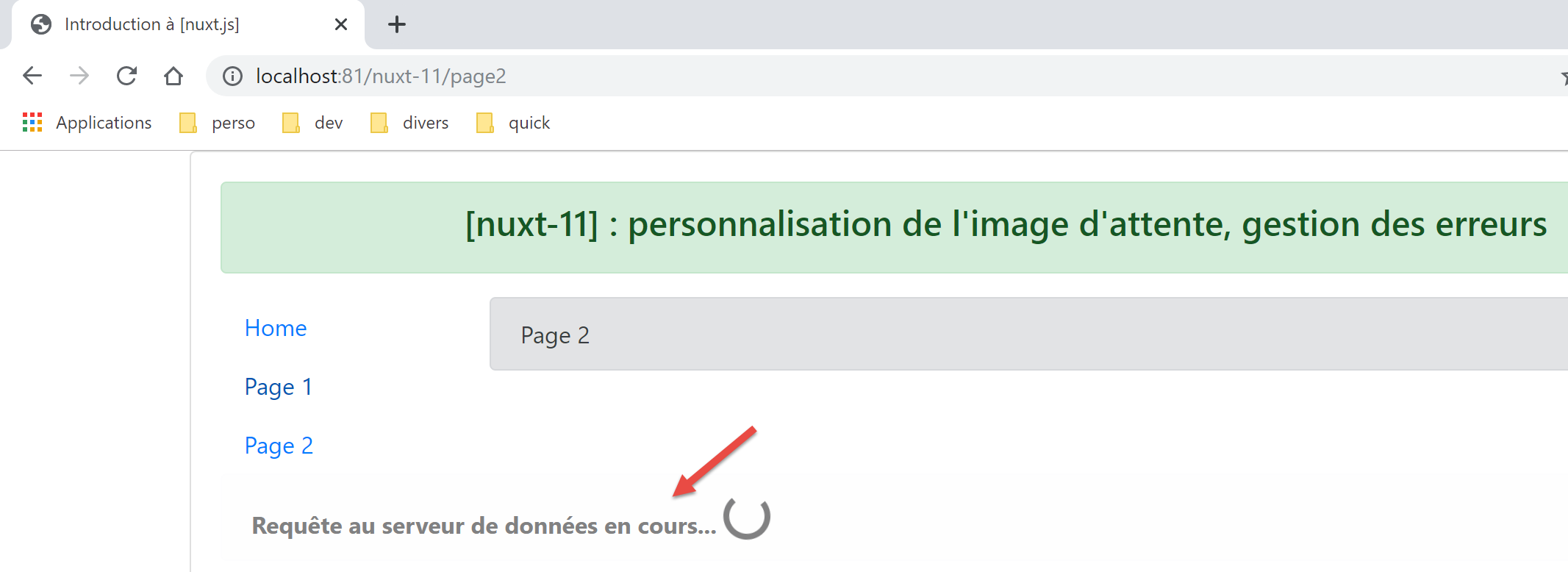
The example [nuxt-11] also shows how to handle loading errors.
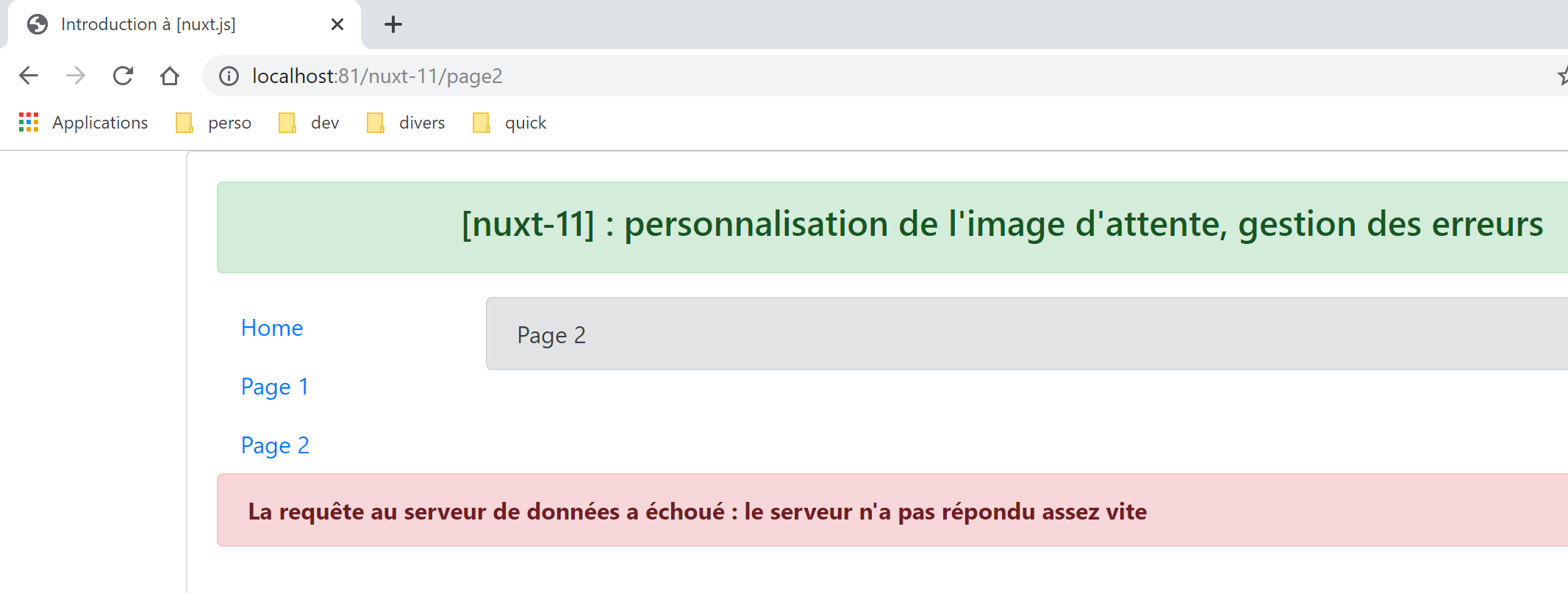
The example [nuxt-11] is initially obtained by copying the example [nuxt-10]:
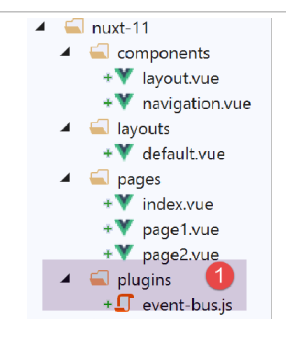
In [1], we will add a client plugin whose role will be to manage events between components.
14.1. The [event-bus] plugin
The [event-bus] plugin will be executed by both the client and the server, but we will see that it does not work on the server side. Its code is as follows:
// create an event bus between views
import Vue from 'vue'
export default (context, inject) => {
  // the event bus
  const eventBus = new Vue()
  // injection of a [eventBus] function into the context
  inject('eventBus', () => eventBus)
}
- line 5: the event bus is an instance of the [Vue] class. This class provides methods for handling events:
- [$emit]: to emit an event;
- [$on]: to listen for a specific event;
This event bus will handle only one event, [loading], which will be used by the pages to start/stop the animation that indicates waiting for the completion of an asynchronous function;
- Line 7: We create a function [$eventBus] (first argument) whose role will be to return the object [eventBus] that we just created (second argument). This function is injected into the context so that it is available in the [context.app] and [this] objects of the pages;
14.2. The layout [default.vue]
The layout [default.vue] evolves as follows:
<template>
  <div class="container">
    <b-card>
      <!-- a message -->
      <b-alert show variant="success" align="center">
        <h4>[nuxt-11] : personnalisation de l'attente, gestion des erreurs</h4>
      </b-alert>
      <!-- the current routing view -->
      <nuxt />
      <!-- loading -->
      <b-alert v-if="showLoading" show variant="light">
        <strong>Requête au serveur de données en cours...</strong>
        <div class="spinner-border ml-auto" role="status" aria-hidden="true"></div>
      </b-alert>
      <!-- loading error -->
      <b-alert v-if="showErrorLoading" show variant="danger">
        <strong>La requête au serveur de données a échoué : {{ errorLoadingMessage }}</strong>
      </b-alert>
    </b-card>
  </div>
</template>

<script>
/* eslint-disable no-console */
export default {
  name: 'App',
  data() {
    return {
      showLoading: false,
      showErrorLoading: false
    }
  },
  // life cycle
  beforeCreate() {
    console.log('[default beforeCreate]')
  },
  created() {
    console.log('[default created]')
    // listen to evt [loading]
    this.$eventBus().$on('loading', this.mShowLoading)
    // and the [errorLoadingMessage] event
    this.$eventBus().$on('errorLoading', this.mShowErrorLoading)
  },
  beforeMount() {
    console.log('[default beforeMount]')
  },
  mounted() {
    console.log('[default mounted]')
  },
  methods: {
    // load management
    mShowLoading(value) {
      console.log('[default mShowLoading], showLoading=', value)
      this.showLoading = value
    },
    // loading error
    mShowErrorLoading(value, errorLoadingMessage) {
      console.log('[default mShowErrorLoading], showErrorLoading=', value, 'errorLoadingMessage=', errorLoadingMessage)
      this.showErrorLoading = value
      this.errorLoadingMessage = errorLoadingMessage
    }
  }
}
</script>
- lines 11–14: the loading animation. It is displayed only if the [showLoading] property is true (line 29);
- lines 16–18: the loading error message. It is displayed only if the property [showErrorLoading] (line 30) is true;
- lines 29-30: upon initial loading of the component, the loading animation is hidden, as is the error message;
- lines 37–43: when created, the page listens for the [loading] event (1st argument) on the event bus created by the plugin. Upon receiving it, it executes the [mShowLoading] method in lines 52–55 (2nd argument);
- lines 52–55: The value received by the [mShowLoading] method will be a Boolean true/false. It is used to show/hide the loading message;
- lines 41–42: When created, the page listens for the [errorLoading] event (first argument) on the event bus created by the plugin. Upon receiving it, it executes the [mShowErrorLoading] method in lines 57–61 (second argument);
- line 57: the [mShowErrorLoading] method receives two arguments:
- the first argument is a Boolean (true/false) to show or hide the error message;
- the second argument is only present if an error occurred. It represents the error message to be displayed;
- The logs on lines 53 and 58 show that the methods [showLoading] and [showErrorLoading] are not executed on the server side;
14.3. The [page1] page
The code for the [page1] page changes as follows:
<!-- view n° 1 -->
<template>
  <Layout :left="true" :right="true">
    <!-- navigation -->
    <Navigation slot="left" />
    <!-- message-->
    <b-alert slot="right" show variant="primary"> Page 1 -- result={{ result }} </b-alert>
  </Layout>
</template>

<script>
/* eslint-disable no-console */
/* eslint-disable nuxt/no-timing-in-fetch-data */

import Navigation from '@/components/navigation'
import Layout from '@/components/layout'

export default {
  name: 'Page1',
  // components used
  components: {
    Layout,
    Navigation
  },
  // asynchronous data
  asyncData(context) {
    // log
    console.log('[page1 asyncData started]')
    // start waiting
    context.app.$eventBus().$emit('loading', true)
    // no error
    context.app.$eventBus().$emit('errorLoading', false)
    // we make a promise
    return new Promise(function(resolve, reject) {
      // we simulate an asynchronous function
      setTimeout(function() {
        // end waiting
        context.app.$eventBus().$emit('loading', false)
        // log
        console.log('[page1 asyncData finished]')
        // we make the result asynchronous - a random number here
        resolve({ result: Math.floor(Math.random() * Math.floor(100)) })
      }, 5000)
    })
  },

  // life cycle
  beforeCreate() {
    console.log('[page1 beforeCreate]')
  },
  created() {
    console.log('[page1 created]')
  },
  beforeMount() {
    console.log('[page1 beforeMount]')
  },
  mounted() {
    console.log('[page1 mounted]')
  }
}
</script>
- The changes occur in the [asyncData] function on lines 26–47;
- lines 29–30: Before the asynchronous function begins, the [loading] event is sent to the other pages in the application. Note that in [asyncData], we do not yet have access to the [this] object, which has not yet been created. We therefore use the context passed as an argument to the [asyncData] function (line 26);
- line 30: the event bus is used to indicate that loading is about to begin;
- line 38: the event bus is used to indicate that loading is complete;
Note: At runtime, when the [page1] page is requested from the server, the loading image is not displayed. The logs show that on the server side, the [default.mShowLoading] method is not called. In any case, seeing the loading image makes no sense when the page is requested from the server. The server only sends the page to the client browser once the [asyncData] function has finished. The loading image is therefore unnecessary. This will be the case for all pages in the application requested directly from the server.
14.4. The [index] page
The code for the [index] page is as follows:
<!-- main page -->
<template>
  <Layout :left="true" :right="true">
    <!-- navigation -->
    <Navigation slot="left" />
    <!-- message-->
    <b-alert slot="right" show variant="warning">
      Home
    </b-alert>
  </Layout>
</template>

<script>
/* eslint-disable no-undef */
/* eslint-disable no-console */
/* eslint-disable nuxt/no-env-in-hooks */
/* eslint-disable nuxt/no-timing-in-fetch-data */

import Navigation from '@/components/navigation'
import Layout from '@/components/layout'

export default {
  name: 'Home',
  // components used
  components: {
    Layout,
    Navigation
  },
  // asynchronous data
  asyncData(context) {
    // log
    console.log('[page1 asyncData started]')
    // start waiting
    context.app.$eventBus().$emit('loading', true)
    // no error
    context.app.$eventBus().$emit('errorLoading', false)
    // we make a promise
    return new Promise(function(resolve, reject) {
      // we simulate an asynchronous function
      setTimeout(function() {
        // end waiting
        context.app.$eventBus().$emit('loading', false)
        // log
        console.log('[page1 asyncData finished]')
        // we return an error
        reject(new Error("le serveur n'a pas répondu assez vite"))
      }, 5000)
    }).catch((e) => context.error({ statusCode: 500, message: e.message }))
  },
  // life cycle
  beforeCreate() {
    console.log('[home beforeCreate]')
  },
  created() {
    console.log('[home created]')
  },
  beforeMount() {
    console.log('[home beforeMount]')
  },
  mounted() {
    console.log('[home mounted]')
    // no error
    this.$eventBus().$emit('errorLoading', false)
  }
}
</script>
- Lines 30–49: The function [asyncData] is identical to that of the page [page1] with one exception: in line 46, the asynchronous function is terminated on failure (using the method [reject]);
- line 46: the parameter of the [reject] function is an instance of the [Error] class. The parameter of the [Error] constructor is the error message;
- line 48: this error is intercepted by the [catch] method of [Promise], which receives the error as a parameter. The [context.error] function is then used to report the error. The parameter of the [context.error] function is an object with two properties here:
- [statusCode]: an error code;
- [message]: an error message;
Whether [asyncData] is executed by the client or the server, in the event of an error [context.error], [nuxt] displays the page [layouts / error.vue]:
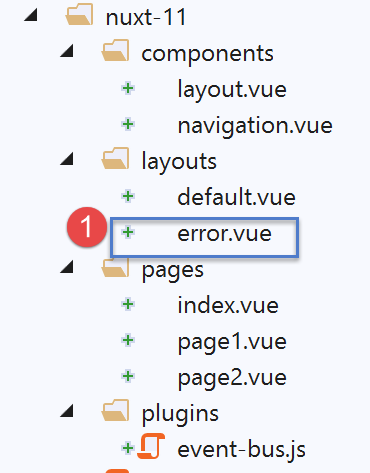
Although it is a page, the [error.vue] page is looked for in the [layouts] folder (perhaps to prevent it from being included in the application routes?). Here, the [error.vue] page is as follows:
<!-- definition HTML of the view -->
<template>
  <!-- layout -->
  <Layout :left="true" :right="true">
    <!-- alert in the right-hand column -->
    <template slot="right">
      <!-- message on yellow background -->
      <b-alert show variant="danger" align="center">
        <h4>L'erreur suivante s'est produite : {{ JSON.stringify(error) }}</h4>
      </b-alert>
    </template>
    <!-- navigation menu in the left-hand column -->
    <Navigation slot="left" />
  </Layout>
</template>

<script>
/* eslint-disable no-undef */
/* eslint-disable no-console */
/* eslint-disable nuxt/no-env-in-hooks */

import Layout from '@/components/layout'
import Navigation from '@/components/navigation'

export default {
  name: 'Error',
  // components used
  components: {
    Layout,
    Navigation
  },
  // property [props]
  props: { error: { type: Object, default: () => 'waiting ...' } },
  // life cycle
  beforeCreate() {
    // client and server
    console.log('[error beforeCreate]')
  },
  created() {
    // client and server
    console.log('[error created, error=]', this.error)
  },
  beforeMount() {
    // customer only
    console.log('[error beforeMount]')
  },
  mounted() {
    // customer only
    console.log('[error mounted]')
  }
}
</script>
When [nuxt] displays the page [error.vue], it passes the error that occurred (line 33) to it as the property [props]. If the error was caused by [context.error(objet1)], the [props] property of the [error.vue] page will have the value [objet1]. The [nuxt] documentation states that [objet1] must have at least the attributes of [statusCode, message]. Line 9 displays the string jSON from the received object [objet1].
14.5. The [page2] page
The page [page2] shows another way to handle the error:
- in [page1], the error is displayed on a separate page, [error.vue];
- in [page2], the error will be displayed on the page [page2] that caused the error;
The code for [page2] is as follows:
<!-- view n° 2 -->
<template>
  <Layout :left="true" :right="true">
    <!-- navigation -->
    <Navigation slot="left" />
    <!-- message -->
    <b-alert slot="right" show variant="secondary">
      Page 2
    </b-alert>
  </Layout>
</template>

<script>
/* eslint-disable no-console */
/* eslint-disable nuxt/no-timing-in-fetch-data */

import Navigation from '@/components/navigation'
import Layout from '@/components/layout'

export default {
  name: 'Page2',
  // components used
  components: {
    Layout,
    Navigation
  },
  // asynchronous data
  asyncData(context) {
    // log
    console.log('[page2 asyncData started]')
    // start waiting
    context.app.$eventBus().$emit('loading', true)
    // no error
    context.app.$eventBus().$emit('errorLoading', false)
    // we make a promise
    return new Promise(function(resolve, reject) {
      // we simulate an asynchronous function
      setTimeout(function() {
        // end waiting
        context.app.$eventBus().$emit('loading', false)
        // arbitrarily generate an error
        const errorLoadingMessage = "le serveur n'a pas répondu assez vite"
        // successful completion
        resolve({ showErrorLoading: true, errorLoadingMessage })
        // log
        console.log('[page2 asyncData finished]')
      }, 5000)
    })
  },
  // life cycle
  beforeCreate() {
    console.log('[page2 beforeCreate]')
  },
  created() {
    console.log('[page2 created]')
  },
  beforeMount() {
    console.log('[page2 beforeMount]')
  },
  mounted() {
    console.log('[page2 mounted]')
    // customer
    if (this.showErrorLoading) {
      console.log('[page2 mounted, showErrorLoading=true]')
      this.$eventBus().$emit('errorLoading', true, this.errorLoadingMessage)
    }
  }
}
</script>
Once again, we insert a [asyncData] function into the page code, and like [index], [page2] will generate an error that we will handle differently this time.
- Line 44: Both the server and the client resolve the promise successfully by returning the result [{ showErrorLoading: true, errorLoadingMessage }]. We know that this will result in the properties [showerrorLoading, errorLoadingMessage] being included in the page’s properties [data] and that the client will receive these properties;
- lines 60–67: we know that the [mounted] function is executed only by the client;
- line 63: the client checks whether the [showErrorLoading] property has been set (by the server or the client, as applicable). If so, it triggers the [‘errorLoading’] event (line 65) so that the [default] page displays the [this.errorLoadingMessage] error message. Ultimately, the server sends a page without an error message displayed. The error message is displayed at the last moment by the client when the page is "loaded";
14.6. Execution
14.6.1. [nuxt.config]
The [nuxt.config.js] execution file is as follows:
export default {
  mode: 'universal',
  /*
   ** Headers of the page
   */
  head: {
    title: 'Introduction à [nuxt.js]',
    meta: [
      { charset: 'utf-8' },
      { name: 'viewport', content: 'width=device-width, initial-scale=1' },
      {
        hid: 'description',
        name: 'description',
        content: 'ssr routing loading asyncdata middleware plugins store'
      }
    ],
    link: [{ rel: 'icon', type: 'image/x-icon', href: '/favicon.ico' }]
  },
  /*
   ** Customize the progress-bar color
   */
  loading: false,

  /*
   ** Global CSS
   */
  css: [],
  /*
   ** Plugins to load before mounting the App
   */
  plugins: [{ src: '@/plugins/event-bus' }],
  /*
   ** Nuxt.js dev-modules
   */
  buildModules: [
    // Doc: https://github.com/nuxt-community/eslint-module
    '@nuxtjs/eslint-module'
  ],
  /*
   ** Nuxt.js modules
   */
  modules: [
    // Doc: https://bootstrap-vue.js.org
    'bootstrap-vue/nuxt',
    // Doc: https://axios.nuxtjs.org/usage
    '@nuxtjs/axios'
  ],
  /*
   ** Axios module configuration
   ** See https://axios.nuxtjs.org/options
   */
  axios: {},
  /*
   ** Build configuration
   */
  build: {
    /*
     ** You can extend webpack config here
     */
    extend(config, ctx) {}
  },
  // source code directory
  srcDir: 'nuxt-11',
  // router
  router: {
    // application URL root
    base: '/nuxt-11/'
  },
  // server
  server: {
    // service port, default 3000
    port: 81,
    // network addresses listened to, default localhost: 127.0.0.1
    // 0.0.0.0 = all the machine's network addresses
    host: 'localhost'
  }
}
- line 22: set the [loading] property to [false] so that [nuxt] does not use its default idle image;
- line 31: the plugin that defines the event bus;
14.6.2. The [index] page executed by the server
Let’s request the page [index] from the server (we manually enter URL [http://localhost:81/nuxt-11/]). The page displayed by the client browser is as follows:
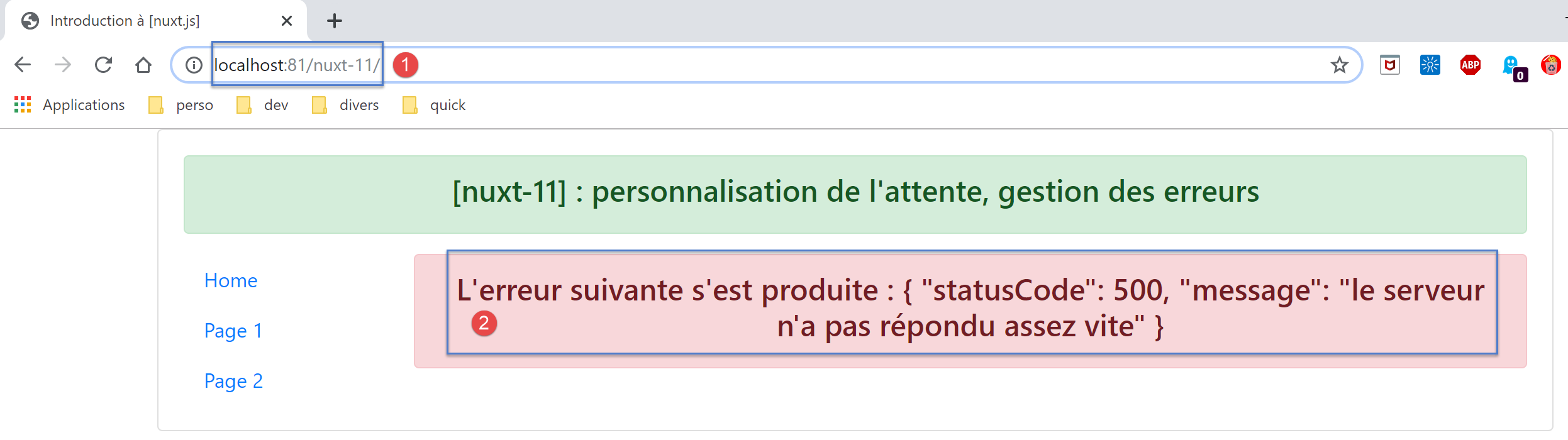
The logs are as follows:
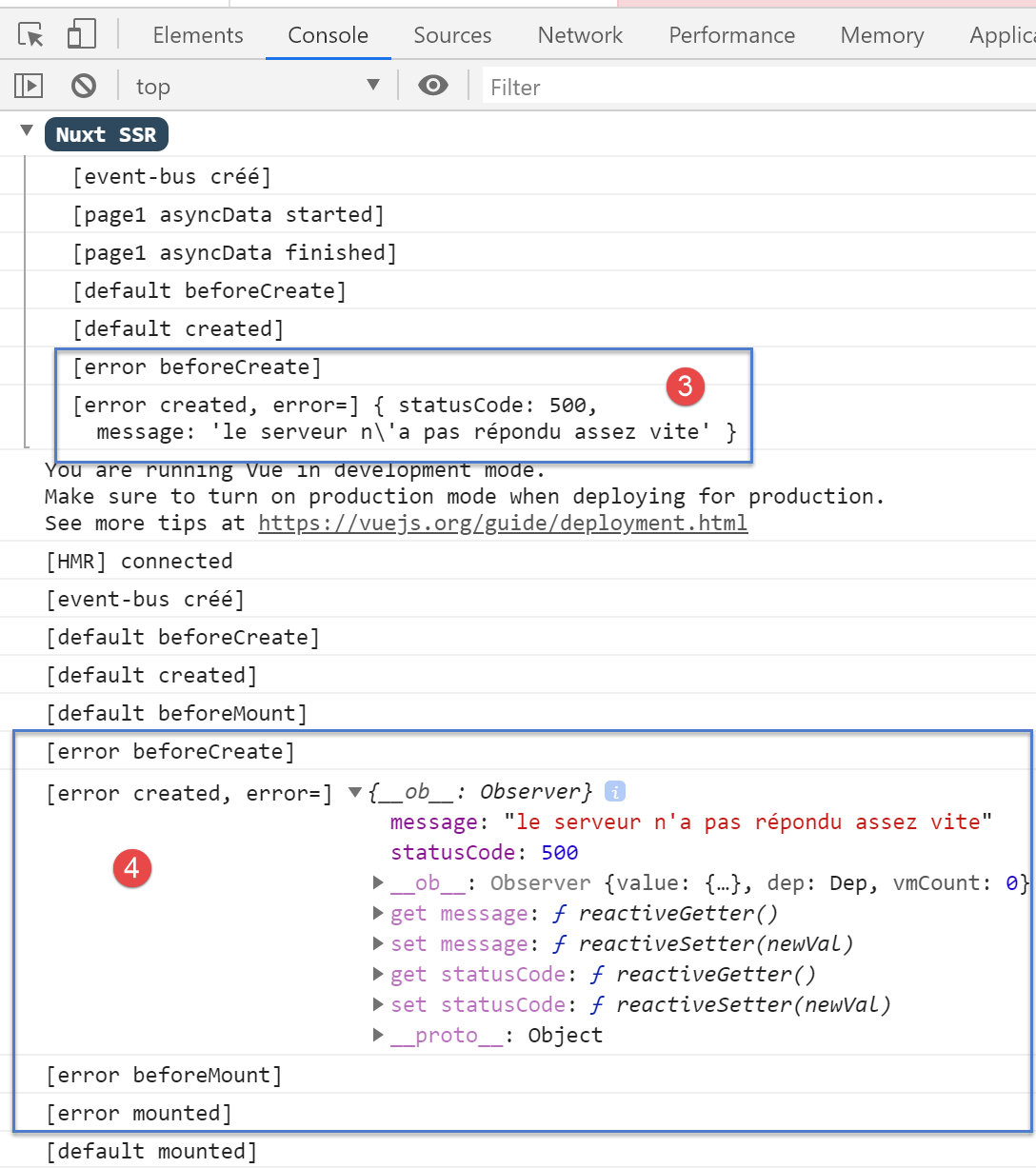
- In [3], we see that the server sends the page [error.vue];
- in [4], we see that the client also displays the page [error] with the same error as the server;
- we can see that the [mShowLoading] method of the [default] page was not called on the server side, even though the [index] page had triggered a wait. This method is called upon receipt of an event, and clearly event handling is not implemented on the server side;
Let’s examine the source code of the page received by the client browser:
<!doctype html>
<html data-n-head-ssr>
<head>
<title>Introduction à [nuxt.js]</title>
<meta data-n-head="ssr" charset="utf-8">
<meta data-n-head="ssr" name="viewport" content="width=device-width, initial-scale=1">
<meta data-n-head="ssr" data-hid="description" name="description" content="ssr routing loading asyncdata middleware plugins store">
<link data-n-head="ssr" rel="icon" type="image/x-icon" href="/favicon.ico">
<base href="/nuxt-11/">
<link rel="preload" href="/nuxt-11/_nuxt/runtime.js" as="script">
<link rel="preload" href="/nuxt-11/_nuxt/commons.app.js" as="script">
<link rel="preload" href="/nuxt-11/_nuxt/vendors.app.js" as="script">
<link rel="preload" href="/nuxt-11/_nuxt/app.js" as="script">
...
</head>
<body>
<div data-server-rendered="true" id="__nuxt">
<div id="__layout">
<div class="container">
<div class="card">
<div class="card-body">
<div role="alert" aria-live="polite" aria-atomic="true" align="center" class="alert alert-success">
<h4>[nuxt-11] : personnalisation de l'attente, gestion des erreurs</h4>
</div>
<div>
<div class="row">
<div class="col-2">
<ul class="nav flex-column">
<li class="nav-item">
<a href="/nuxt-11/" target="_self" class="nav-link active nuxt-link-active">
Home
</a>
</li>
<li class="nav-item">
<a href="/nuxt-11/page1" target="_self" class="nav-link">
Page 1
</a>
</li>
<li class="nav-item">
<a href="/nuxt-11/page2" target="_self" class="nav-link">
Page 2
</a>
</li>
</ul>
</div> <div class="col-10"><div role="alert" aria-live="polite" aria-atomic="true" align="center" class="alert alert-danger">
<h4>L'erreur suivante s'est produite : {"statusCode":500,"message":"le serveur n'a pas répondu assez vite"}</h4>
</div>
</div>
</div>
</div>
</div>
</div>
</div>
</div>
</div>
<script>window.__NUXT__ = (function (a, b, c, d) {
d.statusCode = 500; d.message = "le serveur n'a pas répondu assez vite";
return {
layout: "default", data: [d], error: d, serverRendered: true,
logs: [
{ date: new Date(1575047424168), args: ["[event-bus créé]"], type: a, level: b, tag: c },
{ date: new Date(1575047424175), args: ["[page1 asyncData started]"], type: a, level: b, tag: c },
{ date: new Date(1575047429455), args: ["[page1 asyncData finished]"], type: a, level: b, tag: c },
{ date: new Date(1575047429515), args: ["[default beforeCreate]"], type: a, level: b, tag: c },
{ date: new Date(1575047429675), args: ["[default created]"], type: a, level: b, tag: c },
{ date: new Date(1575047430157), args: ["[error beforeCreate]"], type: a, level: b, tag: c },
{ date: new Date(1575047430246), args: ["[error created, error=]", "{ statusCode: 500,\n message: 'le serveur n\\'a pas répondu assez vite' }"], type: a, level: b, tag: c }]
}
}("log", 2, "", {}));</script>
<script src="/nuxt-11/_nuxt/runtime.js" defer></script>
<script src="/nuxt-11/_nuxt/commons.app.js" defer></script>
<script src="/nuxt-11/_nuxt/vendors.app.js" defer></script>
<script src="/nuxt-11/_nuxt/app.js" defer></script>
</body>
</html>
- line 57: we see that the server sent an object [d] representing the error that occurred on the server side;
- line 59: we see a property [error] with a value of the object [d]. We can assume that it is the presence of the [error] property in the page sent by the server that causes the client-side scripts to display the [error.vue] page with the [error] error;
14.6.3. The [page1] page executed by the server
We manually enter URL [http://localhost:81/nuxt-11/page1]. After 5 seconds, the browser displays the following page:
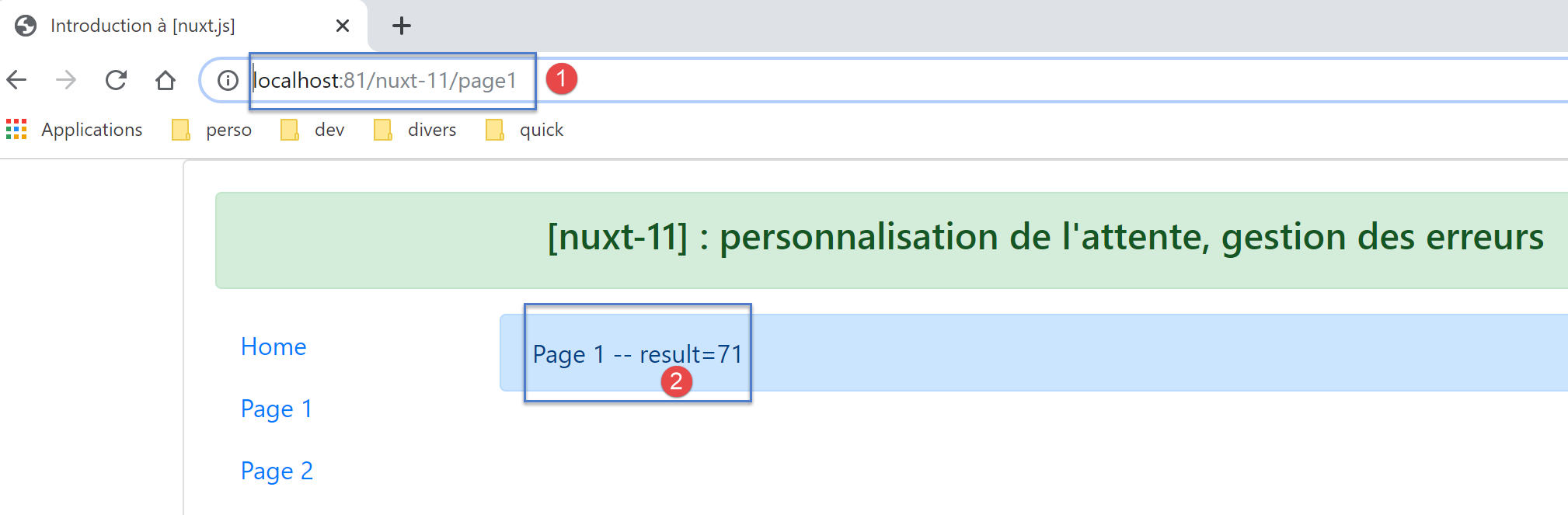
The displayed logs are as follows:
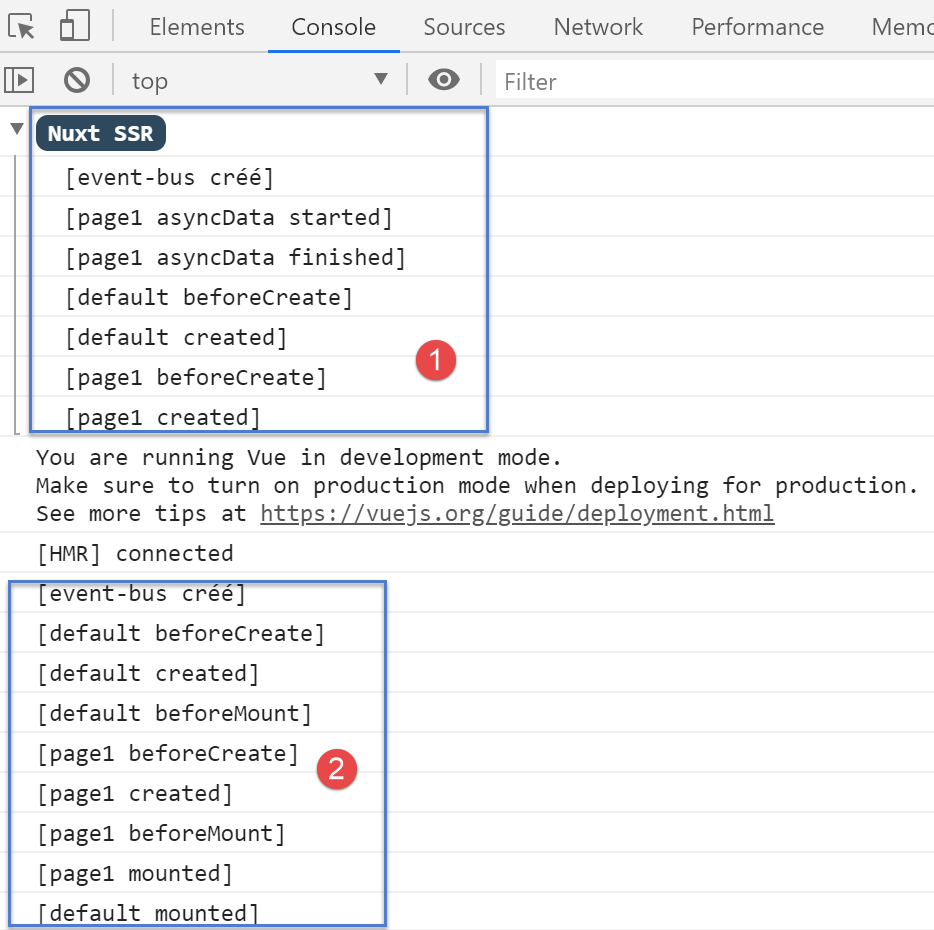
- in [1], the server logs. Note that the [mShowLoading] method of the [default] page was not called;
- in [2], the client logs;
14.6.4. The [page2] page executed by the server
We manually enter URL [http://localhost:81/nuxt-11/page2]. After 5 seconds, the browser displays the following page:
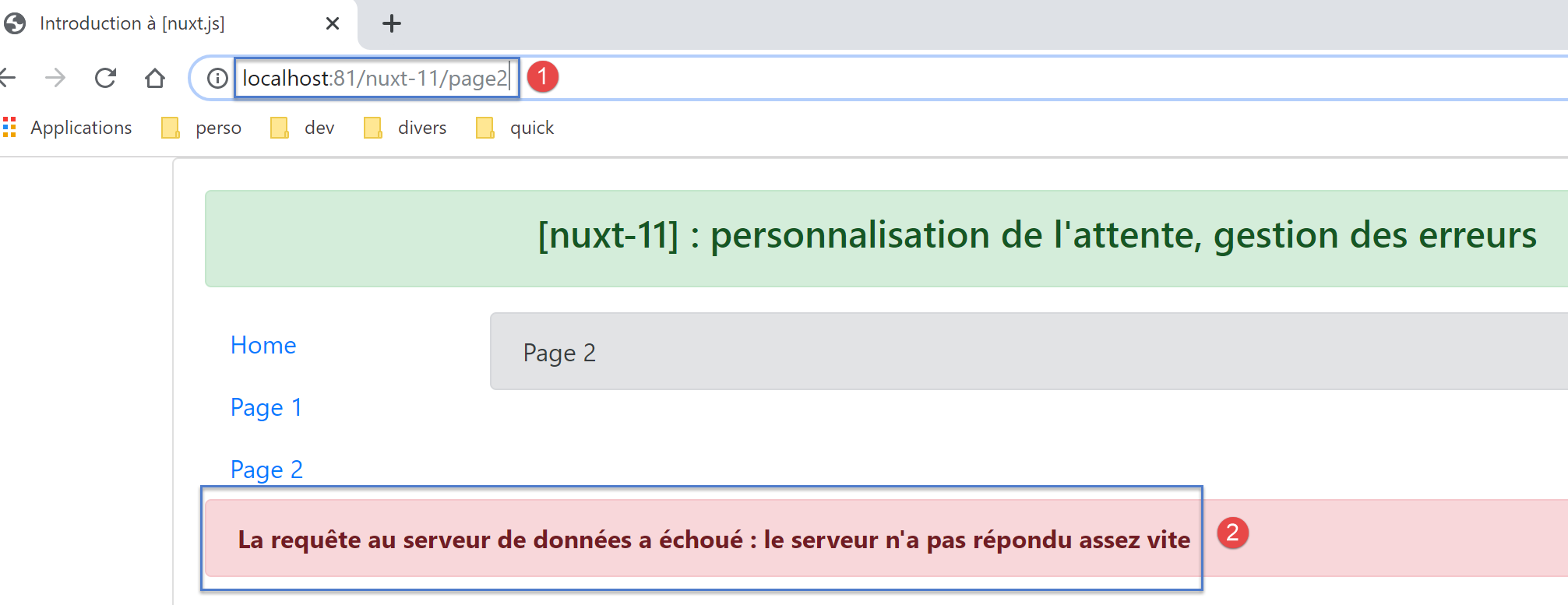
Let’s examine the logs displayed in the browser:
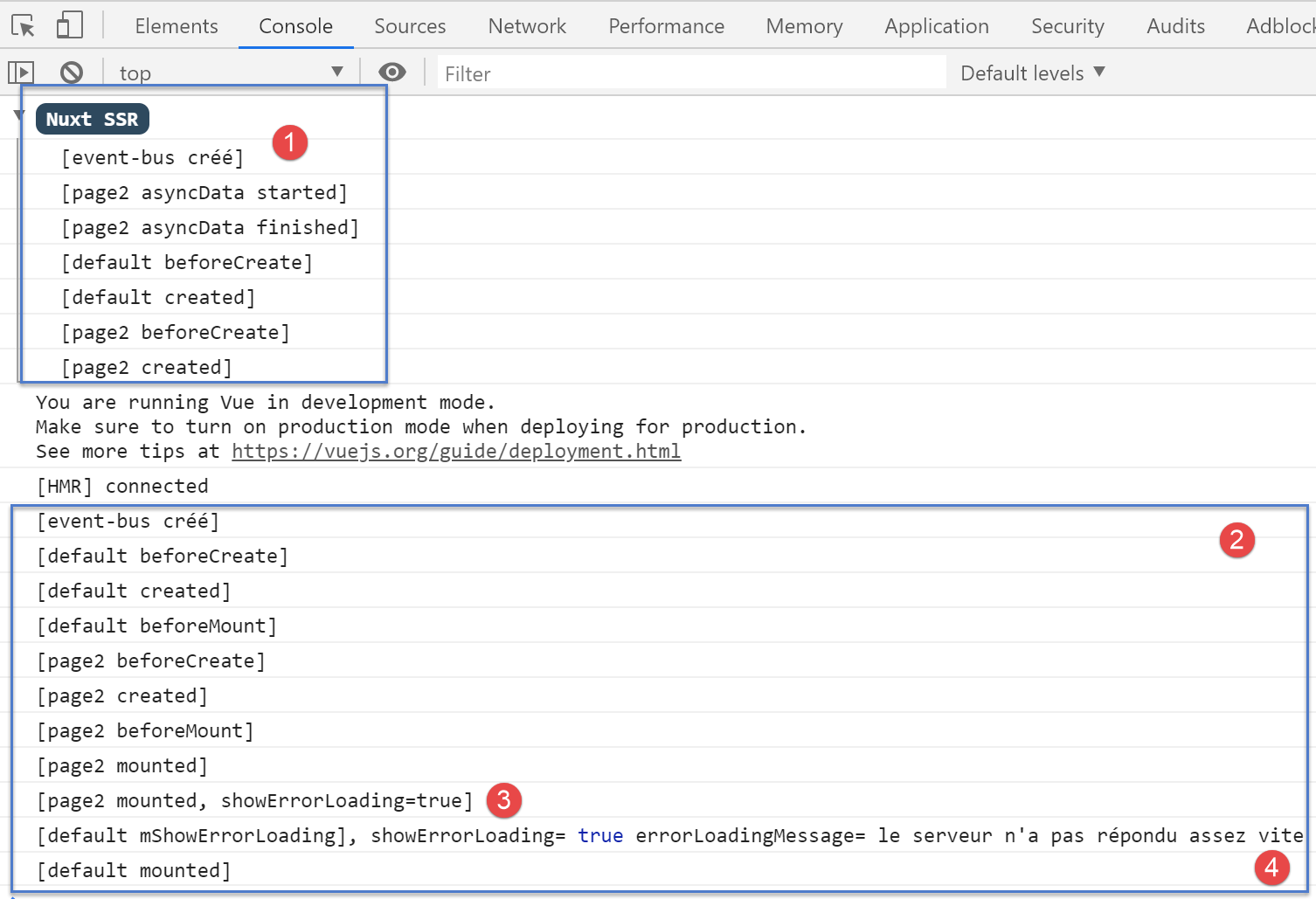
- in [1], the server logs. Recall that the server included the [showErrorLoading, errorLoadingMessage] properties in the page sent to the client browser. We know that these properties will then be incorporated into the [data] of the page displayed by the client
- In [3], when the [page2] page is loaded, it finds the [showErrorLoading] property set to true. It then sends an event to the [default] page, so that it displays the error message sent by the [4] server;
14.6.5. The [index] page executed by the client
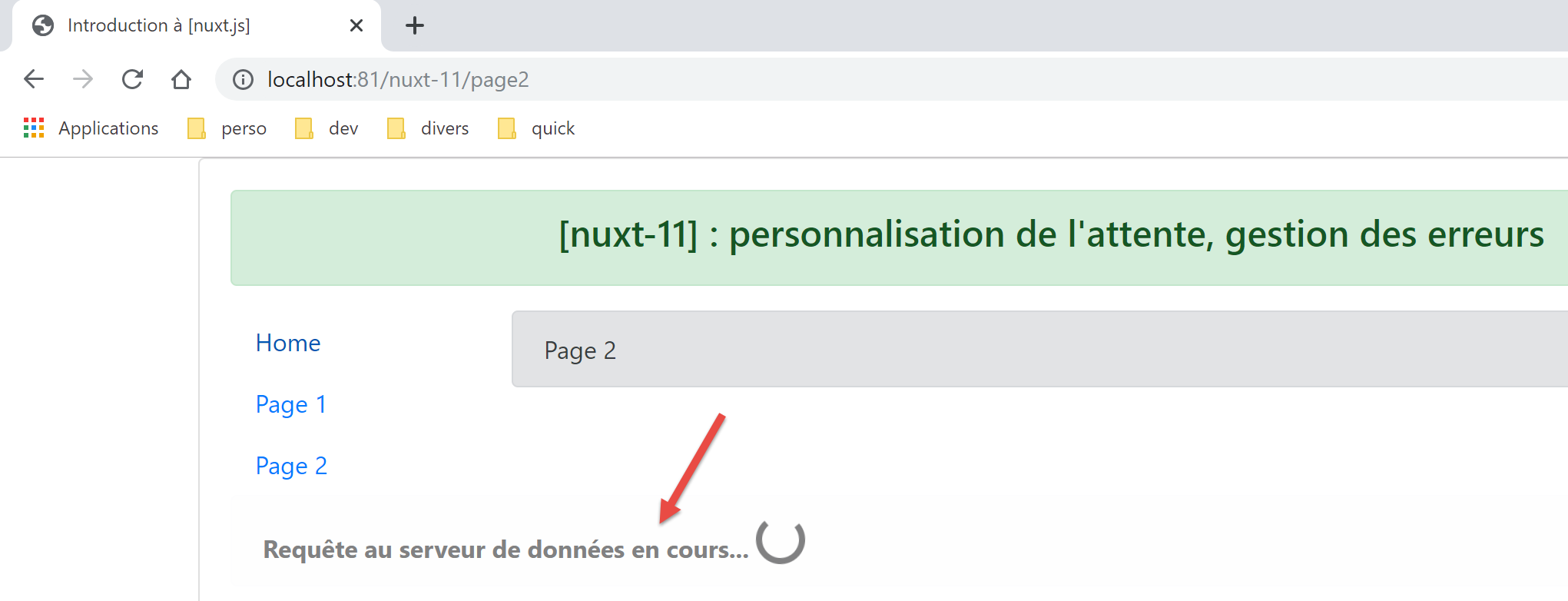
We now use the links from navigation to display the three pages. All pages displayed by the client are identical to those displayed by the server. The only difference is that the 5-second wait image is displayed each time.
We start with the [index] page. The loading image is then displayed:
then after 5 seconds, the following page appears:
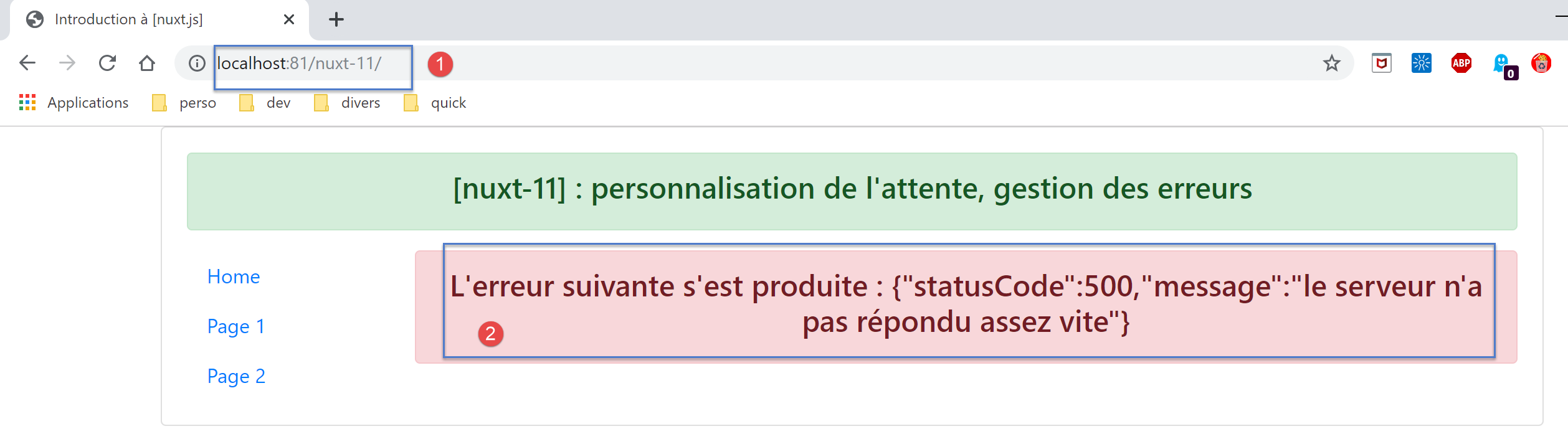
The final page is therefore identical to the one obtained on the server side.
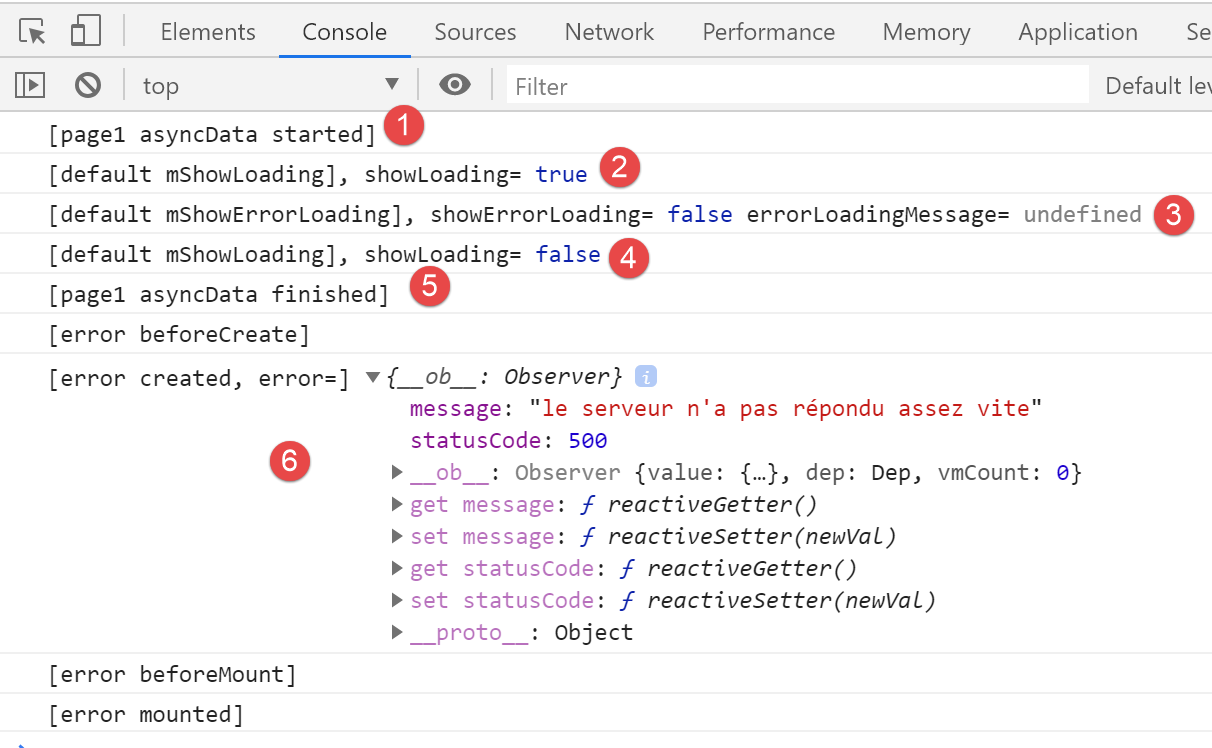
Recall the [asyncData] function from the [index] page:
asyncData(context) {
    // log
    console.log('[page1 asyncData started]')
    // start waiting
    context.app.$eventBus().$emit('loading', true)
    // no error
    context.app.$eventBus().$emit('errorLoading', false)
    // we make a promise
    return new Promise(function(resolve, reject) {
      // we simulate an asynchronous function
      setTimeout(function() {
        // end waiting
        context.app.$eventBus().$emit('loading', false)
        // log
        console.log('[page1 asyncData finished]')
        // we return an error
        reject(new Error("le serveur n'a pas répondu assez vite"))
      }, 5000)
    }).catch((e) => context.error({ statusCode: 500, message: e.message }))
}
The client logs are as follows:
- in [1], the [asyncData] function starts;
- in [2], the loading image is displayed;
- in [2-3], we see that page [default] received events [loading, true], [2], and [errorLoading, false] sent by function [asyncData] from page [index] (lines 5 and 7);
- in [4], end of wait. Page [default] received event [loading, false] sent by page [index] (line 13);
- in [5], the function [asyncData] has finished its work;
- because the function [asyncData] generated an error with [context.error] (line 19), the page [error] is displayed as [6];
14.6.6. The [page1] page executed by the client
After a 5-second wait, the client displays the following page:
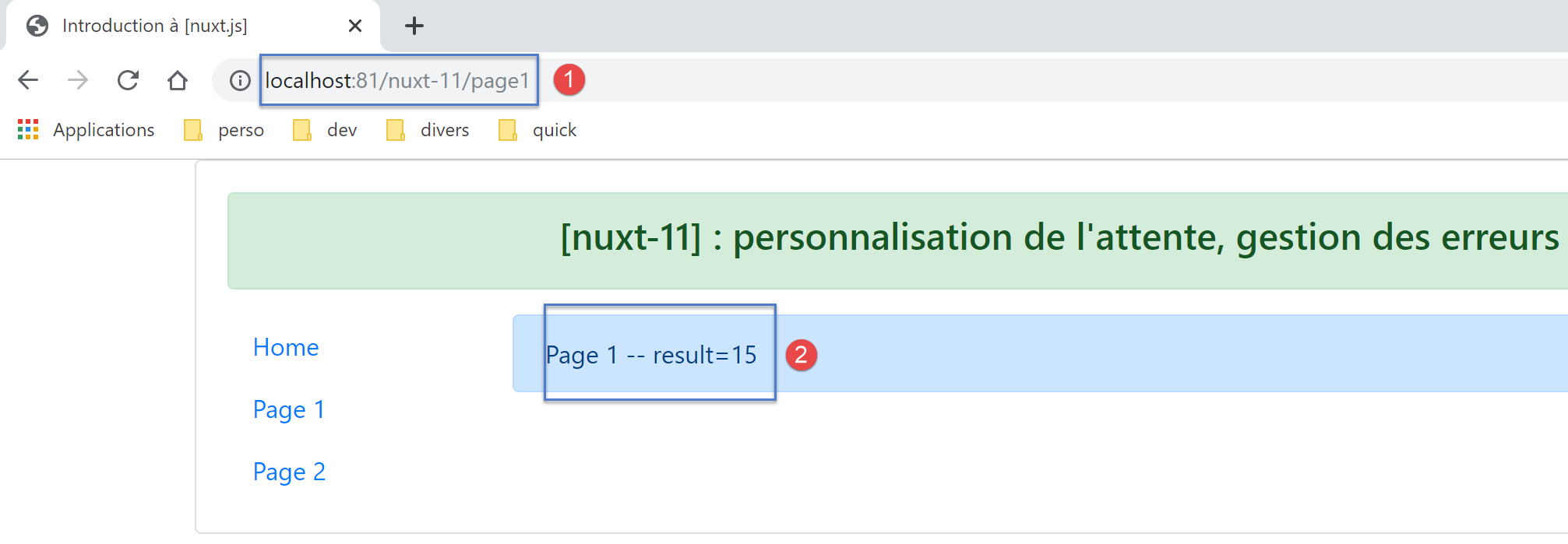
Let’s review the code for the [asyncData] function from [page1]:
asyncData(context) {
    // log
    console.log('[page1 asyncData started]')
    // start waiting
    context.app.$eventBus().$emit('loading', true)
    // no error
    context.app.$eventBus().$emit('errorLoading', false)
    // we make a promise
    return new Promise(function(resolve, reject) {
      // we simulate an asynchronous function
      setTimeout(function() {
        // end waiting
        context.app.$eventBus().$emit('loading', false)
        // log
        console.log('[page1 asyncData finished]')
        // we make the result asynchronous - a random number here
        resolve({ result: Math.floor(Math.random() * Math.floor(100)) })
      }, 5000)
    })
},
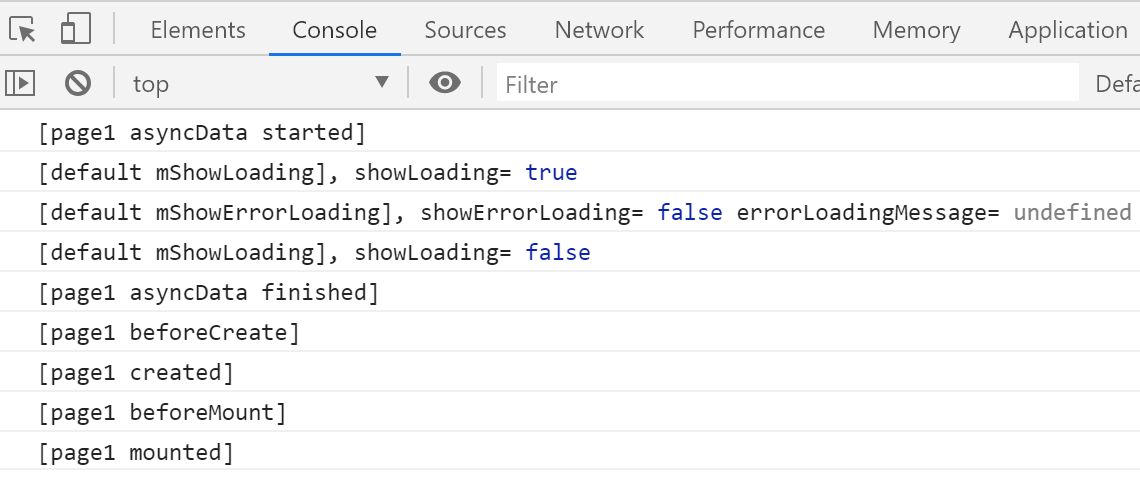
The logs are as follows:
14.6.7. The [page2] page executed by the client
After a 5-second wait, the client displays the following page:
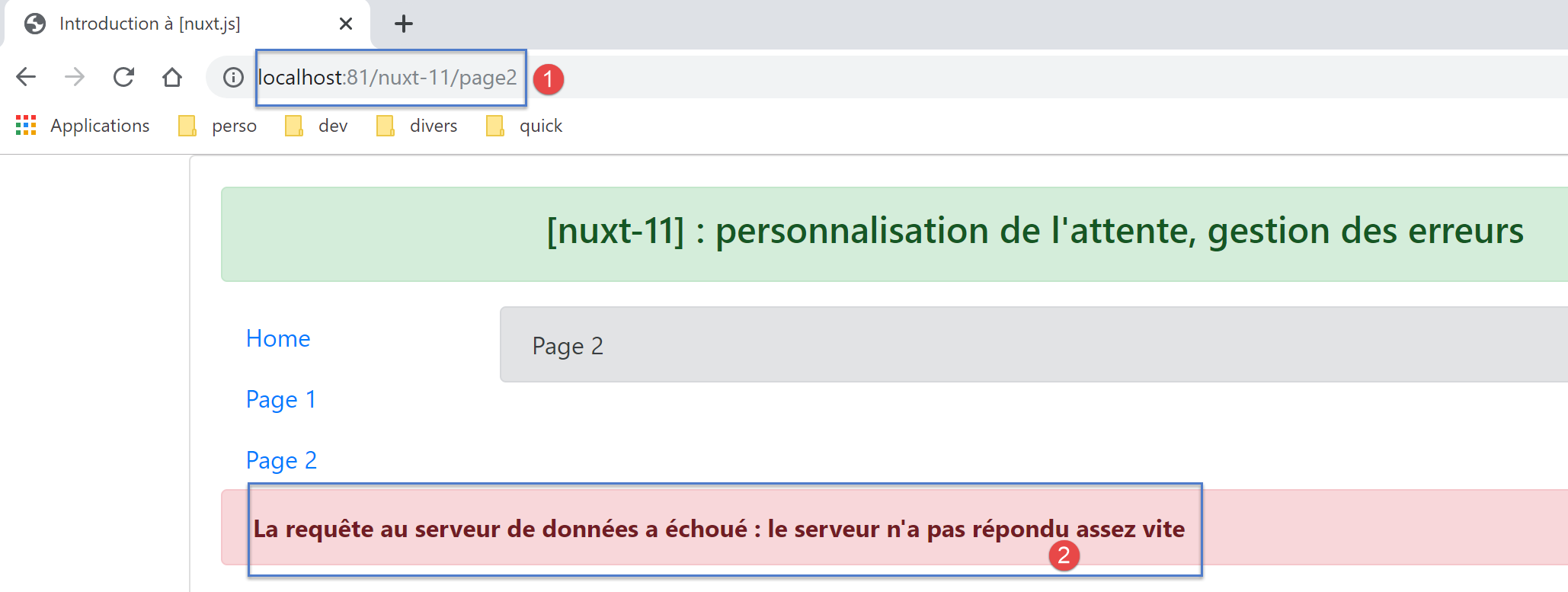
Let’s review the code for the [asyncData] and [mounted] functions in [page2]:
asyncData(context) {
    // log
    console.log('[page2 asyncData started]')
    // start waiting
    context.app.$eventBus().$emit('loading', true)
    // no error
    context.app.$eventBus().$emit('errorLoading', false)
    // we make a promise
    return new Promise(function(resolve, reject) {
      // we simulate an asynchronous function
      setTimeout(function() {
        // end waiting
        context.app.$eventBus().$emit('loading', false)
        // arbitrarily generate an error
        const errorLoadingMessage = "le serveur n'a pas répondu assez vite"
        // successful completion
        resolve({ showErrorLoading: true, errorLoadingMessage })
        // log
        console.log('[page2 asyncData finished]')
      }, 5000)
    })
  }

mounted() {
    console.log('[page2 mounted]')
    // customer
    if (this.showErrorLoading) {
      console.log('[page2 mounted, showErrorLoading=true]')
      this.$eventBus().$emit('errorLoading', true, this.errorLoadingMessage)
    }
}
The logs are as follows:
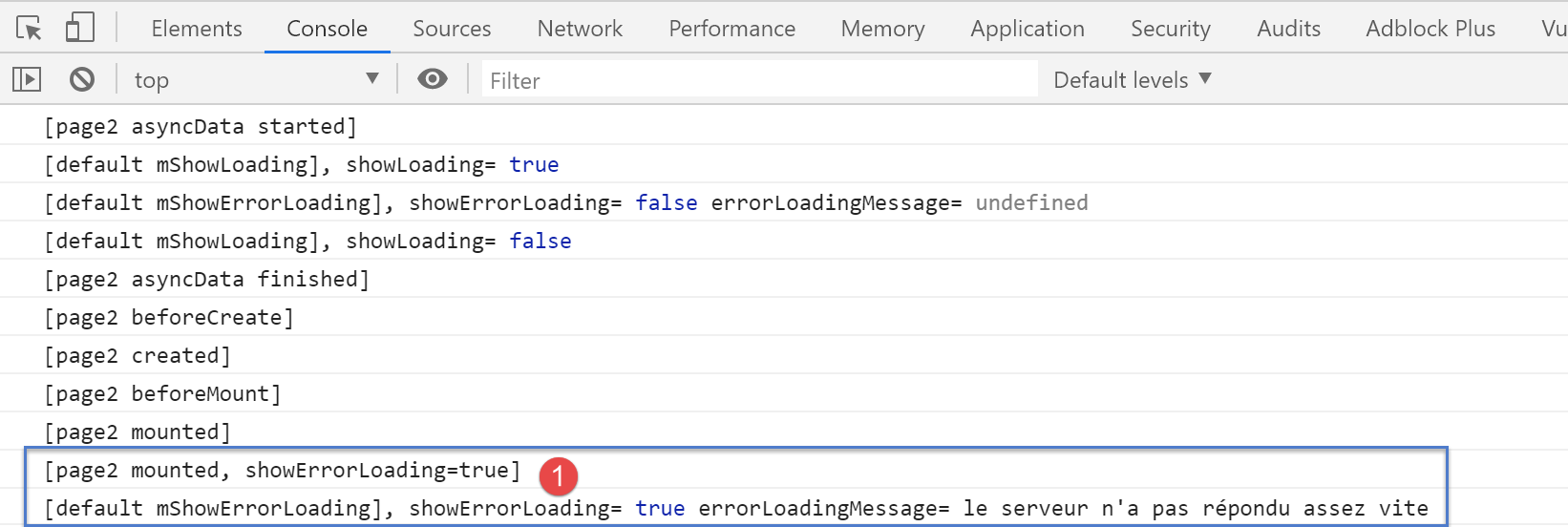
- In [1], the page [default] received the event [showErrorLoading, true] sent by [page2] (line 29), which instructs it to display the error message;