1. Introduction
The PDF of the document can be found HERE.
The document's codes can be found HERE.
Here, we aim to introduce the key concepts of Struts 2 using examples. Struts 2 is a web framework that provides:
- a number of libraries in the form of JAR files
- a development framework: Struts 2 influences how a web application is developed.
The prerequisites for understanding the examples are as follows:
- basic knowledge of the Java language
- basic knowledge of web development, particularly the Html language.
All the resources needed to meet these prerequisites can be found on the [http://developpez.com] website. I have written a few of them, which can be found on the [http://tahe.developpez.com] website.
The examples in this document are available at Url and [http://tahe.developpez.com/java/struts2].
To learn more about Struts 2, you can use the following references:
- [ref1]: the Struts 2 documentation, available on the Struts website
- [ref2]: the book "Struts 2 in Action" written by Donald Brown, Chad Michael Davis, and Scott Stanlick, published by Manning. This book is particularly instructive.
We will occasionally refer to [ref2] to let the reader know that they can explore a topic in greater depth using this book.
This document has been written so that it can be read without a computer at hand. Therefore, we include many screenshots.
1.1. The Role of Struts 2 in a Web Application
First, let’s situate Struts 2 within the development of a web application. Most often, it will be built on a multi-layer architecture such as the following:
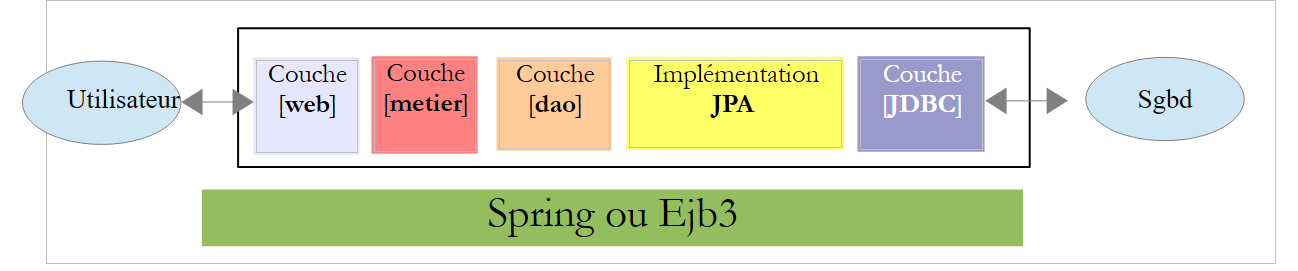 |
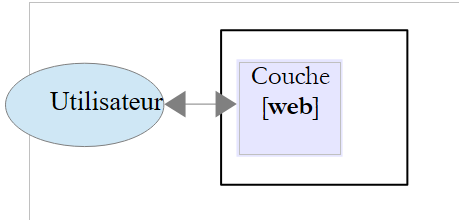
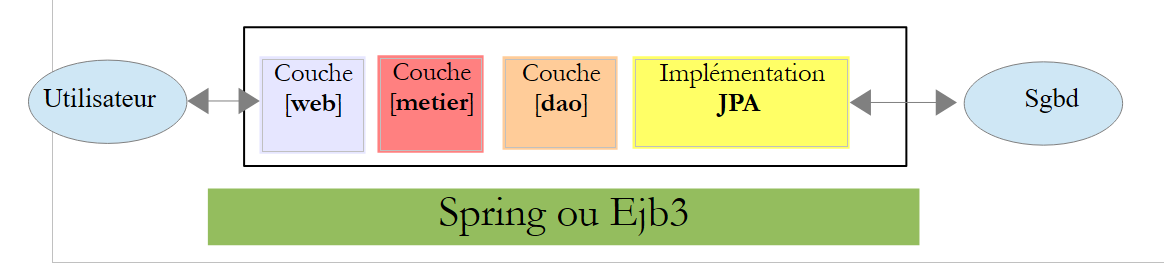
- The [web] layer is the layer that interacts with the web application user. The user interacts with the web application through web pages displayed by a browser. It is in this layer that Struts 2 resides, and only in this layer.
- The [metier] layer implements the application’s business logic, such as calculating a salary or an invoice. This layer uses data from the user via the [web] layer and from the DBMS via the [dao] layer.
- The [dao] layer (Data Access Objects), the [jpa] layer (Java Persistence Api), and the JDBC driver manage access to DBMS data. The [jpa] layer serves as an ORM (Object-Relational Mapper). It acts as a bridge between the objects handled by the [dao] layer and the rows and columns of data in a relational database.
- The integration of the layers can be performed by a Spring container or an EJB3 (Enterprise Java Bean) container.
Most of the examples provided below will use only a single layer, the [web] layer:
 |
However, this document will conclude with the construction of a multi-layer web application:
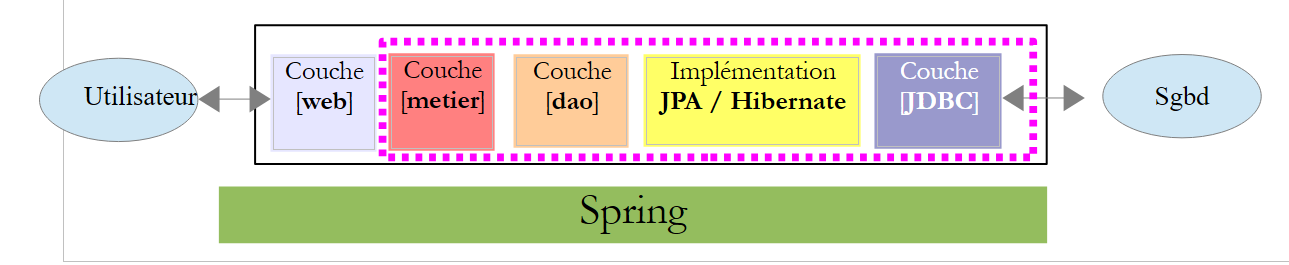 |
The set of layers [metier], [dao], and [jpa/hibernate] will be provided to us in the form of a jar archive so that, once again, we only have the [web] layer to build.
1.2. The Struts 2 development model
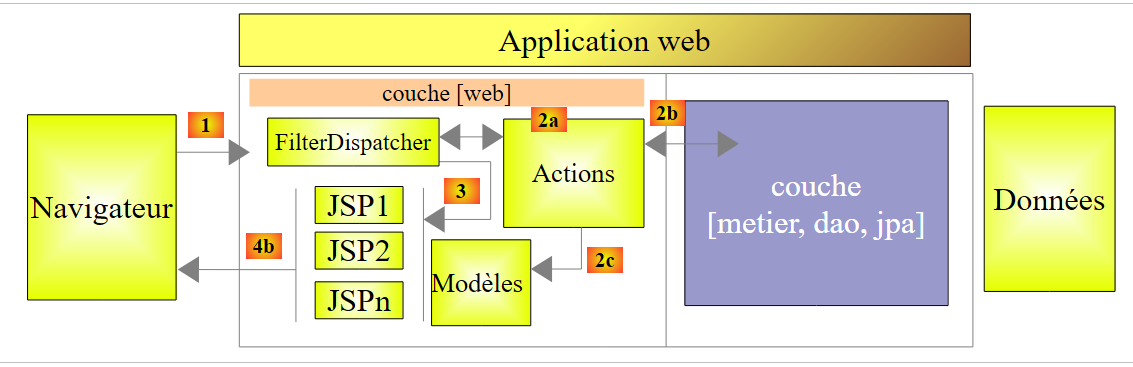
Struts 2 implements the so-called MVC (Model–View–Controller) architectural pattern as follows:
 |
The processing of a client request proceeds as follows:
The requested URLs are of the form http://machine:port/context/dir1/dir2/.../Action. The [/rep1/rep2/.../Action] path must correspond to an action defined in a Struts 2 configuration file; otherwise, it is rejected. An action is defined in a Xml file in the following format:
In the previous example, suppose that Url [ http://machine:port/contexte/actions/Action1] is requested. The following steps are then executed:
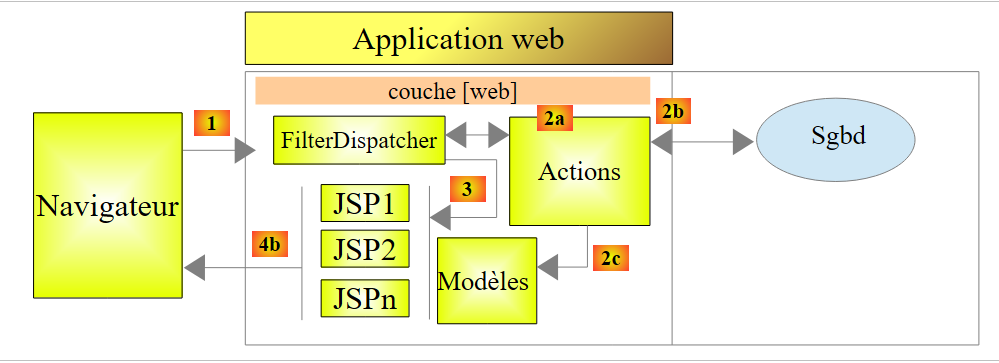
- request - the browser client makes a request to the [FilterDispatcher] controller. This controller handles all requests for clients. It is the entry point of the application. It is the C in MVC.
- processing
- The C controller consults its configuration file and discovers that the action actions/Action1 exists. The namespace (line 1) concatenated with the action name (name attribute on line 2) defines the action actions/Action1.
- Controller C instantiates [2a], a class of type [actions.Action1] (class attribute on line 2). The name and package of this class can be anything.
- If the requested Url is accompanied by parameters of type [param1=val1¶m2=val2&...], then the C controller assigns these parameters to the [actions.Action1] class as follows:
Therefore, the [actions.Action1] class must have these setParami methods for each of the expected parami parameters.
- Controller C calls the method [String execute()] of class [actions.Action1]. This method can then use the parami parameters that the class has retrieved. When processing the user’s request, it may need the [metier] and [2b] layers. Once the client’s request has been processed, it can trigger various responses. A classic example is:
- an error page if the request could not be processed correctly
- a confirmation page otherwise
The execute method returns a string-type result to controller C, called the key of navigation. In the example above, [actions.Action1].execute can produce two keys of type navigation: "page1" (line 3) and "page2" (line 4). The [actions.Action1].execute method will also update the M template [2c], which will be used by the page JSP to be sent in response to the user. This template may contain elements from:
- the [actions.Action1] class instantiated
- the user session
- Application scope data
- ...
- response - the C controller instructs the JSP page corresponding to the key of navigation to display [3]. This is the view, the V of MVC. The page JSP uses a template M to initialize the dynamic parts of the response it must send to the client.
Now, let’s clarify the relationship between web architecture MVC and layered architecture. In fact, these are two different concepts that are sometimes confused. Let’s take a single-layer Struts 2 web application:
 |
If we implement the [web] layer with Struts 2, we will indeed have a MVC web architecture but not a multi-layer architecture. Here, the [web] layer will handle everything: presentation, business logic, and data access. With Struts 2, it is the [Action]-type classes that will do this work.
Now, let’s consider a multi-layer web architecture:
 |
The [web] layer can be implemented without a framework and without following the MVC model. We then indeed have a multi-layer architecture, but the web layer does not implement the MVC model.
In MVC, we stated that the M model corresponds to the V view, c.a.d—the set of data displayed by the V view. Sometimes (often), another definition of the M model in MVC is provided:
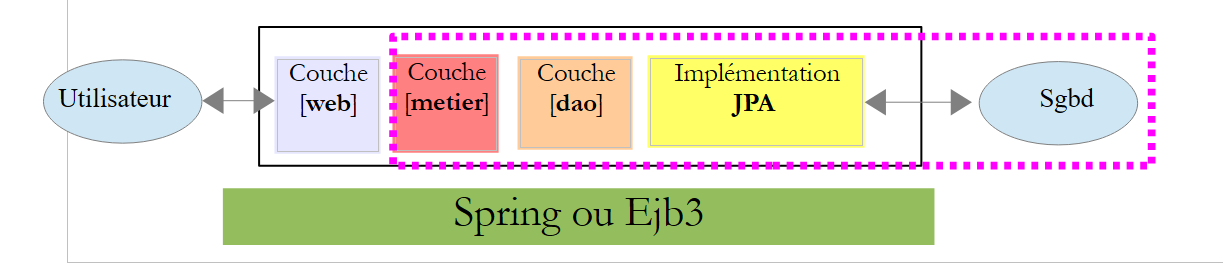 |
Many authors consider that what is to the right of layer [web] forms the M model of MVC. To avoid ambiguity, we can refer to:
- the domain model when referring to everything to the right of the [présentation] layer
- the view model when referring to the data displayed by a view V
Hereinafter, the term "M model" will refer exclusively to the model of a view V.
1.3. The tools used
Hereinafter, we use (December 2011)
- IDE Netbeans 7.01 available at Url [http://www.netbeans.org]
- the Struts 2 plugin for Netbeans 7.01 available at Url [http://plugins.netbeans.org/plugin/39218]
- Struts 2 version 2.2.3 available at version Url [http://struts.apache.org/]
Note that only the Struts 2 libraries obtained from Url and [http://struts.apache.org/] are required to develop the examples that follow. Netbeans can be replaced by another IDE (Eclipse, JDeveloper, Intellij, ...) and the Struts 2 plugin is only there to make the developer’s life easier. It is not essential either.
1.3.1. IDE Netbeans
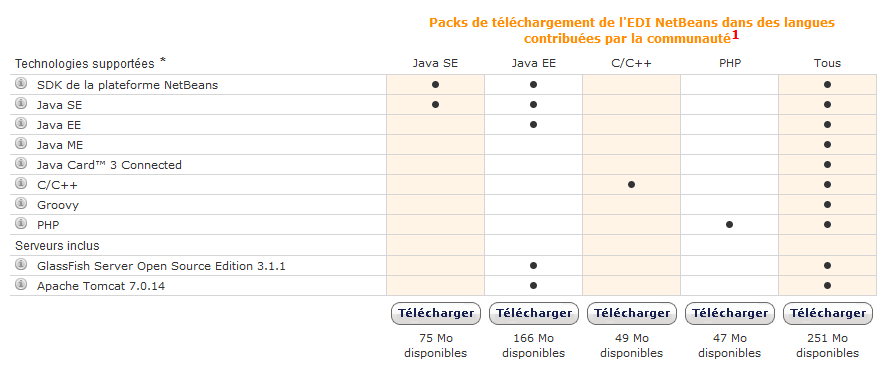
On the Netbeans download site, we select version Java EE:
1.3.2. Struts 2 Plugin
Depending on the versions of Netbeans, this plugin has not always been available. In December 2011, it can be found at Url [http://plugins.netbeans.org]. This Url allows you to see the various plugins available for Netbeans. You can filter your search. In [1], you can search for plugins that contain the word "struts" in their name.
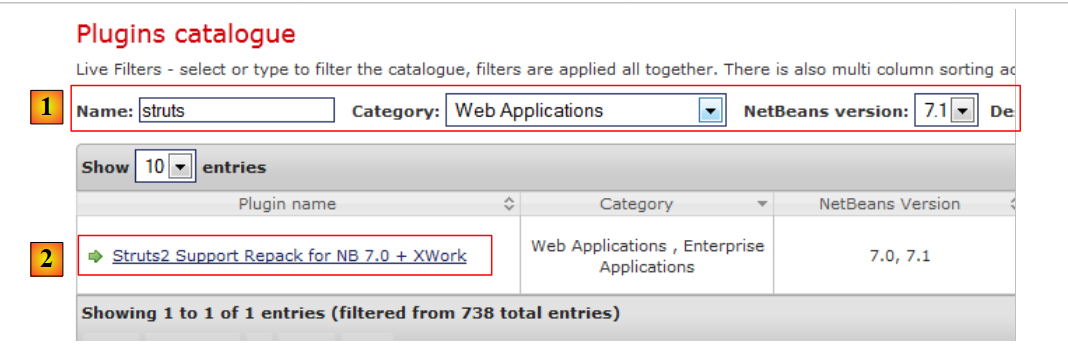 |
- Follow the link [2]
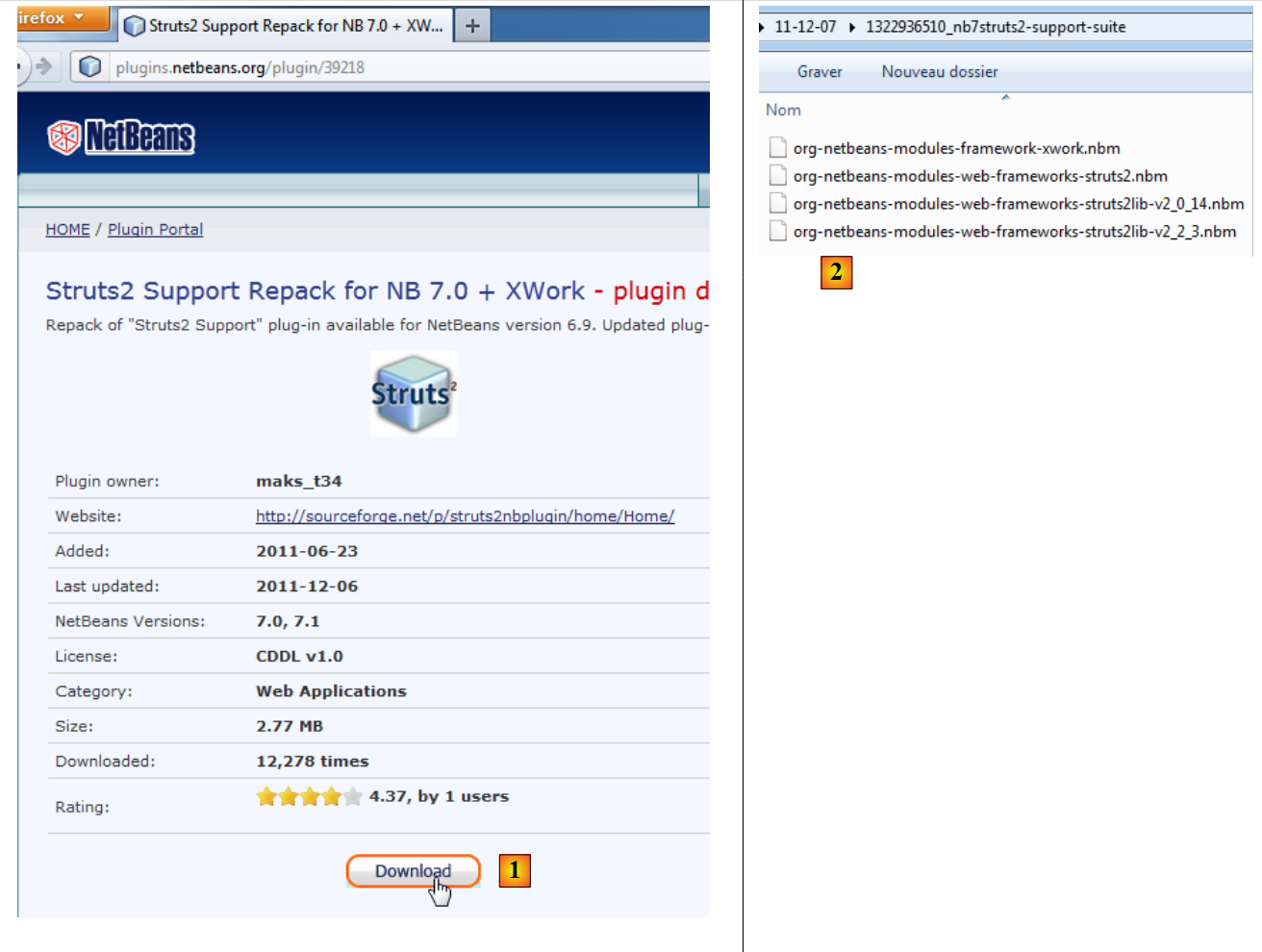 |
Download the plugin and unzip it [2]. To integrate it into Netbeans, proceed as follows:
- Launch Netbeans
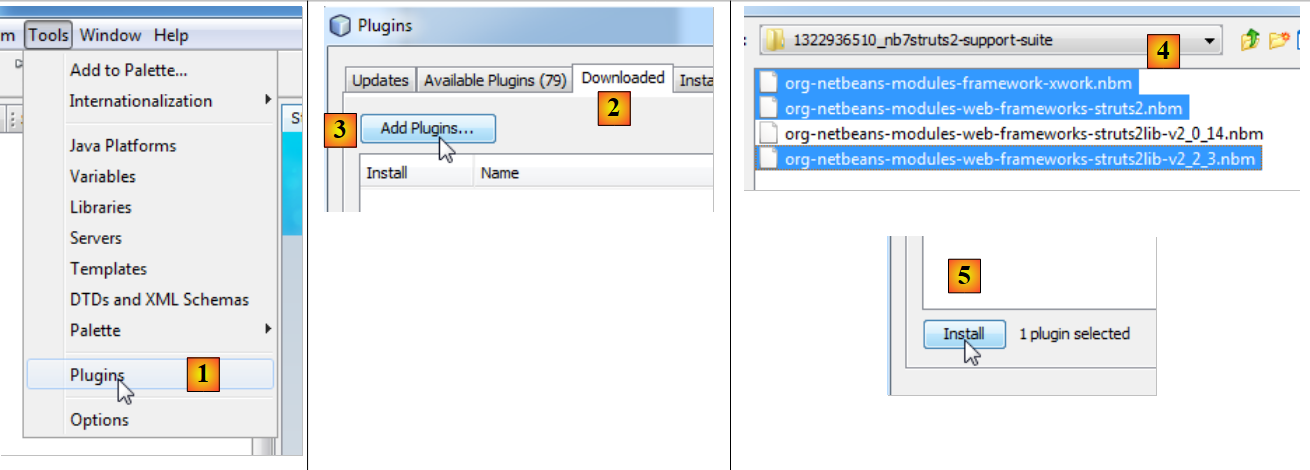 |
- In [1], select the Tools/Plugins menu
- In the [2] tab, use the [3] button
- In [4], select the .nbm files for the downloaded plugins. Here, we select the Struts 2.2.3 libraries (version) rather than the Struts 2.0.14 libraries
- Back in the [2] tab, install the selected plugins using the [5] button.
Installing the plugins often requires restarting Netbeans.
1.3.3. Struts 2 Libraries
If you have downloaded the Struts 2 plugin for Netbeans, you have the main Struts libraries but not all of them. Later on, we will need certain libraries available on the Struts 2 website [http://struts.apache.org/].
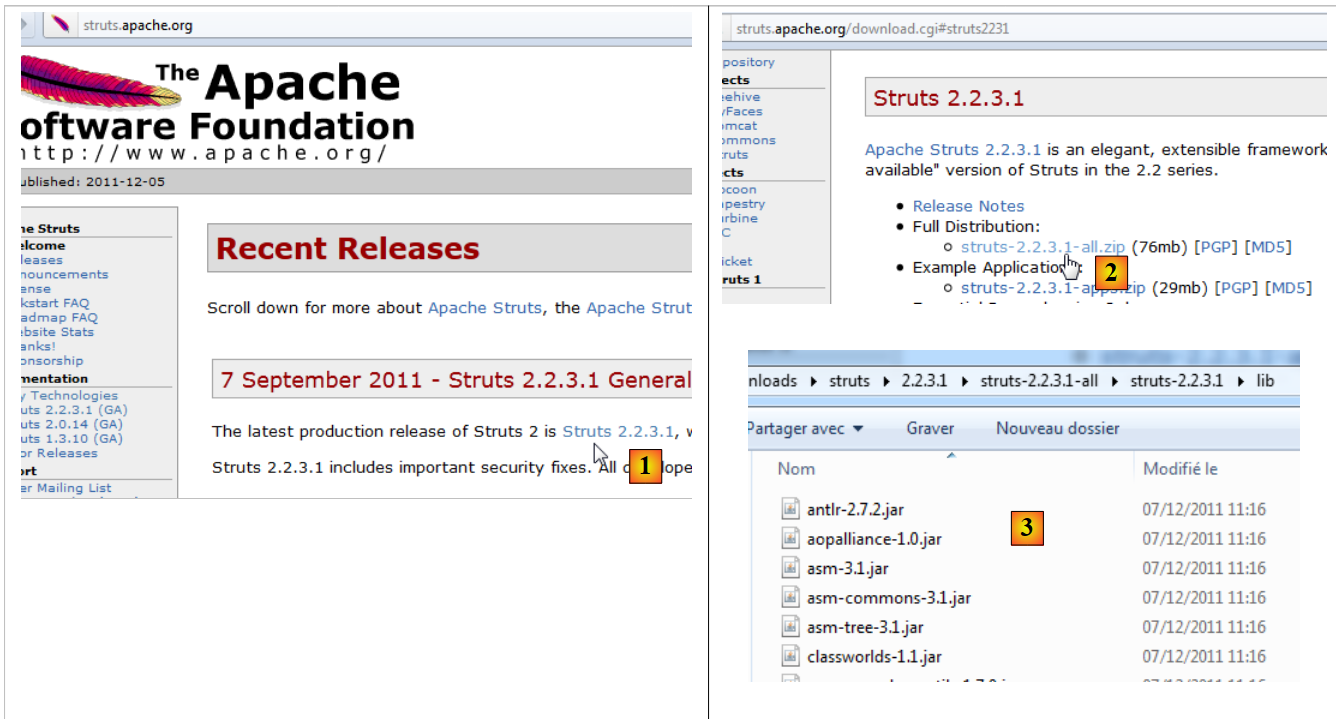 |
Follow the link [1] and then the link [2] to download the zip file for version 2.2.3.1. Once the distribution is unzipped, the libraries required by Struts are located in the [lib] and [3] folders of the distribution. There are several dozen of them, raising the question of which ones are essential. This is where the Struts plugin will help us.