6. Example 05 – The Input Form
We’ll introduce the concept of an input form using a simple example.
6.1. The Netbeans project
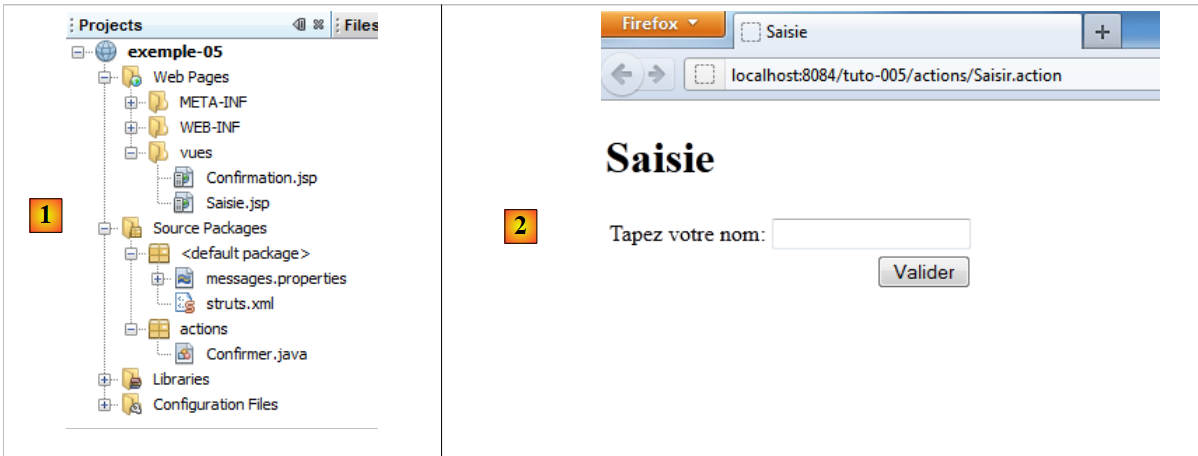 |
In [1], the project:
- the views [Saisie.jsp], [Confirmation.jsp]
- the configuration file [struts.xml]
- the message file [messages.properties]
- the action [Confirmer.java]
In [2], the input page
6.2. Configuration
The file [struts.xml] is as follows:
<?xml version="1.0" encoding="UTF-8" ?>
<!DOCTYPE struts PUBLIC
        "-//Apache Software Foundation//DTD Struts Configuration 2.0//EN"
        "http://struts.apache.org/dtds/struts-2.0.dtd">

<struts>
  <!-- internationalization -->
  <constant name="struts.custom.i18n.resources" value="messages" />
  <!-- default package -->
  <package name="default" namespace="/" extends="struts-default">
    <default-action-ref name="index" />
    <action name="index">
      <result type="redirectAction">
        <param name="actionName">Saisir</param>
        <param name="namespace">/actions</param>
      </result>
    </action>
  </package>
  <!-- equity package -->
  <package name="actions" namespace="/actions" extends="struts-default">
    <action name="Saisir">
      <result name="success">/vues/Saisie.jsp</result>
    </action>
    <action name="Confirmer" class="actions.Confirmer">
      <result name="success">/vues/Confirmation.jsp</result>
    </action>
  </package>
</struts>
- Line 20: the action package for Url /actions/Action.
- lines 21-23: define the action [Saisir]. No class is associated with it. The response is always the view [/vues/Saisie.jsp]
- Lines 24–26: define the [Confirmer] action. The [actions.Confirmer] class is associated with it. The response is always the [/vues/Confirmation.jsp] view
6.3. The action [Confirmer]
Its code is as follows:
package actions;

import com.opensymphony.xwork2.ActionSupport;

public class Confirmer extends ActionSupport{

  // model
  private String nom;

  // getters and setters

  public String getNom() {
    return nom;
  }

  public void setNom(String nom) {
    this.nom = nom;
  }

}
The class has only one field, the one on line 8 with its get / set.
6.4. The message file
The content of [messages.properties] is as follows:
saisie.texte=Formulaire de saisie
saisie.titre1=Saisie
saisie.titre2=Saisie
saisie.libelle=Tapez votre nom
saisie.valider=Valider
confirm.titre1=Confirmation
confirm.titre2=Confirmation
confirm.texte=Bonjour
confirm.retour=Retour au formulaire de saisie
These message keys are used in the two views [Saisie.jsp] and [Confirmation.jsp].
6.5. The views
6.5.1. The view [Saisie.jsp]
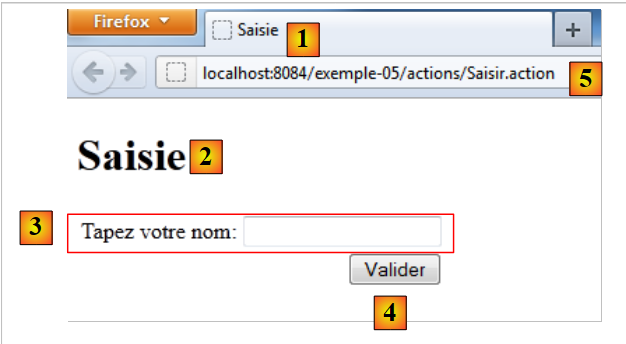
Visually, it looks like this:
 |
Its source code is as follows:
<%@page contentType="text/html" pageEncoding="UTF-8"%>
<%@ taglib prefix="s" uri="/struts-tags" %>
<!DOCTYPE html>
<html>
  <head>
    <meta http-equiv="Content-Type" content="text/html; charset=UTF-8">
    <title><s:text name="saisie.titre1"/></title>
  </head>
  <body>
    <h1><s:text name="saisie.titre2"/></h1>
    <s:form action="Confirmer">
      <s:textfield key="saisie.libelle" name="nom"/>
      <s:submit key="saisie.valider" action="Confirmer"/>
    </s:form>
  </body>
</html>
- Line 7: Displays the key message saisie.titre1 (Entry) [1].
- line 10: displays the key message saisie.titre2 (Input) [2].
- Lines 11, 14: The <s:form> tag introduces a form Html. All entries within this form will be sent to the web server. We say they are posted because the operation involved in sending this data to the server is called POST. The data is sent in the form of a string: param1=value1¶m2=value2&... We have already encountered this string in Section 3.5 of Example 02. In both cases, the parameter string is processed in the same way by Struts 2. The values of the parameters are injected into the executed action, into fields bearing the same names as the parameters. To whom is the posted data sent? By default, to the action that displayed the form, in this case the action Saisir [5]. You can also use the action attribute to specify a different action, in this case the action [Confirmer].
- Line 12: The <s:textfield ...> tag displays the input field [3]. Its key attribute specifies the label to be displayed to the left of the input field. The label is therefore retrieved from the [messages.properties] file. The name attribute is the name of the parameter that will be submitted. The value associated with this parameter will be the text entered in the input field.
- Line 13: The <s:submit ...> tag displays the [4] button. Its key attribute specifies the key for the label to be displayed on the button. The label is therefore looked up in the [messages.properties] file. A button of type submit triggers the form’s submission to an action. We mentioned earlier that this action is [Confirmer] due to the action attribute of the <s:form> tag. The action attribute of the <s:submit> tag allows you to specify a different action if desired. Here we have set the action to [Confirmer]. The button has a default parameter name: action:nom_action, here action:Confirm. The value associated with this parameter is the button label. Ultimately, the parameter string posted to the action [Confirmer] when the user clicks the button [Valider] will be:
?name=xx&action:Confirm=Validate.
where xx is the text entered by the user in the input field.
6.5.2. The [Confirmation.jsp] view
Visually, it looks like this:
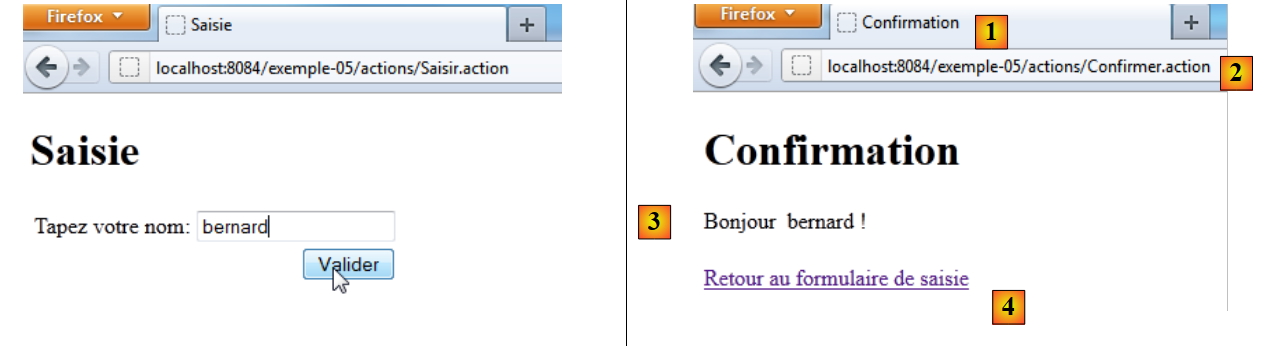 |
We enter a name and submit the input page. We then receive the response [1], which corresponds to the view [Confirmation.jsp]. The Url displayed in [2] is that of the [Confirmer] action. In the example above, the following string was posted:
name=bernard&action:Confirm=Validate
The action:Confirm parameter allows Struts 2 to route the request to the correct action, in this case the [Confirmer] action. The value of the name parameter will then be injected into the name field of the [Confirmer] action.
The source code for the [Confirmation.jsp] action is as follows:
<%@page contentType="text/html" pageEncoding="UTF-8"%>
<%@ taglib prefix="s" uri="/struts-tags" %>
<!DOCTYPE html>
<html>
<head>
<meta http-equiv="Content-Type" content="text/html; charset=UTF-8">
<title><s:text name="confirm.titre1"/></title>
</head>
<body>
<h1><s:text name="confirm.titre2"/></h1>
<s:text name="confirm.texte"/>
<s:property value="nom"/> !
<br/><br/>
<a href="<s:url action="Saisir"/>"><s:text name="confirm.retour"/></a>
</body>
</html>
- line 7: displays the key label confirm.titre1 found in the message file [1]
- line 10: displays the key label confirm.titre2 found in the message file [3]
- line 12: displays the name property of the action [Confirmer] that was executed.
- line 14: creates a link to the action [Saisir]. The <s:url> tag, which has already been encountered, will be generated from the browser's Url [2]. The path will be that of [2] http://localhost:8084/example-05/actions, and the action will be that of the action attribute, in this case Enter. The link URL will therefore be http://localhost:8084/example-05/actions/Saisir.action. The link text will be the label associated with the key confirm.retour [4].
6.6. Tests
Here are two requests:
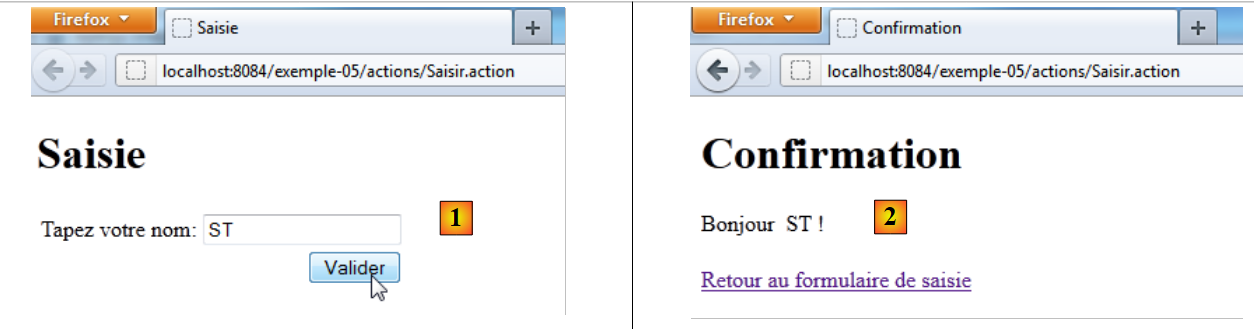 |
In [1], enter a name and submit. In [2], the confirmation page.
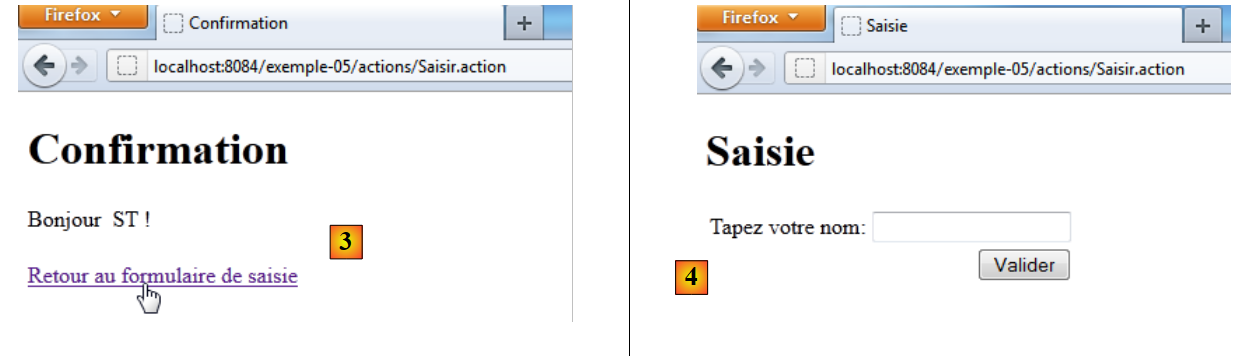 |
In [3], we follow the link back to the form. In [4], the result. Everything has been explained, except for the transition from [3] to [4]. Why isn’t the name we entered visible in [4]?
The link in [3] is a link to Url and [http://localhost:8084/exemple-05/actions/Saisir.action]. The action [Saisir] is therefore executed. Let's look at its configuration in [struts.xml]:
<package name="actions" namespace="/actions" extends="struts-default">
    <action name="Saisir">
      <result name="success">/vues/Saisie.jsp</result>
    </action>
    <action name="Confirmer" class="actions.Confirmer">
      <result name="success">/vues/Confirmation.jsp</result>
    </action>
</package>
The action [Saisir] is not associated with an action. Therefore, the view [Saisie.jsp] is displayed immediately. Let’s look at the code for this view:
<%@page contentType="text/html" pageEncoding="UTF-8"%>
<%@ taglib prefix="s" uri="/struts-tags" %>
<!DOCTYPE html>
<html>
  <head>
    <meta http-equiv="Content-Type" content="text/html; charset=UTF-8">
    <title><s:text name="saisie.titre1"/></title>
  </head>
  <body>
    <h1><s:text name="saisie.titre2"/></h1>
    <s:form>
      <s:textfield key="saisie.libelle" name="nom"/>
      <s:submit key="saisie.valider" action="Confirmer"/>
    </s:form>
  </body>
</html>
On line 12, the input field is displayed. Its content is initialized with the name property (name). Recall what was written earlier about how the <s:property> tag works:
The <s:property name="property"> tag allows you to write the value of a property of an object named ActionContext. This object contains:
- the properties of the class associated with the action that was executed.
- the attributes of the current request denoted as <s:property name="#request['clé']">
- the attributes of the user's session, denoted as <s:property name="#session['clé']">
- attributes of the application itself denoted as <s:property name="#application['clé']">
- parameters sent by the client browser, denoted as <s:property name="#parameters['clé']">
- the notation <s:property name="#attr['clé']"> displays the value of an object searched for in the page, the request, the session, and the application, in that order.
This is case 1. The action [Saisir] has no associated class. Therefore, the "name" property does not exist. An empty string is then displayed in the input field.
To display in [4] the name that was entered in [1], we will use the user’s session.