13. Example 10 – Conversion and validation of real numbers
The new application displays the entry of real numbers:
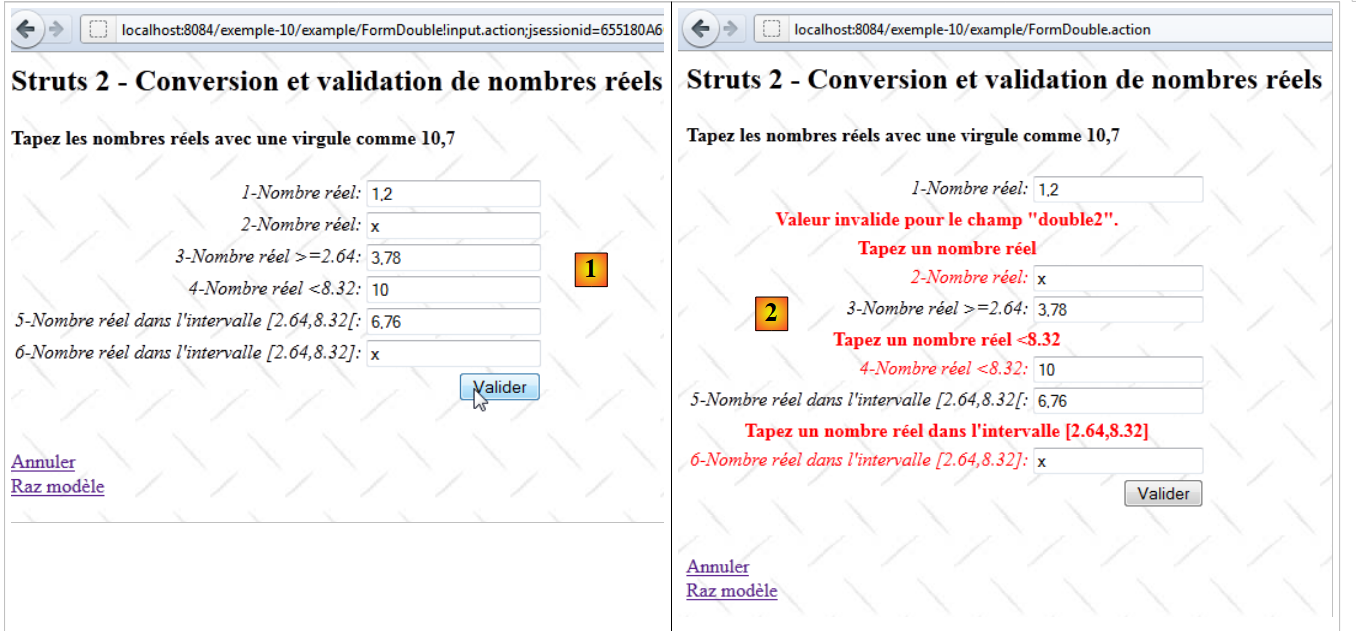 |
- in [1], the input form
- in [2], the returned response
The application works similarly to the integer input feature, so we will only comment on the differences.
13.1. Project Netbeans
The Netbeans project is as follows:
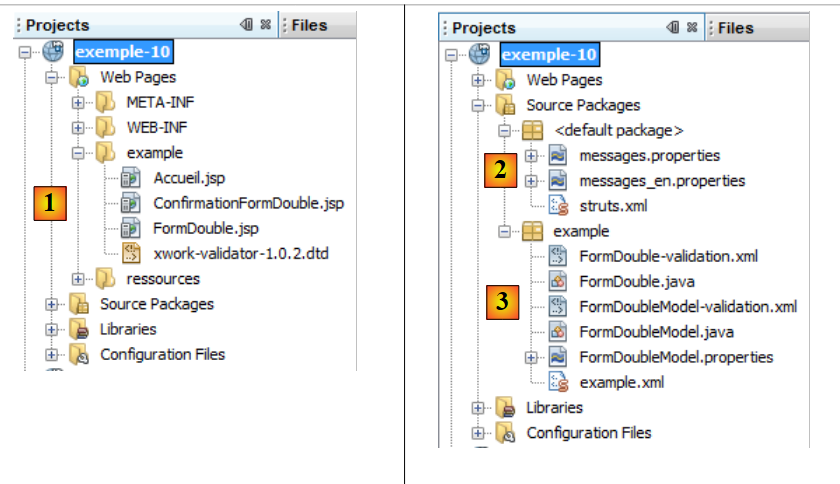 |
- in [1], the application views
- [Accueil.jsp]: the home page
- [FormDouble.jsp]: the input form
- [ConfirmationDouble.jsp]: the confirmation page
- in [2], the message file [messages.properties] and the main Struts configuration file
- in [3]:
- [FormDouble.java]: the action that displays and processes the form
- [FormDouble-validation.xml]: the validation rules for the [FormDouble] action. This file delegates these validations to the model using the method just discussed.
- [FormDoubleModel]: the model for action [FormDouble]
- [FormDoubleModel-validation.xml]: the validation rules for the model
- [FormDoubleModel.properties]: the model's message file
- [example.xml]: Struts secondary configuration file
13.2. Project configuration
The project is primarily configured by the following [example.xml] file:
<?xml version="1.0" encoding="UTF-8" ?>
<!DOCTYPE struts PUBLIC
        "-//Apache Software Foundation//DTD Struts Configuration 2.0//EN"
        "http://struts.apache.org/dtds/struts-2.0.dtd">

<struts>
  <package name="example" namespace="/example" extends="struts-default">
    <action name="Accueil">
      <result name="success">/example/Accueil.jsp</result>
    </action>
    <action name="FormDouble" class="example.FormDouble">
      <result name="input">/example/FormDouble.jsp</result>
      <result name="cancel" type="redirect">/example/Accueil.jsp</result>
      <result name="success">/example/ConfirmationFormDouble.jsp</result>
    </action>
  </package>
</struts>
It is similar to the one discussed for entering integers.
13.3. The message files
The file [messages.properties] is as follows:
Accueil.titre=Accueil
Accueil.message=Struts 2 - Conversions et validations
Accueil.FormDouble=Saisie de nombres r\u00e9els
Form.titre=Conversions et validations
FormDouble.message=Struts 2 - Conversion et validation de nombres r\u00e9els
FormDouble.conseil=Tapez les nombres r\u00e9els avec une virgule comme 10,7
Form.submitText=Valider
Form.cancelText=Annuler
Form.clearModel=Raz mod\u00e8le
Confirmation.titre=Confirmation
Confirmation.message=Confirmation des valeurs saisies
Confirmation.champ=champ
Confirmation.valeur=valeur
Confirmation.lien=Formulaire de test
xwork.default.invalid.fieldvalue=Valeur invalide pour le champ "{0}".
The file [FormDoubleModel.properties] is as follows:
double.format={0,number}
double1.prompt=1-Nombre r\u00E9el
double1.error=Tapez un nombre r\u00E9el
double2.prompt=2-Nombre r\u00E9el
double2.error=Tapez un nombre r\u00E9el
double3.prompt=3-Nombre r\u00E9el >=2.64
double3.error=Tapez un nombre r\u00E9el >=2.64
double4.prompt=4-Nombre r\u00E9el <8.32
double4.error=Tapez un nombre r\u00E9el <8.32
double5.prompt=5-Nombre r\u00E9el dans l''intervalle [2.64,8.32[
double5.error=Tapez un nombre r\u00E9el dans l''intervalle [2.64,8.32[
double6.prompt=6-Nombre r\u00E9el dans l''intervalle [2.64,8.32]
double6.error=Tapez un nombre r\u00E9el dans l''intervalle [2.64,8.32]
Line 1 plays an important role. We will come back to it later.
13.4. The input form
The view [FormDouble.jsp] is as follows:
<%@ page contentType="text/html; charset=UTF-8" pageEncoding="UTF-8"%>
<%@ taglib prefix="s" uri="/struts-tags" %>
<html>
  <head>
    <title><s:text name="Form.titre"/></title>
    <s:head/>
  </head>

  <body background="<s:url value="/ressources/standard.jpg"/>">
    <h2><s:text name="FormDouble.message"/></h2>
    <h4><s:text name="FormDouble.conseil"/></h4>
    <s:form name="formulaire" action="FormDouble">
      <s:textfield name="double1" key="double1.prompt"/>
      <s:textfield name="double2" key="double2.prompt" value="%{#parameters['double2']!=null ? #parameters['double2'] : double2==null ? '' :getText('double.format',{double2})}"/>
      <s:textfield name="double3" key="double3.prompt" value="%{#parameters['double3']!=null ? #parameters['double3'] : double3==null ? '' :getText('double.format',{double3})}"/>
      <s:textfield name="double4" key="double4.prompt" value="%{#parameters['double4']!=null ? #parameters['double4'] : double4==null ? '' :getText('double.format',{double4})}"/>
      <s:textfield name="double5" key="double5.prompt" value="%{#parameters['double5']!=null ? #parameters['double5'] : double5==null ? '' :getText('double.format',{double5})}"/>
      <s:textfield name="double6" key="double6.prompt"/>
      <s:submit key="Form.submitText" method="execute"/>
    </s:form>
    <br/>
    <s:url id="url" action="FormDouble" method="cancel"/>
    <s:a href="%{url}"><s:text name="Form.cancelText"/></s:a>
    <br/>
    <s:url id="url" action="FormDouble" method="clearModel"/>
    <s:a href="%{url}"><s:text name="Form.clearModel"/></s:a>
  </body>
</html>
Lines 13 through 18 are the six input fields for real numbers. The fields double2 through double5 have a complex value attribute. Normally, the six input fields should be as follows:
      <s:textfield name="double1" key="double1.prompt"/>
      <s:textfield name="double2" key="double2.prompt"/>
      <s:textfield name="double3" key="double3.prompt"/>
      <s:textfield name="double4" key="double4.prompt"/>
      <s:textfield name="double5" key="double5.prompt"/>
<s:textfield name="double6" key="double6.prompt"/>
To resolve certain issues encountered during testing, we had to make things more complex. For now, the reader can ignore this complexity. We will explain it later.
13.5. The confirmation view
The confirmation view [ConfirmationFormDouble.jsp] is as follows:
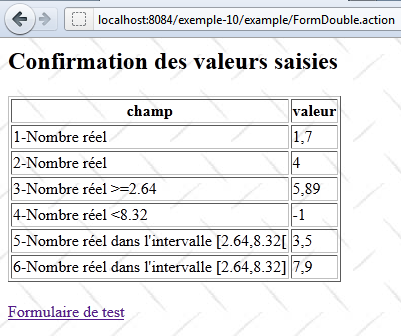
Its code is as follows:
<%@ page contentType="text/html; charset=UTF-8" pageEncoding="UTF-8"%>
<%@ taglib prefix="s" uri="/struts-tags" %>
<html>
  <head>
    <title><s:text name="Confirmation.titre"/></title>
    <s:head/>
  </head>

  <body background="<s:url value="/ressources/standard.jpg"/>">
    <h2><s:text name="Confirmation.message"/></h2>
    <table border="1">
      <tr>
        <th><s:text name="Confirmation.champ"/></th>
        <th><s:text name="Confirmation.valeur"/></th>
      </tr>
      <tr>
        <td><s:text name="double1.prompt"/></td>
        <td><s:text name="double1"/></td>
      </tr>
      <tr>
        <td><s:text name="double2.prompt"/></td>
        <td>
          <s:text name="double.format">
            <s:param value="double2"/>
          </s:text>
        </td>
      </tr>
      <tr>
        <td><s:text name="double3.prompt"/></td>
        <td>
          <s:text name="double.format">
            <s:param value="double3"/>
          </s:text>
        </td>
      </tr>
      <tr>
        <td><s:text name="double4.prompt"/></td>
        <td>
          <s:text name="double.format">
            <s:param value="double4"/>
          </s:text>
        </td>
      </tr>
      <tr>
        <td><s:text name="double5.prompt"/></td>
        <td>
          <s:text name="double.format">
            <s:param value="double5"/>
          </s:text>
        </td>
      </tr>
      <tr>
        <td><s:text name="double6.prompt"/></td>
        <td><s:text name="double6"/></td>
      </tr>
    </table>
    <br/>
    <s:url id="url" action="FormDouble!input"/>
    <s:a href="%{url}"><s:text name="Confirmation.lien"/></s:a>
  </body>
</html>
The [ConfirmationFormDouble.jsp] view simply displays the [FormDoubleModel] template. Lines 47–49 show how a real number is displayed. We want this display to take the application’s locale into account. Depending on the locale, a real number will not be displayed the same way in France (10,7) as in the United Kingdom (10.7). To achieve this, we use the <s:text> tag, which we had previously used for the application’s internationalization. This tag is therefore also used for localization.
Here, the message key used is double.format. This key is found in the file [FormDoubleModel.properties]:
double.format={0,number}
The value associated with the key here is not a message, but a display format:
- 0 is a parameter representing the value to be displayed. Here, it will be the double5 field of the model.
- number represents the numeric format. It will be adapted to each country. Without this format, the number 10.7 will always be displayed as 10.7 regardless of the country.
The tag
         <s:text name="double.format">
            <s:param value="double5"/>
</s:text>
Displays the message {0, number}, where the double5 parameter (line 2) replaces the 0 parameter in the format. Thus, the double5 template will be displayed in the localized numeric format.
13.6. The [FormDoubleModel] template
The fields double1 through double6 from the [FormDouble.jsp] form are injected into the following [FormDoubleModel] template:
package example;

public class FormDoubleModel {

  // constructor without parameters
  public FormDoubleModel() {
  }
  // fields
  private String double1;
  private Double double2;
  private Double double3;
  private Double double4;
  private Double double5;
  private String double6;

  // raz model
  public void clearModel() {
    double1 = null;
    double2 = null;
    double3 = null;
    double4 = null;
    double5 = null;
    double6 = null;
  }

  // getters and setters
   ...
}
- The fields double1 and double6 are of type String
- the other fields are of type Double
13.7. Model validation
Model validation is controlled by two files: [FormDouble-validation.xml] and [FormDoubleModel-validation.xml].
The file [FormDouble-validation.xml] delegates validations to [FormDoubleModel-validation.xml]:
<!--
<!DOCTYPE validators PUBLIC "-//OpenSymphony Group//XWork Validator 1.0.2//
EN" "http://www.opensymphony.com/xwork/xwork-validator-1.0.2.dtd">
-->
<!DOCTYPE validators PUBLIC "-//OpenSymphony Group//XWork Validator 1.0.2//
EN" "http://localhost:8084/exemple-10/example/xwork-validator-1.0.2.dtd">

<validators>
  <field name="model" >
    <field-validator type="visitor">
      <param name="appendPrefix">false</param>
      <message/>
    </field-validator>
  </field>
</validators>
We have already encountered this file.
The file [FormDoubleModel-validation.xml] contains the following validation rules:
<!--
<!DOCTYPE validators PUBLIC "-//OpenSymphony Group//XWork Validator 1.0.2//
EN" "http://www.opensymphony.com/xwork/xwork-validator-1.0.2.dtd">
-->

<!DOCTYPE validators PUBLIC "-//OpenSymphony Group//XWork Validator 1.0.2//
EN" "http://localhost:8084/exemple-10/example/xwork-validator-1.0.2.dtd">


<validators>

  <field name="double1" >
    <field-validator type="requiredstring" short-circuit="true">
      <message key="double1.error"/>
    </field-validator>
    <field-validator type="regex" short-circuit="true">
      <param name="expression">^[+|-]*\s*\d+(,\d+)*$</param>
      <param name="trim">true</param>
      <message key="double1.error"/>
    </field-validator>
  </field>

  <field name="double2" >
    <field-validator type="required" short-circuit="true">
      <message key="double2.error"/>
    </field-validator>
    <field-validator type="conversion" short-circuit="true">
      <message key="double2.error"/>
    </field-validator>
  </field>

  <field name="double3" >
    <field-validator type="required" short-circuit="true">
      <message key="double3.error"/>
    </field-validator>
    <field-validator type="conversion" short-circuit="true">
      <message key="double3.error"/>
    </field-validator>
    <field-validator type="double" short-circuit="true">
      <param name="minInclusive">2.64</param>
      <message key="double3.error"/>
    </field-validator>
  </field>

  <field name="double4" >
    <field-validator type="required" short-circuit="true">
      <message key="double4.error"/>
    </field-validator>
    <field-validator type="conversion" short-circuit="true">
      <message key="double4.error"/>
    </field-validator>
    <field-validator type="double" short-circuit="true">
      <param name="maxExclusive">8.32</param>
      <message key="double4.error"/>
    </field-validator>
  </field>

  <field name="double5" >
    <field-validator type="required" short-circuit="true">
      <message key="double5.error"/>
    </field-validator>
    <field-validator type="conversion" short-circuit="true">
      <message key="double5.error"/>
    </field-validator>
    <field-validator type="double" short-circuit="true">
      <param name="minInclusive">2.64</param>
      <param name="maxExclusive">8.32</param>
      <message key="double5.error"/>
    </field-validator>
  </field>

  <field name="double6" >
    <field-validator type="requiredstring" short-circuit="true">
      <message key="double6.error"/>
    </field-validator>
    <field-validator type="regex" short-circuit="true">
      <param name="expression">^[+|-]*\s*\d+(,\d+)*$</param>
      <param name="trim">true</param>
      <message key="double6.error"/>
    </field-validator>
  </field>
</validators>
- The rule in lines 12–21 verifies that the double1 input field matches a regular expression pattern representing a real number.
- The rule in lines 23–30 verifies that the double2 input field can be converted to a double-precision real number.
- The rule in lines 32–43 verifies that the input field `double3` can be converted to a double-precision real number greater than or equal to 2.64. Note that the Anglo-Saxon notation for real numbers must be used.
- The rule in lines 45–56 verifies that the double4 input field can be converted to a double-precision real number < 8.32.
- The rule in lines 58–70 verifies that the input field double5 can be converted to a double-precision real number in the interval [2.64, 8.32[.
- The rule in lines 72–80 verifies that the double6 field follows the pattern of a regular expression representing a real number.
Once the [FormDoubleModel-validation.xml] file has been processed by the validation interceptor, the latter executes the validate method of the [FormDouble] action if it exists. We will present it along with the entire action.
13.8. The [FormDouble] action
The [FormDouble] action is as follows:
package example;

import com.opensymphony.xwork2.ActionSupport;
import com.opensymphony.xwork2.ModelDriven;
import java.util.Map;
import org.apache.struts2.interceptor.SessionAware;
import org.apache.struts2.interceptor.validation.SkipValidation;

public class FormDouble extends ActionSupport implements ModelDriven, SessionAware {

  // constructor without parameters
  public FormDouble() {
  }

  // action model
  public Object getModel() {
    if (session.get("model") == null) {
      session.put("model", new FormDoubleModel());
    }
    return session.get("model");
  }

  @SkipValidation
  public String clearModel() {
    // close to the model
    ((FormDoubleModel) getModel()).clearModel();
    // result
    return INPUT;
  }

  public String cancel() {
    // cleaning the model
    ((FormDoubleModel) getModel()).clearModel();
    // result
    return "cancel";
  }
  // SessionAware
  Map<String, Object> session;

  public void setSession(Map<String, Object> session) {
    this.session = session;
  }

  // validation
  @Override
  public void validate() {
    // valid double6 entry?
    if (getFieldErrors().get("double6") == null) {
      // replace the comma with a period in the double6 string
      String strDouble6 = (((FormDoubleModel) getModel()).getDouble6()).replace(',', '.');
      // String --> double
      double double6 = Double.parseDouble(strDouble6);
      // check
      if (double6 < 2.64 || double6 > 8.32) {
        addFieldError("double6", getText("double6.error"));
      }
    }
  }
}
Action [FormDouble] is built on the same model as action [FormInt]. We will only comment on the validate method. Note that the validate method is executed after the validation file [FormDoubleModel-validation.xml] has been processed and before the execute method is executed.
- Line 48: If there are already errors in the double6 field, no further action is taken.
- Line 50: We received a string in the form 45.67. It was stored in the double6 field of the model. We replace the comma with a period to get 45.67.
- line 52: the string 45.67 is converted to a double-precision floating-point number. This should work since the double6 field adheres to the format of a real number.
- line 54: we check that the resulting double-precision real number is in the interval [2.64, 8.32].
- line 55: if this is not the case, the error message for the double6.error key is attached to the double6 field. This message will be found in the [FormDoubleModel.properties] file. It will be displayed when the form with the error is re-displayed.
13.9. Final details
Now, back to the complexity of the input fields in the [FormDouble.jsp] form. We will focus on the double2 field. This reasoning applies to fields double3 through double5, which have a Double-type model. For the double1 and double6 fields, which have a String-type model, there is no issue.
The double2 input field is as follows:
<s:textfield name="double2" key="double2.prompt" value="%{#parameters['double2']!=null ? #parameters['double2'] : double2==null ? '' :getText('double.format',{double2})}"/>
Let’s start with the simplest tag:
<s:textfield name="double2" key="double2.prompt"/>
and let’s see what happens:
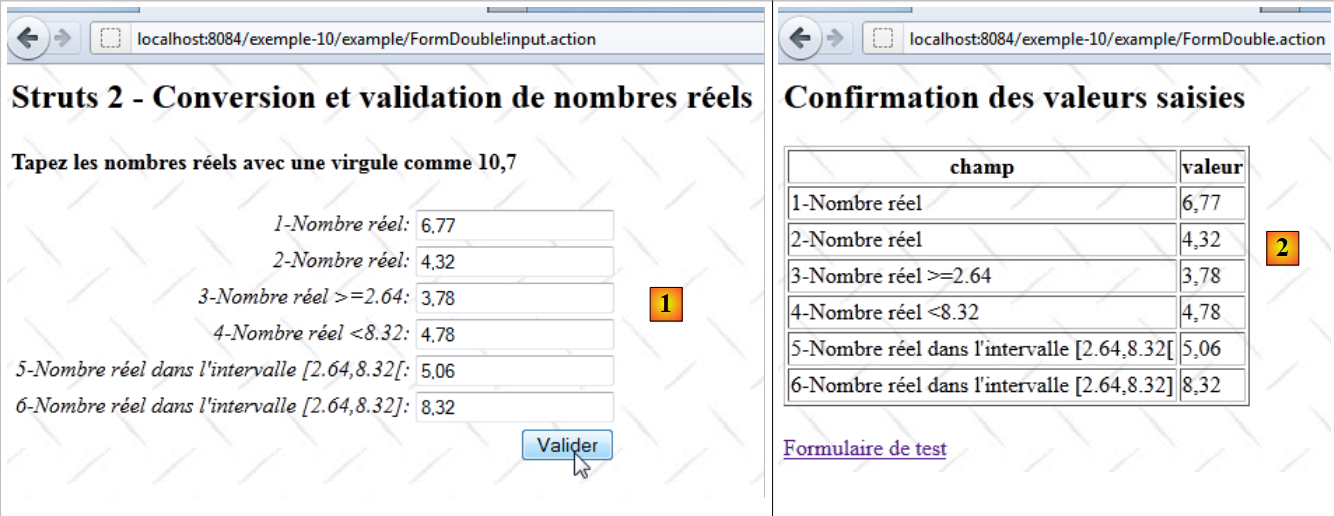 |
- In [1], the correct double2 number is validated. It’s not very clear in the screenshot, but we entered the number with a decimal point.
- In [2], the confirmation view. The double2 entry passed the validation tests. The number is displayed with a comma.
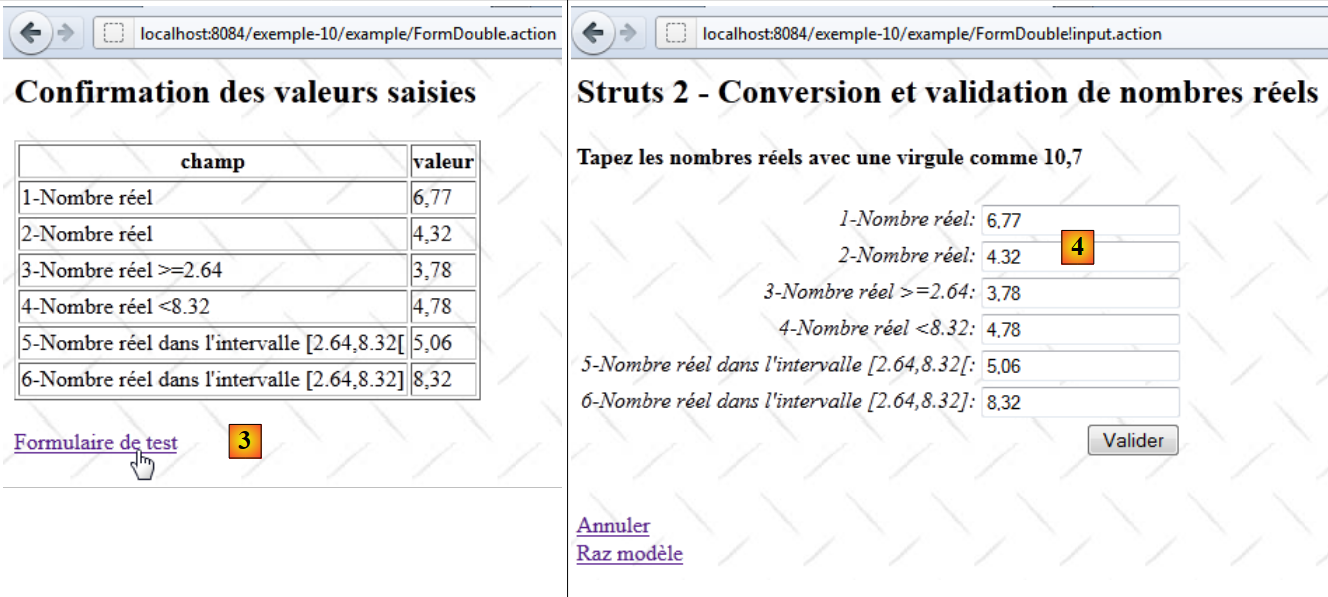 |
- In [3], we return to the form
- In [4], the form. What the screenshot doesn’t show clearly is that the double2 number, which was initially 4.32, has become 4.32 with a decimal point.
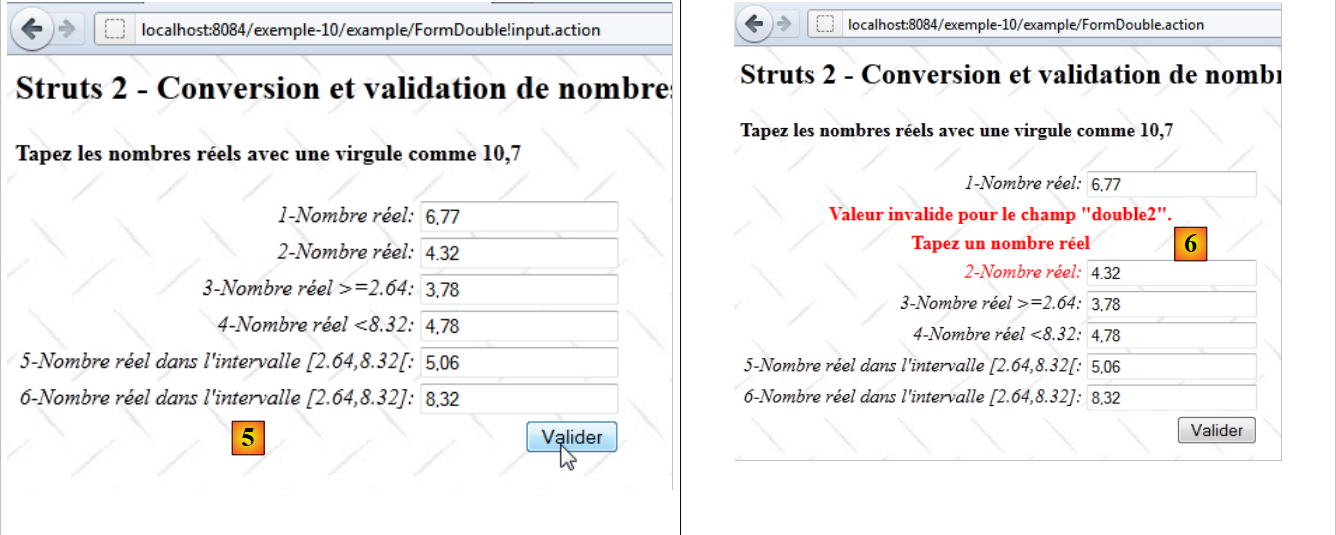 |
- In [5], we resubmit the form without changing anything
- In [6], an error is reported in the double2 field.
The problem is as follows:
- Initially, in [1], the input string "4,32" was successfully converted to the real number 4.32. This means that the operation String --> Double succeeded, and therefore, in this context, Struts takes the locale into account—in this case, France.
- The new form [4] displays the value of the real number 4.32 in the double2 field. Since the display has not been localized, it defaults to the Anglo-Saxon format, c.a.d, with a decimal point. So in the Double --> String direction, Struts no longer takes the locale into account; otherwise, it would have displayed 4.32 with a comma.
This is inconsistent, to say the least. But never mind, we’ll localize the display of the number 4.32. The input tag becomes the following:
<s:textfield name="double2" key="double2.prompt" value="%{getText('double.format',{double2})}"/>
The value attribute specifies the value to be displayed in the double2 field. This value corresponds to an expression OGNL. Recall the definition of the key double.format in the file [FormDoubleModel.properties]:
double.format={0,number}
The method getText('key') retrieves the message associated with a key. This message is looked up in the file corresponding to the current locale. Thus, if the locale were es (Spain), the key double.format would have been looked up in the file [FormDoubleModel_es.properties].
The method getText('key', {param0, param1, ...}) retrieves a message with parameters. The message
is a message parameterized by parameter 0. This is a positional parameter. The method getText('double.format', {double2}) will assign the number double2 to parameter 0. Ultimately, the value of double2 is requested in the localized numeric format. In France, the number 4.56 will be localized as the string "4,56".
After this transformation, we run the tests again.
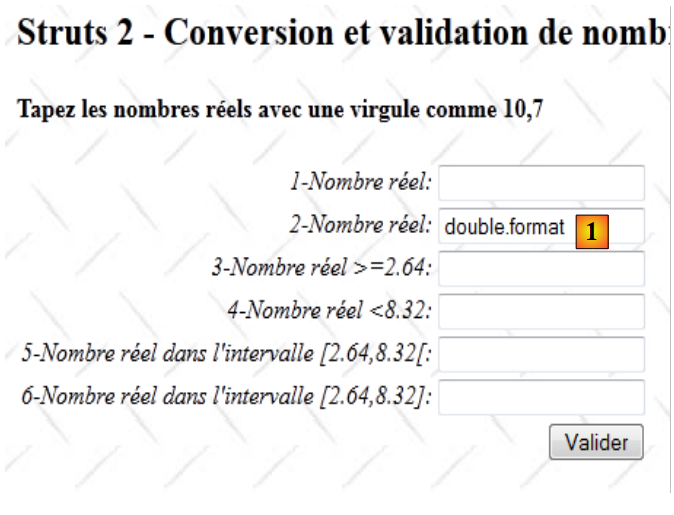 |
As soon as the form is initially displayed, an error occurs in [1]. Let’s return to the tag:
<s:textfield name="double2" key="double2.prompt" value="%{getText('double.format',{double2})}"/>
Upon initial display, the value of the double2 model is null, a non-numeric value. We modify the tag as follows:
<s:textfield name="double2" key="double2.prompt" value="%{double2==null ? '' : getText('double.format',{double2})}"/>
This time, we check if double2==null. If so, we display an empty string.
With this change made, we resume testing:
 |
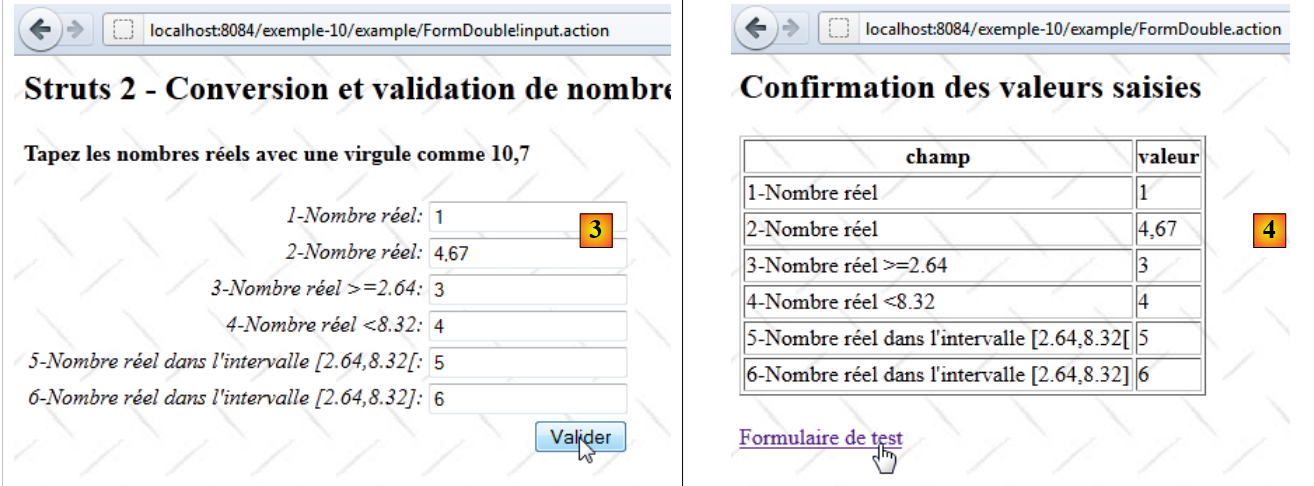 |
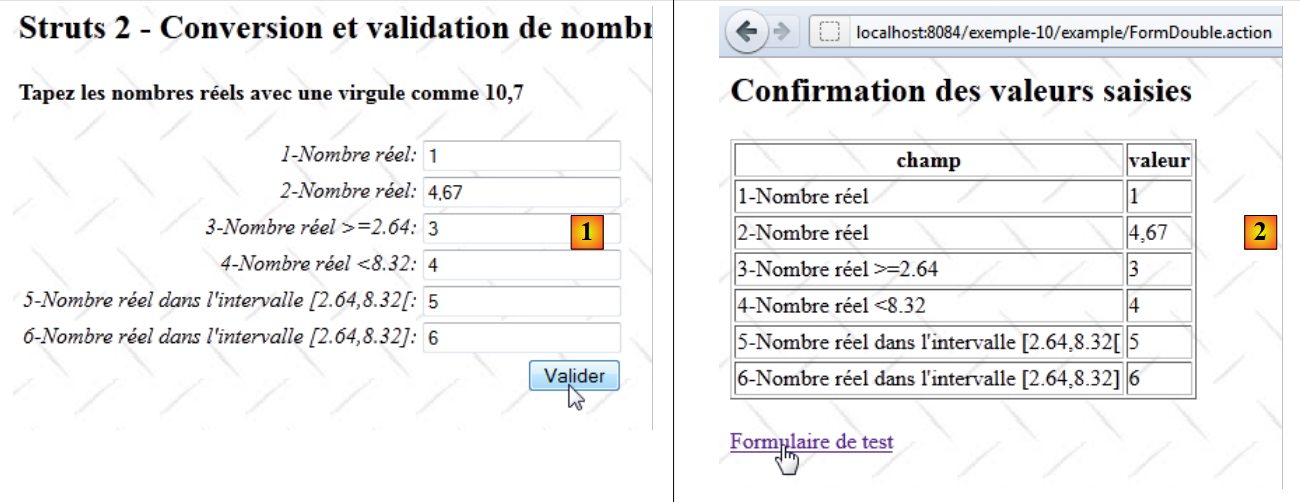
Screens [1] through [4] show that the issue we were trying to resolve has been resolved:
- in [1], we enter 4.67
- in [2], this number was accepted
- in [3], it is displayed again as 4.67 with the decimal point, which is confirmed by [4].
Unfortunately, the problems don’t end there. Let’s look at the following sequence:
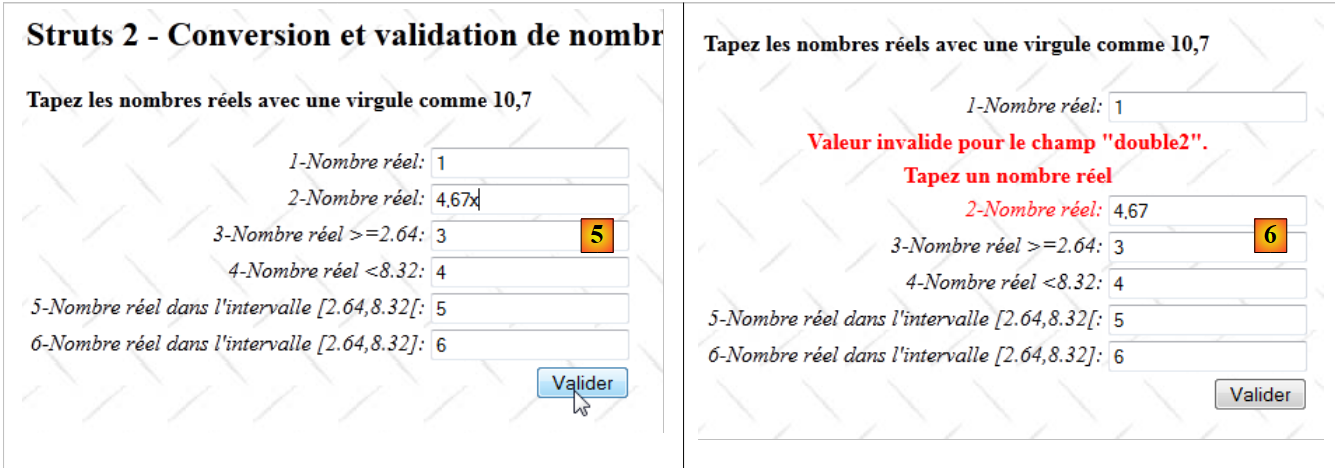 |
- in [5], a character is added to invalidate double2
- In [6], the validation checks have done their job and the error is reported. However, the string displayed in [6] is not the erroneous string but the current value of the double2 model. The entered value has been lost.
When switching from [5] to [6], the request does not complete. It is stopped by the validation interceptor. In [6], the value of the double2 model was displayed, which did not receive a new value due to this interruption. Therefore, its previous value is displayed, whereas the entered string should have been displayed. The parameters of a request are available for viewing via the #parameters notation in ['param']. We update the double2 input field as follows:
<s:textfield name="double2" key="double2.prompt" value="%{#parameters['double2']!=null ? #parameters['double2'] : double2==null ? '' : getText('double.format',{double2})}"/>
The displayed value of the double2 field is calculated as follows: if the 'double2' parameter exists, it is displayed; otherwise, the double2 template is displayed. The reader is invited to test whether this new version of the tag resolves the issues encountered.
13.10. Conclusion
It is surprising that entering real numbers with validity checks is so complicated... Perhaps I missed something in the documentation?