14. Example 11 – Date Conversion and Validation
The new application features date entry:
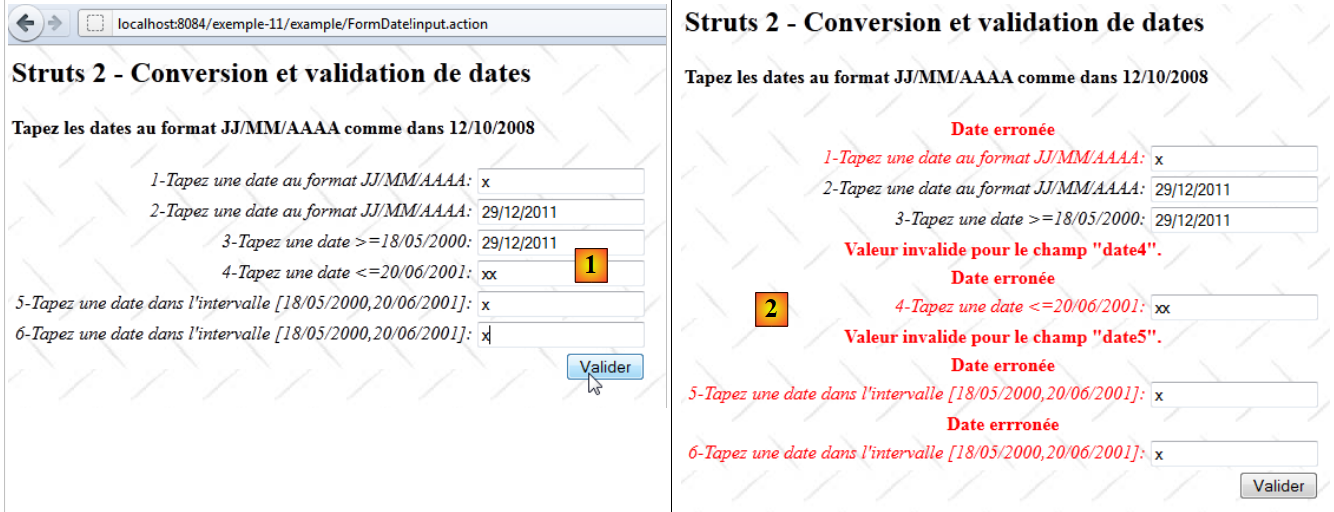 |
- in [1], the input form
- in [2], the returned response
The application works similarly to the integer input, so we will only comment on the points that differ.
14.1. The Netbeans project
The Netbeans project is as follows:
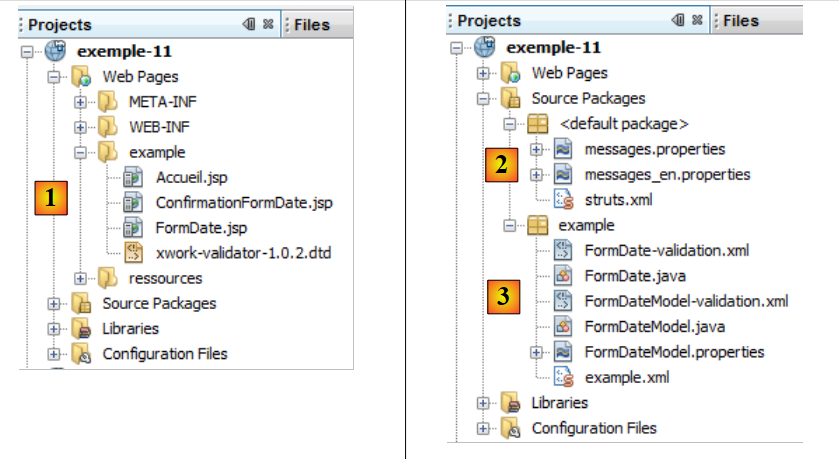 |
- in [1], the application views
- [Accueil.jsp]: the home page
- [FormDate.jsp]: the input form
- [ConfirmationFormDate.jsp]: the confirmation page
- in [2], the message file [messages.properties] and the main Struts configuration file
- in [3]:
- [FormDate.java]: the action that displays and processes the form
- [FormDate-validation.xml]: the validation rules for the [FormDate] action. This file delegates these validations to the model.
- [FormDateModel]: the model for action [FormDate]
- [ FormDateModel-validation.xml]: the validation rules for the model
- [FormDateModel.properties]: the model message file
- [example.xml]: Struts secondary configuration file
14.2. Project configuration
The project is primarily configured by the following [example.xml] file:
<?xml version="1.0" encoding="UTF-8" ?>
<!DOCTYPE struts PUBLIC
        "-//Apache Software Foundation//DTD Struts Configuration 2.0//EN"
        "http://struts.apache.org/dtds/struts-2.0.dtd">

<struts>
  <package name="example" namespace="/example" extends="struts-default">
    <action name="Accueil">
      <result name="success">/example/Accueil.jsp</result>
    </action>
    <action name="FormDate" class="example.FormDate">
      <result name="input">/example/FormDate.jsp</result>
      <result name="cancel" type="redirect">/example/Accueil.jsp</result>
      <result name="success">/example/ConfirmationFormDate.jsp</result>
    </action>
  </package>
</struts>
It is similar to the one discussed for entering integers.
14.3. The message files
The file [messages.properties] is as follows:
Accueil.titre=Accueil
Accueil.message=Struts 2 - Conversions et validations
Accueil.FormDate=Saisie de dates
Form.titre=Conversions et validations
FormDate.message=Struts 2 - Conversion et validation de dates
FormDate.conseil=Tapez les dates au format JJ/MM/AAAA comme dans 12/10/2008
Form.submitText=Valider
Form.cancelText=Annuler
Form.clearModel=Raz mod\u00e8le
Confirmation.titre=Confirmation
Confirmation.message=Confirmation des valeurs saisies
Confirmation.champ=champ
Confirmation.valeur=valeur
Confirmation.lien=Formulaire de test
xwork.default.invalid.fieldvalue=Valeur invalide pour le champ "{0}".
The file [FormDateModel.properties] is as follows:
date.format={0,date,dd/MM/yyyy}
date1.prompt=1-Tapez une date au format JJ/MM/AAAA
date1.error=Date erron\u00E9e
date2.prompt=2-Tapez une date au format JJ/MM/AAAA
date2.error=Date erron\u00E9e
date3.prompt=3-Tapez une date >=18/05/2000
date3.error=Date erron\u00E9e
date4.prompt=4-Tapez une date <=20/06/2001
date4.error=Date erron\u00E9e
date5.prompt=5-Tapez une date dans l''intervalle [18/05/2000,20/06/2001]
date5.error=Date errron\u00E9e
date6.prompt=6-Tapez une date dans l''intervalle [18/05/2000,20/06/2001]
date6.error=Date errron\u00E9e
Line 1 plays an important role. We will come back to it later.
14.4. The input form
The view [FormDate.jsp] is as follows:
<%@ page contentType="text/html; charset=UTF-8" pageEncoding="UTF-8"%>
<%@ taglib prefix="s" uri="/struts-tags" %>
<html>
  <head>
    <title><s:text name="Form.titre"/></title>
    <s:head/>
  </head>

  <body background="<s:url value="/ressources/standard.jpg"/>">
    <h2><s:text name="FormDate.message"/></h2>
    <h4><s:text name="FormDate.conseil"/></h4>
    <s:form name="formulaire" action="FormDate">
      <s:textfield name="date1" key="date1.prompt"/>
      <s:textfield name="date2" key="date2.prompt" value="%{#parameters['date2']!=null ? #parameters['date2'] : date2==null ? '' :getText('date.format',{date2})}"/>
      <s:textfield name="date3" key="date3.prompt" value="%{#parameters['date3']!=null ? #parameters['date3'] : date3==null ? '' :getText('date.format',{date3})}"/>
      <s:textfield name="date4" key="date4.prompt" value="%{#parameters['date4']!=null ? #parameters['date4'] : date4==null ? '' :getText('date.format',{date4})}"/>
      <s:textfield name="date5" key="date5.prompt" value="%{#parameters['date5']!=null ? #parameters['date5'] : date5==null ? '' :getText('date.format',{date5})}"/>
      <s:textfield name="date6" key="date6.prompt"/>
      <s:submit key="Form.submitText" method="execute"/>
    </s:form>
    <br/>
    <s:url id="url" action="FormDate" method="cancel"/>
    <s:a href="%{url}"><s:text name="Form.cancelText"/></s:a>
      <br/>
    <s:url id="url" action="FormDate" method="clearModel"/>
    <s:a href="%{url}"><s:text name="Form.clearModel"/></s:a>
  </body>
</html>
Lines 13 through 18 are the six date input fields. The date2 through date5 fields have a complex value attribute, the same as for real number input. Since the same difficulties were encountered, they were resolved in the same way.
14.5. The confirmation view
The confirmation view [ConfirmationFormDate.jsp] is as follows:
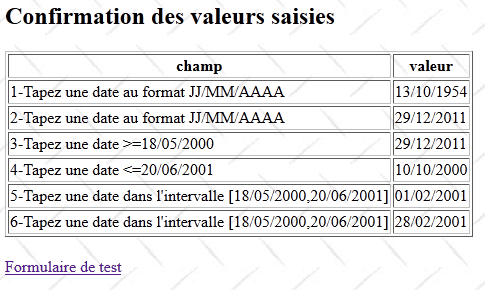
Its code is as follows:
<%@ page contentType="text/html; charset=UTF-8" pageEncoding="UTF-8"%>
<%@ taglib prefix="s" uri="/struts-tags" %>
<html>
  <head>
    <title><s:text name="Confirmation.titre"/></title>
    <s:head/>
  </head>

  <body background="<s:url value="/ressources/standard.jpg"/>">
    <h2><s:text name="Confirmation.message"/></h2>
    <table border="1">
      <tr>
        <th><s:text name="Confirmation.champ"/></th>
        <th><s:text name="Confirmation.valeur"/></th>
      </tr>
      <tr>
        <td><s:text name="date1.prompt"/></td>
        <td><s:text name="date1"/></td>
      </tr>
      <tr>
        <td><s:text name="date2.prompt"/></td>
        <td>
          <s:text name="date.format">
            <s:param value="date2"/>
          </s:text>
        </td>
      </tr>
      <tr>
        <td><s:text name="date3.prompt"/></td>
        <td>
          <s:text name="date.format">
            <s:param value="date3"/>
          </s:text>
        </td>
      </tr>
      <tr>
        <td><s:text name="date4.prompt"/></td>
        <td>
          <s:text name="date.format">
            <s:param value="date4"/>
          </s:text>
        </td>
      </tr>
      <tr>
        <td><s:text name="date5.prompt"/></td>
        <td>
          <s:text name="date.format">
            <s:param value="date5"/>
          </s:text>
        </td>
      </tr>
      <tr>
        <td><s:text name="date6.prompt"/></td>
        <td><s:text name="date6"/></td>
      </tr>
    </table>
    <br/>
    <s:url id="url" action="FormDate!input"/>
    <s:a href="%{url}"><s:text name="Confirmation.lien"/></s:a>
  </body>
</html>
The view [ConfirmationFormDate.jsp] simply displays the template [FormDateModel]. Lines 47–49 show the display of a date. We want this display to take a date format into account. To do this, we use the <s:text> tag that we had previously used for the application’s internationalization.
Here, the message key used is date.format. This key is found in the file [FormDateModel.properties]:
date.format={0,date,dd/MM/yyyy}
The value associated with the key here is not a message, but a display format:
- 0 is a parameter representing the value to be displayed. Here, it will be the date5 field of the model.
- date represents a date. Previously, we used number for a number.
- dd/MM/yyyy represents the date format. Here, we want it in the form dd/mm/yyyy. The appropriate Java format is dd/MM/yyyy (d: day, M: Month, y: year)
The tag
<s:text name="date.format">
            <s:param value="date5"/>
</s:text>
displays the message {0, date, dd/MM/yyyy}, where the date5 parameter (line 2) replaces the 0 parameter in the format. Thus, the date5 template will be displayed in the dd/mm/yyyy format.
14.6. The [FormDateModel] template
The date1 to date6 fields from the [FormDate.jsp] form are injected into the following [FormDateModel] template:
package example;

import java.util.Date;

public class FormDateModel {

  // constructor without parameters
  public FormDateModel() {
  }
  // fields
  private String date1;
  private Date date2 = new Date();
  private Date date3 = new Date();
  private Date date4;
  private Date date5;
  private String date6;

  // raz model
  public void clearModel() {
    date1 = null;
    date2 = null;
    date3 = null;
    date4 = null;
    date5 = null;
    date6 = null;
  }

  // getters and setters
...
}
- The date1 and date6 fields are of type String
- the other fields are of type Date
14.7. Model validation
Model validation is controlled by two files: [FormDate-validation.xml] and [FormDateModel-validation.xml].
The file [FormDate-validation.xml] delegates validations to [FormDateModel-validation.xml]:
<!--
<!DOCTYPE validators PUBLIC "-//OpenSymphony Group//XWork Validator 1.0.2//
EN" "http://www.opensymphony.com/xwork/xwork-validator-1.0.2.dtd">
-->
<!DOCTYPE validators PUBLIC "-//OpenSymphony Group//XWork Validator 1.0.2//
EN" "http://localhost:8084/exemple-10/example/xwork-validator-1.0.2.dtd">

<validators>
  <field name="model" >
    <field-validator type="visitor">
      <param name="appendPrefix">false</param>
      <message/>
    </field-validator>
  </field>
</validators>
We have already encountered this file.
The file [FormDateModel-validation.xml] contains the following validation rules:
<!--
<!DOCTYPE validators PUBLIC "-//OpenSymphony Group//XWork Validator 1.0.2//
EN" "http://www.opensymphony.com/xwork/xwork-validator-1.0.2.dtd">
-->

<!DOCTYPE validators PUBLIC "-//OpenSymphony Group//XWork Validator 1.0.2//
EN" "http://localhost:8084/exemple-11/example/xwork-validator-1.0.2.dtd">

<validators>

  <field name="date1" >
    <field-validator type="requiredstring" short-circuit="true">
      <message key="date1.error"/>
    </field-validator>
    <field-validator type="regex" short-circuit="true">
      <param name="expression">^\d{2}/\d{2}/\d{4}$</param>
      <param name="trim">true</param>
      <message key="date1.error"/>
    </field-validator>
  </field>

  <field name="date2" >
    <field-validator type="required" short-circuit="true">
      <message key="date2.error"/>
    </field-validator>
    <field-validator type="conversion" short-circuit="true">
      <message key="date2.error"/>
    </field-validator>
   </field>

  <field name="date3" >
    <field-validator type="required" short-circuit="true">
      <message key="date2.error"/>
    </field-validator>
    <field-validator type="conversion" short-circuit="true">
      <message key="date3.error"/>
    </field-validator>
    <field-validator type="date" short-circuit="true">
      <param name="min">18/05/2000</param>
      <message key="date3.error"/>
    </field-validator>
  </field>

  <field name="date4" >
    <field-validator type="required" short-circuit="true">
      <message key="date2.error"/>
    </field-validator>
    <field-validator type="conversion" short-circuit="true">
      <message key="date4.error"/>
    </field-validator>
    <field-validator type="date" short-circuit="true">
      <param name="max">20/06/2001</param>
      <message key="date4.error"/>
    </field-validator>
  </field>

 <field name="date5" >
    <field-validator type="required" short-circuit="true">
      <message key="date2.error"/>
    </field-validator>
    <field-validator type="conversion" short-circuit="true">
      <message key="date5.error"/>
    </field-validator>
    <field-validator type="date" short-circuit="true">
      <param name="min">18/05/2000</param>
      <param name="max">20/06/2001</param>
      <message key="date5.error"/>
    </field-validator>
  </field>

  <field name="date6" >
    <field-validator type="requiredstring" short-circuit="true">
      <message key="date6.error"/>
    </field-validator>
    <field-validator type="regex" short-circuit="true">
      <param name="expression">^\d{2}/\d{2}/\d{4}$</param>
      <param name="trim">true</param>
      <message key="date6.error"/>
    </field-validator>
  </field>

</validators>
- The rule in lines 11–20 verifies that the date1 input field follows the pattern of a regular expression representing a date in the format dd/mm/yyyy. Note that we verify that the string is in the form of a date, but we do not verify that it is a valid date. Thus, 02/29/2011 is in the form of a date but is not a valid date.
- The rule in lines 22–29 checks that the date2 input field is a valid date.
- The rule in lines 31–42 verifies that the date3 input field is a valid date >= 05/18/2000
- The rule in lines 44–55 verifies that the date4 input field is a valid date on or before 06/20/2001.
- The rule in lines 57–69 verifies that the date5 input field is a valid date <= June 20, 2001 and >= May 18, 2000.
- The rule for lines 71–80 verifies that the date6 field is in the format dd/mm/yyyy.
Once the file [FormDateModel-validation.xml] has been processed by the validation interceptor, the latter executes the validate method of the action [FormDate] if it exists. We will present it along with the entire action.
14.8. The [FormDate] action
The [FormDate] action is as follows:
package example;

import com.opensymphony.xwork2.ActionSupport;
import com.opensymphony.xwork2.ModelDriven;
import java.text.SimpleDateFormat;
import java.util.Date;
import java.util.Map;
import org.apache.struts2.interceptor.SessionAware;
import org.apache.struts2.interceptor.validation.SkipValidation;

public class FormDate extends ActionSupport implements ModelDriven, SessionAware {

  // constructor without parameters
  public FormDate() {
  }

  // action model
  public Object getModel() {
    if (session.get("model") == null) {
      session.put("model", new FormDateModel());
    }
    return session.get("model");
  }

  @SkipValidation
  public String clearModel() {
    // close to the model
    ((FormDateModel) getModel()).clearModel();
    // result
    return INPUT;
  }

  public String cancel() {
    // cleaning the model
    ((FormDateModel) getModel()).clearModel();
    // result
    return "cancel";
  }
  // SessionAware
  Map<String, Object> session;

  public void setSession(Map<String, Object> session) {
    this.session = session;
  }

  // validation
  @Override
  public void validate() {
    // date formatting
    SimpleDateFormat formateurDate = new SimpleDateFormat("dd/MM/yyyy");
    formateurDate.setLenient(false);
    // enter valid date1 ?
    if (getFieldErrors().get("date1") == null) {
      // check validity date
      try {
        formateurDate.parse(((FormDateModel) getModel()).getDate1());
      } catch (Exception e) {
        addFieldError("date1", getText("date1.error"));
      }
    }
    // valid date6 entry?
    if (getFieldErrors().get("date6") == null) {
      Date d = null;
      try {
        // check validity date
        d = formateurDate.parse(((FormDateModel) getModel()).getDate6());
        // terminal check
        if (d.after(formateurDate.parse("20/06/2001")) || d.before(formateurDate.parse("18/05/2000"))) {
          addFieldError("date6", getText("date6.error"));
          return;
        }
      } catch (Exception e) {
        addFieldError("date6", getText("date6.error"));
        return;
      }
    }
  }
}
Action [FormDate] is built on the same model as action [FormInt]. We will only comment on the validate method. Note that the validate method is executed after the validation file [FormDateModel-validation.xml] is processed and before the execute method is executed.
- The validate method completes the validation of the date1 and date6 fields. The validation file [FormDateModel-validation.xml] had verified that the entered strings were in date format. We now verify that these are indeed valid dates. Note also that date1 and date6 were the only two fields in the model of type String.
- Line 50: We create a date format dd/mm/yyyy to verify that strings of this type are indeed valid dates.
- Line 51: setLenient(false) prevents the invalid date 32/01/2012 from being interpreted as the valid date 01/02/2012.
- Line 53: We validate date1 only if the previous validations did not encounter any errors in this field.
- Line 56: We verify that date1 is a valid date in the dd/mm/yyyy format.
- line 58: if this is not the case, an error message is associated with the date1 field.
- Line 62: date6 is validated only if this field has passed the previous validations.
- Line 66: We verify that date6 is a valid date
- Line 68: If date6 is <05/18/2000 or date6 > 06/20/2001, then date6 is incorrect.
14.9. Final details
The previous form has flaws, as shown in the following example:
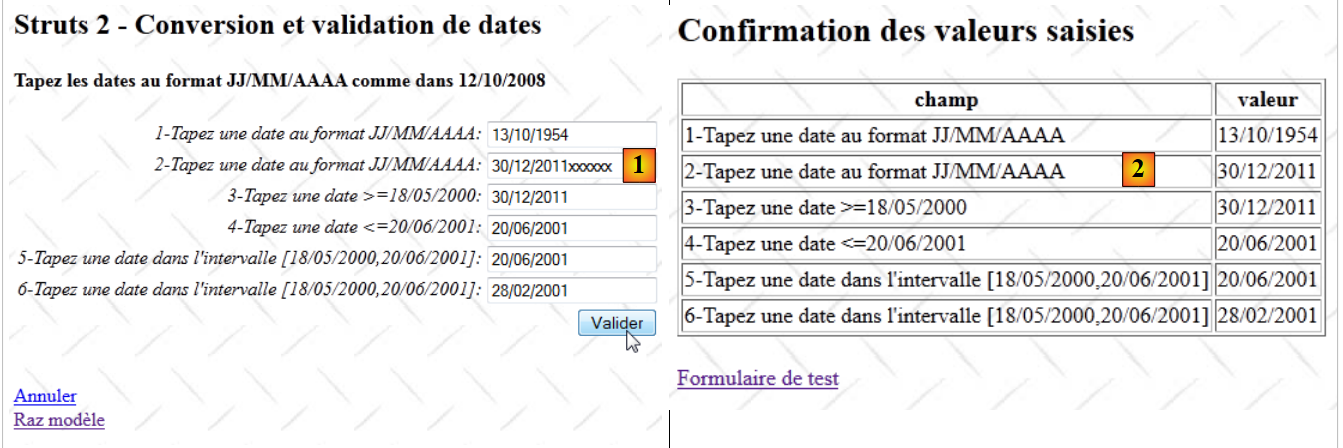 |
- In [1], an invalid date is entered
- in [2], it was accepted. Only the first characters dd/mm/yyyy were taken into account.
The date2 through date5 fields, which are linked to Date-type models, all have this issue. Again, perhaps I missed something in the documentation. The date1 and date6 fields, which are linked to String-type models, do not have this issue.