19. Case Study – version 1
19.1. The Simulated [metier] Layer
Let’s revisit the architecture of the application we are building:
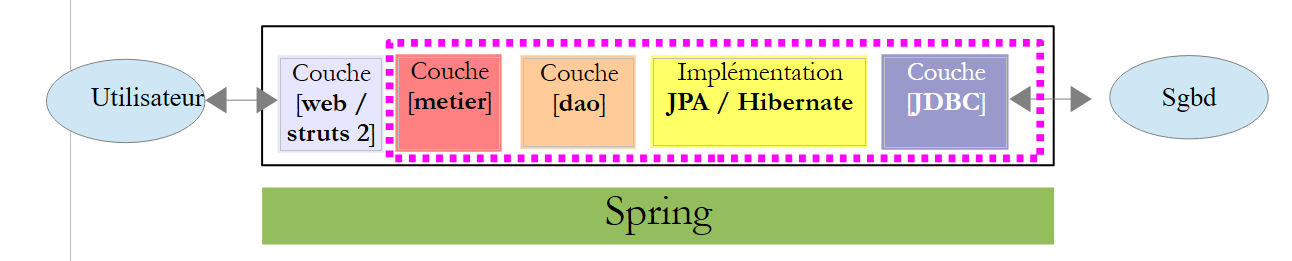 |
We have the archive of the [metier, dao, jpa] layers, and we have presented the elements of these layers that the [web] layer needed to know. We are ready to write this layer using the Struts framework.
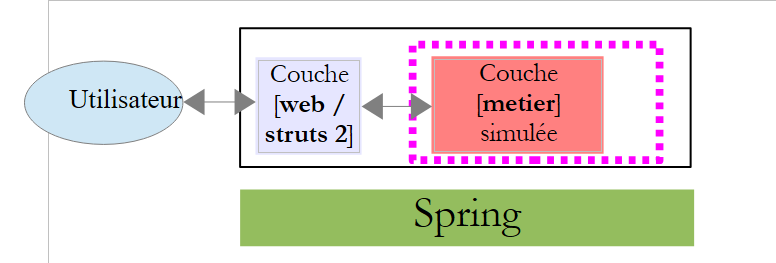
To simplify testing of our application during development, we will create a simulated business layer that will conform to the interface of the [metier] layer. The architecture will be as follows:
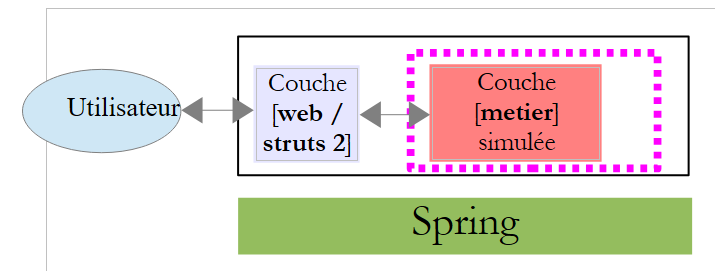 |
We will develop the [web] layer with the simulated [métier] layer. Testing will be simpler because there is no longer a database in the architecture. Thanks to Spring and the use of interfaces, replacing the simulated [metier] layer with the actual [metier, dao, jpa] architecture at a later stage will have no impact on the code of the [web / struts2] layer. The [web / struts2] layer that we are about to develop can be used as-is.
The simulated [metier] layer we will use is as follows:
package metier;

import java.util.ArrayList;
import java.util.HashMap;
import java.util.List;
import java.util.Map;
import jpa.Cotisation;
import jpa.Employe;
import jpa.Indemnite;

public class MetierSimule implements IMetier {

  // list of employees
  private Map<String, Employe> hashEmployes = new HashMap<String, Employe>();
  private List<Employe> listEmployes;

  // get your payslip
  public FeuilleSalaire calculerFeuilleSalaire(String SS,
          double nbHeuresTravaillées, int nbJoursTravaillés) {
    // we retrieve employee n° SS
    Employe e = hashEmployes.get(SS);
    // a fictitious payslip is returned
    return new FeuilleSalaire(e, new Cotisation(3.49, 6.15, 9.39, 7.88), new ElementsSalaire(100, 100, 100, 100, 100));
  }

  // list of employees
  public List<Employe> findAllEmployes() {
    if (listEmployes == null) {
      // create a list of two employees
      listEmployes = new ArrayList<Employe>();
      listEmployes.add(new Employe("254104940426058", "Jouveinal", "Marie", "5 rue des oiseaux", "St Corentin", "49203", new Indemnite(2, 2.1, 2.1, 3.1, 15)));
      listEmployes.add(new Employe("260124402111742", "Laverti", "Justine", "La br�lerie", "St Marcel", "49014", new Indemnite(1, 1.93, 2, 3, 12)));
      // employee dictionary
      for (Employe e : listEmployes) {
        hashEmployes.put(e.getSS(), e);
      }
    }
    // we return the list of employees
    return listEmployes;
  }
}
- line 11: the class [MetierSimule] implements the interface [IMetier], which the actual layer [metier] implements.
- line 14: a dictionary of employees indexed by their INSEE number
- line 15: the list of employees
- Lines 27–39: Implementation of the findAllEmployes method of the [IMetier] interface.
- Lines 30–33: creation of a list of two employees
- lines 34-36: creation of the employee dictionary indexed by ID INSEE
- lines 18-24: implementation of the calculerSalaire method of the [IMetier] interface. Here, a fictitious pay stub is returned.
19.2. The Netbeans project
The Netbeans project is as follows:
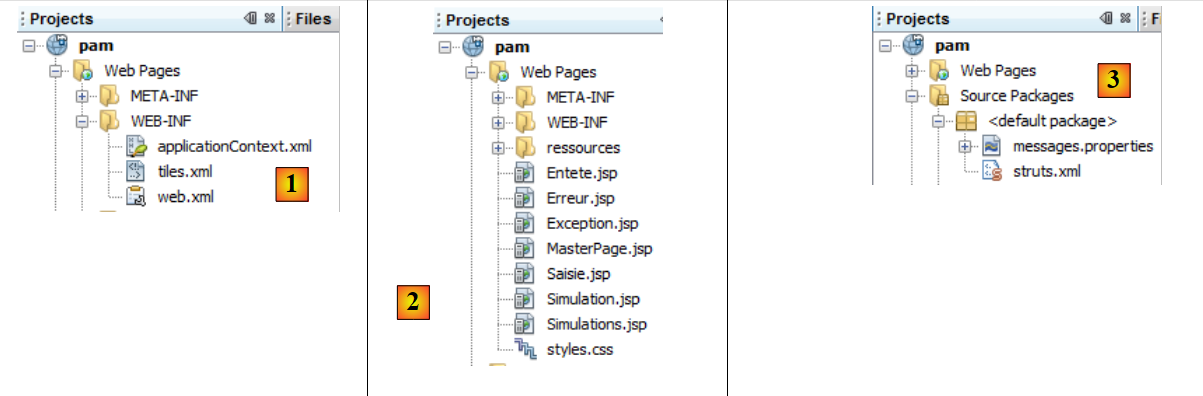 |
- in [1]:
- [applicationContext.xml] is the Spring configuration file
- [tiles.xml] is the configuration file for a framework called Tiles.
- [web.xml] is the web application configuration file
- in [2]: the various views of the application
- in [3]:
- [messages.properties]: the messages file
- [struts.xml]: the Struts configuration file
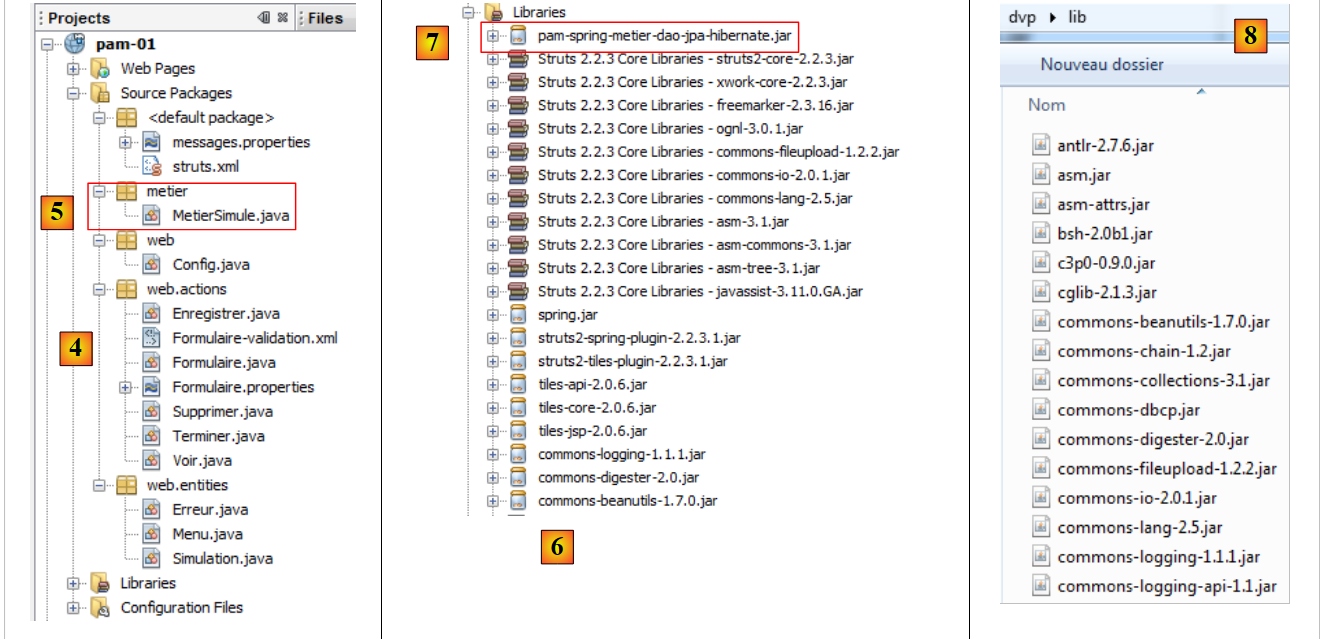 |
- in [4]: the application source code. The Struts actions are in the [web.actions] package.
- in [5]: the simulated [metier] layer
- in [6]: the libraries used. This includes the libraries for the various tools used: Spring, Tiles, Struts 2, the Struts 2/Spring integration plugin, and the Struts 2/Tiles integration plugin.
- in [7]: the archive of the actual [metier, dao, jpa] layer. It gives us access to the JPA entities, the [IMetier] interface, and the [FeuilleSalaire] and [ElementsSalaire] classes. All of these elements are indeed used by our [MetierSimule] class.
19.3. Project Configuration
The project is configured by various files:
- [web.xml], which configures the web application
- [struts.xml], which configures the Struts framework
- [applicationContext.xml], which configures the Spring framework
- [tiles.xml], which configures the Tiles framework
19.3.1. Web application configuration
The file [web.xml] is as follows:
<?xml version="1.0" encoding="UTF-8"?>
<web-app id="pam_struts_01" version="2.4" xmlns="http://java.sun.com/xml/ns/j2ee" xmlns:xsi="http://www.w3.org/2001/XMLSchema-instance" xsi:schemaLocation="http://java.sun.com/xml/ns/j2ee http://java.sun.com/xml/ns/j2ee/web-app_2_4.xsd">
  <display-name>Pam</display-name>
    <!-- Tiles -->
  <context-param>
    <param-name> org.apache.tiles.impl.BasicTilesContainer.DEFINITIONS_CONFIG </param-name>
    <param-value>/WEB-INF/tiles.xml</param-value>
  </context-param>
  <listener>
    <listener-class>org.apache.struts2.tiles.StrutsTilesListener</listener-class>
  </listener>
    <!-- Struts 2 -->
  <filter>
    <filter-name>struts2</filter-name>
    <filter-class>org.apache.struts2.dispatcher.FilterDispatcher</filter-class>
  </filter>
  <filter-mapping>
    <filter-name>struts2</filter-name>
    <url-pattern>/*</url-pattern>
  </filter-mapping>
     <!-- Spring -->
  <listener>
    <listener-class>org.springframework.web.context.ContextLoaderListener</listener-class>
  </listener>
</web-app>
- lines 13–20: configure the Struts 2 filter – already seen
- lines 22–24: configure the Spring listener – seen before
- lines 9–11: configure the Tiles listener. The [org.apache.struts2.tiles.StrutsTilesListener] class will be instantiated when the web application starts. It will then use its configuration file. This is defined by lines 5–8. The Tiles configuration file is therefore the [WEB-INF/tiles.xml] file.
Ultimately, when the Struts application starts, three classes are instantiated:
- one for the Struts 2 filter. This is the one that handles the C in MVC.
- another for the Spring listener. Spring will use the [applicationContext.xml] file to instantiate the [métier, dao, jpa] layers of the application. Spring will also instantiate, as in a previous example, a [Config] class that will contain the Application scope data. Finally, Spring will inject a reference to this single [Config] instance into every Struts action that needs it.
- Another one for the Tiles listener. This framework will handle view management. We’ll come back to this shortly.
19.3.2. Configuring the Struts Framework
The Struts framework is configured by the following [struts.xml] file:
<?xml version="1.0" encoding="UTF-8" ?>
<!DOCTYPE struts PUBLIC
    "-//Apache Software Foundation//DTD Struts Configuration 2.0//EN"
    "http://struts.apache.org/dtds/struts-2.0.dtd">

<struts>
  <!-- internationalization -->
  <constant name="struts.custom.i18n.resources" value="messages" />
  <!-- spring integration -->
  <constant name="struts.objectFactory.spring.autoWire" value="name" />


  <!-- struts /Tiles shares -->
  <package name="default" namespace="/" extends="tiles-default">
    <!-- default action -->
    <default-action-ref name="index" />
    <action name="index">
      <result type="redirectAction">
        <param name="actionName">Formulaire</param>
        <param name="namespace">/</param>
      </result>
    </action>
    <!-- action Form -->
    <action name="Formulaire" class="web.actions.Formulaire" method="input">
      <result name="success" type="tiles">saisie</result>
      <result name="exception" type="tiles">exception</result>
    </action>
    <!-- action FaireSimulation -->
    <action name="FaireSimulation" class="web.actions.Formulaire" method="calculSalaire">
      <result name="success" type="tiles">simulation</result>
      <result name="exception" type="tiles">exception</result>
      <result name="input" type="tiles">saisie</result>
    </action>
    <!-- action EnregistrerSimulation -->
    <action name="EnregistrerSimulation" class="web.actions.Enregistrer" method="execute">
      <result name="error" type="tiles">erreur</result>
      <result name="simulations" type="tiles">simulations</result>
    </action>
   <!-- action RetourFormulaire -->
    <action name="RetourFormulaire" >
      <result type="redirectAction">
        <param name="actionName">Formulaire</param>
        <param name="namespace">/</param>
      </result>
    </action>
   <!-- action VoirSimulations -->
    <action name="VoirSimulations" class="web.actions.Voir">
      <result name="success" type="tiles">simulations</result>
    </action>
   <!-- action RetirerSimulation -->
    <action name="SupprimerSimulation" class="web.actions.Supprimer" method="execute">
      <result name="erreur" type="tiles">erreur</result>
      <result name="simulations" type="tiles">simulations</result>
    </action>
   <!-- action TerminerSession -->
    <action name="TerminerSession" class="web.actions.Terminer" method="execute">
      <result name="success" type="redirectAction">
        <param name="actionName">Formulaire</param>
        <param name="namespace">/</param>
      </result>
    </action>
  </package>

</struts>
We will discuss the various Struts actions as we go through them. For now, note the following points:
- line 8: defines the message file
- line 10: defines how Spring beans are injected into Struts actions. Injection is based on the bean’s name. The Struts action field that needs to be initialized by Spring must have the same name as the bean to be injected.
- line 25: defines the view to display for the "success" key of action [Formulaire]. We see that the <result> element has a type='tiles' attribute that we are not familiar with. We were familiar with the redirect type, which allows the client to be redirected to a view. Here, the tiles-type view is managed by the Tiles framework. The tiles type is defined in the [struts-plugin.xml] file within the [struts2-tiles-plugin-2.2.3.1.jar] archive:
<struts>
    <package name="tiles-default" extends="struts-default">
        <result-types>
            <result-type name="tiles" class="org.apache.struts2.views.tiles.TilesResult"/>
        </result-types>
    </package>
</struts>
- lines 3-5: the definition of the tiles result type.
- line 2: this type is defined in the [tiles-default] package, which extends the [struts-default] package.
- line 14: defines the [default] package, which will contain all the application’s actions. To utilize the definition of the tiles view type, the package extends [tiles-default].
19.3.3. Spring Framework Configuration
The Spring framework is configured by the following [WEB-INF/applicationContext.xml] file:
<?xml version="1.0" encoding="UTF-8"?>
<beans xmlns="http://www.springframework.org/schema/beans" xmlns:xsi="http://www.w3.org/2001/XMLSchema-instance"
       xmlns:tx="http://www.springframework.org/schema/tx"
       xsi:schemaLocation="http://www.springframework.org/schema/beans http://www.springframework.org/schema/beans/spring-beans-2.0.xsd http://www.springframework.org/schema/tx http://www.springframework.org/schema/tx/spring-tx-2.0.xsd">

  <!-- application layers -->

<!-- web -->
  <bean id="config" class="web.Config" init-method="init">
    <property name="metier" ref="metier"/>
  </bean>
  <!-- business -->
  <bean id="metier" class="metier.MetierSimule"/>

</beans>
- Line 13: The simulated [metier] layer instantiated by the [metier.MetierSimule] class
- lines 9–11: configure a bean named config. As in a previously discussed example, this bean will be used to encapsulate Application-scope information. The class associated with this bean is the following [Config] class:
package web;

import java.util.List;
import jpa.Employe;
import metier.IMetier;

public class Config {

  // business layer initialized by Spring
  private IMetier metier;
  // list of employees
  private List<Employe> employes;
  // errors
  private Exception initException;

  // manufacturer
  public Config() {
  }

  // spring method for object initialization
  public void init() {
    // we ask for the list of employees
    try {
      employes = metier.findAllEmployes();
    } catch (Exception ex) {
      initException = ex;
    }
  }

  // getters and setters
  ...
}
Let's return to the configuration of the config bean:
  <bean id="config" class="web.Config" init-method="init">
    <property name="metier" ref="metier"/>
  </bean>
  <!-- business -->
  <bean id="metier" class="metier.Metier">
    ...
</bean>
In line 2, we can see that the business bean from line 5 is injected (ref) into the field named business (name) of the [Config] object. The business bean is a reference to the [metier] layer:
 |
To interact with the [metier] layer, all Struts actions in the [web] layer will need a reference to it. We can say that the reference to the [metier] layer is Application-scoped data. All requests from all users will require it. That is why we place this reference in the [Config] object. Additionally, on line 1, the configuration of the config bean includes an init-method attribute. This attribute specifies the bean method to be executed after the bean is instantiated. Here, we specify that after instantiating the [web.Config] class, its init method must be executed. This method is as follows:
// business layer initialized by Spring
  private IMetier metier;
  // list of employees
  private List<Employe> employes;
  // errors
  private Exception initException;

  // manufacturer
  public Config() {
  }

  // spring method for object initialization
  public void init() {
    // we ask for the list of employees
    try {
      employes = metier.findAllEmployes();
    } catch (Exception ex) {
      initException = ex;
    }
  }
When the init method is executed, the business field of the class has been instantiated by Spring. The init method therefore has access to the business layer of the [IMetier] interface (line 2):
package metier;

import java.util.List;
import jpa.Employe;

public interface IMetier {
  // get your payslip
  FeuilleSalaire calculerFeuilleSalaire(String SS, double nbHeuresTravaillées, int nbJoursTravaillés );
  // list of employees
  List<Employe> findAllEmployes();
}
- line 8: the method calculates an employee's salary
- line 10: the method retrieves the list of employees
We can see that the init method requests the list of employees from the [métier] layer. This list is stored in the field on line 4. If an exception occurs, it is stored in the field on line 6.
In summary, the single object [Config] contains:
- a reference to the [métier] layer
- the list of employees
19.4. Generating Tiles Views
As we saw in the Struts configuration file, the views will be generated by the Tiles framework. We will explain only what is strictly necessary for writing our application.
Tiles allows you to generate views from a master page. This page, called [MasterPage.jsp] here, will be an assembly of the following JSP fragments:
These JSP fragments are defined in the Netbeans project:
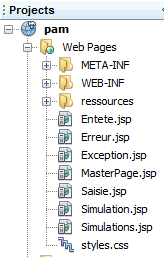
The Tiles framework allows us to define which fragments will be inserted into the master page.
The master page [MasterPage.jsp] is as follows:
<%@ page contentType="text/html; charset=UTF-8" pageEncoding="UTF-8"%>
<%@ taglib prefix="s" uri="/struts-tags" %>
<%@ taglib uri="http://tiles.apache.org/tags-tiles" prefix="tiles" %>
<!DOCTYPE HTML PUBLIC "-//W3C//DTD HTML 4.01 Transitional//EN"
  "http://www.w3.org/TR/html4/loose.dtd">

<html>
  <head>
    <meta http-equiv="Content-Type" content="text/html; charset=UTF-8">
    <link href="styles.css" rel="stylesheet" type="text/css"/>
    <title>
      <tiles:insertAttribute name="titre" ignore="true" />
    </title>
    <s:head/>
  </head>
  <body background="<s:url value="/ressources/standard.jpg"/>">
    <tiles:insertAttribute name="entete" />
    <hr/>
    <tiles:insertAttribute name="saisie" />
    <tiles:insertAttribute name="simulation" />
    <tiles:insertAttribute name="exception" />
    <tiles:insertAttribute name="erreur" />
    <tiles:insertAttribute name="simulations" />
  </body>
</html>
The master page is a container for JSP fragments. Here, it is an assembly of six fragments, those in lines 17 through 23. Upon generation, there may be between 0 and 6 fragments assembled in the master page. This generation is governed by the [WEB-INF/tiles.xml] file, which defines the Tiles views:
<?xml version="1.0" encoding="UTF-8" ?>

<!DOCTYPE tiles-definitions PUBLIC "-//Apache Software Foundation//DTD Tiles Configuration 2.0//EN"
 "http://tiles.apache.org/dtds/tiles-config_2_0.dtd">

<tiles-definitions>

<!-- the master page -->
  <definition name="masterPage" template="/MasterPage.jsp">
    <put-attribute name="entete" value="/Entete.jsp"/>
    <put-attribute name="titre"  value="Pam"/>
    <put-attribute name="saisie" value=""/>
    <put-attribute name="simulation" value=""/>
    <put-attribute name="simulations" value=""/>
    <put-attribute name="exception" value=""/>
    <put-attribute name="erreur" value=""/>
  </definition>

<!-- input view -->
  <definition name="saisie" extends="masterPage">
    <put-attribute name="saisie"   value="/Saisie.jsp"/>
  </definition>

  <!-- simulation view -->
 <definition name="simulation" extends="saisie">
    <put-attribute name="simulation"   value="/Simulation.jsp"/>
  </definition>

<!-- the simulations view -->
  <definition name="simulations" extends="masterPage">
    <put-attribute name="simulations"   value="/Simulations.jsp"/>
  </definition>

<!-- the exceptional view -->
  <definition name="exception" extends="masterPage">
    <put-attribute name="exception"   value="/Exception.jsp"/>
  </definition>

<!-- error view -->
 <definition name="erreur" extends="masterPage">
    <put-attribute name="erreur"   value="/Erreur.jsp"/>
  </definition>
</tiles-definitions>
- The file above defines six Tiles views named: masterPage (line 9), input (line 20), simulation (line 25), simulations (line 30), exception (line 35), error (line 40).
- Lines 9–17: define a view named masterPage (name) and associated with the master page [MasterPage.jsp] (template). We have seen that this JSP page defines six subviews. A Tiles view associated with the master page must specify the JSP fragment associated with each of the six subviews. We can see that some subviews are assigned the empty string as their value. These subviews will not be included in the master page [MasterPage.jsp]. The Tiles view named masterPage therefore consists solely of the sub-fragment [Entete.jsp].
- Lines 20–22: define a view named "saisie" (name) that extends the view named masterPage, which was defined earlier. This means that it inherits all the definitions from the view masterPage. Its definition is equivalent to the following:
<definition name="saisie" template="/MasterPage.jsp">
    <put-attribute name="entete" value="/Entete.jsp"/>
    <put-attribute name="titre"  value="Pam"/>
    <put-attribute name="saisie" value=""/>
    <put-attribute name="simulation" value=""/>
    <put-attribute name="simulations" value=""/>
    <put-attribute name="exception" value=""/>
    <put-attribute name="erreur" value=""/>
    <put-attribute name="saisie" value="/Saisie.jsp"/>
  </definition>
We can see that it is associated with the JSP page [MasterPage.jsp] and that, as such, it must define the six subviews of this page. We can see that the definition on line 9 overrides the one on line 4. The Tiles view named "saisie" is therefore composed of the JSP fragments [Entete.jsp, Saisie.jsp]
If we continue this line of reasoning, we obtain the following table:
Tiles view | JSP pages |
19.5. Message files
The application has been internationalized. The messages are located in the files [messages.properties] and [Formulaire.properties].
The file [messages.properties] is as follows:
Pam.titre=Calcul du salaire des assistantes maternelles
Pam.Erreurs.titre=Les erreurs suivantes se sont produites :
Pam.Erreurs.classe=Exception
Pam.Erreurs.message=Message
Pam.Erreur.libelle=L''erreur suivante s''est produite
Pam.Saisie.Heures.libell\u00e9=Heures travaill\u00e9es
Pam.Saisie.Jours.libell\u00e9=Jours travaill\u00e9s
Pam.Saisie.employ\u00e9=Employ\u00e9
Pam.BtnSalaire.libell\u00e9=Salaire
Pam.BtnEffacer.libell\u00e9=Effacer
Simulation.Infos.employe=Informations Employ\u00e9
Simulation.Employe.nom=Nom
Simulation.Employe.prenom=Pr\u00e9nom
Simulation.Employe.adresse=Adresse
Simulation.Employe.indice=Indice
Simulation.Employe.ville=Ville
Simulation.Employe.codePostal=Code Postal
Simulation.Infos.cotisations=Cotisations Sociales
Simulation.Cotisations.csgrds=CsgRds
Simulation.Cotisations.csgrds=Csgd
Simulation.Cotisations.retraite=Retraite
Simulation.Cotisations.secu=S\u00e9cu
Form.Infos.indemnites=Indemnit\u00e9s
Simulation.Indemnites.salaireHoraire=Salaire horaire
Simulation.Indemnites.entretienJour=Entretien/Jour
Simulation.Indemnites.repasJour=Repas/Jour
Simulation.Indemnites.cong\u00e9sPay\u00e9s=Cong\u00e9s pay\u00e9s
Simulation.Infos.Salaire=Salaire
Simulation.Salaire.salaireBase=Salaire de base
Simulation.Salaire.cotisationsSociales=Cotisations sociales
Simulation.Salaire.entretien=Indemnit\u00e9s d''entretien
Simulation.Salaire.repas=Indemnit\u00e9s de repas
Simulation.salaireNet=Salaire net
# formats
Format.heure = {0,time}
Format.nombre = {0,number,#0.0##}
Format.pourcent = {0,number,##0.00' %'}
Format.monnaie={0,number,##0.00' \u20ac'}
# list of simulations
Pam.Simulations.titre=Liste des simulations
Pam.Simulations.num=Num\u00e9ro
Pam.Simulations.nom=Nom
Pam.Simulations.prenom=Pr\u00e9nom
Pam.Simulations.heures=Heures
Pam.Simulations.jours=Jours
Pam.Simulations.salairebase=Salaire de base
Pam.Simulations.indemnites=Indemnites
Pam.Simulations.cotisationsociales=Cotisations
Pam.Simulations.salairenet=Salaire
Pam.SimulationsVides.titre=La liste des simulations est vide
# menu
Menu.FaireSimulation=Faire la simulation
Menu.EffacerSimulation=Effacer la simulation
Menu.VoirSimulations=Voir les simulations
Menu.RetourFormulaire=Retour au formulaire de navigation
Menu.EnregistrerSimulation=Enregistrer la simulation
Menu.TerminerSession=Terminer la session
# error msg
Erreur.sessionexpiree=La session a expir\u00e9
Erreur.numSimulation=N\u00b0 de simulation incorrect
# conversion error
xwork.default.invalid.fieldvalue=Valeur invalide pour le champ "{0}".
The [Formulaire.properties] file is as follows:
# so that duplicates are in local format
double.format={0,number,#0.00##}
# error msg
joursTravaill\u00e9s.error=Tapez un nombre entier compris entre 1 et 31
heuresTravaill\u00e9es.error=Tapez un nombre r\u00e9el entre 0 et 300
19.6. The style sheet
Tiles views use the following style sheet: [styles.css]
.libelle{
  background-color: #ccffff;
  font-family: 'Times New Roman',Times,serif;
  font-size: 14px;
  font-weight: bold;;
  padding-right: 5px;
  padding-left: 5px;
  padding-bottom: 5px;
  padding-top: 5px;
}


.info{
  background-color: #99cc00;;
  padding-right: 5px;
  padding-left: 5px;
  padding-bottom: 5px;
  padding-top: 5px;
}

.titreInfos{
  background-color: #ffcc00
}
19.7. The Initial View
To explore the application, we will examine it based on the user’s various actions. For each action, we will look at the Struts action that executes it and the Tiles view that is returned in response.
In [struts.xml], we have the following actions:
  <!-- default action -->
    <default-action-ref name="index" />
    <action name="index">
      <result type="redirectAction">
        <param name="actionName">Formulaire!input</param>
        <param name="namespace">/</param>
      </result>
    </action>
    <!-- action Form -->
    <action name="Formulaire" class="web.actions.Formulaire">
      <result name="success" type="tiles">saisie</result>
      <result name="exception" type="tiles">exception</result>
      <result name="input" type="tiles">saisie</result>
      <result name="simulation" type="tiles">simulation</result>
</action>
- Lines 2–8: The application’s default action is [Formulaire!input].
The [Formulaire] class is as follows:
package web.actions;

...
public class Formulaire extends ActionSupport implements Preparable, SessionAware {

  // configuration initialized by Spring
  private Config config;
  // list of employees
  private List<Employe> employes;
  // error list
  private List<Erreur> erreurs;
  // payslip
  private FeuilleSalaire feuilleSalaire;
  // foreclosures
  private String comboEmployesValue;
  private Double heuresTravaillees;
  private Integer joursTravailles;
  // session
  private Map<String, Object> session;
  // menu
  private Menu menu;

  @Override
  public void prepare() throws Exception {
    ...
  }

  @Override
  public String input() {
  ....
  }

  // wage calculation
  public String calculSalaire() {
 ...
    }
  }

  @Override
  public void validate() {
  ...
  }

  @Override
  public void setSession(Map<String, Object> map) {
    session = map;
  }

  // getters and setters
  ...
}
- line 4: the [Formulaire] action implements the Preparable interface. This interface has only one method, the prepare method on line 24. This method is executed once before any other method in the action. It is generally used to initialize the action's model.
The action model consists of lines 6–21:
- line 7: the field config is initialized by Spring as explained. It provides access to application-scope data:
- a reference to the [métier] layer
- a reference to the list of employees
- a reference to the exception that may have occurred during the instantiation of the [Config] object
- line 9: a list of employees. This will populate the employee combo box in the [Saisie.jsp] fragment.
- Line 11: a list of errors. This will populate the [Erreur.jsp] fragment.
- Line 21: the list of menu options for fragment [Entete.jsp]
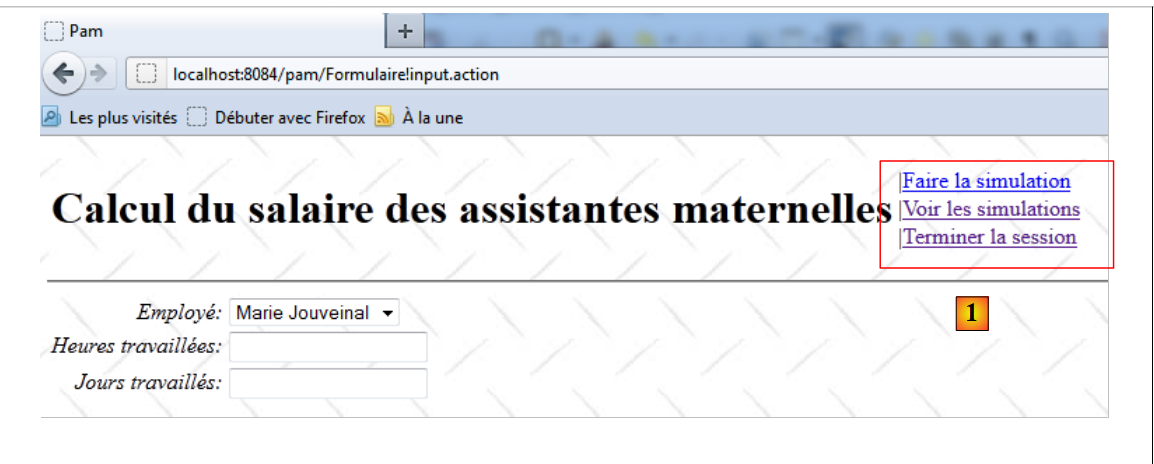 |
In [1], the links in the displayed menu are controlled by the menu field of the [Formulaire] action.
The prepare method is executed before the input method. It is as follows:
  @Override
  public void prepare() throws Exception {
    // configuration error?
    Exception initException = config.getInitException();
    if (initException != null) {
      erreurs = new ArrayList<Erreur>();
      Throwable th = initException;
      while (th != null) {
        erreurs.add(new Erreur(th.getClass().getName(), th.getMessage()));
        th = th.getCause();
      }
    } else {
      employes = config.getEmployes();
    }
}
- line 4: retrieve the exception in the [Config] object instantiated by Spring
- line 5: if an exception occurred during the instantiation of the [Config] object, then we initialize the error list on line 11. The [Erreur] class is as follows:
package web.entities;

import java.io.Serializable;

public class Erreur implements Serializable{

  public Erreur() {
  }

  // fields
  private String classe;
  private String message;

  // manufacturer
  public Erreur(String classe, String message){
    this.setClasse(classe);
    this.message=message;
  }

  // getters and setters
...
}
The class is used to store the exception stack:
- line 11: the exception class
- line 12: the exception message
Let’s return to the prepare method:
- line 13: the list of employees for the [Config] object is stored in the action’s employees field.
Once the prepare method has been executed, the input method will be executed next. It is as follows:
  @Override
  public String input() {
    if (erreurs == null) {
      // menu
      menu = new Menu(true, false, false, true, false, true);
      return SUCCESS;
    } else {
      // menu
      menu = new Menu(false, false, false, false, false, false);
      return "exception";
    }
}
The input method simply sets the list of menu options to be displayed. The [Menu] class is as follows:
package web.entities;

import java.io.Serializable;

public class Menu implements Serializable {
  // menu items

  private boolean faireSimulation;
  private boolean effacerSimulation;
  private boolean enregistrerSimulation;
  private boolean voirSimulations;
  private boolean retourFormulaire;
  private boolean terminerSession;

  public Menu() {
  }

  public Menu(boolean faireSimulation, boolean effacerSimulation, boolean enregistrerSimulation, boolean voirSimulations, boolean retourFormulaire, boolean terminerSession) {
    this.faireSimulation = faireSimulation;
    this.effacerSimulation = effacerSimulation;
    this.enregistrerSimulation = enregistrerSimulation;
    this.voirSimulations = voirSimulations;
    this.retourFormulaire = retourFormulaire;
    this.terminerSession = terminerSession;
  }

  // getters and setters
...
}
- lines 8–13: there are 6 possible links in the menu
- lines 18-25: the class constructor allows you to specify which links should be displayed and which should not.
The menu links are displayed in [Entete.jsp], a JSP fragment present in all Tiles views. Each action will have a menu field to control the display of the menu in [Entete.jsp].
Let’s return to the input method:
  @Override
  public String input() {
    if (erreurs == null) {
      // menu
      menu = new Menu(true, false, false, true, false, true);
      return SUCCESS;
    } else {
      // menu
      menu = new Menu(false, false, false, false, false, false);
      return "exception";
    }
}
- lines 3-6: if the error list is empty, the menu [Faire la simulation, Voir les simulations, Terminer la session] will be displayed and the input key returned.
- lines 9-10: if the error list is not empty, the menu will be empty and the exception key will be returned.
Let's return to the configuration of the [Formulaire] action in [struts.xml]:
    <!-- action Form -->
    <action name="Formulaire" class="web.actions.Formulaire">
      <result name="success" type="tiles">saisie</result>
      <result name="exception" type="tiles">exception</result>
      <result name="input" type="tiles">saisie</result>
      <result name="simulation" type="tiles">simulation</result>
</action>
- line 5: the input key displays the Tiles view named input
- line 4: the exception key displays the Tiles view named exception
Let’s start with the Tiles view named "input". It consists of the JSP fragments [Entete.jsp] and [Saisie.jsp].
The fragment [Entete.jsp] is as follows:

Its code is as follows:
<%@ page contentType="text/html; charset=UTF-8" pageEncoding="UTF-8"%>
<%@ taglib prefix="s" uri="/struts-tags" %>

<table>
  <tr>
    <td><h1><s:text name="Pam.titre"/></h1></td>
    <td>
      <s:if test="menu.faireSimulation">
        |<a href="javascript:doSimulation()"><s:text name="Menu.FaireSimulation"/></a><br/>
      </s:if>
      <s:if test="menu.effacerSimulation">
        |<a href="<s:url action="Formulaire!input"/>"><s:text name="Menu.EffacerSimulation"/></a><br/>
      </s:if>
      <s:if test="menu.voirSimulations">
        |<a href="<s:url action="VoirSimulations"/>"><s:text name="Menu.VoirSimulations"/></a><br/>
      </s:if>
      <s:if test="menu.retourFormulaire">
        |<a href="<s:url action="RetourFormulaire"/>"><s:text name="Menu.RetourFormulaire"/></a><br/>
      </s:if>
      <s:if test="menu.enregistrerSimulation">
        |<a href="<s:url action="EnregistrerSimulation"/>"><s:text name="Menu.EnregistrerSimulation"/></a><br/>
      </s:if>
      <s:if test="menu.terminerSession">
        |<a href="<s:url action="TerminerSession"/>"><s:text name="Menu.TerminerSession"/></a><br/>
      </s:if>
    </td>
  </tr>
</table>
- lines 8-25: display of the six menu links [Run Simulation (lines 8-10), Clear Simulation (lines 11-13), View Simulations (lines 14-16), Return to Form (lines 17-19), Save Simulation (lines 20-22), End Session (lines 23-25).
- lines 8, 11, 14, 17, 20, 23: the display of the links is controlled by the menu field of the current action.
Note that the fragment [Entete.jsp] displays a table Html (lines 4–28) but is not a complete Html page. It is important to remember here that all views of the application are embedded in the following master page [MasterPage.jsp]:
<%@ page contentType="text/html; charset=UTF-8" pageEncoding="UTF-8"%>
<%@ taglib prefix="s" uri="/struts-tags" %>
<%@ taglib uri="http://tiles.apache.org/tags-tiles" prefix="tiles" %>
<!DOCTYPE HTML PUBLIC "-//W3C//DTD HTML 4.01 Transitional//EN"
  "http://www.w3.org/TR/html4/loose.dtd">

<html>
  <head>
    <meta http-equiv="Content-Type" content="text/html; charset=UTF-8">
    <link href="styles.css" rel="stylesheet" type="text/css"/>
    <title>
      <tiles:insertAttribute name="titre" ignore="true" />
    </title>
    <s:head/>
  </head>
  <body background="<s:url value="/ressources/standard.jpg"/>">
    <tiles:insertAttribute name="entete" />
    <hr/>
    <tiles:insertAttribute name="saisie" />
    <tiles:insertAttribute name="simulation" />
    <tiles:insertAttribute name="exception" />
    <tiles:insertAttribute name="erreur" />
    <tiles:insertAttribute name="simulations" />
  </body>
</html>
The fragment [Entete.jsp] is inserted on line 17, within a regular Html page.
The fragment [Saisie.jsp] is inserted on line 19. This is the following view:
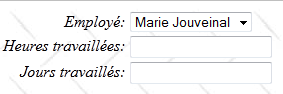
The code for the [Saisie.jsp] fragment is as follows:
<%@ page contentType="text/html; charset=UTF-8" pageEncoding="UTF-8"%>
<%@ taglib prefix="s" uri="/struts-tags" %>
<%@ taglib uri="http://tiles.apache.org/tags-tiles" prefix="tiles" %>
<!DOCTYPE HTML PUBLIC "-//W3C//DTD HTML 4.01 Transitional//EN"
  "http://www.w3.org/TR/html4/loose.dtd">


<script language="javascript" type="text/javascript">
  function doSimulation(){
    // on poste le formulaire
    document.forms['Saisie'].elements['action'].name='action:Formulaire!calculSalaire'
    document.forms['Saisie'].submit();
  }
</script>

<!-- data entry -->
<s:form name="Saisie" id="Saisie">
  <s:select name="comboEmployesValue" list="employes" listKey="SS" listValue="prenom+' ' +nom" key="Pam.Saisie.employé"/>
  <s:textfield name="heuresTravaillees" key="Pam.Saisie.Heures.libellé" value="%{#parameters['heuresTravaillees']!=null ? #parameters['heuresTravaillees'] : heuresTravaillees==null ? '' : getText('double.format',{heuresTravaillees})}"/>
  <s:textfield name="joursTravailles" key="Pam.Saisie.Jours.libellé" value="%{#parameters['joursTravailles']!=null ? #parameters['joursTravailles'] : joursTravailles==null ? '' : joursTravailles}"/>
  <input type="hidden" name="action"/>
</s:form>
- Line 17: The form has no action attribute. By default, action='Form'.
- Line 18: Display of the employee dropdown. The content of the dropdown (list attribute) is provided by the employees field of the current action. The value attribute of the options will be the employee ID (SS) (listKey attribute). The label displayed for each option will be the employee’s first and last name (listValue attribute). The SS number of the employee selected in the dropdown will be posted to the [Formulaire].comboEmployesvalue field (attribute name).
- Line 19: field for entering hours worked. The displayed value (value attribute) is that of the heuresTravaillees field from the [Formulaire] action in the following format (Formulaire.properties):
double.format={0,number,#0.00##}
The value will be posted to the field [Formulaire].heuresTravaillees (attribute name).
- Line 20: Input field for days worked. The displayed value (value attribute) is that of field joursTravailles from action [Formulaire].
The value will be posted to the [Formulaire].joursTravailles field (attribute name).
Ultimately, the Tiles view displayed at startup when there are no errors is as follows:
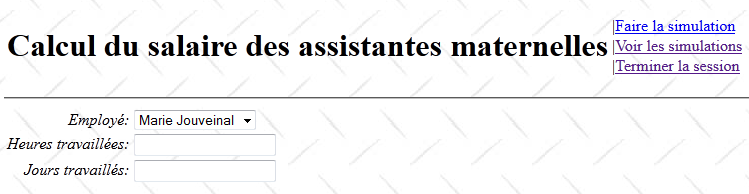
Let’s return to the configuration of the [Formulaire] action:
    <!-- action Form -->
    <action name="Formulaire" class="web.actions.Formulaire">
      <result name="success" type="tiles">saisie</result>
      <result name="exception" type="tiles">exception</result>
      <result name="input" type="tiles">saisie</result>
      <result name="simulation" type="tiles">simulation</result>
</action>
We have seen that the action [Formulaire].input can also return the exception key on line 4. In this case, the Tiles view named exception is displayed. This view consists of the fragments [Entete.jsp] and [Exception.jsp]. We have already presented the fragment [Entete.jsp]. The fragment [Exception.jsp] is as follows:
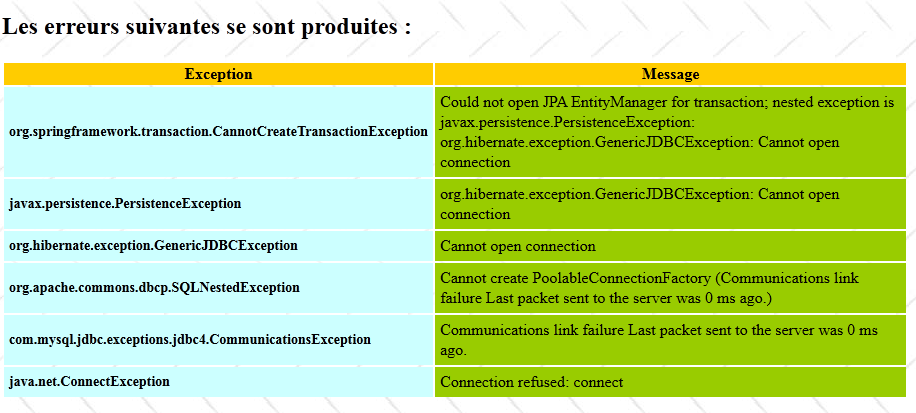
This is the application’s version 2 startup page when the DBMS has not been launched. The JSP code for the [Erreur.jsp] fragment is as follows:
<%@ page contentType="text/html; charset=UTF-8" pageEncoding="UTF-8"%>
<%@ taglib prefix="s" uri="/struts-tags" %>

<h2><s:text name="Pam.Erreurs.titre"/></h2>
<table>
  <tr class="titreInfos">
    <th><s:text name="Pam.Erreurs.classe"/></th>
    <th><s:text name="Pam.Erreurs.message"/></th>
  </tr>
  <s:iterator value="erreurs">
    <tr>
      <td class="libelle"><s:property value="classe"/></td>
      <td class="info"><s:property value="message"/></td>
    </tr>
  </s:iterator>
</table>
- lines 10-14: an iterator over the List<Error> errors collection from the [Formulaire] action. Recall that in the event of an error, a stack of exceptions was stored there.
19.8. Perform a simulation
Once the initial view is displayed, you can calculate a salary using the [Faire une simulation] link.
19.8.1. Validating the entries
Consider the following sequence:
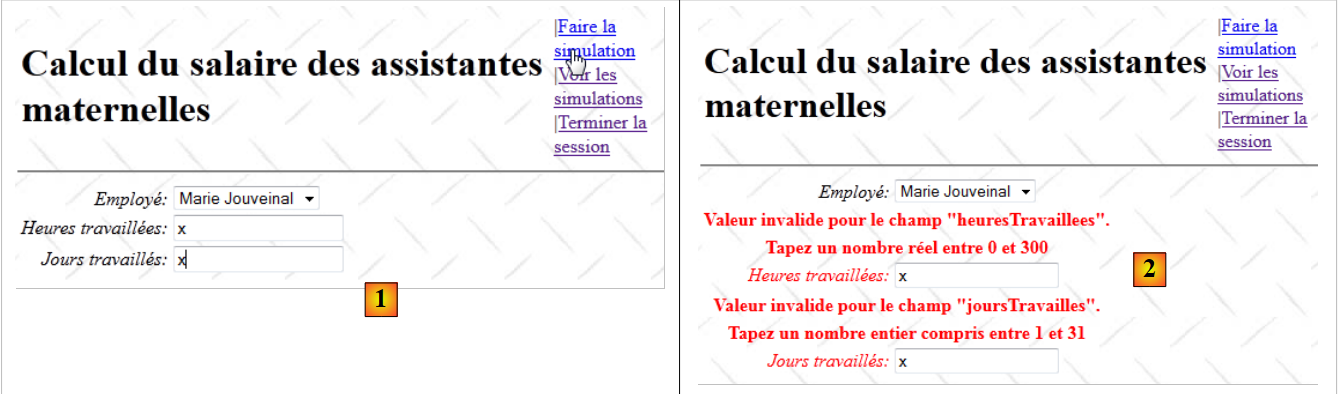 |
- in [1], an incorrect entry
- in [2], the response sent.
Consider the configuration of action [Formulaire] in [struts.xml]:
    <!-- action Form -->
    <action name="Formulaire" class="web.actions.Formulaire">
      <result name="success" type="tiles">saisie</result>
      <result name="exception" type="tiles">exception</result>
      <result name="input" type="tiles">saisie</result>
      <result name="simulation" type="tiles">simulation</result>
</action>
We know that in the event of a validation error, the validation interceptor returns the "input" key. Therefore, the "Input" Tiles view is returned. The validation process ensures that fields with errors are accompanied by error messages.
Validation for action [Formulaire] is handled by the following file: [Formulaire-validation.xml]:
<!DOCTYPE validators PUBLIC "-//OpenSymphony Group//XWork Validator 1.0.2//EN" "http://www.opensymphony.com/xwork/xwork-validator-1.0.2.dtd">


<validators>

  <field name="heuresTravaillees" >
    <field-validator type="required" short-circuit="true">
      <message key="heuresTravaillées.error"/>
    </field-validator>

    <field-validator type="conversion" short-circuit="true">
      <message key="heuresTravaillées.error"/>
    </field-validator>

    <field-validator type="double" short-circuit="true">
      <param name="minInclusive">0</param>
      <param name="maxInclusive">300</param>
      <message key="heuresTravaillées.error"/>
    </field-validator>
  </field>

  <field name="joursTravailles" >
    <field-validator type="required" short-circuit="true">
      <message key="joursTravaillés.error"/>
    </field-validator>

    <field-validator type="conversion" short-circuit="true">
      <message key="joursTravaillés.error"/>
    </field-validator>

    <field-validator type="int" short-circuit="true">
      <param name="min">0</param>
      <param name="max">31</param>
      <message key="joursTravaillés.error"/>
    </field-validator>
  </field>

</validators>
- Lines 6–20 verify that the field heuresTravaillees is a real number in the range [0,300].
- Lines 22–36 verify that the field joursTravailles is an integer within the range [0,31].
Let’s return to the configuration of the [Formulaire] action in [struts.xml]:
    <!-- action Form -->
    <action name="Formulaire" class="web.actions.Formulaire">
      ...
      <result name="input" type="tiles">saisie</result>
</action>
We know that in the event of a validation error, the validation interceptor returns the "input" key. Therefore, the "Input" Tiles view is returned.
Recall that this view consists of the fragments [Entete.jsp] and [Saisie.jsp], where [Entete.jsp] contains a title and a list of options, and [Saisie.jsp] contains the input form. In the event of input errors, the validation process ensures that the erroneous fields are accompanied by error messages and also display their incorrect values. The fragment [Entete.jsp] plays no role in the validation process. Let’s look at its code:
<%@ page contentType="text/html; charset=UTF-8" pageEncoding="UTF-8"%>
<%@ taglib prefix="s" uri="/struts-tags" %>

<table>
  <tr>
    <td><h1><s:text name="Pam.titre"/></h1></td>
    <td>
      <s:if test="menu.faireSimulation">
        |<a href="javascript:doSimulation()"><s:text name="Menu.FaireSimulation"/></a><br/>
      </s:if>
      <s:if test="menu.effacerSimulation">
        |<a href="<s:url action="Formulaire!input"/>"><s:text name="Menu.EffacerSimulation"/></a><br/>
      </s:if>
      <s:if test="menu.voirSimulations">
        |<a href="<s:url action="VoirSimulations"/>"><s:text name="Menu.VoirSimulations"/></a><br/>
      </s:if>
      <s:if test="menu.retourFormulaire">
        |<a href="<s:url action="RetourFormulaire"/>"><s:text name="Menu.RetourFormulaire"/></a><br/>
      </s:if>
      <s:if test="menu.enregistrerSimulation">
        |<a href="<s:url action="EnregistrerSimulation"/>"><s:text name="Menu.EnregistrerSimulation"/></a><br/>
      </s:if>
      <s:if test="menu.terminerSession">
        |<a href="<s:url action="TerminerSession"/>"><s:text name="Menu.TerminerSession"/></a><br/>
      </s:if>
    </td>
  </tr>
</table>
The six links are configured by the menu field in the template (lines 8, 11, 14, 17, 20, 23). When an error occurs, this template is not updated by the action, resulting in a page without a menu. To resolve this issue, the [Formulaire] class has the following validate method:
package web.actions;

import com.opensymphony.xwork2.ActionSupport;
...
public class Formulaire extends ActionSupport implements Preparable, SessionAware {

  ...
  // menu
  private Menu menu;

  @Override
  public void prepare() throws Exception {
  ...
  }

  @Override
  public String input() {
  ...
  }

  // wage calculation
  public String calculSalaire() {
  ...
  }

  @Override
  public void validate() {
    // mistakes?
    if (!getFieldErrors().isEmpty()) {
      // menu
      menu = new Menu(true, false, false, true, false, true);
    }
  }

  // getters and setters
  ...
}
- line 27: we know that when this line is present, the validate method is executed by the validation process. We take this opportunity to update the menu on line 4, which is part of the [Entete.jsp] fragment model.
- lines 29–32: if there were validation errors, then we set the menu to redisplay the Tiles view. If there were no validation errors, then we do nothing. The calculSalaire method is then responsible for creating the view template to be displayed.
19.8.2. Salary calculation
Let’s return to the JSP code in the header:
<%@ page contentType="text/html; charset=UTF-8" pageEncoding="UTF-8"%>
<%@ taglib prefix="s" uri="/struts-tags" %>

<table>
  <tr>
    <td><h1><s:text name="Pam.titre"/></h1></td>
    <td>
      <s:if test="menu.faireSimulation">
        |<a href="javascript:doSimulation()"><s:text name="Menu.FaireSimulation"/></a><br/>
      </s:if>
      ...
    </td>
  </tr>
</table>
- Line 9: When the user clicks on the link [Faire la simulation], the function Javascript doSimulation is executed. This is defined in the fragment [Saisie.jsp]:
<script language="javascript" type="text/javascript">
  function doSimulation(){
    // on poste le formulaire
    document.forms['Saisie'].elements['action'].name='action:Formulaire!calculSalaire'
    document.forms['Saisie'].submit();
  }
</script>

<!-- data entry -->
<s:form name="Saisie" id="Saisie">
  <s:select name="comboEmployesValue" list="employes" listKey="SS" listValue="prenom+' ' +nom" key="Pam.Saisie.employé"/>
  <s:textfield name="heuresTravaillees" key="Pam.Saisie.Heures.libellé" value="%{#parameters['heuresTravaillees']!=null ? #parameters['heuresTravaillees'] : heuresTravaillees==null ? '' : getText('double.format',{heuresTravaillees})}"/>
  <s:textfield name="joursTravailles" key="Pam.Saisie.Jours.libellé" value="%{#parameters['joursTravailles']!=null ? #parameters['joursTravailles'] : joursTravailles==null ? '' : joursTravailles}"/>
  <input type="hidden" name="action"/>
</s:form>
- Line 14: A hidden field named action will be posted to the [Formulaire] action. This field allows us to specify the action and method to be executed in the POST section of the form. You may recall from the earlier examples that these can be specified in a parameter named action:Action!method. The value of this parameter does not matter; it just needs to be present.
- Lines 2–6: The Javascript function, which is executed when the user clicks the [Faire la simulation] link in the [Entete.jsp] fragment.
- Line 4: We change the name attribute of the hidden action field. We ensure that it is in the action:Action!method format expected by Struts.
- Line 5: The form named "Line 5 Entry" is submitted. As a result, the following parameter string is submitted:
SS1: ID of the employee selected in the combo box
heuresTravaillees: number of hours worked
joursTravailles: number of days worked
action:Form!calculSalaire: The above elements will be posted to action [Formulaire], and then the calculSalaire method of that action will be executed.
The method [Formulaire].calculSalaire is as follows:
// wage calculation
  public String calculSalaire() {
    try {
      // salary calculation
      feuilleSalaire = config.getMetier().calculerFeuilleSalaire(comboEmployesValue, heuresTravaillees, joursTravailles);
      // put the simulation in the session
      session.put("simulation", new Simulation(0, "" + heuresTravaillees, "" + joursTravailles, feuilleSalaire));
      // menu
      menu = new Menu(true, true, true, true, false, true);
      // finish
      return "simulation";
    } catch (Throwable th) {
      ...
    }
  }
- Line 5: The payroll calculation is requested from the [métier] layer
- line 7: a Simulation object is placed in the user's session. This may be needed for a subsequent query. The [Simulation] class is as follows:
package web.entities;

import java.io.Serializable;
import metier.FeuilleSalaire;

public class Simulation implements Serializable{

  public Simulation() {
  }

  // simulation fields
  private Integer num;
  private FeuilleSalaire feuilleSalaire;
  private String heuresTravaillées;
  private String joursTravaillés;

  // manufacturer
  public Simulation(Integer num,String heuresTravaillées, String joursTravaillés, FeuilleSalaire feuilleSalaire){
    this.setNum(num);
    this.setFeuilleSalaire(feuilleSalaire);
    this.setHeuresTravaillées(heuresTravaillées);
    this.setJoursTravaillés(joursTravaillés);
  }

  public double getIndemnites(){
    return feuilleSalaire.getElementsSalaire().getIndemnitesEntretien()+ feuilleSalaire.getElementsSalaire().getIndemnitesRepas();
  }

  // getters and setters
...
}
- line 12: the simulation number. It is incremented with each new simulation saved.
- line 13: the employee's pay stub
- line 14: the number of hours worked
- line 15: the number of days worked
- line 25: the method getIndemnites returns the total compensation for the employee
We will see that the [Simulation] class is the template for the [Simulations.jsp] fragment, which displays all the simulations performed.
Back to method [Formulaire].calculSalaire:
// wage calculation
  public String calculSalaire() {
    try {
      // salary calculation
      feuilleSalaire = config.getMetier().calculerFeuilleSalaire(comboEmployesValue, heuresTravaillees, joursTravailles);
      // put the simulation in the session
      session.put("simulation", new Simulation(0, "" + heuresTravaillees, "" + joursTravailles, feuilleSalaire));
      // menu
      menu = new Menu(true, true, true, true, false, true);
      // finish
      return "simulation";
    } catch (Throwable th) {
 ...
  }
- line 9: update the menu
- line 11: return the key for navigation simulation.
Back to the configuration of the [Formulaire] action:
    <!-- action Form -->
    <action name="Formulaire" class="web.actions.Formulaire">
         ...
      <result name="simulation" type="tiles">simulation</result>
</action>
Line 4 shows that the key navigation simulation displays the Tiles view named simulation. This view is composed of the following JSP fragments: [Entete, Saisie, Simulation].
The rendered view is as follows:
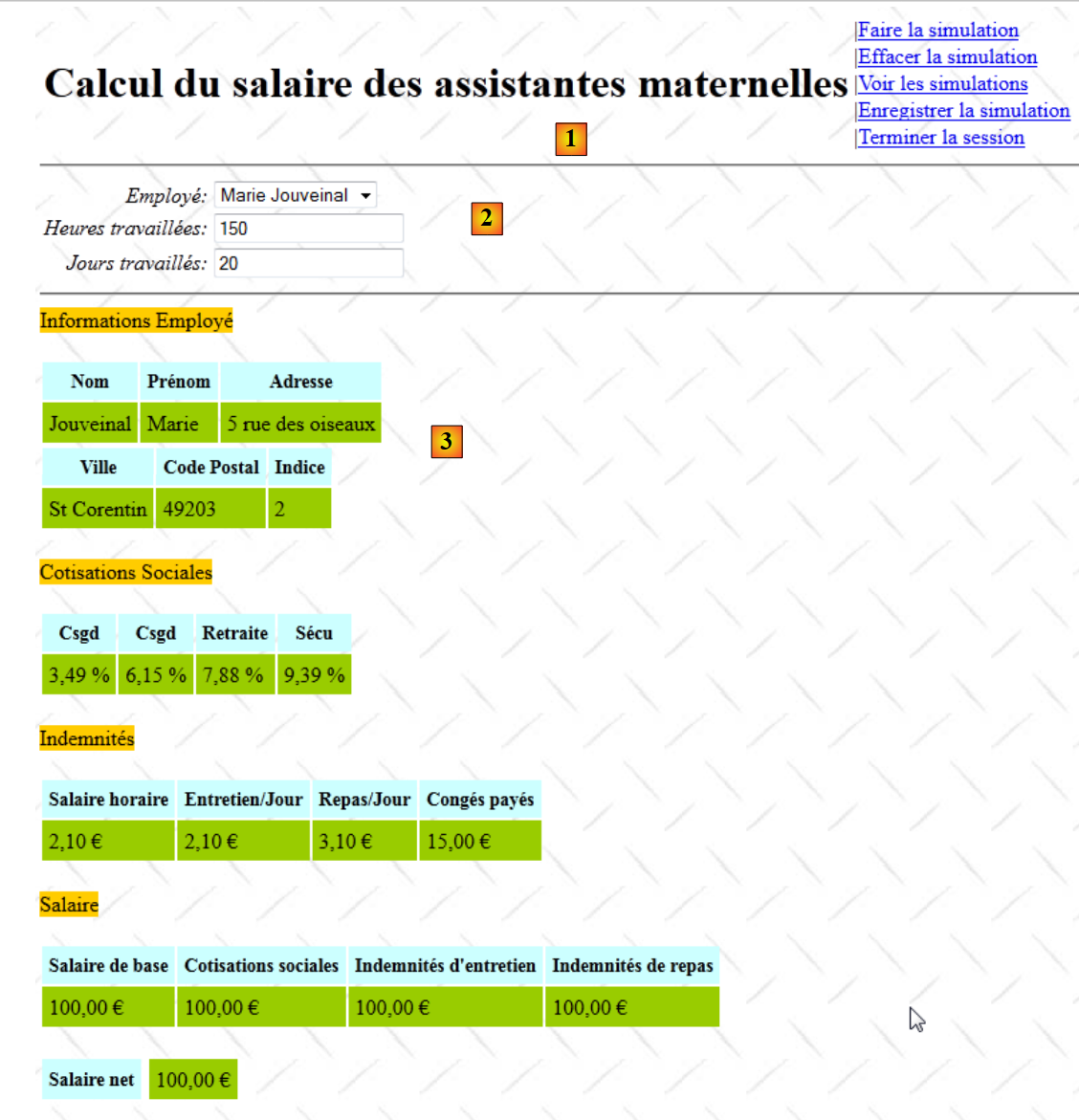 |
- in [1], the fragment [Entete.jsp]
- in [2], the fragment [Saisie.jsp]
- in [3], the fragment [Simulation.jsp]. Note that the pay stub shown is the fictitious pay stub rendered by layer [metier].
The first two fragments have already been presented. The fragment [Simulation.jsp] is as follows:
<%@ page contentType="text/html; charset=UTF-8" pageEncoding="UTF-8"%>
<%@ taglib prefix="s" uri="/struts-tags" %>

<hr/>
<!-- information Employees -->
<span class="titreInfos">
  <s:text  name="Simulation.Infos.employe"/>
</span>
<br/><br/>
<table>
  <!-- line 1 -->
  <tr>
    <th class="libelle">
      <s:text name="Simulation.Employe.nom"/>
    </th>
    <th class="libelle">
      <s:text name="Simulation.Employe.prenom"/>
    </th>
    <th class="libelle">
      <s:text name="Simulation.Employe.adresse"/>
    </th>
  </tr>
  <!-- line 2 -->
  <tr>
    <td class="info">
      <s:property value="feuilleSalaire.employe.nom"/>
    </td>
    <td class="info">
      <s:property value="feuilleSalaire.employe.prenom"/>
    </td>
    <td class="info">
      <s:property value="feuilleSalaire.employe.adresse"/>
    </td>
</table>
<table>
  <!-- line 1 -->
  <tr>
    <th class="libelle"><s:text name="Simulation.Employe.ville"/></th>
    <th class="libelle">
      <s:text name="Simulation.Employe.codePostal"/>
    </th>
    <th class="libelle">
      <s:text name="Simulation.Employe.indice"/>
    </th>
  </tr>
  <!-- line 2 -->
  <tr>
    <td class="info">
      <s:property value="feuilleSalaire.employe.ville"/>
    </td>
    <td class="info">
      <s:property value="feuilleSalaire.employe.codePostal"/>
    </td>
    <td class="info">
      <s:property value="feuilleSalaire.employe.indemnite.indice"/>
    </td>
</table>
<!-- information Cotisations -->
<br/>
<span class="titreInfos">
  <s:text name="Simulation.Infos.cotisations"/>
</span>

<br/><br/>
<table>
  <!-- line 1 -->
  <tr>
    <th class="libelle">
      <s:text name="Simulation.Cotisations.csgrds"/>
    </th>
    <th class="libelle">
      <s:text name="Simulation.Cotisations.csgrds"/>
    </th>
    <th class="libelle">
      <s:text name="Simulation.Cotisations.retraite"/>
    </th>
    <th class="libelle">
      <s:text name="Simulation.Cotisations.secu"/>
    </th>
  </tr>
  <!-- line 2 -->
  <tr>
    <td class="info">
      <s:text name="Format.pourcent">
        <s:param value="feuilleSalaire.cotisation.csgrds"/>
      </s:text>
    </td>
    <td  class="info">
      <s:text name="Format.pourcent">
        <s:param value="feuilleSalaire.cotisation.csgd"/>
      </s:text>
    </td>
    <td class="info">
      <s:text name="Format.pourcent">
        <s:param value="feuilleSalaire.cotisation.retraite"/>
      </s:text>
    </td>
    <td class="info">
      <s:text name="Format.pourcent">
        <s:param value="feuilleSalaire.cotisation.secu"/>
      </s:text>
    </td>
</table>
<!-- information Indemnities -->
<br/>
<span class="titreInfos">
  <s:text name="Form.Infos.indemnites"/>
</span>
<br/><br/>
<table>
  <!-- line 1 -->
  <tr>
    <th class="libelle">
      <s:text name="Simulation.Indemnites.salaireHoraire"/>
    </th>
    <th class="libelle">
      <s:text name="Simulation.Indemnites.entretienJour"/>
    </th>
    <th class="libelle">
      <s:text name="Simulation.Indemnites.repasJour"/>
    </th>
    <th class="libelle">
      <s:text name="Simulation.Indemnites.congésPayés"/>
    </th>
  </tr>
  <!-- line 2 -->
  <tr>
    <td class="info">
      <s:text name="Format.monnaie">
        <s:param value="feuilleSalaire.employe.indemnite.baseHeure"/>
      </s:text>
    </td>
    </td>
    <td class="info">
      <s:text name="Format.monnaie">
        <s:param value="feuilleSalaire.employe.indemnite.entretienJour"/>
      </s:text>
    </td>
    <td class="info">
      <s:text name="Format.monnaie">
        <s:param value="feuilleSalaire.employe.indemnite.repasJour"/>
      </s:text>
    </td>
    <td class="info">
      <s:text name="Format.monnaie">
        <s:param value="feuilleSalaire.employe.indemnite.indemnitesCP"/>
      </s:text>
    </td>
  </tr>
</table>
<!-- salary information -->
<br/>
<span class="titreInfos">
  <s:text name="Simulation.Infos.Salaire"/>
</span>
<br/><br/>
<table>
  <!-- line 1 -->
  <tr>
    <th class="libelle">
      <s:text name="Simulation.Salaire.salaireBase"/>
    </th>
    <th class="libelle">
      <s:text name="Simulation.Salaire.cotisationsSociales"/>
    </th>
    <th class="libelle">
      <s:text name="Simulation.Salaire.entretien"/>
    </th>
    <th class="libelle">
      <s:text name="Simulation.Salaire.repas"/>
    </th>
  </tr>

  <!-- line 2 -->
  <tr>
    <td class="info">
      <s:text name="Format.monnaie">
        <s:param value="feuilleSalaire.elementsSalaire.salaireBase"/>
      </s:text>
    </td>
    <td class="info">
      <s:text name="Format.monnaie">
        <s:param value="feuilleSalaire.elementsSalaire.cotisationsSociales"/>
      </s:text>
    </td>
    <td class="info">
      <s:text name="Format.monnaie">
        <s:param value="feuilleSalaire.elementsSalaire.indemnitesEntretien"/>
      </s:text>
    </td>
    <td class="info">
      <s:text name="Format.monnaie">
        <s:param value="feuilleSalaire.elementsSalaire.indemnitesRepas"/>
      </s:text>
    </td>
  </tr>
</table>
<!-- Salary net-->
<br/>
<table>
  <tr>
    <td class="libelle">
      <s:text name="Simulation.salaireNet"/>
    <td></td>
    <td class="info">
      <s:text name="Format.monnaie">
        <s:param value="feuilleSalaire.elementsSalaire.salaireNet"/>
      </s:text>
    </td>
  </tr>
</table>
It's long ... but it's functionally simple. This fragment displays the various properties of the field [Formulaire].feuilleSalaire, which represents the employee's pay stub.
Back to the [Formulaire].calculSalaire method:
// wage calculation
  public String calculSalaire() {
    try {
      ...
      return "simulation";
    } catch (Throwable th) {
      erreurs = new ArrayList<Erreur>();
      while (th != null) {
        erreurs.add(new Erreur(th.getClass().getName(), th.getMessage()));
        th = th.getCause();
      }
      // menu
      menu = new Menu(false, false, false, false, true, true);
      return "exception";
    }
  }
Salary calculation can go wrong. This would be the case, for example, if the connection to the DBMS were to fail. In this case, we handle the exception that occurs. We have already encountered this scenario when studying the method [Formulaire].input.
- Lines 7–11: We create a list of Error objects from the exception stack
- Line 13: We set the menu
- Line 14: We set the exception key.
The exception key will display the Tiles exception view:
    <!-- action Form -->
    <action name="Formulaire" class="web.actions.Formulaire">
      <result name="exception" type="tiles">exception</result>
      ...
</action>
This Tiles view has already been presented. It looks like this:
19.9. Save a simulation
After running a simulation, the user may want to save it to the session.
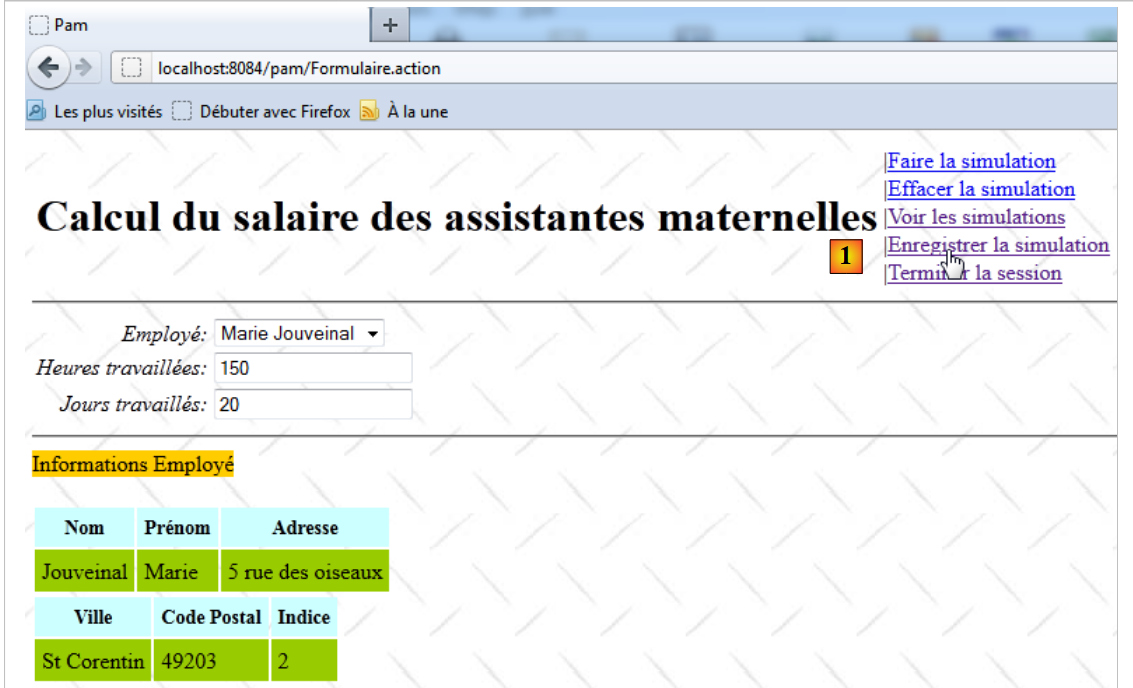 |
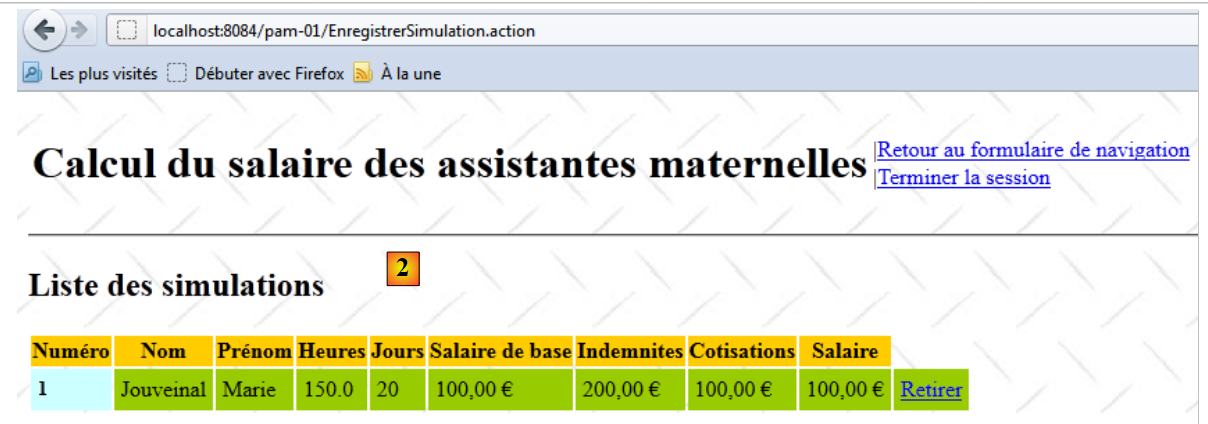 |
- In [1], the simulation is saved
- In [2], the response displays the list of simulations already performed, to which the new simulation is added
The link [Enregistrer la simulation] is located in the fragment [Entete.jsp]:
<%@ page contentType="text/html; charset=UTF-8" pageEncoding="UTF-8"%>
<%@ taglib prefix="s" uri="/struts-tags" %>

<table>
  <tr>
    <td><h1><s:text name="Pam.titre"/></h1></td>
    <td>
      ...
      <s:if test="menu.enregistrerSimulation">
        |<a href="<s:url action="EnregistrerSimulation"/>"><s:text name="Menu.EnregistrerSimulation"/></a><br/>
      </s:if>
      ...
    </td>
  </tr>
</table>
We can see that clicking on the link triggers the execution of action [EnregistrerSimulation]. This action is configured in the [struts.xml] file as follows:
   <!-- action EnregistrerSimulation -->
    <action name="EnregistrerSimulation" class="web.actions.Enregistrer" method="execute">
      <result name="error" type="tiles">erreur</result>
      <result name="simulations" type="tiles">simulations</result>
</action>
- Line 1: The action [EnregistrerSimulation] is associated with the class [Enregistrer] and its execute method.
The [Enregistrer] class is as follows:
package web.actions;

...
public class Enregistrer extends ActionSupport implements SessionAware {

  // session
  private Map<String, Object> session;
  // menu
  private Menu menu;

  @Override
  public void setSession(Map<String, Object> session) {
    this.session = session;
  }

  // action execution
  public String execute() {
    // retrieve the last simulation in the session
    Simulation simulation = (Simulation) session.get("simulation");
    if (simulation == null) {
      return ERROR;
    }
    ...
  }

  // getters and setters
  ...
}
- line 4: because the action needs access to the session, it implements the SessionAware interface.
- line 7: the session
- line 9: the menu
When the [Enregistrer] action is instantiated, its execute method is executed. Recall that its job is to place the latest simulation into the session. This simulation will be added to the list of simulations already performed, which is also stored in the session.
- line 19: we retrieve the last simulation placed in the session.
- Lines 20–22: If it is not found, then the session has likely expired. Indeed, the session lasts only a certain amount of time, which can be set in the [web.xml] file that configures the application.
- Line 21: Return the key error.
Back to the configuration of the [EnregistrerSimulation] action:
   <!-- action EnregistrerSimulation -->
    <action name="EnregistrerSimulation" class="web.actions.Enregistrer" method="execute">
      <result name="error" type="tiles">erreur</result>
      <result name="simulations" type="tiles">simulations</result>
</action>
We can see that the key error (line 3) triggers the display of the Tiles view named "error." This view is composed of the fragments [Entete.jsp] and [Erreur.jsp] and has the following appearance:
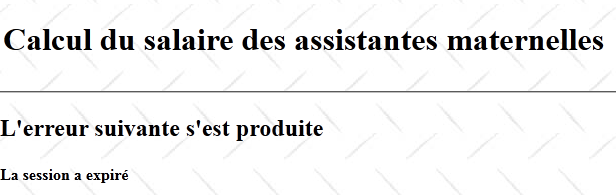
The fragment [Erreur.jsp] is as follows:
<%@ page contentType="text/html; charset=UTF-8" pageEncoding="UTF-8"%>
<%@ taglib prefix="s" uri="/struts-tags" %>

<h2><s:text name="Pam.Erreur.libelle"/></h2>
<h4><s:text name="Erreur.sessionexpiree"/></h4>
Return to the [Enregistrer].execute method:
// action execution
  public String execute() {
    // retrieve the last simulation in the session
    Simulation simulation = (Simulation) session.get("simulation");
    if (simulation == null) {
      return ERROR;
    }
    // retrieve the number of the last simulation
    Integer numDerniereSimulation = (Integer) session.get("numDerniereSimulation");
    if (numDerniereSimulation == null) {
      numDerniereSimulation = 0;
    }
    // increment it
    numDerniereSimulation++;
    // we give it the new number in the session
    session.put("numDerniereSimulation", numDerniereSimulation);
    // retrieve the list of simulations
    List<Simulation> simulations = (List<Simulation>) session.get("simulations");
    if (simulations == null) {
      simulations = new ArrayList<Simulation>();
      session.put("simulations", simulations);
    }
    // we add the current simulation
    simulation.setNum(numDerniereSimulation);
    simulations.add(simulation);
    // the list of simulations is displayed
    menu = new Menu(false, false, false, false, true, true);
    return "simulations";
  }
- lines 9-16: the various simulations are numbered starting from 1. The last assigned number is stored in the session under the key numDerniereSimulation. The code in lines 9-16 retrieves this key and increments the value associated with it.
- lines 18–22: The list of simulations is stored in the session associated with the key simulations. Lines 18–22 retrieve this list if it exists or create it if it does not.
- Lines 24–25: Once the list of simulations is obtained, the current simulation is added to it (line 25). Previously, the current simulation was assigned a number (line 24).
- Line 27: The menu to be displayed is set
- Line 28: We set the key to navigation simulations.
Back to the configuration of the [EnregistrerSimulation] action in [struts.xml]:
   <!-- action EnregistrerSimulation -->
    <action name="EnregistrerSimulation" class="web.actions.Enregistrer" method="execute">
      <result name="error" type="tiles">erreur</result>
      <result name="simulations" type="tiles">simulations</result>
</action>
Line 4: The "simulations" key triggers the display of the Tiles view named "simulations." This view consists of the fragments [Entete.jsp] and [Simulations.jsp]. The displayed view is as follows:
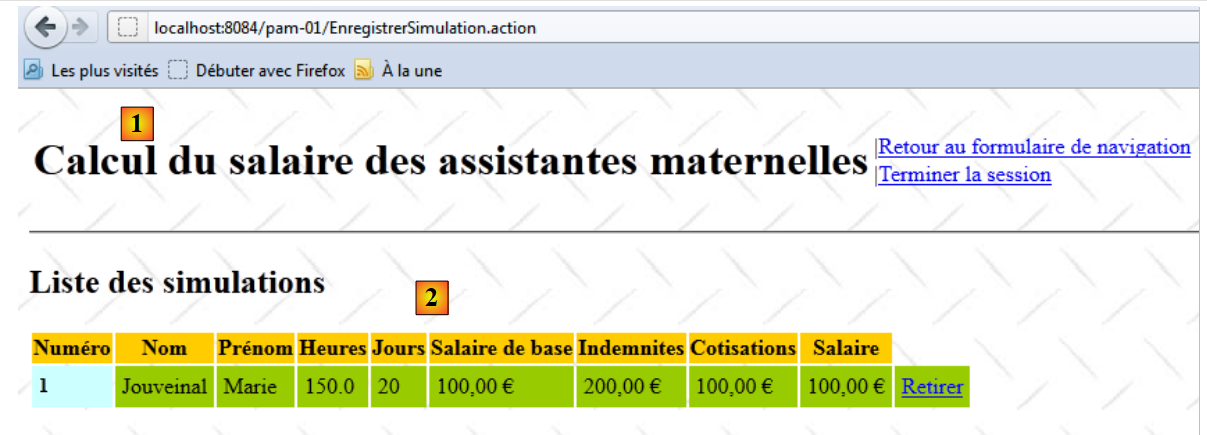 |
- in [1], the fragment [Entete.jsp], which we are now familiar with.
- in [2], the fragment [Simulations.jsp]
The fragment [Simulations.jsp] is as follows:
<%@ page contentType="text/html; charset=UTF-8" pageEncoding="UTF-8"%>
<%@ taglib prefix="s" uri="/struts-tags" %>

<!-- empty simulation list -->
<s:if test="#session['simulations']==null || #session['simulations'].size()==0">
  <h2><s:text name="Pam.SimulationsVides.titre"/></h2>
</s:if>
<!-- non-empty simulation list -->
<s:if test="#session['simulations'].size()!=0">
  <h2><s:text name="Pam.Simulations.titre"/></h2>
  <table>
    <tr class="titreInfos">
      <th><s:text name="Pam.Simulations.num"/></th>
      <th><s:text name="Pam.Simulations.nom"/></th>
      <th><s:text name="Pam.Simulations.prenom"/></th>
      <th><s:text name="Pam.Simulations.heures"/></th>
      <th><s:text name="Pam.Simulations.jours"/></th>
      <th><s:text name="Pam.Simulations.salairebase"/></th>
      <th><s:text name="Pam.Simulations.indemnites"/></th>
      <th><s:text name="Pam.Simulations.cotisationsociales"/></th>
      <th><s:text name="Pam.Simulations.salairenet"/></th>
    </tr>
    <s:iterator value="#session['simulations']">
      <s:url action="SupprimerSimulation" var="url">
        <s:param name="id" value="num"/>
      </s:url>
      <tr>
        <td class="libelle"><s:property value="num"/></td>
        <td class="info"><s:property value="feuilleSalaire.employe.nom"/></td>
        <td class="info"><s:property value="feuilleSalaire.employe.prenom"/></td>
        <td class="info"><s:property value="heuresTravaillées"/></td>
        <td class="info"><s:property value="joursTravaillés"/></td>
        <td class="info">
          <s:text name="Format.monnaie">
            <s:param value="feuilleSalaire.elementsSalaire.salaireBase"/>
          </s:text>
        </td>
        <td class="info">
          <s:text name="Format.monnaie">
            <s:param value="indemnites"/>
          </s:text>
        </td>
        <td class="info">
          <s:text name="Format.monnaie">
            <s:param value="feuilleSalaire.elementsSalaire.cotisationsSociales"/>
          </s:text>
        </td>
        <td class="info">
          <s:text name="Format.monnaie">
            <s:param value="feuilleSalaire.elementsSalaire.salaireNet"/>
          </s:text>
        </td>
        <td class="info"><a href="<s:property value="#url"/>">Retirer</a></td>
      </tr>
    </s:iterator>
  </table>
</s:if>
- lines 5–7: if there are no simulations in the session, then the following view is displayed:

- lines 13–21: display the table column headers

- lines 23-55: iterate over the list of simulations found in the session
- lines 24-26: creation of a Url named url (attribute id). The link Html generated by this Url is as follows:
<a href="<a href="view-source:http://localhost:8084/pam/SupprimerSimulation.action?id=1">/pam/SupprimerSimulation.action?id=1</a>">Retirer</a>
We can see that the link targets the action [SupprimerSimulation] with the parameter id, which represents the number of the simulation to be removed from the list.
- Lines 28–54: For each iteration through the list of simulations, the properties of the current simulation are displayed.

19.10. Remove a simulation
The user may want to remove a simulation from the list of simulations:
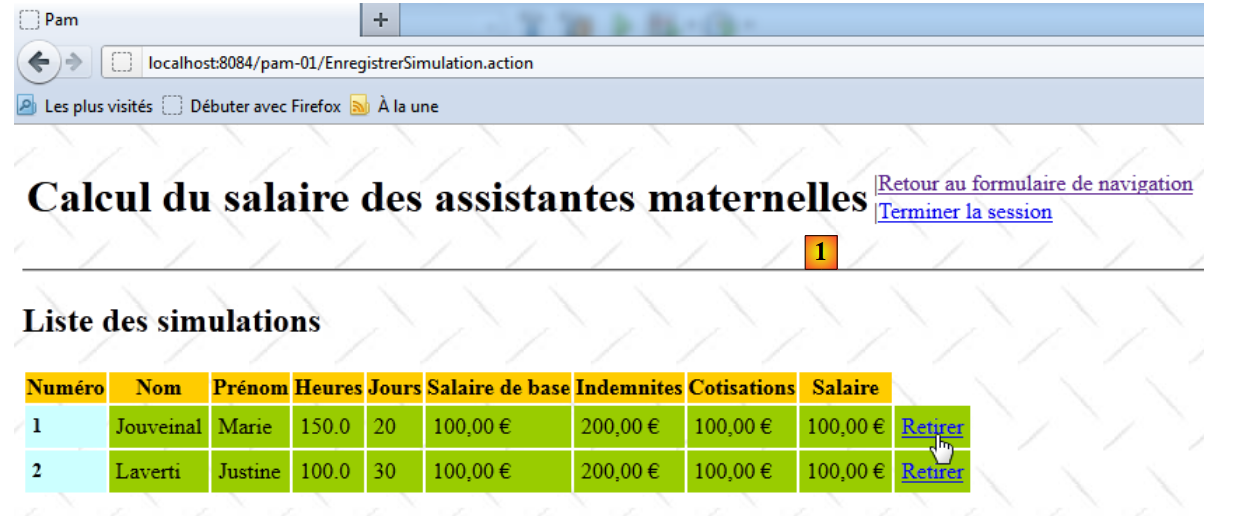 |
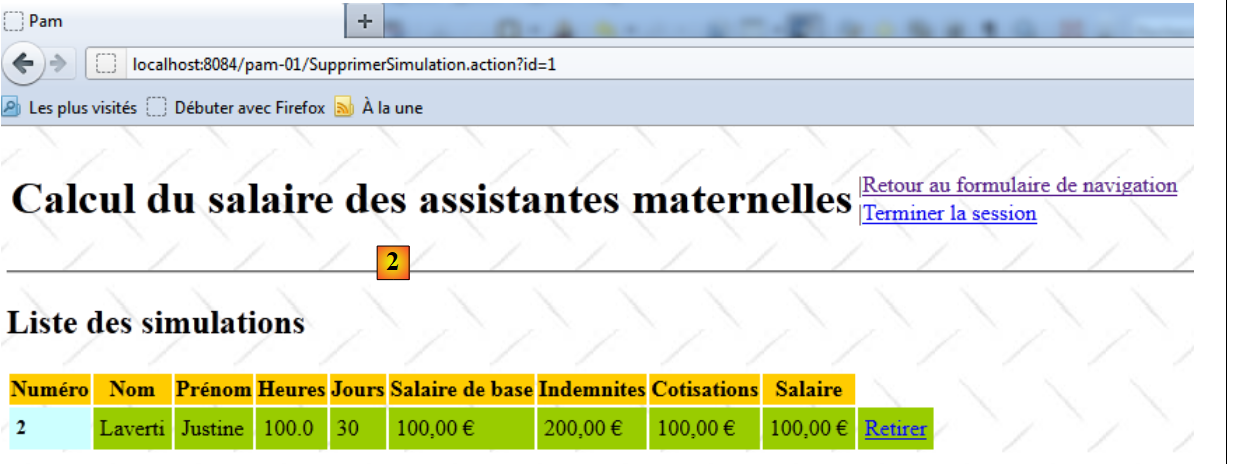 |
- In [1], simulation #1 is removed
- In [2], simulation #1 has been deleted
The link [Retirer] is located in the fragment [Simulations.jsp] that we have already examined:
<%@ page contentType="text/html; charset=UTF-8" pageEncoding="UTF-8"%>
<%@ taglib prefix="s" uri="/struts-tags" %>

<!-- empty simulation list -->
<s:if test="#session['simulations']==null || #session['simulations'].size()==0">
  <h2><s:text name="Pam.SimulationsVides.titre"/></h2>
</s:if>
<!-- non-empty simulation list -->
<s:if test="#session['simulations'].size()!=0">
  <h2><s:text name="Pam.Simulations.titre"/></h2>
  <table>
    <tr class="titreInfos">
      ...
    </tr>
    <s:iterator value="#session['simulations']">
      <s:url action="SupprimerSimulation" var="url">
        <s:param name="id" value="num"/>
      </s:url>
      <tr>
        ...
        <td class="info">
          <s:text name="Format.monnaie">
            <s:param value="feuilleSalaire.elementsSalaire.salaireNet"/>
          </s:text>
        </td>
        <td class="info"><a href="<s:property value="#url"/>">Retirer</a></td>
      </tr>
    </s:iterator>
  </table>
</s:if>
- lines 16-18: generate the link Html
<a href="<a href="view-source:http://localhost:8084/pam-01/SupprimerSimulation.action?id=2">/pam-01/SupprimerSimulation.action?id=</a>num">Retirer</a>
where num is the number of the simulation to be removed.
The action [SupprimerSimulation] is defined as follows in the file [struts.xml]:
<?xml version="1.0" encoding="UTF-8" ?>
<!DOCTYPE struts PUBLIC
    "-//Apache Software Foundation//DTD Struts Configuration 2.0//EN"
    "http://struts.apache.org/dtds/struts-2.0.dtd">

<struts>
  <!-- internationalization -->
  <constant name="struts.custom.i18n.resources" value="messages" />
  <!-- spring integration -->
  <constant name="struts.objectFactory.spring.autoWire" value="name" />


  <!-- struts /Tiles shares -->
  <package name="default" namespace="/" extends="tiles-default">
    ...
   <!-- action RetirerSimulation -->
    <action name="SupprimerSimulation" class="web.actions.Supprimer">
      <result name="erreur" type="tiles">erreur</result>
      <result name="simulations" type="tiles">simulations</result>
    </action>
   ...
  </package>

    <!-- Add packages here -->

</struts>
- Line 16: The action [SupprimerSimulation] is associated with the class [Supprimer]. Since no method is specified, its execute method will be executed. The class [Supprimer] is as follows:
package web.actions;

...
public class Supprimer extends ActionSupport implements SessionAware {

  // session
  private Map<String, Object> session;
  // id of the simulation to be deleted
  private String id;
  // menu
  private Menu menu;

  @Override
  public void setSession(Map<String, Object> session) {
    this.session = session;
  }

  // action execution
  public String execute() {
    // simulations are retrieved from the
    List<Simulation> simulations = (List<Simulation>) session.get("simulations");
    if (simulations == null) {
      // abnormal case - session must have expired
      menu = new Menu(false, false, false, false, true, true);
      return "erreur";
    }
    // test of id
    int num = 0;
    boolean erreur = false;
    try {
      num = Integer.parseInt(id);
      erreur = num <= 0;
    } catch (NumberFormatException ex) {
      // abnormal
      erreur = true;
    }
    // mistake?
    if (erreur) {
      menu = new Menu(false, false, false, false, true, true);
      return "erreur";
    }
    // search for the simulation to be deleted
    for (int i = 0; i < simulations.size(); i++) {
      if (num == simulations.get(i).getNum()) {
        simulations.remove(i);
        break;
      }
    }
    // the list of simulations is displayed
    menu = new Menu(false, false, false, false, true, true);
    return "simulations";
  }

  // getters and setters
...
}
- line 4: the [Supprimer] action implements the [SessionAware] interface to access the session.
- line 7: the session
- line 9: the number of the simulation to be deleted. Recall that we instantiate the [Supprimer] class via Url Html:
<a href="<a href="view-source:http://localhost:8084/pam-01/SupprimerSimulation.action?id=2">/pam-01/SupprimerSimulation.action?id=</a>num">Retirer</a>
where num is the number of the simulation to be removed. This number will be stored in the id field on line 9.
- line 11: the menu for the view that will be displayed in response to the request
- line 19: the execute method that will generate the response to the request.
- line 21: we retrieve the list of simulations already performed in the session
- lines 22–26: failing to retrieve this list from the session likely means the session has expired. We have encountered this scenario before. We return the error key, which displays the Tiles error view:
<!-- action RetirerSimulation -->
    <action name="SupprimerSimulation" class="web.actions.Supprimer">
      <result name="erreur" type="tiles">erreur</result>
      ...
</action>
The Tiles error view was presented in Section 19.9.
- lines 28–36: we verify that the string id on line 9 is indeed an integer >0.
- lines 38-40: if this is not the case, the error key is returned again, which will display the error Tiles view
- lines 43–48: The simulation to be removed is searched for in the list of simulations. If found, it is deleted.
- line 50: the menu is updated for the Tiles simulations view.
- line 51: the `simulations` key is returned. This will display the Tiles simulations view:
<!-- action RetirerSimulation -->
    <action name="SupprimerSimulation" class="web.actions.Supprimer">
      ...
      <result name="simulations" type="tiles">simulations</result>
</action>
The Tiles simulations view was introduced in Section 19.9.
19.11. Return to the form
From the Tiles simulations view, the user can return to the form:
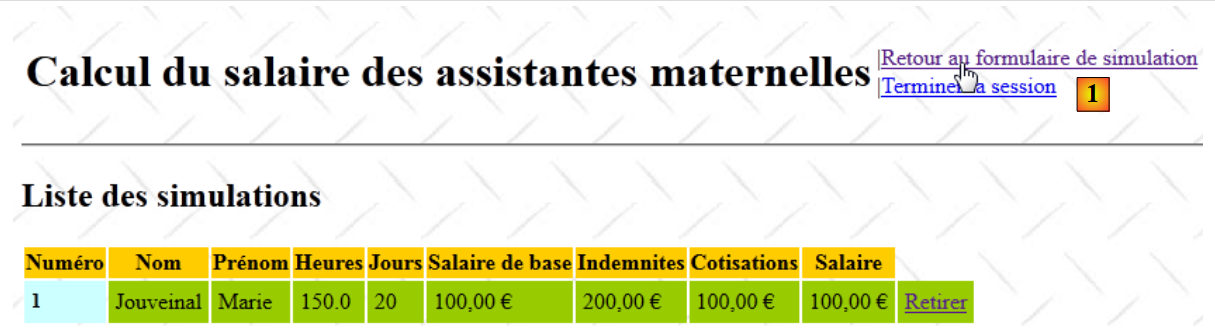 |
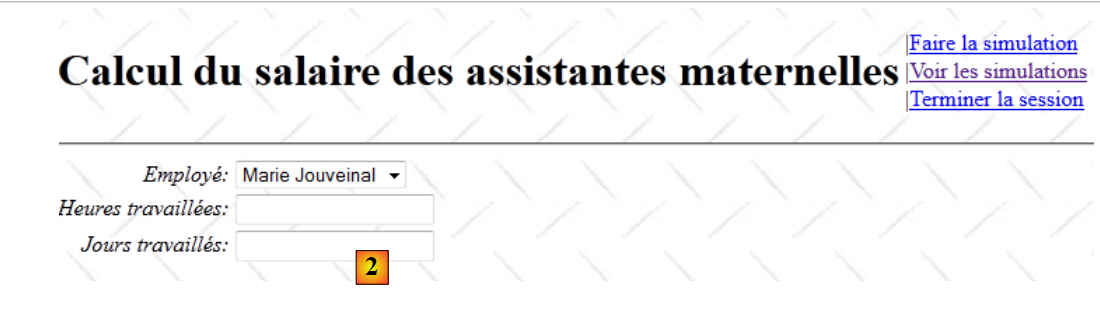 |
- in [1], click the link to return to the form
- In [2], an empty form is displayed
The link [Retour au formulaire de simulation] is defined in the fragment [Entete.jsp]:
<%@ page contentType="text/html; charset=UTF-8" pageEncoding="UTF-8"%>
<%@ taglib prefix="s" uri="/struts-tags" %>

<table>
  <tr>
    <td><h1><s:text name="Pam.titre"/></h1></td>
    <td>
      ...
      <s:if test="menu.retourFormulaire">
        |<a href="<s:url action="RetourFormulaire"/>"><s:text name="Menu.RetourFormulaire"/></a><br/>
      </s:if>
      ...
    </td>
  </tr>
</table>
- Line 10: The link points to action [RetourFormulaire]. This is defined as follows in file [struts.xml]:
   <!-- action RetourFormulaire -->
    <action name="RetourFormulaire" >
      <result type="redirectAction">
        <param name="actionName">Formulaire!input</param>
        <param name="namespace">/</param>
      </result>
</action>
We can see that this action is not associated with any class. It simply redirects the client browser to the action [/Formulaire!input]. We are therefore in the same situation as when displaying the initial view explained in section 19.7. We thus see this initial view [2].
19.12. View the list of simulations
From the Tiles simulation or entry views, the user can request to view the simulations:
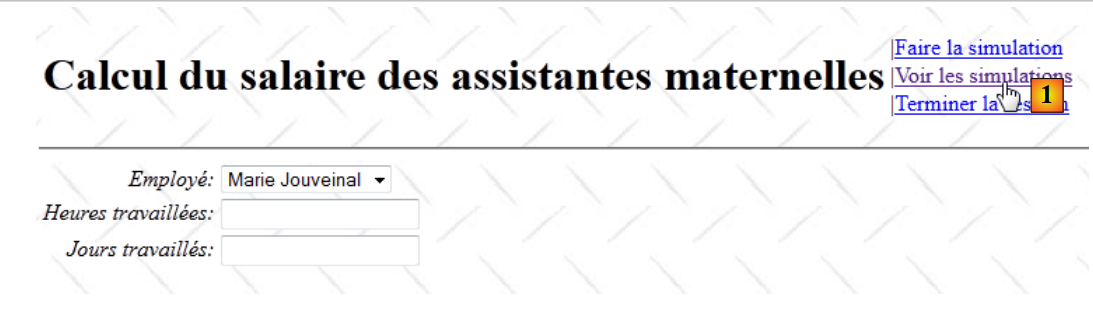 |
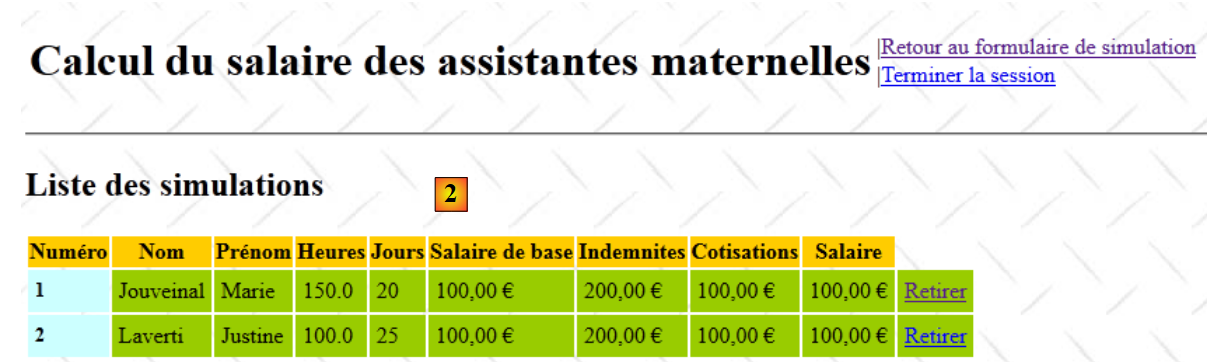 |
- in [1], click the link [Voir les simulations]
- in [2], the list of simulations is displayed
The link [Voir les simulations] is defined in the fragment [Entete.jsp]:
<%@ page contentType="text/html; charset=UTF-8" pageEncoding="UTF-8"%>
<%@ taglib prefix="s" uri="/struts-tags" %>

<table>
  <tr>
    <td><h1><s:text name="Pam.titre"/></h1></td>
    <td>
      ...
      <s:if test="menu.voirSimulations">
        |<a href="<s:url action="VoirSimulations"/>"><s:text name="Menu.VoirSimulations"/></a><br/>
      </s:if>
      ...
    </td>
  </tr>
</table>
- Line 10: The link [Voir les simulations] calls the action [VoirSimulations]. This is defined as follows in the file [struts.xml]:
   <!-- action VoirSimulations -->
    <action name="VoirSimulations" class="web.actions.Voir">
      <result name="success" type="tiles">simulations</result>
</action>
The action [VoirSimulations] is associated with the class [Voir] without specifying a method. Therefore, the method [Voir].execute will be executed. The class [Voir] is as follows:
package web.actions;

import com.opensymphony.xwork2.ActionSupport;
import web.entities.Menu;

public class Voir extends ActionSupport{
  // menu
  private Menu menu=new Menu(false,false,false,false,true,true);
  // getters and setters

  public Menu getMenu() {
    return menu;
  }

  public void setMenu(Menu menu) {
    this.menu = menu;
  }

}
The action [Voir] does only one thing: position the menu for the Tiles simulations view (line 8). There is no execute method. Therefore, the one from the parent class [ActionSupport] will be executed. We know that it does nothing except set the success key.
Back to the action in [struts.xml]:
   <!-- action VoirSimulations -->
    <action name="VoirSimulations" class="web.actions.Voir">
      <result name="success" type="tiles">simulations</result>
</action>
Line 3 shows that the "success" key triggers the display of the "Tiles simulations" view. This view was described on page 156.
19.13. Clear the current simulation
From the Tiles simulation view, the user can request to clear the current simulation:
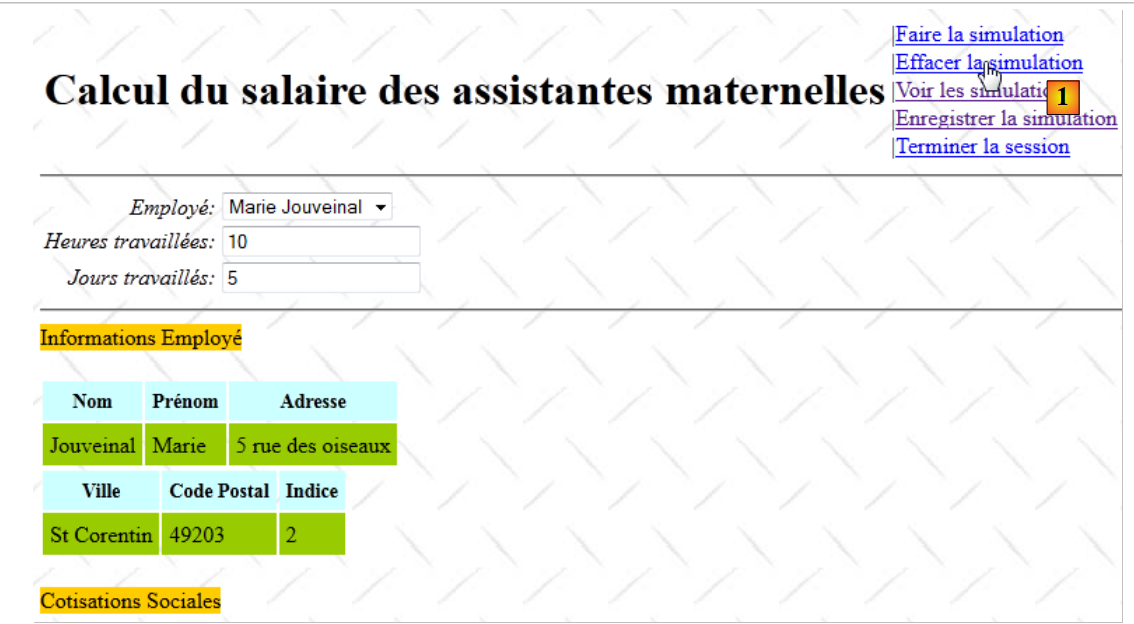 |
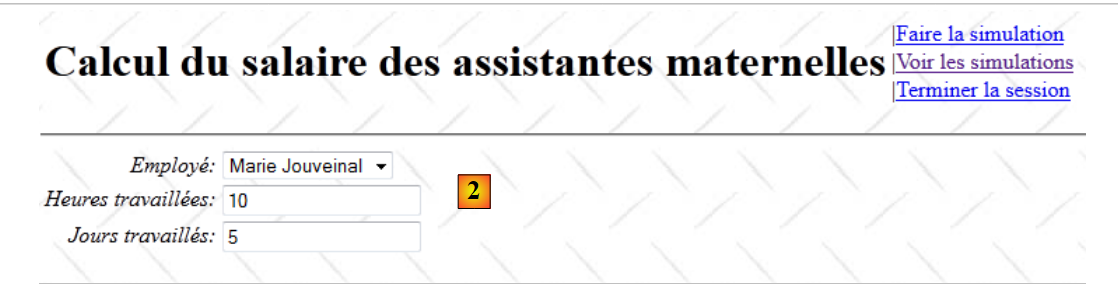 |
- in [1], the current simulation is cleared
- In [2], the input form is empty
The link [Effacer la simulation] is defined in the fragment [Entete.jsp]:
<%@ page contentType="text/html; charset=UTF-8" pageEncoding="UTF-8"%>
<%@ taglib prefix="s" uri="/struts-tags" %>

<table>
  <tr>
    <td><h1><s:text name="Pam.titre"/></h1></td>
    <td>
      ...
      <s:if test="menu.effacerSimulation">
        |<a href="<s:url action="Formulaire!input"/>"><s:text name="Menu.EffacerSimulation"/></a><br/>
      </s:if>
      ...
    </td>
  </tr>
</table>
On line 10, we see that the link [Effacer la simulation] triggers the action [Formulaire!input]. We know that this action leads to the initial view [2].
19.14. End the current session
From any Tiles view, the user can request to end the session:
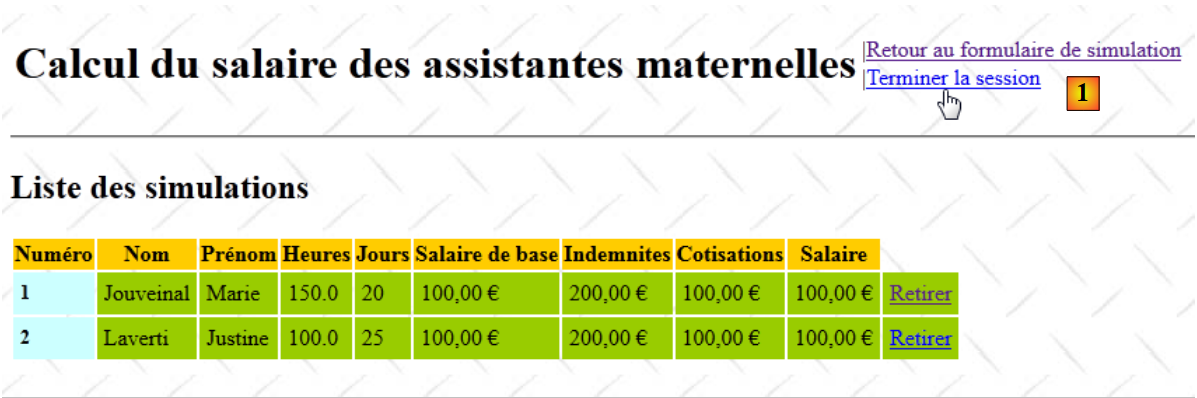 |
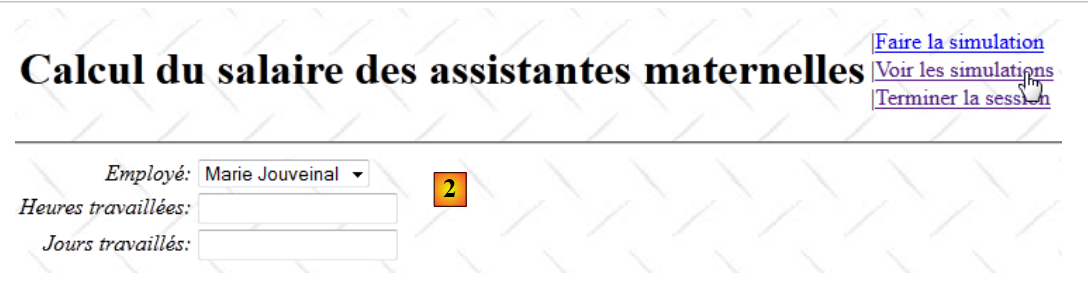 |
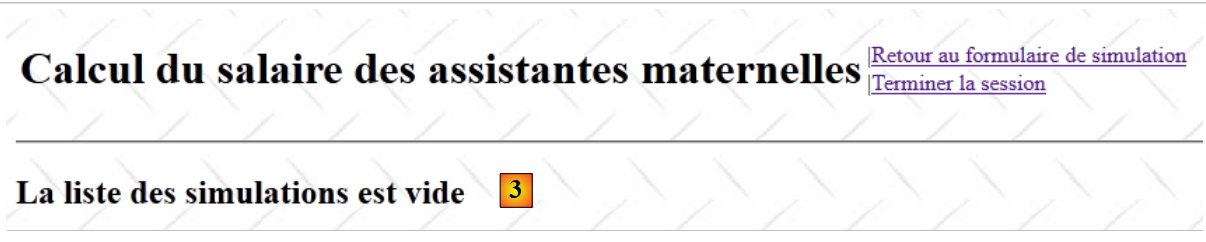 |
- In [1], starting from the simulations view, the session is ended
- In [2], the input form is empty. We request to view the simulations.
- In [3], the list of simulations is now empty.
The link [Terminer la session] is defined in the fragment [Entete.jsp]:
<%@ page contentType="text/html; charset=UTF-8" pageEncoding="UTF-8"%>
<%@ taglib prefix="s" uri="/struts-tags" %>

<table>
  <tr>
    <td><h1><s:text name="Pam.titre"/></h1></td>
    <td>
      ...
      <s:if test="menu.terminerSession">
        |<a href="<s:url action="TerminerSession"/>"><s:text name="Menu.TerminerSession"/></a><br/>
      </s:if>
    </td>
  </tr>
</table>
Line 10 shows that the link [Terminer la session] triggers the action [TerminerSession]. This is defined as follows in the file [struts.xml]:
    <action name="TerminerSession" class="web.actions.Terminer">
      <result name="success" type="redirectAction">
        <param name="actionName">Formulaire!input</param>
        <param name="namespace">/</param>
      </result>
</action>
- Line 1: We can see that the [Terminer] class will be instantiated and its execute method will be called.
- Lines 2–5: After the [Terminer].execute method is executed, the user will be redirected to the initial data entry view. This explains screen #2.
The [Terminer] class is as follows:
package web.actions;

import com.opensymphony.xwork2.ActionSupport;
import java.util.Map;
import org.apache.struts2.interceptor.SessionAware;

public class Terminer extends ActionSupport implements SessionAware {

  // session
  private Map<String, Object> session;

  @Override
  public String execute() {
    // quit current session
    session.clear();
    return SUCCESS;
  }

  @Override
  public void setSession(Map<String, Object> session) {
    this.session = session;
  }
}
The role of the [Terminer] action is to clear the current session of its attributes.
- Line 7: The [Terminer] action implements the [SessionAware] interface to access the session.
- line 10: the session dictionary
- Line 13: The execute method is executed
- line 15: it clears the session dictionary. As a result, the list of simulations currently in the session will disappear. This explains screen #3.
- line 16: it returns the key "success," which, as we have seen, will display the Tiles view entered as [2].
19.15. Conclusion
We have fully commented on version 1 from our case study, which works with a simulated [metier] layer:
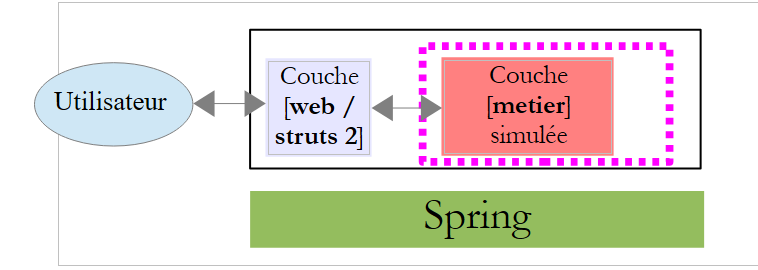 |
All that remains is to "connect" the actual business layer to the [web] layer.