10. Example 08 - Tags Associated with Lists
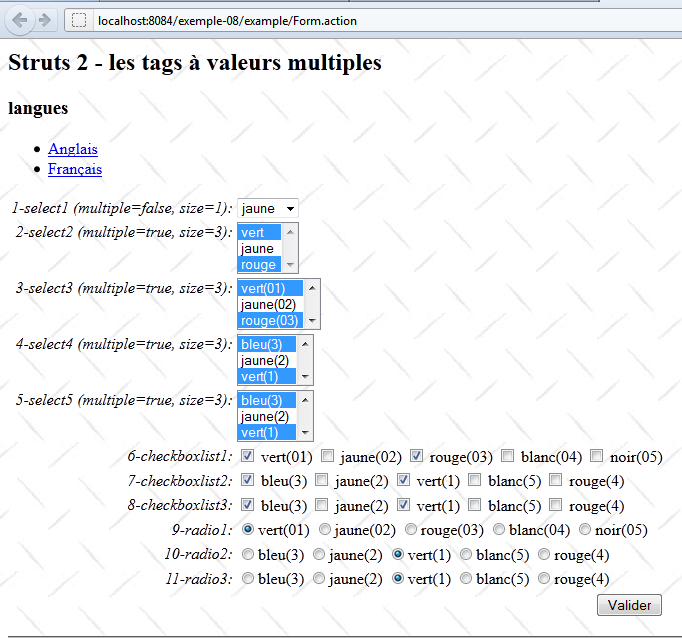
The following example focuses on tags that display lists. We have already encountered them in the previous example: the drop-down list, checkboxes, and radio buttons. The test form will be as follows:
10.1. The Netbeans project
The project Netbeans is as follows:
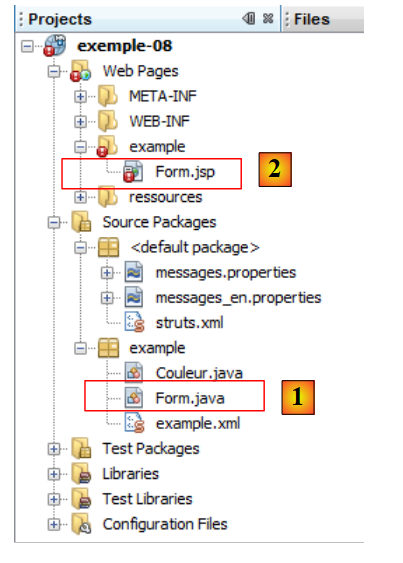 |
- in [1] the action and in [2] the associated view.
The file [example/example.xml] configures the application:
<?xml version="1.0" encoding="UTF-8" ?>
<!DOCTYPE struts PUBLIC
        "-//Apache Software Foundation//DTD Struts Configuration 2.0//EN"
        "http://struts.apache.org/dtds/struts-2.0.dtd">

<struts>
  <package name="example" namespace="/example" extends="struts-default">
    <action name="Form" class="example.Form">
      <result name="success">/example/Form.jsp</result>
    </action>
  </package>
</struts>
Lines 8–9 show that a call to Url generates the view [/example/Form.jsp]. The [Form] action will therefore be responsible for building the model for the [Form.jsp] view.
10.2. The internationalized messages file
The [messages.properties] file for internationalized messages is as follows:
Form.francais=Fran\u00E7ais
Form.anglais=Anglais
Form.titre=Struts 2 - les tags \u00E0 valeurs multiples
Form.message=Struts 2 - les tags \u00E0 valeurs multiples
Form.langues=langues
Form.select1=1-select1 (multiple=false, size=1)
Form.select2=2-select2 (multiple=true, size=3)
Form.select3=3-select3 (multiple=true, size=3)
Form.select4=4-select4 (multiple=true, size=3)
Form.select5=5-select5 (multiple=true, size=3)
Form.checkboxlist1=6-checkboxlist1
Form.checkboxlist2=7-checkboxlist2
Form.checkboxlist3=8-checkboxlist3
Form.radio1=9-radio1
Form.radio2=10-radio2
Form.radio3=11-radio3
Form.submitText=Valider
Confirmation.message=Confirmation des valeurs saisies
Confirmation.champ=champ
Confirmation.valeur=valeur
Confirmation.select1=1-select1 (multiple=false, size=1)
Confirmation.select2=2-select2 (multiple=false, size=3)
Confirmation.select3=3-select3 (multiple=true, size=3)
Confirmation.select4=4-select4 (multiple=true, size=3)
Confirmation.select5=5-select5 (multiple=true, size=3)
Confirmation.checkboxlist1=6-checkboxlist1
Confirmation.checkboxlist2=7-checkboxlist2
Confirmation.checkboxlist3=8-checkboxlist3
Confirmation.radio1=9-radio1
Confirmation.radio2=10-radio2
Confirmation.radio3=11-radio3
The view [Form.jsp] uses these messages.
10.3. The view [Form.jsp]
The [Form.jsp] view is as follows:
<%@ page contentType="text/html; charset=UTF-8" pageEncoding="UTF-8"%>
<%@ taglib prefix="s" uri="/struts-tags" %>
<html>
  <head>
    <title><s:text name="Form.titre"/></title>
    <s:head/>
  </head>

  <body background="<s:url value="/ressources/standard.jpg"/>">
    <h2><s:text name="Form.message"/></h2>
    <h3><s:text name="Form.langues"/></h3>
    <ul>
      <li>
        <s:url id="url" action="Form">
          <s:param name="request_locale">en</s:param>
        </s:url>
        <s:a href="%{url}"><s:text name="Form.anglais"/></s:a>
        </li>
        <li>
        <s:url id="url" action="Form">
          <s:param name="request_locale">fr</s:param>
        </s:url>
        <s:a href="%{url}"><s:text name="Form.francais"/></s:a>
        </li>
      </ul>
    <s:form name="formulaire">
      <s:select name="select1" list="{'vert','jaune','rouge'}" size="1" key="Form.select1"/>
      <s:select name="select2" list="{'vert','jaune','rouge'}" size="3" key="Form.select2" multiple="true"/>
      <s:select name="select3" list="#{'01':'vert(01)','02':'jaune(02)','03':'rouge(03)','04':'blanc(04)','05':'noir(05)'}" size="3" key="Form.select3" multiple="true"/>
      <s:select name="select4" list="dico" size="3" key="Form.select4" multiple="true"/>
      <s:select name="select5" list="couleurs" listKey="id" listValue="nom" size="3" key="Form.select5" multiple="true" />
      <s:checkboxlist name="checkboxlist1" list="#{'01':'vert(01)','02':'jaune(02)','03':'rouge(03)','04':'blanc(04)','05':'noir(05)'}" key="Form.checkboxlist1"/>
      <s:checkboxlist name="checkboxlist2" list="dico" key="Form.checkboxlist2"/>
      <s:checkboxlist name="checkboxlist3" list="couleurs" listKey="id" listValue="nom" key="Form.checkboxlist3" />
      <s:radio name="radio1" list="#{'01':'vert(01)','02':'jaune(02)','03':'rouge(03)','04':'blanc(04)','05':'noir(05)'}" key="Form.radio1"/>
      <s:radio name="radio2" list="dico" key="Form.radio2"/>
      <s:radio name="radio3" list="couleurs" listKey="id" listValue="nom" key="Form.radio3" />
      <s:submit key="Form.submitText" name="submitText"/>
    </s:form>
    <hr/>
    <h2><s:text name="Confirmation.message"/></h2>
    <table border="1">
      <tr>
        <th><s:text name="Confirmation.champ"/></th>
        <th><s:text name="Confirmation.valeur"/></th>
      </tr>
      <tr>
        <td><s:text name="Form.select1"/></td>
        <td><s:property value="select1"/>
      </tr>
      <tr>
        <td><s:text name="Form.select2"/></td>
        <td><s:property value="select2SelectedValues"/>
      </tr>
      <tr>
        <td><s:text name="Form.select3"/></td>
        <td><s:property value="select3SelectedValues"/>
      </tr>
      <tr>
        <td><s:text name="Form.select4"/></td>
        <td><s:property value="select4SelectedValues"/>
      </tr>
      <tr>
        <td><s:text name="Form.select5"/></td>
        <td><s:property value="select5SelectedValues"/>
      </tr>
      <tr>
        <td><s:text name="Form.checkboxlist1"/></td>
        <td><s:property value="checkboxlist1SelectedValues"/>
      </tr>
      <tr>
        <td><s:text name="Form.checkboxlist2"/></td>
        <td><s:property value="checkboxlist2SelectedValues"/>
      </tr>
      <tr>
        <td><s:text name="Form.checkboxlist3"/></td>
        <td><s:property value="checkboxlist3SelectedValues"/>
      </tr>
      <tr>
        <td><s:text name="Form.radio1"/></td>
        <td><s:property value="radio1"/>
      </tr>
      <tr>
        <td><s:text name="Form.radio2"/></td>
        <td><s:property value="radio2"/>
      </tr>
      <tr>
        <td><s:text name="Form.radio3"/></td>
        <td><s:property value="radio3"/>
      </tr>
    </table>
  </body>
</html>
Let's examine the various input tags in the form:
- line 27: the <s:select> tag:
<s:select name="select1" list="{'vert','jaune','rouge'}" size="1" key="Form.select1"/>
This tag will generate the following Html code:
The value of the list attribute is an array of strings used to generate the values and labels for the options. The associated model is the select1 field of the following [Form] action:
private String select1 = "jaune";
This field is associated with read and write access to the tag named select1. On write, the value of the selected option will be injected into the select1 field. On read, the value of the select1 field is used to determine the selected option. Here, the value "yellow" in the select1 field is used to select the option from the select1 tag that has the value "yellow." This is why, on line 3, the option is selected.
- line 28
<s:select name="select2" list="{'vert','jaune','rouge'}" size="3" key="Form.select2" multiple="true"/>
There is no fundamental difference from the tag on line 27, except that the selection here is multiple. Therefore, the posted value is an array of values, those of the selected options. The select2 field of the action associated with the form is as follows:
private String[] select2 = new String[]{"vert", "rouge"};
This is indeed an array. Its initial value is used to select the options whose values are present in the array.
- line 29
<s:select name="select3" list="#{'01':'vert(01)','02':'jaune(02)','03':'rouge(03)','04':'blanc(04)','05':'noir(05)'}" size="3" key="Form.select3" multiple="true"/>
Here, the value of the list attribute is a dictionary whose keys serve as values for the options and whose associated values serve as labels for the options. The generated Html code is as follows:
The associated field in the action is as follows:
private String[] select3 = new String[]{"01", "03"};
We again have an array of values because the associated tag is a multiple-choice element. The initial values of the array explain why the options on lines 2 and 4 are initially selected.
- line 30
<s:select name="select4" list="dico" size="3" key="Form.select4" multiple="true"/>
Here, the list options will be provided by the view model, which is part of the [Form] action:
private HashMap<String, String> dico = new HashMap<String, String>();
The keys of the dico dictionary will be the values of the options. The values of the dico dictionary will be the labels of the options. The select4 field of the action is as follows:
private String[] select4 = new String[]{"1", "3"};
This is an array of values that will receive the values posted by the select4 tag.
- line 31
<s:select name="select5" list="couleurs" listKey="id" listValue="nom" size="3" key="Form.select5" multiple="true" />
The list of options is generated by the colors field defined by the list attribute. The colors field of action [Form] is defined as follows:
private Couleur[] couleurs;
The [Couleur] class is defined as follows:
package example;

public class Couleur {

  // fields
  private String id;
  private String nom;

  // manufacturer
  public Couleur(){
  }

  // getters and setters
...
}
It has two fields named id and name. In the select5 tag, we have listKey="id" listValue="name". This means that the id field will serve as the value for a option, and the name field will serve as the label. Note that it is the values of the options that are posted. They will be posted to the following select5 field:
private String[] select5 = new String[]{"1", "3"};
- line 32
<s:checkboxlist name="checkboxlist1" list="#{'01':'vert(01)','02':'jaune(02)','03':'rouge(03)','04':'blanc(04)','05':'noir(05)'}" key="Form.checkboxlist1"/>
This tag will generate the following Html code:
All checkboxes have the name checkboxlist1. Since each one can be checked, multiple checkboxlist1 parameters can be submitted. Therefore, the checkboxlist1 field in the model must be of type array. The list attribute on line 22 is a dictionary whose keys generate the value attributes of the checkboxes and whose values generate the labels for those same checkboxes. The checkboxlist1 field in the [Form] action is as follows:
private String[] checkboxlist1 = new String[]{"01", "03"};
- line 33
<s:checkboxlist name="checkboxlist2" list="dico" key="Form.checkboxlist2"/>
This tag functions like the select4 tag discussed earlier. The associated field in the action is as follows:
private String[] checkboxlist2 = new String[]{"1", "3"};
- line 34
<s:checkboxlist name="checkboxlist3" list="couleurs" listKey="id" listValue="nom" key="Form.checkboxlist3" />
This tag works like the select5 tag discussed earlier. The associated checkboxlist3 field in the action is as follows:
private String[] checkboxlist3 = new String[]{"1", "3"};
- line 35
<s:radio name="radio1" list="#{'01':'vert(01)','02':'jaune(02)','03':'rouge(03)','04':'blanc(04)','05':'noir(05)'}" key="Form.radio1"/>
This tag works in principle like the select3 tag seen previously. The generated Html code is as follows:
All radio buttons have the same name, radio1. Only one radio button can be selected. Therefore, only one value is submitted: the value of the selected radio button. The keys in the list dictionary are used to generate the value attributes of the radio buttons, while the values in the dictionary are used to generate the labels associated with these buttons. The associated radio1 field in the action is as follows:
private String radio1="01";
- line 36
<s:radio name="radio2" list="dico" key="Form.radio2"/>
This tag works in principle like the select4 tag. The associated radio2 field in the action is as follows:
private String radio2="1";
- line 37
<s:radio name="radio3" list="couleurs" listKey="id" listValue="nom" key="Form.radio3" />
This tag works in the same way as the select5 tag. The associated radio3 field in the action is as follows:
private String radio3="1";
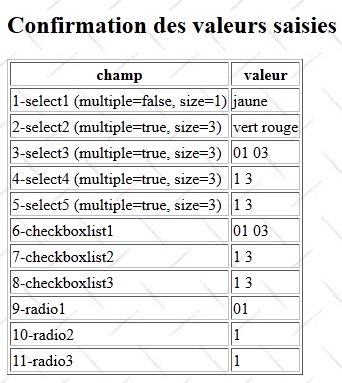
That covers the data entry portion of the form. There is also a confirmation section that is similar to the one in the previous example: it confirms the posted values. We will only comment on the following lines:
      <tr>
        <td><s:text name="Form.select2"/></td>
        <td><s:property value="select2SelectedValues"/>
</tr>
which visually corresponds to the following:

The text in the left cell comes from the file [messages.properties]:
Form.select2=2-select2 (multiple=true, size=3)
The text in the right-hand cell was generated by the getSelect2SelectedValues method of the [Form] action:
// values selected from drop-down lists
  public String getSelect2SelectedValues() {
    return getArrayValue(select2);
  }

  // utility methods
  public String getArrayValue(String[] values) {
    String result = "";
    for (String value : values) {
      result += " " + value;
    }
    return result;
  }
The getSelect2SelectedValues method returns the values of the select2 array as a string.
10.4. The [Form] action
When commenting on the [Form.jsp] view, we presented the fields of the associated [Form] action. The code for the [Form] action is as follows:
package example;

import com.opensymphony.xwork2.ActionSupport;
import java.util.HashMap;

public class Form extends ActionSupport {

  // form fields
  private String select1 = "jaune";
  private String[] select2 = new String[]{"vert", "rouge"};
  private String[] select3 = new String[]{"01", "03"};
  private String[] select4 = new String[]{"1", "3"};
  private String[] select5 = new String[]{"1", "3"};
  private HashMap<String, String> dico = new HashMap<String, String>();
  private Couleur[] couleurs;
  private String[] checkboxlist1 = new String[]{"01", "03"};
  private String[] checkboxlist2 = new String[]{"1", "3"};
  private String[] checkboxlist3 = new String[]{"1", "3"};
  private String radio1="01";
  private String radio2="1";
  private String radio3="1";

  private String submitText;

  // constructor without parameters
  public Form() {
    // init color dictionary
    dico.put("1", "vert(1)");
    dico.put("2", "jaune(2)");
    dico.put("3", "bleu(3)");
    dico.put("4", "rouge(4)");
    dico.put("5", "blanc(5)");

    // init array of objects Color
    couleurs = new Couleur[dico.size()];
    int i = 0;
    for (String key : dico.keySet()) {
      couleurs[i] = new Couleur();
      couleurs[i].setId(key);
      couleurs[i].setNom(dico.get(key));
      i++;
    }
  }

  // values selected from drop-down lists
  public String getSelect2SelectedValues() {
    return getArrayValue(select2);
  }

  public String getSelect3SelectedValues() {
    return getArrayValue(select3);
  }

  public String getSelect4SelectedValues() {
    return getArrayValue(select4);
  }

  public String getSelect5SelectedValues() {
    return getArrayValue(select5);
  }

  public String getCheckboxlist1SelectedValues() {
    return getArrayValue(checkboxlist1);
  }

  public String getCheckboxlist2SelectedValues() {
    return getArrayValue(checkboxlist2);
  }
  public String getCheckboxlist3SelectedValues() {
    return getArrayValue(checkboxlist3);
  }

  // utility methods
  public String getArrayValue(String[] values) {
    String result = "";
    for (String value : values) {
      result += " " + value;
    }
    return result;
  }

  // getters and setters
   ...
}
There is no execute method in this action. Therefore, the execute method of the parent class ActionSupport is executed. This method does nothing and simply returns the key of navigation as SUCCESS.
10.5. Tests
The reader is invited to test the [exemple-08] application.