3. Example 02 – Parameter Injection into the Action
3.1. The project Netbeans
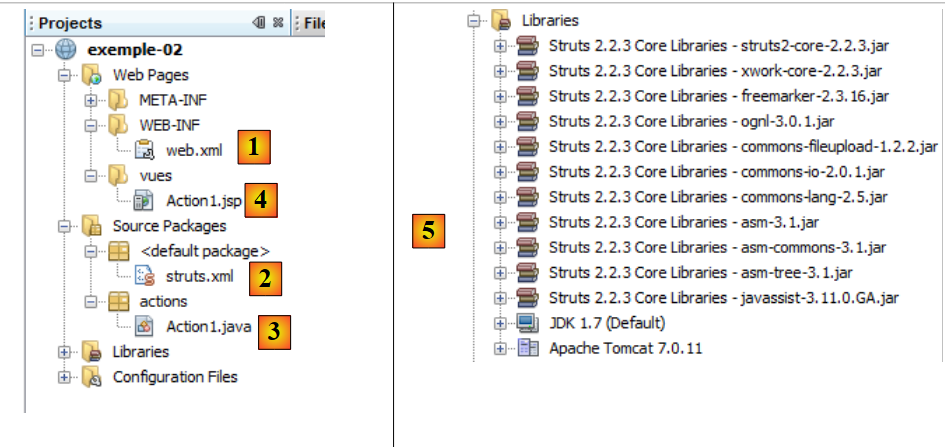 |
- in [1,2], the configuration files
- in [3], the action
- in [4], the view
- to [5], the project libraries
3.2. The configuration files
The file [web.xml] is as follows:
<?xml version="1.0" encoding="UTF-8"?>

<web-app xmlns="http://java.sun.com/xml/ns/javaee"
     xmlns:xsi="http://www.w3.org/2001/XMLSchema-instance"
     xsi:schemaLocation="http://java.sun.com/xml/ns/javaee http://java.sun.com/xml/ns/javaee/web-app_3_0.xsd"
     version="3.0">

  <display-name>Struts tuto-001</display-name>
  <filter>
    <filter-name>struts2</filter-name>
    <filter-class>org.apache.struts2.dispatcher.FilterDispatcher</filter-class>
  </filter>
  <filter-mapping>
    <filter-name>struts2</filter-name>
    <url-pattern>/*</url-pattern>
  </filter-mapping>
  <session-config>
    <session-timeout>
            30
    </session-timeout>
  </session-config>
</web-app>
We have already commented on this file. We will not do so again. Just remember that it ensures that all Url (line 15) are passed through the Struts filter (line 10).
The [struts.xml] file is as follows:
<?xml version="1.0" encoding="UTF-8" ?>
<!DOCTYPE struts PUBLIC
        "-//Apache Software Foundation//DTD Struts Configuration 2.0//EN"
        "http://struts.apache.org/dtds/struts-2.0.dtd">

<struts>
 <package name="default" namespace="/" extends="struts-default">
    <default-action-ref name="index" />
    <action name="index">
      <result type="redirectAction">
        <param name="actionName">Action1</param>
        <param name="namespace">/actions</param>
      </result>
    </action>
  </package>
  <package name="actions" namespace="/actions" extends="struts-default">
    <action name="Action1" class="actions.Action1">
      <result name="success">/vues/Action1.jsp</result>
    </action>
  </package>
</struts>
- lines 7-15: define the [default] package, which is used when an action could not be found in another package.
- line 8: defines a default action for this package named index.
- lines 9-14: configure the action named index. Note that it is not associated with a class (the class attribute is missing on line 9).
- Line 10: The result is for the success key (the name attribute is missing). It is of type redirectAction (type attribute). This type allows an action to be redirected to another action. Here, when the client requests the /index action, it will be redirected to the /actions/Action1 action (lines 11–12).
- Lines 16–20: define the actions package (name) associated with the actions of Url /actions/Action (class).
- Lines 17–19: configure the /actions/Action1 action (name). When this action is requested, Struts will instantiate the actions.Action1 class, and then the execute method of that class will be executed. This method must return the success key, as it is the only key defined on line 18.
- Line 18: For the "success" key, the view to be displayed will be the JSP page [vues/Action1.jsp].
In summary, the Struts project can only execute the action Url [actions/Action1].
3.3. The action
The Action1 action is represented by the following class:
package actions;

import com.opensymphony.xwork2.ActionSupport;

public class Action1 extends ActionSupport{

  // action model
  private String param1="valeur1";
  private String param2="valeur2";

  @Override
  public String execute(){
    return SUCCESS;
  }

  // getters and setters

  public String getParam1() {
    return param1;
  }

  public void setParam1(String param1) {
    this.param1 = param1;
  }

  public String getParam2() {
    return param2;
  }

  public void setParam2(String param2) {
    this.param2 = param2;
  }

}
- lines 8-9: two fields accessible via get / set (lines 18-32)
- lines 12-14: the execute method returns the success flag as expected. It does nothing else.
3.4. The JSP view
The Action1.jsp view is as follows:
<%@page contentType="text/html" pageEncoding="UTF-8"%>
<%@ taglib prefix="s" uri="/struts-tags" %>
<!DOCTYPE html>
<html>
  <head>
    <meta http-equiv="Content-Type" content="text/html; charset=UTF-8">
    <title>Action1</title>
  </head>
  <body>
    <h1>Action1</h1>
    param1=<s:property value="param1"/><br/>
    param2=<s:property value="param2"/><br/>
  </body>
</html>
This view is displayed after the [Action1].execute method is executed. It displays the values of the param1 (line 11) and param2 (line 19) fields of the [Action1] class.
3.5. Tests
Let’s run the [exemple-02] project:
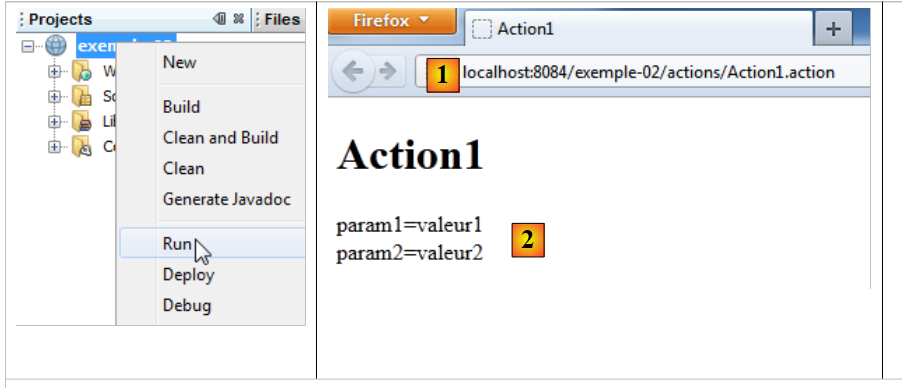 |
- in [1], the requested Url. Note that the initial requested Url was [/exemple-02] with no action. The files [web.xml] and [struts.xml] were then used. We observed that the file [web.xml] delegated the processing of all requests to Struts 2. The file [struts.xml] was then exploited:
<struts>
 <package name="default" namespace="/" extends="struts-default">
    <default-action-ref name="index" />
    <action name="index">
      <result type="redirectAction">
        <param name="actionName">Action1</param>
        <param name="namespace">/actions</param>
      </result>
    </action>
  </package>
  <package name="actions" namespace="/actions" extends="struts-default">
    <action name="Action1" class="actions.Action1">
      <result name="success">/vues/Action1.jsp</result>
    </action>
  </package>
</struts>
The Url [/exemple-02] without an action was handled by the default package in lines 2–10. Since there was no action in the Url, the action became "index" due to line 3 (default action). Lines 4–8 caused Struts to return a Url redirection to the client for [/exemple-02/actions/Action1], as shown in [1].
The [Action1] action then executed as configured in lines 12–14. Its execute method was executed. We saw that it returned the success code. Line 13 of [struts.xml] caused the page [/vues/Action1.jsp] to be returned to the browser:
...
<html>
  <head>
    <meta http-equiv="Content-Type" content="text/html; charset=UTF-8">
    <title>Action1</title>
  </head>
  <body>
    <h1>Action1</h1>
    param1=<s:property value="param1"/><br/>
    param2=<s:property value="param2"/><br/>
  </body>
</html>
Lines 9 and 10 displayed the values of the param1 and param2 fields from [Action1]. This is what [2] shows.
Let’s request another Url:
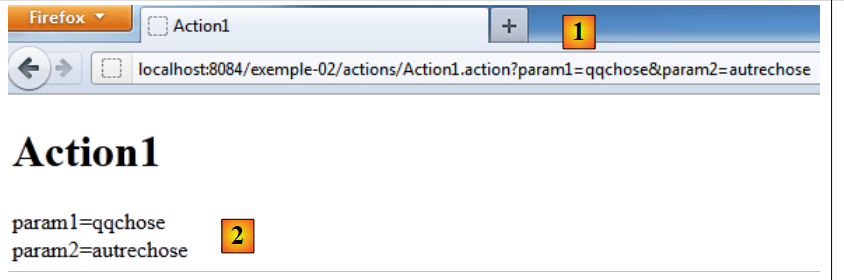 |
In [1], the [Action1] action is requested with the parameters param1 and param2. Let’s return to the Struts action execution flowchart:
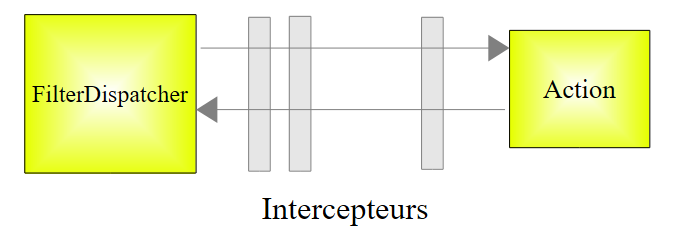 |
The controller [FilterDispatcher] executes the action’s execute method. The execution flow passes through interceptors. One of them processes the parameter string param1=something¶m2=somethingelse. It then uses the setParam1 and setParam2 methods of the Action1 action:
package actions;

import com.opensymphony.xwork2.ActionSupport;

public class Action1 extends ActionSupport{

  // action model
  private String param1="valeur1";
  private String param2="valeur2";

  @Override
  public String execute(){
    return SUCCESS;
  }

  // getters and setters

  public String getParam1() {
    return param1;
  }

  public void setParam1(String param1) {
    this.param1 = param1;
  }

  public String getParam2() {
    return param2;
  }

  public void setParam2(String param2) {
    this.param2 = param2;
  }

}
The params interceptor executes the following methods:
Therefore, they must exist. Note the following: to retrieve the parami parameters from a Http request, the called Struts action must have fields with the same names as the parameters and associated get / set methods.
When the execute method of [Action1] runs, the param1 and param2 fields have been initialized by the params interceptor:
The execute method returns the success key, and the [Action1.jsp] page is displayed with the new values for param1 and param2 from [2].