16. Example 13 - The context of an action
This application aims to demonstrate that an action has access to:
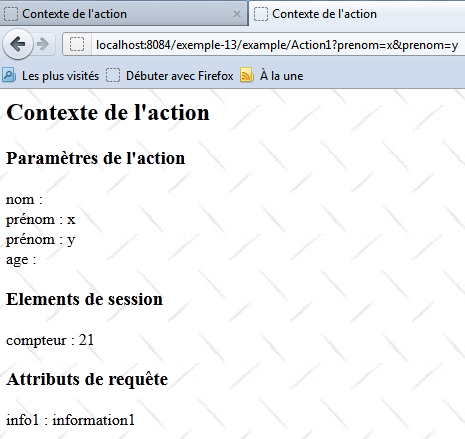
- request parameters
- request attributes
- to the user’s session attributes
16.1. The Netbeans project
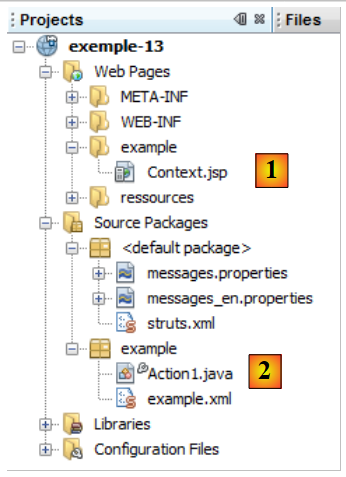 |
The project Netbeans is as follows:
- in [1], the view [Context.jsp]
- in [2], the action [Action1.java] and the Struts configuration file [example.xml]
16.2. Configuration
The project configuration is defined in [example.xml]:
<?xml version="1.0" encoding="UTF-8" ?>
<!DOCTYPE struts PUBLIC
        "-//Apache Software Foundation//DTD Struts Configuration 2.0//EN"
        "http://struts.apache.org/dtds/struts-2.0.dtd">

<struts>
  <package name="example" namespace="/example" extends="struts-default">
    <action name="Action1" class="example.Action1">
      <result name="success">/example/Context.jsp</result>
    </action>
  </package>
</struts>
- Line 8: The request for Url [/example/Action1] will cause the [example.Action] class to be instantiated. Since no method is specified, the execute method will be executed.
- Line 9: Only one key is accepted. The success key causes the [Context.jsp] view to be displayed.
The simplified architecture for processing a request will be as follows:
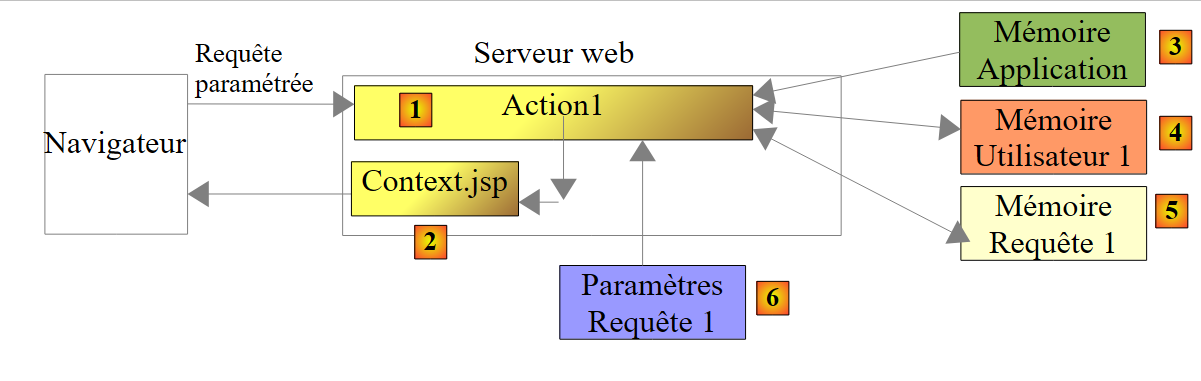 |
The request will be processed by two components of the web application: the action [Action1] [1] and the view [Context.jsp] [2]. These two components have access to different types of data:
- Application-scope data [3], c.a.d. Data accessible to all requests from all users. It is almost always read-only. This data often includes the application’s initial configuration. Here, [Action1] and [Context.jsp] have access to this data.
- Session-scope data: [4], c.a.d. Data accessible to all requests from the same user. It is read/write. Here, [Action1] will use the session in read/write mode, while [Context.jsp] will use it in read-only mode.
- Request-scope data [5], accessible to all elements processing the request. Here, [Action1] will store data in this memory, and [Context.jsp] will retrieve it. Request scope data allows element N to pass information to element N+1.
- The parameters of the [6] request sent by the client. They are used in read-only mode by the components processing the request.
16.3. The [Action1] action
The code for class [Action1] is as follows:
package example;

import com.opensymphony.xwork2.ActionSupport;
import java.util.Map;
import java.util.Set;
import org.apache.struts2.interceptor.ParameterAware;
import org.apache.struts2.interceptor.RequestAware;
import org.apache.struts2.interceptor.SessionAware;

public class Action1 extends ActionSupport implements SessionAware, RequestAware, ParameterAware {

  // constructor without parameters
  public Action1() {
  }
  // Session, Request, Parameters
  Map<String, Object> session;
  Map<String, Object> request;
  Map<String, String[]> parameters;

  @Override
  public String execute() {
    // parameter list
    System.out.println("Paramètres...");
    Set<String> clés = parameters.keySet();
    for (String clé : clés) {
      for (String valeur : parameters.get(clé)) {
        System.out.println(String.format("[%s,%s]", clé, valeur));
      }
    }
    // session
    System.out.println("Session...");
    if (session.get("compteur") == null) {
      session.put("compteur", new Integer(0));
    }
    Integer compteur = (Integer) session.get("compteur");
    compteur = compteur + 1;
    session.put("compteur", compteur);
    System.out.println(String.format("compteur=%s", compteur));
    // request
    request.put("info1", "information1");
    // display page JSP
    return SUCCESS;
  }

  // session
  public void setSession(Map<String, Object> session) {
    this.session = session;
  }

  // request
  public void setRequest(Map<String, Object> request) {
    this.request = request;
  }

  // settings
  public void setParameters(Map<String, String[]> parameters) {
    this.parameters = parameters;
  }
}
- line 10: the class implements the following interfaces
- SessionAware: to access the session attributes dictionary (line 16). This interface has only one method, the one on line 46.
- RequestAware: to access the request attributes dictionary (line 17). This interface has only one method, the one on line 51.
- ParameterAware: to access the query parameter dictionary (line 18). Note that each key (the parameter name) corresponds to an array of values. This is necessary to account for input fields that submit multiple values, such as a multi-select list. The ParameterAware interface has only one method, the one on line 56.
- Line 21: the execute method, which is executed when the [Action1] action is requested. When it runs, the interceptors have done their job:
- the setParameters method (line 56) has been called, and the parameters dictionary on line 18 contains all the parameters of the request.
- The method setSession (line 46) was called, and the session dictionary on line 16 contains all the session attributes.
- The method setRequest (line 51) was called, and the request dictionary on line 17 contains all the request attributes.
- Lines 31–38: The value associated with the counter key is written to the session
- Lines 32–34: The counter key is searched for in the session. If it is not found, it is added to the session with the integer value 0.
- Lines 35–37: The counter key is searched for in the session, its value is incremented, and then the key is put back into the session.
- line 38: the value associated with the counter key is displayed. Since the increment is performed with each request on action [Action1], we should see the counter value increase as requests are made.
- Line 40: An attribute with the key "info1" and the value "information1" is inserted into the request attributes dictionary. Request attributes are different from request parameters. Parameters are sent by the web application client. The request attributes, on the other hand, enable communication between the various components of the web application that process it. Thus, after executing [Action1], the view [Context.jsp] will be displayed. We will see that it is capable of retrieving the request attributes.
- Line 42: The execute method returns the success key.
16.4. The message file
The file [messages.properties] is as follows:
Context.titre=Contexte de l''action
Context.message=Contexte de l''action
Context.parameters=Param\u00E8tres de l''action
Context.session=Elements de session
Context.request=Attributs de requ\u00EAte
16.5. The [Context.jsp] view
The [Context.jsp] view is designed to display:
- certain request parameters
- the value of the counter key in the session
- the value of the info1 key in the request
Its code is as follows:
<%@ page contentType="text/html; charset=UTF-8" pageEncoding="UTF-8"%>
<%@ taglib prefix="s" uri="/struts-tags" %>
<html>
  <head>
    <title><s:text name="Context.titre"/></title>
    <s:head/>
  </head>

  <body background="<s:url value="/ressources/standard.jpg"/>">
    <h2><s:text name="Context.message"/></h2>
    <h3><s:text name="Context.parameters"/></h3>
    <s:iterator value="#parameters['nom']" var="nom">
      nom : <s:property value="nom"/><br/>
    </s:iterator>
    <s:iterator value="#parameters['prenom']" var="prenom">
      prenom : <s:property value="prenom"/><br/>
    </s:iterator>
    <s:iterator value="#parameters['age']" var="age">
      âge : <s:property value="age"/><br/>
    </s:iterator>
    <h3><s:text name="Context.session"/></h3>
    compteur : <s:property value="#session['compteur']"/>
    <h3><s:text name="Context.request"/></h3>
    info1 : <s:property value="#request['info1']"/>
  </body>
</html>
- lines 12-14: display all values associated with the name parameter
- lines 15-17: display all values associated with the first_name parameter
- lines 18-20: display all values associated with the age parameter
- line 22: displays the value associated with the counter key in the session
- line 24: displays the value associated with the info1 key in the query
16.6. The tests
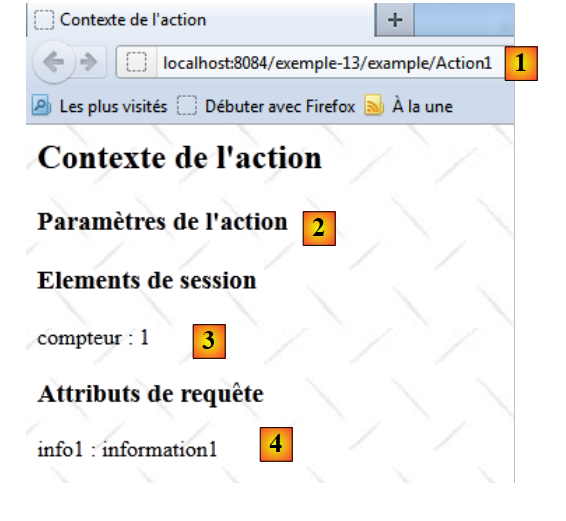 |
- In [1], Action1 is called without parameters
- In [2], [Context.jsp] did not find any parameters
- In [3], [Context.jsp] found the counter key in the session
- in [4], [Context.jsp] found the info1 key in the query
Let's run another test:
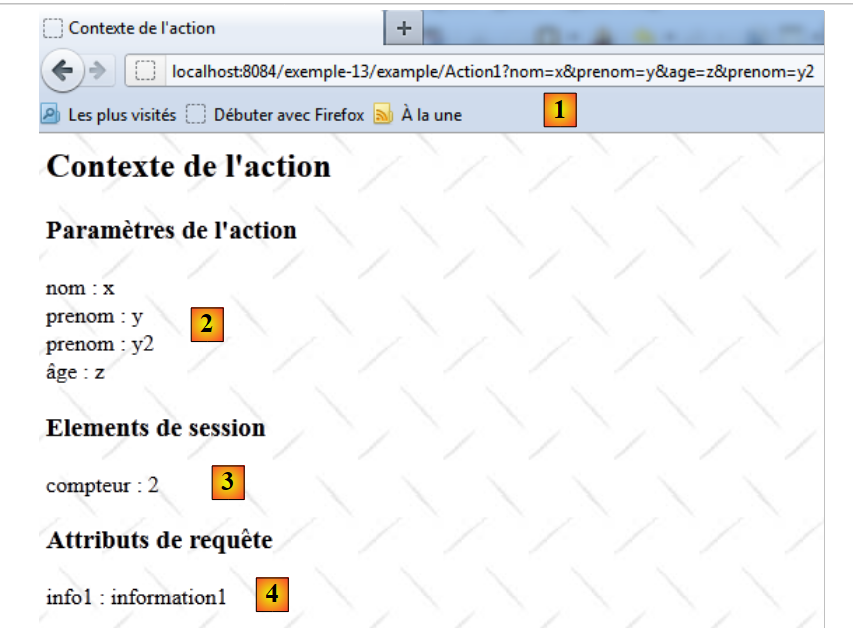 |
- in [1], Action1 is requested with parameters
- in [2], [Context.jsp] displays these parameters
- In [3], [Context.jsp] found the counter key in the session. The counter was indeed incremented by 1, demonstrating that data was indeed cached between the two requests.
- In [4], [Context.jsp] found the info1 key in the request
Recall that the [Action1.execute] method wrote to the web server console. Here is an example:
16.7. Conclusion
Keep the following points in mind:
- To store information to be shared by all requests from all users, we will use the application's memory. We will show an example of this shortly.
- To store information to be shared by all requests from the same user, we will use that user’s session.
- To store information to be shared by all components processing a request, we will use the request scope.