7. Example 05B – Navigation in an input form
We are examining a form with several buttons to submit (submit) the entered data to an action.
7.1. The Netbeans project
The Netbeans project is as follows:
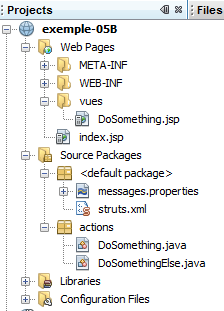
The project components are as follows:
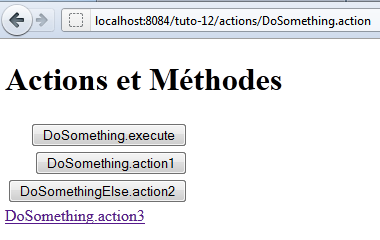
- [DoSomething.jsp]: the only view in the application that displays the three buttons from navigation as well as a link.
- [DoSomething.java] and [DoSomethingElse.java]: the two actions of the project
- [messages.properties]: the internationalized messages file
- [struts.xml]: the Struts 2 configuration file
7.2. Configuration
The following [struts.xml] file configures the application:
<!DOCTYPE struts PUBLIC
"-//Apache Software Foundation//DTD Struts Configuration 2.0//EN"
"http://struts.apache.org/dtds/struts-2.0.dtd">

<struts>
 <constant name="struts.custom.i18n.resources" value="messages" />
 <package name="actions" namespace="/actions" extends="struts-default">
    <action name="DoSomething" class="actions.DoSomething">
      <result name="success">/vues/DoSomething.jsp</result>
    </action>
    <action name="DoSomethingElse" class="actions.DoSomethingElse">
      <result name="success">/vues/DoSomething.jsp</result>
    </action>
  </package>
</struts>
- The action [/actions/DoSomething] will instantiate the class [actions.DoSomething], and its execute method will be executed by default. This default behavior can be overridden if the parameters passed to the action [Something] specify a different method. Regardless of which method is executed, it must return the key for navigation as "success" since only this key has been defined. The view [DoSomething.jsp] will then be displayed.
- The configuration of action [/actions/DoSomethingElse] is identical.
7.3. The message file
The message file [messages.properties] is as follows:
formulaire.titre1=Actions et M\u00e9thodes
formulaire.titre2=Actions et M\u00e9thodes
formulaire.execute=DoSomething.execute
formulaire.action1=DoSomething.action1
formulaire.action2=DoSomethingElse.action2
formulaire.action3=DoSomething.action3
7.4. The view [DoSomething.jsp]
The view [DoSomething.jsp] is as follows:
Its code is as follows:
<%@page contentType="text/html" pageEncoding="UTF-8"%>
<%@ taglib prefix="s" uri="/struts-tags" %>
<!DOCTYPE html>
<html>
  <head>
    <meta http-equiv="Content-Type" content="text/html; charset=UTF-8">
    <title><s:text name="formulaire.titre1"/></title>
  </head>
  <body>
    <h1><s:text name="formulaire.titre2"/></h1>
    <s:form action="DoSomething">
      <s:submit key="formulaire.execute"/>
      <s:submit key="formulaire.action1" method="action1"/>
      <s:submit key="formulaire.action2" action="DoSomethingElse" method="action2"/>
    </s:form>
    <s:url id="url" action="DoSomething" method="action3"/>
    <s:a href="%{url}"><s:text name="formulaire.action3"/></s:a>
  </body>
</html>
- line 11: the form will be posted to the [DoSomething] action. This does not necessarily mean that this action will be triggered. It depends on the submit button used for the POST.
- Line 12: The submit button specifies neither an action nor a method. The [DoSomething] action specified by the <form> tag will be instantiated. The method executed will be the one defined in the [struts.xml] file, the execute method.
- Line 13: The submit button specifies a method. The action [DoSomething], specified by the <form> tag, will be instantiated. The method executed will be the action1 method.
- Line 14: The submit button specifies an action and a method. The [DoSomethingElse] action will be instantiated. The method executed will be the action2 method.
- Lines 16–17: A link to the action [DoSomething] and the method action3. The action [DoSomething] will be instantiated and its method action3 executed. Unlike the submit buttons, clicking the link does not trigger a POST but a GET. Therefore, no parameters are posted.
The Html code generated by this code, when requesting the Url [http://localhost:8084/exemple-05B/actions/DoSomething.action], is as follows:
- Line 9: the form tag for the Html form. The action attribute specifies the Url to which the form parameters will be posted. This Url corresponds to the [DoSomething] action.
- Lines 11, 13, 15: The name attributes of the buttons will be posted to the target action of the submit button. This is what allows Struts to determine which action to instantiate and which method to execute.
- line 13: the attribute name=method:action1 indicates that the method DoSomething.action1 should be executed.
- Line 15: The attribute name= action:DoSomethingElse!action2 indicates that the method DoSomethingElse.action2 must be executed.
- Line 11: The attribute name= formulaire.execute specifies neither an action nor a method. Therefore, the method DoSomething.execute will be executed.
- Line 19: The link explicitly requests execution of the DoSomething.action3 method
7.5. The actions
The action [DoSomething] is as follows:
package actions;

import com.opensymphony.xwork2.ActionSupport;

public class DoSomething extends ActionSupport {

  public DoSomething() {
    System.out.println("DoSomething");
  }

  @Override
  public String execute() {
    System.out.println("DoSomething.execute");
    return SUCCESS;
  }

  public String action1() {
    System.out.println("DoSomething.action1");
    return SUCCESS;
  }

  public String action3() {
    System.out.println("DoSomething.action3");
    return SUCCESS;
  }
}
- The methods execute, action1, and action3 write to the web server console and set the key of navigation to success.
- Line 8: The constructor also writes to the web server console
The various console outputs allow you to determine which methods are executed during a request.
The action [DoSomethingElse] is similar:
package actions;

import com.opensymphony.xwork2.ActionSupport;

public class DoSomethingElse extends ActionSupport {

  public DoSomethingElse() {
    System.out.println("DoSomethingElse");
  }

  @Override
  public String execute() {
    System.out.println("DoSomethingElse.execute");
    return SUCCESS;
  }

  public String action2() {
    System.out.println("DoSomethingElse.action2");
    return SUCCESS;
  }
}
7.6. The tests
The tests show the following results (on the web server console):
- When the [DoSomething.execute] button is clicked, the [DoSomething] action is instantiated and its execute method is executed.
- When the [DoSomething.action1] button is clicked, the [DoSomething] action is instantiated and its action1 method is executed.
- When the [DoSomethingElse.action2] button is clicked, the [DoSomethingElse] action is instantiated and its action2 method is executed.
- When the [DoSomething.action3] link is clicked, the [DoSomething] action is instantiated and its action3 method is executed.