4. Spring JDBC 简介
在本章中,我们将探讨以下架构:
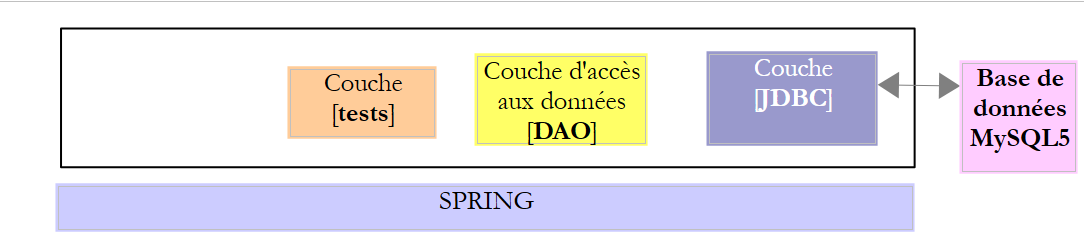 |
这与之前的架构相同。我们将引入两项变更:
- 数据库将包含两张通过外键关系关联的表;
- [DAO] 层将使用 [Spring JDBC] 库进行实现,这简化了 JDBC API 的管理;
4.1. 配置开发环境
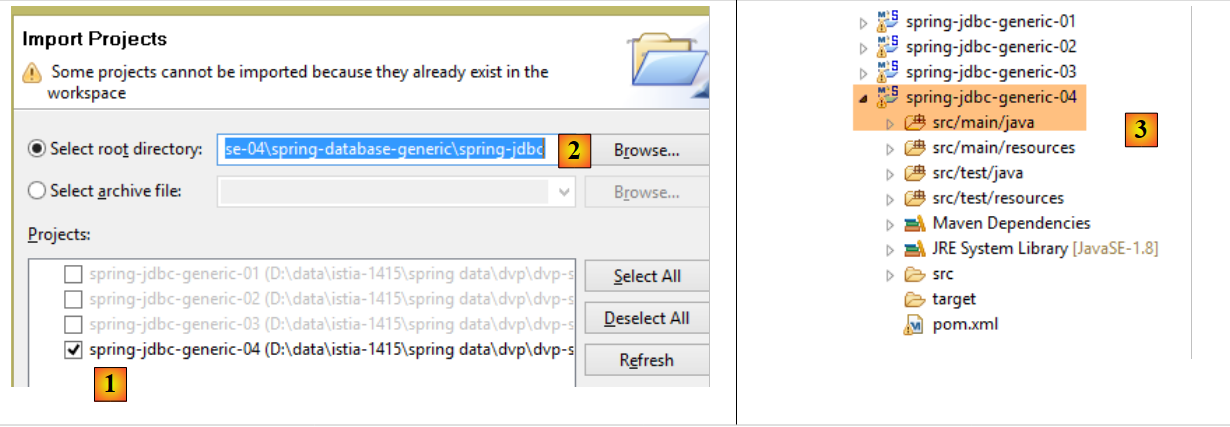
使用 STS,导入位于 [<examples>/spring-database-generic/spring-jdbc] 文件夹中的 [spring-jdbc-04] 项目
 |
此外,我们需要使用 [MyManager] 客户端创建一个新的 MySQL 数据库(参见第 3.1 节):
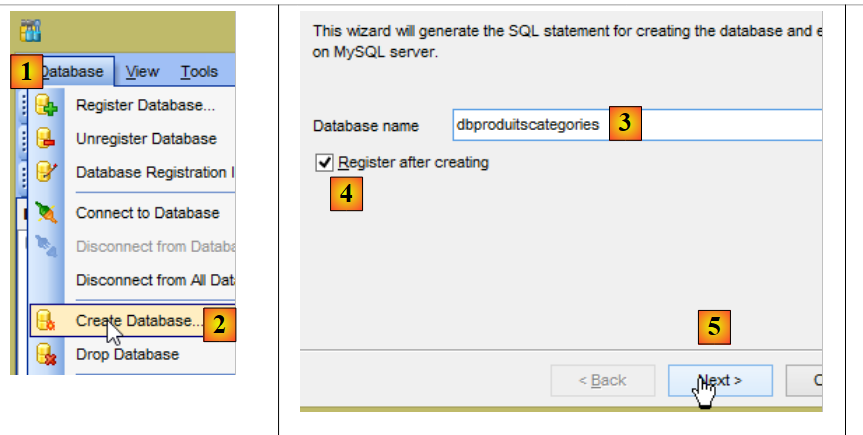 |
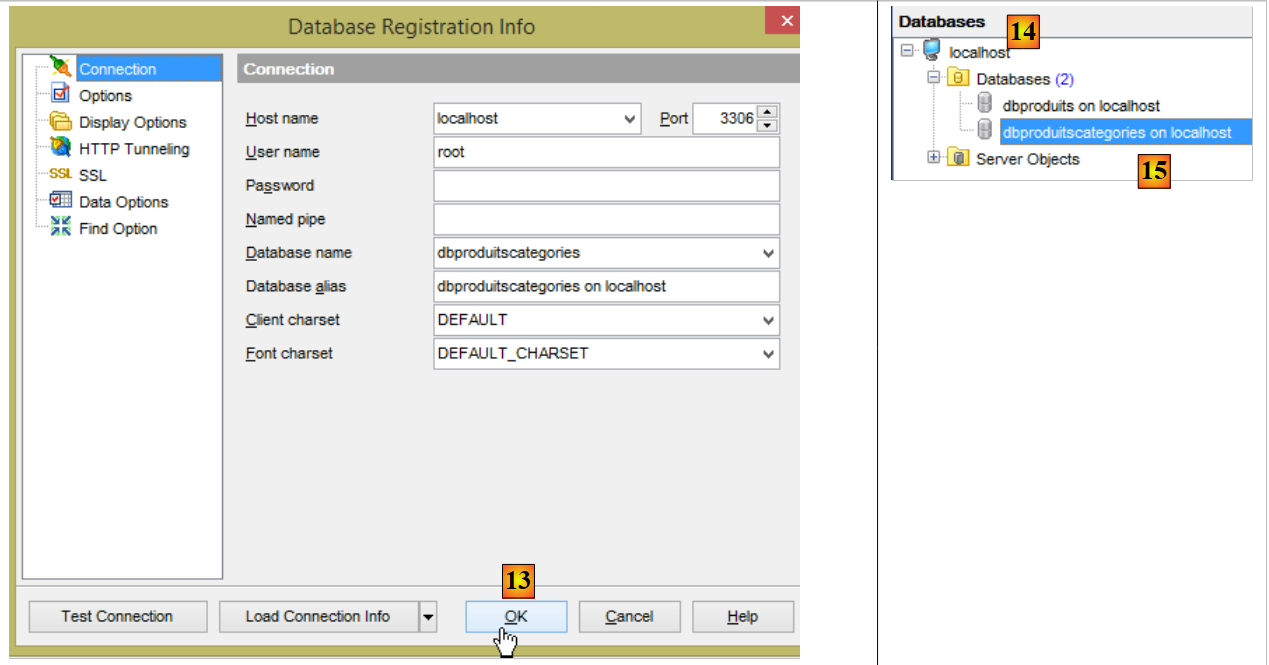
- 在[3]中,以下示例使用了一个名为[dbproduitscategories]的MySQL数据库;
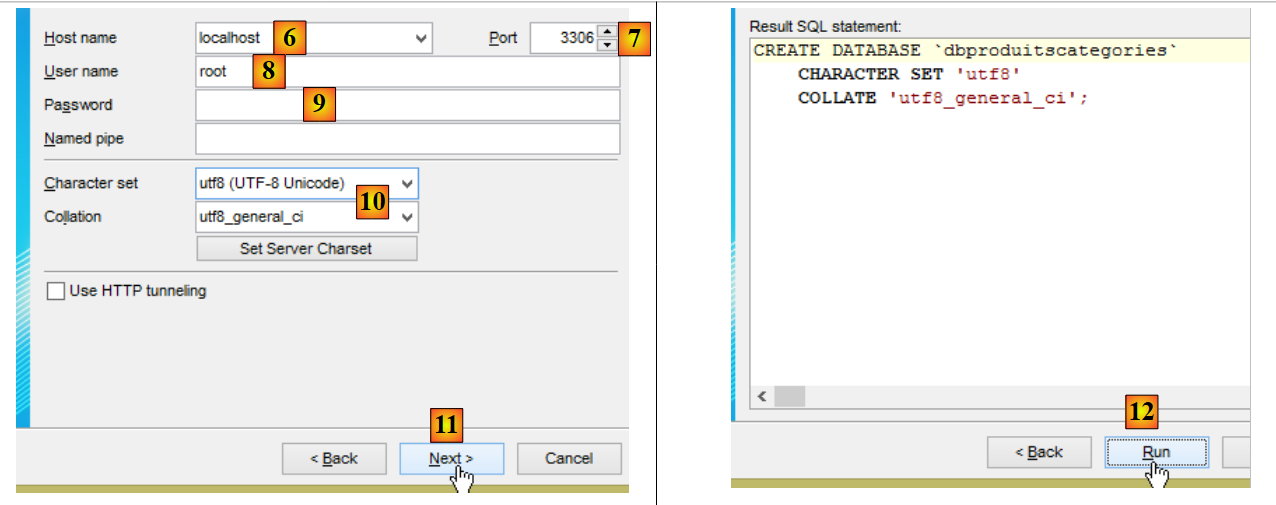 |
- 在 [9] 中,请输入 root 用户的密码(本文档中该密码为“root”);
 |
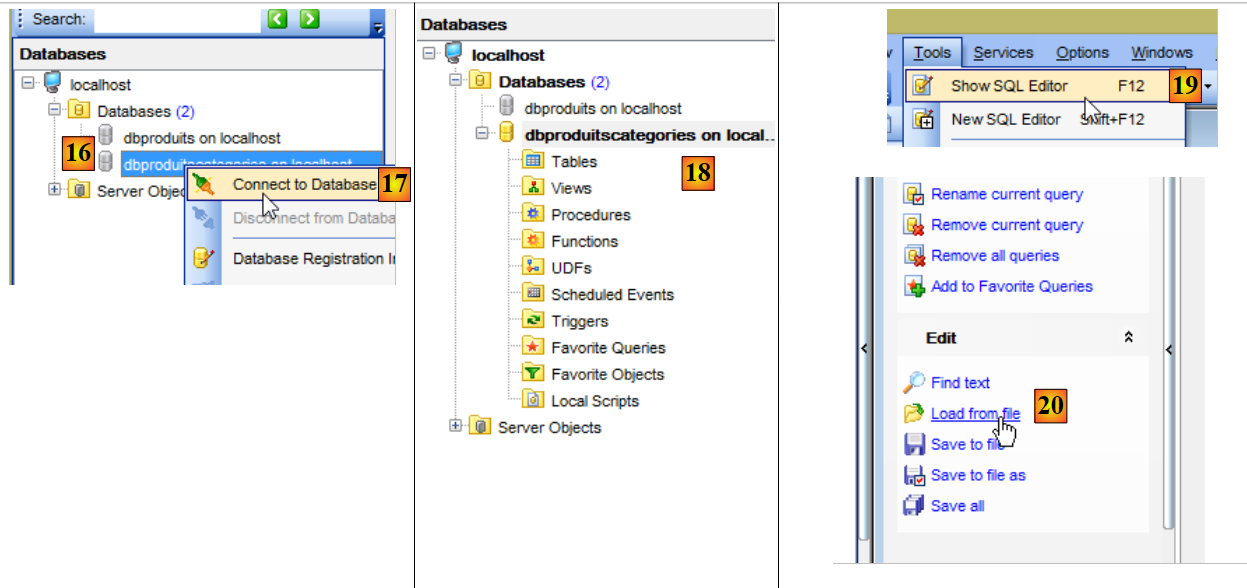 |
- 在[18]中,[dbproduitscategories]数据库是空的。我们通过一个SQL脚本创建表并向其中插入数据[19-20];
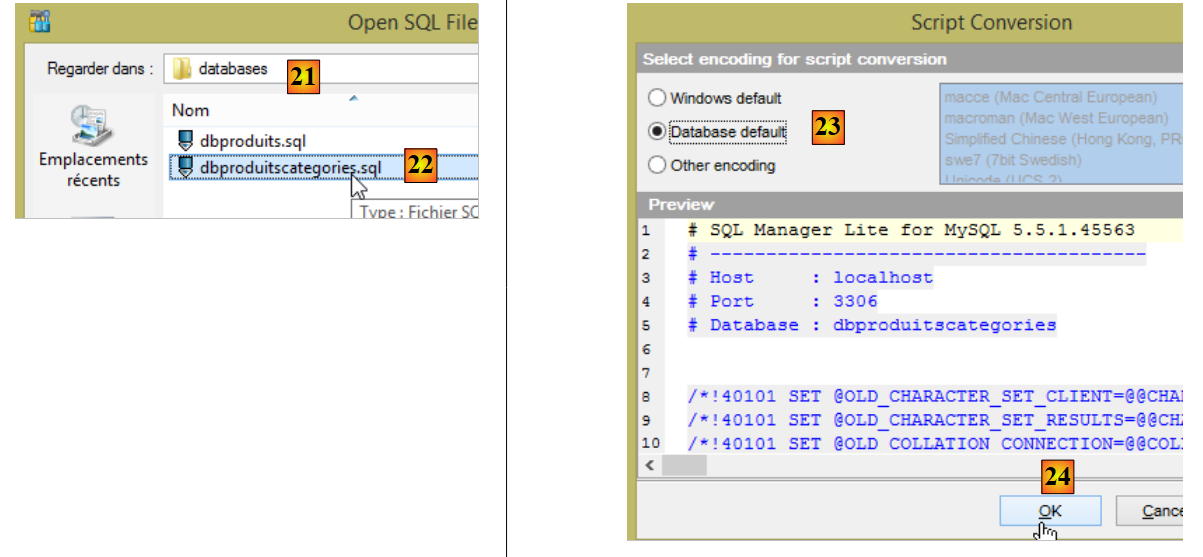 |
- 在 [21] 中,导航至文件夹 [<examples>/spring-database-config/mysql/databases];
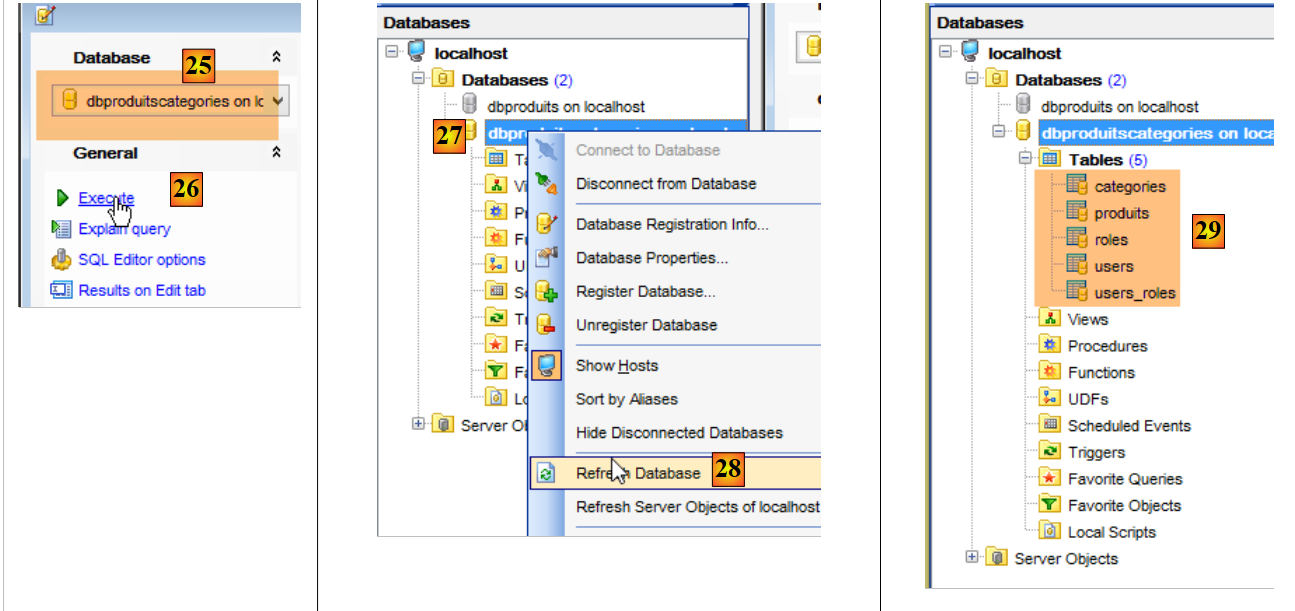 |
- 在 [25] 中,请确保您当前所在的数据库是 [dbproduitscategories],而非 [dbproduits];
- 在 [29] 中,SQL 脚本已创建了五个表。[ROLES、USERS、USERS_ROLES] 表仅在处理 Web 服务的安全性时使用,该服务旨在将 [dbproduitscategories] 数据库通过 Web 对外公开;
4.2. [dbproduitscategories] 数据库
[dbproduitscategories] 数据库是前面讨论过的 [dbproduits] 数据库的扩展。在 [PRODUITS] 表中,产品的类别由一个没有特定含义的数字标识,而在这里,该数字将成为 [CATEGORIES] 表中的外键。
[PRODUCTS] 表结构如下:
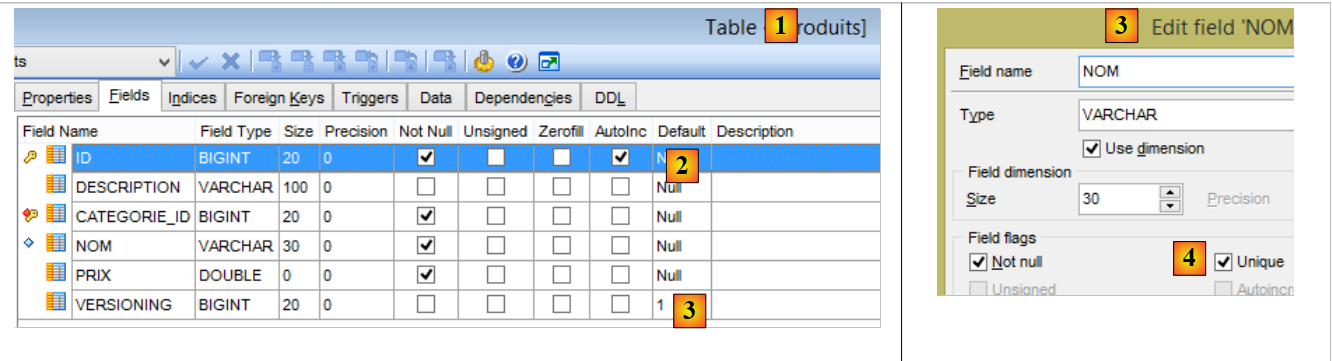 |
- [ID]:[PRODUCTS] 表的自增主键;
- [NAME]:产品的唯一名称 [4];
- [PRICE]:产品的价格;
- [DESCRIPTION]:产品的描述;
- [VERSIONING] 是产品的版本号。其初始版本为 1 [3]。每次修改产品时,操作该表的代码会将其版本号递增;
- [CATEGORY_ID]:[CATEGORIES] 表中的外键,用于标识产品所属的类别;
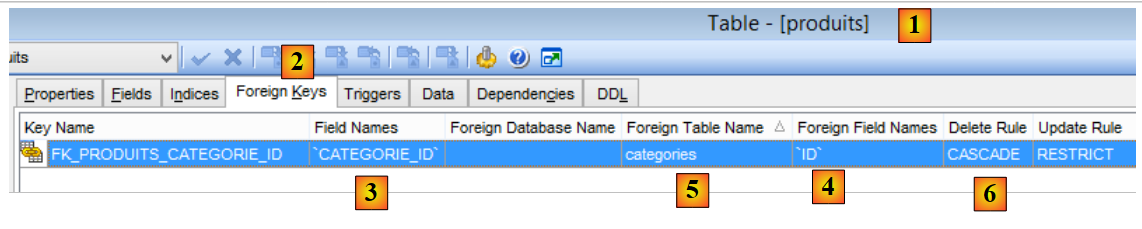 |
- 在 [1-3] 中,[PRODUITS] 表的外键 [CATEGORIE_ID]。它引用 [CATEGORIES] 表的 [ID] 列 [4-5];
- 当删除一个类别时,与其关联的所有产品也会被删除 [6]。这一点值得注意,因为它用于构建使用 [dbproduitscategories] 数据库的 [DAO] 层;
[CATEGORIES] 表结构如下:
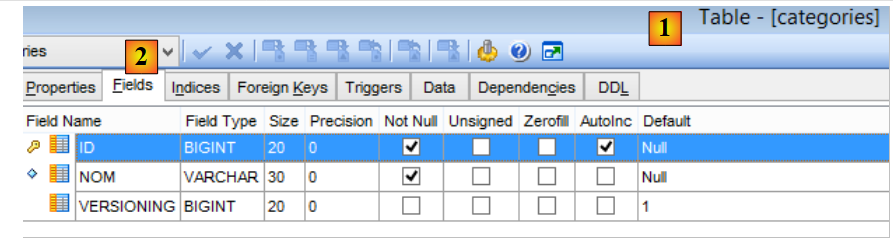 |
- [ID]:自动递增的主键;
- [VERSIONING]:分类版本号;
- [NAME]: 类别的唯一名称;
4.3. Eclipse 项目
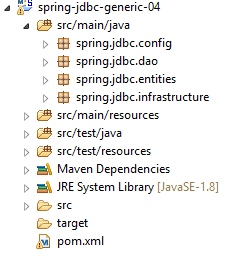 |
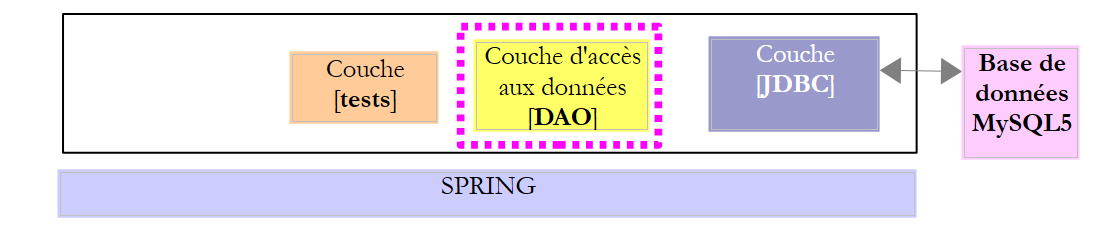
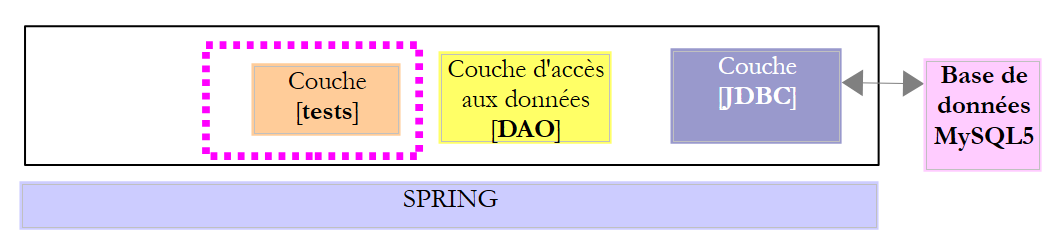
[spring-jdbc-04] 项目实现了以下架构:
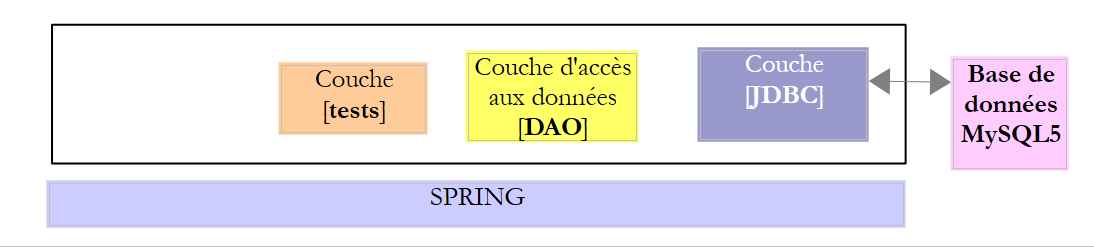 |
[spring-jdbc-04] 项目是一个由以下 [pom.xml] 文件配置的 Maven 项目:
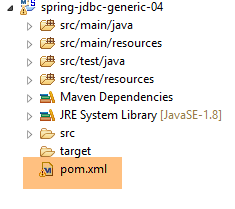 |
<?xml version="1.0" encoding="UTF-8"?>
<project xmlns="http://maven.apache.org/POM/4.0.0" xmlns:xsi="http://www.w3.org/2001/XMLSchema-instance"
    xsi:schemaLocation="http://maven.apache.org/POM/4.0.0 http://maven.apache.org/xsd/maven-4.0.0.xsd">
    <modelVersion>4.0.0</modelVersion>

    <groupId>dvp.spring.database</groupId>
    <artifactId>spring-jdbc-generic-04</artifactId>
    <version>0.0.1-SNAPSHOT</version>
    <packaging>jar</packaging>

    <name>spring-jdbc-generic-04</name>
    <description>Demo project for Spring JdbcTemplate</description>

    <parent>
        <groupId>org.springframework.boot</groupId>
        <artifactId>spring-boot-starter-parent</artifactId>
        <version>1.2.3.RELEASE</version>
        <relativePath /> <!-- lookup parent from repository -->
    </parent>

    <properties>
        <project.build.sourceEncoding>UTF-8</project.build.sourceEncoding>
        <java.version>1.8</java.version>
    </properties>

    <dependencies>
        <!-- configuration JDBC of SGBD -->
        <dependency>
            <groupId>dvp.spring.database</groupId>
            <artifactId>generic-config-jdbc</artifactId>
            <version>0.0.1-SNAPSHOT</version>
        </dependency>
        <!-- Spring JdbcTemplate -->
        <dependency>
            <groupId>org.springframework.boot</groupId>
            <artifactId>spring-boot-starter-jdbc</artifactId>
        </dependency>
    </dependencies>

    <build>
        <plugins>
            <plugin>
                <groupId>org.apache.maven.plugins</groupId>
                <artifactId>maven-surefire-plugin</artifactId>
                <version>2.18.1</version>
            </plugin>
        </plugins>
    </build>

</project>
- 第 28–32 行:该项目依赖于 [mysql-config-jdbc] 项目,该项目用于配置 JDBC 层;
- 第 34–37 行:[spring-boot-starter-jdbc] 构建产物提供了 Spring JDBC 库;
最终,依赖项如下:
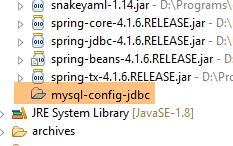 |
4.4. Spring 配置
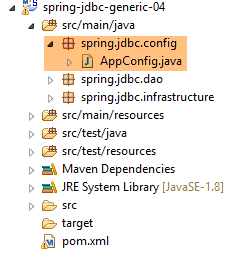 |
用于配置 Spring 项目的 [AppConfig] 类如下:
package spring.jdbc.config;

import generic.jdbc.config.ConfigJdbc;

import org.apache.tomcat.jdbc.pool.DataSource;
import org.springframework.context.annotation.Bean;
import org.springframework.context.annotation.ComponentScan;
import org.springframework.context.annotation.Configuration;
import org.springframework.context.annotation.Import;
import org.springframework.jdbc.core.namedparam.NamedParameterJdbcTemplate;
import org.springframework.jdbc.core.simple.SimpleJdbcInsert;
import org.springframework.jdbc.datasource.DataSourceTransactionManager;
import org.springframework.transaction.PlatformTransactionManager;
import org.springframework.transaction.annotation.EnableTransactionManagement;

@Configuration
@ComponentScan(basePackages = { "spring.jdbc.dao" })
@EnableTransactionManagement
@Import({ generic.jdbc.config.ConfigJdbc.class })
public class AppConfig {

    // data source
    @Bean
    public DataSource dataSource() {
        // data source TomcatJdbc
        DataSource dataSource = new DataSource();
        // configuration access JDBC
        dataSource.setDriverClassName(ConfigJdbc.DRIVER_CLASSNAME);
        dataSource.setUsername(ConfigJdbc.USER_DBPRODUITSCATEGORIES);
        dataSource.setPassword(ConfigJdbc.PASSWD_DBPRODUITSCATEGORIES);
        dataSource.setUrl(ConfigJdbc.URL_DBPRODUITSCATEGORIES);
        // initially open connections
        dataSource.setInitialSize(5);
        // result
        return dataSource;
    }

    // Transaction manager
    @Bean
    public PlatformTransactionManager transactionManager(DataSource dataSource) {
        return new DataSourceTransactionManager(dataSource);
    }

    // JdbcTemplate
    @Bean
    public NamedParameterJdbcTemplate namedParameterJdbcTemplate(DataSource dataSource) {
        return new NamedParameterJdbcTemplate(dataSource);
    }

    // product insertion
    @Bean
    public SimpleJdbcInsert simpleJdbcInsertProduit(DataSource dataSource) {
        return new SimpleJdbcInsert(dataSource).withTableName(ConfigJdbc.TAB_PRODUITS).usingGeneratedKeyColumns(
                ConfigJdbc.TAB_PRODUITS_ID);
    }

    // insertion category
    @Bean
    public SimpleJdbcInsert simpleJdbcInsertCategorie(DataSource dataSource) {
        return new SimpleJdbcInsert(dataSource).withTableName(ConfigJdbc.TAB_CATEGORIES).usingGeneratedKeyColumns(
                ConfigJdbc.TAB_CATEGORIES_ID);
    }

}
- 第 16 行:该类是一个 Spring 配置类;
- 第 17 行:系统将扫描 [spring.jdbc.dao] 包,查找除 [AppConfig] 类中已存在的 Spring 组件以外的其他组件。我们将在这里找到实现 [DAO] 层的组件;
- 第 18 行:我们不会自行管理事务,而是交由 Spring JDBC 处理。唯一需要做的是,用 Spring 的 [@Transactional] 注解标注需要在事务内执行的方法。第 18 行确保该注解会被处理,而不会被忽略。事务管理由通过 [pom.xml] 文件导入的 Spring JDBC 项目依赖之一负责;
- 第 19 行:我们从 [mysql-config-jdbc] 项目中导入 [generic.jdbc.config.ConfigJdbc] 类中已定义的 Bean;
- 第 23–36 行:[spring-jdbc-02] 示例中引入的 [tomcat-jdbc] 数据源;
- 第 40–42 行:与之前定义的数据源关联的事务管理器。该 Bean 必须命名为 [transactionManager],因为这是 [@EnableTransactionManagement] 注解所使用的名称。[DataSourceTransactionManager] 由 Spring JDBC 库提供(第 12 行);
- 第 45–48 行:[namedParameterJdbcTemplate] Bean,[DAO] 层的实现将基于此 Bean。该 Bean 由 Spring JDBC 库提供(第 10 行)。该 Bean 还与之前定义的数据源相关联(第 47 行);
- 第 51–55 行:[simpleJdbcInsertProduit] Bean(名称可任意设定)将用于向 [PRODUITS] 表插入产品并获取生成的主键。所使用的各项参数如下:
- [dataSource]:来自第24–36行的[tomcat-jdbc]数据源;
- [ConfigJdbc.TAB_PRODUITS]:即 [PRODUITS] 表;
- [ConfigJdbc.TAB_CATEGORIES_ID]:[PRODUCTS] 表的主键列。请注意,对于 PostgreSQL,该列名必须为小写;
- 第 58–62 行:将使用 [simpleJdbcInsertCategorie] Bean 向 [CATEGORIES] 表插入一个类别,并获取生成的主键;
4.5. 项目异常
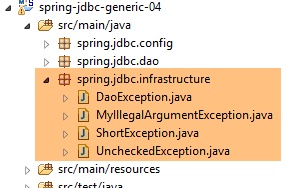 |
我们在 [spring-jdbc-03] 项目中已经看到了 [UncheckedException、DaoException、ShortException] 这几个类。现在我们添加一个新的类:
package spring.jdbc.infrastructure;

public class MyIllegalArgumentException extends UncheckedException {

    private static final long serialVersionUID = 1L;

    // manufacturers
    public MyIllegalArgumentException() {
        super();
    }

    public MyIllegalArgumentException(int code, Throwable e, String className) {
        super(code, e, className);
    }

}
- [MyIllegalArgumentException] 类继承自 [UncheckedException] 类,因此属于未检查异常类。它将用于指示 [DAO] 层中方法的调用参数不正确。我们没有将其命名为 [IllegalArgumentException],因为 JDK 中已经存在该异常,这有时会导致编译器生成错误的 [import] 语句;
4.6. 项目实体
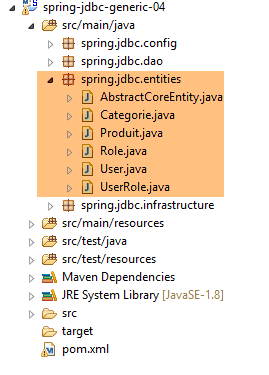 |
[spring.jdbc.entities] 包中的类代表 [dbproduitscategories] 数据库表中的行。目前,我们将忽略 [USERS、ROLES、USERS_ROLE] 表。
所有实体都继承自父类 [AbstractCoreEntity]:
package spring.jdbc.entities;

public abstract class AbstractCoreEntity {
    // properties
    protected Long id;
    protected Long version;

    // manufacturers
    public AbstractCoreEntity() {

    }

    public AbstractCoreEntity(Long id, Long version) {
        this.id = id;
        this.version = version;
    }

    public AbstractCoreEntity(AbstractCoreEntity entity) {
        this.id = entity.id;
        this.version = entity.version;
    }

    public void setAbstractCoreEntity(AbstractCoreEntity entity) {
        this.id = entity.id;
        this.version = entity.version;
    }

    // ------------------------------------------------------------
    // redefine [equals] and [hashcode]
    @Override
    public int hashCode() {
        return (id != null ? id.hashCode() : 0);
    }

    @Override
    public boolean equals(Object entity) {
        if (!(entity instanceof AbstractCoreEntity)) {
            return false;
        }
        String class1 = this.getClass().getName();
        String class2 = entity.getClass().getName();
        if (!class2.equals(class1)) {
            return false;
        }
        AbstractCoreEntity other = (AbstractCoreEntity) entity;
        return id != null && other.id != null && id.equals(other.id);
    }

    // getters and setters
...
}
- 第 5 行:[id] 字段将与 [ID] 列相关联,该列是表的主键;
- 第 6 行:[version] 字段将与表中的 [VERSIONING] 列相关联;
- 第 8–26 行:用于构建或初始化 [AbstractCoreEntity] 对象的各种构造函数和方法;
- 第 35–47 行:[equals] 方法规定,若两个 [AbstractCoreEntity] 对象的 [id] 字段相同,则视为相等。需特别注意的是,[AbstractCoreEntity] 对象将表示表中的行,其中 [id] 是主键,因此不可能存在两个 [id] 相同的行;
- 第 30–33 行:关于 [hashCode] 的提案;
[Product] 类将表示 [PRODUCTS] 表中的一行:
package spring.jdbc.entities;

import com.fasterxml.jackson.annotation.JsonFilter;

@JsonFilter("jsonFilterProduit")
public class Produit extends AbstractCoreEntity {
    // properties
    private String nom;
    private Long idCategorie;
    private double prix;
    private String description;
    private Categorie categorie;

    // manufacturers
    public Produit() {

    }

    public Produit(Long id, Long version, String nom, Long idCategorie, double prix, String description,
            Categorie categorie) {
        super(id, version);
        this.nom = nom;
        this.idCategorie = idCategorie;
        this.prix = prix;
        this.description = description;
        this.categorie = categorie;
    }

    // signature
    public String toString() {
        return String.format("[id=%s, version=%s, nom=%s, prix=10.2f, desc=%s, idCategorie=%s]", id, version, nom, prix,
                description, idCategorie);
    }

    // getters and setters
...
}
- 第 6 行:[Product] 类继承自 [AbstractCoreEntity] 类;
- 第 8–12 行:字段 [id, version, name, categoryId, price, description] 对应 [PRODUCTS] 表中的列 [ID, VERSIONING, NAME, CATEGORY_ID, PRICE, DESCRIPTION];
- 第 12 行:类型为 [Category] 且主键为 [categoryId] 的对象。该字段是否被赋值取决于具体情况。当其被赋值时,表示长格式产品 [LongProduct];否则表示短格式产品 [ShortProduct];
- 第 5 行:一个 JSON 过滤器。请注意,[mysql-config-jdbc] 项目包含一个 JSON 库。由于 [category] 字段可能已填充也可能未填充,因此需要此过滤器。 在此情况下,产品的 JSON 表示形式会有所不同。为处理这两种情况,我们将在第 5 行配置 [jsonFilterProduct] 过滤器。JSON 过滤器允许我们动态指定应从 JSON 表示中排除哪些字段。当我们知道 [category] 字段未被填充时,将把它从产品的 JSON 表示中排除;
[Category] 类表示 [CATEGORIES] 表中的一行:
package spring.jdbc.entities;

import java.util.ArrayList;
import java.util.List;

import com.fasterxml.jackson.annotation.JsonFilter;

@JsonFilter("jsonFilterCategorie")
public class Categorie extends AbstractCoreEntity {

    // properties
    private String nom;
    public List<Produit> produits;

    // manufacturers
    public Categorie() {

    }

    public Categorie(Long id, Long version, String nom, List<Produit> produits) {
        super(id, version);
        this.nom = nom;
        this.produits = produits;
    }

    // signature
    public String toString() {
        return String.format("[id=%s, version=%s, nom=%s]", id, version, nom);
    }

    // methods
    public void addProduit(Produit produit) {
        // add a product
        if (produits == null) {
            produits = new ArrayList<Produit>();
        }
        if (produit != null) {
            // we add the product
            produits.add(produit);
            // set your category
            produit.setCategorie(this);
            produit.setIdCategorie(this.id);
        }
    }

    // getters and setters
...
}
- 第 9 行:[Category] 类继承自 [AbstractCoreEntity] 类;
- 第 12 行:字段 [id, version, name] 对应 [CATEGORIES] 表中的列 [ID, VERSIONING, NAME];
- 第 13 行:[products] 字段表示该类别中的产品列表。该字段并非总是被填充。当未填充时,我们使用简短形式类别 [ShortCategorie];否则,使用长形式类别 [LongCategorie];
- 第 32–44 行:[addProduct] 方法允许您向类别添加产品(第 39 行),并在添加的产品中设置类别的特征(categoryID 和 category);
- 第 8 行:一个 JSON 过滤器。当 JSON 库需要对 [Category] 对象进行序列化/反序列化时,我们必须告知其如何处理名为 [jsonFilterCategory] 的过滤器;
4.7. Idao<T> 接口
 |
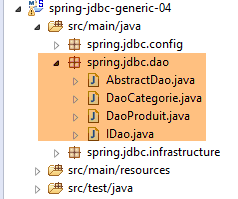 |
[DAO] 层的 [IDao] 接口具有以下签名:
package spring.jdbc.dao;

import java.util.List;

import spring.jdbc.entities.AbstractCoreEntity;

public interface IDao<T extends AbstractCoreEntity> {

    // list of all T entities
    public List<T> getAllShortEntities();

    public List<T> getAllLongEntities();

    // special entities - short version
    public List<T> getShortEntitiesById(Iterable<Long> ids);

    public List<T> getShortEntitiesById(Long... ids);

    public List<T> getShortEntitiesByName(Iterable<String> names);

    public List<T> getShortEntitiesByName(String... names);

    // special entities - long version
    public List<T> getLongEntitiesById(Iterable<Long> ids);

    public List<T> getLongEntitiesById(Long... ids);

    public List<T> getLongEntitiesByName(Iterable<String> names);

    public List<T> getLongEntitiesByName(String... names);

    // update of several entities
    public List<T> saveEntities(Iterable<T> entities);

    public List<T> saveEntities(@SuppressWarnings("unchecked") T... entities);

    // delete all entities
    public void deleteAllEntities();

    // deletion of multiple entities
    public void deleteEntitiesById(Iterable<Long> ids);

    public void deleteEntitiesById(Long... ids);

    public void deleteEntitiesByName(Iterable<String> names);

    public void deleteEntitiesByName(String... names);

    public void deleteEntitiesByEntity(Iterable<T> entities);

    public void deleteEntitiesByEntity(@SuppressWarnings("unchecked") T... entities);
}
- 第 7 行:这里有一个由类型 T 泛型化的 [IDao] 接口,其条件是:该类型必须继承 [AbstractCoreEntity] 类或实现 [AbstractCoreEntity] 接口。这两种情况都使用了 [extends] 关键字。在此,T 将由 [Product] 类型或 [Category] 类型实例化。 事实上,很快就能发现我们对 [Product] 和 [Category] 类型执行的是相同类型的操作(插入、修改、删除、查询)。因此,将这些方法归入一个泛型接口是合理的;
- 根据上下文不同,术语 [LongEntity] 和 [ShortEntity] 指代不同的情况:
- 当 T 是 [Product] 类型时:
- [ShortEntity] 是指未填充 [Category] 字段的产品;
- [LongEntity] 表示已填充 [Category] 字段的产品;
- 当 T 是 [Category] 类型时:
- [ShortEntity] 指未填充 [List<Product> products] 字段的类别;
- [LongEntity] 是已填充 [List<Product> products] 字段的产品;
- 当 T 是 [Product] 类型时:
因此,我们得到一个包含 19 个方法的接口。其中大部分方法是重复的。以 [getShortEntitiesById] 方法为例:
    public List<T> getShortEntitiesById(Iterable<Long> ids);

    public List<T> getShortEntitiesById(Long... ids);
- 第 1 行和第 3 行:参数是我们要获取短版本的实体的主键列表。该列表有两种不同的形式:
- 第 1 行:一个实现了 [Iterable<Long>] 接口的列表。虽然 [List<Long>] 类型实现了该接口,但还有许多其他类型。如果我们写成 [List<Long> ids],对于本示例来说已经足够,但这会迫使示例使用者在参数类型与预期不完全一致时进行类型转换;
- 第 3 行:遗憾的是,`Long[]` 类型并未实现 `Iterable<Long>` 接口。在此情况下,我们将采用第 3 行中的版本。形式参数 [Long... ids](3 个点)既可接受数组中的值,也可接受 ID 序列中的值:getShortEntitiesById(id1, id2, ...);
以下架构将实现相同的 IDao<T> 接口:
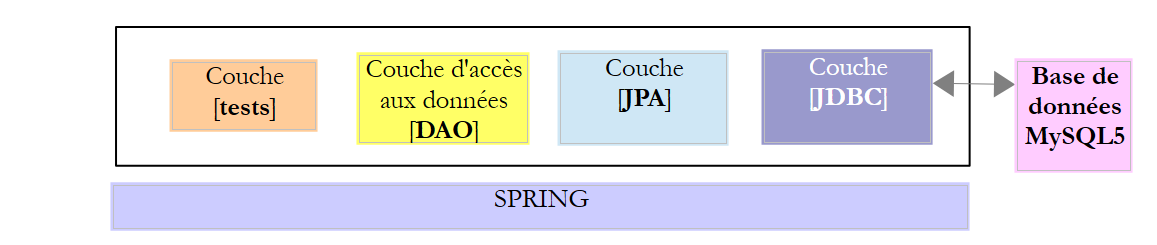 |
其中,将在 [DAO] 层与 DBMS 的 JDBC 驱动程序之间插入一个 [JPA](Java Persistence API)层。这将使我们能够为这两种架构提供一个通用的测试层。在两种情况下,[DAO] 层都将提供两个接口:
- IDao<Product> 用于访问 [PRODUCTS] 表;
- IDao<Category> 用于访问 [CATEGORIES] 表;
4.8. IDao<T> 接口的实现
|
- IDao<Product> 接口由 [DaoProduct] 类实现;
- IDao<Category> 接口由 [DaoCategory] 类实现;
类 [DaoProduct] 和 [DaoCategory] 均继承自以下抽象类 [ AbstractDao]:
package spring.jdbc.dao;

import java.util.ArrayList;
import java.util.List;

import org.springframework.beans.factory.annotation.Autowired;
import org.springframework.beans.factory.annotation.Qualifier;
import org.springframework.transaction.annotation.Transactional;

import spring.jdbc.entities.AbstractCoreEntity;
import spring.jdbc.infrastructure.MyIllegalArgumentException;

import com.google.common.collect.Lists;

public abstract class AbstractDao<T extends AbstractCoreEntity> implements IDao<T> {

    // injections
    @Autowired
    @Qualifier("maxPreparedStatementParameters")
    protected int maxPreparedStatementParameters;

    // local
    protected String simpleClassName = getClass().getSimpleName();

    @Override
    @Transactional(readOnly = true)
    public List<T> getShortEntitiesById(Iterable<Long> ids) {
        // argument validity
        List<T> entities = checkNullOrEmptyArgument(true, ids);
        if (entities != null) {
            return entities;
        }
        // obtaining by tranches
        entities = new ArrayList<T>();
        int taille = maxPreparedStatementParameters;
        List<Long> listIds = Lists.newArrayList(ids);
        int nbIds = listIds.size();
        for (int i = 0; i < nbIds; i += taille) {
            int limit = Math.min(nbIds, i + taille);
            entities.addAll(getShortEntitiesById(listIds.subList(i, limit)));
        }
        // result
        return entities;
    }

    @Override
    @Transactional(readOnly = true)
    public List<T> getShortEntitiesById(Long... ids) {
        // argument validity
        List<T> entities = checkNullOrEmptyArgument(true, ids);
        if (entities != null) {
            return entities;
        }
        // result
        return getShortEntitiesById((Iterable<Long>) Lists.newArrayList(ids));
    }

    @Override
    @Transactional(readOnly = true)
    public List<T> getShortEntitiesByName(Iterable<String> names) {
    ...
    }

    @Override
    @Transactional(readOnly = true)
    public List<T> getShortEntitiesByName(String... names) {
    ...
    }

    @Override
    @Transactional(readOnly = true)
    public List<T> getLongEntitiesById(Iterable<Long> ids) {
    ...
    }

    @Override
    @Transactional(readOnly = true)
    public List<T> getLongEntitiesById(Long... ids) {
    ...
    }

    @Override
    @Transactional(readOnly = true)
    public List<T> getLongEntitiesByName(Iterable<String> names) {
    ...
    }

    @Override
    @Transactional(readOnly = true)
    public List<T> getLongEntitiesByName(String... names) {
    ...
    }

    @Override
    @Transactional
    public List<T> saveEntities(Iterable<T> entities) {
    ...
    }

    @Override
    @Transactional
    public List<T> saveEntities(@SuppressWarnings("unchecked") T... entities) {
    ...
    }

    @Override
    public void deleteEntitiesById(Iterable<Long> ids) {
    ...
    }

    @Override
    public void deleteEntitiesById(Long... ids) {
    ...
    }

    @Override
    public void deleteEntitiesByName(Iterable<String> names) {
    ...
    }

    @Override
    public void deleteEntitiesByName(String... names) {
    ...
    }

    @Override
    public void deleteEntitiesByEntity(Iterable<T> entities) {
    ...
    }

    @Override
    public void deleteEntitiesByEntity(@SuppressWarnings("unchecked") T... entities) {
    ...
    }

    protected void deleteEntitiesByEntity(List<T> entities) {
    ...
    }

    @Override
    @Transactional(readOnly = true)
    public abstract List<T> getAllShortEntities();

    @Override
    @Transactional(readOnly = true)
    public abstract List<T> getAllLongEntities();

    @Override
    public abstract void deleteAllEntities();

    // méthodes privées ----------------------------------------------
    private <T2> List<T> checkNullOrEmptyArgument(boolean checkEmpty, Iterable<T2> elements) {
...
    }

    @SuppressWarnings("unchecked")
    private <T2> List<T> checkNullOrEmptyArgument(boolean checkEmpty, T2... elements) {
    ...
    }

    // méthodes protégées ----------------------------------------------
    abstract protected List<T> getShortEntitiesById(List<Long> ids);

    abstract protected List<T> getShortEntitiesByName(List<String> names);

    abstract protected List<T> getLongEntitiesById(List<Long> ids);

    abstract protected List<T> getLongEntitiesByName(List<String> names);

    abstract protected List<T> saveEntities(List<T> entities);

    abstract protected void deleteEntitiesById(List<Long> ids);

    abstract protected void deleteEntitiesByName(List<String> names);

}
- 第 15 行:[AbstractDao] 类是抽象类(关键字 `abstract`)。因此,它无法被实例化,只能被继承。该类具有以下几个作用:
- 定义执行每个方法时所处的事务性质;
- 尽可能为 [IDao<Product>] 和 [IDao<Category>] 接口的两种实现处理尽可能多的常见任务。这主要涉及对参数的验证。不接受空参数和空列表;
- 将参数 `T... params` 和 `Iterable<T> params` 的类型统一为单一类型:`List<T> params`;
- 一旦操作涉及其中一个接口的具体实现,立即将工作委托给子类;
得益于 [AbstractDao] 类对各类方法参数的标准化处理,子类 [DaoProduit] 和 [DaoCategorie] 只需实现 10 个方法,而非原来的 19 个:
    // methods implemented by child classes ----------------------------------------------
    abstract protected List<T> getShortEntitiesById(List<Long> ids);

    abstract protected List<T> getShortEntitiesByName(List<String> names);

    abstract protected List<T> getLongEntitiesById(List<Long> ids);

    abstract protected List<T> getLongEntitiesByName(List<String> names);

    abstract protected List<T> saveEntities(List<T> entities);

    abstract protected void deleteEntitiesById(List<Long> ids);

    abstract protected void deleteEntitiesByName(List<String> names);

    @Override
    @Transactional(readOnly = true)
    public abstract List<T> getAllShortEntities();

    @Override
    @Transactional(readOnly = true)
    public abstract List<T> getAllLongEntities();

    @Override
public abstract void deleteAllEntities();
让我们来看看 [AbstractDao] 类的几个方法。
[getShortEntitiesById] 方法
该方法用于检索主键已提供的实体的简短版本。
    // injections
    @Autowired
    @Qualifier("maxPreparedStatementParameters")
    protected int maxPreparedStatementParameters;

    // local
    protected String simpleClassName = getClass().getSimpleName();

    @Override
    @Transactional(readOnly = true)
    public List<T> getShortEntitiesById(Iterable<Long> ids) {
    ...
}
- 第 2–4 行:我们注入了在 [ConfigJdbc] 配置文件中定义的 [maxPreparedStatementParameters] Bean,该文件为特定的数据库管理系统 (DBMS) 配置了 JDBC 层:
    // max number of parameters of a [PreparedStatement]
    public final static int MAX_PREPAREDSTATEMENT_PARAMETERS = 10000;

    @Bean(name = "maxPreparedStatementParameters")
    public int maxPreparedStatementParameters() {
        return MAX_PREPAREDSTATEMENT_PARAMETERS;
}
- 第 1–7 行:定义 [maxPreparedStatementParameters] Bean,用于设置可传递给 [PreparedStatement] 的最大参数数量。在 MySQL 数据库管理系统中,由于 [PreparedStatement] 支持 10,000 个参数,因此并未出现此需求。 在测试 SQL Server 数据库管理系统时,系统抛出了异常,指出 [PreparedStatement] 的最大参数数量为 2,100。因此,该数值已成为各数据库管理系统的配置参数。因此,必须将其放置在每个数据库管理系统的 [sgbd-config-jdbc] 配置项目中;
让我们回到 [getShortEntitiesById] 方法的代码:
    // injections
    @Autowired
    @Qualifier("maxPreparedStatementParameters")
    protected int maxPreparedStatementParameters;

    // local
    protected String simpleClassName = getClass().getSimpleName();

    @Override
    @Transactional(readOnly = true)
    public List<T> getShortEntitiesById(Iterable<Long> ids) {
    ...
}
- 第 7 行:类名。用作异常类 [DaoException] 其中一个构造函数的参数;
- 第 10 行:注解 [@Transactional(readOnly = true)] 表示该方法必须在只读事务中运行。有人可能会质疑这种事务的必要性,因为该方法仅执行读取操作,因此即使发生故障,也没有内容需要回滚。 [Spring Data] 库的作者推荐了这种做法,并解释了原因。我采纳了他的建议;
该方法的实现代码如下:
    @Override
    @Transactional(readOnly = true)
    public List<T> getShortEntitiesById(Iterable<Long> ids) {
        // validité de l'argument
        List<T> entities = checkNullOrEmptyArgument(true, ids);
        if (entities != null) {
            return entities;
        }
...
}
- 第 5 行:通过以下方法检查 [ids] 参数的有效性:
    private <T2> List<T> checkNullOrEmptyArgument(boolean checkEmpty, Iterable<T2> elements) {
        // elements null ?
        if (elements == null) {
            throw new MyIllegalArgumentException(222, new NullPointerException("L'argument ne peut être null"), simpleClassName);
        }
        // elements vide ?
        if (!elements.iterator().hasNext()) {
            if (checkEmpty) {
                throw new MyIllegalArgumentException(223, new RuntimeException("l'argument ne peut être une liste vide"),
                        simpleClassName);
            } else {
                return new ArrayList<T>();
            }
        }
        // résultat par défaut
        return null;
}
- 第 1 行:[checkNullOrEmptyArgument] 方法是一个由类型 <T2> 泛型化的方法。T2 是作为方法第二个参数传递的元素的类型。这可以是 [Long, String, AbstractCoreEntity];
- 第 1 行:[checkNullOrEmptyArgument] 方法接受两个参数:
- [Iterable<T2> elements]:待测试的参数;
- [checkEmpty]:若需验证前一个参数是否为非空列表,则将其设为 true;
- 第 4–6 行:我们检查 [elements] 参数是否为空。如果是,则抛出 [MyIllegalArgumentException];
- 第 8–15 行:如果列表为空,且我们本应验证其不为空,则抛出 [MyIllegalArgumentException];
- 第 13 行:如果列表为空,且我们不需要验证其非空性,则返回一个类型为 T 的空元素列表。[Iterable<T2>] 接口提供了一个 [iterator()] 方法,允许 遍历实现该接口的列表中的元素。该迭代器的两个方法非常有用:
- [iterator].hasNext():如果列表中仍有待处理的元素,则返回 true,否则返回 false;
- [iterator].next(): 返回列表的当前元素,并将迭代器向前移动一个元素;
- 最后,
- 如果参数 [T2... elements] 为 null 或为空,则抛出 [MyIllegalArgumentException];
- 如果参数 [T2... elements] 是一个空列表且这在语法上是合法的,则返回一个包含类型 T 元素的空列表;
当待测试的参数类型为 [T2... elements] 时,也存在类似的方法:
@SuppressWarnings("unchecked")
    private <T2> List<T> checkNullOrEmptyArgument(boolean checkEmpty, T2... elements) {
    ...
    }
让我们回到 [getShortEntitiesById] 方法的代码:
    @Override
    @Transactional(readOnly = true)
    public List<T> getShortEntitiesById(Iterable<Long> ids) {
        // argument validity
        List<T> entities = checkNullOrEmptyArgument(true, ids);
        // obtaining by tranches
        entities = new ArrayList<T>();
        int taille = maxPreparedStatementParameters;
        List<Long> listIds = Lists.newArrayList(ids);
        int nbIds = listIds.size();
        for (int i = 0; i < nbIds; i += taille) {
            int limit = Math.min(nbIds, i + taille);
            entities.addAll(getShortEntitiesById(listIds.subList(i, limit)));
        }
        // result
        return entities;
}
- 第 7 行:如果执行到此处,说明参数 [Iterable<Long> ids] 有效;
- 第 7–14 行:稍后我们将看到,[getShortEntitiesById] 方法将由 [PreparedStatement] 类型实现,该类型将把待搜索的主键列表作为参数。例如:
public final static String SELECT_SHORTCATEGORIE_BYID = "SELECT c.ID as c_ID, c.VERSIONING as c_VERSIONING, c.NOM as c_NOM FROM CATEGORIES c WHERE c.ID in (:ids)";
:ids 是一个参数,其实际值类型为 List<Long>。该列表的每个元素都将作为参数 ? 传递给 [PreparedStatement]。不过,我们已指定该类型接受的参数数量上限,该数值由类的 [maxPreparedStatementParameters] 字段设定;
- 第 7 行:[getShortEntitiesById] 方法将返回的 T 实体列表。该列表将以 [maxPreparedStatementParameters] 个元素为一组进行构建;
- 第 9 行:从 [Iterable<Long> ids] 参数中,我们创建了一个 [List<Long> listIds] 类型。[Lists] 类是 Google Guava 库中的一个类,它提供了许多用于操作对象集合的静态方法。Maven 项目 [mysql-config-jdbc] 已通过 pom.xml 导入了 Google Guava 库:
        <!-- Google Guava -->
        <dependency>
            <groupId>com.google.guava</groupId>
            <artifactId>guava</artifactId>
            <version>16.0.1</version>
</dependency>
- 第 10 行:要在数据库中搜索的 T 实体数量;
- 第 11–13 行:以 [size = maxPreparedStatementParameters] 个元素为一组进行搜索;
- 第 12 行:用于防止超出 [listIds] 列表范围的计算;
- 第 13 行:通过调用 [getShortEntitiesById(listIds.subList(i, limit))] 获取 T 实体。该方法在类中定义如下:
abstract protected List<T> getShortEntitiesById(List<Long> ids);
因此,将从数据库中检索 T 实体的将是子类:
- [DaoProduct],若 T 的类型为 [Product];
- [DaoCategory] 若 T 的类型为 [Category];
这种在父类中采用的方法有两个好处:
- 子类中 [getShortEntitiesById] 方法的签名是唯一的:其参数类型为 [List<Long> ids];
- 子类无需处理 [PreparedStatement] 的 [maxPreparedStatementParameters] 参数问题。其父类已代为处理;
- 第 13 行:子类返回的实体被添加到父类将返回的实体列表中(第 16 行);
现在,让我们看看该类另一个方法 [getShortEntitiesById] 的实现:
    @Override
    @Transactional(readOnly = true)
    public List<T> getShortEntitiesById(Long... ids) {
        // validité de l'argument
        List<T> entities = checkNullOrEmptyArgument(true, ids);
        // résultat
        return getShortEntitiesById((Iterable<Long>) Lists.newArrayList(ids));
}
- 第 3 行:参数的类型已更改:Long... ids;
- 第 5 行:对该参数的有效性进行验证;
- 第 7 行:我们调用刚才描述的 [getShortEntitiesById] 方法。这里我们再次使用了 [Google Guava] 库中的 [Lists] 类。请注意,由于 [getShortEntitiesById] 方法在类中有三个签名,因此我们必须显式地将其强制转换为 [Iterable<Long>] 类型,以帮助编译器选择正确的方法:
- List<T> getShortEntitiesById(Long... ids);
- List<T> getShortEntitiesById(Iterable<Long> ids);
- List<T> getShortEntitiesById(List<Long> ids),该方法为抽象方法,由子类实现;
关于 [DaoProduit] 和 [DaoCategorie] 类的父类 [AbstractDao],我们不再赘述。仅需指出,将多个类共有的行为提取到父类中(无论该父类是否为抽象类)有时非常有用。完成此项工作后,子类只需实现以下方法:
    // methods implemented by child classes ----------------------------------------------
    abstract protected List<T> getShortEntitiesById(List<Long> ids);

    abstract protected List<T> getShortEntitiesByName(List<String> names);

    abstract protected List<T> getLongEntitiesById(List<Long> ids);

    abstract protected List<T> getLongEntitiesByName(List<String> names);

    abstract protected List<T> saveEntities(List<T> entities);

    abstract protected void deleteEntitiesById(List<Long> ids);

    abstract protected void deleteEntitiesByName(List<String> names);

    @Override
    @Transactional(readOnly = true)
    public abstract List<T> getAllShortEntities();

    @Override
    @Transactional(readOnly = true)
    public abstract List<T> getAllLongEntities();

    @Override
public abstract void deleteAllEntities();
第4.8节中的代码展示了每个方法所使用的不同类型的事务。请注意以下几点:
- 读取数据库的方法使用 [@Transactional(readOnly = true)] 注解;
- 修改数据库的方法使用 [@Transactional] 注解;
- [delete] 方法未添加注解,因此不在事务中执行。其设计思路是:若删除操作失败,用户通常不希望回滚之前已成功执行的所有操作;
4.9. [DaoCategorie] 类
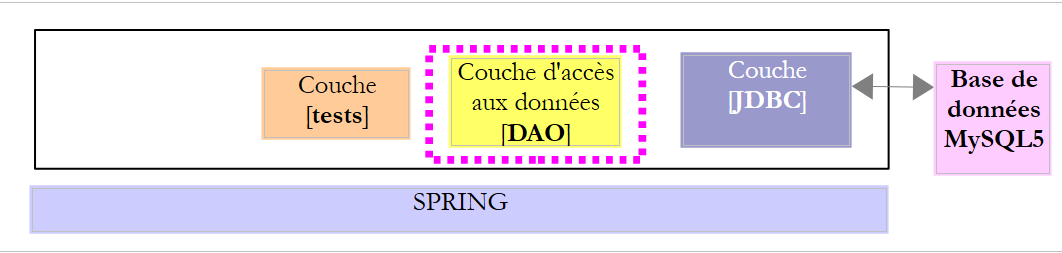 |
|
[DaoCategorie] 类实现了 [IDao<Categorie>] 接口,该接口提供了对 MySQL 数据库 [dbproduitscategories] 中 [CATEGORIES] 表数据的访问。其骨架如下:
package spring.jdbc.dao;

import generic.jdbc.config.ConfigJdbc;

import java.sql.ResultSet;
import java.sql.SQLException;
import java.util.ArrayList;
import java.util.Collections;
import java.util.HashMap;
import java.util.List;
import java.util.Map;

import org.springframework.beans.factory.annotation.Autowired;
import org.springframework.jdbc.core.RowMapper;
import org.springframework.jdbc.core.namedparam.MapSqlParameterSource;
import org.springframework.jdbc.core.namedparam.NamedParameterJdbcTemplate;
import org.springframework.jdbc.core.namedparam.SqlParameterSource;
import org.springframework.jdbc.core.namedparam.SqlParameterSourceUtils;
import org.springframework.jdbc.core.simple.SimpleJdbcInsert;
import org.springframework.stereotype.Component;

import spring.jdbc.entities.Categorie;
import spring.jdbc.entities.Produit;
import spring.jdbc.infrastructure.DaoException;

import com.google.common.collect.Lists;

@Component
public class DaoCategorie extends AbstractDao<Categorie> {

    // constants

    // injections
    @Autowired
    private NamedParameterJdbcTemplate namedParameterJdbcTemplate;
    @Autowired
    private SimpleJdbcInsert simpleJdbcInsertCategorie;
    @Autowired
    private IDao<Produit> daoProduit;

    @Override
    public List<Categorie> getAllShortEntities() {
    ...
    }

    @Override
    public List<Categorie> getAllLongEntities() {
    ...
    }

    @Override
    public void deleteAllEntities() {
    ...
    }

    @Override
    protected List<Categorie> getShortEntitiesById(List<Long> ids) {
    ...
    }

    @Override
    protected List<Categorie> getShortEntitiesByName(List<String> names) {
    ...
    }

    @Override
    protected List<Categorie> getLongEntitiesById(List<Long> ids) {
    ...
    }

    @Override
    protected List<Categorie> getLongEntitiesByName(List<String> names) {
    ...
    }

    @Override
    protected List<Categorie> saveEntities(List<Categorie> entities) {
    ...
    }

    @Override
    protected void deleteEntitiesById(List<Long> ids) {
    ...
    }

    @Override
    protected void deleteEntitiesByName(List<String> names) {
    ...
    }

...
}

// --------------------- mappers
class ShortCategorieMapper implements RowMapper<Categorie> {
....
}

class LongCategorieMapper implements RowMapper<Categorie> {
....
}
- 第 28 行:[DaoCategorie] 类是 Spring 组件,因此可以被注入到其他 Spring 组件中;
- 第 29 行:[DaoCategorie] 类继承自抽象类 [AbstractDao<Categorie>],因此它实现了 [IDao<Categorie>] 接口;
- 第 34–37 行:注入第 4.4 节中描述的 [AppConfig] 类中定义的 Bean;
- 第 38–39 行:注入对 [DaoProduit] 类的引用,该类实现了 [IDao<Produit>] 接口,用于管理对 [PRODUITS] 表中数据的访问;
- 第 41–89 行:实现 [IDao<Category>] 接口;
- 第 95–101 行:两个实现 [RowMapper<T>] 接口的内部类;
让我们逐一查看这些方法。
4.9.1. [getAllShortEntities] 方法
[getAllShortEntities] 方法返回 [CATEGORIES] 表中所有类别的简短形式:
    @Override
    public List<Categorie> getAllShortEntities() {
        try {
            return namedParameterJdbcTemplate.query(ConfigJdbc.SELECT_ALLSHORTCATEGORIES, new ShortCategorieMapper());
        } catch (Exception e) {
            throw new DaoException(202, e, simpleClassName);
        }
}
所有方法都依赖于在 Spring 配置文件中定义并由 Spring JDBC 库提供的 [namedParameterJdbcTemplate] 对象。该对象拥有众多方法。上文中使用的是以下方法:

- [sql] 是要执行的 SQL 语句;
- [rowMapper] 是以下 [RowMapper<T>] 接口的实例:

其工作原理如下:
- [namedParameterJdbcTemplate].query(String sql, RowMapper<T> rowMapper) 方法用于执行 [Select] SQL 语句。 它会处理任何异常,并负责打开和关闭与数据库管理系统(DBMS)的连接。它唯一无法做到的是将 [ResultSet] 的元素(即它获取到的对象)封装为 [Category] 类型,因为它不知道 [Category] 类型的字段与 [ResultSet] 的列之间的映射关系。 我们稍后将看到,这种映射是通过 JPA 技术创建的,它会自动将 [ResultSet] 的元素封装为类型 T 的实例。目前,[query] 方法的第二个参数是一个 [RowMapper<T>] 接口的实例,能够执行这种封装;
让我们回到代码:
    @Override
    public List<Categorie> getAllShortEntities() {
        try {
            return namedParameterJdbcTemplate.query(ConfigJdbc.SELECT_ALLSHORTCATEGORIES, new ShortCategorieMapper());
        } catch (Exception e) {
            throw new DaoException(202, e, simpleClassName);
        }
}
SQL 语句 [ConfigJdbc.SELECT_ALLSHORTCATEGORIES] 如下:
public final static String SELECT_ALLSHORTCATEGORIES = "SELECT c.ID as c_ID, c.VERSIONING as c_VERSIONING, c.NOM as c_NOM FROM CATEGORIES c";
该查询从 [CATEGORIES] 表中检索 [ID、VERSIONING、NOM] 列。我们将始终使用以下语法:
SELECT t1.COL1 as t1_COL1, t1.COL2 as t1_COL2 FROM TABLE1 t1, TABLE2 t2 WHERE ...
重要的是使用 [as column_name] 属性为 SELECT 语句返回的列命名。这是确保不同数据库管理系统(DBMS)之间兼容性的唯一方法,因为它们都有自己专有的方式来命名 SELECT 语句返回的列,而不同表中的列可能具有相同的名称(例如,在本例中是 ID、NAME 或 VERSIONING)。 我们通过明确指定这些列应有的名称来解决这种歧义。
内部类 [ShortCategorieMapper] 如下所示:
class ShortCategorieMapper implements RowMapper<Categorie> {

    @Override
    public Categorie mapRow(ResultSet rs, int rowNum) throws SQLException {
        return new Categorie(rs.getLong("c_ID"), rs.getLong("c_VERSIONING"), rs.getString("c_NOM"), null);
    }
}
- 第 1 行:[ShortCategorieMapper] 类实现了 [RowMapper<Categorie>] 接口,因此必须在第 4–5 行实现 [mapRow] 方法,该方法的作用是将 [SELECT] 语句生成的 [ResultSet rs] 中的行封装为 [Categorie] 类型;
- 第 5 行:执行此封装操作。请注意,[rs.getType(name)] 方法所使用的名称即为 SELECT 列中 [as name] 属性所使用的名称;
至此,我们已获取了类别列表的简短形式,且无需处理异常或管理连接。这就是 Spring JDBC 库的优势:它处理了表元素管理中所有可抽象化的部分,将无法抽象化的部分留给开发者处理。
4.9.2. [getAllLongEntities] 方法
[getAllLongEntities] 方法会返回 [CATEGORIES] 表中所有类别的长格式数据:
    @Override
    public List<Categorie> getAllLongEntities() {
        try {
            return filterCategories(namedParameterJdbcTemplate.query(ConfigJdbc.SELECT_ALLLONGCATEGORIES,
                    new LongCategorieMapper()));
        } catch (Exception e) {
            throw new DaoException(223, e, simpleClassName);
        }
}
SQL 语句 [ConfigJdbc.SELECT_ALLLONGCATEGORIES] 如下:
public final static String SELECT_ALLLONGCATEGORIES = "SELECT p.ID as p_ID, p.VERSIONING as p_VERSION, p.NOM as p_NOM, p.PRIX as p_PRIX, p.DESCRIPTION as p_DESCRIPTION, p.CATEGORIE_ID AS p_CATEGORIE_ID, c.ID as c_ID, c.NOM as c_NOM, c.VERSIONING as c_VERSION FROM PRODUITS p RIGHT JOIN CATEGORIES c ON p.CATEGORIE_ID=c.ID";
目标是检索类别及其关联的产品。这是通过使用 [PRODUCTS] 表中指向 [CATEGORIES] 表的外键 [CATEGORY_ID],将 [CATEGORIES] 表与 [PRODUCTS] 表进行连接来实现的。 语法 [FROM PRODUCTS p RIGHT JOIN CATEGORIES c ON p.CATEGORY_ID=c.ID] 也会检索到没有关联产品的类别。在这种情况下,SELECT 查询会返回一个类别和一个产品,其中所有列都设置为 NULL。
[LongCategorieMapper] 类如下所示:
class LongCategorieMapper implements RowMapper<Categorie> {

    @Override
    public Categorie mapRow(ResultSet rs, int rowNum) throws SQLException {
        Categorie categorie = new Categorie(rs.getLong("c_ID"), rs.getLong("c_VERSION"), rs.getString("c_NOM"), null);
        List<Produit> produits = new ArrayList<Produit>();
        long idProduit = rs.getLong("p_ID");
        // cas de la catégorie sans produits
        if (!rs.wasNull()) {
            produits.add(new Produit(idProduit, rs.getLong("p_VERSION"), rs.getString("p_NOM"), rs.getLong("p_CATEGORIE_ID"),
                    rs.getDouble("p_PRIX"), rs.getString("p_DESCRIPTION"), categorie));
        }
        categorie.setProduits(produits);
        return categorie;
    }
}
- 第 4 行:[mapRow] 方法必须返回一个 [Category] 对象,其 [products] 字段需根据前一个 SELECT 语句返回的 [ResultSet] 中的某一行进行填充;
最终,该操作:
[namedParameterJdbcTemplate.query(ConfigJdbc.SELECT_ALLLONGCATEGORIES,new LongCategorieMapper())]
将返回一个类型为:
其中每个类别 [ci] 都有一个字段 [products],该字段是一个包含单个元素 [productsij] 的产品列表。现在,我们需要以下列表:
其中每个类别 [ci] 都会有一个字段 [products],该字段包含产品列表 [producti1, producti2, ...]。这是通过将类别列表传递给一个私有方法 [filterCategories] 来实现的:
    @Override
    public List<Categorie> getAllLongEntities() {
        try {
            return filterCategories(namedParameterJdbcTemplate.query(ConfigJdbc.SELECT_ALLLONGCATEGORIES,
                    new LongCategorieMapper()));
        } catch (Exception e) {
            throw new DaoException(223, e, simpleClassName);
        }
}
[filterCategories] 方法如下:
    private List<Categorie> filterCategories(List<Categorie> categories) {
        if (categories.size() == 0) {
            return categories;
        }
        // catégories à rendre
        List<Categorie> cats = new ArrayList<Categorie>();
        // on parcourt la liste des catégories obtenues
        for (Categorie categorie : categories) {
            boolean trouve = false;
            for (Categorie cat : cats) {
                if (categorie.equals(cat)) {
                    cat.addProduit(categorie.getProduits().get(0));
                    trouve = true;
                    break;
                }
            }
            // trouvé ?
            if (!trouve) {
                cats.add(categorie);
            }
        }
        // résultat
        return cats;
}
- 第 1 行:[List<Category> categories] 是用于过滤(或分组)的类别列表;
- 第 6 行:要返回给调用方的类别列表;
- 第 8–21 行:处理待过滤列表中的每个类别;
- 第 10–16 行:检查当前类别 [category] 是否已存在于待构建的类别列表 [cats] 中(注意:如果两个类别的主键相同,则视为相等,详见第 4.6 节);
- 第 11–14 行:若已存在,则将 [categorie] 中封装的产品添加到 [cat] 的产品列表中;
- 第 18–20 行:如果当前类别 [categorie] 尚未出现在待构建的类别列表 [cats] 中,则将其连同其产品列表(该列表仅包含一个元素)一并添加到该列表中;
让我们考虑一种情况:当 SQL SELECT 语句返回的类别没有关联的产品时,[LongCategorieMapper] 类会返回哪个实体?
class LongCategorieMapper implements RowMapper<Categorie> {

    @Override
    public Categorie mapRow(ResultSet rs, int rowNum) throws SQLException {
        Categorie categorie = new Categorie(rs.getLong("c_ID"), rs.getLong("c_VERSION"), rs.getString("c_NOM"), null);
        List<Produit> produits = new ArrayList<Produit>();
        long idProduit = rs.getLong("p_ID");
        // cas de la catégorie sans produits
        if (!rs.wasNull()) {
            produits.add(new Produit(idProduit, rs.getLong("p_VERSION"), rs.getString("p_NOM"), rs.getLong("p_CATEGORIE_ID"),
                    rs.getDouble("p_PRIX"), rs.getString("p_DESCRIPTION"), categorie));
        }
        categorie.setProduits(produits);
        return categorie;
    }
}
如果 SQL SELECT 语句返回的类别下没有商品,则随类别一起返回的商品列都将包含 SQL NULL 值。这种情况在第 7–9 行中进行了处理:
- 第 7 行:将产品的主键作为长整型数检索;
- 第 9 行:检查读取的值是否为 SQL NULL(rs.wasNull)。如果不是,则在第 6 行将该商品添加到列表中;否则,不添加任何内容,商品列表保持为空。
请注意,在所有情况下,我们返回的类别其 [products] 字段均不为空。
4.9.3. [getShortEntitiesById] 方法
[getShortEntitiesById] 方法与 [getAllShortEntities] 方法类似,区别在于它仅返回主键在列表中指定的实体:
    @Override
    protected List<Categorie> getShortEntitiesById(List<Long> ids) {
        try {
            return namedParameterJdbcTemplate.query(ConfigJdbc.SELECT_SHORTCATEGORIE_BYID,
                    Collections.singletonMap("ids", ids), new ShortCategorieMapper());
        } catch (Exception e) {
            throw new DaoException(203, e, simpleClassName);
        }
}
- 第 4 行:所使用的 [query] 方法的签名如下:

第一个参数是一个参数化 SQL [Select] 语句。第二个参数是一个字典,用于将每个参数与一个值关联起来。第三个参数是该类的实例,该类将 [Select] 产生的 [ResultSet] 中的行封装为类型为 T 的对象;
- 第 4 行:参数化 SQL [Select] 语句如下:
public final static String SELECT_SHORTCATEGORIE_BYID = "SELECT c.ID as c_ID, c.VERSIONING as c_VERSIONING, c.NOM as c_NOM FROM CATEGORIES c WHERE c.ID in (:ids)";
此查询从 [CATEGORIES] 表中检索主键在列表 :ids 中的类别。
- 第 5 行:此处 [query] 方法的第二个参数是一个字典,它将键 'ids'(第一个参数)与第 1 行作为 [getShortEntitiesById] 方法参数传递的 [ids] 列表关联起来。[Collections] 类属于 [Google Guava] 库,我们之前已经讨论过。[Collections.singleMap] 返回一个仅包含一个元素的字典;
- 第 5 行:负责将 [Select] 产生的 [ResultSet] 中的行封装为 [Category] 类型对象的类,正是我们之前分析过的 [ShortCategoryMapper] 类;
这通常是 [maxPreparedStatementParameters] Bean 发挥作用的地方。事实上,SQL 语句中的 [:ids] 参数(代表主键列表)可能包含 1 到数千个参数。该数量存在上限,具体取决于各数据库管理系统。对于 MySQL,我们能够无错误地传递 10,000 个参数,但未进行超过该数量的测试。 对于 SQL Server,官方限制为 2,100。对于 Firebird,1,000 个参数已超出其处理能力,我们将其缩减至 100 个。总体而言,我们并未对各数据库管理系统(DBMS)的该参数数量上限进行测试。
4.9.4. [getLongEntitiesById] 方法
[getLongEntitiesById] 方法与 [getShortEntitiesById] 方法类似,区别在于它返回的是类别的长版本:
    @Override
    protected List<Categorie> getLongEntitiesById(List<Long> ids) {
        try {
            return filterCategories(namedParameterJdbcTemplate.query(ConfigJdbc.SELECT_LONGCATEGORIE_BYID,
                    Collections.singletonMap("ids", ids), new LongCategorieMapper()));
        } catch (Exception e) {
            throw new DaoException(205, e, simpleClassName);
        }
}
第 4 行,SQL 查询 [ConfigJdbc.SELECT_LONGCATEGORIE_BYID] 如下:
public final static String SELECT_LONGCATEGORIE_BYID = "SELECT p.ID as p_ID, p.VERSIONING as p_VERSION, p.NOM as p_NOM, p.PRIX as p_PRIX, p.DESCRIPTION as p_DESCRIPTION, p.CATEGORIE_ID AS p_CATEGORIE_ID, c.ID as c_ID, c.NOM as c_NOM, c.VERSIONING as c_VERSION FROM PRODUITS p RIGHT JOIN CATEGORIES c ON c.ID=p.CATEGORIE_ID WHERE c.ID in (:ids)";
4.9.5. [getShortEntitiesByName] 方法
[getShortEntitiesByName] 方法与 [getShortEntitiesById] 方法类似,区别在于它通过类别名称而非主键来检索类别:
    @Override
    protected List<Categorie> getShortEntitiesByName(List<String> names) {
        try {
            return namedParameterJdbcTemplate.query(ConfigJdbc.SELECT_SHORTCATEGORIE_BYNAME,
                    Collections.singletonMap("noms", names), new ShortCategorieMapper());
        } catch (Exception e) {
            throw new DaoException(204, e, simpleClassName);
        }
}
第 4 行,SQL 语句 [ConfigJdbc.SELECT_SHORTCATEGORIE_BYNAME] 如下:
public final static String SELECT_SHORTCATEGORIE_BYNAME = "SELECT c.ID as c_ID, c.VERSIONING as c_VERSIONING, c.NOM as c_NOM FROM CATEGORIES c WHERE c.NOM in (:noms)";
4.9.6. [getLongEntitiesByName] 方法
[getLongEntitiesByName] 方法与 [getShortEntitiesByName] 方法类似,不同之处在于它检索的是类别的完整名称:
    @Override
    protected List<Categorie> getLongEntitiesByName(List<String> names) {
        try {
            return filterCategories(namedParameterJdbcTemplate.query(ConfigJdbc.SELECT_LONGCATEGORIE_BYNAME,
                    Collections.singletonMap("noms", names), new LongCategorieMapper()));
        } catch (Exception e) {
            throw new DaoException(215, e, simpleClassName);
        }
}
第 4 行,SQL 语句 [ConfigJdbc.SELECT_LONGCATEGORIE_BYNAME] 如下:
public final static String SELECT_LONGCATEGORIE_BYNAME = "SELECT p.ID as p_ID, p.VERSIONING as p_VERSION, p.NOM as p_NOM, p.PRIX as p_PRIX, p.DESCRIPTION as p_DESCRIPTION, p.CATEGORIE_ID AS p_CATEGORIE_ID, c.ID as c_ID, c.NOM as c_NOM, c.VERSIONING as c_VERSION FROM PRODUITS p RIGHT JOIN CATEGORIES c ON c.ID=p.CATEGORIE_ID WHERE c.NOM in(:noms)";
4.9.7. [deleteAllEntities] 方法
[deleteAllEntities] 方法用于从 [CATEGORIES] 表中删除所有类别:
    @Override
    public void deleteAllEntities() {
        try {
            // on supprime toutes les catégories et par cascade tous les produits
            namedParameterJdbcTemplate.update(ConfigJdbc.DELETE_ALLCATEGORIES, (Map<String, Object>) null);
        } catch (Exception e) {
            throw new DaoException(208, e, simpleClassName);
        }
}
- 第 4 行:所使用的 [namedParameterJdbcTemplate.update] 方法具有以下签名:

第一个参数是一个参数化的 SQL 更新语句(INSERT、UPDATE、DELETE)。第二个参数是将值与 SQL 语句的各个参数关联起来的字典。该方法返回 SQL 语句更新的行数。
- 第 4 行:SQL 语句 [ConfigJdbc.DELETE_ALLCATEGORIES] 如下所示:
public final static String DELETE_ALLCATEGORIES = "DELETE FROM CATEGORIES";
因此,这并非参数化查询。这就是为什么 [update] 方法的第二个参数值为 null 的原因。
4.9.8. [deleteAllEntitiesById] 方法
[deleteAllEntitiesById] 方法用于删除 [CATEGORIES] 表中主键与传入值匹配的类别:
    @Override
    protected void deleteEntitiesById(List<Long> ids) {
        try {
            namedParameterJdbcTemplate.update(ConfigJdbc.DELETE_CATEGORIESBYID, Collections.singletonMap("ids", ids));
        } catch (Exception e) {
            throw new DaoException(209, e, simpleClassName);
        }
}
第 4 行,SQL 语句 [ConfigJdbc.DELETE_CATEGORIESBYID] 如下:
public final static String DELETE_CATEGORIESBYID = "DELETE FROM CATEGORIES WHERE ID in (:ids)";
4.9.9. [deleteAllEntitiesByName] 方法
[deleteAllEntitiesByName] 方法用于从 [CATEGORIES] 表中删除名称与传入参数匹配的分类:
    @Override
    protected void deleteEntitiesByName(List<String> names) {
        try {
            namedParameterJdbcTemplate.update(ConfigJdbc.DELETE_CATEGORIESBYNAME, Collections.singletonMap("noms", names));
        } catch (Exception e) {
            throw new DaoException(225, e, simpleClassName);
        }
}
第 4 行,SQL 语句 [ConfigJdbc.DELETE_CATEGORIESBYNAME] 如下:
public final static String DELETE_CATEGORIESBYNAME = "DELETE FROM CATEGORIES WHERE NOM in (:noms)";
4.9.10. [saveEntities] 方法
4.9.10.1. 代码
该方法的签名如下:
    @Override
    protected List<Categorie> saveEntities(List<Categorie> entities) {
该方法接受一个类别列表作为参数。它对这些类别执行以下操作:
- 如果类别的主键为空,则执行 SQL INSERT 操作;否则,执行 SQL UPDATE 操作;
- 对该类别中的每个产品重复此操作;
该方法返回已持久化或更新的类别列表。返回的列表准确反映了表中存在的类别和产品,版本号除外:尽管数据库中已将其递增,但更新后的实体中这些版本号实际上并未被修改。
这是迄今为止最复杂的方法。其代码如下:
@Override
    protected List<Categorie> saveEntities(List<Categorie> entities) {
        try {
            // --------------------------------------------- categories
            List<Categorie> insertCategories = new ArrayList<Categorie>();
            List<Categorie> updateCategories = new ArrayList<Categorie>();
            // on scanne les catégories
            for (Categorie categorie : entities) {
                // insert or update ?
                if (categorie.getId() == null) {
                    insertCategories.add(categorie);
                } else {
                    updateCategories.add(categorie);
                }
            }
            // insertions catégories
            if (insertCategories.size() > 0) {
                insertCategories(insertCategories);
            }
            // updates categories
            if (updateCategories.size() > 0) {
                updateCategories(updateCategories);
            }

            // --------------------------------------------- produits
            // on met à jour les produits des catégories
            List<Produit> allProduits = new ArrayList<Produit>();
            for (Categorie categorie : entities) {
                List<Produit> produits = categorie.getProduits();
                Long idCategorie = categorie.getId();
                if (produits != null) {
                    // on l'ajoute à la liste de tous les produits
                    allProduits.addAll(produits);
                    // on scanne les produits un à un pour les relier à leur catégorie
                    for (Produit produit : produits) {
                        // on relie le produit à sa catégorie
                        produit.setIdCategorie(idCategorie);
                        produit.setCategorie(categorie);
                    }
                }
            }
            // insert / update des produits
            daoProduit.saveEntities(allProduits);
            // résultat
            return entities;
        } catch (DaoException e) {
            throw e;
        } catch (Exception e) {
            throw new DaoException(207, e, simpleClassName);
        }
    }
- 第 5–23 行:插入或更新类别;
- 第 26–43 行:插入或更新产品;
- 第35–39行:此代码将每个产品与其所属类别建立关联。在之前的插入类别阶段,已为类别分配了主键,该主键必须填入产品的 [idCategorie] 字段(第37行)。 此外,第37–38行用于处理调用方未正确将每个产品与所属类别关联的情况。为确保该关联关系正确,必须使用 [Category].add(Product p) 方法,但用户仍可绕过此方法直接将产品添加到类别的产品列表中,不过这会导致产品 p 的 [idCategory, category] 字段可能被错误填充;
- 第 43 行:我们将产品持久化/更新的任务委托给 [IDao<Product>] 接口的实例。请注意,该实例已被注入到 [DaoCategory] 类中:
    @Autowired
    private IDao<Produit> daoProduit;
4.9.10.2. 插入分类
使用以下私有方法 [insertCategories] 将类别插入到 [CATEGORIES] 表中:
private List<Categorie> insertCategories(List<Categorie> categories) {
        Map<Long, Categorie> mapCategories=new HashMap<Long,Categorie>();
        try {
            // catégories à ajouter
            for (Categorie categorie : categories) {
                Number newId = simpleJdbcInsertCategorie.executeAndReturnKey(getMapForCategorie(categorie));
                // on mémorise la clé primaire
                mapCategories.put(newId.longValue(), categorie);
            }
        } catch (Exception e) {
            throw new DaoException(201, e, simpleClassName);
        }
        // tout est OK - on affecte les clés primaires aux catégories persistées
        for(Long id : mapCategories.keySet()){
            Categorie categorie=mapCategories.get(id);
            categorie.setId(id);
        }
        // résultat
        return categories;
    }
- 第 6 行:我们使用通过以下代码注入到类中的 [simpleJdbcInsertCategorie] Bean:
    @Autowired
    private SimpleJdbcInsert simpleJdbcInsertCategorie;
该 Bean 在项目的 [AppConfig] 类中定义如下:
import org.springframework.jdbc.core.simple.SimpleJdbcInsert;


    @Bean
    public SimpleJdbcInsert simpleJdbcInsertCategorie(DataSource dataSource) {
        return new SimpleJdbcInsert(dataSource).withTableName(ConfigJdbc.TAB_CATEGORIES)
                .usingGeneratedKeyColumns(ConfigJdbc.TAB_CATEGORIES_ID)
                .usingColumns(ConfigJdbc.TAB_CATEGORIES_NOM);
}
- 第 5 行:[SimpleJdbcInsert] 类是 Spring JDBC 库中的一个类(第 1 行):
- 构造函数参数 [SimpleJdbcInsert] 是执行操作的数据源;
- [withTableName] 子句指定要插入元素的目标表,本例中为 [CATEGORIES] 表;
- [usingGeneratedKeyColumns] 子句指定自动生成的主键列,此处为 [ID] 列;
- [usingColumns] 子句将插入操作限制在特定列上。此处,我们排除了由 DBMS 自动生成的 [ID] 列,以及默认值为 1 的 [VERSIONING] 列;
让我们回到 [insertCategories] 方法的代码:
private List<Categorie> insertCategories(List<Categorie> categories) {
        Map<Long, Categorie> mapCategories=new HashMap<Long,Categorie>();
        try {
            // catégories à ajouter
            for (Categorie categorie : categories) {
                Number newId = simpleJdbcInsertCategorie.executeAndReturnKey(getMapForCategorie(categorie));
                // on mémorise la clé primaire
                mapCategories.put(newId.longValue(), categorie);
            }
        } catch (Exception e) {
            throw new DaoException(201, e, simpleClassName);
        }
        // tout est OK - on affecte les clés primaires aux catégories persistées
        for(Long id : mapCategories.keySet()){
            Categorie categorie=mapCategories.get(id);
            categorie.setId(id);
        }
        // résultat
        return categories;
}
- 第 6 行:使用了 [simpleJdbcInsertCategorie.executeAndReturnKey] 方法:

该方法期望接收一个字典作为参数,该字典将表列映射到要插入的值。它返回主键,类型为 [Number]。使用 [Number.longValue()] 方法将主键转换为 [Long] 类型。
[getMapForCategorie] 方法是以下私有方法:
    private Map<String, ?> getMapForCategorie(Categorie categorie) {
        Map<String, Object> map = new HashMap<String, Object>();
        map.put(ConfigJdbc.TAB_CATEGORIES_NOM, categorie.getNom());
        return map;
}
字典的键是待填充的列名 [NAME],字典的值则是将插入到这些列中的数据。
- 第 8 行 [insertCategories]:检索到的主键被存储在一个字典中。我们将等待直至确认所有实体均已插入,再将主键分配给它们。事实上,若发生异常,所有插入操作都将回滚,而我们也希望第 1 行中的 [categories] 实体保持不变;
- 第 14–17 行:现在我们已确认一切顺利,将生成的主键分配给各类别;
- 第 19 行:返回包含主键的类别列表;
4.9.10.3. 更新分类
使用以下私有方法 [updateCategories] 更新分类:
    private void updateCategories(List<Categorie> categories) {
        try {
            for (Categorie categorie : categories) {
                // basic category update
                int nbLignes = namedParameterJdbcTemplate.update(ConfigJdbc.UPDATE_CATEGORIES,
                        new BeanPropertySqlParameterSource(categorie));
                // did we succeed?
                Long idCategorie = null;
                if (nbLignes == 0) {
                    // we didn't succeed - we're trying to find out why
                    // search for the basic category
                    idCategorie = categorie.getId();
                    List<Categorie> categoriesInBd = getShortEntitiesById(idCategorie);
                    if (categoriesInBd.size() == 0) {
                        // category does not exist
                        throw new RuntimeException(String.format("Erreur de mise à jour. La catégorie de clé [%s] n'existe pas",
                                idCategorie));
                    } else {
                        // the version was no good
                        throw new RuntimeException(String.format(
                                "Erreur de mise à jour. La catégorie de clé [%s] n'a pas la bonne version", idCategorie));
                    }
                }
            }
        } catch (DaoException e) {
            throw e;
        } catch (Exception e) {
            throw new DaoException(206, e, simpleClassName);
        }
}
只有当类别 C1 和 C2 的版本号相同时,才允许用内存中的 C2 类别更新数据库中的 C1 类别。该版本号用于防止两个不同用户同时更新该实体:两个用户 U1 和 U2 读取版本号为 V1 的实体 E。U1 修改了 E 并将此修改持久化到数据库中:此时版本号变为 V1+1。 随后 U2 修改 E 并将该修改持久化到数据库中:由于其版本(V1)与数据库中的版本(V1+1)不一致,因此会抛出异常。
- 第 2–29 行:`try` 代码块包含两个 `catch` 代码块:
- 第一个位于第 25 行,用于允许第 13 行代码抛出的任何 [DaoException] 异常通过;
- 第二个位于第 27 行,用于处理其他类型的异常;
- 第 3 行:我们遍历所有待更新的类别;
- 第 4 行:我们使用 [namedParameterJdbcTemplate.update] 方法更新当前类别:
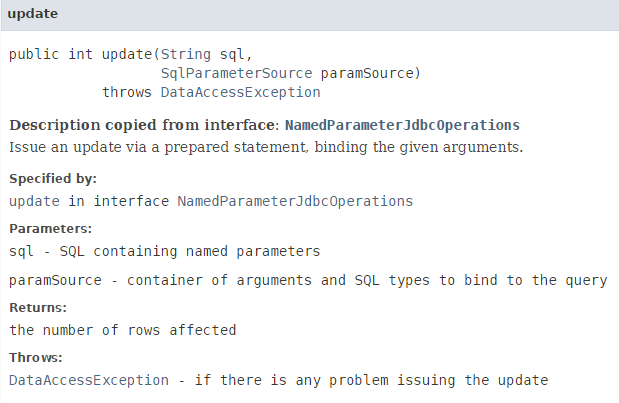
- 让我们分析一下这条语句:
int nbLignes = namedParameterJdbcTemplate.update(ConfigJdbc.UPDATE_CATEGORIES, new BeanPropertySqlParameterSource(categorie));
SQL语句 [ConfigJdbc.UPDATE_CATEGORIES] 如下:
public final static String UPDATE_CATEGORIES = "UPDATE CATEGORIES SET VERSIONING=VERSIONING+1, NOM=:nom WHERE ID=:id AND VERSIONING=:version";
该语句包含三个参数(:id、:version、:nom),其值取自被修改的 [categorie] 对象中同名的字段。我们通过将 [new BeanPropertySqlParameterSource(categorie)] 作为第二个参数传递来使用此功能,这指定了“参数值取自该 Java Bean 中同名的字段”;
该操作在正常运行时返回的结果是修改行的数量,即 0 或 1。
让我们回到正在分析的代码:
private void updateCategories(List<Categorie> categories) {
        try {
            for (Categorie categorie : categories) {
                // basic category update
                int nbLignes = namedParameterJdbcTemplate.update(ConfigJdbc.UPDATE_CATEGORIES,
                        new BeanPropertySqlParameterSource(categorie));
                // did we succeed?
                Long idCategorie = null;
                if (nbLignes == 0) {
                    // we didn't succeed - we're trying to find out why
                    // search for the basic category
                    idCategorie = categorie.getId();
                    List<Categorie> categoriesInBd = getShortEntitiesById(idCategorie);
                    if (categoriesInBd.size() == 0) {
                        // category does not exist
                        throw new RuntimeException(String.format("Erreur de mise à jour. La catégorie de clé [%s] n'existe pas",
                                idCategorie));
                    } else {
                        // the version was no good
                        throw new RuntimeException(String.format(
                                "Erreur de mise à jour. La catégorie de clé [%s] n'a pas la bonne version", idCategorie));
                    }
                }
            }
        } catch (DaoException e) {
            throw e;
        } catch (Exception e) {
            throw new DaoException(206, e, simpleClassName);
        }
}
- 第 9 行:检查更新是否成功;
- 第 10 行:更新失败。由于 [WHERE] 子句涉及 [ID] 和 [VERSIONING] 列,我们查找导致 [WHERE] 条件失败的列;
- 第 12–18 行:验证该类别的 [id] 键是否存在于数据库中。如果不存在,则抛出一个带有相应错误消息的 [RuntimeException];
- 第 19–22 行:处理版本不正确的情况;
4.10. [DaoProduit] 类
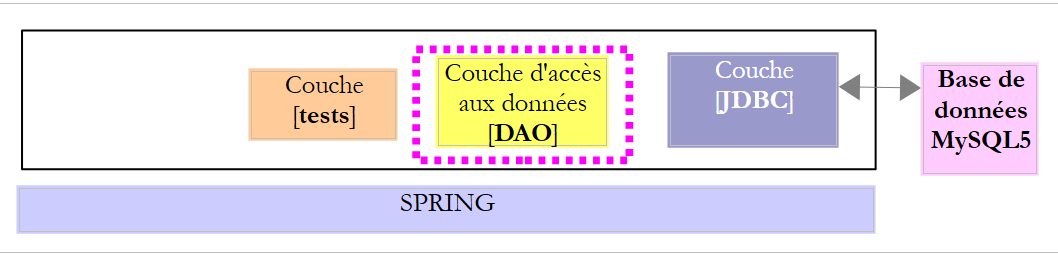 |
|
[DaoProduit] 类实现了 [IDao<Produit>] 接口,该接口提供了对 MySQL 数据库 [dbproduitscategories] 中 [PRODUITS] 表中数据的访问。其骨架如下:
package spring.jdbc.dao;

import generic.jdbc.config.ConfigJdbc;

import java.sql.ResultSet;
import java.sql.SQLException;
import java.util.ArrayList;
import java.util.Collections;
import java.util.HashMap;
import java.util.List;
import java.util.Map;

import org.springframework.beans.factory.annotation.Autowired;
import org.springframework.jdbc.core.RowMapper;
import org.springframework.jdbc.core.namedparam.NamedParameterJdbcTemplate;
import org.springframework.jdbc.core.namedparam.SqlParameterSource;
import org.springframework.jdbc.core.simple.SimpleJdbcInsert;
import org.springframework.stereotype.Component;

import spring.jdbc.entities.Categorie;
import spring.jdbc.entities.Produit;
import spring.jdbc.infrastructure.DaoException;

import com.google.common.collect.Lists;

@Component
public class DaoProduit extends AbstractDao<Produit> {

    // injections
    @Autowired
    private NamedParameterJdbcTemplate namedParameterJdbcTemplate;
    @Autowired
    private SimpleJdbcInsert simpleJdbcInsertProduit;

    @Override
    public List<Produit> getAllShortEntities() {
...
    }

    @Override
    public List<Produit> getAllLongEntities() {
....
    }

    @Override
    public void deleteAllEntities() {
    ...
    }

    @Override
    protected List<Produit> getShortEntitiesById(List<Long> ids) {
...
    }

    @Override
    protected List<Produit> getShortEntitiesByName(List<String> names) {
    ....
    }

    @Override
    protected List<Produit> getLongEntitiesById(List<Long> ids) {
...
    }

    @Override
    protected List<Produit> getLongEntitiesByName(List<String> names) {
        try {
            return namedParameterJdbcTemplate.query(ConfigJdbc.SELECT_LONGPRODUIT_BYNAME,
                    Collections.singletonMap("noms", names), new LongProduitMapper());
        } catch (Exception e) {
            throw new DaoException(112, e, simpleClassName);
        }
    }

    @Override
    protected List<Produit> saveEntities(List<Produit> entities) {
    ...
    }

    @Override
    protected void deleteEntitiesById(List<Long> ids) {
    ....
    }

    @Override
    protected void deleteEntitiesByName(List<String> names) {
...
    }
}

// --------------------- mappers
class ShortProduitMapper implements RowMapper<Produit> {

...
}

class LongProduitMapper implements RowMapper<Produit> {
...
}
该代码与 [DaoCategory] 类的代码非常相似。我们仅将探讨其中几个方法。
4.10.1. [getShortEntitiesById] 方法
[getShortEntitiesById] 方法返回主键为传入值的产品的简短版本:
    @Override
    protected List<Produit> getShortEntitiesById(List<Long> ids) {
        try {
            return namedParameterJdbcTemplate.query(ConfigJdbc.SELECT_SHORTPRODUIT_BYID,
                    Collections.singletonMap("ids", ids), new ShortProduitMapper());
        } catch (Exception e) {
            throw new DaoException(109, e, simpleClassName);
        }
}
- 第 4 行:SQL Select 语句 [ConfigJdbc.SELECT_SHORTPRODUIT_BYID] 如下:
public final static String SELECT_SHORTPRODUIT_BYID = "SELECT p.ID as p_ID, p.VERSIONING as p_VERSIONING, p.NOM as p_NOM, p.CATEGORIE_ID as p_CATEGORIE_ID, p.PRIX as p_PRIX, p.DESCRIPTION as p_DESCRIPTION FROM PRODUITS p WHERE p.ID in (:ids)";
- 第 4 行:负责将 [ResultSet] 封装为产品列表的 [ShortProductMapper] 类如下:
class ShortProduitMapper implements RowMapper<Produit> {

    @Override
    public Produit mapRow(ResultSet rs, int rowNum) throws SQLException {
        return new Produit(rs.getLong("p_ID"), rs.getLong("p_VERSIONING"), rs.getString("p_NOM"),
                rs.getLong("p_CATEGORIE_ID"), rs.getDouble("p_PRIX"), rs.getString("p_DESCRIPTION"), null);
    }
}
4.10.2. [getLongEntitiesByName] 方法
[getShortEntitiesById] 方法返回名称为传入值的产品的长版本:
    @Override
    protected List<Produit> getLongEntitiesByName(List<String> names) {
        try {
            return namedParameterJdbcTemplate.query(ConfigJdbc.SELECT_LONGPRODUIT_BYNAME,
                    Collections.singletonMap("noms", names), new LongProduitMapper());
        } catch (Exception e) {
            throw new DaoException(112, e, simpleClassName);
        }
}
- 第 4 行:SQL SELECT 语句 [ConfigJdbc.SELECT_LONGPRODUIT_BYNAME] 如下:
public final static String SELECT_LONGPRODUIT_BYID = "SELECT p.ID as p_ID, p.VERSIONING as p_VERSION, p.NOM as p_NOM, p.PRIX as p_PRIX, p.DESCRIPTION as p_DESCRIPTION, p.CATEGORIE_ID AS p_CATEGORIE_ID, c.ID as c_ID, c.NOM as c_NOM, c.VERSIONING as c_VERSION FROM PRODUITS p, CATEGORIES c WHERE p.ID in (:ids) AND p.CATEGORIE_ID=c.ID";
- 第 4 行:负责将 [ResultSet] 的元素封装为产品(长版本)的 [LongProductMapper] 类如下:
class LongProduitMapper implements RowMapper<Produit> {

    @Override
    public Produit mapRow(ResultSet rs, int rowNum) throws SQLException {
        return new Produit(rs.getLong("p_ID"), rs.getLong("p_VERSION"), rs.getString("p_NOM"),
                rs.getLong("p_CATEGORIE_ID"), rs.getDouble("p_PRIX"), rs.getString("p_DESCRIPTION"), new Categorie(rs.getLong("c_ID"), rs.getLong("c_VERSION"), rs.getString("c_NOM"), null));
    }
}
4.10.3. [saveEntities] 方法
[saveEntities] 方法可用于插入新产品(id==null)或更新现有产品(id!=null):
    @Override
    protected List<Produit> saveEntities(List<Produit> entities) {
        try {
            // produits à insérer
            List<Produit> insertProduits = new ArrayList<Produit>();
            // produits à mettre à jour
            List<Produit> updateproduits = new ArrayList<Produit>();
            // on scanne la liste des entités reçues
            for (Produit produit : entities) {
                Long id = produit.getId();
                if (id == null) {
                    insertProduits.add(produit);
                } else {
                    updateproduits.add(produit);
                }
            }
            // ajouts
            insertProduits(insertProduits);
            // modifications
            updateProduits(updateproduits);
            // résultat
            return entities;
        } catch (DaoException e) {
            throw e;
        } catch (Exception e) {
            throw new DaoException(103, e, simpleClassName);
        }
}
第 18 行:使用以下私有方法 [insertProducts] 添加待插入的产品:
private List<Produit> insertProduits(List<Produit> produits) {
        Map<Long, Produit> mapProduits = new HashMap<Long, Produit>();
        try {
            // produits à ajouter
            for (Produit produit : produits) {
                Number newId = simpleJdbcInsertProduit.executeAndReturnKey(getMapForProduit(produit));
                // on note la clé primaire
                mapProduits.put(newId.longValue(), produit);
            }
        } catch (Exception e) {
            throw new DaoException(201, e, simpleClassName);
        }
        // tout est OK - on affecte les clés primaires aux produits persistés
        for (Long id : mapProduits.keySet()) {
            Produit produit = mapProduits.get(id);
            produit.setId(id);
        }
        // résultat
        return produits;
    }

    private Map<String, ?> getMapForProduit(Produit produit) {
        Map<String, Object> map = new HashMap<String, Object>();
        map.put(ConfigJdbc.TAB_PRODUITS_NOM, produit.getNom());
        map.put(ConfigJdbc.TAB_PRODUITS_CATEGORIE_ID, produit.getIdCategorie());
        map.put(ConfigJdbc.TAB_PRODUITS_PRIX, produit.getPrix());
        map.put(ConfigJdbc.TAB_PRODUITS_DESCRIPTION, produit.getDescription());
        return map;
    }
此方法与第4.9.10.3节中讨论的[insertCategories]方法类似。
- 第 4 行:我们使用注入到该类中的 [simpleJdbcInsertProduit] Bean:
    @Autowired
    private SimpleJdbcInsert simpleJdbcInsertProduit;
该 Bean 在配置项目的 [AppConfig] 类中定义:
    @Bean
    public SimpleJdbcInsert simpleJdbcInsertProduit(DataSource dataSource) {
        return new SimpleJdbcInsert(dataSource)
                .withTableName(ConfigJdbc.TAB_PRODUITS)
                .usingGeneratedKeyColumns(ConfigJdbc.TAB_PRODUITS_ID)
                .usingColumns(ConfigJdbc.TAB_PRODUITS_NOM, ConfigJdbc.TAB_PRODUITS_PRIX, ConfigJdbc.TAB_PRODUITS_DESCRIPTION,ConfigJdbc.TAB_PRODUITS_CATEGORIE_ID);
}
- 第 3-6 行:[simpleJdbcInsertProduct] Bean
- 与 [dbproduitscategories] 数据库(第 3 行)以及该数据库中的 [ConfigJdbc.TAB_PRODUITS] 表(第 4 行)相关联;
- 该表的主键生成在 [ConfigJdbc.TAB_PRODUITS_ID] 列中(第 5 行);
- 仅为 [ConfigJdbc.TAB_PRODUITS_NOM, ConfigJdbc.TAB_PRODUITS_PRIX, ConfigJdbc.TAB_PRODUITS_DESCRIPTION, ConfigJdbc.TAB_PRODUITS_CATEGORIE_ID] 列赋值(第 6 行);
用于更新产品的 [updateProducts] 方法(位于 [saveEntities] 的第 20 行)如下:
private void updateProduits(List<Produit> updateProduits) {
        try {
            // we scan products
            for (Produit produit : updateProduits) {
                // basic product update
                int nbLignes = namedParameterJdbcTemplate.update(ConfigJdbc.UPDATE_PRODUITS,
                        new BeanPropertySqlParameterSource(produit));
                // did we succeed?
                Long idProduit = null;
                if (nbLignes == 0) {
                    // we didn't succeed - we're trying to find out why
                    // we search for the basic product
                    idProduit = produit.getId();
                    List<Produit> produitsInBd = getShortEntitiesById(idProduit);
                    if (produitsInBd.size() == 0) {
                        // the product does not exist
                        throw new RuntimeException(String.format("Erreur de mise à jour. Le produit de clé [%s] n'existe pas",
                                idProduit));
                    } else {
                        // the version was no good
                        throw new RuntimeException(String.format(
                                "Erreur de mise à jour. Le produit de clé [%s] n'a pas la bonne version", idProduit));
                    }
                }
            }
        } catch (DaoException e) {
            throw e;
        } catch (Exception e) {
            throw new DaoException(106, e, simpleClassName);
        }
    }
它与更新分类的代码类似(参见第4.9.10.3节)。在第23行,用于更新产品的SQL语句[ConfigJdbc.UPDATE_PRODUITS]如下:
public final static String UPDATE_PRODUITS = "UPDATE PRODUITS SET VERSIONING=VERSIONING+1, NOM=:nom, PRIX=:prix, CATEGORIE_ID=:idCategorie, DESCRIPTION=:description WHERE ID=:id AND VERSIONING=:version";
参数名称 [:id,:version,:nom,:prix,:idCategorie,:description] 也是 [Product] 类中的字段名称,这使得第 6–7 行中的语句可用于更新当前产品。
4.11. 测试层
 |
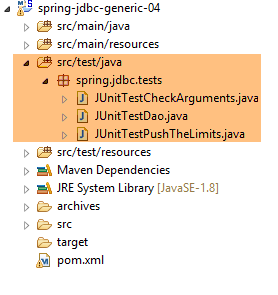 |
测试层由三个测试类组成:
- [JUnitTestCheckArguments]:该类中的测试会使用无效参数调用 [DAO] 层的各种方法,并验证它们是否能正确响应;
- [JUnitTestDao]:该类中的测试会调用 [DAO] 层的各种方法,并验证它们是否按预期执行;
- [JUnitTestPushTheLimits] 并非用于测试 [DAO] 层,而是用于衡量其性能;
该测试层在本文档中扮演着重要角色。实际上,它是所有 [IDao<T>] 接口实现的共同组成部分。每个数据库管理系统(DBMS)包含六个测试(1 个 JDBC 实现、3 个 JPA 实现、1 个 Spring MVC 实现、1 个安全 Spring MVC 实现),因此针对所测试的六个 DBMS 共计 36 个测试。该测试层使我们能够验证所有实现的行为是否一致。
4.11.1. [JUnitTestCheckArguments] 测试
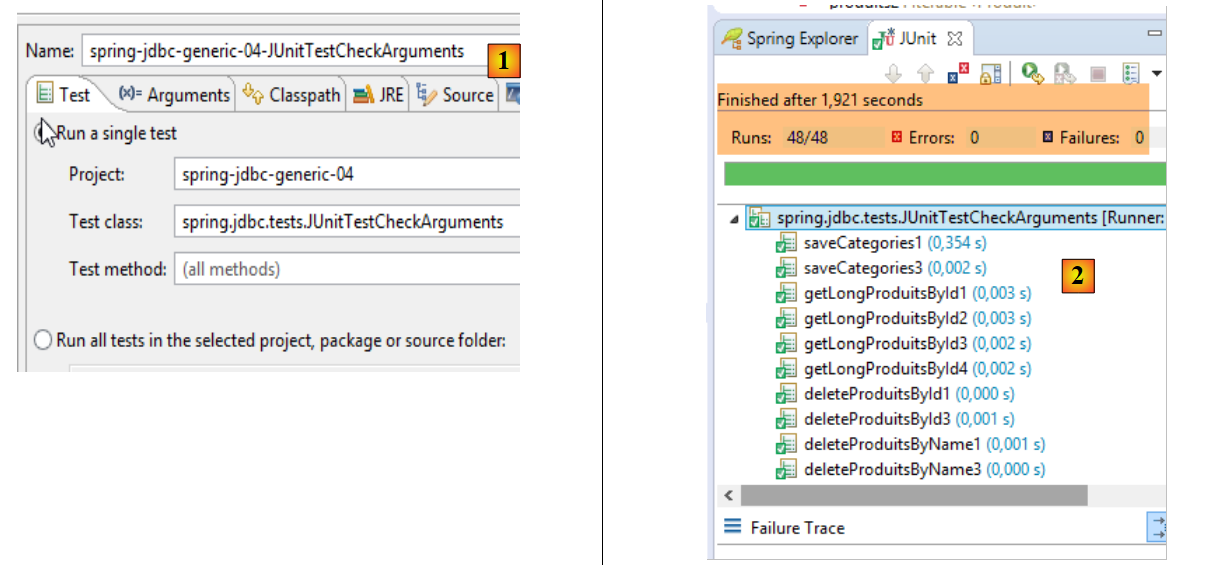
[JUnitTestCheckArguments] 测试类包含 48 个方法,用于测试当 [DAO] 层方法被传入错误参数时其反应。其骨架如下:
package spring.jdbc.tests;

import org.junit.Assert;
import org.junit.Test;
import org.junit.runner.RunWith;
import org.springframework.beans.factory.annotation.Autowired;
import org.springframework.boot.test.SpringApplicationConfiguration;
import org.springframework.test.context.junit4.SpringJUnit4ClassRunner;

import spring.jdbc.config.AppConfig;
import spring.jdbc.dao.IDao;
import spring.jdbc.entities.Categorie;
import spring.jdbc.entities.Produit;
import spring.jdbc.infrastructure.MyIllegalArgumentException;

import com.google.common.collect.Lists;

@SpringApplicationConfiguration(classes = AppConfig.class)
@RunWith(SpringJUnit4ClassRunner.class)
public class JUnitTestCheckArguments {

    // layer [DAO]
    @Autowired
    private IDao<Produit> daoProduit;
    @Autowired
    private IDao<Categorie> daoCategorie;

    // local data
    private Iterable<String> names1 = null;
    private Iterable<String> names2 = Lists.newArrayList(new String[0]);
    private String[] names3 = null;
    private String[] names4 = new String[0];
    private Iterable<Long> ids1 = null;
    private Iterable<Long> ids2 = Lists.newArrayList(new Long[0]);
    private Long[] ids3 = null;
    private Long[] ids4 = new Long[0];
    private Iterable<Categorie> categories1 = null;
    private Iterable<Categorie> categories2 = Lists.newArrayList(new Categorie[0]);
    private Categorie[] categories3 = null;
    private Categorie[] categories4 = new Categorie[0];
    private Iterable<Produit> produits1 = null;
    private Iterable<Produit> produits2 = Lists.newArrayList(new Produit[0]);
    private Produit[] produits3 = null;
    private Produit[] produits4 = new Produit[0];

    ...

}
- 第 19 行:JUnit 测试将在与 Spring 框架集成的情况下执行;
- 第 18 行:在测试开始前,将实例化项目中 [AppConfig] 类中定义的 Bean;
- 第 23–26 行:向 [DAO] 层注入两个接口各自的实例;
- 第 29–44 行:[DAO] 层方法的调用参数不正确;
- 第 29 行:将类型为 [Iterable<String>] 的空指针作为名称列表;
- 第 30 行:将类型为 [Iterable<String>] 的空列表作为名称列表;
- 第 29 行:将类型为 String[] 的空指针用作名称数组;
- 第 30 行:将类型为 String[] 的空数组用作名称列表;
- ...
对于 [names1] 字段,我们可以进行如下测试,例如:
    @Test(expected = MyIllegalArgumentException.class)
    public void getShortProduitsByName1() {
        daoProduit.getShortEntitiesByName(names1);
}
- 第 1 行:我们指定 [getShortProduitsByName1] 测试必须抛出 [MyIllegalArgumentException]
对于 [names2] 字段,我们可以进行如下测试,例如:
    @Test(expected = MyIllegalArgumentException.class)
    public void getLongCategoriesByName2() {
        daoCategorie.getLongEntitiesByName(names2);
}
利用 [names3] 字段,我们可以进行如下测试,例如:
    @Test(expected = MyIllegalArgumentException.class)
    public void getLongCategoriesByName3() {
        daoCategorie.getLongEntitiesByName(names3);
}
利用 [names4] 字段,我们可以进行如下测试,例如:
    @Test(expected = MyIllegalArgumentException.class)
    public void getShortProduitsByName4() {
        daoProduit.getShortEntitiesByName(names4);
}
因此,我们运行了 48 个测试以覆盖所有可能的情况。我们执行名为 [spring-jdbc-generic-04-JUnitTestCheckArguments] [1] 的测试配置。结果如下 [2]:
 |
4.11.2. [JUnitTestDao] 测试
[JUnitTestDao] 测试使用有效参数调用 [DAO] 层的方法,并验证这些方法是否按预期执行。共有 74 个测试用于验证实体、类别或产品的插入、查询、更新和删除操作。总计超过 1,000 行代码。我们将仅考察其中几个方法。
4.11.2.1. 测试框架
[JUnitTestDao] 类的结构如下:
package spring.jdbc.tests;

import java.util.ArrayList;
import java.util.HashMap;
import java.util.List;
import java.util.Map;

import org.junit.Assert;
import org.junit.Before;
import org.junit.Test;
import org.junit.runner.RunWith;
import org.springframework.beans.BeansException;
import org.springframework.beans.factory.annotation.Autowired;
import org.springframework.boot.test.SpringApplicationConfiguration;
import org.springframework.context.ApplicationContext;
import org.springframework.test.context.junit4.SpringJUnit4ClassRunner;

import spring.jdbc.config.AppConfig;
import spring.jdbc.dao.IDao;
import spring.jdbc.entities.Categorie;
import spring.jdbc.entities.Produit;

import com.fasterxml.jackson.core.JsonProcessingException;
import com.fasterxml.jackson.databind.ObjectMapper;
import com.google.common.collect.Lists;

@SpringApplicationConfiguration(classes = AppConfig.class)
@RunWith(SpringJUnit4ClassRunner.class)
public class JUnitTestDao {

    // spring context
    @Autowired
    private ApplicationContext context;
    // layer [DAO]
    @Autowired
    private IDao<Produit> daoProduit;
    @Autowired
    private IDao<Categorie> daoCategorie;

    // constants
    private final int NB_PRODUITS = 5;
    private final int NB_CATEGORIES = 2;

    // local
    // local
    private Map<Long, Categorie> mapCategories = new HashMap<Long, Categorie>();
    private Map<Long, Produit> mapProduits = new HashMap<Long, Produit>();

    @Before
    public void clean() {
        // the base is cleaned before each test
        log("Vidage de la base de données", 1);
        // we empty table [CATEGORIES] and cascade table [PRODUITS]
        daoCategorie.deleteAllEntities();
        // emptying dictionaries
        for (Long id : mapCategories.keySet()) {
            mapCategories.remove(id);
        }
        for (Long id : mapProduits.keySet()) {
            mapProduits.remove(id);
        }
    }
...
}
- 第 27-28 行:与 [JUnitTestCheckArguments] 测试类似,这是一个与 Spring 集成的测试,由项目的 [AppConfig] 类进行配置;
- 第 32-33 行:注入 Spring 上下文,该上下文提供了对所有 Bean 的访问;
- 第 35-36 行:注入该类所测试的 [IDao<Product>] 接口的实例;
- 第 37-38 行:注入该类所测试的 [IDao<Category>] 接口的实例;
- 第 41-42 行:当测试需要数据库数据时,将生成一个包含 [NB_CATEGORIES] 个类别的数据库,每个类别包含 [NB_PRODUITS] 个产品。因此,[CATEGORIES] 表中将有 [NB_CATEGORIES] 个类别,[PRODUITS] 表中将有 [NB_CATEGORIES] * [NB_PRODUITS] 个产品;
- 第 46-47 行:两个字典,用于存储产品和类别;
- 第 49–62 行:[clean] 方法在每次测试前运行(第 49 行)。第 54 行清空了 [CATEGORIES] 表。这里需要特别注意的是,[PRODUCTS] 表的主键 [CATEGORY_ID] 关联 [CATEGORIES] 表的 ID 列,其定义如下:
 |
- (续)
- 在 [1-3] 中,[PRODUITS] 表的外键 [CATEGORIE_ID] 引用了 [CATEGORIES] 表的 [ID] 列 [4-5];
- 当删除一个类别时,与其关联的所有产品也会被删除 [6]。这一点值得注意,因为它将在构建使用 [dbproduitscategories] 数据库的 [DAO] 层时用到;
因此,当 [CATEGORIES] 表中的内容被删除时,[PRODUCTS] 表中的内容也将被删除。
- 第 56-58 行:我们清空类别字典;
- 第 59–61 行:对产品字典执行同样的操作;
请注意,在每次测试开始前,我们会确保数据库中的表为空,内存中的字典也为空。
4.11.2.2. [verifyClean] 方法
[verifyClean] 方法用于验证在调用 [clean] 方法后,表是否为空:
    @Test
    public void verifyClean() {
        log("verifyClean", 1);
        List<Categorie> categories = daoCategorie.getAllShortEntities();
        Assert.assertEquals(0, categories.size());
        List<Produit> produits = daoProduit.getAllShortEntities();
        Assert.assertEquals(0, produits.size());
}
4.11.2.3. [fillDataBase] 方法
该方法用于验证数据库是否已正确填充了测试数据:
    @Test
    public void fillDataBase() throws BeansException, JsonProcessingException {
        // remplissage base et dictionnaires
        registerCategories(fill(NB_CATEGORIES, NB_PRODUITS));
        // affichage
        Object[] data = showDataBase();
        List<Categorie> categories = (List<Categorie>) data[0];
        List<Produit> produits = (List<Produit>) data[1];
        // quelques vérifications
        Assert.assertEquals(NB_CATEGORIES, categories.size());
        Assert.assertEquals(NB_PRODUITS * NB_CATEGORIES, produits.size());
        for (Categorie categorie : categories) {
            checkShortCategorie(categorie);
        }
        for (Produit produit : produits) {
            checkShortProduit(produit);
        }
        // les dictionnaires doivent avoir été épuisés
        Assert.assertEquals(0, mapCategories.size());
        Assert.assertEquals(0, mapProduits.size());
}
此测试使用了几个私有方法:
- 第 4 行的 [fill],用于向数据库中填充测试数据;
- 第 4 行的 [registerCategories],该方法将 [fill] 方法返回的数据填充到字典中。这两个字典代表持久化实体;
- 第 6 行的 [showDataBase],用于读取 [CATEGORIES] 和 [PRODUCTS] 这两张表,并返回所读取的数据;
- 第 13 行的 [checkShortCategorie] 方法检查由 [showDataBase] 读取的类别。它验证该类别的简短名称是否与类别字典中存储的内容一致;
- [checkShortProduct] 第 16 行对产品执行相同操作;
- 当在字典中找到某个实体时,该实体将从字典中移除。第 19–20 行验证两个字典是否均为空。如果这两个断言均为真,则意味着:
- [showDataBase]读取的所有值确实都在字典中找到了;
- 字典中除已读取的实体外不包含其他实体;
私有方法 [fill] 如下所示:
    private List<Categorie> fill(int nbCategories, int nbProduits) {
        // on remplit les tables
        List<Categorie> categories = new ArrayList<Categorie>();
        for (int i = 0; i < nbCategories; i++) {
            Categorie categorie = new Categorie(null, null, String.format("categorie[%d]", i), null);
            for (int j = 0; j < nbProduits; j++) {
                Produit produit = new Produit(null, null, String.format("produit[%d,%d]", i, j), null,
                        100 * (1 + (double) (i * 10 + j) / 100), String.format("desc[%d,%d]", i, j), null);
                categorie.addProduit(produit);
            }
            categories.add(categorie);
        }
        // ajout de la catégorie - par cascade les produits vont eux aussi être
        // insérés
        categories = daoCategorie.saveEntities(categories);
        // résultat
        return categories;
}
- 第 3–12 行:我们构建了一个包含 [nbCategories] 个类别的列表,每个类别包含 [nbProduits] 个产品;
- 第 15 行:将该类别列表持久化。我们看到,当类别关联有产品时,[daoCategorie.saveEntities] 方法也会将这些产品一并持久化;
- 第 17 行:返回已持久化的类别列表。持久化的实体(类别和产品)现在在其 [id] 字段中拥有主键;
私有方法 [registerCategories] 将把这些实体添加到两个字典中:
    private void registerCategories(List<Categorie> categories) {
        // dictionaries
        for (Categorie categorie : categories) {
            mapCategories.put(categorie.getId(), categorie);
            for (Produit produit : categorie.getProduits()) {
                mapProduits.put(produit.getId(), produit);
            }
        }
}
每个字典都使用实体的主键作为其访问键。
完成此操作后,将通过以下私有方法 [showDataBase] 读取并显示先前已填充的数据库:
    private Object[] showDataBase() throws BeansException, JsonProcessingException {
        // liste des catégories
        log("Liste des catégories", 2);
        List<Categorie> categories = daoCategorie.getAllShortEntities();
        affiche(categories, context.getBean("jsonMapperShortCategorie", ObjectMapper.class));
        // liste des produits
        log("Liste des produits", 2);
        List<Produit> produits = daoProduit.getAllShortEntities();
        affiche(produits, context.getBean("jsonMapperShortProduit", ObjectMapper.class));
        // résultat
        return new Object[] { categories, produits };
}
- 第 4 行和第 8 行:获取类别和产品的简短版本;
- 第 11 行:返回一个包含两个检索到的实体列表的数组;
- 第 5 行和第 9 行:使用以下私有方法 [display] 显示实体列表:
    // display a list of elements of type T
    private <T> void affiche(List<T> elements, ObjectMapper mapper) throws JsonProcessingException {
        for (T element : elements) {
            affiche(element, mapper);
        }
}

    // display of a T-type element
    private <T> void affiche(T element, ObjectMapper mapper) throws JsonProcessingException {
        System.out.println(mapper.writeValueAsString(element));
}
实体通过 JSON 映射器进行显示(第 10 行)。该映射器是 [display] 方法(第 2 行)的第二个参数。Spring 上下文在 Maven 依赖项 [mysql-config-jdbc] 的 [ConfigJdbc] 文件中定义了四个 JSON 映射器:
// filters jSON -------------------------------------
    @Bean
    public ObjectMapper jsonMapper() {
        return new ObjectMapper();
    }

    @Bean
    @Scope(value = ConfigurableBeanFactory.SCOPE_PROTOTYPE)
    ObjectMapper jsonMapperShortCategorie() {
        ObjectMapper jsonMapper = jsonMapper();
        jsonMapper.setFilters(new SimpleFilterProvider().addFilter("jsonFilterCategorie",
                SimpleBeanPropertyFilter.serializeAllExcept("produits")));
        return jsonMapper;
    }

    @Bean
    @Scope(value = ConfigurableBeanFactory.SCOPE_PROTOTYPE)
    ObjectMapper jsonMapperLongCategorie() {
        ObjectMapper jsonMapper = jsonMapper();
        jsonMapper.setFilters(new SimpleFilterProvider().addFilter("jsonFilterCategorie",
                SimpleBeanPropertyFilter.serializeAllExcept()).addFilter("jsonFilterProduit",
                SimpleBeanPropertyFilter.serializeAllExcept("categorie")));
        return jsonMapper;
    }

    @Bean
    @Scope(value = ConfigurableBeanFactory.SCOPE_PROTOTYPE)
    ObjectMapper jsonMapperShortProduit() {
        ObjectMapper jsonMapper = jsonMapper();
        jsonMapper.setFilters(new SimpleFilterProvider().addFilter("jsonFilterProduit",
                SimpleBeanPropertyFilter.serializeAllExcept("categorie")));
        return jsonMapper;
    }

    @Bean
    @Scope(value = ConfigurableBeanFactory.SCOPE_PROTOTYPE)
    ObjectMapper jsonMapperLongProduit() {
        ObjectMapper jsonMapper = jsonMapper();
        jsonMapper.setFilters(new SimpleFilterProvider().addFilter("jsonFilterProduit",
                SimpleBeanPropertyFilter.serializeAllExcept()).addFilter("jsonFilterCategorie",
                SimpleBeanPropertyFilter.serializeAllExcept("produits")));
        return jsonMapper;
    }
- 这些 JSON 映射器(第 7–9 行、第 16–18 行、第 26–28 行、第 35–37 行)具有一个属性
[@Scope(value = ConfigurableBeanFactory.SCOPE_PROTOTYPE)]
,这使得它们成为每次向 Spring 上下文发起请求时都会被实例化的 Bean。这是新的。此前看到的所有 Spring Bean 都是单例:仅创建一个实例,且每次从 Spring 上下文请求该实例的引用时,都会返回该实例。为何要进行这一更改? 实际上,这四个 Bean [jsonMapperShortCategory, jsonMapperLongCategory, jsonMapperShortProduct, jsonMapperLongProduct] 用于配置第 2–5 行中定义的单个 JSON 映射器(该映射器确实是单例)。每次调用上述四个 Bean 中的任意一个时,都必须重新配置该映射器,而不仅仅是在上下文初始化时配置一次。 如果我们决定使用四个不同的 JSON 映射器(每个 Bean 对应一个),那么它们本可以是单例。这完全可行。届时,我们需要编写第 10、19、29 和 38 行代码:
ObjectMapper jsonMapper = new ObjectMapper();
以及
[Category] 实体的 JSON 表示由 JSON 过滤器 [jsonFilterCategory] 控制,而 [Product] 实体的 JSON 表示则由 JSON 过滤器 [jsonFilterProduct] 控制。Spring 上下文中的四个 JSON 映射器将这两个过滤器配置如下:
- [jsonMapperShortCategory] 映射器为简短版本的类别配置了 [jsonFilterCategory] JSON 过滤器:[products] 字段将不会包含在类别的 JSON 表示中;
- [jsonMapperLongCategory] 映射器为类别的完整版本配置了 JSON 过滤器 [jsonFilterCategory]:[products] 字段将被包含在类别的 JSON 表示中;
- 映射器 [jsonMapperShortProduct] 配置了用于产品简短版本的 JSON 过滤器 [jsonFilterProduct]:[category] 字段将不会包含在产品的 JSON 表示中;
- [jsonMapperLongProduit] 映射器为产品的长版本配置了 [jsonFilterProduit] JSON 过滤器:[categorie] 字段将被包含在产品的 JSON 表示中;
私有方法 [showDataBase] 的配置已完成。让我们回到 [fillDataBase] 测试代码:
    @Test
    public void fillDataBase() throws BeansException, JsonProcessingException {
        // remplissage base et dictionnaires
        registerCategories(fill(NB_CATEGORIES, NB_PRODUITS));
        // affichage
        Object[] data = showDataBase();
        List<Categorie> categories = (List<Categorie>) data[0];
        List<Produit> produits = (List<Produit>) data[1];
        // quelques vérifications
        Assert.assertEquals(NB_CATEGORIES, categories.size());
        Assert.assertEquals(NB_PRODUITS * NB_CATEGORIES, produits.size());
        for (Categorie categorie : categories) {
            checkShortCategorie(categorie);
        }
        for (Produit produit : produits) {
            checkShortProduit(produit);
        }
        // les dictionnaires doivent avoir été épuisés
        Assert.assertEquals(0, mapCategories.size());
        Assert.assertEquals(0, mapProduits.size());
}
- 第 6-8 行:我们从数据库中读取产品和类别的简短版本;
- 第 10-11 行:初始检查;
- 第12–14行:由[showDataBase]方法返回的每个分类都会通过以下私有方法[checkShortCategory]进行检查:
    private void checkShortCategorie(Categorie actual) {
        Long id = actual.getId();
        Categorie expected = mapCategories.get(actual.getId());
        mapCategories.remove(id);
        Assert.assertEquals(expected.getNom(), actual.getNom());
        // the [products] field cannot be tested in a portable way with jPA implementations
}
- 第 1 行:[Category actual] 是从数据库读取的类别,必须与 [mapCategories] 字典中的类别完全一致;
- 第 2 行:我们获取读取到的类别的主键;
- 第 3 行:我们从类别字典中检索与该主键关联的类别;
- 第 4 行:从字典中移除该键,以确保后续检索的其他分类不会使用相同的键;
- 第 5 行:我们验证这两个分类是否名称相同;
[showDataBase] 方法返回的简短产品列表由以下私有方法 [checkShortProduct] 进行验证:
    private void checkShortProduit(Produit actual) {
        Long id = actual.getId();
        Produit expected = mapProduits.get(id);
        mapProduits.remove(id);
        Assert.assertEquals(expected.getNom(), actual.getNom());
        Assert.assertEquals(expected.getDescription(), actual.getDescription());
        Assert.assertEquals(expected.getPrix(), actual.getPrix(), 1e-6);
        Assert.assertEquals(actual.getIdCategorie(), expected.getIdCategorie());
        // the [category] field cannot be tested in a portable way with jPA implementations
}
- 第 1 行:[Actual Product] 是从数据库中读取的简短产品信息;
- 第 2-3 行:我们从持久化产品的字典中检索具有相同主键的产品;
- 第 4 行:我们删除字典中找到的条目;
- 第 5-8 行:我们验证这两个产品的字段值是否相同;
4.11.2.4. [getLongCategoriesByName3] 方法
该测试如下:
    @Test
    public void getLongCategoriesByName3() {
        // remplissage base
        List<Categorie> categories = fill(NB_CATEGORIES, NB_PRODUITS);
        // test
        log("getLongCategoriesByName3", 1);
        List<Categorie> categories2 = daoCategorie.getLongEntitiesByName("categorie[0]", "categorie[1]");
        Assert.assertEquals(2, categories2.size());
        registerCategories(Lists.newArrayList(categories.get(0), categories.get(1)));
        for (Categorie categorie : categories) {
            checkLongCategorie(categorie);
        }
        Assert.assertEquals(0, mapCategories.size());
}
- 第 4 行:我们向数据库插入数据,并检索已保存的类别和产品列表;
- 第 7 行:我们测试来自 [DAO] 层的方法 [daoCategorie.getLongEntitiesByName(Iterable<String> names)]。我们请求一个包含两个产品的列表,这些产品通过其全名进行标识;
- 第 8 行:我们验证 [daoCategorie.getLongEntitiesByName(Iterable<String> names)] 返回的列表确实包含两个元素;
- 第 9 行:将第 4 行持久化的两个元素添加到类别字典中;
- 第 10–12 行:我们验证读取的这两个元素确实就是之前持久化的那些;
- 第 13 行:我们验证类别字典为空,这意味着所有读取的类别均已在字典中找到,且字典中不包含任何未读取的值;
第 11 行:[checkLongCategory] 方法检查类别的长版本:
    private void checkLongCategorie(Categorie actual) {
        Long id = actual.getId();
        Categorie expected = mapCategories.get(actual.getId());
        mapCategories.remove(id);
        Assert.assertEquals(expected.getNom(), actual.getNom());
        Assert.assertNotNull(actual.getProduits());
}
- 第 6 行验证了类别(category)的 [products] 字段不为空。这是因为以 long 格式读取类别时,[products] 字段始终返回非空值。如果类别没有产品,则 [products] 字段是一个空列表,但该列表本身是存在的;
4.11.2.5. [updateDataBase1] 方法
@Test
    public void updateDataBase1() {
        // remplissage
        fill(NB_CATEGORIES, NB_PRODUITS);
        // test
        log("Mise à jour du prix des produits de [categorie1]", 1);
        Categorie categorie1 = daoCategorie.getLongEntitiesByName("categorie[1]").get(0);
        List<Produit> produits = categorie1.getProduits();
        Map<Produit, Long> versions = new HashMap<Produit, Long>();
        for (Produit produit : produits) {
            produit.setPrix(1.1 * produit.getPrix());
            versions.put(produit, produit.getVersion());
        }
        daoProduit.saveEntities(produits);
        // relecture
        List<Produit> produitsInBd = daoCategorie.getLongEntitiesByName("categorie[1]").get(0)
                .getProduits();
        Assert.assertEquals(produits.size(), produitsInBd.size());
        // vérifications
        for (Produit produit2 : produitsInBd) {
            Produit produit = findProduitByName(produit2.getNom(), produits);
            Assert.assertEquals(produit2.getPrix(), produit.getPrix(), 1e-6);
            Assert.assertEquals(produit2.getVersion().longValue(), versions.get(produit) + 1);
        }
    }

    private Produit findProduitByName(String nom, List<Produit> produits) {
        for (Produit produit : produits) {
            if (produit.getNom().equals(nom)) {
                return produit;
            }
        }
        return null;
    }
[updateDataBase1] 方法将名为 categorie[1] 的类别中产品的价格提高 10%,并检查两件事:
- 基础价格是否确实发生了变化;
- 更新后产品的版本号是否已增加 1;
该代码执行以下操作:
- 第 4 行:填充数据库;
- 第 7 行:从数据库中检索名为 'categorie[1]' 的分类;
- 第 8–13 行:将所有产品的价格提高 10%(第 11 行)。此外,创建一个字典,将产品与其版本关联起来(第 9 和 12 行);
- 第 14 行:调用 [daoProduit.saveEntities] 方法。该方法将更新产品数据;
- 第 16 行:从数据库中检索名为 'category[1]' 的类别中的产品;
- 第 20–24 行:对于该类别中的所有产品,验证价格是否已更新(第 22 行)以及版本号是否已增加 1(第 23 行);
4.11.2.6. [deleteProductsByProduct1] 方法
[deleteProductsByProduct1] 方法用于从 [PRODUCTS] 表中删除产品:
    @Test
    public void deleteProduitsByProduit1() {
        // filling
        fill(NB_CATEGORIES, NB_PRODUITS);
        // delete
        daoProduit.deleteEntitiesByEntity(daoProduit.getShortEntitiesByName("produit[0,0]", "produit[1,1]"));
        // check
        List<Produit> produits = daoProduit.getShortEntitiesByName("produit[0,0]", "produit[1,1]");
        Assert.assertEquals(0, produits.size());
}
- 第 6 行:我们删除两个产品;
- 第 8-9 行:我们验证它们是否已不在数据库中;
4.11.2.7. [getLongProductsById3] 方法
    @Test
    public void getLongProduitsById3() {
        // remplissage
        List<Categorie> categories = fill(NB_CATEGORIES, NB_PRODUITS);
        // test
        log("getLongProduitsById3", 1);
        List<Produit> produits = daoProduit.getLongEntitiesByName("produit[0,3]", "produit[1,4]");
        Assert.assertEquals(2, produits.size());
        registerProduits(Lists.newArrayList(categories.get(0).getProduits().get(3), categories.get(1).getProduits().get(4)));
        produits = daoProduit.getLongEntitiesById(produits.get(0).getId(), produits.get(1).getId());
        for (Produit produit : produits) {
            checkLongProduit(produit);
        }
        Assert.assertEquals(0, mapProduits.size());
}
- 第 4 行:填充数据库并检索已持久化的类别列表;
- 第 7 行:从数据库中检索两个通过名称标识的产品的详细信息;
- 第 9 行:将第 4 行类别列表中包含的产品 [product[0,3], product[1,4]] 添加到产品字典中;
- 第 10 行:使用主键在数据库中查询上述这两款产品;
- 第 11–14 行:验证检索到的数据与字典中存储的数据是否一致;
私有方法 [checkLongProduct] 如下:
    private void checkLongProduit(Produit actual) {
        Long id = actual.getId();
        Produit expected = mapProduits.get(id);
        mapProduits.remove(id);
        Assert.assertEquals(expected.getNom(), actual.getNom());
        Assert.assertEquals(expected.getDescription(), actual.getDescription());
        Assert.assertEquals(expected.getPrix(), actual.getPrix(), 1e-6);
        Assert.assertNotNull(actual.getCategorie());
}
4.11.2.8. 结论
我们先到此为止。目前已有 74 个测试用例,而且可能还有更多,因为我可能遗漏了一些测试场景。尽管这些测试并非面面俱到,但它们已检测出大量错误——主要是 [DAO] 层最初编写时未预料到的边界情况。对于任何项目而言,全面的测试阶段都至关重要。
要运行测试,我们可以使用名为 [spring-jdbc-generic-04.JUnitTestDao] 的导入执行配置。
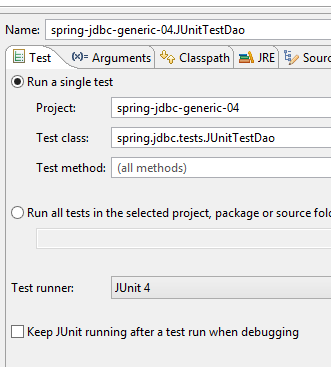 | 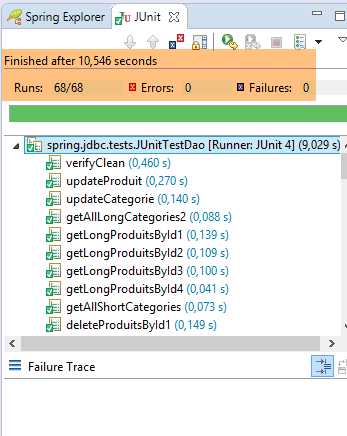 |
4.11.3. [JUnitTestPushTheLimits] 测试
[JUnitTestPushTheLimits] 测试是一项性能测试。我们利用 JUnit 测试会显示其执行时间这一特性,来测量 [DAO] 层的性能。随后将这些结果与 [DAO] 层的 JPA 实现结果进行比较。
4.11.3.1. 框架
[JUnitTestPushTheLimits] 类的骨架如下:
package spring.jdbc.tests;

import java.util.ArrayList;
import java.util.HashMap;
import java.util.List;
import java.util.Map;

import org.junit.Assert;
import org.junit.Before;
import org.junit.Test;
import org.junit.runner.RunWith;
import org.springframework.beans.factory.annotation.Autowired;
import org.springframework.boot.test.SpringApplicationConfiguration;
import org.springframework.test.context.junit4.SpringJUnit4ClassRunner;

import spring.jdbc.config.AppConfig;
import spring.jdbc.dao.IDao;
import spring.jdbc.entities.Categorie;
import spring.jdbc.entities.Produit;

@SpringApplicationConfiguration(classes = AppConfig.class)
@RunWith(SpringJUnit4ClassRunner.class)
public class JUnitTestPushTheLimits {

    // layer [DAO]
    @Autowired
    private IDao<Produit> daoProduit;
    @Autowired
    private IDao<Categorie> daoCategorie;

    // constants
    private final int NB_CATEGORIES = 2500;
    private final int NB_PRODUITS = 2;

    // local
    private Map<Long, Categorie> hCategories;
    private Map<Long, Produit> hProduits;

    @Before
    public void clean() {
        // empty table [CATEGORIES]
        daoCategorie.deleteAllEntities();
        // dictionaries
        hCategories = new HashMap<Long, Categorie>();
        hProduits = new HashMap<Long, Produit>();
    }

    private List<Categorie> fill(int nbCategories, int nbProduits) {
        // fill the tables
        List<Categorie> categories = new ArrayList<Categorie>();
        for (int i = 0; i < nbCategories; i++) {
            Categorie categorie = new Categorie(null, 0L, String.format("categorie[%d]", i), null);
            for (int j = 0; j < nbProduits; j++) {
                Produit produit = new Produit(null, 0L, String.format("produit[%d,%d]", i, j), 0L,
                        100 * (1 + (double) (i * 10 + j) / 100), String.format("desc[%d,%d]", i, j), null);
                categorie.addProduit(produit);
            }
            categories.add(categorie);
        }
        // add the category - the products will be cascaded in as well
        categories = daoCategorie.saveEntities(categories);
        // dictionaries
        for (Categorie categorie : categories) {
            hCategories.put(categorie.getId(), categorie);
            for (Produit produit : categorie.getProduits()) {
                hProduits.put(produit.getId(), produit);
            }
        }
        // result
        return categories;
    }

....

    // -------------------- private methods
    private void checkLongProduit(Produit actual) {
        Long id = actual.getId();
        Produit expected = hProduits.get(id);
        hProduits.remove(id);
        Assert.assertEquals(expected.getNom(), actual.getNom());
        Assert.assertEquals(expected.getDescription(), actual.getDescription());
        Assert.assertEquals(expected.getPrix(), actual.getPrix(), 1e-6);
        Assert.assertEquals(expected.getIdCategorie(), actual.getIdCategorie());
        Assert.assertNotNull(actual.getCategorie());
    }

    private void checkShortProduit(Produit actual) {
        Long id = actual.getId();
        Produit expected = hProduits.get(id);
        hProduits.remove(id);
        Assert.assertEquals(expected.getNom(), actual.getNom());
        Assert.assertEquals(expected.getDescription(), actual.getDescription());
        Assert.assertEquals(expected.getPrix(), actual.getPrix(), 1e-6);
        Assert.assertEquals(expected.getIdCategorie(), actual.getIdCategorie());
        boolean erreur = false;
        try {
            actual.getCategorie().getNom();
        } catch (Exception e) {
            erreur = true;
        }
        Assert.assertTrue(erreur);
    }

    private void checkShortCategorie(Categorie actual) {
        Long id = actual.getId();
        Categorie expected = hCategories.get(actual.getId());
        hCategories.remove(id);
        Assert.assertEquals(expected.getNom(), actual.getNom());
        boolean erreur = false;
        try {
            actual.getProduits().size();
        } catch (Exception e) {
            erreur = true;
        }
        Assert.assertTrue(erreur);
    }

    private void checkLongCategorie(Categorie actual) {
        Long id = actual.getId();
        Categorie expected = hCategories.get(actual.getId());
        hCategories.remove(id);
        Assert.assertEquals(expected.getNom(), actual.getNom());
        Assert.assertNotNull(actual.getProduits());
    }

}
这里展示了 [JUnitTestDao] 类的框架结构。我们之前已经接触过其中的所有方法。该测试使用了一个包含 2,500 个类别的数据库,每个类别包含 2 种产品(第 32–33 行)。因此,[CATEGORIES] 表将包含 2,500 行,而 [PRODUCTS] 表将包含 5,000 行。 虽然我们可以增加更多行数,但该测试的运行时间已接近一分钟。因此,我们选择了对等待测试完成的用户而言尚可接受的数值。
测试总共包含 18 个测试用例。它们使用执行配置 [1] 进行运行。执行时间如 [2] 所示:
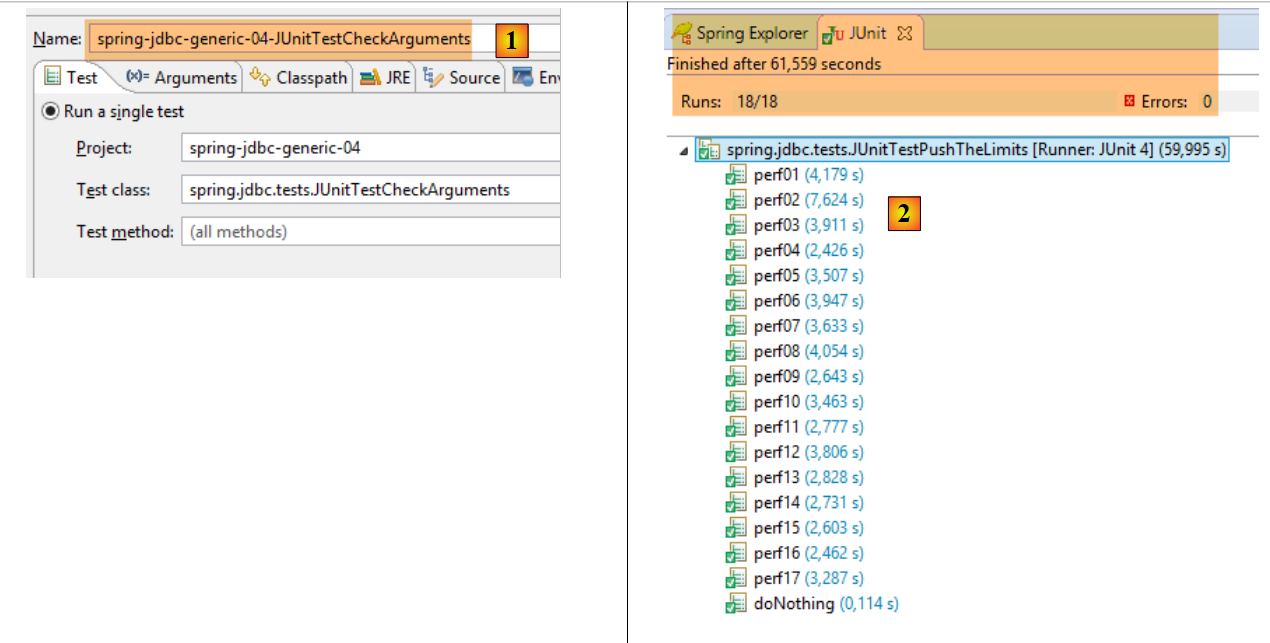 |
4.11.3.2. doNothing [0.114]
[doNothing] 方法不执行任何操作。它用于测量 [clean] 方法的执行时长,该方法在每次测试前执行,用于清空数据库。上图显示,与其他操作相比,此操作的执行时长可以忽略不计。
    @Test
    public void doNothing() {
        // clean
}
4.11.3.3. perf01 [4.179]
[perf01] 测试用于测量数据库填充时间:
    @Test
    public void perf01() {
        // insert
        fill(NB_CATEGORIES, NB_PRODUITS);
}
4.11.3.4. perf02 [7,624]
[perf02] 方法:
- 填充数据库;
- 然后修改所有类别的名称和所有产品的价格。
    @Test
    public void perf02() {
        // update
        List<Categorie> categories = fill(NB_CATEGORIES, NB_PRODUITS);
        for (Categorie categorie : categories) {
            categorie.setNom(categorie.getNom() + "*");
            for (Produit produit : categorie.getProduits()) {
                produit.setPrix(produit.getPrix() * 1.1);
            }
        }
        // mise à jour
        daoCategorie.saveEntities(categories);
}
4.11.3.5. perf03[3,911]
[perf03] 方法:
- 填充数据库
- 然后逐一删除所有类别。由于 [CATEGORIES] 表与 [PRODUCTS] 表之间存在级联关系,产品也会被一并删除。
令人惊讶的是,尽管此操作执行的内容更多,但耗时 [3.911 秒] 却比操作内容更少的 [perf01] 操作 [4.179 秒] 更短。
    @Test
    public void perf03() {
        // delete categories and cascade products
        daoCategorie.deleteEntitiesByEntity(fill(NB_CATEGORIES, NB_PRODUITS));
}
如果我们查看 [daoCategorie.deleteEntitiesByEntity] 方法的代码,会发现将执行一个包含 2,500 个参数(即分类数量)的 [PreparedStatement]。 这就是 [maxPreparedStatementParameters] Bean 发挥作用的地方;它将把 SQL 语句拆分为多个 [PreparedStatement] 对象,每个对象包含特定 DBMS 能够处理的参数数量。
4.11.3.6. perf04[2,426]
[perf04] 方法:
- 填充数据库;
- 随后检索所有类别的完整详情;
    @Test
    public void perf04() {
        // select
        List<Categorie> categories = fill(NB_CATEGORIES, NB_PRODUITS);
        List<Long> ids = new ArrayList<Long>();
        for (Categorie categorie : categories) {
            ids.add(categorie.getId());
        }
        daoCategorie.getLongEntitiesById(ids);
}
4.11.3.7. perf05 [3,507]
[perf05] 方法:
- 向数据库插入数据;
- 然后使用主键删除 5,000 条产品记录(因此我们可能有一个包含 5,000 个参数的 [PreparedStatement]);
- 检查产品表是否已清空;
    @Test
    public void perf05() {
        // delete products
        List<Categorie> categories = fill(NB_CATEGORIES, NB_PRODUITS);
        List<Long> ids = new ArrayList<Long>();
        for (Categorie categorie : categories) {
            for (Produit p : categorie.getProduits()) {
                ids.add(p.getId());
            }
        }
        daoProduit.deleteEntitiesById(ids);
        // check
        List<Produit> produits = daoProduit.getAllShortEntities();
        Assert.assertEquals(0, produits.size());
}
4.11.3.8. 结果
我们将不再逐一展示各项测试。仅说明它们的功能及其执行时长。这些时长只有相互比较时才有意义。其数值取决于所使用的测试环境(硬件和软件配置)。但在相同环境下获取的数据,则可以进行比较。
总测试时长:59.995 秒
角色 | ||
向数据库中插入 2,500 个类别和 5,000 种产品 | ||
先填充数据库,然后对其进行修改 | ||
先填充数据库,然后删除所有类别及其产品 | ||
填充数据库并请求所有分类的长版本 | ||
填充数据库,并使用主键逐一删除 5,000 个产品 | ||
将数据填入数据库,并按名称逐一删除这5,000个产品 | ||
将数据库填满,并按SKU逐一删除这5,000件商品 | ||
填充数据库,并根据名称检索所有产品的简短版本 | ||
填充数据库,并按名称检索所有产品的长版本 | ||
填充数据库,并根据主键检索所有产品的简短版本 | ||
向数据库中插入数据,并使用主键检索所有产品的详细信息 | ||
填充数据库,然后通过名称逐一删除所有类别(以及相关的商品) | ||
先填充数据库,然后使用 SKU 逐一删除所有类别(及其关联的产品) | ||
填充数据库,并通过名称检索所有类别的简短版本 | ||
填充数据库,并按名称请求所有类别的长版本 | ||
填充数据库,并使用主键检索所有类别的简短版本 | ||
向数据库中插入数据,并通过主键检索所有类别的长版本 |
这些结果有时令人惊讶:
- 尽管长版本(perf09)涉及两个表的连接,但其检索速度却快于短版本(perf08);
- 首次填充(perf01)的耗时显著超过所有后续填充;
- 通过产品名称检索短版本(perf08)所需时间比通过主键检索(perf10)更长。这似乎合乎逻辑。但对于长版本而言,情况恰恰相反(perf09, perf11);
因此,我们不会过多讨论这些结果。不过,这些结果对于将此 [Spring JDBC] 解决方案与其他五种数据库管理系统(DBMS)的:
- 针对其他五种数据库管理系统(DBMS)的 [Spring JDBC] 方案;
- 后续将介绍的 [Spring JPA];