6. Spring Data JPA Hibernate
6.1. 简介
我们将基于由项目 [spring-jdbc-04] 管理的数据库 [dbproduitscategories],并实现该项目中定义的两个接口 [IDao<Categorie>, IDao<Produit>]。这将使我们能够:
- 比较实现代码;
- 使用相同的测试层;
- 比较两个实现的性能;
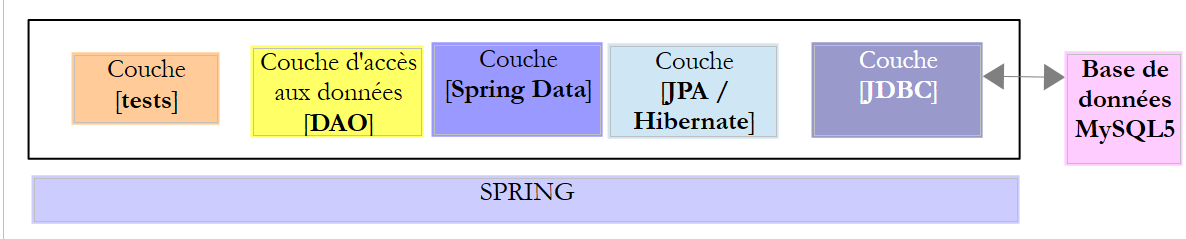 |
- [JDBC] 层由第 3.3 节中研究的 [mysql-config-jdbc] 项目实现;
现在我们转向其他层。
6.2. 搭建工作环境
使用 STS,导入位于 [<exemples>/spring-database-config/mysql/eclipse] [2] 文件夹中的 [mysl-config-jpa-hibernate] [1] 项目:
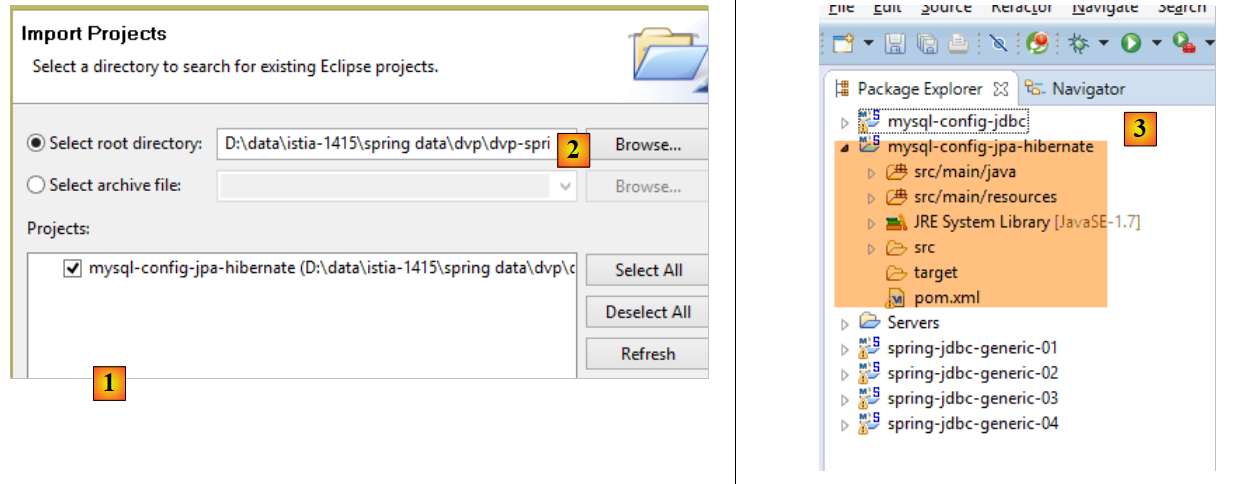 |
该项目配置了该项目的 [Spring JPA Hibernate] 层。每个 JPA 实现都有其独立的配置项目。
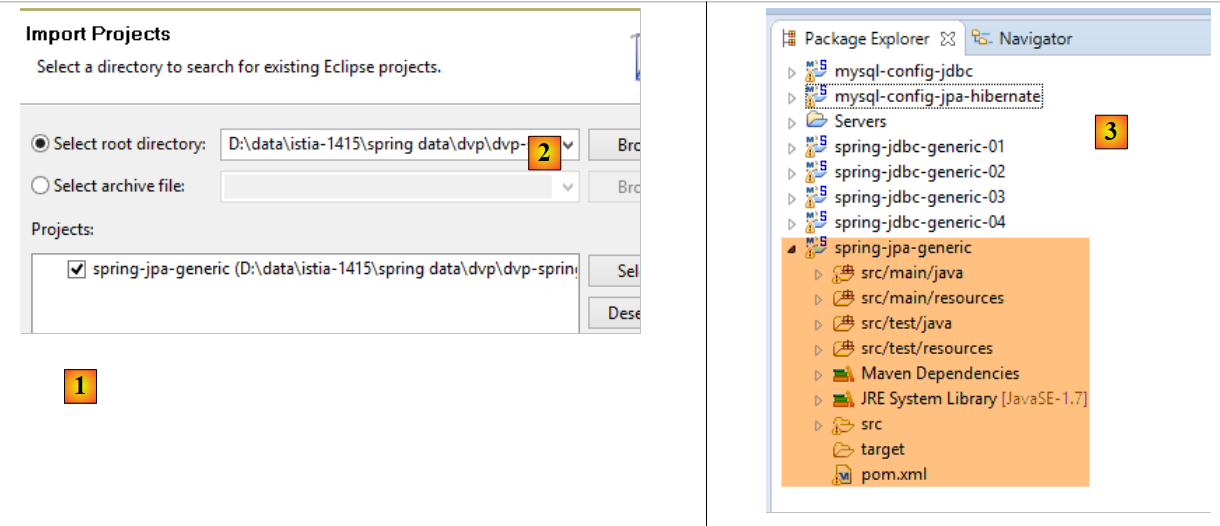
然后,导入位于 [<exemples>/spring-database-generic/spring-jpa] [2] 文件夹中的 [spring-jpa-generic] [1] 项目:
 |
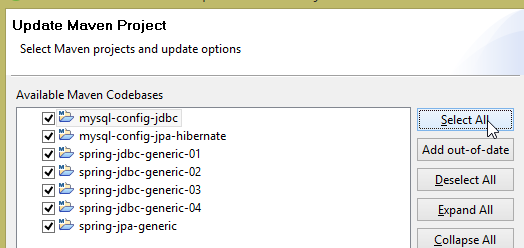
完成上述操作后,重置 [Package Explorer] 中所有项目的 Maven 环境(Alt-F5):
 |
然后,为验证工作环境,请执行名为 [spring-jpa-generic-JUnitTestDao-hibernate] 的运行配置:
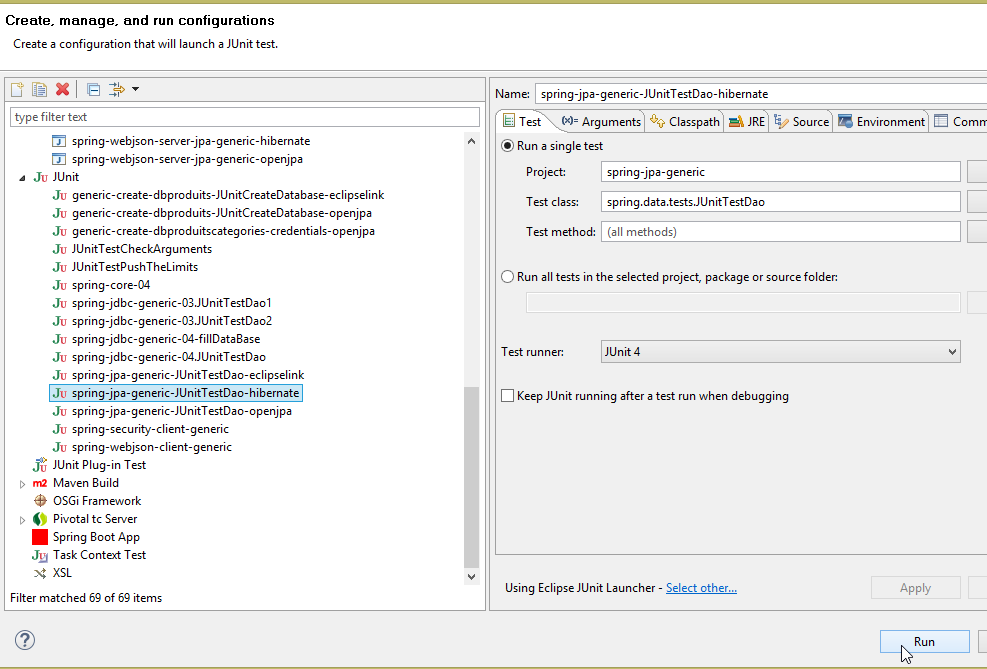 |
该配置将执行测试 [JUnitTestDao]。该测试必须成功:
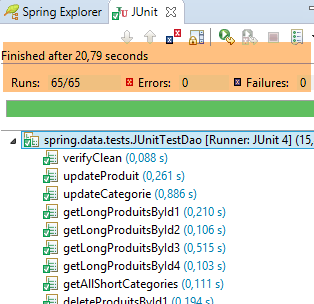 |
6.3. JPA 配置层项目
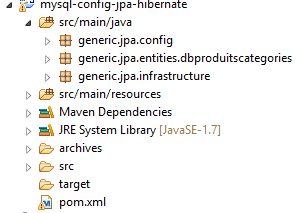 |
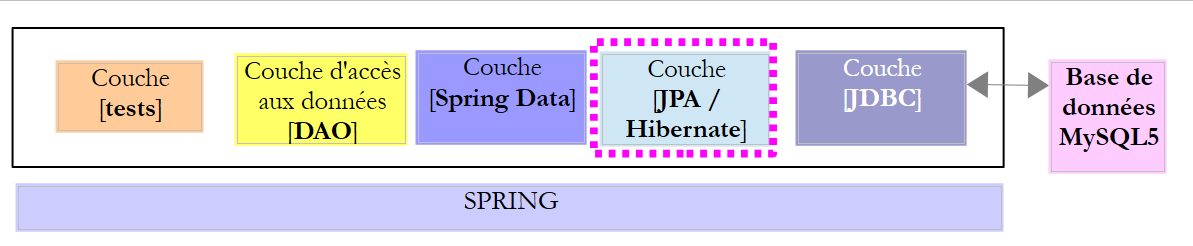
该项目的目的是配置以下架构中的 JPA 层:
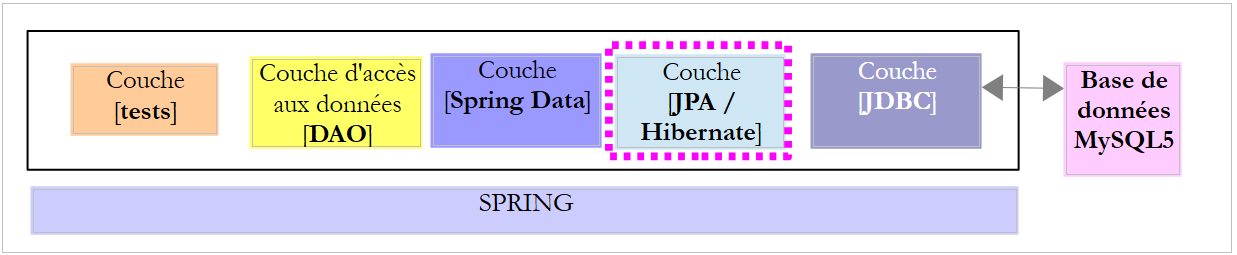 |
6.3.1. Maven 配置
该项目是一个 Maven 项目,由以下 [pom.xml] 文件进行配置:
<project xsi:schemaLocation="http://maven.apache.org/POM/4.0.0 http://maven.apache.org/xsd/maven-4.0.0.xsd"
    xmlns="http://maven.apache.org/POM/4.0.0" xmlns:xsi="http://www.w3.org/2001/XMLSchema-instance">

    <modelVersion>4.0.0</modelVersion>
    <groupId>dvp.spring.database</groupId>
    <artifactId>generic-config-jpa</artifactId>
    <version>0.0.1-SNAPSHOT</version>
    <name>configuration mysql openjpa</name>

    <parent>
        <groupId>org.springframework.boot</groupId>
        <artifactId>spring-boot-starter-parent</artifactId>
        <version>1.2.3.RELEASE</version>
    </parent>

    <dependencies>
        <!-- 可变依赖项 ********************************************** -->
        <!-- JPA 提供者 -->
        <dependency>
            <groupId>org.hibernate</groupId>
            <artifactId>hibernate-entitymanager</artifactId>
        </dependency>
        <!-- 常量依赖 ********************************************** -->
        <!-- Spring Data -->
        <dependency>
            <groupId>org.springframework.data</groupId>
            <artifactId>spring-data-jpa</artifactId>
        </dependency>
        <!-- Spring Context -->
        <!-- 继承自 JDBC 的配置 -->
        <dependency>
            <groupId>dvp.spring.database</groupId>
            <artifactId>generic-config-jdbc</artifactId>
            <version>0.0.1-SNAPSHOT</version>
            <exclusions>
                <exclusion>
                    <groupId>org.springframework.boot</groupId>
                    <artifactId>spring-boot-starter-jdbc</artifactId>
                </exclusion>
            </exclusions>
        </dependency>
    </dependencies>

    <properties>
        <project.build.sourceEncoding>UTF-8</project.build.sourceEncoding>
        <java.version>1.7</java.version>
    </properties>

    <build>
        <plugins>
            <plugin>
                <groupId>org.apache.maven.plugins</groupId>
                <artifactId>maven-surefire-plugin</artifactId>
                <version>2.18.1</version>
            </plugin>
        </plugins>
    </build>

</project>
- 第 5-7 行:该项目生成的 Maven 工件。其他实现的配置项目(如 JPA(Eclipselink)和 OpenJpa)将使用同一工件。这意味着在任何给定时刻,这些项目中只能有一个处于活动状态。 因此,请避免在 [Package Explorer] 中同时存在所有这些项目。只需保留其中一个即可;
- 第 10-14 行:父级 Maven 项目,用于确定该项目所需的大部分依赖项的版本;
- 第 19-22 行:Hibernate 库;
- 第 25-28 行:Spring Data 库;
- 第 32-34 行:JPA 层的配置项目基于 JDBC 层的配置项目,后者定义的内容包括: 所用 SGBD 的 JDBC 驱动程序以及待用数据库的连接信息;
- 第 35-39 行:图层 JDBC 的配置项目包含库 [Spring JDBC],此处将其替换为库 [Spring Data JPA]。 因此,建议不要将其包含在项目依赖项中。不过,即使保留该库,也不会导致错误;
最终,项目的依赖项如下:
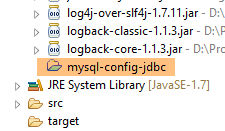 |
6.3.2. Spring 配置
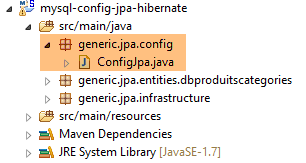 |
类 [ConfigJpa] 用于配置 Spring 项目:
package generic.jpa.config;

import javax.persistence.EntityManagerFactory;

import generic.jdbc.config.ConfigJdbc;

import org.apache.tomcat.jdbc.pool.DataSource;
import org.springframework.context.annotation.Bean;
import org.springframework.context.annotation.Configuration;
import org.springframework.context.annotation.Import;
import org.springframework.orm.jpa.JpaTransactionManager;
import org.springframework.orm.jpa.JpaVendorAdapter;
import org.springframework.orm.jpa.LocalContainerEntityManagerFactoryBean;
import org.springframework.orm.jpa.vendor.Database;
import org.springframework.orm.jpa.vendor.HibernateJpaVendorAdapter;
import org.springframework.transaction.PlatformTransactionManager;

@Configuration
@Import({ ConfigJdbc.class })
public class ConfigJpa {

    // JPA 提供程序
    @Bean
    public JpaVendorAdapter jpaVendorAdapter() {
        HibernateJpaVendorAdapter hibernateJpaVendorAdapter = new HibernateJpaVendorAdapter();
        hibernateJpaVendorAdapter.setShowSql(false);
        hibernateJpaVendorAdapter.setDatabase(Database.MYSQL);
        hibernateJpaVendorAdapter.setGenerateDdl(true);
        return hibernateJpaVendorAdapter;
    }

    // JPA 实体包
    public final static String[] ENTITIES_PACKAGES = { "generic.jpa.entities.dbproduitscategories" };

    // 数据源
    @Bean
    public DataSource dataSource() {
        // 数据源 TomcatJdbc
        DataSource dataSource = new DataSource();
        // 访问配置JDBC
        dataSource.setDriverClassName(ConfigJdbc.DRIVER_CLASSNAME);
        dataSource.setUsername(ConfigJdbc.USER_DBPRODUITSCATEGORIES);
        dataSource.setPassword(ConfigJdbc.PASSWD_DBPRODUITSCATEGORIES);
        dataSource.setUrl(ConfigJdbc.URL_DBPRODUITSCATEGORIES);
        // 初始打开的连接
        dataSource.setInitialSize(5);
        // 结果
        return dataSource;
    }

    // EntityManagerFactory
    @Bean
    public EntityManagerFactory entityManagerFactory(JpaVendorAdapter jpaVendorAdapter, DataSource dataSource) {
        LocalContainerEntityManagerFactoryBean factory = new LocalContainerEntityManagerFactoryBean();
        factory.setJpaVendorAdapter(jpaVendorAdapter);
        factory.setPackagesToScan(ENTITIES_PACKAGES);
        factory.setDataSource(dataSource);
        factory.afterPropertiesSet();
        return factory.getObject();
    }

    // 事务管理器
    @Bean
    public PlatformTransactionManager transactionManager(EntityManagerFactory entityManagerFactory) {
        JpaTransactionManager txManager = new JpaTransactionManager();
        txManager.setEntityManagerFactory(entityManagerFactory);
        return txManager;
    }

}
- 第 18 行:该类是一个 Spring 配置类;
- 第19行:导入由配置类[ConfigJdbc]定义的Bean,该类用于配置Spring项目[mysql-config-jdbc]。这些是过滤器jSON;
- 第23-30行:定义了所使用的实现类JPA,此处为Hibernate实现(第25行);
- 第 26 行:可选择是否显示由 Hibernate 实现执行的 SQL 操作;
- 第27行:向Hibernate指定已连接的SGBD。 此配置至关重要。它使 Hibernate 能够使用 SGBD 的 SQL 方言,包括其专有部分。 此外,这还会告知 Hibernate 其可使用的 SQL 类型以及 SGBD 对象。 正是 JPA 实现能够适应特定 SGBD 的这一特性,使其在 SGBD 之间具有很强的可移植性;
- 第28行:Hibernate可根据其发现的JPA实体,选择是否生成目标数据库中的表。仅当表不存在时才会进行生成。若表已存在,则不执行任何操作。 在介绍本文档中使用的各种数据库生成脚本 SQL 的生成过程时,我们将利用这一生成表的功能;
- 第 33 行:包含 [dbproduitscategories] 数据库中 JPA 实体的包;
- 第36-49行:与数据库[dbproduitscategories]关联的数据源[tomcat-jdbc];
- 第 52-60 行:名为 [entityManagerFactory] 的 Bean(必须以此命名)将创建 [EntityManager] 对象,该对象负责管理持久化上下文 JPA。 所有 JPA 操作都通过它进行。由于使用了 [Spring Data JPA],因此我们自己永远不会直接使用该对象。但我们需要对其进行配置。它需要了解以下信息:
- 所使用的 JPA 实现(第 55 行);
- 所使用的数据源(第 57 行);
- 该数据源中的 JPA 实体(第 56 行);
- 第 58 行:使用这些信息初始化 EntityManager;
- 第 59 行:返回单例 [entityManagerFactory];
- 第 63-68 行:定义事务管理器。其名称应为 [transactionManager];
- 第 65 行:创建事务管理器 JPA;
- 第 66 行:通过 Bean [entityManagerFactory](第 53 和 57 行)将其连接到第 37 行的数据源;
只有第23至30行的Bean依赖于所使用的JPA实现。其他Bean随后基于它。
6.3.3. [JPA] 层的实体
 |
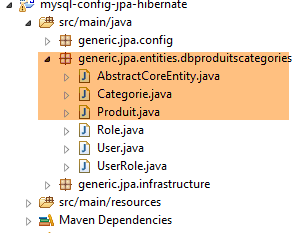 |
目标数据库是 [dbproduitscategories],其中包含两个表:[CATEGORIES] 和 [PRODUITS]。 我们看到它还有另外三张表 [USERS, ROLES, USERS_ROLES],这些表将用于保障即将部署到 Web 上的 Web 服务的安全。目前我们暂不考虑这些表。为便于回顾,特此重述 [CATEGORIES] 和 [PRODUITS] 这两张表的结构:
[PRODUITS] 表的结构如下:
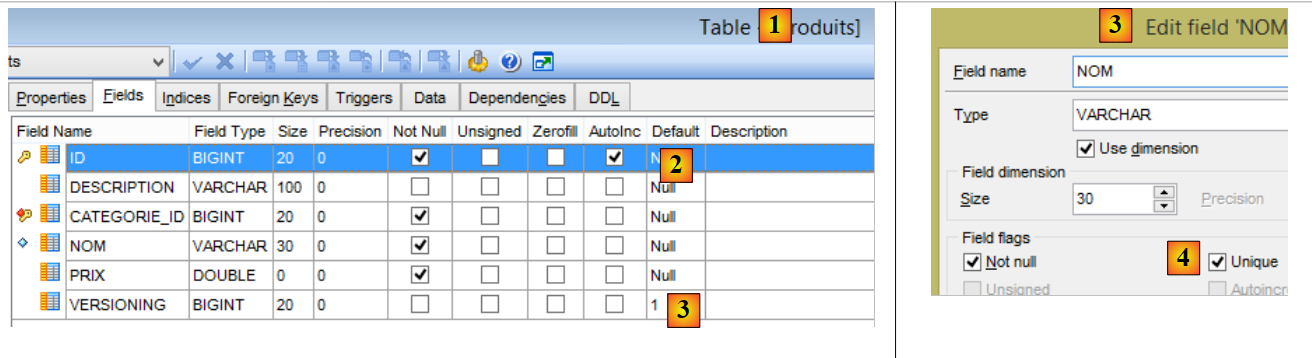 |
- [ID]:表 [2] 的自增主键;
- [NOM]:产品 [4] 的唯一名称;
- [PRIX]:产品的价格;
- [DESCRIPTION]:产品的描述;
- [VERSIONING] 是产品的版本号。其初始版本为 1 [3]。每次修改产品时,操作该表的代码会递增其版本号;
- [CATEGORIE_ID]:表[CATEGORIES]的外键,用于标识产品所属的类别;
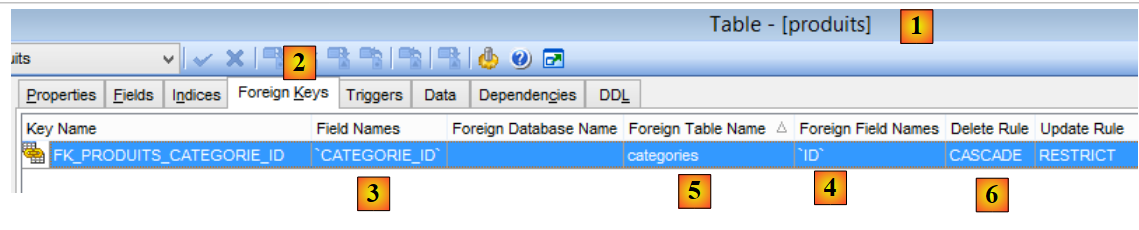 |
- 在 [1-3] 中,作为表 [PRODUITS] 的外键 [CATEGORIE_ID]。 该操作针对表 [CATEGORIES] 中的列 [ID] [4-5];
- 当某分类被删除时,与其关联的所有产品也会被删除 [6]。这一点值得注意,因为它在构建利用 [dbproduitscategories] 数据库的 [DAO] 层时会被用到;
类别表 [CATEGORIES] 如下:
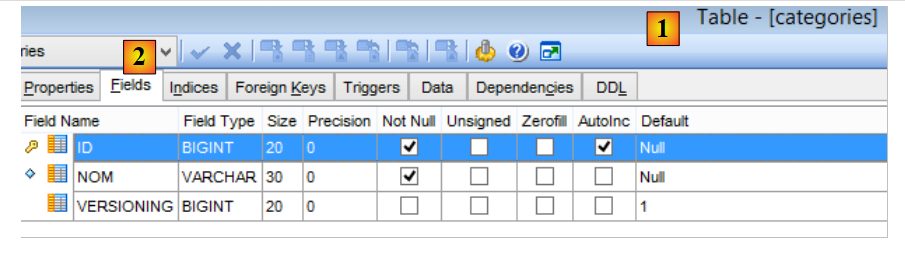 |
- [ID]:自增主键;
- [VERSIONING]:类别版本号;
- [NOM]:类别的唯一名称;
接下来我们将描述实体 JPA、[Produit] 和 [Categorie],以及表 [PRODUITS] 和 [CATEGORIES] 的映像。
|
6.3.3.1. 接口 [AbstractCoreEntity]
接口 [AbstractCoreEntity] 由实体 JPA、[Categorie] 和 [Produit] 实现:
package generic.jpa.entities.dbproduitscategories;

public interface AbstractCoreEntity {

    // 字段的 getter 和 setter[id]、[version]、[entityType]
    public Long getId();

    public void setId(Long id);

    public Long getVersion();

    public void setVersion(Long version);

    public enum EntityType {
        PROXY, POJO
    }

    public EntityType getEntityType();

    public void setEntityType(EntityType entityType);

}
由两个实体 JPA 实现的该接口,仅用于列出用于读取/写入这些实体的字段 [id]、[version] 和 [entityType] 的方法。 字段 [entityType] 的作用将在后续说明;
6.3.3.2. 实体 JPA [Produit]
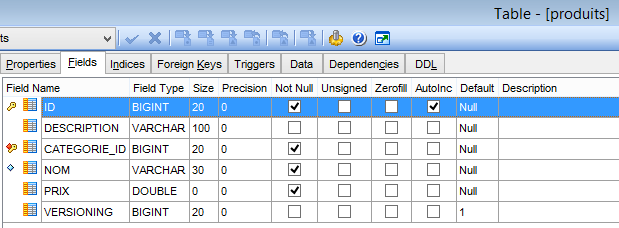
类 [Produit] 是与表 [PRODUITS] 中某行关联的实体 JPA:
 |
package generic.jpa.entities.dbproduitscategories;

import generic.jdbc.config.ConfigJdbc;
import generic.jpa.infrastructure.ProxyException;

import javax.persistence.Column;
import javax.persistence.Entity;
import javax.persistence.FetchType;
import javax.persistence.GeneratedValue;
import javax.persistence.GenerationType;
import javax.persistence.Id;
import javax.persistence.JoinColumn;
import javax.persistence.ManyToOne;
import javax.persistence.Table;
import javax.persistence.Transient;
import javax.persistence.Version;

import com.fasterxml.jackson.annotation.JsonFilter;
import com.fasterxml.jackson.annotation.JsonIgnore;

@Entity
@Table(name = ConfigJdbc.TAB_PRODUITS)
@JsonFilter("jsonFilterProduit")
public class Produit implements AbstractCoreEntity {
    // 属性
    @Id
    @GeneratedValue(strategy = GenerationType.IDENTITY)
    @Column(name = ConfigJdbc.TAB_JPA_ID)
    protected Long id;

    @Version
    @Column(name = ConfigJdbc.TAB_JPA_VERSIONING)
    protected Long version;

    @Transient
    protected EntityType entityType = EntityType.POJO;

    @Transient
    @JsonIgnore
    protected String simpleClassName = getClass().getSimpleName();

    // 属性
    @Column(name = ConfigJdbc.TAB_PRODUITS_NOM, unique = true, length = 30, nullable = false)
    private String nom;

    @Column(name = ConfigJdbc.TAB_PRODUITS_CATEGORIE_ID, insertable = false, updatable = false, nullable = false)
    private Long idCategorie;

    @Column(name = ConfigJdbc.TAB_PRODUITS_PRIX, nullable = false)
    private double prix;

    @Column(name = ConfigJdbc.TAB_PRODUITS_DESCRIPTION, length = 100)
    private String description;

    // 类别
    @ManyToOne(fetch = FetchType.LAZY)
    @JoinColumn(name = ConfigJdbc.TAB_PRODUITS_CATEGORIE_ID)
    private Categorie categorie;

    // 制造商
    public Produit() {

    }

    public Produit(Long id, Long version, String nom, Long idCategorie, double prix, String description,
            Categorie categorie) {
        this.id = id;
        this.version = version;
        this.nom = nom;
        this.idCategorie = idCategorie;
        this.prix = prix;
        this.description = description;
        this.categorie = categorie;
    }

    // 签名
    public String toString() {
        return String.format("[id=%s, version=%s, nom=%s, prix=10.2f, desc=%s, idCategorie=%s]", id, version, nom, prix,
                description, idCategorie);
    }

    // ------------------------------------------------------------
    // 重定义 [equals] 和 [hashcode]
    @Override
    public int hashCode() {
        Long id = getId();
        return (id != null ? id.hashCode() : 0);
    }

    @Override
    public boolean equals(Object entity) {
        if (!(entity instanceof AbstractCoreEntity)) {
            return false;
        }
        String class1 = this.getClass().getName();
        String class2 = entity.getClass().getName();
        if (!class2.equals(class1)) {
            return false;
        }
        AbstractCoreEntity other = (AbstractCoreEntity) entity;
        Long id = getId();
        Long otherId = other.getId();
        return id != null && otherId != null && id.equals(otherId);
    }

    // 获取器和设置器
...
    public void setCategorie(Categorie categorie) {
        // 实体类型
        if (entityType == EntityType.PROXY) {
            throw new ProxyException(1005, new RuntimeException(
                    "On ne peut changer la catégorie d'un produit de type [PROXY]"), simpleClassName);
        }
        this.categorie = categorie;
    }

}
- 第 21 行:注释 [@Entity] 将类 [Produit] 设为由层 [JPA] 管理的实体。 也可以写成 [@Entity(name="MonProduit")],这会给该实体命名 [MonProduit]。 若缺少此信息,实体的名称即为类名,此处即为 [Produit]。当实体中存在两个来自不同包且名称相同的类时,这种命名方式便变得必要;
- 第 22 行:注释 [@Table(name = "PRODUITS")] 表示类 [Produit] 是数据库表 [PRODUITS] 中某行对应的对象;
- 第 23 行:要应用于该实体的过滤器名称为 jSON。我们将看到,第 58 行中的属性 [categorie] 并非总是可用。 因此必须将其从对象的 jSON 表示中排除。为此我们需要一个过滤器。因此,我们将通过名为 [jsonFilterCategorie] 的过滤器来指定是否需要属性 [categorie];
- 第 26 行:注释 [@Id] 将该注释字段设为第 19 行表的主键关联字段;
- 第27行:注释[@GeneratedValue(strategy = GenerationType.IDENTITY)]确定了表[PRODUITS]中主键的自动生成模式。该模式由属性[strategy]设定。可选模式包括:
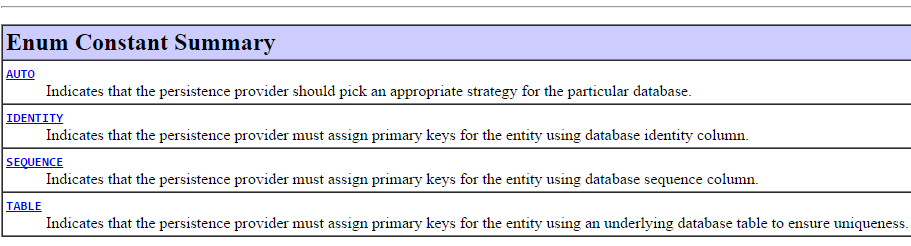
策略 [IDENTITY] 并非适用于所有 SGBD。 在测试的六个 SGBD 中,该策略适用于 SGBD 和 [MySQL 5, PostgreSQL 9.4, SQL Server 2014, DB2 Express-C10.5]。 对于另外两个 [Oracle Express 11g Release 2, Firebird 2.5.4],则必须使用 [SEQUENCE] 策略。 为了确保 JPA 实现之间的可移植性,不应采用 [AUTO] 策略,因为该策略将主键生成策略的选择权交由 JPA 实现自行决定。 因此,对于 MySQL 5 及策略 [AUTO]:
- Hibernate 会选择策略 [IDENTITY] 并采用主键模式 [AUTO_INCREMENT];
- EclipseLink 选择策略 [TABLE],该策略默认创建名为 [SEQUENCE] 的表,需通过查询该表才能获取主键。
最终,由这两个实现(JPA)管理的数据库结构并不相同。如果该结构由 Hibernate 生成,则无法被 EclipseLink 使用,反之亦然。
- 第 28 行:注解 [@Column(name="ID"] 确定了表 [PRODUITS] 中与字段 [id] 关联的列名;
- 第 29 行:主键使用类型 [Long] 而非 [long]。这是因为主键 [null] 对 JPA 具有特殊含义。 因此,此处建议使用对象类型而非简单类型;
- 第 31 行:注释 [@Version] 表明字段 [version] 关联了一个版本控制列。实现 JPA 将在实体每次被修改时递增该版本号。 该版本号用于防止两个不同用户同时更新该实体:用户 U1 和 U2 读取的实体 E 具有版本号 V1。 U1 修改了 E 并将该修改保存到数据库中:此时版本号变为 V1+1。 U2 随后修改 E 并将该修改保存到数据库中:它将引发异常,因为其版本号(V1)与数据库中的版本号(V1+1)不一致;
- 第36行:实体的类型。将有两种类型:POJO 和 PROXY。默认情况下,生成的实例将是一个 POJO(普通Java对象)。 在某些情况下,从数据库中检索到的 [Produit] 实例将属于 [PROXY] 类型。 这种情况发生在第 58 行中的 [Categorie categorie] 属性因第 56 行中的 [fetch = FetchType.LAZY] 属性而未被初始化为类别时。 在此情况下,待测试的 JPA 实现存在差异:
- [Hibernate, OpenJPA]:访问 [PROXY] 类型产品的类别会引发异常。 Hibernate 使用“代理”一词来指代在 [LAZY] 模式下获取的 JPA 实例。因此,我使用该术语来指代此类实体;
- [EclipseLink]:访问类型为 [PROXY] 的产品的类别时,系统会在数据库中搜索该类别,且不会抛出异常;
由于我希望建立一个与所用 JPA 实现方案独立的测试层,因此需要明确每个实体的类型:是 POJO 还是 PROXY。 因此,我在 JPA 实体中添加了 [entityType] 字段;
- 第 35 行:注释 [@Transient] 指出,实现 JPA 必须忽略该字段。因为该字段在 SGBD 的表中并不存在;
- 第 40 行:类 [Produit] 抛出类型为 [ProxyException] 的异常,该异常需要类名;
- 第 38 行:与前文相同,此处指出 JPA 实现应忽略该字段;
- 第 39 行:注解 [@JsonIgnore] 指出,[Produit] 实例的序列化器/反序列化器 jSON 应忽略该字段;
- 第 43 行:注释 [@Column] 将字段 [nom] 与表 [PRODUITS] 的列 [NOM] 关联起来。 当字段名称与关联列名称相同(不区分大小写)时,可省略注释 [@Column]。本例即属此情况。 [unique = true, length = 30, nullable = false] 属性仅在 JPA 实现需要根据实体 [Produit] 生成表 [CATEGORIES] 时使用。 这些属性将由 SQL 和 [UNIQUE, VARCHAR(30), NOT NULL] 属性转换,从而确保 [NOM] 列的长度不超过 30 个字符,在表中唯一,且不能取值 NULL;
- 第 46-47 行:字段 [idCategorie] 与该表的 [CATEGORIE_ID] 列相关联。稍后我们将详细讨论其属性;
- 第 49-50 行:字段 [prix] 与列 [PRIX] 相关联;
- 第 52-53 行:字段 [description] 与列 [DESCRIPTION] 相关联;
- 第 56-58 行:产品类别;
- 第 56 行:注释 [@ManyToOne] 表示第 57 行注释 [@JoinColumn(name = "CATEGORIE_ID")] 的列是表 [PRODUITS] 的外键,该表属于[Produit] 实体的注释列,该列关联于第 58 行所对应的 [CATEGORIES] 表。该注释必须标注 JPA 实体。 因此,第 58 行中的类必须是实体 JPA;
- 第56行:注解[fetch = FetchType.LAZY]要求,当从表[PRODUITS]中检索产品时,其类别(第58行)不会立即被检索(延迟加载)。 该类别将在首次调用方法 [getCategorie] 时获取。为此,在运行时, JPA 层会通过调用 SGBD 方法来获取类别,从而增强原始的 [getCategorie] 方法(该方法仅返回 categorie 字段),这种技术被称为“代理”。如前所述,JPA 的各实现版本在该特性的实现上存在差异。此属性不具有强制性。 所使用的 JPA 实现有权忽略它。正是因为 [categorie] 属性可能存在也可能不存在,我们才在第 23 行引入了 jSON 过滤器。 在插入或更新产品时,表 [PRODUITS] 的连接列 [CATEGORIE_ID] 会自动更新。 它接收来自 [categorie.getId()] 的值,其中 [categorie] 是第 58 行中的字段。JPA 规范规定,该连接列不能通过其他方式进行更新。 因此,它还强制执行第46行的[insertable = false, updatable = false]属性,这些属性确保与字段[idCategorie]关联的列[CATEGORIE_ID] (即该连接列)与字段 [idCategorie] 相关联,且该列不能被字段 [idCategorie] 修改。仅允许将列 [CATEGORIE_ID] 的值传输至字段 [idCategorie];
- 第 91-104 行:[Produit] 实体之间的相等关系被定义为其主键 [id] 之间的相等关系;
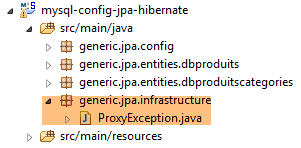
- 第 108-115 行:为了使我们的测试层具有可移植性,我们将统一处理三个实现(JPA、[Hibernate, EclipseLink, OpenJpa])中的 [PROXY] 实体。 对于类型为 [PROXY] 的 [Produit] 类型,将禁止更改字段 [categorie] 的值。[ProxyException] 类如下:
 |
package generic.jpa.infrastructure;

import generic.jdbc.infrastructure.UncheckedException;

public class ProxyException extends UncheckedException {

    private static final long serialVersionUID = 7278276670314994574L;

    public ProxyException() {
    }

    public ProxyException(int code, Throwable e, String simpleClassName) {
        super(code, e, simpleClassName);
    }

}
在结束对该实体的研究时,需要注意的是,注释及其属性在两种截然不同的情况下被使用:
- 用于创建数据库表;
- 以便加以利用。在这种情况下,实现 JPA 期望找到的表应与其自身生成的表一致。因此,不能将任意 [PRODUITS] 表与前面的 [Produit] 实体相关联。 该表必须至少具备(也可包含其他属性)其本应生成的 [PRODUITS] 表的特征。 在使用 JPA 时,最佳做法是从一个空数据库开始,让 JPA 在其中生成表。我们稍后将详细讨论这种生成方式。 为 SGBD 和 MySQL 提供的脚本 SQL 是基于 JPA 生成的表生成的。
实体 [Produit] 的所有属性均用于生成表 [PRODUITS]。完成此操作后,在处理表时将不再使用诸如 [unique = true, length = 30, nullable = false] 之类的生成属性。
6.3.3.3. 实体 JPA [Categorie]
类 [Categorie] 是与表 [CATEGORIES] 中某行关联的实体 JPA:
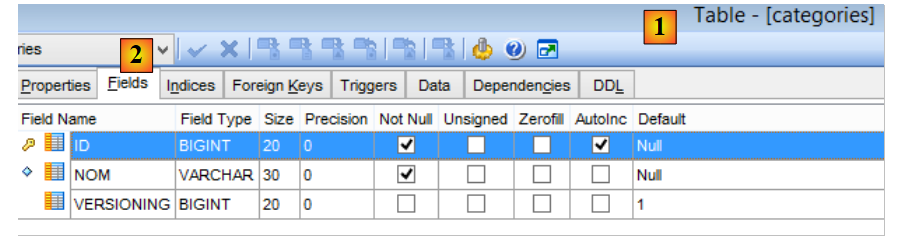 |
其代码如下:
package generic.jpa.entities.dbproduitscategories;

import generic.jdbc.config.ConfigJdbc;
import generic.jpa.infrastructure.ProxyException;

import java.util.ArrayList;
import java.util.List;

import javax.persistence.CascadeType;
import javax.persistence.Column;
import javax.persistence.Entity;
import javax.persistence.FetchType;
import javax.persistence.GeneratedValue;
import javax.persistence.GenerationType;
import javax.persistence.Id;
import javax.persistence.OneToMany;
import javax.persistence.Table;
import javax.persistence.Transient;
import javax.persistence.Version;

import com.fasterxml.jackson.annotation.JsonFilter;
import com.fasterxml.jackson.annotation.JsonIgnore;

@Entity
@Table(name = ConfigJdbc.TAB_CATEGORIES)
@JsonFilter("jsonFilterCategorie")
public class Categorie implements AbstractCoreEntity {

    @Id
    @GeneratedValue(strategy = GenerationType.IDENTITY)
    @Column(name = ConfigJdbc.TAB_JPA_ID)
    protected Long id;

    @Version
    @Column(name = ConfigJdbc.TAB_JPA_VERSIONING)
    protected Long version;

    @Transient
    protected EntityType entityType = EntityType.POJO;

    @Transient
    @JsonIgnore
    protected String simpleClassName = getClass().getSimpleName();

    // 属性
    @Column(name = ConfigJdbc.TAB_CATEGORIES_NOM, unique = true, length = 30, nullable = false)
    private String nom;

    // 相关产品
    @OneToMany(fetch = FetchType.LAZY, mappedBy = "categorie", cascade = { CascadeType.ALL })
    private List<Produit> produits;

    // 构造函数
    public Categorie() {

    }

    public Categorie(Long id, Long version, String nom, List<Produit> produits) {
        this.id = id;
        this.version = version;
        this.nom = nom;
        this.produits = produits;
    }

    // 签名
    public String toString() {
        return String.format("[id=%s, version=%s, nom=%s]", id, version, nom);
    }

    // 方法
    public void addProduit(Produit produit) {
        // 实体类型
        if (entityType == EntityType.PROXY) {
            throw new ProxyException(1004, new RuntimeException(
                    "On ne peut ajouter de produits à une catégorie de type [PROXY]"), simpleClassName);
        }
        // 添加产品
        if (produits == null) {
            produits = new ArrayList<Produit>();
        }
        if (produit != null) {
            // 正在添加产品
            produits.add(produit);
            // 设置其类别
            produit.setCategorie(this);
            produit.setIdCategorie(this.id);
        }
    }

    // ------------------------------------------------------------
    // 重新定义 [equals] 和 [hashcode]
    @Override
    public int hashCode() {
        Long id = getId();
        return (id != null ? id.hashCode() : 0);
    }

    @Override
    public boolean equals(Object entity) {
        if (!(entity instanceof AbstractCoreEntity)) {
            return false;
        }
        String class1 = this.getClass().getName();
        String class2 = entity.getClass().getName();
        if (!class2.equals(class1)) {
            return false;
        }
        AbstractCoreEntity other = (AbstractCoreEntity) entity;
        Long id = getId();
        Long otherId = other.getId();
        return id != null && otherId != null && id.equals(otherId);
    }

    // 获取器和设置器
...
}
- 第 24 行:该类是一个 JPA 实体;
- 第 25 行:关联到表 [CATEGORIES];
- 第26行:实体[Categorie]的表示jSON由名为[jsonFilterCategorie]的过滤器控制。 在请求该实体的 jSON 表示形式之前,必须先配置该过滤器。 将使用过滤器 [jsonFilterCategorie] 来决定是否从实体 [Categorie] 的表示 jSON 中排除第 40 行中的字段 [produits];
- 第29-32行:字段[id]与表[CATEGORIES]的主键[ID]相关联。 所选的生成模式是 [IDENTITY] 模式,因此 MySQL 的生成模式为 [AUTO_INCREMENT];
- 第34-36行:字段[version]与表[CATEGORIES]中的版本控制列[VERSIONING]相关联;
- 第 38-39 行:实体 [Categorie] 的类型;
- 第 41-43 行:类 [Categorie] 的简短名称;
- 第 46-47 行:字段 [nom] 与表 [CATEGORIES] 的列 [NOM] 相关联。 为其赋予属性 JPA [unique = true, length = 30, nullable=false],以便在生成表 [CATEGORIES] 时, [NOM]列将具有SQL和[UNIQUE, VARCHAR(30), NOT NULL]的属性;
- 第50-51行:属于该类别的商品;
- 第50行:注释[@OneToMany]是我们在实体[Produit]中遇到的关系[@ManyToOne]的反向关系。 属性 [mappedBy = "categorie"] 指明实体 [Produit] 中被反向关系 [@ManyToOne] 标注的字段。 属性 [cascade = { CascadeType.ALL }] 要求对 @Entity [Categorie] 执行的操作(persist、merge、remove)应级联到第 51 行中的 [produits]。 可以通过常量 [CascadeType.PERSIST, CascadeType.MERGE, CascadeType.REMOVE] 指定部分级联;
- 第50行:属性[fetch = FetchType.LAZY]要求,当从表[CATEGORIES]中检索某类别时,其关联产品不会立即被检索。这些产品将在首次调用方法[getProduits]时被检索。 为此,在运行时, JPA 层会通过调用 SGBD 方法来获取该类别的商品,从而扩展初始的 [getProduits] 方法(该方法仅返回 produits 字段)。 该属性具有约束力。JPA 实现不能忽略它。 由于属性 [produits] 可能已初始化也可能未初始化,我们在第 26 行引入了过滤器 jSON,以便指定是否需要该属性,并在第 39 行指定实体类型;
- 第 71-88 行:方法 [addProduit] 用于将产品添加到类别中;
- 第73-76行:为统一不同JPA实现之间的代理管理,我们决定不能向类型为PROXY的[Categorie]实体添加产品;
- 第 92-112 行:如果两个 [Categorie] 实体具有相同的主键 [id],则视为相等;
6.3.4. 文件 [persistence.xml]
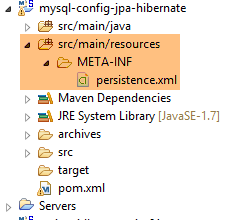 |
JPA应用程序必须在应用程序类路径中的[META-INF/persistence.xml]文件中,定义所用提供程序JPA的某些属性,以及要使用的JPA实体。 上文中,该文件被放置在 [src/main/resources] 文件夹中,该文件夹实际上属于某个 Eclipse 项目的类路径。 当将 JPA 与 Spring 结合使用时,本应位于 [persistence.xml] 文件中的某些信息会被放置在 Spring 配置类中的其他位置。 在 Spring JPA 应用中,由 Spring 驱动 JPA。在 Spring JPA Hibernate 环境中,[persistence.xml] 文件可简化为最简形式:
<?xml version="1.0" encoding="UTF-8"?>
<persistence version="1.0" xmlns="http://java.sun.com/xml/ns/persistence" xmlns:xsi="http://www.w3.org/2001/XMLSchema-instance"
    xsi:schemaLocation="http://java.sun.com/xml/ns/persistence http://java.sun.com/xml/ns/persistence/persistence_1_0.xsd">
    <persistence-unit name="dummy-persistence-unit" transaction-type="RESOURCE_LOCAL" />
</persistence>
- 第 1-5 行:[persistence.xml] 文件必须包含根标签 <persistence>。第 2 行中的标签属性在本应用中不会被使用;
- 持久化文件可通过 <persistence-unit> 标签(第 4 行)定义一个或多个持久化单元。每个持久化单元负责管理对特定数据库的访问。若应用程序同时管理两个数据库,则需包含两个持久化单元;
- 第 4 行:一个持久化单元名为 [attribut name],支持事务类型 [attribut transaction-type],具有属性,并定义了与该持久化单元所管理的数据库表相关的实体。 此处由于数据库访问将由 [Spring JPA Hibernate] 管理,因此后两项信息可置于其他位置。事务类型有两种:
- [RESOURCE_LOCAL]:事务由应用程序自身管理。本例即属此类,将由 Spring 管理事务;
- [JTA](Java事务 API):由运行应用程序的容器 EJB(企业级 Java Bean)根据代码中发现的 Java 注解自动管理事务。 此处并非采用该配置;
我们稍后将看到,该文件 [persistence.xml] 的内容取决于所使用的 JPA 实现。
6.4. [spring-jpa-generic] 项目
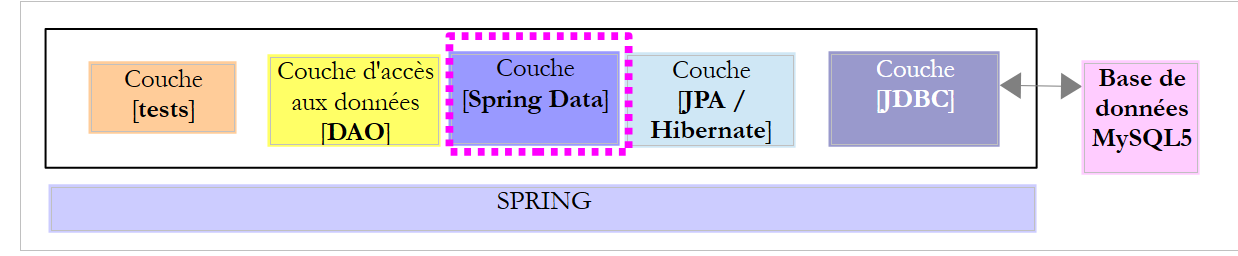
让我们回顾一下我们的目标。我们希望实现以下架构:
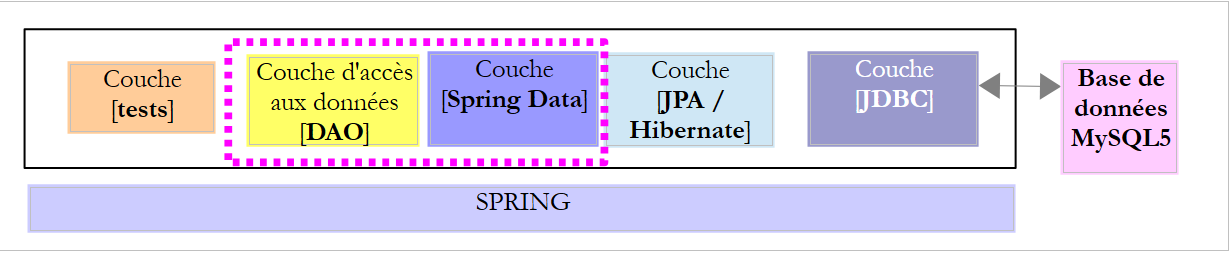 |
其中 [DAO] 层将实现第 4 章中探讨的 [IDao<Produit>, IDao<Categorie>] 接口。我们的任务是比较该接口的两个实现:
- 一个使用 Spring 构建的 JDBC;
- 另一个使用 Spring JPA 构建;
在上述架构中:
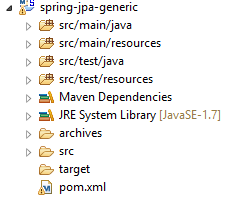
项目 [spring-jpa-generic] 负责实现 [DAO] 和 [Spring Data] 层。
 |
6.4.1. Maven 配置
项目 [spring-jpa-generic] 是一个由以下 [pom.xml] 文件配置的 Maven 项目:
<?xml version="1.0" encoding="UTF-8"?>
<project xmlns="http://maven.apache.org/POM/4.0.0" xmlns:xsi="http://www.w3.org/2001/XMLSchema-instance"
    xsi:schemaLocation="http://maven.apache.org/POM/4.0.0 http://maven.apache.org/xsd/maven-4.0.0.xsd">
    <modelVersion>4.0.0</modelVersion>

    <groupId>dvp.spring.database</groupId>
    <artifactId>spring-jpa-generic</artifactId>
    <version>0.0.1-SNAPSHOT</version>
    <packaging>jar</packaging>

    <name>spring-jpa-generic</name>
    <description>démo spring data avec tables de catégories et de produits</description>

    <parent>
        <groupId>org.springframework.boot</groupId>
        <artifactId>spring-boot-starter-parent</artifactId>
        <version>1.2.3.RELEASE</version>
    </parent>

    <dependencies>
        <!-- SGBD 的 JPA 配置 -->
        <dependency>
            <groupId>dvp.spring.database</groupId>
            <artifactId>generic-config-jpa</artifactId>
            <version>0.0.1-SNAPSHOT</version>
        </dependency>
    </dependencies>

    <properties>
        <project.build.sourceEncoding>UTF-8</project.build.sourceEncoding>
        <java.version>1.7</java.version>
    </properties>

    <build>
        <plugins>
            <plugin>
                <groupId>org.apache.maven.plugins</groupId>
                <artifactId>maven-surefire-plugin</artifactId>
                <version>2.18.1</version>
            </plugin>
        </plugins>
    </build>

</project>
- 第 22-26 行:该项目仅有一个依赖项,即配置应用程序 [JPA] 层的项目(即我们刚刚研究过的那个)。这是一个通用应用程序:
- 通过更改 [JDBC] 层的配置项目,即可切换 SGBD;
- 通过更改 [JPA] 层的配置项目,即可切换到 JPA 实现;
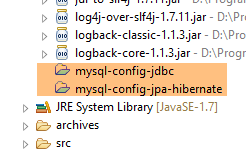
最终,依赖关系如下:
 |
6.4.2. Spring 配置
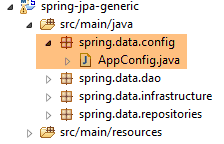 |
类 [AppConfig] 用于配置 Spring 项目:
package spring.data.config;

import generic.jpa.config.ConfigJpa;

import org.springframework.context.annotation.ComponentScan;
import org.springframework.context.annotation.Configuration;
import org.springframework.context.annotation.Import;
import org.springframework.data.jpa.repository.config.EnableJpaRepositories;

@EnableJpaRepositories(basePackages = { "spring.data.repositories" })
@Configuration
@ComponentScan(basePackages = { "spring.data.dao" })
@Import({ ConfigJpa.class })
public class AppConfig {

}
- 第 11 行:该类是一个 Spring 配置类;
- 第 10 行:注解 [@EnableJpaRepositories] 用于指定包含 Spring Data 接口 [CrudRepository] 的包。这使得它们成为可注入到其他 Spring 组件中的 Spring 组件;
- 第 12 行:注解 [@ComponentScan] 表示需遍历 [spring.data.dao] 包以查找 Spring 组件。将找到 [DaoCategorie] 和 [DaoProduit] 组件;
- 第 13 行:导入配置类 [ConfigJpa] 中的 Bean。其中包含所用实现 JPA 的 Bean (Hibernate、Eclipselink、OpenJpa),待使用的数据源 EntityManager,以及事务管理器 JPA;
6.4.3. [Spring Data] 层
 |
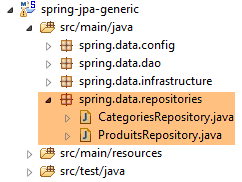 |
6.4.3.1. 接口 [CategoriesRepository]
接口 [CategoriesRepository] 管理对表 [CATEGORIES] 的访问:
package spring.data.repositories;

import generic.jpa.entities.dbproduitscategories.Categorie;

import java.util.List;

import org.springframework.data.jpa.repository.Query;
import org.springframework.data.repository.CrudRepository;

public interface CategoriesRepository extends CrudRepository<Categorie, Long> {

    // 产品及其所属类别
    @Query("select c from Categorie c left join fetch c.produits where c.id=?1")
    public Categorie getLongCategorieById(Long id);

    @Query("select c from Categorie c left join fetch c.produits where c.nom=?1")
    public Categorie getLongCategorieByName(String nom);

    @Query("select c from Categorie c where c.nom in ?1")
    public List<Categorie> getShortCategoriesByName(Iterable<String> names);

    @Query("select c from Categorie c where c.id in ?1")
    public List<Categorie> getShortCategoriesById(Iterable<Long> ids);

    @Query("select distinct c from Categorie c left join fetch c.produits where c.id in ?1")
    public List<Categorie> getLongCategoriesById(List<Long> names);

    @Query("select distinct c from Categorie c left join fetch c.produits where c.nom in ?1")
    public List<Categorie> getLongCategoriesByName(List<String> names);

    @Query("select c from Categorie c")
    public List<Categorie> getAllShortCategories();

    @Query("select distinct c from Categorie c left join fetch c.produits")
    public List<Categorie> getAllLongCategories();

}
- 第 10 行:接口 [CrudRepository] 已在第 5.1.3 节中使用并说明。需要提醒的是:
- 该接口的第一个参数类型是实体 JPA,用于管理对 CRUD(findOne、findAll、 save、delete、deleteAll),
- 接口的第二个参数类型是实体 JPA 的主键,此处为整数 [Long];
该接口的方法通过 JPQL 查询(Java Persistence Query Language)实现。该查询针对 JPA 实体。在此类查询中:
- 表被替换为与其关联的实体 JPA;
- 列被替换为查询中使用的 JPA 实体的字段;
以第 31-32 行为例:第 32 行中的方法将数据库中的所有类别以简短形式返回。 该方法由第31行的JPQL查询(Java持久化查询语言)实现,其结构与对应的SQL非常相似。 若要深入了解 JPQL,可参阅 [ref2](参见第 1.2 节)。
接口 [CategoriesRepository] 的方法如下:
- 第13-14行:方法[getLongCategorieById]返回由主键[id]引用的类别的详细版本,即包含其产品的类别。 需要提醒的是,在实体 [Categorie] 中,字段 [produits] 具有属性 [fetch = FetchType.LAZY](延迟加载)。 在查询 JPQL 中,我们使用关键字 [fetch] 强制加载产品。 查询中的参数 ?1 在执行时将被第 12 行方法的第一个参数值替换,即参数 [Long id];
- 第16-17行:方法[getLongCategorieByName]返回通过名称[nom]引用的类别的长版本;
- 第19-20行:方法[getShortCategoriesByName]返回通过名称引用的类别的简短版本。这些类别的字段[produits]并非null。 该字段包含一个代理的引用(由实现类 JPA 创建),其作用是在被调用时返回该类别的商品。在 JPA 持久化上下文之外调用该方法会引发异常 (Hibernate 及 OpenJpa 会抛出,但 EclipseLink 不会)。因此,我们不会使用类别简短版本中的 [produits] 字段;
- 第 22-23 行:方法 [getShortCategoriesById] 返回通过主键 [id] 引用的类别的简短版本;
- 第 25-26 行:方法 [getLongCategoriesById] 根据主键 [id] 检索类别的长版本;
- 第 [28-29] 行:方法 [getLongCategoriesByName] 返回通过名称引用的类别的长版本;
- 第 31-32 行:方法 [getAllShortCategories] 返回所有类别的简短版本;
- 第 34-35 行:方法 [getAllLongCategories] 返回所有类别的长版本;
注:并非所有 JPA 实现都支持相同的 JPQL 语法。 因此,以下语法被 Hibernate 和 EclipseLink 接受,但不被 OpenJpa 接受:
@Query("select c from Categorie c left join fetch c.produits p where c.nom=?1")
OpenJpa 不接受上述别名 [p]。
6.4.3.2. 接口 [ProduitsRepository]
接口 [ProduitsRepository] 管理对表 [PRODUITS] 的访问:
package spring.data.repositories;

import generic.jpa.entities.dbproduitscategories.Produit;

import java.util.List;

import org.springframework.data.jpa.repository.Query;
import org.springframework.data.repository.CrudRepository;
import org.springframework.transaction.annotation.Transactional;

@Transactional()
public interface ProduitsRepository extends CrudRepository<Produit, Long> {

    // 带分类的产品
    @Query("select p from Produit p left join fetch p.categorie where p.id=?1")
    public Produit getLongProduitById(Long id);

    @Query("select p from Produit p left join fetch p.categorie where p.nom=?1")
    public Produit getLongProduitByName(String nom);

    @Query("select p from Produit p where p.id in ?1")
    public List<Produit> getShortProduitsById(List<Long> ids);

    @Query("select p from Produit p where p.nom in ?1")
    public List<Produit> getShortProduitsByName(List<String> names);

    @Query("select distinct p from Produit p left join fetch p.categorie where p.id in ?1")
    public List<Produit> getLongProduitsById(List<Long> ids);

    @Query("select distinct p from Produit p left join fetch p.categorie where p.nom in ?1")
    public List<Produit> getLongProduitsByName(List<String> names);

    @Query("select distinct p from Produit p left join fetch p.categorie")
    public List<Produit> getAllLongProduits();

    @Query("select p from Produit p")
    public List<Produit> getAllShortProduits();
}
- [15-16] 行:方法 [getLongProduitById] 返回由主键 [id] 标识的产品的详细信息,即包含其类别。 需要提醒的是,在实体 [Produit] 中,字段 [categorie] 具有属性 [fetch = FetchType.LAZY](延迟加载)。 在查询 JPQL 中,我们使用关键字 [fetch] 强制加载类别;
- 第 18-19 行:方法 [getLongProduitByName] 返回通过名称标识的产品的详细信息;
- 第21-22行:方法[getShortProduitsById]返回通过主键[id]标识的产品的简短版本。 在此简短版本中,字段 [categorie] 的值并非 null。它包含由实现 JPA 生成的代理引用,若调用该代理,将获取产品的类别。 该调用只能在持久化上下文 JPA 中进行。在其他地方进行该调用会引发异常(Hibernate 和 OpenJpa,但不包括 EclipseLink)。 因此,在 [DAO] 层或其他地方,我们不会在产品的简版中使用字段 [categorie]。 在产品的简短版本中,字段 [idCategorie] 已被初始化。其值为该产品所属类别的主键。这使得后续可以通过方法 [DaoCategorie. getShortCategoriesById(idCategorie)] 向 [DAO] 层查询该类别;
- 第24-25行:方法[getShortProduitsByName]返回通过名称标识的产品的简短版本;
- 第27-28行:方法[getLongProduitsById]返回通过主键标识的产品的详细信息;
- 第 30-31 行:方法 [getLongProduitsByName] 返回按名称标识的产品的详细信息;
- 第 33-34 行:方法 [getAllLongProduits] 返回所有产品的长描述;
- 第 36-37 行:方法 [getAllShortProduits] 返回所有产品的简短版本;
这些接口将在项目运行时由 JPA 实现生成的类来实现。此类类被称为 [proxy] 类。 默认情况下,[CrudRepository] 接口的方法在事务中执行。由于 [ProduitsRepository, CategoriesRepository] 接口继承了 [CrudRepository] 类,因此它们属于 Spring 组件。因此,它们可以被注入到其他 Spring 组件中。
6.4.4. [DAO] 层
 |
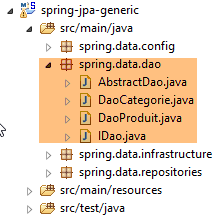 |
6.4.4.1. [IDao<T>] 接口
接口 [IDao<T>] 即为在基于 Spring 实现的 [DAO] 层中已探讨过的接口(参见第 4.7 节);
package spring.data.dao;

import generic.jpa.entities.dbproduitscategories.AbstractCoreEntity;

import java.util.List;

public interface IDao<T extends AbstractCoreEntity> {

    // 所有 T 实体的列表
    public List<T> getAllShortEntities();

    public List<T> getAllLongEntities();

    // 特定实体的列表 - 简短版本
    public List<T> getShortEntitiesById(Iterable<Long> ids);

    public List<T> getShortEntitiesById(Long... ids);

    public List<T> getShortEntitiesByName(Iterable<String> names);

    public List<T> getShortEntitiesByName(String... names);

    // 特定实体 - 长版
    public List<T> getLongEntitiesById(Iterable<Long> ids);

    public List<T> getLongEntitiesById(Long... ids);

    public List<T> getLongEntitiesByName(Iterable<String> names);

    public List<T> getLongEntitiesByName(String... names);

    // 更新多个实体
    public List<T> saveEntities(Iterable<T> entities);

    public List<T> saveEntities(@SuppressWarnings("unchecked") T... entities);

    // 删除所有实体
    public void deleteAllEntities();

    // 删除多个实体
    public void deleteEntitiesById(Iterable<Long> ids);

    public void deleteEntitiesById(Long... ids);

    public void deleteEntitiesByName(Iterable<String> names);

    public void deleteEntitiesByName(String... names);

    public void deleteEntitiesByEntity(Iterable<T> entities);

    public void deleteEntitiesByEntity(@SuppressWarnings("unchecked") T... entities);
}
6.4.4.2. 抽象类 [AbstractDao]
|
抽象类 [AbstractDao] 是实现 [DAO] 层的类的父类:
- 实现接口 [IDao<Produit>] 并管理对表 [PRODUITS] 访问的类 [DaoProduit];
- 类 [DaoCategorie],该类实现了接口 [IDao<Categorie>],并管理对表 [CATEGORIES] 的访问;
其代码与第 4.8 节所述内容基本一致,仅有一处细微差别:没有任何方法具有 [@Transactional] 属性,该属性会导致方法在事务中执行。此处利用了 Spring Data 的 [CrudRepository] 接口默认在事务中执行这一特性。
6.4.4.3. 类 [DaoCategorie]
|
类 [DaoCategorie] 以如下方式实现了接口 [IDao<Categorie>]:
package spring.data.dao;

import generic.jpa.entities.dbproduitscategories.AbstractCoreEntity.EntityType;
import generic.jpa.entities.dbproduitscategories.Categorie;
import generic.jpa.entities.dbproduitscategories.Produit;

import java.util.ArrayList;
import java.util.List;

import org.springframework.beans.factory.annotation.Autowired;
import org.springframework.stereotype.Component;

import spring.data.infrastructure.DaoException;
import spring.data.repositories.CategoriesRepository;
import spring.data.repositories.ProduitsRepository;

@Component
public class DaoCategorie extends AbstractDao<Categorie> {

    @Autowired
    private ProduitsRepository produitsRepository;

    @Autowired
    private CategoriesRepository categoriesRepository;

    @Override
    public List<Categorie> getAllShortEntities() {
        try {
            return setShortCategoriesType(categoriesRepository.getAllShortCategories());
        } catch (Exception e) {
            throw new DaoException(211, e, simpleClassName);
        }
    }

    private List<Categorie> setShortCategoriesType(List<Categorie> categories) {
        for (Categorie categorie : categories) {
            categorie.setEntityType(EntityType.PROXY);
        }
        return categories;
    }

    @Override
    public List<Categorie> getAllLongEntities() {
        try {
            return categoriesRepository.getAllLongCategories();
        } catch (Exception e) {
            throw new DaoException(202, e, simpleClassName);
        }
    }

    @Override
    public void deleteAllEntities() {
        try {
            categoriesRepository.deleteAll();
        } catch (Exception e) {
            throw new DaoException(208, e, simpleClassName);
        }
    }

    @Override
    protected List<Categorie> getShortEntitiesById(List<Long> ids) {
        try {
            return setShortCategoriesType(categoriesRepository.getShortCategoriesById(ids));
        } catch (Exception e) {
            throw new DaoException(203, e, simpleClassName);
        }
    }

    @Override
    protected List<Categorie> getShortEntitiesByName(List<String> names) {
        try {
            return setShortCategoriesType(categoriesRepository.getShortCategoriesByName(names));
        } catch (Exception e) {
            throw new DaoException(204, e, simpleClassName);
        }
    }

    @Override
    protected List<Categorie> getLongEntitiesById(List<Long> ids) {
        try {
            return categoriesRepository.getLongCategoriesById(ids);
        } catch (Exception e) {
            throw new DaoException(205, e, simpleClassName);
        }
    }

    @Override
    protected List<Categorie> getLongEntitiesByName(List<String> names) {
        try {
            return categoriesRepository.getLongCategoriesByName(names);
        } catch (Exception e) {
            throw new DaoException(206, e, simpleClassName);
        }
    }

    @Override
    protected List<Categorie> saveEntities(List<Categorie> categories) {
    ...
    }

    @Override
    protected void deleteEntitiesById(List<Long> ids) {
        try {
            categoriesRepository.delete(getShortEntitiesById(ids));
        } catch (Exception e) {
            throw new DaoException(209, e, simpleClassName);
        }
    }

    @Override
    protected void deleteEntitiesByName(List<String> names) {
        try {
            categoriesRepository.delete(getShortEntitiesByName(names));
        } catch (Exception e) {
            throw new DaoException(212, e, simpleClassName);
        }
    }

}
- 第 17 行:注解 [@Component] 将类 [DaoCategorie] 定义为 Spring 组件;
- 第 18 行:类 [DaoCategorie] 继承自类 [AbstractDao<Categorie>],因此它实现了接口 [IDao<Categorie>];
- 第20-24行:将[CrudRepository]和[Spring Data]这两个接口的引用注入。该注入将在Spring对象实例化时进行,通常发生在Spring项目执行开始时;
- 该类的所有方法都将工作委托给 [CrudRepository] 接口中同名的方法;
- 所有将实体转换为简短版本的方法,都会通过将实体的类型设置为 [EntityType.PROXY] 来表明这一点(第 29、63、72 行);
方法 [saveEntities] 需要特别说明:
@Override
    protected List<Categorie> saveEntities(List<Categorie> categories) {
        // 标注待插入的产品
        List<Produit> insertedProduits = new ArrayList<Produit>();
        for (Categorie categorie : categories) {
            EntityType categorieType = categorie.getEntityType();
            List<Produit> produits = null;
            if ((categorieType == EntityType.POJO) && (produits = categorie.getProduits()) != null) {
                for (Produit produit : produits) {
                    if (produit.getId() == null) {
                        insertedProduits.add(produit);
                    }
                    // 借此机会(如有必要)恢复产品 --> 类别关系
                    produit.setCategorie(categorie);
                }
            }
        }
        // 保存类别/产品
        try {
            categoriesRepository.save(categories);
        } catch (Exception e) {
            throw new DaoException(201, e, simpleClassName);
        }
        // 更新已插入产品的字段 [idCategorie]
        for (Produit produit : insertedProduits) {
            produit.setIdCategorie(produit.getCategorie().getId());
        }
        // 结果
        return categories;
    }
- 第 2 行:作为参数传递的类别既包括需要插入的类别([id==null]),也包括需要修改的类别([id!=null]);
- 第20行:使用方法[categoriesRepository.save(entities)]持久化分类。测试发现,持久化商品(id==null)的字段[idCategorie]未被填充。 为解决此问题,在第4-17行记录待插入的产品,并在数据持久化后,填充其[idCategorie]字段(第25-27行);
- 第5-17行:遍历类别列表;
- 第8-16行:遍历每个类别的商品列表。这里存在一个难点。 方法 [saveEntities] 既用于持久化,也用于修改类别。在后一种情况下,类别可能以简短版本获取,因此字段 [produits] 中包含代理方法的引用。 若在 Hibernate 中使用该字段,将引发异常,因为所操作的类别已不在持久化上下文 JPA 中——该上下文已在返回类别短版本的方法事务结束时被关闭。 因此,我们使用实体 [Categorie] 第 8 行中的字段 [EntityType] 来判断是否可以访问该类别的商品列表;
- 第14行:将产品与其类别建立关联。通常情况下,该关联应已存在。但我们无法确定该产品是如何构建的,以及是否已与其类别建立关联。 因此,为避免任何问题(处理实体 [Produit] 时,JPA 需要该实体引用其关联的实体 [Categorie]),我们自行建立此关联。
通过将此代码与 Spring 实现 JDBC 中的 [DaoProduit] 类代码进行对比(参见第 4.9 节) 可以发现,Spring Data 库 JPA 极大地简化了 [DAO] 层的编写工作。
6.4.4.4. [DaoProduit]类
|
类 [DaoProduit] 以如下方式实现了接口 [IDao<Produit>]:
package spring.data.dao;

import generic.jpa.entities.dbproduitscategories.AbstractCoreEntity.EntityType;
import generic.jpa.entities.dbproduitscategories.Categorie;
import generic.jpa.entities.dbproduitscategories.Produit;

import java.util.List;

import org.springframework.beans.factory.annotation.Autowired;
import org.springframework.stereotype.Component;

import spring.data.infrastructure.DaoException;
import spring.data.repositories.CategoriesRepository;
import spring.data.repositories.ProduitsRepository;

import com.google.common.collect.Lists;

@Component
public class DaoProduit extends AbstractDao<Produit> {
    @Autowired
    private ProduitsRepository produitsRepository;

    @Autowired
    private CategoriesRepository categoriesRepository;

    @Override
    public List<Produit> getAllShortEntities() {
        try {
            return setShortProduitsType(produitsRepository.getAllShortProduits());
        } catch (Exception e) {
            throw new DaoException(102, e, simpleClassName);
        }
    }

    private List<Produit> setShortProduitsType(List<Produit> produits) {
        for (Produit produit : produits) {
            produit.setEntityType(EntityType.PROXY);
        }
        return produits;
    }

    @Override
    public List<Produit> getAllLongEntities() {
        try {
            return produitsRepository.getAllLongProduits();
        } catch (Exception e) {
            throw new DaoException(117, e, simpleClassName);
        }
    }

    @Override
    public void deleteAllEntities() {
        try {
            produitsRepository.deleteAll();
        } catch (Exception e) {
            throw new DaoException(112, e, simpleClassName);
        }
    }

    @Override
    protected List<Produit> getShortEntitiesById(List<Long> ids) {
        try {
            return setShortProduitsType(produitsRepository.getShortProduitsById(ids));
        } catch (Exception e) {
            throw new DaoException(103, e, simpleClassName);
        }
    }

    @Override
    protected List<Produit> getShortEntitiesByName(List<String> names) {
        try {
            return setShortProduitsType(produitsRepository.getShortProduitsByName(names));
        } catch (Exception e) {
            throw new DaoException(104, e, simpleClassName);
        }
    }

    @Override
    protected List<Produit> getLongEntitiesById(List<Long> ids) {
        try {
            return linkLongProduitsToCategories(produitsRepository.getLongProduitsById(ids));
        } catch (Exception e) {
            throw new DaoException(105, e, simpleClassName);
        }
    }

    @Override
    protected List<Produit> getLongEntitiesByName(List<String> names) {
        try {
            return linkLongProduitsToCategories(produitsRepository.getLongProduitsByName(names));
        } catch (Exception e) {
            throw new DaoException(106, e, simpleClassName);
        }
    }

    private List<Produit> linkLongProduitsToCategories(List<Produit> produits) {
        for (Produit produit : produits) {
            Categorie categorie = produit.getCategorie();
            if (categorie != null) {
                produit.setCategorie(categorie);
                produit.setIdCategorie(categorie.getId());
            }
        }
        return produits;
    }

    @Override
    protected List<Produit> saveEntities(List<Produit> entities) {
        // (如有必要)恢复商品与其分类之间的关联
        for (Produit produit : entities) {
            if (produit.getEntityType() == EntityType.POJO) {
                produit.setCategorie(new Categorie(produit.getIdCategorie(), 0L, null, null));
            }
        }
        // 保存产品
        try {
            return Lists.newArrayList(produitsRepository.save(entities));
        } catch (Exception e) {
            throw new DaoException(111, e, simpleClassName);
        }
    }

    @Override
    protected void deleteEntitiesById(List<Long> ids) {
        try {
            produitsRepository.delete(getShortEntitiesById(ids));
        } catch (Exception e) {
            throw new DaoException(113, e, simpleClassName);
        }
    }

    @Override
    protected void deleteEntitiesByName(List<String> names) {
        try {
            produitsRepository.delete(getShortEntitiesByName(names));
        } catch (Exception e) {
            throw new DaoException(118, e, simpleClassName);
        }
    }

}
该代码与类[DaoCategorie]的代码类似:
- 对于类别的长格式,测试发现产品字段 [idCategorie] 未被填充。第 96-105 行中的方法 [linkLongProduitsToCategories] 解决了此问题;
- 第108至121行的[saveEntities]方法用于插入新产品或修改现有产品。 JPA 层要求每个 [Produit] 实体都与一个 [Categorie] 实体相关联。由于无法确定用户是否已执行此操作,因此我们在第 110-113 行自行完成此操作。 只需将 [Produit] 与一个 [Categorie] 实体建立关联,该实体的主键需等于 [Produit] 中的 [idCategorie] 字段。 测试表明,若将类别版本设为 null 将会报错。因此此处将其设为 0,但实际可设置任意值。 除主键外,实体 [Categorie] 的任何字段均非 JPA 层插入/修改实体 [Produit] 所必需;
6.4.5. 测试层
 |
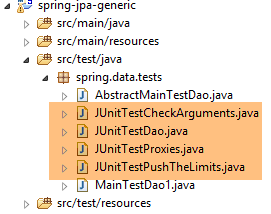 |
上述测试与 Spring 实现 JDBC 中的测试完全一致。如有需要,请参阅以下页面:
- [JUnitTestCheckArguments]:第 4.11.1 节;
- [JUnitTestDao]:第 4.11.2 节;
- [JUnitTestPushTheLimits]:第 4.11.3 节;
我们使用以下运行配置:
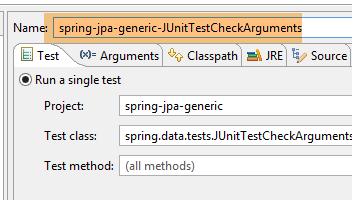 | 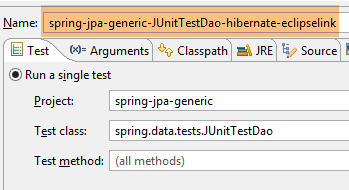 |
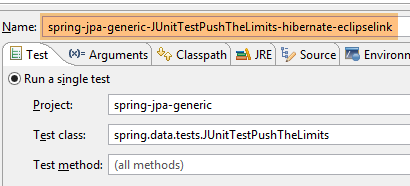 | 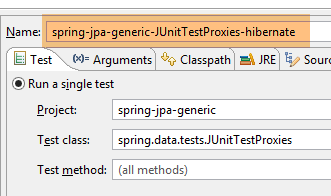 |
各项测试的结果如下:
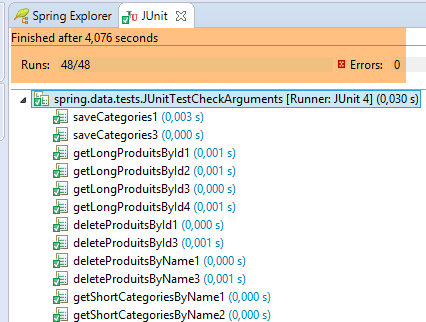 | 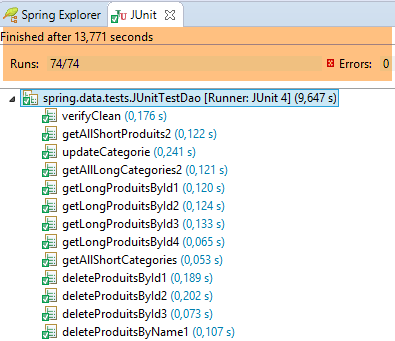 |
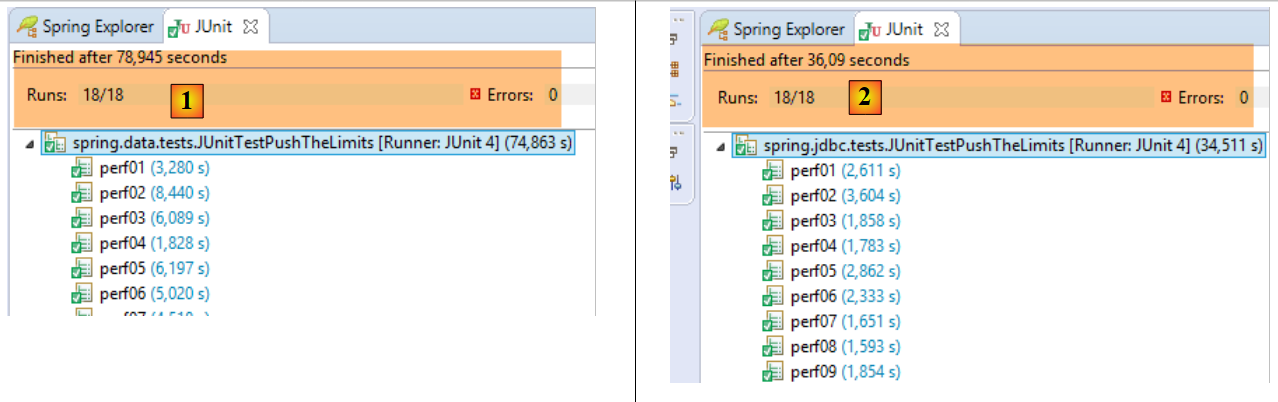 |
在 [1] 中, 测试 [JUnitTestPushTheLimits] 采用了 Spring Data JPA Hibernate 实现,而 [2] 则采用了 Spring JDBC 实现。 可以看出,后者性能更优。因此得出初步结论:使用 Spring Data 开发 [DAO] 层显然更为简单,但其性能不如 Spring 实现 JDBC。
测试 [JUnitTestProxies] 是一个伪测试 JUnit。它的目的是展示每个实现 JPA 在面对代理(即实体的简化版本)时的行为:
package spring.data.tests;

import generic.jpa.entities.dbproduitscategories.Categorie;
import generic.jpa.entities.dbproduitscategories.Produit;

import java.util.ArrayList;
import java.util.List;

import org.junit.Before;
import org.junit.Test;
import org.junit.runner.RunWith;
import org.springframework.beans.factory.annotation.Autowired;
import org.springframework.boot.test.SpringApplicationConfiguration;
import org.springframework.test.context.junit4.SpringJUnit4ClassRunner;

import spring.data.config.AppConfig;
import spring.data.dao.IDao;

import com.google.common.collect.Lists;

@SpringApplicationConfiguration(classes = AppConfig.class)
@RunWith(SpringJUnit4ClassRunner.class)
public class JUnitTestProxies {

    // 层[DAO]
    @Autowired
    private IDao<Produit> daoProduit;
    @Autowired
    private IDao<Categorie> daoCategorie;

    @Before
    public void clean() {
        // 每次测试前清理数据库
        log("Vidage de la base de données", 1);
        // 清空表 [CATEGORIES],并级联清空表 [PRODUITS]
        daoCategorie.deleteAllEntities();
    }

    @Test
    public void doNothing() {
        System.out.println("doNothing");
    }

    private List<Categorie> fill(int nbCategories, int nbProduits) {
        // 填充表
        List<Categorie> categories = new ArrayList<Categorie>();
        for (int i = 0; i < nbCategories; i++) {
            Categorie categorie = new Categorie(null, null, String.format("categorie[%d]", i), null);
            categorie.setProduits(new ArrayList<Produit>());
            for (int j = 0; j < nbProduits; j++) {
                Produit produit = new Produit(null, null, String.format("produit[%d,%d]", i, j), null,
                        100 * (1 + (double) (i * 10 + j) / 100), String.format("desc[%d,%d]", i, j), null);
                categorie.addProduit(produit);
            }
            categories.add(categorie);
        }
        // 添加类别 - 相关产品也将随之
        // 插入
        daoCategorie.saveEntities(categories);
        // 结果
        return categories;
    }

    @Test
    public void getShortCategoriesByName1() {
        // 填充
        fill(1, 1);
        // 测试
        log("getShortCategoriesByName1", 1);
        Categorie categorie = daoCategorie.getShortEntitiesByName(Lists.newArrayList("categorie[0]")).get(0);
        System.out.println(String.format("Catégorie de type : %s", categorie.getEntityType()));
        System.out.println("Catégorie :");
        try {
            System.out.println(categorie.getProduits().size());
        } catch (Exception e) {
            System.err.println(String.format("Exception : %s, Message : %s", e.getClass().getName(), e.getMessage()));
        }
    }

    @Test
    public void getShortProduitsByName1() {
        // 填充
        fill(1, 1);
        // 测试
        log("getShortProduitsByName1", 1);
        Produit produit = daoProduit.getShortEntitiesByName(Lists.newArrayList("produit[0,0]")).get(0);
        System.out.println(String.format("Produit de type : %s", produit.getEntityType()));
        System.out.println("Nom de la catégorie du produit :");
        try {
            System.out.println(produit.getCategorie().getNom());
        } catch (Exception e) {
            System.err.println(String.format("Exception : %s, Message : %s", e.getClass().getName(), e.getMessage()));
        }
    }

    @Test
    public void getLongCategoriesByName1() {
        // 填充
        fill(1, 1);
        // 测试
        log("getLongCategoriesByName1", 1);
        Categorie categorie = daoCategorie.getLongEntitiesByName(Lists.newArrayList("categorie[0]")).get(0);
        System.out.println(String.format("Catégorie de type : %s", categorie.getEntityType()));
        System.out.println("Catégorie :");
        try {
            System.out.println(categorie.getProduits().size());
        } catch (Exception e) {
            System.err.println(String.format("Exception : %s, Message : %s", e.getClass().getName(), e.getMessage()));
        }
    }

    @Test
    public void getLongProduitsByName1() {
        // 填充
        fill(1, 1);
        // 测试
        log("getLongProduitsByName1", 1);
        Produit produit = daoProduit.getLongEntitiesByName(Lists.newArrayList("produit[0,0]")).get(0);
        System.out.println(String.format("Produit de type : %s", produit.getEntityType()));
        System.out.println("Nom de la catégorie du produit :");
        try {
            System.out.println(produit.getCategorie().getNom());
        } catch (Exception e) {
            System.err.println(String.format("Exception : %s, Message : %s", e.getClass().getName(), e.getMessage()));
        }
    }

    private void log(String message, int mode) {
        // 显示消息
        String toPrint = null;
        switch (mode) {
        case 1:
            toPrint = String.format("%s --------------------------------", message);
            break;
        case 2:
            toPrint = String.format("-- %s", message);
            break;
        }
        System.out.println(toPrint);
    }

}
测试结果如下:
Vidage de la base de données --------------------------------
doNothing
Vidage de la base de données --------------------------------
getShortCategoriesByName1 --------------------------------
Catégorie de type : PROXY
Catégorie :
Exception : org.hibernate.LazyInitializationException, Message : failed to lazily initialize a collection of role: generic.jpa.entities.dbproduitscategories.Categorie.produits, could not initialize proxy - no Session
Vidage de la base de données --------------------------------
getLongCategoriesByName1 --------------------------------
Catégorie de type : POJO
Catégorie :
1
Vidage de la base de données --------------------------------
getShortProduitsByName1 --------------------------------
Produit de type : PROXY
Nom de la catégorie du produit :
Exception : org.hibernate.LazyInitializationException, Message : could not initialize proxy - no Session
Vidage de la base de données --------------------------------
getLongProduitsByName1 --------------------------------
Produit de type : POJO
Nom de la catégorie du produit :
categorie[0]
由此可见,当访问类型为 PROXY 的类别的字段 [Categorie.produits],以及访问类型为 PROXY 的产品的字段 [Produit.categorie] 时, 这两种情况(第7行和第17行)都会抛出类型为[org.hibernate.LazyInitializationException]的异常。