18. 为 /jSON Web 服务编写的客户端
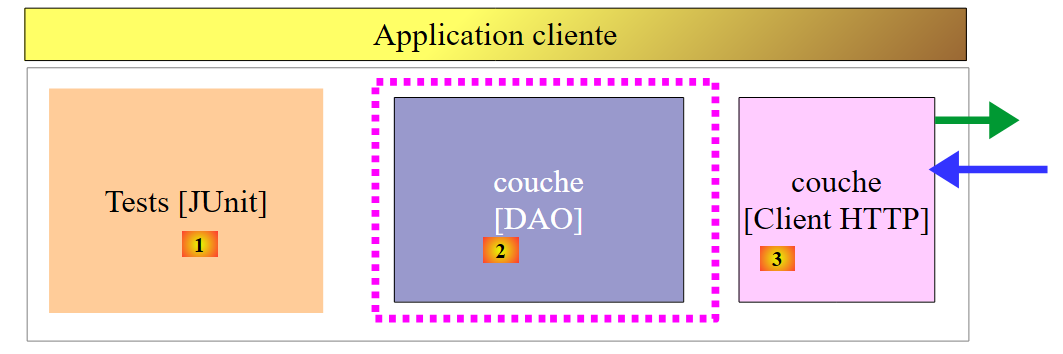
既然 [dbproduitscategories] 数据库已在 Web 上提供,我们将编写一个使用该数据库的应用程序。届时我们将拥有以下客户端/服务器架构:
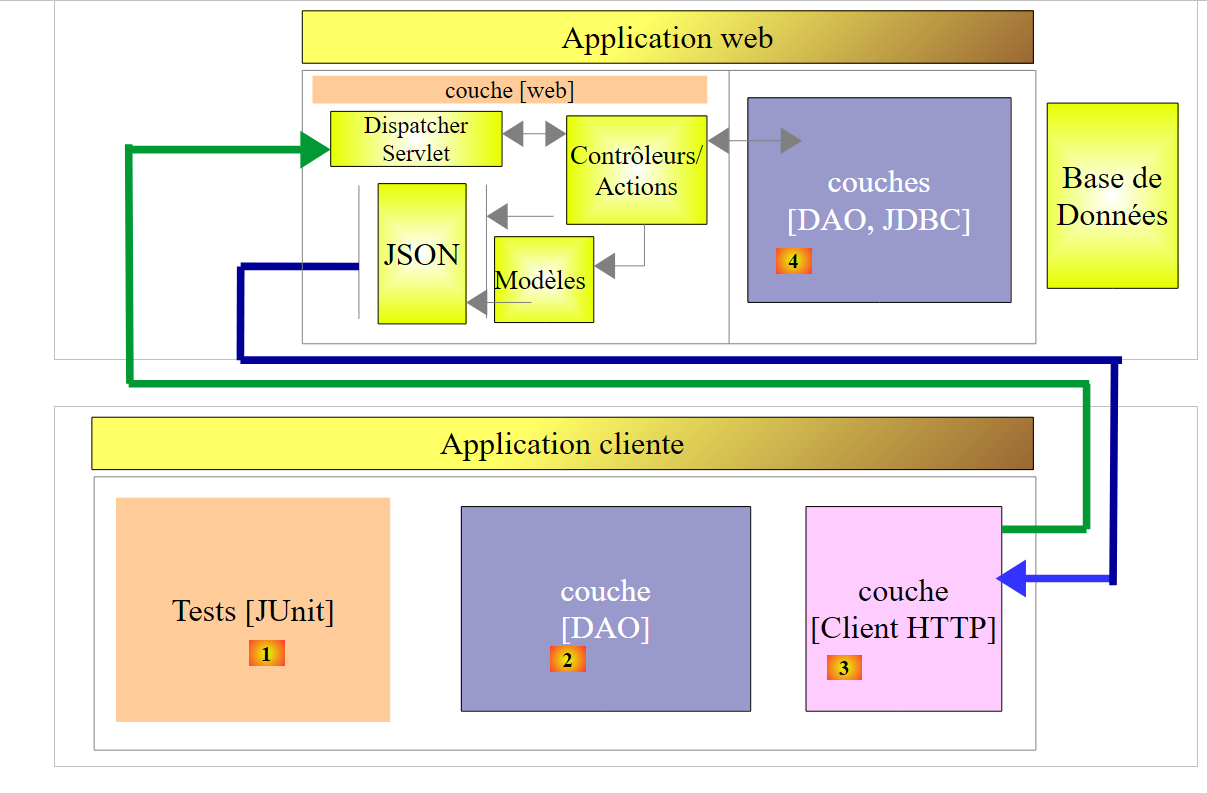 |
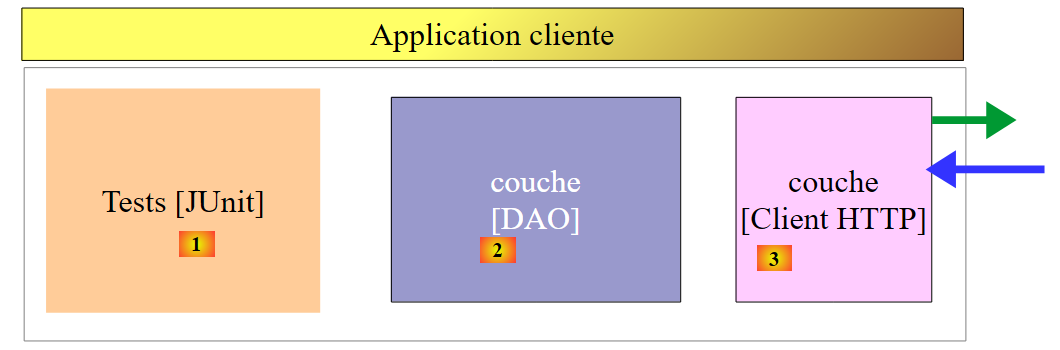
客户端应用程序将包含三个层:
- 一个 [HTTP 客户端] [3] 层,用于与暴露数据库的 /jSON Web 应用程序进行通信;
- 一个 [DAO] 层 [2],其接口与 [DAO] 层 [4] 保持一致;
- 一个 JUnit 测试层 [1],用于验证客户端和服务器是否运行正常;
18.1. Eclipse 项目
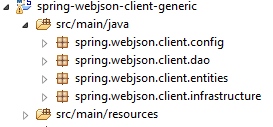
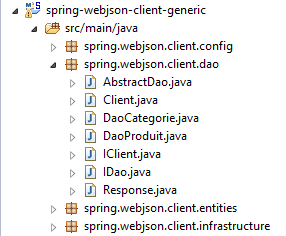
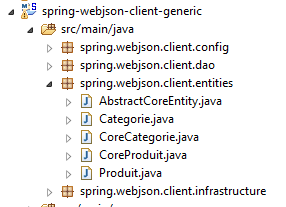
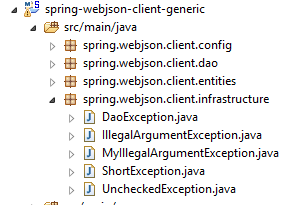
客户端的 Eclipse 项目结构如下:
 |
 |  |  |
 |  |
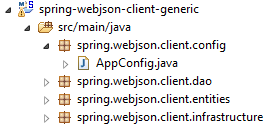
- [spring.webjson.client.config] 包包含 [DAO] 层的 Spring 配置;
- [spring.webjson.client.dao] 包包含 [DAO] 层的实现;
- [spring.webjson.client.entities] 包包含与 Web 服务/JSON 交换的对象。我们对它们都很熟悉;
- [spring.webjson.client.infrastructure] 包包含项目中使用的异常类。我们对它们都了如指掌;
18.2. 项目的 Maven 配置
该项目是一个由以下 [pom.xml] 文件配置的 Maven 项目:
<project xmlns="http://maven.apache.org/POM/4.0.0" xmlns:xsi="http://www.w3.org/2001/XMLSchema-instance"
    xsi:schemaLocation="http://maven.apache.org/POM/4.0.0 http://maven.apache.org/xsd/maven-4.0.0.xsd">
    <modelVersion>4.0.0</modelVersion>
    <groupId>dvp.spring.database</groupId>
    <artifactId>spring-webjson-client-generic</artifactId>
    <version>0.0.1-SNAPSHOT</version>

    <description>Client console du serveur web / jSON</description>
    <name>spring-webjson-client-generic</name>

    <properties>
        <project.build.sourceEncoding>UTF-8</project.build.sourceEncoding>
        <java.version>1.7</java.version>
    </properties>

    <parent>
        <groupId>org.springframework.boot</groupId>
        <artifactId>spring-boot-starter-parent</artifactId>
        <version>1.2.3.RELEASE</version>
    </parent>

    <dependencies>
        <!-- Spring -->
        <dependency>
            <groupId>org.springframework</groupId>
            <artifactId>spring-web</artifactId>
        </dependency>
        <!-- jSON library used by Spring -->
        <dependency>
            <groupId>com.fasterxml.jackson.core</groupId>
            <artifactId>jackson-core</artifactId>
        </dependency>
        <dependency>
            <groupId>com.fasterxml.jackson.core</groupId>
            <artifactId>jackson-databind</artifactId>
        </dependency>
        <!-- component used by Spring RestTemplate -->
        <dependency>
            <groupId>org.apache.httpcomponents</groupId>
            <artifactId>httpclient</artifactId>
        </dependency>
        <!-- Google Guava -->
        <dependency>
            <groupId>com.google.guava</groupId>
            <artifactId>guava</artifactId>
            <version>16.0.1</version>
        </dependency>
        <!-- log library -->
        <dependency>
            <groupId>org.springframework.boot</groupId>
            <artifactId>spring-boot-starter-logging</artifactId>
        </dependency>
        <!-- Spring Boot Test -->
        <dependency>
            <groupId>org.springframework.boot</groupId>
            <artifactId>spring-boot-starter-test</artifactId>
            <scope>test</scope>
        </dependency>
        <!-- Spring Boot -->
        <dependency>
            <groupId>org.springframework.boot</groupId>
            <artifactId>spring-boot</artifactId>
            <scope>test</scope>
        </dependency>
    </dependencies>
    <!-- plugins -->
    <build>
        <plugins>
            <plugin>
                <groupId>org.apache.maven.plugins</groupId>
                <artifactId>maven-surefire-plugin</artifactId>
                <version>2.18.1</version>
            </plugin>
        </plugins>
    </build>

</project>
- 第 16–20 行:父级 Maven 项目 [spring-boot-starter-parent],它允许我们定义多个依赖项而无需指定其版本,因为这些版本已在父项目中定义;
- 第 24–27 行:尽管我们并非在编写 Web 应用程序,但仍需 [spring-web] 依赖项,其中包含 [RestTemplate] 类,该类可轻松实现与 Web 应用程序或 JSON 的交互;
- 第 29–36 行:一个 JSON 库;
- 第 38–41 行:一个允许我们为客户端的 HTTP 请求设置超时的依赖项。超时是指等待服务器响应的最长时限。超过此时间后,客户端将通过抛出异常来触发超时错误;
- 第 43–48 行:Google Guava 库;
- 第 50–53 行:日志记录库;
- 第 54–64 行:用于 JUnit 测试的依赖项。它包含测试所需的 JUnit 4 库。这些依赖项带有 [<scope>test</scope>] 属性,表明它们仅在测试阶段需要。它们不会包含在最终的项目归档中;
18.3. Spring 配置
|
[AppConfig] 类负责处理 HTTP 客户端的 Spring 配置。其代码如下:
package spring.webjson.client.config;

import java.util.ArrayList;
import java.util.List;

import org.springframework.beans.factory.config.ConfigurableBeanFactory;
import org.springframework.context.annotation.Bean;
import org.springframework.context.annotation.ComponentScan;
import org.springframework.context.annotation.Configuration;
import org.springframework.context.annotation.Scope;
import org.springframework.http.client.HttpComponentsClientHttpRequestFactory;
import org.springframework.http.converter.HttpMessageConverter;
import org.springframework.http.converter.json.MappingJackson2HttpMessageConverter;
import org.springframework.web.client.RestTemplate;

import com.fasterxml.jackson.databind.ObjectMapper;
import com.fasterxml.jackson.databind.ser.impl.SimpleBeanPropertyFilter;
import com.fasterxml.jackson.databind.ser.impl.SimpleFilterProvider;

@Configuration
@ComponentScan({ "spring.webjson.client.dao" })
public class AppConfig {

    // constants
    static private final int TIMEOUT = 1000;
    static private final String URL_WEBJSON = "http://localhost:8081";

    // filters jSON
    @Bean
    public ObjectMapper jsonMapper(RestTemplate restTemplate) {
        return ((MappingJackson2HttpMessageConverter) (restTemplate.getMessageConverters().get(0))).getObjectMapper();
    }

    @Bean
    @Scope(value = ConfigurableBeanFactory.SCOPE_PROTOTYPE)
    ObjectMapper jsonMapperShortCategorie(RestTemplate restTemplate) {
        ObjectMapper jsonMapper = jsonMapper(restTemplate);
        jsonMapper.setFilters(new SimpleFilterProvider().addFilter("jsonFilterCategorie",
                SimpleBeanPropertyFilter.serializeAllExcept("produits")));
        return jsonMapper;
    }

    @Bean
    @Scope(value = ConfigurableBeanFactory.SCOPE_PROTOTYPE)
    ObjectMapper jsonMapperLongCategorie(RestTemplate restTemplate) {
        ObjectMapper jsonMapper = jsonMapper(restTemplate);
        jsonMapper.setFilters(new SimpleFilterProvider().addFilter("jsonFilterCategorie",
                SimpleBeanPropertyFilter.serializeAllExcept()).addFilter("jsonFilterProduit",
                SimpleBeanPropertyFilter.serializeAllExcept("categorie")));
        return jsonMapper;
    }

    @Bean
    @Scope(value = ConfigurableBeanFactory.SCOPE_PROTOTYPE)
    ObjectMapper jsonMapperShortProduit(RestTemplate restTemplate) {
        ObjectMapper jsonMapper = jsonMapper(restTemplate);
        jsonMapper.setFilters(new SimpleFilterProvider().addFilter("jsonFilterProduit",
                SimpleBeanPropertyFilter.serializeAllExcept("categorie")));
        return jsonMapper;
    }

    @Bean
    @Scope(value = ConfigurableBeanFactory.SCOPE_PROTOTYPE)
    ObjectMapper jsonMapperLongProduit(RestTemplate restTemplate) {
        ObjectMapper jsonMapper = jsonMapper(restTemplate);
        jsonMapper.setFilters(new SimpleFilterProvider().addFilter("jsonFilterProduit",
                SimpleBeanPropertyFilter.serializeAllExcept()).addFilter("jsonFilterCategorie",
                SimpleBeanPropertyFilter.serializeAllExcept("produits")));
        return jsonMapper;
    }

    @Bean
    public RestTemplate restTemplate(int timeout) {
        // creation of the RestTemplate component
        HttpComponentsClientHttpRequestFactory factory = new HttpComponentsClientHttpRequestFactory();
        RestTemplate restTemplate = new RestTemplate(factory);
        // converter jSON
        List<HttpMessageConverter<?>> messageConverters = new ArrayList<HttpMessageConverter<?>>();
        messageConverters.add(new MappingJackson2HttpMessageConverter());
        restTemplate.setMessageConverters(messageConverters);
        // exchange timeout
        factory.setConnectTimeout(timeout);
        factory.setReadTimeout(timeout);
        // result
        return restTemplate;
    }

    @Bean
    public int timeout() {
        return TIMEOUT;
    }

    @Bean
    public String urlWebJson() {
        return URL_WEBJSON;
    }
}
- 第 20 行:该类是一个 Spring 配置类;
- 第 21 行:其他 Spring 组件位于 [spring.webjson.client.dao] 包中;
- 第 25 行:设置了 1 秒(1000 毫秒)的超时;
- 第 88–91 行:返回此值的 Bean;
- 第 26 行:Web 服务 / JSON 的 URL;
- 第 93–96 行:返回此值的 Bean;
- 第 72–86 行:处理与 Web 服务/JSON 通信的 [RestTemplate] 类的配置。如果不需要配置,可以在代码中通过简单的 [new RestTemplate()] 进行实例化。在此,我们希望设置与 Web 服务/JSON 通信的超时时间。 第 89 行的 [timeout] Bean 作为参数传递给了第 73 行的 [restTemplate] 方法;
- 第 75 行:[HttpComponentsClientHttpRequestFactory] 组件正是用于设置通信超时(第 82–83 行)的组件;
- 第 76 行:使用该组件构造 [RestTemplate] 类。由于它依赖该组件与 Web 服务/JSON 进行通信,因此通信确实会受超时限制;
- 第 78–80 行:我们将一个 JSON 转换器与 [RestTemplate] 类关联起来。 我们在研究 Web 服务时已讨论过这一点。客户端和服务器之间交换的是文本行。转换器将对象序列化为文本,并将文本反序列化回对象。[RestTemplate] 类可以关联多个转换器,具体选用哪个取决于服务器发送的 HTTP 头部。这里我们只使用了一个 JSON 转换器,因为交换的文本行是 JSON;
- 第 82–83 行:设置通信超时;
- 第 28–70 行:定义 JSON 过滤器。这些与第 17.3.2.1 节中介绍的服务器端过滤器相同;
- 第 29–32 行:[jsonMapper] Bean 是我们关联到 [RestTemplate] 类的 [MappingJackson2HttpMessageConverter] 的 JSON 映射器。我们在 JSON 过滤器的定义中需要它;
- 第 34–41 行:定义 JSON 过滤器 [category without its products] 的 Bean。[jsonMapperShortCategory] 方法将第 73 行定义的 [RestTemplate] Bean 作为参数;
- 第 37 行:我们调用第 30 行中的 [jsonMapper] 方法以获取 JSON 映射器;
- 第 38–39 行:我们将过滤器设置为返回不包含其产品的类别;
- 第 40 行:按配置返回 JSON 映射器;
- 第 42–51 行:用于检索包含其产品的类别的 JSON 过滤器;
- 第 53–60 行:用于检索不包含其所属类别的产品的 JSON 过滤器;
- 第 62–70 行:用于检索包含其所属类别的产品的 JSON 过滤器;
所有这些 Bean 都将可供 [DAO] 层代码以及 JUnit 测试使用。
18.4. HTTP 客户端的实现
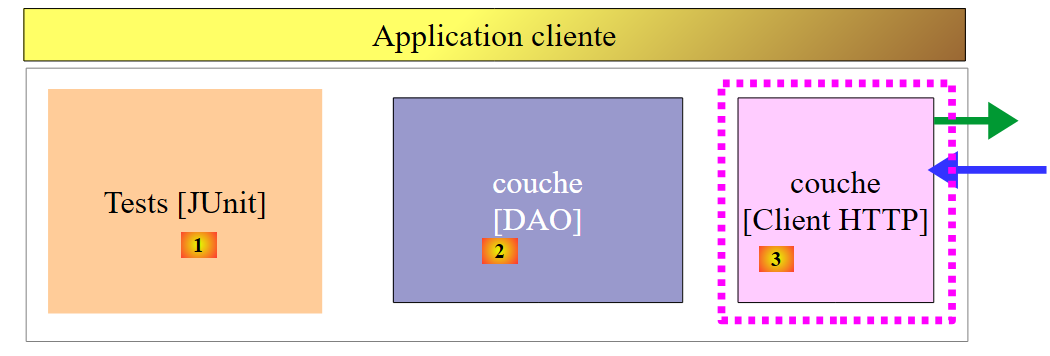 |
上文展示的是与我们刚刚构建的 Web 服务进行通信的 [HTTP 客户端] 层。接下来我们将对其进行详细探讨。
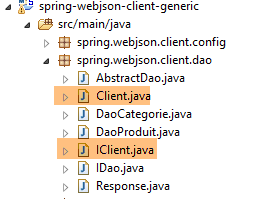 |
[Client] 类负责处理与 Web 服务/JSON 的通信。它实现了以下 [IClient] 接口:
package spring.webjson.client.dao;

import org.springframework.http.HttpMethod;

public interface IClient {
    public <T1, T2> T1 getResponse(String url, HttpMethod method, int errStatus, T2 body);
}
该接口仅有一个方法 [getResponse]:
- 第 6 行:[getResponse] 方法是一个泛型方法,由两个类型作为参数:
- [T1]:表示预期从服务器接收的响应类型,形式为 [Response<T1>],例如 [List<Category>],
- [T2]:表示通过 POST 操作提交的 JSON 参数的类型,例如 [List<Product>];
- 第 6 行:[getResponse] 方法返回类型为 T1 的结果,例如 [List<Category>];
- 第 6 行:[getResponse] 的参数如下:
- [String url]:要查询的 URL;
- [HttpMethod method]:请求的 HTTP 方法,根据情况选择 GET 或 POST,
- [int errStatus]:若与服务器通信时发生错误,将在 [DaoException] 类中使用的错误代码;
- [T2 body]:若发起 POST 请求时需提交的值;
[Client] 类实现 [IClient] 接口如下:
package spring.webjson.client.dao;

import java.net.URI;
import java.util.ArrayList;
import java.util.List;

import org.springframework.beans.factory.annotation.Autowired;
import org.springframework.core.ParameterizedTypeReference;
import org.springframework.http.HttpMethod;
import org.springframework.http.MediaType;
import org.springframework.http.RequestEntity;
import org.springframework.http.ResponseEntity;
import org.springframework.stereotype.Component;
import org.springframework.web.client.RestTemplate;

import spring.webjson.client.infrastructure.DaoException;

@Component
public class Client implements IClient {

    // injections
    @Autowired
    protected RestTemplate restTemplate;
    @Autowired
    protected String urlServiceWebJson;

    // local
    private String simpleClassName = getClass().getSimpleName();

    // generic request
    @Override
    public <T1, T2> T1 getResponse(String url, HttpMethod method, int errStatus, T2 body) {
    ...
    }

    // list of exception error messages
    protected List<String> getMessagesForException(Exception exception) {
    ...
    }
}
- 第 18 行:[Client] 类是 Spring 组件,因此可以注入到其他 Spring 组件中;
- 第 22–23 行:注入在 [AppConfig] 中定义的 [RestTemplate] Bean(参见第 18.3 节),该 Bean 负责与服务器的通信;
- 第 24–25 行:注入 [AppConfig] 中定义的 Web 服务 URL / JSON(参见第 18.3 节);
- 第 37–39 行:私有方法 [getMessagesForException] 是一个辅助方法,用于检索异常中包含的错误消息列表。我们已经多次遇到过它;
让我们继续:
    // generic request
    @Override
    public <T1, T2> T1 getResponse(String url, HttpMethod method, int errStatus, T2 body) {
        // the server response
        ResponseEntity<Response<T1>> response;
        try {
            // prepare the query
            RequestEntity<?> request = null;
            if (method == HttpMethod.GET) {
                request = RequestEntity.get(new URI(String.format("%s%s", urlServiceWebJson, url)))
                        .accept(MediaType.APPLICATION_JSON).build();
            }
            if (method == HttpMethod.POST) {
                request = RequestEntity.post(new URI(String.format("%s%s", urlServiceWebJson, url)))
                        .header("Content-Type", "application/json").accept(MediaType.APPLICATION_JSON).body(body);
            }
            // execute the query
            response = restTemplate.exchange(request, new ParameterizedTypeReference<Response<T1>>() {
            });
        } catch (Exception e) {
            // encapsulate the exception
            throw new DaoException(errStatus, e, simpleClassName);
        }
        ...
}
- 第 18 行:该语句负责向服务器发送请求并接收其响应。[RestTemplate] 组件提供了大量用于与服务器交互的方法,但只有 [exchange] 方法支持泛型参数。这就是选择它的原因。第二个参数指定了预期响应的类型。第一个参数是 [RequestEntity] 请求(第 8 行)。 [exchange] 方法的返回类型为 [ResponseEntity<Response<T1>>](第 5 行)。[ResponseEntity] 类型封装了服务器的完整响应,包括 HTTP 头部和服务器发送的文档。同样,[RequestEntity] 类型封装了客户端的完整请求,包括 HTTP 头部和任何提交的数据;
- 第 8–16 行:我们需要构建 [RequestEntity] 请求。具体实现取决于我们使用的是 GET 请求还是 POST 请求;
- 第 10 行:GET 请求。 [RequestEntity] 类提供了静态方法,用于创建 GET、POST、HEAD 及其他类型的请求。通过链式调用 [RequestEntity.get] 方法及其构建请求的各个子方法,可以创建一个 GET 请求:
- [RequestEntity.get] 方法将目标 URL 作为 URI 实例形式的参数传入,
- [accept] 方法允许您定义 [Accept] HTTP 头中的元素。在此,我们指定接受服务器将发送的 [application/json] 类型;
- [build] 方法利用这些信息构建请求的 [RequestEntity] 类型;
- 第 14 行:POST 请求。[RequestEntity.post] 方法允许您通过串联构建请求的各种方法来创建 POST 请求:
- [RequestEntity.post] 方法将目标 URL 作为 URI 实例形式的参数接收,
- [header] 方法用于定义 HTTP 头部。在此,我们向服务器发送 [Content-Type: application/json] 头部,以表明所提交的数据将以 JSON 字符串的形式到达;
- [accept] 方法允许我们表明接受服务器将发送的 [application/json] 类型;
- [body] 方法设置提交的值。这是泛型 [getResponse] 方法的第四个参数(第 1 行);
- 第 20–23 行:如果与服务器发生通信错误,将抛出 [DaoException],其错误代码设置为作为泛型 [getResponse] 方法(第 3 行)第三个参数传递的 [errStatus] 参数;
[getResponse] 方法后续实现如下:
// generic request
    @Override
    public <T1, T2> T1 getResponse(String url, HttpMethod method, int errStatus, T2 body) {
    ...
        // retrieve the body of the reply
        Response<T1> entity = response.getBody();
        int status = entity.getStatus();
        // server-side errors?
        if (status != 0) {
            // create an exception
            throw new DaoException(status, new RuntimeException(entity.getException()), simpleClassName);
        } else {
            // it's good
            return entity.getBody();
        }
    }
- 第 4 行:我们已收到来自服务器的响应。其类型为 [ResponseEntity<Response<T1>>](前一个代码示例的第 5 行),其中 [Response] 类是服务器端已使用的类:
package spring.webjson.client.dao;

public class Response<T> {

    // ----------------- properties
    // operation status
    private int status;
    // the possible exception
    private String exception;
    // the body of the reply
    private T body;

    // manufacturers
    public Response() {

    }

    public Response(int status, String exception, T body) {
        this.status = status;
        this.exception = exception;
        this.body = body;
    }

    // getters and setters
...
}
让我们回到 [getResponse] 方法:
- 第 6 行:我们获取封装在 response 中的 [Response<T1>] 对象。该类型包含 [int status, String exception, T1 body] 字段;
- 第 7 行:我们获取响应的 [status],这是一个错误代码;
- 第 9–12 行:如果发生错误,我们会抛出一个异常,其中包含来自服务器响应的两项信息 [status, exception];
- 第 14 行:否则,返回 [Response<T1>] 响应中包含的 [T1] 类型;
[Client] 类是泛型类。它可用于任何 Web/JSON 客户端。
18.5. [Dao] 层的实现
 |
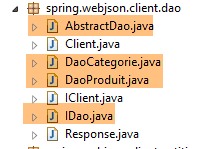 |
18.5.1. [AbstractDao] 类
客户端 [DAO] 层与服务器端 [DAO] 层具有相同的接口(参见第 4.7 节):
package spring.webjson.client.dao;

import java.util.List;

import spring.webjson.client.entities.AbstractCoreEntity;

public interface IDao<T extends AbstractCoreEntity> {

    // list of all T entities
    public List<T> getAllShortEntities();

    public List<T> getAllLongEntities();

    // special entities - short version
    public List<T> getShortEntitiesById(Iterable<Long> ids);

    public List<T> getShortEntitiesById(Long... ids);

    public List<T> getShortEntitiesByName(Iterable<String> names);

    public List<T> getShortEntitiesByName(String... names);

    // special entities - long version
    public List<T> getLongEntitiesById(Iterable<Long> ids);

    public List<T> getLongEntitiesById(Long... ids);

    public List<T> getLongEntitiesByName(Iterable<String> names);

    public List<T> getLongEntitiesByName(String... names);

    // update of several entities
    public List<T> saveEntities(Iterable<T> entities);

    public List<T> saveEntities(@SuppressWarnings("unchecked") T... entities);

    // delete all entities
    public void deleteAllEntities();

    // deletion of multiple entities
    public void deleteEntitiesById(Iterable<Long> ids);

    public void deleteEntitiesById(Long... ids);

    public void deleteEntitiesByName(Iterable<String> names);

    public void deleteEntitiesByName(String... names);

    public void deleteEntitiesByEntity(Iterable<T> entities);

    public void deleteEntitiesByEntity(@SuppressWarnings("unchecked") T... entities);
}
[AbstractDao] 类实现了 [IDao] 接口。它与服务器端同名的类(参见第 4.8 节)功能相似。它作为 [DaoCategorie] 和 [DaoProduit] 类的父类。两者不完全相同,原因有二:
- 在服务器端,[AbstractDao] 类管理一项信息:
    // injections
    @Autowired
    @Qualifier("maxPreparedStatementParameters")
    protected int maxPreparedStatementParameters;
这里我们不需要它。
- 在服务器端,[AbstractDao] 类使用 [@Transactional] 注解将每个方法封装在事务中。而在客户端,无需管理数据库,因此该注解不再出现;
[AbstractDao] 类在将调用委托给子类之前,仅需验证 [IDao] 接口方法的调用参数是否有效:
package spring.webjson.client.dao;

import java.util.ArrayList;
import java.util.List;

import spring.webjson.client.entities.AbstractCoreEntity;
import spring.webjson.client.infrastructure.MyIllegalArgumentException;

import com.google.common.collect.Lists;

public abstract class AbstractDao<T1 extends AbstractCoreEntity> implements IDao<T1> {

    // local
    protected String simpleClassName = getClass().getSimpleName();

    @Override
    public List<T1> getShortEntitiesById(Iterable<Long> ids) {
        // argument validity
        List<T1> entities = checkNullOrEmptyArgument(true, ids);
        if (entities != null) {
            return entities;
        }
        // result
        return getShortEntitiesById(Lists.newArrayList(ids));
    }

    @Override
    public List<T1> getShortEntitiesById(Long... ids) {
        // argument validity
        List<T1> entities = checkNullOrEmptyArgument(true, ids);
        if (entities != null) {
            return entities;
        }
        // result
        return getShortEntitiesById(Lists.newArrayList(ids));
    }
...
    @Override
    public void deleteEntitiesByEntity(@SuppressWarnings("unchecked") T1... entities) {
        ...
    }

    // méthodes privées ----------------------------------------------
    private <T3> List<T1> checkNullOrEmptyArgument(boolean checkEmpty, Iterable<T3> elements) {
        // elements null ?
        if (elements == null) {
            throw new MyIllegalArgumentException(222, new NullPointerException("L'argument ne peut être null"),
                    simpleClassName);
        }
        // empty elements?
        if (!elements.iterator().hasNext()) {
            if (checkEmpty) {
                throw new MyIllegalArgumentException(223, new RuntimeException("l'argument ne peut être une liste vide"),simpleClassName);
            } else {
                return new ArrayList<T1>();
            }
        }
        // default result
        return null;
    }

    @SuppressWarnings("unchecked")
    private <T3> List<T1> checkNullOrEmptyArgument(boolean checkEmpty, T3... elements) {
        // elements null ?
        if (elements == null) {
            throw new MyIllegalArgumentException(222, new NullPointerException("L'argument ne peut être null"),simpleClassName);
        }
        // empty elements?
        if (elements.length == 0) {
            if (checkEmpty) {
                throw new MyIllegalArgumentException(223, new RuntimeException("L'argument ne peut être une liste vide"),
                        simpleClassName);
            } else {
                return new ArrayList<T1>();
            }
        }
        // default result
        return null;
    }

    // méthodes protégées ----------------------------------------------
    abstract protected List<T1> getShortEntitiesById(List<Long> ids);

    abstract protected List<T1> getShortEntitiesByName(List<String> names);

    abstract protected List<T1> getLongEntitiesById(List<Long> ids);

    abstract protected List<T1> getLongEntitiesByName(List<String> names);

    abstract protected List<T1> saveEntities(List<T1> entities);

    abstract protected void deleteEntitiesById(List<Long> ids);

    abstract protected void deleteEntitiesByName(List<String> names);
}
18.5.2. [DaoCategorie] 类
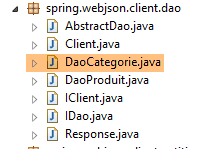 |
[DaoCategorie] 类如下所示:
package spring.webjson.client.dao;

import java.util.List;

import org.springframework.beans.factory.annotation.Autowired;
import org.springframework.context.ApplicationContext;
import org.springframework.http.HttpMethod;
import org.springframework.stereotype.Component;

import spring.webjson.client.entities.Categorie;
import spring.webjson.client.entities.CoreCategorie;
import spring.webjson.client.entities.CoreProduit;
import spring.webjson.client.entities.Produit;
import spring.webjson.client.infrastructure.DaoException;

import com.fasterxml.jackson.core.type.TypeReference;
import com.fasterxml.jackson.databind.ObjectMapper;

@Component
public class DaoCategorie extends AbstractDao<Categorie> {

    @Autowired
    private ApplicationContext context;
    @Autowired
    private IClient client;

...
}
- 第 19 行:[DaoClient] 类是一个 Spring 组件,其他 Spring 组件可以注入其中;
- 第 20 行:[DaoClient] 类继承了我们刚才看到的 [AbstractDao<Category>] 类,因此实现了 [IDao<Category>] 接口;
- 第 22–23 行:我们注入 Spring 上下文以访问其中的 Bean;
- 第 24–25 行:我们注入了刚才构建的 HTTP 客户端;
[DaoCategory] 接口中各个方法的实现都遵循相同的模式。我们将介绍三个方法,其中一个基于 [GET] 操作,另外两个基于 [POST] 操作。
18.5.2.1. [getAllLongEntities] 方法
[getAllLongEntities] 方法返回数据库中所有类别的长版本:
    @Override
    public List<Categorie> getAllLongEntities() {
        try {
            // filters jSON
            ObjectMapper mapper = context.getBean("jsonMapperLongCategorie", ObjectMapper.class);
            // get all categories
            Object map = client.<List<Categorie>, Void> getResponse("/getAllLongCategories", HttpMethod.GET, 232, null);
            // the List<Categorie> category list
            List<Categorie> categories = mapper.readValue(mapper.writeValueAsString(map),
                    new TypeReference<List<Categorie>>() {
                    });
            // redo the product --> category link
            return linkCategorieWithProduits(categories);
        } catch (DaoException e1) {
            throw e1;
        } catch (Exception e2) {
            throw new DaoException(233, e2, simpleClassName);
        }
}
- 第 2 行:该方法返回类别列表的完整名称;
- 第 5 行:JSON 映射器,用于序列化提交的值(此处未提供)并反序列化 [Client] 类返回的响应(即长格式的类别);
- 第 7 行:我们调用 [Client] 类的 [getResponse] 方法。该方法负责处理与 Web 服务 / JSON 的通信。其参数如下:
- 要查询的服务 URL [/getAllLongCategories];
- 要使用的 [GET] 方法;
- 发生错误时使用的错误代码(232);
- 要提交的值。此处无值;
- 第 7 行:在表达式 [client.<List<Category>, Void>] 中,我们为 [getResponse] 方法指定了泛型类型 [T1, T2] 的实际参数。回顾一下,[T1] 是预期响应的类型,而 [T2] 是提交值的类型。此处,我们期望结果类型为 [List<Category>],且没有提交值 [Void];
- 第 7 行:[getResponse] 方法返回的结果存储在一个 [Object] 类型的对象中。这有些奇怪,因为我们期望的类型是 [List<Category>]。这是因为 [getResponse] 方法虽然使用泛型类型 [T1, T2],但总是返回 [java.util.LinkedHashMap] 类型,因此必须对其进行处理才能返回正确的类型;
- 第 9 行:我们返回类别列表。为此,我们将 [map] 对象 [mapper.writeValueAsString(map)] 序列化为 JSON 字符串,然后将其反序列化回 [List<Category>] 类型;
- 第 13 行:我们已收到一个类别列表,其中部分类别可能包含产品。我们接收的是这些产品的简略版本。因此,在反序列化时,生成的 [Product] 对象的 [category] 字段会被设置为 null。[linkCategoryWithProducts] 方法会重新建立 [Product] 与其 [Category] 之间的关联;
- 第 14–15 行:我们捕获 [getResponse] 方法可能抛出的 [DaoException],并立即将其重新抛出。这种非典型行为是因为,如果不这样做,[DaoException] 将会被第 16–18 行捕获,而我们不希望出现这种情况;
- 第 16–18 行:我们捕获所有其他异常,并将它们封装在 [DaoException] 类型中。请记住,[DAO] 层只能抛出此类异常;
用于重建 [Product] 实体与 [Category] 实体之间关联的 [linkCategorieWithProduits] 方法如下:
    private List<Categorie> linkCategorieWithProduits(List<Categorie> categories) {
        for (Categorie categorie : categories) {
            List<Produit> produits = categorie.getProduits();
            if (produits != null) {
                for (Produit produit : produits) {
                    produit.setCategorie(categorie);
                }
            }
        }
        return categories;
}
18.5.2.2. 管理 JSON 过滤器
让我们回顾一下前一个 [getAllLongEntities] 方法中的 JSON 过滤器处理:
    @Override
    public List<Categorie> getAllLongEntities() {
        try {
            // filters jSON
            ObjectMapper mapper = context.getBean("jsonMapperLongCategorie", ObjectMapper.class);
            // get all categories
            Object map = client.<List<Categorie>, Void> getResponse("/getAllLongCategories", HttpMethod.GET, 232, null);
            // the List<Categorie> category list
            List<Categorie> categories = mapper.readValue(mapper.writeValueAsString(map),
                    new TypeReference<List<Categorie>>() {
                    });
- 第 5 行:我们从 Spring 上下文中获取一个 JSON 映射器,该映射器能够处理长格式的类别名称。让我们回顾一下 Spring 配置 [AppConfig] 中对该映射器的定义:
// filters jSON
    @Bean
    public ObjectMapper jsonMapper(RestTemplate restTemplate) {
        return ((MappingJackson2HttpMessageConverter) (restTemplate.getMessageConverters().get(0))).getObjectMapper();
    }

    @Bean
    @Scope(value = ConfigurableBeanFactory.SCOPE_PROTOTYPE)
    ObjectMapper jsonMapperLongCategorie(RestTemplate restTemplate) {
        ObjectMapper jsonMapper = jsonMapper(restTemplate);
        jsonMapper.setFilters(new SimpleFilterProvider().addFilter("jsonFilterCategorie",
                SimpleBeanPropertyFilter.serializeAllExcept()).addFilter("jsonFilterProduit",
                SimpleBeanPropertyFilter.serializeAllExcept("categorie")));
        return jsonMapper;
}
    @Bean
    public RestTemplate restTemplate(int timeout) {
    ...
    }
- 由 [getAlllongEntities] 方法请求的 [jsonMapperLongCategory] Bean 即第 7–15 行中的 Bean;
- 第 10 行:该映射器由第 2–5 行中的 [jsonMapper] 方法提供。我们可以看到,此 JSON 映射器属于 [RestTemplate] 对象,该对象负责管理客户端与服务器之间的 HTTP 交互。默认情况下,该映射器用于:
- 序列化发送到服务器的值;
- 反序列化服务器返回的响应;
让我们回到 [getAllLongEntities] 的代码:
            // filters jSON
            ObjectMapper mapper = context.getBean("jsonMapperLongCategorie", ObjectMapper.class);
            // get all categories
            Object map = client.<List<Categorie>, Void> getResponse("/getAllLongCategories", HttpMethod.GET, 232, null);
            // the List<Categorie> category list
            List<Categorie> categories = mapper.readValue(mapper.writeValueAsString(map),
                    new TypeReference<List<Categorie>>() {
                    });
            // redo the product --> category link
return linkCategorieWithProduits(categories);
- 第 2 行:从 Spring 上下文中获取 [jsonMapperLongCategorie] 映射器;
- 第 4 行:执行 [getResponse] 方法。这包括:
- 对提交值的自动序列化(此处无提交值);
- 对接收到的响应进行自动反序列化,此处为 List<Category> 类型。这是因为 [Category] 实体有一个 JSON 过滤器 [jsonFilterCategory],需要进行处理。这就是第 2 行代码的原因;
- 第 6 行:结果使用同一映射器进行第二次序列化/反序列化,以获取 List<Category> 类型。第 4 行:[getResponse] 返回的类型为 [Object] 类型;
在以下方法中,请注意,从 Spring 上下文中请求的 JSON 映射器既用于提交值(序列化),也用于接收值(反序列化)。如果其中一个或两个值都带有 JSON 过滤器,则必须对其进行配置。因此,该映射器最多可配置两个过滤器。但在以下示例中,这种情况从未发生。 要么是提交值没有过滤器(List<Long>、List<String>),要么是接收值没有(List<CoreCategory>、List<CoreProduct>)。带有 JSON 过滤器的实体仅为 [Category] 和 [Product]。
18.5.2.3. [getShortEntitiesById] 方法
[getShortEntitiesById] 方法返回其作为参数接收的主键所对应的类别的简短版本:
    @Override
    protected List<Categorie> getShortEntitiesById(List<Long> ids) {
        try {
            // filters jSON
            ObjectMapper mapper = context.getBean("jsonMapperShortCategorie", ObjectMapper.class);
            // get a category without its products
            Object map = client.<List<Categorie>, List<Long>> getResponse("/getShortCategoriesById", HttpMethod.POST, 204, ids);
            // the category
            return mapper.readValue(mapper.writeValueAsString(map), new TypeReference<List<Categorie>>() {
            });
        } catch (DaoException e1) {
            throw e1;
        } catch (Exception e2) {
            throw new DaoException(223, e2, simpleClassName);
        }
}
- 第 5 行:该 JSON 映射器将对提交的值(主键列表)进行序列化,并对 [Client] 类返回的响应(类别短名称)进行反序列化。由于提交列表中的元素没有过滤器,因此所选的过滤器对提交的值没有影响;
- 第 7 行:我们调用父类的 [getResponse] 方法。该方法负责处理与 Web 服务 / JSON 的通信。其参数如下:
- 要查询的服务 URL [/getShortCategoriesById];
- 要使用的 [POST] 方法;
- 发生错误时使用的错误代码(204);
- 提交的值。此处为主键列表;
- 第 7 行:在表达式 [client.<List<Category>, List<Long>>] 中,我们为 [getResponse] 方法指定了泛型类型 [T1, T2] 的实际参数。 回顾一下,[T1] 是预期响应的类型,而 [T2] 是提交值的类型。在此,我们期望返回 [List<Category>] 类型的结果,而提交值是一个 [List<Long>] 类型的主键列表;
- 第 7 行:[getResponse] 方法返回的结果存储在 [Object] 类型中;
- 第 9 行:返回类别列表。为此,将 [map] 对象 [mapper.writeValueAsString(map)] 序列化为 JSON 字符串,然后将其反序列化为 [List<Category>] 类型;
18.5.2.4. [saveEntities] 方法
[saveEntities] 方法将类别持久化到数据库中。其代码如下:
@Override
    protected List<Categorie> saveEntities(List<Categorie> entities) {
        try {
            // filters jSON
            ObjectMapper mapper = context.getBean("jsonMapperLongCategorie", ObjectMapper.class);
            // add categories
            Object map = client.<List<CoreCategorie>, List<Categorie>> getResponse("/saveCategories", HttpMethod.POST, 200,
                    entities);
            // list of added core categories
            List<CoreCategorie> coreCategories = mapper.readValue(mapper.writeValueAsString(map),
                    new TypeReference<List<CoreCategorie>>() {
                    });
            // categories are updated with the information received
            for (int i = 0; i < entities.size(); i++) {
                Categorie categorie = entities.get(i);
                CoreCategorie coreCategorie = coreCategories.get(i);
                categorie.setId(coreCategorie.getId());
                List<Produit> produits = categorie.getProduits();
                if (produits != null) {
                    List<CoreProduit> coreProduits = coreCategorie.getCoreProduits();
                    for (int j = 0; j < produits.size(); j++) {
                        Produit produit = produits.get(j);
                        produit.setId(coreProduits.get(j).getId());
                        produit.setIdCategorie(categorie.getId());
                        produit.setCategorie(categorie);
                    }
                }
            }
            return entities;
        } catch (DaoException e1) {
            throw e1;
        } catch (Exception e2) {
            throw new DaoException(220, e2, simpleClassName);
        }
    }
- 第 2 行:使用 [saveEntities] 方法将作为参数传递的类别持久化到数据库中。该方法返回这些类别,并为其添加主键。如果类别与产品一起传递,产品也会被持久化;
- 第 5 行:该 JSON 映射器将负责序列化提交的值(即类别列表的长格式版本),并反序列化 [Client] 类返回的响应([CoreCategory] 对象)。所选的过滤器不会影响结果,因为作为响应接收到的列表中的元素并未经过过滤;
- 第 7 行:调用父类的 [getResponse] 方法来处理与 Web 服务 / JSON 的通信;
- 第一个参数是 URL [/saveCategories];
- 第二个参数是要使用的 HTTP 方法,本例中为 [POST];
- 第三个参数是发生错误时使用的错误代码(200);
- 最后一个参数是提交的值,此处为待持久化的类别列表;
- 第 7 行:[getResponse] 方法的泛型参数 [T1, T2] 在此处为 [List<CoreCategory>, List<Category>]。第一个类型是预期响应的类型,第二个是提交值的类型;
- 第 7 行:我们将获取的响应存储在 [Object] 类型中;
- 第 9 行:我们重建类型为 [List<CoreCategory>] 的响应。待返回的响应类型应为 [List<Category>](第 2 行),而非 [List<CoreCategory>]。收到的响应是已持久化类别和产品的主键列表;
- 第 14–28 行:将接收的主键分配给类别和产品(第 17、23、24 行)。此外,还重建了 [Product] → [Category] 的关系(第 24–25 行);
所有其他方法均遵循相同模式。
18.6. JUnit 测试
让我们回到当前正在开发的客户端/服务器架构:
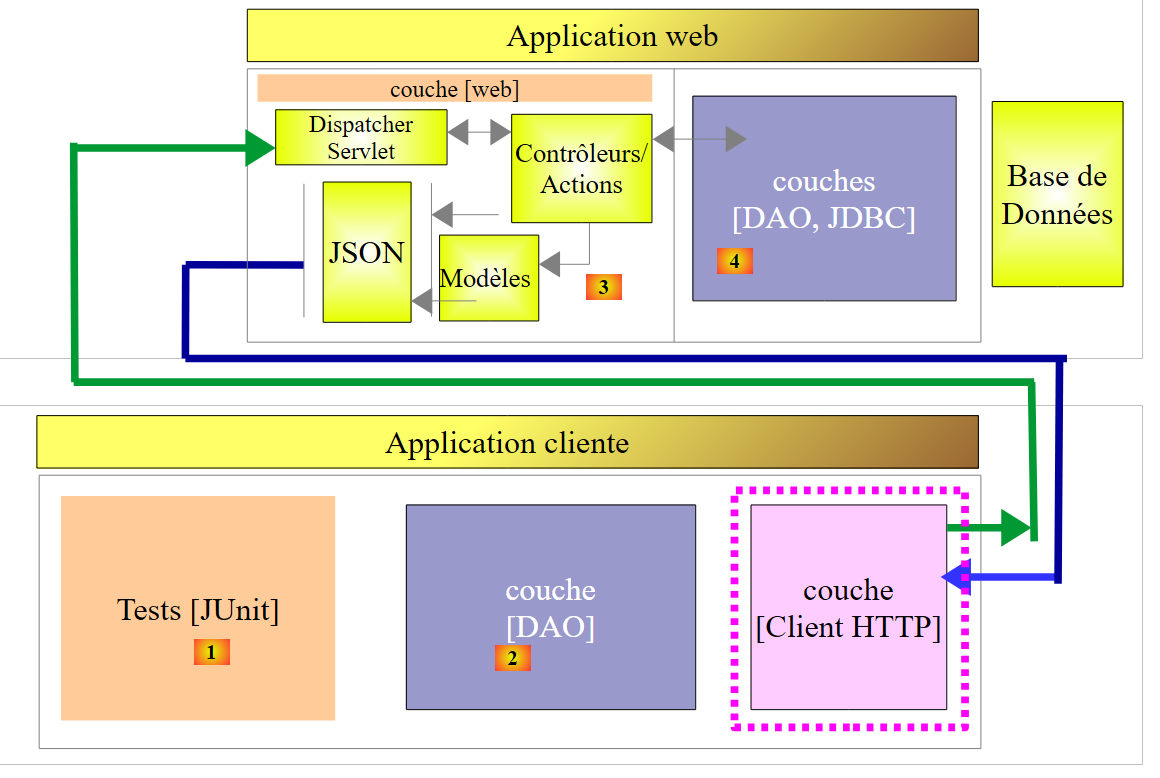 |
我们构建了一个与 [DAO] 层 [4] 具有相同接口的 [DAO] 层 [2]。因此,为了测试 [DAO] 层 [2],我们可以使用之前用于测试 [DAO] 层 [4] 的 JUnit 测试:
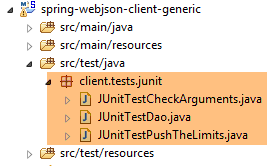 |
这三项测试采用以下测试配置进行:
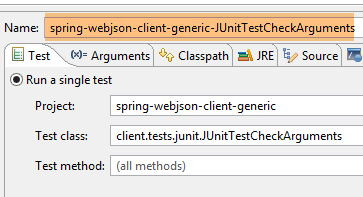 | 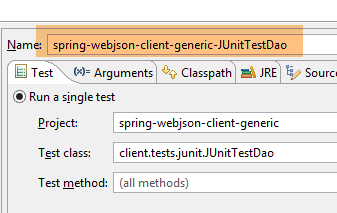 |
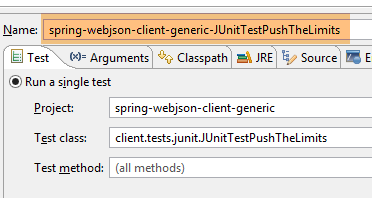 |
三项测试的结果如下:
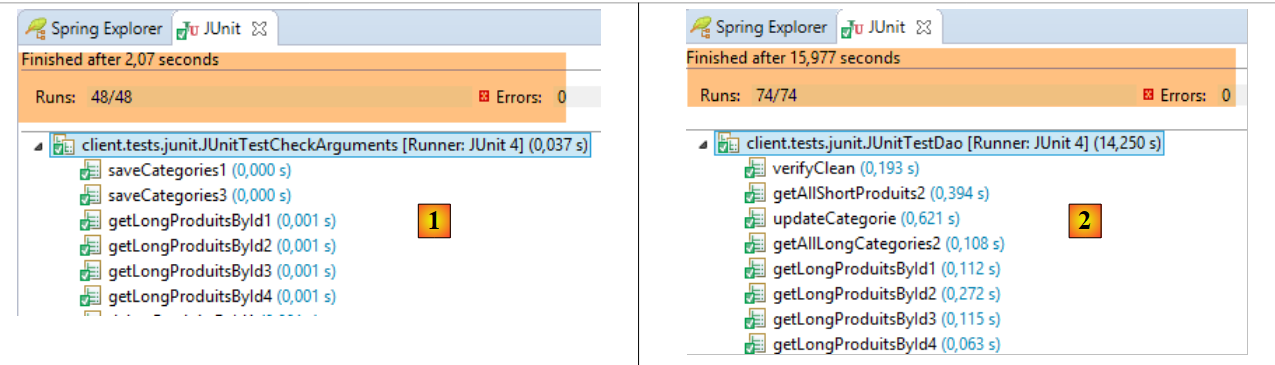 |
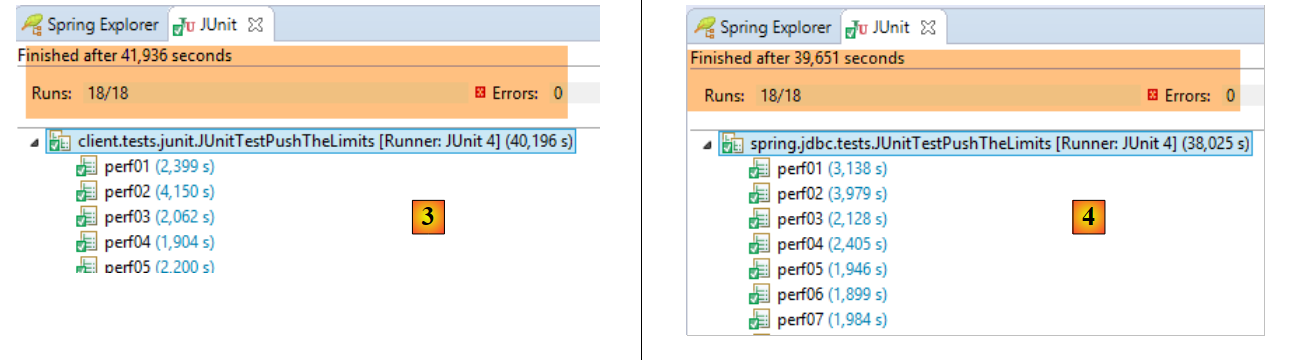 |
- 在 [1] 中,[JUnitTestCheckArguments] 测试;
- 在 [2] 中,[JUnitTestDao] 测试;
- 在 [3] 中,客户端执行的 [JUnitTestPushTheLimits] 测试(项目 [spring-webjson-client-generic]);
- 在 [3] 中,在服务器端执行的 [JUnitTestPushTheLimits] 测试(项目 [spring-jdbc-generic-04])。我们观察到,与访问 DBMS 造成的延迟相比,网络层造成的延迟非常小;
18.7. Web 服务 / JSON / JPA / Hibernate 实现
接下来我们将考察以下架构:
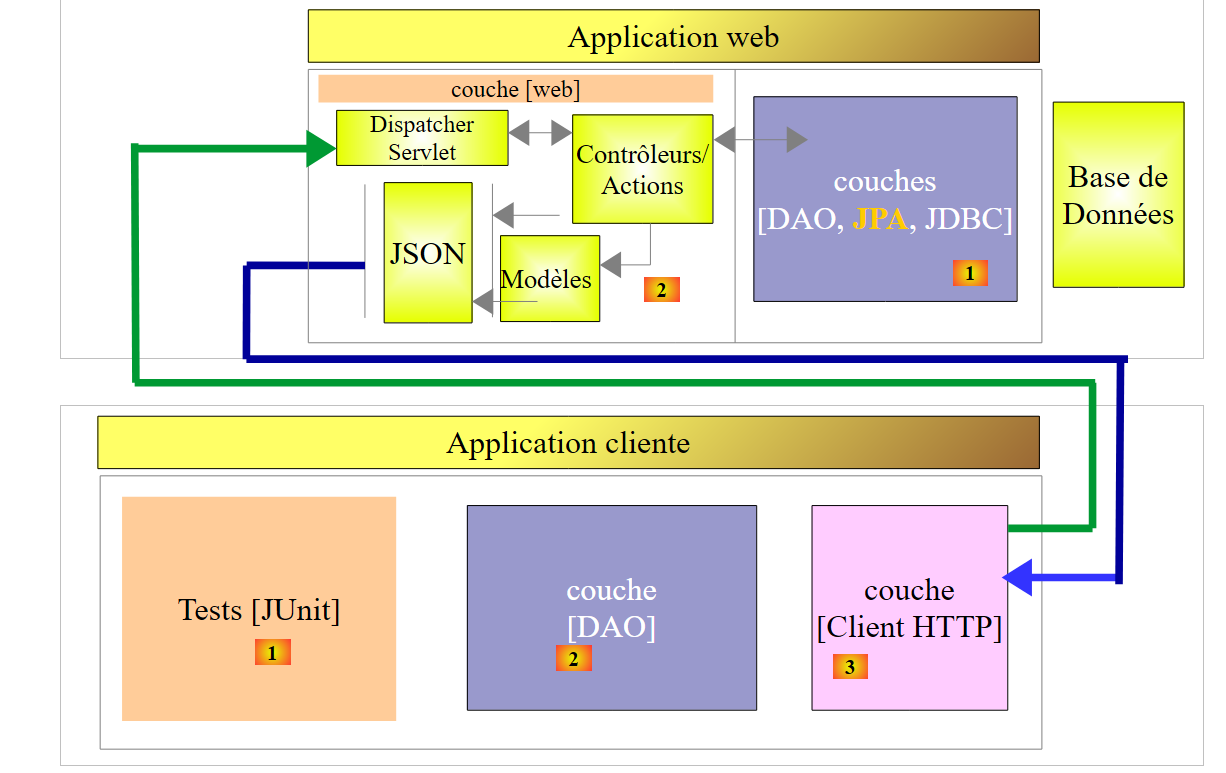 |
修改内容见[1]。服务器的[DAO]层依赖于一个JPA实现。我们将首先使用一个JPA/Hibernate实现。
18.7.1. Eclipse 项目
目前,已加载到Eclipse中的项目如下:
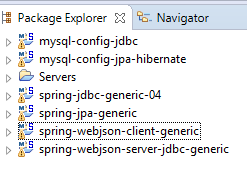 |
[spring-webjson-server-jdbc-generic] 项目基于 [spring-jdbc-generic-04] 项目,该项目配置了用于访问 MySQL 数据库管理系统 (DBMS) 的 DAO/JDBC 层。 我们将创建一个新项目 [spring-webjson-server-jpa-generic],该项目将依赖于 [spring-jpa-generic] 项目,后者配置了用于访问 MySQL 数据库管理系统 (DBMS) 的 DAO/JPA/JDBC 层。我们知道,在这两种情况下,[DAO] 层都实现了相同的 [IDao] 接口。因此,[web] 层的代码保持不变。
我们可以从 [spring-webjson-server-jdbc-generic] 项目中复制并粘贴内容来创建 [spring-webjson-server-jpa-generic] 项目:
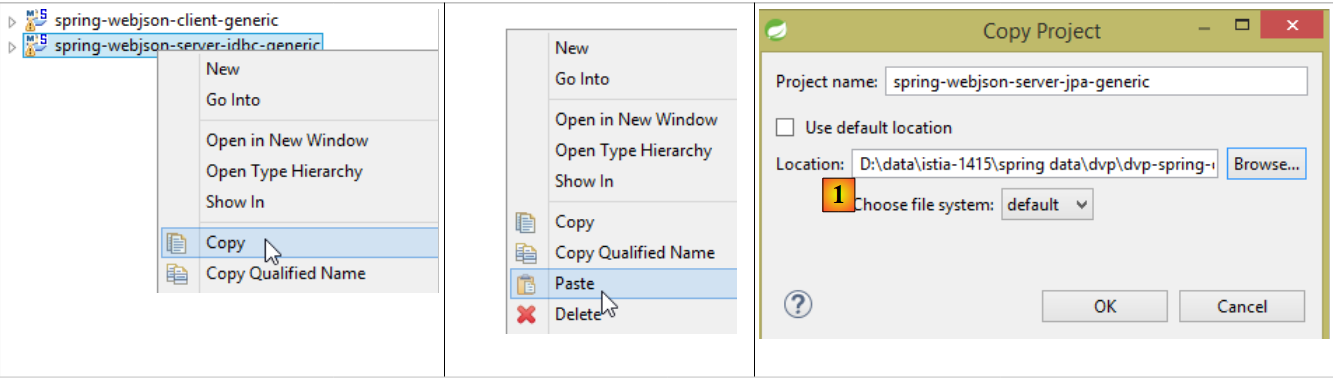 |
- 在 [1] 中,指定一个专门为新项目创建的文件夹;
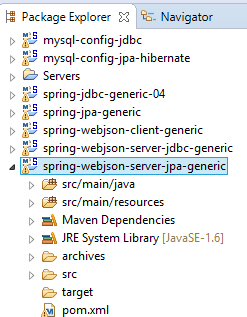 |
需要进行三类修改。第一类修改位于项目的 Maven 配置文件 [pom.xml] 中:
<project xmlns="http://maven.apache.org/POM/4.0.0" xmlns:xsi="http://www.w3.org/2001/XMLSchema-instance"
    xsi:schemaLocation="http://maven.apache.org/POM/4.0.0 http://maven.apache.org/xsd/maven-4.0.0.xsd">
    <modelVersion>4.0.0</modelVersion>
    <groupId>dvp.spring.database</groupId>
    <artifactId>spring-webjson-server-jpa-generic</artifactId>
    <version>0.0.1-SNAPSHOT</version>

    <name>spring-webjson-server-jpa-generic</name>
    <description>démo spring mvc</description>

    <parent>
        <groupId>org.springframework.boot</groupId>
        <artifactId>spring-boot-starter-parent</artifactId>
        <version>1.2.3.RELEASE</version>
    </parent>

    <dependencies>
        <!-- web layer -->
        <dependency>
            <groupId>org.springframework.boot</groupId>
            <artifactId>spring-boot-starter-web</artifactId>
        </dependency>
        <!-- layer [DAO] -->
        <dependency>
            <groupId>dvp.spring.database</groupId>
            <artifactId>spring-jpa-generic</artifactId>
            <version>0.0.1-SNAPSHOT</version>
        </dependency>
    </dependencies>
    <!-- plugins -->
    <build>
        <plugins>
            <plugin>
                <groupId>org.apache.maven.plugins</groupId>
                <artifactId>maven-surefire-plugin</artifactId>
                <version>2.18.1</version>
            </plugin>
        </plugins>
    </build>

</project>
- 第 5 行:更改 Maven 工件的名称;
- 第 24–28 行:依赖项现在指向 [spring-jpa-generic] 项目,不再指向 [spring-jdbc-generic-04];
最终,依赖关系如下:
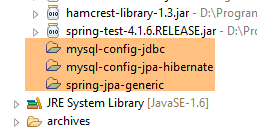 |
完成此操作后,我们将解决各个类中出现的所有导入问题。例如,[Product、Category] 实体不再位于 [spring-jdbc-generic-04] 项目中,而是位于 [spring-jpa-generic] 项目中。在类代码中按下 [Ctrl-Shift-O] 即可重新生成导入语句。
最后需要在 [AppConfig] 配置文件中进行修改:
package spring.webjson.server.config;

import org.springframework.context.annotation.ComponentScan;
import org.springframework.context.annotation.Configuration;
import org.springframework.context.annotation.Import;

@Configuration
@ComponentScan(basePackages = { "spring.webjson.server.service" })
@Import({ spring.data.config.AppConfig.class, WebConfig.class })
public class AppConfig {

}
- 第 9 行:现在我们从 [spring-jpa-generic] 项目导入配置,而不是从 [spring-jdbc-generic-04] 项目导入;
就这样——我们准备就绪。我们使用 [spring-webjson-server-jpa-generic-hibernate-eclipselink] 配置启动 Web 服务:
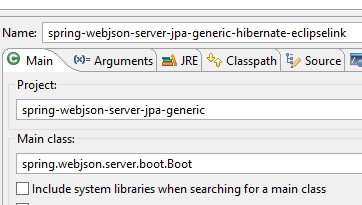 | 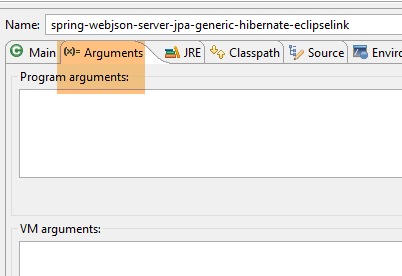 |
然后,我们运行通用客户端 [spring-webjson-client-generic] 的三个测试:
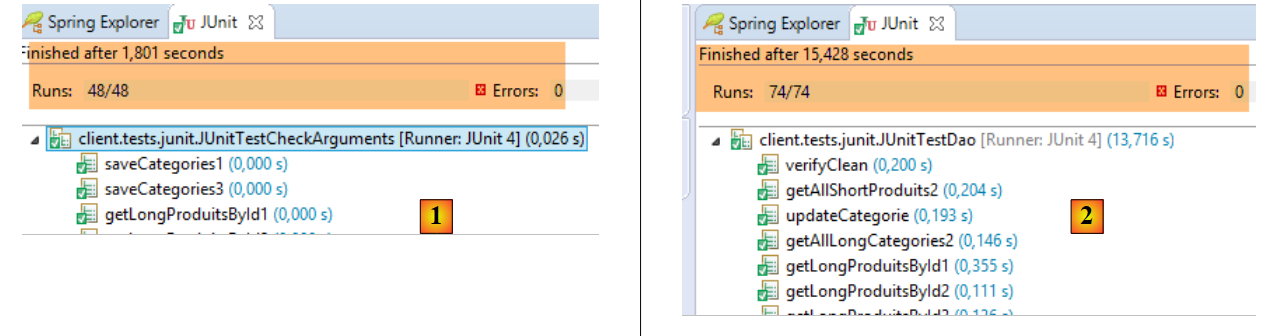 |
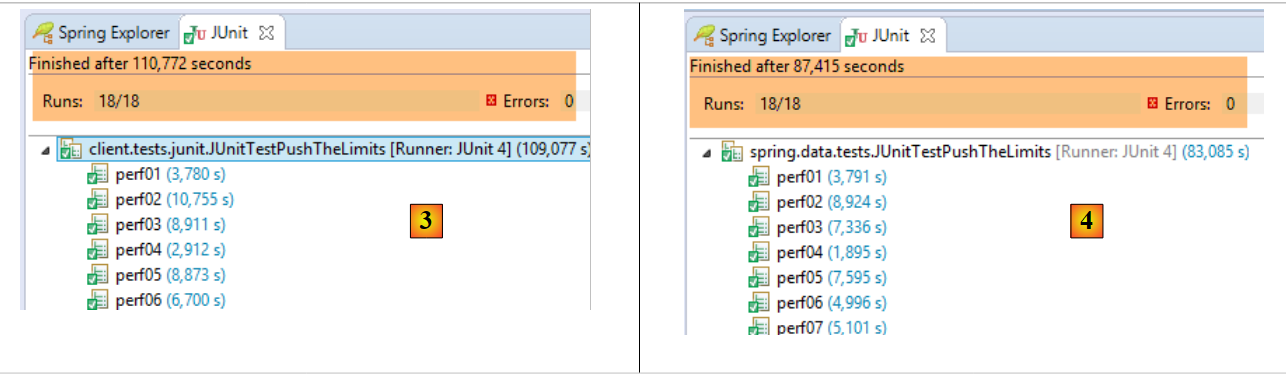 |
- 在 [1] 中,[JUnitTestCheckArguments] 测试(运行配置 [spring-webjson-client-generic-JUnitTestCheckArguments]);
- 在 [2] 中,[JUnitTestDao] 测试(执行配置 [spring-webjson-client-generic-JUnitTestDao]);
- 在 [3] 中,客户端运行的 [JUnitTestPushTheLimits] 测试(运行配置 [spring-webjson-client-generic-JUnitTestPushTheLimits]);
- 在 [4] 中,在服务器端执行的 [JUnitTestPushTheLimits] 测试(运行配置 [spring-jpa-generic-JUnitTestPushTheLimits-hibernate-eclipselink]);
18.7.2. 为什么它能正常工作?
虽然它确实能运行,但仔细查看代码后,你会惊讶于它竟然能运行。 虽然由 [spring-jdbc-generic-04] 和 [spring-jpa-generic] 项目实现的 [DAO] 层确实提供了相同的接口,但它们操作的 [Category] 和 [Product] 实体并不相同:在 [spring-jpa-generic] 项目中,这些实体有一个额外的字段 [EntityType entityType],该字段可能取两个值:
- EntityType.POJO:该实体是一个普通对象,其字段可自由使用;
- EntityType.PROXY:该实体是由 [JPA] 层渲染的 PROXY 对象。在此情况下,某些字段(实际上是这些字段的 getter 方法)的行为与通常不同,并已制定以下规则:
- 如果 [Category.entityType == EntityType.PROXY],则不得使用 [getProducts] 方法;
- 如果 [Product.entityType == EntityType.PROXY],则不得使用 [getCategory] 方法;
然而,我们刚刚将 [spring-webjson-server-jdbc-generic] 项目迁移到了 [spring-webjson-server-jpa-generic],且未修改任何代码。这是如何做到的?
让我们来查看 [saveCategories] 方法的代码:
    @RequestMapping(value = "/saveCategories", method = RequestMethod.POST, consumes = "application/json; charset=UTF-8")
    public Response<List<CoreCategorie>> saveCategories(HttpServletRequest request) {
...
            // retrieve the posted value
            String body = CharStreams.toString(request.getReader());
            // we deserialize it
            ObjectMapper mapper = context.getBean("jsonMapperLongCategorie", ObjectMapper.class);
            List<Categorie> categories = mapper.readValue(body, new TypeReference<List<Categorie>>() {
            });
            // we persist categories
            categories = daoCategorie.saveEntities(categories);
            ...
}
- 第 8 行:从一个 JSON 字符串创建了一个 List<Category> 对象:
- 在提交的数据中,产品(Product)不包含 [category] 字段。确实没有必要提交该字段。如果我们提交了该字段,反序列化会构建一个 [Product] 对象,其 [category] 字段( )将指向一个新创建的 [Category] 对象。对于 n 个产品,这将导致创建 n 个 [Category] 对象,而实际上只需一个。 此外,产品的 [category] 字段将不会指向正确的 [Category] 对象,即它们所属的那个对象。因此,在此处产品的 [category] 字段为 [category==null];
- 在 [Category] 和 [Product] 类中,[EntityType entityType] 字段定义如下:
protected EntityType entityType = EntityType.POJO;
因此,通过序列化生成的 [Category] 和 [Product] 实体均为 POJO 类型。
- 第 11 行:我们将类别进行持久化。这应该无法正常工作。事实上,虽然在 JDBC 实现中 [Product.category] 字段并非持久化所必需(而是使用 [categoryId] 字段),但在 JPA 实现中它却是绝对必要的。该字段必须指向一个 [Category] 实体,但此处它为 null。
让我们检查 [DAO / JPA] 层中 [DaoCategorie.saveEntities] 方法的代码:
@Override
    protected List<Categorie> saveEntities(List<Categorie> categories) {
        // on note les produits qui vont être insérés
        List<Produit> insertedProduits = new ArrayList<Produit>();
        for (Categorie categorie : categories) {
            EntityType categorieType = categorie.getEntityType();
            List<Produit> produits = null;
            if ((categorieType == EntityType.POJO) && (produits = categorie.getProduits()) != null) {
                for (Produit produit : produits) {
                    if (produit.getId() == null) {
                        insertedProduits.add(produit);
                    }
                    // on en profite pour rétablir (si besoin est) la relation produit --> categorie
                    produit.setCategorie(categorie);
                }
            }
        }
        // on persiste les catégories / produits
        try {
            categoriesRepository.save(categories);
        } catch (Exception e) {
            throw new DaoException(201, e, simpleClassName);
        }
        // on met à jour le champ [idCategorie] des produits insérés
        for (Produit produit : insertedProduits) {
            produit.setIdCategorie(produit.getCategorie().getId());
        }
        // résultat
        return categories;
    }
- 第 13–14 行:我们可以看到,对于 POJO 实体(第 8 行),[Product] → [Category] 的关系已被重新建立,本例中正是如此。这解释了为何类别的持久化能够正常工作。这种方法在其他情况下也很有用:你永远无法确定用户是否已将产品正确地关联到了类别。因此,我们代为完成这一步;
现在让我们来分析负责持久化产品的 [ProductController.saveProducts] 方法:
@RequestMapping(value = "/saveProduits", method = RequestMethod.POST, consumes = "application/json; charset=UTF-8")
    public Response<List<CoreProduit>> saveProduits(HttpServletRequest request) {
    ...
            // retrieve the posted value
            String body = CharStreams.toString(request.getReader());
            // we deserialize it
            ObjectMapper mapper = context.getBean("jsonMapperShortProduit", ObjectMapper.class);
            List<Produit> produits = mapper.readValue(body, new TypeReference<List<Produit>>() {
            });
            // we persist products
            produits = daoProduit.saveEntities(produits);
            List<CoreProduit> coreProduits = new ArrayList<CoreProduit>();
            for (Produit produit : produits) {
                coreProduits.add(new CoreProduit(produit.getId()));
            }
            // we return the answer
            return new Response<List<CoreProduit>>(0, null, coreProduits);
...
    }
- 第 8 行:根据提交的值重建一个 List<Product> 对象。基于前文所述的原因,每个 [Product] 对象将包含一个字段:
- [EntityType entityType] 等于 [EntityType.POJO];
- [Category category] 等于 null;
- 第 11 行:产品的持久化操作应会失败。事实上,在 JPA 中,只有当产品的 [category] 字段指向一个 [Category] 实体时,才可能对其进行持久化;
让我们看看 [DAO / JPA] 层中 [DaoProduit.saveEntities] 方法的代码:
    @Override
    protected List<Produit> saveEntities(List<Produit> entities) {
        // on rétablit (si besoin est) le lien entre un produits et sa catégorie
        for (Produit produit : entities) {
            if (produit.getEntityType() == EntityType.POJO) {
                produit.setCategorie(new Categorie(produit.getIdCategorie(), 0L, null, null));
            }
        }
        // on persiste les produits
        try {
            return Lists.newArrayList(produitsRepository.save(entities));
        } catch (Exception e) {
            throw new DaoException(111, e, simpleClassName);
        }
}
- 第 3–8 行:对于每个 POJO 类型的 [Product],会创建一个指向 [Category] 对象的链接,该链接具有正确的主键且版本不为空。这足以让 JPA 层正确地持久化该产品;
最后再看一点。[Category] 和 [Product] 对象有一个额外的字段 [EntityType entityType],当这些对象发送给客户端时,该字段会被序列化为 JSON。我们可以使用 [Advanced Rest Client] 进行验证:
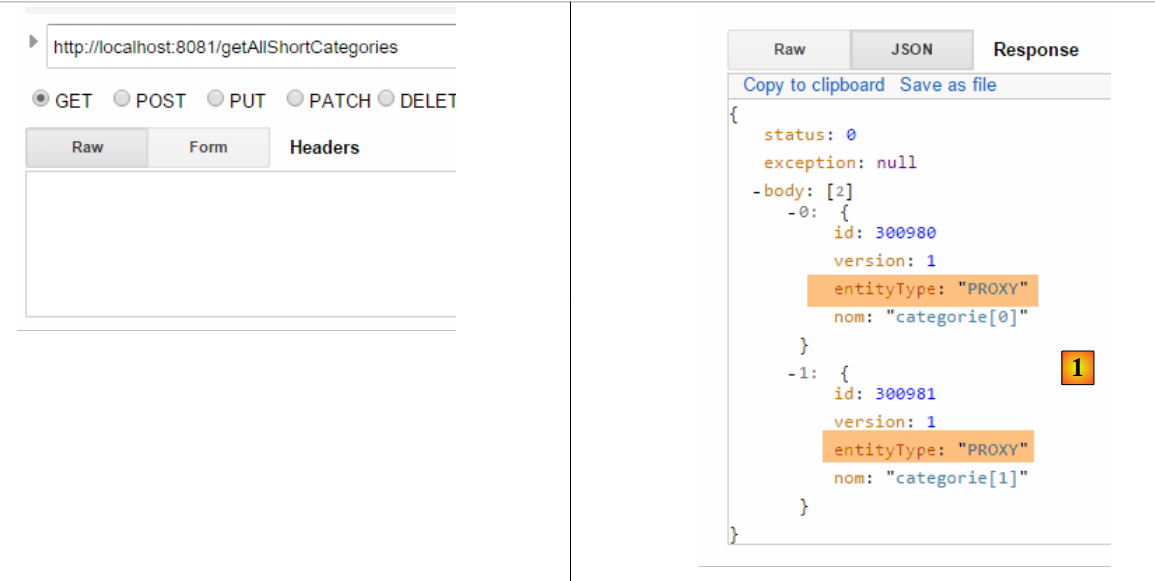 |
在客户端,[Category] 和 [Product] 实体在定义时未包含 [EntityType entityType] 字段。这是正常的,因为 [Category] 和 [Product] 对象在序列化时不包含其 PROXY 部分 [Category.products] 和 [Product.category]。因此,在客户端并不存在 PROXY 实体的概念,只有普通的对象。
在客户端,JSON字符串 [1] 由以下 [DaoCategorie.getAllShortEntities] 方法接收:
    @Override
    public List<Categorie> getAllShortEntities() {
...
            // filters jSON
            ObjectMapper mapper = context.getBean("jsonMapperShortCategorie", ObjectMapper.class);
            // get all categories
            Object map = client.<List<Categorie>, Void> getResponse("/getAllShortCategories", HttpMethod.GET, 202, null);
            // the List<Categorie> category list
            return mapper.readValue(mapper.writeValueAsString(map), new TypeReference<List<Categorie>>() {
            });
...
}
- 第 5 行:我们配置 [RestTemplate] 对象的 JSON 映射器,以处理 [Category] 对象的 JSON 过滤器 [jsonFilterCategory] 以及 [Product] 对象的过滤器 [jsonFilterProduct];
- 第 7 行:使用此映射器对提交的值(此处没有)和接收的值(List<Category>)进行序列化/反序列化。 请注意,即使 [Category] 和 [Product] 实体在客户端不存在 [entityType] 字段,但接收到的 JSON 字符串中出现该字段也不会引发错误。该字段会被忽略。如果它确实引发了错误,我们需要修改客户端过滤器以忽略该字段。
18.8. Web 服务 / JSON / JPA / EclipseLink 实现
要实现 Web 服务 / JSON / JPA / EclipseLink,只需修改 JPA 实现:
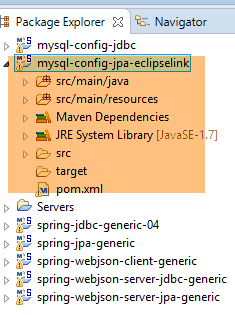 |
注意:按下 Alt-F5,然后重新生成所有 Maven 项目。
我们将使用已用于 Hibernate 的 [spring-webjson-server-jpa-generic-hibernate-eclipselink] 运行时配置来启动 Web 服务。完成后,请运行通用客户端 [spring-webjson-client-generic] 的三个测试:
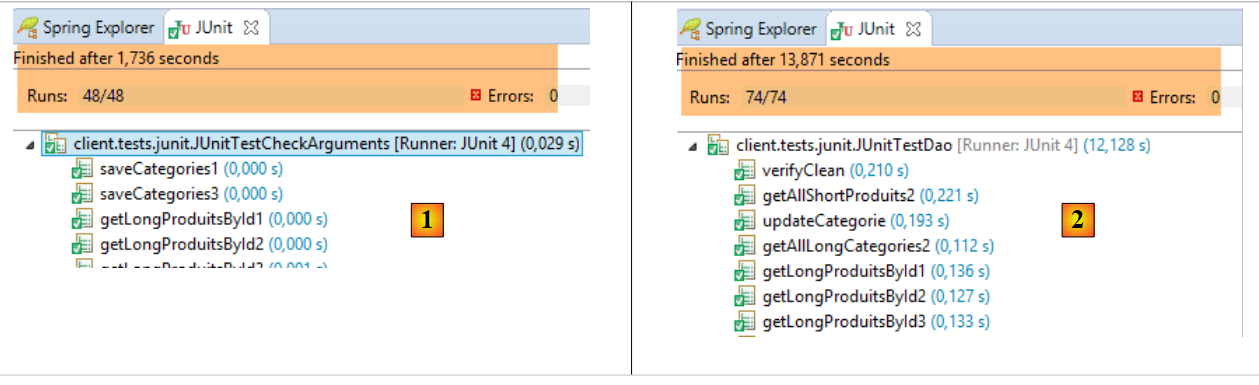 |
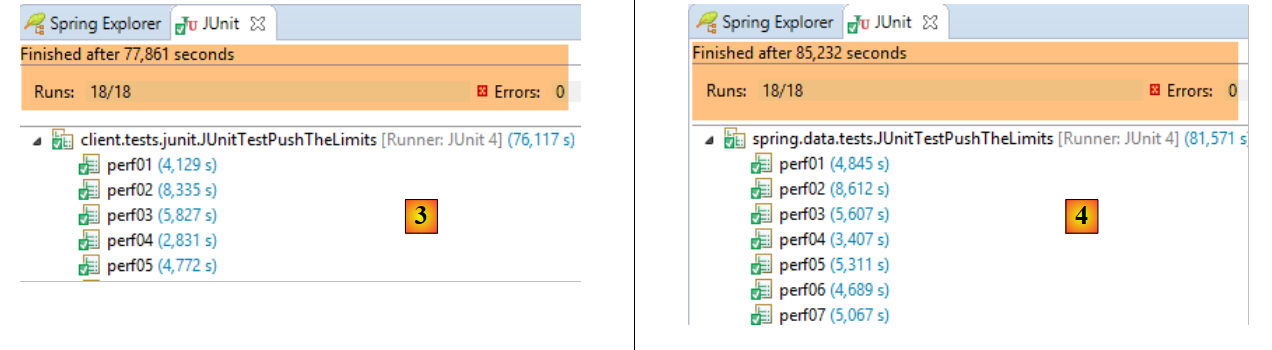 |
- 在 [1] 中,[JUnitTestCheckArguments] 测试;
- 在 [2] 中,[JUnitTestDao] 测试;
- 在 [3] 中,客户端运行的 [JUnitTestPushTheLimits] 测试(项目 [spring-webjson-client-generic]);
- 在 [4] 中,服务器端运行的 [JUnitTestPushTheLimits] 测试(运行配置 [spring-jpa-generic-JUnitTestPushTheLimits-hibernate-eclipselink]);
18.9. Web 服务 / JSON / JPA / OpenJPA 实现
要实现 Web 服务 / JSON / JPA / OpenJPA,只需更改 JPA 实现:
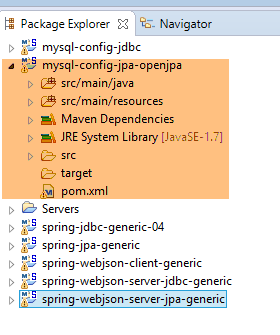 |
注意:按下 Alt-F5,然后重新生成所有 Maven 项目。
我们将使用运行时配置 [spring-webjson-server-jpa-generic-openpa] 启动 Web 服务:
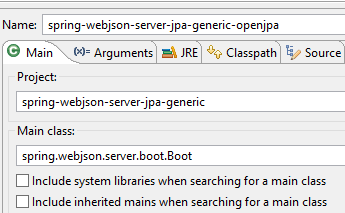 | 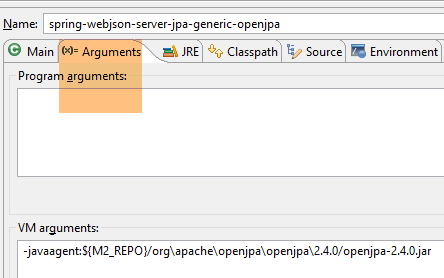 |
完成上述操作后,请运行通用客户端 [spring-webjson-client-generic] 的三个测试:
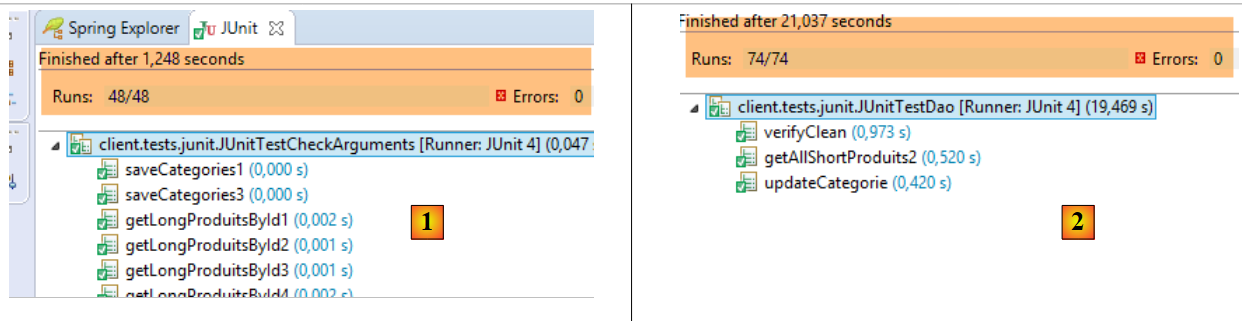 |
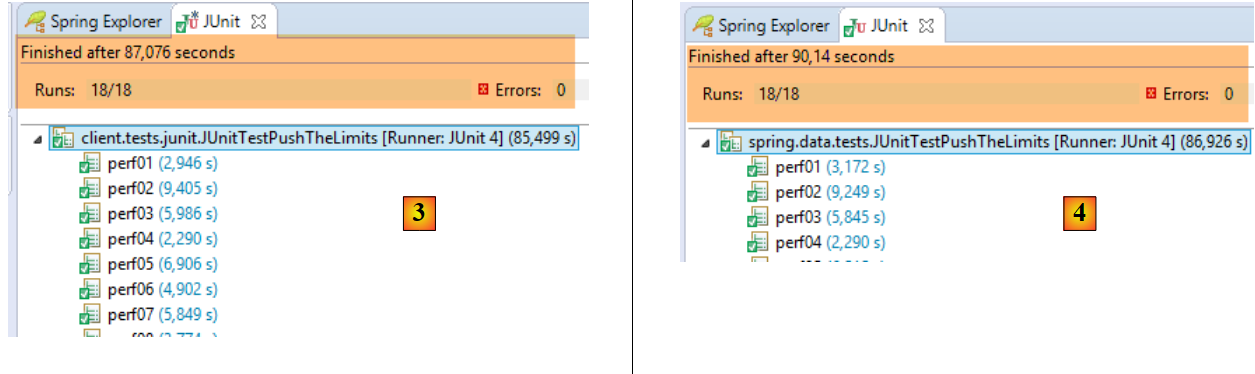 |
- 在 [1] 中,[JUnitTestCheckArguments] 测试(运行配置 [spring-webjson-client-generic-JUnitTestCheckArguments]);
- 在 [2] 中,[JUnitTestDao] 测试(运行配置 [spring-webjson-client-generic-JUnitTestDao]);
- 在 [3] 中,客户端运行的 [JUnitTestPushTheLimits] 测试(运行配置 [spring-webjson-client-generic-JUnitTestPushTheLimits]);
- 在 [4] 中,在服务器端执行的 [JUnitTestPushTheLimits] 测试(执行配置 [spring-jpa-generic-JUnitTestPushTheLimits-openpa]);
为了使测试正常运行,必须对 DAO/JPA 层进行修改。事实上,由于某种无法解释的原因,在填充数据库时,方法 [DaoCategorie.saveEntities] 和 [DaoProduit.saveEntities] 均告失败,这表明无法持久化脱离的实体。脱离的实体是指具有以下任一特征的实体:
- 主键不为空;
- 版本字段不为空;
上述两种情况均未被验证。由于不知从何处着手排查,我将待持久化的实体复制到一个全新的列表中,测试随即通过。这一修改本应:
- 在 [DAO / JPA] 层;
- 在创建待持久化实体的 [Web] 层中;
我选择在 [DAO / JPA] 层进行修改。当然,这会带来性能损失,但与数据库管理系统(DBMS)的响应时间相比,这种损失完全可以忽略不计。具体修改如下:
在 [spring-jpa-generic] 项目的 [DaoCategorie] 类中:
@Override
    protected List<Categorie> saveEntities(List<Categorie> categories) {
        // ***************************************************************************************
        // on clone la liste des catégories -- nécessaire parfois pour OpenJpa -- bug non compris
        // ***************************************************************************************
        List<Categorie> categories2 = new ArrayList<Categorie>();
        for (Categorie categorie : categories) {
            // catégorie
            Categorie categorie2 = new Categorie(categorie.getId(), categorie.getVersion(), categorie.getNom(), null);
            EntityType categorieType = categorie.getEntityType();
            categorie2.setEntityType(categorieType);
            categories2.add(categorie2);
            // produits
            List<Produit> produits = null;
            if ((categorieType == EntityType.POJO) && (produits = categorie.getProduits()) != null) {
                List<Produit> produits2 = new ArrayList<Produit>();
                for (Produit produit : produits) {
                    Produit produit2 = new Produit(produit.getId(), produit.getVersion(), produit.getNom(),
                            produit.getIdCategorie(), produit.getPrix(), produit.getDescription(), produit.getCategorie());
                    produit2.setEntityType(produit.getEntityType());
                    produits2.add(produit2);
                }
                categorie2.setProduits(produits2);
            }
        }
        // on note les produits qui vont être insérés
        List<Produit> insertedProduits = new ArrayList<Produit>();
        for (Categorie categorie : categories2) {
            EntityType categorieType = categorie.getEntityType();
            List<Produit> produits = null;
            if ((categorieType == EntityType.POJO) && (produits = categorie.getProduits()) != null) {
                for (Produit produit : produits) {
                    if (produit.getId() == null) {
                        insertedProduits.add(produit);
                    }
                    // on en profite pour rétablir (si besoin est) la relation produit --> categorie
                    produit.setCategorie(categorie);
                }
            }
        }
        // on persiste les catégories / produits
        try {
            categoriesRepository.save(categories2);
        } catch (Exception e) {
            throw new DaoException(201, e, simpleClassName);
        }
        // on met à jour le champ [idCategorie] des produits insérés
        for (Produit produit : insertedProduits) {
            produit.setIdCategorie(produit.getCategorie().getId());
        }
        // résultat
        return categories2;
    }
- 第 3–25 行:作为参数接收的 [categories] 列表(第 2 行)在 [categories2] 列表中被复制(第 6 行)。正是这个列表被持久化并返回给调用方(第 52 行)。这带来一个重要后果:返回的列表与作为参数传递的列表不同,因此我们之前可以这样写:
List<Categorie> categories=...
daoCategorie.saveEntities(categories)
// exploitation de [categories]
现在我们需要编写:
List<Categorie> categories=...
categories=daoCategorie.saveEntities(categories)
// exploitation de [categories]
在 [spring-jpa-generic] 项目的 [DaoProduct] 类中,[saveEntities] 方法也进行了类似的修改:
    @Override
    protected List<Produit> saveEntities(List<Produit> entities) {
        // ***************************************************************************************
        // on clone la liste des produits -- nécessaire parfois pour OpenJpa -- bug non compris
        // ***************************************************************************************
        List<Produit> produits2 = new ArrayList<Produit>();
        for (Produit produit : entities) {
            Produit produit2 = new Produit(produit.getId(), produit.getVersion(), produit.getNom(), produit.getIdCategorie(),
                    produit.getPrix(), produit.getDescription(), produit.getCategorie());
            produit2.setEntityType(produit.getEntityType());
            produits2.add(produit2);
        }

        // on rétablit (si besoin est) le lien entre un produits et sa catégorie
        for (Produit produit : produits2) {
            if (produit.getEntityType() == EntityType.POJO) {
                produit.setCategorie(new Categorie(produit.getIdCategorie(), 0L, null, null));
            }
        }
        // on persiste les produits
        try {
            return Lists.newArrayList(produitsRepository.save(produits2));
        } catch (Exception e) {
            throw new DaoException(111, e, simpleClassName);
        }
}
18.10. Web 服务实现 / JSON / JPA / EclipseLink / PostgreSQL
要实现 Web 服务 / JSON / JPA / EclipseLink / PostgreSQL,您必须安装:
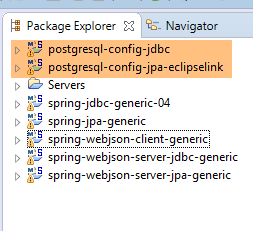
- 用于配置 PostgreSQL JDBC 层的 [postgresql-config-jdbc] 项目;
- 用于配置 PostgreSQL JPA 层的 [postgresql-config-jpa-eclipselink] 项目;
- 按 Alt-F5 并重新生成所有 Maven 项目;
 |
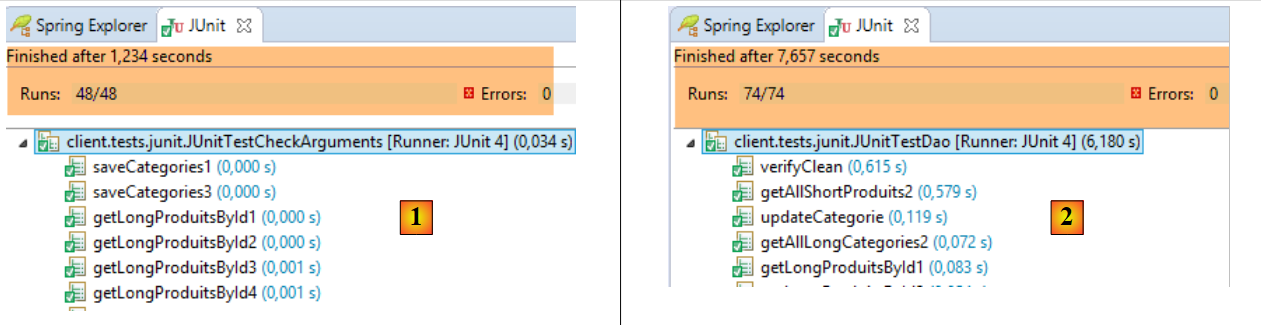
启动 PostgreSQL 数据库管理系统,并使用之前使用的 [spring-webjson-server-jpa-generic-hibernate-eclipselink] 运行时配置启动 Web 服务。完成后,运行通用客户端 [spring-webjson-client-generic] 的三个测试:
 |
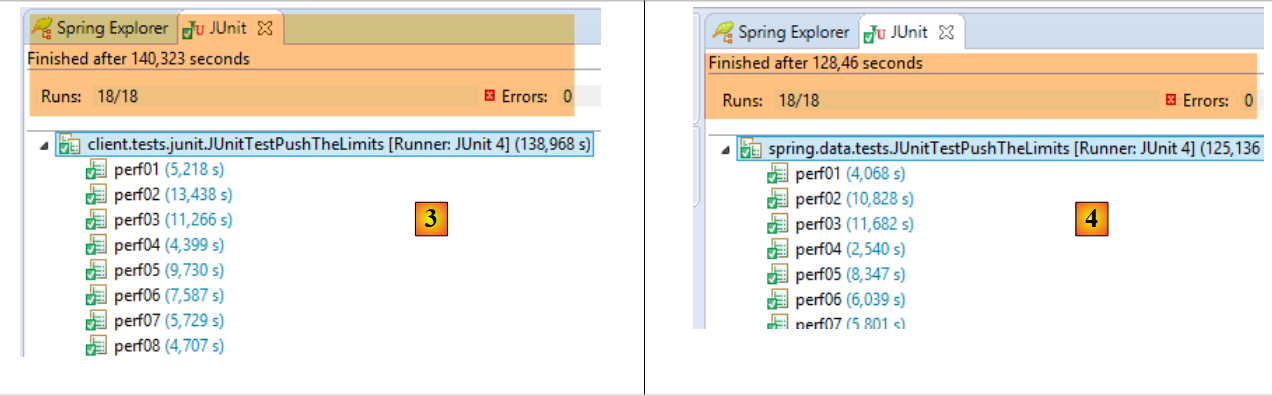 |
- 在 [1] 中,[JUnitTestCheckArguments] 测试(运行配置 [spring-webjson-client-generic-JUnitTestCheckArguments]);
- 在 [2] 中,[JUnitTestDao] 测试(运行配置 [spring-webjson-client-generic-JUnitTestDao]);
- 在 [3] 中,客户端执行的 [JUnitTestPushTheLimits] 测试(运行配置 [spring-webjson-client-generic-JUnitTestPushTheLimits]);
- 在 [4] 中,在服务器端执行的 [JUnitTestPushTheLimits] 测试(执行配置 [spring-jpa-generic-JUnitTestPushTheLimits-hibernate-eclipselink]);