19. 使用 Spring Security 保护 Web 服务访问
19.1. Spring Security 在 Web 应用程序中的作用
让我们将 Spring Security 置于 Web 应用程序的开发背景中。通常,它将基于如下所示的多层架构构建:
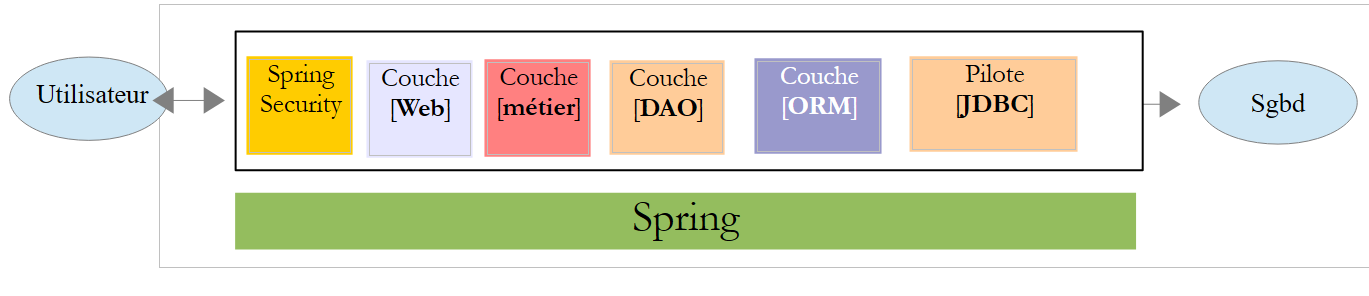 |
- [Spring Security] 层仅允许经过授权的用户访问 [Web] 层。
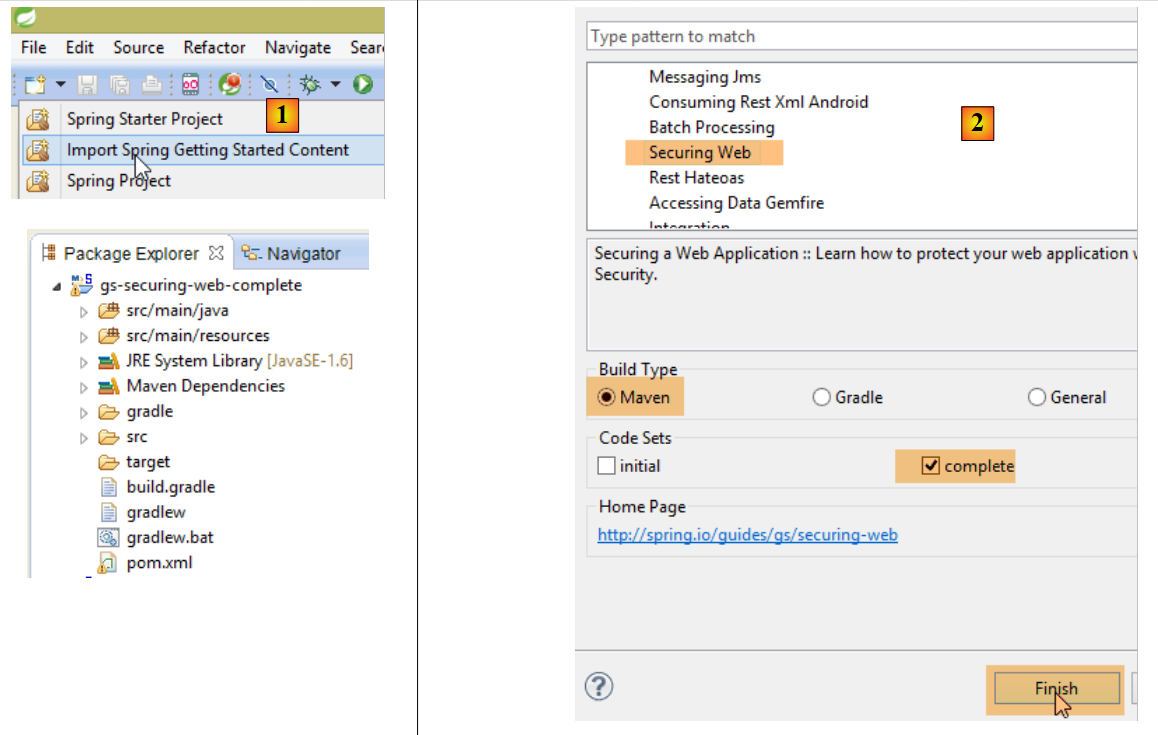
19.2. Spring Security 入门教程
 |
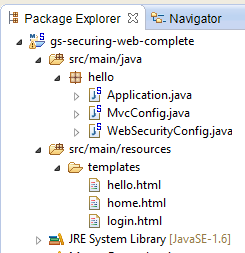 |
该项目包括以下内容:
- 在 [templates] 文件夹中,您将找到该项目的 HTML 页面;
- [Application]:是项目的可执行类;
- [MvcConfig]:是 Spring MVC 的配置类;
- [WebSecurityConfig]:是 Spring Security 的配置类;
19.2.1. Maven 配置
项目 [3] 是一个 Maven 项目。让我们查看其 [pom.xml] 文件,了解其依赖项:
<?xml version="1.0" encoding="UTF-8"?>
<project xmlns="http://maven.apache.org/POM/4.0.0" xmlns:xsi="http://www.w3.org/2001/XMLSchema-instance"
    xsi:schemaLocation="http://maven.apache.org/POM/4.0.0 http://maven.apache.org/xsd/maven-4.0.0.xsd">
    <modelVersion>4.0.0</modelVersion>

    <groupId>org.springframework</groupId>
    <artifactId>gs-securing-web</artifactId>
    <version>0.1.0</version>

    <parent>
        <groupId>org.springframework.boot</groupId>
        <artifactId>spring-boot-starter-parent</artifactId>
        <version>1.2.3.RELEASE</version>
    </parent>

    <dependencies>
        <dependency>
            <groupId>org.springframework.boot</groupId>
            <artifactId>spring-boot-starter-thymeleaf</artifactId>
        </dependency>
        <!-- tag::security[] -->
        <dependency>
            <groupId>org.springframework.boot</groupId>
            <artifactId>spring-boot-starter-security</artifactId>
        </dependency>
        <!-- end::security[] -->
    </dependencies>

    <properties>
        <start-class>hello.Application</start-class>
    </properties>

    <build>
        <plugins>
            <plugin>
                <groupId>org.springframework.boot</groupId>
                <artifactId>spring-boot-maven-plugin</artifactId>
            </plugin>
        </plugins>
    </build>

</project>
- 第 10–14 行:该项目是一个 Spring Boot 项目;
- 第 17–20 行:依赖 [Thymeleaf] 框架;
- 第 22–25 行:对 Spring Security 框架的依赖;
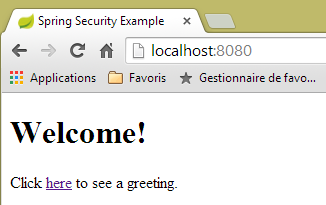
19.2.2. Thymeleaf 视图
 |
 |
<!DOCTYPE html>
<html xmlns="http://www.w3.org/1999/xhtml"
    xmlns:th="http://www.thymeleaf.org"
    xmlns:sec="http://www.thymeleaf.org/thymeleaf-extras-springsecurity3">
<head>
<title>Spring Security Example</title>
</head>
<body>
    <h1>Welcome!</h1>

    <p>
        Click <a th:href="@{/hello}">here</a> to see a greeting.
    </p>
</body>
</html>
- 第 12 行:属性 [th:href="@{/hello}"] 将生成 <a> 标签的 [href] 属性。值 [@{/hello}] 将生成路径 [<context>/hello],其中 [context] 是 Web 应用程序的上下文;
生成的 HTML 代码如下:
<!DOCTYPE html>

<html xmlns="http://www.w3.org/1999/xhtml" xmlns:sec="http://www.thymeleaf.org/thymeleaf-extras-springsecurity3">
    <head>
        <title>Spring Security Example</title>
    </head>
    <body>
        <h1>Welcome!</h1>

        <p>
            Click
            <a href="/hello">here</a>
            to see a greeting.
        </p>
    </body>
</html>
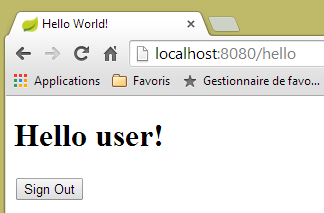
[hello.html] 视图如下:
 |
<!DOCTYPE html>
<html xmlns="http://www.w3.org/1999/xhtml"
    xmlns:th="http://www.thymeleaf.org"
    xmlns:sec="http://www.thymeleaf.org/thymeleaf-extras-springsecurity3">
<head>
<title>Hello World!</title>
</head>
<body>
    <h1 th:inline="text">Hello [[${#httpServletRequest.remoteUser}]]!</h1>
    <form th:action="@{/logout}" method="post">
        <input type="submit" value="Sign Out" />
    </form>
</body>
</html>
- 第 9 行:[th:inline="text"] 属性将生成 <h1> 标签的文本内容。该文本包含一个必须进行求值的 $ 表达式。元素 [[${#httpServletRequest.remoteUser}]] 是当前 HTTP 请求中 [RemoteUser] 属性的值。这是已登录用户的名称;
- 第 10 行:一个 HTML 表单。[th:action="@{/logout}"] 属性将生成 [form] 标签的 [action] 属性。值 [@{/logout}] 将生成路径 [<context>/logout],其中 [context] 是 Web 应用程序上下文;
生成的 HTML 代码如下:
<!DOCTYPE html>

<html xmlns="http://www.w3.org/1999/xhtml" xmlns:sec="http://www.thymeleaf.org/thymeleaf-extras-springsecurity3">
    <head>
        <title>Hello World!</title>
    </head>
    <body>
        <h1>Hello user!</h1>
        <form method="post" action="/logout">
            <input type="submit" value="Sign Out" />
            <input type="hidden" name="_csrf" value="b152e5b9-d1a4-4492-b89d-b733fe521c91" />
        </form>
    </body>
</html>
- 第 8 行:"Hello [[${#httpServletRequest.remoteUser}]]!" 的翻译;
- 第 9 行:@{/logout} 的翻译;
- 第 11 行:一个名为 _csrf 的隐藏字段(name 属性);
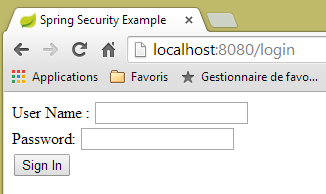
最终的视图 [login.html] 如下:
 |
<!DOCTYPE html>
<html xmlns="http://www.w3.org/1999/xhtml"
    xmlns:th="http://www.thymeleaf.org"
    xmlns:sec="http://www.thymeleaf.org/thymeleaf-extras-springsecurity3">
<head>
<title>Spring Security Example</title>
</head>
<body>
    <div th:if="${param.error}">Invalid username and password.</div>
    <div th:if="${param.logout}">You have been logged out.</div>
    <form th:action="@{/login}" method="post">
        <div>
            <label> User Name : <input type="text" name="username" />
            </label>
        </div>
        <div>
            <label> Password: <input type="password" name="password" />
            </label>
        </div>
        <div>
            <input type="submit" value="Sign In" />
        </div>
    </form>
</body>
</html>
- 第 9 行:属性 [th:if="${param.error}"] 确保只有当显示登录页面的 URL 包含 [error] 参数(http://context/login?error)时,才会生成 <div> 标签;
- 第 10 行:属性 [th:if="${param.logout}"] 确保只有当显示登录页面的 URL 包含 [logout] 参数(http://context/login?logout)时,才会生成 <div> 标签;
- 第 11–23 行:一个 HTML 表单;
- 第 11 行:表单将提交至 URL [<context>/login],其中 <context> 是 Web 应用程序上下文;
- 第 13 行:一个名为 [username] 的输入字段;
- 第 17 行:一个名为 [password] 的输入字段;
生成的 HTML 代码如下:
<!DOCTYPE html>

<html xmlns="http://www.w3.org/1999/xhtml" xmlns:sec="http://www.thymeleaf.org/thymeleaf-extras-springsecurity3">
    <head>
        <title>Spring Security Example </title>
    </head>
    <body>

        <div>
            You have been logged out.
        </div>
        <form method="post" action="/login">
            <div>
                <label>
                    User Name :
                    <input type="text" name="username" />
                </label>
            </div>
            <div>
                <label>
                    Password:
                    <input type="password" name="password" />
                </label>
            </div>
            <div>
                <input type="submit" value="Sign In" />
            </div>
            <input type="hidden" name="_csrf" value="ef809b0a-88b4-4db9-bc53-342216b77632" />
        </form>
    </body>
</html>
请注意第 28 行,Thymeleaf 添加了一个名为 [_csrf] 的隐藏字段。
19.2.3. Spring MVC 配置
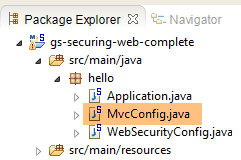 |
[MvcConfig] 类用于配置 Spring MVC 框架:
package hello;

import org.springframework.context.annotation.Configuration;
import org.springframework.web.servlet.config.annotation.ViewControllerRegistry;
import org.springframework.web.servlet.config.annotation.WebMvcConfigurerAdapter;

@Configuration
public class MvcConfig extends WebMvcConfigurerAdapter {

    @Override
    public void addViewControllers(ViewControllerRegistry registry) {
        registry.addViewController("/home").setViewName("home");
        registry.addViewController("/").setViewName("home");
        registry.addViewController("/hello").setViewName("hello");
        registry.addViewController("/login").setViewName("login");
    }

}
- 第 7 行:[@Configuration] 注解将 [MvcConfig] 类定义为配置类;
- 第 8 行:[MvcConfig] 类继承自 [WebMvcConfigurerAdapter] 类,以重写某些方法;
- 第 10 行:重定义了父类中的一个方法;
- 第 11–16 行:[addViewControllers] 方法允许将 URL 与 HTML 视图关联。其中建立了以下关联:
视图 | |
/templates/home.html | |
/templates/hello.html | |
/templates/login.html |
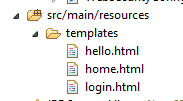
后缀 [html] 和 [templates] 文件夹是 Thymeleaf 使用的默认值。它们可以通过配置进行更改。 [templates] 文件夹必须位于项目类路径的根目录下:
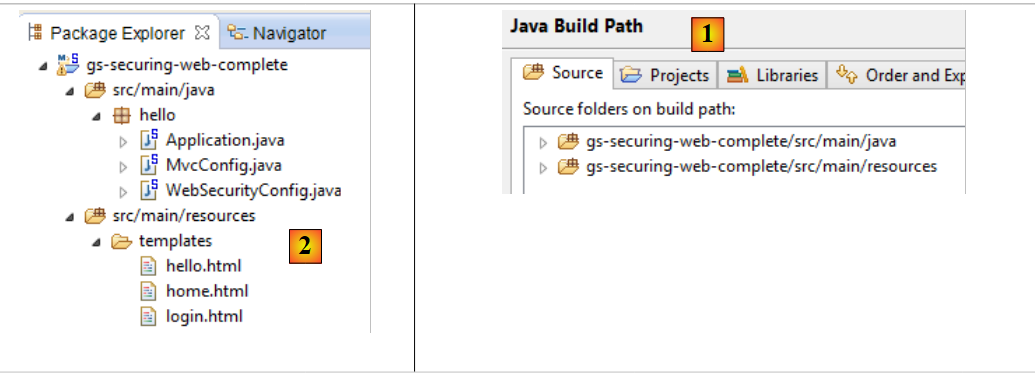 |
在上文的 [1] 中,[java] 和 [resources] 文件夹均为源文件夹。这意味着它们的内容将位于项目类路径的根目录下。因此,在 [2] 中,[hello] 和 [templates] 文件夹将位于类路径的根目录下。
19.2.4. Spring Security 配置
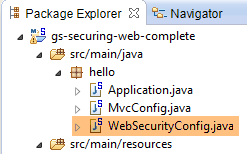 |
[WebSecurityConfig] 类用于配置 Spring Security 框架:
package hello;

import org.springframework.context.annotation.Configuration;
import org.springframework.security.config.annotation.authentication.builders.AuthenticationManagerBuilder;
import org.springframework.security.config.annotation.web.builders.HttpSecurity;
import org.springframework.security.config.annotation.web.configuration.WebSecurityConfigurerAdapter;
import org.springframework.security.config.annotation.web.servlet.configuration.EnableWebMvcSecurity;

@Configuration
@EnableWebMvcSecurity
public class WebSecurityConfig extends WebSecurityConfigurerAdapter {
    @Override
    protected void configure(HttpSecurity http) throws Exception {
        http.authorizeRequests().antMatchers("/", "/home").permitAll().anyRequest().authenticated();
        http.formLogin().loginPage("/login").permitAll().and().logout().permitAll();
    }

    @Override
    protected void configure(AuthenticationManagerBuilder auth) throws Exception {
        auth.inMemoryAuthentication().withUser("user").password("password").roles("USER");
    }
}
- 第 9 行:[@Configuration] 注解将 [WebSecurityConfig] 类定义为配置类;
- 第 10 行:[@EnableWebSecurity] 注解将 [WebSecurityConfig] 类定义为 Spring Security 配置类;
- 第 11 行:[WebSecurity] 类继承自 [WebSecurityConfigurerAdapter] 类,以重写某些方法;
- 第 12 行:重写父类中的方法;
- 第 13–16 行:重写 [configure(HttpSecurity http)] 方法,用于定义应用程序各 URL 的访问权限;
- 第 14 行:[http.authorizeRequests()] 方法允许将 URL 与访问权限关联。其中建立了以下关联:
规则 | 代码 | |
无需身份验证的访问 | | |
仅限经过身份验证的访问 |
- 第 15 行:定义身份验证方法。身份验证通过一个对所有人开放的 URL 表单 [/login] 进行 [http.formLogin().loginPage("/login").permitAll()]。注销功能也对所有人开放;
- 第 19–21 行:重新定义管理用户的方法 [configure(AuthenticationManagerBuilder auth)];
- 第 20 行:使用硬编码的用户进行身份验证 [auth.inMemoryAuthentication()]。此处通过登录名 [user]、密码 [password] 和角色 [USER] 定义用户。具有相同角色的用户可被授予相同的权限;
19.2.5. 可执行类
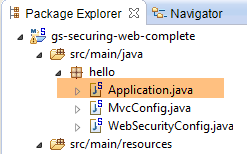 |
[Application] 类如下所示:
package hello;

import org.springframework.boot.autoconfigure.EnableAutoConfiguration;
import org.springframework.boot.SpringApplication;
import org.springframework.context.annotation.ComponentScan;
import org.springframework.context.annotation.Configuration;

@EnableAutoConfiguration
@Configuration
@ComponentScan
public class Application {

    public static void main(String[] args) throws Throwable {
        SpringApplication.run(Application.class, args);
    }

}
- 第 8 行:[@EnableAutoConfiguration] 注解指示 Spring Boot(第 3 行)执行开发者未显式配置的配置;
- 第 9 行:将 [Application] 类设为 Spring 配置类;
- 第 10 行:指示系统扫描包含 [Application] 类的目录以查找 Spring 组件。因此,[MvcConfig] 和 [WebSecurityConfig] 这两个类会被发现,因为它们带有 [@Configuration] 注解;
- 第 13 行:可执行类的 [main] 方法;
- 第 14 行:以 [Application] 配置类作为参数执行静态方法 [SpringApplication.run]。我们之前已经遇到过这个过程,知道项目 Maven 依赖中嵌入的 Tomcat 服务器将被启动,项目将部署到该服务器上。我们看到有四个 URL 被处理 [/, /home, /login, /hello],其中部分 URL 受访问权限保护。
19.2.6. 测试应用程序
让我们先请求 URL [/],这是四个被接受的 URL 之一。它关联的视图是 [/templates/home.html]:
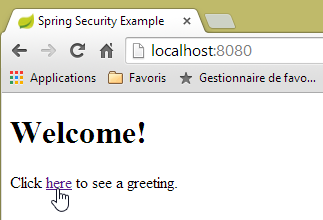 |
请求的 URL [/] 对所有人开放。这就是我们能够获取它的原因。链接 [此处] 如下:
点击该链接时,系统将请求 URL [/hello]。该 URL 受保护:
规则 | 代码 | |
无需身份验证的访问 | | |
仅限经过身份验证的访问 |
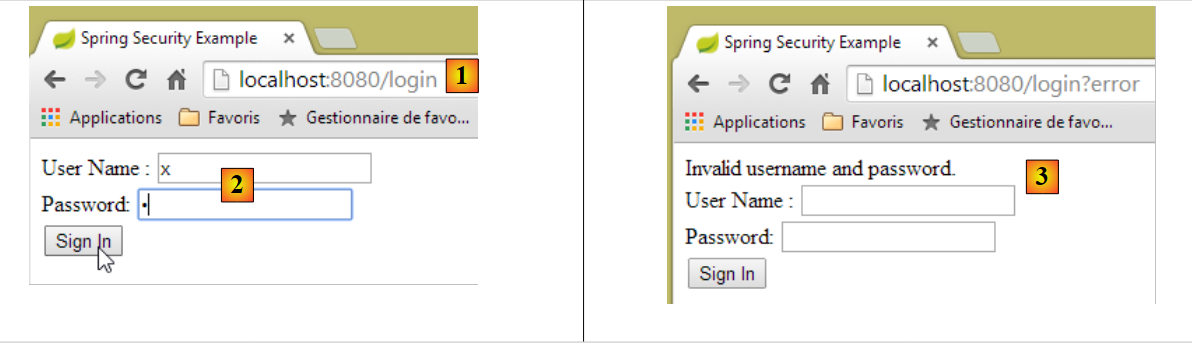
您必须经过身份验证才能访问该页面。随后,Spring Security 会将客户端浏览器重定向至身份验证页面。根据所示配置,该页面的 URL 为 [/login]。该页面对所有人开放:
http.formLogin().loginPage("/login").permitAll().and().logout().permitAll();
因此我们得到 [1]:
 |
获取到的页面源代码如下:
- 在第 7 行,出现了一个原始 [login.html] 页面中不存在的隐藏字段。这是 Thymeleaf 添加的。这段代码被称为 CSRF(跨站请求伪造),旨在解决一个安全漏洞。为了使身份验证被接受,必须将此令牌与身份验证凭据一起发回给 Spring Security;
我们回顾一下,Spring Security 仅识别用户名/密码对。如果我们在 [2] 中输入其他内容,将看到 [3] 处带有错误信息的同一页面。Spring Security 已将浏览器重定向至 URL [http://localhost:8080/login?error]。由于存在 [error] 参数,触发了以下标签的显示:
<div th:if="${param.error}">Invalid username and password.</div>
现在,让我们输入预期的用户名/密码值 [4]:
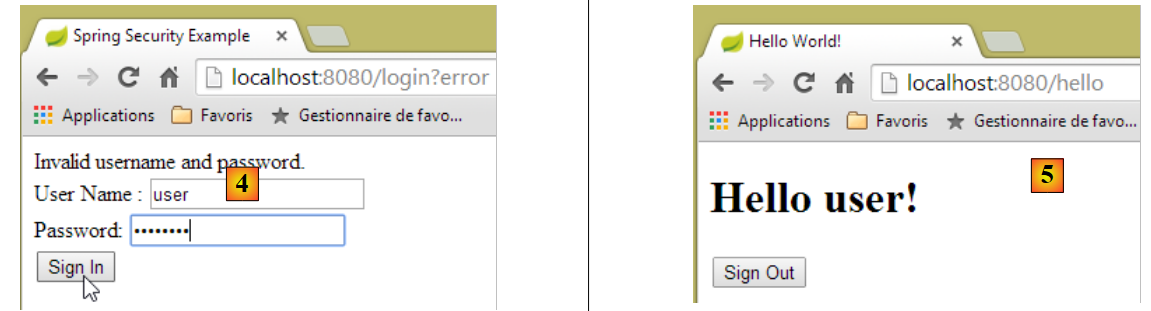 |
- 在 [4] 中,我们登录;
- 在 [5] 中,Spring Security 将我们重定向到 URL [/hello],因为这是我们在被重定向到登录页面时请求的 URL。用户的身份由 [hello.html] 中的以下一行显示:
<h1 th:inline="text">Hello [[${#httpServletRequest.remoteUser}]]!</h1>
页面 [5] 显示如下表单:
    <form th:action="@{/logout}" method="post">
        <input type="submit" value="Sign Out" />
</form>
当您点击 [注销] 按钮时,系统会向 URL [/logout] 发送一个 POST 请求。与 URL [/login] 一样,该 URL 对所有人开放:
http.formLogin().loginPage("/login").permitAll().and().logout().permitAll();
在我们的 URL/视图映射中,我们尚未为 URL [/logout] 定义任何内容。会发生什么?让我们试一试:
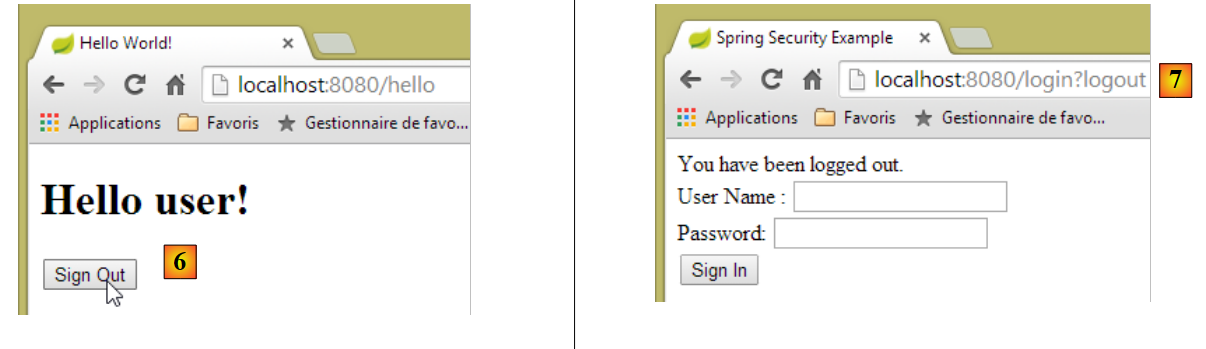 |
- 在 [6] 中,我们点击了 [Sign Out] 按钮;
- 在 [7] 中,我们可以看到已被重定向到 URL [http://localhost:8080/login?logout]。这是 Spring Security 发起的重定向。URL 中 [logout] 参数的存在导致视图中显示了以下内容:
<div th:if="${param.logout}">You have been logged out.</div>
19.2.7. 结论
在上一个示例中,我们本可以先编写 Web 应用程序,然后再对其进行安全加固。Spring Security 具有非侵入性。您可以为已经编写好的 Web 应用程序实现安全功能。此外,我们还发现了以下几点:
- 可以定义身份验证页面;
- 身份验证必须伴随 Spring Security 生成的 CSRF 令牌;
- 如果身份验证失败,系统会将您重定向至身份验证页面,且 URL 中会附加一个错误参数;
- 若认证成功,系统将重定向至认证时请求的页面。若直接请求认证页面而不经过中间页面,Spring Security 会将您重定向至 URL [/](此情况未在示例中演示);
- 通过 POST 请求访问 URL [/logout] 可完成注销。随后 Spring Security 会将您重定向至包含 "logout" 参数的认证页面;
所有这些结论均基于 Spring Security 的默认行为。可以通过覆盖 [WebSecurityConfigurerAdapter] 类的某些方法,在配置中更改此行为。
之前的教程对我们后续的工作帮助不大。实际上,我们将使用:
- 一个数据库来存储用户、密码及其角色;
- 基于 HTTP 头部的身份验证;
关于我们要实现的功能,现有的教程寥寥无几。我们将提出的解决方案,是整合了从各处收集的代码片段。