17. 在 Web 上公开数据库
17.1. Web服务架构 / jSON
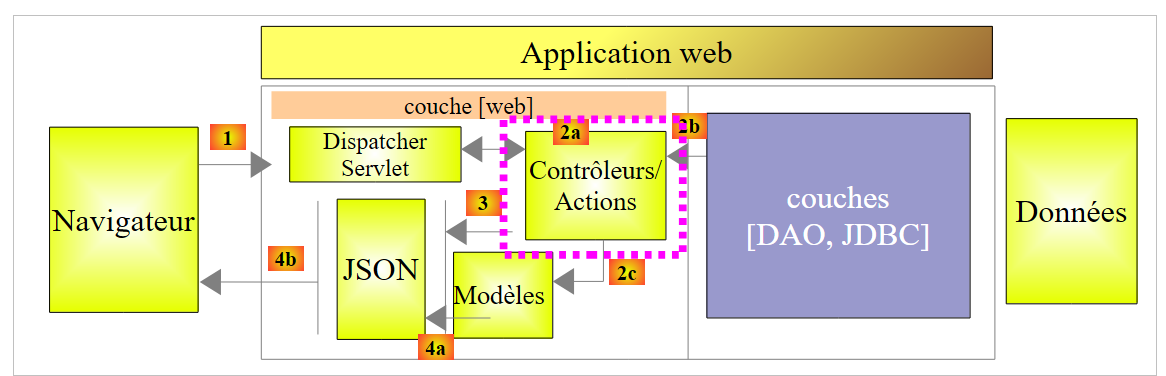
我们将构建以下架构:
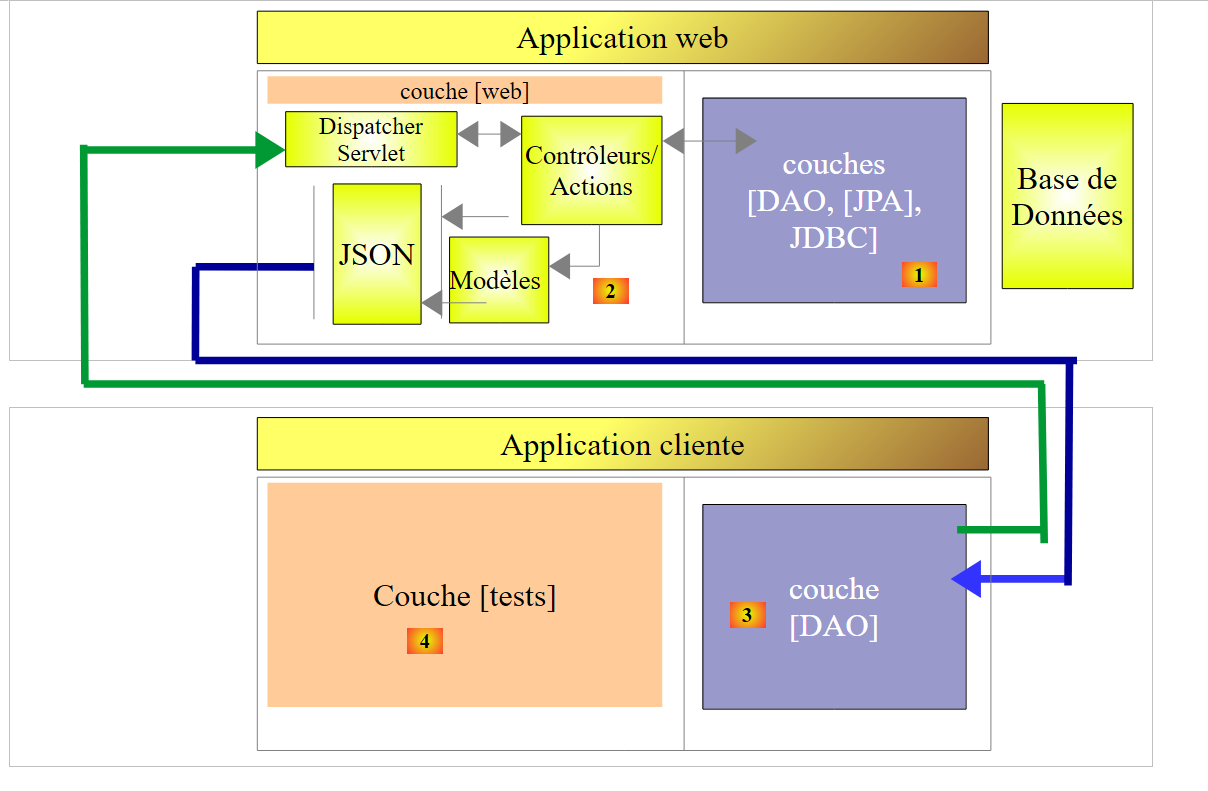 |
- 在 [1] 中,[DAO, [JPA], JDBC] 由前几章(特别是第 15 节)中介绍的 24 种配置之一实现;
- 远程客户端的 [DAO] [3] 层实现了与 [DAO] [1] 层相同的接口,这使得我们可以使用与前几章相同的测试层。 一切都仿佛 [2-3] 层对 [4] 层是透明的;
我们将基于以下项目:
- 项目 [sgbd-config-jdbc],用于配置六个 SGBD 中的一个所对应的 JDBC 层;
- 项目 [sgbd-config-jpa-*],该项目配置了 SGBD 的 JPA 层,该 SGBD 是从所研究的三个 JPA 实现中选出的 (Hibernate、EclipseLink、OpenJpa);
- 通用项目 [spring-jdbc-04],该项目实现了 [DAO] 和 [1] 层;
- 通用项目 [spring-jpa-generic],该项目实现了 [DAO] 和 [2] 层;
- 通用项目 [spring-webjson-server-jdbc-generic],该项目实现了基于项目 [spring-jdbc-04] 的 Web 服务;
- 通用项目 [spring-webjson-server-jpa-generic],它实现了基于项目 [spring-jpa-generic] 的 Web 服务;
- 通用客户端 [spring-webjson-client-generic],它将作为 Web 服务 24 种配置的唯一客户端;
17.2. 工作环境的搭建
我们将使用以下组件:
- SGBD MySQL 5.6.25;
- JPA Hibernate 实现;
将以下项目导入 STS:
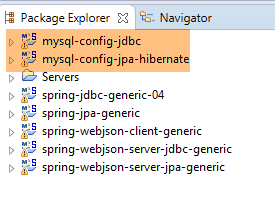 |
- [spring-webjson-*] 项目位于 [<exemples>\spring-database-generic\spring-webjson] 文件夹中;
- 执行 [Alt-F5],然后重新生成上述所有项目;
要验证工作环境是否安装正确,请按以下步骤操作:
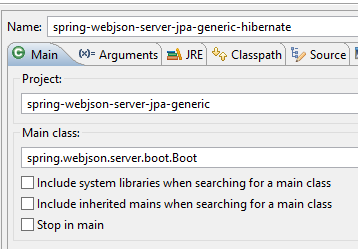
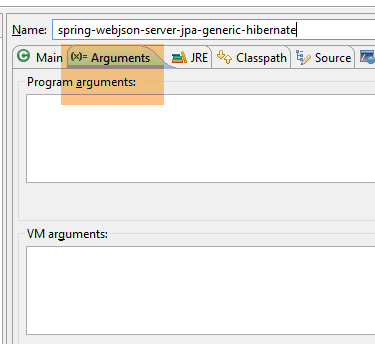
- 使用基于 JPA / Hibernate 实现的运行配置 [spring-webjson-server-jpa-generic-hibernate] 启动 Web 服务;
 |  |
然后:
- 使用运行配置 [spring-webjson-client-generic] 启动该 Web 服务的客户端,该配置是 JUnit 的测试版本:
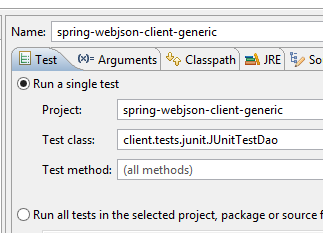 | 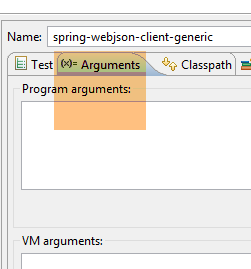 |
测试应成功:
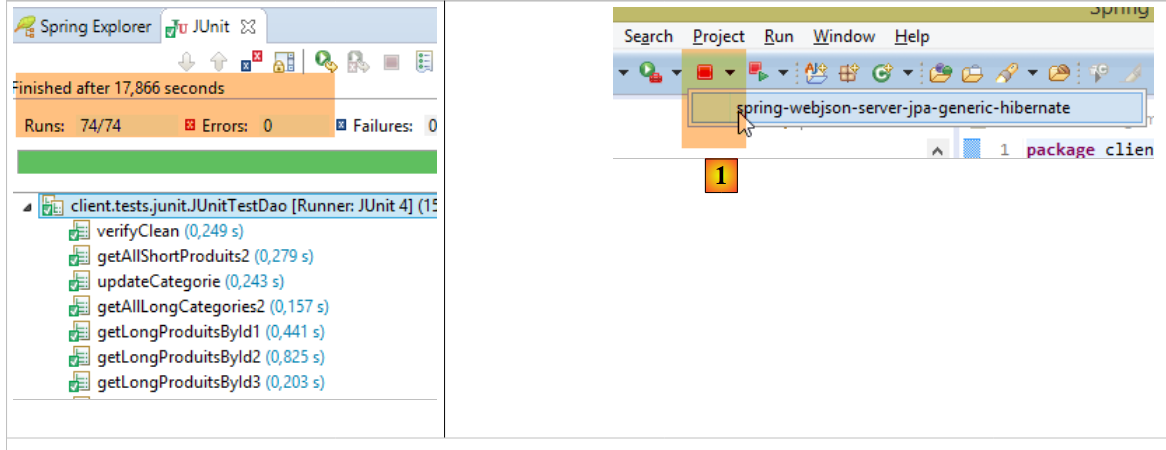 |
- 在 [1] 中,停止 Web 服务,然后使用基于 JDBC 实现的运行配置 [spring-webjson-server-jdbc-generic] 启动 Web 服务:
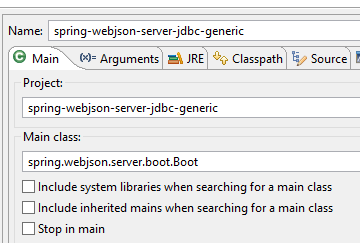 | 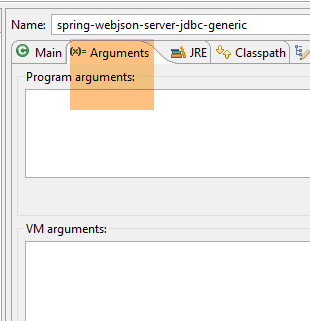 |
然后使用运行配置 [spring-webjson-client-generic] 启动该 Web 服务的客户端:
| |
测试应成功:
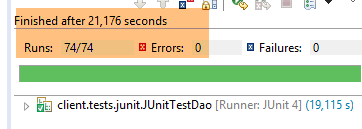 |
17.3. Web 服务实现 / jSON / JDBC
首先,我们关注以下架构:
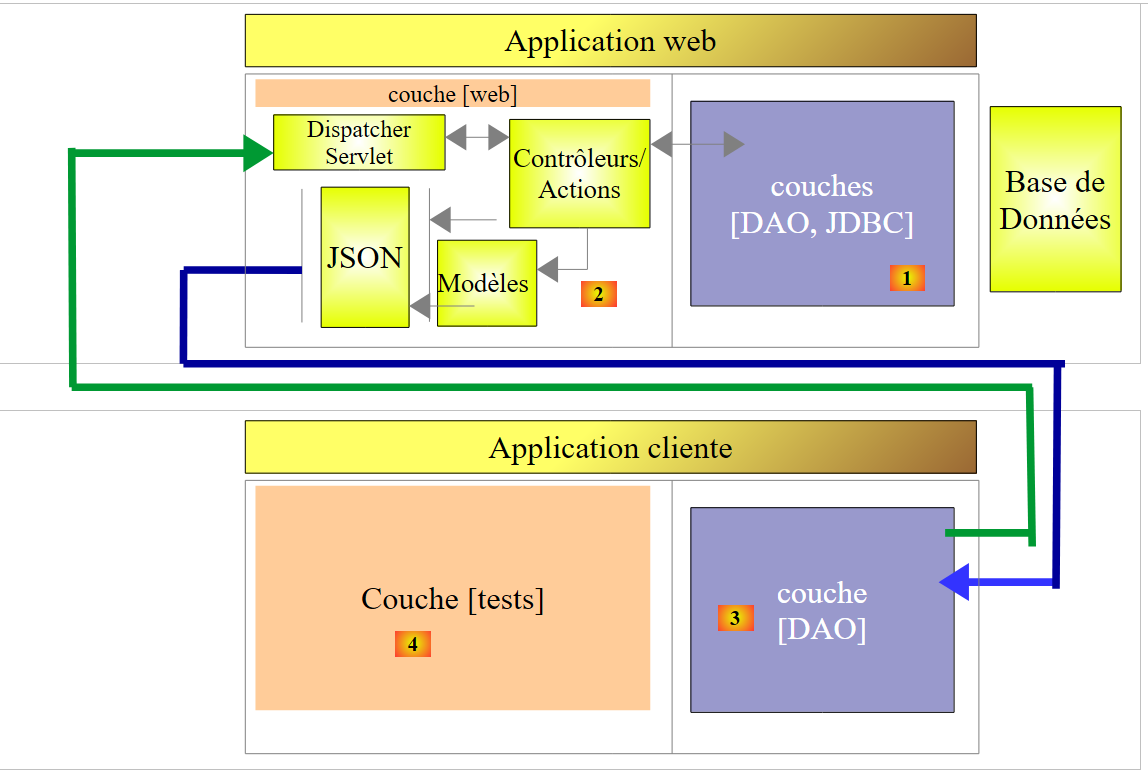 |
其中 [DAO] [1] 层直接与 JDBC 的 SGBD 层进行通信。
17.3.1. Web服务的Eclipse项目
Web 服务的 Eclipse 项目 / jSON / JDBC 如下:
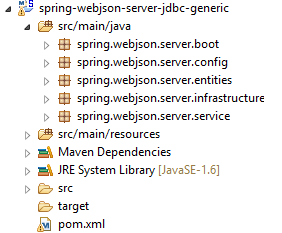 |
这是一个 Maven 项目,其 [pom.xml] 文件如下:
<project xmlns="http://maven.apache.org/POM/4.0.0" xmlns:xsi="http://www.w3.org/2001/XMLSchema-instance"
    xsi:schemaLocation="http://maven.apache.org/POM/4.0.0 http://maven.apache.org/xsd/maven-4.0.0.xsd">
    <modelVersion>4.0.0</modelVersion>
    <groupId>dvp.spring.database</groupId>
    <artifactId>spring-webjson-server-jdbc-generic</artifactId>
    <version>0.0.1-SNAPSHOT</version>

    <name>spring-webjson-server-jdbc-generic</name>
    <description>démo spring mvc</description>

    <parent>
        <groupId>org.springframework.boot</groupId>
        <artifactId>spring-boot-starter-parent</artifactId>
        <version>1.2.3.RELEASE</version>
    </parent>

    <dependencies>
        <!-- Web层 -->
        <dependency>
            <groupId>org.springframework.boot</groupId>
            <artifactId>spring-boot-starter-web</artifactId>
        </dependency>
        <!-- 层[DAO] -->
        <dependency>
            <groupId>dvp.spring.database</groupId>
            <artifactId>spring-jdbc-generic-04</artifactId>
            <version>0.0.1-SNAPSHOT</version>
        </dependency>
    </dependencies>
    <!-- 插件 -->
    <build>
        <plugins>
            <plugin>
                <groupId>org.apache.maven.plugins</groupId>
                <artifactId>maven-surefire-plugin</artifactId>
                <version>2.18.1</version>
            </plugin>
        </plugins>
    </build>

</project>
- 第 11-15 行:父 Maven 项目;
- 第 24-28 行:对由项目 [spring-jdbc-generic-04] 实现的 [DAO / JDBC] 层的依赖;
- 第 19-22 行:对 [spring-boot-starter-web] 构建的依赖。该构建包含创建 Web 服务 / jSON 所需的所有依赖项。但同时也引入了一些不必要的库。 因此需要更精确的配置,但此配置对于入门来说很实用。
此配置引入的依赖项如下:
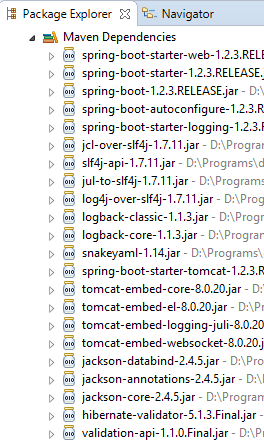 | 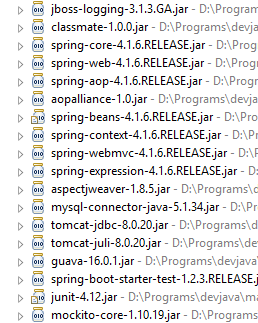 | 1 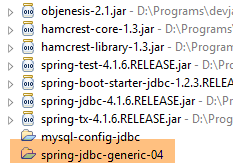 |
- 在 [1] 中,可以看到 Eclipse 已识别出对项目存档 [spring-jdbc-generic-04] 的依赖;
上述依赖关系同时属于 [DAO] 层和 [web] 层。
17.3.2. [web] 层的配置
[web] 层由两个 Spring 配置文件进行配置:
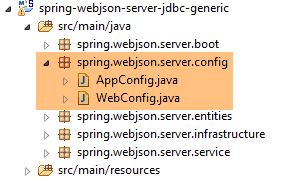 |
17.3.2.1. [WebConfig] 类
[WebConfig] 类的首要作用是配置:
- 将部署 Web 服务的 Tomcat 服务器;
- 用于对 [Produit] 和 [Categorie] 对象进行序列化/反序列化的 jSON 过滤器:
package spring.webjson.server.config;

import java.util.List;

import org.springframework.beans.factory.annotation.Autowired;
import org.springframework.beans.factory.config.ConfigurableBeanFactory;
import org.springframework.boot.context.embedded.EmbeddedServletContainerFactory;
import org.springframework.boot.context.embedded.ServletRegistrationBean;
import org.springframework.boot.context.embedded.tomcat.TomcatEmbeddedServletContainerFactory;
import org.springframework.context.ApplicationContext;
import org.springframework.context.annotation.Bean;
import org.springframework.context.annotation.Configuration;
import org.springframework.context.annotation.Scope;
import org.springframework.http.converter.HttpMessageConverter;
import org.springframework.http.converter.json.MappingJackson2HttpMessageConverter;
import org.springframework.web.context.WebApplicationContext;
import org.springframework.web.servlet.DispatcherServlet;
import org.springframework.web.servlet.config.annotation.EnableWebMvc;
import org.springframework.web.servlet.config.annotation.WebMvcConfigurerAdapter;

import com.fasterxml.jackson.databind.ObjectMapper;
import com.fasterxml.jackson.databind.ser.impl.SimpleBeanPropertyFilter;
import com.fasterxml.jackson.databind.ser.impl.SimpleFilterProvider;

@Configuration
@EnableWebMvc
public class WebConfig extends WebMvcConfigurerAdapter {

    // -------------------------------- 层配置 [web]
    @Autowired
    private ApplicationContext context;

    @Bean
    public DispatcherServlet dispatcherServlet() {
        DispatcherServlet servlet=new DispatcherServlet((WebApplicationContext) context);
        return servlet;
    }

    @Bean
    public ServletRegistrationBean servletRegistrationBean(DispatcherServlet dispatcherServlet) {
        return new ServletRegistrationBean(dispatcherServlet, "/*");
    }

    @Bean
    public EmbeddedServletContainerFactory embeddedServletContainerFactory() {
        return new TomcatEmbeddedServletContainerFactory("", 8081);
    }

    // -------------------------------- 过滤器配置 [json]
    ...
}
- 第 25 行:该类是 Spring 配置类;
- 第 26 行:注解 [@EnableWebMvc] 表明 Web 层通过 Spring 实现 MVC。这将触发一些隐式配置,我们无需手动进行;
- 第30-31行:注入应用程序的Spring上下文;
- 第33-37行:定义了Bean [dispatcherServlet],该Bean在Spring应用程序MVC中扮演[FrontController]的角色,其作用是将客户端的请求路由到能够处理这些请求的控制器;
- 第 39-42 行:注册了 Web 服务的 Servlet 及其处理的 URL。此处写的是 [/*],表示所有 URLs;
- 第 44-47 行:定义 Bean [embeddedServletContainerFactory],该 Bean 指定了要使用的 Web 服务器。此处将使用 Tomcat Web 服务器 [http://tomcat.apache.org/]。 也可以使用 Jetty 服务器 [http://www.eclipse.org/jetty/]。这两者都是 Maven 依赖项中内置的服务器。当 [Spring Boot] 驱动项目启动时,它会自动启动配置中指定的 Web 服务器,并在其上部署 Web 服务或 Web 应用程序;
jSON 过滤器的配置如下:
package spring.webjson.server.config;

import java.util.List;
...

@Configuration
@EnableWebMvc
public class WebConfig extends WebMvcConfigurerAdapter {

    // -------------------------------- 层配置 [web]
...
    // -------------------------------- 过滤器配置 [json]
    // 映射 jSON
    @Bean
    public MappingJackson2HttpMessageConverter mappingJackson2HttpMessageConverter() {
        final MappingJackson2HttpMessageConverter converter = new MappingJackson2HttpMessageConverter();
        final ObjectMapper objectMapper = new ObjectMapper();
        converter.setObjectMapper(objectMapper);
        return converter;
    }

    @Override
    public void configureMessageConverters(List<HttpMessageConverter<?>> converters) {
        converters.add(mappingJackson2HttpMessageConverter());
        super.configureMessageConverters(converters);
    }

    // 过滤器 jSON
    @Bean
    public ObjectMapper jsonMapper(MappingJackson2HttpMessageConverter mappingJackson2HttpMessageConverter) {
        return mappingJackson2HttpMessageConverter.getObjectMapper();
    }

    @Bean
    @Scope(value = ConfigurableBeanFactory.SCOPE_PROTOTYPE)
    ObjectMapper jsonMapperShortCategorie(MappingJackson2HttpMessageConverter mappingJackson2HttpMessageConverter) {
        ObjectMapper jsonMapper = jsonMapper(mappingJackson2HttpMessageConverter);
        jsonMapper.setFilters(new SimpleFilterProvider().addFilter("jsonFilterCategorie",
                SimpleBeanPropertyFilter.serializeAllExcept("produits")));
        return jsonMapper;
    }

    @Bean
    @Scope(value = ConfigurableBeanFactory.SCOPE_PROTOTYPE)
    ObjectMapper jsonMapperLongCategorie(MappingJackson2HttpMessageConverter mappingJackson2HttpMessageConverter) {
        ObjectMapper jsonMapper = jsonMapper(mappingJackson2HttpMessageConverter);
        jsonMapper.setFilters(new SimpleFilterProvider().addFilter("jsonFilterCategorie",
                SimpleBeanPropertyFilter.serializeAllExcept()).addFilter("jsonFilterProduit",
                SimpleBeanPropertyFilter.serializeAllExcept("categorie")));
        return jsonMapper;
    }

    @Bean
    @Scope(value = ConfigurableBeanFactory.SCOPE_PROTOTYPE)
    ObjectMapper jsonMapperShortProduit(MappingJackson2HttpMessageConverter mappingJackson2HttpMessageConverter) {
        ObjectMapper jsonMapper = jsonMapper(mappingJackson2HttpMessageConverter);
        jsonMapper.setFilters(new SimpleFilterProvider().addFilter("jsonFilterProduit",
                SimpleBeanPropertyFilter.serializeAllExcept("categorie")));
        return jsonMapper;
    }

    @Bean
    @Scope(value = ConfigurableBeanFactory.SCOPE_PROTOTYPE)
    ObjectMapper jsonMapperLongProduit(MappingJackson2HttpMessageConverter mappingJackson2HttpMessageConverter) {
        ObjectMapper jsonMapper = jsonMapper(mappingJackson2HttpMessageConverter);
        jsonMapper.setFilters(new SimpleFilterProvider().addFilter("jsonFilterProduit",
                SimpleBeanPropertyFilter.serializeAllExcept()).addFilter("jsonFilterCategorie",
                SimpleBeanPropertyFilter.serializeAllExcept("produits")));
        return jsonMapper;
    }
}
- 第 8 行:类 [WebConfig] 继承自类 [WebMvcConfigurerAdapter]。后者为 Web 应用程序配置了默认值。若需自定义该配置,则需重写该类的某些方法。 在此,我们希望重写 [22-26] 中的 [configureMessageConverters] 方法(请注意 @Override 注解),该方法定义了一个“转换器”列表。Web 服务 /jSON 及其客户端之间交换文本行。 转换器是一种能够根据接收到的文本行创建对象(反序列化),并根据对象生成文本行(序列化)的工具。在此,文本行将作为字符串 jSON 处理。 因此我们将讨论 jSON 的序列化/反序列化;
- 第23行:方法[configureMessageConverters]接收一个转换器列表作为参数;
- 第24-25行:将[14-20]行中的转换器jSON [MappingJackson2HttpMessageConverter]添加到该列表中。这将支持客户端与服务器之间的jSON数据交换;
- [14-20] 行:定义了一个由类 [MappingJackson2HttpMessageConverter] 实现的转换器 jSON。该类(第 10 行)可在项目的 Maven 依赖项中找到;
- 第 [17-18] 行:创建了一个映射器 jSON,并将其分配给转换器 [MappingJackson2HttpMessageConverter];
- [29-32] 行:将第 17 行创建的映射器 jSON 定义为 Spring Bean。这将其放入 Spring 上下文中,使其可用于注入到其他 Bean 中或在 Web 应用程序代码中使用;
- 第 34-41 行:为前面的映射器 jSON 定义了一个过滤器 jSON;
- 第 35 行:注解 [@Scope(value = ConfigurableBeanFactory.SCOPE_PROTOTYPE)] 确保此处定义的 Bean 不是单例。每次从上下文中请求该 Bean 时,都会重新执行方法 [jsonMapperCategorieWithoutProduits]。 此处需要这样做,因为我们定义了四个 jSON 过滤器。但在任何给定时刻,只能有一个处于活动状态。通过将 Bean 的作用域设为 [ConfigurableBeanFactory.SCOPE_PROTOTYPE],可以确保该方法会被重新执行,并且之前的过滤器会被新的过滤器替换;
- 要理解这些过滤器,需注意在 [DAO] 层中:
- 实体 [Produit] 已被 [jsonFilterProduit] 注解修饰;
- 实体 [Categorie] 被标注了注释 [jsonFilterCategorie];
因此需要定义名称与之对应的过滤器。
- [34-41] 行:定义了一个名为 [jsonMapperShortCategorie] 的过滤器,该过滤器可生成某个类别(不含其产品)的 jSON 表示形式;
- [43-51] 行:定义了一个名为 [jsonMapperLongCategorie] 的过滤器,该过滤器可生成包含其产品的类别视图 jSON;
- 行 [53-60]:定义了一个名为 [jsonMapperShortProduit] 的过滤器,用于生成不包含所属类别的产品的表示形式 jSON;
- 行 [62-70]:定义了一个名为 [jsonMapperLongProduit] 的过滤器,用于生成包含其所属类别的 jSON 产品表示;
17.3.2.2. 类 [AppConfig]
类 [AppConfig] 配置整个应用程序,即 [web] 和 [DAO] 层:
package spring.webjson.server.config;

import org.springframework.context.annotation.ComponentScan;
import org.springframework.context.annotation.Configuration;
import org.springframework.context.annotation.Import;

@Configuration
@ComponentScan(basePackages = { "spring.webjson.server.service" })
@Import({ spring.jdbc.config.AppConfig.class, WebConfig.class })
public class AppConfig {

}
- 第 7 行:该类是 Spring 配置类;
- 第 9 行:导入 [DAO / JDBC] 层的 Bean 以及由类 [WebConfig] 定义的 Bean。 因此,[DAO]层中的所有Bean都将在Web应用程序/jSON中可用;
- 第 8 行:指定了可在哪些包中找到其他 Spring Bean;
17.3.3. 异常 [ServerException]
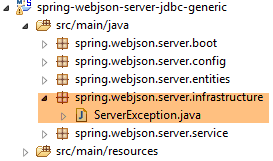 |
与前几章类似,[DAO]层抛出了一个未捕获的异常[DaoException],[web]层将抛出一个未捕获的异常[ServerException]:
package spring.webjson.server.infrastructure;

import generic.jdbc.infrastructure.UncheckedException;

public class ServerException extends UncheckedException {

    private static final long serialVersionUID = 1L;

    // 制造商
    public ServerException() {
        super();
    }

    public ServerException(int code, Throwable e, String simpleClassName) {
        super(code, e, simpleClassName);
    }
}
- 第 5 行:类 [ServerException] 继承了在配置 JDBC 层(第 3 行)的项目中定义的类 [UncheckedException];
17.3.4. 控制器
 |
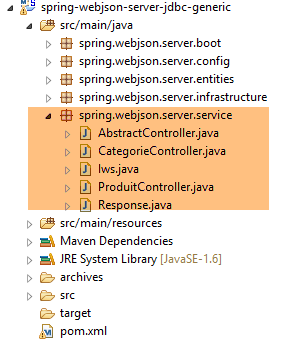 |
这里将有两个控制器:
- [CategorieController] 将控制对类别的查询;
- [CategorieController] 负责处理产品查询;
控制器暴露的 URL 方法与 [DAO] 层中的 [DaoCategorie] 和 [DaoProduit] 接口的方法一一对应:
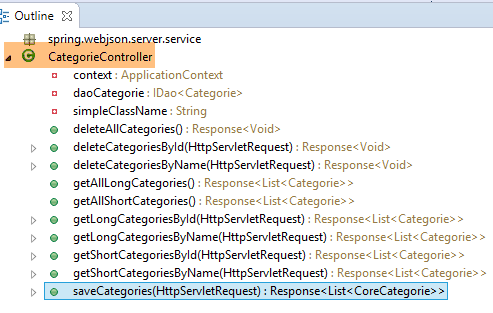 | 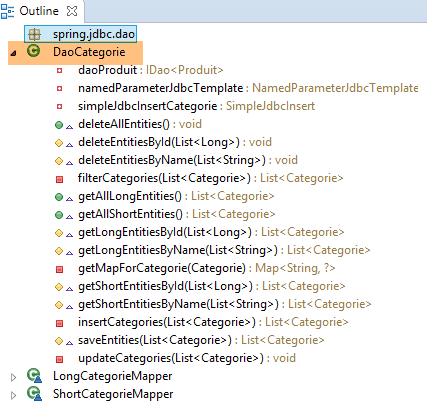 |
因此如上所述:
- Web方法 [deleteAllCategories] 将调用类 [DaoCategorie] 中的方法 [deleteAllEntities];
- Web方法 [getShortCategoriesById] 将调用类 [DaoCategorie] 中的方法 [getShortEntitiesById];
产品也是如此:
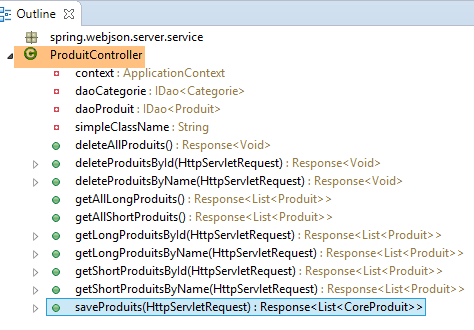 | 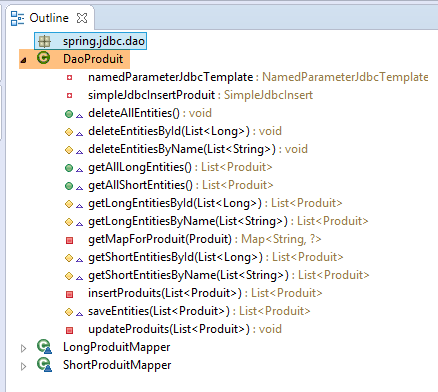 |
17.3.4.1. 由控制器 [CategorieController] 暴露的 URL
| |
| |
| |
| |
| |
| |
| |
| |
| |
| |
17.3.4.2. 由控制器 [ProduitController] 暴露的 URL
| |
| |
| |
| |
| |
| |
| |
| |
| |
| |
17.3.5. Web服务的通用实现
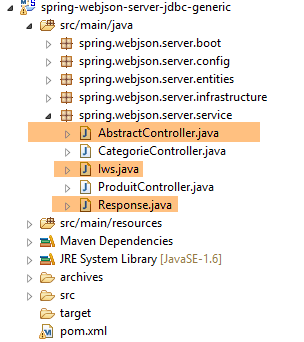 |
Web 服务公开的 URL 列表显示,我们提供了相同类型的 URL 来管理类别和产品。 与其编写两个非常相似的控制器,不如让它们继承自一个类,由该类处理两个控制器共有的所有工作。这就是上文提到的 [AbstractController] 类。该类将实现以下 [Iws] 接口:
package spring.webjson.server.service;
import java.util.List;
import javax.servlet.http.HttpServletRequest;
import spring.jdbc.entities.AbstractCoreEntity;
public interface Iws<T extends AbstractCoreEntity> {
// 所有 T 实体的列表
public Response<List<T>> getAllShortEntities();
public Response<List<T>> getAllLongEntities();
// 特定实体的列表 - 简短版本
public Response<List<T>> getShortEntitiesById(HttpServletRequest request);
public Response<List<T>> getShortEntitiesByName(HttpServletRequest request);
// 特定实体的列表 - 长版
public Response<List<T>> getLongEntitiesById(HttpServletRequest request);
public Response<List<T>> getLongEntitiesByName(HttpServletRequest request);
// 多个实体的更新
public Response<List<T>> saveEntities(HttpServletRequest request);
// 删除所有实体
public Response<Void> deleteAllEntities();
// 删除多个实体
public Response<Void> deleteEntitiesById(HttpServletRequest request);
public Response<Void> deleteEntitiesByName(HttpServletRequest request);
}
该接口继承了即将被调用的 [DAO] 层接口中的方法:
package spring.jdbc.dao;
import java.util.List;
import spring.jdbc.entities.AbstractCoreEntity;
public interface IDao<T extends AbstractCoreEntity> {
// 所有 T 类实体的列表
public List<T> getAllShortEntities();
public List<T> getAllLongEntities();
// 特定实体的列表 - 简短版
public List<T> getShortEntitiesById(Iterable<Long> ids);
public List<T> getShortEntitiesById(Long... ids);
public List<T> getShortEntitiesByName(Iterable<String> names);
public List<T> getShortEntitiesByName(String... names);
// 特定实体的列表 - 长版
public List<T> getLongEntitiesById(Iterable<Long> ids);
public List<T> getLongEntitiesById(Long... ids);
public List<T> getLongEntitiesByName(Iterable<String> names);
public List<T> getLongEntitiesByName(String... names);
// 更新多个实体
public List<T> saveEntities(Iterable<T> entities);
public List<T> saveEntities(@SuppressWarnings("unchecked") T... entities);
// 删除所有实体
public void deleteAllEntities();
// 删除多个实体
public void deleteEntitiesById(Iterable<Long> ids);
public void deleteEntitiesById(Long... ids);
public void deleteEntitiesByName(Iterable<String> names);
public void deleteEntitiesByName(String... names);
public void deleteEntitiesByEntity(Iterable<T> entities);
public void deleteEntitiesByEntity(@SuppressWarnings("unchecked") T... entities);
}
将 [DAO] 层的 [IDao<T>] 接口转换为 Web 服务的 [Iws<T>] 接口时,遵循了以下规则:
- [Iws<T>] 接口的方法不会抛出异常。若发生异常,该异常将被封装在 [Response] 对象中;
- 诸如第45行和第47行中的[Iterable<String> names, String... names]等参数变体将消失。方法将从类型为[HttpServletRequest request]的客户端的HTTP请求中获取其参数;
Web 服务的所有响应都将封装在以下 [Response] 对象中:
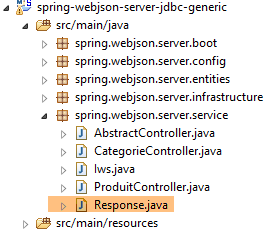 |
package spring.webjson.server.service;
public class Response<T> {
// ----------------- 属性
// 操作状态
private int status;
// 一条错误信息
private String exception;
// 响应正文
private T body;
// 构造函数
public Response() {
}
public Response(int status, String exception, T body) {
this.status = status;
this.exception = exception;
this.body = body;
}
// 获取器和设置器
...
}
- 第 4 行:响应封装了一个 T 类型;
- 第 12 行:类型为 T 的响应;
- 第 7-10 行:方法可能抛出异常。在此情况下,它将返回包含以下内容的响应:
- 第 8 行:status!=0;
- 第10行:一条错误消息;
类 [AbstractController] 如下所示:
package spring.webjson.server.service;
import java.util.List;
import javax.annotation.PostConstruct;
import javax.servlet.http.HttpServletRequest;
import org.springframework.beans.factory.annotation.Autowired;
import org.springframework.context.ApplicationContext;
import spring.jdbc.dao.IDao;
import spring.jdbc.entities.AbstractCoreEntity;
import spring.jdbc.infrastructure.DaoException;
import spring.webjson.server.infrastructure.ServerException;
import com.fasterxml.jackson.core.type.TypeReference;
import com.fasterxml.jackson.databind.ObjectMapper;
import com.google.common.io.CharStreams;
public abstract class AbstractController<T extends AbstractCoreEntity> implements Iws<T> {
@Autowired
protected ApplicationContext context;
// DAO 层
private IDao<T> dao;
abstract protected IDao<T> getDao();
// 本地
private String simpleClassName = getClass().getSimpleName();
@PostConstruct
public void init(){
dao=getDao();
}
@Override
public Response<List<T>> getAllShortEntities() {
try {
// 响应
return new Response<List<T>>(0, null, dao.getAllShortEntities());
} catch (DaoException e) {
return new Response<List<T>>(1, e.toString(), null);
} catch (Exception e) {
return new Response<List<T>>(2, new ServerException(1007, e, simpleClassName).toString(), null);
}
}
@Override
public Response<List<T>> getAllLongEntities() {
try {
// 响应
return new Response<List<T>>(0, null, dao.getAllLongEntities());
} catch (DaoException e) {
return new Response<List<T>>(1, e.toString(), null);
} catch (Exception e) {
return new Response<List<T>>(2, new ServerException(1008, e, simpleClassName).toString(), null);
}
}
@Override
public Response<List<T>> getShortEntitiesById(HttpServletRequest request) {
...
}
@Override
public Response<List<T>> getShortEntitiesByName(HttpServletRequest request) {
...
}
@Override
public Response<List<T>> getLongEntitiesById(HttpServletRequest request) {
...
}
@Override
public Response<List<T>> getLongEntitiesByName(HttpServletRequest request) {
...
}
@Override
public Response<List<T>> saveEntities(HttpServletRequest request) {
return new Response<List<T>>(2, new ServerException(1013, new RuntimeException("[saveEntities] not implemented"), simpleClassName).toString(), null);
}
@Override
public Response<Void> deleteAllEntities() {
try {
// 删除
dao.deleteAllEntities();
// 响应
return new Response<Void>(0, null, null);
} catch (DaoException e) {
return new Response<Void>(1, e.toString(), null);
} catch (Exception e) {
return new Response<Void>(2, new ServerException(1014, e, simpleClassName).toString(), null);
}
}
@Override
public Response<Void> deleteEntitiesById(HttpServletRequest request) {
...
}
@Override
public Response<Void> deleteEntitiesByName(HttpServletRequest request) {
...
}
}
所有方法的实现方式均相同:
- 如果它们需要信息,则从 [HttpServletRequest request] 对象中获取;
- 它们调用 [DAO] 层中与自身同名的方法;
- 它们处理可能发生的异常,这些异常可能出现在操作 1(参数获取)中,也可能出现在操作 2(调用 [DAO] 层)中;
首先,让我们看看 [DAO] 层是如何注入到 [AbstractController] 类中的:
public abstract class AbstractController<T extends AbstractCoreEntity> implements Iws<T> {
@Autowired
protected ApplicationContext context;
// 层DAO
private IDao<T> dao;
abstract protected IDao<T> getDao();
@PostConstruct
public void init(){
dao=getDao();
}
- 第 1 行:该类是抽象类,并实现了通用接口 [Iws<T>];
- 第3-4行:注入Spring上下文;
- 第 7 行:待使用的 [DAO] 层的引用目前尚不可知;
- 第 9 行:抽象方法 [getDao],该方法将返回待使用的 [DAO] 层的引用。 该方法将由子类重写,因此由子类决定使用哪个 [DAO] 层(DaoProduit 或 DaoCategorie);
- 第 11 行:注解 [@PostConstruct] 用于标注在对象实例化完成后需执行的方法。当实例化完成时,Spring 的注入已完成。 此时子类将获得其 [DAO] 层的引用,并可将其传递给父类;
方法 [getShortEntitiesById] 如下所示:
@Override
public Response<List<T>> getShortEntitiesById(HttpServletRequest request) {
try {
// 获取提交的值
String body = CharStreams.toString(request.getReader());
// 对其进行反序列化
ObjectMapper mapper = context.getBean("jsonMapper", ObjectMapper.class);
List<Long> ids = mapper.readValue(body, new TypeReference<List<Long>>() {
});
// 响应
return new Response<List<T>>(0, null, dao.getShortEntitiesById(ids));
} catch (DaoException e) {
return new Response<List<T>>(1, e.toString(), null);
} catch (Exception e) {
return new Response<List<T>>(2, new ServerException(1009, e, simpleClassName).toString(), null);
}
}
- 第 5 行:客户端提交的值将是一个字符串 jSON。此处即为该字符串的获取位置;
- 第7-9行:字符串jSON包含需要生成短版本的实体的主键列表;
- 第11行:调用同名的[DAO]方法。类型为[List<T>]的响应被封装在[Response]对象中;
- 第 13 行:处理 [DAO] 层抛出异常的情况;
- 第 15 行:处理其他异常的情况,特别是第 8 行中 jSON 参数反序列化可能引发的异常;
方法 [getShortEntitiesByName] 与此类似:
@Override
public Response<List<T>> getShortEntitiesByName(HttpServletRequest request) {
try {
// 获取提交的值
String body = CharStreams.toString(request.getReader());
// 对其进行反序列化
ObjectMapper mapper = context.getBean("jsonMapper", ObjectMapper.class);
List<String> noms = mapper.readValue(body, new TypeReference<List<String>>() {
});
// 响应
return new Response<List<T>>(0, null, dao.getShortEntitiesByName(noms));
} catch (DaoException e) {
return new Response<List<T>>(1, e.toString(), null);
} catch (Exception e) {
return new Response<List<T>>(2, new ServerException(1010, e, simpleClassName).toString(), null);
}
}
- 第 4-9 行:此处的参数 jSON 是需要生成简短版本的类别名称列表;
方法 [saveEntities] 尚未实现,因为它很大程度上取决于待持久化实体的性质,即 [Categorie] 或 [Produit]。可提取的代码较少。因此,这项工作留给子类处理。
@Override
public Response<List<T>> saveEntities(HttpServletRequest request) {
return new Response<List<T>>(2, new ServerException(1013, new RuntimeException("[saveEntities] not implemented"), simpleClassName).toString(), null);
}
17.3.6. 控制器 [CategorieController]
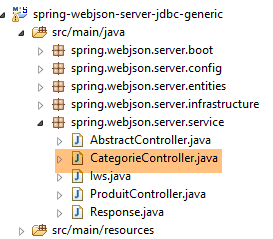 |
控制器 [CategorieController] 负责处理与以下类别相关的 URL:
package spring.webjson.server.service;
import java.util.ArrayList;
import java.util.List;
import javax.servlet.http.HttpServletRequest;
import org.springframework.beans.factory.annotation.Autowired;
import org.springframework.web.bind.annotation.RequestMapping;
import org.springframework.web.bind.annotation.RequestMethod;
import org.springframework.web.bind.annotation.RestController;
import spring.jdbc.dao.IDao;
import spring.jdbc.entities.Categorie;
import spring.jdbc.entities.Produit;
import spring.jdbc.infrastructure.DaoException;
import spring.webjson.server.entities.CoreCategorie;
import spring.webjson.server.entities.CoreProduit;
import spring.webjson.server.infrastructure.ServerException;
import com.fasterxml.jackson.core.type.TypeReference;
import com.fasterxml.jackson.databind.ObjectMapper;
import com.google.common.io.CharStreams;
@RestController
public class CategorieController extends AbstractController<Categorie> {
@Autowired
private IDao<Categorie> daoCategorie;
@Override
protected IDao<Categorie> getDao() {
return daoCategorie;
}
// 本地
private String simpleClassName = getClass().getSimpleName();
@RequestMapping(value = "/getAllShortCategories", method = RequestMethod.GET)
public Response<List<Categorie>> getAllShortCategories() {
// 父级
Response<List<Categorie>> response = super.getAllShortEntities();
// 序列化过滤器 jSON
context.getBean("jsonMapperShortCategorie", ObjectMapper.class);
// 响应
return response;
}
@RequestMapping(value = "/getAllLongCategories", method = RequestMethod.GET)
public Response<List<Categorie>> getAllLongCategories() {
// 父级
Response<List<Categorie>> response = super.getAllLongEntities();
// 序列化过滤器 jSON
context.getBean("jsonMapperLongCategorie", ObjectMapper.class);
// 响应
return response;
}
@RequestMapping(value = "/getShortCategoriesById", method = RequestMethod.POST)
public Response<List<Categorie>> getShortCategoriesById(HttpServletRequest request) {
// 父级
Response<List<Categorie>> response = super.getShortEntitiesById(request);
// 序列化过滤器 jSON
context.getBean("jsonMapperShortCategorie", ObjectMapper.class);
// 响应
return response;
}
@RequestMapping(value = "/getShortCategoriesByName", method = RequestMethod.POST)
public Response<List<Categorie>> getShortCategoriesByName(HttpServletRequest request) {
// 父级
Response<List<Categorie>> response = super.getShortEntitiesByName(request);
// 序列化过滤器 jSON
context.getBean("jsonMapperShortCategorie", ObjectMapper.class);
// 响应
return response;
}
@RequestMapping(value = "/getLongCategoriesById", method = RequestMethod.POST)
public Response<List<Categorie>> getLongCategoriesById(HttpServletRequest request) {
// 父级
Response<List<Categorie>> response = super.getLongEntitiesById(request);
// 序列化过滤器 jSON
context.getBean("jsonMapperLongCategorie", ObjectMapper.class);
// 响应
return response;
}
@RequestMapping(value = "/getLongCategoriesByName", method = RequestMethod.POST)
public Response<List<Categorie>> getLongCategoriesByName(HttpServletRequest request) {
// 父级
Response<List<Categorie>> response = super.getLongEntitiesByName(request);
// 序列化过滤器 jSON
context.getBean("jsonMapperLongCategorie", ObjectMapper.class);
// 响应
return response;
}
@RequestMapping(value = "/saveCategories",
 method = RequestMethod.POST, consumes =
 "application/json; charset=UTF-8")
public Response<List<CoreCategorie>> saveCategories(HttpServletRequest request) {
...
}
@RequestMapping(value = "/deleteAllCategories",
 method = RequestMethod.GET)
public Response<Void> deleteAllCategories() {
return super.deleteAllEntities();
}
@RequestMapping(value = "/deleteCategoriesById",
 method = RequestMethod.POST, consumes =
 "application/json; charset=UTF-8")
public Response<Void> deleteCategoriesById(HttpServletRequest request) {
return super.deleteEntitiesById(request);
}
@RequestMapping(value = "/deleteCategoriesByName",
 method = RequestMethod.POST, consumes =
 "application/json; charset=UTF-8")
public Response<Void> deleteCategoriesByName(HttpServletRequest request) {
return super.deleteEntitiesByName(request);
}
}
- 第 26 行:类 [CategorieController] 继承自类 [AbstractController];
- 第25行:注解[@RestController]将该类定义为Spring组件。此外,该注解还表明该类是一个Web服务,其方法会直接以jSON格式向客户端发送响应;
- 第28-29行:此处注入了[DAO]层的引用;
- 第 31-34 行:重写了父类中声明为抽象的 [getDao] 方法,其目的是返回一个指向 [DAO] 层的引用以供使用;
所有方法均遵循相同的模式:
- 将处理任务委托给父类;
- 初始化映射器 jSON,该映射器将执行响应的序列化;
- 发送响应;
让我们关注几个 URL 的签名:
| - URL 调用 [/getAllShortCategories] 时,会传入 GET |
| - URL [/getShortCategoriesById] 与 POST 一起调用。写入的值是 jSON 字符串,其中包含所需类别的 ; |
| - URL [/getLongCategoriesByName] 调用时传入 POST。提交的值是包含所需类别名称的字符串 ; |
现在,让我们详细说明 [saveCategories] 方法,该方法的格式与其他方法不同:
@RequestMapping(value = "/saveCategories", method = RequestMethod.POST, consumes = "application/json; charset=UTF-8")
public Response<List<CoreCategorie>> saveCategories(HttpServletRequest request) {
// 保存分类
try {
// 获取提交的值
String body = CharStreams.toString(request.getReader());
// 反序列化
ObjectMapper mapper = context.getBean("jsonMapperLongCategorie", ObjectMapper.class);
List<Categorie> categories = mapper.readValue(body, new TypeReference<List<Categorie>>() {
});
// 保存类别
categories = daoCategorie.saveEntities(categories);
// 返回结果
List<CoreCategorie> coreCategories = new ArrayList<CoreCategorie>();
for (Categorie categorie : categories) {
CoreCategorie coreCategorie = new CoreCategorie(categorie.getId());
coreCategories.add(coreCategorie);
List<Produit> produits = categorie.getProduits();
if (produits != null) {
List<CoreProduit> coreProduits = new ArrayList<CoreProduit>();
for (Produit produit : categorie.getProduits()) {
coreProduits.add(new CoreProduit(produit.getId()));
}
coreCategorie.setCoreProduits(coreProduits);
}
}
// 结果
return new Response<List<CoreCategorie>>(0, null, coreCategories);
} catch (DaoException e) {
return new Response<List<CoreCategorie>>(1, e.toString(), null);
} catch (Exception e) {
return new Response<List<CoreCategorie>>(2, new ServerException(1020, e, simpleClassName).toString(), null);
}
}
- 第 1 行:URL [/saveCategories] 附带一个传递的值。该值是字符串 jSON,其中包含要持久化的类别的长版本名称;
- 第5-10行:将根据字符串jSON重新创建待保留的类别。 将 [Produit] 与其 [Catégorie] 关联的链接 [produit.categorie] 实际值为 null,因为在 [Categorie] 的长版本中, 每个 [Produit] 本身就是其简短版本,不包含 [categorie] 字段。这并不影响,因为使用 JDBC 实现的 [DAO] 层不需要此信息;
- 第 12 行:类别已持久化。接收到的类别列表已补充了持久化项(类别和产品)的主键。 其他内容未作更改。与其返回整个接收到的列表(这会产生开销),我们只返回该列表中各元素的主键。为此,我们使用以下类:[CoreCategorie] 和 [CoreProduit]:
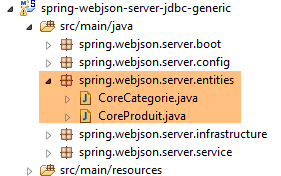 |
package spring.webjson.server.entities;
import java.util.List;
public class CoreCategorie {
// 主键
private Long id;
// 制造商
public CoreCategorie() {
}
public CoreCategorie(Long id) {
this.id=id;
}
// 产品列表
private List<CoreProduit> coreProduits;
// 获取器和设置器
...
}
- 第 8 行:产品的主键;
- 第 20 行:其产品的主键;
package spring.webjson.server.entities;
public class CoreProduit {
// 主键
private Long id;
// 构造函数
public CoreProduit() {
}
public CoreProduit(Long id) {
this.id = id;
}
// getter 和 setter
...
}
- 第 6 行:产品的主键;
让我们回到方法代码 [saveCategories]:
...
// 持久化分类
categories = daoCategorie.saveEntities(categories);
// 返回结果
List<CoreCategorie> coreCategories = new ArrayList<CoreCategorie>();
for (Categorie categorie : categories) {
CoreCategorie coreCategorie = new CoreCategorie(categorie.getId());
coreCategories.add(coreCategorie);
List<Produit> produits = categorie.getProduits();
if (produits != null) {
List<CoreProduit> coreProduits = new ArrayList<CoreProduit>();
for (Produit produit : categorie.getProduits()) {
coreProduits.add(new CoreProduit(produit.getId()));
}
coreCategorie.setCoreProduits(coreProduits);
}
}
// 结果
return new Response<List<CoreCategorie>>(0, null, coreCategories);
...
- 第5-17行:构建将返回给远程客户端的[CoreCategorie]列表;
- 第19行:返回响应并将其序列化为jSON;
17.3.7. jSON 过滤器管理
对于控制器中的每个方法,jSON的序列化/反序列化有两个时机:
- 提交值的反序列化:此处显式处理;
- 结果的序列化:此处采用隐式处理;
首先处理 [CategorieController.saveCategories] 中提交值的反序列化:
@RequestMapping(value = "/saveCategories", method = RequestMethod.POST, consumes = "application/json; charset=UTF-8")
public Response<List<CoreCategorie>> saveCategories(HttpServletRequest request) {
// 持久化类别
try {
// 获取提交的值
String body = CharStreams.toString(request.getReader());
// 反序列化
ObjectMapper mapper = context.getBean("jsonMapperLongCategorie", ObjectMapper.class);
List<Categorie> categories = mapper.readValue(body, new TypeReference<List<Categorie>>() {
});
- 第 8 行:在 Spring 上下文中获取一个配置好的映射器,用于管理过滤器 jSON [jsonMapperLongCategorie]。让我们回到配置类 [WebConfig] 中该映射器的定义:
// -------------------------------- 过滤器配置 [json]
// 映射 jSON
@Bean
public MappingJackson2HttpMessageConverter mappingJackson2HttpMessageConverter() {
final MappingJackson2HttpMessageConverter converter = new MappingJackson2HttpMessageConverter();
final ObjectMapper objectMapper = new ObjectMapper();
converter.setObjectMapper(objectMapper);
return converter;
}
@Override
public void configureMessageConverters(List<HttpMessageConverter<?>> converters) {
converters.add(mappingJackson2HttpMessageConverter());
super.configureMessageConverters(converters);
}
// 过滤器 jSON
@Bean
public ObjectMapper jsonMapper(MappingJackson2HttpMessageConverter mappingJackson2HttpMessageConverter) {
return mappingJackson2HttpMessageConverter.getObjectMapper();
}
@Bean
@Scope(value = ConfigurableBeanFactory.SCOPE_PROTOTYPE)
ObjectMapper jsonMapperShortCategorie(MappingJackson2HttpMessageConverter mappingJackson2HttpMessageConverter) {
ObjectMapper jsonMapper = jsonMapper(mappingJackson2HttpMessageConverter);
jsonMapper.setFilters(new SimpleFilterProvider().addFilter("jsonFilterCategorie",
SimpleBeanPropertyFilter.serializeAllExcept("produits")));
return jsonMapper;
}
@Bean
@Scope(value = ConfigurableBeanFactory.SCOPE_PROTOTYPE)
ObjectMapper jsonMapperLongCategorie(MappingJackson2HttpMessageConverter mappingJackson2HttpMessageConverter) {
ObjectMapper jsonMapper = jsonMapper(mappingJackson2HttpMessageConverter);
jsonMapper.setFilters(new SimpleFilterProvider().addFilter("jsonFilterCategorie",
SimpleBeanPropertyFilter.serializeAllExcept()).addFilter("jsonFilterProduit",
SimpleBeanPropertyFilter.serializeAllExcept("categorie")));
return jsonMapper;
}
- 第 32-40 行:由 [CategorieController] 类获取的映射器 jSON [jsonMapperLongCategorie];
- 第 35 行:该映射器由第 18-21 行中的 [jsonMapper] 方法渲染;
- 第 18-21 行:方法 [jsonMapper] 渲染了第 3-9 行中转换器 [MappingJackson2HttpMessageConverter] 的映射器 jSON;
换言之,映射器 jSON 由下文第 4 行从 [CategorieController.saveCategories] 中获取:
// 获取提交的值
String body = CharStreams.toString(request.getReader());
// 对其进行反序列化
ObjectMapper mapper = context.getBean("jsonMapperLongCategorie", ObjectMapper.class);
List<Categorie> categories = mapper.readValue(body, new TypeReference<List<Categorie>>() {
});
是 Spring 默认使用的转换器,用于反序列化客户端提交的值,并序列化发送给客户端的结果。在上面的代码行中,并未对提交的值进行隐式反序列化。若要实现这一点,应编写如下代码:
@RequestMapping(value = "/saveCategories", method = RequestMethod.POST, consumes = "application/json; charset=UTF-8")
public Response<List<CoreCategorie>> saveCategories(@RequestBody List<Categorie> categories) {
在这种情况下,参数 [categories] 中提交的值将自动反序列化。但存在 [Categorie] 实体所拥有的过滤器 [jsonFilterCategorie] 的问题。必须对其进行配置。 因此,我们选择了显式反序列化(第4-5行)。第二个需要注意的点是,第4行的映射器(即Spring默认使用的MVC)也适用于[Response<List<CoreCategorie>]结果的序列化。 实际上,实体 [CoreCategorie] 没有 jSON 过滤器。因此,无需为通过额外过滤器获得的映射器 jSON 进行配置。 此时,对客户端的响应将进行隐式序列化。
17.3.8. 控制器 [ProduitController]
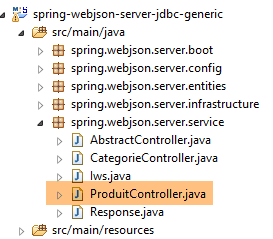 |
控制器 [ProduitController] 负责处理与产品相关的 URL。其代码与控制器 [CategorieController] 类似:
package spring.webjson.server.service;
import java.util.ArrayList;
import java.util.List;
import javax.servlet.http.HttpServletRequest;
import org.springframework.beans.factory.annotation.Autowired;
import org.springframework.web.bind.annotation.RequestMapping;
import org.springframework.web.bind.annotation.RequestMethod;
import org.springframework.web.bind.annotation.RestController;
import spring.jdbc.dao.IDao;
import spring.jdbc.entities.Produit;
import spring.jdbc.infrastructure.DaoException;
import spring.webjson.server.entities.CoreProduit;
import spring.webjson.server.infrastructure.ServerException;
import com.fasterxml.jackson.core.type.TypeReference;
import com.fasterxml.jackson.databind.ObjectMapper;
import com.google.common.io.CharStreams;
@RestController
public class ProduitController extends AbstractController<Produit> {
@Autowired
private IDao<Produit> daoProduit;
@Override
protected IDao<Produit> getDao() {
return daoProduit;
}
// 本地
private String simpleClassName = getClass().getSimpleName();
@RequestMapping(value = "/getAllShortProduits", method = RequestMethod.GET)
public Response<List<Produit>> getAllShortProduits() {
// 父级
Response<List<Produit>> response = super.getAllShortEntities();
// 序列化过滤器jSON
context.getBean("jsonMapperShortProduit", ObjectMapper.class);
// 响应
return response;
}
@RequestMapping(value = "/getAllLongProduits", method = RequestMethod.GET)
public Response<List<Produit>> getAllLongProduits() {
// 父级
Response<List<Produit>> response = super.getAllLongEntities();
// 序列化过滤器 jSON
context.getBean("jsonMapperLongProduit", ObjectMapper.class);
// 响应
return response;
}
@RequestMapping(value = "/getShortProduitsById", method = RequestMethod.POST, consumes = "application/json; charset=UTF-8")
public Response<List<Produit>> getShortProduitsById(HttpServletRequest request) {
// 父级
Response<List<Produit>> response = super.getShortEntitiesById(request);
// 序列化过滤器 jSON
context.getBean("jsonMapperShortProduit", ObjectMapper.class);
// 响应
return response;
}
@RequestMapping(value = "/getShortProduitsByName", method = RequestMethod.POST, consumes = "application/json; charset=UTF-8")
public Response<List<Produit>> getShortProduitsByName(HttpServletRequest request) {
// 父级
Response<List<Produit>> response = super.getShortEntitiesByName(request);
// 序列化过滤器 jSON
context.getBean("jsonMapperShortProduit", ObjectMapper.class);
// 响应
return response;
}
@RequestMapping(value = "/getLongProduitsById", method = RequestMethod.POST, consumes = "application/json; charset=UTF-8")
public Response<List<Produit>> getLongProduitsById(HttpServletRequest request) {
// 父级
Response<List<Produit>> response = super.getLongEntitiesById(request);
// 序列化过滤器 jSON
context.getBean("jsonMapperLongProduit", ObjectMapper.class);
// 响应
return response;
}
@RequestMapping(value = "/getLongProduitsByName", method = RequestMethod.POST, consumes = "application/json; charset=UTF-8")
public Response<List<Produit>> getLongProduitsByName(HttpServletRequest request) {
// 父级
Response<List<Produit>> response = super.getLongEntitiesByName(request);
// 序列化过滤器 jSON
context.getBean("jsonMapperLongProduit", ObjectMapper.class);
// 响应
return response;
}
@RequestMapping(value = "/saveProduits", method =
 RequestMethod.POST, consumes = "application/json;
 charset=UTF-8")
public Response<List<CoreProduit>> saveProduits(HttpServletRequest request) {
...
}
@RequestMapping(value = "/deleteAllProduits",
 method = RequestMethod.GET)
public Response<Void> deleteAllProduits() {
return super.deleteAllEntities();
}
@RequestMapping(value = "/deleteProduitsById",
 method = RequestMethod.POST, consumes =
 "application/json; charset=UTF-8")
public Response<Void> deleteProduitsById(HttpServletRequest request) {
return super.deleteEntitiesById(request);
}
@RequestMapping(value = "/deleteProduitsByName",
 method = RequestMethod.POST, consumes =
 "application/json; charset=UTF-8")
public Response<Void> deleteProduitsByName(HttpServletRequest request) {
return super.deleteEntitiesByName(request);
}
}
仅 [saveProduits] 方法的结构与其他方法不同:
@RequestMapping(value = "/saveProduits", method = RequestMethod.POST, consumes = "application/json; charset=UTF-8")
    public Response<List<CoreProduit>> saveProduits(HttpServletRequest request) {
        try {
            // 获取提交的值
            String body = CharStreams.toString(request.getReader());
            // 对其进行反序列化
            ObjectMapper mapper = context.getBean("jsonMapperShortProduit", ObjectMapper.class);
            List<Produit> produits = mapper.readValue(body, new TypeReference<List<Produit>>() {
            });
            // 将产品数据持久化
            produits = daoProduit.saveEntities(produits);
            List<CoreProduit> coreProduits = new ArrayList<CoreProduit>();
            for (Produit produit : produits) {
                coreProduits.add(new CoreProduit(produit.getId()));
            }
            // 返回响应
            return new Response<List<CoreProduit>>(0, null, coreProduits);
        } catch (DaoException e) {
            return new Response<List<CoreProduit>>(1, e.toString(), null);
        } catch (Exception e) {
            return new Response<List<CoreProduit>>(2, new ServerException(1021, e, simpleClassName).toString(), null);
        }
}
- 第4-9行:基于接收到的字符串jSON,重建待保存的[Produit]列表。 由于接收到的字符串 jSON 对应的是产品的简版,因此这些产品的 [categorie] 字段值为 null。 同样,DAO / JDBC 层不需要此信息;
- 第 11 行:产品数据被持久化;
- 第 12-15 行:构建待返回的 [CoreProduit] 列表;
- 第18行:返回响应,该响应将在发送给远程客户端之前由第7行的映射器进行序列化(由Spring MVC执行隐式序列化)(参见第17.3.7节的讨论);
17.3.9. Web 服务的执行类 / jSON
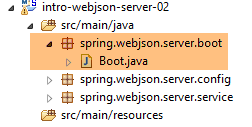 |
类 [Boot] 是该项目的可执行类:
package spring.webjson.server.boot;

import org.springframework.boot.SpringApplication;

import spring.webjson.server.config.AppConfig;

public class Boot {

    public static void main(String[] args) {
        SpringApplication.run(AppConfig.class, args);
    }
}
- 第 10 行:执行静态方法 [SpringApplication.run]。类 [SpringApplication] 是项目 [spring Boot] 中的一个类(第 3 行)。向其传递两个参数:
- [AppConfig.class]:配置整个应用程序的类;
- [args]:传递给第 9 行方法 [main] 的任何参数。此参数在此处未被使用;
执行该类时,会生成以下日志:
  .   ____          _            __ _ _
 /\\ / ___'_ __ _ _(_)_ __  __ _ \ \ \ \
( ( )\___ | '_ | '_| | '_ \/ _` | \ \ \ \
 \\/  ___)| |_)| | | | | || (_| |  ) ) ) )
  '  |____| .__|_| |_|_| |_\__, | / / / /
 =========|_|==============|___/=/_/_/_/
 :: Spring Boot ::        (v1.2.3.RELEASE)

11:34:08.661 [main] INFO  spring.webjson.server.boot.Boot - Starting Boot on Gportpers3 with PID 6796 (started by ST in D:\data\istia-1415\spring data\dvp\dvp-spring-database-05\spring-database-generic\spring-webjson\spring-webjson-server-jdbc-generic)
11:34:08.700 [main] INFO  o.s.b.c.e.AnnotationConfigEmbeddedWebApplicationContext - Refreshing org.springframework.boot.context.embedded.AnnotationConfigEmbeddedWebApplicationContext@2df32bf7: startup date [Mon Jun 08 11:34:08 CEST 2015]; root of context hierarchy
11:34:08.916 [main] INFO  o.s.b.f.s.DefaultListableBeanFactory - Overriding bean definition for bean 'jsonMapper': replacing [Root bean: class [null]; scope=; abstract=false; lazyInit=false; autowireMode=3; dependencyCheck=0; autowireCandidate=true; primary=false; factoryBeanName=generic.jdbc.config.ConfigJdbc; factoryMethodName=jsonMapper; initMethodName=null; destroyMethodName=(inferred); defined in class generic.jdbc.config.ConfigJdbc] with [Root bean: class [null]; scope=; abstract=false; lazyInit=false; autowireMode=3; dependencyCheck=0; autowireCandidate=true; primary=false; factoryBeanName=spring.webjson.server.config.WebConfig; factoryMethodName=jsonMapper; initMethodName=null; destroyMethodName=(inferred); defined in class spring.webjson.server.config.WebConfig]
11:34:08.917 [main] INFO  o.s.b.f.s.DefaultListableBeanFactory - Overriding bean definition for bean 'jsonMapperLongCategorie': replacing [Root bean: class [null]; scope=prototype; abstract=false; lazyInit=false; autowireMode=3; dependencyCheck=0; autowireCandidate=true; primary=false; factoryBeanName=generic.jdbc.config.ConfigJdbc; factoryMethodName=jsonMapperLongCategorie; initMethodName=null; destroyMethodName=(inferred); defined in class generic.jdbc.config.ConfigJdbc] with [Root bean: class [null]; scope=prototype; abstract=false; lazyInit=false; autowireMode=3; dependencyCheck=0; autowireCandidate=true; primary=false; factoryBeanName=spring.webjson.server.config.WebConfig; factoryMethodName=jsonMapperLongCategorie; initMethodName=null; destroyMethodName=(inferred); defined in class spring.webjson.server.config.WebConfig]
11:34:08.918 [main] INFO  o.s.b.f.s.DefaultListableBeanFactory - Overriding bean definition for bean 'jsonMapperShortProduit': replacing [Root bean: class [null]; scope=prototype; abstract=false; lazyInit=false; autowireMode=3; dependencyCheck=0; autowireCandidate=true; primary=false; factoryBeanName=generic.jdbc.config.ConfigJdbc; factoryMethodName=jsonMapperShortProduit; initMethodName=null; destroyMethodName=(inferred); defined in class generic.jdbc.config.ConfigJdbc] with [Root bean: class [null]; scope=prototype; abstract=false; lazyInit=false; autowireMode=3; dependencyCheck=0; autowireCandidate=true; primary=false; factoryBeanName=spring.webjson.server.config.WebConfig; factoryMethodName=jsonMapperShortProduit; initMethodName=null; destroyMethodName=(inferred); defined in class spring.webjson.server.config.WebConfig]
11:34:08.919 [main] INFO  o.s.b.f.s.DefaultListableBeanFactory - Overriding bean definition for bean 'jsonMapperShortCategorie': replacing [Root bean: class [null]; scope=prototype; abstract=false; lazyInit=false; autowireMode=3; dependencyCheck=0; autowireCandidate=true; primary=false; factoryBeanName=generic.jdbc.config.ConfigJdbc; factoryMethodName=jsonMapperShortCategorie; initMethodName=null; destroyMethodName=(inferred); defined in class generic.jdbc.config.ConfigJdbc] with [Root bean: class [null]; scope=prototype; abstract=false; lazyInit=false; autowireMode=3; dependencyCheck=0; autowireCandidate=true; primary=false; factoryBeanName=spring.webjson.server.config.WebConfig; factoryMethodName=jsonMapperShortCategorie; initMethodName=null; destroyMethodName=(inferred); defined in class spring.webjson.server.config.WebConfig]
11:34:08.919 [main] INFO  o.s.b.f.s.DefaultListableBeanFactory - Overriding bean definition for bean 'jsonMapperLongProduit': replacing [Root bean: class [null]; scope=prototype; abstract=false; lazyInit=false; autowireMode=3; dependencyCheck=0; autowireCandidate=true; primary=false; factoryBeanName=generic.jdbc.config.ConfigJdbc; factoryMethodName=jsonMapperLongProduit; initMethodName=null; destroyMethodName=(inferred); defined in class generic.jdbc.config.ConfigJdbc] with [Root bean: class [null]; scope=prototype; abstract=false; lazyInit=false; autowireMode=3; dependencyCheck=0; autowireCandidate=true; primary=false; factoryBeanName=spring.webjson.server.config.WebConfig; factoryMethodName=jsonMapperLongProduit; initMethodName=null; destroyMethodName=(inferred); defined in class spring.webjson.server.config.WebConfig]
11:34:09.409 [main] INFO  o.s.b.c.e.t.TomcatEmbeddedServletContainer - Tomcat initialized with port(s): 8081 (http)
11:34:09.641 [main] INFO  o.a.catalina.core.StandardService - Starting service Tomcat
11:34:09.642 [main] INFO  o.a.catalina.core.StandardEngine - Starting Servlet Engine: Apache Tomcat/8.0.20
11:34:09.778 [localhost-startStop-1] INFO  o.a.c.c.C.[Tomcat].[localhost].[/] - Initializing Spring embedded WebApplicationContext
11:34:09.778 [localhost-startStop-1] INFO  o.s.web.context.ContextLoader - Root WebApplicationContext: initialization completed in 1081 ms
11:34:09.839 [localhost-startStop-1] INFO  o.s.b.c.e.ServletRegistrationBean - Mapping servlet: 'dispatcherServlet' to [/*]
11:34:10.558 [main] INFO  o.h.validator.internal.util.Version - HV000001: Hibernate Validator 5.1.3.Final
11:34:10.654 [main] INFO  o.s.w.s.m.m.a.RequestMappingHandlerAdapter - Looking for @ControllerAdvice: org.springframework.boot.context.embedded.AnnotationConfigEmbeddedWebApplicationContext@2df32bf7: startup date [Mon Jun 08 11:34:08 CEST 2015]; root of context hierarchy
11:34:10.745 [main] INFO  o.s.w.s.m.m.a.RequestMappingHandlerMapping - Mapped "{[/saveCategories],methods=[POST],params=[],headers=[],consumes=[application/json;charset=UTF-8],produces=[],custom=[]}" onto public spring.webjson.server.service.Response<java.util.List<spring.webjson.server.entities.CoreCategorie>> spring.webjson.server.service.CategorieController.saveCategories(javax.servlet.http.HttpServletRequest)
11:34:10.745 [main] INFO  o.s.w.s.m.m.a.RequestMappingHandlerMapping - Mapped "{[/deleteCategoriesById],methods=[POST],params=[],headers=[],consumes=[application/json;charset=UTF-8],produces=[],custom=[]}" onto public spring.webjson.server.service.Response<java.lang.Void> spring.webjson.server.service.CategorieController.deleteCategoriesById(javax.servlet.http.HttpServletRequest)
11:34:10.745 [main] INFO  o.s.w.s.m.m.a.RequestMappingHandlerMapping - Mapped "{[/getShortCategoriesByName],methods=[POST],params=[],headers=[],consumes=[application/json;charset=UTF-8],produces=[],custom=[]}" onto public spring.webjson.server.service.Response<java.util.List<spring.jdbc.entities.Categorie>> spring.webjson.server.service.CategorieController.getShortCategoriesByName(javax.servlet.http.HttpServletRequest)
11:34:10.746 [main] INFO  o.s.w.s.m.m.a.RequestMappingHandlerMapping - Mapped "{[/getAllLongCategories],methods=[GET],params=[],headers=[],consumes=[],produces=[],custom=[]}" onto public spring.webjson.server.service.Response<java.util.List<spring.jdbc.entities.Categorie>> spring.webjson.server.service.CategorieController.getAllLongCategories()
11:34:10.746 [main] INFO  o.s.w.s.m.m.a.RequestMappingHandlerMapping - Mapped "{[/getLongCategoriesById],methods=[POST],params=[],headers=[],consumes=[application/json;charset=UTF-8],produces=[],custom=[]}" onto public spring.webjson.server.service.Response<java.util.List<spring.jdbc.entities.Categorie>> spring.webjson.server.service.CategorieController.getLongCategoriesById(javax.servlet.http.HttpServletRequest)
11:34:10.746 [main] INFO  o.s.w.s.m.m.a.RequestMappingHandlerMapping - Mapped "{[/deleteCategoriesByName],methods=[POST],params=[],headers=[],consumes=[application/json;charset=UTF-8],produces=[],custom=[]}" onto public spring.webjson.server.service.Response<java.lang.Void> spring.webjson.server.service.CategorieController.deleteCategoriesByName(javax.servlet.http.HttpServletRequest)
11:34:10.746 [main] INFO  o.s.w.s.m.m.a.RequestMappingHandlerMapping - Mapped "{[/getShortCategoriesById],methods=[POST],params=[],headers=[],consumes=[application/json;charset=UTF-8],produces=[],custom=[]}" onto public spring.webjson.server.service.Response<java.util.List<spring.jdbc.entities.Categorie>> spring.webjson.server.service.CategorieController.getShortCategoriesById(javax.servlet.http.HttpServletRequest)
11:34:10.746 [main] INFO  o.s.w.s.m.m.a.RequestMappingHandlerMapping - Mapped "{[/getAllShortCategories],methods=[GET],params=[],headers=[],consumes=[],produces=[],custom=[]}" onto public spring.webjson.server.service.Response<java.util.List<spring.jdbc.entities.Categorie>> spring.webjson.server.service.CategorieController.getAllShortCategories()
11:34:10.747 [main] INFO  o.s.w.s.m.m.a.RequestMappingHandlerMapping - Mapped "{[/getLongCategoriesByName],methods=[POST],params=[],headers=[],consumes=[application/json;charset=UTF-8],produces=[],custom=[]}" onto public spring.webjson.server.service.Response<java.util.List<spring.jdbc.entities.Categorie>> spring.webjson.server.service.CategorieController.getLongCategoriesByName(javax.servlet.http.HttpServletRequest)
11:34:10.747 [main] INFO  o.s.w.s.m.m.a.RequestMappingHandlerMapping - Mapped "{[/deleteAllCategories],methods=[GET],params=[],headers=[],consumes=[],produces=[],custom=[]}" onto public spring.webjson.server.service.Response<java.lang.Void> spring.webjson.server.service.CategorieController.deleteAllCategories()
11:34:10.748 [main] INFO  o.s.w.s.m.m.a.RequestMappingHandlerMapping - Mapped "{[/saveProduits],methods=[POST],params=[],headers=[],consumes=[application/json;charset=UTF-8],produces=[],custom=[]}" onto public spring.webjson.server.service.Response<java.util.List<spring.webjson.server.entities.CoreProduit>> spring.webjson.server.service.ProduitController.saveProduits(javax.servlet.http.HttpServletRequest)
11:34:10.749 [main] INFO  o.s.w.s.m.m.a.RequestMappingHandlerMapping - Mapped "{[/getShortProduitsById],methods=[POST],params=[],headers=[],consumes=[application/json;charset=UTF-8],produces=[],custom=[]}" onto public spring.webjson.server.service.Response<java.util.List<spring.jdbc.entities.Produit>> spring.webjson.server.service.ProduitController.getShortProduitsById(javax.servlet.http.HttpServletRequest)
11:34:10.749 [main] INFO  o.s.w.s.m.m.a.RequestMappingHandlerMapping - Mapped "{[/getAllLongProduits],methods=[GET],params=[],headers=[],consumes=[],produces=[],custom=[]}" onto public spring.webjson.server.service.Response<java.util.List<spring.jdbc.entities.Produit>> spring.webjson.server.service.ProduitController.getAllLongProduits()
11:34:10.749 [main] INFO  o.s.w.s.m.m.a.RequestMappingHandlerMapping - Mapped "{[/getShortProduitsByName],methods=[POST],params=[],headers=[],consumes=[application/json;charset=UTF-8],produces=[],custom=[]}" onto public spring.webjson.server.service.Response<java.util.List<spring.jdbc.entities.Produit>> spring.webjson.server.service.ProduitController.getShortProduitsByName(javax.servlet.http.HttpServletRequest)
11:34:10.749 [main] INFO  o.s.w.s.m.m.a.RequestMappingHandlerMapping - Mapped "{[/getAllShortProduits],methods=[GET],params=[],headers=[],consumes=[],produces=[],custom=[]}" onto public spring.webjson.server.service.Response<java.util.List<spring.jdbc.entities.Produit>> spring.webjson.server.service.ProduitController.getAllShortProduits()
11:34:10.749 [main] INFO  o.s.w.s.m.m.a.RequestMappingHandlerMapping - Mapped "{[/deleteProduitsByName],methods=[POST],params=[],headers=[],consumes=[application/json;charset=UTF-8],produces=[],custom=[]}" onto public spring.webjson.server.service.Response<java.lang.Void> spring.webjson.server.service.ProduitController.deleteProduitsByName(javax.servlet.http.HttpServletRequest)
11:34:10.750 [main] INFO  o.s.w.s.m.m.a.RequestMappingHandlerMapping - Mapped "{[/getLongProduitsByName],methods=[POST],params=[],headers=[],consumes=[application/json;charset=UTF-8],produces=[],custom=[]}" onto public spring.webjson.server.service.Response<java.util.List<spring.jdbc.entities.Produit>> spring.webjson.server.service.ProduitController.getLongProduitsByName(javax.servlet.http.HttpServletRequest)
11:34:10.750 [main] INFO  o.s.w.s.m.m.a.RequestMappingHandlerMapping - Mapped "{[/deleteProduitsById],methods=[POST],params=[],headers=[],consumes=[application/json;charset=UTF-8],produces=[],custom=[]}" onto public spring.webjson.server.service.Response<java.lang.Void> spring.webjson.server.service.ProduitController.deleteProduitsById(javax.servlet.http.HttpServletRequest)
11:34:10.750 [main] INFO  o.s.w.s.m.m.a.RequestMappingHandlerMapping - Mapped "{[/deleteAllProduits],methods=[GET],params=[],headers=[],consumes=[],produces=[],custom=[]}" onto public spring.webjson.server.service.Response<java.lang.Void> spring.webjson.server.service.ProduitController.deleteAllProduits()
11:34:10.750 [main] INFO  o.s.w.s.m.m.a.RequestMappingHandlerMapping - Mapped "{[/getLongProduitsById],methods=[POST],params=[],headers=[],consumes=[application/json;charset=UTF-8],produces=[],custom=[]}" onto public spring.webjson.server.service.Response<java.util.List<spring.jdbc.entities.Produit>> spring.webjson.server.service.ProduitController.getLongProduitsById(javax.servlet.http.HttpServletRequest)
11:34:10.809 [main] INFO  o.a.coyote.http11.Http11NioProtocol - Initializing ProtocolHandler ["http-nio-8081"]
11:34:10.826 [main] INFO  o.a.coyote.http11.Http11NioProtocol - Starting ProtocolHandler ["http-nio-8081"]
11:34:10.860 [main] INFO  o.a.tomcat.util.net.NioSelectorPool - Using a shared selector for servlet write/read
11:34:11.733 [main] INFO  o.s.b.c.e.t.TomcatEmbeddedServletContainer - Tomcat started on port(s): 8081 (http)
11:34:11.934 [main] INFO  spring.webjson.server.boot.Boot - Started Boot in 3.533 seconds (JVM running for 4.137)
11:34:20.382 [http-nio-8081-exec-1] INFO  o.a.c.c.C.[Tomcat].[localhost].[/] - Initializing Spring FrameworkServlet 'dispatcherServlet'
11:34:20.384 [http-nio-8081-exec-1] INFO  o.s.web.servlet.DispatcherServlet - FrameworkServlet 'dispatcherServlet': initialization started
11:34:20.410 [http-nio-8081-exec-1] INFO  o.s.web.servlet.DispatcherServlet - FrameworkServlet 'dispatcherServlet': initialization completed in 26 ms
11:34:33.103 [http-nio-8081-exec-8] INFO  o.s.b.f.xml.XmlBeanDefinitionReader - Loading XML bean definitions from class path resource [org/springframework/jdbc/support/sql-error-codes.xml]
11:34:33.168 [http-nio-8081-exec-8] INFO  o.s.j.support.SQLErrorCodesFactory - SQLErrorCodes loaded: [DB2, Derby, H2, HSQL, Informix, MS-SQL, MySQL, Oracle, PostgreSQL, Sybase, Hana]
- 第 11-15 行:发现定义 jSON 过滤器的 Bean。它们重新定义了在 JDBC 配置层项目中发现的同名 Bean;
- 第 17-18 行:启动将执行 Web 服务 /jSON 的 Tomcat 服务器;
- 第 19-21 行:初始化 Spring 上下文 MVC;
- 第 24-43 行:发现已暴露的 URL;
17.3.10. Web 服务 / jSON 的测试
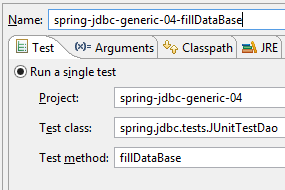
为了进行测试,我们使用客户端 [Advanced Rest Client](参见第 23.11 节)来查询由 Web 服务 / jSON 提供的 URL (当然,必须先启动Web服务 / jSON 以及 SGBD)。为了填充数据库,我们执行名为 [spring-jdbc-generic-04-fillDataBase] 的运行配置,该配置将5个类别和10个产品填入数据库:
 |
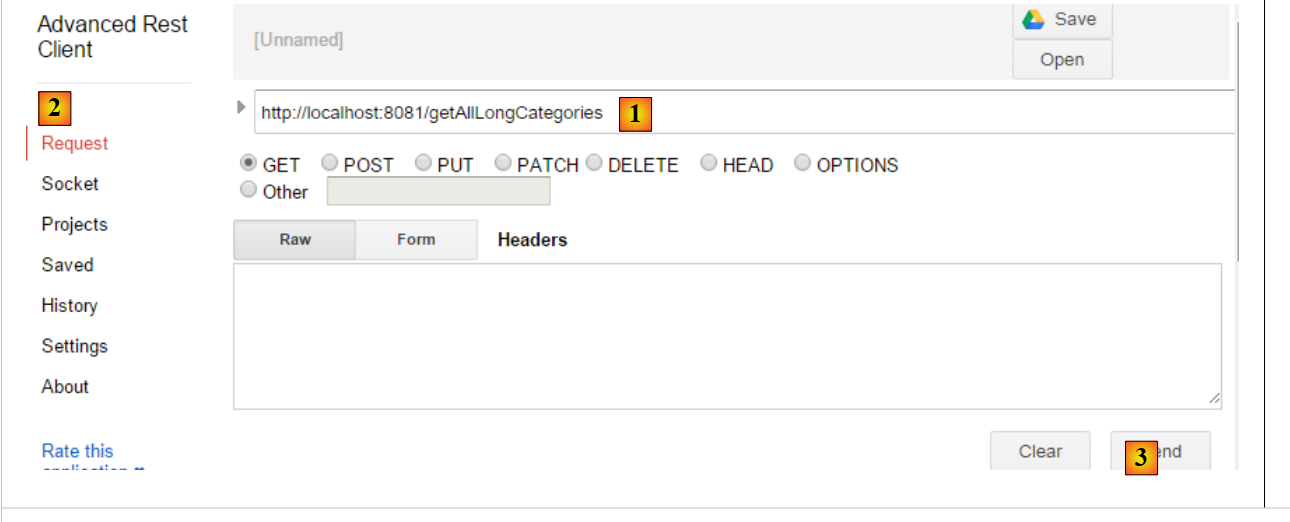 |
- 在 [1-3] 中,我们通过命令 HTTP GET 请求 URL [/getAllLongCategories];
我们得到以下响应:
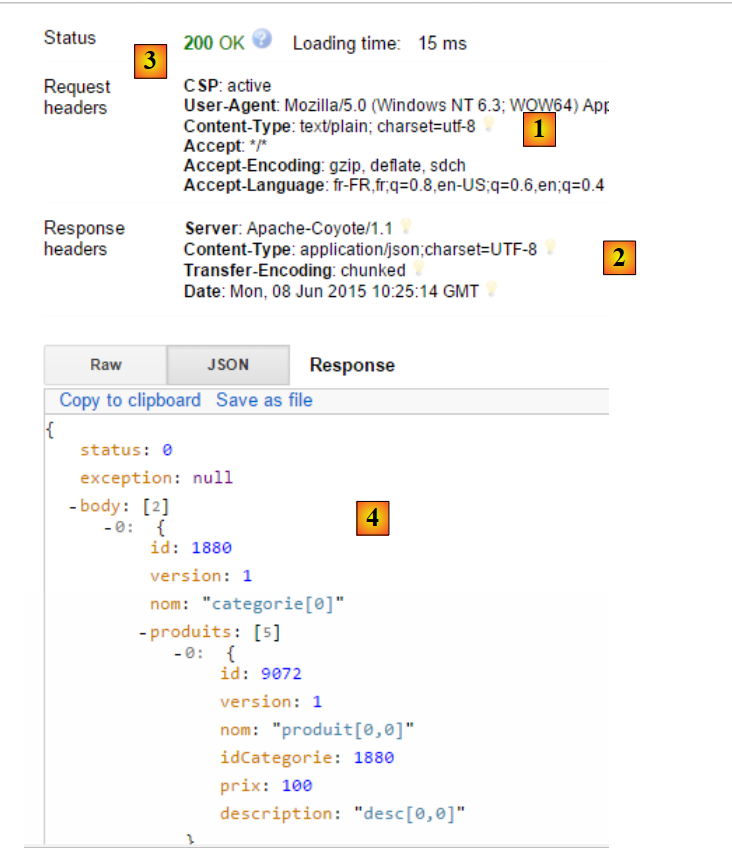 |
- 在 [1] 中,客户端的请求 HTTP;
- [2] 对应服务器的响应 HTTP;
- [3],状态码[200 OK]表示服务器已正确处理该请求;
- 在 [4] 中,服务器响应 jSON;
完整的 jSON 响应如下:
{"status":0,"exception":null,"body":[{"id":1880,"version":1,"nom":"categorie[0]","produits":[{"id":9072,"version":1,"nom":"produit[0,0]","idCategorie":1880,"prix":100.0,"description":"desc[0,0]"},{"id":9073,"version":1,"nom":"produit[0,1]","idCategorie":1880,"prix":101.0,"description":"desc[0,1]"},{"id":9074,"version":1,"nom":"produit[0,2]","idCategorie":1880,"prix":102.0,"description":"desc[0,2]"},{"id":9075,"version":1,"nom":"produit[0,3]","idCategorie":1880,"prix":103.0,"description":"desc[0,3]"},{"id":9076,"version":1,"nom":"produit[0,4]","idCategorie":1880,"prix":104.0,"description":"desc[0,4]"}]},{"id":1881,"version":1,"nom":"categorie[1]","produits":[{"id":9077,"version":1,"nom":"produit[1,0]","idCategorie":1881,"prix":110.00000000000001,"description":"desc[1,0]"},{"id":9078,"version":1,"nom":"produit[1,1]","idCategorie":1881,"prix":111.00000000000001,"description":"desc[1,1]"},{"id":9079,"version":1,"nom":"produit[1,2]","idCategorie":1881,"prix":112.00000000000001,"description":"desc[1,2]"},{"id":9080,"version":1,"nom":"produit[1,3]","idCategorie":1881,"prix":112.99999999999999,"description":"desc[1,3]"},{"id":9081,"version":1,"nom":"produit[1,4]","idCategorie":1881,"prix":114.00000000000001,"description":"desc[1,4]"}]}]}
- status:0 表示服务器端未发生错误;
- exception: null 表示没有错误信息;
- body:是响应正文,此处为包含产品的分类列表。共有两个分类,每个分类包含5个产品;
我们将向类别 [categorie1] 中添加产品 [produit15]。 为此,我们将使用 URL [/saveProduits] 方法,该方法等待包含待保存商品(插入/修改)的字符串 jSON。该字符串如下:
[{"id":null,"version":null,"nom":"produit15","idCategorie":1881,"prix":111.0,"description":"desc15"}]}]
向 Web 服务 / jSON 发送的请求如下所示:
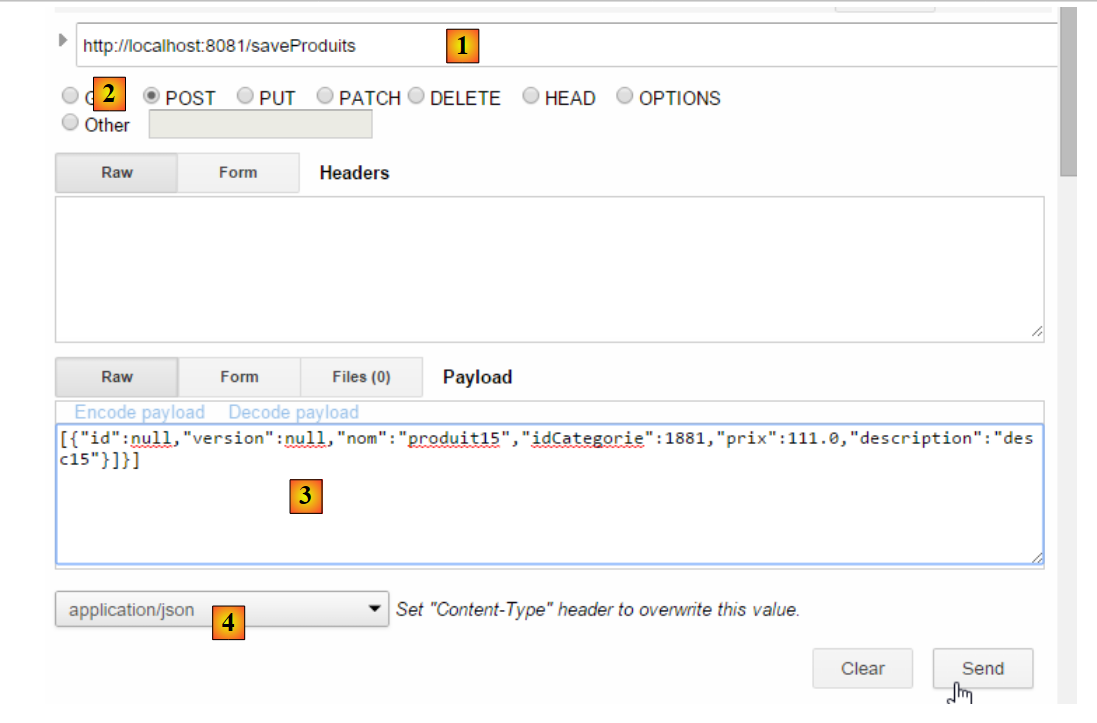 |
- 在 [1] 中,请求的是 URL;
- 在 [2] 中,该请求是通过 POST 操作发出的;
- 在 [3] 中,已发送字符串 jSON;
- 在 [4] 中,通知服务器将向其发送 jSON;
服务器的响应如下:
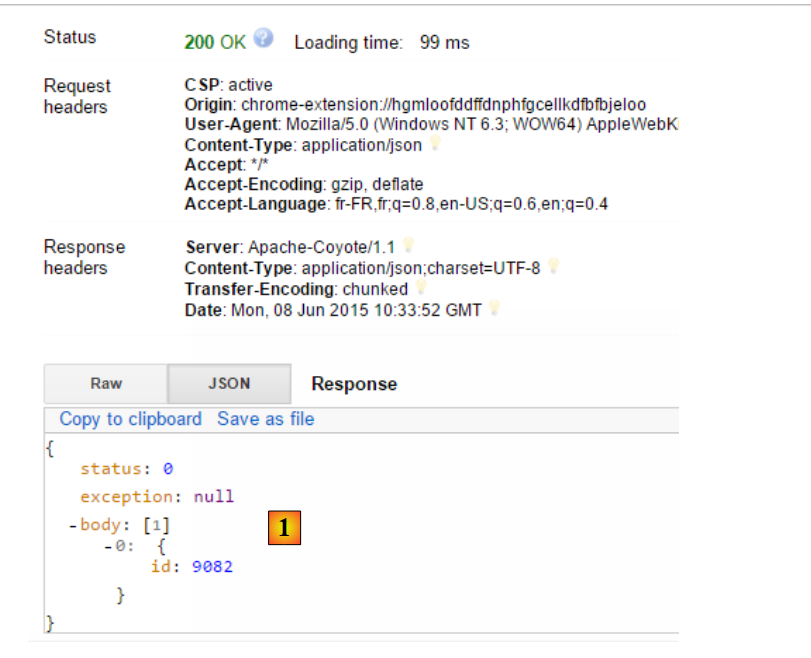 |
- 在 [1] 中,我们获取到了包含 [CoreProduit] 及其主键的列表。这里,我们获取到了一个包含单个元素的列表,该元素的主键正是我们刚刚插入数据库中的产品主键;
现在,查询名为 [categorie[1]] 的分类的详细信息:
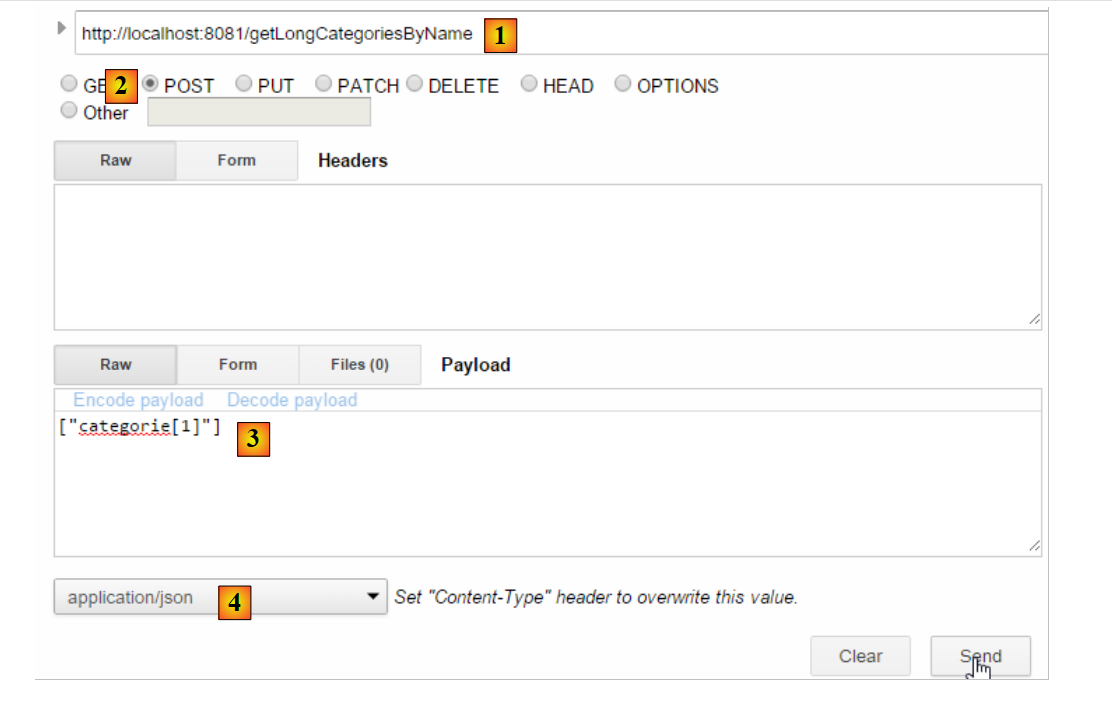 |
- 在 [1] 中,请求的 URL;
- 将 [2] 转换为 POST;
- 在 [3,4] 中,提交的值是一个字符串 jSON。该字符串代表需要获取完整名称的分类名称列表;
我们得到以下结果:
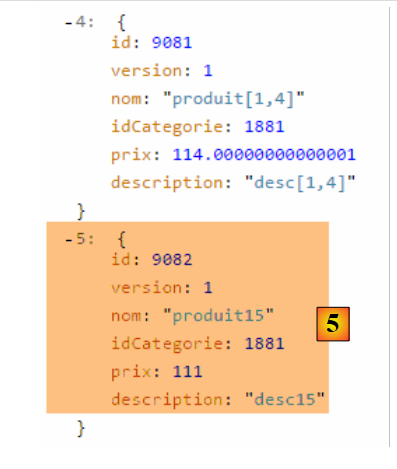 |
- 在 [5] 中,类别 [produit[1,5]] 现在有了第六个产品;
现在删除该产品:
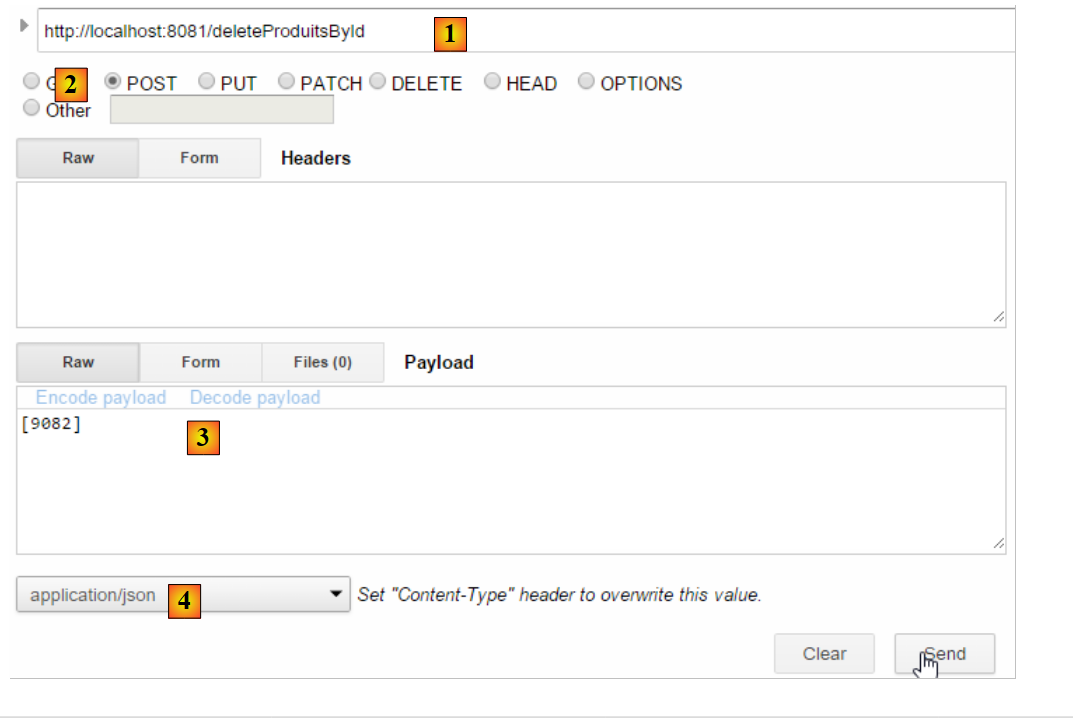 |
- 变为 [1],请求的 URL;
- 将其改为 [2],并生成 POST;
- 在 [3-4] 中,发布一个字符串 jSON,该字符串代表要删除的产品的主键列表;
所得结果如下:
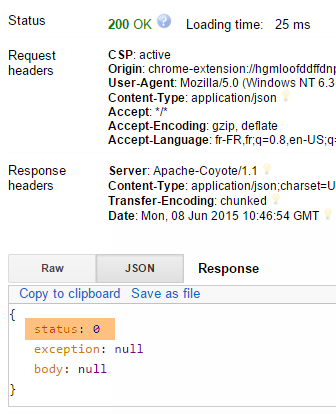 |
- [status:0] 表示删除操作已成功完成;
现在,查询产品 [body:[0]] 以验证其是否已被成功删除:
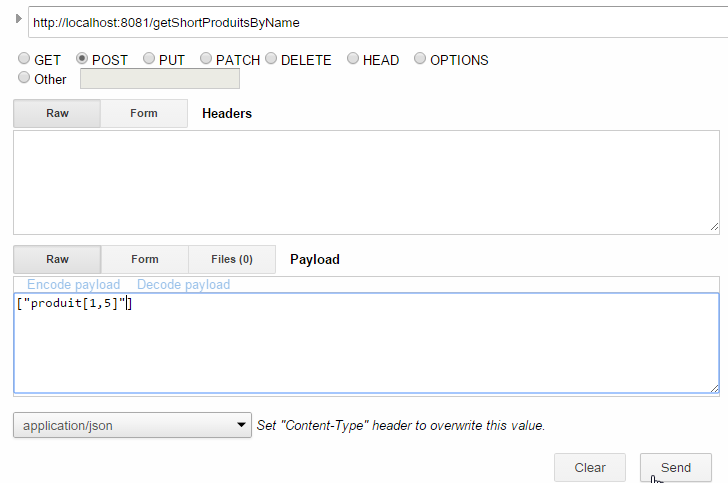 |
我们得到以下结果:
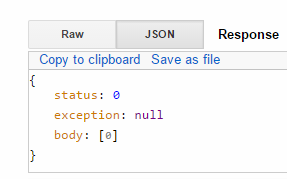 |
- [status:0] 表示操作未发生异常;
- [produit[1,5]] 表示 [body] 是一个包含 0 个元素的列表。因此,实体 [[${#httpServletRequest.remoteUser}]] 已成功删除;
所有 [GET] 操作均可在普通浏览器中完成:
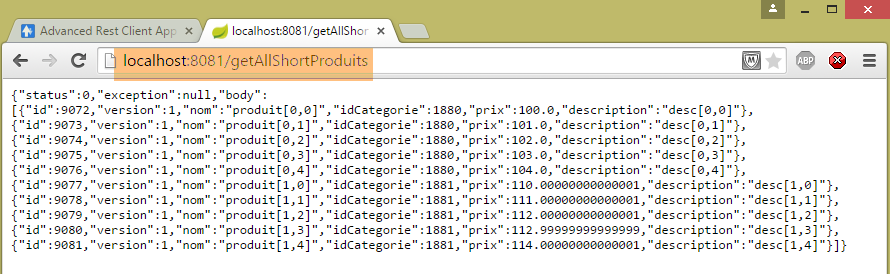 |
建议读者测试 Web 服务 / jSON 中的其他 URL 操作。