20. 为访问 [dbproduitscategories] 数据库的 Web 服务提供安全保护
20.1. 搭建开发环境
我们将使用以下项目来实现 Web 服务的安全性:
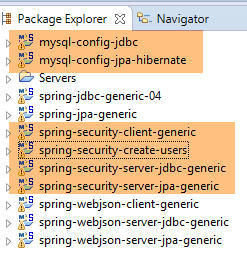 |
- [spring-security-*] 项目位于 [<examples>\spring-database-generic\spring-security] 文件夹中;
- 将通过 [DAO / JDBC] 层,随后是 [DAO / JPA / Hibernate] 层,为 MySQL 数据库管理系统实现安全功能;
- 按下 Alt-F5,然后重新生成所有 Maven 项目;
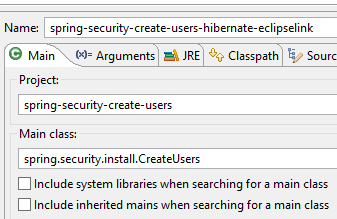
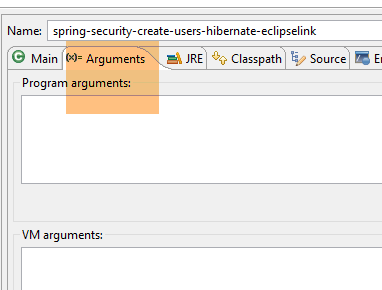
我们需要在 [dbproduitscategories] 数据库中创建用户。为此,请使用 [spring-security-create-users-hibernate-eclipselink] 运行配置:
 |  |
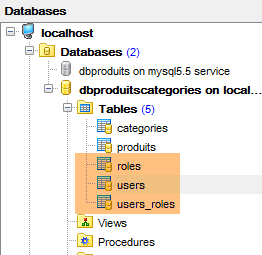
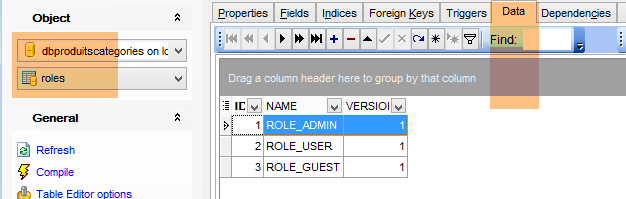
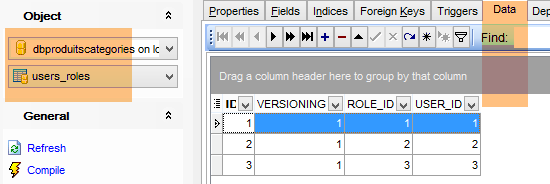
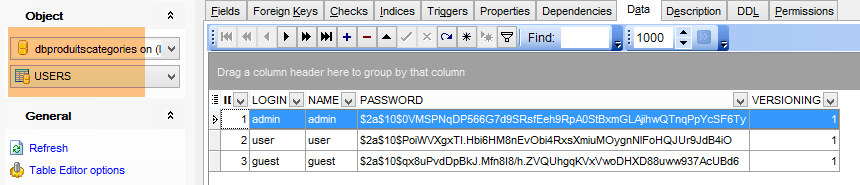
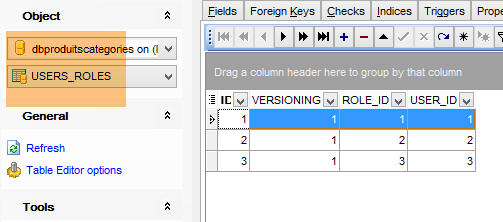
运行此配置将向 [dbproduitscategories] 数据库中的 [USERS、ROLES、USERS_ROLES] 表中插入数据:
 |
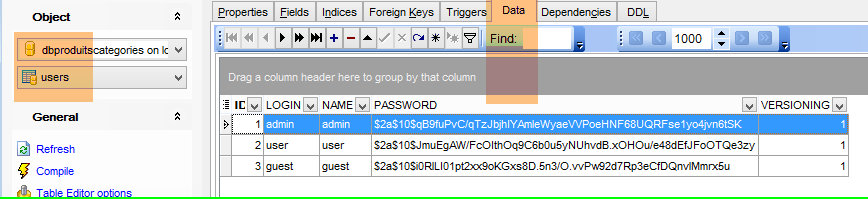 |
已创建的凭据 [用户名/密码] 如下:[admin/admin]、[user/user]、[guest/guest]。在数据库中,密码均已加密。
 |
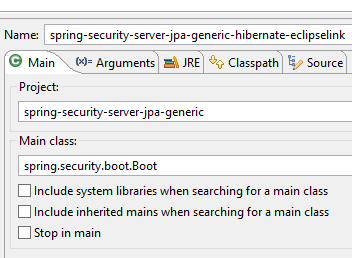
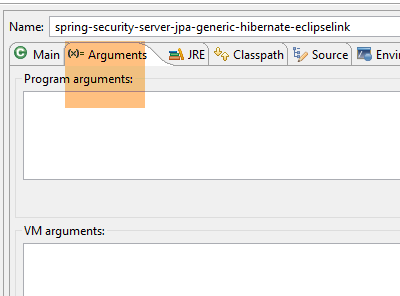
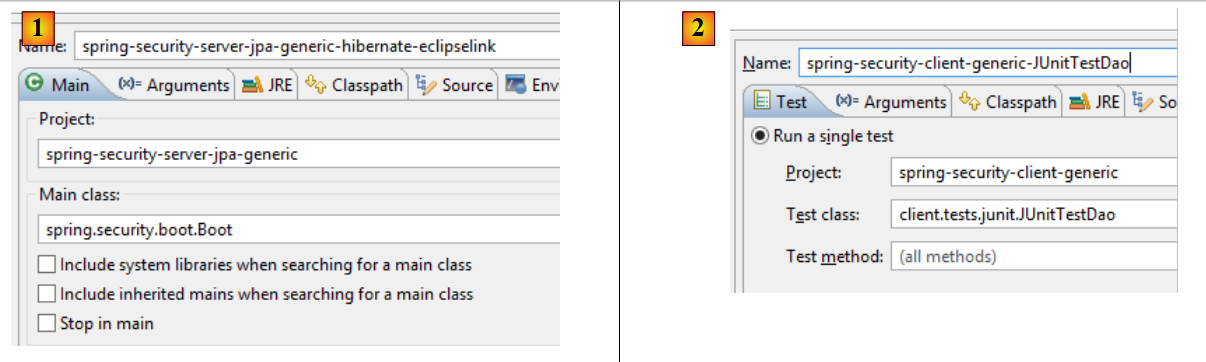
完成上述操作后,运行名为 [spring-security-server-jpa-generic-hibernate-eclipselink] 的测试配置,该配置将启动安全 Web 服务(此时 MySQL 必须正在运行):
 |  |
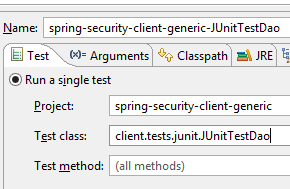
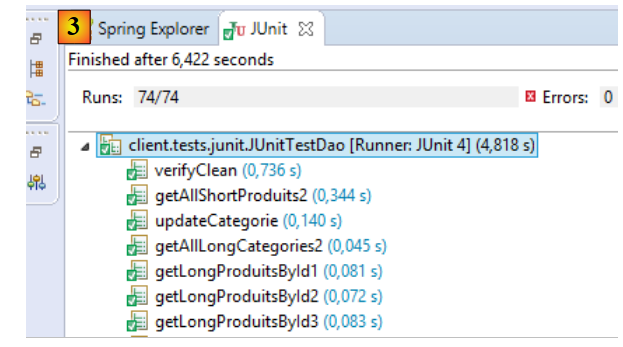
然后运行名为 [spring-security-client-generic-JUnitTestDao] 的测试配置,该配置用于测试安全 Web 服务:
 |  |
测试应通过。
20.2. Eclipse 项目 [spring-security-server-jdbc-generic]
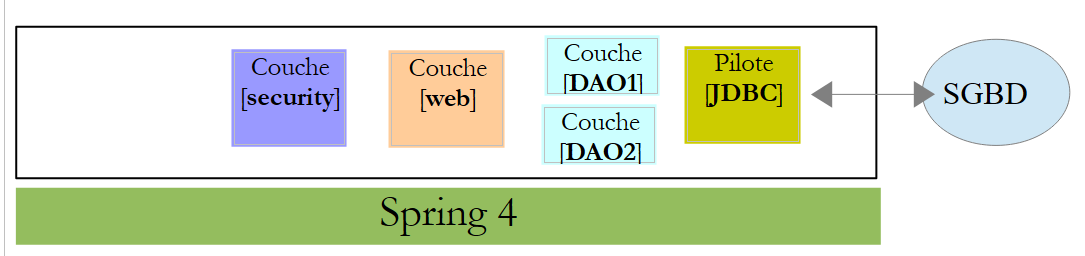
安全的 Web 服务由 [spring-security-server-jdbc-generic] 项目实现:
 |
上文:
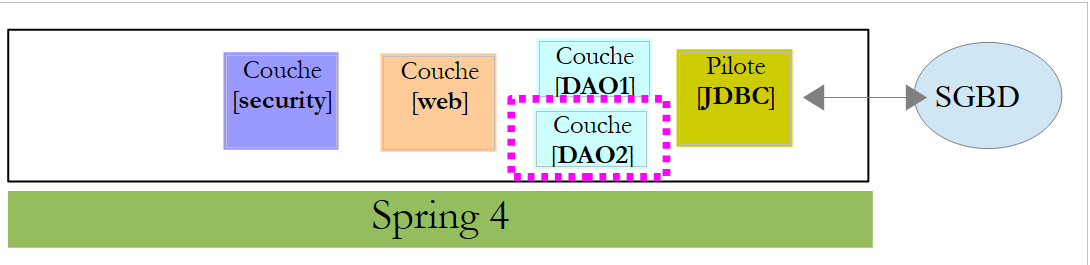
- [DAO1]层是管理[dbproduitscategories]数据库中[PRODUCTS]和[CATEGORIES]表的[DAO]层。该层已编写完成;
- [DAO2] 层是管理 [dbproduitscategories] 数据库中 [USERS]、[ROLES] 和 [USERS_ROLES] 表的 [DAO] 层。该层尚未编写;
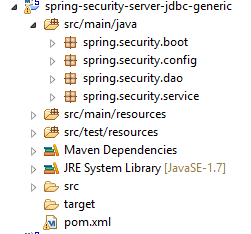 |
20.2.1. Maven 配置
[spring-security-server-jdbc-generic] 项目是一个由以下 [pom.xml] 文件配置的 Maven 项目:
<project xmlns="http://maven.apache.org/POM/4.0.0" xmlns:xsi="http://www.w3.org/2001/XMLSchema-instance"
    xsi:schemaLocation="http://maven.apache.org/POM/4.0.0 http://maven.apache.org/xsd/maven-4.0.0.xsd">
    <modelVersion>4.0.0</modelVersion>
    <groupId>dvp.spring.database</groupId>
    <artifactId>spring-security-server-jdbc-generic</artifactId>
    <version>0.0.1-SNAPSHOT</version>

    <name>spring-security-server-jdbc-generic</name>
    <description>démo spring security</description>

    <properties>
        <project.build.sourceEncoding>UTF-8</project.build.sourceEncoding>
        <java.version>1.7</java.version>
    </properties>

    <parent>
        <groupId>org.springframework.boot</groupId>
        <artifactId>spring-boot-starter-parent</artifactId>
        <version>1.2.3.RELEASE</version>
    </parent>

    <dependencies>
        <!-- Spring security -->
        <dependency>
            <groupId>org.springframework.boot</groupId>
            <artifactId>spring-boot-starter-security</artifactId>
        </dependency>
        <!-- web server / jSON -->
        <dependency>
            <groupId>dvp.spring.database</groupId>
            <artifactId>spring-webjson-server-jdbc-generic</artifactId>
            <version>0.0.1-SNAPSHOT</version>
        </dependency>
    </dependencies>
    <!-- plugins -->
    <build>
        <plugins>
            <plugin>
                <groupId>org.apache.maven.plugins</groupId>
                <artifactId>maven-surefire-plugin</artifactId>
                <version>2.18.1</version>
            </plugin>
        </plugins>
    </build>

</project>
- 第 29–33 行:我们复用之前分析过的包含 Web 服务、JSON 和 JDBC 的存档文件中的现有代码;
- 第 24–27 行:引入 Spring Security 类的依赖项;
最终,该项目对加载到Eclipse中的其他项目具有以下依赖关系:
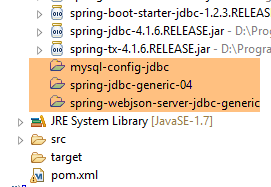 |
20.2.2. [DAO2] 层
 |
上文:
- [DAO1]层是管理[dbproduitscategories]数据库中[PRODUCTS]和[CATEGORIES]表的[DAO]层。它已经编写完成;
- [DAO2] 层是管理 [dbproduitscategories] 数据库中 [USERS]、[ROLES] 和 [USERS_ROLES] 表的 [DAO] 层。这就是我们接下来要编写的部分;
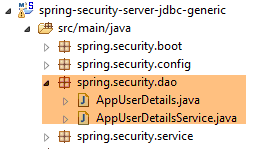 |
Spring Security 要求创建一个实现以下 [UsersDetail] 接口的类:
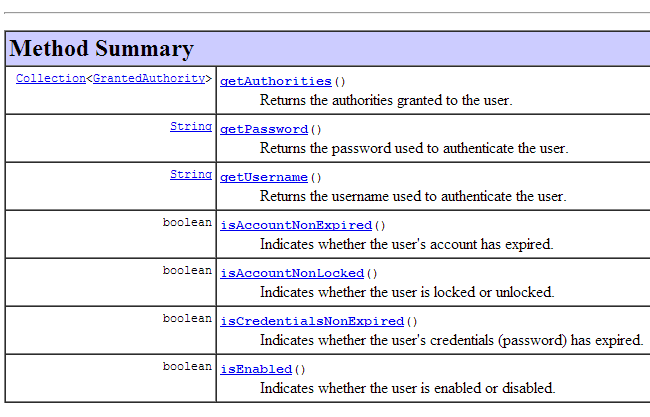 |
此接口由 [AppUserDetails] 类在此处实现:
package spring.security.dao;

import generic.jdbc.config.ConfigJdbc;

import java.sql.ResultSet;
import java.sql.SQLException;
import java.util.ArrayList;
import java.util.Collection;
import java.util.Collections;
import java.util.List;

import org.springframework.jdbc.core.RowMapper;
import org.springframework.jdbc.core.namedparam.NamedParameterJdbcTemplate;
import org.springframework.security.core.GrantedAuthority;
import org.springframework.security.core.authority.SimpleGrantedAuthority;
import org.springframework.security.core.userdetails.UserDetails;

import spring.jdbc.entities.Role;
import spring.jdbc.entities.User;
import spring.jdbc.infrastructure.DaoException;

public class AppUserDetails implements UserDetails {

    private static final long serialVersionUID = 1L;

    // JdbcTemplate
    private NamedParameterJdbcTemplate namedParameterJdbcTemplate;
    // properties
    private User user;
    private String simpleClassName = getClass().getSimpleName();

    // manufacturers
    public AppUserDetails() {
    }

    public AppUserDetails(User user, NamedParameterJdbcTemplate namedParameterJdbcTemplate) {
        this.user = user;
        this.namedParameterJdbcTemplate = namedParameterJdbcTemplate;
    }

    // -------------------------interface
    @Override
    public Collection<? extends GrantedAuthority> getAuthorities() {
        Collection<GrantedAuthority> authorities = new ArrayList<>();
        for (Role role : getRoles(user.getId())) {
            authorities.add(new SimpleGrantedAuthority(role.getName()));
        }
        return authorities;
    }
...

    // méthodes privées----------------
    private List<Role> getRoles(Long id) {
        try {
            // search for the user by id
            return namedParameterJdbcTemplate.query(ConfigJdbc.SELECT_ROLES_BYUSERID, Collections.singletonMap("id", id),    new ShortRoleMapper());
        } catch (Exception e) {
            //e.printStackTrace();
            throw new DaoException(167, e, simpleClassName);
        }
    }

}

// --------------------- mappers
class ShortRoleMapper implements RowMapper<Role> {

    @Override
    public Role mapRow(ResultSet rs, int rowNum) throws SQLException {
        return new Role(rs.getLong("r_ID"), rs.getLong("r_VERSIONING"), rs.getString("r_NAME"));
    }
}
- 第 22 行:[AppUserDetails] 类实现了 [UserDetails] 接口;
- 第 29-30 行:该类封装了一个用户(第 19 行)以及提供该用户详细信息的存储库(第 20 行);
- 第 27 行:将通过 JDBC 访问数据库,使用 [spring-jdbc-generic-04] 项目中定义的 [NamedParameterJdbcTemplate] 对象。 请注意,该对象并非像通常那样由 Spring 注入,而是通过第 36–39 行传递给构造函数。为什么?因为 [AppUserDetails] 类不是 Spring 组件(它缺少 @Component 注解),因此无法被注入;
- 第 36–39 行:通过用户及其存储库实例化该类的构造函数;
- 第 42–49 行:实现 [UserDetails] 接口的 [getAuthorities] 方法。该方法必须构建一个由 [GrantedAuthority] 类型或其派生类型元素组成的集合。此处我们使用派生类型 [SimpleGrantedAuthority](第 46 行),该类型封装了第 29 行中用户的某个角色名称;
- 第 45–47 行:遍历第 29 行中用户的角色列表,以构建一个 [SimpleGrantedAuthority] 类型的元素列表;
- 第 45 行:为获取用户的角色,我们调用第 53 行中的私有方法 [getRoles];
- 第 56 行:执行以下 SQL 语句 [ConfigJdbc.SELECT_ROLES_BYUSERID](定义在 [ConfigJdbc] 中):
public static final String SELECT_ROLES_BYUSERID = "SELECT DISTINCT r.ID as r_ID, r.VERSIONING as r_VERSIONING, r.NAME as r_NAME FROM ROLES r, USERS u, USERS_ROLES ur WHERE u.ID=:id AND ur.USER_ID=u.ID AND ur.ROLE_ID=r.ID";
此 SQL 查询对 [USERS、ROLES、USERS_ROLES] 这三个表进行连接,以检索由主键标识的用户的角色。该查询通过要查询其角色的用户的主键 [:id] 进行参数化。
- 第 56 行:来自 [SELECT] 语句的每行结果都会在第 66–72 行中由 [ShortRowMapper] 类转换为 [Role] 实体;
让我们回到 [AppUserDetails] 类的代码:
package spring.security.dao;

...

public class AppUserDetails implements UserDetails {

    private static final long serialVersionUID = 1L;

    // JdbcTemplate
    private NamedParameterJdbcTemplate namedParameterJdbcTemplate;
    // properties
    private User user;
    private String simpleClassName = getClass().getSimpleName();

    // manufacturers
    public AppUserDetails() {
    }

    public AppUserDetails(User user, NamedParameterJdbcTemplate namedParameterJdbcTemplate) {
        this.user = user;
        this.namedParameterJdbcTemplate = namedParameterJdbcTemplate;
    }

    // -------------------------interface
    @Override
    public Collection<? extends GrantedAuthority> getAuthorities() {
        Collection<GrantedAuthority> authorities = new ArrayList<>();
        for (Role role : getRoles(user.getId())) {
            authorities.add(new SimpleGrantedAuthority(role.getName()));
        }
        return authorities;
    }

    @Override
    public String getPassword() {
        return user.getPassword();
    }

    @Override
    public String getUsername() {
        return user.getLogin();
    }

    @Override
    public boolean isAccountNonExpired() {
        return true;
    }

    @Override
    public boolean isAccountNonLocked() {
        return true;
    }

    @Override
    public boolean isCredentialsNonExpired() {
        return true;
    }

    @Override
    public boolean isEnabled() {
        return true;
    }

    // getters and setters
    ...
}
- 第 35–37 行:实现 [UserDetails] 接口的 [getPassword] 方法。我们返回第 12 行中的用户密码;
- 第 39–42 行:实现 [UserDetails] 接口的 [getUserName] 方法。我们返回第 12 行中的用户登录名;
- 第 44–47 行:用户的账户永不过期;
- 第 49–52 行:用户的账户永不过期;
- 第 54–57 行:用户的凭据永不过期;
- 第 59–62 行:用户的账户始终处于活动状态;
Spring Security 还要求存在一个实现 [AppUserDetailsService] 接口的类:
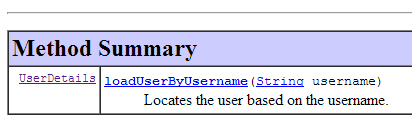 |
该接口由以下 [AppUserDetailsService] 类实现:
package spring.security.dao;

import generic.jdbc.config.ConfigJdbc;

import java.sql.ResultSet;
import java.sql.SQLException;
import java.util.Collections;
import java.util.List;

import org.springframework.beans.factory.annotation.Autowired;
import org.springframework.jdbc.core.RowMapper;
import org.springframework.jdbc.core.namedparam.NamedParameterJdbcTemplate;
import org.springframework.security.core.userdetails.UserDetails;
import org.springframework.security.core.userdetails.UserDetailsService;
import org.springframework.security.core.userdetails.UsernameNotFoundException;
import org.springframework.stereotype.Service;

import spring.jdbc.entities.User;
import spring.jdbc.infrastructure.DaoException;

@Service
public class AppUserDetailsService implements UserDetailsService {

    // injections
    @Autowired
    private NamedParameterJdbcTemplate namedParameterJdbcTemplate;

    // local
    private String simpleClassName = getClass().getSimpleName();

    @Override
    public UserDetails loadUserByUsername(String login) throws UsernameNotFoundException {
        List<User> users;
        try {
            // search for user via login
            users = namedParameterJdbcTemplate.query(ConfigJdbc.SELECT_USER_BYLOGIN,
                    Collections.singletonMap("login", login), new ShortUserMapper());
        } catch (Exception e) {
            throw new DaoException(145, e, simpleClassName);
        }
        // found?
        if (users.size() == 0) {
            throw new UsernameNotFoundException(String.format("login [%s] inexistant", login));
        }
        // render user details
        return new AppUserDetails(users.get(0), namedParameterJdbcTemplate);
    }
}

// --------------------- mappers
class ShortUserMapper implements RowMapper<User> {

    @Override
    public User mapRow(ResultSet rs, int rowNum) throws SQLException {
        return new User(rs.getLong("u_ID"), rs.getLong("u_VERSIONING"), rs.getString("u_NAME"), rs.getString("u_LOGIN"),
                rs.getString("u_PASSWORD"));
    }
}
- 第 21 行:该类将作为 Spring 组件;
- 第 25-26 行:将通过 JDBC 访问数据库,使用 [spring-jdbc-generic-04] 项目 Bean 中定义的 [NamedParameterJdbcTemplate] 对象;
- 第 31-49 行:实现 [UserDetailsService] 接口(第 22 行)的 [loadUserByUsername] 方法。参数为用户登录名;
- 第 36–37 行:根据用户登录名进行用户搜索。SQL 语句 [ConfigJdbc.SELECT_USER_BYLOGIN] 如下:
public static final String SELECT_USER_BYLOGIN = "SELECT u.ID as u_ID, u.VERSIONING as u_VERSIONING, u.NAME as u_NAME,u.LOGIN as u_LOGIN,u.PASSWORD as u_PASSWORD FROM USERS u WHERE u.LOGIN= :login";
SELECT 语句返回的每一行都会在第 52–58 行由 [ShortUserMapper] 类转换为 [User] 实体。
- 第 42–44 行:若未找到,则抛出异常;
- 第 46 行:构建并返回一个 [AppUserDetails] 对象。它确实是 [UserDetails] 类型(第 32 行)。有两项信息被传递给其构造函数:
- 找到的用户;
- 允许 [AppUserDetails] 类查询数据库的 [namedParameterJdbcTemplate] 对象;
20.2.3. [web] 层
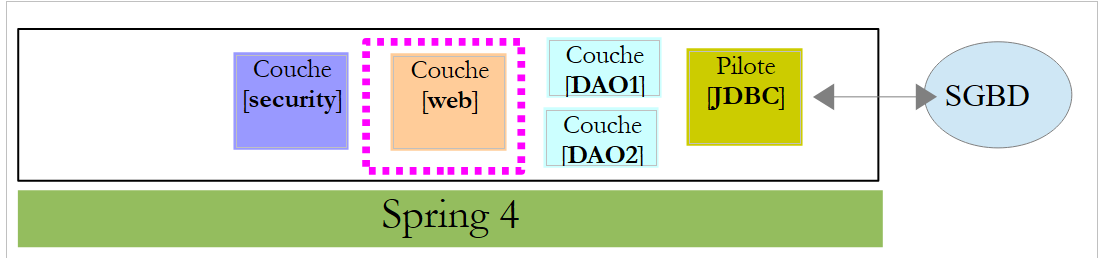 |
[spring-security-server-jdbc-generic] 项目依赖于 [spring-webjson-server-jdbc-generic] 项目:
|
该项目实现了[web]层。无需对其进行修改。
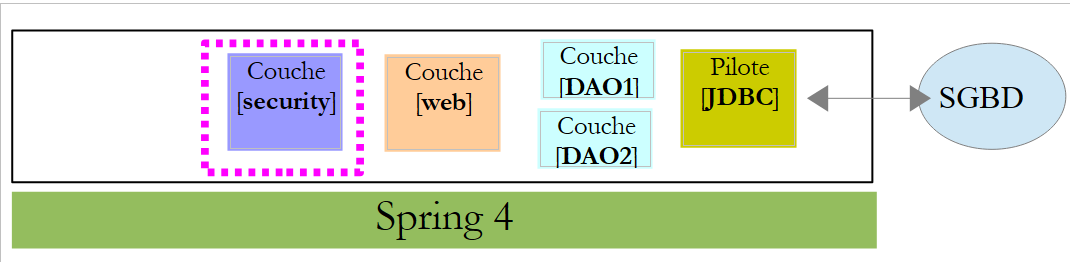
20.2.4. 项目安全配置
 |
1 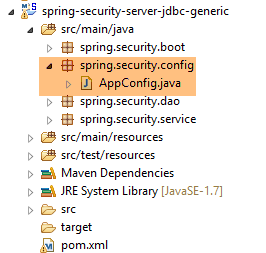 |
我们已经遇到过一个 Spring Security 配置类(参见第 19.2.4 节):
package hello;

import org.springframework.context.annotation.Configuration;
import org.springframework.security.config.annotation.authentication.builders.AuthenticationManagerBuilder;
import org.springframework.security.config.annotation.web.builders.HttpSecurity;
import org.springframework.security.config.annotation.web.configuration.WebSecurityConfigurerAdapter;
import org.springframework.security.config.annotation.web.servlet.configuration.EnableWebMvcSecurity;

@Configuration
@EnableWebMvcSecurity
public class WebSecurityConfig extends WebSecurityConfigurerAdapter {
    @Override
    protected void configure(HttpSecurity http) throws Exception {
        http.authorizeRequests().antMatchers("/", "/home").permitAll().anyRequest().authenticated();
        http.formLogin().loginPage("/login").permitAll().and().logout().permitAll();
    }

    @Override
    protected void configure(AuthenticationManagerBuilder auth) throws Exception {
        auth.inMemoryAuthentication().withUser("user").password("password").roles("USER");
    }
}
我们将遵循相同的步骤:
- 第 11 行:定义一个继承自 [WebSecurityConfigurerAdapter] 类的类;
- 第 13 行:定义一个方法 [configure(HttpSecurity http)],用于定义 Web 服务各 URL 的访问权限;
- 第 19 行:定义一个方法 [configure(AuthenticationManagerBuilder auth)],用于定义用户及其角色;
[AppConfig] 类将如下所示:
package spring.security.config;

import org.springframework.beans.factory.annotation.Autowired;
import org.springframework.context.annotation.ComponentScan;
import org.springframework.context.annotation.Configuration;
import org.springframework.context.annotation.Import;
import org.springframework.http.HttpMethod;
import org.springframework.security.config.annotation.authentication.builders.AuthenticationManagerBuilder;
import org.springframework.security.config.annotation.web.builders.HttpSecurity;
import org.springframework.security.config.annotation.web.configuration.EnableWebSecurity;
import org.springframework.security.config.annotation.web.configuration.WebSecurityConfigurerAdapter;
import org.springframework.security.crypto.bcrypt.BCryptPasswordEncoder;

import spring.security.dao.AppUserDetailsService;
import spring.webjson.server.config.WebConfig;

@Configuration
@EnableWebSecurity
@ComponentScan(basePackages = { "spring.security.dao", "spring.security.service" })
@Import({ spring.webjson.server.config.AppConfig.class, WebConfig.class })
public class AppConfig extends WebSecurityConfigurerAdapter {
    @Autowired
    private AppUserDetailsService appUserDetailsService;

    // security
    private boolean activateSecurity = true;

    @Override
    protected void configure(AuthenticationManagerBuilder registry) throws Exception {
        // authentication is performed by bean [appUserDetailsService]
        // the password is encrypted using the BCrypt hash algorithm
        registry.userDetailsService(appUserDetailsService).passwordEncoder(new BCryptPasswordEncoder());
    }

    @Override
    protected void configure(HttpSecurity http) throws Exception {
        // CSRF
        http.csrf().disable();
        // secure application?
        if (activateSecurity) {
            // the password is transmitted by the header Authorization: Basic xxxx
            http.httpBasic();
            // the HTTP OPTIONS method must be authorized for all
            http.authorizeRequests() //
                    .antMatchers(HttpMethod.OPTIONS, "/", "/**").permitAll();
            // only the ADMIN role can use the application
            http.authorizeRequests() //
                    .antMatchers("/", "/**") // all URL
                    .hasRole("ADMIN");
            // session or not?
            //http.sessionManagement().sessionCreationPolicy(SessionCreationPolicy.STATELESS);
        }
    }
}
- 第 17 行:该类是一个 Spring 配置类;
- 第 18 行:启用 Spring Security 组件;
- 第 26 行:我们从 [DAO2] 层以及 [spring.security.service] 包中获取 Spring 组件,这些内容我们稍后会讨论;
- 第 23 行:导入来自 [spring-webjson-server-jdbc-generic] 项目的 Bean,该项目实现了 [web] 层。其中也包含来自 [DAO1] 层的 Bean;
- 第 22–23 行:注入了 [AppUserDetails] 类,该类提供对应用程序用户的访问;
- 第 26 行:一个布尔值,用于控制 Web 应用程序是否启用安全保护(true)或不启用(false);
- 第 28–33 行:[configure(HttpSecurity http)] 方法定义用户及其角色。该方法将 [AuthenticationManagerBuilder] 作为参数。该参数被补充了两项信息(第 32 行):
- 来自第 23 行的 [appUserDetailsService] 引用,该服务提供对已注册用户的访问。请注意,此处并未明确说明用户数据存储在数据库中。因此,它们也可能存储在缓存中,或由 Web 服务提供等。
- 密码所使用的加密类型。我们采用了 BCrypt 算法;
- 第 35–53 行:[configure(HttpSecurity http)] 方法定义了对 Web 服务 URL 的访问权限;
- 第 38 行:我们在入门项目中看到,默认情况下 Spring Security 会管理一个 CSRF(跨站请求伪造)令牌,希望进行身份验证的用户必须将该令牌发回给服务器。在此处,该机制已被禁用。结合布尔值(isSecured=false),这使得 Web 应用程序可以在不启用安全保护的情况下使用;
- 第 42 行:我们启用了通过 HTTP 头进行身份验证。客户端必须发送以下 HTTP 头:
其中 code 是登录名:密码字符串的 Base64 编码。例如,字符串 admin:admin 的 Base64 编码为 YWRtaW46YWRtaW4=。因此,登录名为 [admin]、密码为 [admin] 的用户将发送以下 HTTP 头进行身份验证:
- 第 47–49 行:表示具有 [ROLE_ADMIN] 角色的用户可以访问 Web 服务的所有 URL。这意味着没有此角色的用户无法访问该 Web 服务;
- 第 51 行:在 [session] 模式下,已通过身份验证的用户后续访问时无需再次验证。这是 Spring Security 的默认设置。第 51 行禁用了此模式。若启用该模式,用户每次访问都必须进行身份验证。由于不使用会话时,安全 Web 服务的响应速度会比使用会话时更慢,因此第 51 行已被注释掉;
20.2.5. 测试受保护的 Web 服务
我们将使用 Chrome 客户端 [Advanced Rest Client] 测试该 Web 服务。需要指定 HTTP 身份验证头:
其中 [code] 是 Base64 编码的字符串 [login:password]。要生成此代码,您可以使用 [spring-security-create-users] 项目中的以下程序:
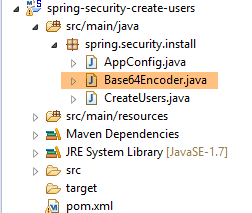 |
package spring.security.helpers;

import org.springframework.security.crypto.codec.Base64;

public class Base64Encoder {

    public static void main(String[] args) {
        // we expect two arguments: login password
        if (args.length != 2) {
            System.out.println("Syntaxe : login password");
            System.exit(0);
        }
        // we retrieve the two arguments
        String chaîne = String.format("%s:%s", args[0], args[1]);
        // encode the string
        byte[] data = Base64.encode(chaîne.getBytes());
        // displays its Base64 encoding
        System.out.println(new String(data));
    }

}
如果我们使用两个参数 [admin admin] 运行此程序:
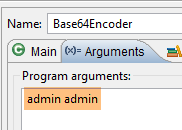 |
我们得到以下结果:
现在我们可以进行测试了:
- MySQL 数据库管理系统必须正在运行;
- 我们使用名为 [spring-jdbc-generic-04-fillDataBase] 的执行配置来填充 [PRODUCTS] 和 [CATEGORIES] 表:
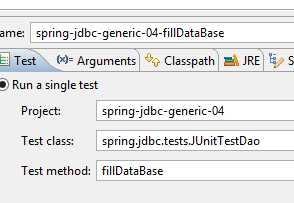 |
- 如果尚未执行此操作,我们将使用名为 [spring-security-create-users-hibernate-eclipselink] 的执行配置来填充 [USERS、ROLES、USERS_ROLES] 表:
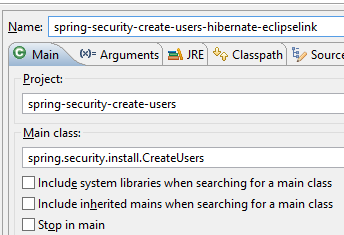 |
- 我们使用名为 [spring-security-server-jdbc-generic] 的运行时配置启动安全 Web 服务:
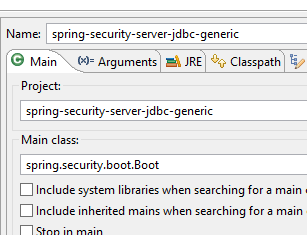 |
然后,使用 Chrome 客户端 [Advanced Rest Client],我们请求所有分类的长版本:
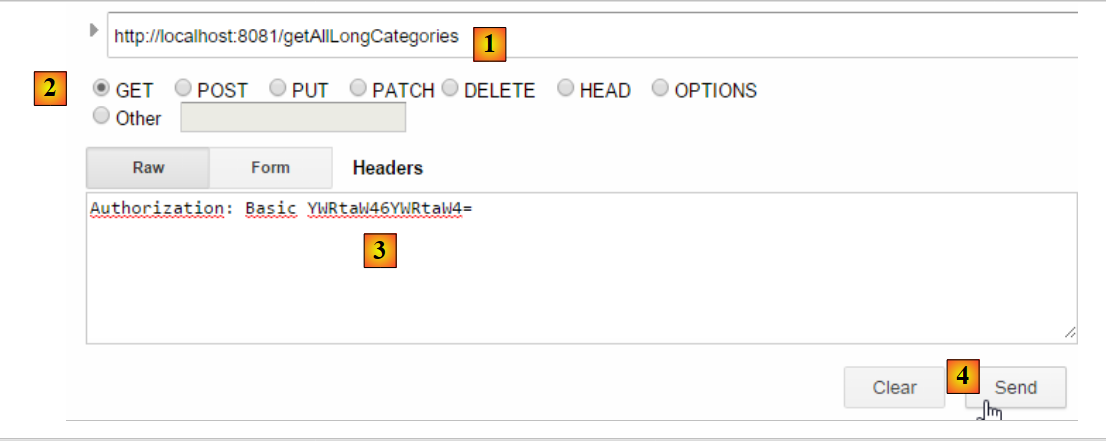 |
- 在 [1] 中,我们使用 GET 方法请求长版分类描述的 URL;
- 在 [2] 中,使用 GET 方法;
- 在 [3] 中,我们提供了身份验证 HTTP 头。代码 [YWRtaW46YWRtaW4=] 是字符串 [admin:admin] 的 Base64 编码;
- 在 [4] 中,我们发送 HTTP 请求;
服务器的响应如下:
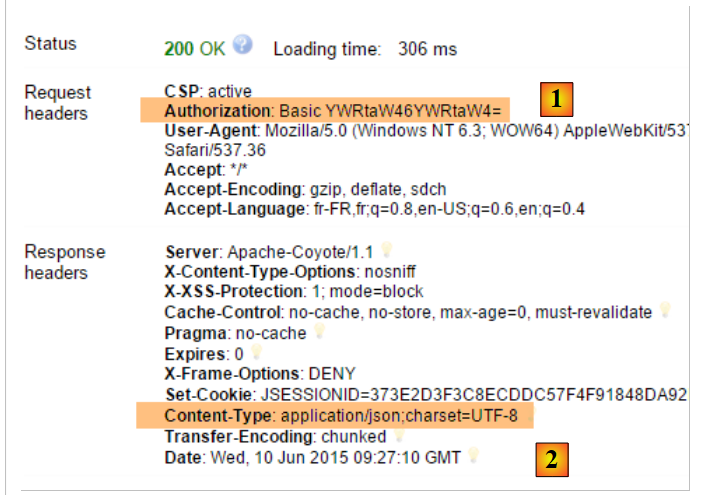 |
- 在 [1] 中,HTTP 身份验证标头;
- 在 [2] 中,服务器返回一个 JSON 响应;
我们成功获取了分类列表:
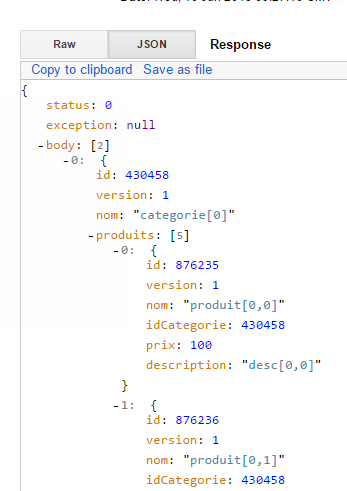 |
现在,让我们尝试发送一个包含错误身份验证标头的 HTTP 请求。此时响应如下:
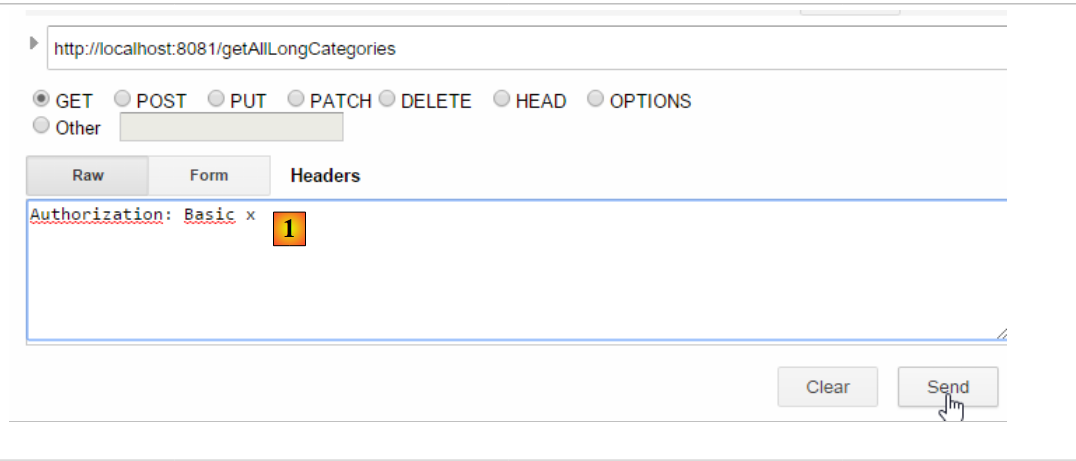 |
- 在 [1] 中:HTTP 身份验证标头;
我们收到以下响应:
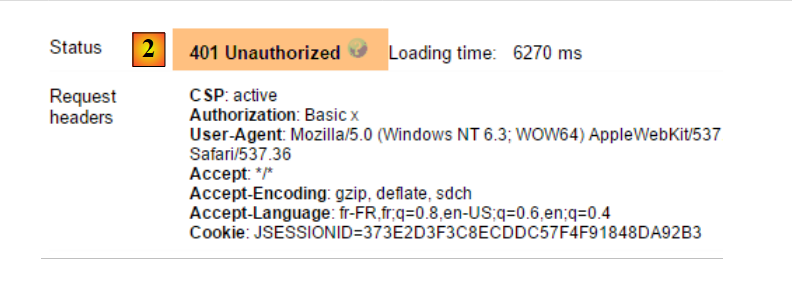 |
- 在 [2] 中:Web 服务响应;
现在,我们来试一下用户 / user。该用户存在,但无权访问该 Web 服务。如果我们使用两个参数 [user user] 运行 Base64 编码程序:
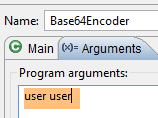 |
我们得到以下结果:
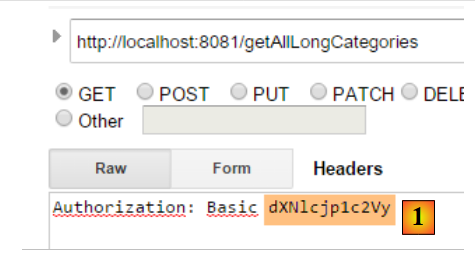 |
- 在 [1] 中:错误的 HTTP 身份验证标头;
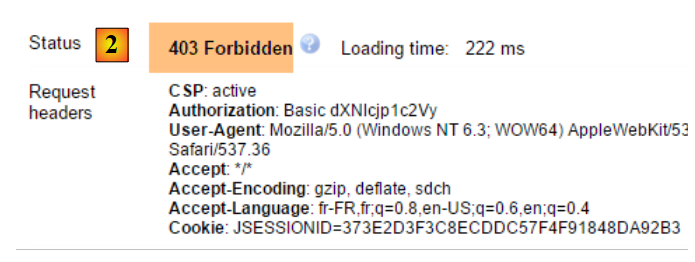 |
- 在 [2] 中:Web 服务响应。它与之前的 [401 未授权] 不同。这次,用户身份验证正确,但没有足够的权限访问该 URL;
一个安全的 Web 服务现已投入运行。
20.2.6. 一个身份验证 URL
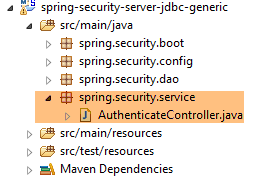 |
我们将创建一个 URL,用于判断用户是否具有访问 Web 服务的权限。为此,我们创建以下新的 MVC 控制器 [AuthenticateController]:
package spring.security.service;

import org.springframework.web.bind.annotation.RequestMapping;
import org.springframework.web.bind.annotation.RequestMethod;
import org.springframework.web.bind.annotation.RestController;

import spring.webjson.server.service.Response;

@RestController
public class AuthenticateController {
    @RequestMapping(value = "/authenticate", method = RequestMethod.GET)
    public Response<Void> authenticate() {
        return new Response<Void>(0, null, null);
    }

}
- 第 9 行:[AuthenticateController] 类是一个 Spring 控制器。因此,它会暴露 URL。[@RestController] 注解表示处理这些 URL 的方法会向客户端返回各自的响应;
- 第 11 行:公开 URL [/authenticate];
- 第 12–14 行:该方法仅返回一个空的 [Response] 对象,但其 [status] 值为 0,表示未发生错误;
这个 URL 的用途是什么?当我们仅需对用户进行身份验证时,就会请求该 URL。我们已经看到,如果安全层不接受该用户,它会抛出异常。以下是一个示例;
使用用户 [admin:admin]:
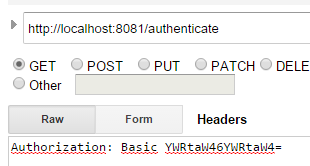 | 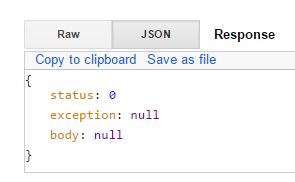 |
我们收到一个空响应,但没有抛出异常。
用户 [user:user] 的情况:
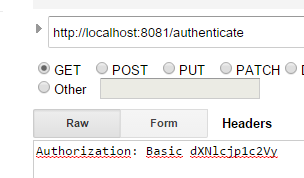 | 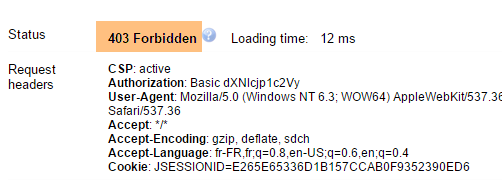 |
我们遇到一个异常。
20.2.7. 结论
在不修改原始 web/JSON 项目的情况下,已添加了 Spring Security 所需的类。这种理想情况源于一个事实:即添加到数据库中的三个表与现有表相互独立。我们甚至可以将它们放在一个独立的数据库中。在其他情况下,新增的表可能与现有表存在关联。此时,必须审查现有 [DAO] 层中的代码。
20.3. 为安全 Web/JSON 服务编写的客户端
我们已经为未加密的 Web 服务/JSON 编写了一个客户端:
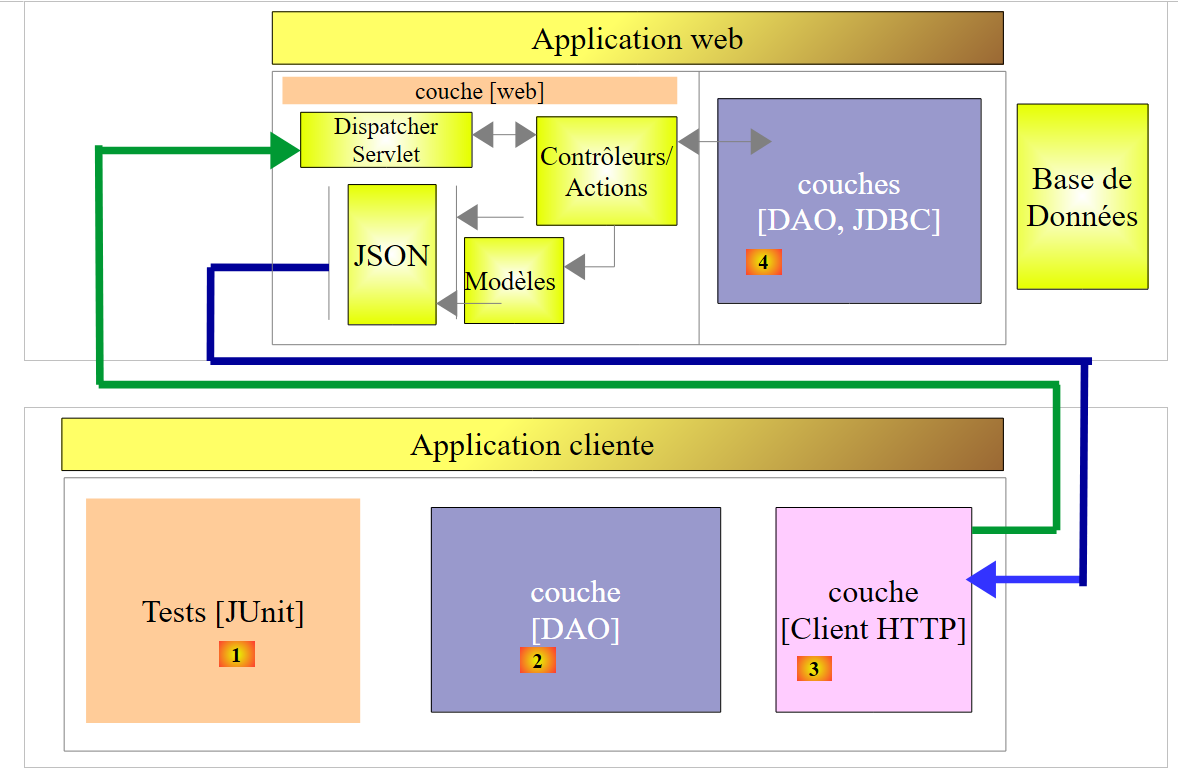 |
现在我们将编写一个用于安全 Web 服务的客户端:
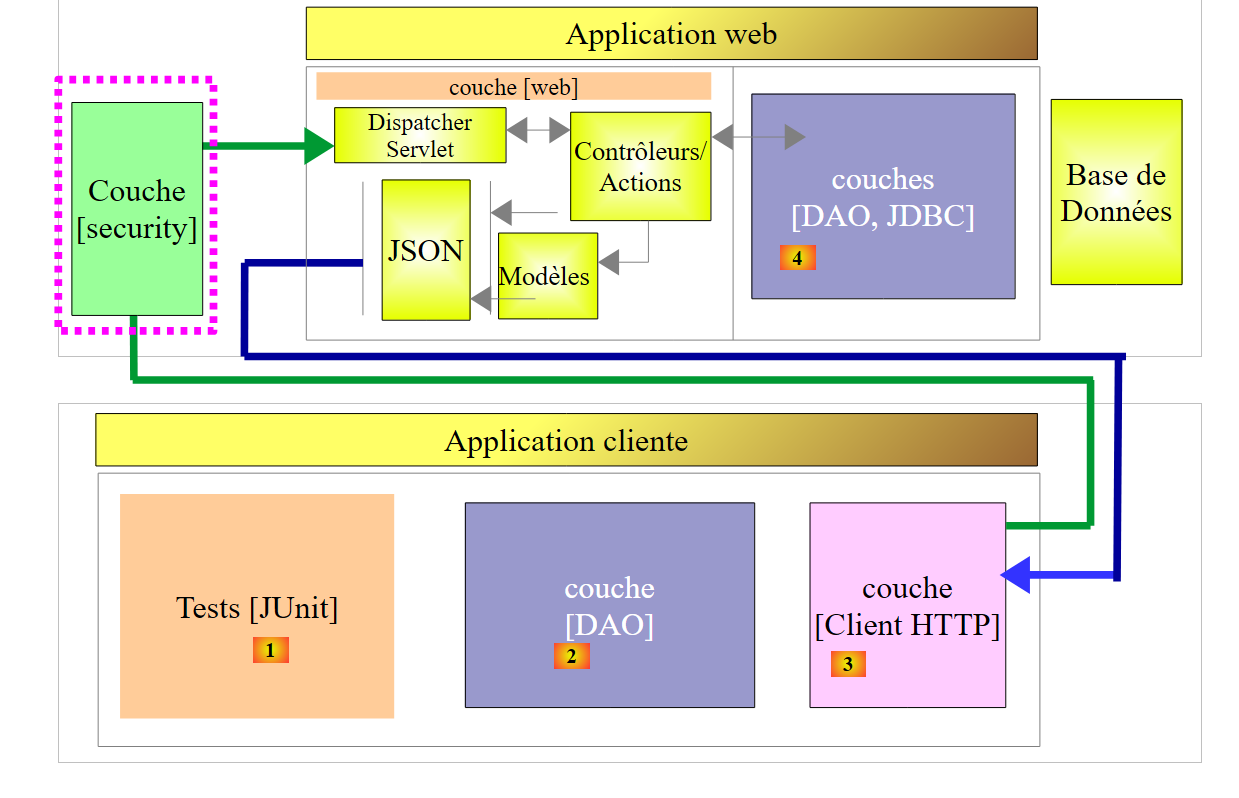 |
 |
20.3.1. [HTTP 客户端] 层
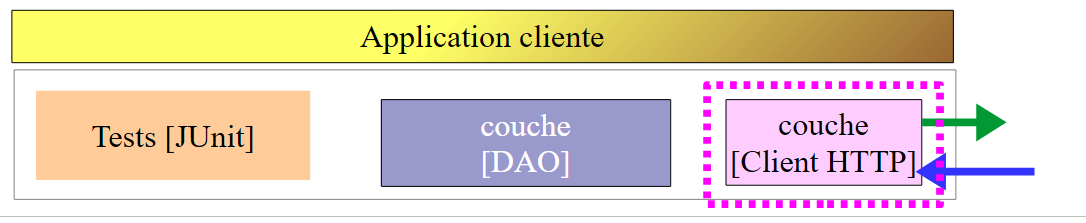 |
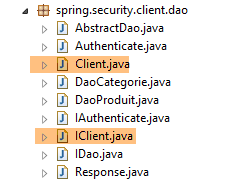 | 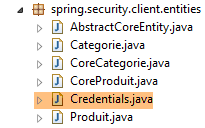 |
[Client] 类负责处理与安全/JSON Web 服务器的 HTTP 通信。正如我们刚才所见,在此 HTTP 通信中,客户端现在必须发送一个身份验证标头,例如:
[IClient] 接口变为如下形式:
package spring.webjson.client.dao;

import org.springframework.http.HttpMethod;

import spring.webjson.client.entities.Credentials;

public interface IClient {
    public <T1, T2> T1 getResponse(Credentials credentials,String url, HttpMethod method, int errStatus, T2 body);
}
- 第 8 行:[getResponse] 方法的第一个参数现在是一个 [Credentials] 对象,该对象封装了用户的凭据:
package spring.security.client.entities;

public class Credentials {

    // properties
    private String login;
    private String password;

    // manufacturer
    public Credentials() {
    }

    public Credentials(String login, String password) {
        this.login = login;
        this.password = password;
    }

    // getters and setters
...
}
实现 [IClient] 接口的 [Client] 类演变如下:
package spring.security.client.dao;

...

@Component
public class Client implements IClient {

    // injections
    @Autowired
    protected RestTemplate restTemplate;
    @Autowired
    protected String urlServiceWebJson;

    // local
    private String simpleClassName = getClass().getSimpleName();

    private String getBase64(Credentials credentials) {
        // encodes user and password in base 64 - requires java 8
        String chaîne = String.format("%s:%s", credentials.getLogin(), credentials.getPassword());
        return String.format("Basic %s", new String(Base64.getEncoder().encode(chaîne.getBytes())));
    }

    // generic request
    @Override
    public <T1, T2> T1 getResponse(Credentials credentials, String url, HttpMethod method, int errStatus, T2 body) {
        // the server response
        ResponseEntity<Response<T1>> response;
        try {
            // prepare the query
            RequestEntity<?> request = null;
            if (method == HttpMethod.GET) {
                HeadersBuilder<?> headersBuilder = RequestEntity.get(new URI(String.format("%s%s", urlServiceWebJson, url)))    .accept(MediaType.APPLICATION_JSON);
                if (credentials != null) {
                    headersBuilder = headersBuilder.header("Authorization", getBase64(credentials));
                }
                request = headersBuilder.build();
            }
            if (method == HttpMethod.POST) {
                BodyBuilder bodyBuilder = RequestEntity.post(new URI(String.format("%s%s", urlServiceWebJson, url))).header("Content-Type", "application/json").accept(MediaType.APPLICATION_JSON);
                if (credentials != null) {
                    bodyBuilder = bodyBuilder.header("Authorization", getBase64(credentials));
                }
                request = bodyBuilder.body(body);
            }
            // execute the query
            response = restTemplate.exchange(request, new ParameterizedTypeReference<Response<T1>>() {
            });
        } catch (Exception e) {
            // encapsulate the exception
            throw new DaoException(errStatus, e, simpleClassName);
        }
...
    }
...
}
- 第 33–35 行、第 40–42 行:如果用户 [credentials] 不为空,则添加身份验证标头。 用户名和密码的 Base64 编码由第 17–21 行中的 [getBase64] 方法处理。请注意,该方法使用了 JDK 1.8 中的 [Base64] 类。我们的 HTTP 客户端可以处理不安全的 Web 服务。只需向其传递一个值为 null 的 [credentials] 即可;
- 除上述几行外,其余代码保持不变;
20.3.2. [DAO] 层
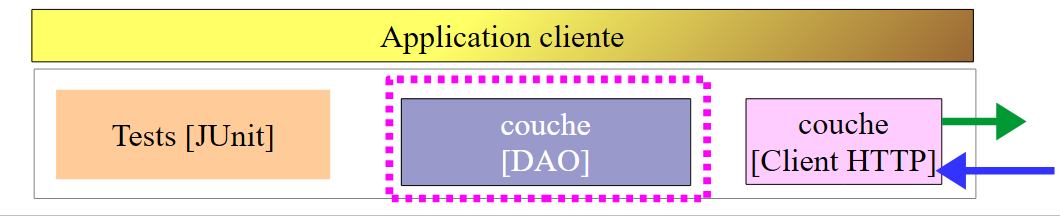 |
20.3.2.1. [IDao] 接口
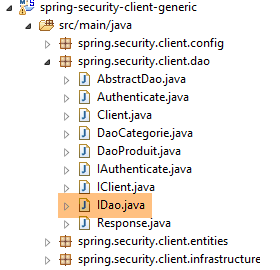 |
[spring-webjson-client-generic] 项目中 [IDao] 接口的所有方法都会接收一个额外的 [Credentials] 参数:
package spring.security.client.dao;

import java.util.List;

import spring.security.client.entities.AbstractCoreEntity;
import spring.security.client.entities.Credentials;

public interface IDao<T extends AbstractCoreEntity> extends IAuthenticate {

    // list of all T entities
    public List<T> getAllShortEntities(Credentials credentials);

    public List<T> getAllLongEntities(Credentials credentials);

    // special entities - short version
    public List<T> getShortEntitiesById(Credentials credentials, Iterable<Long> ids);

    public List<T> getShortEntitiesById(Credentials credentials, Long... ids);

    public List<T> getShortEntitiesByName(Credentials credentials, Iterable<String> names);

    public List<T> getShortEntitiesByName(Credentials credentials, String... names);

    // special entities - long version
    public List<T> getLongEntitiesById(Credentials credentials, Iterable<Long> ids);

    public List<T> getLongEntitiesById(Credentials credentials, Long... ids);

    public List<T> getLongEntitiesByName(Credentials credentials, Iterable<String> names);

    public List<T> getLongEntitiesByName(Credentials credentials, String... names);

    // update of several entities
    public List<T> saveEntities(Credentials credentials, Iterable<T> entities);

    public List<T> saveEntities(Credentials credentials, @SuppressWarnings("unchecked") T... entities);

    // delete all entities
    public void deleteAllEntities(Credentials credentials);

    // deletion of multiple entities
    public void deleteEntitiesById(Credentials credentials, Iterable<Long> ids);

    public void deleteEntitiesById(Credentials credentials, Long... ids);

    public void deleteEntitiesByName(Credentials credentials, Iterable<String> names);

    public void deleteEntitiesByName(Credentials credentials, String... names);

    public void deleteEntitiesByEntity(Credentials credentials, Iterable<T> entities);

    public void deleteEntitiesByEntity(Credentials credentials, @SuppressWarnings("unchecked") T... entities);
}
- 第 8 行:[IDao] 接口继承了以下 [IAuthenticate] 接口:
package spring.security.client.dao;

import spring.security.client.entities.Credentials;

public interface IAuthenticate {
    // authentication
    public void authenticate(Credentials credentials);
}
[IAuthenticate] 接口仅包含一个方法,即 [authenticate]。如果用户 [Credentials credentials] 被安全 Web 服务接受,该方法不返回任何值(void);否则,它将抛出异常。
20.3.2.2. [AbstractDao] 类
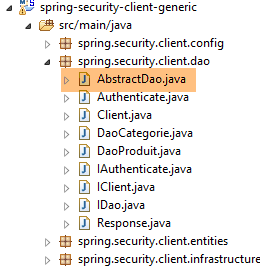 |
请注意,[AbstractDao] 类是管理分类 URL 的 [DaoCategorie] 类以及管理产品 URL 的 [DaoProduit] 类的父类。在 [spring-webjson-client-generic] 项目中,[AbstractDao] 类的所有方法都会接收一个额外的参数 [Credentials credentials],并将该参数传递给子类。以下是一个示例:
    @Override
    public List<T1> getShortEntitiesById(Credentials credentials, Iterable<Long> ids) {
        // validité de l'argument
        List<T1> entities = checkNullOrEmptyArgument(true, ids);
        if (entities != null) {
            return entities;
        }
        // résultat
        return getShortEntitiesById(credentials, Lists.newArrayList(ids));
}
- [getShortEntitiesById] 方法接收 [Credentials credentials] 参数(第 2 行),并将该参数(第 9 行)传递给子类的 [getShortEntitiesById] 方法;
[AbstractDao] 类的骨架如下:
package spring.security.client.dao;

import java.util.ArrayList;
import java.util.List;

import org.springframework.beans.factory.annotation.Autowired;

import spring.security.client.entities.AbstractCoreEntity;
import spring.security.client.entities.Credentials;
import spring.security.client.infrastructure.MyIllegalArgumentException;

import com.google.common.collect.Lists;

public abstract class AbstractDao<T1 extends AbstractCoreEntity> implements IDao<T1> {

    @Autowired
    private IAuthenticate authenticate;

...
}
- 第 14 行:该类实现了我们之前描述的 [IDao] 接口;
- 第 16–17 行:注入了一个 [IAuthenticate] 接口的实例。该接口由以下 [Authenticate] 类实现:
package spring.security.client.dao;

import org.springframework.beans.factory.annotation.Autowired;
import org.springframework.http.HttpMethod;
import org.springframework.stereotype.Component;

import spring.security.client.entities.Credentials;

@Component
public class Authenticate implements IAuthenticate{
    @Autowired
    protected IClient client;

    // verification [credentials,mdp]
    public void authenticate(Credentials credentials) {
        client.<Void, Void> getResponse(credentials, "/authenticate", HttpMethod.GET, 111, (Void) null);
    }

}
- 第 9 行:[Authenticate] 类是 Spring 组件;
- 第 10 行:该类实现了 [IAuthenticate] 接口;
- 第 11–12 行:注入 HTTP 客户端,用于与安全 Web 服务进行通信;
- 第 15–17 行:实现了该接口的 [authenticate] 方法;
- 第 16 行:向 URL [/authenticate] 发送一个 HTTP GET 请求。该 URL 的用法已在第 20.2.6 节中演示过。其原理是:如果用户 [credentials] 未知或权限不足,调用将引发异常;
[AbstractDao] 类实现了 [IDao] 接口的 [authenticate] 方法,具体如下:
    @Autowired
    private IAuthenticate authenticate;

    @Override
    public void authenticate(Credentials credentials) {
        authenticate.authenticate(credentials);
}
- 第 7 行:该任务被委托给 [Authenticate] 类的 [authenticate] 方法。因此,如果用户 [Credentials credentials] 未被安全 Web 服务接受,则会抛出异常;
20.3.2.3. [DaoCategorie, DaoProduit] 类
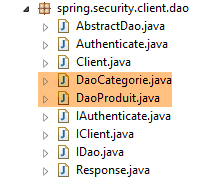 |
[DaoCategorie, DaoProduit] 类是来自 [spring-webjson-server-generic] 项目中的类,并额外添加了 [Credentials credentials] 参数。以下是一个示例:
@Component
public class DaoCategorie extends AbstractDao<Categorie> {

    // injections
    @Autowired
    protected ApplicationContext context;
    @Autowired
    protected IClient client;

    @Override
    public List<Categorie> getAllShortEntities(Credentials credentials) {
        try {
            // filters jSON
            ObjectMapper mapper = context.getBean("jsonMapperShortCategorie", ObjectMapper.class);
            // get all categories
            Object map = client.<List<Categorie>, Void> getResponse(credentials, "/getAllShortCategories", HttpMethod.GET,
                    202, null);
            // the List<Categorie> category list
            return mapper.readValue(mapper.writeValueAsString(map), new TypeReference<List<Categorie>>() {
            });
        } catch (DaoException e1) {
            throw e1;
        } catch (Exception e2) {
            throw new DaoException(221, e2, simpleClassName);
        }
    }
....
20.3.3. Spring 配置
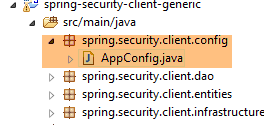 |
[AppConfig] 类用于配置项目的 Spring 环境。它与 [spring-webjson-client-generic] 项目中的配置完全相同,只有一个例外:
@Configuration
@ComponentScan({ "spring.security.client.dao" })
public class AppConfig {
- 第 2 行:必须指定新的 [DAO] 层的包名;
20.3.4. [DAO] 层的测试
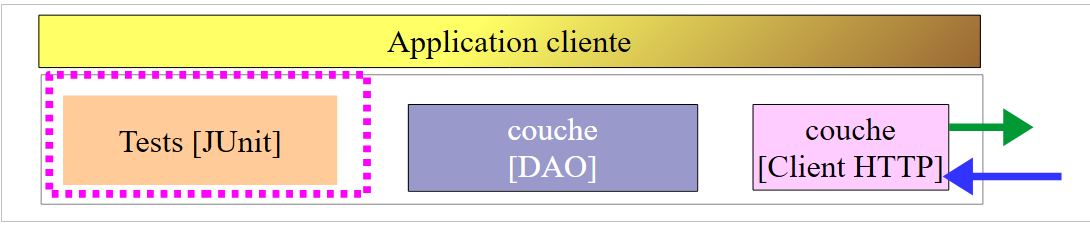 |
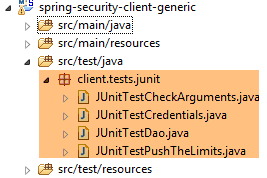 |
20.3.4.1. [JUnitTestCredentials] 测试
[JUnitTestCredentials] 测试使用 [IDao.authenticate] 方法来验证特定用户的有效性:
package client.tests.junit;

import org.junit.Assert;
import org.junit.BeforeClass;
import org.junit.Test;
import org.junit.runner.RunWith;
import org.springframework.beans.factory.annotation.Autowired;
import org.springframework.boot.test.SpringApplicationConfiguration;
import org.springframework.test.context.junit4.SpringJUnit4ClassRunner;

import spring.security.client.config.AppConfig;
import spring.security.client.dao.IAuthenticate;
import spring.security.client.entities.Credentials;
import spring.security.client.infrastructure.DaoException;

@SpringApplicationConfiguration(classes = AppConfig.class)
@RunWith(SpringJUnit4ClassRunner.class)
public class JUnitTestCredentials {

    // layer [DAO]
    @Autowired
    private IAuthenticate authenticate;

    // users
    static private Credentials admin;
    static private Credentials user;
    static private Credentials unknown;

    @BeforeClass
    public static void init() {
        admin = new Credentials("admin", "admin");
        user = new Credentials("user", "user");
        unknown = new Credentials("x", "y");
    }

    @Test()
    public void checkUserUser() {
        DaoException se = null;
        try {
            authenticate.authenticate(user);
        } catch (DaoException e) {
            se = e;
            System.out.println("checkUserUser: " + e);
        }
        Assert.assertNotNull(se);
        Assert.assertEquals("403 Forbidden", se.getExceptions().get(0).getErrorMessage());
    }

    @Test()
    public void checkUserUnknown() {
        DaoException se = null;
        try {
            authenticate.authenticate(unknown);
        } catch (DaoException e) {
            se = e;
            System.out.println("checkUserUnknown : " + e);
        }
        Assert.assertNotNull(se);
        Assert.assertEquals("401 Unauthorized", se.getExceptions().get(0).getErrorMessage());
    }

    @Test()
    public void checkUserAdmin() {
        DaoException se = null;
        try {
            authenticate.authenticate(admin);
        } catch (DaoException e) {
            se = e;
            System.out.println("checkUserAdmin : " + e);
        }
        Assert.assertNull(se);
    }
}
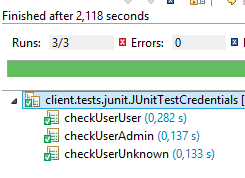
- 在测试类的初始化过程中(第 29–34 行),创建了三个用户:
- 用户 [admin] 具有访问 Web 服务 URL 的权限。这在第 63–72 行进行测试;
- 用户 [user] 存在,但无权使用 Web 服务 URL。相关测试在第 37–47 行进行;
- 用户 [unknown] 不存在。相关测试在第 50–60 行进行;
我们使用名为 [spring-security-server-jdbc-generic] 的运行时配置启动安全 Web 服务 [1]:
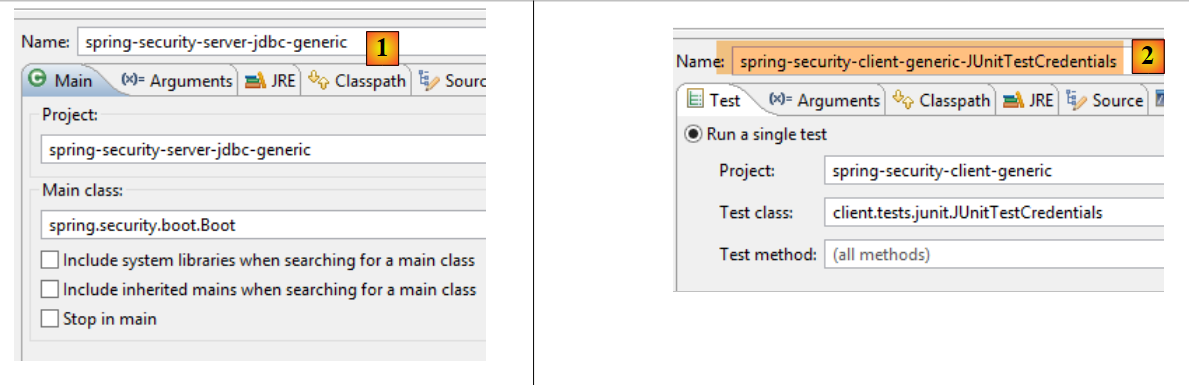 |
随后,我们使用运行时配置 [spring-security-client-generic-JUnitTestCredentials] [2] 运行 JUnit 测试 [JUnitTestCredentials]。获得的控制台输出结果如下:
且测试通过:
 |
20.3.4.2. [JUnitTestDao] 测试
[JUnitTestDao] 测试与未加固的 [spring-webjson-client-generic] 项目中的测试完全相同,唯一的区别在于,现在被测试的 [DAO] 层的方法都将用户 [admin / admin] 作为其第一个参数:
@SpringApplicationConfiguration(classes = AppConfig.class)
@RunWith(SpringJUnit4ClassRunner.class)
public class JUnitTestDao {

    // spring context
    @Autowired
    private ApplicationContext context;
    // layer [DAO]
    @Autowired
    private IDao<Produit> daoProduit;
    @Autowired
    private IDao<Categorie> daoCategorie;

....

    // users
    static private Credentials admin;

    @BeforeClass
    public static void init() {
        admin = new Credentials("admin", "admin");
    }

    @Before
    public void clean() {
        // the base is cleaned before each test
        log("Vidage de la base de données", 1);
        // we empty table [CATEGORIES] and cascade table [PRODUITS]
        daoCategorie.deleteAllEntities(admin);
        // emptying dictionaries
        for (Long id : mapCategories.keySet()) {
            mapCategories.remove(id);
        }
        for (Long id : mapProduits.keySet()) {
            mapProduits.remove(id);
        }
    }

    private List<Categorie> fill(int nbCategories, int nbProduits) {
        // fill the tables
        ...
        // adding the category - by cascading the products will also be
        // inserted - the result is returned at the same time
        return daoCategorie.saveEntities(admin, categories);
    }

    private Object[] showDataBase() throws BeansException, JsonProcessingException {
        // list of categories
        log("Liste des catégories", 2);
        List<Categorie> categories = daoCategorie.getAllShortEntities(admin);
        affiche(categories, context.getBean("jsonMapperShortCategorie", ObjectMapper.class));
        // product list
        log("Liste des produits", 2);
        List<Produit> produits = daoProduit.getAllShortEntities(admin);
        affiche(produits, context.getBean("jsonMapperShortProduit", ObjectMapper.class));
        // result
        return new Object[] { categories, produits };
    }
...
所有操作均使用 [admin / admin] 用户执行,该用户是唯一拥有安全 Web 服务访问权限的用户。
我们将使用名为 [spring-security-client-generic-JUnitTestDao] 的执行配置运行测试:
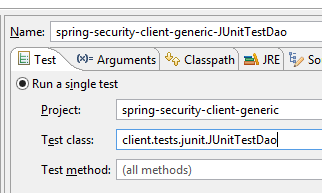 |
测试通过了,但我们可以看到,它的运行速度比未受保护的 Web 服务要慢。对应用程序进行安全加固会显著增加其响应时间。有一个重要因素影响了受保护 Web 服务的性能:在配置它的 [AppConfig] 类中,我们写道:
    @Override
    protected void configure(HttpSecurity http) throws Exception {
        // CSRF
        http.csrf().disable();
        // secure application?
        if (activateSecurity) {
            // the password is transmitted by the header Authorization: Basic xxxx
            http.httpBasic();
            // the HTTP OPTIONS method must be authorized for all
            http.authorizeRequests() //
                    .antMatchers(HttpMethod.OPTIONS, "/", "/**").permitAll();
            // only the ADMIN role can use the application
            http.authorizeRequests() //
                    .antMatchers("/", "/**") // all URL
                    .hasRole("ADMIN");
            // no session
            http.sessionManagement().sessionCreationPolicy(SessionCreationPolicy.STATELESS);
        }
}
第 17 行会产生影响。它决定了用户是否在每次访问时都被强制进行身份验证。如果我们将该行注释掉,JUnit 测试的执行时间会显著缩短,因为用户 [admin] 仅在首次测试时进行身份验证( ),后续测试则不再验证(即使客户端发送了 HTTP 身份验证头,服务器也不会重新验证用户的密码)。
20.4. Eclipse 项目 [spring-security-server-jpa-generic]
安全的 Web 服务现将由 [spring-security-server-jpa-generic] 项目实现,该项目基于 [spring-jpa-generic] 项目,后者使用 Spring Data JPA 管理数据库访问:
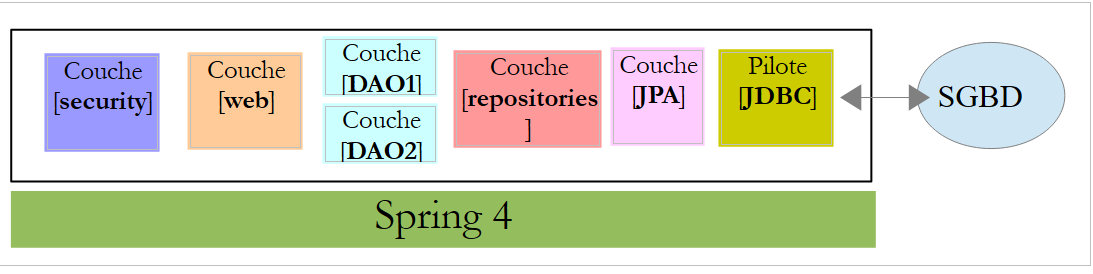 |
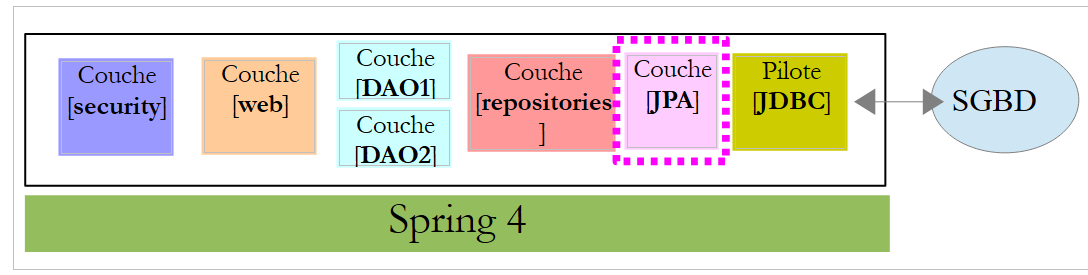
上文:
- [DAO1]层即管理[dbproduitscategories]数据库中[PRODUCTS]和[CATEGORIES]表的[DAO]层。该层已编写完成;
- [DAO2] 层是管理 [dbproduitscategories] 数据库中 [USERS]、[ROLES] 和 [USERS_ROLES] 表的 [DAO] 层。该层尚未编写;
[spring-security-server-jpa-generic] 项目最初是通过克隆之前学习过的 [spring-security-server-jdbc-generic] 项目创建的。实际上,[web] 和 [security] 层保持不变,因为:
- [DAO1 / Repositories / JPA] 层(已编写)与 [DAO1 / JDBC] 层具有相同的接口;
- [DAO2 / Repositories / JPA] 层(待编写)将与 [DAO2 / JDBC] 层具有相同的接口;
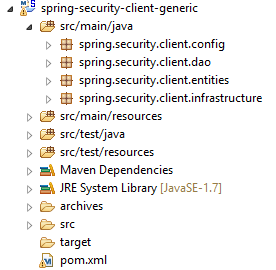
[spring-security-server-jpa-generic] 项目结构如下:
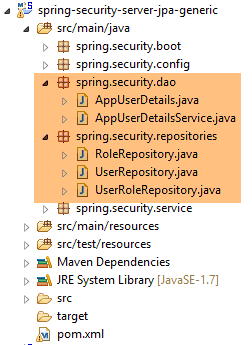 |
- [spring.security.repositories] 包实现了 [repositories] 层;
- [spring.security.dao] 包实现了 [dao2] 层;
20.4.1. Maven 项目
该项目是一个由以下 [pom.xml] 文件配置的 Maven 项目:
<project xmlns="http://maven.apache.org/POM/4.0.0" xmlns:xsi="http://www.w3.org/2001/XMLSchema-instance"
    xsi:schemaLocation="http://maven.apache.org/POM/4.0.0 http://maven.apache.org/xsd/maven-4.0.0.xsd">
    <modelVersion>4.0.0</modelVersion>
    <groupId>dvp.spring.database</groupId>
    <artifactId>spring-security-server-jpa-generic</artifactId>
    <version>0.0.1-SNAPSHOT</version>

    <name>spring-security-server-jpa-generic</name>
    <description>démo spring security</description>

    <properties>
        <project.build.sourceEncoding>UTF-8</project.build.sourceEncoding>
        <java.version>1.7</java.version>
    </properties>

    <parent>
        <groupId>org.springframework.boot</groupId>
        <artifactId>spring-boot-starter-parent</artifactId>
        <version>1.2.3.RELEASE</version>
    </parent>

    <dependencies>
        <!-- Spring security -->
        <dependency>
            <groupId>org.springframework.boot</groupId>
            <artifactId>spring-boot-starter-security</artifactId>
        </dependency>
        <!-- web server / jSON -->
        <dependency>
            <groupId>dvp.spring.database</groupId>
            <artifactId>spring-webjson-server-jpa-generic</artifactId>
            <version>0.0.1-SNAPSHOT</version>
        </dependency>
    </dependencies>
    <!-- plugins -->
    <build>
        <plugins>
            <plugin>
                <groupId>org.apache.maven.plugins</groupId>
                <artifactId>maven-surefire-plugin</artifactId>
                <version>2.18.1</version>
            </plugin>
        </plugins>
    </build>

</project>
- 第 24–27 行:项目 [security] 层的依赖项;
- 第 29–33 行:项目 [web] 层的依赖项。[spring-webjson-server-jpa-generic] 项目完全实现了 [web] 层。该层无需编写或修改;
最终,依赖项如下:
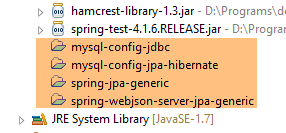 |
20.4.2. Spring 配置
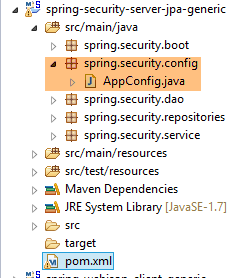 |
上一项目 [spring-security-server-jdbc-generic] 中的 [AppConfig] 配置文件即可使用。您只需向其中添加一项额外配置:
@Configuration
@EnableWebSecurity
@EnableJpaRepositories(basePackages = { "spring.security.repositories" })
@ComponentScan(basePackages = { "spring.security.dao", "spring.security.service" })
@Import({ spring.webjson.server.config.AppConfig.class })
public class AppConfig extends WebSecurityConfigurerAdapter {
- 第 3 行:我们声明了实现 [repositories] 层的包;
- 第 4 行:在新项目中,包含 Spring Bean 的包名称保持不变;
- 第 5 行:在之前的项目中,[spring.webjson.server.config.AppConfig] 类位于 [spring-webjson-server-jdbc-generic] 依赖中。在此处,它将位于 [spring-webjson-server-jpa-generic] 依赖中;
20.4.3. JPA 层
 |
由 [JPA] 层管理的 JPA 实体位于 [mysql-config-jpa-hibernate] 项目 [2] 中,该项目是项目 [1] 的依赖项:
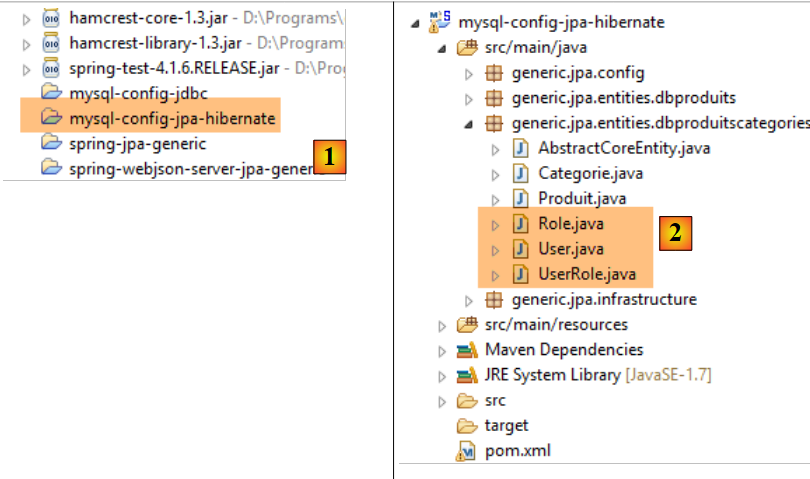 |
[User] 类是 [USERS] 表的映射:

- ID:主键;
- VERSION:行版本控制列;
- IDENTITY:用户的描述性标识符;
- LOGIN:用户的登录名;
- PASSWORD:用户的密码;
package generic.jpa.entities.dbproduitscategories;

import generic.jdbc.config.ConfigJdbc;

import java.util.List;

import javax.persistence.CascadeType;
import javax.persistence.Column;
import javax.persistence.Entity;
import javax.persistence.FetchType;
import javax.persistence.GeneratedValue;
import javax.persistence.GenerationType;
import javax.persistence.Id;
import javax.persistence.OneToMany;
import javax.persistence.Table;
import javax.persistence.Transient;
import javax.persistence.Version;

import com.fasterxml.jackson.annotation.JsonIgnore;

@Entity
@Table(name = ConfigJdbc.TAB_USERS)
public class User implements AbstractCoreEntity {
    // properties
    @Id
    @GeneratedValue(strategy = GenerationType.IDENTITY)
    @Column(name = ConfigJdbc.TAB_JPA_ID)
    protected Long id;

    @Version
    @Column(name = ConfigJdbc.TAB_JPA_VERSIONING)
    protected Long version;

    @Transient
    protected EntityType entityType=EntityType.POJO;

    // properties
    @Column(name = ConfigJdbc.TAB_USERS_NAME, length = 30, nullable = false)
    private String name;
    @Column(name = ConfigJdbc.TAB_USERS_LOGIN, length = 30, unique = true, nullable = false)
    private String login;
    @Column(name = ConfigJdbc.TAB_USERS_PASSWORD, length = 60, nullable = false)
    private String password;

    // the associated UserRole
    @OneToMany(fetch = FetchType.LAZY, mappedBy = "user", cascade = { CascadeType.ALL })
    @JsonIgnore
    private List<UserRole> userRoles;

    // manufacturers
    public User() {
    }

    public User(Long id, Long version, String identity, String login, String password) {
        this.id = id;
        this.version = version;
        this.name = identity;
        this.login = login;
        this.password = password;
    }

    // ------------------------------------------------------------
    // redefine [equals] and [hashcode]
...

    // getters and setters
...
}
- 第 23 行:该类实现了 [AbstractCoreEntity] 接口,该接口已用于其他实体;
- 第 34–35 行:实体类型。该属性不会被持久化到数据库中 [@Transient];
- 第 38–43 行:用户的三个基本属性(姓名、登录名、密码);
- 第 46–48 行:用户的角色列表。一个用户可能拥有多个角色。同样地,我们将看到一个角色可以与多个用户相关联。因此,在 JPA 的语义中,[User] 和 [Role] 实体之间存在 [ManyToMany] 关系:
- 一个用户可以被分配到多个角色;
- 一个角色可以与多个用户相关联;
该 [ManyToMany] 关系通过关联表 [USERS_ROLES] 在数据库中实现。 如果用户 U 与角色 R 之间存在关联,该关联将通过记录实体 (U, R) 的主键对存储在 [USERS_ROLES] 表中。在 JPA 方面,连接 [User] 和 [Role] 实体的 [ManyToMany] 关系可以拆分为两个关系 [ManyToOne, OneToMany]:
- (续)
- 从 [User] 实体到 [UserRole] 实体的 [ManyToOne] 关系;
- 从 [UserRole] 实体到 [UserRole] 实体的 [OneToMany] 关系;
同样地,连接 [Role] 和 [User] 实体的 [多对多] 关系可以拆分为两个 [多对一、一对多] 关系:
- (待续)
- 从 [Role] 实体到 [UserRole] 实体的 [多对一] 关系;
- 从 [UserRole] 实体到 [User] 实体的 [OneToMany] 关系;
- 第 48 行:用户拥有多个角色的事实通过与 [UserRole] 实体的 [OneToMany] 关系来表示;
[Role] 类表示 [ROLES] 表:

- ID:主键;
- VERSION:行版本控制列;
- NAME:角色名称。默认情况下,Spring Security 期望名称采用 ROLE_XX 的格式,例如 ROLE_ADMIN 或 ROLE_GUEST;
package generic.jpa.entities.dbproduitscategories;

import generic.jdbc.config.ConfigJdbc;

import java.util.List;

import javax.persistence.CascadeType;
import javax.persistence.Column;
import javax.persistence.Entity;
import javax.persistence.FetchType;
import javax.persistence.GeneratedValue;
import javax.persistence.GenerationType;
import javax.persistence.Id;
import javax.persistence.OneToMany;
import javax.persistence.Table;
import javax.persistence.Transient;
import javax.persistence.Version;

import com.fasterxml.jackson.annotation.JsonIgnore;

@Entity
@Table(name = ConfigJdbc.TAB_ROLES)
public class Role implements AbstractCoreEntity {
    // properties
    @Id
    @GeneratedValue(strategy = GenerationType.IDENTITY)
    @Column(name = ConfigJdbc.TAB_JPA_ID)
    protected Long id;

    @Version
    @Column(name = ConfigJdbc.TAB_JPA_VERSIONING)
    protected Long version;

    @Transient
    protected EntityType entityType=EntityType.POJO;

    // properties
    @Column(name = ConfigJdbc.TAB_ROLES_NAME, length = 30, unique = true, nullable = false)
    private String name;

    // the associated UserRole
    @OneToMany(fetch = FetchType.LAZY, mappedBy = "role", cascade = { CascadeType.ALL })
    @JsonIgnore
    private List<UserRole> userRoles;

    // manufacturers
    public Role() {
    }

    public Role(Long id, Long version, String name) {
        this.id = id;
        this.version = version;
        this.name = name;
    }

    // getters and setters
    public Role(String name) {
        this.name = name;
    }

    // ------------------------------------------------------------
    // redefine [equals] and [hashcode]
...
    // getters and setters
...
}
- 第 42–44 行:多个用户可以与一个角色相关联这一事实,通过与 [UserRole] 实体的 [@OneToMany] 关系来表示;
[UserRole] 类表示 [USERS_ROLES] 表:

一个用户可以拥有多个角色,一个角色也可以拥有多个用户。我们通过 [USERS_ROLES] 表来表示这种多对多关系。
- ID:主键;
- VERSION:行版本控制列;
- USER_ID:用户标识符;
- ROLE_ID:角色的标识符;
package generic.jpa.entities.dbproduitscategories;

import generic.jdbc.config.ConfigJdbc;

import javax.persistence.Column;
import javax.persistence.Entity;
import javax.persistence.FetchType;
import javax.persistence.GeneratedValue;
import javax.persistence.GenerationType;
import javax.persistence.Id;
import javax.persistence.JoinColumn;
import javax.persistence.ManyToOne;
import javax.persistence.Table;
import javax.persistence.Transient;
import javax.persistence.Version;

@Entity
@Table(name = ConfigJdbc.TAB_USERS_ROLES)
public class UserRole implements AbstractCoreEntity {
    // properties
    @Id
    @GeneratedValue(strategy = GenerationType.IDENTITY)
    @Column(name = ConfigJdbc.TAB_JPA_ID)
    protected Long id;

    @Version
    @Column(name = ConfigJdbc.TAB_JPA_VERSIONING)
    protected Long version;

    @Transient
    protected EntityType entityType=EntityType.POJO;

    // a UserRole refers to a User
    @ManyToOne(fetch = FetchType.LAZY)
    @JoinColumn(name = ConfigJdbc.TAB_USERS_ROLES_USER_ID, nullable = false)
    private User user;

    // a UserRole refers to a Role
    @ManyToOne(fetch = FetchType.LAZY)
    @JoinColumn(name = ConfigJdbc.TAB_USERS_ROLES_ROLE_ID, nullable = false)
    private Role role;

    // manufacturers
    public UserRole() {

    }

    public UserRole(User user, Role role) {
        this.user = user;
        this.role = role;
    }

    // ------------------------------------------------------------
    // redefine [equals] and [hashcode]
    ...

    // getters and setters
...
}
- 第 34–36 行:实现从 [USERS_ROLES] 表到 [USERS] 表的外键;
- 第 38–41 行:实现从 [USERS_ROLES] 表到 [ROLES] 表的外键;
20.4.4. [repositories] 层
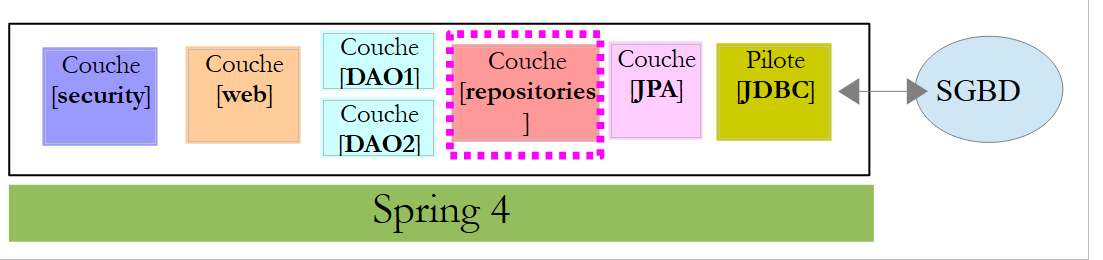 |
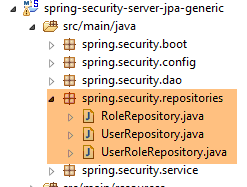 |
[UserRepository] 接口负责管理对 [User] 实体的访问:
package spring.security.repositories;

import generic.jpa.entities.dbproduitscategories.Role;
import generic.jpa.entities.dbproduitscategories.User;

import org.springframework.data.jpa.repository.Query;
import org.springframework.data.repository.CrudRepository;

public interface UserRepository extends CrudRepository<User, Long> {

    // liste des rôles d'un utilisateur identifié par son id
    @Query("select ur.role from UserRole ur where ur.user.id=?1")
    Iterable<Role> getRoles(long id);

    // liste des rôles d'un utilisateur identifié par son login unique
    @Query("select ur.role from UserRole ur where ur.user.login=?1 and ur.user.password=?2")
    Iterable<Role> getRoles(String login, String password);

    // recherche d'un utilisateur via son login
    User findUserByLogin(String login);
}
- 第 9 行:[UserRepository] 接口继承了 Spring Data 的 [CrudRepository] 接口(第 7 行);
- 第 12-13 行:[getRoles(long id)] 方法根据 [id] 检索用户的全部角色
- 第 16-17 行:与上文相同,但针对通过登录名和密码标识的用户;
- 第 20 行:根据用户登录名查找用户;
[RoleRepository] 接口管理对 [Role] 实体的访问:
package spring.security.repositories;

import generic.jpa.entities.dbproduitscategories.Role;

import org.springframework.data.repository.CrudRepository;

public interface RoleRepository extends CrudRepository<Role, Long> {

    // search for a role by name
    Role findRoleByName(String name);

}
- 第 7 行:[RoleRepository] 接口继承自 [CrudRepository] 接口;
- 第 10 行:您可以通过名称搜索角色。请注意,[Role] 实体具有 [name] 字段。Spring Data 会自动实现 [findEntityByField] 方法。因此,此处无需实现 [findRoleByName] 方法,只需在接口中声明该方法即可。
[UserRoleRepository] 接口负责管理对 [UserRole] 实体的访问:
package spring.security.repositories;

import generic.jpa.entities.dbproduitscategories.UserRole;

import org.springframework.data.repository.CrudRepository;

public interface UserRoleRepository extends CrudRepository<UserRole, Long> {

}
- 第 7 行:[UserRoleRepository] 接口仅继承了 [CrudRepository] 接口,未添加任何新方法;
20.4.5. [DAO2] 层
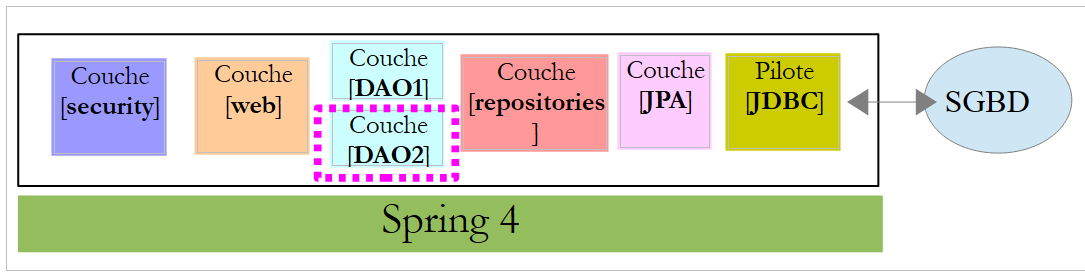 |
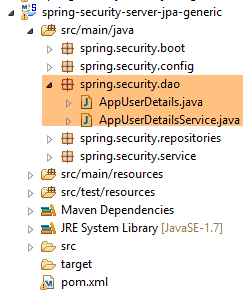 |
[DAO2] 层包含与第 20.2.2 节中讨论的 [spring-security-server-jdbc-generic] 项目中的 [DAO2] 层相同的类。现在,我们只需使用 [repositories] 层中的类来实现它们即可。
[AppUserDetails] 类的演变如下:
package spring.security.dao;

import generic.jpa.entities.dbproduitscategories.Role;
import generic.jpa.entities.dbproduitscategories.User;

import java.util.ArrayList;
import java.util.Collection;

import org.springframework.security.core.GrantedAuthority;
import org.springframework.security.core.authority.SimpleGrantedAuthority;
import org.springframework.security.core.userdetails.UserDetails;

import spring.data.infrastructure.DaoException;
import spring.security.repositories.UserRepository;

public class AppUserDetails implements UserDetails {

    private static final long serialVersionUID = 1L;

    // properties
    private User user;
    private UserRepository userRepository;

    // local
    private String simpleClassName = getClass().getSimpleName();

    // manufacturers
    public AppUserDetails() {
    }

    public AppUserDetails(User user, UserRepository userRepository) {
        this.user = user;
        this.userRepository = userRepository;
    }

    // -------------------------interface
    @Override
    public Collection<? extends GrantedAuthority> getAuthorities() {
        Collection<GrantedAuthority> authorities = new ArrayList<>();
        Iterable<Role> roles;
        try {
            roles = userRepository.getRoles(user.getId());
        } catch (Exception e) {
            e.printStackTrace();
            throw new DaoException(167, e, simpleClassName);
        }
        for (Role role : roles) {
            authorities.add(new SimpleGrantedAuthority(role.getName()));
        }
        return authorities;
    }
...
}
- 在第 31 行,类构造函数将 [UserRepository] 对象作为其第二个参数接收,这使得该类能够获取指定用户的角色(第 42 行);
Spring组件[AppUserDetailsService]的演变如下:
package spring.security.dao;

import generic.jpa.entities.dbproduitscategories.User;

import org.springframework.beans.factory.annotation.Autowired;
import org.springframework.security.core.userdetails.UserDetails;
import org.springframework.security.core.userdetails.UserDetailsService;
import org.springframework.security.core.userdetails.UsernameNotFoundException;
import org.springframework.stereotype.Service;

import spring.data.infrastructure.DaoException;
import spring.security.repositories.UserRepository;

@Service
public class AppUserDetailsService implements UserDetailsService {

    @Autowired
    private UserRepository userRepository;
    // local
    private String simpleClassName = getClass().getName();

    @Override
    public UserDetails loadUserByUsername(String login) throws UsernameNotFoundException {
        // search for user via login
        User user;
        try {
            user = userRepository.findUserByLogin(login);
        } catch (Exception e) {
            throw new DaoException(168, e, simpleClassName);
        }
        // found?
        if (user == null) {
            throw new UsernameNotFoundException(String.format("login [%s] inexistant", login));
        }
        // render user details
        return new AppUserDetails(user, userRepository);
    }

}
- 第 18 行:注入 Spring 组件 [userRepository],这将使服务能够返回由登录名标识的用户,第 27 行;
最终,我们意识到我们只需要 [userRepository],而不需要另外两个存储库 [roleRepository, userRoleRepository]。这些将在下一个项目中使用,该项目旨在填充 [USERS, ROLES, USERS_ROLES] 表。
20.4.6. 测试
安全 Web 服务使用名为 [spring-security-server-jpa-generic-hibernate-eclipselink] 的配置启动 [1]。针对通用客户端的 [JUnitTestDao] 测试使用名为 [spring-security-client-generic-JUnitTestDao] 的配置启动 [2]:
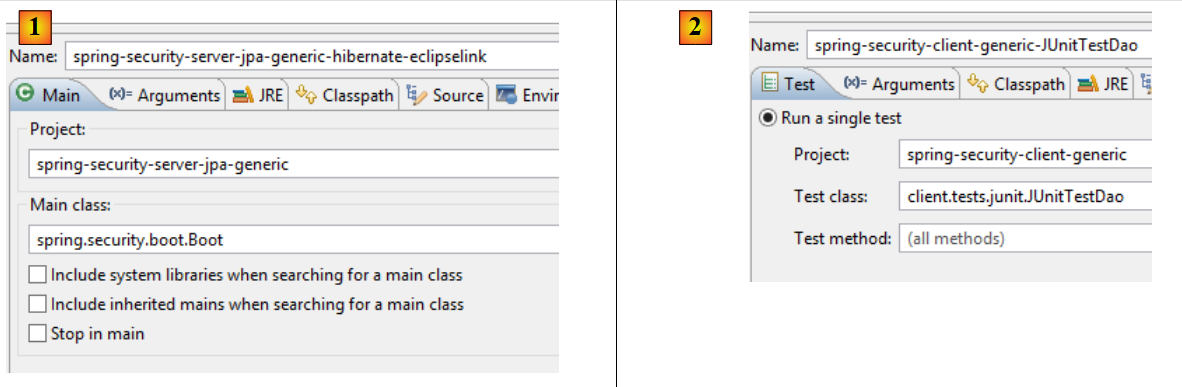 |
测试通过。
20.5. Eclipse 项目 [spring-security-create-users]
 |
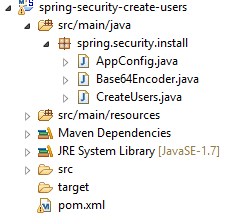 |
20.5.1. 数据库
运行该项目会向 [dbproduitscategories] 数据库中的 [USERS、ROLES、USERS_ROLES] 表中插入数据:
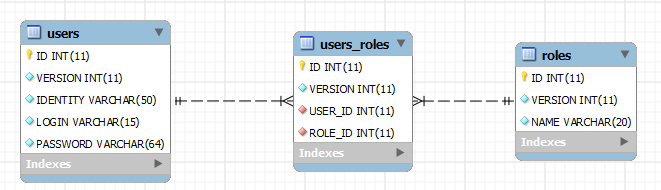
|
|
已创建的凭据 [用户名/密码] 如下:[admin/admin]、[user/user]、[guest/guest]。默认情况下,密码是加密的。
|
20.5.2. Maven 配置
该项目是一个由以下 [pom.xml] 文件配置的 Maven 项目:
<?xml version="1.0" encoding="UTF-8"?>
<project xmlns="http://maven.apache.org/POM/4.0.0" xmlns:xsi="http://www.w3.org/2001/XMLSchema-instance"
    xsi:schemaLocation="http://maven.apache.org/POM/4.0.0 http://maven.apache.org/xsd/maven-4.0.0.xsd">
    <modelVersion>4.0.0</modelVersion>

    <groupId>dvp.spring.database</groupId>
    <artifactId>spring-security-create-users-jpa</artifactId>
    <version>0.0.1-SNAPSHOT</version>
    <packaging>jar</packaging>

    <name>spring-security-create-users-jpa</name>
    <description>création de utilisateurs dans la base [dbproduitscategories]</description>

    <parent>
        <groupId>org.springframework.boot</groupId>
        <artifactId>spring-boot-starter-parent</artifactId>
        <version>1.2.3.RELEASE</version>
    </parent>

    <dependencies>
        <!-- Spring security -->
        <dependency>
            <groupId>org.springframework.boot</groupId>
            <artifactId>spring-boot-starter-security</artifactId>
        </dependency>
        <!-- spring-security-server-jpa-generic -->
        <dependency>
            <groupId>dvp.spring.database</groupId>
            <artifactId>spring-security-server-jpa-generic</artifactId>
            <version>0.0.1-SNAPSHOT</version>
        </dependency>
    </dependencies>

    <properties>
        <project.build.sourceEncoding>UTF-8</project.build.sourceEncoding>
        <java.version>1.7</java.version>
    </properties>

    <build>
        <plugins>
            <plugin>
                <groupId>org.apache.maven.plugins</groupId>
                <artifactId>maven-surefire-plugin</artifactId>
                <version>2.18.1</version>
            </plugin>
        </plugins>
    </build>

</project>
- 第 22–25 行:对 Spring Security 框架的依赖。该框架提供了密码加密算法
- 第 27–31 行:依赖于我们刚刚构建的 [spring-security-server-jpa-generic] 项目。该项目实现了项目的 [repositories] 和 [JPA] 层;
最终,依赖关系如下:
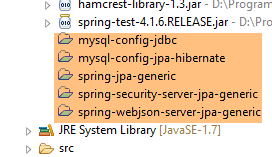 |
20.5.3. [控制台] 层
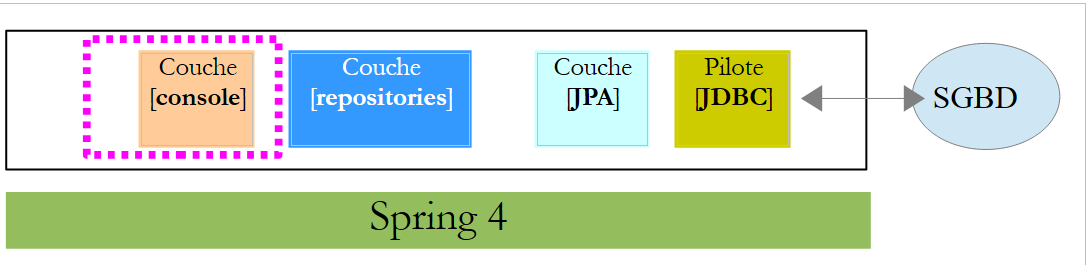 |
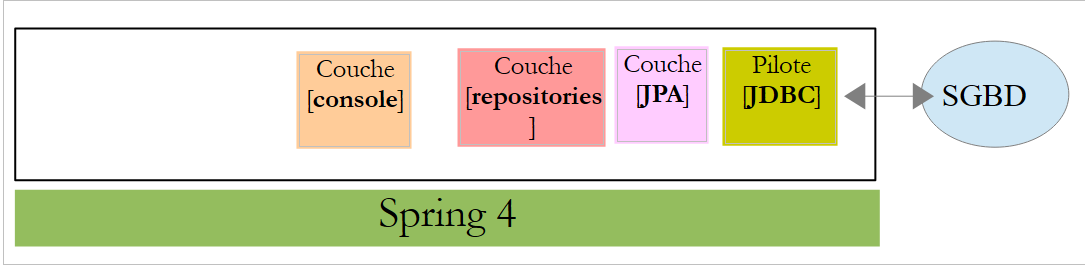
由于 [repositories] 和 [JPA] 层已由 [spring-security-server-jpa-generic] 依赖项实现,因此仅剩 [console] 层需要实现。
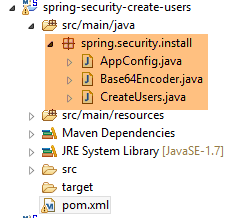 |
- [AppConfig] 是该项目的 Spring 配置类;
- [CreateUsers] 是用于创建用户和角色的可执行类;
- [Base64Encoder] 是一个用于为 [登录名, 密码] 对生成 Base64 编码的辅助类。我们已经使用过它。本项目不需要它;
Spring 配置类 [AppConfig] 如下所示:
package spring.security.install;

import generic.jpa.config.ConfigJpa;

import org.springframework.context.annotation.Configuration;
import org.springframework.context.annotation.Import;
import org.springframework.data.jpa.repository.config.EnableJpaRepositories;

@Configuration
@EnableJpaRepositories(basePackages = { "spring.security.repositories" })
@Import({ ConfigJpa.class })
public class AppConfig {
}
- 第 10 行:指定应用程序 [repositories] 的位置。它们位于 [spring-security-server-jpa-generic] 依赖项的 [spring.security.repositories] 包中
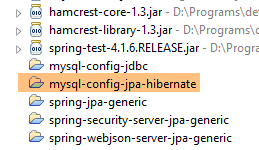
- 第 11 行:导入来自 [ConfigJpa] 类的 Bean,该类用于配置项目的 [JPA] 层。该类位于 [mysql-config-jpa-hibernate] 依赖项中:
 |
[CreateUsers] 类的定义如下:
package spring.security.install;

import generic.jpa.entities.dbproduitscategories.Role;
import generic.jpa.entities.dbproduitscategories.User;
import generic.jpa.entities.dbproduitscategories.UserRole;

import org.springframework.context.annotation.AnnotationConfigApplicationContext;
import org.springframework.security.crypto.bcrypt.BCrypt;

import spring.security.repositories.RoleRepository;
import spring.security.repositories.UserRepository;
import spring.security.repositories.UserRoleRepository;

public class CreateUsers {

    public static void main(String[] args) {

        // end
        System.out.println("Travail en cours...");

        // we create three users
        String[] logins = { "admin", "user", "guest" };
        String[] passwds = { "admin", "user", "guest" };
        String[] roles = { "admin", "user", "guest" };

        // spring context
        AnnotationConfigApplicationContext context = new AnnotationConfigApplicationContext(AppConfig.class);
        UserRepository userRepository = context.getBean(UserRepository.class);
        RoleRepository roleRepository = context.getBean(RoleRepository.class);
        UserRoleRepository userRoleRepository = context.getBean(UserRoleRepository.class);
        for (int i = 0; i < logins.length; i++) {
            // we retrieve information from user n° i
            String login = logins[i];
            String password = passwds[i];
            String roleName = String.format("ROLE_%s", roles[i].toUpperCase());
            // does the role already exist?
            Role role = roleRepository.findRoleByName(roleName);
            // if it doesn't exist, we create it
            if (role == null) {
                role = roleRepository.save(new Role(roleName));
            }
            // does the user already exist?
            User user = userRepository.findUserByLogin(login);
            // if it doesn't exist, we create it
            if (user == null) {
                // hash the password with bcrypt
                String crypt = BCrypt.hashpw(password, BCrypt.gensalt());
                // save user
                user = userRepository.save(new User(null, null, login, login, crypt));
                // we create the relationship with the role
                userRoleRepository.save(new UserRole(user, role));
            } else {
                // the user already exists - does he/she have the required role?
                boolean trouvé = false;
                for (Role r : userRepository.getRoles(user.getId())) {
                    if (r.getName().equals(roleName)) {
                        trouvé = true;
                        break;
                    }
                }
                // if not found, we create the relationship with the role
                if (!trouvé) {
                    userRoleRepository.save(new UserRole(user, role));
                }
            }
        }
        // closing Spring context
        context.close();
        // end
        System.out.println("Travail terminé...");
    }

}
- 第 22–24 行:定义三个用户的用户名、密码和角色;
- 第 27 行:从 [AppConfig] 配置类构建 Spring 上下文;
- 第 28–30 行:获取三个 [Repository] 对象的引用,这些对象可用于创建用户;
- 第 31 行:创建这三个用户;
- 第 33–35 行:用于创建第 i 个用户的信息;
- 第 37 行:检查角色是否已存在;
- 第 39–41 行:如果不存在,则在数据库中创建该角色。其名称将采用 [ROLE_XX] 的形式;
- 第 43 行:检查登录名是否已存在;
- 第 45–52 行:如果用户名不存在,则在数据库中创建;
- 第 47 行:对密码进行加密。此处使用 Spring Security 中的 [BCrypt] 类(第 8 行)。因此我们需要该框架的依赖包。[pom.xml] 文件中包含以下依赖项:
        <dependency>
            <groupId>org.springframework.boot</groupId>
            <artifactId>spring-boot-starter-security</artifactId>
</dependency>
- 第 49 行:用户被持久化到数据库中;
- 第 51 行:以及将其与角色关联的关系;
- 第 55–60 行:如果登录用户已存在,则检查我们要分配给该用户的角色是否已在其角色列表中;
- 第 62–64 行:如果未找到要查找的角色,则在 [USERS_ROLES] 表中创建一行,将用户与其角色关联起来;
- 我们尚未对潜在的异常进行处理。这是一个用于快速创建用户的辅助类;
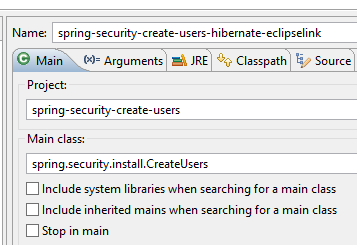
要运行该项目,请执行名为 [spring-security-create-users-hibernate-eclipselink] 的运行配置:
 |
我们刚刚构建了两个安全的 Web 服务:
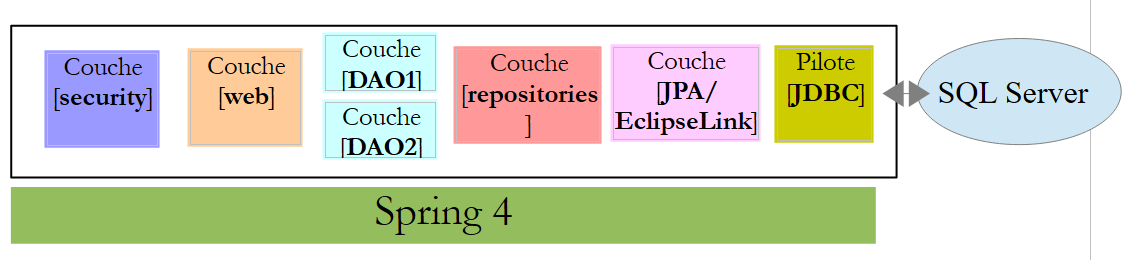
- 其中一个采用 [安全 / Web / JDBC / MySQL] 架构;
- 另一个采用 [安全 / Web / Hibernate / MySQL] 架构;
接下来我们将探讨另外两种架构:
- 一种 [安全 / Web / EclipseLink / SQL Server 2014 Express] 架构;
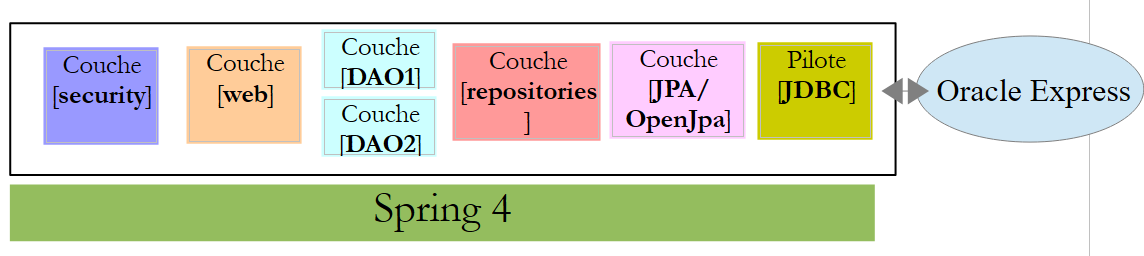
- 一个 [安全 / Web / OpenJpa / Oracle Express] 架构;
20.5.4. [安全 / Web / EclipseLink / SQL Server] 架构
 |
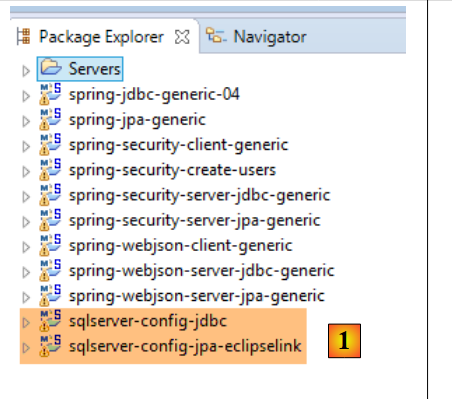 |
- 在[1]中,我们加载了配置了[JDBC / SQL Server]层和[JPA / EclipseLink / SQL Server]层的项目;
注意:按 Alt-F5,然后重新生成所有 Maven 项目。
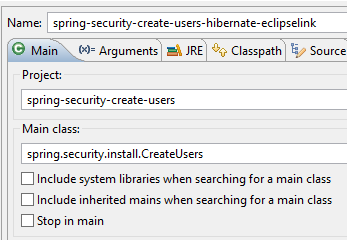
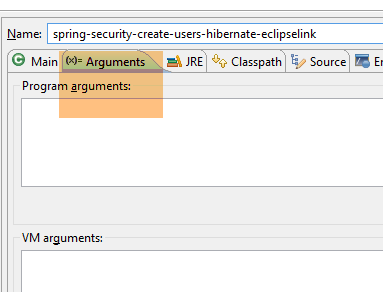
我们假设 SQL Server 数据库管理系统正在运行,且 [dbproduitscategories] 数据库已生成。首先,我们需要向该数据库中的 [USERS、ROLES、USERS_ROLES] 表中插入数据。为此,请运行名为 [spring-security-create-users-hibernate-eclipselink] 的执行配置:
 |  |
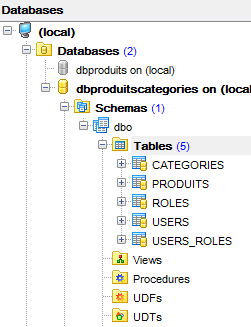
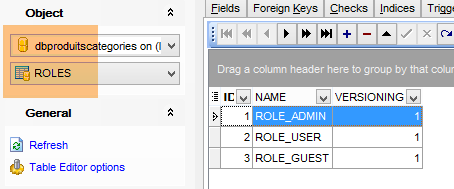
这将向这三个表中插入数据:
 |  |
 |
 |
- 使用名为 [spring-security-server-jpa-generic-hibernate-eclipselink][1] 的配置启动安全 Web 服务;
- 使用名为 [spring-security-client-generic-JUnitTestDao][2] 的配置运行 JUnitTestDao 测试。该测试应通过 [3];
 |
 |
20.5.5. 架构 [安全 / Web / OpenJpa / Oracle Express]
 |
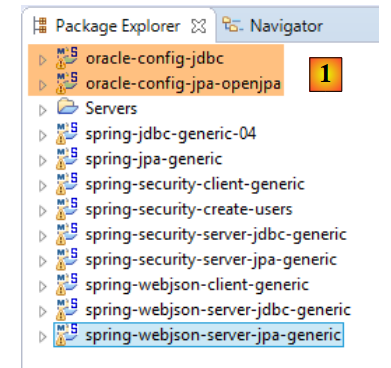 |
- 在 [1] 中,加载配置了 [JDBC / Oracle Express] 层和 [JPA / OpenJpa / Oracle Express] 层的项目;
注意:按 Alt-F5,然后重新生成所有 Maven 项目。
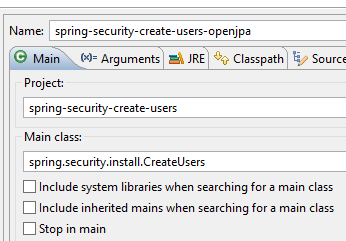
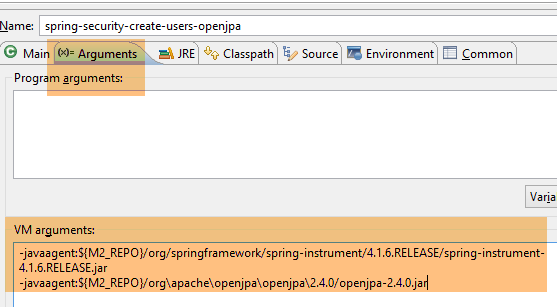
我们假设 Oracle Express 数据库管理系统正在运行,且 [dbproduitscategories] 数据库已生成。首先,我们需要向该数据库中的 [USERS、ROLES、USERS_ROLES] 表中插入数据。为此,请运行名为 [spring-security-create-users-openjpa] 的执行配置:
 |  |
这将向这三个表中插入数据:
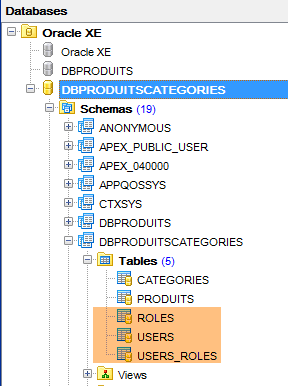 | 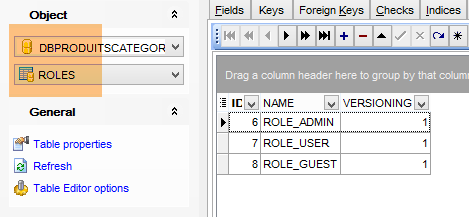 |
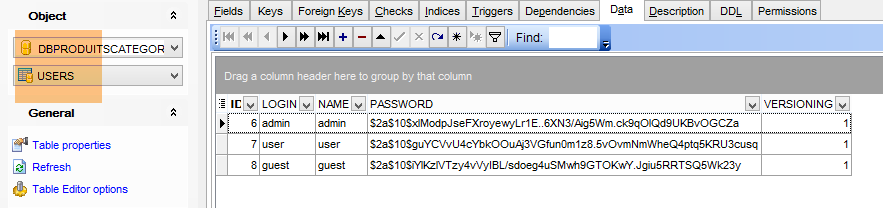 |
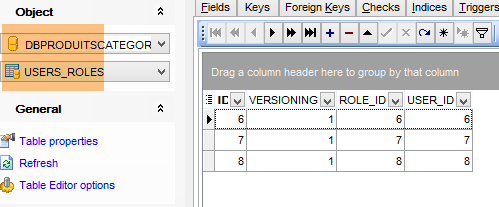 |
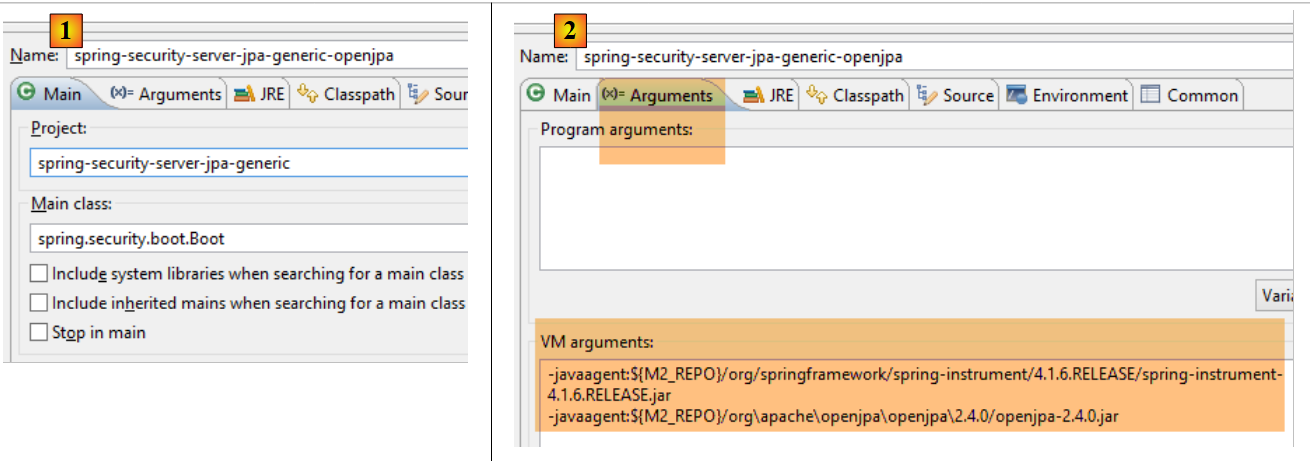
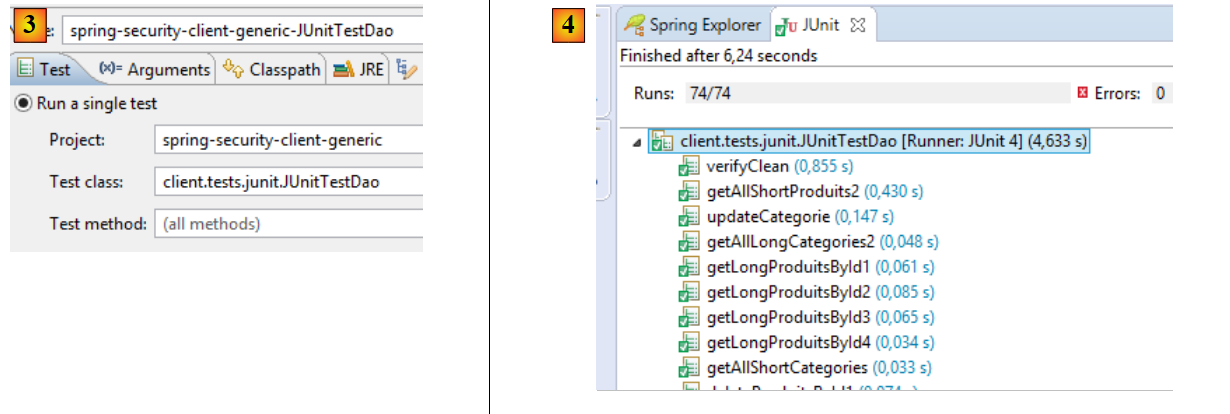
- 使用名为 [spring-security-server-jpa-generic-openjpa][1-2] 的配置启动安全 Web 服务;
- 使用名为 [spring-security-client-generic-JUnitTestDao][3] 的配置运行 JUnitTestDao 测试。该测试应通过 [4];
 |
 |