16. 示例 [nuxt-13]:检查 [nuxt-12] 的导航
在此示例中,我们关注的是 [nuxt-12] 的导航。我们未在 [nuxt-12] 中进行此操作,因为导航检查会使本已复杂的示例变得更加复杂。
目标:我们希望用户只能执行受限操作:
- 如果会话 jSON 尚未启动,则仅允许 URL 和 [/];
- 如果会话 jSON 已启动但用户未通过身份验证,则仅允许 URL 和 [/authentification];
- 如果 jSON 会话已启动且用户已通过身份验证,则仅允许 URL 和 [/get-admindata, /fin-session];
- 当当前路由目标未获授权时,将重定向至获授权的 URL;
示例 [nuxt-13] 最初是通过复制示例 [nuxt-12] 获得的:
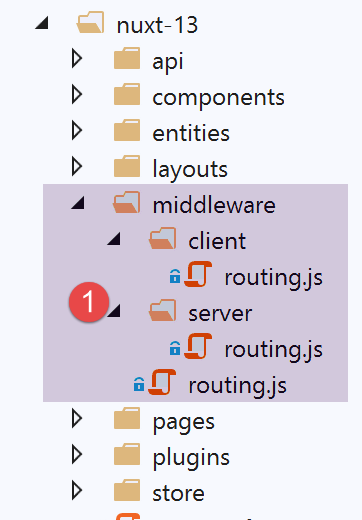
修改操作将在 [middleware] 的路由文件夹中进行。
16.1. 应用程序路由 [nuxt]
在文件 [nuxt.config] 中,应用程序路由配置如下:
// 路由器
  router: {
    // 应用程序的 URL 根节点
    base: '/nuxt-13/',
    // 路由中间件
    middleware: ['routing']
},
- 第 6 行:应用程序路由由文件 [middleware/routing] 控制;
文件 [middleware/routing] 内容如下:
/* eslint-disable no-console */

// 导入服务器和客户端的中间件
import serverRouting from './server/routing'
import clientRouting from './client/routing'

export default function(context) {
  // 谁在执行这段代码?
  console.log('[middleware], process.server', process.server, ', process.client=', process.client)
  if (process.server) {
    // 服务器路由
    serverRouting(context)
  } else {
    // 客户端路由
    clientRouting(context)
  }
}
- 第10-16行:对客户端和服务器[nuxt]的路由处理方式不同。这是两者存在显著差异的一点;
- 第 4 行:服务器的路由由脚本 [middleware/server/routing] 实现;
- 第 5 行:客户端的路由由脚本 [middleware/client/routing] 实现;
16.2. 客户端路由 [nuxt]
客户端路由 [nuxt] 与 [nuxt-12] 中的内容保持一致:
/* eslint-disable no-console */
export default function(context) {
  // 谁在执行这段代码?
  console.log('[middleware client], process.server', process.server, ', process.client=', process.client)
  // 浏览器中 PHP 会话 Cookie 的管理
  // 浏览器中的会话 Cookie PHP 必须与 Nuxt 会话中找到的 Cookie 完全一致
  // 操作 [fin-session] 接收一个新的 PHP cookie(服务器作为 Nuxt 客户端)
  // 如果是由服务器接收该cookie,客户端必须将其转发给浏览器
  // 以便其自身与服务器 PHP 进行通信
  // 此处属于客户端路由

  // 获取会话cookie PHP
  const phpSessionCookie = context.store.state.phpSessionCookie
  if (phpSessionCookie) {
    // 如果存在,则将会话cookie PHP 分配给浏览器
    document.cookie = phpSessionCookie
  }

  ...
}
为防止客户进入未授权的路由,我们只需在客户导航菜单中仅提供授权的路由。组件 [components/navigation] 变为如下:
<template>
  <!-- 三个选项的 Bootstrap 菜单 -->
  <b-nav vertical>
    <b-nav-item v-if="$store.state.jsonSessionStarted && !$store.state.userAuthenticated" to="/authentification" exact exact-active-class="active">
      Authentification
    </b-nav-item>
    <b-nav-item
      v-if="$store.state.jsonSessionStarted && $store.state.userAuthenticated && !$store.state.adminData"
      to="/get-admindata"
      exact
      exact-active-class="active"
    >
      Requête AdminData
    </b-nav-item>
    <b-nav-item v-if="$store.state.jsonSessionStarted && $store.state.userAuthenticated" to="/fin-session" exact exact-active-class="active">
      Fin session impôt
    </b-nav-item>
  </b-nav>
</template>
- 第 4 行:仅当 jSON 会话已启动但用户尚未通过身份验证时,才提供 [Authentification] 选项。 如果 jSON 会话尚未启动,或者用户已通过身份验证,则不会提供该选项;
- 第 7-11 行:仅当 jSON 会话已启动、用户已通过身份验证且尚未检索 [AdminData] 数据时,才会提供 [Requête AdminData] 选项。 如果这三个条件中的任何一个未满足(jSON会话未启动、用户未通过身份验证或已获取[AdminData]数据),则不提供该选项;
- 第15行:只要jSON会话已启动且用户已通过身份验证,则提供[Fin session impôt]选项;否则不提供;
16.3. 服务器 [nuxt] 的路由
服务器的路由通常比客户端的更复杂,因为用户可以在浏览器的地址栏中输入任意 URL。我们可以放任不管(毕竟用户本不该这么做),也可以尝试进行控制。 本例中我们将采取后者,因为对于[nuxt-12]应用程序而言,完全可以省略此步骤——该税务计算服务器已针对此类手动输入的URL做好了充分防护,并能发送相应的错误信息。 我们在[next-12]中已经看到,那里没有任何路由控制。
[nuxt]服务器的路由机制与[nuxt]客户端在重定向概念上存在显著差异:
- 当 [nuxt] 服务器被重定向时,它会向客户端浏览器发送包含重定向目标的指令。随后,浏览器会向 [nuxt] 服务器发起新请求,要求其提供已接收的目标地址。 这一过程就如同用户手动输入了重定向目标的URL地址:整个[nuxt]应用程序将重新启动,其整个生命周期(服务器插件、存储、服务器路由、页面)随之重置;
- 而当 [nuxt] 客户端被重定向时,则不会发生上述情况。此时仅发生简单的页面切换,这与用户点击指向重定向目标的链接所产生的效果完全相同。此时的生命周期则有所不同(客户端路由、显示路由目标);
因此,即使两者的代码看似相似,也最好将客户端路由与服务器端路由分开处理。
服务器路由脚本 [middleware/server/routing] 将如下所示:
/* eslint-disable no-console */
export default function(context) {
  // 谁在执行这段代码?
  console.log('[middleware server], process.server', process.server, ', process.client=', process.client)

  // 从存储中获取一些信息 [nuxt]
  const store = context.store
  // 我们来自哪里?
  const from = store.state.from || 'nowhere'
  ...
}
- 在客户端路由中,路由函数接收上下文 [context],其中包含属性 [context.from],该属性即为当前页面来源的路由。目标路由通过 [context.route] 获取;
- 在服务器路由中,路由函数接收上下文 [context],但不包含属性 [context.from]。 只有当手动向服务器 [nuxt] 请求 URL 时,服务器的路由才会介入。 我们知道,此时整个 [nuxt] 应用程序会被重置。这就像是从头开始一样,因此不存在“上一页”的概念;
- 借助 [nuxt] 会话,我们知道服务器可以恢复该会话,从而避免从头开始。 因此,我们将利用该 [nuxt] 会话(特别是该会话的存储区),存储客户端浏览器在向服务器请求 URL 之前显示的最后一个页面名称;
- 第7-9行:获取客户端浏览器显示的最后一个页面的名称。在应用程序启动时,存储中尚不存在该信息。 随后将名称 [nowhere] 赋值给变量 [from];
为了使服务器 [nuxt] 能从存储中获取客户端浏览器最后显示的页面名称,客户端 [nuxt] 也必须将该信息写入存储。因此,客户端 [nuxt] 的路由脚本需按以下方式补充:
/* eslint-disable no-console */
export default function(context) {
  // 谁在执行这段代码?
  console.log('[middleware client], process.server', process.server, ', process.client=', process.client)
  // 浏览器中 PHP 会话 Cookie 的管理
  // 浏览器中的会话 Cookie PHP 必须与 Nuxt 会话中找到的 Cookie 完全一致
  // 操作 [fin-session] 接收一个新的 PHP cookie(服务器作为 Nuxt 客户端)
  // 如果是由服务器接收该cookie,客户端必须将其转发给浏览器
  // 以便其自身与服务器 PHP 进行通信
  // 此处属于客户端路由

  // 获取会话cookie PHP
  const phpSessionCookie = context.store.state.phpSessionCookie
  if (phpSessionCookie) {
    // 如果存在,则将会话cookie PHP 分配给浏览器
    document.cookie = phpSessionCookie
  }

  // 将目标页面的名称存入会话中——不进行服务器重定向
  context.store.commit('replace', { serverRedirection: false, from: context.route.name })
  // 将存储数据保存到会话中 [nuxt]
  const session = context.app.$session()
  session.value.store = context.store.state
  session.save(context)
}
- 添加第 19-24 行;
- 第20行:将即将显示的页面名称[context.route.name]存入存储区,该页面将在后续路由中作为来源页面。 此外,我们将看到在服务器 [nuxt] 的路由中,该服务器需要知道当前路由是否源自服务器 [nuxt] 的先前重定向。 此处并非如此,因此我们将属性 [serverRedirection] 设置为 [false];
- 第22-24行: 存储状态被放入会话 [nuxt] 中(第 23 行),随后会话 [nuxt] 被保存到一个 Cookie 中(第 24 行),该 Cookie 随后将存储在客户端浏览器 [nuxt] 中;
让我们回到服务器 [nuxt] 的路由脚本:
/* eslint-disable no-console */
export default function(context) {
  // 谁在执行这段代码?
  console.log('[middleware server], process.server', process.server, ', process.client=', process.client)

  // 从存储中获取一些信息 [nuxt]
  const store = context.store
  // 我们来自哪里?
  const from = store.state.from || 'nowhere'
  // 我们要去哪里?
  const to = context.route.name
  // 可能的重定向
  let redirection = ''
  // 路由管理完成
  let done = false

  // 是否已处于 [nuxt] 服务器的重定向中?
  if (store.state.serverRedirection) {
    // 无需操作
    done = true
  }

  // 是否为页面刷新?
  if (to === from) {
    // 无需操作
    done = true
  }

  // 检查服务器 [nuxt] 的导航
  // 参考 [navigation] 组件中的客户端导航

  // PHP 会话未启动的情况
  if (!done && !store.state.jsonSessionStarted && to !== 'index') {
    // 重定向
    redirection = 'index'
    // 任务完成
    done = true
  }

  // 用户未通过身份验证的情况
  if (!done && store.state.jsonSessionStarted && !store.state.userAuthenticated && to !== 'authentification') {
    // 重定向
    redirection = from
    // 任务完成
    done = true
  }

  // 用户已通过身份验证的情况
  if (!done && store.state.jsonSessionStarted && store.state.userAuthenticated && to !== 'get-admindata' && to !== 'fin-session') {
    // 留在当前页面
    redirection = from
    // 任务完成
    done = true
  }

  // 已获取 [adminData] 的情况
  if (!done && store.state.jsonSessionStarted && store.state.userAuthenticated && store.state.adminData && to !== 'fin-session') {
    // 保持在当前页面
    redirection = from
    // 工作完成
    done = true
  }

  // 已完成所有检查 ---------------------
  // 重定向?
  if (redirection) {
    // 在商店中记录重定向
    store.commit('replace', { serverRedirection: true })
  } else {
    // 无重定向
    store.commit('replace', { serverRedirection: false, from: to })
  }
  // 将数据存储保存在会话中[nuxt]
  const session = context.app.$session()
  session.value.store = store.state
  session.save(context)
  // 执行可能的重定向
  if (redirection) {
    context.redirect({ name: redirection })
  }
}
- 第 6-9 行:从服务器 [nuxt] 的存储中获取 [from] 的值;
- 第11行:记录当前路由的目标;
- 第13行:路由可能导致客户端浏览器重定向。[redirection]将是此次重定向的目标;
- 第 15 行:[done] 到 [true] 表示路由已完成;
- 第17-21行:首先检查当前路由是否源自发送给客户端浏览器的重定向请求。 该信息存储在存储器的 [serverRedirection] 属性中。如果该属性为真,则说明在之前向服务器 [nuxt] 发送请求时,服务器 [nuxt] 已向客户端浏览器发送了重定向。 在这种情况下,无需进行路由处理。在上一次请求中,服务器 [nuxt] 的路由器已决定将客户端浏览器重定向。这一决定不应因新的路由操作而受到质疑;
- 第23-27行:检查当前路由是否为页面刷新。如果是,则保持原状;
- 从第29行开始,采用客户[nuxt]中[navigation]组件所应用的规则(参见上一段);
- 第32-38行:处理jSON会话未启动且路由目标并非[index]页面的情况。 在此情况下,将客户端浏览器重定向至页面 [index];
- 第40-46行:处理以下情况:jSON会话已启动,用户未通过身份验证,且当前路由目标并非页面[authentification]。在此情况下,拒绝路由并保持当前状态;
- 第48-54行: 处理以下情况:jSON会话已启动,用户已通过身份验证,且当前路由的目标既不是页面[get-admindata],也不是页面[fin-session](此时这两者是唯一可能的目的地)。 在此情况下,拒绝所请求的路由,并返回至先前所在的位置;
- 第 56-62 行:处理获取到 [adminData] 的情况。 此时,路由仅有一个可能的目标:页面 [fin-session]。如果请求的并非该页面,则拒绝路由并返回上一步;
- 第64-72行:若发生重定向,则在[nuxt]服务器的存储中记录:[serverRedirection: true]。需注意,存储中[from]属性未赋值。 原因是客户端浏览器将进行重定向,而我们已看到在此情况下不存在路由(第17-20行),且存储中的 [from] 属性未被使用;
- 第 66-69 行:如果不进行重定向,则同样在服务器存储中记录 [nuxt]:[serverRedirection: false]。 此外,当前的路由将显示页面 [to],该页面对于后续请求(客户端或服务器 [nuxt])而言将成为上一页。因此写入 [from: to];
- 第73-76行:将存储数据保存到[nuxt]会话中,该会话本身保存在Cookie中;
- 第77-80行:如果[redirection]不为空,则要求浏览器进行重定向。否则(此处未显示),服务器[nuxt]的生命周期将继续: 页面 [to] 将由服务器 [nuxt] 处理,并连同会话 Cookie [nuxt] 一起发送给客户端浏览器 [nuxt];
此处为服务器 [nuxt] 选择的路由是任意的。我们本可以选择其他路由,或者如前所述,完全不进行路由。上述选择的优势在于,无论用户请求的是哪个 URL,应用程序始终保持在稳定状态。
当最终加载的页面是原始页面时,可以进一步优化。有两种情况:
- 用户主动刷新了页面(to===from);
- 存在重定向至原始页面的情况(redirection===from);
在这两种情况下,原始页面都将重新执行,并向税费计算服务器发起异步调用。举个例子。如果用户在认证后刷新页面(F5)。 根据上述路由逻辑,此时路径为:[to]=[from]=[authentification]。 此时不会发生重定向。页面 [to=authentification] 将由服务器 [nuxt] 执行。如果不采取任何措施,函数 [asyncData] 将再次执行。这毫无意义,因为身份验证已经完成。
通过稍微修改页面 [authentification],可以改善这一情况:
// 异步数据
  async asyncData(context) {
    // 日志
    console.log('[authentification asyncData started]')
    // 如果页面已被请求过,则不重复处理
    if (process.server && context.store.state.userAuthenticated) {
      console.log('[authentification asyncData canceled]')
      return { result: '[succès]' }
    }
     // 客户端 [nuxt]
    if (process.client) {
      // 开始等待
      context.app.$eventBus().$emit('loading', true)
      // 无错误
      context.app.$eventBus().$emit('errorLoading', false)
    }
    try {
      // 正在向服务器进行身份验证
...
- 第 6-9 行:如果页面由服务器 [nuxt] 执行,且在存储中发现身份验证已完成,则直接返回所需结果(第 8 行);
所有页面均采用相同处理方式:
页面 [index]:
// 异步数据
  async asyncData(context) {
    // 日志
    console.log('[index asyncData started]')
    // 如果页面已被请求过,则不重复操作
    if (process.server && context.store.state.jsonSessionStarted) {
      console.log('[index asyncData canceled]')
      return { result: '[succès]' }
    }
    try {
...
页面 [get-admindata]
// 异步数据
  async asyncData(context) {
    // 日志
    console.log('[get-admindata asyncData started]')
    // 如果页面已被请求,则不再重复处理
    if (process.server && context.store.state.adminData) {
      console.log('[get-admindata asyncData canceled]')
      return { result: context.store.state.adminData }
    }
    // 客户端
    if (process.client) {
      // 开始等待
      context.app.$eventBus().$emit('loading', true)
      // 无错误
      context.app.$eventBus().$emit('errorLoading', false)
    }
    try {
   ...
页面 [fin-session]
// 异步数据
  async asyncData(context) {
    // 日志
    console.log('[fin-session asyncData started]')
    // 如果页面已被请求过,则不再重复操作
    if (process.server && context.store.state.jsonSessionStarted && !context.store.state.userAuthenticated) {
      console.log('[fin-session asyncData canceled]')
      return { result: "[succès]. La session jSON reste initialisée mais vous n'êtes plus authentifié(e)." }
    }
    // 客户端情况 [nuxt]
    if (process.client) {
      // 开始等待
      context.app.$eventBus().$emit('loading', true)
      // 无错误
      context.app.$eventBus().$emit('errorLoading', false)
    }
    try {
16.4. Exécution
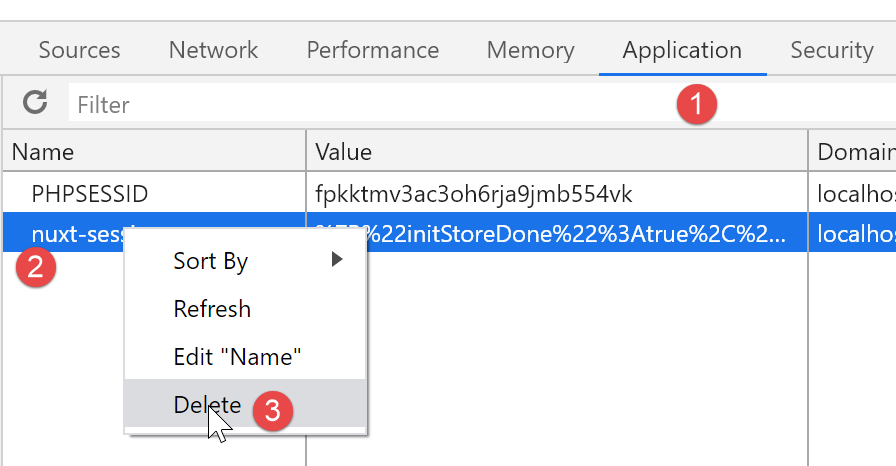
要运行此示例,请务必在执行前从运行 [nuxt] 客户端的浏览器中删除会话 Cookie [nuxt] 和 Cookie PHP,以便从空白状态开始。以下是使用 Chrome 浏览器的示例:
16.5. Conclusion
[nuxt]服务器的路由配置较为复杂,因为必须预先考虑用户可能手动输入的所有URL。这是一个典型的案例。 [nuxt] 应用程序本不该被如此使用。一旦 [nuxt] 服务器的路由器返回了 [index] 页面,后续对该服务器的请求便可重定向至错误页面。
就我们 [nuxt-13] 示例的具体情况而言,[nuxt] 服务器的路由设置是多余的。[nuxt-12] 示例中的默认设置(实际上即无路由)完全足够。