11. 示例 [nuxt-08]:路由中间件
在此示例中,我们将介绍路由中间件的概念,即在每次路由变更时执行的脚本。
示例 [nuxt-08] 最初是通过复制项目 [nuxt-01] 获得的:
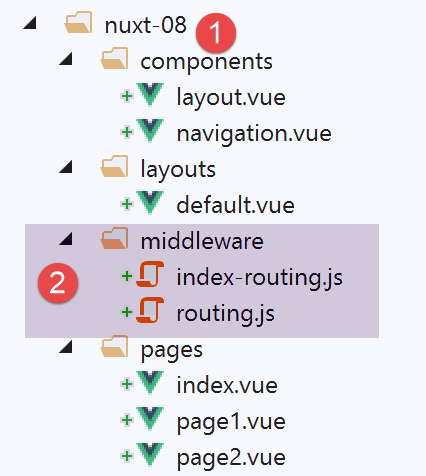
路由中间件必须位于名为 [middleware] [2] 的文件夹中。可能存在两级路由:
- 应用于每次导航的路由。此类路由需在文件 [nuxt.config.js] 中进行声明;
- 针对特定页面的路由,当该页面是路由的目标时。此类路由需在目标页面中进行声明;
11.1. 通用路由
文件 [middleware / routing.js] 将负责通用路由。该路由在文件 [nuxt.config.js] 中通过以下声明进行定义:
  router: {
    base: '/nuxt-08/',
    middleware: ['routing']
},
通用路由中间件是路由器的属性(第 1 行)。可能存在多个路由中间件。因此,在第 3 行,属性 [middleware] 的值是一个数组。 可以看到,这里并未使用路径来指定中间件。系统会自动在项目的 [middleware] 文件夹中查找该中间件;
中间件 [routing] 在此仅负责日志记录:
/* eslint-disable no-undef */
/* eslint-disable no-console */
export default function(...args) {
  // 谁在执行这段代码?
  console.log('[routing], process.server=', process.server, 'process.client=', process.client)
  const who = process.server ? 'server' : 'client'
  const routing = '[routing ' + who + ']'
  // 参数个数
  console.log(routing + ', il y a', args.length, 'argument(s)')

  // 第一个参数
  const context = args[0]
  // 上下文键
  dumpkeys(routing + ', context', context)
  // 应用程序
  dumpkeys(routing + ', context.app', context.app)
  // 路由
  dumpkeys(routing + ', context.route', context.route)
  console.log(routing + ', context.route=', context.route)
  // 路由器
  dumpkeys(routing + ', context.app.router', context.app.router)
  // router.options.routes
  dumpkeys(routing + ', context.app.router.options.routes', context.app.router.options.routes)
  console.log(routing + ', context.app.router.options.routes=', context.app.router.options.routes)
}

function dumpkeys(message, object) {
  // [object] 的密钥列表
  const ligne = 'Liste des clés [' + message + ']'
  console.log(ligne)
  // 密钥列表
  if (object) {
    console.log(Object.keys(object))
  }
}
- 第 3 行:我们将发现该中间件接收一个参数:执行器的上下文(服务器或客户端);
- 第 4-25 行:我们显示不同对象的属性以确定哪些可用。我们将发现中间件的上下文与插件的上下文几乎完全相同;
11.2. 特定页面的路由
我们需要控制访问页面 [index] 的方式。为此,我们需要在页面 [index] 中引入属性 [middleware]:
<script>
/* eslint-disable no-undef */
/* eslint-disable no-console */
/* eslint-disable nuxt/no-env-in-hooks */

import Navigation from '@/components/navigation'
import Layout from '@/components/layout'

export default {
  name: 'Home',
  // 使用的组件
  components: {
    Layout,
    Navigation
  },
  // 生命周期
  beforeCreate() {
    // 客户端与服务器
    console.log('[home beforeCreate]')
  },
  created() {
    // 客户端与服务器
    console.log('[home created]')
  },
  beforeMount() {
    // 仅客户端
    console.log('[home beforeMount]')
  },
  mounted() {
    // 仅客户端
    console.log('[home mounted]')
  },
  // 路由
  middleware: ['index-routing']
}
</script>
- 第 34 行:属性 [middleware] 列出了每次显示下一页(即页面 [index])时需执行的脚本。同样,这些脚本将在项目的 [middleware] 文件夹中查找;
中间件 [index-routing] 如下:
/* eslint-disable no-undef */
/* eslint-disable no-console */
export default function(...args) {
  // 谁在执行这段代码?
  console.log('[index-routing], process.server=', process.server, 'process.client=', process.client)
  const who = process.server ? 'server' : 'client'
  const indexRouting = '[index-routing ' + who + ']'
  // 参数个数
  console.log(indexRouting + ', il y a', args.length, 'argument(s)')

  // 第一个参数
  const context = args[0]
  // 上下文键
  dumpkeys(indexRouting + ', context', context)
  // 应用程序
  dumpkeys(indexRouting + ', context.app', context.app)
  // 路由
  dumpkeys(indexRouting + ', context.route', context.route)
  console.log(indexRouting + ', context.route=', context.route)
  // 路由器
  dumpkeys(indexRouting + ', context.app.router', context.app.router)
  // router.options.routes
  dumpkeys(indexRouting + ', context.app.router.options.routes', context.app.router.options.routes)
  console.log(indexRouting + ', context.app.router.options.routes=', context.app.router.options.routes)
  // 我们来自哪里?
  if (context.from) {
    console.log('from=', context.from)
  }
}

function dumpkeys(message, object) {
  // [object] 的密钥列表
  const ligne = 'Liste des clés [' + message + ']'
  console.log(ligne)
  // 密钥列表
  if (object) {
    console.log(Object.keys(object))
  }
}
[index-routing] 的代码与 [routing] 完全相同,且生成相同的结果。我们关注的是这两个中间件何时被执行。
11.3. 项目运行
我们运行该项目。此时日志如下:
服务器首先执行的是脚本 [routing]:
这与使用插件时得到的结果一致。
- 第15行:属性[redirect]常用于中间件中,它允许更改当前路由的目标;
随后,由于即将显示的页面是 [index],服务器执行脚本 [index-routing] 并显示以下日志:
使用脚本 [index-routing] 获得的结果与使用脚本 [routing] 获得的结果类似。
当客户端浏览器接收到 [index] 页面后,客户端脚本开始接管。日志变为如下内容:
因此可以看出,在应用程序启动时,客户端不会执行任何中间件。这意味着,每当用户强制向服务器发起请求时,都会发生这种情况。只有在客户端内部进行导航时,客户端才会执行中间件。 例如,我们通过链接 [Page 1] 导航至页面 [page1](当前位于页面 [index])。此时日志如下:
- 第 2 行:客户端执行了中间件 [routing];
- 第 4 行:请注意属性 [from]:这是我们来自的路径;
- 第 9 行:[context.route] 是目标路由;
- 第 15-18 行:显示页面 [page1];
现在通过链接 [Home] 返回页面 [index]。此时日志如下:
- 第 1-15 行:客户端执行中间件 [routing]。这是正常的,每次路由变更时都会执行该中间件;
- 第 16-29 行:客户端执行中间件 [index-routing],原因是:
- [index] 是当前路由的目标(参见第 23 行);
- 页面 [index] 定义了一个名为 [index-routing] 的中间件;
由此可见,通用路由中间件会在页面关联的中间件之前由客户端执行。