15. 示例 [nuxt-12]:使用 axios 进行 HTTP 请求
15.1. 简介
在这个新示例中,我们将探讨如何在 [asyncData] 函数内使用 [axios] 库进行 HTTP 请求。此外,我们将应用之前已介绍的概念:
- [nuxt-06] 示例中的插件使用:
- 将数据存储在会话 Cookie 中(来自 [nuxt-06] 示例);
- 来自 [nuxt-09] 示例中使用中间件进行导航控制;
- 来自 [nuxt-11] 示例的错误处理;
该示例的架构如下:
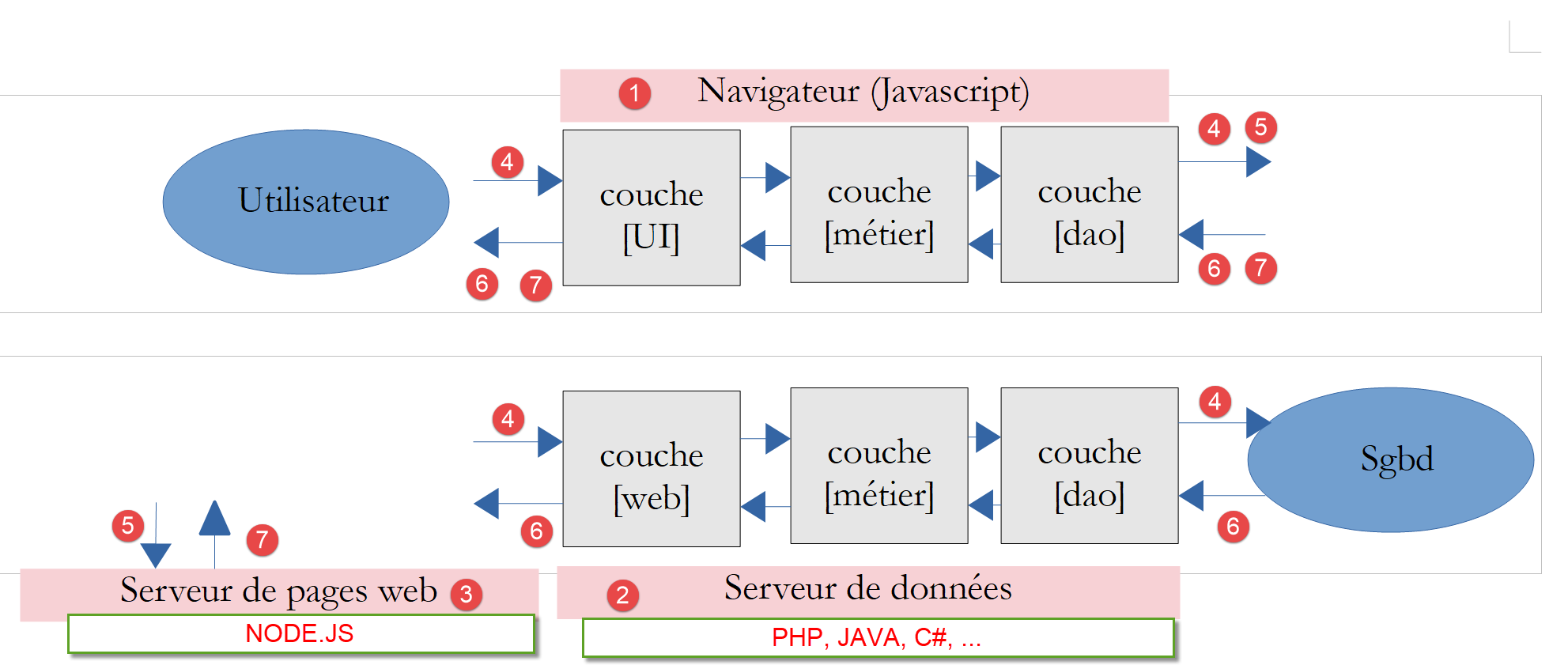
- [nuxt] 应用程序将托管在 [node.js] 服务器 [3] 上,由浏览器 [1] 下载并执行;
- [nuxt] 客户端 [1] 和 [nuxt] 服务器 [3] 都会向数据服务器 [2] 发起 HTTP 请求。该服务器即 PHP 7 章节中开发的税费计算服务器。我们将使用其最新版本(第 14 版),并启用 CORS 请求;
该示例的架构可简化如下:
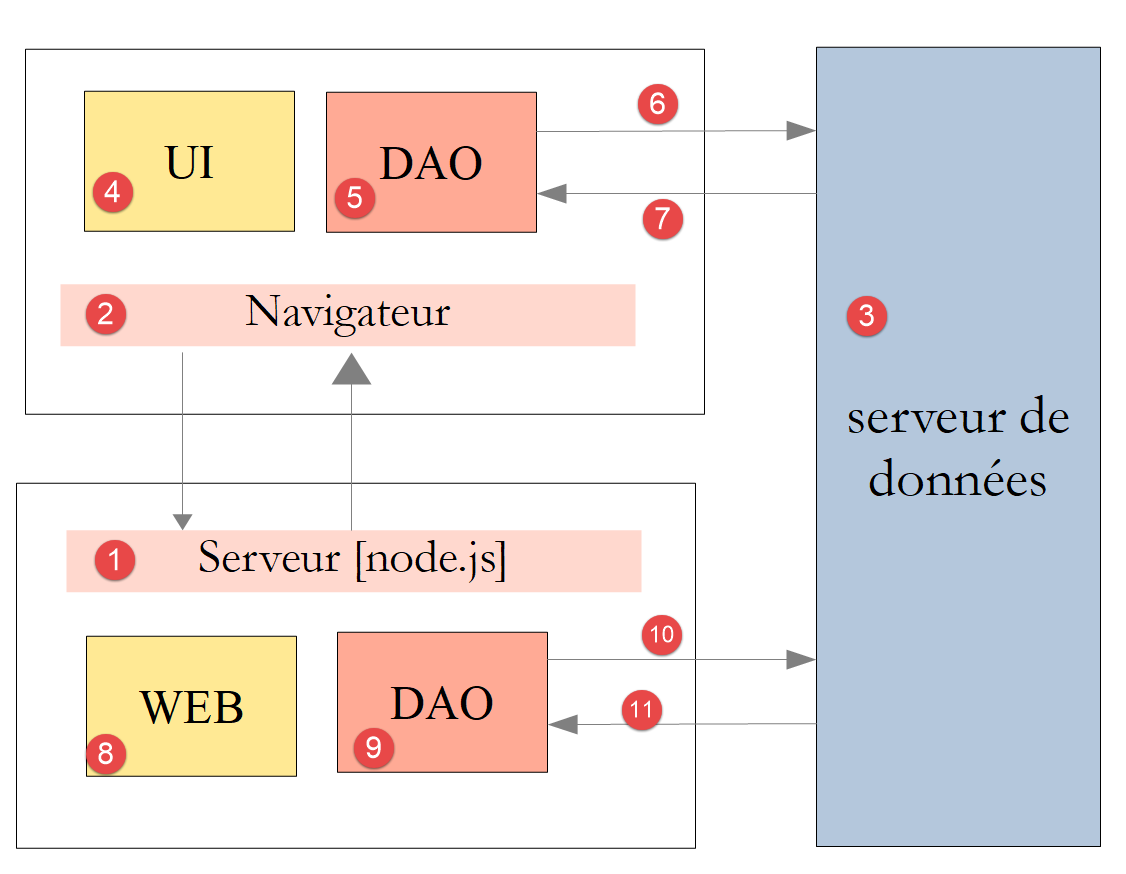
- 在 [1] 中,[Node.js] 服务器将 [Nuxt] 页面交付给浏览器 [2]。负责交付这些页面的正是服务器的 [Web] 层 [8]。为了交付页面,服务器可能已向数据服务器 [3] 请求了外部数据。负责发起必要 HTTP 请求的是 [DAO] 层 [9];
- 每次向 [Node.js] 服务器 [1] 发起页面请求时,浏览器 [2] 都会接收完整的 [Nuxt] 应用程序,随后该应用程序以 SPA 模式运行。[UI](用户界面)模块 [4] 向用户展示 [Vue.js] 页面。用户的操作或页面的自然生命周期都可能触发向数据服务器 [3] 请求外部数据。 随后,[DAO]层[5]会发起必要的HTTP请求;
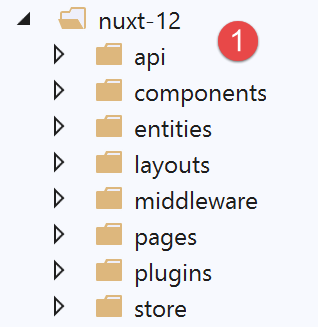
15.2. 项目目录结构
15.3. [nuxt.config.js] 配置文件
该项目将由以下 [nuxt.config.js] 文件进行控制:
export default {
  mode: 'universal',
  /*
   ** Headers of the page
   */
  head: {
    title: 'Introduction à [nuxt.js]',
    meta: [
      { charset: 'utf-8' },
      { name: 'viewport', content: 'width=device-width, initial-scale=1' },
      {
        hid: 'description',
        name: 'description',
        content: 'ssr routing loading asyncdata middleware plugins store'
      }
    ],
    link: [{ rel: 'icon', type: 'image/x-icon', href: '/favicon.ico' }]
  },
  /*
   ** Customize the progress-bar color
   */
  loading: false,

  /*
   ** Global CSS
   */
  css: [],
  /*
   ** Plugins to load before mounting the App
   */
  plugins: [
    { src: '@/plugins/client/plgSession', mode: 'client' },
    { src: '@/plugins/server/plgSession', mode: 'server' },
    { src: '@/plugins/client/plgDao', mode: 'client' },
    { src: '@/plugins/server/plgDao', mode: 'server' },
    { src: '@/plugins/client/plgEventBus', mode: 'client' }
  ],
  /*
   ** Nuxt.js dev-modules
   */
  buildModules: [
    // Doc: https://github.com/nuxt-community/eslint-module
    '@nuxtjs/eslint-module'
  ],
  /*
   ** Nuxt.js modules
   */
  modules: [
    // Doc: https://bootstrap-vue.js.org
    'bootstrap-vue/nuxt',
    // Doc: https://axios.nuxtjs.org/usage
    '@nuxtjs/axios',
    // https://www.npmjs.com/package/cookie-universal-nuxt
    'cookie-universal-nuxt'
  ],
  /*
   ** Axios module configuration
   ** See https://axios.nuxtjs.org/options
   */
  axios: {},
  /*
   ** Build configuration
   */
  build: {
    /*
     ** You can extend webpack config here
     */
    extend(config, ctx) { }
  },
  // source code directory
  srcDir: 'nuxt-12',
  // router
  router: {
    // application URL root
    base: '/nuxt-12/',
    // routing middleware
    middleware: ['routing']
  },
  // server
  server: {
    // service port, default 3000
    port: 81,
    // network addresses listened to, default localhost: 127.0.0.1
    // 0.0.0.0 = all the machine's network addresses
    host: 'localhost'
  },
  // environment
  env: {
    // axios configuration
    timeout: 2000,
    withCredentials: true,
    baseURL: 'http://localhost/php7/scripts-web/impots/version-14',
    // session cookie configuration [nuxt]
    maxAge: 60 * 5
  }
}
- 第 22 行:我们自行处理异步操作完成的通知;
- 第 31 行:我们将使用各种插件,这些插件专门针对客户端或服务器端,但不会同时支持两者;
- 第 52 行:[axios] 模块已集成到 [nuxt] 中。因此,负责处理 [nuxt] 应用程序向 PHP 税费计算服务器发送 HTTP 请求的 [axios] 对象,可在 [context.$axios] 中获取;
- 第 54 行:[cookie-universal-nuxt] 模块将允许我们将 [nuxt] 会话保存到 Cookie 中;
- 第 60 行:[axios] 属性允许我们配置第 52 行引入的 [@nuxtjs/axios] 模块。我们不会使用此选项,而是更倾向于使用第 88 行中的 [env] 属性;
- 第 90 行:等待税费计算服务器响应的最大时长;
- 第 91 行:[nuxt] 客户端的必备配置——启用与税费计算服务器通信时使用 Cookie;
- 第 92 行:税费计算服务器的基准 URL;
- 第 94 行:Nuxt 会话时长(5 分钟);
- 第 77 行:客户端和 [nuxt] 服务端的导航将由路由中间件控制;
15.4. 应用程序的 [UI] 层
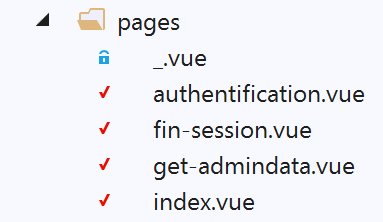
我们将通过以下视图,使 [nuxt] 应用程序能够访问税费计算服务器的 API:
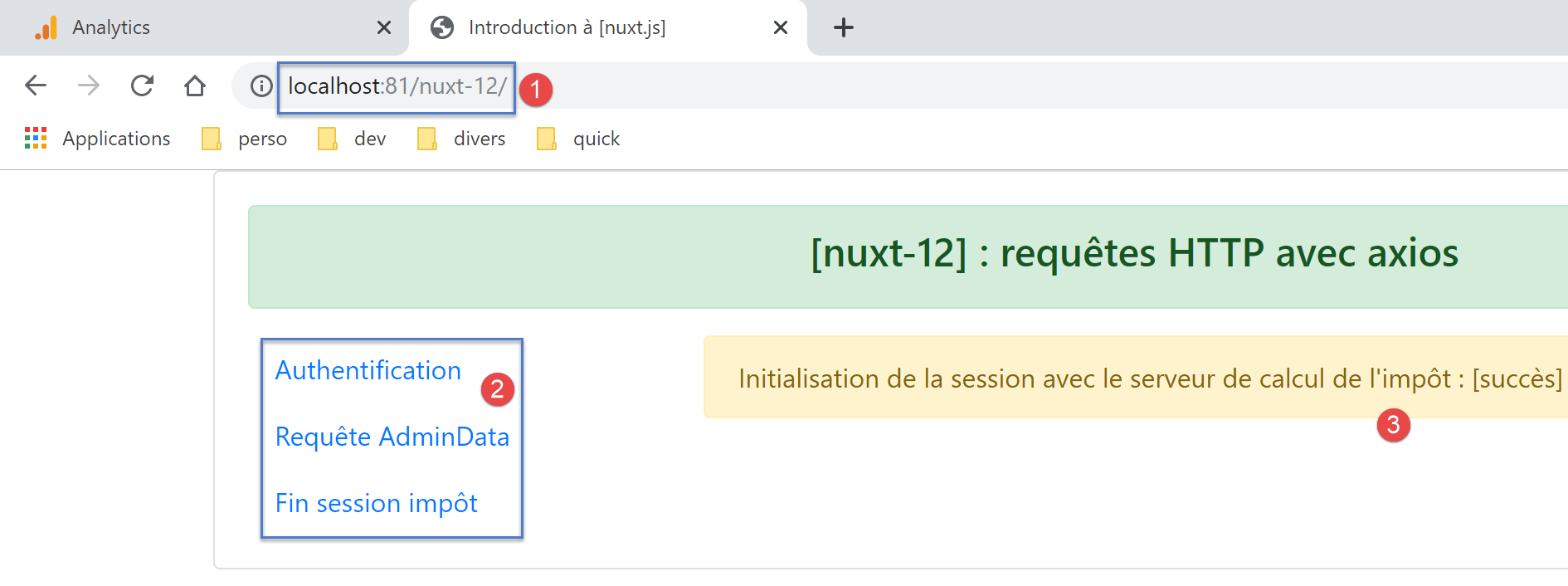
- 在 [2] 中,提供访问税务计算服务器 API 的菜单:
- [Authentication]:对应 [authentication] 页面。该页面使用凭据 [admin, admin](目前是唯一的授权凭据)向税费计算服务器发送身份验证请求。显示的结果与 [3] 类似;
- [AdminData Request]:对应于 [get-admindata] 页面。该页面向税务计算服务器请求数据(此处称为 [adminData]),该数据用于支持税务计算。显示的结果与 [3] 类似;
- [结束税务会话]:对应于 [end-session] 页面。该页面向税务计算服务器发送 PHP 会话结束请求。随后,服务器将取消当前的 PHP 会话并初始化一个新的、空白的会话;
15.5. [nuxt] 应用程序的 [dao] 层
如上所述,[nuxt] 应用程序的架构如下:
- 在 [1] 中,[Node.js] 服务器将 [Nuxt] 页面交付给浏览器 [2]。负责交付这些页面的正是服务器的 [Web] 层 [8]。为了交付页面,服务器可能已向数据服务器 [3] 请求了外部数据。负责发起必要 HTTP 请求的是 [DAO] 层 [9];
- 每次向 [Node.js] 服务器 [1] 发起页面请求时,浏览器 [2] 都会接收完整的 [Nuxt] 应用程序,随后该应用程序以 SPA 模式运行。[UI](用户界面)模块 [4] 向用户展示 [Vue.js] 页面。 用户操作或页面生命周期可能会触发向数据服务器 [3] 请求外部数据。随后,[DAO] 层 [5] 会发出必要的 HTTP 请求;
我们将使用文档《通过示例学习 PHP7 入门》中开发的税费计算服务器第 14 版。我们将仅使用其 JSON API(应用程序接口)的一部分:
请求 | 响应 |
| |
| |
| |
| |
15.5.1. [Nuxt] 服务器的 [DAO] 层
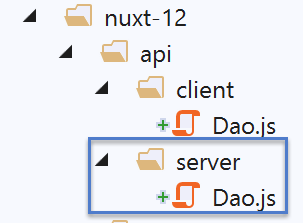
[node.js] 服务器 [1] 将使用文档 |通过示例了解 VUE.JS 框架| 中描述的 [DAO] 层。以下是代码:
'use strict';

// imports
import qs from 'qs'

class Dao {

  // manufacturer
  constructor(axios) {
    this.axios = axios;
    // session cookie
    this.sessionCookieName = "PHPSESSID";
    this.sessionCookie = '';
  }

  // init session
  async  initSession() {
    // query options HHTP [get /main.php?action=init-session&type=json]
    const options = {
      method: "GET",
      // URL parameters
      params: {
        action: 'init-session',
        type: 'json'
      }
    };
    // execute query HTTP
    return await this.getRemoteData(options);
  }

  async  authentifierUtilisateur(user, password) {
    // query options HHTP [post /main.php?action=authenticate-user]
    const options = {
      method: "POST",
      headers: {
        'Content-type': 'application/x-www-form-urlencoded',
      },
      // body of POST
      data: qs.stringify({
        user: user,
        password: password
      }),
      // URL parameters
      params: {
        action: 'authentifier-utilisateur'
      }
    };
    // execute query HTTP
    return await this.getRemoteData(options);
  }

  async getAdminData() {
    // query options HHTP [get /main.php?action=get-admindata]
    const options = {
      method: "GET",
      // URL parameters
      params: {
        action: 'get-admindata'
      }
    };
    // execute query HTTP
    const data = await this.getRemoteData(options);
    // result
    return data;
  }

  async  getRemoteData(options) {
    // for the session cookie
    if (!options.headers) {
      options.headers = {};
    }
    options.headers.Cookie = this.sessionCookie;
    // execute query HTTP
    let response;
    try {
      // asynchronous request
      response = await this.axios.request('main.php', options);
    } catch (error) {
      // the [error] parameter is an exception instance - it can take various forms
      if (error.response) {
        // the server response is in [error.response]
        response = error.response;
      } else {
        // error restart
        throw error;
      }
    }
    // response is the entire HTTP response from the server (HTTP headers + response itself)
    // retrieve the session cookie if it exists
    const setCookie = response.headers['set-cookie'];
    if (setCookie) {
      // setCookie is an array
      // look for the session cookie in this table
      let trouvé = false;
      let i = 0;
      while (!trouvé && i < setCookie.length) {
        // look for the session cookie
        const results = RegExp('^(' + this.sessionCookieName + '.+?);').exec(setCookie[i]);
        if (results) {
          // the session cookie is stored
          // eslint-disable-next-line require-atomic-updates
          this.sessionCookie = results[1];
          // we found
          trouvé = true;
        } else {
          // next item
          i++;
        }
      }
    }
    // the server response is in [response.data]
    return response.data;
  }
}

// class export
export default Dao;
- [dao] 层中的所有方法都会返回数据服务器发送的对象 [{action: ‘xx’, status: nn, response: {...}],其中:
- [action]:数据服务器执行的操作名称;
- [state]:数值指标:
- [initSession]:状态码为700,表示响应无错误;
- [authenticateUser]:状态码=200,表示响应无错误;
- [getAdminData]:状态码=1000,表示响应无错误;
- [end-session]:状态=400,表示响应无错误;
- [response]:与数值指标 [status] 关联的响应。具体内容可能因该数值指标而异;
让我们来查看 [Dao] 类的构造函数:
// constructeur
  constructor(axios) {
    this.axios = axios;
    // cookie de session
    this.sessionCookieName = "PHPSESSID";
    this.sessionCookie = '';
}
- 第 2 行:作为构造函数参数传递的 [axios] 对象由调用代码提供。正是这个对象将执行 HTTP 请求;
- 第 5 行:由 PHP 编写的数据服务器发送的会话 Cookie 的名称;
- 第 6 行:[dao] 层与数据服务器之间交换的会话 Cookie。该 Cookie 由第 67–113 行中的 [getRemoteData] 函数初始化;
对于会话 Cookie,我们需要考虑两个独立的 [dao] 层:
- 浏览器层;
- 服务器层;
我们需要管理三个会话 Cookie:
- [nuxt] 客户端与 PHP 7 服务器之间交换的那个;
- [nuxt] 服务器与 PHP 7 服务器之间交换的 Cookie;
- 客户端 [nuxt] 与 [nuxt] 服务器之间交换的 Cookie;
我们将确保客户端与 [nuxt] 服务器在 PHP 服务器上的会话 Cookie 保持一致。我们将这个 Cookie 称为 PHP 会话 Cookie。该 Cookie 即情况 1 和情况 2 中的那个。我们将情况 3 中的 Cookie 称为 [nuxt] 会话 Cookie。因此,我们将拥有两个会话:
- 一个使用 PHP 会话 Cookie 的 PHP 会话;
- 一个带有 [nuxt] 会话 Cookie 的 [nuxt] 会话;
为何要为客户端的 PHP 会话和 [nuxt] 浏览器的会话使用相同的 Cookie?我们希望应用程序无论是由客户端还是 [nuxt] 服务器发起,都能与 PHP 7 服务器进行通信:
- 如果 [nuxt] 服务器发起的操作 A 将 PHP 服务器置于状态 E,该状态将反映在 PHP 服务器维护的 PHP 会话中;
- 通过使用与服务器相同的 PHP 会话 Cookie,紧随服务器操作 A [nuxt] 之后的客户端操作 B [nuxt] 将发现 PHP 服务器处于服务器 [nuxt] 留下的状态 E,因此能够基于服务器 [nuxt] 已完成的工作继续进行;
- 如果在 [nuxt] 客户端的操作 B 之后,紧接着是 [nuxt] 服务器的操作 C,基于与之前相同的理由,该操作将能够基于 [nuxt] 客户端操作 B 所完成的工作继续处理;
为了使 [nuxt] 客户端的浏览器能够与税费计算 PHP 服务器通信,我们将使用该服务器的第 14 版,该版本支持跨域调用——即从浏览器向 PHP 服务器发起调用。然而,从 [nuxt] 服务器向 PHP 服务器发起的调用并不属于跨域调用。这一概念仅适用于从浏览器发起的调用。
让我们回到前一个 [Dao] 类的构造函数代码:
// constructeur
  constructor(axios) {
    this.axios = axios;
    // cookie de session
    this.sessionCookieName = "PHPSESSID";
    this.sessionCookie = '';
}
- 第 5 行和第 6 行对应与税费计算服务器之间的 PHP 会话 Cookie;
上述 PHP 会话 Cookie 的管理方式不适用于 [nuxt] 服务器:其 [dao] 层会在每次向 [nuxt] 服务器发起新请求时被实例化。请注意,向 [nuxt] 服务器请求页面实际上会重置 [nuxt] 应用程序。 因此,当 [nuxt] 服务器首次向数据服务器发起请求时,[dao] 层的 PHP 会话 Cookie 会被初始化;但在随后来自同一 [nuxt] 服务器的 HTTP 请求中,该值会丢失,因为在此期间其 [dao] 层已被重建,构造函数被重新执行,且 PHP 会话 Cookie 被重置为空字符串(第 6 行);
一种解决方案是为服务器的 [dao] 层使用不同的构造函数:
// constructeur
  constructor(axios, phpSessionCookie) {
    // bibliothèque axios
    this.axios = axios
    // valeur du cookie de session
    this.phpSessionCookie = phpSessionCookie
    // nom du cookie de session du serveur PHP
    this.phpSessionCookieName = 'PHPSESSID'
  }
- 第 2 行:这次,PHP 会话 Cookie 将被传递给数据服务器的 [DAO] 层构造函数;
[nuxt] 服务器将如何将这个 PHP 会话 Cookie 提供给其 [dao] 层的构造函数?我们将把 PHP 会话 Cookie 存储在浏览器与 [nuxt] 服务器之间交换的 [nuxt] 会话 Cookie 中。具体过程如下:
- 启动 [nuxt] 应用程序;
- 当 [nuxt] 服务器向 PHP 服务器发出首次 HTTP 请求时,它会将收到的 PHP 会话 Cookie 存储在与 [nuxt] 客户端交换的 [nuxt] 会话 Cookie 中;
- 承载 [nuxt] 客户端的浏览器接收此 [nuxt] 会话 Cookie,并会在每次向 [nuxt] 服务器发送新请求时自动将其一并发送回去;
- 当 [nuxt] 服务器需要向 PHP 服务器发起新请求时,它会在浏览器发送的 [nuxt] 会话 Cookie 中查找 PHP 会话 Cookie,并将其发送给 PHP 服务器;
确实存在两个会话 Cookie,且二者绝不能混淆:
- [nuxt] 服务器与 [nuxt] 客户端浏览器之间交换的 [nuxt] 会话 Cookie;
- 在 [nuxt] 服务器与 PHP 服务器之间,或 [nuxt] 客户端与 PHP 服务器之间交换的 PHP 会话 Cookie;
现在让我们回到 [Dao] 类方法的代码。该方法中没有包含用于关闭与税费计算服务器之间 PHP 会话的函数。我们将添加这一行:
// end of tax calculation session
  async finSession() {
    // query options HHTP [get /main.php?action=end-session]
    const options = {
      method: 'GET',
      // URL parameters
      params: {
        action: 'fin-session'
      }
    }
    // execute query HTTP
    const data = await this.getRemoteData(options)
    // result
    return data
  }
在测试过程中,我们发现第 12 行调用的 [getRemoteData] 函数不适用于 [finSession] 方法:
async  getRemoteData(options) {
    // for the session cookie
    if (!options.headers) {
      options.headers = {};
    }
    options.headers.Cookie = this.sessionCookie;
    // execute query HTTP
    let response;
    try {
      // asynchronous request
      response = await this.axios.request('main.php', options);
    } catch (error) {
      // the [error] parameter is an exception instance - it can take various forms
      if (error.response) {
        // the server response is in [error.response]
        response = error.response;
      } else {
        // error restart
        throw error;
      }
    }
    // response is the entire HTTP response from the server (HTTP headers + response itself)
    // retrieve the session cookie if it exists
    const setCookie = response.headers['set-cookie'];
    if (setCookie) {
      // setCookie is an array
      // look for the session cookie in this table
      let trouvé = false;
      let i = 0;
      while (!trouvé && i < setCookie.length) {
        // look for the session cookie
        const results = RegExp('^(' + this.sessionCookieName + '.+?);').exec(setCookie[i]);
        if (results) {
          // the session cookie is stored
          // eslint-disable-next-line require-atomic-updates
          this.sessionCookie = results[1];
          // we found
          trouvé = true;
        } else {
          // next item
          i++;
        }
      }
    }
    // the server response is in [response.data]
    return response.data;
  }
- 第 30–43 行:我们搜索 [PHPSESSID=xxx] 这个 Cookie。如果找到,则将其存储在类中(第 36 行);
此代码不适用于新的 [finSession] 方法,因为在 [fin-session] 操作中,PHP 服务器会发送两个名为 [PHPSESSID] 的 Cookie。以下是使用 [Postman] 客户端获取的示例:
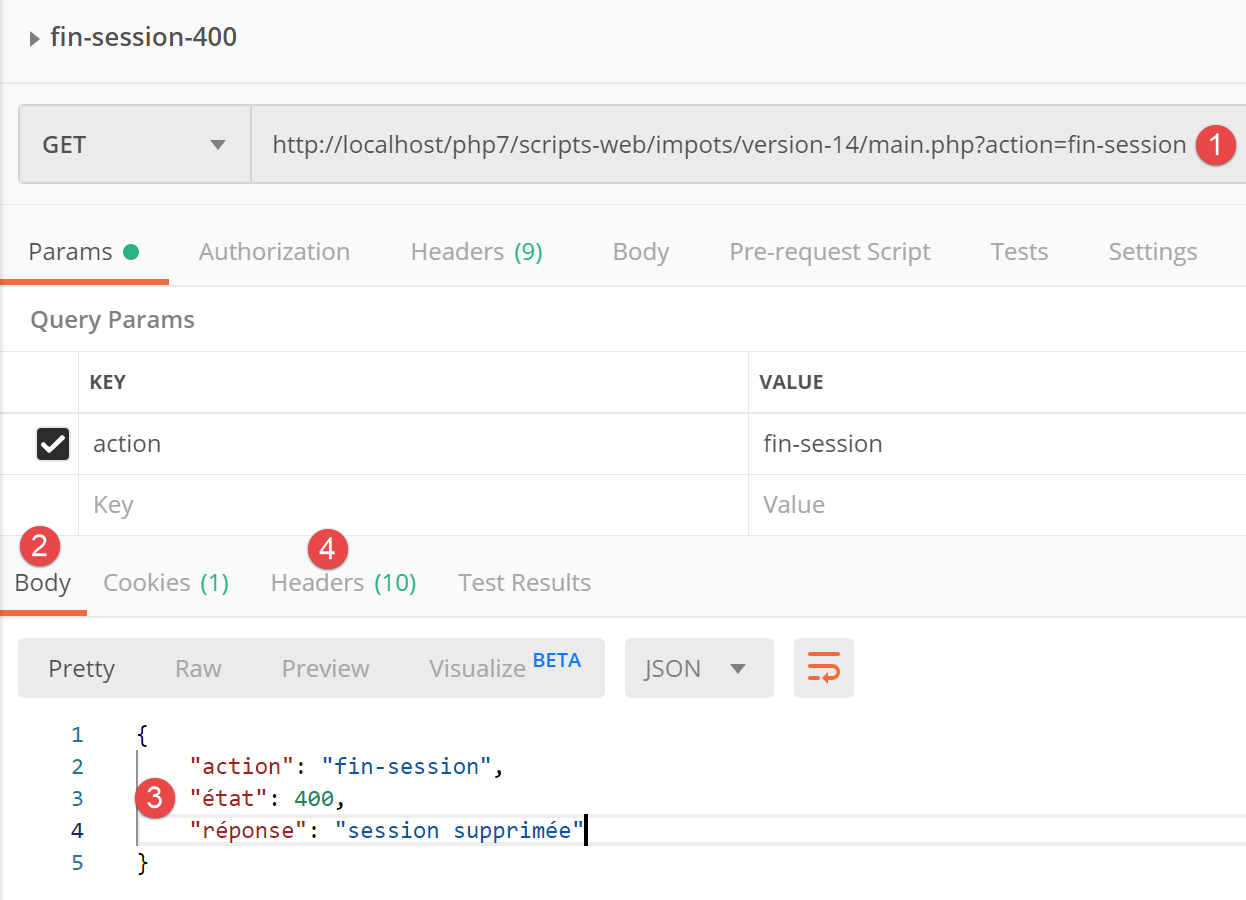
- [1] 处为 [Postman] 客户端发出的请求;
- [3] 处为 PHP 服务器的响应;
- [4] 处为 PHP 服务器响应的 HTTP 头部;
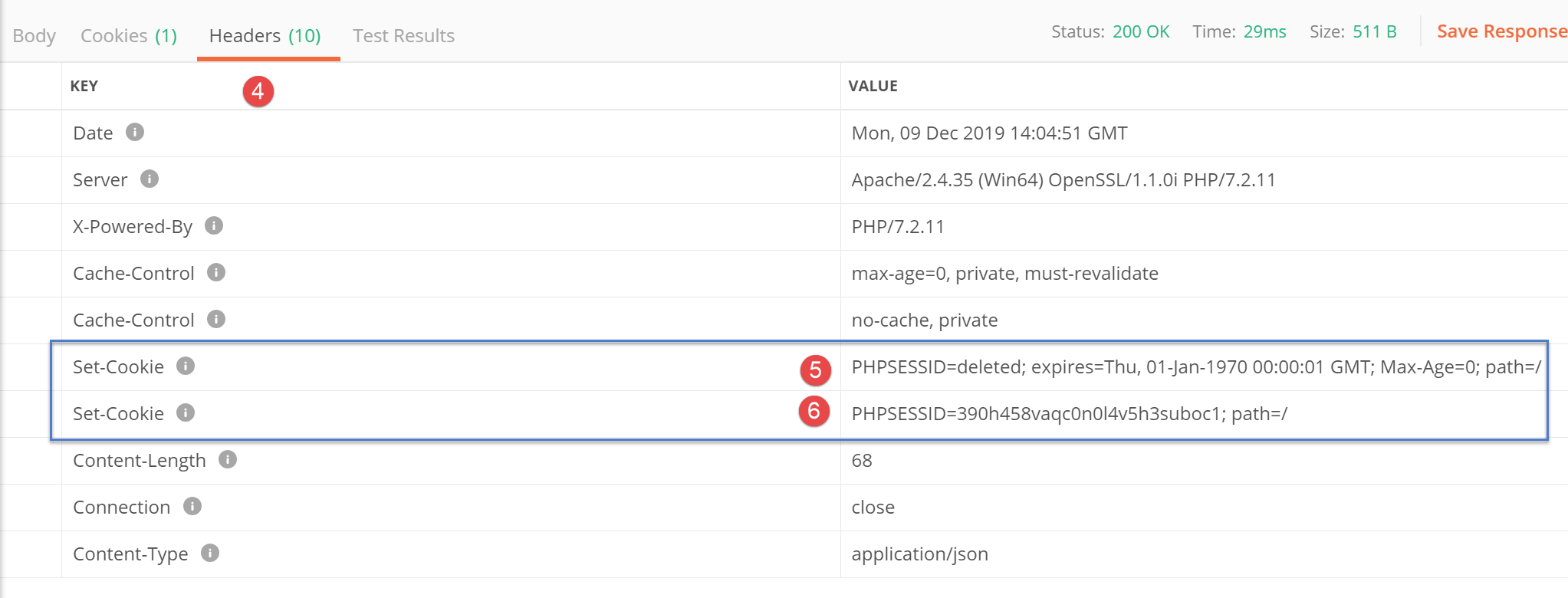
- 在[5]中,PHP服务器首先表示已删除当前的PHP会话;
- 在 [6] 中,PHP 服务器发送了新 PHP 会话的 Cookie;
根据当前代码,[getRemoteData] 函数检索的是 Cookie [5],而实际上需要存储的是 Cookie [6]。
因此,我们必须更新 [getRemoteData] 函数的代码:
async getRemoteData(options) {
    // is there a PHP session cookie?
    if (this.phpSessionCookie) {
      // are there headers?
      if (!options.headers) {
        // create an empty object
        options.headers = {}
      }
      // session cookie header PHP
      options.headers.Cookie = this.phpSessionCookie
    }
    // execute query HTTP
    let response
    try {
      // asynchronous request
      response = await this.axios.request('main.php', options)
    } catch (error) {
      // the [error] parameter is an exception instance - it can take various forms
      if (error.response) {
        // the server response is in [error.response]
        response = error.response
      } else {
        // error restart
        throw error
      }
    }
    // response is the entire HTTP response from the server (HTTP headers + response itself)
    // look for session cookie PHP in received cookies
    // all cookies received
    const cookies = response.headers['set-cookie']
    if (cookies) {
      // cookies is a picture
      // look for the PHP session cookie in this array
      let trouvé = false
      let i = 0
      while (!trouvé && i < cookies.length) {
        // look for the PHP session cookie
        const results = RegExp('^(' + this.phpSessionCookieName + '.+?)$').exec(cookies[i])
        if (results) {
          // we store the PHP session cookie
          const phpSessionCookie = results[1]
          // is the word [deleted] in it?
          const results2 = RegExp(this.phpSessionCookieName + '=deleted').exec(phpSessionCookie)
          if (!results2) {
            // we have the right session cookie PHP
            this.phpSessionCookie = phpSessionCookie
            // we found
            trouvé = true
          } else {
            // next item
            i++
          }
        } else {
          // next item
          i++
        }
      }
    }
    // the server response is in [response.data]
    return response.data
  }
- 第 41 行:我们发现了一个名为 [PHPSESSID] 的 Cookie。我们将它保存在本地;
- 第 43 行:我们检查保存的 Cookie 是否包含字符串 [PHPSESSID=deleted];
- 第 46 行:如果答案为否,则说明我们找到了正确的 Cookie [PHPSESSID]。我们将它存储在类中;
在 [getRemoteData] 函数之后,PHP 会话 Cookie 会被存储在类中,位于 [this.phpSessionCookie] 属性中。我们提到,该类会在 [nuxt] 服务器接收到每个新的 HTTP 请求时被实例化。因此,必须从该类中提取 PHP 会话 Cookie。为此,我们向该类添加了一个新方法:
// accès au cookie de la session PHP
  getPhpSessionCookie() {
    return this.phpSessionCookie
}
- [nuxt] 服务器通过向 [dao] 层的构造函数提供 PHP 会话 Cookie(如果存在的话)来请求执行操作;
- 操作完成后,[nuxt] 服务器会使用之前的 [getPhpSessionCookie] 方法,从 [dao] 层中检索已存储的 PHP 会话 Cookie。该 Cookie 可能与之前的相同,也可能不同。后一种情况会在以下两种情形下发生:
- 执行 [initSession] 方法时(此前不存在 PHP 会话 Cookie);
- 当执行 [finSession] 方法时(PHP 服务器更改了 PHP 会话 Cookie);
请注意关于 PHP 会话 Cookie 的一个特殊情况。[nuxt] 服务器并非总能从 PHP 服务器接收到该 Cookie。实际上,PHP 服务器仅发送一次。 此后,它将不再发送该 Cookie。查看 [getRemoteData] 和 [getPhpSessionCookie] 的代码可以发现,当 PHP 服务器未发送会话 Cookie 时,[getPhpSessionCookie] 函数会返回提供给构造函数的 PHP 会话 Cookie。这就是服务器始终向 PHP 服务器发送 PHP 服务器最后一次发送给它的 PHP 会话 Cookie 的方式。
15.5.2. [nuxt] 客户端的 [dao] 层
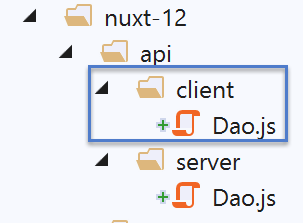
对于在浏览器中运行的 [nuxt] 客户端,我们使用文档 |通过示例了解 VUE.JS 框架| 中 [Dao] 类的代码:
"use strict";

// imports
import qs from "qs";

class Dao {
  // manufacturer
  constructor(axios) {
    this.axios = axios;
  }

  // init session
  async initSession() {
    // query options HHTP [get /main.php?action=init-session&type=json]
    const options = {
      method: "GET",
      // URL parameters
      params: {
        action: "init-session",
        type: "json"
      }
    };
    // execute query HTTP
    return await this.getRemoteData(options);
  }

  async authentifierUtilisateur(user, password) {
    // query options HHTP [post /main.php?action=authenticate-user]
    const options = {
      method: "POST",
      headers: {
        "Content-type": "application/x-www-form-urlencoded"
      },
      // body of POST
      data: qs.stringify({
        user: user,
        password: password
      }),
      // URL parameters
      params: {
        action: "authentifier-utilisateur"
      }
    };
    // execute query HTTP
    return await this.getRemoteData(options);
  }

  async getAdminData() {
    // query options HHTP [get /main.php?action=get-admindata]
    const options = {
      method: "GET",
      // URL parameters
      params: {
        action: "get-admindata"
      }
    };
    // execute query HTTP
    const data = await this.getRemoteData(options);
    // result
    return data;
  }

  async getRemoteData(options) {
    // execute query HTTP
    let response;
    try {
      // asynchronous request
      response = await this.axios.request("main.php", options);
    } catch (error) {
      // the [error] parameter is an exception instance - it can take various forms
      if (error.response) {
        // the server response is in [error.response]
        response = error.response;
      } else {
        // error restart
        throw error;
      }
    }
    // response is the entire HTTP response from the server (HTTP headers + response itself)
    // the server response is in [response.data]
    return response.data;
  }
}

// class export
export default Dao;
这段代码与 [nuxt] 服务器的 [dao] 层不同,它不负责管理与税费计算服务器之间的 PHP 会话 Cookie:这由浏览器来处理。
我们将像处理 [nuxt] 服务器的 [dao] 层那样,添加一个 [finSession] 方法:
// end of tax calculation session
  async finSession() {
    // query options HHTP [get /main.php?action=end-session]
    const options = {
      method: 'GET',
      // URL parameters
      params: {
        action: 'fin-session'
      }
    }
    // execute query HTTP
    const data = await this.getRemoteData(options)
    // result
    return data
  }
当 [nuxt] 客户端执行此方法时,它会像 [nuxt] 服务器一样收到两个 PHP 会话 Cookie。实际上是浏览器接收了它们,并且它正确地处理了这种情况:它只保留由税费计算服务器发起的新 PHP 会话的 Cookie。因此,下次 [nuxt] 客户端向 PHP 服务器发送请求时,PHP 会话 Cookie 将是正确的,因为发送它的是浏览器。 然而,这里存在一个问题:[nuxt] 客户端并不知道 PHP 会话 Cookie 已发生变化。在与 PHP 服务器通信时,它会发送一个已不存在的 PHP 会话 Cookie,从而引发问题。 [nuxt]客户端需要通知[nuxt]服务器PHP会话Cookie已发生变化,并将其传递给服务器。我们知道如何实现这一点:通过[nuxt]会话Cookie,即客户端与[nuxt]服务器之间交换的Cookie。[nuxt]客户端至少有两种方式可以获取新的PHP会话Cookie:
- 向浏览器请求;
- 使用服务器的 [getRemoteData] 方法,该方法知道如何获取新的 PHP 会话 Cookie;
我们将采用第二种方案,因为它已准备就绪。[nuxt] 客户端的 [getRemoteData] 方法随后变为如下形式:
async getRemoteData(options) {
    // execute query HTTP
    let response
    try {
      // asynchronous request
      response = await this.axios.request('main.php', options)
    } catch (error) {
      // the [error] parameter is an exception instance - it can take various forms
      if (error.response) {
        // the server response is in [error.response]
        response = error.response
      } else {
        // error restart
        throw error
      }
    }
    // response is the entire HTTP response from the server (HTTP headers + response itself)
    // look for session cookie PHP in received cookies
    // all cookies received
    const cookies = response.headers['set-cookie']
    if (cookies) {
      // cookies is a picture
      // look for session cookie PHP in this array
      let trouvé = false
      let i = 0
      while (!trouvé && i < cookies.length) {
        // look for the PHP session cookie
        const results = RegExp('^(' + this.phpSessionCookieName + '.+?)$').exec(cookies[i])
        if (results) {
          // we store the PHP session cookie
          const phpSessionCookie = results[1]
          // is the word [deleted] in it?
          const results2 = RegExp(this.phpSessionCookieName + '=deleted').exec(phpSessionCookie)
          if (!results2) {
            // we have the right session cookie PHP
            this.phpSessionCookie = phpSessionCookie
            // we found
            trouvé = true
          } else {
            // next item
            i++
          }
        } else {
          // next item
          i++
        }
      }
    }
    // the server response is in [response.data]
    return response.data
  }
我们仅保留了 [getRemoteData] 中的代码,该代码用于处理 PHP 服务器的响应以获取 PHP 会话 Cookie。我们未保留将 PHP 会话 Cookie 包含在发往 PHP 服务器请求中的代码,因为托管 [nuxt] 客户端的浏览器会自行处理该操作。
一旦 [nuxt] 客户端获取了 PHP 会话 Cookie,就必须将其放入 [nuxt] 会话中,以便 [nuxt] 服务器能够使用它。[dao] 层不处理此操作,但它提供了一个方法,用于访问其存储的 PHP 会话 Cookie:
// accès au cookie de la session PHP
  getPhpSessionCookie() {
    return this.phpSessionCookie
}
[getPhpSessionCookie] 函数并不总是返回有效的会话 Cookie:
- 这里需要特别注意的是,[nuxt] 客户端的 [dao] 层是持久的。它仅实例化一次,之后便会驻留在内存中;
- 只要 PHP 服务器未向 [nuxt] 客户端发送 PHP 会话 Cookie,[nuxt] 客户端的 [getPhpSessionCookie] 函数就会返回 [undefined] 值;
- 当 PHP 服务器向 [nuxt] 客户端发送 PHP 会话 Cookie 时,该 Cookie 将存储在 [this.phpSessionCookie] 中,并一直保留在那里,直到被 PHP 服务器发送的新 PHP 会话 Cookie 替换。此时,[nuxt] 客户端的 [getPhpSessionCookie] 函数将返回收到的最后一个 PHP 会话 Cookie;
[nuxt] 客户端的 [dao] 层与 [nuxt] 服务器的 [dao] 层仅有一点不同:它不会自行发送 PHP 会话 Cookie,因为浏览器会处理此操作。尽管如此,我们仍选择维护两个独立的 [dao] 层,因为它们各自实现背后的逻辑不同。
15.6. [nuxt] 会话
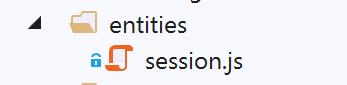
[nuxt] 会话(客户端与 Nuxt 服务器之间)将被封装在以下 [session] 对象中:
/* eslint-disable no-console */
// définition de la session
const session = {
  // contenu de la session
  value: {
    // store non initialisé
    initStoreDone: false,
    // valeur du store Vuex
    store: ''
  },
  // sauvegarde de la session dans un cookie
  save(context) {
    // sauvegarde du store en session
    this.value.store = context.store.state
    console.log('nuxt-session save=', this.value)
    // sauvegarde de la valeur de la session
    context.app.$cookies.set('nuxt-session', this.value, { path: context.base, maxAge: context.env.maxAge })
  },
  // reset de la session
  reset(context) {
    console.log('nuxt-session reset')
    // reset du store
    context.store.commit('reset')
    // sauvegarde du nouveau store en session et sauvegarde de la session
    this.save(context)
  }
}
// export de la session
export default session
- 第 5–10 行:session 仅有一个 [value] 属性,该属性包含两个子属性:
- [initStoreDone],用于指示存储是否已初始化;
- [store]:应用程序 Vuex 存储的 [store.state] 值;
- 第 12–18 行:[save] 方法用于将 [nuxt] 会话保存到 Cookie 中。此处我们使用 [cookie-universal-nuxt] 库来管理 Cookie。请注意 [nuxt] 会话 Cookie 的名称:[nuxt-session](第 17 行);
- 第 20–26 行:[reset] 方法用于重置 [nuxt] 会话;
- 第 23 行:重置 Vuex 存储,并在第 25 行将其保存到会话中;
15.7. [nuxt] 会话管理插件
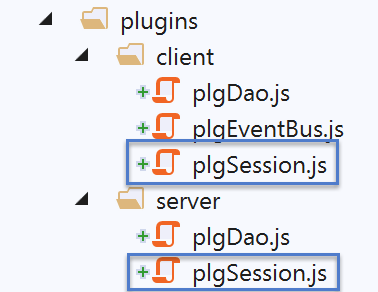
15.7.1. 用于 [nuxt] 服务器的 [nuxt] 会话管理插件
应用程序启动时,[nuxt] 服务器会首先运行。因此,它负责初始化 [nuxt] 会话。[server/plgSession] 脚本如下:
/* eslint-disable no-console */

// import de la session
import session from '@/entities/session'

export default (context, inject) => {
  // gestion de la session serveur
  console.log('[plugin server plgSession]')

  // y-a-t-il une session existante ?
  const value = context.app.$cookies.get('nuxt-session')
  if (!value) {
    // nouvelle session
    console.log("[plugin server plgSession], démarrage d'une nouvelle session")
  } else {
    // session existante
    console.log("[plugin server plgSession], reprise d'une session existante")
    session.value = value
  }

  // on injecte une fonction dans [context, Vue] qui rendra la session courante
  inject('session', () => session)
}
- 第 4 行:导入 [nuxt] 会话代码;
- 第 11 行:获取 [nuxt] 会话 Cookie 的值;
- 第 12–15 行:如果 [nuxt] 会话 Cookie 不存在,那么第 4 行导入的 [nuxt] 会话就足够了。无需进行其他操作;
- 第 15–19 行:如果 [nuxt] 会话 Cookie 存在,则在第 18 行将其值存储到第 4 行导入的会话中;
- 第 22 行:会话已初始化或恢复。我们通过 [$session] 函数使其可用;
15.7.2. 适用于 [nuxt] 客户端的 [nuxt] 会话管理插件
[client/plgSession] 脚本如下:
/* eslint-disable no-console */

// import de la session
import session from '@/entities/session'

export default (context, inject) => {
  // gestion de la session client
  console.log('[plugin client plgSession], reprise de la session [nuxt] du serveur')
  // on récupère la session existante du serveur nuxt
  session.value = context.app.$cookies.get('nuxt-session')

  // on injecte une fonction dans [context, Vue] qui rendra la session courante
  inject('session', () => session)
}
- 第 4 行:导入 [nuxt] 会话;
- 第 10 行:从 [nuxt-session] Cookie 中获取当前 [nuxt] 会话;
- 第 13 行:通过注入的 [$session] 函数返回第 4 行导入的 [nuxt] 会话;
15.8. [dao] 层的插件
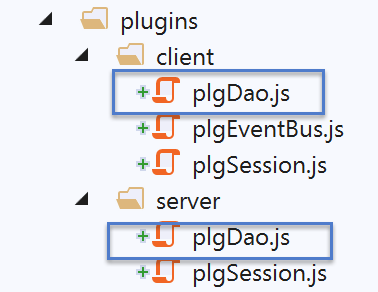
15.8.1. 针对 [nuxt] 客户端的 [dao] 层插件
[client/plgDao] 脚本如下:
/* eslint-disable no-console */
// on crée un point d'accès à la couche [Dao]
import Dao from '@/api/client/Dao'
export default (context, inject) => {
  // configuration axios
  context.$axios.defaults.timeout = context.env.timeout
  context.$axios.defaults.baseURL = context.env.baseURL
  context.$axios.defaults.withCredentials = context.env.withCredentials
  // instanciation de la couche [dao]
  const dao = new Dao(context.$axios)
  // injection d'une fonction [$dao] dans le contexte
  inject('dao', () => dao)
  // log
  console.log('[fonction client $dao créée]')
}
- 第 3 行:导入了 [nuxt] 客户端的 [dao] 层;
- 第 6-8 行:我们配置 [context.$axios] 对象,该对象将使用 [nuxt.config] 文件中的信息,为 [nuxt] 客户端的 [dao] 层发起 HTTP 请求:
// environnement
  env: {
    // configuration axios
    timeout: 2000,
    withCredentials: true,
    baseURL: 'http://localhost/php7/scripts-web/impots/version-14',
    // configuration du cookie de session [nuxt]
    maxAge: 60 * 5
  }
- 第 10 行:实例化 [nuxt] 客户端的 [dao] 层;
- 第 12 行:将 [$dao] 函数注入客户端的上下文和页面中。该函数提供了对第 10 行 [dao] 层的访问;
因此,要在 [nuxt] 客户端运行时访问其 [dao] 层,我们编写:
- [context.app.$dao()](其中 context 已知);
- 在 [Vue.js] 页面中使用 [this.$dao()];
15.8.2. [nuxt] 服务端的 [dao] 层插件
[server/plgDao] 脚本如下:
/* eslint-disable no-console */
// on crée un point d'accès à la couche [Dao]
import Dao from '@/api/server/Dao'
export default (context, inject) => {
  // configuration axios
  context.$axios.defaults.timeout = context.env.timeout
  context.$axios.defaults.baseURL = context.env.baseURL
  // on récupère le cookie de session
  const store = context.app.$session().value.store
  const phpSessionCookie = store ? store.phpSessionCookie : ''
  console.log('session=', context.app.$session().value, 'phpSessionCookie=', phpSessionCookie)
  // instanciation de la couche [dao]
  const dao = new Dao(context.$axios, phpSessionCookie)
  // injection d'une fonction [$dao] dans le contexte
  inject('dao', () => dao)
  // log
  console.log('[fonction server $dao créée]')
}
- 第 3 行:导入了 [nuxt] 服务器的 [dao] 层;
- 第 6-7 行:配置 [context.$axios] 对象,使其使用 [nuxt.config] 文件中的信息为 [nuxt] 服务器的 [dao] 层发送 HTTP 请求:
// environnement
  env: {
    // configuration axios
    timeout: 2000,
    withCredentials: true,
    baseURL: 'http://localhost/php7/scripts-web/impots/version-14',
    // configuration du cookie de session [nuxt]
    maxAge: 60 * 5
  }
- 第 9 行:获取应用程序存储 [nuxt];
- 第 10 行:如果存储存在,则获取 PHP 会话 Cookie,因为我们需要它来实例化 [nuxt] 服务器的 [dao] 层;
- 第 13 行:实例化 [nuxt] 服务器的 [dao] 层;
- 第 15 行:将 [$dao] 函数注入到 [nuxt] 服务器的上下文和页面中。该函数提供了对第 13 行中 [dao] 层的访问;
因此,要在 [nuxt] 服务器运行时访问其 [dao] 层,我们编写如下代码:
- [context.app.$dao()](其中 context 已知);
- 在 [Vue.js] 页面中使用 [this.$dao()];
15.9. Vuex 存储
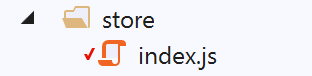
[Vuex] 存储将存储应用程序中各个组件(页面、客户端、服务器)需要共享的所有数据,但这些数据本身并不具备响应式特性。
/* eslint-disable no-console */

// awning status
export const state = () => ({
  // session jSON started
  jsonSessionStarted: false,
  // authenticated user
  userAuthenticated: false,
  // session cookie PHP
  phpSessionCookie: '',
  // adminData
  adminData: ''
})

// changes in the awning
export const mutations = {
  // state replacement
  replace(state, newState) {
    for (const attr in newState) {
      state[attr] = newState[attr]
    }
  },
  // awning reset
  reset() {
    this.commit('replace', { jsonSessionStarted: false, userAuthenticated: false, phpSessionCookie: '', adminData: '' })
  }
}

// awning actions
export const actions = {
  nuxtServerInit(store, context) {
    // who executes this code?
    console.log('nuxtServerInit, client=', process.client, 'serveur=', process.server, 'env=', context.env)
    // init session
    initStore(store, context)
  }
}

function initStore(store, context) {
  // store is the blind to be initialized
  // retrieve the session
  const session = context.app.$session()
  // has the session already been initiated?
  if (!session.value.initStoreDone) {
    // start a new blind
    console.log("nuxtServerInit, initialisation d'une nouvelle session")
    // put the blind in the session
    session.value.store = store.state
    // the blind is now initialized
    session.value.initStoreDone = true
  } else {
    console.log("nuxtServerInit, reprise d'un store existant")
    // update the store with the session store
    store.commit('replace', session.value.store)
  }
  // save the session
  session.save(context)
  // log
  console.log('initStore terminé, store=', store.state)
}
存储在存储器中的数据如下:
- 第 6 行:一旦与 PHP 服务器的 JSON 会话成功初始化,无论是由客户端还是 [nuxt] 服务器发起,[jsonSessionStarted] 都会被设置为 true。初始化完成后,将获取 PHP 服务器的会话 Cookie 并将其存储在第 10 行的 [phpSessionCookie] 属性中;
- 第 8 行:只要与 PHP 服务器的身份验证成功,无论是由客户端还是 [nuxt] 服务器执行,[userAuthenticated] 都会被设置为 true;
- 第 12 行:认证成功后,[adminData] 将取自 PHP 服务器获取的 [adminData] 值;
- 第 18–22 行:[replace] 操作将使用作为参数传递的对象的属性初始化之前的属性;
- 第 24–26 行:[reset] 突变将存储属性恢复为初始值;
- 第 31–37 行:[nuxtServerInit] 函数将其工作委托给 [initStore] 函数;
- 第 39–60 行:[initStore] 函数有两个作用:
- 如果存储尚未初始化,则对其进行初始化并添加到会话中;
- 如果存储已初始化,则从 [nuxt] 会话中获取其值;
- 第 42 行:获取 nuxt 会话;
- 第 44 行:检查存储是否已初始化:
- 若未初始化,则将初始 Store 放入会话中(第 48 行);
- 随后,在第 50 行,我们标记该存储已初始化;
- 第 51–55 行:如果存储已初始化,则在第 54 行使用它,通过会话中的值来初始化存储;
- 第 57 行:无论哪种情况,都会将会话及其包含的存储保存到 [nuxt-session] Cookie 中;
15.10. [plgEventBus] 插件
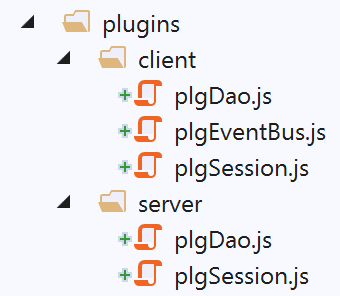
该插件旨在通过注入到 [nuxt] 客户端上下文中的 [$eventBus] 函数,使 [nuxt] 客户端能够访问事件总线。由于服务器无法处理事件,因此无需将其注入 [nuxt] 服务器上下文。不过,我们已经看到,在服务器端注入并使用它并不会引发错误。
/* eslint-disable no-console */
// on crée un bus d'événements entre les vues
import Vue from 'vue'
export default (context, inject) => {
  // le bus d'événements
  const eventBus = new Vue()
  // injection d'une fonction [$eventBus] dans le contexte
  inject('eventBus', () => eventBus)
  // log
  console.log('[fonction $eventBus créée]')
}
我们在链接部分已经遇到过这个插件。[$eventBus] 函数将通过以下语法向客户端提供:
- [context.app.$eventBus()](当 context 可用时);
- 在客户端的 [Vue.js] 页面中为 [this.$eventBus()];
15.11. [Nuxt] 应用程序的组件
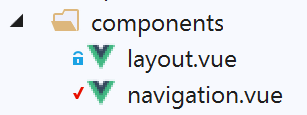
[layout] 组件即前面的示例中使用的那个:
<!-- view layout -->
<template>
  <!-- line -->
  <div>
    <b-row>
      <!-- three-column zone -->
      <b-col v-if="left" cols="3">
        <slot name="left" />
      </b-col>
      <!-- nine-column zone -->
      <b-col v-if="right" cols="9">
        <slot name="right" />
      </b-col>
    </b-row>
  </div>
</template>

<script>
export default {
  // paramètres
  props: {
    left: {
      type: Boolean
    },
    right: {
      type: Boolean
    }
  }
}
</script>
[导航]组件如下所示:
<template>
  <!-- bootstrap menu with three options -->
  <b-nav vertical>
    <b-nav-item to="/authentification" exact exact-active-class="active">
      Authentification
    </b-nav-item>
    <b-nav-item to="/get-admindata" exact exact-active-class="active">
      Requête AdminData
    </b-nav-item>
    <b-nav-item to="/fin-session" exact exact-active-class="active">
      Fin session impôt
    </b-nav-item>
  </b-nav>
</template>
15.12. [nuxt] 应用程序布局
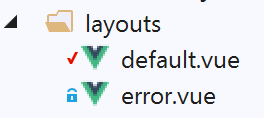
15.12.1. [default]
[default] 布局是链接段落中 [nuxt-11] 示例所使用的布局:
<template>
  <div class="container">
    <b-card>
      <!-- un message -->
      <b-alert show variant="success" align="center">
        <h4>[nuxt-12] : requêtes HTTP avec axios</h4>
      </b-alert>
      <!-- la vue courante du routage -->
      <nuxt />
      <!-- message d’attente -->
      <b-alert v-if="showLoading" show variant="light">
        <strong>Requête au serveur de données en cours...</strong>
        <div class="spinner-border ml-auto" role="status" aria-hidden="true"></div>
      </b-alert>
      <!-- erreur d’une opération asynchrone -->
      <b-alert v-if="showErrorLoading" show variant="danger">
        <strong>La requête au serveur de données a échoué : {{ errorLoadingMessage }}</strong>
      </b-alert>
    </b-card>
  </div>
</template>

<script>
/* eslint-disable no-console */
export default {
  name: 'App',
  data() {
    return {
      showLoading: false,
      showErrorLoading: false
    }
  },
  // life cycle
  beforeCreate() {
    console.log('[default beforeCreate]')
  },
  created() {
    console.log('[default created]')
    if (process.client) {
      // listen to the evt [loading]
      this.$eventBus().$on('loading', this.mShowLoading)
      // and event [errorLoadingMessage]
      this.$eventBus().$on('errorLoading', this.mShowErrorLoading)
    }
  },
  beforeMount() {
    console.log('[default beforeMount]')
  },
  mounted() {
    console.log('[default mounted]')
  },
  methods: {
    // message waiting management
    mShowLoading(value) {
      console.log('[default mShowLoading], showLoading=', value)
      this.showLoading = value
    },
    // asynchronous operation error
    mShowErrorLoading(value, errorLoadingMessage) {
      console.log('[default mShowErrorLoading], showErrorLoading=', value, 'errorLoadingMessage=', errorLoadingMessage)
      this.showErrorLoading = value
      this.errorLoadingMessage = errorLoadingMessage
    }
  }
}
</script>
- 第 10–14 行:显示一条消息,表明客户端 [nuxt] 正在等待异步操作完成;
- 第 15–18 行:显示异步操作产生的任何错误消息;
- 第 37 行:在页面 [mounted] 函数执行之前,先执行 [default] 页面的 [created] 函数;
- 第 39 行:如果执行者是 [nuxt] 客户端,则 [default] 页面监听
- [loading] 事件,该事件标志着等待的开始或结束。随后执行 [mShowLoading] 函数;
- [errorLoading],这表示必须显示错误消息。随后执行 [mShowErrorLoading] 函数;
- [nuxt] 页面:
- 通过在事件总线上发布 [‘loading’, true] 事件来显示加载提示;
- 通过在事件总线上发布 [‘loading’, false] 事件来隐藏加载提示;
- 通过在事件总线上发布 [‘errorLoading’, true] 事件来显示错误提示;
- 通过在事件总线上发布 [‘errorLoading’, false] 事件来隐藏错误提示;
15.12.2. [error]
[error] 布局用于显示系统错误消息(非开发者管理):
<!-- définition HTML de la vue -->
<template>
  <!-- mise en page -->
  <Layout :left="true" :right="true">
    <!-- alerte dans la colonne de droite -->
    <template slot="right">
      <!-- message sur fond rose -->
      <b-alert show variant="danger" align="center">
        <h4>L'erreur suivante s'est produite : {{ JSON.stringify(error) }}</h4>
      </b-alert>
    </template>
    <!-- menu de navigation dans la colonne de gauche -->
    <Navigation slot="left" />
  </Layout>
</template>

<script>
/* eslint-disable no-undef */
/* eslint-disable no-console */
/* eslint-disable nuxt/no-env-in-hooks */

import Layout from '@/components/layout'
import Navigation from '@/components/navigation'

export default {
  name: 'Error',
  // components used
  components: {
    Layout,
    Navigation
  },
  // property [props]
  props: { error: { type: Object, default: () => 'waiting ...' } },
  // life cycle
  beforeCreate() {
    // client and server
    console.log('[error beforeCreate]')
  },
  created() {
    // client and server
    console.log('[error created, error=]', this.error)
  },
  beforeMount() {
    // customer only
    console.log('[error beforeMount]')
  },
  mounted() {
    // customer only
    console.log('[error mounted]')
  }
}
</script>
15.13. 由 [nuxt] 服务器提供的 [index] 页面
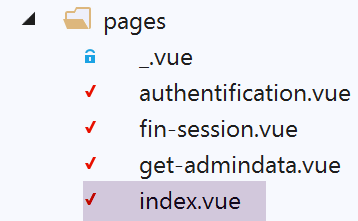
[index.vue] 页面的独特之处在于,它只能通过 [nuxt] 服务器访问。用户无法通过 [nuxt] 客户端访问该页面。其代码如下:
<!-- page principale -->
<template>
  <Layout :left="true" :right="true">
    <!-- navigation -->
    <Navigation slot="left" />
    <!-- message-->
    <b-alert slot="right" show variant="warning">Initialisation de la session avec le serveur de calcul de l'impôt : {{ result }} </b-alert>
  </Layout>
</template>

<script>
/* eslint-disable no-console */

import Navigation from '@/components/navigation'
import Layout from '@/components/layout'

export default {
  name: 'InitSession',
  // components used
  components: {
    Layout,
    Navigation
  },
  // asynchronous data
  async asyncData(context) {
    // log
    console.log('[index asyncData started]')
    try {
      // start a jSON session
      const dao = context.app.$dao()
      const response = await dao.initSession()
      // log
      console.log('[index asyncData response=]', response)
      // retrieve session cookie PHP for future requests
      const phpSessionCookie = dao.getPhpSessionCookie()
      // we store the PHP session cookie in the [nuxt] session
      context.store.commit('replace', { phpSessionCookie })
      // was there a mistake?
      if (response.état !== 700) {
        // the error is in response.réponse
        throw new Error(response.réponse)
      }
      // note that the jSON session has started
      context.store.commit('replace', { jsonSessionStarted: true })
      // we return the result
      return { result: '[succès]' }
    } catch (e) {
      // log
      console.log('[index asyncData error=]', e)
      // note that session jSON has not started
      context.store.commit('replace', { jsonSessionStarted: false })
      // we report the error
      return { result: '[échec]', showErrorLoading: true, errorLoadingMessage: e.message }
    } finally {
      // save the blind
      const session = context.app.$session()
      session.save(context)
      // log
      console.log('[index asyncData finished]')
    }
  },
  // life cycle
  beforeCreate() {
    console.log('[index beforeCreate]')
  },
  created() {
    console.log('[index created]')
  },
  beforeMount() {
    console.log('[index beforeMount]')
  },
  mounted() {
    console.log('[index mounted]')
    // customer only
    if (this.showErrorLoading) {
      console.log('[index mounted, showErrorLoading=true]')
      this.$eventBus().$emit('errorLoading', true, this.errorLoadingMessage)
    }
  }
}
</script>
- 第 7 行:页面显示了异步请求(第 46 行和第 51 行)的结果 [result];
- 第 31 行:该异步操作是与税费计算服务器建立 JSON 会话;
- 第 25 行:我们知道,当页面直接从 [nuxt] 服务器请求时,[asyncData] 函数仅由服务器执行,而非由 [nuxt] 客户端执行;该函数会在浏览器收到 [nuxt] 服务器的响应后运行;
- 第 30 行:我们从 [nuxt] 服务器上下文中获取 [dao] 层;
- 第 35 行:如果服务器尚未向税费计算服务器发起请求,则获取其首个 PHP 会话 Cookie;否则,获取其收到的最后一个 PHP 会话 Cookie(参见链接部分中 [nuxt] 服务器 [dao] 层的代码);
- 第 37 行:将此 PHP 会话 Cookie 存储在存储中;
- 第 39–42 行:我们检查操作是否成功。若未成功,则抛出异常,该异常将被第 47 行的 [catch] 捕获;
- 第 44 行:我们在存储中记录与 PHP 服务器的 JSON 会话已启动;
- 第 46 行:返回结果 [result],并在第 7 行显示;
- 第 47–54 行:处理任何异常。这些异常可能有两种类型:
- 第 31 行的 HTTP 操作因 [nuxt] 服务器与 PHP 服务器之间的通信错误而失败;
- 第 31 行的 HTTP 操作成功,但接收到的结果报告了错误(第 39–42 行);
- 第 51 行:我们注意到与 PHP 服务器的 JSON 会话未建立;
- 第 53 行:返回结果 [result] 并在第 7 行显示。此外,还设置了 [showErrorLoading] 和 [errorLoadingMessage] 属性,[nuxt] 客户端在收到 [nuxt] 服务器发送的页面时将使用这些属性来显示错误消息(第 72–79 行);
- 第 54–60 行:无论成功还是失败,此代码均会被执行;
- 第 56 行:从 [nuxt] 服务器上下文中获取 [nuxt] 会话;
- 第 57 行:将其保存;
- 第 63–68 行:一旦 [asyncData] 函数执行完毕,[nuxt] 服务器将执行 [beforeCreate] 和 [create] 函数;
注意:[nuxt] 服务器对 [index] 页面的执行可能会失败,例如,当 [nuxt] 应用程序启动时,税费计算服务器未运行:
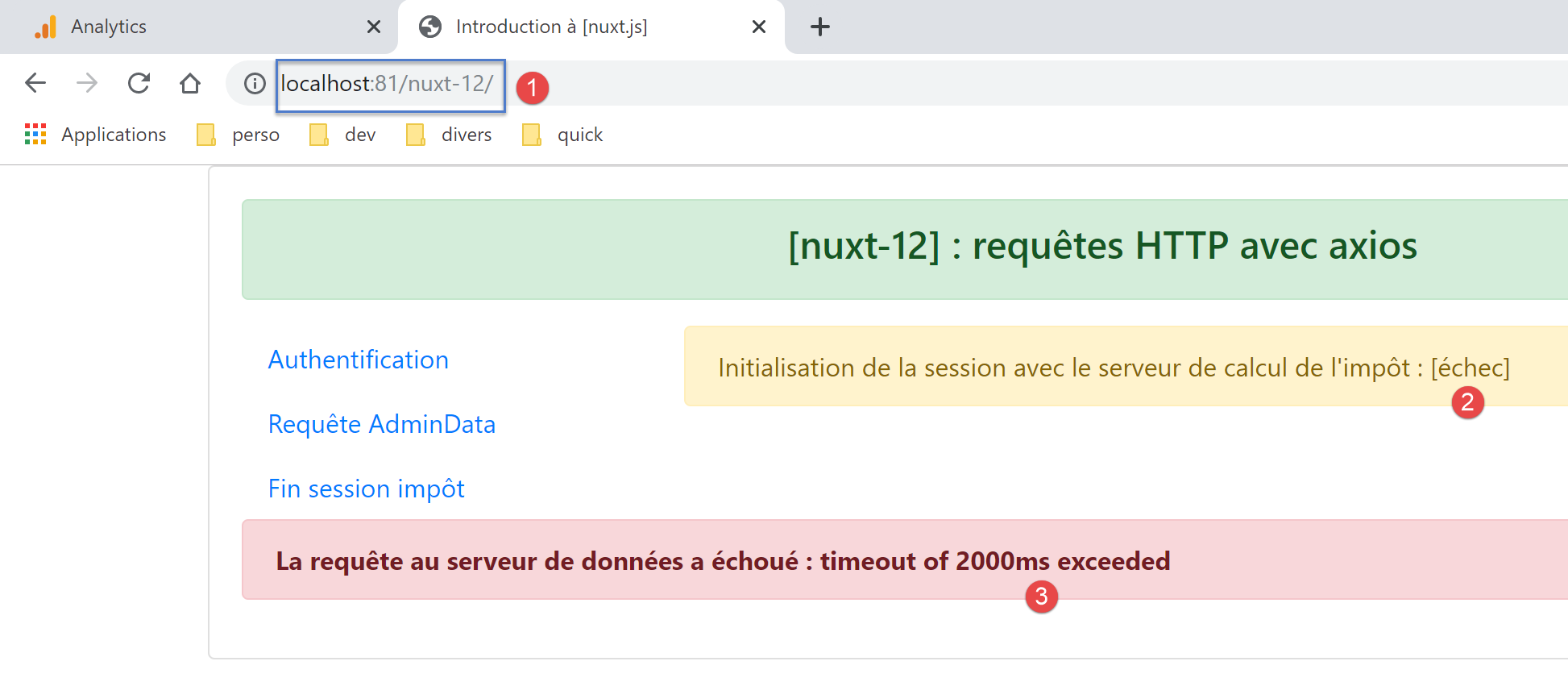
在这种情况下,唯一的解决方法是先启动税费计算服务器,然后再启动 [nuxt] 应用程序本身,因为导航菜单中没有提供与税费计算服务器建立 JSON 会话的选项;
15.14. 由 [nuxt] 客户端执行的 [index] 页面
[index] 页面仅在 [nuxt] 服务器将其发送给客户端后,才会由 [nuxt] 客户端执行。服务器已发送 [result] 信息,以及(如适用)[showErrorLoading] 和 [errorLoadingMessage]。
我们知道 [asyncData] 函数不会被执行。这便只剩下生命周期函数,特别是 [mounted] 函数:
mounted() {
    console.log('[index mounted]')
    // client seulement
    if (this.showErrorLoading) {
      console.log('[index mounted, showErrorLoading=true]')
      this.$eventBus().$emit('errorLoading', true, this.errorLoadingMessage)
    }
}
- [nuxt] 客户端会自动将 [result] 元素,以及 [nuxt] 服务器发送给它的 [showErrorLoading] 和 [errorLoadingMessage] 元素(如适用)包含在页面属性中:
- 第 7 行负责显示 [result] 属性;
- [showErrorLoading] 和 [errorLoadingMessage] 属性由 [mounted] 方法使用:第 4 行会检查 [showErrorLoading] 属性。如果为 true,则在第 6 行使用客户端的 [nuxt] 事件总线发出信号,表示有错误消息需要显示;
- 第 6 行触发的 [errorLoading] 事件被链接部分中描述的 [layouts/default] 页面拦截;
15.15. 由 [nuxt] 服务器执行的 [authentication] 页面
[authentication] 页面负责通过税费计算服务器对用户进行身份验证。其代码如下:
<!-- page d’authentification -->
<template>
  <Layout :left="true" :right="true">
    <!-- navigation -->
    <Navigation slot="left" />
    <!-- message-->
    <b-alert slot="right" show variant="warning">Authentification auprès du serveur de calcul de l'impôt : {{ result }} </b-alert>
  </Layout>
</template>

<script>
/* eslint-disable no-console */

import Navigation from '@/components/navigation'
import Layout from '@/components/layout'

export default {
  name: 'Authentification',
  // components used
  components: {
    Layout,
    Navigation
  },
  // asynchronous data
  async asyncData(context) {
    // log
    console.log('[authentification asyncData started]')
    if (process.client) {
      // start waiting for customer [nuxt]
      context.app.$eventBus().$emit('loading', true)
      // no error
      context.app.$eventBus().$emit('errorLoading', false)
    }
    try {
      // authenticate to the server
      const dao = context.app.$dao()
      const response = await dao.authentifierUtilisateur('admin', 'admin')
      // log
      console.log('[authentification asyncData response=]', response)
      // result
      const userAuthenticated = response.état === 200
      // we note whether the user is authenticated or not
      context.store.commit('replace', { userAuthenticated })
      // save the store in the [nuxt] session
      const session = context.app.$session()
      session.save(context)
      // authentication error?
      if (!userAuthenticated) {
        // the error is in response.réponse
        throw new Error(response.réponse)
      }
      // we return the result
      return { result: '[succès]' }
    } catch (e) {
      // we report the error
      return { result: '[échec]', showErrorLoading: true, errorLoadingMessage: e.message }
    } finally {
      // log
      console.log('[authentification asyncData finished]')
      if (process.client) {
        // end customer waiting [nuxt]
        context.app.$eventBus().$emit('loading', false)
      }
    }
  },
  // life cycle
  beforeCreate() {
    console.log('[authentification beforeCreate]')
  },
  created() {
    console.log('[authentification created]')
  },
  beforeMount() {
    console.log('[authentification beforeMount]')
  },
  mounted() {
    console.log('[authentification mounted]')
    // customer only
    if (this.showErrorLoading) {
      console.log('[authentification mounted, showErrorLoading=true]')
      this.$eventBus().$emit('errorLoading', true, this.errorLoadingMessage)
    }
  }
}
</script>
- 第 7 行:页面显示了第 25–65 行发起的异步请求 [asyncData] 的结果 [result];
- 第 28–33 行:服务器不会执行这些专为客户端 [nuxt] 设计的代码;
- 第 36 行:从 [nuxt] 服务器获取 [dao] 层;
- 第 37 行:我们使用测试凭据 [admin, admin] 向税费计算服务器进行身份验证,这是税费计算服务器唯一接受的凭据;
- 第 41 行:只有当响应状态为 200 时,身份验证操作才算成功;
- 第 43 行:我们在存储中设置 [userAuthenticated] 属性;
- 第 44–46 行:将存储保存到 [nuxt] 会话中;
- 第 48–51 行:如果身份验证失败,则抛出一个包含税务计算服务器发送的错误消息的异常;
- 否则,在第 53 行返回成功结果,该结果将在第 7 行显示;
- 第 54–57 行:发生错误时,将设置三个页面属性 [result, showErrorLoading, errorLoadingMessage]。[result] 属性将在第 7 行显示。这三个属性将发送至客户端 [nuxt];
- 第 60–63 行:不会由 [nuxt] 服务器执行;
- 一旦 [asyncData] 返回结果,该结果将显示在第 7 行。随后执行 [beforeCreate](第 67–69 行)和 [created](第 70–72 行)方法;
- 就这样;
注意:[authentification] 页面可能无法在 [nuxt] 服务器上执行,例如,如果与税费计算服务器的 JSON 会话尚未初始化。可通过以下方式实现:
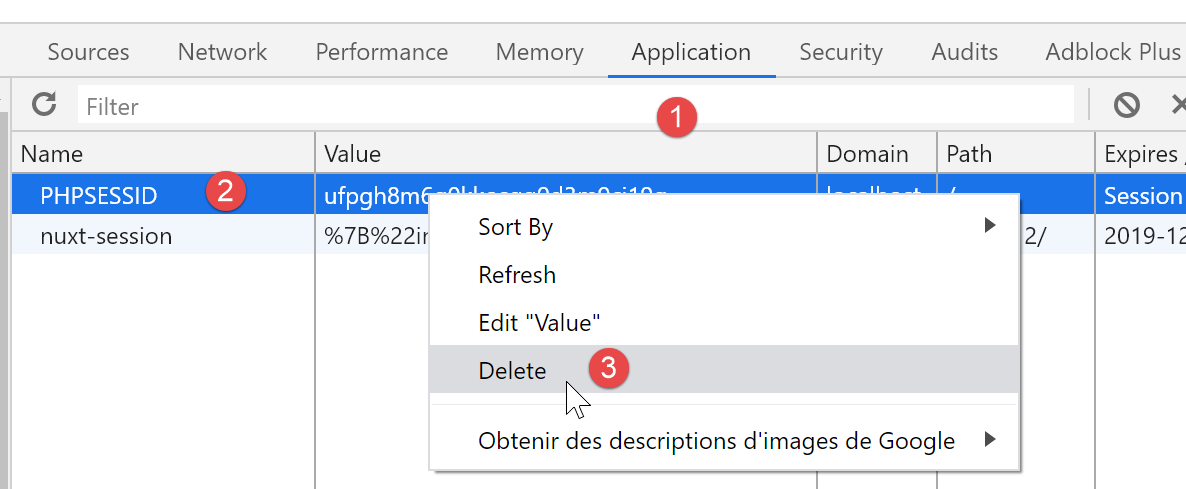
- 从浏览器中删除 PHP 会话 Cookie(以便从头开始):
- 在计算服务器尚未启动时启动 [nuxt] 应用程序:您将收到错误提示;
- 启动税费计算服务器;
- 直接在浏览器地址栏中输入 URL [/authentication]:
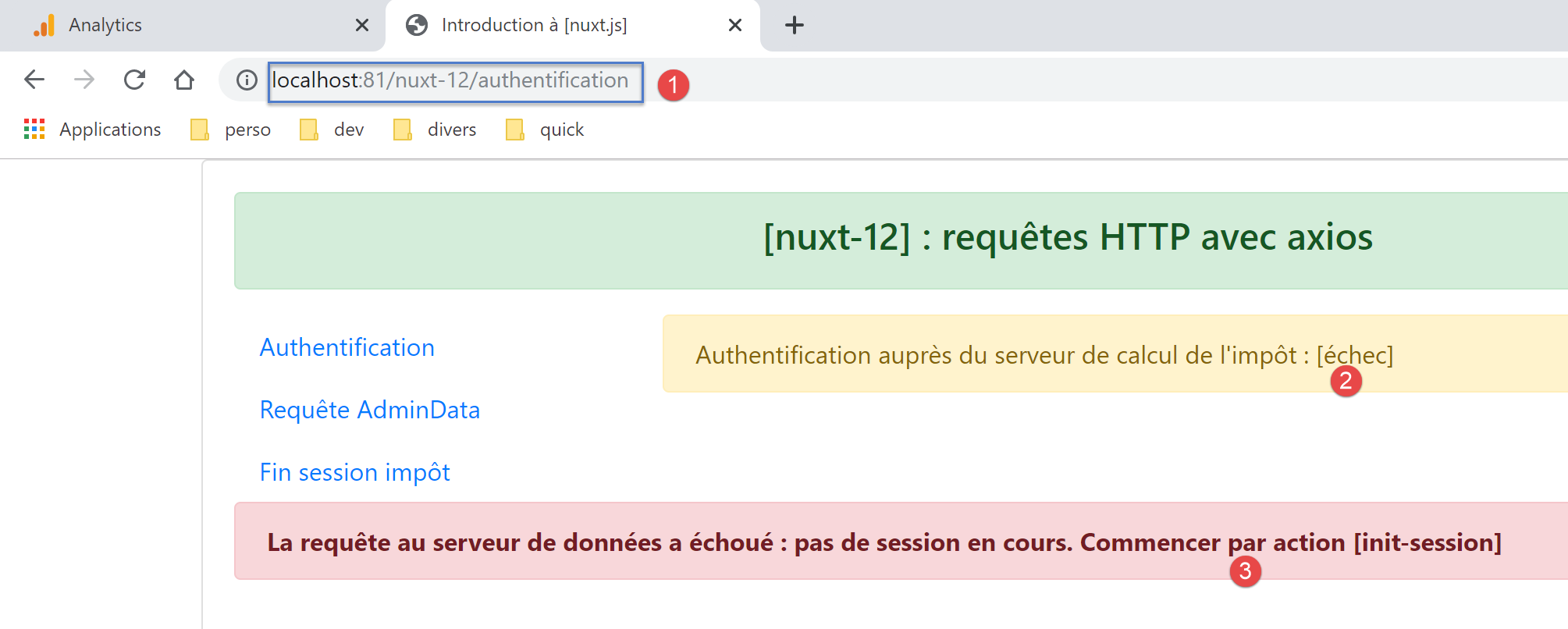
在这种情况下,唯一的解决方法是重新加载 [index] 页面。
15.16. 由 [nuxt] 客户端执行的 [authentication] 页面
让我们再次查看该页面的代码:
<!-- page d’authentification -->
<template>
  <Layout :left="true" :right="true">
    <!-- navigation -->
    <Navigation slot="left" />
    <!-- message-->
    <b-alert slot="right" show variant="warning">Authentification auprès du serveur de calcul de l'impôt : {{ result }} </b-alert>
  </Layout>
</template>

<script>
/* eslint-disable no-console */

import Navigation from '@/components/navigation'
import Layout from '@/components/layout'

export default {
  name: 'Authentification',
  // components used
  components: {
    Layout,
    Navigation
  },
  // asynchronous data
  async asyncData(context) {
    // log
    console.log('[authentification asyncData started]')
    if (process.client) {
      // start waiting for customer [nuxt]
      context.app.$eventBus().$emit('loading', true)
      // no error
      context.app.$eventBus().$emit('errorLoading', false)
    }
    try {
      // authenticate to the server
      const dao = context.app.$dao()
      const response = await dao.authentifierUtilisateur('admin', 'admin')
      // log
      console.log('[authentification asyncData response=]', response)
      // result
      const userAuthenticated = response.état === 200
      // we note whether the user is authenticated or not
      context.store.commit('replace', { userAuthenticated })
      // save the store in the [nuxt] session
      const session = context.app.$session()
      session.save(context)
      // authentication error?
      if (!userAuthenticated) {
        // the error is in response.réponse
        throw new Error(response.réponse)
      }
      // we return the result
      return { result: '[succès]' }
    } catch (e) {
      // we report the error
      return { result: '[échec]', showErrorLoading: true, errorLoadingMessage: e.message }
    } finally {
      // log
      console.log('[authentification asyncData finished]')
      if (process.client) {
        // end customer waiting [nuxt]
        context.app.$eventBus().$emit('loading', false)
      }
    }
  },
  // life cycle
  beforeCreate() {
    console.log('[authentification beforeCreate]')
  },
  created() {
    console.log('[authentification created]')
  },
  beforeMount() {
    console.log('[authentification beforeMount]')
  },
  mounted() {
    console.log('[authentification mounted]')
    // customer only
    if (this.showErrorLoading) {
      console.log('[authentification mounted, showErrorLoading=true]')
      this.$eventBus().$emit('errorLoading', true, this.errorLoadingMessage)
    }
  }
}
</script>
在以下两种情况下,[nuxt] 客户端会执行 [authentication] 页面:
- [nuxt] 客户端在 [nuxt] 服务器将 [authentication] 页面发送至 [nuxt] 客户端的浏览器后运行;
- [nuxt] 客户端因用户点击了导航菜单中的 [Authentication] 链接而触发:
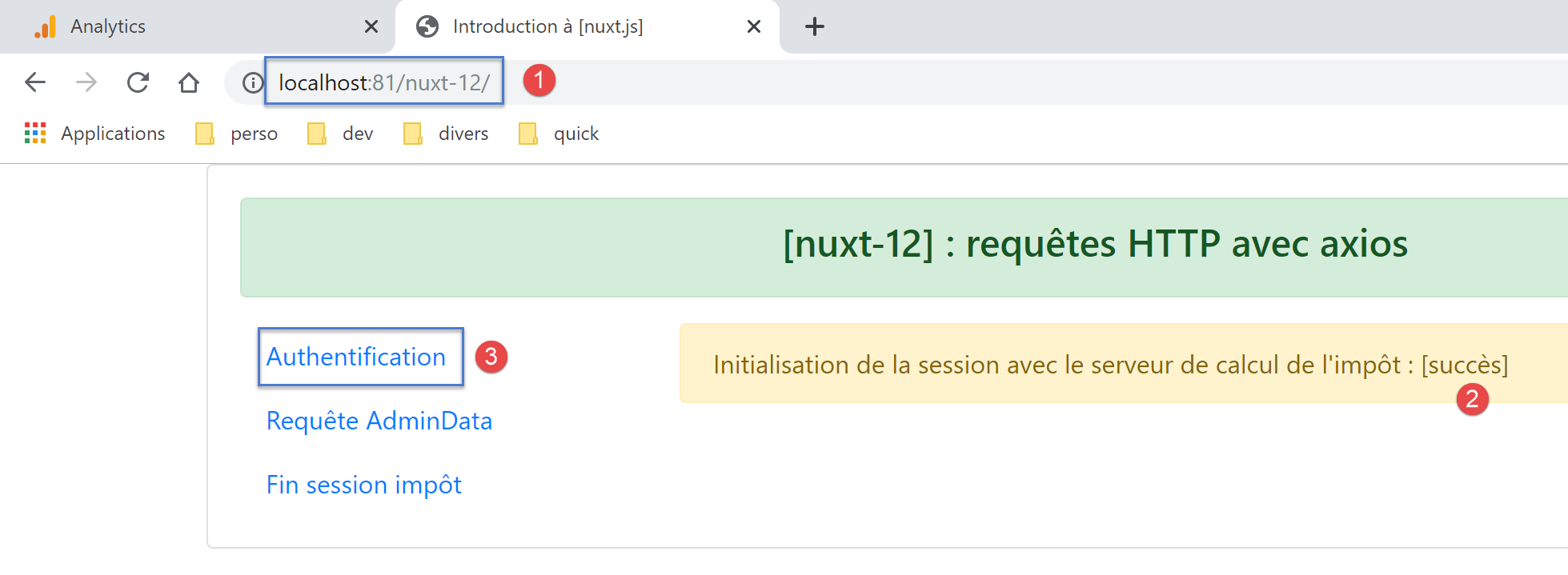
让我们先分析第一个场景。在此情况下,[nuxt] 客户端不会执行 [asyncData] 函数。它会将 [nuxt] 服务器发送给它的 [result] 元素,以及(如有)[showErrorLoading] 和 [errorLoadingMessage] 元素,整合到页面的属性中:
- 第 7 行会显示 [result] 属性;
- [showErrorLoading] 和 [errorLoadingMessage] 属性由 [mounted] 方法使用:第 79 行会检查 [showErrorLoading] 属性。如果该属性为 true,则在第 81 行,将使用 [nuxt] 客户端的事件总线发出信号,表示有错误消息需要显示;
关于 [index] 页面的错误消息显示机制已在“链接”部分中进行过说明。
情况 2 是用户点击 [Authentication] 链接后 [nuxt] 客户端运行的情形。在此情况下,[nuxt] 客户端独立运行,而非在 [nuxt] 服务器之后运行。随后将执行 [asyncData] 函数。我们仅提供与 [nuxt] 服务器执行的页面说明不同的细节:
- 第 28–33 行:[nuxt] 客户端请求显示加载提示,并清除之前显示的任何错误信息;
- 第 36 行:此处调用的已是 [nuxt] 客户端的 [dao] 层;
- 第 60–63 行:[nuxt] 客户端请求移除加载提示;
- 一旦 [asyncData] 完成,页面生命周期将继续进行。第 76–83 行中的 [mounted] 函数将被执行。如果发生错误,错误消息随后将被显示;
注意:要触发错误,请按照链接部分末尾针对 [nuxt] 服务器说明的步骤操作,但不要在地址栏中输入 URL 来请求 [authentication] 页面,而是使用导航菜单中的 [Authentication] 链接。这将导致 [nuxt] 客户端运行。
15.17. [get-admindata] 页面
[get-admindata] 页面的代码如下:
<!-- vue get-admindata -->
<template>
  <Layout :left="true" :right="true">
    <!-- navigation -->
    <Navigation slot="left" />
    <!-- message -->
    <b-alert slot="right" show variant="secondary"> Demande de [adminData] au serveur de calcul de l'impôt : {{ result }} </b-alert>
  </Layout>
</template>

<script>
/* eslint-disable no-console */

import Navigation from '@/components/navigation'
import Layout from '@/components/layout'

export default {
  name: 'GetAdmindata',
  // components used
  components: {
    Layout,
    Navigation
  },
  // asynchronous data
  async asyncData(context) {
    // log
    console.log('[get-admindata asyncData started]')
    if (process.client) {
      // start waiting
      context.app.$eventBus().$emit('loading', true)
      // no error
      context.app.$eventBus().$emit('errorLoading', false)
    }
    try {
      // the data [admindata] is requested
      const response = await context.app.$dao().getAdminData()
      // log
      console.log('[get-admindata asyncData response=]', response)
      // result
      const adminData = response.état === 1000 ? response.réponse : ''
      // put the data in the store
      context.store.commit('replace', { adminData })
      // save the store in the [nuxt] session
      const session = context.app.$session()
      session.save(context)
      // was there a mistake?
      if (!adminData) {
        // the error is in response.réponse
        throw new Error(response.réponse)
      }
      // return the value received
      return { result: adminData }
    } catch (e) {
      // we report the error
      return { result: '[échec]', showErrorLoading: true, errorLoadingMessage: e.message }
    } finally {
      // log
      console.log('[get-admindata asyncData finished]')
      if (process.client) {
        // end waiting
        context.app.$eventBus().$emit('loading', false)
      }
    }
  },
  // life cycle
  beforeCreate() {
    console.log('[get-admindata beforeCreate]')
  },
  created() {
    console.log('[get-admindata created]')
  },
  beforeMount() {
    console.log('[get-admindata beforeMount]')
  },
  mounted() {
    console.log('[get-admindata mounted]')
    // customer
    if (this.showErrorLoading) {
      console.log('[get-admindata mounted, showErrorLoading=true]')
      this.$eventBus().$emit('errorLoading', true, this.errorLoadingMessage)
    }
  }
}
</script>
本页面与 [authentication] 页面非常相似。无论是由 [nuxt] 服务器还是 [nuxt] 客户端执行,其说明均相同。但请注意,第 7 行不再像之前那样显示成功/失败状态,而是显示从税费计算服务器接收到的数据值(第 52 行):
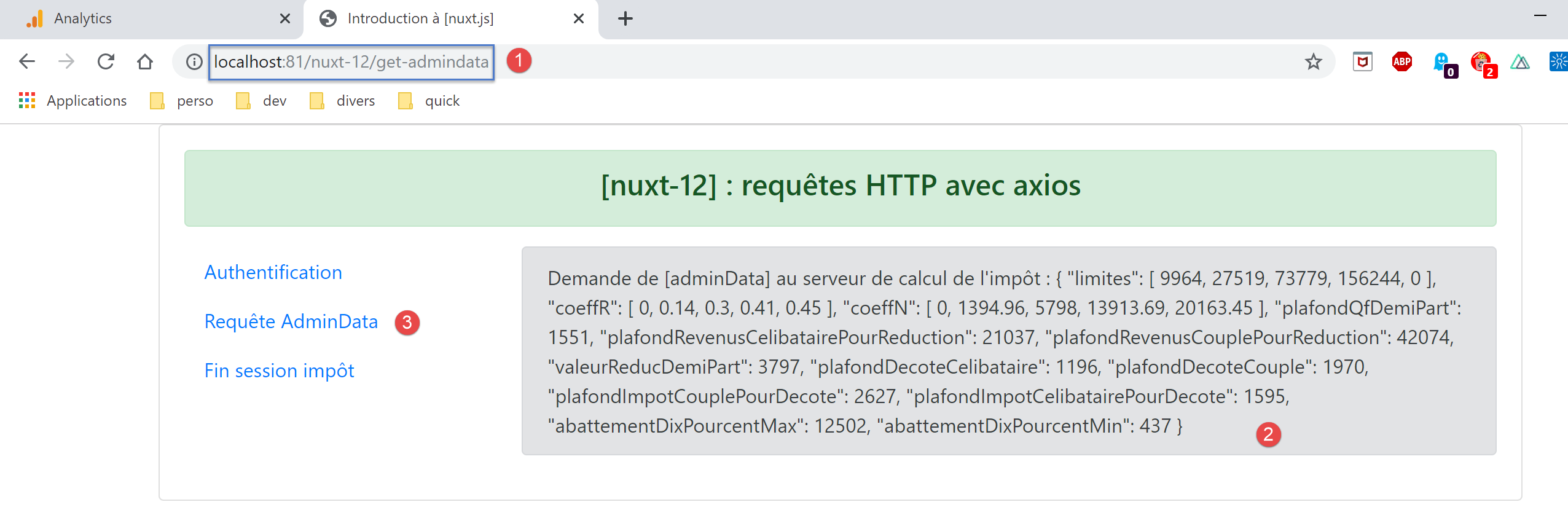
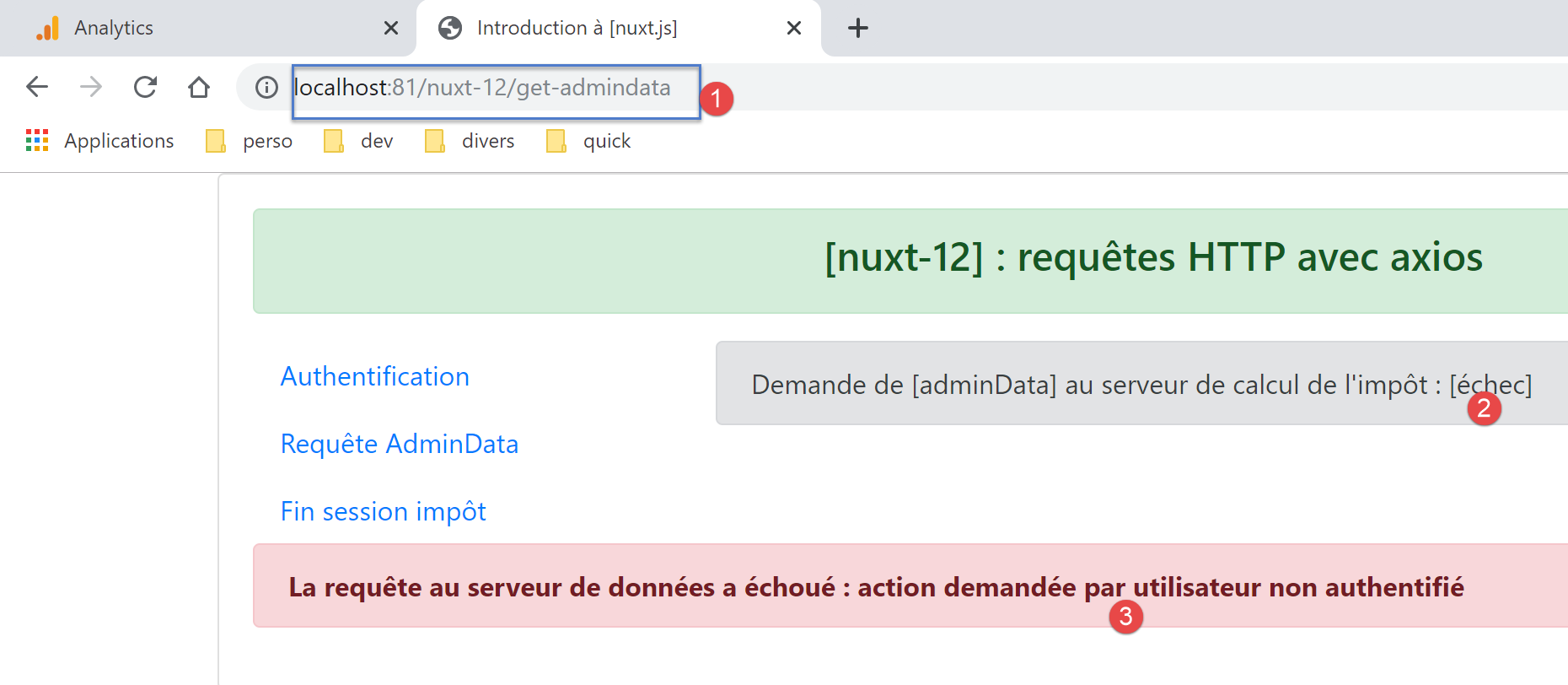
上述结果是通过服务器和 [nuxt] 客户端共同获取的。要触发错误,请在未经过身份验证的情况下,通过服务器或 [nuxt] 客户端请求 [get-admindata] 页面:
15.18. [fin-session] 页面
该页面的代码如下:
<!-- page principale -->
<template>
  <Layout :left="true" :right="true">
    <!-- navigation -->
    <Navigation slot="left" />
    <!-- message-->
    <b-alert slot="right" show variant="warning">Fin de la session avec le serveur de calcul de l'impôt : {{ result }} </b-alert>
  </Layout>
</template>

<script>
/* eslint-disable no-console */

import Navigation from '@/components/navigation'
import Layout from '@/components/layout'

export default {
  name: 'FinSession',
  // components used
  components: {
    Layout,
    Navigation
  },
  // asynchronous data
  async asyncData(context) {
    // log
    console.log('[fin-session asyncData started]')
    // customer case [nuxt]
    if (process.client) {
      // start waiting
      context.app.$eventBus().$emit('loading', true)
      // no error
      context.app.$eventBus().$emit('errorLoading', false)
    }
    try {
      // a new session PHP is requested from the tax calculation server
      const dao = context.app.$dao()
      const response = await dao.finSession()
      // log
      console.log('[fin-session asyncData response=]', response)
      // was there a mistake?
      if (response.état !== 400) {
        // the error is in response.réponse
        throw new Error(response.réponse)
      }
      // the server has sent a new session cookie PHP
      // we retrieve it for both the server and the nuxt client
      // if this code is executed by the [nuxt] client, the PHP session cookie must be set in the nuxt session
      // so that the [plgDao] plugin on the [nuxt] server can retrieve it and initialize the [dao] layer with
      // if this code is executed by the [nuxt] server, the PHP session cookie must be set in the nuxt session
      // so that the client routing [nuxt] can retrieve it and pass it to the browser
      const phpSessionCookie = dao.getPhpSessionCookie()
      // we note in the store that the session jSON has been started and we store the session cookie PHP
      context.store.commit('replace', { jsonSessionStarted: true, phpSessionCookie, userAuthenticated: false, adminData: '' })
      // save the store in the [nuxt] session
      const session = context.app.$session()
      session.save(context)
      // we return the result
      return { result: "[succès]. La session jSON reste initialisée mais vous n'êtes plus authentifié(e)." }
    } catch (e) {
      // log
      console.log('[fin-session asyncData error=]', e)
      // report the error
      return { result: '[échec]', showErrorLoading: true, errorLoadingMessage: e.message }
    } finally {
      // log
      console.log('[fin-session asyncData finished]')
      if (process.client) {
        // end waiting
        context.app.$eventBus().$emit('loading', false)
      }
    }
  },
  // life cycle
  beforeCreate() {
    console.log('[fin-session beforeCreate]')
  },
  created() {
    console.log('[fin-session created]')
  },
  beforeMount() {
    console.log('[fin-session beforeMount]')
  },
  mounted() {
    console.log('[fin-session mounted]')
    // customer only
    if (this.showErrorLoading) {
      console.log('[fin-session mounted, showErrorLoading=true]')
      this.$eventBus().$emit('errorLoading', true, this.errorLoadingMessage)
    }
  }
}
</script>
这段代码与前几页的非常相似,解释也一样。只有一点需要注意:第 38 行的异步操作会导致税费计算服务器发送一个新的 PHP 会话 Cookie。处理此 Cookie 的方法取决于执行此代码的是服务器还是 [nuxt] 客户端。
我们先从 [nuxt] 服务器开始:
- 第 37 行:此处实例化的是 [nuxt] 服务器的 [dao] 层。让我们回顾一下其构造函数的代码:
// constructeur
  constructor(axios, phpSessionCookie) {
    // bibliothèque axios
    this.axios = axios
    // valeur du cookie de session
    this.phpSessionCookie = phpSessionCookie
    // nom du cookie de session du serveur PHP
    this.phpSessionCookieName = 'PHPSESSID'
}
在第 1 行,我们可以看到构造函数需要当前的 PHP 会话 Cookie——即最后接收到的那个,无论它来自服务器还是 [nuxt] 客户端;
- 第 52 行:[nuxt] 服务器会获取新 PHP 会话的 Cookie,若会话终止操作失败,则获取旧的 Cookie;
- 第 54 行:PHP 会话 Cookie 被放入存储中,随后在第 56–57 行保存到 [nuxt] 会话中;
- 服务器处理完毕后,[nuxt]客户端会使用服务器发送的数据执行[end-session]页面。我们知道它不会执行[asyncData]函数;
- 最终,在服务器和 [nuxt] 客户端完成各自工作后,我们知道用于与税费计算服务器通信所需的 PHP Cookie 已存在于 [nuxt] 会话中;
PHP Cookie 位于 [nuxt] 会话中这一事实对服务器而言已足够,因为其 [dao] 层将从该处获取它。在初始化服务器 [dao] 层的 [server/plgDao] 插件中,我们已编写:
/* eslint-disable no-console */
// on crée un point d'accès à la couche [Dao]
import Dao from '@/api/server/Dao'
export default (context, inject) => {
  // configuration axios
  context.$axios.defaults.timeout = context.env.timeout
  context.$axios.defaults.baseURL = context.env.baseURL
  // on récupère le cookie de session
  const store = context.app.$session().value.store
  const phpSessionCookie = store ? store.phpSessionCookie : ''
  console.log('session=', context.app.$session().value, 'phpSessionCookie=', phpSessionCookie)
  // instanciation de la couche [dao]
  const dao = new Dao(context.$axios, phpSessionCookie)
  // injection d'une fonction [$dao] dans le contexte
  inject('dao', () => dao)
  // log
  console.log('[fonction server $dao créée]')
}
- 第 13 行:使用从 [nuxt] 会话中获取的 PHP 会话 Cookie 实例化 [nuxt] 服务器的 [dao] 层,见第 9–10 行;
对于 [nuxt] 客户端而言,情况则有所不同。发送 Cookie 的并非客户端,而是执行它的浏览器。然而,该浏览器并不知道 [nuxt] 服务器接收到的用于新 PHP 会话的 Cookie。如果我们使用导航菜单中的链接 [3]:
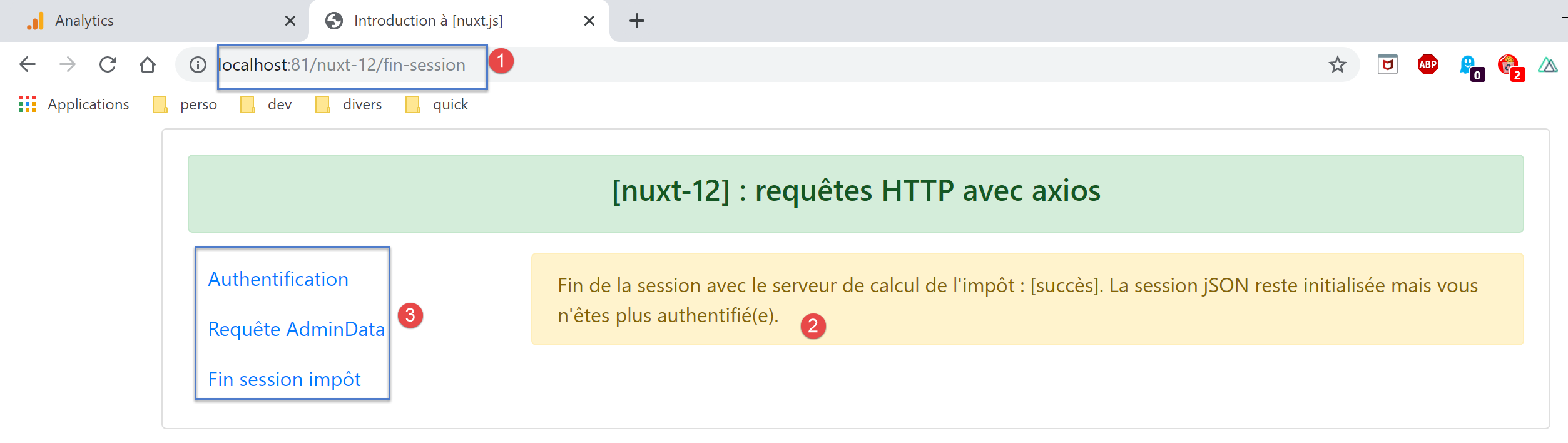
税费计算服务器将从浏览器接收一个过期的 PHP 会话 Cookie,并会响应称没有与该 Cookie 关联的 JSON 会话。我们需要找到一种方法,将新的 PHP 会话 Cookie 传递给浏览器。
我们可以使用路由中间件来实现这一点:
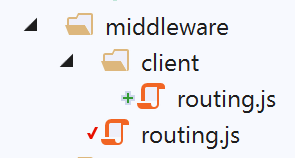
[client/routing] 脚本即是在 [nuxt.config] 文件中声明的路由中间件:
// router
  router: {
    // application URL root
    base: '/nuxt-12/',
    // routing middleware
    middleware: ['routing']
},
[middleware/routing] 脚本如下:
/* eslint-disable no-console */

// on importe le middleware du client
import clientRouting from './client/routing'

export default function(context) {
  // qui exécute ce code ?
  console.log('[middleware], process.server', process.server, ', process.client=', process.client)
  if (process.client) {
    // routage client
    clientRouting(context)
  }
}
- 第 9–12 行:我们仅使用第 4 行导入的函数来路由客户端;
脚本 [middleware/client/routing] 如下:
/* eslint-disable no-console */
export default function(context) {
  // who executes this code?
  console.log('[middleware client], process.server', process.server, ', process.client=', process.client)
  // management of the PHP session cookie in the browser
  // the browser's PHP session cookie must be identical to the one found in the nuxt session
  // acion [fin-session] receives a new cookie PHP (server as nuxt client)
  // if the server receives it, the client must pass it on to the browser
  // for its own exchanges with the PHP server
  // this is customer routing

  // retrieve the session cookie PHP
  const phpSessionCookie = context.store.state.phpSessionCookie
  if (phpSessionCookie) {
    // if it exists, we assign the PHP session cookie to the browser
    document.cookie = phpSessionCookie
  }
}
让我们回到[nuxt]服务器执行[fin-session]页面后的情况:
如果你点击[3]菜单中的某个链接,[nuxt]客户端将接管处理。由于页面将发生跳转,客户端的路由脚本会执行:
- 第 13 行:在 [nuxt] 应用程序存储中找到 PHP 会话 Cookie;
- 第 14 行:如果该数组不为空,则将其发送至浏览器(第 16 行)。从这一刻起,[nuxt] 客户端的浏览器便拥有了正确的 PHP 会话 Cookie;
每次 [nuxt] 客户端切换页面时,[client/routing] 脚本都会运行。该脚本的代码不受目标页面的影响:基本上,大多数情况下,它会向浏览器发送一个浏览器已经拥有的 PHP 会话 Cookie,但有两种情况例外:
- 应用程序启动后,[nuxt] 服务器会执行 [index] 页面,并接收一个 [nuxt] 客户端浏览器尚未拥有的首个 PHP 会话 Cookie;
- 如前所述,当 [nuxt] 服务器执行 [end-session] 页面时;
现在,让我们分析一下仅由 [nuxt] 客户端执行 [end-session] 页面的情况,因为用户点击了导航菜单中的链接。此时,是 [nuxt] 客户端执行 [asyncData] 函数:
try {
      // a new session PHP is requested from the tax calculation server
      const dao = context.app.$dao()
      const response = await dao.finSession()
      // log
      console.log('[fin-session asyncData response=]', response)
      // was there a mistake?
      if (response.état !== 400) {
        // the error is in response.réponse
        throw new Error(response.réponse)
      }
      // the server has sent a new session cookie PHP
      // we retrieve it for both the server and the nuxt client
      // if this code is executed by the [nuxt] client, the PHP session cookie must be set in the nuxt session
      // so that the [plgDao] plugin on the [nuxt] server can retrieve it and initialize the [dao] layer with
      // if this code is executed by the [nuxt] server, the PHP session cookie must be set in the nuxt session
      // so that the client routing [nuxt] can retrieve it and pass it to the browser
      const phpSessionCookie = dao.getPhpSessionCookie()
      // we note in the store that the session jSON has been started and we store the session cookie PHP
      context.store.commit('replace', { jsonSessionStarted: true, phpSessionCookie, userAuthenticated: false, adminData: '' })
      // save the store in the [nuxt] session
      const session = context.app.$session()
      session.save(context)
      // we return the result
      return { result: "[succès]. La session jSON reste initialisée mais vous n'êtes plus authentifié(e)." }
    } catch (e) {
      // log
      console.log('[fin-session asyncData error=]', e)
      // report the error
      return { result: '[échec]', showErrorLoading: true, errorLoadingMessage: e.message }
    } finally {
      // log
      console.log('[fin-session asyncData finished]')
      if (process.client) {
        // end waiting
        context.app.$eventBus().$emit('loading', false)
      }
    }
- 第 3 行:此处获取的是 [nuxt] 客户端的 [dao] 层;
- 第 18 行:由 [nuxt] 客户端的 [dao] 层获取的 PHP 会话 Cookie 被存储,放入存储器(第 20 行),然后保存在 [nuxt] 会话中(第 22–23 行);
- 此后一切运行正常,因为我们知道 [nuxt] 服务端的 [dao] 层会从 [nuxt] 会话中获取 PHP 会话 Cookie;
15.19. 执行
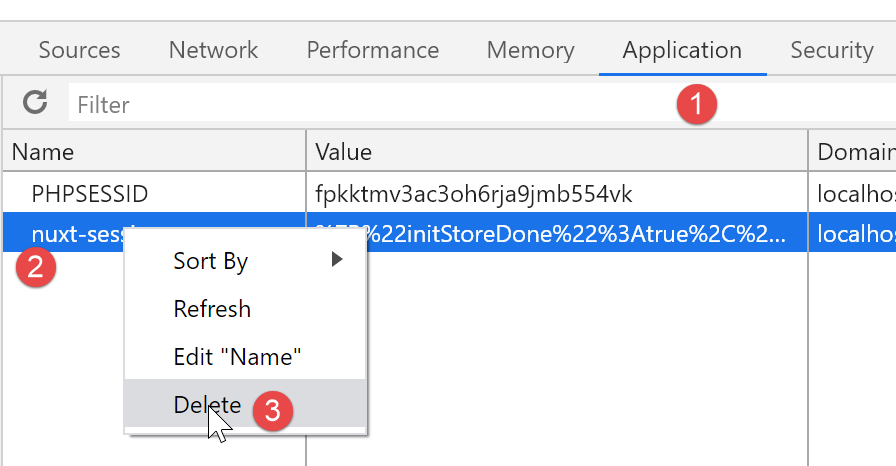
要运行此示例,您必须首先从运行 [nuxt] 客户端的浏览器中删除 [nuxt] 会话 Cookie 和 PHP Cookie,以便从零开始。以下是使用 Chrome 浏览器的示例:
15.20. 结论
本示例尤为复杂。它综合运用了前几个示例中掌握的知识:在 [nuxt] 会话中存储数据、函数注入插件、路由中间件以及异步操作的错误处理。 由于我们希望用户既能使用导航菜单链接,又能手动输入 URL 而不破坏应用程序,这进一步增加了复杂性。为了实现这一点,我们必须研究每个页面在由客户端或 [nuxt] 服务器执行时的行为差异。
客户端与 [Nuxt] 服务端行为的一致性并非绝对必要。试想以下常见场景:
- 首屏由 [nuxt] 服务器提供;
- 后续所有页面均由 [nuxt] 客户端提供,此时客户端将以 [SPA] 模式运行;
尽管如此,即使在这种情况下,你也必须验证所有页面在由 [nuxt] 服务器执行时的渲染效果,因为当搜索引擎请求这些页面时,它们所看到的正是这种渲染效果。