5. 示例 [nuxt-02]:服务器端与客户端页面
在此项目中,我们展示了:
- 客户端构建的页面在视觉上可能与从服务器接收到的页面不同。这会导致页面快速切换,用户能够察觉到这种变化,从而损害应用程序的用户体验。因此应避免采用这种方案;
- 一种使客户端页面重现与服务器发送页面完全一致的解决方案;
项目 [nuxt-02] 最初是通过复制项目 [nuxt-01] 获得的。
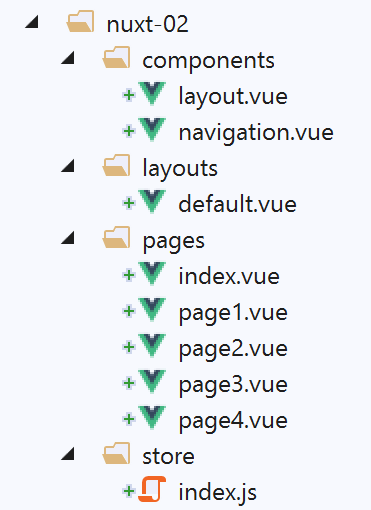
项目中新增了一个名为 [store] 的文件夹以及两个新页面。我们稍后将对此进行讨论。
5.1. 页面 [index]
5.1.1. 该页面的代码
页面 [index] 的代码如下:
<!-- 主页 -->
<template>
  <Layout :left="true" :right="true">
    <!-- 导航 -->
    <Navigation slot="left" />
    <!-- 消息-->
    <b-alert slot="right" show variant="warning"> Home - value= {{ value }} </b-alert>
  </Layout>
</template>

<script>
/* eslint-disable no-undef */
/* eslint-disable no-console */
/* eslint-disable nuxt/no-env-in-hooks */

import Navigation from '@/components/navigation'
import Layout from '@/components/layout'

export default {
  name: 'Home',
  // 使用的组件
  components: {
    Layout,
    Navigation
  },
  data() {
    return {
      value: 0
    }
  },
  // 生命周期
  beforeCreate() {
    // 客户端与服务器
    console.log('[home beforeCreate]')
  },
  created() {
    // 客户端与服务器
    console.log('[home created]')
    // 仅服务器
    if (process.server) {
      this.value = 10
    }
    // 客户端和服务器
    console.log('value=', this.value)
  },
  beforeMount() {
    // 仅客户端
    console.log('[home beforeMount]')
  },
  mounted() {
    // 仅客户端
    console.log('[home mounted]')
  }
}
</script>
注释
- 第 7 行:页面 [index] 将显示其属性 [value] 的值(第 28 行);
- 第 36-45 行:这里需要记住,函数 [created] 既在服务器端执行,也在客户端执行。第 40-42 行,服务器将属性 [value] 的值设置为 10。而客户端则不会修改该值。 我们只是想知道客户端是否保留了该值。结果发现并非如此;
5.1.2. 运行
我们修改文件 [/nuxt.config.js] 以执行项目 [nuxt-02]:
...
  // 源代码目录
  srcDir: 'nuxt-02',
  // 路由器
  router: {
    // 应用程序的 URL 根目录
    base: '/nuxt-02/'
  },
  // 服务器
  server: {
    // 服务端口,默认 3000
    port: 81,
    // 监听的网络地址,默认 localhost:127.0.0.1
    // 0.0.0.0 = 该机器的所有网络地址
    host: 'localhost'
  }
...
我们执行项目 [1]:
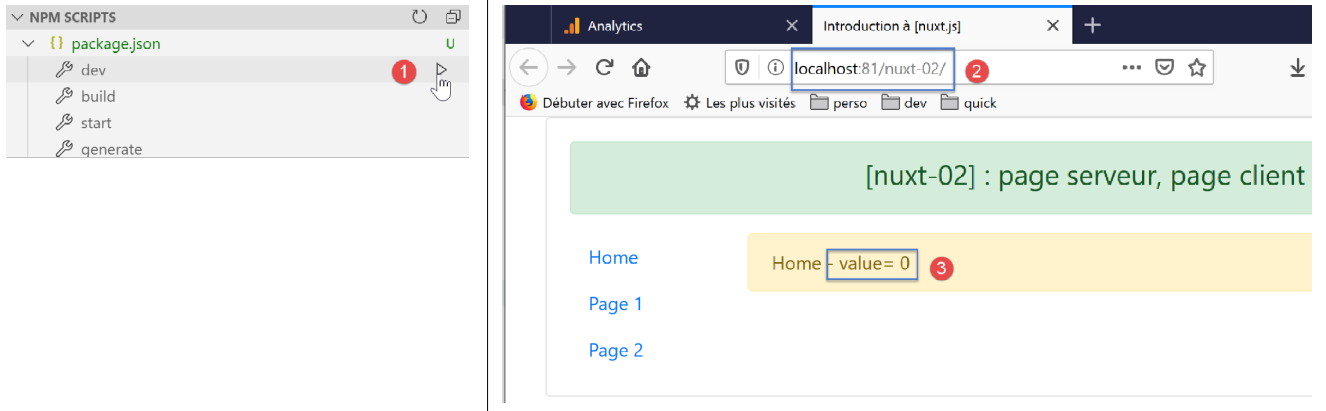
随后显示页面 [index](即 [2-3])。该页面短暂显示值 [10],随后显示值 [0]。发生了什么?
步骤 1
服务器首先运行。它执行页面 [index] 中的代码:
export default {
  name: 'Home',
  // 使用的组件
  components: {
    Layout,
    Navigation
  },
  data() {
    return {
      value: 0
    }
  },
  // 生命周期
  beforeCreate() {
    // 客户端和服务器
    console.log('[home beforeCreate]')
  },
  created() {
    // 客户端与服务器
    console.log('[home created]')
    // 仅服务器
    if (process.server) {
      this.value = 10
    }
    // 客户端和服务器
    console.log('value=', this.value)
  },
  beforeMount() {
    // 仅客户端
    console.log('[home beforeMount]')
  },
  mounted() {
    // 仅客户端
    console.log('[home mounted]')
  }
}
- 由于第 23 行,第 10 行的属性 [value] 取值为 10;
可以通过查看浏览器接收到的页面源代码(浏览器中的 [code source] 选项)来验证这一点:
<!doctype html>
<html data-n-head-ssr>
<head>
  <title>Introduction à [nuxt.js]</title>
  <meta data-n-head="ssr" charset="utf-8">
  <meta data-n-head="ssr" name="viewport" content="width=device-width, initial-scale=1">
  <meta data-n-head="ssr" data-hid="description" name="description" content="ssr routing loading asyncdata middleware plugins store">
  <link data-n-head="ssr" rel="icon" type="image/x-icon" href="/favicon.ico">
  <base href="/nuxt-02/">
  <link rel="preload" href="/nuxt-02/_nuxt/runtime.js" as="script">
  <link rel="preload" href="/nuxt-02/_nuxt/commons.app.js" as="script">
  <link rel="preload" href="/nuxt-02/_nuxt/vendors.app.js" as="script">
  <link rel="preload" href="/nuxt-02/_nuxt/app.js" as="script">
  ....
</head>
<body>
  <div data-server-rendered="true" id="__nuxt">
    <div id="__layout">
      <div class="container">
        <div class="card">
          <div class="card-body">
            <div role="alert" aria-live="polite" aria-atomic="true" align="center" class="alert alert-success">
              <h4>[nuxt-02] : page serveur, page client</h4>
            </div> <div>
              <div class="row">
                <div class="col-2">
                  <ul class="nav flex-column">
                    <li class="nav-item">
                      <a href="/nuxt-02/" target="_self" class="nav-link active nuxt-link-active">
                        Home
                      </a>
                    </li>
                    <li class="nav-item">
                      <a href="/nuxt-02/page1" target="_self" class="nav-link">
                        Page 1
                      </a>
                    </li>
                    <li class="nav-item">
                      <a href="/nuxt-02/page2" target="_self" class="nav-link">
                        Page 2
                      </a>
                    </li>
                  </ul>
                </div> <div class="col-10">
                  <div role="alert" aria-live="polite" aria-atomic="true" class="alert alert-warning">
                    Home - value= 10
                  </div>
                </div>
              </div>
            </div>
          </div>
        </div>
      </div>
    </div>
  </div>
  <script>window.__NUXT__ = ....;</script>
  <script src="/nuxt-02/_nuxt/runtime.js" defer></script>
  <script src="/nuxt-02/_nuxt/commons.app.js" defer></script>
  <script src="/nuxt-02/_nuxt/vendors.app.js" defer></script>
  <script src="/nuxt-02/_nuxt/app.js" defer></script>
</body>
</html>
- 第46行:在接收到的页面中,[value]的值为10;
步骤 2
我们知道,页面接收后,第57-60行的脚本会接管并改变接收页面的行为,甚至像这里一样改变显示的信息。这些脚本构成了客户端,该客户端同样执行页面[index]的代码,这与服务器端的代码相同:
export default {
  name: 'Home',
  // 使用的组件
  components: {
    Layout,
    Navigation
  },
  data() {
    return {
      value: 0
    }
  },
  // 生命周期
  beforeCreate() {
    // 客户端和服务器
    console.log('[home beforeCreate]')
  },
  created() {
    // 客户端和服务器
    console.log('[home created]')
    // 仅服务器
    if (process.server) {
      this.value = 10
    }
    // 客户端和服务器
    console.log('value=', this.value)
  },
  beforeMount() {
    // 仅客户端
    console.log('[home beforeMount]')
  },
  mounted() {
    // 仅客户端
    console.log('[home mounted]')
  }
}
- 要理解这一过程,需明白客户端 [nuxt] 不会执行第 22-24 行(process.server=false);
- 在典型的 [vue] 应用中,第 10 行中的 [value] 属性保持为 0。因此,当客户端跳转到接收到的页面后,显示的值变为 [0];
服务器生成的 [nuxt] 值对于属性 [value] 毫无用处。
5.2. 页面 [page1]
5.2.1. [Vuex] 商店
我们在项目 [nuxt-02] 中添加了一个文件夹 [store]:
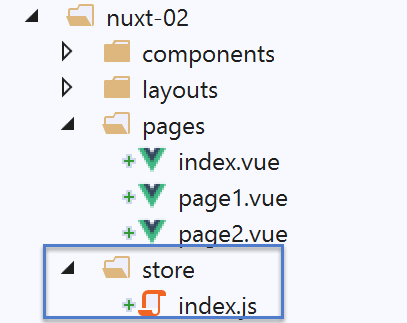
该文件的存在将导致 [nuxt] 自动实现一个名为 [Vuex] 的存储。 实现该存储的文件是 [index.js]。此处的 [index.js] 文件内容如下:
export const state = () => ({
  counter: 0
})

export const mutations = {
  increment(state, inc) {
    state.counter += inc
  }
}
[nuxt] 基于 [index.js] 的内容实现了一个名为 [Vuex] 的存储:
- 第 1-3 行:定义存储器状态 [state]。该状态由一个函数返回。在此,该状态仅有一个属性,即第 2 行中的计数器。导出的函数应命名为 [state];
- 第5-9行:对存储状态可执行的操作。这些操作称为[mutations]。 此处,[increment] 变体操作可将属性 [counter] 增加 [inc] 的量。导出的对象应命名为 [mutations];
由 [nuxt] 实现的 [store] 视图可在不同位置使用。在视图中,它可在属性 [this.$store] 中使用。
5.2.2. 页面代码
与页面 [index] 一样,页面 [page1] 将显示一个值,即 Vuex 存储计数器的值:
<!-- 第 1 页 -->
<template>
  <Layout :left="true" :right="true">
    <!-- 导航 -->
    <Navigation slot="left" />
    <!-- 消息-->
    <b-alert slot="right" show variant="primary"> Page 1 - value = {{ value }} </b-alert>
  </Layout>
</template>

<script>
/* eslint-disable no-console */

import Navigation from '@/components/navigation'
import Layout from '@/components/layout'

export default {
  name: 'Page1',
  // 所用组件
  components: {
    Layout,
    Navigation
  },
  data() {
    return {
      value: 0
    }
  },
  // 生命周期
  beforeCreate() {
    // 客户端与服务器
    console.log('[home beforeCreate]')
  },
  created() {
    // 客户端与服务器
    console.log('[home created]')
    // 仅服务器
    if (process.server) {
      this.$store.commit('increment', 25)
    }
    // 客户端和服务器
    this.value = this.$store.state.counter
    console.log('value=', this.value)
  },
  beforeMount() {
    // 仅客户端
    console.log('[home beforeMount]')
  },
  mounted() {
    // 仅客户端
    console.log('[home mounted]')
  }
}
</script>
注释
- 第 38-40 行:服务器将计数器加 25;
- 第 42 行:服务器和客户端都会显示计数器的值;
- 第 7 行:显示计数器的值;
阅读此代码时,需理解两点:
- 服务器和客户端执行的代码是相同的;
- 但对象 [this] 并非相同:服务器端有一个版本 [this],客户端则有一个版本 [client];
我们需要确认服务器端的 [this.$store] 是否与客户端的 [this.$store] 相同。 由于服务器(在应用程序启动时)是首先运行的,这相当于在问:服务器初始化的 [store] 是否被传输给了客户端?
5.2.3. 运行
我们运行项目 [nuxt-02],并手动输入 [localhost:81/nuxt-02/page1] 以触发服务器响应。与启动时处理页面 [index] 时相同:
- 服务器执行页面 [page1.vue];
- 将生成的页面发送至浏览器。该页面随即显示;
- 发送页面中嵌入的客户端脚本接管并再次执行页面 [page1.vue];
- 此时显示的页面被修改;
最终结果如下:
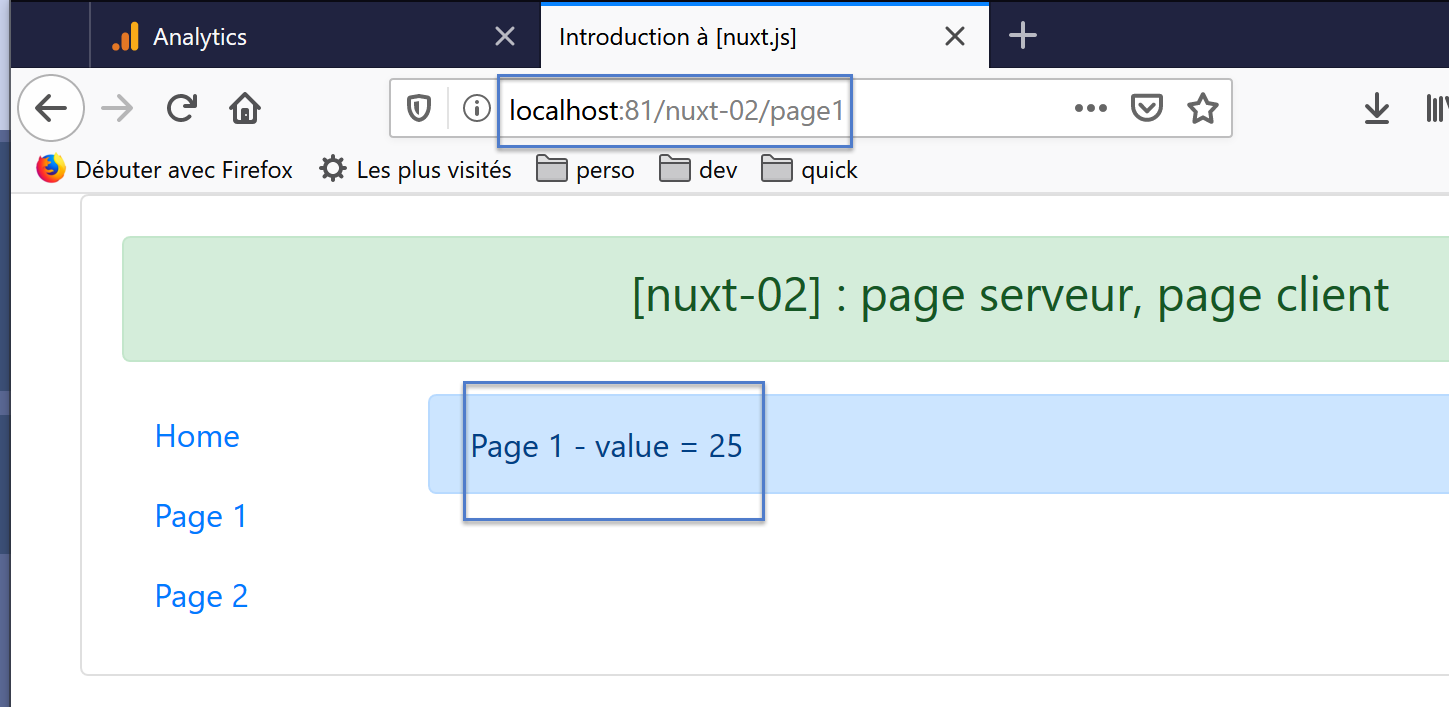
这次,显示的值确实是服务器设定的,从视觉上看,页面不会因为客户端更改了服务器显示的值而“闪烁”。这次发生了什么?
服务器执行了以下页面:[page1]:
...

<script>
/* eslint-disable no-console */

import Navigation from '@/components/navigation'
import Layout from '@/components/layout'

export default {
  name: 'Page1',
  // 使用的组件
  components: {
    Layout,
    Navigation
  },
  data() {
    return {
      value: 0
    }
  },
  // 生命周期
  beforeCreate() {
    // 客户端和服务器
    console.log('[page1 beforeCreate]')
  },
  created() {
    // 客户端与服务器
    console.log('[page1 created]')
    // 仅服务器
    if (process.server) {
      this.$store.commit('increment', 25)
    }
    // 客户端和服务器
    this.value = this.$store.state.counter
    console.log('value=', this.value)
  },
  beforeMount() {
    // 仅客户端
    console.log('[page1 beforeMount]')
  },
  mounted() {
    // 仅客户端
    console.log('[page1 mounted]')
  }
}
</script>
- 第 30-32 行已无错误地执行完毕。这意味着在服务器端,[this.$store] 同样指向存储器 [Vuex]。第 31 行将存储器的计数器值更新为 25;
- 随后,页面被发送给客户端;
查看客户端接收到的页面,可发现以下内容:
<!doctype html>
<html data-n-head-ssr>
<head>
  <title>Introduction à [nuxt.js]</title>
  <meta data-n-head="ssr" charset="utf-8">
  <meta data-n-head="ssr" name="viewport" content="width=device-width, initial-scale=1">
  <meta data-n-head="ssr" data-hid="description" name="description" content="ssr routing loading asyncdata middleware plugins store">
  <link data-n-head="ssr" rel="icon" type="image/x-icon" href="/favicon.ico">
  <base href="/nuxt-02/">
  <link rel="preload" href="/nuxt-02/_nuxt/runtime.js" as="script">
  <link rel="preload" href="/nuxt-02/_nuxt/commons.app.js" as="script">
  <link rel="preload" href="/nuxt-02/_nuxt/vendors.app.js" as="script">
  <link rel="preload" href="/nuxt-02/_nuxt/app.js" as="script">
  ...
</head>
<body>
  <div data-server-rendered="true" id="__nuxt">
    <div id="__layout">
      <div class="container">
        <div class="card">
          <div class="card-body">
            <div role="alert" aria-live="polite" aria-atomic="true" align="center" class="alert alert-success">
              <h4>[nuxt-02] : page serveur, page client</h4>
            </div>
            <div>
              <div class="row">
                <div class="col-2">
                  <ul class="nav flex-column">
                    <li class="nav-item">
                      <a href="/nuxt-02/" target="_self" class="nav-link">
                        Home
                      </a>
                    </li>
                    <li class="nav-item">
                      <a href="/nuxt-02/page1" target="_self" class="nav-link active nuxt-link-active">
                        Page 1
                      </a>
                    </li>
                    <li class="nav-item">
                      <a href="/nuxt-02/page2" target="_self" class="nav-link">
                        Page 2
                      </a>
                    </li>
                  </ul>
                </div> <div class="col-10">
                  <div role="alert" aria-live="polite" aria-atomic="true" class="alert alert-primary">
                    Page 1 - value = 25
                  </div>
                </div>
              </div>
            </div>
          </div>
        </div>
      </div>
    </div>
  </div>
  <script>
  window.__NUXT__ = (function (a, b, c) {
      return {
        layout: "default", data: [{}], error: null, state: { counter: 25 }, serverRendered: true,
        logs: [
          { date: new Date(1574085336802), args: ["[home beforeCreate]"], type: a, level: b, tag: c },
          { date: new Date(1574085336839), args: ["[home created]"], type: a, level: b, tag: c },
          { date: new Date(1574085336869), args: ["value=", "25"], type: a, level: b, tag: c }
        ]
      }
    }("log", 2, ""));</script>
  <script src="/nuxt-02/_nuxt/runtime.js" defer></script>
  <script src="/nuxt-02/_nuxt/commons.app.js" defer></script>
  <script src="/nuxt-02/_nuxt/vendors.app.js" defer></script>
  <script src="/nuxt-02/_nuxt/app.js" defer></script>
</body>
</html>
- 第47行:服务器发送的值;
- 第60行:可见存储器[Vuex]的状态已被嵌入页面中。这将使在接收页面后执行的客户端能够重建一个新的存储器[Vuex],其计数器的初始值为25;
在接收并显示来自服务器的页面后,客户端接管并依次执行页面 [page1]:
...

<script>
/* eslint-disable no-console */

import Navigation from '@/components/navigation'
import Layout from '@/components/layout'

export default {
  name: 'Page1',
  // 使用的组件
  components: {
    Layout,
    Navigation
  },
  data() {
    return {
      value: 0
    }
  },
  // 生命周期
  beforeCreate() {
    // 客户端和服务器
    console.log('[page1 beforeCreate]')
  },
  created() {
    // 客户端与服务器
    console.log('[page1 created]')
    // 仅服务器
    if (process.server) {
      this.$store.commit('increment', 25)
    }
    // 客户端和服务器
    this.value = this.$store.state.counter
    console.log('value=', this.value)
  },
  beforeMount() {
    // 仅客户端
    console.log('[page1 beforeMount]')
  },
  mounted() {
    // 仅客户端
    console.log('[page1 mounted]')
  }
}
</script>
- 第34行:第18行的属性[value]也接收到了计数器的值25;
因此,[nuxt]的存储器允许服务器在页面初始加载时(即在服务器上检索该页面时)向客户端传输信息。 需要说明的是,一旦获取该页面,服务器将不再被调用,应用程序将像经典的 [vue] 应用程序一样,在 SAP 模式下运行。
5.3. [page2]页面
在 [page2] 页面中,我们展示了另一种方法,使:
- 服务器将计算出的信息包含在页面中;
- 客户端不修改这些信息;
5.3.1. 页面代码
页面 [page2] 的代码演变如下:
<!-- 第2页 -->
<template>
  <Layout :left="true" :right="true">
    <!-- 导航 -->
    <Navigation slot="left" />
    <!-- 消息 -->
    <b-alert slot="right" show variant="secondary"> Page 2 - value = {{ value }} </b-alert>
  </Layout>
</template>

<script>
/* eslint-disable no-console */
/* eslint-disable nuxt/no-timing-in-fetch-data */

import Navigation from '@/components/navigation'
import Layout from '@/components/layout'

export default {
  name: 'Page2',
  // 使用的组件
  components: {
    Layout,
    Navigation
  },
  asyncData(context) {
    // 谁在执行这段代码?
    console.log('asyncData, client=', process.client, 'serveur=', process.server)
    // 仅限服务器
    if (process.server) {
      // 返回一个 Promise
      return new Promise(function(resolve, reject) {
        // 此处通常是一个异步函数
        // 我们通过等待一秒来模拟它
        setTimeout(() => {
          // 该结果将被包含在 [data] 的属性中
          resolve({ value: 87 })
          // 日志
          console.log('asynData terminée')
        }, 1000)
      })
    }
  },
  // 生命周期
  beforeCreate() {
    // 客户端和服务器
    console.log('[page2 beforeCreate]')
  },
  created() {
    // 客户端与服务器
    console.log('[page2 created]')
  },
  beforeMount() {
    // 仅客户端
    console.log('[page2 beforeMount]')
  },
  mounted() {
    // 仅客户端
    console.log('[page2 mounted]')
  }
}
</script>
- 第 7 行:页面显示名为 [value] 的属性值;
- 属性 [value] 并不作为由函数 [data] 返回的对象的元素而存在。此处该函数并不存在。属性 [value] 由第 36 行动态创建;
- 第 25 行:函数 [asyncData] 是一个 [nuxt] 函数。 顾名思义,这通常是一个异步函数。其常规作用是获取外部数据。[nuxt] 确保在 [asyncData] 函数渲染完其异步数据之前,页面不会发送给客户端浏览器;
- 函数 [asyncData] 接收 [nuxt] 作为参数。该对象信息量非常丰富,可访问关于 [nuxt] 应用程序的大量信息。我们将在后续章节中详细探讨;
- 第 31 行:我们通过 [Promise] 实现 [asyncData] 函数(参见文档《ECMASCRIPT 语言入门:示例篇》)。该类的构造函数接受一个异步函数作为参数,该函数:
- 通过 [resolve] 函数返回数据来标记成功。该函数返回的对象会自动包含在页面的 [data] 属性中;
- 通过 [reject] 函数返回错误来报告失败;
- 第 34 行:使用函数 [setTimeout] 模拟异步函数。 该函数通过 [resolve] 函数(该函数会报告 [Promise] 执行成功)在 1 秒后(第 31 行)返回 [{ value: 87 }] 对象(第 36 行)。 该异步函数返回的对象会自动包含在页面的 [data] 属性中。因此,第 7 行显示的就是该属性;
- 第 27 行:我们将发现 [asyncData] 函数由服务器执行,而非客户端;
- 第 29 行:[value] 属性的初始化由服务器完成;
注:函数 [asyncData] 中不认识对象 [this],因为封装组件 [vue] 的对象尚未创建;
5.3.2. 执行
运行项目 [nuxt-02],并手动输入 [localhost:81/nuxt-02/page2] 以触发服务器响应。与启动时访问页面 [index] 时相同:
- 服务器执行页面 [page2.vue];
- 将生成的页面发送至浏览器。该页面随即显示;
- 发送页面中嵌入的客户端脚本接管并再次执行页面 [page2.vue];
- 此时显示的页面被修改;
最终结果如下:
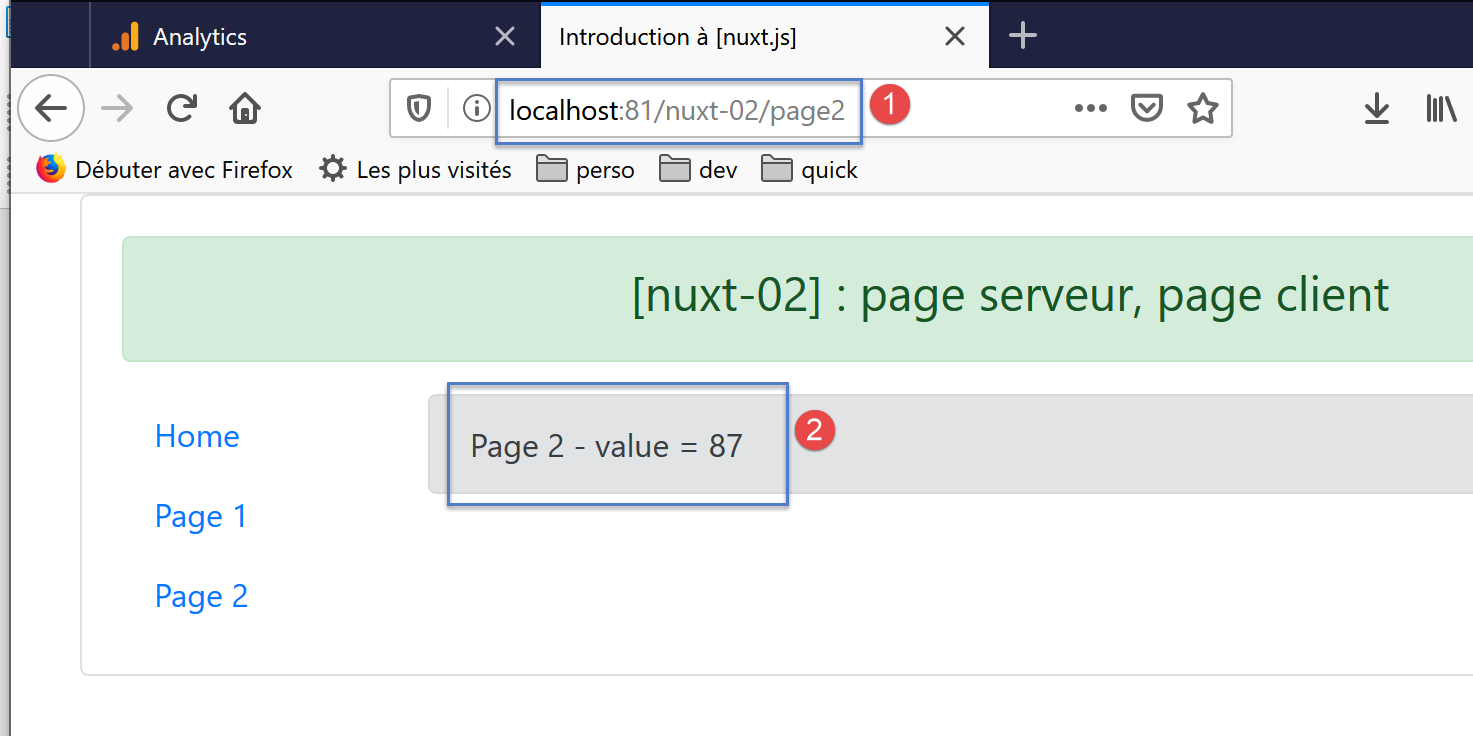
这次,显示的值确实是服务器设定的值,从视觉上看,页面不会因客户端更改了服务器显示的值而“闪烁”。这次发生了什么?
服务器执行了以下页面 [page2]:
<!-- 第2页 -->
<template>
  <Layout :left="true" :right="true">
    <!-- 导航 -->
    <Navigation slot="left" />
    <!-- 消息 -->
    <b-alert slot="right" show variant="secondary"> Page 2 - value = {{ value }} </b-alert>
  </Layout>
</template>

<script>
/* eslint-disable no-console */
/* eslint-disable nuxt/no-timing-in-fetch-data */

import Navigation from '@/components/navigation'
import Layout from '@/components/layout'

export default {
  name: 'Page2',
  // 使用的组件
  components: {
    Layout,
    Navigation
  },
  asyncData(context) {
    // 谁在执行这段代码?
    console.log('asyncData, client=', process.client, 'serveur=', process.server)
    // 仅限服务器
    if (process.server) {
      // 返回一个 Promise
      return new Promise(function(resolve, reject) {
        // 此处通常是一个异步函数
        // 通过等待一秒来模拟它
        setTimeout(() => {
          // 该结果将被包含在 [data] 的属性中
          resolve({ value: 87 })
          // 日志
          console.log('asynData terminée')
        }, 1000)
      })
    }
  },
  // 生命周期
  beforeCreate() {
    // 客户端与服务器
    console.log('[page2 beforeCreate]')
  },
  created() {
    // 客户端与服务器
    console.log('[page2 created]')
  },
  beforeMount() {
    // 仅客户端
    console.log('[page2 beforeMount]')
  },
  mounted() {
    // 仅客户端
    console.log('[page2 mounted]')
  }
}
</script>
正是第 36 行确定了第 7 行显示的值。因此,客户端浏览器接收到的正是这个内容。确切地说,它接收到的页面如下:
<!doctype html>
<html data-n-head-ssr>
<head>
  <title>Introduction à [nuxt.js]</title>
  <meta data-n-head="ssr" charset="utf-8">
  <meta data-n-head="ssr" name="viewport" content="width=device-width, initial-scale=1">
  <meta data-n-head="ssr" data-hid="description" name="description" content="ssr routing loading asyncdata middleware plugins store">
  <link data-n-head="ssr" rel="icon" type="image/x-icon" href="/favicon.ico">
  <base href="/nuxt-02/">
  <link rel="preload" href="/nuxt-02/_nuxt/runtime.js" as="script">
  <link rel="preload" href="/nuxt-02/_nuxt/commons.app.js" as="script">
  <link rel="preload" href="/nuxt-02/_nuxt/vendors.app.js" as="script">
  <link rel="preload" href="/nuxt-02/_nuxt/app.js" as="script">
  ...
</head>
<body>
  <div data-server-rendered="true" id="__nuxt">
    <div id="__layout">
      <div class="container">
        <div class="card">
          <div class="card-body">
            <div role="alert" aria-live="polite" aria-atomic="true" align="center" class="alert alert-success">
              <h4>[nuxt-02] : page serveur, page client</h4>
            </div>
            <div>
              <div class="row">
                <div class="col-2">
                  <ul class="nav flex-column">
                    <li class="nav-item">
                      <a href="/nuxt-02/" target="_self" class="nav-link">
                        Home
                      </a>
                    </li>
                    <li class="nav-item">
                      <a href="/nuxt-02/page1" target="_self" class="nav-link">
                        Page 1
                      </a>
                    </li>
                    <li class="nav-item">
                      <a href="/nuxt-02/page2" target="_self" class="nav-link active nuxt-link-active">
                        Page 2
                      </a>
                    </li>
                  </ul>
                </div>
                <div class="col-10">
                  <div role="alert" aria-live="polite" aria-atomic="true" class="alert alert-secondary">
                    Page 2 - value = 87
                  </div>
                </div>
              </div>
            </div>
          </div>
        </div>
      </div>
    </div>
  </div>
  <script>
  window.__NUXT__ = (function (a, b, c) {
      return {
        layout: "default", data: [{ value: 87 }], error: null, state: { counter: 0 }, serverRendered: true,
        logs: [
          { date: new Date(1574096608555), args: ["asyncData, client=", "false", "serveur=", "true"], type: a, level: b, tag: c },
          { date: new Date(1574096608575), args: ["[page2 beforeCreate]"], type: a, level: b, tag: c },
          { date: new Date(1574096608599), args: ["[page2 created]"], type: a, level: b, tag: c }
        ]
      }
    }("log", 2, ""));</script>
  <script src="/nuxt-02/_nuxt/runtime.js" defer></script>
  <script src="/nuxt-02/_nuxt/commons.app.js" defer></script>
  <script src="/nuxt-02/_nuxt/vendors.app.js" defer></script>
  <script src="/nuxt-02/_nuxt/app.js" defer></script>
</body>
</html>
- 第 48 行:可以看到接收到的页面中的值为 87;
- 第61行:在服务器响应中,可以看到两个对象:[data] 和 [state]:
- [state] 是存储 [Vuex] 的状态。该存储是根据应用程序 [nuxt-02] 中文件夹 [store] 的内容实例化而成的;
- [data] 包含服务器通过 [asyncData] 函数创建的属性。 这里可以看到由服务器创建的属性 [value : 87]。客户端脚本将把该属性整合到页面 [page2] 的属性中;
让我们回到 [page2] 页面的代码:
<!-- 第2页 -->
<template>
  <Layout :left="true" :right="true">
    <!-- 导航 -->
    <Navigation slot="left" />
    <!-- 消息 -->
    <b-alert slot="right" show variant="secondary"> Page 2 - value = {{ value }} </b-alert>
  </Layout>
</template>

<script>
/* eslint-disable no-console */
/* eslint-disable nuxt/no-timing-in-fetch-data */

import Navigation from '@/components/navigation'
import Layout from '@/components/layout'

export default {
  name: 'Page2',
  // 使用的组件
  components: {
    Layout,
    Navigation
  },
  asyncData(context) {
    // 谁在执行这段代码?
    console.log('asyncData, client=', process.client, 'serveur=', process.server)
    // 仅限服务器
    if (process.server) {
      // 返回一个 Promise
      return new Promise(function(resolve, reject) {
        // 此处通常是一个异步函数
        // 我们通过等待一秒来模拟它
        setTimeout(() => {
          // 该结果将被包含在 [data] 的属性中
          resolve({ value: 87 })
          // 日志
          console.log('asynData terminée')
        }, 1000)
      })
    }
  },
  // 生命周期
  beforeCreate() {
    // 客户端和服务器
    console.log('[page2 beforeCreate]')
  },
  created() {
    // 客户端和服务器
    console.log('[page2 created]')
  },
  beforeMount() {
    // 仅客户端
    console.log('[page2 beforeMount]')
  },
  mounted() {
    // 仅客户端
    console.log('[page2 mounted]')
  }
}
</script>
- 第 7 行使用了属性 [value]。然而,该页面并未定义名为 [value] 的属性。不过,客户端脚本通过从服务器接收的 [data: [{ value: 87 }]] 对象自动创建了该属性;
日志还显示,客户端未执行函数 [asyncData]:
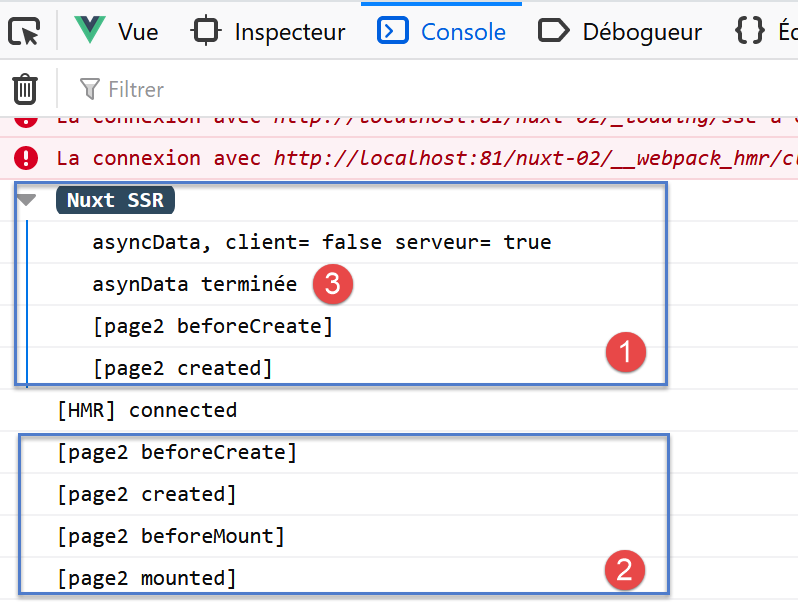
函数 [asyncData] 由服务器 [1] 执行,但未由客户端 [2] 执行。 此外,值得注意的是,在 [asyncData] 函数结束之前,服务器不会执行生命周期函数。可以通过延长 [asyncData] 函数内的等待时间来验证这一点。
5.4. 页面 [page3]
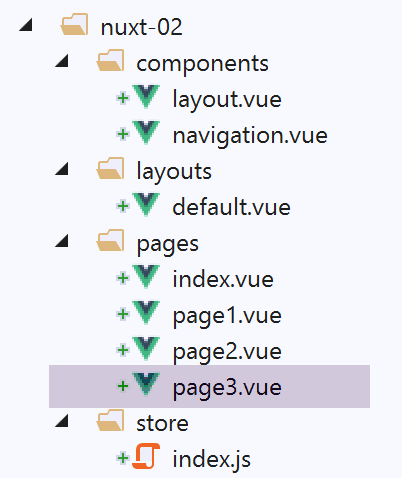
我们在应用程序中添加了一个新页面 [page3]:
5.4.1. 组件 [navigation]
修改组件 [vavigation] 以支持导航至新页面:
<template>
  <!-- 三选项 Bootstrap 菜单 -->
  <b-nav vertical>
    <b-nav-item to="/" exact exact-active-class="active">
      Home
    </b-nav-item>
    <b-nav-item to="/page1" exact exact-active-class="active">
      Page 1
    </b-nav-item>
    <b-nav-item to="/page2" exact exact-active-class="active">
      Page 2
    </b-nav-item>
    <b-nav-item to="/page3" exact exact-active-class="active">
      Page 3
    </b-nav-item>
  </b-nav>
</template>
5.4.2. [page3] 的代码
[page3] 页面的代码如下:
<!-- 第3页 -->
<template>
  <Layout :left="true" :right="true">
    <!-- 导航 -->
    <Navigation slot="left" />
    <!-- 消息 -->
    <b-alert slot="right" show variant="secondary"> Page 3 - value = {{ value }} </b-alert>
  </Layout>
</template>

<script>
/* eslint-disable no-console */
/* eslint-disable nuxt/no-timing-in-fetch-data */

import Navigation from '@/components/navigation'
import Layout from '@/components/layout'

export default {
  name: 'Page3',
  // 使用的组件
  components: {
    Layout,
    Navigation
  },
  data() {
    return {
      value: 0
    }
  },
  fetch(context) {
    // 谁在执行这段代码?
    console.log('fetch, client=', process.client, 'serveur=', process.server)
    // 仅限服务器
    if (process.server) {
      // 返回一个 Promise
      return new Promise(function(resolve, reject) {
        // 这里通常是一个异步函数
        // 通过等待一秒来模拟它
        setTimeout(() => {
          // 成功
          resolve()
        }, 1000)
      }).then(() => {
        // 修改存储器
        context.store.commit('increment', 28)
      })
    }
  },
  // 生命周期
  beforeCreate() {
    // 客户端与服务器
    console.log('[page3 beforeCreate]')
  },
  created() {
    // 客户端与服务器
    this.value = this.$store.state.counter
    console.log('[page3 created], value=', this.value)
  },
  beforeMount() {
    // 仅客户端
    console.log('[page3 beforeMount]')
  },
  mounted() {
    // 仅客户端
    console.log('[page3 mounted]')
  }
}
</script>
- 第 30 行:函数 [fetch] 的行为与函数 [asyncData] 类似:
- 它在生命周期函数之前执行;
- 该函数中不识别对象 [this];
- 其运行方式为异步;
- 在异步函数返回结果之前,生命周期不会开始;
- 此处的结果由 [Promise] 中的 [then] 方法返回(第 43 行);
- 函数 [fetch] 接收参数 [context]。该参数代表当前的 [nuxt] 上下文;
- 第30行:在众多属性中,对象[context]拥有一个名为[store]的属性,该属性表示应用程序的存储[Vuex];
- 第41行:人为地,在1秒后报告[Promise]成功(参见文档《ECMASCRIPT 6语言示例入门》);
- 第45行:随后执行方法[then]。在此方法中,将[store]的计数器递增;
5.4.3. 执行
运行项目 [nuxt-02],并手动输入 [localhost:81/nuxt-02/page3] 以触发服务器请求。与启动时处理页面 [index] 时相同:
- 服务器执行页面 [page3.vue];
- 将生成的页面发送至浏览器。该页面随即显示;
- 发送页面中嵌入的客户端脚本接管并再次执行页面 [page3.vue];
- 此时显示的页面被修改;
最终结果如下:
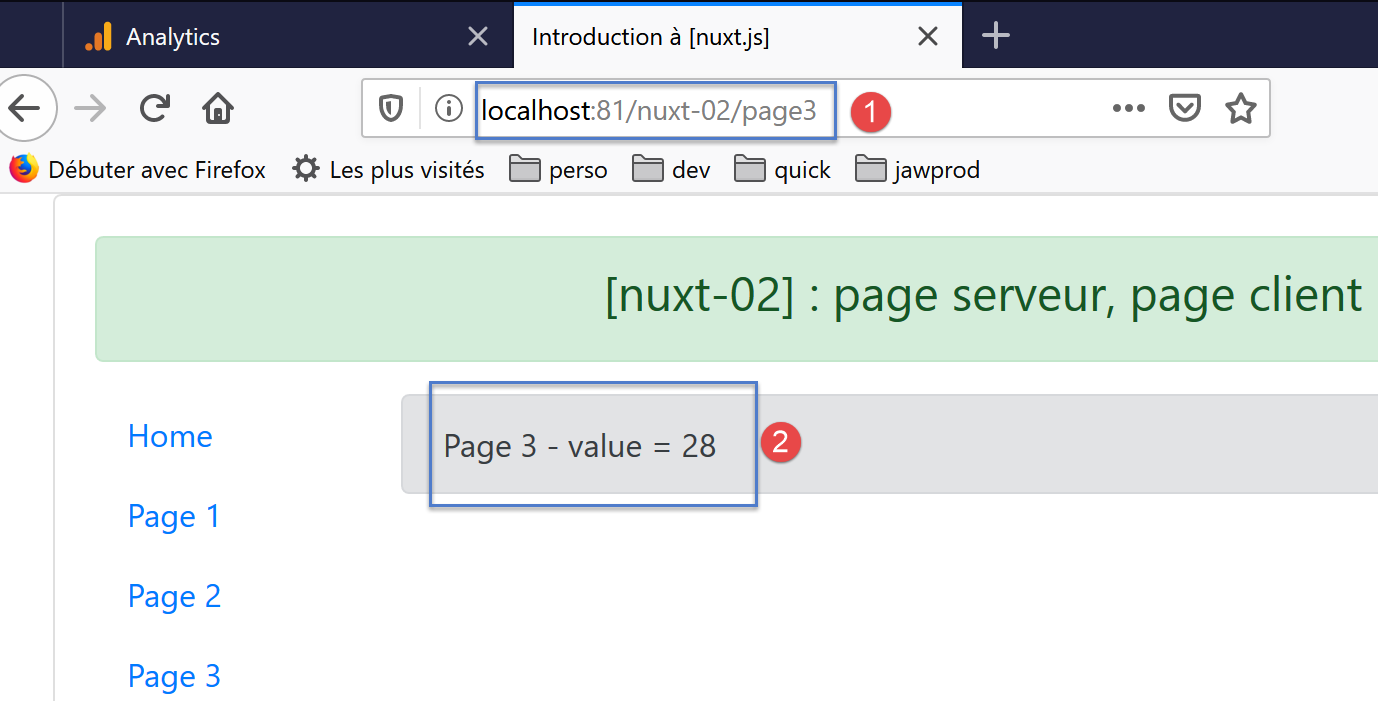
显示的值确实是服务器设定的,从视觉上看,页面不会因客户端更改了服务器显示的值而“闪烁”。这次发生了什么?
服务器执行了以下页面 [page3]:
<!-- 第3页 -->
<template>
  <Layout :left="true" :right="true">
    <!-- 导航 -->
    <Navigation slot="left" />
    <!-- 消息 -->
    <b-alert slot="right" show variant="secondary"> Page 3 - value = {{ value }} </b-alert>
  </Layout>
</template>

<script>
/* eslint-disable no-console */
/* eslint-disable nuxt/no-timing-in-fetch-data */

import Navigation from '@/components/navigation'
import Layout from '@/components/layout'

export default {
  name: 'Page3',
  // 使用的组件
  components: {
    Layout,
    Navigation
  },
  data() {
    return {
      value: 0
    }
  },
  fetch(context) {
    // 谁在执行这段代码?
    console.log('fetch, client=', process.client, 'serveur=', process.server)
    // 仅限服务器
    if (process.server) {
      // 返回一个 Promise
      return new Promise(function(resolve, reject) {
        // 此处通常是一个异步函数
        // 通过等待一秒来模拟它
        setTimeout(() => {
          // 成功
          resolve()
        }, 1000)
      }).then(() => {
        // 修改存储
        context.store.commit('increment', 28)
        // 日志
        console.log('fetch commit terminé')
      })
    }
  },
  // 生命周期
  beforeCreate() {
    // 客户端和服务器
    console.log('[page3 beforeCreate]')
  },
  created() {
    // 客户端与服务器
    this.value = this.$store.state.counter
    console.log('[page3 created], value=', this.value)
  },
  beforeMount() {
    // 仅客户端
    console.log('[page3 beforeMount]')
  },
  mounted() {
    // 仅客户端
    console.log('[page3 mounted]')
  }
}
</script>
- 第 45 行:异步函数 [fetch] 是上述函数中第一个被执行的。它接收一个名为 [context] 的对象作为参数,该对象即为当前的 [nuxt] 上下文。 在这个对象的众多属性中,属性 [context.store] 代表存储区 [Vuex];
- 第 45 行:在异步函数 [fetch] 中,服务器将存储器的计数器设置为 28;
- 第 56 行:当函数 [created] 执行时,[nuxt] 确保异步函数 [fetch] 已完成其工作;
- 第58行:百叶窗计数器的值被赋给第27行的属性[value];
- 第 7 行:显示 [value] 的值,即存储器的计数器值;
客户端浏览器接收到的页面如下:
<!doctype html>
<html data-n-head-ssr>
<head>
  <title>Introduction à [nuxt.js]</title>
  <meta data-n-head="ssr" charset="utf-8">
  <meta data-n-head="ssr" name="viewport" content="width=device-width, initial-scale=1">
  <meta data-n-head="ssr" data-hid="description" name="description" content="ssr routing loading asyncdata middleware plugins store">
  <link data-n-head="ssr" rel="icon" type="image/x-icon" href="/favicon.ico">
  <base href="/nuxt-02/">
  <link rel="preload" href="/nuxt-02/_nuxt/runtime.js" as="script">
  <link rel="preload" href="/nuxt-02/_nuxt/commons.app.js" as="script">
  <link rel="preload" href="/nuxt-02/_nuxt/vendors.app.js" as="script">
  <link rel="preload" href="/nuxt-02/_nuxt/app.js" as="script">
  ...
</head>
<body>
  <div data-server-rendered="true" id="__nuxt">
    <div id="__layout">
      <div class="container">
        <div class="card">
          <div class="card-body">
            <div role="alert" aria-live="polite" aria-atomic="true" align="center" class="alert alert-success">
              <h4>[nuxt-02] : page serveur, page client</h4>
            </div>
            <div>
              <div class="row">
                <div class="col-2">
                  <ul class="nav flex-column">
                    <li class="nav-item">
                      <a href="/nuxt-02/" target="_self" class="nav-link">
                        Home
                      </a>
                    </li>
                    <li class="nav-item">
                      <a href="/nuxt-02/page1" target="_self" class="nav-link">
                        Page 1
                      </a>
                    </li>
                    <li class="nav-item">
                      <a href="/nuxt-02/page2" target="_self" class="nav-link">
                        Page 2
                      </a>
                    </li>
                    <li class="nav-item">
                      <a href="/nuxt-02/page3" target="_self" class="nav-link active nuxt-link-active">
                        Page 3
                      </a>
                    </li>
                  </ul>
                </div> <div class="col-10">
                  <div role="alert" aria-live="polite" aria-atomic="true" class="alert alert-secondary">
                    Page 3 - value = 28
                  </div>
                </div>
              </div>
            </div>
          </div>
        </div>
      </div>
    </div>
  </div>
  <script>
  window.__NUXT__ = (function (a, b, c) {
      return {
        layout: "default", data: [{}], error: null, state: { counter: 28 }, serverRendered: true,
        logs: [
          { date: new Date(1574169916025), args: ["fetch, client=", "false", "serveur=", "true"], type: a, level: b, tag: c },
          { date: new Date(1574169917038), args: ["fetch commit terminé"], type: a, level: b, tag: c },
          { date: new Date(1574169917137), args: ["[page3 beforeCreate]"], type: a, level: b, tag: c },
          { date: new Date(1574169917167), args: ["[page3 created], value=", "28"], type: a, level: b, tag: c }
        ]
      }
    }("log", 2, ""));</script>
  <script src="/nuxt-02/_nuxt/runtime.js" defer></script>
  <script src="/nuxt-02/_nuxt/commons.app.js" defer></script>
  <script src="/nuxt-02/_nuxt/vendors.app.js" defer></script>
  <script src="/nuxt-02/_nuxt/app.js" defer></script>
</body>
</html>
- 第 52 行:可以看到接收到的页面中的值为 28;
- 第65行:在服务器响应中,可见服务器向客户端发送了存储器[Vuex]的状态[state]。借助此信息,客户端脚本将能够重建存储器[Vuex];
客户端脚本随后将执行页面 [page3] 中的代码:
<!-- 第3页 -->
<template>
  <Layout :left="true" :right="true">
    <!-- 导航 -->
    <Navigation slot="left" />
    <!-- 消息 -->
    <b-alert slot="right" show variant="secondary"> Page 3 - value = {{ value }} </b-alert>
  </Layout>
</template>

<script>
/* eslint-disable no-console */
/* eslint-disable nuxt/no-timing-in-fetch-data */

import Navigation from '@/components/navigation'
import Layout from '@/components/layout'

export default {
  name: 'Page3',
  // 使用的组件
  components: {
    Layout,
    Navigation
  },
  data() {
    return {
      value: 0
    }
  },
  fetch(context) {
    // 谁在执行这段代码?
    console.log('fetch, client=', process.client, 'serveur=', process.server)
    // 仅限服务器
    if (process.server) {
      // 返回一个 Promise
      return new Promise(function(resolve, reject) {
        // 此处通常是一个异步函数
        // 通过等待一秒来模拟它
        setTimeout(() => {
          // 成功
          resolve()
        }, 1000)
      }).then(() => {
        // 修改存储
        context.store.commit('increment', 28)
        // 日志
        console.log('fetch commit terminé')
      })
    }
  },
  // 生命周期
  beforeCreate() {
    // 客户端和服务器
    console.log('[page3 beforeCreate]')
  },
  created() {
    // 客户端与服务器
    this.value = this.$store.state.counter
    console.log('[page3 created], value=', this.value)
  },
  beforeMount() {
    // 仅客户端
    console.log('[page3 beforeMount]')
  },
  mounted() {
    // 仅客户端
    console.log('[page3 mounted]')
  }
}
</script>
- 第58行:客户端执行的函数[created]将计数器的值赋给第27行的属性[value];
- 第 7 行显示了该值。由于该值与服务器发送的值相同,因此不会因修改而导致页面“闪烁”;
日志还显示,客户端未执行函数 [fetch]:
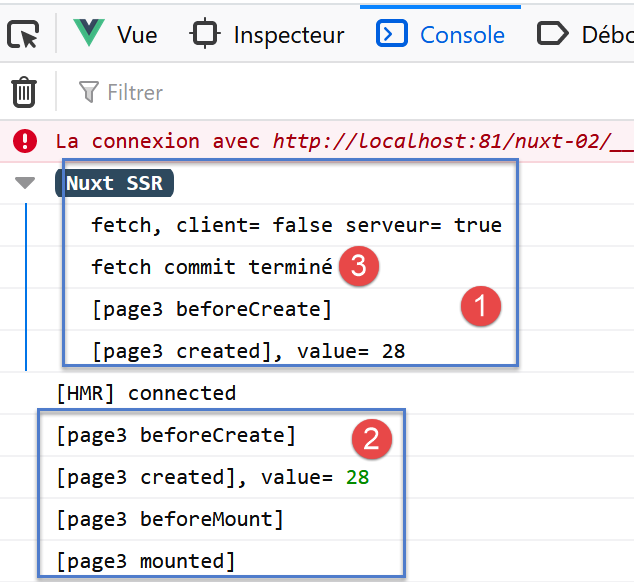
函数 [fetch] 由服务器 [1] 执行,但未由客户端 [2] 执行。 此外,值得注意的是,在 [fetch] 和 [3] 函数结束之前,服务器并未执行生命周期函数。可以通过延长 [fetch] 函数内的等待时间来验证这一点。
页面 [page1] 和 [page3] 展示了两种利用存储 [Vuex] 将信息从服务器传输至客户端的方法。人们可能会质疑它们是否等效。 我们将构建一个 [page4] 页面来验证这一点。
5.5. 页面 [page4]
我们在应用程序中添加了一个新页面 [page4]:
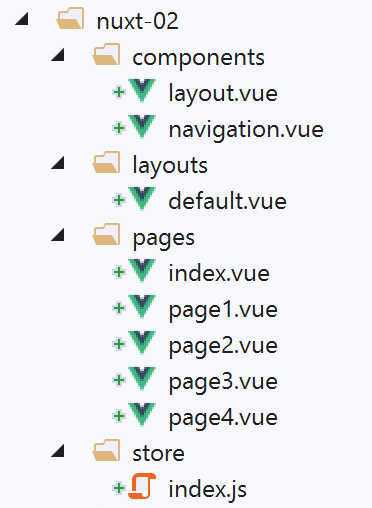
5.5.1. 组件 [navigation]
修改组件 [navigation] 以支持导航至新页面:
<template>
  <!-- 五选项 Bootstrap 菜单 -->
  <b-nav vertical>
    <b-nav-item to="/" exact exact-active-class="active">
      Home
    </b-nav-item>
    <b-nav-item to="/page1" exact exact-active-class="active">
      Page 1
    </b-nav-item>
    <b-nav-item to="/page2" exact exact-active-class="active">
      Page 2
    </b-nav-item>
    <b-nav-item to="/page3" exact exact-active-class="active">
      Page 3
    </b-nav-item>
    <b-nav-item to="/page4" exact exact-active-class="active">
      Page 4
    </b-nav-item>
  </b-nav>
</template>
5.5.2. [page4] 的代码
页面 [page4] 的代码如下:
<!-- 第4页 -->
<template>
  <Layout :left="true" :right="true">
    <!-- 导航 -->
    <Navigation slot="left" />
    <!-- 消息 -->
    <b-alert slot="right" show variant="secondary"> Page 4 - value = {{ value }} </b-alert>
  </Layout>
</template>

<script>
/* eslint-disable no-console */

import Navigation from '@/components/navigation'
import Layout from '@/components/layout'

export default {
  name: 'Page4',
  // 使用的组件
  components: {
    Layout,
    Navigation
  },
  data() {
    return {
      value: 0
    }
  },
  // 生命周期
  async beforeCreate() {
    // 客户端与服务器
    console.log('[page4 beforeCreate]')
    // 仅限服务器
    if (process.server) {
      // 执行异步函数
      const valeur = await new Promise(function(resolve, reject) {
        // 此处通常为异步函数
        // 通过等待10秒来模拟该函数
        setTimeout(() => {
          // 成功 - 返回计数器的值
          resolve(52)
        }, 10000)
      })
      // 修改存储器
      this.$store.commit('increment', valeur)
      // 日志
      console.log('[page4 beforeCreate], fonction asynchrone terminée, compteur=', this.$store.state.counter)
    }
  },
  created() {
    // 客户端和服务器
    this.value = this.$store.state.counter
    console.log('[page4 created], value=', this.value)
  },
  beforeMount() {
    // 仅客户端
    console.log('[page4 beforeMount]')
  },
  mounted() {
    // 仅客户端
    console.log('[page4 mounted]')
  }
}
</script>
- 第 30 行:此前在 [fetch] 函数中执行的操作,现已移至 [beforeCreate] 方法中。使用 async(第 30 行)与 await(第 36 行)配合,以等待异步函数结束;
- 第 36 行:在 10 秒后(第 42 行)获取第 41 行渲染的异步函数结果;
- 第50-54行:在同时在服务器端和客户端执行的[created]方法中,将计数器赋值给页面的[value]属性;
5.5.3. 执行
运行项目 [nuxt-02],并手动输入 [localhost:81/nuxt-02/page4] 以触发服务器请求。与页面 [index] 的启动过程类似:
- 服务器执行页面 [page4.vue];
- 将生成的页面发送至浏览器。该页面随即显示;
- 发送页面中嵌入的客户端脚本接管并再次执行页面 [page4.vue];
- 此时显示的页面被修改;
最终结果如下:
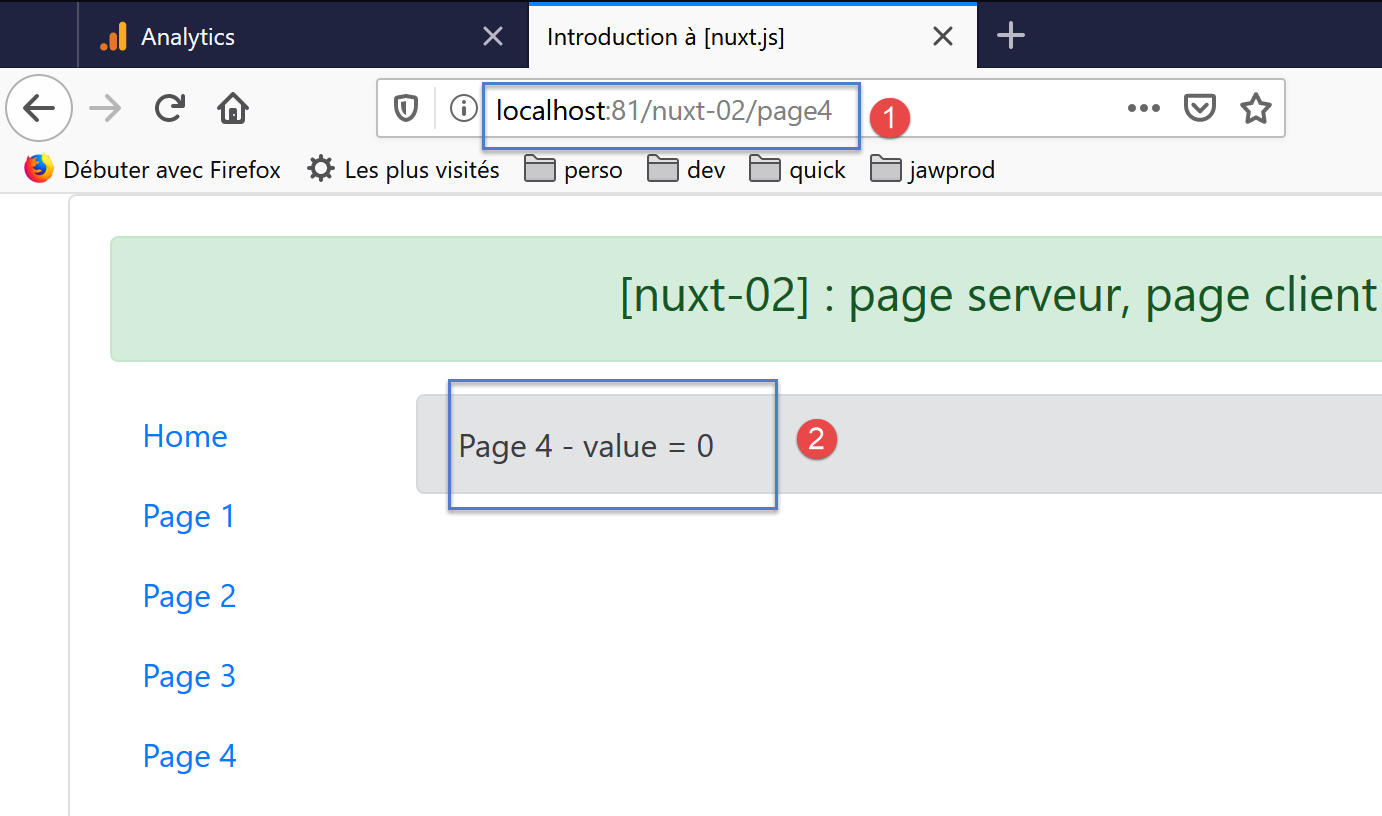
与预期相反,[2]中显示的值并非52。究竟发生了什么?
日志记录如下:
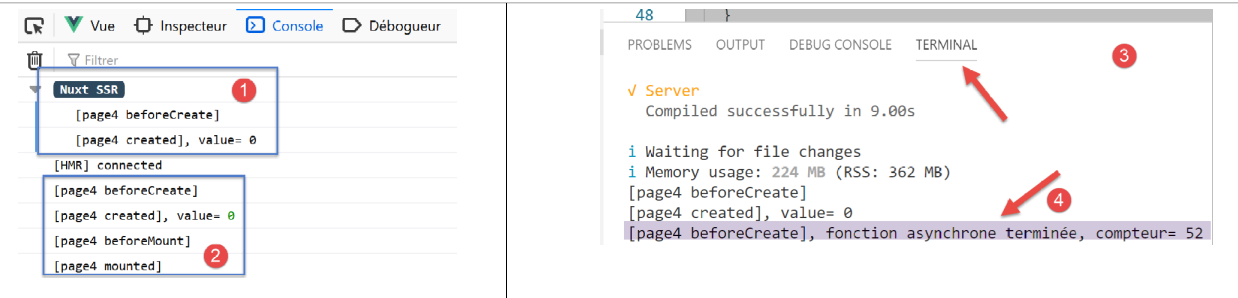
可以注意到,在 [1] 中,异步操作结束的日志并未显示。 显示计数器值的函数 [created] 显示为 0。这一切都表明 [nuxt] 并未等待异步操作结束。
若返回用于启动应用程序的 VSCode 终端,可查看到 [3-4] 的日志。可见该异步函数已在服务器端成功执行。
最终,[beforeCreate] 函数确实已在服务器端完全执行完毕,但 [nuxt] 并未等待其执行结束就将页面发送给了客户端浏览器,尽管它确实等待了 [fetch] 函数的执行结束。 因此,若希望服务器初始化 [Vuex] 存储,则必须使用此方法。
5.6. [vue] 应用程序的导航
我们已经展示了当服务器初次加载每个 [index, page1, page2, page3, page4] 页面时发生的情况。但在实际操作中并非如此:在正常运行时,服务器仅会检索 [index] 页面。让我们看看这种情况下这三个页面:
页面 [index]
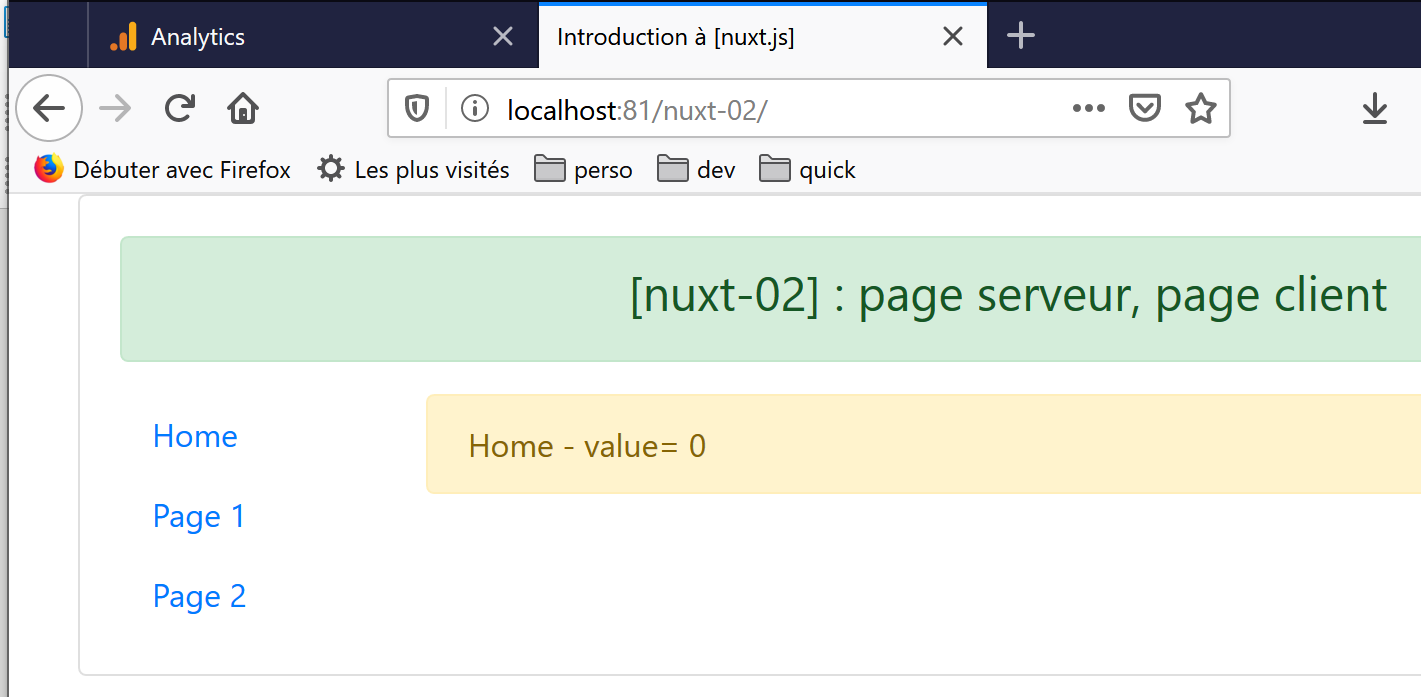
我们在“链接”一节中已经解释过这一结果。
现在点击链接 [Page 1]:
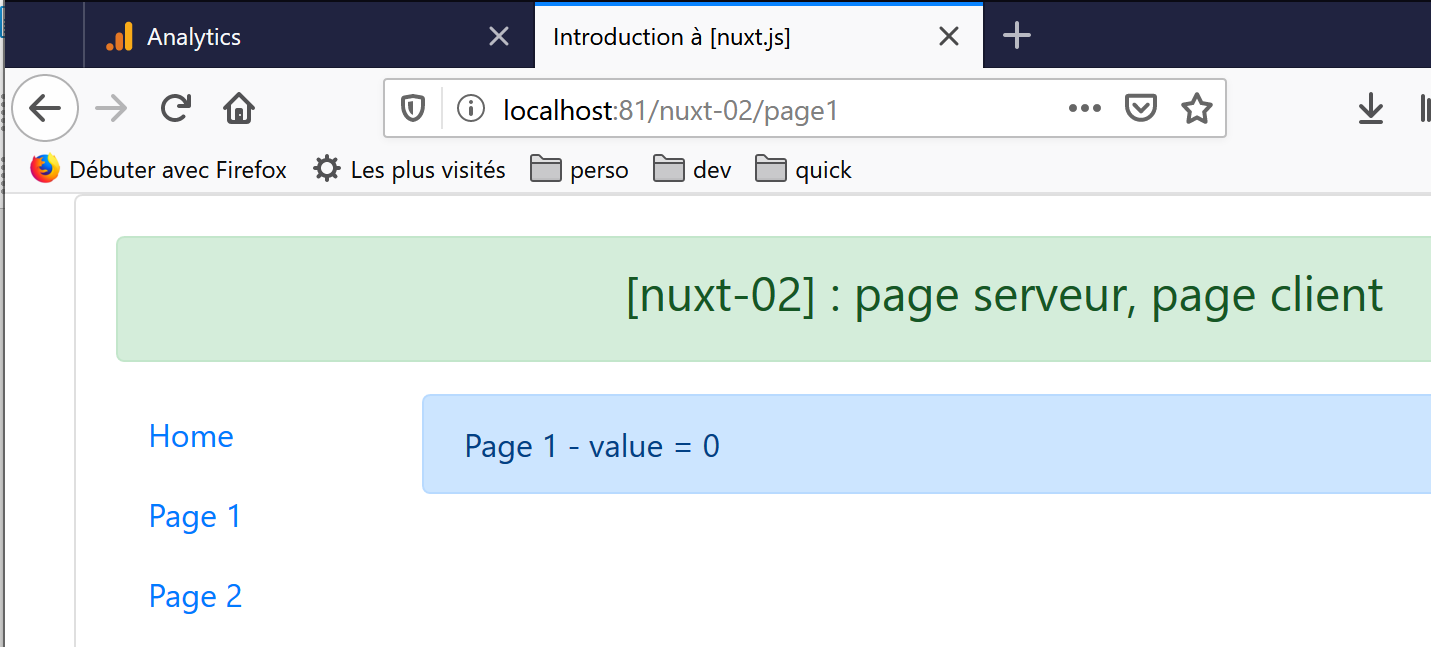
显示的值为 0。而当最初通过手动输入 URL 向服务器请求该页面时,该值为 25。原因很简单。执行的代码如下:
  created() {
    // 客户端和服务器
    console.log('[page1 created]')
    // 仅服务器
    if (process.server) {
      this.$store.commit('increment', 25)
    }
    // 客户端和服务器
    this.value = this.$store.state.counter
    console.log('value=', this.value)
},
正是第 6 行将计数器设置为 25。由于页面未向服务器请求,第 5-7 行未被执行,因此 [Vuex] 存储器的计数器保持为 0。
现在,我们点击链接 [Page 2]:
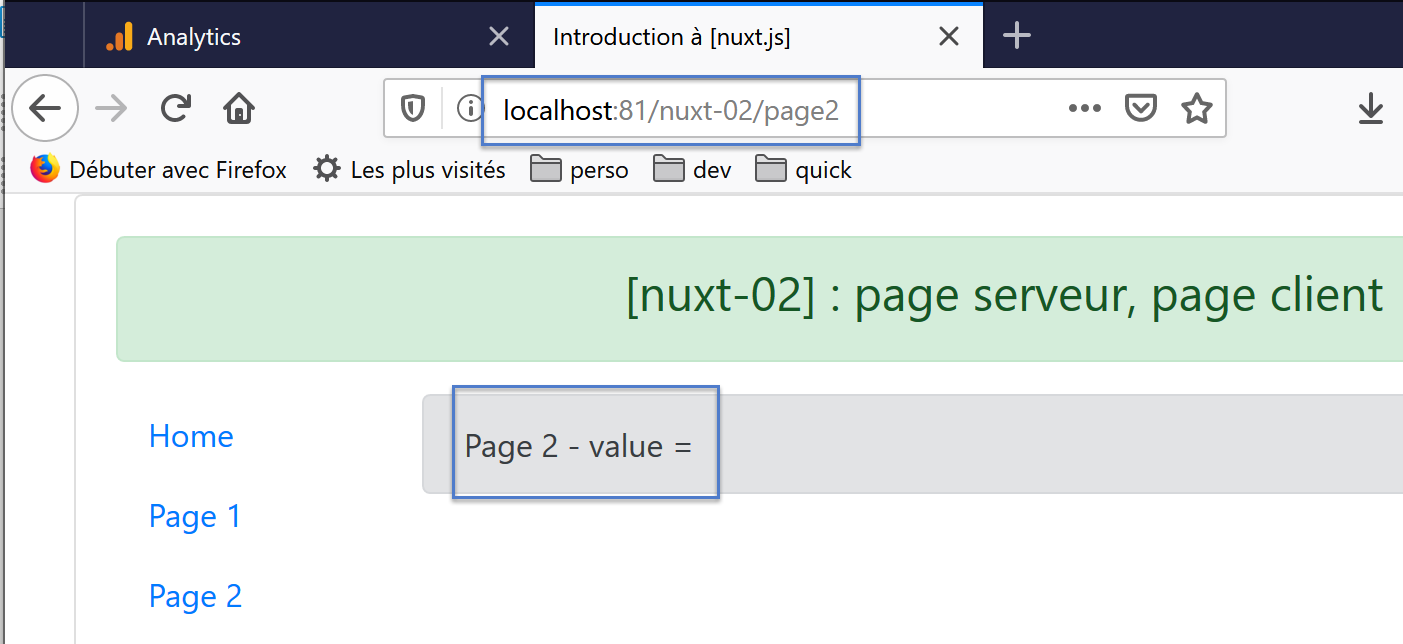
这次,页面上没有显示任何值,而且控制台日志中还出现了一条警告:
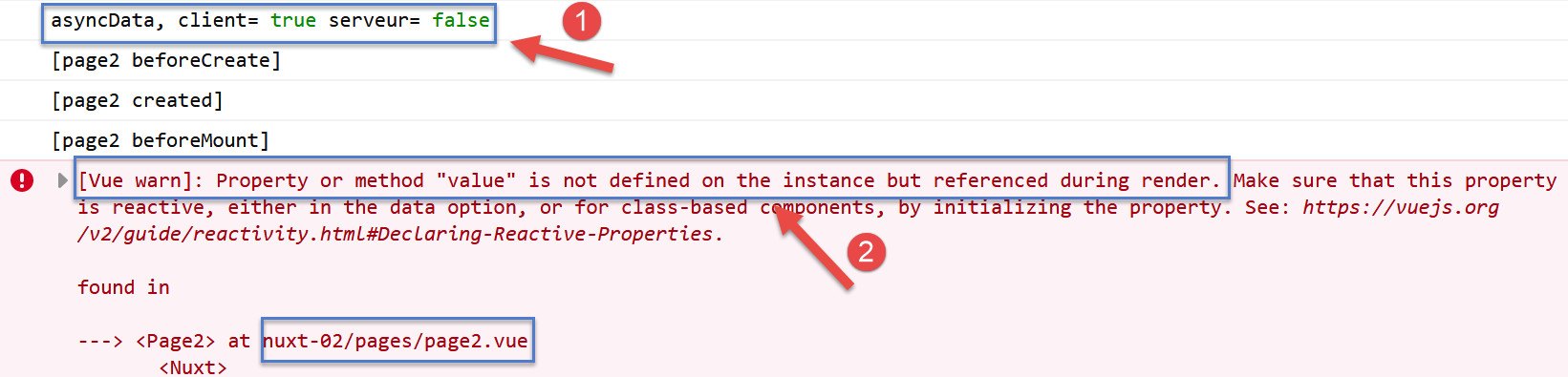
- 在 [1] 中,我们发现 [asyncData] 函数是由客户端执行的。情况总是如此:
- 如果页面是向服务器请求的,则由服务器执行该函数。在这种情况下,客户端不会执行该函数;
- 而当页面是客户端当前路由的目标时,该函数则由客户端执行;
- 在 [2] 中:[nuxt] 会发出警告,因为页面模板中存在响应式表达式 {{ value }},而该页面并不具备 [value] 属性;
回顾客户端执行的代码:
asyncData() {
    // 谁在执行这段代码?
    console.log('asyncData, client=', process.client, 'serveur=', process.server)
    // 仅限服务器
    if (process.server) {
      // 返回一个 Promise
      return new Promise(function(resolve, reject) {
        // 通常这里会有一个异步函数——但这里没有
        // 该结果将被包含在 [data] 的属性中
        resolve({ value: 87 })
      })
    }
  },
- 第 3 行显示,函数 [asyncData] 甚至在生命周期函数之前就被客户端执行了;
- 第 5 行阻止了创建属性 [value] 的其余代码的执行,因为该代码由客户端执行;
现在我们来看 [page3] 页面:
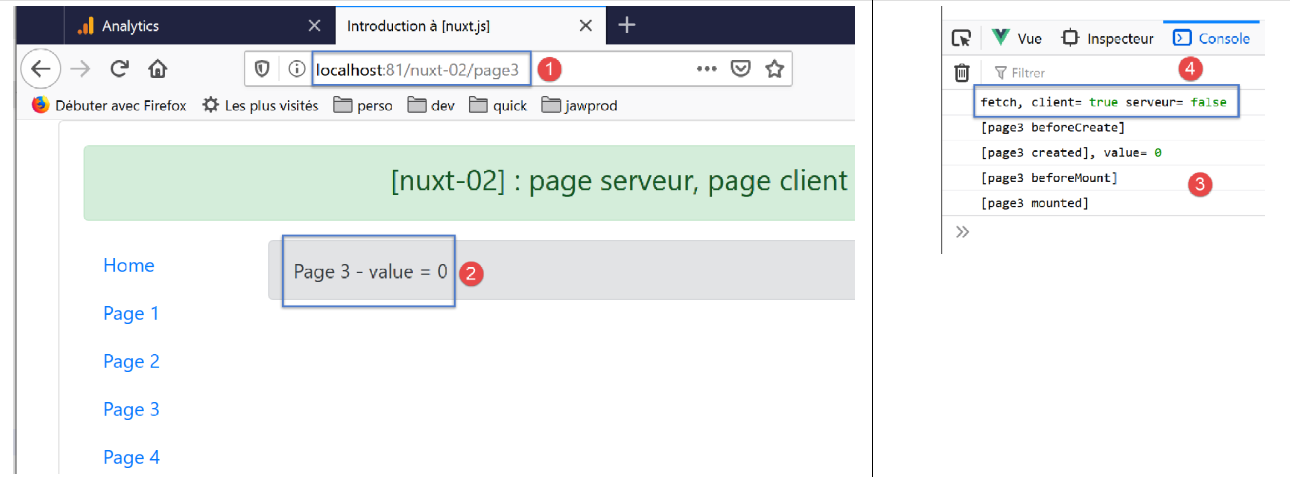
- 在 [2] 中,当页面由服务器提供时,该值为 28。但此处并非如此;
- 在 [4] 中,我们可以看到 [fetch] 函数已在客户端执行;
让我们来分析客户端执行的代码:
...
fetch(context) {
    // 谁在执行这段代码?
    console.log('fetch, client=', process.client, 'serveur=', process.server)
    // 仅限服务器
    if (process.server) {
      // 返回一个 Promise
      return new Promise(function(resolve, reject) {
        // 这里通常是一个异步函数
        // 通过等待一秒来模拟它
        setTimeout(() => {
          // 成功
          resolve()
        }, 1000)
      }).then(() => {
        // 修改存储
        context.store.commit('increment', 28)
        // 日志
        console.log('fetch commit terminé')
      })
    }
},
...
- 客户端执行方法 [fetch],第 2 行;
- 第 6-21 行未被执行,因为条件 [process.server] 为假。因此,将计数器设置为 28 的第 17 行未被执行。计数器保持为零。这就是为什么客户端显示 0 而不是 28 的原因;
现在我们来看页面 [page4]。结果如下:
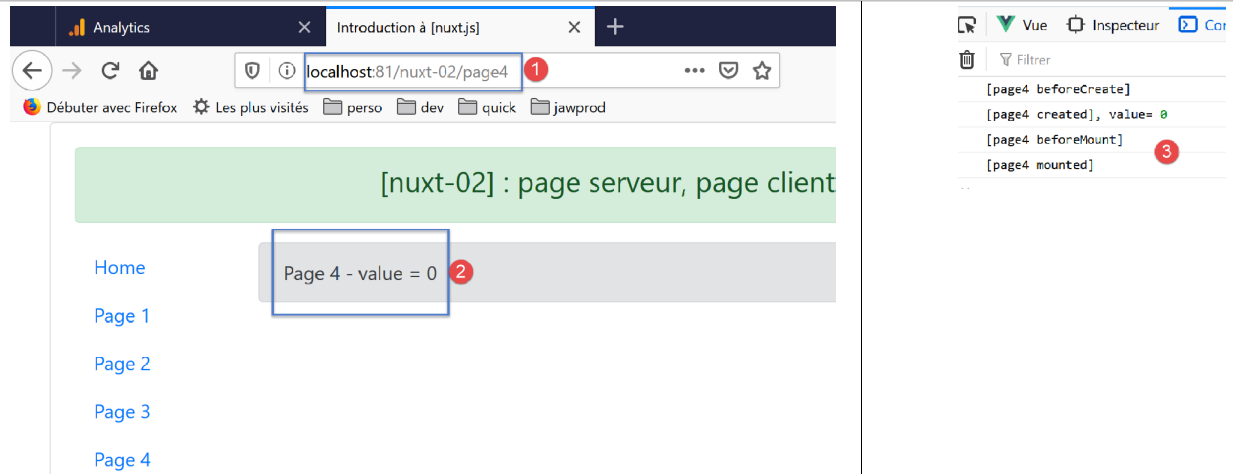
- 在 [2] 中,计数器的值;
- 在 [3] 中,客户端日志;
客户端执行的代码如下:
...
data() {
    return {
      value: 0
    }
  },
  // 生命周期
  async beforeCreate() {
    // 客户端和服务器
    console.log('[page4 beforeCreate]')
    // 仅限服务器
    if (process.server) {
      // 执行异步函数
      const valeur = await new Promise(function(resolve, reject) {
        // 此处通常是一个异步函数
        // 通过等待10秒来模拟该函数
        setTimeout(() => {
          // 成功 - 返回计数器的值
          resolve(52)
        }, 10000)
      })
      // 修改存储器
      this.$store.commit('increment', valeur)
      // 日志
      console.log('[page4 beforeCreate], fonction asynchrone terminée, compteur=', this.$store.state.counter)
    }
  },
  created() {
    // 客户端和服务器
    this.value = this.$store.state.counter
    console.log('[page4 created], value=', this.value)
  },
...
- 第12至26行不会被客户端执行,因为第12行的条件[process.server]为假。因此存储器[Vuex]的计数器值为0(其在存储器中的初始值),页面显示的正是该值;
有人可能会问,如果将第12行和第26行的[if]注释掉会发生什么。答案如下:
- 此时客户端执行第14-25行代码,但[nuxt]不会等待异步函数结束(与服务器端不同),因此计数器保持为0;
- 10秒后,异步函数结束,计数器在第23行被设置为52;
- 当再次导航至页面 [page4] 时,此时显示的值即为 52;
5.7. Résumé
通过多次测试,我们总结出以下要点:
- 如果页面 [index] 需要包含外部数据,服务器可通过函数 [asyncData] 获取这些数据;
- 如果服务器需要在加载页面 [index] 时,使用外部数据初始化存储 [Vuex],则将在函数 [fetch] 中执行此操作;
- 若要避免因客户端页面在视觉上覆盖服务器发送并最初显示的页面而导致的“闪烁”现象,服务器生成的页面与客户端生成的页面必须完全一致;
我们将通过一个新示例进一步了解 [nuxt] 的其他方面。