8. 示例 [nuxt-05]:利用会话 Cookie 实现存储持久化
目标:我们希望 [Vuex] 存储器不会在每次向服务器发送请求时被重置。为实现这一目标,我们将使用会话 Cookie:
- 存储将由服务器初始化,并由服务器将其存储在会话 Cookie 中;
- 客户端浏览器将接收该会话 Cookie,并在每次向服务器发送新请求时自动将其带上;
- 服务器随后可检索该会话 Cookie,并使用其中包含的、由客户端更新的存储;
8.1. 概述
[nuxt-05] 项目最初是通过克隆 [nuxt-04] 项目创建的:
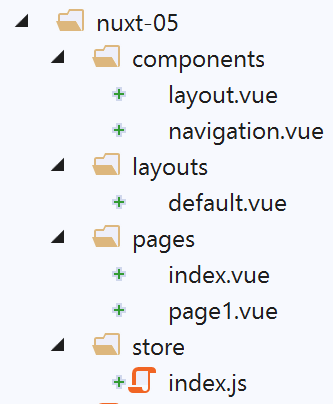
我们将看到,只有 [store/index.js] 文件会发生变化。
要在 [nuxt] 中使用 Cookie,我们将使用 [cookie-universal-nuxt] 模块,并通过 [yarn] 在 VSCode 终端中安装它:
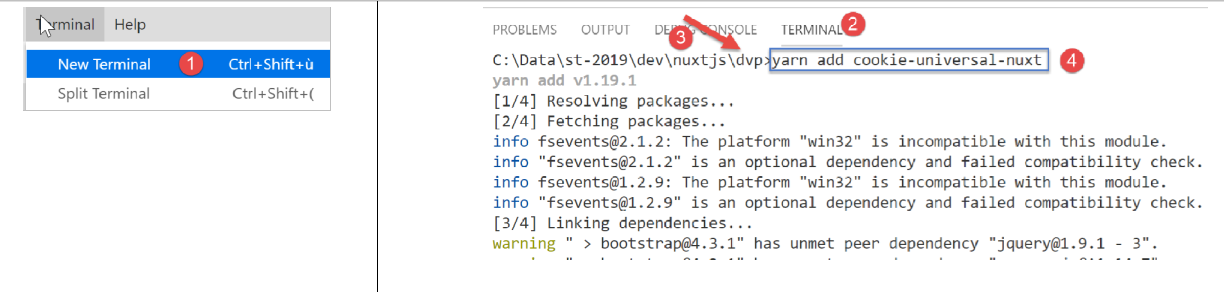
- 在 [4] 中,输入命令 [yarn add cookie-universal-nuxt];
这样,[dvp] 项目的 [package.json] 文件中便新增了一个模块:
...
},
  "dependencies": {
    "@nuxtjs/axios": "^5.3.6",
    "bootstrap": "^4.1.3",
    "bootstrap-vue": "^2.0.0",
    "cookie-universal-nuxt": "^2.0.19",
    "nuxt": "^2.0.0"
},
8.2. 配置文件 [nuxt.config.js]
为了让 [nuxt] 使用 [cookie-universal-nuxt] 提供的 Cookie,您必须在 [nuxt.config.js] 配置文件中声明此模块:
...
],
  /*
   ** Nuxt.js modules
   */
  modules: [
    // Doc: https://bootstrap-vue.js.org
    'bootstrap-vue/nuxt',
    // Doc: https://axios.nuxtjs.org/usage
    '@nuxtjs/axios',
    // https://www.npmjs.com/package/cookie-universal-nuxt
    'cookie-universal-nuxt'
  ],
...
- 第 12 行,将 [cookie-universal-nuxt] 模块添加到 [nuxt] 模块数组中 [6];
最终 [nuxt.config.js] 文件如下:
export default {
  mode: 'universal',
  /*
   ** Headers of the page
   */
  head: {
    title: 'Introduction à [nuxt.js]',
    meta: [
      { charset: 'utf-8' },
      { name: 'viewport', content: 'width=device-width, initial-scale=1' },
      {
        hid: 'description',
        name: 'description',
        content: 'ssr routing loading asyncdata middleware plugins store'
      }
    ],
    link: [{ rel: 'icon', type: 'image/x-icon', href: '/favicon.ico' }]
  },
  /*
   ** Customize the progress-bar color
   */
  loading: { color: '#fff' },
  /*
   ** Global CSS
   */
  css: [],
  /*
   ** Plugins to load before mounting the App
   */
  plugins: [],
  /*
   ** Nuxt.js dev-modules
   */
  buildModules: [
    // Doc: https://github.com/nuxt-community/eslint-module
    '@nuxtjs/eslint-module'
  ],
  /*
   ** Nuxt.js modules
   */
  modules: [
    // Doc: https://bootstrap-vue.js.org
    'bootstrap-vue/nuxt',
    // Doc: https://axios.nuxtjs.org/usage
    '@nuxtjs/axios',
    // https://www.npmjs.com/package/cookie-universal-nuxt
    'cookie-universal-nuxt'
  ],
  /*
   ** Axios module configuration
   ** See https://axios.nuxtjs.org/options
   */
  axios: {},
  /*
   ** Build configuration
   */
  build: {
    /*
     ** You can extend webpack config here
     */
    extend(config, ctx) {}
  },
  // source code directory
  srcDir: 'nuxt-05',
  // router
  router: {
    // application URL root
    base: '/nuxt-05/'
  },
  // server
  server: {
    // service port, default 3000
    port: 81,
    // network addresses listened to, default localhost: 127.0.0.1
    // 0.0.0.0 = all the machine's network addresses
    host: 'localhost'
  },
  // environment
  env: {
    maxAge: 60 * 5
  }
}
- 第 79 行:我们在文件中添加了 [env] 键。该键是一个保留字。在此对象中声明的元素可通过应用程序中的 [context.env] 对象访问;
- 第 80 行:[maxAge] 属性将表示会话 Cookie 的最大生存时间,从 Cookie 最后一次初始化时开始计算。该时长以秒为单位。此处,我们将其生存时间设置为 5 分钟;
8.3. 存储持久化的原理
客户端与服务器之间交换的 Cookie 在双方(客户端和服务器)均可访问,具体位于:
- [context.app.$cookies](只要 [context] 对象可用,即几乎在任何地方);
- [this.$cookies](在视图内部);
可通过表达式 [...$cookies.get('cookie_name')] 获取特定 Cookie。可通过表达式 [...$cookies.set('cookie_name', cookie_value)] 设置 Cookie 的值。
商店持久化 Cookie 的原理如下:
- 当服务器在 [nuxtServerInit] 函数中初始化存储时,存储的状态将被保存在名为“session”的 Cookie 中;
- 随后,‘session’ Cookie 将作为服务器 HTTP 响应的一部分返回。我们知道,浏览器会将服务器发送给它的 Cookie 发回给服务器,并且在每次向服务器发起新请求时都会这样做。我们还知道,服务器会在发送给客户端的页面中包含该存储;
- 在浏览器中,客户端应用程序会检索服务器发送的存储,然后执行其任务。我们将确保每次修改存储时,其新状态都会存储在浏览器保存的“session” Cookie 中;
- 如果用户强制向服务器发起请求,客户端浏览器将自动回传服务器先前发送的所有 Cookie,包括名为“session”的 Cookie;
- 当服务器在收到此请求后重新初始化数据存储时,它将检索“session”Cookie,并使用其值来初始化数据存储的状态;
- 因此,客户端与服务器之间将保持存储器的连续性;
8.4. 初始化存储
存储器在 [store / index.js] 文件中实现:
/* eslint-disable no-console */
export const state = () => ({
  // meter
  counter: 0
})

export const mutations = {
  // increment counter by one [inc] value
  increment(state, inc) {
    state.counter += inc
  },
  // state replacement
  replace(state, newState) {
    for (const attr in newState) {
      state[attr] = newState[attr]
    }
  }
}

export const actions = {
  async nuxtServerInit(store, context) {
    // who executes this code?
    console.log('nuxtServerInit, client=', process.client, 'serveur=', process.server, 'env=', context.env)
    // waiting for a promise to be fulfilled
    await new Promise(function(resolve, reject) {
      // this is normally an asynchronous function
      // we simulate it with a one-second wait
      setTimeout(() => {
        // init session
        initStore(store, context)
        // success
        resolve()
      }, 1000)
    })
  }
}

function initStore(store, context) {
  // is there a session cookie in the current request?
  const cookies = context.app.$cookies
  const session = cookies.get('session')
  if (!session) {
    // no existing session
    console.log("nuxtServerInit, initialisation d'une nouvelle session")
    // initialize the blind
    store.commit('increment', 77)
  } else {
    console.log("nuxtServerInit, reprise d'une session existante")
    // update the store with the session cookie
    store.commit('replace', session.store)
  }
  // put the store in the session cookie
  cookies.set('session', { store: store.state }, { path: context.base, maxAge: context.env.maxAge })
  // log
  console.log('initStore terminé, store=', store.state)
}
注释
- 第2–5行:该商店将包含一个计数器;
- 第9–11行:该计数器可以递增;
- 第13-17行:数据存储的状态可以从一个新状态初始化。添加此函数是为了演示数据存储的初始化方式,当其不仅限于本例中的计数器时;
- 第 21–35 行:[nuxtServerInit] 函数未作更改;
- 第 30 行:当一秒钟的超时时间结束时,使用第 38–56 行中的函数初始化存储;
- 第40–41行:我们首先获取名为“session”的Cookie:
- 在应用程序首次执行以及向服务器发送的第一个请求期间,该 Cookie 尚不存在。随后它将被创建(第 53 行)并发送至客户端浏览器;
- 在应用程序的同一执行过程中,以及向服务器发出的第 2、第 3……次请求时,该 Cookie 将存在,因为客户端浏览器会在每次向服务器发出新请求时将其发回;
- 在第二次执行应用程序并向服务器发出首次请求时,该 Cookie 也可能存在。事实上,在步骤 1 结束时,该 Cookie 已被存储在浏览器中,并具有特定的有效期。如果该有效期尚未过期,名为“session”的 Cookie 将随向服务器发出的首次请求一并发送
总而言之,对于每次向服务器发出的请求:如果“session”Cookie 已存储在客户端浏览器中,服务器将接收到它;否则,则不会。
- 第 42–47 行:如果服务器未收到会话 Cookie,则第 46 行会初始化存储;
- 随后,在第 53 行,将创建一个名为“session”的 Cookie 并将其放入服务器的 HTTP 响应中。该 Cookie 的值为对象 [{ store: store.state }]。因此,放入会话 Cookie 中的是存储器的状态,而非存储器本身;
- [set] 函数的第三个参数是一个选项对象:
- [path] 指定应将此 Cookie 发送到的 URL。[context.base] 是 [nuxt-05] 应用程序的基准 URL。该值在 [nuxt.config.js] 文件中定义:
  // router
  router: {
    // application URL root
    base: '/nuxt-05/'
},
- [maxAge] 表示 Cookie 在浏览器中的有效期(以秒为单位)。超过此时间后,浏览器将不再将其发回服务器。[context.env.maxAge] 返回 [nuxt.config.js] 文件中指定的值:
[env] 是配置文件中的保留关键字。在此,我们将生命周期设置为 5 分钟。该时长从浏览器上次接收会话 Cookie 时开始计算。超过此时间后,Cookie 将不再发回服务器,届时服务器将需要启动一个新的会话;
- 第 48–50 行:如果服务器接收到会话 Cookie,则使用该 Cookie 中的 [store] 对象初始化存储器的状态。请注意,该对象包含存储器的保存状态;
- 随后,在第53行,会话Cookie会被放入发送给客户端浏览器的响应中:
- [get] 函数从服务器接收的请求中获取会话 Cookie;
- [set] 函数将会话 Cookie 放入服务器发送给客户端浏览器的响应中;
- 随后,在第53行,会话Cookie会被放入发送给客户端浏览器的响应中:
8.5. 增加存储计数器
[index.vue] 页面中的计数器递增机制如下:
  // event management
  methods: {
    incrementCounter() {
      console.log('incrementCounter')
        // counter increment of 1
      this.$store.commit('increment', 1)
       // change display value
      this.value = this.$store.state.counter
       // store in session cookie
      this.$cookies.set('session', { store: this.$store.state }, { path: this.$nuxt.context.base, maxAge: this.$nuxt.context.env.maxAge })
    }
}
在客户端,每次修改存储时,都必须将其保存到会话 Cookie 中。这是因为用户随时可能手动请求一个 URL,而我们必须能够将最新的存储状态发送给服务器。因此,在第 10 行,在递增存储计数器之后,我们将存储的状态保存到了会话 Cookie 中:
- cookie 可通过 [this.$cookies] 属性访问;
- 存储的状态 [this.$store.state] 保存在与键 [store] 关联的 Cookie 中;
- Cookie 的路径为 [context.base]。在视图中,可通过 [this.$nuxt.context] 访问上下文;
- Cookie 的有效期为 [context.env.maxAge],此处可通过 [this.$nuxt.context.env.maxAge] 属性获取;
8.6. 运行 [nuxt-05] 示例
我们启动 [nuxt-05] 应用程序:

以下截图来自 Chrome 浏览器。我们请求的 URL 是 [http://localhost:81/nuxt-05/]。请务必在 /nuxt-05 之后加上最后的 /,否则将无法获得预期结果:
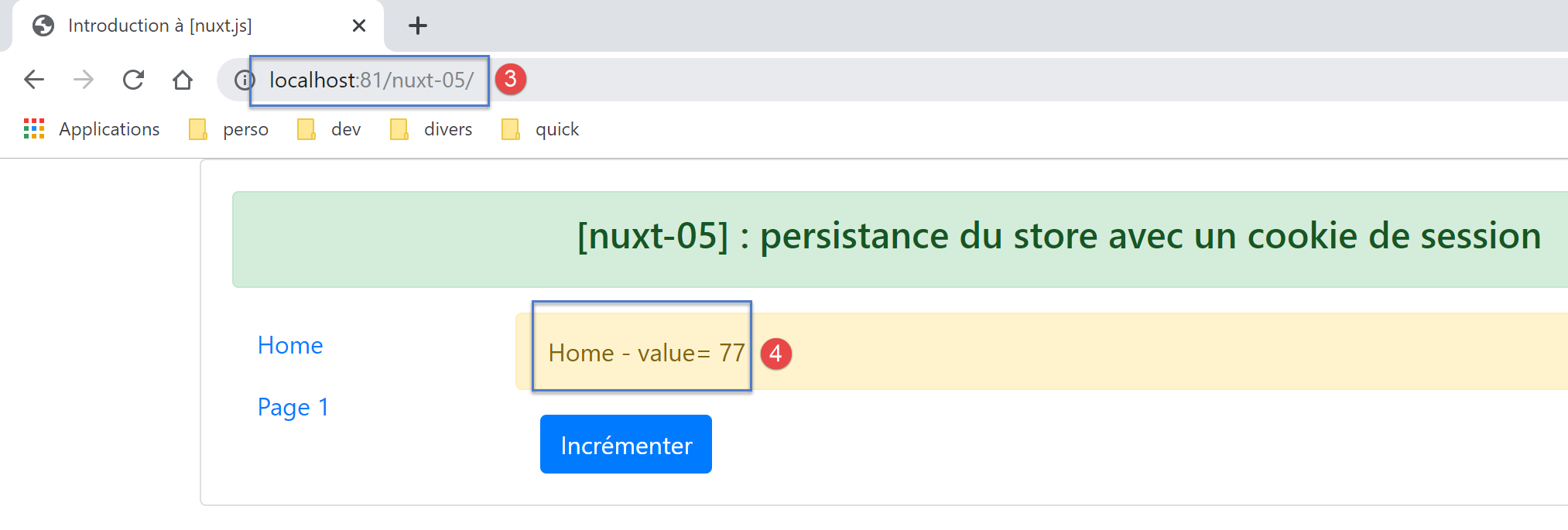
- 在 [4] 中,我们获取到了 store 的初始值(77);
让我们查看浏览器日志(F12):
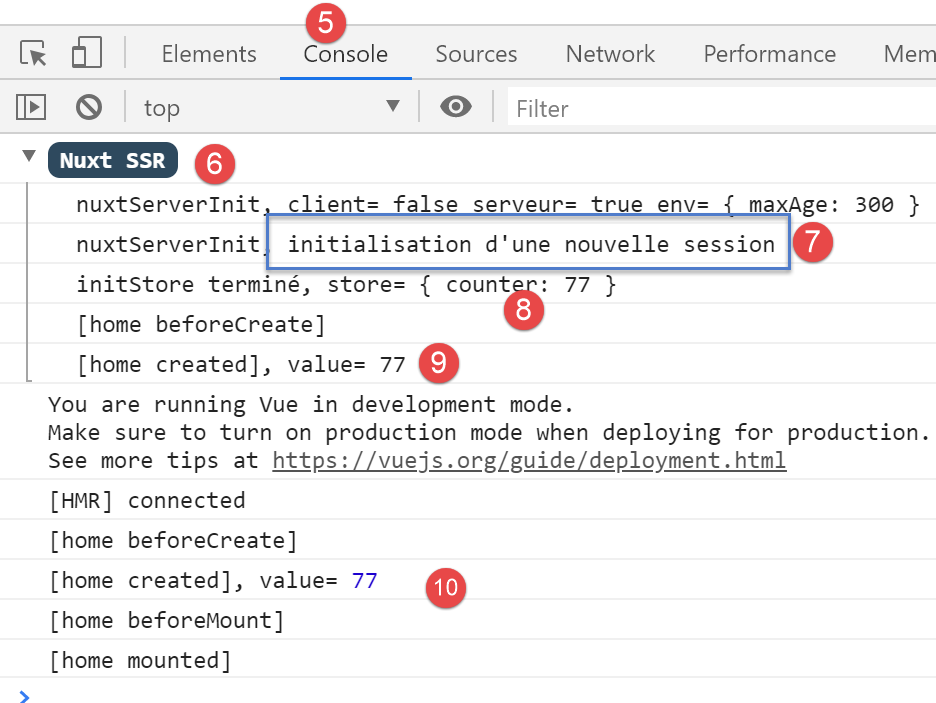
- 在 [5-6] 中,服务器日志;
- 在 [7] 中,我们看到服务器正在启动一个新会话。这意味着它未收到会话 Cookie;
- 在 [8] 中,计数器初始化为 77;
- 在 [9] 中,服务器的 [index] 页面 (9) 和客户端的 [index] 页面 (10) 均显示相同的计数器值;
现在让我们看看浏览器接收到的 Cookie:
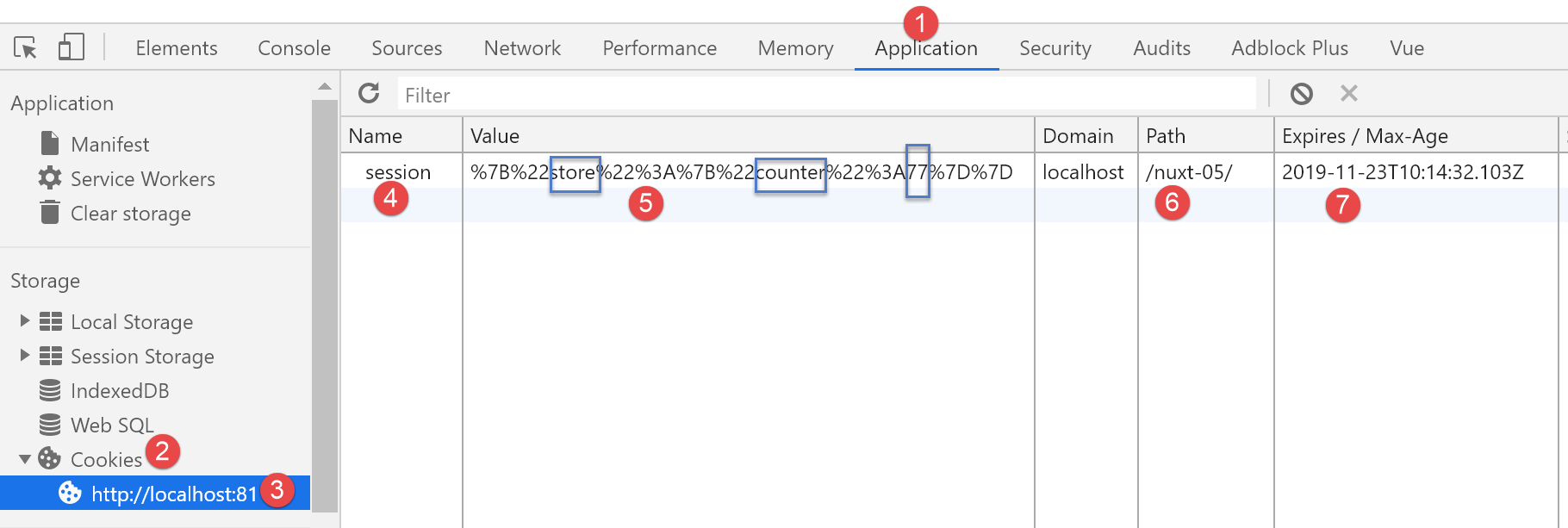
- 在 [1] 中,选择 [应用程序] 选项卡,然后选择 [Cookie] 选项 [2]。从浏览器中的所有 Cookie 中,选择来自 [http://localhost:81] 域的那个;
- 在 [4] 中,选择名为“session”的 Cookie。如果未显示,请刷新页面 [F5]:可能是其 5 分钟的有效期已过;
- 在 [5] 处,是该 Cookie 的值。尽管由于字符 { : 的编码导致不太清晰,但仍可辨认出计数器显示的数值 77;
- 在 [6] 中,是 Cookie 的 URL:每次请求该 URL 时,浏览器都会将该 Cookie 发送给服务器;
- 在 [7] 中,是 Cookie 的过期时间。一旦超过这个时间,Cookie 就会从浏览器中删除;
请确保您拥有此 Cookie。若未拥有,请刷新页面(F5)。当页面加载并包含该 Cookie 后,再次刷新页面(F5)。此时日志将显示如下:
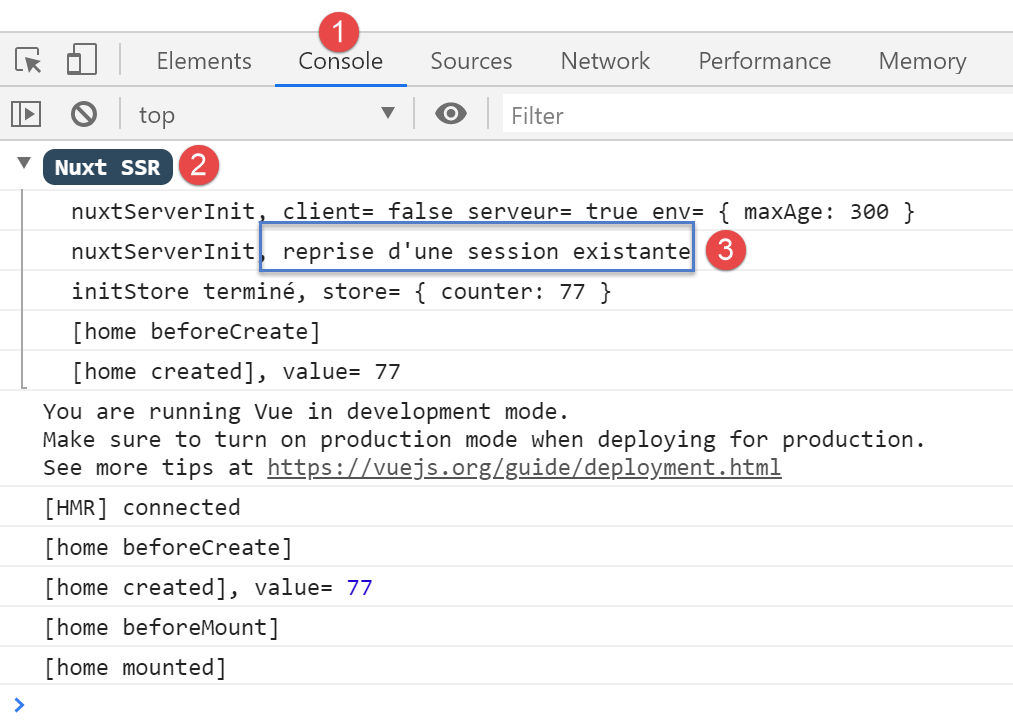
这次,在[3]中,服务器已成功检索到会话Cookie。该Cookie是由客户端浏览器发送给服务器的。
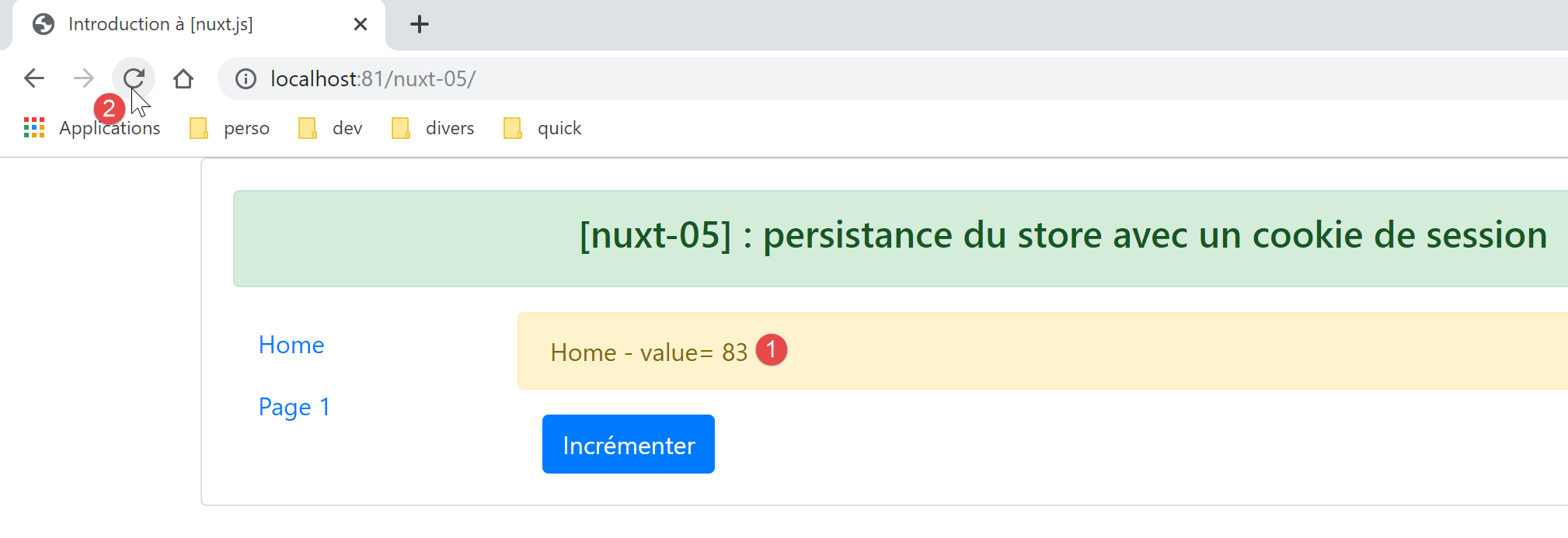
现在,将计数器加 1,然后不时刷新当前页面(F5)——无论是 [index] 还是 [page1]——你会发现计数器不会像 [nuxt-04] 示例中那样重置为 77,而是保留了页面刷新前客户端浏览器中的原始值:
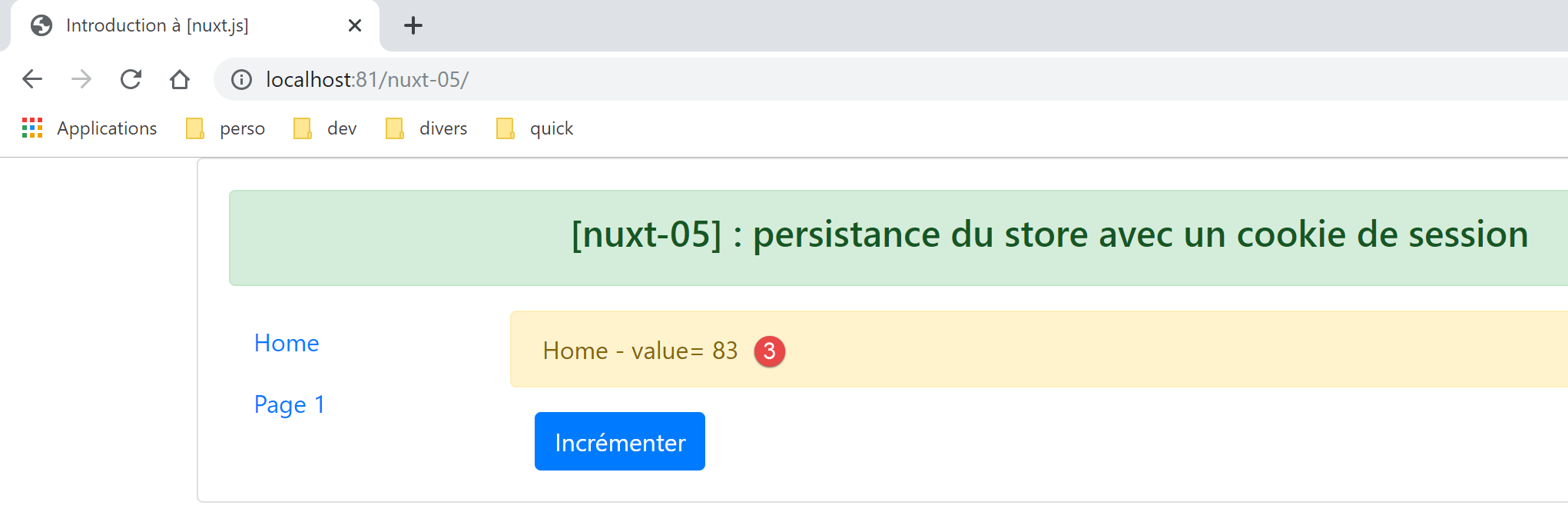
此时的浏览器日志如下:
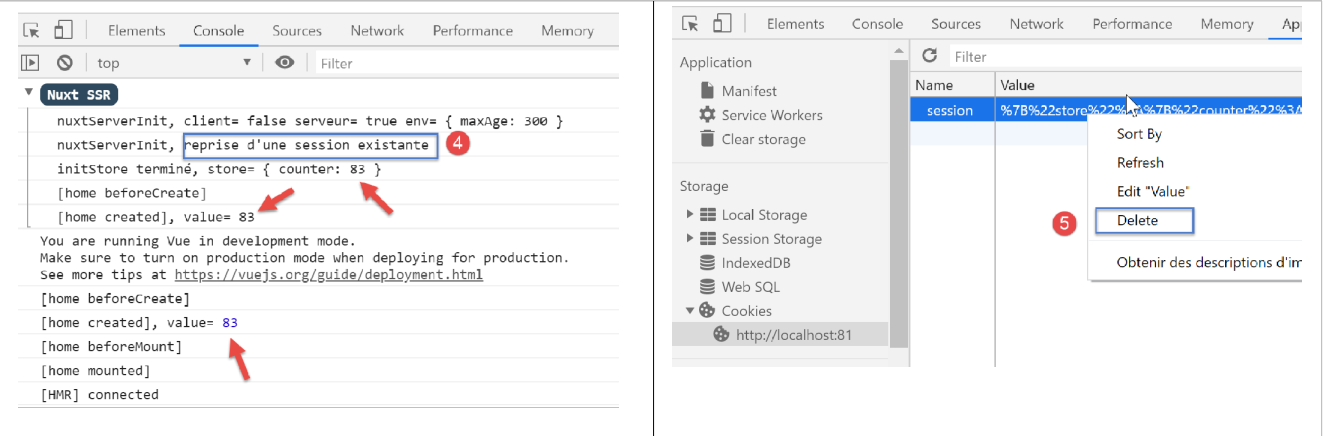
注意:出于测试目的,您可能需要删除[5]浏览器中存储的会话 Cookie,以便在下次向服务器发送请求时,由服务器初始化一个新的会话。
最后,让我们演示 [index] 页面上的 [incrementCounter] 函数对客户端浏览器中存储的会话 Cookie 产生的影响:
// event management
  methods: {
    incrementCounter() {
      console.log('incrementCounter')
      // counter increment of 1
      this.$store.commit('increment', 1)
      // change display value
      this.value = this.$store.state.counter
      // store in session cookie
      this.$cookies.set('session', { store: this.$store.state }, { path: this.$nuxt.context.base, maxAge: this.$nuxt.context.env.maxAge })
    }
  }
- 第 10 行:计数器的更改已反映在会话 Cookie 中;
让我们验证一下。我们从以下情况开始:
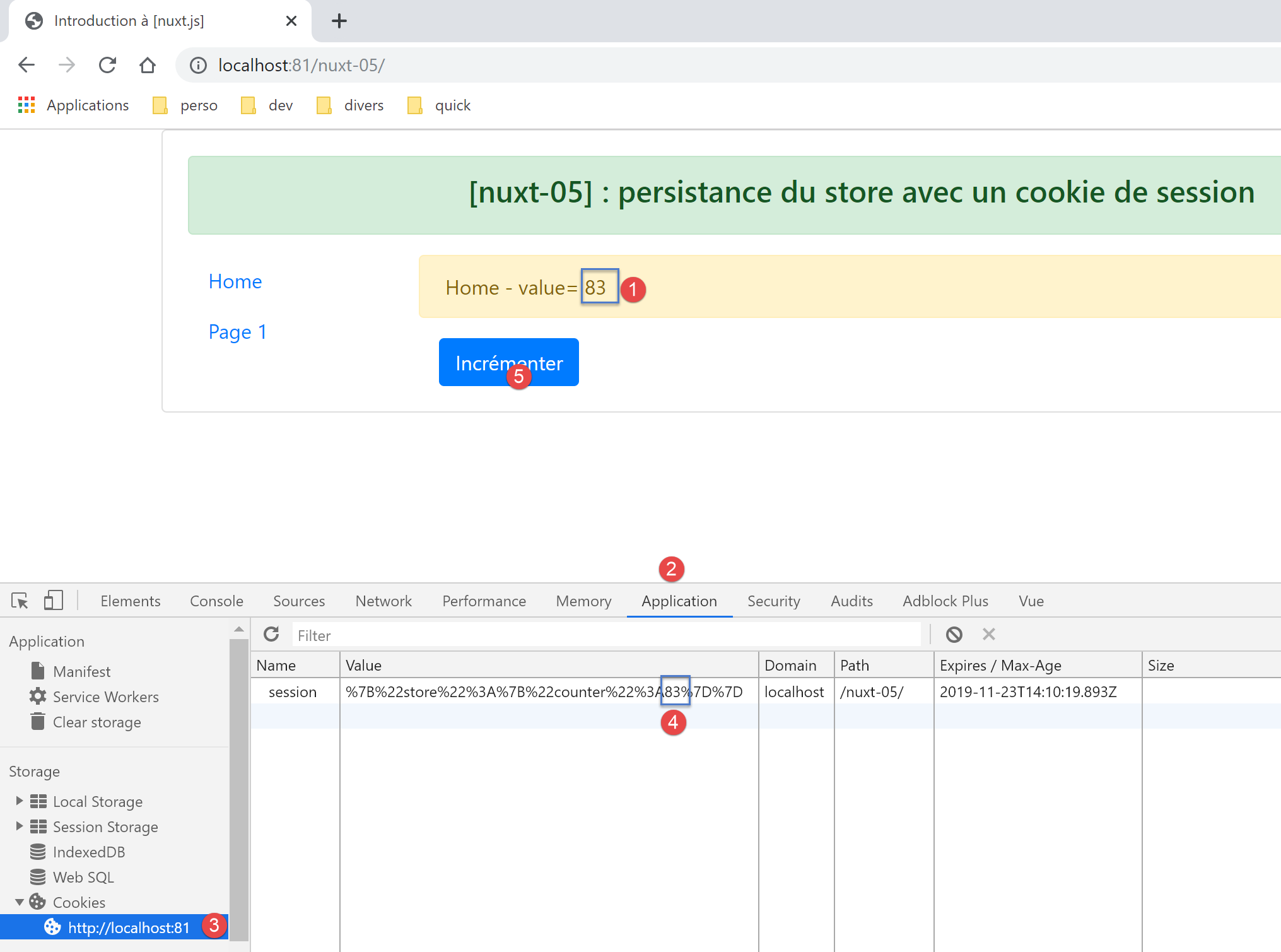
- 在 [4] 中,会话 Cookie 计数器正确地反映了显示的值 [1];
现在,让我们将计数器递增一次 [5]。图 [4] 中的会话 Cookie 变化如下:
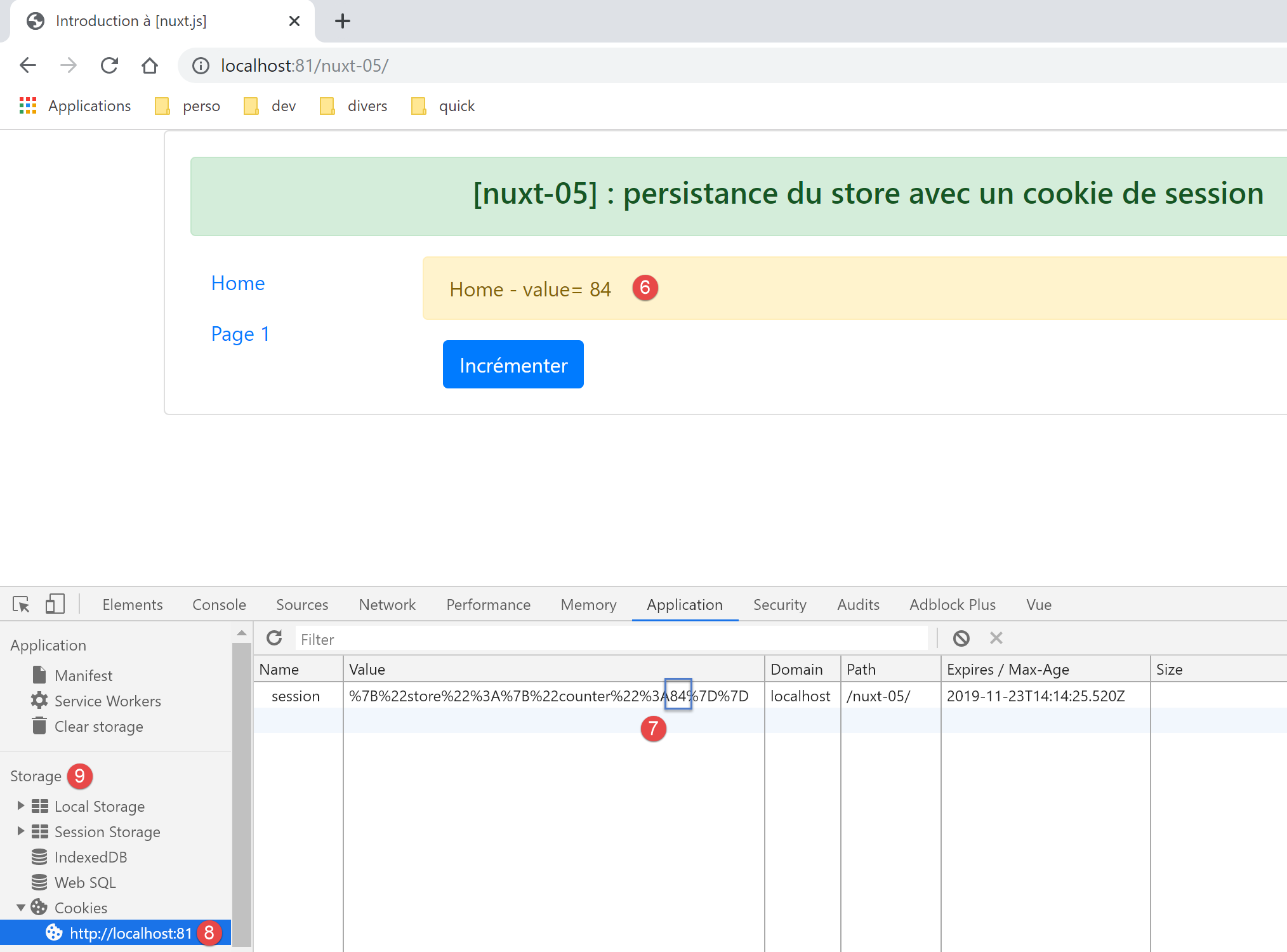
- 在 [7] 中,会话 Cookie 的计数器确实已变为 84。要查看这一点,您需要刷新视图 [8]。为此,请从 [存储] [9] 中选择另一个选项,然后重新选择选项 [8]。此时,会话 Cookie 的新值应该就会显示出来;