14. 示例 [nuxt-11]:自定义加载图片
默认情况下,[nuxt] 的加载图片为进度条。示例 [nuxt-11] 展示了如何将其替换为自定义的加载图片:
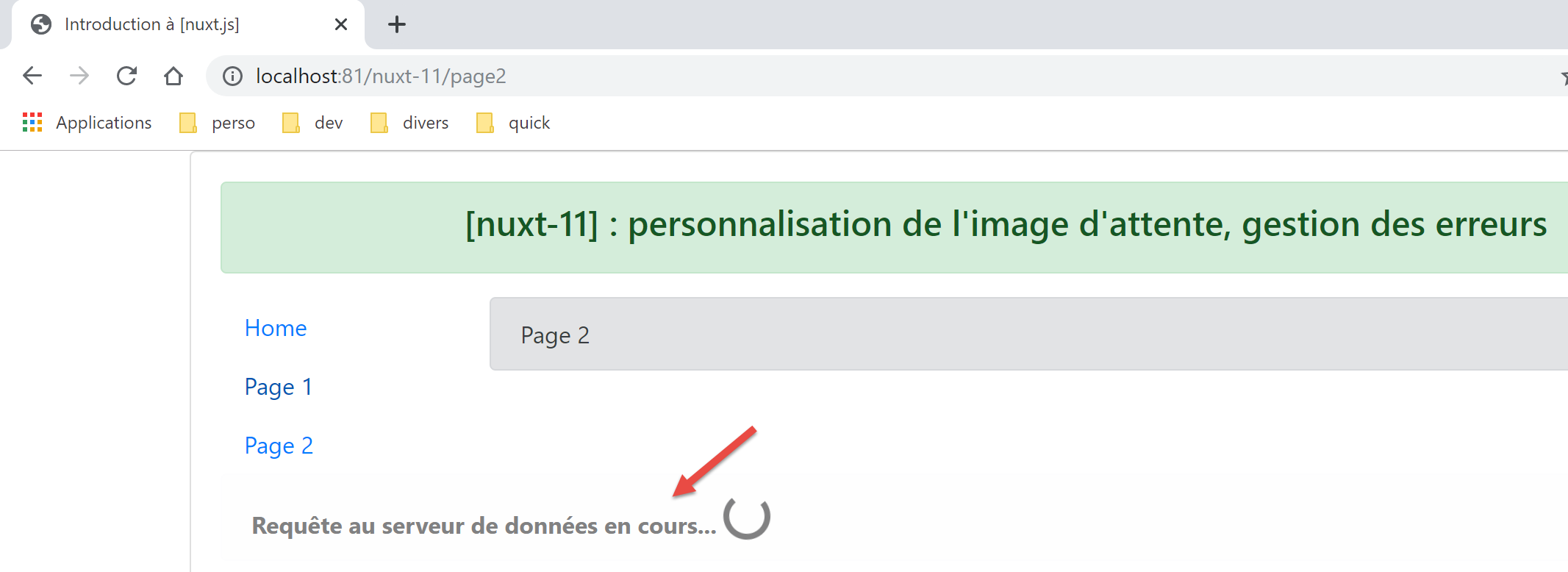
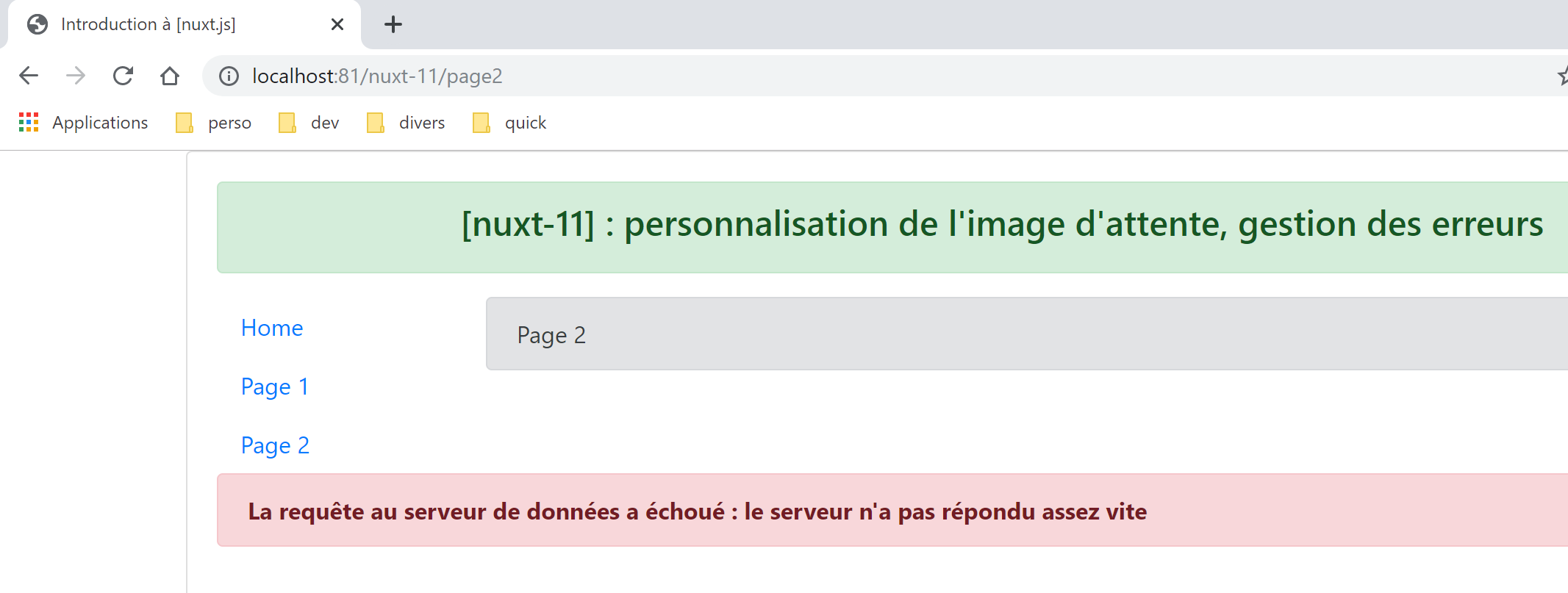
示例 [nuxt-11] 还展示了如何处理加载错误。
示例 [nuxt-11] 最初是通过复制示例 [nuxt-10] 获得的:
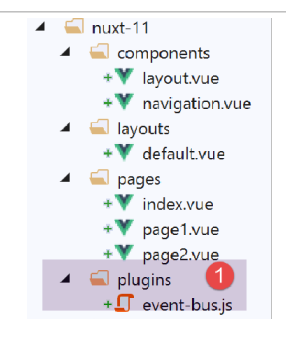
我们将向 [1] 中添加一个客户端插件,其作用是管理组件之间的事件。
14.1. 插件 [event-bus]
插件 [event-bus] 将由客户端和服务器共同执行,但我们会发现它在服务器端无法运行。其代码如下:
// 在视图之间创建事件总线
import Vue from 'vue'
export default (context, inject) => {
  // 事件总线
  const eventBus = new Vue()
  // 将函数 [eventBus] 注入上下文
  inject('eventBus', () => eventBus)
}
- 第 5 行:事件总线是 [Vue] 类的实例。该类确实提供了用于管理事件的方法:
- [$emit]:用于触发事件;
- [$on]:用于监听特定事件;
该事件总线仅处理一个事件 [loading],页面将利用该事件来启动/停止异步函数结束时的等待动画;
- 第 7 行:创建函数 [$eventBus](第一个参数),其作用是返回刚刚创建的对象 [eventBus](第二个参数)。 该函数被注入到上下文中,以便在页面的 [context.app] 和 [this] 对象中可用;
14.2. 布局 [default.vue]
布局 [default.vue] 的演变如下:
<template>
  <div class="container">
    <b-card>
      <!-- 一条消息 -->
      <b-alert show variant="success" align="center">
        <h4>[nuxt-11] : personnalisation de l'attente, gestion des erreurs</h4>
      </b-alert>
      <!-- 当前路由视图 -->
      <nuxt />
      <!-- 加载中 -->
      <b-alert v-if="showLoading" show variant="light">
        <strong>Requête au serveur de données en cours...</strong>
        <div class="spinner-border ml-auto" role="status" aria-hidden="true"></div>
      </b-alert>
      <!-- 加载错误 -->
      <b-alert v-if="showErrorLoading" show variant="danger">
        <strong>La requête au serveur de données a échoué : {{ errorLoadingMessage }}</strong>
      </b-alert>
    </b-card>
  </div>
</template>

<script>
/* eslint-disable no-console */
export default {
  name: 'App',
  data() {
    return {
      showLoading: false,
      showErrorLoading: false
    }
  },
  // 生命周期
  beforeCreate() {
    console.log('[default beforeCreate]')
  },
  created() {
    console.log('[default created]')
    // 监听事件 [loading]
    this.$eventBus().$on('loading', this.mShowLoading)
    // 以及事件 [errorLoadingMessage]
    this.$eventBus().$on('errorLoading', this.mShowErrorLoading)
  },
  beforeMount() {
    console.log('[default beforeMount]')
  },
  mounted() {
    console.log('[default mounted]')
  },
  methods: {
    // 加载管理
    mShowLoading(value) {
      console.log('[default mShowLoading], showLoading=', value)
      this.showLoading = value
    },
    // 装载错误
    mShowErrorLoading(value, errorLoadingMessage) {
      console.log('[default mShowErrorLoading], showErrorLoading=', value, 'errorLoadingMessage=', errorLoadingMessage)
      this.showErrorLoading = value
      this.errorLoadingMessage = errorLoadingMessage
    }
  }
}
</script>
- 第 11-14 行:加载动画。仅当属性 [showLoading] 为真时(第 29 行)才会显示;
- 第 16-18 行:加载错误消息。仅当属性 [showErrorLoading](第 30 行)为真时才会显示;
- 第29-30行:组件初次加载时,加载动画和错误消息均被隐藏;
- 第37-43行:页面创建时,会监听插件创建的事件总线上的[loading]事件(第一个参数)。接收到该事件后,会执行第52-55行的[mShowLoading]方法(第二个参数);
- 第52-55行:方法[mShowLoading]接收的值将是一个布尔值true/false。该值用于显示/隐藏等待提示信息;
- 第41-42行:页面创建时,会监听插件创建的事件总线上的[errorLoading]事件(第一个参数)。接收到该事件后,它会执行第57-61行中的[mShowErrorLoading]方法(第二个参数);
- 第57行:方法[mShowErrorLoading]接收两个参数:
- 第一个参数是一个布尔值(true/false),用于显示或隐藏错误消息;
- 第二个参数仅在发生错误时存在,它代表要显示的错误信息;
- 第53行和第58行的日志将显示,方法[showLoading]和[showErrorLoading]在服务器端并未被执行;
14.3. 页面 [page1]
[page1] 页面的代码演变如下:
<!-- 视图 1 -->
<template>
  <Layout :left="true" :right="true">
    <!-- 导航 -->
    <Navigation slot="left" />
    <!-- 消息-->
    <b-alert slot="right" show variant="primary"> Page 1 -- result={{ result }} </b-alert>
  </Layout>
</template>

<script>
/* eslint-disable no-console */
/* eslint-disable nuxt/no-timing-in-fetch-data */

import Navigation from '@/components/navigation'
import Layout from '@/components/layout'

export default {
  name: 'Page1',
  // 使用的组件
  components: {
    Layout,
    Navigation
  },
  // 异步数据
  asyncData(context) {
    // 日志
    console.log('[page1 asyncData started]')
    // 等待开始
    context.app.$eventBus().$emit('loading', true)
    // 无错误
    context.app.$eventBus().$emit('errorLoading', false)
    // 返回一个 Promise
    return new Promise(function(resolve, reject) {
      // 模拟异步函数
      setTimeout(function() {
        // 等待结束
        context.app.$eventBus().$emit('loading', false)
        // 日志
        console.log('[page1 asyncData finished]')
        // 返回异步结果——此处为一个随机数
        resolve({ result: Math.floor(Math.random() * Math.floor(100)) })
      }, 5000)
    })
  },

  // 生命周期
  beforeCreate() {
    console.log('[page1 beforeCreate]')
  },
  created() {
    console.log('[page1 created]')
  },
  beforeMount() {
    console.log('[page1 beforeMount]')
  },
  mounted() {
    console.log('[page1 mounted]')
  }
}
</script>
- 修改发生在 [asyncData] 函数的第 26-47 行;
- 第29-30行:在异步函数开始之前,向应用程序的其他页面发送事件[loading]。 需注意,在 [asyncData] 中无法访问尚未创建的 [this] 对象。因此,需使用作为参数传递给 [asyncData] 函数(第 26 行)的上下文;
- 第 30 行:使用事件总线指示加载即将开始;
- 第 38 行:使用事件总线指示加载已完成;
注:在运行时,当向服务器请求页面 [page1] 时,不会显示加载等待图片。日志显示,服务器端并未调用方法 [default.mShowLoading]。 无论如何,在向服务器请求页面时显示加载图标并无意义。因为服务器只有在 [asyncData] 函数执行完毕后,才会将页面发送给客户端浏览器。此时加载图标便毫无用处。对于应用程序中所有直接向服务器请求的页面,情况均是如此。
14.4. 页面 [index]
页面 [index] 的代码如下:
<!-- 主页面 -->
<template>
  <Layout :left="true" :right="true">
    <!-- 导航 -->
    <Navigation slot="left" />
    <!-- 消息-->
    <b-alert slot="right" show variant="warning">
      Home
    </b-alert>
  </Layout>
</template>

<script>
/* eslint-disable no-undef */
/* eslint-disable no-console */
/* eslint-disable nuxt/no-env-in-hooks */
/* eslint-disable nuxt/no-timing-in-fetch-data */

import Navigation from '@/components/navigation'
import Layout from '@/components/layout'

export default {
  name: 'Home',
  // 使用的组件
  components: {
    Layout,
    Navigation
  },
  // 异步数据
  asyncData(context) {
    // 日志
    console.log('[page1 asyncData started]')
    // 开始等待
    context.app.$eventBus().$emit('loading', true)
    // 无错误
    context.app.$eventBus().$emit('errorLoading', false)
    // 返回一个 Promise
    return new Promise(function(resolve, reject) {
      // 模拟异步函数
      setTimeout(function() {
        // 等待结束
        context.app.$eventBus().$emit('loading', false)
        // 日志
        console.log('[page1 asyncData finished]')
        // 返回错误
        reject(new Error("le serveur n'a pas répondu assez vite"))
      }, 5000)
    }).catch((e) => context.error({ statusCode: 500, message: e.message }))
  },
  // 生命周期
  beforeCreate() {
    console.log('[home beforeCreate]')
  },
  created() {
    console.log('[home created]')
  },
  beforeMount() {
    console.log('[home beforeMount]')
  },
  mounted() {
    console.log('[home mounted]')
    // 无错误
    this.$eventBus().$emit('errorLoading', false)
  }
}
</script>
- 第 30-49 行: 函数 [asyncData] 与页面 [page1] 中的函数完全相同,仅有一处细微差别:第 46 行,异步函数在失败时终止(使用方法 [reject]);
- 第 46 行:函数 [reject] 的参数是类 [Error] 的实例。构造函数 [Error] 的参数是错误消息;
- 第 48 行:该错误由 [Promise] 类的 [catch] 方法拦截,该方法将错误作为参数接收。随后使用 [context.error] 函数来声明该错误。 函数 [context.error] 的参数是一个对象,其中包含两个属性:
- [statusCode]:一个错误代码;
- [message]:错误消息;
无论 [asyncData] 由客户端还是服务器执行,若发生 [context.error] 错误,[nuxt] 将显示页面 [layouts / error.vue]:
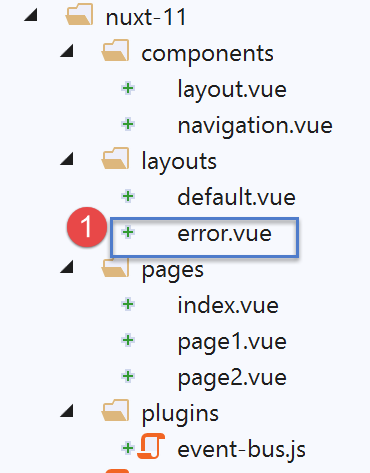
尽管这是一页,但系统会在 [layouts] 文件夹中查找 [error.vue] 页面(可能是为了避免将其包含在应用程序的路由中?)。此处的 [error.vue] 页面如下:
<!-- 视图定义 HTML -->
<template>
  <!-- 版面设计 -->
  <Layout :left="true" :right="true">
    <!-- 右侧栏中的警报 -->
    <template slot="right">
      <!-- 黄色背景上的消息 -->
      <b-alert show variant="danger" align="center">
        <h4>L'erreur suivante s'est produite : {{ JSON.stringify(error) }}</h4>
      </b-alert>
    </template>
    <!-- 左侧栏导航菜单 -->
    <Navigation slot="left" />
  </Layout>
</template>

<script>
/* eslint-disable no-undef */
/* eslint-disable no-console */
/* eslint-disable nuxt/no-env-in-hooks */

import Layout from '@/components/layout'
import Navigation from '@/components/navigation'

export default {
  name: 'Error',
  // 使用的组件
  components: {
    Layout,
    Navigation
  },
  // 属性 [props]
  props: { error: { type: Object, default: () => 'waiting ...' } },
  // 生命周期
  beforeCreate() {
    // 客户端和服务器
    console.log('[error beforeCreate]')
  },
  created() {
    // 客户端与服务器
    console.log('[error created, error=]', this.error)
  },
  beforeMount() {
    // 仅客户端
    console.log('[error beforeMount]')
  },
  mounted() {
    // 仅客户端
    console.log('[error mounted]')
  }
}
</script>
当 [nuxt] 显示页面 [error.vue] 时,它将其作为属性传递给 [props],即发生的错误(第 33 行)。 如果错误是由 [context.error(objet1)] 引起的,则页面 [error.vue] 的属性 [props] 将取值为 [objet1]。 [nuxt]文档指出,[objet1]必须至少具有[statusCode, message]属性。 第 9 行显示了接收到的对象 [objet1] 的字符串 jSON。
14.5. 页面 [page2]
页面 [page2] 展示了另一种处理错误的方法:
- 在 [page1] 中,错误显示在单独的页面 [error.vue] 中;
- 在 [page2] 中,错误将显示在引发该错误的页面 [page2] 中;
[page2]的代码如下:
<!-- 视图 2 -->
<template>
  <Layout :left="true" :right="true">
    <!-- 导航 -->
    <Navigation slot="left" />
    <!-- 消息 -->
    <b-alert slot="right" show variant="secondary">
      Page 2
    </b-alert>
  </Layout>
</template>

<script>
/* eslint-disable no-console */
/* eslint-disable nuxt/no-timing-in-fetch-data */

import Navigation from '@/components/navigation'
import Layout from '@/components/layout'

export default {
  name: 'Page2',
  // 使用的组件
  components: {
    Layout,
    Navigation
  },
  // 异步数据
  asyncData(context) {
    // 日志
    console.log('[page2 asyncData started]')
    // 开始等待
    context.app.$eventBus().$emit('loading', true)
    // 无错误
    context.app.$eventBus().$emit('errorLoading', false)
    // 返回一个 Promise
    return new Promise(function(resolve, reject) {
      // 模拟异步函数
      setTimeout(function() {
        // 等待结束
        context.app.$eventBus().$emit('loading', false)
        // 任意生成错误
        const errorLoadingMessage = "le serveur n'a pas répondu assez vite"
        // 成功结束
        resolve({ showErrorLoading: true, errorLoadingMessage })
        // 日志
        console.log('[page2 asyncData finished]')
      }, 5000)
    })
  },
  // 生命周期
  beforeCreate() {
    console.log('[page2 beforeCreate]')
  },
  created() {
    console.log('[page2 created]')
  },
  beforeMount() {
    console.log('[page2 beforeMount]')
  },
  mounted() {
    console.log('[page2 mounted]')
    // 客户端
    if (this.showErrorLoading) {
      console.log('[page2 mounted, showErrorLoading=true]')
      this.$eventBus().$emit('errorLoading', true, this.errorLoadingMessage)
    }
  }
}
</script>
再次,我们在页面代码中插入一个 [asyncData] 函数,与 [index] 类似,[page2] 也会引发错误,但这次我们将采用不同的处理方式。
- 第 44 行:服务器和客户端均以成功状态完成 Promise,返回结果 [{ showErrorLoading: true, errorLoadingMessage }]。 我们知道这将导致 [showerrorLoading, errorLoadingMessage] 的属性被包含在页面 [data] 的属性中,且客户端将接收这些属性;
- 第 60-67 行:已知函数 [mounted] 仅由客户端执行;
- 第 63 行:客户端检测属性 [showErrorLoading] 是否已被设置(根据具体情况,由服务器或客户端设置)。 如果是,则触发事件 [‘errorLoading’](第 65 行),以便页面 [default] 显示错误消息 [this.errorLoadingMessage]。 最终,服务器发送的页面上不会显示错误信息。该错误信息由客户端在页面“加载”的最后时刻显示;
14.6. Exécution
14.6.1. [nuxt.config]
执行文件 [nuxt.config.js] 内容如下:
export default {
  mode: 'universal',
  /*
   ** Headers of the page
   */
  head: {
    title: 'Introduction à [nuxt.js]',
    meta: [
      { charset: 'utf-8' },
      { name: 'viewport', content: 'width=device-width, initial-scale=1' },
      {
        hid: 'description',
        name: 'description',
        content: 'ssr routing loading asyncdata middleware plugins store'
      }
    ],
    link: [{ rel: 'icon', type: 'image/x-icon', href: '/favicon.ico' }]
  },
  /*
   ** Customize the progress-bar color
   */
  loading: false,

  /*
   ** Global CSS
   */
  css: [],
  /*
   ** Plugins to load before mounting the App
   */
  plugins: [{ src: '@/plugins/event-bus' }],
  /*
   ** Nuxt.js dev-modules
   */
  buildModules: [
    // 文档:https://github.com/nuxt-community/eslint-module
    '@nuxtjs/eslint-module'
  ],
  /*
   ** Nuxt.js modules
   */
  modules: [
    // 文档:https://bootstrap-vue.js.org
    'bootstrap-vue/nuxt',
    // 文档:https://axios.nuxtjs.org/usage
    '@nuxtjs/axios'
  ],
  /*
   ** Axios module configuration
   ** See https://axios.nuxtjs.org/options
   */
  axios: {},
  /*
   ** Build configuration
   */
  build: {
    /*
     ** You can extend webpack config here
     */
    extend(config, ctx) {}
  },
  // 源代码目录
  srcDir: 'nuxt-11',
  // 路由器
  router: {
    // 应用程序的根目录
    base: '/nuxt-11/'
  },
  // 服务器
  server: {
    // 服务端口,默认值为 3000
    port: 81,
    // 监听的网络地址,默认 localhost:127.0.0.1
    // 0.0.0.0 = 该机器的所有网络地址
    host: 'localhost'
  }
}
- 第 22 行:将属性 [loading] 设置为 [false],以防止 [nuxt] 使用其默认加载图片;
- 第 31 行:定义事件总线的插件;
14.6.2. L 页面由服务器执行的 [index]
向服务器请求页面 [index](手动输入 URL [http://localhost:81/nuxt-11/])。客户端浏览器显示的页面如下:
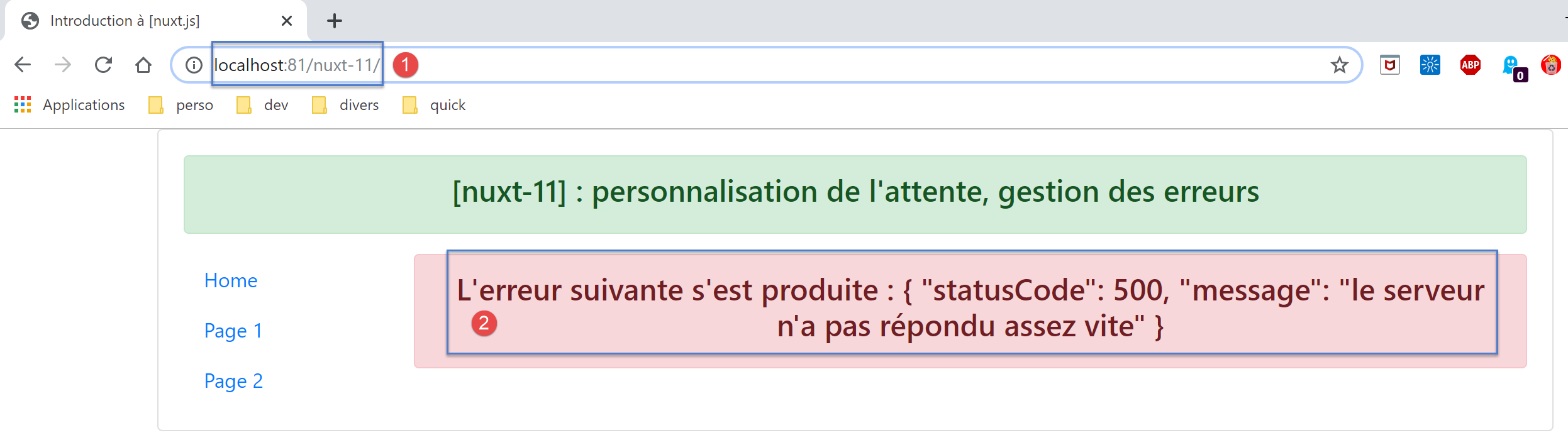
日志如下:
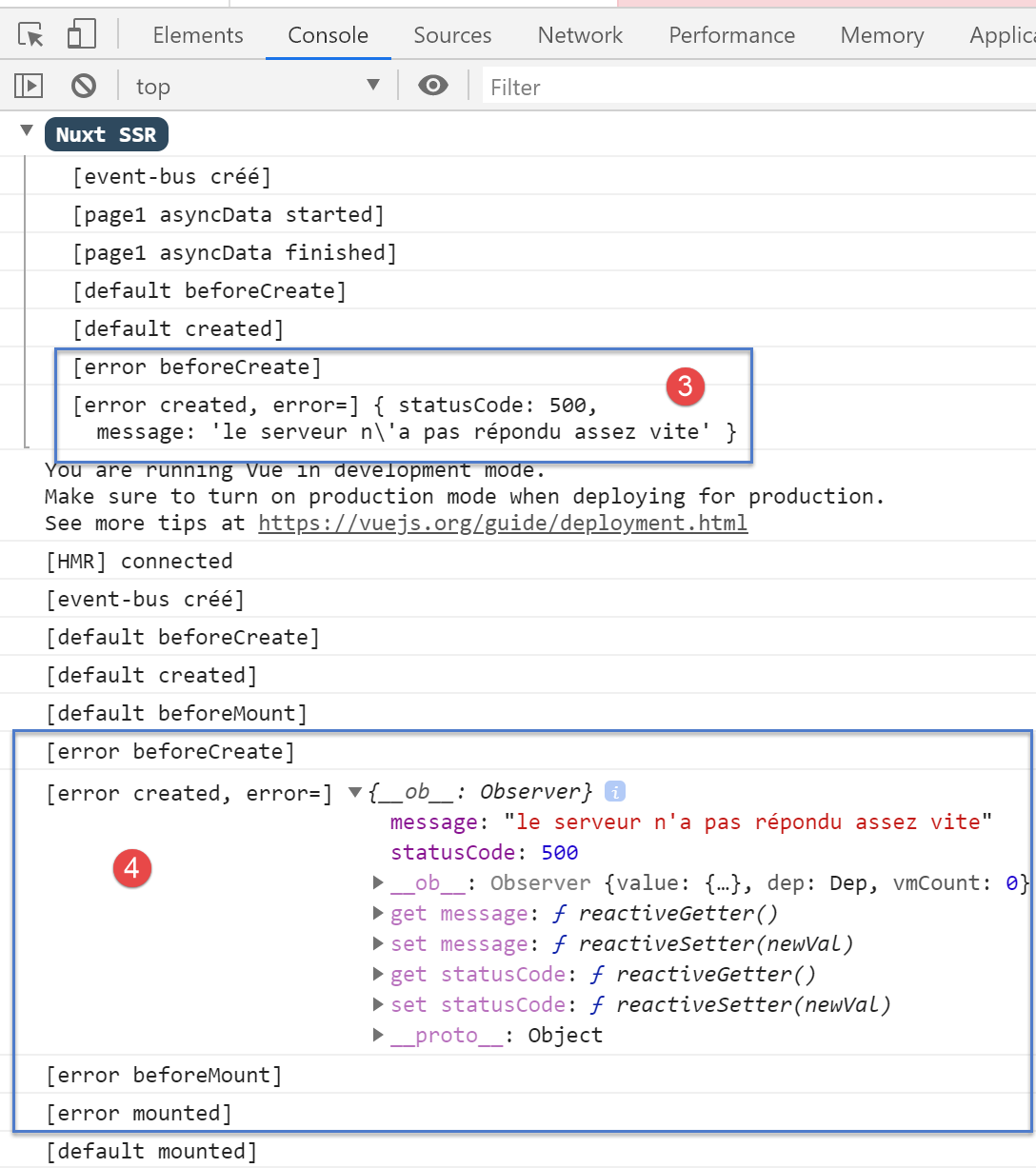
- 在 [3] 中,可以看到服务器发送了页面 [error.vue];
- 在 [4] 中,可以看到客户端也显示了页面 [error],并出现了与服务器相同的错误;
- 值得注意的是,尽管页面 [index] 已设置了等待,但页面 [default] 中的方法 [mShowLoading] 并未在服务器端被调用。 该方法是在接收到事件时被调用的,显然服务器端未实现事件处理;
让我们查看客户端浏览器接收到的页面源代码:
<!doctype html>
<html data-n-head-ssr>
<head>
<title>Introduction à [nuxt.js]</title>
<meta data-n-head="ssr" charset="utf-8">
<meta data-n-head="ssr" name="viewport" content="width=device-width, initial-scale=1">
<meta data-n-head="ssr" data-hid="description" name="description" content="ssr routing loading asyncdata middleware plugins store">
<link data-n-head="ssr" rel="icon" type="image/x-icon" href="/favicon.ico">
<base href="/nuxt-11/">
<link rel="preload" href="/nuxt-11/_nuxt/runtime.js" as="script">
<link rel="preload" href="/nuxt-11/_nuxt/commons.app.js" as="script">
<link rel="preload" href="/nuxt-11/_nuxt/vendors.app.js" as="script">
<link rel="preload" href="/nuxt-11/_nuxt/app.js" as="script">
...
</head>
<body>
<div data-server-rendered="true" id="__nuxt">
<div id="__layout">
<div class="container">
<div class="card">
<div class="card-body">
<div role="alert" aria-live="polite" aria-atomic="true" align="center" class="alert alert-success">
<h4>[nuxt-11] : personnalisation de l'attente, gestion des erreurs</h4>
</div>
<div>
<div class="row">
<div class="col-2">
<ul class="nav flex-column">
<li class="nav-item">
<a href="/nuxt-11/" target="_self" class="nav-link active nuxt-link-active">
Home
</a>
</li>
<li class="nav-item">
<a href="/nuxt-11/page1" target="_self" class="nav-link">
Page 1
</a>
</li>
<li class="nav-item">
<a href="/nuxt-11/page2" target="_self" class="nav-link">
Page 2
</a>
</li>
</ul>
</div> <div class="col-10"><div role="alert" aria-live="polite" aria-atomic="true" align="center" class="alert alert-danger">
<h4>L'erreur suivante s'est produite : {"statusCode":500,"message":"le serveur n'a pas répondu assez vite"}</h4>
</div>
</div>
</div>
</div>
</div>
</div>
</div>
</div>
</div>
<script>window.__NUXT__ = (function (a, b, c, d) {
d.statusCode = 500; d.message = "le serveur n'a pas répondu assez vite";
return {
layout: "default", data: [d], error: d, serverRendered: true,
logs: [
{ date: new Date(1575047424168), args: ["[event-bus créé]"], type: a, level: b, tag: c },
{ date: new Date(1575047424175), args: ["[page1 asyncData started]"], type: a, level: b, tag: c },
{ date: new Date(1575047429455), args: ["[page1 asyncData finished]"], type: a, level: b, tag: c },
{ date: new Date(1575047429515), args: ["[default beforeCreate]"], type: a, level: b, tag: c },
{ date: new Date(1575047429675), args: ["[default created]"], type: a, level: b, tag: c },
{ date: new Date(1575047430157), args: ["[error beforeCreate]"], type: a, level: b, tag: c },
{ date: new Date(1575047430246), args: ["[error created, error=]", "{ statusCode: 500,\n message: 'le serveur n\\'a pas répondu assez vite' }"], type: a, level: b, tag: c }]
}
}("log", 2, "", {}));</script>
<script src="/nuxt-11/_nuxt/runtime.js" defer></script>
<script src="/nuxt-11/_nuxt/commons.app.js" defer></script>
<script src="/nuxt-11/_nuxt/vendors.app.js" defer></script>
<script src="/nuxt-11/_nuxt/app.js" defer></script>
</body>
</html>
- 第 57 行:可以看到服务器发送了一个 [d] 对象,该对象代表了服务器端发生的错误;
- 第59行:可以看到一个属性[error],其值为对象[d]。 可以推测,正是由于服务器发送的页面中存在属性 [error],才导致客户端脚本显示页面 [error.vue] 并报错 [error];
14.6.3. 由服务器执行的页面 [page1]
手动输入 URL [http://localhost:81/nuxt-11/page1]。5秒后,浏览器显示以下页面:
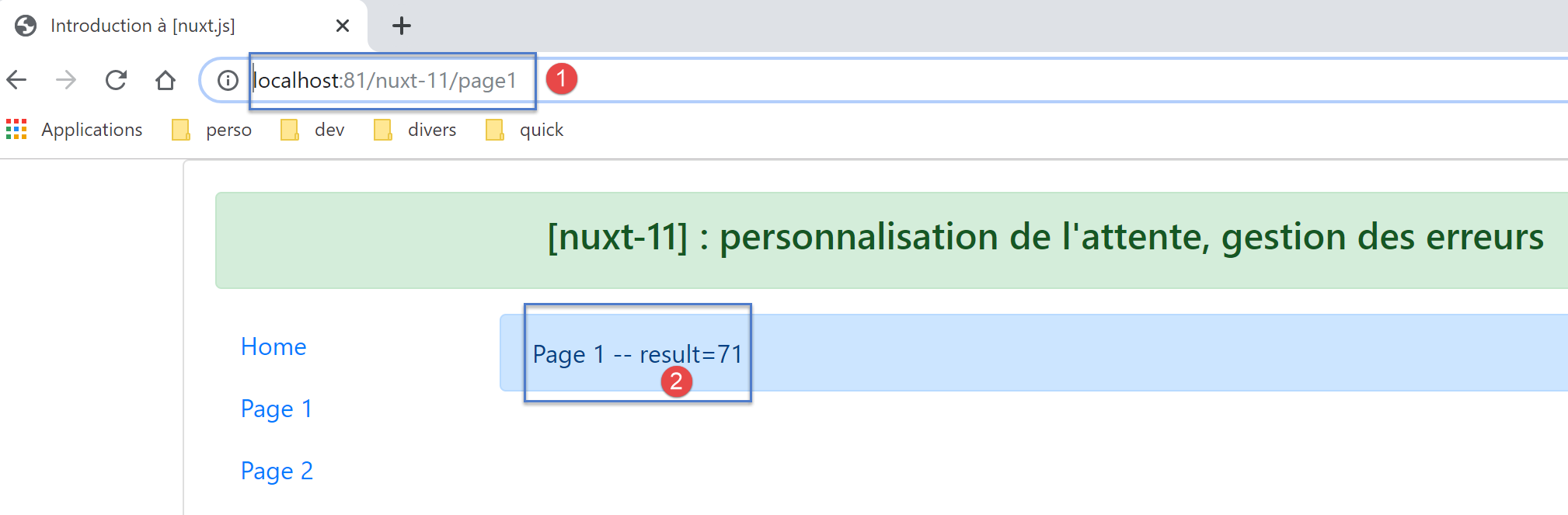
显示的日志如下:
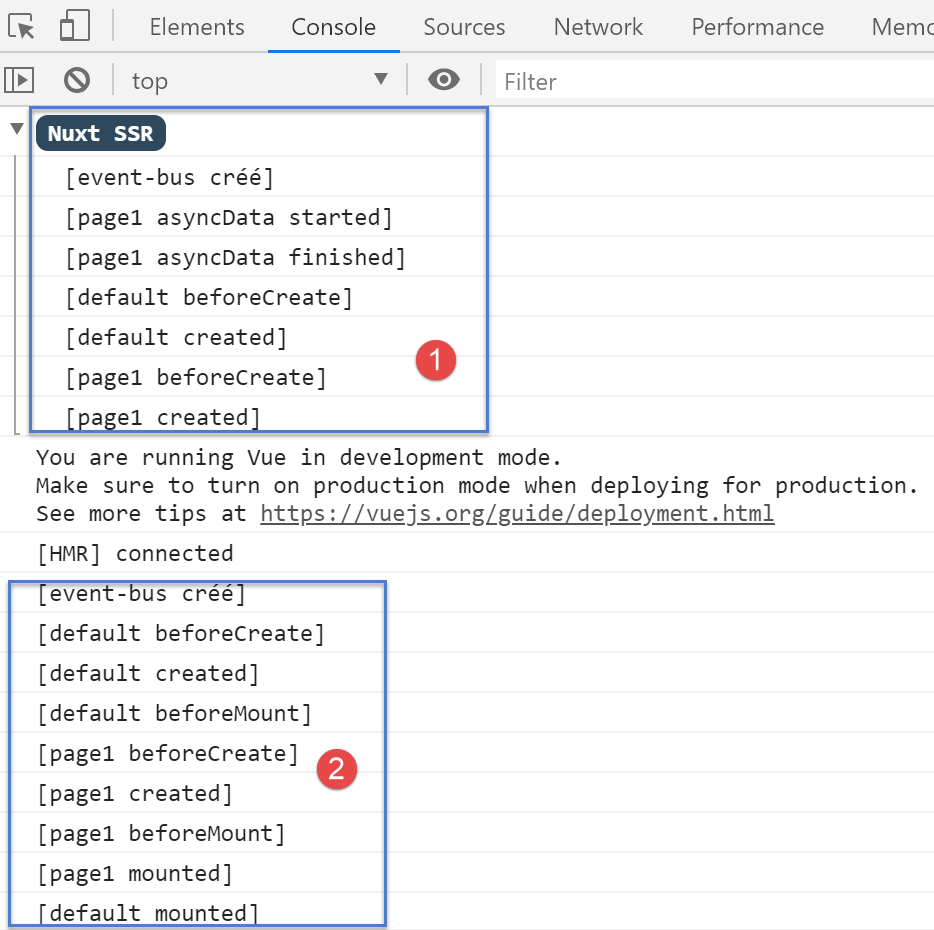
- [1] 显示的是服务器日志。可以注意到,页面 [default] 中的方法 [mShowLoading] 并未被调用;
- 在 [2] 中,客户端日志;
14.6.4. 由服务器执行的页面 [page2]
我们手动输入 URL 和 [http://localhost:81/nuxt-11/page2]。5 秒后,浏览器显示以下页面:
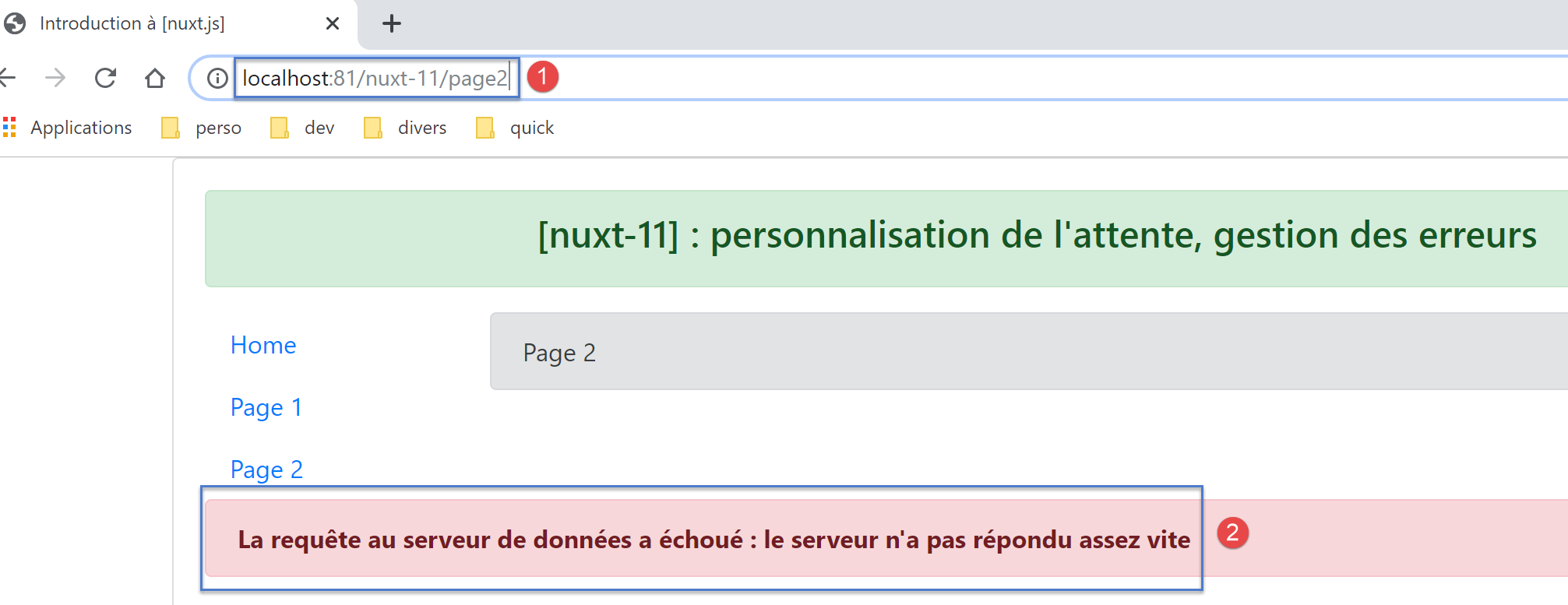
让我们查看浏览器中显示的日志:
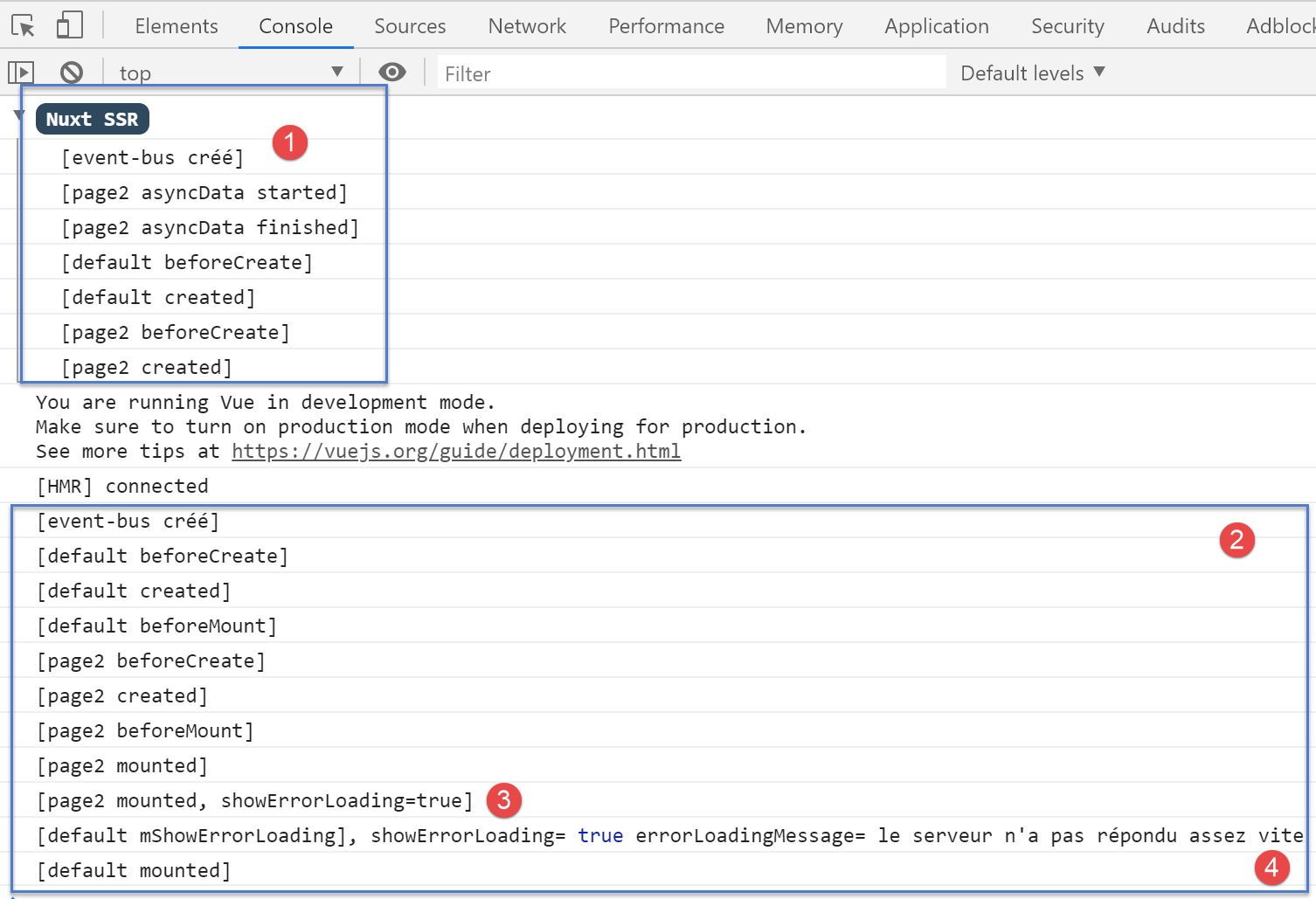
- 在 [1] 中,即服务器日志。需要提醒的是,服务器已在发送给客户端浏览器的页面中设置了 [showErrorLoading, errorLoadingMessage] 属性。我们知道,当页面加载时,这些属性将被整合到客户端显示的页面 [data] 中
- 在 [3] 中,当页面 [page2] 加载时,它发现属性 [showErrorLoading] 的值为 true。 随后它向页面 [default] 发送一个事件,使其显示由服务器 [4] 发送的错误消息;
14.6.5. 由客户端执行的 [index] 页面
现在我们使用导航链接来显示这三个页面。客户端显示的所有页面都与服务器显示的页面完全一致。唯一的区别是每次都会显示5秒倒计时的等待图片。
首先显示页面 [index]。此时会显示等待图片:
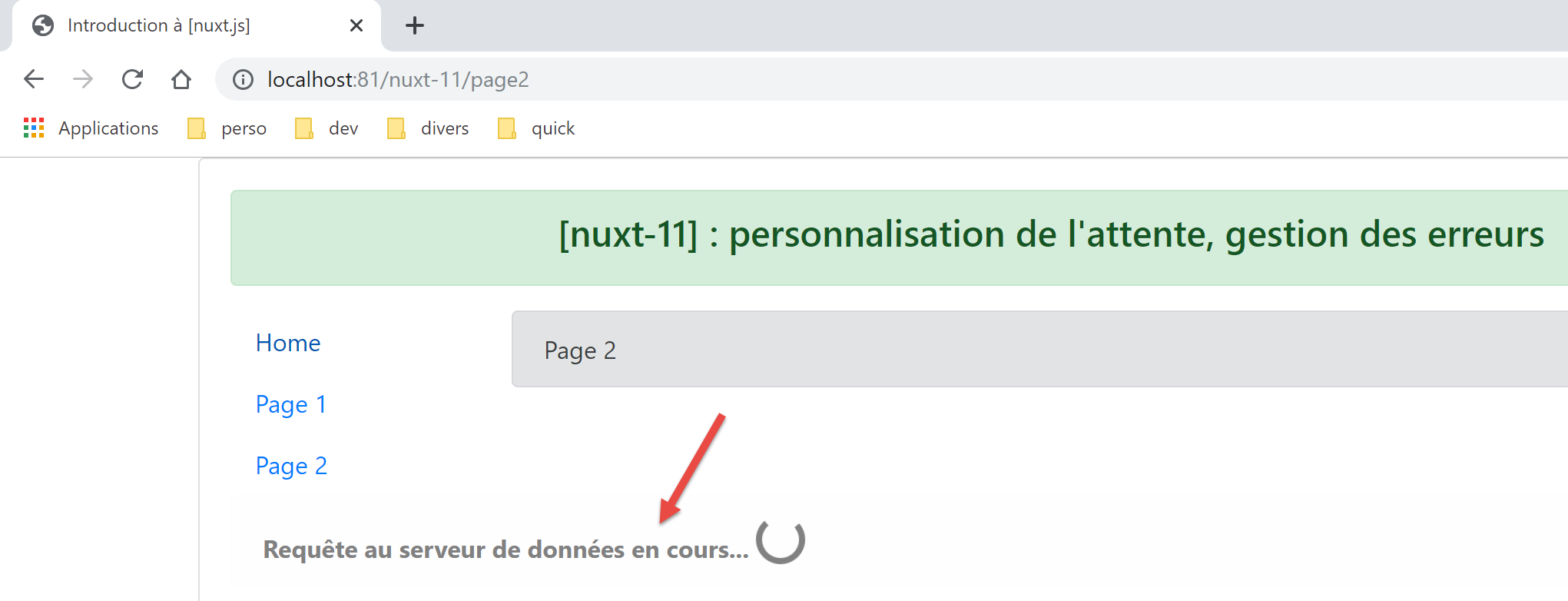
5秒后,显示如下页面:
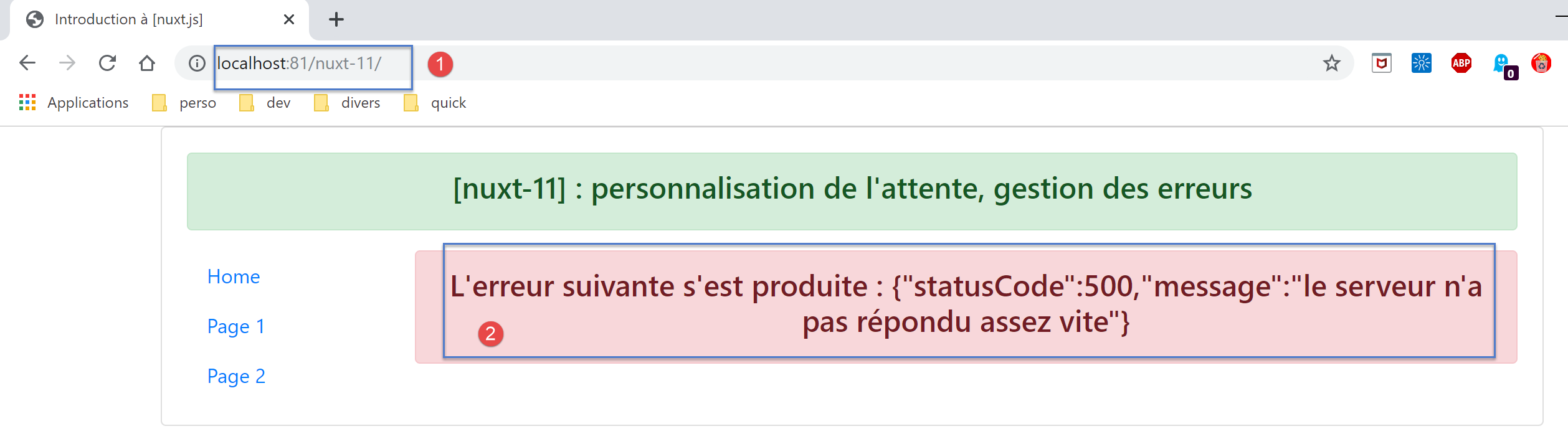
因此,最终页面与服务器端生成的页面完全一致。
回顾页面 [index] 中的函数 [asyncData]:
asyncData(context) {
    // 日志
    console.log('[page1 asyncData started]')
    // 开始等待
    context.app.$eventBus().$emit('loading', true)
    // 无错误
    context.app.$eventBus().$emit('errorLoading', false)
    // 返回一个 Promise
    return new Promise(function(resolve, reject) {
      // 模拟异步函数
      setTimeout(function() {
        // 等待结束
        context.app.$eventBus().$emit('loading', false)
        // 日志
        console.log('[page1 asyncData finished]')
        // 返回错误
        reject(new Error("le serveur n'a pas répondu assez vite"))
      }, 5000)
    }).catch((e) => context.error({ statusCode: 500, message: e.message }))
}
客户端日志如下:
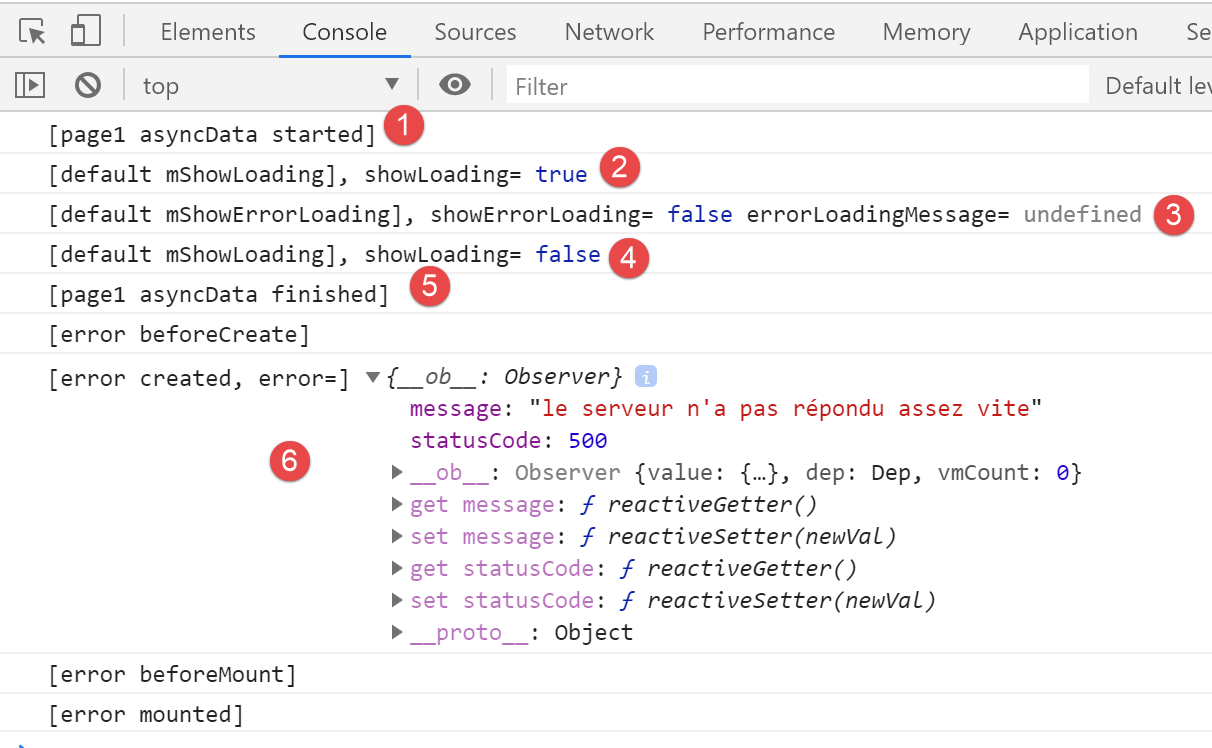
- 在 [1] 中,函数 [asyncData] 启动;
- 在 [2] 中,启动了等待图像;
- 在 [2-3] 时, 可见页面 [default] 已接收由页面 [asyncData] 的函数 [asyncData] 发送的事件 [loading, true]、[2] 和 [errorLoading, false]XW2HTMLP001407ZQX 页面(第 5 行和第 7 行)发送的事件 [loading, true]、[2] 和 [errorLoading, false];
- 在 [4] 中,等待结束。页面 [default] 接收到了由页面 [index] 发送的事件 [loading, false](第 13 行);
- 在 [5] 中,函数 [asyncData] 已完成工作;
- 由于函数 [asyncData] 在与 [context.error] 交互时引发错误(第 19 行),因此显示页面 [error] 时,实际显示的是 [6];
14.6.6. 由客户端执行的页面 [page1]
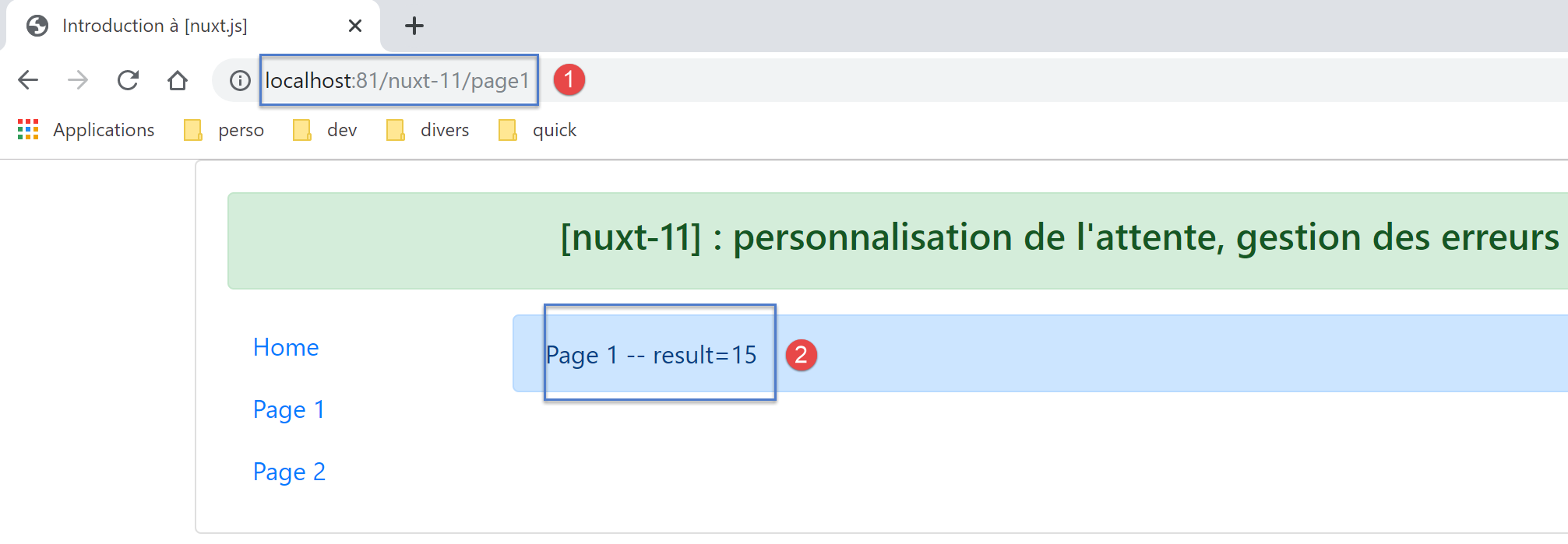
等待 5 秒后,客户端显示以下页面:
回顾 [page1] 中 [asyncData] 函数的代码:
asyncData(context) {
    // 日志
    console.log('[page1 asyncData started]')
    // 开始等待
    context.app.$eventBus().$emit('loading', true)
    // 无错误
    context.app.$eventBus().$emit('errorLoading', false)
    // 返回一个 Promise
    return new Promise(function(resolve, reject) {
      // 模拟异步函数
      setTimeout(function() {
        // 等待结束
        context.app.$eventBus().$emit('loading', false)
        // 日志
        console.log('[page1 asyncData finished]')
        // 返回异步结果——此处为一个随机数
        resolve({ result: Math.floor(Math.random() * Math.floor(100)) })
      }, 5000)
    })
},
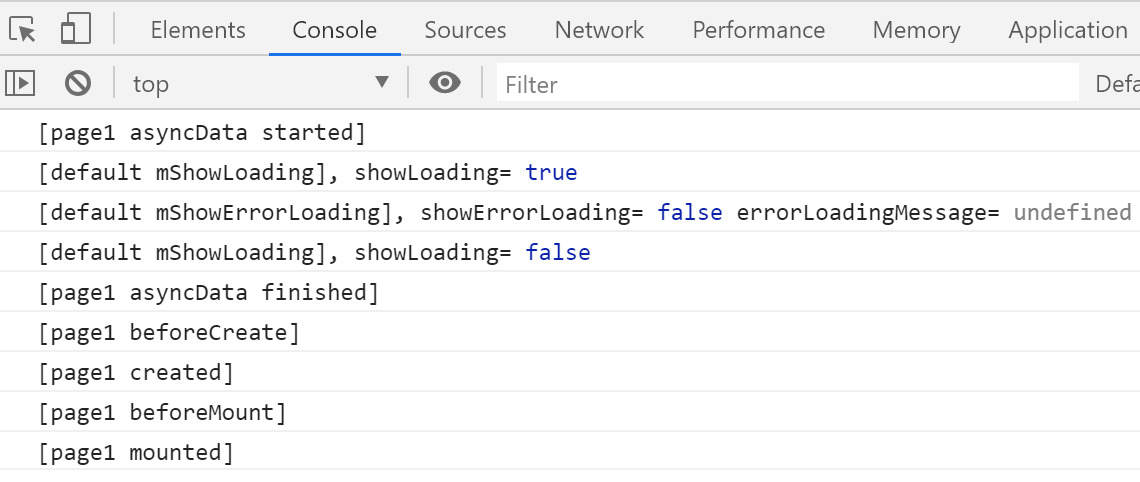
日志如下:
14.6.7. 客户端执行的页面 [page2]
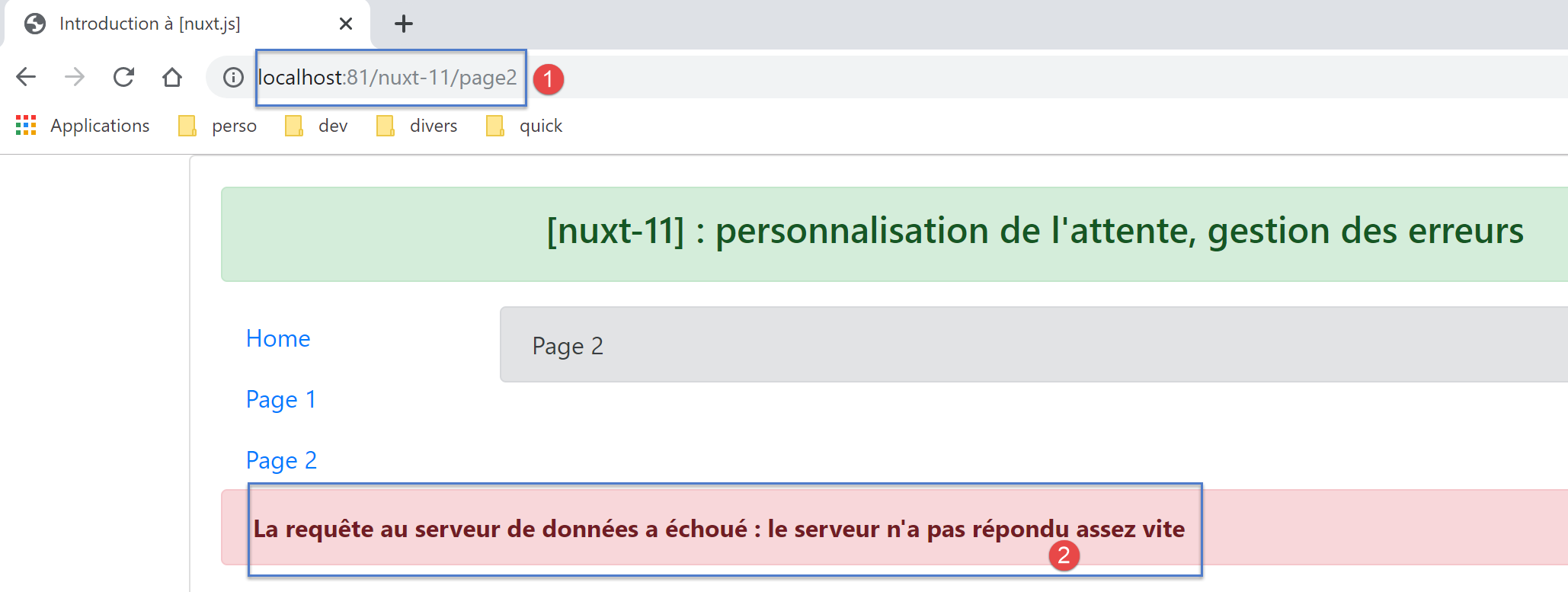
等待 5 秒后,客户端显示以下页面:
回顾 [page2] 中 [asyncData] 和 [mounted] 函数的代码:
asyncData(context) {
    // 日志
    console.log('[page2 asyncData started]')
    // 开始等待
    context.app.$eventBus().$emit('loading', true)
    // 无错误
    context.app.$eventBus().$emit('errorLoading', false)
    // 返回一个 Promise
    return new Promise(function(resolve, reject) {
      // 模拟异步函数
      setTimeout(function() {
        // 等待结束
        context.app.$eventBus().$emit('loading', false)
        // 任意生成错误
        const errorLoadingMessage = "le serveur n'a pas répondu assez vite"
        // 成功结束
        resolve({ showErrorLoading: true, errorLoadingMessage })
        // 日志
        console.log('[page2 asyncData finished]')
      }, 5000)
    })
  }

mounted() {
    console.log('[page2 mounted]')
    // 客户端
    if (this.showErrorLoading) {
      console.log('[page2 mounted, showErrorLoading=true]')
      this.$eventBus().$emit('errorLoading', true, this.errorLoadingMessage)
    }
}
日志如下:
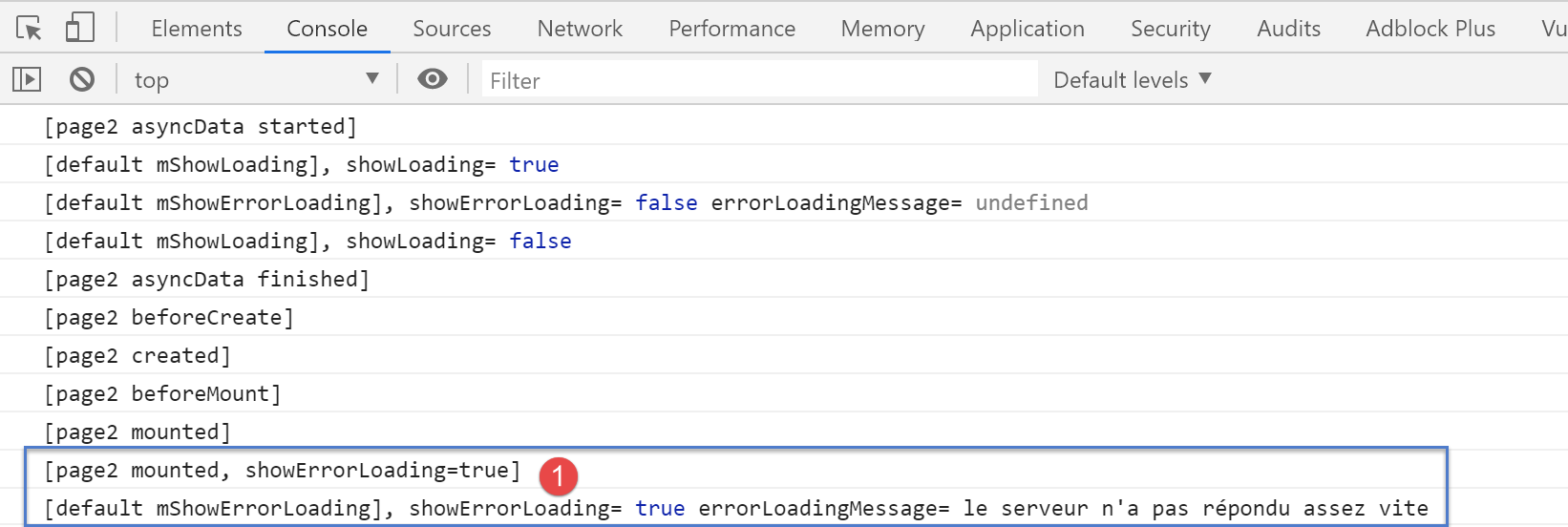
- 在 [1] 中,页面 [default] 接收到了由 [page2] 发送的事件 [showErrorLoading, true](第 29 行),该事件要求其显示错误消息;