6. 示例 [nuxt-03]:nuxtServerInit
[nuxt-03] 项目旨在展示 [Vuex] 存储中名为 [nuxtServerInit] 的函数。 该函数允许服务器像 [fetch] 函数那样初始化存储 [Vuex]。 但与函数 [fetch] 不同,函数 [nuxtServerInit] 绝不会由客户端执行。
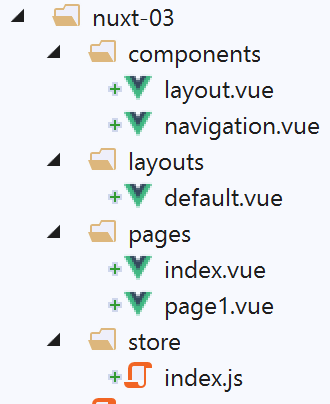
项目 [nuxt-03] 最初是通过复制项目 [nuxt-01] 获得的,随后从该项目中删除了文件夹 [pages] 中的页面 [page2] 以及组件 [navigation]组件中移除了页面[page2]。文件夹[store]是通过复制文件夹[nuxt-02/store]获得的。
6.1. [Vuex]存储
[Vuex] 存储将通过以下 [store/index.js] 文件实现:
/* eslint-disable no-console */
export const state = () => ({
  // 计数器
  counter: 0
})

export const mutations = {
  // 将计数器增加一个值[inc]
  increment(state, inc) {
    state.counter += inc
  }
}

export const actions = {
  async nuxtServerInit(store, context) {
    // 谁在执行这段代码?
    console.log('nuxtServerInit, client=', process.client, 'serveur=', process.server)
    // 正在等待一个 Promise 完成
    await new Promise(function(resolve, reject) {
      // 这里通常有一个异步函数
      // 通过等待一秒来模拟该函数
      setTimeout(() => {
        // 成功
        resolve()
      }, 1000)
    })
    // 修改存储器
    store.commit('increment', 34)
    // 日志
    console.log('nuxtServerInit commit terminé')
  }
}
- 第 1-12 行:与项目 [nuxt-02] 中的内容相同;
- 第 14-32 行:导出一个 [actions] 对象。这是 [Vuex] 存储库中的一个保留术语;
- 第 15 行:定义函数 [nuxtServerInit]。该函数将在服务器启动应用程序时被执行。 其通常的作用是利用通过异步函数获取的外部数据来初始化存储 [Vuex]。[nuxt] 会等待该函数返回结果,然后才开始处理所请求页面的生命周期。该函数接收两个参数:
- 待初始化的存储 [Vuex];
- 当前的上下文 [nuxt];
- 第 19-26 行:等待异步操作结束,此处人为设置了一秒的等待时间(第 15 行);
- 第 28 行:将计数器值设为 34;
- 第 17 和 30 行:用于跟踪函数 [nuxtServerInit] 执行过程的日志;
6.2. 页面 [index]
页面 [index] 将如下所示:
<!-- 页面 [index] -->
<template>
  <Layout :left="true" :right="true">
    <!-- 导航 -->
    <Navigation slot="left" />
    <!-- 消息-->
    <b-alert slot="right" show variant="warning"> Home - value= {{ value }} </b-alert>
  </Layout>
</template>

<script>
/* eslint-disable no-undef */
/* eslint-disable no-console */
/* eslint-disable nuxt/no-env-in-hooks */

import Layout from '@/components/layout'
import Navigation from '@/components/navigation'
export default {
  name: 'Home',
  // 使用的组件
  components: {
    Layout,
    Navigation
  },
  data() {
    return {
      value: 0
    }
  },
  // 生命周期
  beforeCreate() {
    // 客户端与服务器
    console.log('[home beforeCreate]')
  },
  created() {
    // 客户端与服务器
    this.value = this.$store.state.counter
    console.log('[home created], value=', this.value)
  },
  beforeMount() {
    // 仅客户端
    console.log('[home beforeMount]')
  },
  mounted() {
    // 仅客户端
    console.log('[home mounted]')
  }
}
</script>
- 第 37 行:由函数 [nuxtServerInit] 初始化的计数器值被赋给第 27 行的属性 [value]。该值由第 7 行显示;
- 第 37 行将由服务器和客户端同时执行。在两种情况下,属性 [value] 都将获得相同的值,从而确保服务器生成的页面与客户端生成的页面完全一致;
6.3. 页面 [page1]
页面 [page1] 是通过复制页面 [index] 获得的。随后修改其文本,将 [home] 替换为 [page1]:
<!-- 页面 [page1]] -->
<template>
  <Layout :left="true" :right="true">
    <!-- 导航 -->
    <Navigation slot="left" />
    <!-- 消息-->
    <b-alert slot="right" show variant="warning"> Page1 - value= {{ value }} </b-alert>
  </Layout>
</template>

<script>
/* eslint-disable no-undef */
/* eslint-disable no-console */
/* eslint-disable nuxt/no-env-in-hooks */

import Layout from '@/components/layout'
import Navigation from '@/components/navigation'

export default {
  name: 'Page1',
  // 使用的组件
  components: {
    Layout,
    Navigation
  },
  data() {
    return {
      value: 0
    }
  },
  // 生命周期
  beforeCreate() {
    // 客户端与服务器
    console.log('[page1 beforeCreate]')
  },
  created() {
    // 客户端与服务器
    this.value = this.$store.state.counter
    console.log('[page1 created], value=', this.value)
  },
  beforeMount() {
    // 仅客户端
    console.log('[page1 beforeMount]')
  },
  mounted() {
    // 仅客户端
    console.log('[page1 mounted]')
  }
}
</script>
此页面仅用于实现两页之间的导航。
6.4. Exécution
文件 [nuxt.config.js] 修改如下:
// 源代码目录
  srcDir: 'nuxt-03',
  // 路由器
  router: {
    // 应用程序的 URL 根目录
    base: '/nuxt-03/'
  },
  // 服务器
  server: {
    // 服务端口,默认 3000
    port: 81,
    // 监听的网络地址,默认 localhost:127.0.0.1
    // 0.0.0.0 = 该机器的所有网络地址
    host: 'localhost'
}
执行时显示的页面如下:
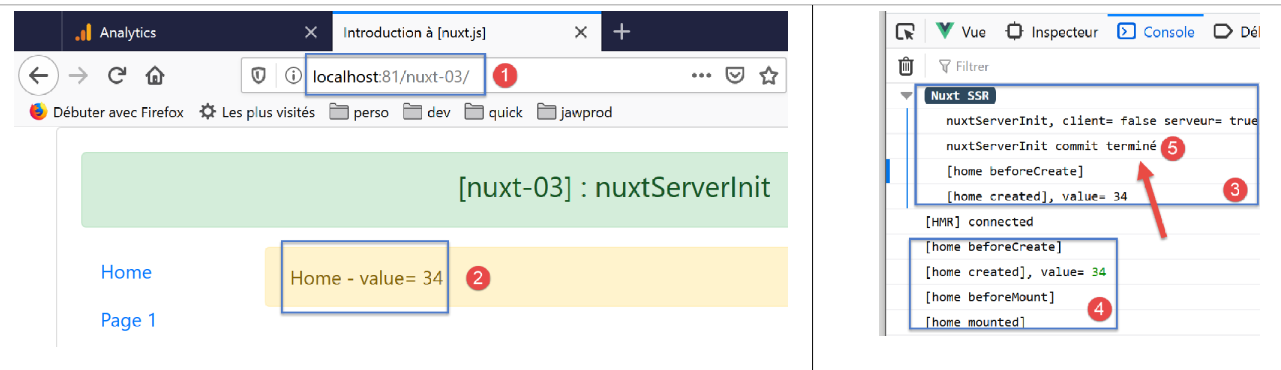
- 在 [5] 中,可以看到服务器在页面 [index] 的生命周期开始之前就已执行了函数 [nuxtServerInit]。 [nuxt] 等待异步函数完成工作后才进入生命周期;
- 在 [4] 中,可以看到客户端并未执行 [nuxtServerInit] 函数;
现在进行两次导航:index --> page1 --> index。此时日志如下:
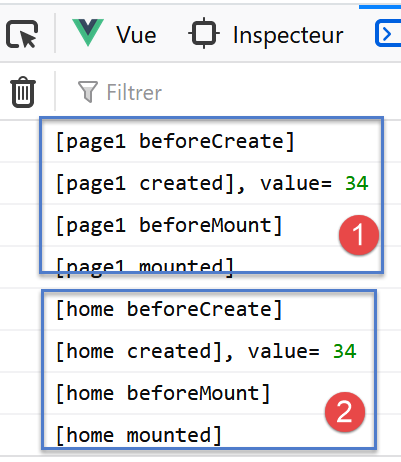
- 在 [1-2] 中,可以看到客户端未执行函数 [nuxtServerInit];
现在手动输入页面 [page1] 中的 URL,以强制调用服务器:
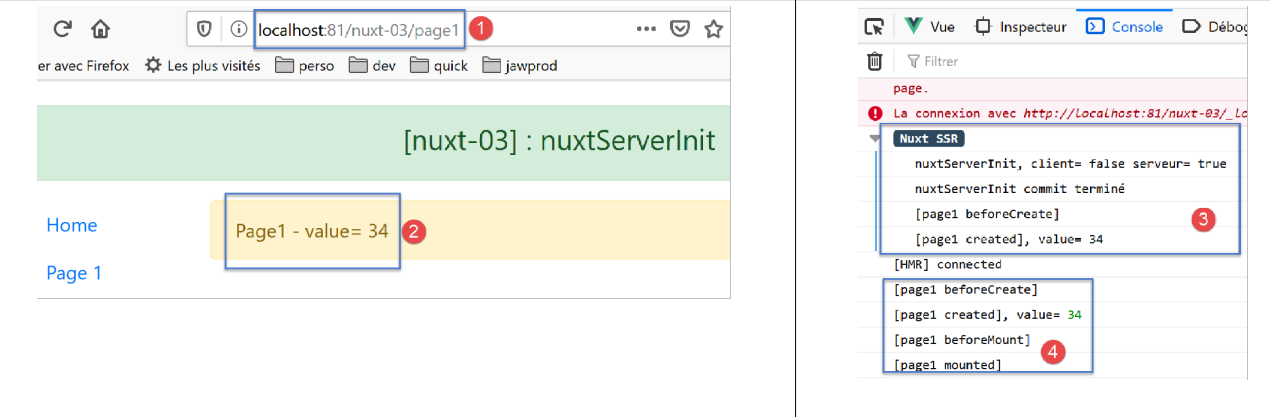
在 [3-4] 中,我们发现与启动时加载 [index] 页面之前相同的机制。 在此重申先前所述:当强制向服务器调用页面时,其效果等同于应用程序重新启动,并将所请求的页面作为首页;