12. 示例 [nuxt-09]:控制导航
示例 [nuxt-09] 使用中间件来控制客户端导航。此外,还新增了一个视图,用于处理用户向服务器请求应用程序中不存在的 URL 的情况。
示例 [nuxt-09] 最初是通过复制示例 [nuxt-01] 创建的:
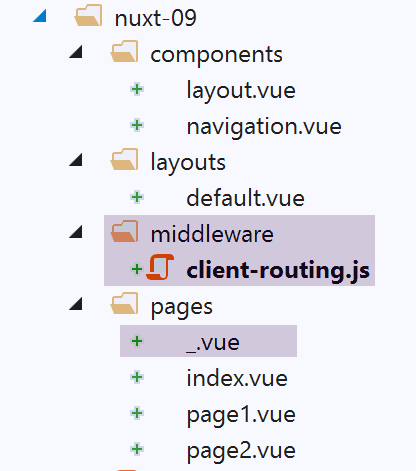
12.1. [_.vue] 页面
我们曾提到,应用程序的路由是基于 [pages] 文件夹中的内容构建的。在此,我们已将 [_.vue] 页面添加到该文件夹中。当应用程序被路由到一个不存在的页面时,就会显示这个特定的页面。 在本示例中,客户端不会遇到这种情况。但在服务器端可能会发生,例如当请求 URL [/nuxt-09/abcd] 时。由于 [abcd] 页面不存在,系统将显示 [_.vue] 页面。此时,页面外观如下:
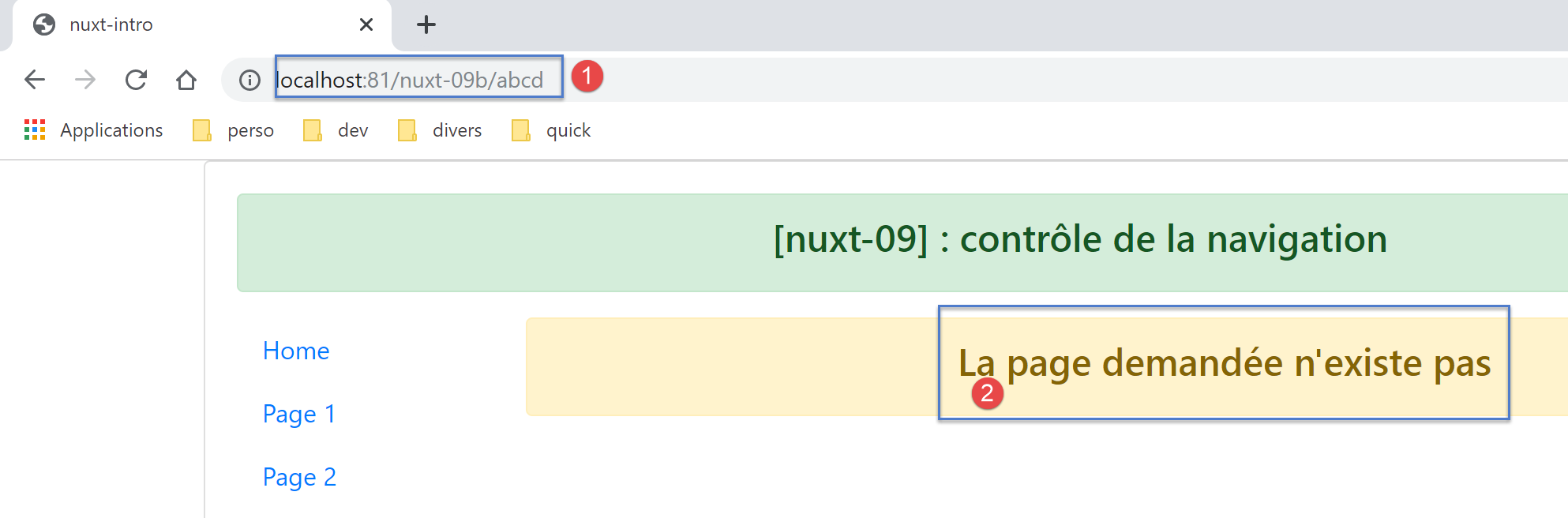
[_.vue] 页面的代码如下:
<!-- définition HTML de la vue -->
<template>
  <!-- mise en page -->
  <Layout :left="true" :right="true">
    <!-- alerte dans la colonne de droite -->
    <template slot="right">
      <!-- message sur fond jaune -->
      <b-alert show variant="warning" align="center">
        <h4>La page demandée n'existe pas</h4>
      </b-alert>
    </template>
    <!-- menu de navigation dans la colonne de gauche -->
    <Navigation slot="left" />
  </Layout>
</template>

<script>
/* eslint-disable no-undef */
/* eslint-disable no-console */
/* eslint-disable nuxt/no-env-in-hooks */

import Layout from '@/components/layout'
import Navigation from '@/components/navigation'

export default {
  name: '404',
  // components used
  components: {
    Layout,
    Navigation
  },
  // life cycle
  beforeCreate() {
    // client and server
    console.log('[404 beforeCreate]')
  },
  created() {
    // client and server
    console.log('[404 created]')
  },
  beforeMount() {
    // customer only
    console.log('[404 beforeMount]')
  },
  mounted() {
    // customer only
    console.log('[404 mounted]')
  }
}
</script>
12.2. 客户端中间件
客户端中间件代码 [client-routing] 如下:
/* eslint-disable no-undef */
/* eslint-disable no-console */
export default function({ route, from, redirect }) {
  // seulement le client
  if (process.client) {
    console.log('[client-routing]')
    // ordre de navigation souhaité
    const routes = ['index', 'page1', 'page2', 'index']
    // route courante
    const current = route.name
    // route précédente
    const previous = from.name
    // on veut une navigation circulaire
    // routes[i] vers routes[i+1]
    for (let i = 0; i < routes.length - 1; i++) {
      if (previous === routes[i] && current !== routes[i + 1]) {
        // on reste sur la même page
        redirect({ name: routes[i] })
        return
      }
    }
  }
}
- 第 3 行:我们知道路由函数仅接受一个参数,即调用它的实体(无论是服务器还是客户端)的 [context] 对象。表示法 [function({ route, from, redirect })]
- 等同于 [function({ route:route, from:from, redirect:redirect })];
- 这意味着 { route:route, from:from, redirect:redirect } <-- 上下文;
- 这会生成三个参数 [route, from, redirect],例如:
- route=context.route;
- redirect=context.redirect;
- from=context.from;
[nuxt] 文档中广泛使用了这种写法。熟悉它非常重要;
- 第 8 行:按期望导航顺序排列的页面名称数组
- 第 10 行:当前路由的目标页面名称;
- 第 12 行:当前路由中上一页的名称;
- 第 14 行:作为练习,我们将仅允许循环导航 [index --> page1 --> page2 --> index];
- 第 15–21 行:遍历数组以确定期望的导航顺序;
- 第 16 行:如果发现 routes[i] 是上次导航到的页面,那么下一个页面必须是 routes[i+1];
- 第18–19行:若非如此,则将应用程序重定向至 routes[i],即不切换页面:拒绝该导航请求;
12.3. 执行
我们使用以下 [nuxt.config.js] 文件运行该示例:
export default {
  mode: 'universal',
  /*
   ** Headers of the page
   */
  head: {
    title: process.env.npm_package_name || "Introduction à nuxt.js par l'exemple",
    meta: [
      { charset: 'utf-8' },
      { name: 'viewport', content: 'width=device-width, initial-scale=1' },
      { hid: 'description', name: 'description', content: process.env.npm_package_description || '' }
    ],
    link: [{ rel: 'icon', type: 'image/x-icon', href: '/favicon.ico' }]
  },
  /*
   ** Customize the progress-bar color
   */
  loading: { color: '#fff' },
  /*
   ** Global CSS
   */
  css: [],
  /*
   ** Plugins to load before mounting the App
   */
  plugins: [],
  /*
   ** Nuxt.js dev-modules
   */
  buildModules: [
    // Doc: https://github.com/nuxt-community/eslint-module
    '@nuxtjs/eslint-module'
  ],
  /*
   ** Nuxt.js modules
   */
  modules: [
    // Doc: https://bootstrap-vue.js.org
    'bootstrap-vue/nuxt',
    // Doc: https://axios.nuxtjs.org/usage
    '@nuxtjs/axios'
  ],
  /*
   ** Axios module configuration
   ** See https://axios.nuxtjs.org/options
   */
  axios: {},
  /*
   ** Build configuration
   */
  build: {
    /*
     ** You can extend webpack config here
     */
    extend(config, ctx) {}
  },
  // source code directory
  srcDir: 'nuxt-09',
  router: {
    base: '/nuxt-09/',
    middleware: ['client-routing']
  },
  // server
  server: {
    port: 81, // default: 3000
    host: 'localhost' // default: localhost
  }
}
请检查以下内容:
- 当您位于 [首页] 时,只能导航至 [第 1 页];
- 当您位于 [第 1 页] 时,只能跳转至 [第 2 页];
- 当您位于 [第 2 页] 时,只能导航至 [首页];
- 当您请求无效的 URL(例如 [http://localhost:81/nuxt-09b/abcd])时,会显示一条提示,表明所请求的页面不存在;