19. Vue.js Client Improvements
19.1. Introduction
We will test the [vuejs-21] project with the development server. Therefore, we will again need the server to send CORS headers. The [config.json] file for version 14 of the tax calculation server must therefore allow these headers:
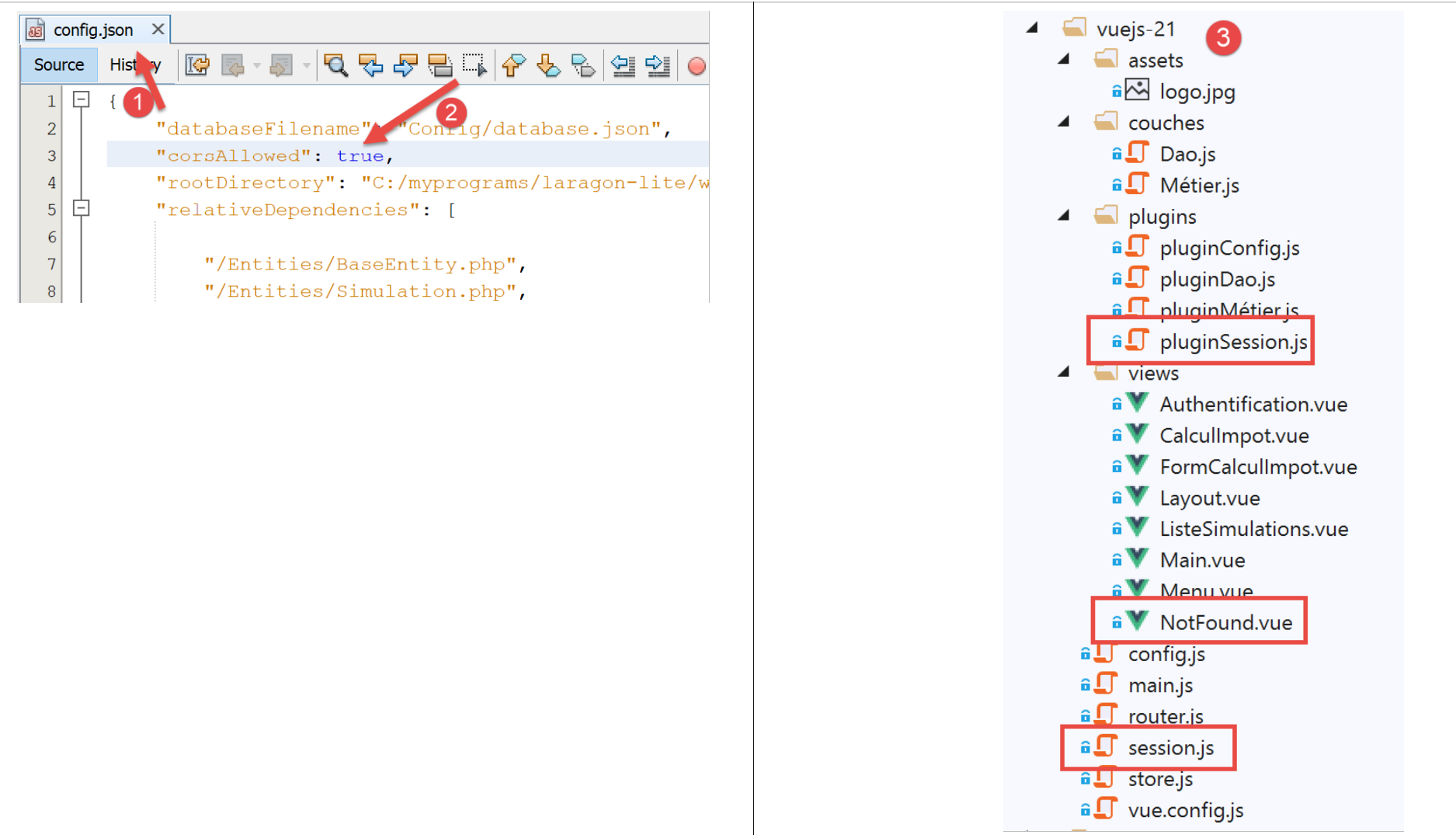
The [vuejs-21] project is initially created by duplicating the [vuejs-20] project. It is then modified [3].
New files appear:
- [session.js]: exports a [session] object that will encapsulate information about the current session;
- [pluginSession]: makes the previous [session] object available in the [$session] property of the views;
- [NotFound.vue]: a new view displayed when the user manually requests a URL that does not exist;
The following files will be modified:
- [main.js]: will initialize the current session and then restore it when the user manually enters a URL;
- [router.js]: controls are added to handle URLs entered by the user;
- [store.js]: a new mutation is added;
- [config.js]: a new configuration is added;
- various views, primarily to save the current session at key points in the application’s lifecycle. The session is then restored whenever the user manually enters URLs;
19.2. The [Vuex] store
The [./store] script evolves as follows:
// plugin Vuex
import Vue from 'vue'
import Vuex from 'vuex'
Vue.use(Vuex);

// store Vuex
const store = new Vuex.Store({
  state: {
    // le tableau des simulations
    simulations: [],
    // le n° de la dernière simulation
    idSimulation: 0
  },
  mutations: {
    // suppression ligne n° index
    deleteSimulation(state, index) {
      ...
    },
    // ajout d'une simulation
    addSimulation(state, simulation) {
      ...
    },
    // nettoyage state
    clear(state) {
      // plus de simulations
      state.simulations = [];
      // la numérotation des simulations repart de 0
      state.idSimulation = 0;
    }
  }
});
// export de l'objet [store]
export default store;
- lines 24-29: the [clear] assignment deletes the list of saved simulations and resets the last simulation number to 0.
19.3. The session
The need for a session arises because when the user types a URL into the browser’s address bar, the [main.js] script is executed again. However, this script contains the following instruction:
// store Vuex
import store from './store'
This instruction imports the following [./store] file:
// plugin Vuex
import Vue from 'vue'
import Vuex from 'vuex'
Vue.use(Vuex);

// store Vuex
const store = new Vuex.Store({
  state: {
    // le tableau des simulations
    simulations: [],
    // le n° de la dernière simulation
    idSimulation: 0
  },
  mutations: {
    ...
  }
});
// export de l'objet [store]
export default store;
As we can see in lines 7–13, we import an empty array of simulations. So if we had simulations before the user typed a URL into the browser’s address bar, we no longer have any afterward. The idea is:
- to use a session that would store the information you want to keep if the user manually enters URLs;
- save it at key points in the application;
- restore it in [main.js], which is always executed when a URL is entered manually;
The [./session] script is as follows:
// on importe le store Vuex
import store from './store'
// on importe la configuration
import config from './config';

// l'objet [session]
const session = {
  // session démarrée
  started: false,
  // authentification
  authenticated: false,
  // heure de sauvegarde
  saveTime: "",
  // couche [métier]
  métier: null,
  // état Vuex
  state: null,

  // sauvegarde de la session dans une chaîne jSON
  save() {
    // on ajoute à la session quelques proprités
    this.saveTime = Date.now();
    this.state = store.state;
    // on la transforme en jSON
    const json = JSON.stringify(this);
    // on la stocke sur le navigateur
    localStorage.setItem("session", json);
    // eslint-disable-next-line no-console
    console.log("session save", json);
  },

  // restauration de la session
  restore() {
    // on récupère la session jSON à partir du navigateur
    const json = localStorage.getItem("session")
    // si on a récupéré qq chose
    if (json) {
      // on restaure toutes les clés de la session
      const restore = JSON.parse(json);
      for (var key in restore) {
        if (restore.hasOwnProperty(key)) {
          this[key] = restore[key];
        }
      }
      // si on a dépassé une certaine durée d'inactivité depuis le début de la session, on repart de zéro
      let durée = Date.now() - this.saveTime;
      if (durée > config.duréeSession) {
        // on vide la session - elle sera également sauvegardée
        session.clear();
      } else {
        // on régénère le store Vuex
        store.replaceState(JSON.parse(JSON.stringify(this.state)));
      }
    }
    // eslint-disable-next-line no-console
    console.log("session restore", this);
  },

    // on nettoie la session
  clear() {
    // eslint-disable-next-line no-console
    console.log("session clear");
    // raz de certains champs de la session
    this.authenticated = false;
    this.saveTime = "";
    this.started = false;
    if (this.métier) {
      // on réinitialise le champ [taxAdminData]
      this.métier.taxAdminData = null;
    }
    // le store Vuex est nettoyé également
    store.commit("clear");
    // on sauvegarde la nouvelle session
    this.save();
  },
}

// export de l'objet [session]
export default session;
Comments
- line 2: the session will also encapsulate the [Vuex] store (list of simulations, ID of the last simulation performed);
- lines 7-17: information stored by the session:
- [started]: whether the JSON session with the server has started or not;
- [authenticated]: whether the user has authenticated or not;
- [saveTime]: the date in milliseconds of the last save;
- [business] : a reference to the [business] layer. This contains the [taxAdminData] data used to calculate the tax;
- [state]: the state of the [Vuex] store (list of simulations, number of the last simulation performed);
- lines 20–30: the [save] method saves the session locally on the browser running the application;
- line 22: the save time is recorded;
- line 23: the [state] of the [Vuex] store is retrieved;
- line 25: the session’s JSON string is created;
- line 27: it is stored locally on the browser associated with the [session] key;
- lines 33–57: the [restore] method restores a session from its local save in the browser;
- line 35: retrieve the local JSON backup;
- line 37: if something was retrieved;
- lines 39–44: the [session] object is reconstructed;
- line 46: the time elapsed since the last backup is calculated;
- lines 47–50: if this duration exceeds a value [config.sessionDuration] set in the configuration, the session is reset (line 49) and saved at that time;
- line 52: otherwise, the [state] attribute of the [Vuex] store is regenerated;
- lines 60–75: the [clear] method resets the session;
- lines 64–70: the session properties are reset to their initial values;
- line 72: as well as the [Vuex] store;
- line 74: the new session is saved;
19.4. The [config] configuration file
The [./config] file evolves as follows:
// utilisation de la bibliothèque [axios]
const axios = require('axios');
// timeout des requêtes HTTP
axios.defaults.timeout = 2000;
...

// export de la configuration
export default {
  // objet [axios]
  axios: axios,
  // délai maximal d'inactivité de la session : 5 mn = 300 s = 300000 ms
  duréeSession: 300000
}
- line 12: we’ll manage the application session much like we manage a web session. Here, we set a maximum inactivity duration of 5 minutes;
19.5. The [pluginSession] plugin
As has been done many times before, the [pluginSession] plugin will allow views to access the session via the [this.$session] property:
export default {
  install(Vue, session) {
    // ajoute une propriété [$session] à la classe vue
    Object.defineProperty(Vue.prototype, '$session', {
      // lorsque Vue.$session est référencé, on rend le 2ième paramètre [session]
      get: () => session,
    })
  }
}
19.6. The main script [main]
The main script [./main.js] evolves as follows:
// log de démarrage
// eslint-disable-next-line no-console
console.log("main started");

// imports
import Vue from 'vue'

...

// instanciation couche [métier]
import Métier from './couches/Métier';
const métier = new Métier();

// plugin [métier]
import pluginMétier from './plugins/pluginMétier'
Vue.use(pluginMétier, métier)

// store Vuex
import store from './store'

// session
import session from './session';
import pluginSession from './plugins/pluginSession'
Vue.use(pluginSession, session)

// on restore la session avant de redémarrer
session.restore();

// on restaure la couche [métier]
if (session.métier && session.métier.taxAdminData) {
  métier.setTaxAdminData(session.métier.taxAdminData);
}

// démarrage de l'UI
new Vue({
  el: '#app',
  // le routeur
  router: router,
  // le store Vuex
  store: store,
  // la vue principale
  render: h => h(Main),
})

// log de fin
// eslint-disable-next-line no-console
console.log("main terminated, session=", session);
- line 19: import the session;
- line 20: import the plugin;
- line 21: the [pluginSession] plugin is integrated into [Vue]. After this instruction, all views have the session available in their [$session] attribute;
- line 27: the session is restored. The session imported on line 11 is then initialized with the contents of its last save;
- after line 16, the views have a [$métier] property initialized on line 12. This property does not contain the [taxAdminData] information used to calculate the tax;
- lines 30–32: if the restoration just performed has restored the [session.métier.taxAdminData] property, then the [$métier] property of the views is initialized with this value;
19.7. The routing file [router]
The routing file [./router] evolves as follows:
// imports
import Vue from 'vue'
import VueRouter from 'vue-router'
// les vues
import Authentification from './views/Authentification'
import CalculImpot from './views/CalculImpot'
import ListeSimulations from './views/ListeSimulations'
import NotFound from './views/NotFound'
// la session
import session from './session'

// plugin de routage
Vue.use(VueRouter)

// les routes de l'application
const routes = [
  // authentification
  { path: '/', name: 'authentification', component: Authentification },
  { path: '/authentification', name: 'authentification', component: Authentification },
  // calcul de l'impôt
  {
    path: '/calcul-impot', name: 'calculImpot', component: CalculImpot,
    meta: { authenticated: true }
  },
  // liste des simulations
  {
    path: '/liste-des-simulations', name: 'listeSimulations', component: ListeSimulations,
    meta: { authenticated: true }
  },
  // fin de session
  {
    path: '/fin-session', name: 'finSession'
  },
  // page inconnue
  {
    path: '*', name: 'notFound', component: NotFound,
  },
]

// le routeur
const router = new VueRouter({
  // les routes
  routes,
  // le mode d'affichage des URL
  mode: 'history',
  // l'URL de base de l'application
  base: '/client-vuejs-impot/'
})

// vérification des routes
router.beforeEach((to, from, next) => {
  // eslint-disable-next-line no-console
  console.log("router to=", to, "from=", from);
  // route réservée aux utilisateurs authentifiés ?
  if (to.meta.authenticated && !session.authenticated) {
    next({
      // on passe à l'authentification
      name: 'authentification',
    })
    // retour à la boucle événementielle
    return;
  }
  // cas particulier de la fin de session
  if (to.name === "finSession") {
    // on nettoie la session
    session.clear();
    // on va sur la vue [authentification]
    next({
      name: 'authentification',
    })
    // retour à la boucle événementielle
    return;
  }
  // autres cas - vue suivante normale du routage
  next();
})

// export du router
export default router
Comments
- lines 16–38: some routes have been enhanced with additional information;
- line 19: a new route has been created to go to the [Authentication] view;
- lines 21–24: The route leading to the [TaxCalculation] view now has a [meta] property (this name is required). The content of this object can be anything and is set by the developer;
- line 23: We add the [authenticated] property to [meta] (this name can be anything). This means that to access the [TaxCalculation] view, the user must be authenticated;
- lines 26–29: we do the same for the route leading to the [ListeSimulations] view. Here too, the user must be authenticated;
- The [meta.authenticated] property will allow us to verify that a user who manually types the URLs for the [CalculImpot] and [ListeSimulations] views cannot access them if they are not authenticated;
- lines 51–76: The [beforeEach] method is executed before a view is routed. This is the right time to perform checks;
- [to]: the next route if nothing is done;
- [from]: the last route displayed;
- [next]: function to change the next route displayed;
- line 55: we check if the next route requires the user to be authenticated;
- lines 56–59: if so, and the user is not authenticated, we change the next route to the [Authentication] view;
- lines 64–73: handle the special case of the [endSession] route from lines 30–32. This route has no associated view;
- line 66: the session is reset to its initial value;
- lines 68–70: set the [Authentication] view as the next view;
- line 75: if neither of the previous two cases applies, we simply proceed to the route specified by the routing file;
- lines 35–37: a [NotFound] view is provided if the route entered by the user does not match any known route. This view is imported on line 8. Routes are checked in the order of the routing file. Therefore, if we reach line 36, it means the requested route is none of the routes in lines 18–33;
19.8. The [NotFound] view
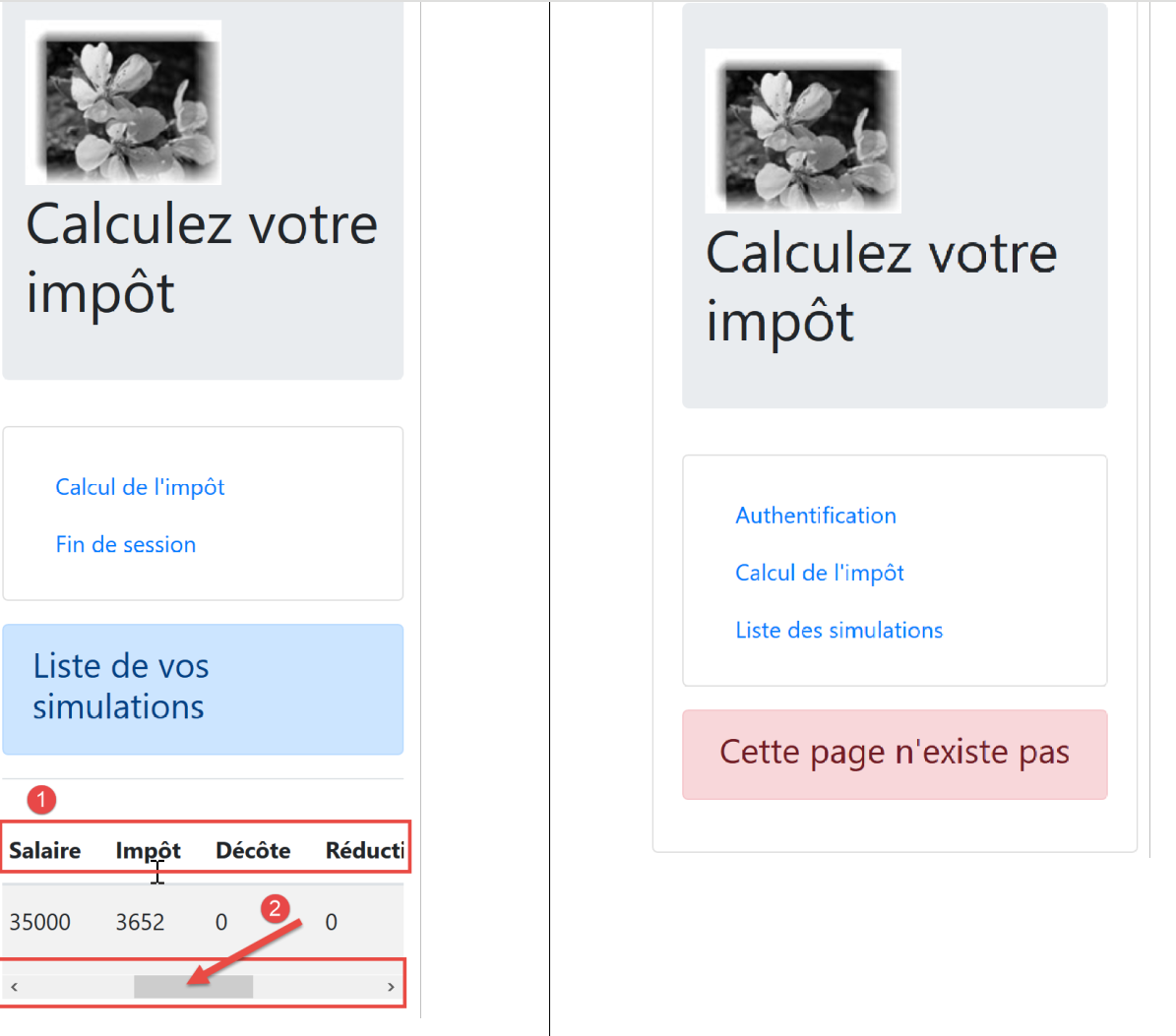
The [NotFound] view is displayed if the route entered by the user does not match any known route:
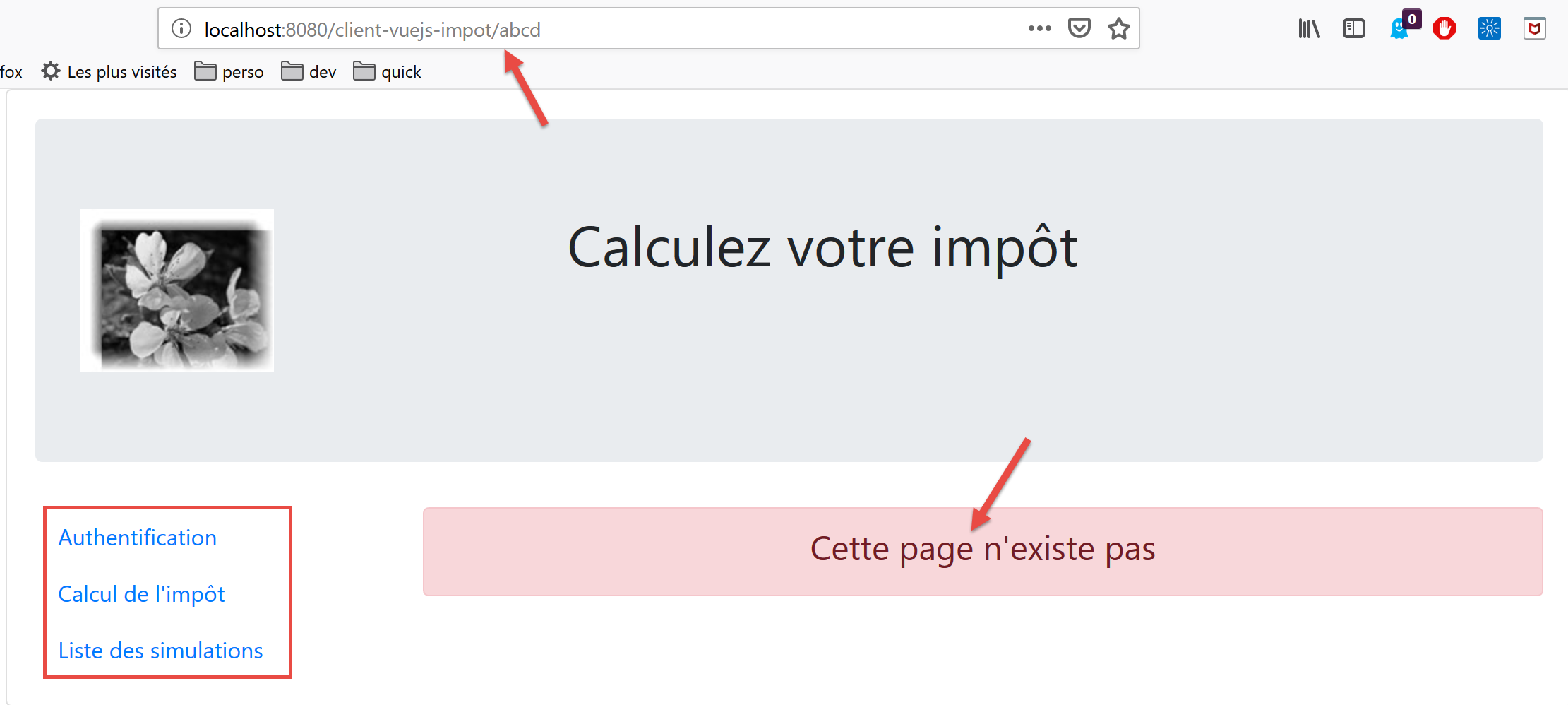
The view code is as follows:
<!-- définition HTML de la vue -->
<template>
  <!-- mise en page -->
  <Layout :left="true" :right="true">
    <!-- alerte dans la colonne de droite -->
    <template slot="right">
      <!-- message sur fond jaune -->
      <b-alert show variant="danger" align="center">
        <h4>Cette page n'existe pas</h4>
      </b-alert>
    </template>
    <!-- menu de navigation dans la colonne de gauche -->
    <Menu slot="left" :options="options" />
  </Layout>
</template>

<script>
// imports
import Layout from "./Layout";
import Menu from "./Menu";
export default {
  // composants
  components: {
    Layout,
    Menu
  },
  // état interne du composant
  data() {
    return {
      // options du menu de navigation
      options: [
        {
          text: "Authentification",
          path: "/"
        }
      ]
    };
  },
  // cycle de vie
  created() {
    // eslint-disable-next-line
    console.log("NotFound created");
    // on regarde quelles options de menu offrir
    if (this.$session.authenticated && this.$métier.taxAdminData) {
      // l'utilisateur peut faire des simulations
      Array.prototype.push.apply(this.options, [
        {
          text: "Calcul de l'impôt",
          path: "/calcul-impot"
        },
        {
          text: "Liste des simulations",
          path: "/liste-des-simulations"
        }
      ]);
    }
  }
};
</script>
Comments
- line 4: it uses both columns of the routed views;
- lines 6–11: an error message;
- line 13: the navigation menu occupies the left column;
- lines 31–36: the menu’s default options;
- lines 40–57: code executed when the view is created;
- line 44: checks whether the user can run simulations;
- lines 45–55: if so, two options are added to the navigation menu—those requiring authentication and an operational [business] layer (lines 46–55);
19.9. The [Authentication] view
The [Authentication] view evolves as follows:
<!-- définition HTML de la vue -->
<template>
  <Layout :left="false" :right="true">
    ...
  </Layout>
</template>

<!-- dynamique de la vue -->
<script>
import Layout from "./Layout";
export default {
  // component status
  data() {
    return {
      // user
      user: "",
      // password
      password: "",
      // controls the display of an error msg
      showError: false,
      // the error message
      message: ""
    };
  },

  // components used
  components: {
    Layout
  },

  // calculated properties
  computed: {
    // valid entries
    valid() {
      return this.user && this.password && this.$session.started;
    }
  },

  // event managers
  methods: {
    // ----------- authentication
    async login() {
      try {
        // start waiting
        this.$emit("loading", true);
        // you are not yet authenticated
        this.$session.authenticated = false;
        // blocking server authentication
        const response = await this.$dao.authentifierUtilisateur(
          this.user,
          this.password
        );
        // end of loading
        this.$emit("loading", false);
        // server response analysis
        if (response.état != 200) {
          // error is displayed
          this.message = response.réponse;
          this.showError = true;
          // return to event loop
          return;
        }
        // no error
        this.showError = false;
        // you are authenticated
        this.$session.authenticated = true;
        // --------- we now request data from the tax authorities
        // initially, no data
        this.$métier.setTaxAdminData(null);
        // start waiting
        this.$emit("loading", true);
        // blocking request to the server
        const response2 = await this.$dao.getAdminData();
        // end of loading
        this.$emit("loading", false);
        // response analysis
        if (response2.état != 1000) {
          // error is displayed
          this.message = response2.réponse;
          this.showError = true;
          // return to event loop
          return;
        }
        // no error
        this.showError = false;
        // the received data is stored in the [business] layer
        this.$métier.setTaxAdminData(response2.réponse);
        // we can move on to tax calculation
        this.$router.push({ name: "calculImpot" });
      } catch (error) {
        // the error is traced back to the main component
        this.$emit("error", error);
      } finally {
        // maj session
        this.$session.métier = this.$métier;
        // save the session
        this.$session.save();
      }
    }
  },
  // life cycle: the component has just been created
  created() {
    // eslint-disable-next-line
    console.log("Authentification created");
    // can the user run simulations?
    if (
      this.$session.started &&
      this.$session.authenticated &&
      this.$métier.taxAdminData
    ) {
      // then the user can run simulations
      this.$router.push({ name: "calculImpot" });
      // return to event loop
      return;
    }
    // if the jSON session has already been started, it will not be restarted
    if (!this.$session.started) {
      // start waiting
      this.$emit("loading", true);
      // initialize the session with the server - asynchronous request
      // we use the promise rendered by the [dao] layer methods
      this.$dao
        // initialize a jSON session
        .initSession()
        // we got the answer
        .then(response => {
          // end waiting
          this.$emit("loading", false);
          // response analysis
          if (response.état != 700) {
            // error is displayed
            this.message = response.réponse;
            this.showError = true;
            // return to event loop
            return;
          }
          // the session has started
          this.$session.started = true;
        })
        // in case of error
        .catch(error => {
          // the error is traced back to the [Main] view
          this.$emit("error", error);
        })
        // in all cases
        .finally(() => {
          // save the session
          this.$session.save();
        });
    }
  }
};
</script>
Comments
- The statements that use the session introduced in this version of the [Vue.js] client are highlighted in yellow;
- lines 97, 148: at the end of the [login, created] methods, the session is saved regardless of the result of the HTTP requests that occur within these methods (the [finally] clause in both cases);
- the [created] method in lines 102–150 is executed every time the [Authentication] view is created. If the user typed the view’s URL, the session will tell us what to do;
- lines 106–115: if the JSON session is started, the user is authenticated, and the data [this.$métier.taxAdminData] is initialized, then the user can go directly to the tax calculation form (line 112);
- line 117: the [created] method was used in the previous version to initialize a JSON session with the server. This step is unnecessary if it has already been performed;
- lines 42–66: the authentication method;
- line 66: if authentication succeeds, it is noted in the session;
- lines 67–92: the request to the server for tax administration data [taxAdminData];
- line 95: at the end of this phase, the session’s [business] property is updated regardless of whether the operation succeeded or not;
19.10. The [CalculImpot] view
The code for the [CalculImpot] view evolves as follows:
<!-- définition HTML de la vue -->
<template>
  ...
</template>

<script>
// imports
import FormCalculImpot from "./FormCalculImpot";
import Menu from "./Menu";
import Layout from "./Layout";

export default {
  // état interne
  data() {
    return {
      // options du menu
      options: [
        {
          text: "Liste des simulations",
          path: "/liste-des-simulations"
        },
        {
          text: "Fin de session",
          path: "/fin-session"
        }
      ],
      // résultat du calcul de l'impôt
      résultat: "",
      résultatObtenu: false
    };
  },
  // composants utilisés
  components: {
    Layout,
    FormCalculImpot,
    Menu
  },
  // méthodes de gestion des évts
  methods: {
    // résultat du calcul de l'impôt
    handleResultatObtenu(résultat) {
      // on construit le résultat en chaîne HTML
      ...
      // une simulation de +
      this.$store.commit("addSimulation", résultat);
      // on sauvegarde la session
      this.$session.save();
    }
  },
  // cycle de vie
  created() {
    // eslint-disable-next-line
    console.log("CalculImpot created");
  }
};
</script>
Comments
- line 45: the calculated simulation is added to the [Vuex] store. This affects the session, which encompasses the store’s [state] property. Therefore, we save the session (line 47);
- line 51: we create a [created] method to track view creations in the logs;
19.11. The [SimulationList] view
The [ListeSimulations] view evolves as follows:
<!-- définition HTML de la vue -->
<template>
  ...
  </div>
</template>

<script>
// imports
import Layout from "./Layout";
import Menu from "./Menu";
export default {
  // composants
  components: {
    Layout,
    Menu
  },
  // état interne
  data() {
    ...
  },
  // état interne calculé
  computed: {
    // liste des simulations prise dans le store Vuex
    simulations() {
      return this.$store.state.simulations;
    }
  },
  // méthodes
  methods: {
    supprimerSimulation(index) {
      // eslint-disable-next-line
      console.log("supprimerSimulation", index);
      // suppression de la simulation n° [index]
      this.$store.commit("deleteSimulation", index);
      // on sauvegarde la session
      this.$session.save();
    }
  },
  // cycle de vie
  created() {
    // eslint-disable-next-line
    console.log("ListeSimulations created");
  }
};
</script>
Comments
- line 36: after deleting a simulation on line 34, we save the session to reflect this state change;
- lines 40–43: we continue to track the creation of views;
19.12. Project Execution
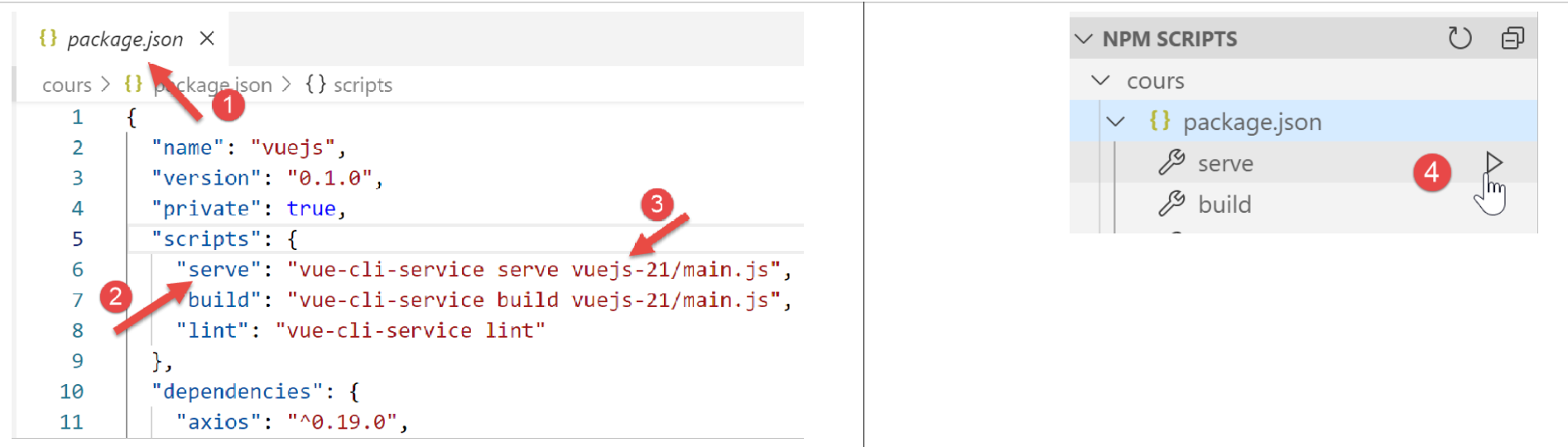
During testing, verify the following points:
- if the user “uses” the application via the navigation menu links and the action buttons/links, it works;
- if the user manually enters URLs, the application continues to function. In particular, perform the following test:
- run simulations;
- once on the [SimulationList] view, reload (F5) the view. In the previous application [vuejs-20], the simulations were lost at that point. That is not the case here: the simulations already performed are still present;
- Check the logs to understand:
- when the [main] script is executed. You should see that it runs every time the user manually enters a URL;
- when the views are created. You should see that they are created every time they are about to be displayed;
- how routing works. Before each routing, a log is generated that tells you:
- the route you came from;
- the route you are going to;
19.13. Deploying the application on a local server
As an exercise, follow the section |Deployment on a local server| to deploy the [vuejs-21] project on the local Laragon server. Then test it.
19.14. Developing the mobile version
In theory, using Bootstrap should allow us to have an application that works on different devices: smartphones, tablets, laptops, and desktops. What differentiates these devices is their screen size.
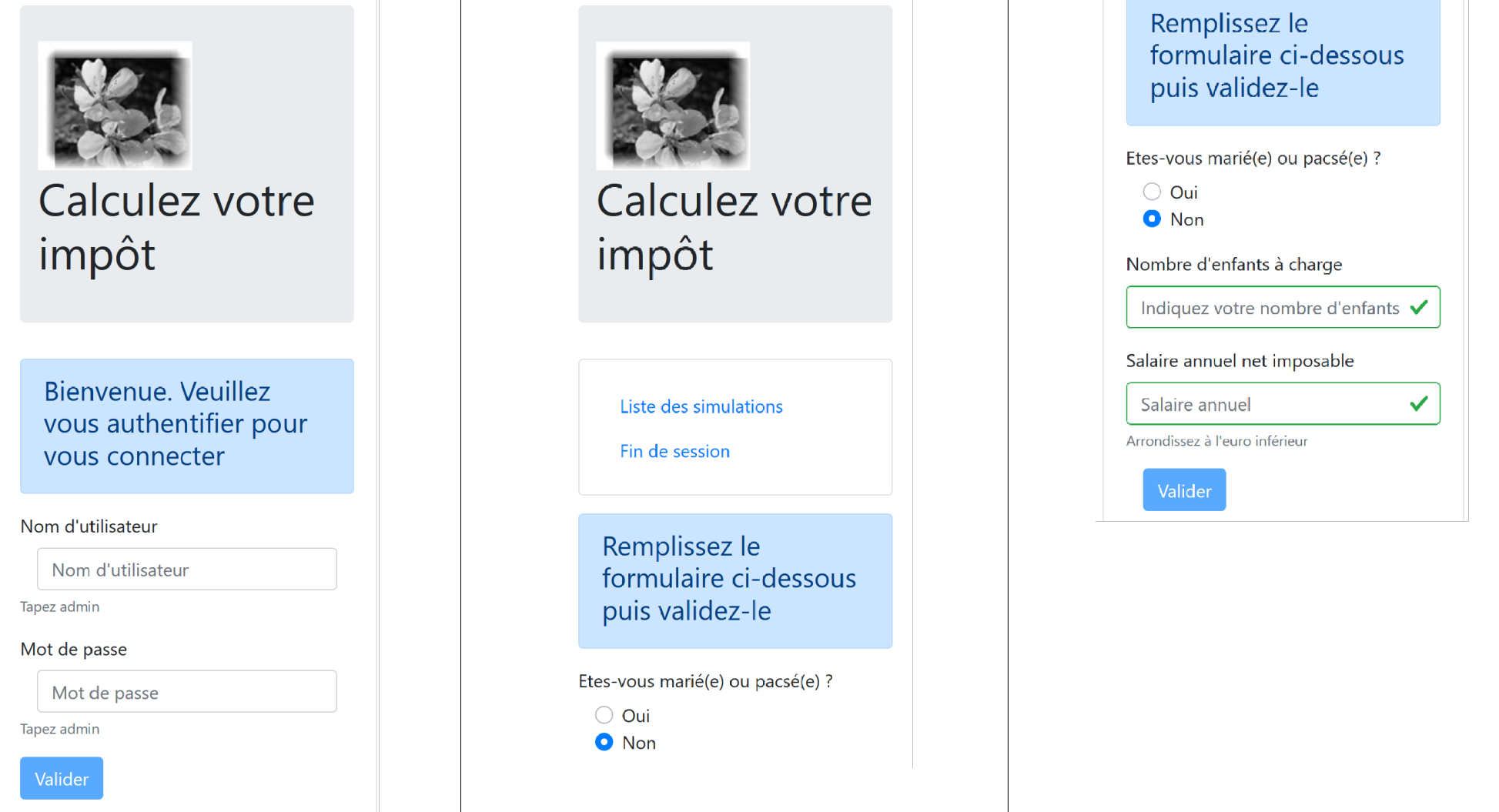
If we test the [vuejs-21] version on a mobile device, we see that the view display is a mess. The [vuejs-22] version fixes this issue. All changes were made in the view templates. They mainly involved optimizing the display for a smartphone screen. Once this is optimized, the display on larger screens works smoothly thanks to Bootstrap.
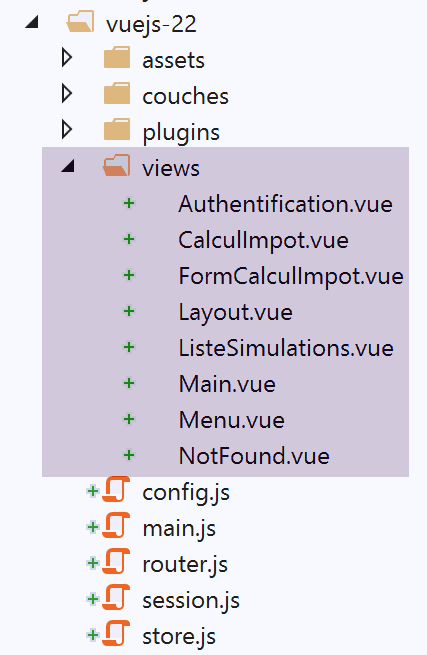
19.14.1. The [Main] view
The [Main] view evolves as follows:
<!-- definition HTML of the view -->
<template>
  <div class="container">
    <b-card>
      <!-- jumbotron -->
      <b-jumbotron>
        <b-row>
          <b-col sm="4">
            <img src="../assets/logo.jpg" alt="Cerisier en fleurs" />
          </b-col>
          <b-col sm="8">
            <h1>Calculez votre impôt</h1>
          </b-col>
        </b-row>
      </b-jumbotron>
      ....
    </b-card>
  </div>
</template>
Comments
- line 8: where it used to say [cols=’4’], we now write [sm=’4’]. [sm] stands for [small]. Smartphone screens fall into this category. The other categories are [xs=extra small, md=medium, lg=large, xl=extra large];
- line 11: same as above;
19.14.2. The [Layout] view
The [Layout] view evolves as follows:
<!-- definition HTML of the routed view layout -->
<template>
  <!-- line -->
  <div>
    <b-row>
      <!-- three-column zone on the left -->
      <b-col sm="3" v-if="left">
        <slot name="left" />
      </b-col>
      <!-- nine-column zone on the right -->
      <b-col sm="9" v-if="right">
        <slot name="right" />
      </b-col>
    </b-row>
  </div>
</template>
19.14.3. The [Authentication] view
The [Authentication] view evolves as follows:
<!-- definition HTML of the view -->
<template>
  <Layout :left="false" :right="true">
    <template slot="right">
      <!-- form HTML - post its values with the [authenticate-user] action -->
      <b-form @submit.prevent="login">
        <!-- title -->
        <b-alert show variant="primary">
          <h4>Bienvenue. Veuillez vous authentifier pour vous connecter</h4>
        </b-alert>
        <!-- 1st line -->
        <b-form-group label="Nom d'utilisateur" label-for="user" description="Tapez admin">
          <!-- user input field -->
          <b-col sm="6">
            <b-form-input type="text" id="user" placeholder="Nom d'utilisateur" v-model="user" />
          </b-col>
        </b-form-group>
        <!-- 2nd line -->
        <b-form-group label="Mot de passe" label-for="password" description="Tapez admin">
          <!-- password input field -->
          <b-col sm="6">
            <b-input type="password" id="password" placeholder="Mot de passe" v-model="password" />
          </b-col>
        </b-form-group>
        <!-- 3rd line -->
        <b-alert
          show
          variant="danger"
          v-if="showError"
          class="mt-3"
        >L'erreur suivante s'est produite : {{message}}</b-alert>
        <!-- submit] button on a 3rd line -->
        <b-row>
          <b-col sm="2">
            <b-button variant="primary" type="submit" :disabled="!valid">Valider</b-button>
          </b-col>
        </b-row>
      </b-form>
    </template>
  </Layout>
</template>
Comments
- Lines 11 and 19: We removed the [label-cols] attribute, which set the number of columns for the input label. Without this attribute, the label appears above the input field. This is better suited for smartphone screens;
19.14.4. The [CalculImpot] view
The [CalculImpot] view has been updated as follows:
<!-- definition HTML of the view -->
<template>
  <div>
    <Layout :left="true" :right="true">
      <!-- tax calculation form on the right -->
      <FormCalculImpot slot="right" @resultatObtenu="handleResultatObtenu" />
      <!-- left-hand navigation menu -->
      <Menu slot="left" :options="options" />
    </Layout>
    <!-- display area for tax calculation results under the form -->
    <b-row v-if="résultatObtenu" class="mt-3">
      <!-- empty three-column zone -->
      <b-col sm="3" />
      <!-- nine-column zone -->
      <b-col sm="9">
        <b-alert show variant="success">
          <span v-html="résultat"></span>
        </b-alert>
      </b-col>
    </b-row>
  </div>
</template>
19.14.5. The [FormCalculImpot] view
The [FormCalculImpot] view evolves as follows:
<!-- definition HTML of the view -->
  <template>
  <!-- form HTML -->
  <b-form @submit.prevent="calculerImpot" class="mb-3">
    <!-- 12-column message on blue background -->
    <b-row>
      <b-col sm="12">
        <b-alert show variant="primary">
          <h4>Remplissez le formulaire ci-dessous puis validez-le</h4>
        </b-alert>
      </b-col>
    </b-row>
    <!-- form elements -->
    <!-- first line -->
    <b-form-group label="Etes-vous marié(e) ou pacsé(e) ?">
      <!-- 5-column radio buttons-->
      <b-col sm="5">
        <b-form-radio v-model="marié" value="oui">Oui</b-form-radio>
        <b-form-radio v-model="marié" value="non">Non</b-form-radio>
      </b-col>
    </b-form-group>
    <!-- second line -->
    <b-form-group label="Nombre d'enfants à charge" label-for="enfants">
      <b-form-input
        type="text"
        id="enfants"
        placeholder="Indiquez votre nombre d'enfants"
        v-model="enfants"
        :state="enfantsValide"
      ></b-form-input>
      <!-- possible error message -->
      <b-form-invalid-feedback :state="enfantsValide">Vous devez saisir un nombre positif ou nul</b-form-invalid-feedback>
    </b-form-group>
    <!-- third line -->
    <b-form-group
      label="Salaire annuel net imposable"
      label-for="salaire"
      description="Arrondissez à l'euro inférieur"
    >
      <b-form-input
        type="text"
        id="salaire"
        placeholder="Salaire annuel"
        v-model="salaire"
        :state="salaireValide"
      ></b-form-input>
      <!-- possible error message -->
      <b-form-invalid-feedback :state="salaireValide">Vous devez saisir un nombre positif ou nul</b-form-invalid-feedback>
    </b-form-group>
    <!-- fourth line, [submit] button -->
    <b-col sm="3">
      <b-button type="submit" variant="primary" :disabled="formInvalide">Valider</b-button>
    </b-col>
  </b-form>
</template>
Comments
- Lines 15, 23, 35: The [label-cols] attribute has been removed;
In addition, we are updating the validation tests:
...
// état interne calculé
  computed: {
    // validation du formulaire
    formInvalide() {
      return (
        // salaire invalide
        !this.salaire.match(/^\s*\d+\s*$/) ||
        // ou enfants invalide
        !this.enfants.match(/^\s*\d+\s*$/) ||
        // ou données fiscales pas obtenues
        !this.$métier.taxAdminData
      );
    },
    // validation du salaire
    salaireValide() {
      // doit être numérique >=0
      return Boolean(
        this.salaire.match(/^\s*\d+\s*$/) || this.salaire.match(/^\s*$/)
      );
    },
    // validation des enfants
    enfantsValide() {
      // doit être numérique >=0
      return Boolean(
        this.enfants.match(/^\s*\d+\s*$/) || this.enfants.match(/^\s*$/)
      );
    }
},
...
Comments
- line 19: when nothing has been entered, the input is considered valid. This ensures that the input is valid when the view is initially displayed. In the previous version, the input initially appeared as incorrect;
- line 26: same as above;
- Lines 5–14: The submit button is only active if both fields contain data and are valid;
19.14.6. The [Menu] view
The [Menu] view evolves as follows:
<!-- definition HTML of the view -->
<template>
  <b-card class="mb-3">
    <!-- bootstrap vertical menu -->
    <b-nav vertical>
      <!-- menu options -->
      <b-nav-item
        v-for="(option,index) of options"
        :key="index"
        :to="option.path"
        exact
        exact-active-class="active"
      >{{option.text}}</b-nav-item>
    </b-nav>
  </b-card>
</template>
Comments
- Line 3: We add the <b-card> tag to surround the menu with a thin border. This helps make the menu easier to locate on a smartphone;
19.14.7. The [SimulationList] view
The [ListeSimulations] view remains unchanged:
<!-- definition HTML of the view -->
<template>
  <div>
    <!-- layout -->
    <Layout :left="true" :right="true">
      <!-- simulations in right-hand column -->
      <template slot="right">
        <template v-if="simulations.length==0">
          <!-- no simulations -->
          <b-alert show variant="primary">
            <h4>Votre liste de simulations est vide</h4>
          </b-alert>
        </template>
        <template v-if="simulations.length!=0">
          <!-- there are simulations -->
          <b-alert show variant="primary">
            <h4>Liste de vos simulations</h4>
          </b-alert>
          <!-- simulation table -->
          <b-table striped hover responsive :items="simulations" :fields="fields">
            <template v-slot:cell(action)="data">
              <b-button variant="link" @click="supprimerSimulation(data.index)">Supprimer</b-button>
            </template>
          </b-table>
        </template>
      </template>
      <!-- navigation menu in left-hand column -->
      <Menu slot="left" :options="options" />
    </Layout>
  </div>
</template>
Comments
- Line 20: Note the [responsive] attribute, which ensures that the table display adapts to the screen size:
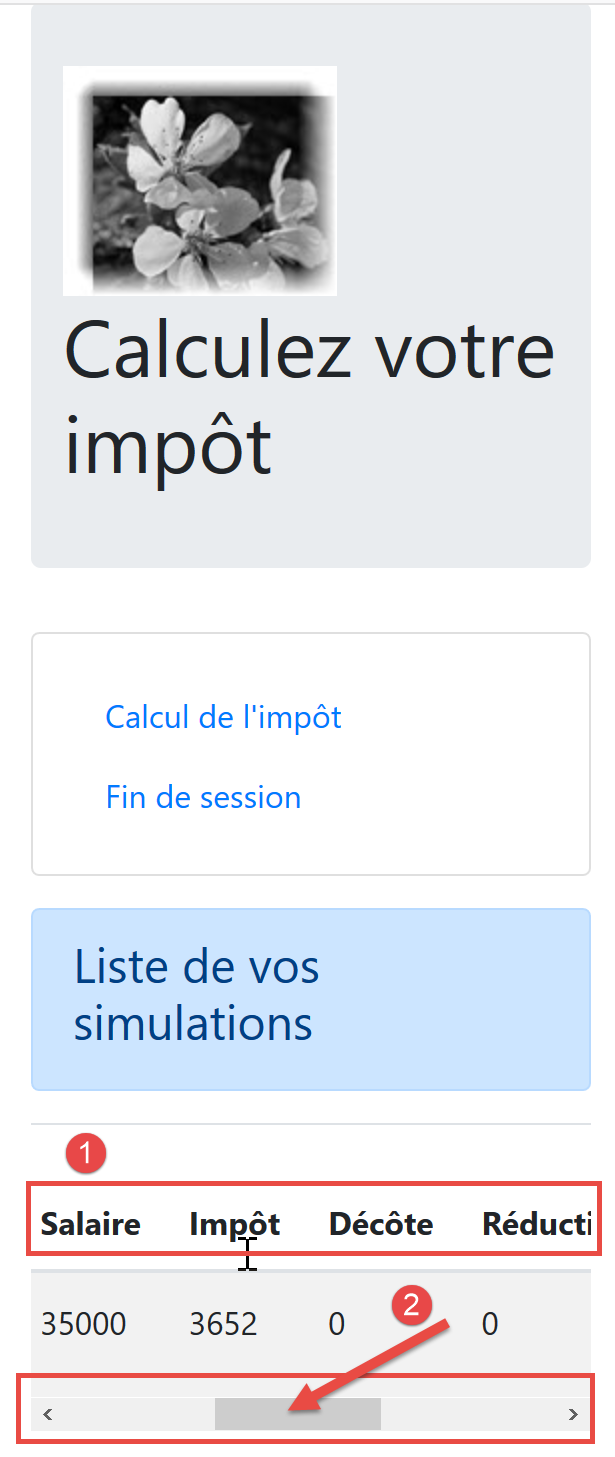
- in [2], on small screens, a horizontal scrollbar allows the table to be displayed;
19.14.8. The [NotFound] view
It remains unchanged.
19.14.9. Mobile views
Note: It is certainly possible to create views that are even better suited for mobile. I am thinking in particular of the navigation menu, which could be improved, but there are other areas as well. The primary objective of this document was not to create a mobile app. In that case, we might have turned to a framework like Ionic |https://ionicframework.com/|.