12. Project [vuejs-10]: [dao] plugin, asynchronous HTTP requests
The directory structure of the [vuejs-10] project is as follows:
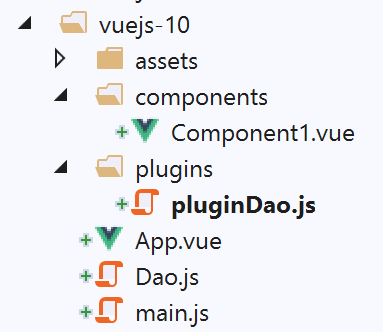
The [vuejs-10] project demonstrates a component making an HTTP request to a remote server. The architecture used is as follows:
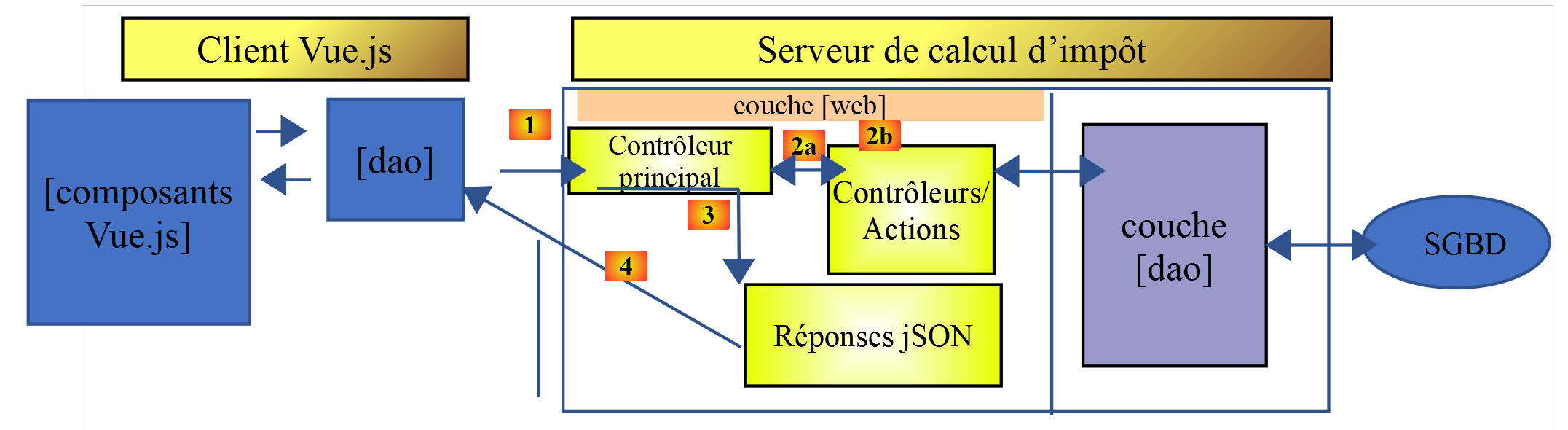
A [Vue.js] component uses the [dao] layer to communicate with the tax calculation server.
12.1. Installing dependencies
The [vuejs-10] application uses the [axios] library to make asynchronous requests to the tax calculation server. We need to install this dependency:
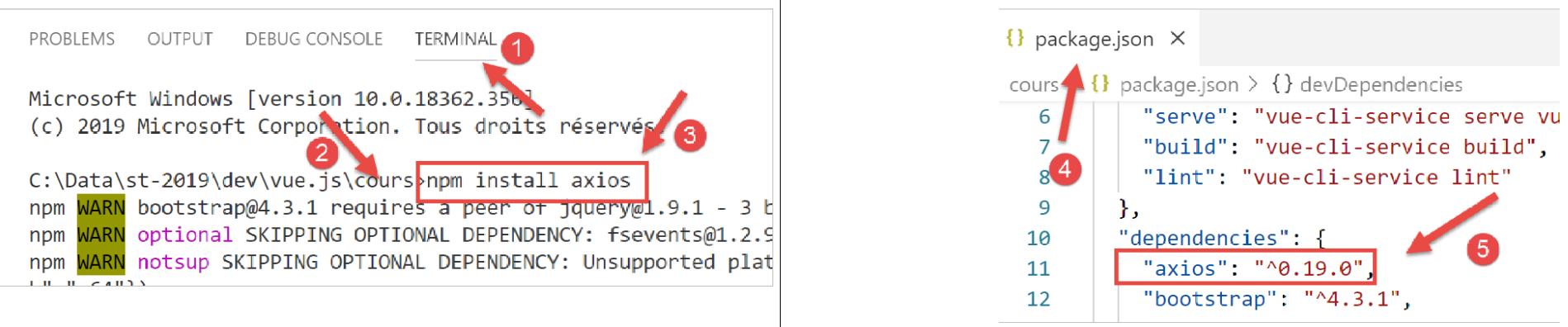
- in [4-5], the line added to the [package.json] file after installing the [axios] library [1-3];
12.2. The [Dao] class
The [Dao] class is the one developed in the section [The Dao Class]. We include it here for reference:
'use strict';

// imports
import qs from 'qs'

// dao] class
class Dao {

  // manufacturer
  constructor(axios) {
    this.axios = axios;
    // session cookie
    this.sessionCookieName = "PHPSESSID";
    this.sessionCookie = '';
  }

  // init session
  async  initSession() {
    // query options HHTP [get /main.php?action=init-session&type=json]
    const options = {
      method: "GET",
      // URL parameters
      params: {
        action: 'init-session',
        type: 'json'
      }
    };
    // execute query HTTP
    return await this.getRemoteData(options);
  }

  async  authentifierUtilisateur(user, password) {
    // query options HHTP [post /main.php?action=authenticate-user]
    const options = {
      method: "POST",
      headers: {
        'Content-type': 'application/x-www-form-urlencoded',
      },
      // body of POST
      data: qs.stringify({
        user: user,
        password: password
      }),
      // URL parameters
      params: {
        action: 'authentifier-utilisateur'
      }
    };
    // execute query HTTP
    return await this.getRemoteData(options);
  }

  async getAdminData() {
    // query options HHTP [get /main.php?action=get-admindata]
    const options = {
      method: "GET",
      // URL parameters
      params: {
        action: 'get-admindata'
      }
    };
    // execute query HTTP
    const data = await this.getRemoteData(options);
    // result
    return data;
  }

  async  getRemoteData(options) {
    // for the session cookie
    if (!options.headers) {
      options.headers = {};
    }
    options.headers.Cookie = this.sessionCookie;
    // execute query HTTP
    let response;
    try {
      // asynchronous request
      response = await this.axios.request('main.php', options);
    } catch (error) {
      // the [error] parameter is an exception instance - it can take various forms
      if (error.response) {
        // the server response is in [error.response]
        response = error.response;
      } else {
        // error restart
        throw error;
      }
    }
    // response is the entire HTTP response from the server (HTTP headers + response itself)
    // retrieve the session cookie if it exists
    const setCookie = response.headers['set-cookie'];
    if (setCookie) {
      // setCookie is an array
      // look for the session cookie in this table
      let trouvé = false;
      let i = 0;
      while (!trouvé && i < setCookie.length) {
        // look for the session cookie
        const results = RegExp('^(' + this.sessionCookieName + '.+?);').exec(setCookie[i]);
        if (results) {
          // the session cookie is stored
          // eslint-disable-next-line require-atomic-updates
          this.sessionCookie = results[1];
          // we found
          trouvé = true;
        } else {
          // next item
          i++;
        }
      }
    }
    // the server response is in [response.data]
    return response.data;
  }
}

// class export
export default Dao;
The [vuejs-10] project uses only the asynchronous [initSession] method in lines 18–30. Note that the [Dao] class is instantiated with an [axios] parameter on line 10, which is initialized by the calling code. In this case, the calling code is the [./main.js] script.
12.3. The [pluginDao] plugin
The [pluginDao] plugin is as follows:
export default {
  install(Vue, dao) {
    // ajoute une propriété [$dao] à la classe Vue
    Object.defineProperty(Vue.prototype, '$dao', {
      // lorsque Vue.$dao est référencé, on rend le 2ième paramètre [dao]
      get: () => dao,
    })
  }
}
If we recall the explanation given for the [event-bus] plugin, we see that the [pluginDao] plugin creates a new property called [$dao] in the [Vue] class/function. This property will have (as we will show) as its value the object exported by the [./Dao] script, i.e., the previous [Dao] class.
12.4. The main script [main.js]
The code for the main script [main.js] is as follows:
// imports
import Vue from 'vue'
import App from './App.vue'
import axios from 'axios';

// plugins
import BootstrapVue from 'bootstrap-vue'
Vue.use(BootstrapVue);

// bootstrap
import 'bootstrap/dist/css/bootstrap.css'
import 'bootstrap-vue/dist/bootstrap-vue.css'

// couche [dao]
import Dao from './Dao';
// configuration axios
axios.defaults.timeout = 2000;
axios.defaults.baseURL = 'http://localhost/php7/scripts-web/impots/version-14';
axios.defaults.withCredentials = true;
// instanciation couche [dao]
const dao = new Dao(axios);

// plugin [dao]
import pluginDao from './plugins/dao'
Vue.use(pluginDao, dao)

// configuration
Vue.config.productionTip = false

// instanciation projet [App]
new Vue({
  render: h => h(App),
}).$mount('#app')
The [main.js] script:
- instantiates the [dao] layer on lines 14–21;
- includes the [pluginDao] plugin on lines 24–25;
- line 15: the [Dao] class is imported;
- lines 17–18: the [axios] object, which handles HTTP requests, is configured. This object is imported on line 4;
- line 17: defines a [timeout] of 2 seconds;
- line 18: the URL of the tax calculation server;
- line 19: to enable cookie exchange with the server;
- lines 24-25: use of the [pluginDao] plugin
- line 24: import of the plugin;
- line 25: integration of the plugin. We can see that the second parameter of the [Vue.use] method is the reference to the [dao] layer defined on line 21. This is why the [Vue.$dao] property will refer to the [dao] layer in all instances of the [Vue] class/function, i.e., in all [Vue.js] components;
12.5. The main view [App.vue]
The code for the main view [App] is as follows:
<template>
  <div class="container">
    <b-card>
      <!-- message -->
      <b-alert show variant="success" align="center">
        <h4>[vuejs-10] : plugin [dao], requêtes HTTP asynchrones</h4>
      </b-alert>
      <!-- composant faisant une requête asynchrone au serveur de calcul d'impôt-->
      <Component1 @error="doSomethingWithError" @endWaiting="endWaiting" @beginWaiting="beginWaiting" />
      <!-- affichage d'une éventuelle erreur -->
      <b-alert show
               variant="danger"
               v-if="showError">Evénement [error] intercepté par [App]. Valeur reçue = {{error}}</b-alert>
      <!-- message d'attente avec un spinner -->
      <b-alert show v-if="showWaiting" variant="light">
        <strong>Requête au serveur de calcul d'impôt en cours...</strong>
        <b-spinner variant="primary" label="Spinning"></b-spinner>
      </b-alert>
    </b-card>
  </div>
</template>

<script>
  import Component1 from "./components/Component1";
  export default {
    name: "app",
    // état du composant
    data() {
      return {
        // contrôle le spinner d'attente
        showWaiting: false,
        // contrôle l'affichage de l'erreur
        showError: false,
        // l'erreur interceptée
        error: {}
      };
    },
    // composants utilisés
    components: {
      Component1
    },
    // méthodes de gestion des évts
    methods: {
      // début attente
      beginWaiting() {
        // on affiche l'attente
        this.showWaiting = true;
        // on cache le msg d'erreur
        this.showError = false;
      },
      // fin attente
      endWaiting() {
        // on cache l'attente
        this.showWaiting = false;
      },
      // gestion d'erreur
      doSomethingWithError(error) {
        // on note qu'il y a eu erreur
        this.error = error;
        // on affiche le msg d'erreur
        this.showError = true;
      }
    }
  };
</script>
Comments
- line 9: [Component1] is the component that makes the asynchronous HTTP request. It can emit three events:
- [beginWaiting]: the request is about to be made. A waiting message must be displayed to the user;
- [endWaiting]: the request is complete. The wait must be stopped;
- [error]: the request failed. An error message must be displayed;
- lines 10–13: the alert that displays any error message. It is controlled by the boolean [showError] on line 33. It displays the error on line 35;
- lines 14–18: the alert that displays the waiting message with a spinner. It is controlled by the boolean [showWaiting] on line 47;
- lines 45–50: [beginWaiting] is the method executed upon receiving the [beginWaiting] event. It displays the waiting message (line 47) and hides the error message (line 49) in case it is still visible from a previous operation;
- lines 52–55: [endWaiting] is the method executed upon receiving the [endWaiting] event. It hides the waiting message (line 54);
- lines 57–62: [doSomethingWithError] is the method executed upon receiving the [error] event. It logs the received error (line 59) and displays the error message (line 61);
12.6. The [Component1] component
The code for the [Component1] component is as follows:
<template>
  <b-row>
    <b-col>
      <b-alert show
               variant="warning"
               v-if="showMsg">Valeur reçue du serveur = {{data}}</b-alert>
    </b-col>
  </b-row>
</template>

<script>
  export default {
    name: "component1",
    // component status
    data() {
      return {
        showMsg: false
      };
    },
    // event management methods
    methods: {
      // processing data received from the server
      doSomethingWithData(data) {
        // record the data received
        this.data = data;
        // we display it
        this.showMsg = true;
      }
    },
    // the component has just been created
    created() {
      // initialize the session with the server - asynchronous request
      // we use the promise rendered by the [dao] layer methods
      // we signal the start of the operation
      this.$emit("beginWaiting");
      // asynchronous operation is launched
      this.$dao
        // initialize a jSON session with the tax calculation server
        .initSession()
        // method that processes the data received in the event of success
        .then(data => {
          // we process the data received
          this.doSomethingWithData(data);
        })
        // error handling method in case of error
        .catch(error => {
          // the error is traced back to the parent component
          this.$emit("error", error.message);
        }).finally(() => {
          // end of wait
          this.$emit("endWaiting");
        })
    }
  };
</script>
Comments
- lines 4–6: The component consists of a single alert that displays the value returned by the tax calculation server, but only if the HTTP request is successful. This alert is controlled by the boolean [showMsg] on line 17;
- lines 31–53: The HTTP request is made as soon as the component is created. Therefore, its code is placed in the [created] method on line 31;
- line 35: the parent component is notified that the asynchronous request is about to start;
- lines 37–39: the [this.$dao.initSession] method is executed. It initializes a JSON session with the tax calculation server. The immediate result of this method is a [Promise];
- lines 41–44: this code runs when the server returns its result without an error. The server’s result is in [data]. On line 43, we call the [doSomethingWithData] method to process this result;
- lines 46–49: this code runs if an error occurs while executing the request. On line 48, the parent component is notified that an error has occurred, and the error message [error.message] is passed to it;
- Lines 49–52: This code runs in all cases. We notify the parent component that the HTTP request is complete;
- Lines 23–28: The [doSomethingWithData] method is responsible for processing the data [data] sent by the server. On line 25, this data is stored, and on line 27, it is displayed;
12.7. Running the project
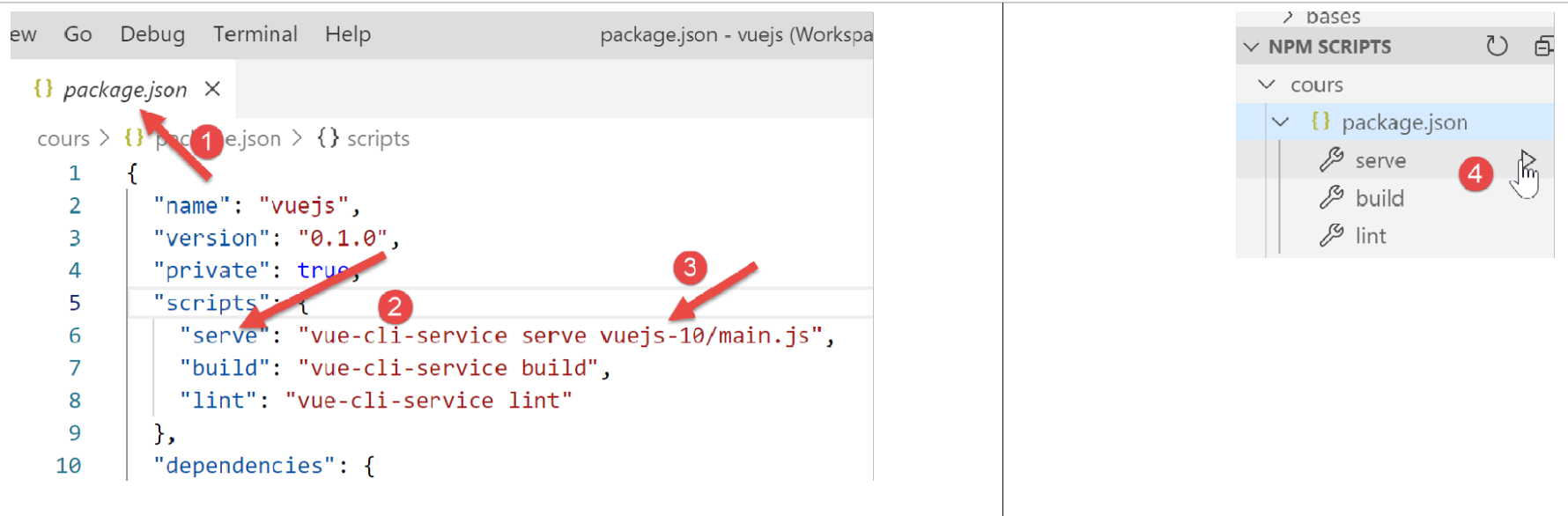
If the tax calculation server is not running when the project is launched, the following result is obtained:
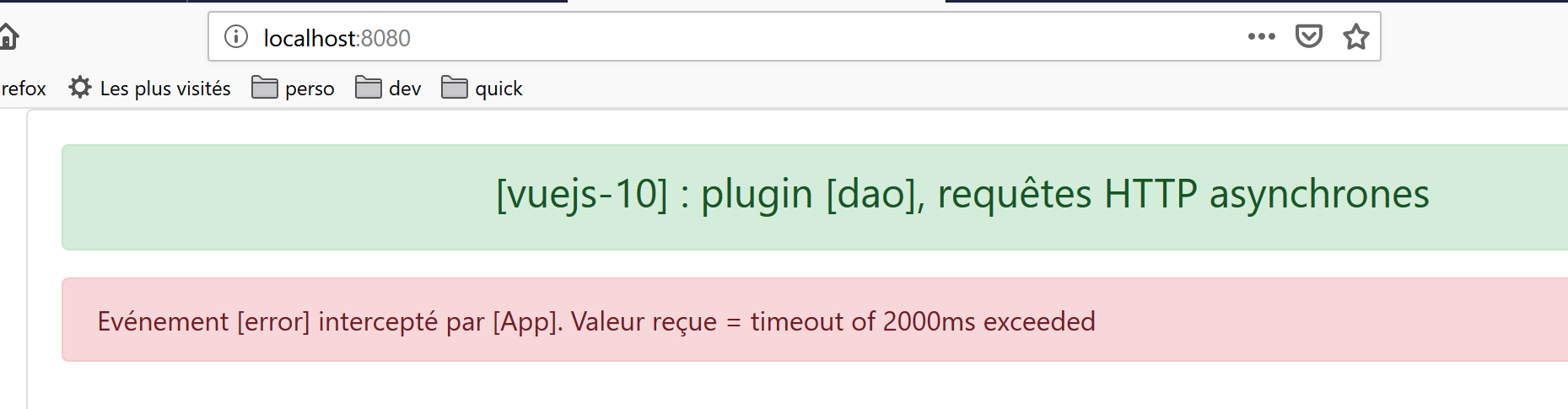
Let’s start the [Laragon] server (see https://tahe.developpez.com/tutoriels-cours/php7) and reload the page above. The result is then as follows:
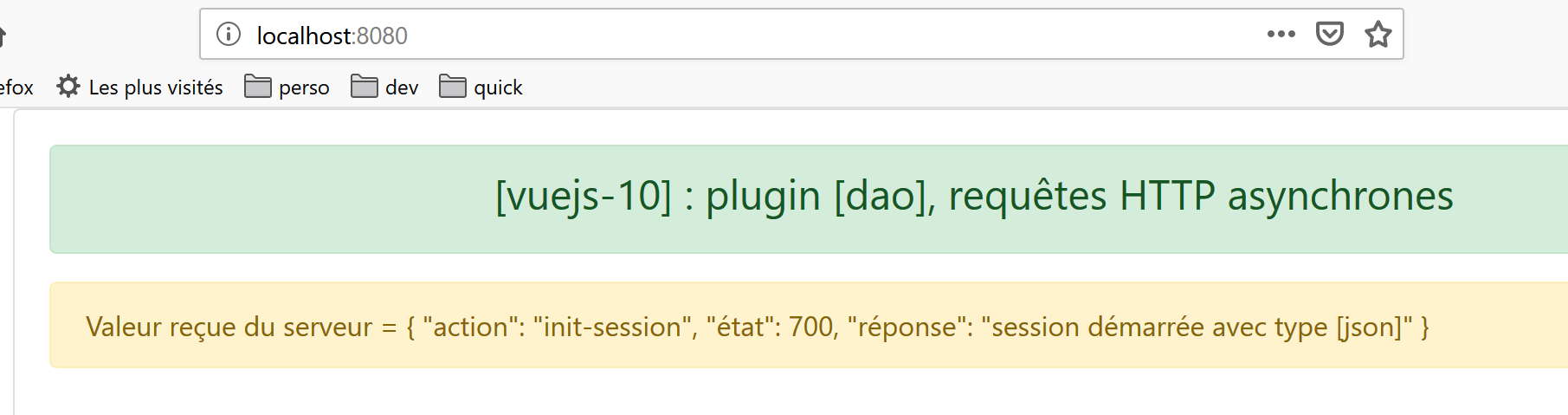
Note: We are using version 14 of the tax calculation server defined at https://tahe.developpez.com/tutoriels-cours/php7.