3. Project [vuejs-01]: the basics
To explain the code executed in [vuejs-00], we will simplify it in [vuejs-01]. We duplicate the [vuejs-00] folder into [vuejs-01]:
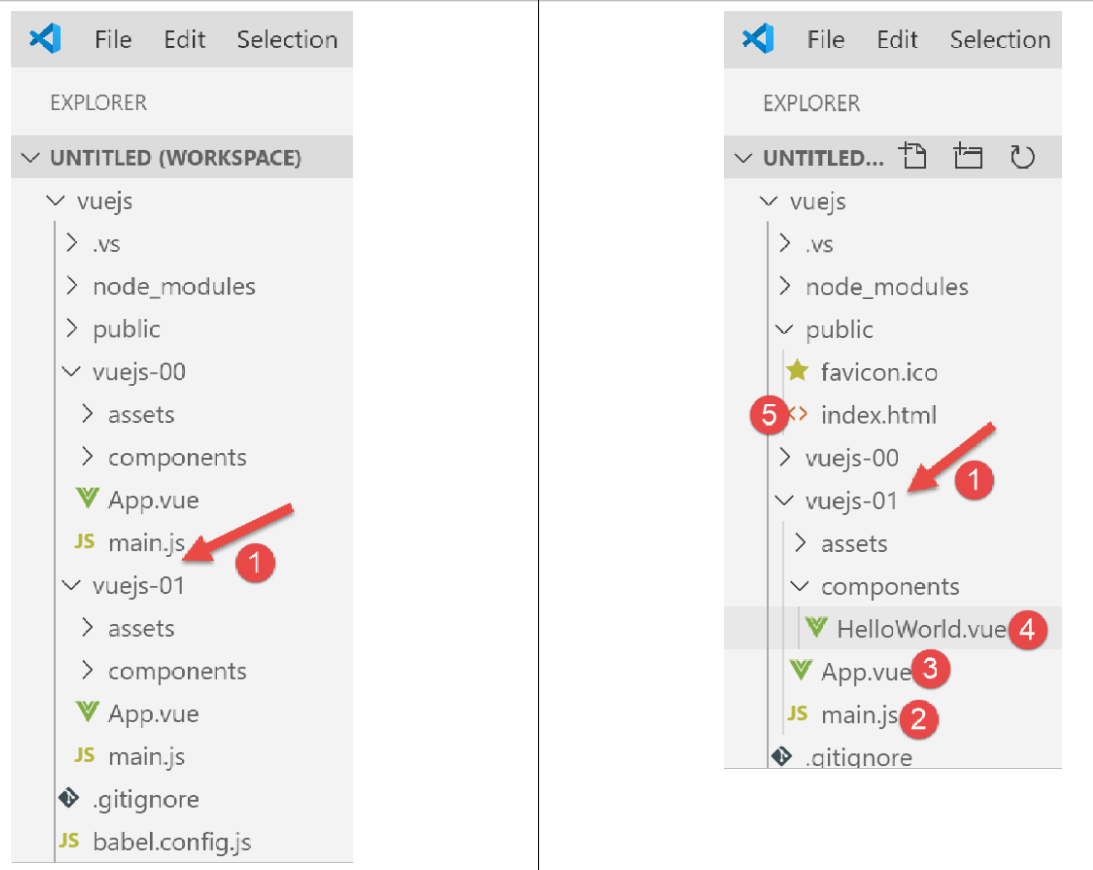
The [vuejs-01] project essentially consists of four files:
- [main.js] [2] is the entry point of the project;
- [App.vue, HelloWorld.vue] and [3-4] are components of [Vue.js], optionally comprising the following elements:
- [<template>...</template>]: code HTML;
- [<script>...</script>]: the code Javascript associated with the code HTML;
- [<style>...</style>]: the style CSS associated with code HTML;
- [public/index.html] [5]: the document HTML displayed by the command [npm run serve];
The file [public/index.html] displayed when the project is run is this one:
<!DOCTYPE html>
<html lang="en">
  <head>
    <meta charset="utf-8">
    <meta http-equiv="X-UA-Compatible" content="IE=edge">
    <meta name="viewport" content="width=device-width,initial-scale=1.0">
    <link rel="icon" href="<%= BASE_URL %>favicon.ico">
    <title>vuejs</title>
  </head>
  <body>
    <noscript>
      <strong>We're sorry but vuejs doesn't work properly without JavaScript enabled. Please enable it to continue.</strong>
    </noscript>
    <div id="app"></div>
    <!-- built files will be auto injected -->
  </body>
</html>
This HTML file therefore does not display anything statically. There is no HTML code here. The display is dynamic: the project’s jS code will generate HTML, which will completely replace the [<div id=’app’>] tag on line 14. The code HTML, generated by the project’s code jS and inserted in place of the [<div>] tag on line 14, comes from the [template] tags of the [vue.js] components, with files having the suffix [.vue].
The code HTML is dynamically inserted on line 14 by the following [vuejs-01/main.js] script:
// imports
import Vue from 'vue'
import App from './App.vue'

// configuration
Vue.config.productionTip = false

// instantiation project [App]
new Vue({
  render: h => h(App),
}).$mount('#app')
Comments
- line 2: the object [Vue] is provided by the framework [vue.js];
- line 3: the [App] object is provided by the [vuejs-01/App.vue] file;
- line 6: configuration of the [Vue] object;
- lines 9–11: these are the lines that:
- generate the application’s HTML code. Line 10: the [App.vue] file generates it;
- load the HTML code generated in line 10 into the [<div id=’app’></div>] section of the [public/index.html] file;
Any [Vue.js] project can keep the [index.html] file as is.
The file [App.vue] from the initial project [vuejs-00] is simplified as follows in the project [vuejs-01]:
<template>
  <div id="myApp">
    <img alt="Vue logo" src="./assets/logo.png" />
    <HelloWorld msg="Notre première application Vue.js" />
  </div>
</template>

<script>
import HelloWorld from "./components/HelloWorld.vue";

export default {
  name: "app",
  components: {
    HelloWorld
  }
};
</script>
Comments
- A [.vue] fragment consists of at most three sections:
- [<template>...</template>]: from code HTML;
- [<script>...</script>]: the code Javascript associated with the code HTML;
- [<style>...</style>]: the style CSS associated with the code HTML;
Here, we do not have a section [style].
- lines 1–6: the code HTML of the fragment (page, component, view, etc.);
- lines 2–5: the [template] section can contain only one element. We generally include a [div] section that encompasses the entire HTML of the fragment. We can also include a <template> tag;
- line 3: an image;
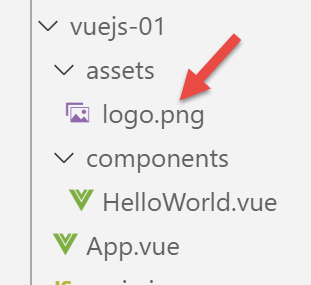
- line 4: a component named [HelloWorld]. The principle of [Vue.js] is to build web pages using fragments defined in [.vue] files, such as [App.vue] here. This component is defined by the file [HelloWorld.vue], defined on line 9 of the associated script jS;
- line 4: a component can accept parameters. The parameter here is the [msg] attribute;
- lines 8–17: the jS script for the fragment (or component);
- line 9: to use the [HelloWorld] component within the [App] component, its definition must be imported into the [script] section;
- lines 11–16: the script defines an object and exports it to make it available externally;
- line 12: the [name] attribute defines the name of the exported component;
- Lines 13–15: The [components] attribute lists the components used by the [App] component. They are exported along with it;
Line 9: There is no requirement that the component [HelloWorld] have the same name as the file that defines it. It could be imported as [X] and exported as component [Bonjour]:
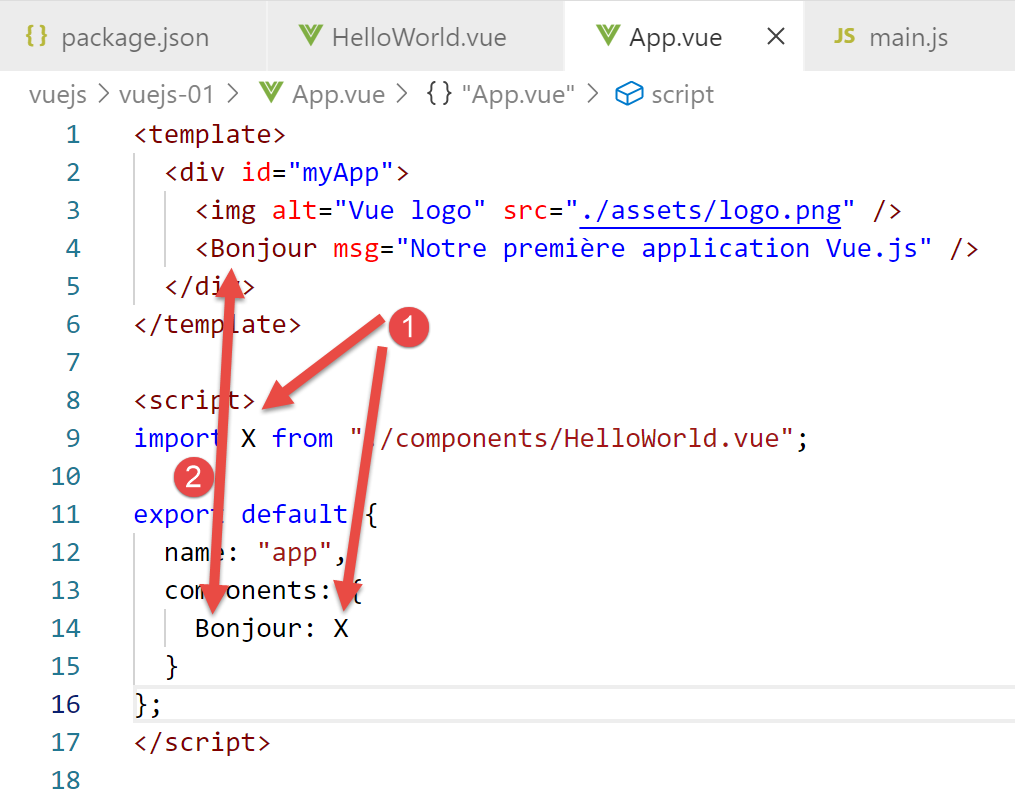
- Line 14: The component [X] is exported under the name [Bonjour]. It is then used under this name, line 4;
The first version is the most common version, so we will define our components this way;
<template>
  <div id="myApp">
    <img alt="Vue logo" src="./assets/logo.png" />
    <HelloWorld msg="Notre première application Vue.js" />
  </div>
</template>

<script>
import HelloWorld from "./components/HelloWorld.vue";

export default {
  name: "app",
  components: {
    HelloWorld
  }
};
</script>
Line 14 is a shorthand for the code [HelloWorld : HelloWorld]: the component [HelloWorld] (on the right, imported on line 9) is exported under the name [HelloWorld] (on the left).
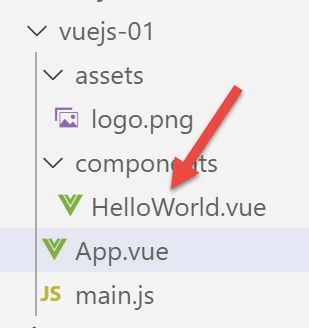
We simplify the [HelloWorld.vue] component as follows:
<template>
  <div>
    <h1>{{ msg }}</h1>
  </div>
</template>

<script>
export default {
  name: "HelloWorld",
  props: {
    msg: String
  }
};
</script>
Comments
- The component [HelloWorld] has the same file structure as the main component [App];
- line 3: here we have an expression evaluation Javascript, here the expression [msg];
- Lines 10–12: define the component’s properties, more specifically its parameters. When the [App] component instantiated a [HelloWorld] component, it did so using the following syntax:
<HelloWorld msg="Notre première application Vue.js" />
The [HelloWorld] component is instantiated by assigning a value to the [msg] parameter (attribute). If we follow the [template] of the [HelloWorld] component, it becomes:
<div>
    <h1>Notre première application Vue.js</h1>
</div>
- lines 7–14: the component’s properties defined as an object that is exported;
- line 9: the component is exported under the name [HelloWorld];
- lines 10–12: its parameters are defined by the [props] property;
Ultimately, if we combine the templates of the two [App, HelloWorld] components used, the [index.html] file displayed will be as follows:
<!DOCTYPE html>
<html lang="en">
<head>
  <meta charset="utf-8">
  <meta http-equiv="X-UA-Compatible" content="IE=edge">
  <meta name="viewport" content="width=device-width,initial-scale=1.0">
  <link rel="icon" href="<%= BASE_URL %>favicon.ico">
  <title>vuejs</title>
</head>
<body>
  <noscript>
    <strong>We're sorry but vuejs doesn't work properly without JavaScript enabled. Please enable it to continue.</strong>
  </noscript>
  <div id="myApp">
    <img alt="Vue logo" src="./assets/logo.png" />
    <div>
      <h1>Notre première application Vue.js</h1>
    </div>
  </div></body>
</html>
We launch the application by modifying the command [serve] [1] in the file [package.json]:
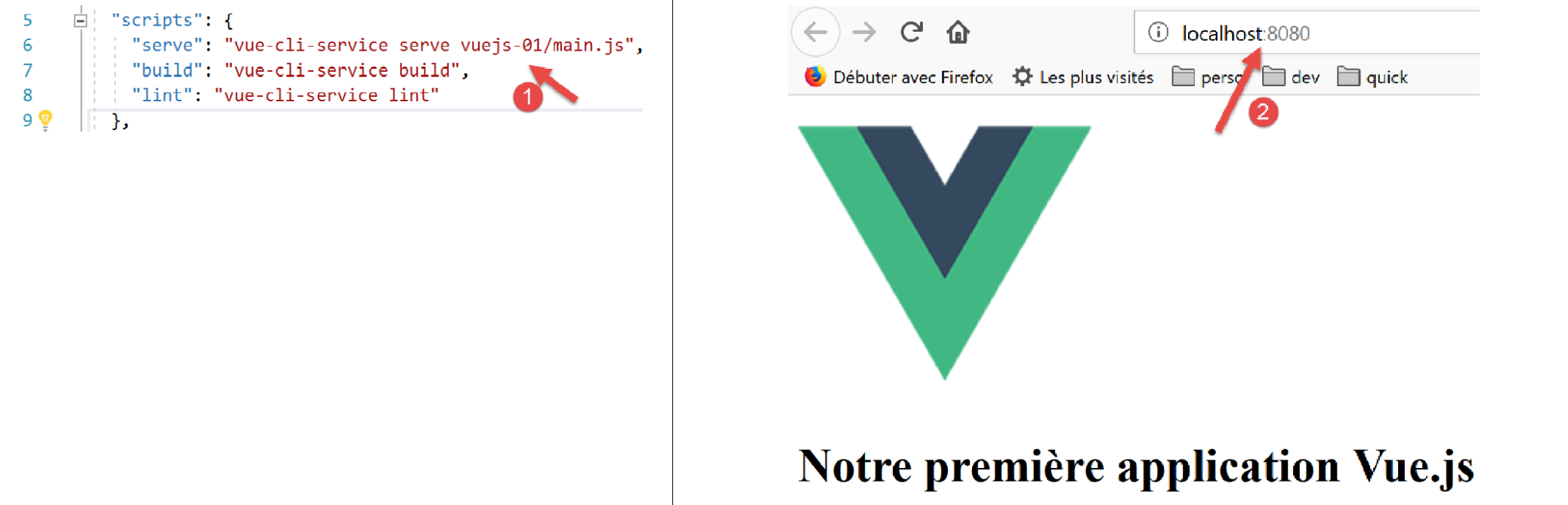
The page displayed is [2].
Now let's look at the code for this page:
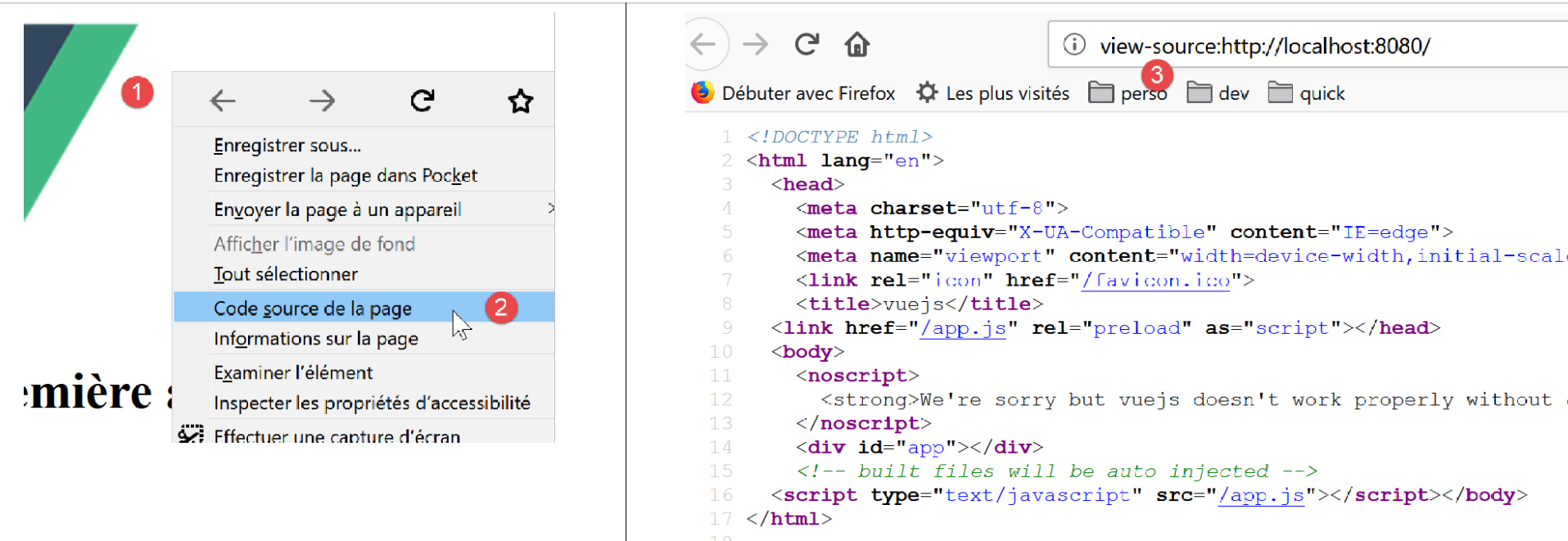
- in [1], make it [clic droit];
- in [2], the page’s source code. We can see that this is the code from the initial file [index.html], and that is not what was displayed. It was indeed the page [index.html] that was initially loaded. Then, dynamically, code from Javascript modified this page, but we are not shown this;
When pages are dynamically generated by Javascript, the option and [2] are useless. You have to go to the browser tools (F12 on Firefox) to view the code of the currently displayed page:
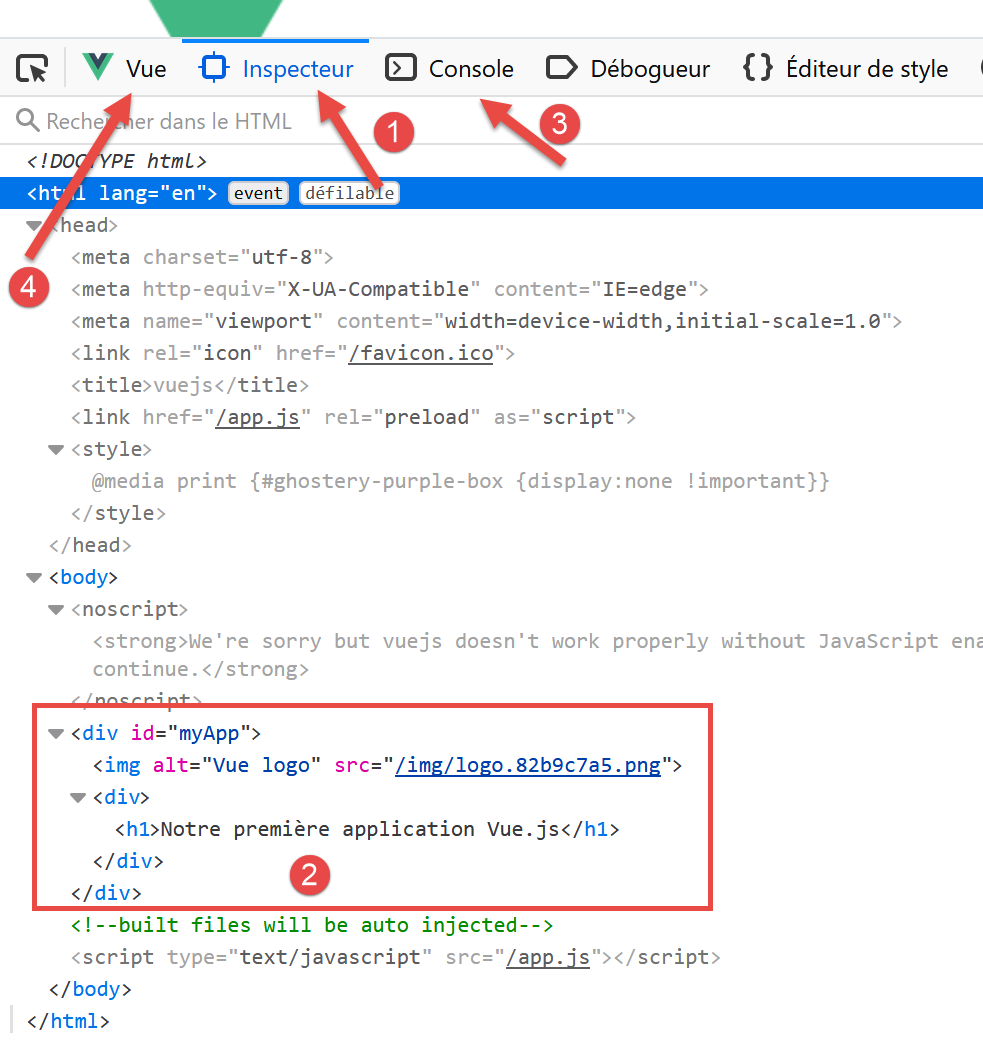
- in [1], the Document Object Model (DOM) inspector for the displayed document;
- in [2], what this DOM actually contains;
- [3-4], the tools we will use to display the Javascript objects used by the [Vue.js] framework;
- [4] is an extension (here for Firefox) for debugging [Vue.js] applications:
- for Firefox: [https://addons.mozilla.org/en/firefox/addon/vue-js-devtools/];
- for Chrome: [https://chrome.google.com/webstore/detail/vuejs-devtools/nhdogjmejiglipccpnnnanhbledajbpd];
Let’s examine the [Vue] [4] tab:
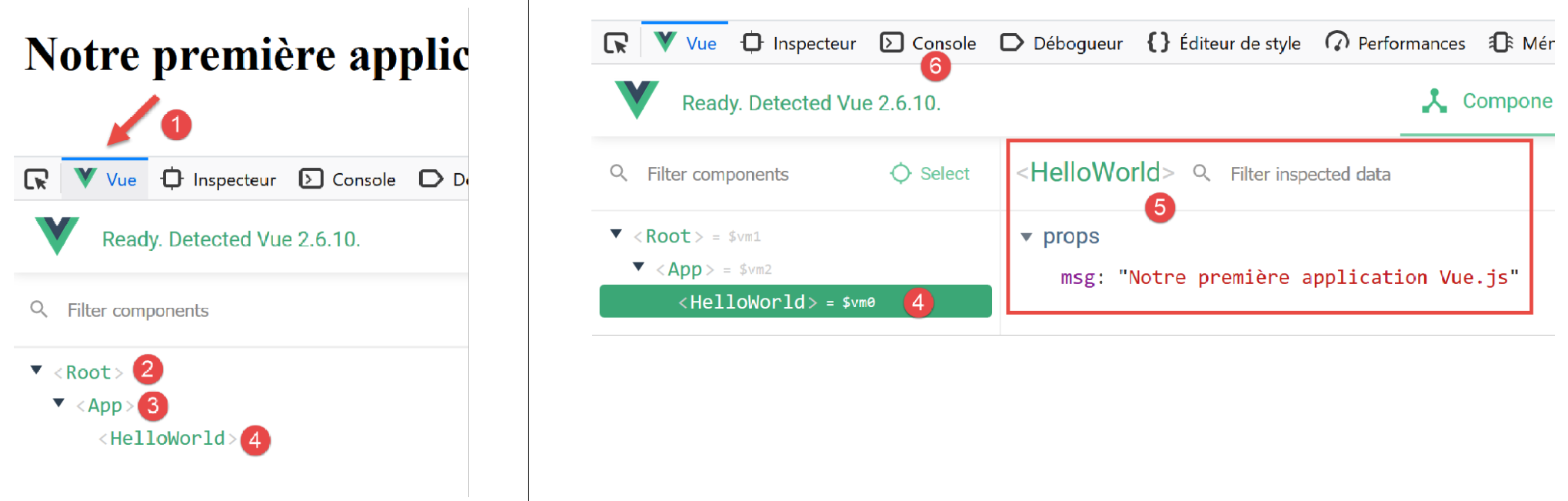
The [1-4] view shows us the [Vue.js] structure of the document: The root of the [2] document (index.html) contains the [App] component (3), which in turn contains the [HelloWorld] component (4). Clicking on [4] displays the properties of the [HelloWorld] and [5] components.
In [4] (on the right), you can see the indicator [$vm0]. This is the variable name that can be used in the JavaScript [6] console to refer to the [HelloWorld] object. Let’s do it:
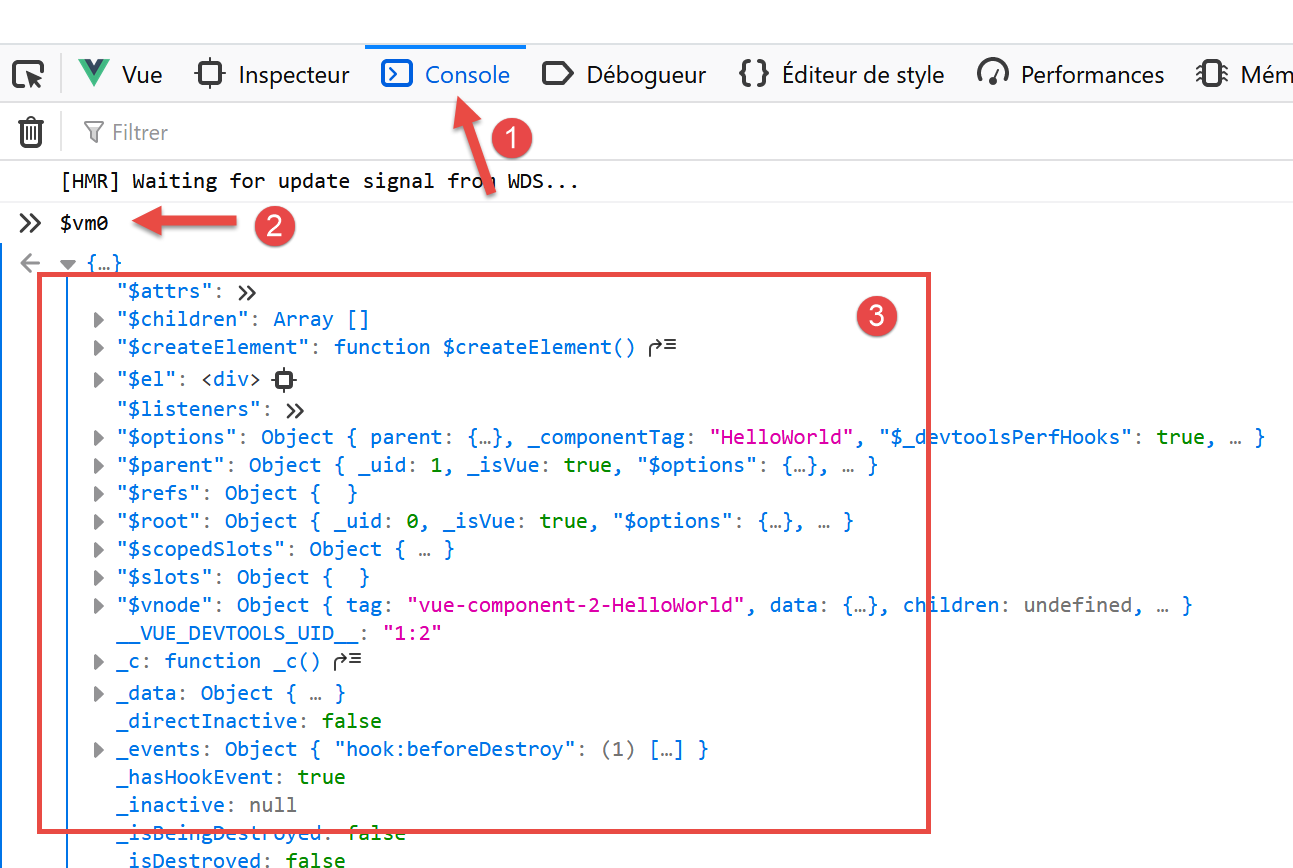
- in [2], we evaluate the expression [$vm0], which displays its structure. Normally, we won’t need to use this structure directly;
Let’s conclude by demonstrating the capability of [hot reload] in the [serve] command used to run the project:
- In [App.vue], modify the message displayed by [HelloWorld]:
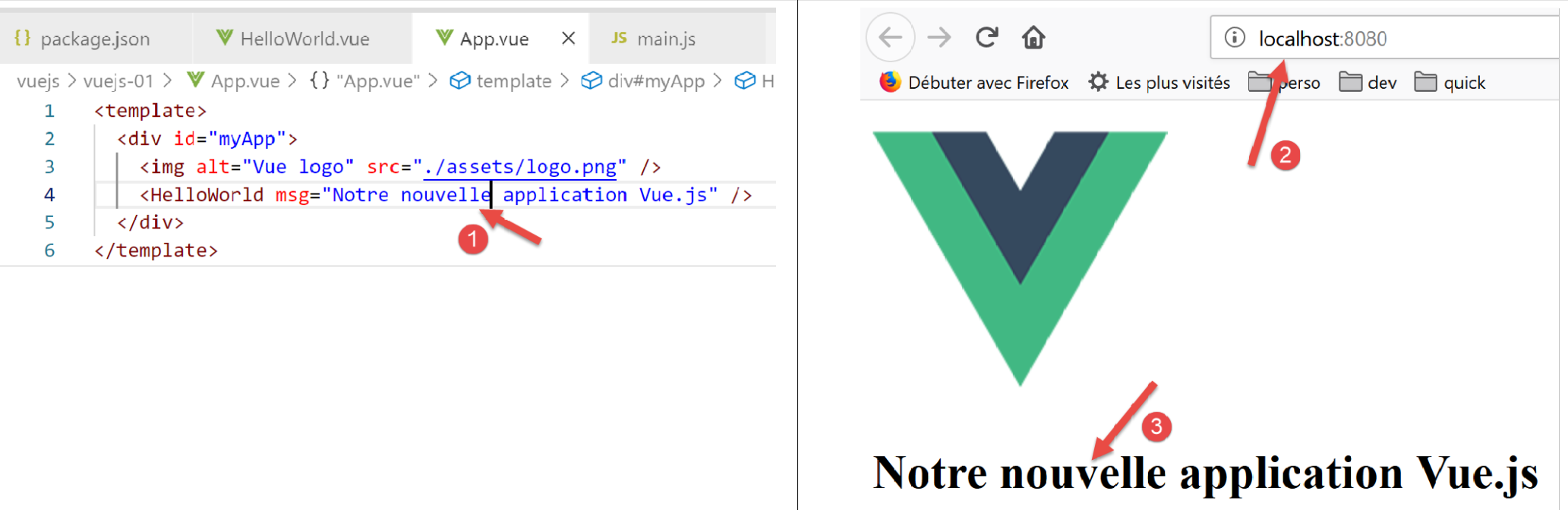
- In [1], we modify the displayed message;
- in [2-3], the page is automatically updated without any action on our part;
We will now create various [vuejs-xx] projects to illustrate the key points of [Vue.js]. By “key,” we mean “those we will use in the [vue.js] client of the tax calculation server.” Other ‘important’ points will be omitted if they are not used in the client. Therefore, this will not be an exhaustive presentation of [vue.js].