20. Deploying the client/server application on a hosting service
Here we outline the deployment of the client/server application we developed on an OVH server [https://www.ovh.com/fr/]. Deployment on other hosting providers should not be very different. We simply want to show that our application lends itself well to this deployment.
20.1. Server Deployment
The OVH hosting service in question is a basic hosting plan:
- a PHP 7.3 environment;
- a MySQL DBMS;
- no [Redis] server;
The third point requires us to modify version 14 of our tax calculation server.
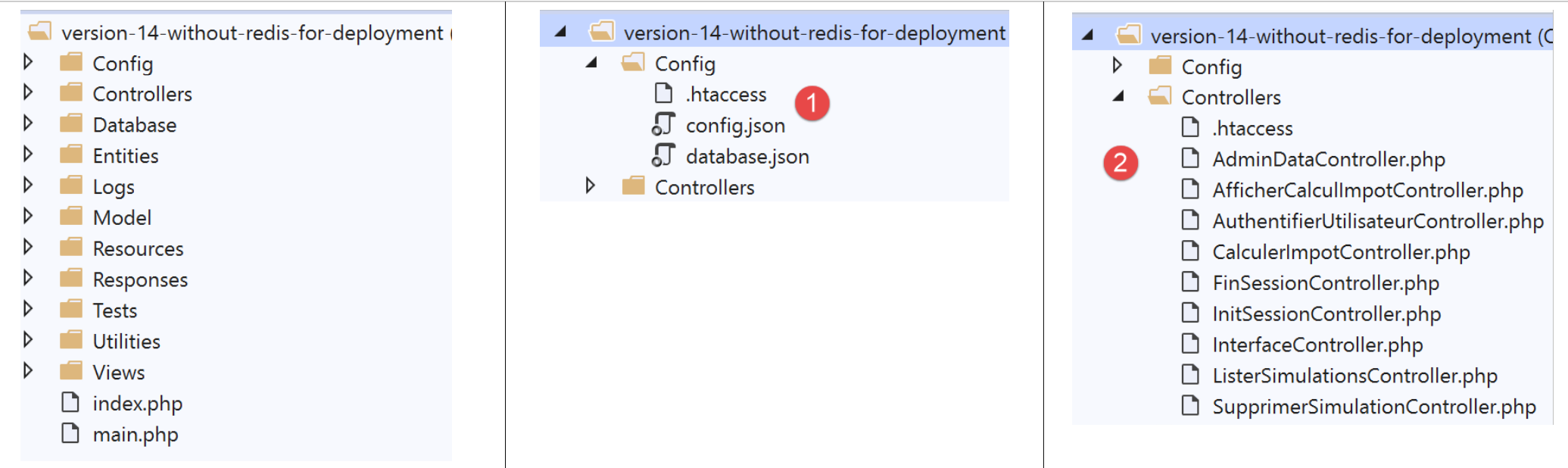
We need to modify:
- the configuration files [1];
- the [AdminDataController] and [CalculerImpotController] controllers to account for the fact that there is no [Redis] server;
The [config.json] file changes as follows:
{
    "databaseFilename": "Config/database.json",
    "corsAllowed": false,
    "redisAvailable":false,
    "rootDirectory": "/.../www/apps/impot/serveur-php7",
    "relativeDependencies": [

        "/Entities/BaseEntity.php",
        ...
        "/Controllers/AdminDataController.php"
    ],
    "absoluteDependencies": [
        "/.../vendor/autoload.php",
        "/.../vendor/predis/predis/autoload.php"
    ],
    "users": [
        {
            "login": "admin",
            "passwd": "admin"
        }
    ],
    ...
}
Comments
- line 4: we introduce a boolean [redisAvailable] to indicate whether or not we have access to a [Redis] server;
- lines 5, 13, 14: the absolute paths will change;
The [database.json] file changes as follows:
{
    "dsn": "mysql:host=...;dbname=...",
    "id": "...",
    "pwd": "...",
    "tableTranches": "dbimpots_tbtranches",
    "colLimites": "limites",
    "colCoeffR": "coeffr",
    "colCoeffN": "coeffn",
    "tableConstantes": "dbimpots_tbconstantes",
    "colPlafondQfDemiPart": "plafondQfDemiPart",
    ...
}
Comments
- lines 2–4: the database name and its owner’s credentials will change;
The [AdminDataController] evolves as follows:
<?php

namespace Application;

// symfony dependencies
use \Symfony\Component\HttpFoundation\Response;
use \Symfony\Component\HttpFoundation\Request;
use \Symfony\Component\HttpFoundation\Session\Session;
// layer alias [dao]
use \Application\ServerDaoWithSession as ServerDaoWithRedis;

class AdminDataController implements InterfaceController {

  // $config is the application configuration
  // traitement d'une requête Request
  // session and can modify it
  // $infos is additional information specific to each controller
  // renders an array [$statusCode, $état, $content, $headers]
  public function execute(
    array $config,
    Request $request,
    Session $session,
    array $infos = NULL): array {

    // you must have a single parameter GET
    $method = strtolower($request->getMethod());
    ...

    // we can work
    // Redis
    if ($config["redisAvailable"]) {
      \Predis\Autoloader::register();
      ...
    } else {
      try {
        // retrieve tax data from the database
        $dao = new ServerDaoWithRedis($config["databaseFilename"], NULL);
        // taxAdminData
        $taxAdminData = $dao->getTaxAdminData();
      } catch (\Throwable $ex) {
        // it didn't go well
        // return result with error to main controller
        $état = 1051;
        return [Response::HTTP_INTERNAL_SERVER_ERROR, $état,
          ["réponse" => utf8_encode($ex->getMessage())], []];
      }
    }

    // return result to main controller
    $état = 1000;
    return [Response::HTTP_OK, $état, ["réponse" => $taxAdminData], []];
  }

}
Comments
- line 31: we now check whether or not we have a [Redis] server;
- lines 32–34: if so, the preceding code is executed in its entirety;
- lines 35–46: otherwise, the tax authority data is retrieved from the database;
The [CalculerImpotController] controller, which also requires data from the tax authority, is updated in the same way.
That’s it. Deployment to the OVH server involved using FTP. We uploaded the following to OVH:
- the [vuejs-14-without-redis] version;
- the [vendor] folder, which contains all dependencies for the [vuejs-14-without-redis] server;
Once the FTP transfer was complete, we generated the necessary tables for the server using the following SQL script:
-- phpMyAdmin SQL Dump
-- version 4.8.5
-- https://www.phpmyadmin.net/
--
-- Host: localhost:3306
-- Generation Time: Oct 12, 2019 at 07:45 AM
-- Server version: 5.7.24
-- PHP Version: 7.2.11

SET SQL_MODE = "NO_AUTO_VALUE_ON_ZERO";
SET AUTOCOMMIT = 0;
START TRANSACTION;
SET time_zone = "+00:00";


/*!40101 SET @OLD_CHARACTER_SET_CLIENT=@@CHARACTER_SET_CLIENT */;
/*!40101 SET @OLD_CHARACTER_SET_RESULTS=@@CHARACTER_SET_RESULTS */;
/*!40101 SET @OLD_COLLATION_CONNECTION=@@COLLATION_CONNECTION */;
/*!40101 SET NAMES utf8mb4 */;

--
-- Table structure for table `dbimpots_tbconstantes`
--

CREATE TABLE `dbimpots_tbconstantes` (
  `id` int(11) NOT NULL,
  `plafondQfDemiPart` decimal(10,2) NOT NULL,
  `plafondRevenusCelibatairePourReduction` decimal(10,2) NOT NULL,
  `plafondRevenusCouplePourReduction` decimal(10,2) NOT NULL,
  `valeurReducDemiPart` decimal(10,2) NOT NULL,
  `plafondDecoteCelibataire` decimal(10,2) NOT NULL,
  `plafondDecoteCouple` decimal(10,2) NOT NULL,
  `plafondImpotCelibatairePourDecote` decimal(10,2) NOT NULL,
  `plafondImpotCouplePourDecote` decimal(10,2) NOT NULL,
  `abattementDixPourcentMax` decimal(10,2) NOT NULL,
  `abattementDixPourcentMin` decimal(10,2) NOT NULL
) ENGINE=InnoDB DEFAULT CHARSET=utf8;

--
-- Dumping data for table `dbimpots_tbconstantes`
--

INSERT INTO `dbimpots_tbconstantes` (`id`, `plafondQfDemiPart`, `plafondRevenusCelibatairePourReduction`, `plafondRevenusCouplePourReduction`, `valeurReducDemiPart`, `plafondDecoteCelibataire`, `plafondDecoteCouple`, `plafondImpotCelibatairePourDecote`, `plafondImpotCouplePourDecote`, `abattementDixPourcentMax`, `abattementDixPourcentMin`) VALUES
(8, '1551.00', '21037.00', '42074.00', '3797.00', '1196.00', '1970.00', '1595.00', '2627.00', '12502.00', '437.00');

-- --------------------------------------------------------

--
-- Table structure for table `dbimpots_tbtranches`
--

CREATE TABLE `dbimpots_tbtranches` (
  `id` int(11) NOT NULL,
  `limites` decimal(10,2) NOT NULL,
  `coeffR` decimal(10,2) NOT NULL,
  `coeffN` decimal(10,2) NOT NULL
) ENGINE=InnoDB DEFAULT CHARSET=utf8;

--
-- Dumping data for table `dbimpots_tbtranches`
--

INSERT INTO `dbimpots_tbtranches` (`id`, `limites`, `coeffR`, `coeffN`) VALUES
(36, '9964.00', '0.00', '0.00'),
(37, '27519.00', '0.14', '1394.96'),
(38, '73779.00', '0.30', '5798.00'),
(39, '156244.00', '0.41', '13913.69'),
(40, '0.00', '0.45', '20163.45');

--
-- Indexes for dumped tables
--

--
-- Indexes for table `dbimpots_tbconstantes`
--
ALTER TABLE `dbimpots_tbconstantes`
  ADD PRIMARY KEY (`id`);

--
-- Indexes for table `dbimpots_tbtranches`
--
ALTER TABLE `dbimpots_tbtranches`
  ADD PRIMARY KEY (`id`);

--
-- AUTO_INCREMENT for dumped tables
--

--
-- AUTO_INCREMENT for table `dbimpots_tbconstantes`
--
ALTER TABLE `dbimpots_tbconstantes`
  MODIFY `id` int(11) NOT NULL AUTO_INCREMENT, AUTO_INCREMENT=9;

--
-- AUTO_INCREMENT for table `dbimpots_tbtranches`
--
ALTER TABLE `dbimpots_tbtranches`
  MODIFY `id` int(11) NOT NULL AUTO_INCREMENT, AUTO_INCREMENT=41;
COMMIT;

/*!40101 SET CHARACTER_SET_CLIENT=@OLD_CHARACTER_SET_CLIENT */;
/*!40101 SET CHARACTER_SET_RESULTS=@OLD_CHARACTER_SET_RESULTS */;
/*!40101 SET COLLATION_CONNECTION=@OLD_COLLATION_CONNECTION */;
Once all of this was done, we adapted the [config.json, database.json] files to their new environment.
20.2. Deployment of the [Vue.js] client
It was decided to deploy the [Vue.js] client to the URL [http://machine/apps/impot/client-vuejs/]. This resulted in the following changes:
At the root of the [VSCode] [workspace], we created the following [vue.config.js] file:
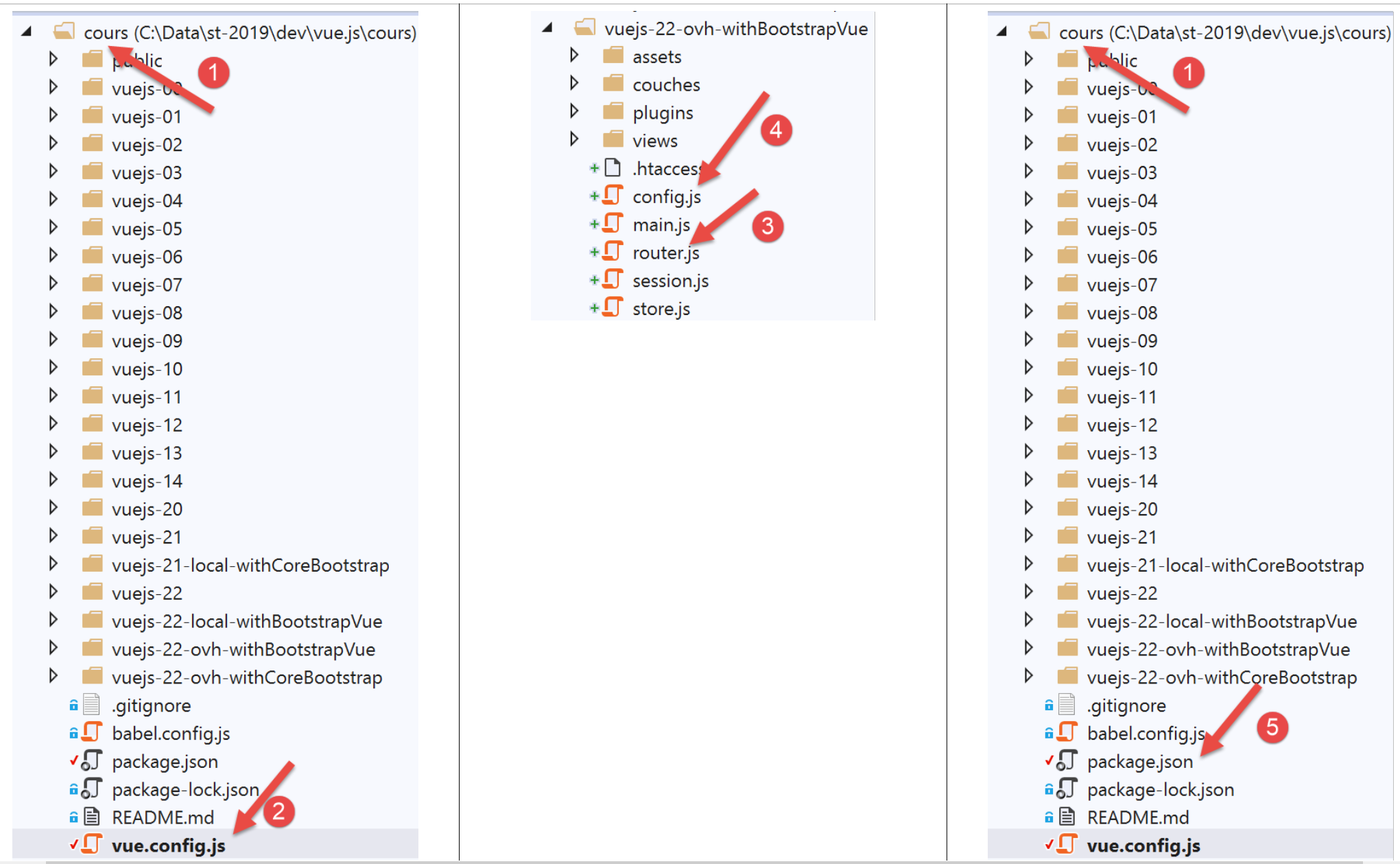
The [vue.config.js] file is as follows:
// vue.config.js
module.exports = {
  // l'URL de service du client [vuejs] du serveur de calcul de l'impôt
  publicPath: '/apps/impot/client-vuejs/'
}
The [router.js] [3] file has also been modified:
// imports
import Vue from 'vue'
import VueRouter from 'vue-router'
...

// plugin de routage
Vue.use(VueRouter)

// les routes de l'application
const routes = [
  ...
]

// le routeur
const router = new VueRouter({
  // les routes
  routes,
  // le mode d'affichage des URL
  mode: 'history',
  // l'URL de base de l'application
  base: '/apps/impot/client-vuejs/'
})

// vérification des routes
router.beforeEach((to, from, next) => {
  ...
})

// export du router
export default router
Comments
- line 21: the URL base has been changed;
The [config.js] file is modified as follows:
// utilisation de la bibliothèque [axios]
const axios = require('axios');
// timeout des requêtes HTTP
axios.defaults.timeout = 5000;
// la base des URL du serveur de calcul de l'impôt
// le schéma [https] pose des problèmes à Firefox parce que le serveur de calcul
// de l'impôt envoie un certificat autosigné. ok avec Chrome et Edge. Safari pas testé.
// avec Firefox c'est possible en demandant l'URL ci-dessous directement et en disant à Firefox
// que vous acceptez le risque d'un certificat non signé. Ensuite le client [vuejs] fonctionnera.
axios.defaults.baseURL = 'http://.../apps/impot/serveur-php7';
// on va utiliser des cookies
axios.defaults.withCredentials = true;

// export de la configuration
export default {
  // objet [axios]
  axios: axios,
  // délai maximal d'inactivité de la session : 5 mn = 300 s = 300000 ms
  duréeSession: 300000
}
Comments
- line 10: enter the URL of the tax calculation server;
The production version of the project was generated using the [build] command in the following [package.json] file [5]:
{
  "name": "vuejs",
  "version": "0.1.0",
  "private": true,
  "scripts": {
    "serve": "vue-cli-service serve vuejs-22/main.js",
    "build": "vue-cli-service build vuejs-22-ovh-withBootstrapVue/main.js",
    "lint": "vue-cli-service lint"
  },
  ...
}
Once this was done, the [dist] folder containing the generated production version was ‘uploaded’ to the OVH server into the [/.../apps/impot] folder and then renamed [client-vuejs] so that the client code would be in the [/.../apps/impot/client-vuejs/] folder as planned. Then, in this folder, we uploaded the following [.htaccess] file:
<IfModule mod_rewrite.c>
  RewriteEngine On
  RewriteBase /apps/impot/client-vuejs/
  RewriteRule ^index\.html$ - [L]
  RewriteCond %{REQUEST_FILENAME} !-f
  RewriteCond %{REQUEST_FILENAME} !-d
  RewriteRule . /apps/impot/client-vuejs/index.html [L]
</IfModule>
This is because the OVH web server used here is an Apache server. For other types of servers, please refer to the documentation |https://cli.vuejs.org/guide/deployment.html|.
The PHP 7 server application can be tested |here|.
The [Vue.js] client can be tested |here|.
20.3. Conclusion
Version [vuejs-21] was not essential. We had seen that version [vuejs-20] handled user-entered URLs correctly. Nevertheless, the new version provides additional convenience for the user. They can navigate by typing URLs. The application then displays the view that best suits the current state (the session) of the application. In addition, version [vuejs-22] brings improvements to the application’s display on mobile devices.