15. Project [vuejs-13]: updating a component, using a session
Project [vuejs-13] builds on project [vuejs-12] by introducing the following change: the array displayed by table HTML is defined in an object [session] known to all components. This is therefore a way to share information between components. This concept is directly inspired by the web session. We use the plugin method to make this shared object available in a [Vue.$session] attribute.
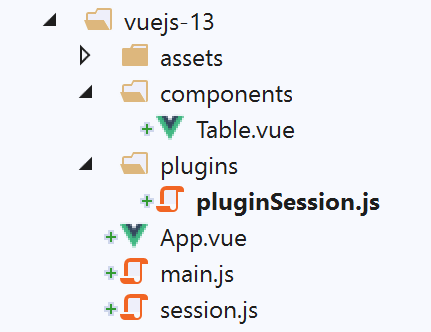
The project tree is as follows:
15.1. The [session] object
The [session] object, shared by all components, is defined in the [./session.js] script:
const session = {
  // list of simulations
  get lignes() {
    return this._lignes;
  },
  // simulation list generation
  generateLignes() {
    this._lignes =
      [
        { id: 3, marié: "oui", enfants: 2, salaire: 35000, impôt: 1200 },
        { id: 5, marié: "non", enfants: 2, salaire: 35000, impôt: 1900 },
        { id: 7, marié: "non", enfants: 0, salaire: 30000, impôt: 2000 }
      ]
  },
  // delete line n° index
  deleteLigne(index) {
    this._lignes.splice(index, 1);
  }
}
// export object [session]
export default session;
15.2. The [./plugins/pluginSession] plugin
The [pluginSession] script is as follows:
export default {
  install(Vue, session) {
    // adds a [$session] property to the view class
    Object.defineProperty(Vue.prototype, '$session', {
      // when Vue.$session is referenced, we return the 2nd parameter [session] of method [install]
      get: () => session,
    })
  }
}
- line 4: the shared object [session] will be available in the [$session] property of all components;
15.3. The main script [main.js]
The main script [main.js] is as follows:
// imports
import Vue from 'vue'
import App from './App.vue'

// plugins
import BootstrapVue from 'bootstrap-vue'
Vue.use(BootstrapVue);

// bootstrap
import 'bootstrap/dist/css/bootstrap.css'
import 'bootstrap-vue/dist/bootstrap-vue.css'

// session
import session from './session';
import pluginSession from './plugins/pluginSession'
Vue.use(pluginSession, session)

// configuration
Vue.config.productionTip = false

// instantiation project [App]
new Vue({
  name: "app",
  render: h => h(App),
}).$mount('#app')
- lines 14–16: the [pluginSession] plugin is integrated into the [Vue.js] framework;
- after line 16, the [$session] attribute is available for all components;
15.4. The main view [App]
The [App] view is now as follows:
<template>
  <div class="container">
    <b-card>
      <!-- message -->
      <b-alert show variant="success" align="center">
        <h4>[vuejs-13] : mise à jour d'un composant, partage des données avec une session</h4>
      </b-alert>
      <!-- table HTML -->
      <Table @updateTable="updateTable" :key="versionTable"/>
    </b-card>
  </div>
</template>

<script>
import Table from "./components/Table";
export default {
  // name
  name: "app",
  // components
  components: {
    Table
  },
  // inner state
  data() {
    return {
      // version table
      versionTable: 1
    };
  },

  // methods
  methods: {
    updateTable() {
      // eslint-disable-next-line
      console.log("App updateTable");
      // increment version table
      this.versionTable++;
    }
  }
};
</script>
Comments
- The [App] view no longer manages the table displayed by the [Table] component in line 9;
- Line 9: The [Table] component triggers the [updateTable] event, which requests that the [Table] component be regenerated. One way to do this is to use the [:key] attribute. This attribute is given a modifiable value. Each time it is modified, the [Table] component is regenerated;
- Line 9: The value of the [:key] attribute is the [versionTable] attribute from line 27. The method [updateTable] (lines 33–38) is responsible for regenerating the component [Table] from line 9. To do this, the method increments the value of the [:key] attribute of the [Table] component, line 37. The [Table] component is then automatically regenerated;
15.5. The [Table] component
The [Table] component changes as follows:
<template>
  <div>
    <!-- empty list -->
    <template v-if="lignes.length==0">
      <b-alert show variant="warning">
        <h4>Votre liste de simulations est vide</h4>
      </b-alert>
      <!-- reload button-->
      <b-button variant="primary" @click="rechargerListe">Recharger la liste</b-button>
    </template>
    <!-- non-empty list-->
    <template v-if="lignes.length!=0">
      <b-alert show variant="primary" v-if="lignes.length==0">
        <h4>Liste de vos simulations</h4>
      </b-alert>
      <!-- simulation table -->
      <b-table striped hover responsive :items="lignes" :fields="fields">
        <template v-slot:cell(action)="row">
          <b-button variant="link" @click="supprimerLigne(row.index)">Supprimer</b-button>
        </template>
      </b-table>
    </template>
  </div>
</template>

<script>
export default {
  // calculated state
  computed: {
    lignes() {
      return this.$session.lignes;
    }
  },
  // inner state
  data() {
    return {
      fields: [
        { label: "#", key: "id" },
        { label: "Marié", key: "marié" },
        { label: "Nombre d'enfants", key: "enfants" },
        { label: "Salaire", key: "salaire" },
        { label: "Impôt", key: "impôt" },
        { label: "", key: "action" }
      ]
    };
  },
  // methods
  methods: {
    supprimerLigne(index) {
      // eslint-disable-next-line
      console.log("Table supprimerLigne", index);
      // delete the line
      this.$session.deleteLigne(index);
      // the parent component is asked to update the view
      this.$emit("updateTable");
    },
    // reload displayed list
    rechargerListe() {
      // eslint-disable-next-line
      console.log("Table rechargerListe");
      // the list of simulations is generated
      this.$session.generateLignes();
      // the parent component is asked to update the view
      this.$emit("updateTable");
    }
  }
};
</script>
Comments:
- The attribute [lignes] (lines 4, 12, 17) is no longer a parameter set by the parent component but a calculated attribute of the component [Table] (lines 30–32). [lignes] is then the array [$session.lignes] (line 31);
- lines 49–56: the method [supprimerLigne] deletes a row from the array [$session.lignes]. By default, this deletion does not change the display of the table HTML. In fact, the elements of [$session] are not reactive: changes to them are not reflected in the components that use them. For this reason, the [Table] component requests that its parent regenerate it using the [updateTable] event (line 55). We have seen that the parent component then increments the [:key] attribute of the [Table] component to force its regeneration;
- lines 58–65: the [rechargerListe] method asks the [$session] object to regenerate the [$session.lignes] array. For the same reason as before, this modification to [$session.liste] does not, by default, change the display of table HTML. For this reason, the component [Table] requests that its parent regenerate it using the event [updateTable] (line 64).
15.6. Running the project
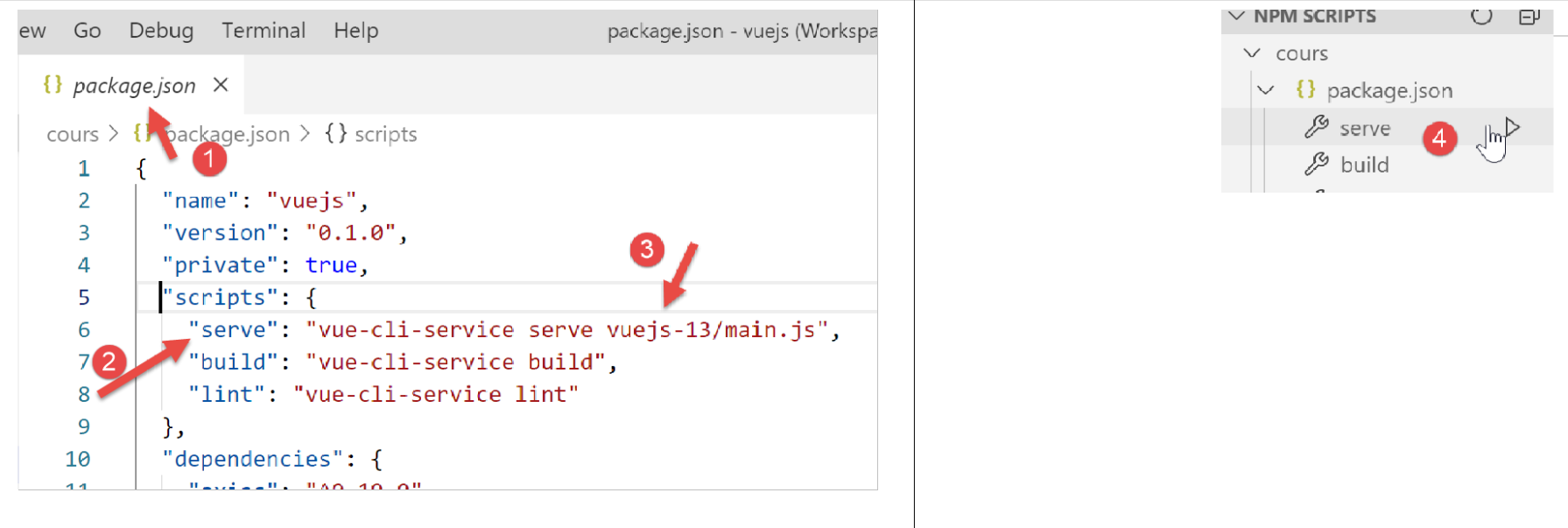
The results are the same as in the [vuejs-12] project.