11. Project [vuejs-09]: Using an [eventBus] plugin
The [vuejs-09] project is identical to the [vuejs-08] project except that it introduces the concept of a plugin. The project directory structure is as follows:
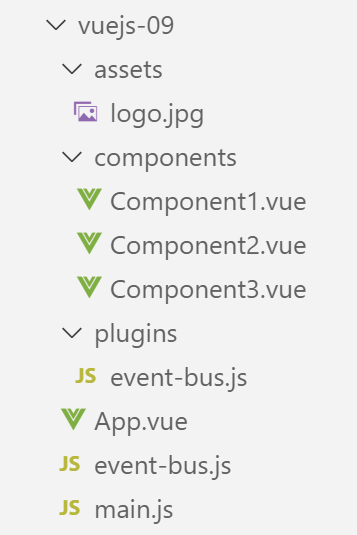
11.1. The [./plugins/event-bus] plugin
The script [./event-bus.js] remains the same as in the previous example:
import Vue from 'vue';
const eventBus = new Vue();
export default eventBus;
The [./plugins/event-bus.js] plugin is as follows:
export default {
  install(Vue, eventBus) {
    // ajoute une propriété [$eventBus] à la classe Vue
    Object.defineProperty(Vue.prototype, '$eventBus', {
      // lorsque Vue.$eventBus est référencé, on rend le 2ième paramètre [eventBus]
      get: () => eventBus,
    })
  }
}
Comments
- A [Vue] plugin is an object with an [install] function (line 2). This function is automatically called when a code declares the use of the plugin;
- lines 1–9: the object exported by the script;
- line 2: the [install] function takes two parameters here:
- [Vue]: the function obtained by the [import Vue from ‘Vue’] statement. Can be thought of as a class;
- [eventBus]: the object exported by the [./event-bus] script;
- lines 4–7: modify the definition (known as the prototype) of the [Vue] function by adding the [$eventBus] property to it. If we think in terms of [class], the [$eventBus] property is added to the [Vue] class. Components that are instances of [Vue] will therefore have access to this new property;
- Line 6 indicates that when we reference the property [Vue].$eventBus, we will obtain the [eventBus] parameter from line 2. We will see a little later that this second parameter will be the [eventBus] object exported by the [./event-bus.js] script. So ultimately, when a component C uses the expression [C.$eventBus], it will reference the [eventBus] object exported by the [./event-bus.js] script. This will save it from having to import the [./event-bus.js] script. That is the point of the plugin: to simplify access to the [eventBus] object exported by the [./event-bus.js] script;
- Note that the plugin does not have to be named [event-bus.js] itself. It could have been named [plugin-event-bus], for example;
- Note also that the $ in [$eventBus] is a convention used to denote [Vue] properties that have been added via plugins. You are not required to follow this convention. In this text, we will follow it;
11.2. The main script [main.js]
The script [./plugins/event-bus.js] defines a plugin for the [Vue.js] framework. This plugin is not yet used, just defined. It is the [main.js] script that activates it:
// imports
import Vue from 'vue'
import App from './App.vue'

// plugins
import BootstrapVue from 'bootstrap-vue'
Vue.use(BootstrapVue);

// bootstrap
import 'bootstrap/dist/css/bootstrap.css'
import 'bootstrap-vue/dist/bootstrap-vue.css'

// eventbus
import eventBus from './event-bus';
import PluginEventBus from './plugins/event-bus';
Vue.use(PluginEventBus, eventBus);

// configuration
Vue.config.productionTip = false

// instanciation projet [App]
new Vue({
  render: h => h(App),
}).$mount('#app')
Comments
- Lines 14–16 activate the [PluginEventBus] plugin. After line 16, all instances of the [Vue] class (function) have the [$eventBus] property, which points to the same object exported by the [./event-bus.js] script. This will be the case for every component in the project;
11.3. The main view [App]
The main view [App] remains the same as it was in the previous project.
11.4. The [Component1] component
The [Component1] component now uses its [$eventBus] property to listen for the [someEvent] event:
<template>
  <b-row>
    <b-col>
      <b-alert show
               variant="warning"
               v-if="showMsg">Evénement [someEvent] intercepté par [Component1]. Valeur reçue={{data}}</b-alert>
    </b-col>
  </b-row>
</template>

<script>
  export default {
    name: "component1",
    // component status
    data() {
      return {
        data: "",
        showMsg: false
      };
    },
    // event management methods
    methods: {
      // evt management [someEvent]
      doSomething(data) {
        this.data = data;
        this.showMsg = true;
      }
    },
    // component lifecycle management
    // évt [created] - the component has been created
    created() {
      // listen to event [someEvent]
      this.$eventBus.$on("someEvent", this.doSomething);
    }
  };
</script>
Comments
- Line 33, use of the component's [this.$eventBus] property. Note also that the script on line 11 no longer imports the [./event-bus.js] script;
11.5. The [Component2] component
The [Component2] component now uses its [$eventBus] property to emit the [someEvent] event:
<template>
  <div>
    <b-button @click="createEvent">Créer un événement</b-button>
  </div>
</template>
<!-- script -->
<script>
  export default {
    name: "component2",
    // méthodes de gestion des évts
    methods: {
      createEvent() {
        this.$eventBus.$emit("someEvent", { x: 2, y: 4 })
      }
    }
  };
</script>
Comments
- Line 13: Use of the component's [this.$eventBus] property. Note also that the script on line 7 no longer imports the [./event-bus.js] script;
11.6. Component [Component3]
The [Component3] component has the same code as [Component1]. It also listens for the [someEvent] event.
11.7. Running the project
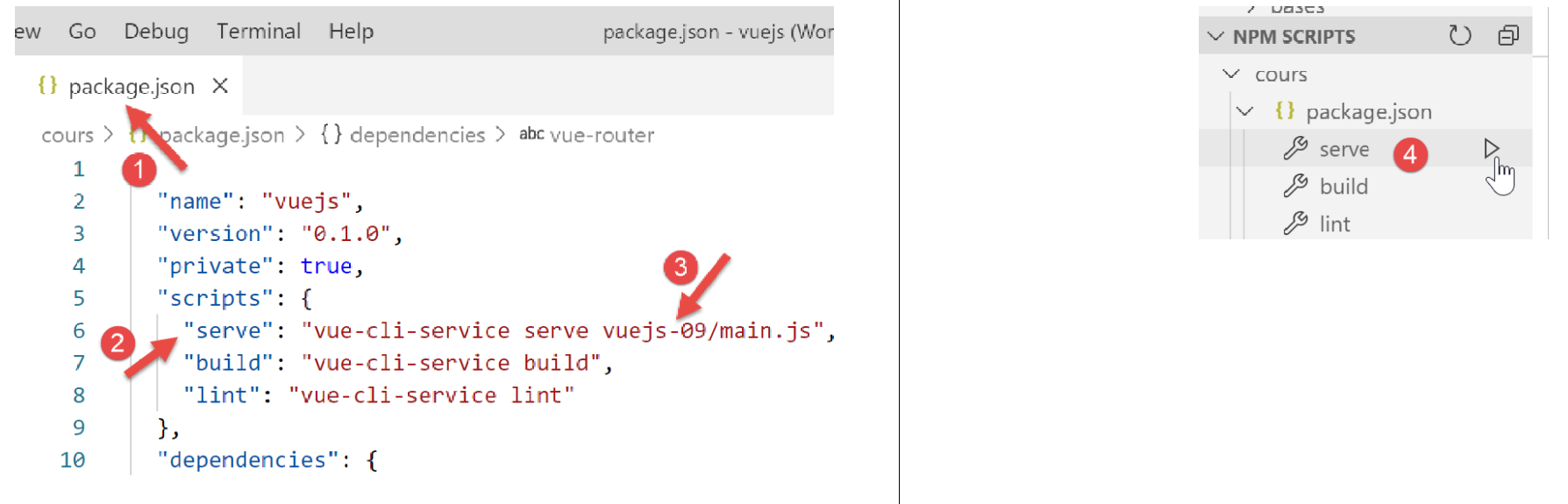
We get the same results as in the previous project.