16. Example [nuxt-13]: checking navigation from [nuxt-12]
In this example, we are looking at navigation from [nuxt-12]. We did not do this in [nuxt-12] because checking navigation would have added complexity to an already complex example.
Objective: We want to ensure that the user can only perform authorized actions:
- if session jSON has not started, then only URL and [/] are allowed;
- if session jSON has started but the user is not authenticated, then only URL and [/authentification] are authorized;
- if the jSON session has started and the user is authenticated, then only URL and [/get-admindata, /fin-session] are authorized;
- when the current routing target is not authorized, a redirection to an authorized URL will be performed;
The example [nuxt-13] is initially obtained by copying the example [nuxt-12]:
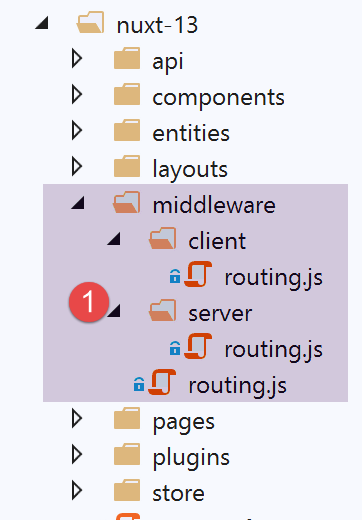
The changes will be made in the [middleware] routing folder.
16.1. Routing for the [nuxt] application
The application routing is configured as follows in the [nuxt.config] file:
// router
  router: {
    // application URL root
    base: '/nuxt-13/',
    // routing middleware
    middleware: ['routing']
},
- line 6: the application's routing is controlled by the file [middleware/routing];
The [middleware/routing] file is as follows:
/* eslint-disable no-console */

// import server and client middleware
import serverRouting from './server/routing'
import clientRouting from './client/routing'

export default function(context) {
  // who executes this code?
  console.log('[middleware], process.server', process.server, ', process.client=', process.client)
  if (process.server) {
    // server routing
    serverRouting(context)
  } else {
    // customer routing
    clientRouting(context)
  }
}
- lines 10–16: we handle client and server routing for [nuxt] differently. This is a point where they differ significantly;
- Line 4: Server routing is implemented by the script [middleware/server/routing];
- Line 5: Client routing is implemented by the script [middleware/client/routing];
16.2. Client routing [nuxt]
Client routing [nuxt] remains the same as in [nuxt-12]:
/* eslint-disable no-console */
export default function(context) {
  // who executes this code?
  console.log('[middleware client], process.server', process.server, ', process.client=', process.client)
  // management of the PHP session cookie in the browser
  // the browser's PHP session cookie must be identical to the one found in the nuxt session
  // acion [fin-session] receives a new cookie PHP (server as nuxt client)
  // if the server receives it, the client must pass it on to the browser
  // for its own exchanges with the PHP server
  // this is customer routing

  // retrieve the session cookie PHP
  const phpSessionCookie = context.store.state.phpSessionCookie
  if (phpSessionCookie) {
    // if it exists, we assign the PHP session cookie to the browser
    document.cookie = phpSessionCookie
  }

  ...
}
To prevent the client from accessing unauthorized routes, we will simply offer them only the authorized routes in the navigation client menu. The [components/navigation] component becomes the following:
<template>
  <!-- bootstrap menu with three options -->
  <b-nav vertical>
    <b-nav-item v-if="$store.state.jsonSessionStarted && !$store.state.userAuthenticated" to="/authentification" exact exact-active-class="active">
      Authentification
    </b-nav-item>
    <b-nav-item
      v-if="$store.state.jsonSessionStarted && $store.state.userAuthenticated && !$store.state.adminData"
      to="/get-admindata"
      exact
      exact-active-class="active"
    >
      Requête AdminData
    </b-nav-item>
    <b-nav-item v-if="$store.state.jsonSessionStarted && $store.state.userAuthenticated" to="/fin-session" exact exact-active-class="active">
      Fin session impôt
    </b-nav-item>
  </b-nav>
</template>
- Line 4: option [Authentification] is only offered if session jSON has started but the user is not authenticated. If the jSON session has not started or the user is already authenticated, then option is not offered;
- lines 7–11: option and [Requête AdminData] are offered only if the jSON session has started, the user is authenticated, and the [AdminData] data has not yet been retrieved. If any of these three conditions is not met (session jSON not started, user not authenticated, or the [AdminData] data already retrieved), the option is not offered;
- Line 15: option is offered as soon as the jSON session has started and the user is authenticated; otherwise, it is not offered;
16.3. Server Routing for [nuxt]
Server routing is generally more complex than client routing because the user can type any URL into their browser’s address bar. We can let that happen (after all, the user isn’t supposed to do that) or try to control things. That is what we will do here, for the sake of this example, because in the case of the [nuxt-12] application, we can easily do without it since the tax calculation server is well protected against these manually entered URL and knows how to send the appropriate error messages. We saw this in [next-12], where there was no routing control.
Routing on a [nuxt] server differs significantly from that of a [nuxt] client in terms of redirection:
- when a [nuxt] server is redirected, it sends a redirect command to the client browser with the redirect target. The browser then makes a new request to the [nuxt] server, asking for the target that was sent to it. It is as if the user had manually typed in the URL of the redirect target: the entire [nuxt] application restarts, and thus its entire lifecycle (server plugins, store, server routing, pages);
- when a client [nuxt] is redirected, nothing like that happens. There is a simple page change, the same as would have occurred if the user had clicked on a link leading to the redirect target. The lifecycle is then different (client routing, displaying the route target);
For this reason, it is preferable to separate client routing from server routing even if the two codes may appear similar.
The server routing script [middleware/server/routing] will be as follows:
/* eslint-disable no-console */
export default function(context) {
  // who executes this code?
  console.log('[middleware server], process.server', process.server, ', process.client=', process.client)

  // we retrieve some information from the [nuxt] store
  const store = context.store
  // where do we come from?
  const from = store.state.from || 'nowhere'
  ...
}
- In client-side routing, the routing function receives the context [context] with the property [context.from], which is the route of the page we came from. The route we are going to is obtained via [context.route];
- in server routing, the routing function receives the context [context] without the property [context.from]. Server routing only occurs when a URL is manually requested from the server [nuxt]. We know that the entire [nuxt] application is then reset. It is as if we were starting from scratch, so there is no concept of a ‘previous page’;
- thanks to the [nuxt] session, we know that the server can retrieve this session and thus avoid starting from scratch. It is therefore in this [nuxt] session, and more specifically in this session’s store, that we will store the name of the last page displayed by the client browser before a URL is requested from the [nuxt] server;
- Lines 7–9: We retrieve the name of the last page displayed by the client browser. When the application starts, this information does not exist in the store. The name [nowhere] is then assigned to the variable [from];
In order for the server [nuxt] to retrieve the name of the last page displayed by the client browser from the store, the client [nuxt] must also place this information in the store. The client routing script [nuxt] is therefore completed as follows:
/* eslint-disable no-console */
export default function(context) {
  // who executes this code?
  console.log('[middleware client], process.server', process.server, ', process.client=', process.client)
  // management of the PHP session cookie in the browser
  // the browser's PHP session cookie must be identical to the one found in the nuxt session
  // acion [fin-session] receives a new cookie PHP (server as nuxt client)
  // if the server receives it, the client must pass it on to the browser
  // for its own exchanges with the PHP server
  // this is customer routing

  // retrieve the session cookie PHP
  const phpSessionCookie = context.store.state.phpSessionCookie
  if (phpSessionCookie) {
    // if it exists, we assign the PHP session cookie to the browser
    document.cookie = phpSessionCookie
  }

  // we put the name of the page we're going to in the session - no server redirection
  context.store.commit('replace', { serverRedirection: false, from: context.route.name })
  // save the store in session [nuxt]
  const session = context.app.$session()
  session.value.store = context.store.state
  session.save(context)
}
- Lines 19–24 are added;
- line 20: we store the name of the page [context.route.name] that will be displayed and which will therefore be, during the next routing step, the page we came from. Furthermore, we will see that in the routing of server [nuxt], it needs to know whether the current routing resulted from a previous redirection from server [nuxt]. Here, that is not the case, so we set the property [serverRedirection] to [false];
- lines 22–24: the store’s state is placed in the [nuxt] session (line 23), then the [nuxt] session is saved in a cookie (line 24), which is itself saved in the client’s browser as [nuxt];
Let’s go back to the routing script on the [nuxt] server:
/* eslint-disable no-console */
export default function(context) {
  // who executes this code?
  console.log('[middleware server], process.server', process.server, ', process.client=', process.client)

  // we retrieve some information from the [nuxt] store
  const store = context.store
  // where do we come from?
  const from = store.state.from || 'nowhere'
  // where are we going?
  const to = context.route.name
  // possible redirection
  let redirection = ''
  // routing management completed
  let done = false

  // are we already in a [nuxt] server redirect?
  if (store.state.serverRedirection) {
    // nothing to do
    done = true
  }

  // is this a page reload?
  if (to === from) {
    // nothing to do
    done = true
  }

  // control of navigation server [nuxt]
  // based on navigation client in [navigation] component

  // if session PHP has not started
  if (!done && !store.state.jsonSessionStarted && to !== 'index') {
    // redirection
    redirection = 'index'
    // work completed
    done = true
  }

  // when the user is not authenticated
  if (!done && store.state.jsonSessionStarted && !store.state.userAuthenticated && to !== 'authentification') {
    // redirection
    redirection = from
    // work completed
    done = true
  }

  // where the user has been authenticated
  if (!done && store.state.jsonSessionStarted && store.state.userAuthenticated && to !== 'get-admindata' && to !== 'fin-session') {
    // we stay on the same page
    redirection = from
    // work completed
    done = true
  }

  // case where [adminData] has been obtained
  if (!done && store.state.jsonSessionStarted && store.state.userAuthenticated && store.state.adminData && to !== 'fin-session') {
    // we stay on the same page
    redirection = from
    // work completed
    done = true
  }

  // we've done all the checks ---------------------
  // redirection?
  if (redirection) {
    // we note the redirection in the store
    store.commit('replace', { serverRedirection: true })
  } else {
    // no redirection
    store.commit('replace', { serverRedirection: false, from: to })
  }
  // save the store in session [nuxt]
  const session = context.app.$session()
  session.value.store = store.state
  session.save(context)
  // any redirection
  if (redirection) {
    context.redirect({ name: redirection })
  }
}
- lines 6–9: retrieve the value of [from] from the [nuxt] server store;
- line 11: we note the target of the current routing;
- line 13: routing may result in a redirect of the client browser. [redirection] will be the target of this redirect;
- line 15: [done] to [true] indicates that the routing is complete;
- Lines 17–21: First, we check whether the current routing stems from a redirection request sent to the client browser. This information is stored in the [serverRedirection] property of the store. If this property is true, then the server [nuxt] sent a redirect to the client browser during the previous request to the server [nuxt]. In this case, no routing is required. During the previous request, the router on server [nuxt] decided that the client browser should be redirected. This decision does not need to be overridden by a new routing;
- lines 23–27: we check whether the current routing is a page reload. If so, we let it proceed;
- Starting on line 29, we resume the rules applied in the [navigation] component of the [nuxt] client (see previous paragraph);
- lines 32–38: we handle the case where the jSON session has not started and the routing target is not the [index] page. In this case, the client browser is redirected to the page [index];
- lines 40–46: Handles the case where the jSON session has started, the user is not authenticated, and the current routing target is not the [authentification] page. In this case, routing is denied and the system remains where it was;
- lines 48–54: We handle the case where session jSON has started, the user is authenticated, and the current routing target is neither page [get-admindata] nor page [fin-session], which are then the only possible destinations. In this case, the requested routing is denied, and we return to where we were previously;
- Lines 56–62: This handles the case where [adminData] was obtained. In this case, there is only one possible target for routing: the page [fin-session]. If this was not the page requested, routing is denied and we return to where we were previously;
- lines 64–72: if a redirect occurred, we record it in the [nuxt] server store: [serverRedirection: true]. Note that we do not assign a value to the [from] property of the store. The reason for this is that there will be a redirection from the client browser, and we have seen that in this case, there is no routing (lines 17–20) and the [from] property of the store is not used;
- lines 66–69: if there is no redirection, then this is also noted in the server store [nuxt]: [serverRedirection: false]. Furthermore, the current routing will display the page [to], which for the next request (client or server [nuxt]) will become the previous page. This is why we write [from: to];
- lines 73–76: we save the store in the [nuxt] session, which is itself saved in a cookie;
- lines 77–80: if [redirection] is not empty, then the browser is instructed to redirect. Otherwise (not shown here), the lifecycle of server [nuxt] will continue: the page [to] will be processed by the server [nuxt] and sent to the client’s browser [nuxt] with the session cookie [nuxt];
The routing chosen here for the [nuxt] server is arbitrary. We could have chosen another one or, as mentioned, not used routing at all. The one chosen above has the advantage of always keeping the application in a stable state regardless of the URL requested by the user.
We can improve on this when the page that is ultimately loaded is the original page. There are two cases:
- the user has triggered a page reload (to===from);
- there are redirects to the original page (redirection===from);
In both cases, the original page will be executed again with its asynchronous call to the tax calculation server. Let’s take an example. If, after authenticating, the user reloads the page (F5). In this case, in the routing above, we have: [to]=[from]=[authentification]. There is no redirection. The page [to=authentification] will be executed by the server [nuxt]. If nothing is done, the function [asyncData] will run again. This is unnecessary since authentication has already been performed.
We can improve this by slightly modifying the [authentification] page:
// asynchronous data
  async asyncData(context) {
    // log
    console.log('[authentification asyncData started]')
    // don't do things twice if the page has already been requested
    if (process.server && context.store.state.userAuthenticated) {
      console.log('[authentification asyncData canceled]')
      return { result: '[succès]' }
    }
     // customer [nuxt]
    if (process.client) {
      // start waiting
      context.app.$eventBus().$emit('loading', true)
      // no error
      context.app.$eventBus().$emit('errorLoading', false)
    }
    try {
      // authenticate to the server
...
- lines 6-9: if the page is executed by server [nuxt] and we find in the store that authentication has already been performed, then we return the desired result directly (line 8);
We do the same for all pages:
Page [index]:
// asynchronous data
  async asyncData(context) {
    // log
    console.log('[index asyncData started]')
    // don't do things twice if the page has already been requested
    if (process.server && context.store.state.jsonSessionStarted) {
      console.log('[index asyncData canceled]')
      return { result: '[succès]' }
    }
    try {
...
Page [get-admindata]
// asynchronous data
  async asyncData(context) {
    // log
    console.log('[get-admindata asyncData started]')
    // don't do things twice if the page has already been requested
    if (process.server && context.store.state.adminData) {
      console.log('[get-admindata asyncData canceled]')
      return { result: context.store.state.adminData }
    }
    // customer
    if (process.client) {
      // start waiting
      context.app.$eventBus().$emit('loading', true)
      // no error
      context.app.$eventBus().$emit('errorLoading', false)
    }
    try {
   ...
Page [fin-session]
// asynchronous data
  async asyncData(context) {
    // log
    console.log('[fin-session asyncData started]')
    // don't do things twice if the page has already been requested
    if (process.server && context.store.state.jsonSessionStarted && !context.store.state.userAuthenticated) {
      console.log('[fin-session asyncData canceled]')
      return { result: "[succès]. La session jSON reste initialisée mais vous n'êtes plus authentifié(e)." }
    }
    // case of customer [nuxt]
    if (process.client) {
      // start waiting
      context.app.$eventBus().$emit('loading', true)
      // no error
      context.app.$eventBus().$emit('errorLoading', false)
    }
    try {
16.4. Execution
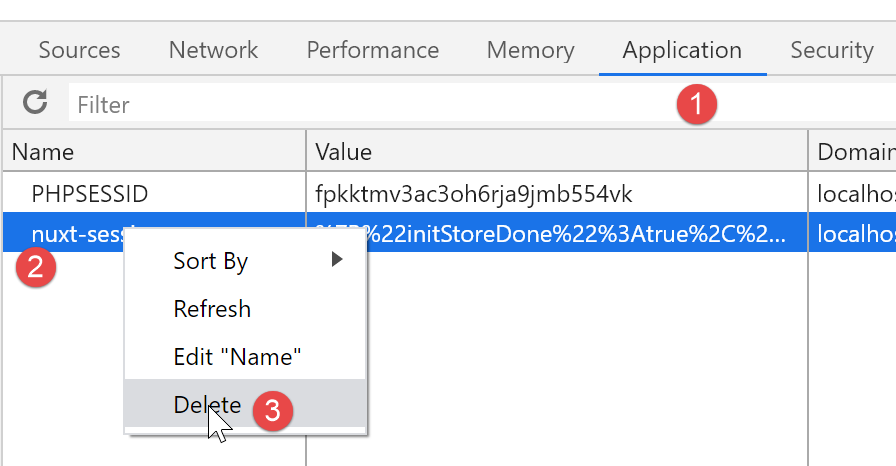
To run this example, you must first delete the session cookie [nuxt] and the cookie PHP from the browser running the client [nuxt] to start with a clean slate. Below is an example using the Chrome browser:
16.5. Conclusion
Routing for the [nuxt] server is complex because you must account for all the URL values that a user might type manually. This is a textbook example. A [nuxt] application is not intended to be used in this way. Once the [index] page is served by the [nuxt] server’s router, subsequent requests made to the server could be redirected to an error page.
In the specific case of our [nuxt-13] example, the routing of the [nuxt] server was unnecessary. The default routing (actually no routing) in the [nuxt-12] example worked just fine.