12. Web application MVC [personne] – version 7
12.1. Introduction
In this version, we assume that there may be browsers clients that have disabled:
- the sending of cookies sent by the server
- the execution of Javascript code embedded in the displayed HTML pages
However, we want this type of browser to be able to use our application. Point 2 brings us back to version 2 of our application, as version 1 was used starting from version 3. version 2 ran the application without Javascript, so point 2 is resolved.
Point 1 may or may not be difficult to handle. Version 6 of our application (version) worked without cookies. By merging versions 2 and 6, we achieve the desired result. We will add an additional constraint: the application must manage a session. This is not a meaningless constraint. In an application where users must authenticate, the server must store the user’s username and password to prevent them from having to authenticate on every page they request.
So far, we have used three solutions to store information during client/server exchanges:
- the session
- cookies
- hidden fields.
Solution 2 can be ruled out since the client browser may have disabled the use of cookies.
Solution 3 is the version 6 method previously discussed. It cannot be used for security reasons. If the login/password pair is embedded in every page sent to the browser, this means it travels over the network with every client-server exchange. This is not good for the application’s security. We could then consider using the HTTPS protocol, which encrypts client/server exchanges. However, using it for every page of the application will increase the server load.
One might want to eliminate Solution 1 because it also relies on cookies. During the first client-server exchange, the server sends the client a session token, which the client will send back to the server with each new request. Thanks to this token, the server can recognize the client and assign it information it had stored during a previous exchange. The session token is sent by the server in a cookie. A browser that has not disabled cookies can send this cookie back to the server during subsequent requests. If cookies are disabled, there is another solution: the browser can include the session token in the Url request it sends. This is what we see now as we resume our examination of the [index.jsp] file from version 4:
<%@ page language="java" contentType="text/html; charset=ISO-8859-1"
    pageEncoding="ISO-8859-1"%>
<%@ taglib uri="/WEB-INF/c.tld" prefix="c" %>

<c:redirect url="/main"/>
Note that line 5 above redirects the client to Url [/personne4/main?jsessionid=XX], where XX is the session token, as shown in the screenshot below obtained after requestingUrl [http://localhost:8080/personne4]:
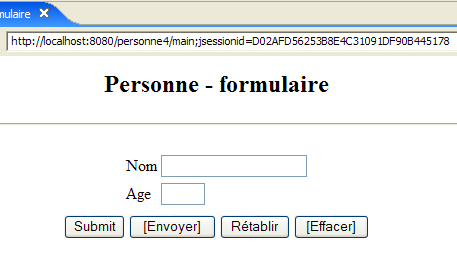
Let’s take a closer look at how the <c:redirect> tag works with the session token. Let’s consider a browser that accepts cookies. Below, we configure the Firefox browser:
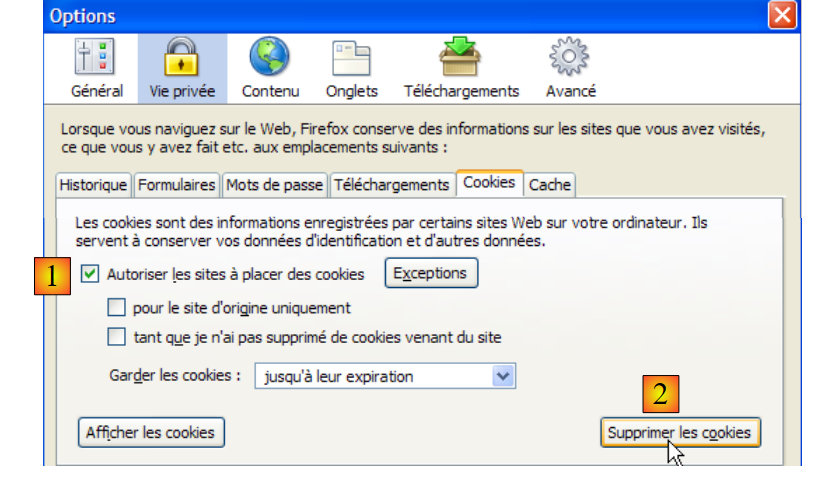
In [1], we enable cookies, and in [2] we delete existing cookies to start from a known state. Then we request Url [http://localhost:8080/personne4]. We receive the following response:
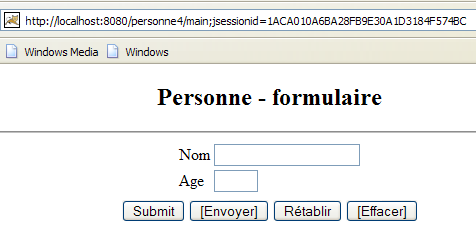
The client's initial HTTP request was as follows:
Note that the client does not send a session cookie. The response HTTP sent by the server is as follows:
- Line 1: The server asks the client to redirect
- line 3: the server sends a session token associated with the [JSESSIONID] attribute
- line 4: the Url redirect contains the session token. The <c:redirect> tag placed it there because the client had not sent a session cookie.
The browser, which was instructed to redirect, then made the following request:
- Line 1: It requests the Url redirect, including the session token. This is why the browser displays this Url in the screenshot.
- Line 10: The browser sends back the session token that the server sent to it in the previous exchange. This is how cookies normally work when they are enabled on the client browser. If they are not enabled, the received cookies are not sent back.
The server responded to this second request with the following:
It found the requested page and is sending it. Note that it no longer sends the session token. This is how session tokens normally work: they are sent to the browser once by the server in the form of a cookie, and the browser then sends it back with every request to be recognized.
Now, using the same browser, let’s request Url [http://localhost:8080/personne4] again by typing it in manually. We then get the following page:
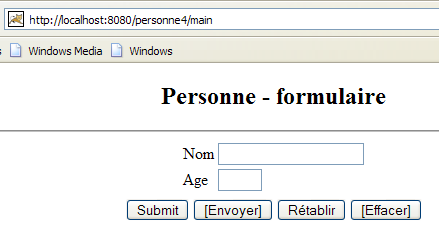
We can see that the Url displayed by the browser no longer contains the session token. Let’s look at the first client/server exchange:
The browser made the following request:
This is exactly the same request as the previous one, with one difference: on line 10, the browser sends back the session token it received during the very first exchange. Once again, this is normal behavior if the browser’s cookies are enabled.
The server sent the following response:
It asks the client to redirect. Since it received a session token from the client, it continues the session and does not send a new session token. For the same reason, the <c:redirect> tag does not include this session token in the redirection URL. This is why the URL displayed in the screenshot above does not have a session token.
The key takeaway from all this is the following rule: the <c:redirect> tag includes the session token in the Url redirect URL only if the client has not sent the HTTP header:
This rule also applies to the <c:url> tag, which we will encounter later.
What happens with a browser where cookies have been disabled? Let’s try it. First, we reset the browser:
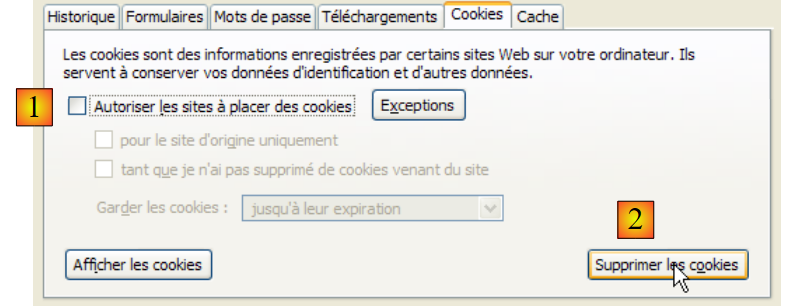
In [1], we disable cookies, and in [2] we delete existing ones to start from a known state. Then we request Url [http://localhost:8080/personne4]. We receive the following response:
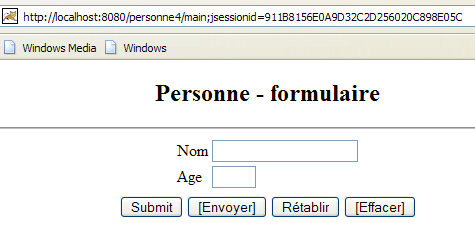
We get the same result as before. However, the HTTP exchanges are not exactly the same:
- Lines 1-9: Request #1 from the browser. It does not send a session cookie.
- lines 11-17: the server's response asking it to redirect to another Url. It sends a session cookie line 13: the <c:redirect> tag has included the token in the Url redirect line 14.
- Lines 19–27: The browser’s second request. It does not send back the session cookie that the server just sent it because its cookies are disabled.
- Lines 29–33: the server’s response. We can see that although the browser did not send a session cookie, the server does not restart a new session as one might have expected. This is evident from the fact that it does not send the header HTTP [Set-Cookie] as it did in line 13. This means that it is continuing the previous session. It was able to retrieve this session thanks to the session token present in the Url requested by the browser on line 19.
Note that the server tracks a session by retrieving the session token sent by the client in two possible ways:
- in the HTTP [Set-Cookie] header sent by the client
- in the Url requested by the client
Now, using the same browser, let’s request the Url [http://localhost:8080/personne4] again by typing it in manually, as was done when cookies were enabled. We then get the following page:
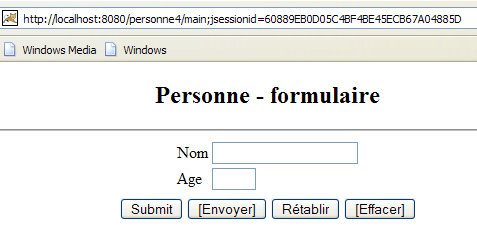
The result is different from the one obtained when cookies were allowed: the session token is in the Url displayed by the browser. Let’s explain this result without examining the HTTP exchanges that took place:
[cookies autorisés]
- During the second request for Url [http://localhost:8080/personne4], the client browser sent back the session cookie it had received from the server during the first request for that same Url. The <c:redirect> tag therefore did not include the session token in the redirect URL.
[cookies inhibés]
- During the second request for Url [http://localhost:8080/personne4], the client browser does not send the session cookie it received from the server during the first request for this same Url, since its cookies are disabled. The <c:redirect> tag therefore includes the session token in the redirect URL. This is why it appears in the screenshot above.
The <c:redirect> and <c:url> tags allow the session token to be included in the Url. This is the solution proposed here.
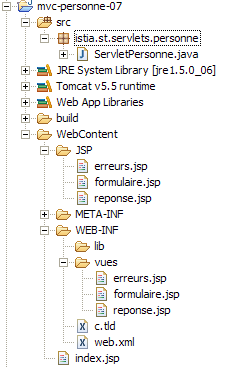
12.2. The Eclipse Project
To create the Eclipse project [mvc-personne-07] for the web application [/personne7], duplicate the project [mvc-personne-06] by following the procedure described in section 6.2.
 | 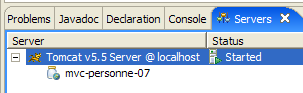 |
12.3. Configuring the [personne7] Web Application
The web.xml file for the /personne7 application is as follows:
<?xml version="1.0" encoding="UTF-8"?>
...
<display-name>mvc-personne-07</display-name>
...
This file is identical to the previous version file except for line 3, where the display name of the web application has changed to [mvc-personne-07]. The [index.jsp] home page remains unchanged.
...
<c:redirect url="/do/formulaire"/>
12.4. The view code
The [formulaire, réponse, erreurs] views revert to what they were in version 2, c.a.d, without Javascript. However, they retain the JSTL tags from the latest versions.
12.4.1. The [formulaire] view
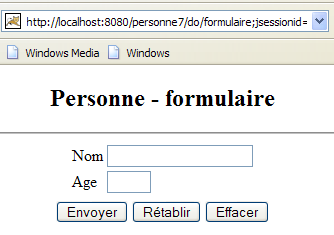
The buttons associated with Javascript have been removed.
[formulaire.jsp]:
<%@ page language="java" contentType="text/html; charset=ISO-8859-1"
pageEncoding="ISO-8859-1"%>
<!DOCTYPE HTML PUBLIC "-//W3C//DTD HTML 4.01 Transitional//EN">
<%@ taglib uri="/WEB-INF/c.tld" prefix="c" %>
<html>
<head>
<title>Personne - formulaire</title>
</head>
<body>
<center>
<h2>Personne - formulaire</h2>
<hr>
<form name="frmPersonne" action="<c:url value="validationFormulaire"/>" method="post">
<table>
<tr>
<td>Nom</td>
<td><input name="txtNom" value="${nom}" type="text" size="20"></td>
</tr>
<tr>
<td>Age</td>
<td><input name="txtAge" value="${age}" type="text" size="3"></td>
</tr>
<tr>
</table>
<table>
<tr>
<td><input type="submit" name="bouton" value="Envoyer"></td>
<td><input type="reset" value="Rétablir"></td>
<td><input type="submit" name="bouton" value="Effacer"></td>
</tr>
</table>
</form>
</center>
</body>
</html>
- line 14: the Url target of POST is written with the <c:url> so that the session token is included in case the client is a browser that does not send the HTTP [Cookie] header.
- The form has two buttons of type [submit]: [Envoyer] (line 28) and [Effacer] (line 30). Both buttons have the same name: button. When the POST occurs, the browser will send the parameter:
- button=Submit if the POST was triggered by the [Submit] button
- button=Clear if the POST was triggered by the [Clear] button
This parameter will help us determine the exact action to take, as Url and [/do/validationFormulaire] now correspond to two distinct actions.
12.4.2. The view [réponse]
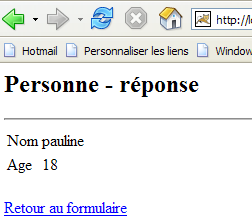
[réponse.jsp]:
<%@ page language="java" contentType="text/html; charset=ISO-8859-1"
pageEncoding="ISO-8859-1"%>
<!DOCTYPE HTML PUBLIC "-//W3C//DTD HTML 4.01 Transitional//EN">
<%@ taglib uri="/WEB-INF/c.tld" prefix="c" %>
<html>
<head>
<title>Personne</title>
</head>
<body>
<h2>Personne - réponse</h2>
<hr>
<table>
<tr>
<td>Nom</td>
<td>${nom}</td>
</tr>
<tr>
<td>Age</td>
<td>${age}</td>
</tr>
</table>
<br>
<a href="<c:url value="retourFormulaire"/>">${lienRetourFormulaire}</a>
</body>
</html>
- line 24: the Url target of HREF is written with the <c:url> so that the session token is included in case the client is a browser that does not send the HTTP [Cookie] header.
12.4.3. The view [erreurs]
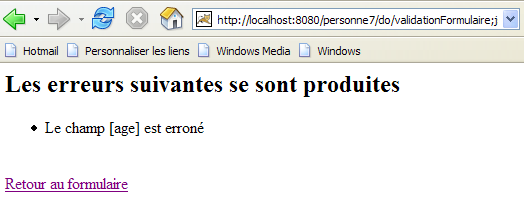
[erreurs.jsp]:
<%@ page language="java" contentType="text/html; charset=ISO-8859-1"
pageEncoding="ISO-8859-1"%>
<!DOCTYPE HTML PUBLIC "-//W3C//DTD HTML 4.01 Transitional//EN">
<%@ taglib uri="/WEB-INF/c.tld" prefix="c" %>
<html>
<head>
<title>Personne</title>
</head>
<body>
<h2>Les erreurs suivantes se sont produites</h2>
<ul>
<c:forEach var="erreur" items="${erreurs}">
<li>${erreur}</li>
</c:forEach>
</ul>
<br>
<a href="<c:url value="retourFormulaire"/>">${lienRetourFormulaire}</a>
</body>
</html>
- line 18: the Url target of HREF is written with the <c:url> so that the session token is included in case the client is a browser that does not send the HTTP [Cookie] header.
Readers are invited to test these new views using the same approach as in previous versions.
12.5. The [ServletPersonne] controller
The [ServletPersonne] controller for the [/personne7] web application is as follows:
1 2 3 4 5 6 7 8 9 10 11 12 13 14 15 16 17 18 19 20 21 22 23 24 25 26 27 28 29 30 31 32 33 34 35 36 37 38 39 40 41 42 43 44 45 46 47 48 49 50 51 52 53 54 55 56 57 58 59 60 61 62 63 64 65 66 67 68 69 70 71 72 73 74 75 76 77 78 79 80 81 82 83 84 85 86 87 88 89 90 91 92 93 94 95 96 97 98 99 100 101 102 103 104 105 106 107 108 109 110 111 112 113 114 115 116 117 118 119 120 121 122 123 | |
- line 35: action [/retourFormulaire] is performed by a GET and no longer by a POST as in the previous version.
- lines 70–87: the [/validationFormulaire] action is triggered by a POST caused by clicking onone of the [Envoyer] or [Effacer] buttons in the [formulaire] view. The [doValidationFormulaire] method handles these two cases using two different methods.
- Lines 90–103: The method [doEnvoyer] corresponds to the method [doValidationFormulaire] from the previous version. The entered data is placed in the session (lines 96–98), whereas in the previous version it was placed in the query.
- Lines 58–67: The new method [doEffacer] must display an empty form. We could use the method [doInit], which already performs this task. Here, we also take the opportunity to clear the [nom, age] elements from the session so that it continues to reflect the form’s latest state.
- Lines 50–55: Request the display of the [formulaire] view without apparently initializing the view’s template. This template is actually composed of the [nom, age] elements already in the session. No further action is required.
12.6. Tests
Start or restart Tomcat after integrating the Eclipse project [personne-mvc-07], then request url and [http://localhost:8080/personne7] using a browser with cookies disabled and existing cookies deleted. The following response is obtained:
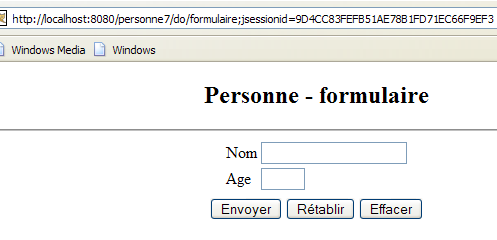
The source code received by the browser is as follows:
Line 1: The session token is in the Url target of POST.
Let's fill out the form and submit it:
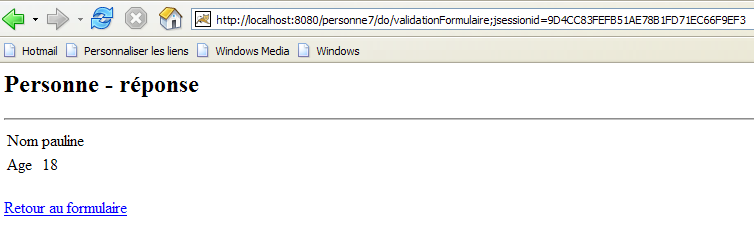
The source code received by the browser is as follows:
Line 3: The session token is in the Url link target.