7. Web application MVC [personne] – version 3
Recommended reading in [ref1]: Chapter 9
7.1. Introduction
We propose to add Javascript code to the HTML pages sent to the browser. It is the browser that executes the Javascript code embedded in the page it displays. This technology is independent of the one used by the web server to generate the HTML document (Java/servlets/JSP, ASP.NET, ASP, PHP, Perl, Python, ...).
[formulaire.jsp]
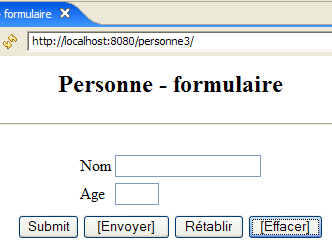
The view generated from this page will look like this:
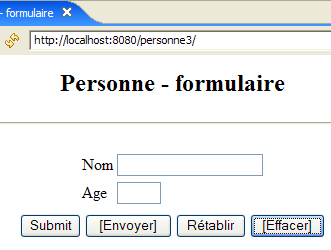
The buttons with labeled text use Javascript code embedded in the HTML page:
Label | HTML Type | Function |
<submit> | performs the same function as the [Envoyer] button in previous versions: sends the entered values to the controller | |
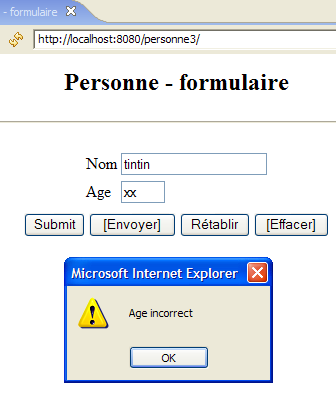
<button> | New button – checks the validity of the entered data locally before submitting it to the controller | |
<reset> | resets the form to the state in which it was initially received by the browser | |
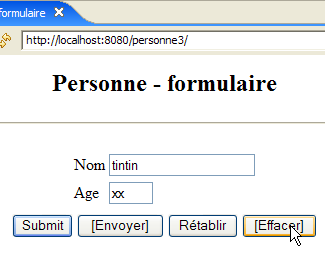
<button> | clears the contents of both input fields |
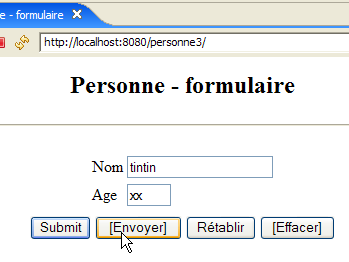
Here is an example of how to use the [Envoyer] and [Effacer] buttons:
 |  |
 |  |
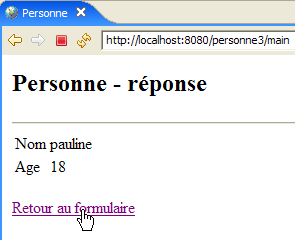
We will also use the Javascript code to manage the [Retour au formulaire] link in the [erreurs] and [réponse] views. Let’s take the example of the [réponse] view:
 | 1 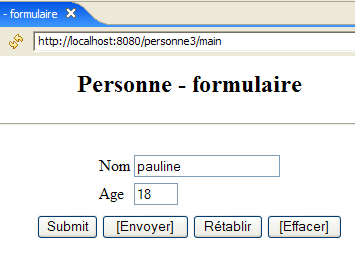 |
The difference lies in the url displayed in [1]. In the previous version, this was:
Here, the action is no longer part of the Url because it will be sent by a POST instead of a GET. This change will result in the browser displaying only Url as [http://localhost:8080/personne3/main], regardless of the requested action.
7.2. The Eclipse Project
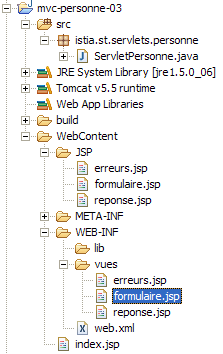
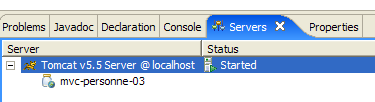
To create the Eclipse project [mvc-personne-03] for the web application [/personne3], duplicate the project [mvc-personne-02] by following the procedure described in section 6.2, page 78.
 |  |
7.3. Configuring the [personne3] Web Application
The web.xml file for the /personne3 application is as follows:
<?xml version="1.0" encoding="UTF-8"?>
<web-app id="WebApp_ID" version="2.4"
    xmlns="http://java.sun.com/xml/ns/j2ee"
    xmlns:xsi="http://www.w3.org/2001/XMLSchema-instance"
    xsi:schemaLocation="http://java.sun.com/xml/ns/j2ee http://java.sun.com/xml/ns/j2ee/web-app_2_4.xsd">
    <display-name>mvc-personne-03</display-name>
    <!--  ServletPersonne -->
    <servlet>
        <servlet-name>personne</servlet-name>
        <servlet-class>
            istia.st.servlets.personne.ServletPersonne
        </servlet-class>
        <init-param>
            <param-name>urlReponse</param-name>
            <param-value>
                /WEB-INF/vues/reponse.jsp
            </param-value>
        </init-param>
        <init-param>
            <param-name>urlErreurs</param-name>
            <param-value>
                /WEB-INF/vues/erreurs.jsp
            </param-value>
        </init-param>
        <init-param>
            <param-name>urlFormulaire</param-name>
            <param-value>
                /WEB-INF/vues/formulaire.jsp
            </param-value>
        </init-param>
        <init-param>
            <param-name>lienRetourFormulaire</param-name>
            <param-value>
                Retour au formulaire
            </param-value>
        </init-param>
    </servlet>
    <!--  Mapping ServletPersonne-->
    <servlet-mapping>
        <servlet-name>personne</servlet-name>
        <url-pattern>/main</url-pattern>
    </servlet-mapping>
    <!--  welcome files -->
    <welcome-file-list>
        <welcome-file>index.jsp</welcome-file>
    </welcome-file-list>
</web-app>
This file is identical to that of the previous version except for a few details:
- line 6: the display name of the web application has changed to [mvc-personne-03]
The [urlControleur] parameter has been removed. In the previous version, it was used to set the target of POST for the [formulaire] view. In this new version, the target will be the empty string, c.a.d, which is the Url displayed by the browser. We explained that this would always be [http://localhost:8080/personne3/main], the one we need for the POST from the [formulaire] view.
The [index.jsp] home page changes:
<%@ page language="java" contentType="text/html; charset=ISO-8859-1"
    pageEncoding="ISO-8859-1"%>
<!DOCTYPE HTML PUBLIC "-//W3C//DTD HTML 4.01 Transitional//EN">
<%
  response.sendRedirect("/personne3/main");
%>
- Line 5: The [index.jsp] page redirects the client to url in the [ServletPersonne] controller of the [/personne3] application.
7.4. The view code
7.4.1. The [formulaire] view
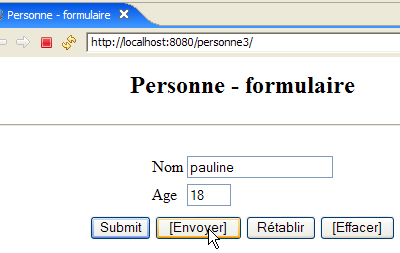
This view has become the following:
It is generated by the following JSP and [formulaire.jsp] pages:
<%@ page language="java" contentType="text/html; charset=ISO-8859-1"
  pageEncoding="ISO-8859-1"%>
<!DOCTYPE HTML PUBLIC "-//W3C//DTD HTML 4.01 Transitional//EN">

<%// retrieve data from the model
            String nom = (String) session.getAttribute("nom");
            String age = (String) session.getAttribute("age");
%>


<html>
  <head>
    <title>Personne - formulaire</title>
    <script language="javascript">
        // -------------------------------
        function effacer(){
          // delete input fields
          with(document.frmPersonne){
            txtNom.value="";
            txtAge.value="";
          }//with
        }//delete
        // -------------------------------
        function envoyer(){
          // check parameters before sending
          with(document.frmPersonne){
            // the name must not be empty
            champs=/^\s*$/.exec(txtNom.value);
            if(champs!=null){
              // name is empty
              alert("Vous devez indiquer un nom");
              txtNom.value="";
              txtNom.focus();
              // back to visual interface
              return;
            }//if
            // age must be a positive integer
            champs=/^\s*\d+\s*$/.exec(txtAge.value);
            if(champs==null){
              // age is incorrect
              alert("Age incorrect");
              txtAge.focus();
              // back to visual interface
              return;
            }//if
            // parameters are correct - send them to the server
            submit();
          }//with
        }//send
      </script>
  </head>
  <body>
    <center>
      <h2>Personne - formulaire</h2>
      <hr>
      <form name="frmPersonne" method="post">
        <table>
          <tr>
            <td>Nom</td>
            <td><input name="txtNom" value="<%= nom %>" type="text" size="20"></td>
          </tr>
          <tr>
            <td>Age</td>
            <td><input name="txtAge" value="<%= age %>" type="text" size="3"></td>
          </tr>
          <tr>
        </table>
        <table>
          <tr>
            <td><input type="submit" value="Submit"></td>
            <td><input type="button" value="[Envoyer]" onclick="envoyer()"></td>
            <td><input type="reset" value="Rétablir"></td>
            <td><input type="button" value="[Effacer]" onclick="effacer()"></td>
          </tr>
        </table>
        <input type="hidden" name="action" value="validationFormulaire">
      </form>
    </center>
  </body>
</html>
What's new:
- Line 56: The form has the name [frmPersonne]. This name will be used in the code Javascript. Note the absence of the [action] attribute, which means that the [frmPersonne] form will be submitted to the Url form displayed by the browser.
- Line 70: The [Submit] button serves the same purpose as the [Envoyer] button in previous versions
- Line 71: Clicking the [Envoyer] button (of type [Button]) executes the Javascript [envoyer] function defined on line 24
- line 72: the [Rétablir] button has not changed its function
- line 73: clicking the [Effacer] button of type [Button] executes the Javascript [effacer] function defined on line 16
Before commenting on the Javascript code, let’s review a few notations:
Javascript manages the displayed page and its content as a tree of objects whose root is the [document] object. This document may contain one or more forms. [document.frmPersonne] refers to the form named [frmPersonne] defined on line 56. This form also contains objects. Input fields are part of it. Thus, [document.frmPersonne.txtNom] refers to the image object of the input field HTML defined on line 60. The object [txtNom] has various properties, including the property [value], which refers to the content of the input field. Thus, [document.frmPersonne.txtNom.value] refers to the content of the input field [txtNom].
- Lines 16–22: The function Javascript [effacer] sets an empty string in the input fields [txtNom, txtAge].
- Lines 24–49: The function Javascript [envoyer] checks the validity of the values in the input fields [txtNom, txtAge] before posting them. It uses regular expressions for this purpose.
- Line 28: Checks whether the value of the input field [txtNom] matches the pattern /s*, which means 0 or more spaces. If the answer is yes, this means the user has not entered a name. If there is a match with the pattern, the variable `champs` will have a value other than the null pointer; otherwise, it will have the value null.
- Line 29: If there is a match with the pattern
- line 30: a message is displayed to the user
- line 32: we set the empty string in the [txtNom] field (there could have been a sequence of spaces)
- line 33: the blinking cursor is positioned on the [txtNom] field
- line 34: the function is terminated. There is then no POST on the server for the entered values.
- lines 38–45: we follow a similar procedure with the field [txtAge]
- line 47: if we reach this point, it means the entered values are correct. We then submit (submit) the form [frmPersonne] to the web server. Everything then proceeds as if we had clicked the button labeled [Submit].
7.4.2. The view [reponse]
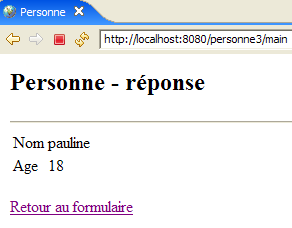
This view displays the values entered in the form when they are valid:
 |  |
Compared to the previous version, the new feature only appears when using the [Retour au formulaire] link from the [réponse] view:
| 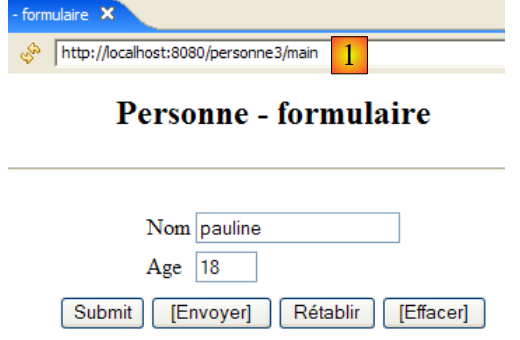 |
The difference lies in the url displayed in [1]. In the previous version, it was:
Here, the action is no longer part of Url because it will be sent via a POST instead of a GET. The new page JSP [reponse.jsp] is lqqqaaaaaaaaaqqAAAaaa
next:
<%@ page language="java" contentType="text/html; charset=ISO-8859-1"
    pageEncoding="ISO-8859-1"%>
<!DOCTYPE HTML PUBLIC "-//W3C//DTD HTML 4.01 Transitional//EN">


<%
    // retrieve data from the model
  String nom=(String)request.getAttribute("nom");
  String age=(String)request.getAttribute("age");
  String lienRetourFormulaire=(String)request.getAttribute("lienRetourFormulaire");
%>


<html>
    <head>
      <title>Personne</title>
  </head>
  <body>
      <h2>Personne - réponse</h2>
    <hr>
    <table>
        <tr>
          <td>Nom</td>
        <td><%= nom %>
      </tr>
        <tr>
          <td>Age</td>
        <td><%= age %>
      </tr>
    </table>
    <br>
    <form name="frmPersonne" method="post">
      <input type="hidden" name="action" value="retourFormulaire">
    </form>
    <a href="javascript:document.frmPersonne.submit();">
      <%= lienRetourFormulaire %>
    </a>
  </body>
</html>
What's new:
- lines 35-37: the link [Retour au formulaire] embeds Javascript. Clicking this link triggers the execution of the code Javascript from the attribute [href]. As we saw in the analysis of [formulaire.jsp], we know that this code submits the values of the <input>, <select>, ... fields from the [frmPersonne] form.
- Lines 32–34: define the form [frmPersonne]. This form has only one field of type <input type="hidden" ...>, i.e., a hidden field. This [action] field is used to send the name of the action to be executed to the controller, in this case [retourFormulaire].
7.4.3. The [erreurs] view
This view reports input errors in the form. The change made is the same as for the [réponse] view:
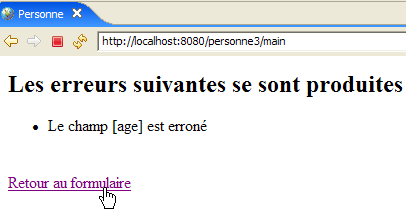 | 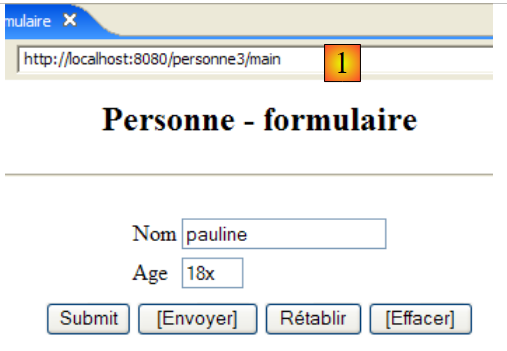 |
The difference lies in the url displayed in [1]. In the previous version, this was:
Here, the action is no longer part of Url because it will be sent by a POST instead of a GET. The new JSP [reponse.jsp] page follows:
<%@ page language="java" contentType="text/html; charset=ISO-8859-1"
    pageEncoding="ISO-8859-1"%>
<!DOCTYPE HTML PUBLIC "-//W3C//DTD HTML 4.01 Transitional//EN">
<%@ page import="java.util.ArrayList" %>

<%
// retrieve data from the model
  ArrayList erreurs=(ArrayList)request.getAttribute("erreurs");
  String lienRetourFormulaire=(String)request.getAttribute("lienRetourFormulaire");
%>


<html>
    <head>
      <title>Personne</title>
  </head>
  <body>
      <h2>Les erreurs suivantes se sont produites</h2>
    <ul>
        <%
          for(int i=0;i<erreurs.size();i++){
            out.println("<li>" + (String) erreurs.get(i) + "</li>\n");
        }//for
      %>
    </ul>
    <br>
    <form name="frmPersonne" method="post">
      <input type="hidden" name="action" value="retourFormulaire">
    </form>
    <a href="javascript:document.frmPersonne.submit();">
      <%= lienRetourFormulaire %>
    </a>
  </body>
</html>
What's new:
- Lines 30-32: the new handling of link clicks. The explanations provided on this topic in study [réponse.jsp] also apply here.
7.5. View testing
To test the previous views, we duplicate their JSP pages into the /WebContent/JSP folder of the Eclipse project:
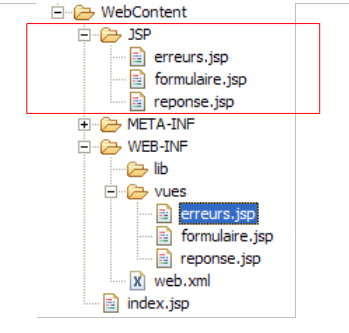
Then, in the JSP folder, the pages are modified as follows:
[formulaire.jsp]:
...
<%
  // -- test: the page template is created
  session.setAttribute("nom","tintin");
  session.setAttribute("age","30");
%>

<%// retrieve data from the model
            String nom = (String) session.getAttribute("nom");
            String age = (String) session.getAttribute("age");
%>
Lines 4–5 were added to create the template required by the page in lines 9–10.
[reponse.jsp] :
...
<%
  // -- test: the page template is created
  request.setAttribute("nom","milou");
  request.setAttribute("age","10");
  request.setAttribute("lienRetourFormulaire","Retour au formulaire");
%>

<%
    // retrieve data from the model
  String nom=(String)request.getAttribute("nom");
  String age=(String)request.getAttribute("age");
  String lienRetourFormulaire=(String)request.getAttribute("lienRetourFormulaire");
%>
...
Lines 4–6 were added to create the template required by the page in lines 11–13.
[erreurs.jsp] :
<%
  // -- test: the page template is created
  ArrayList<String> erreurs1=new ArrayList<String>();
  erreurs1.add("erreur1");
  erreurs1.add("erreur2");
  request.setAttribute("erreurs",erreurs1);
  request.setAttribute("lienRetourFormulaire","Retour au formulaire");
%>

<%
// retrieve data from the model
  ArrayList erreurs=(ArrayList)request.getAttribute("erreurs");
  String lienRetourFormulaire=(String)request.getAttribute("lienRetourFormulaire");
%>
Lines 4–8 were added to create the model required by the page in lines 13–14.
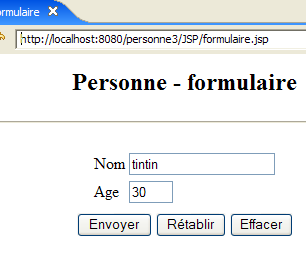
Start Tomcat if you haven't already, then request the following url:
 | 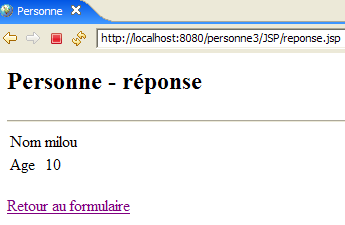 |
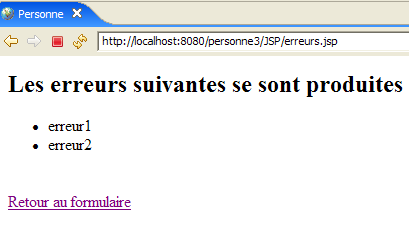 |
We do indeed get the expected views.
7.6. The [ServletPersonne] controller
The [ServletPersonne] controller for the [/personne3] web application will handle the following actions:
No. | request | origin | processing |
1 | [GET /personne3/main] | url entered by the user | - send the empty view [formulaire] |
2 | [POST /personne3/main] with parameters [txtNom, txtAge, action=validationFormulaire] posted | click on the button [Envoyer] in the view [formulaire] | - check the parameter values [txtNom, txtAge] - if they are incorrect, send the view [erreurs(erreurs)] - if they are correct, send the view [reponse(nom,age)] |
3 | [POST /personne3/main] with parameters [action=retourFormulaire] hosted | Click on the [Back to form] in the views [réponse] and [erreurs]. | - Send the pre-filled view [formulaire] with the latest entered values |
We therefore have a new action to handle: [POST /personne3/main] with the posted parameter [action=retourFormulaire], replacing the old action [GET /personne3/main?action=retourFormulaire].
7.6.1. Controller skeleton
The controller skeleton for [ServletPersonne] is identical to that of the previous version.
What's new:
- line 11, the [paramètres] array no longer contains the [urlControleur] parameter, which has been removed from the [web.xml] file.
The [init, doValidationFormulaire] methods remain unchanged. The [doGet, doInit, doRetourFormulaire] methods have changed slightly.
7.6.2. The [doGet] method
The [doGet] method must handle the [POST /personne3/main] action with the posted parameter [action=retourFormulaire]:
- lines 6–9: processing of action [POST /personne3/main] with the posted parameter [action=retourFormulaire]
7.6.3. The [doInit] method
This method processes request #1 [GET /personne3/main]. Its code is as follows:
The change is that the [formulaire] view displayed on line 8 no longer has the [action] element in its template.
7.6.4. The [doRetourFormulaire] method
This method processes request #1 [POST /personne3/main] with [action=retourFormulaire] in the posted elements. Its code is as follows:
The change is that the view [formulaire] displayed on line 14 no longer has the element [action] in its template.
7.7. Tests
Start or restart Tomcat after integrating the Eclipse project [personne-mvc-03] into it. Request url and [http://localhost:8080/personne3], then resume the tests shown as examples in section 7.1.