6. Web application MVC [personne] – version 2
We will now propose variants of the previous [/personne1] application, which we will call [/personne2, /personne3, ...]. These variants do not alter the application’s initial architecture, which remains as follows:
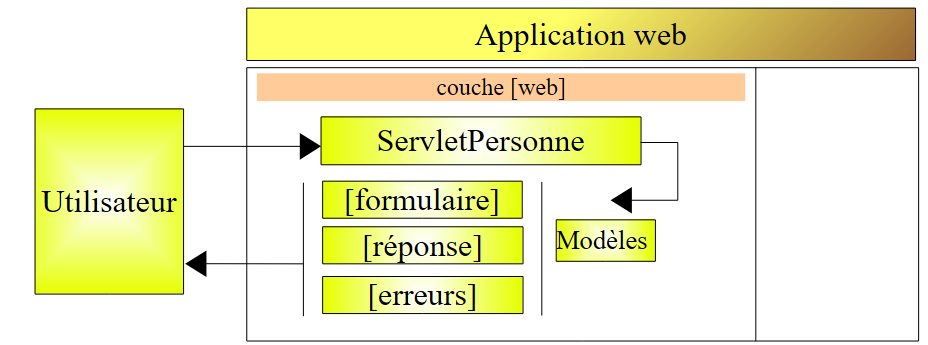
For these variants, we will keep our explanations brief. We will only present the changes made compared to the previous version.
6.1. Introduction
We now propose to add session management to our application. Let us recall the following points:
- the HTTP client-server dialogue is a series of request-response sequences that are disconnected from one another
- the session serves as a memory buffer between different request-response sequences from the same user. If there are N users, there are N sessions.
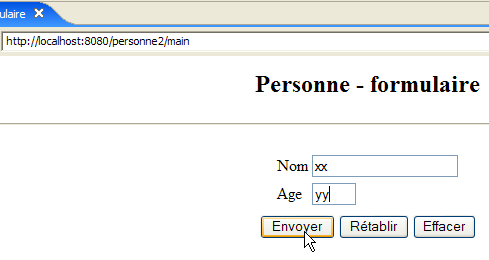
The following screen sequence shows what is now desired in the application’s operation:
Exchange #1
 | 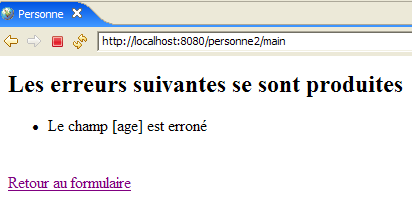 |
The new feature is the link back to the form, which has been added to view [erreurs].
Exchange #2
| |
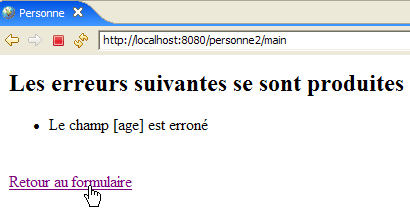 | 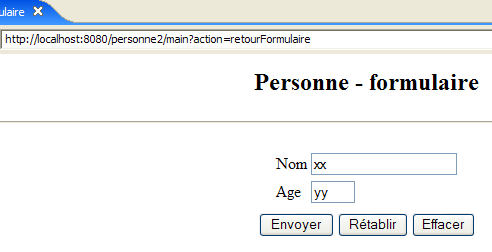 |
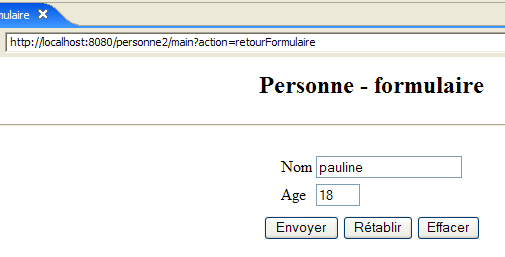
In exchange #1, the user provided the values (xx, yy) for the (name, age) pair. If the server learned these values during the exchange, it “forgets” them at the end of the exchange. However, we can see that during exchange #2, it is able to display their values again in its response. It is the concept of a session that, in this case, allows the web server to store data throughout successive client-server exchanges. There are other possible solutions to this problem.
During exchange #1, the server will store the (name, age) pair that the client sent it in the session so that it can display it during exchange #2.
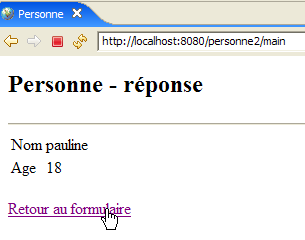
Here is another example of implementing a session between two exchanges:
Exchange #1
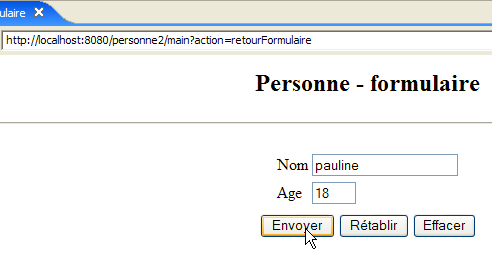 | 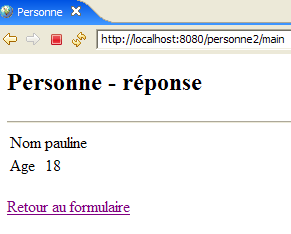 |
The new feature is the link back to the form, which has been added to the response page.
Exchange #2
 |  |
6.2. The Eclipse Project
To create the Eclipse project [mvc-personne-02] for the web application [/personne2], we will duplicate the Eclipse project [mvc-personne-01] in order to reuse the existing configuration. To do this, follow these steps:
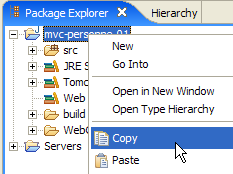
[clic droit sur projet mvc-personne-01 -> Copy]:
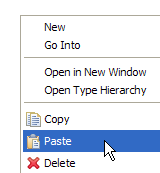
then [clic droit dans Package Explorer -> Paste]:
 | 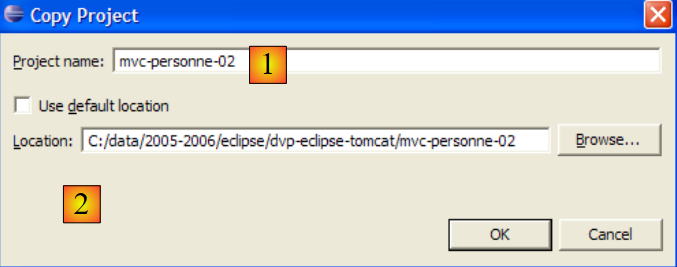 - Enter the name of the new project as [1] and the name of an existing but empty folder as [2] |
The project [mvc-personne-02] is then created:
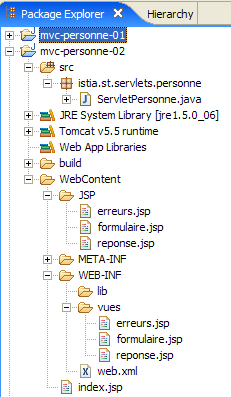
For now, it is identical to the [mvc-personne-01] project. We will need to make a few manual changes before we can use it. Let’s go to the [Servers] view and try to add this new application to those managed by Tomcat:
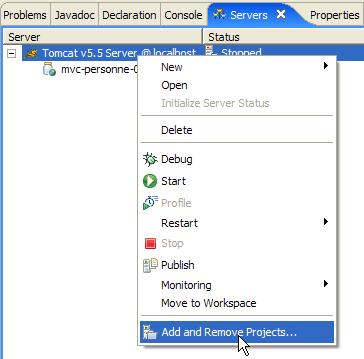 | 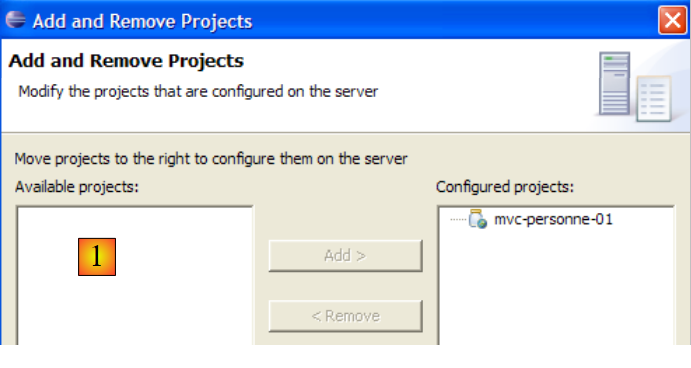 |
We can see that in [1], the new project [mvc-personne-02] is not recognized by Tomcat. For it to recognize it, a configuration file for the [mvc-personne-02] project must be modified. Let’s use option and [File / Open File] to open the [<mvc-personne-02>/.settings/.component] file:
<?xml version="1.0" encoding="UTF-8"?>
<project-modules id="moduleCoreId">
<wb-module deploy-name="mvc-personne-01">
<wb-resource deploy-path="/" source-path="/WebContent"/>
<wb-resource deploy-path="/WEB-INF/classes" source-path="/src"/>
<property name="java-output-path" value="/build/classes/"/>
<property name="context-root" value="personne1"/>
</wb-module>
</project-modules>
Line 3 specifies the name of the web module to be deployed within Tomcat. Here, this name is the same as that of the [mvc-personne-01] project. We change it to [mvc-personne-02]:
<wb-module deploy-name="mvc-personne-02">
Additionally, we can take this opportunity to modify, on line 7, the name of the [mvc-personne-02] application context, which conflicts with that of the [mvc-personne-01] project:
<property name="context-root" value="personne2"/>
This second change could be made directly within Eclipse. However, I didn’t see how to make the first one without going through the configuration file.
Once this is done, we save the new file [.content], then exit and restart Eclipse so that the changes take effect.
Once Eclipse has restarted, let’s try the operation that failed earlier:
| 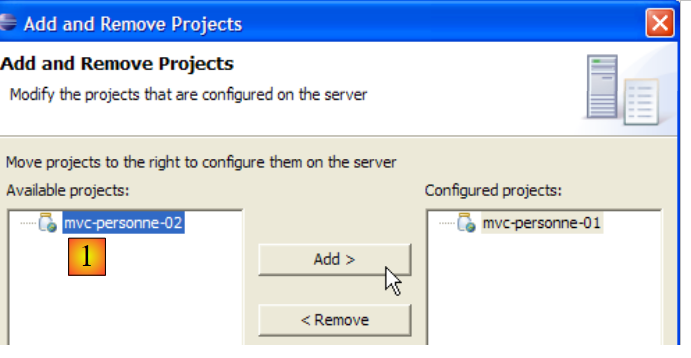 |
This time, the [mvc-personne-02] project is recognized. We add it to the projects configured to run on Tomcat:
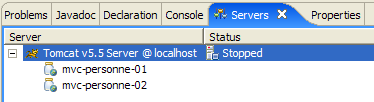
6.3. Configuring the [personne2] web application
The web.xml file for the /personne2 application is as follows:
<?xml version="1.0" encoding="UTF-8"?>
<web-app id="WebApp_ID" version="2.4"
    xmlns="http://java.sun.com/xml/ns/j2ee"
    xmlns:xsi="http://www.w3.org/2001/XMLSchema-instance"
    xsi:schemaLocation="http://java.sun.com/xml/ns/j2ee http://java.sun.com/xml/ns/j2ee/web-app_2_4.xsd">
    <display-name>mvc-personne-02</display-name>
    <!--  ServletPersonne -->
    <servlet>
        <servlet-name>personne</servlet-name>
        <servlet-class>
            istia.st.servlets.personne.ServletPersonne
        </servlet-class>
        <init-param>
            <param-name>urlReponse</param-name>
            <param-value>
                /WEB-INF/vues/reponse.jsp
            </param-value>
        </init-param>
        <init-param>
            <param-name>urlErreurs</param-name>
            <param-value>
                /WEB-INF/vues/erreurs.jsp
            </param-value>
        </init-param>
        <init-param>
            <param-name>urlFormulaire</param-name>
            <param-value>
                /WEB-INF/vues/formulaire.jsp
            </param-value>
        </init-param>
        <init-param>
            <param-name>urlControleur</param-name>
            <param-value>
                main
            </param-value>
        </init-param>
        <init-param>
            <param-name>lienRetourFormulaire</param-name>
            <param-value>
                Retour au formulaire
            </param-value>
        </init-param>
    </servlet>
    <!--  Mapping ServletPersonne-->
    <servlet-mapping>
        <servlet-name>personne</servlet-name>
        <url-pattern>/main</url-pattern>
    </servlet-mapping>
    <!--  welcome files -->
    <welcome-file-list>
        <welcome-file>index.jsp</welcome-file>
    </welcome-file-list>
</web-app>
This file is identical to the one in the previous version, except that it declares two new initialization parameters:
- line 6: the display name of the web application has changed to [mvc-personne-02]
- lines 31–36: define the configuration parameter named [urlControleur], which is the url [main] that leads to the [ServletPersonne] servlet
- lines 37-42: define a configuration parameter named [lienRetourFormulaire], which is the text of the link back to the form on pages JSP, [erreurs.jsp], and [reponse.jsp].
The [index.jsp] home page changes:
<%@ page language="java" contentType="text/html; charset=ISO-8859-1"
    pageEncoding="ISO-8859-1"%>
<!DOCTYPE HTML PUBLIC "-//W3C//DTD HTML 4.01 Transitional//EN">
<%
  response.sendRedirect("/personne2/main");
%>
- Line 5: The [index.jsp] page redirects the client to url in the [ServletPersonne] controller of the [/personne2] application.
6.4. The view code
6.4.1. The [formulaire] view
This view is identical to that of the previous version:
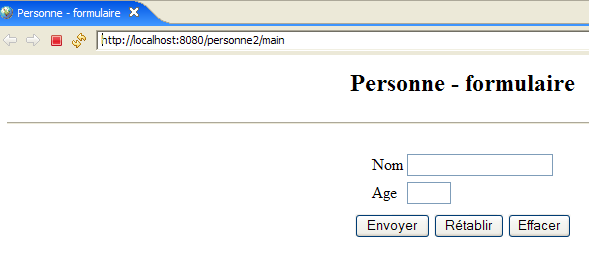
It is generated by the following page: JSP [formulaire.jsp]:
<%@ page language="java" contentType="text/html; charset=ISO-8859-1"
    pageEncoding="ISO-8859-1"%>
<!DOCTYPE HTML PUBLIC "-//W3C//DTD HTML 4.01 Transitional//EN">
<%
    // retrieve data from the model
  String nom=(String)session.getAttribute("nom");
  String age=(String)session.getAttribute("age");
  String urlAction=(String)request.getAttribute("urlAction");
%>

<html>
    <head>
      <title>Personne - formulaire</title>
  </head>
  <body>
      <center>
        <h2>Personne - formulaire</h2>
      <hr>
      <form action="<%=urlAction%>" method="post">
          <table>
            <tr>
              <td>Nom</td>
            <td><input name="txtNom" value="<%= nom %>" type="text" size="20"></td>
          </tr>
          <tr>
              <td>Age</td>
            <td><input name="txtAge" value="<%= age %>" type="text" size="3"></td>
          </tr>
            <tr>
        </table>
        <table>
            <tr>
              <td><input type="submit" value="Envoyer"></td>
            <td><input type="reset" value="Rétablir"></td>
            <td><input type="button" value="Effacer"></td>
          </tr>
        </table>
        <input type="hidden" name="action" value="validationFormulaire">
      </form>
    </center>
  </body>
</html>
What's new:
- line 19, the form now has an attribute [action] whose value is Url, to which the browser must post the form values when the user clicks the [Envoyer] button of type submit. The variable [urlAction] will have the value action="main". The view [formulaire] is displayed after the user performs the following actions:
- initial request: GET /person2/main
- click on the link [Retour au formulaire]: GET /person2/main?action=retourFormulaire
Since the [action] attribute does not specify an absolute URL (starting with /) but a relative URL (not starting with /), the browser will use the first part of the URL of the currently displayed page and append the relative URL to it. The Url of the POST will therefore be [/personne2/main], that of the controller. This POST query will be accompanied by the [txtNom, txtAge, action] parameters from lines 23, 27, and 38.
- Line 8: The value of the [urlAction] element in the model is retrieved. It is looked up in the attributes of the current request. It will be used on line 19.
- Lines 6–7: The values of the [nom, age] elements in the model are retrieved. They are searched for in the session attributes and no longer in the query attributes as in the previous version. This is to meet the requirements of the [GET /personne2/main?action=retourFormulaire] query for the link between the [réponse] and [erreurs] views. Before displaying these two views, the controller places the data entered in the form into the session, which allows it to retrieve this data when the user uses the [Retour au formulaire] link from the [réponse] and [erreurs] views.
6.4.2. The [reponse] view
This view displays the values entered in the form when they are valid:
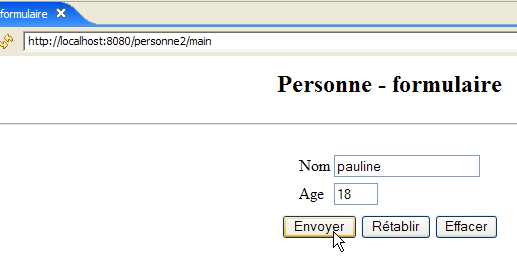 | |
Compared to the previous version, the new feature comes from the [Retour au formulaire] link. The view is generated by the following JSP and [reponse.jsp] pages:
<%@ page language="java" contentType="text/html; charset=ISO-8859-1"
    pageEncoding="ISO-8859-1"%>
<!DOCTYPE HTML PUBLIC "-//W3C//DTD HTML 4.01 Transitional//EN">


<%
    // retrieve data from the model
  String nom=(String)request.getAttribute("nom");
  String age=(String)request.getAttribute("age");
  String lienRetourFormulaire=(String)request.getAttribute("lienRetourFormulaire");
%>

<html>
    <head>
      <title>Personne</title>
  </head>
  <body>
      <h2>Personne - réponse</h2>
    <hr>
    <table>
        <tr>
          <td>Nom</td>
        <td><%= nom %>
      </tr>
        <tr>
          <td>Age</td>
        <td><%= age %>
      </tr>
    </table>
    <br>
    <a href="?action=retourFormulaire"><%= lienRetourFormulaire %></a>
  </body>
</html>
- line 31: the link back to the form. This link has two components:
- the target [href="?action=retourFormulaire"]. The view [réponse] is displayed after POST in the form [formulaire.jsp], followed by url and [/personne2/main]. It is therefore this last Url that is displayed in the browser when the [réponse] view is displayed. Clicking on the [Retour au formulaire] link will then trigger a Get from the browser to the Url specified by the [href] attribute of the link, here "?action=retourFormulaire". If Url is not present in [href], the browser will use the one from the currently displayed view, c.a.d. [/personne2/main]. Ultimately, clicking the [Retour au formulaire] link will trigger a Get from the browser to the url [/personne2/main?action=retourFormulaire], c.a.d to the application controller’s url, accompanied by the parameter [action] to tell it what to do.
- the link text. This will be part of the template sent to the page by the controller and retrieved on line 10.
6.4.3. The [erreurs] view
This view reports input errors in the form:
| |
Compared to the previous version, the new feature is the [Retour au formulaire] link. The view is generated by the following JSP [erreurs.jsp] page:
<%@ page language="java" contentType="text/html; charset=ISO-8859-1"
    pageEncoding="ISO-8859-1"%>
<!DOCTYPE HTML PUBLIC "-//W3C//DTD HTML 4.01 Transitional//EN">
<%@ page import="java.util.ArrayList" %>

<%
// retrieve data from the model
  ArrayList erreurs=(ArrayList)request.getAttribute("erreurs");
  String lienRetourFormulaire=(String)request.getAttribute("lienRetourFormulaire");
%>

<html>
    <head>
      <title>Personne</title>
  </head>
  <body>
      <h2>Les erreurs suivantes se sont produites</h2>
    <ul>
        <%
          for(int i=0;i<erreurs.size();i++){
            out.println("<li>" + (String) erreurs.get(i) + "</li>\n");
        }//for
      %>
    </ul>
    <br>
    <a href="?action=retourFormulaire"><%= lienRetourFormulaire %></a>
  </body>
</html>
- Line 26: the link back to the form. This link is identical to the one in view [réponse]. The reader is encouraged to review the explanations provided for that view if necessary.
6.5. Testing the views
To test the previous views, we duplicate their JSP pages into the /WebContent/JSP folder of the Eclipse project:
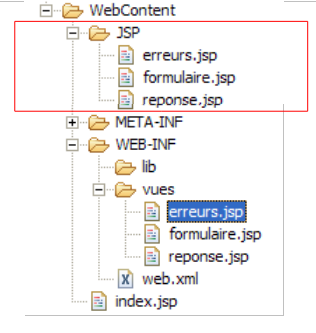
Then, in the JSP folder, the pages are modified as follows:
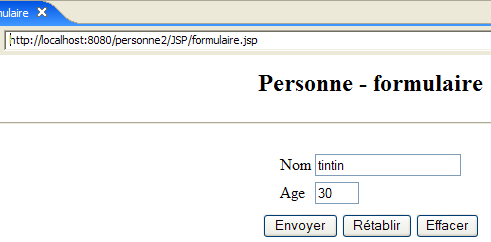
[formulaire.jsp]:
...
<%
  // -- test: the page template is created
  session.setAttribute("nom","tintin");
  session.setAttribute("age","30");
  request.setAttribute("urlAction","main");
%>

<%
    // retrieve data from the model
  String nom=(String)session.getAttribute("nom");
  String age=(String)session.getAttribute("age");
  String urlAction=(String)request.getAttribute("urlAction");
%>
Lines 4–5 were added to create the model required by the page in lines 11–13.
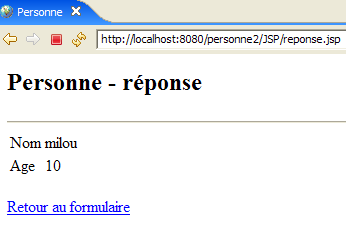
[reponse.jsp] :
<%
  // -- test: the page template is created
  request.setAttribute("nom","milou");
  request.setAttribute("age","10");
  request.setAttribute("lienRetourFormulaire","Retour au formulaire");
%>

<%
    // retrieve data from the model
  String nom=(String)request.getAttribute("nom");
  String age=(String)request.getAttribute("age");
  String lienRetourFormulaire=(String)request.getAttribute("lienRetourFormulaire");
%>
Lines 4–6 were added to create the form required by the page in lines 11–13.
[erreurs.jsp] :
<%
  // -- test: the page template is created
  ArrayList<String> erreurs1=new ArrayList<String>();
  erreurs1.add("erreur1");
  erreurs1.add("erreur2");
  request.setAttribute("erreurs",erreurs1);
  request.setAttribute("lienRetourFormulaire","Retour au formulaire");
%>

<%
// retrieve data from the model
  ArrayList erreurs=(ArrayList)request.getAttribute("erreurs");
  String lienRetourFormulaire=(String)request.getAttribute("lienRetourFormulaire");
%>
Lines 4–8 were added to create the template required by the page in lines 13–14.
Let’s start Tomcat if it isn’t already running, then request the following url:
 |  |
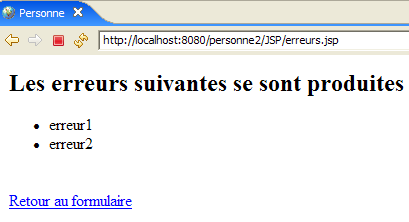 |
We do indeed get the expected views.
6.6. The [ServletPersonne] controller
The [ServletPersonne] controller for the [/personne2] web application will handle the following actions:
No. | request | origin | processing |
1 | [GET /personne2/main] | url entered by the user | - send the empty view [formulaire] |
2 | [POST /personne2/main] with parameters [txtNom, txtAge, action] posted | click on the button [Envoyer] in the view [formulaire] | - check the values of the parameters [txtNom, txtAge] - if they are incorrect, send the view [erreurs(erreurs)] - if they are correct, send the view [reponse(nom,age)] |
3 | [GET /person2/main? action=returnForm] | click on the [Return to form] in the response] and [erreurs]. | - Send the pre-filled view [formulaire] with the latest entered values |
We therefore have a new action to handle: [GET /personne2/main?action=retourFormulaire].
6.6.1. Controller skeleton
The controller skeleton for [ServletPersonne] is almost identical to that of the previous version:
What's new:
- line 4: using a session requires importing the [HttpSession] package
- Lines 28–30: The new method [doRetourFormulaire] processes the new action: [GET /personne2/main?action=retourFormulaire].
6.6.2. Initialization of the [init] controller
The [init] method is identical to that of the previous version. It checks the [web.xml] file for the elements declared in the [paramètres] array:
- line 5: the parameters [urlControleur] (Url from the controller) and [lienRetourFormulaire] (Link text from views [réponse] and [erreurs] have been added.
6.6.3. The method [doGet]
The method [doGet] must handle the action [GET /personne2/main?action=retourFormulaire], which did not exist previously:
- lines 6–14: we check that the list of initialization errors is empty. If this is not the case, we display the view [erreurs(erreursInitialisation)], which will report the error(s).
To understand this code, you need to recall the template for the [erreurs] view:
<%
// retrieve data from the model
  ArrayList erreurs=(ArrayList)request.getAttribute("erreurs");
  String lienRetourFormulaire=(String)request.getAttribute("lienRetourFormulaire");
%>
The [erreurs] view expects a key element named "errors" in the request. The controller creates this element on line 8. It also expects a key element named "lienRetourFormulaire". The controller creates this element on line 9. Here, the link text will be empty. Therefore, there will be no link in the [erreurs] view that is sent. Indeed, if there were errors during application initialization, the application must be reconfigured. There is no need to offer the user the option to continue the application via a link.
- Lines 34–37: processing of the new action [GET /personne2/main?action=retourFormulaire]
6.6.4. The [doInit] method
This method processes request #1 [GET /personne2/main]. For this request, it must send the empty view [formulaire(nom,age)]. Its code is as follows:
- Line 4: The current session is retrieved if it exists, or created otherwise (true parameter from getSession).
- lines 9-10: the [formulaire] view is displayed. Recall the template expected by this view:
<%
    // retrieve data from the model
  String nom=(String)session.getAttribute("nom");
  String age=(String)session.getAttribute("age");
  String urlAction=(String)request.getAttribute("urlAction");
%>
- lines 6-7: the [nom,age] elements of the [formulaire] view template are initialized with empty strings and placed in the session because that is where the view expects them.
- line 8: the [urlAction] element of the model is initialized with the value of the [urlControleur] parameter from the [web.xml] file and placed in the request.
6.6.5. The [doValidationFormulaire] method
This method processes request #2 [POST /personne2/main], in which the posted parameters are [action, txtNom, txtAge]. Its code is as follows:
- lines 5-6: retrieve the values of the parameters "txtNom" and "txtAge" from the client request.
- lines 8-10: these values are stored in the session so they can be retrieved when the user clicks the [Retour au formulaire] link in the [réponse] and [erreurs] views.
- Lines 12–19: The validity of the values for the two parameters is checked
- lines 21-28: if either parameter is incorrect, the view [erreurs(erreurs,lienRetourFormulaire)] is displayed. Recall the template for this view:
<%
// retrieve data from the model
  ArrayList erreurs=(ArrayList)request.getAttribute("erreurs");
  String lienRetourFormulaire=(String)request.getAttribute("lienRetourFormulaire");
%>
- lines 30-34: if the two retrieved parameters "txtNom" and "txtAge" have valid values, display the view [reponse(nom,age,lienRetourFormulaire)]. Recall the template for the [reponse] view:
<%
    // retrieve data from the model
  String nom=(String)request.getAttribute("nom");
  String age=(String)request.getAttribute("age");
  String lienRetourFormulaire=(String)request.getAttribute("lienRetourFormulaire");
%>
6.6.6. The [doRetourFormulaire] method
This method processes request no. 3 [GET /personne2/main?action=retourFormulaire]. Its code is as follows:
At the end of this method, the [formulaire] view must be displayed, pre-filled with the user’s latest entries. Recall the [formulaire] view template:
<%
    // retrieve data from the model
  String nom=(String)session.getAttribute("nom");
  String age=(String)session.getAttribute("age");
  String urlAction=(String)request.getAttribute("urlAction");
%>
The [doRetourFormulaire] method must therefore construct the previous model.
- Line 4: Retrieve the session in which the controller has stored the entered values (name, age).
- line 7: we retrieve the name from the session
- Lines 8–9: If it is not there, we add it with an empty value. This scenario should not occur during normal application operation, as the [retourFormulaire] action always takes place after the [validationFormulaire] action, which occurs after the entered data has been saved to the session. However, a session may expire because it has a limited lifespan, often a few dozen minutes. In this case, line 4 has created a new session in which the name will not be found. We then set an empty name in the new session.
- Lines 11–13: The same is done for the age
- If we ignore the issue of the expired session, then lines 3–13 are unnecessary. The [nom,age] elements of the model are already in the session. Therefore, there is no need to add them back.
- Line 15: We set the value of the [urlAction] element in the model
6.7. Tests
Start or restart Tomcat. Request url and [http://localhost:8080/personne2], then repeat the tests shown as examples in section 6.1.