17. MVC web application in a 3-tier architecture – Example 3 – Firebird DBMS
17.1. The Firebird database
In this new version, we will store the list of people in a Firebird database table. The document [http://tahe.developpez.com/divers/sql-firebird/] contains information on how to install and manage this SGBD. The following screenshots are from IBExpert, an administration client for the Interbase and Firebird SGBD.
The database is named [dbpersonnes.gdb]. It contains a table named [PERSONNES]:
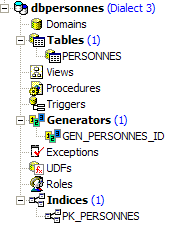
The table [PERSONNES] will contain the list of people managed by the web application. It was created using the following SQL commands:
- Lines 2–10: The structure of the [PERSONNES] table, intended to store objects of type [Personne], reflects the structure of that object. Since the Boolean type does not exist in Firebird, the field [MARIE] (line 8) has been declared as type [SMALLINT], an integer. Its value will be 0 (unmarried) or 1 (married).
- Lines 13–16: integrity constraints that mirror those of the [ValidatePersonne] data validator.
- Line 19: The field ID is the primary key of the table [PERSONNES]
The table [PERSONNES] could have the following content:
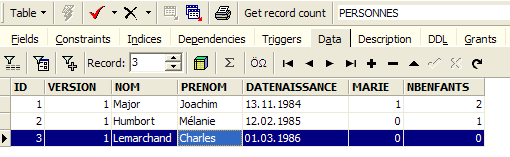
The database [dbpersonnes.gdb] has, in addition to the table [PERSONNES], an object called a generator named [GEN_PERSONNES_ID]. This generator produces successive integers that we will use to assign a value to the primary key [ID] of the class [PERSONNES]. Let’s look at an example to illustrate how it works:
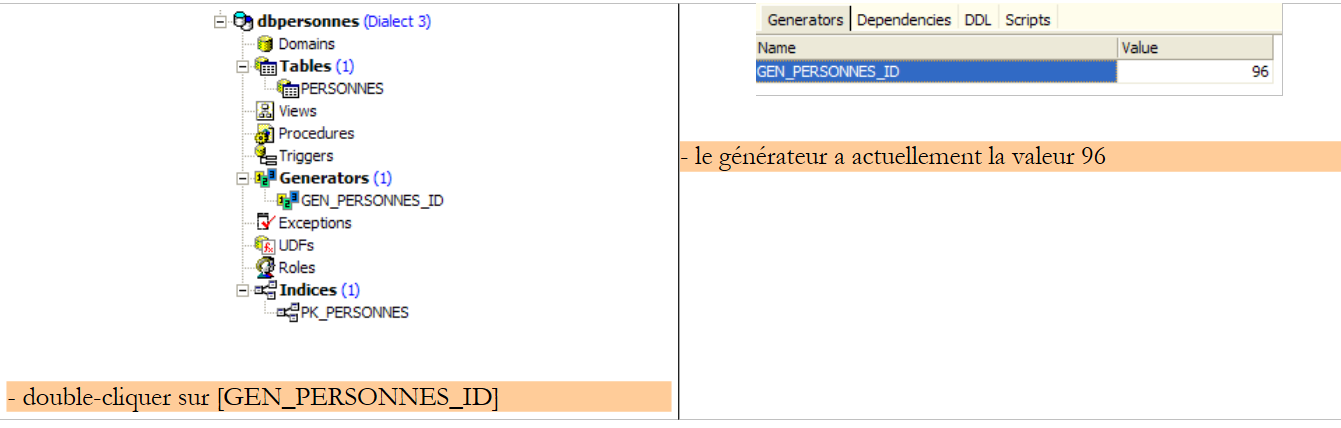 |
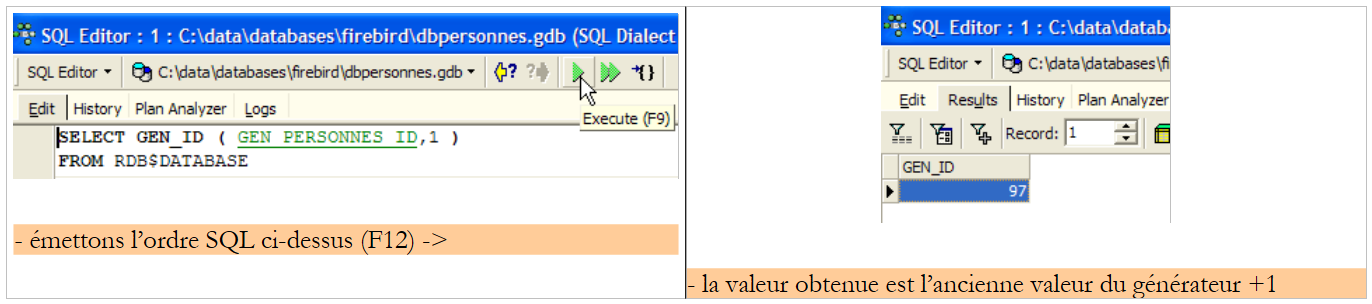 |
We can see that the value of the generator [GEN_PERSONNES_ID] has changed (double-click on it + F5 to refresh):
 |
The order s to SQL
thus yields the following generator value: [GEN_PERSONNES_ID]. GEN_ID is an internal Firebird function, and [RDB$DATABASE] is a system table for SGBD.
17.2. The Eclipse project for the [dao] and [service] layers
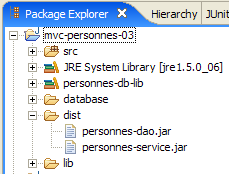
To develop the [dao] and [service] layers of our database application, we will use the following Eclipse project:
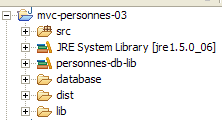
The project is a simple Java project, not a Tomcat web project. Recall that version 2 of our application will use the [web] layer from version 1. Therefore, this layer does not need to be written.
[src] Folder
This folder contains the source code for the [dao] and [service] layers:
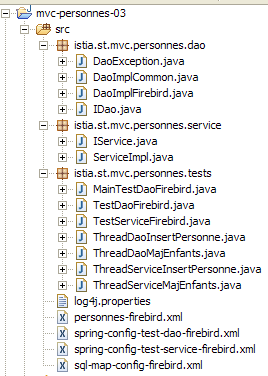
It contains various packages:
- [istia.st.mvc.personnes.dao]: contains the [dao] layer
- [istia.st.mvc.personnes.entites]: contains the class [Personne]
- [istia.st.mvc.personnes.service]: contains the class [service]
- [istia.st.mvc.personnes.tests]: contains the JUnit tests for the [dao] and [service] layers
as well as configuration files that must be in the application’s ClassPath directory.
[database] folder
This folder contains the Firebird database of people:
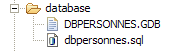
- [dbpersonnes.gdb] is the database.
- [dbpersonnes.sql] is the database generation script:
Folder [lib]
This folder contains the archives required by the application:
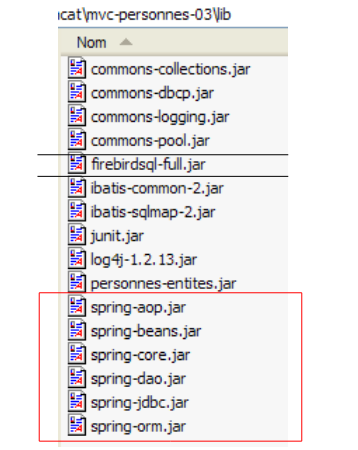 |
Note the presence of the JDBC, [firebirdsql-full.jar], and SGBD Firebird drivers, as well as a number of [spring-*.jar] archives. We could have used the single [spring.jar] archive found in the [dist] folder of the distribution, which contains all of Spring’s classes. We can also use only the archives necessary for the project. That is what we did here, guided by the missing class errors reported by Eclipse and the names of the partial Spring archives. All these archives from the [lib] folder were placed in the project’s classpath.
Folder [dist]
This folder will contain the archives resulting from the compilation of the application’s classes:
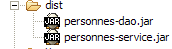
- [personnes-dao.jar]: archive of the [dao] layer
- [personnes-service.jar]: archive of the [service] layer
17.3. The [dao] layer
17.3.1. The components of layer [dao]
The [dao] layer consists of the following classes and interfaces:
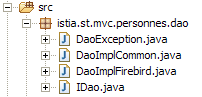
- [IDao] is the interface provided by the [dao] layer
- [DaoImplCommon] is an implementation of this interface where the group of people is stored in a database table. [DaoImplCommon] groups together features independent of SGBD.
- [DaoImplFirebird] is a class derived from [DaoImplCommon] to specifically manage a Firebird database.
- [DaoException] is the type of unhandled exceptions thrown by the [dao] layer. This class corresponds to version 1.
The [IDao] interface is as follows:
- The interface has the same four methods as in the previous version.
The [DaoImplCommon] class implementing this interface will be as follows:
- lines 8–9: The class [DaoImpl] implements the interface [IDao] and therefore the four methods [getAll, getOne, saveOne, deleteOne].
- lines 27-37: the method [saveOne] uses two internal methods, [insertPersonne] and [updatePersonne], depending on whether a person needs to be added or modified.
- Line 50: The private method [check] is the one from the previous version. We will not revisit it.
- Line 8: To implement the [IDao] interface, the [DaoImpl] class derives from the Spring [SqlMapClientDaoSupport] class.
17.3.2. The [iBATIS] data access layer
The Spring class [SqlMapClientDaoSupport] uses a third-party framework [Ibatis SqlMap] available at url [http://ibatis.apache.org/]:
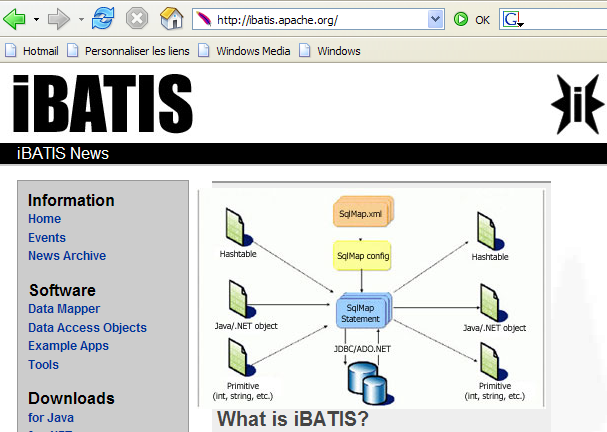
[iBATIS] is an Apache project that facilitates the construction of database-driven layers. With [dao], the architecture of the data access layer is as follows:
 |
[iBATIS] sits between the application’s [dao] layer and the database’s JDBC driver. There are alternatives to [iBATIS], such as, for example, the [Hibernate] alternative:
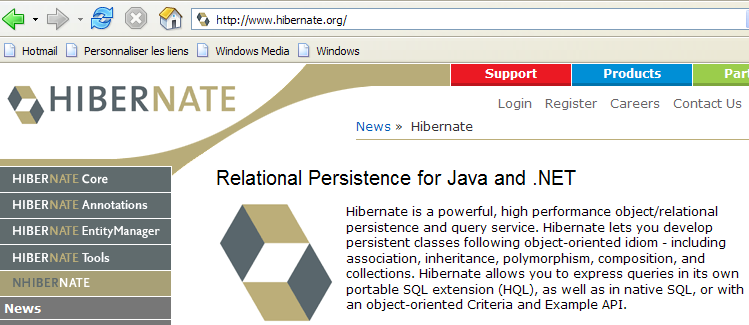
 |
Using the [iBATIS] framework requires two [ibatis-common, ibatis-sqlmap] archives, both of which have been placed in the [lib] folder of the project:
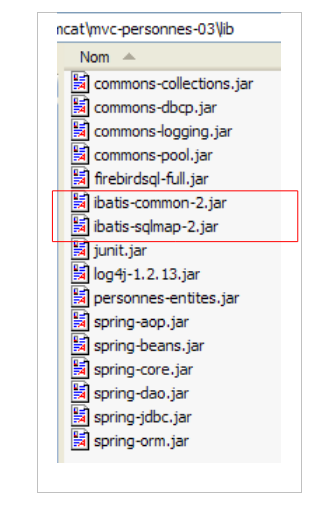 |
The [SqlMapClientDaoSupport] class encapsulates the generic part of using the [iBATIS] framework, c.a.d. code segments found in all [dao] layers using the [iBATIS] tool. To write the non-generic part of the code—that is, the part specific to the [dao] layer—simply derive the [SqlMapClientDaoSupport] class. That is what we are doing here.
The [SqlMapClientDaoSupport] class is defined as follows:
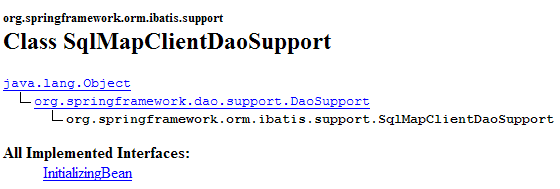
Among the methods of this class, one of them allows you to configure the [iBATIS] client with which you will operate the database:

The [SqlMapClient sqlMapClient] object is the [IBATIS] object used to access a database. On its own, it implements the [iBATIS] layer of our architecture:
 |
A typical sequence of actions with this object is as follows:
- request a connection from a connection pool
- open a transaction
- execute a series of SQL commands stored in a configuration file
- close the transaction
- return the connection to the pool
If our [DaoImplCommon] implementation worked directly with [iBATIS], it would have to perform this sequence repeatedly. Only operation 3 is specific to the [dao] layer; the other operations are generic. The Spring class [SqlMapClientDaoSupport] will handle operations 1, 2, 4, and 5 itself, delegating operation 3 to its derived class, in this case the class [DaoImplCommon].
To function, the [SqlMapClientDaoSupport] class requires a reference to the iBATIS [SqlMapClient sqlMapClient] object, which will handle communication with the database. This object requires two things to function:
- a [DataSource] object connected to the database from which it will request connections
- one or more configuration files where the SQL commands to be executed are externalized. In fact, these commands are not in the Java code. They are identified by a code in a configuration file, and the [SqlMapClient sqlMapClient] object uses this code to execute a specific SQL command.
A preliminary configuration of our [dao] layer that would reflect the architecture above would be as follows:
<!-- layer access classes [dao] -->
<bean id="dao" class="istia.st.mvc.personnes.dao.DaoImplCommon">
<property name="sqlMapClient">
<ref local="sqlMapClient"/>
</property>
</bean>
Here, the property [sqlMapClient] (line 3) of the class [DaoImplCommon] (line 2) is initialized. It is initialized by the method [setSqlMapClient] of the class [DaoImpl]. This class does not have this method. It is its parent class, [SqlMapClientDaoSupport], that has it. Therefore, it is actually this class that is being initialized here.
Now, in line 4, we reference an object named "sqlMapClient" that has yet to be constructed. As mentioned, this object is of type [SqlMapClient], a subtype of [iBATIS]:
[SqlMapClient] is an interface. Spring provides the [SqlMapClientFactoryBean] class to obtain an object that implements this interface:
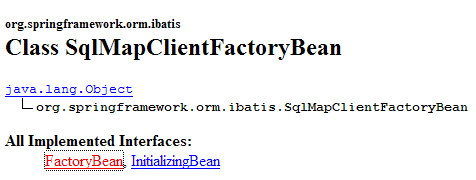
Recall that we are trying to instantiate an object that implements the [SqlMapClient] interface. This does not appear to be the case for the [SqlMapClientFactoryBean] class. This class implements the [FactoryBean] interface (see above). It has the following [getObject()] method:

When Spring is asked for an instance of an object implementing the [FactoryBean] interface, it:
- creates a [I] instance of the class—here it creates an instance of type [SqlMapClientFactoryBean].
- returns to the calling method the result of the [I].getObject() method—the [SqlMapClientFactoryBean] method.getObject() will return an object implementing the [SqlMapClient] interface.
To return an object that implements the [SqlMapClient] interface, the [SqlMapClientFactoryBean] class requires two pieces of information necessary for this object:
- a [DataSource] object connected to the database from which it will request connections
- one (or more) configuration file(s) where the SQL commands to be executed are externalized
The [SqlMapClientFactoryBean] class has set methods to initialize these two properties:
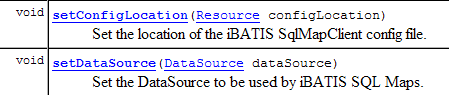
We’re making progress... Our configuration file is taking shape and becomes:
<!-- SqlMapCllient -->
<bean id="sqlMapClient"
class="org.springframework.orm.ibatis.SqlMapClientFactoryBean">
<property name="dataSource">
<ref local="dataSource"/>
</property>
<property name="configLocation">
<value>classpath:sql-map-config-firebird.xml</value>
</property>
</bean>
<!-- layer access classes [dao] -->
<bean id="dao" class="istia.st.mvc.personnes.dao.DaoImplCommon">
<property name="sqlMapClient">
<ref local="sqlMapClient"/>
</property>
</bean>
- Lines 2-3: The bean "sqlMapClient" is of type [SqlMapClientFactoryBean]. From what has just been explained, we know that when we ask Spring for an instance of this bean, we get an object implementing the iBATIS [SqlMapClient] interface. It is this latter object that will therefore be obtained on line 14.
- Lines 7–9: We specify that the configuration file required for the iBATIS [SqlMapClient] object is named "sql-map-config-firebird.xml" and that it must be located in the application's ClassPath. The [SqlMapClientFactoryBean].setConfigLocation method is used here.
- Lines 4–6: We initialize the [dataSource] property of [SqlMapClientFactoryBean] using its [setDataSource] method.
Line 5: We reference a bean named "dataSource" that has yet to be created. If we look at the parameter expected by the [setDataSource] method of [SqlMapClientFactoryBean], we see that it is of type [DataSource]:
Once again, we are dealing with an interface for which we need to find an implementation class. The role of such a class is to efficiently provide an application with connections to a specific database. A SGBD cannot keep a large number of connections open simultaneously. To reduce the number of open connections at any given time, for each interaction with the database, we must:
- open a connection
- start a transaction
- issue SQL commands
- close the transaction
- close the connection
Opening and closing connections repeatedly is time-consuming. To address both of these issues—limiting both the number of open connections at any given time and reducing the cost of opening and closing them—classes that implement the [DataSource] interface often proceed as follows:
- Upon instantiation, they open N connections to the target database. N generally has a default value and can usually be defined in a configuration file. These N connections remain open at all times and form a pool of connections available to the application’s threads.
- When an application thread requests a connection, the [DataSource] object provides it with one of the N connections opened at startup, if any remain available. When the application closes the connection, it is not actually closed but simply returned to the pool of available connections.
There are various freely available implementations of the [DataSource] interface. Here we will use the [commons DBCP] implementation available at url [http://jakarta.apache.org/commons/dbcp/]:
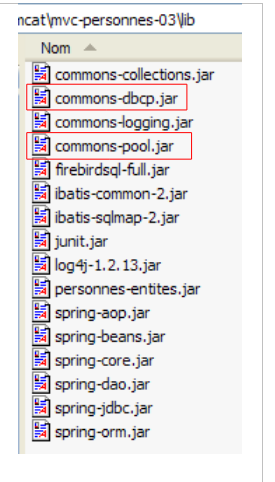
Using the [commons DBCP] tool requires two [commons-dbcp, commons-pool] archives, both of which have been placed in the [lib] folder of the project:
 |
The [BasicDataSource] class in [commons DBCP] provides the [DataSource] implementation we need:
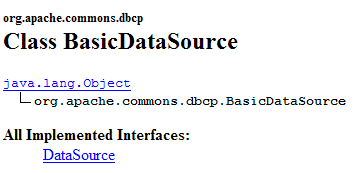
This class will provide us with a connection pool to access our application’s Firebird database [dbpersonnes.gdb]. To do this, we must provide it with the information it needs to create the connections in the pool:
- the name of the driver to use – initialized with
- the name of the database to be used – initialized with [setUrl]
- the username of the connection owner – initialized with [setUsername] (and not setUserName as one might expect)
- their password – initialized with [setPassword]
The configuration file for our [dao] layer could be as follows:
<?xml version="1.0" encoding="ISO_8859-1"?>
<!DOCTYPE beans SYSTEM "http://www.springframework.org/dtd/spring-beans.dtd">
<beans>
<!-- data source DBCP -->
<bean id="dataSource" class="org.apache.commons.dbcp.BasicDataSource"
destroy-method="close">
<property name="driverClassName">
<value>org.firebirdsql.jdbc.FBDriver</value>
</property>
<!-- warning: do not leave spaces between the two <value> tags of the url -->
<property name="url">
<value>jdbc:firebirdsql:localhost/3050:C:/data/2005-2006/eclipse/dvp-eclipse-tomcat/mvc-personnes-03/database/dbpersonnes.gdb</value>
</property>
<property name="username">
<value>sysdba</value>
</property>
<property name="password">
<value>masterkey</value>
</property>
</bean>
<!-- SqlMapCllient -->
<bean id="sqlMapClient"
class="org.springframework.orm.ibatis.SqlMapClientFactoryBean">
<property name="dataSource">
<ref local="dataSource"/>
</property>
<property name="configLocation">
<value>classpath:sql-map-config-firebird.xml</value>
</property>
</bean>
<!-- layer access classes [dao] -->
<bean id="dao" class="istia.st.mvc.personnes.dao.DaoImplCommon">
<property name="sqlMapClient">
<ref local="sqlMapClient"/>
</property>
</bean>
</beans>
- lines 7-9: the driver name JDBC for the Firebird database SGBD
- lines 11-13: the url for the Firebird database [dbpersonnes.gdb]. Pay special attention to how this is written. There must be no spaces between the <value> tags and the url.
- lines 14–16: the connection owner—here, [sysdba], which is the default administrator for Firebird distributions
- lines 17-19: its password [masterkey] – also the default value
We’ve made a lot of progress, but there are still some configuration points to clarify: line 28 references the file [sql-map-config-firebird.xml], which must configure the client [SqlMapClient] for iBATIS. Before examining its contents, let’s show the location of these configuration files in our Eclipse project:
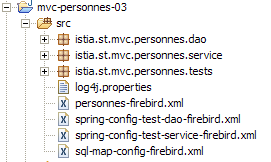
- [spring-config-test-dao-firebird.xml] is the configuration file for the [dao] layer that we just examined
- [sql-map-config-firebird.xml] is referenced by [spring-config-test-dao-firebird.xml]. We will examine it.
- [personnes-firebird.xml] is referenced by [sql-map-config-firebird.xml]. We will examine it.
The three previous files are in the [src] folder. In Eclipse, this means that at runtime they will be present in the [bin] folder of the project (not shown above). This folder is part of the application’s ClassPath. Ultimately, the three files mentioned above will indeed be present in the application’s ClassPath. This is necessary.
The [sql-map-config-firebird.xml] file is as follows:
<?xml version="1.0" encoding="UTF-8" ?>
<!DOCTYPE sqlMapConfig
PUBLIC "-//iBATIS.com//DTD SQL Map Config 2.0//EN"
"http://www.ibatis.com/dtd/sql-map-config-2.dtd">
<sqlMapConfig>
<sqlMap resource="personnes-firebird.xml"/>
</sqlMapConfig>
- This file must have <sqlMapConfig> as its root tag (lines 6 and 8)
- Line 7: The <sqlMap> tag is used to identify the files containing the SQL commands to be executed. There is often, though not necessarily, one file per table. This allows SQL commands for a given table to be grouped together in a single file. However, SQL commands involving multiple tables are frequently encountered. In this case, the previous breakdown does not apply. You simply need to remember that all files designated by the <sqlMap> tags will be merged. These files are searched for in the application’s ClassPath.
The [personnes-firebird.xml] file describes the SQL commands that will be issued to the [PERSONNES] table in the Firebird database [dbpersonnes.gdb]. Its content is as follows:
<?xml version="1.0" encoding="UTF-8" ?>
<!DOCTYPE sqlMap
PUBLIC "-//iBATIS.com//DTD SQL Map 2.0//EN"
"http://www.ibatis.com/dtd/sql-map-2.dtd">
<sqlMap>
<!-- alias class [Person] -->
<typeAlias alias="Personne.classe"
type="istia.st.mvc.personnes.entites.Personne"/>
<!-- mapping table [PERSONNES] - object [Person] -->
<resultMap id="Personne.map"
class="Personne.classe">
<result property="id" column="ID" />
<result property="version" column="VERSION" />
<result property="nom" column="NOM"/>
<result property="prenom" column="PRENOM"/>
<result property="dateNaissance" column="DATENAISSANCE"/>
<result property="marie" column="MARIE"/>
<result property="nbEnfants" column="NBENFANTS"/>
</resultMap>
<!-- list of all persons -->
<select id="Personne.getAll" resultMap="Personne.map" > select ID, VERSION, NOM,
PRENOM, DATENAISSANCE, MARIE, NBENFANTS FROM PERSONNES</select>
<!-- get a specific person -->
<select id="Personne.getOne" resultMap="Personne.map" >select ID, VERSION, NOM,
PRENOM, DATENAISSANCE, MARIE, NBENFANTS FROM PERSONNES WHERE ID=#value#</select>
<!-- add a person -->
<insert id="Personne.insertOne" parameterClass="Personne.classe">
<selectKey keyProperty="id">
SELECT GEN_ID(GEN_PERSONNES_ID,1) as "value" FROM RDB$$DATABASE
</selectKey>
insert into
PERSONNES(ID, VERSION, NOM, PRENOM, DATENAISSANCE, MARIE, NBENFANTS)
VALUES(#id#, #version#, #nom#, #prenom#, #dateNaissance#, #marie#,
#nbEnfants#) </insert>
<!-- update a person -->
<update id="Personne.updateOne" parameterClass="Personne.classe"> update
PERSONNES set VERSION=#version#+1, NOM=#nom#, PRENOM=#prenom#, DATENAISSANCE=#dateNaissance#,
MARIE=#marie#, NBENFANTS=#nbEnfants# WHERE ID=#id# and
VERSION=#version#</update>
<!-- delete a person -->
<delete id="Personne.deleteOne" parameterClass="int"> delete FROM PERSONNES WHERE
ID=#value# </delete>
</sqlMap>
- The file must have <sqlMap> as the root tag (lines 7 and 45)
- Lines 9-10: To simplify writing the file, we assign the alias (synonym) [Personne.classe] to the class [istia.st.springmvc.personnes.entites.Personne].
- Lines 12–21: Define the mappings between the columns of table [PERSONNES] and the fields of object [Personne].
- Lines 23–24: The sequence SQL [select] to retrieve all persons from table [PERSONNES]
- Lines 26–27: The command SQL [select] to retrieve a specific person from table [PERSONNES]
- Lines 29–36: The command SQL [insert] inserts a person into table [PERSONNES]
- Lines 38–41: The command SQL [update], which updates a person in table [PERSONNES]
- Lines 42–44: The command SQL [delete], which deletes a person from table [PERSONNES]
The role and significance of the contents of the [personnes-firebird.xml] file will be explained through an examination of the [DaoImplCommon] class, which implements the [dao] layer.
17.3.3. The [DaoImplCommon] class
Let’s revisit the data access architecture:
 |
The [DaoImplCommon] class is as follows:
We will examine the methods one by one.
getAll
This method retrieves all the people in the list. Its code is as follows:
First, let’s recall that the [DaoImplCommon] class derives from the Spring [SqlMapClientDaoSupport] class. It is this class that contains the [getSqlMapClientTemplate()] method used in line 3 above. This method has the following signature:

The [SqlMapClientTemplate] type encapsulates the [SqlMapClient] object from the [iBATIS] layer. It is through this type that we will access the database. The type [iBATIS] SqlMapClient could be used directly since the class [SqlMapClientDaoSupport] has access to it:

The drawback of the [iBATIS] and SqlMapClient classes is that they throw exceptions of type [SQLException], a controlled exception type, c.a.d. which must be handled by a try/catch block or declared in the signature of the methods that throw it. However, let us recall that the [dao] layer implements an interface [IDao] whose methods do not include exceptions in their signatures. The methods of the classes implementing the [IDao] interface therefore cannot have exceptions in their signatures either. We must therefore intercept every [SQLException] exception thrown by the [iBATIS] layer and encapsulate it in an unhandled exception. The [DaoException] type from our project would be suitable for this encapsulation.
Rather than handling these exceptions ourselves, we will delegate them to the Spring type [SqlMapClientTemplate], which encapsulates the [SqlMapClient] object from the [iBATIS] layer. In fact, [SqlMapClientTemplate] was designed to intercept the [SQLException] exceptions thrown by the [SqlMapClient] layer and encapsulate them in an unhandled [DataAccessException] . This behavior suits us. We simply need to remember that the [dao] layer is now capable of throwing two types of unchecked exceptions:
- our custom type [DaoException]
- the Spring type [DataAccessException]
The type [SqlMapClientTemplate] is defined as follows:
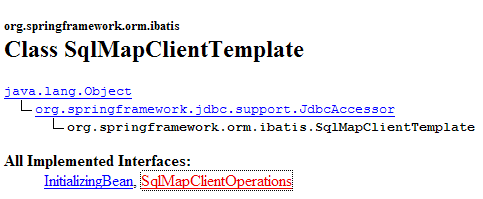
It implements the following [SqlMapClientOperations] interface:
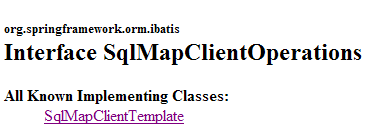
This interface defines methods capable of processing the contents of the [personnes-firebird.xml] file:
[queryForList]

This method allows you to issue a [SELECT] command and retrieve the result as a list of objects:
- [statementName]: the identifier (id) of the [select] order in the configuration file
- [parameterObject]: the "parameter" object for a configured [select]. The "parameter" object can take two forms:
- an object conforming to the JavaBean standard: the parameters of the [select] command are then the names of the JavaBean’s fields. When the [select] command is executed, they are replaced by the values of these fields.
- a dictionary: the parameters of the command [select] are then the keys of the dictionary. When the command [select] is executed, these are replaced by their associated values in the dictionary.
- If [SELECT] returns no rows, the result [List] is an object empty of elements but not null (to be verified).
[queryForObject]

This method is conceptually identical to the previous one but returns only a single object. If [SELECT] returns no rows, the result is the null pointer.
[insert]

This method allows you to execute a SQL [insert] command configured by the second parameter. The returned object is the primary key of the row that was inserted. There is no requirement to use this result.
[update]

This method executes a SQL [update] command configured by the second parameter. The result is the number of rows modified by the SQL [update] command.
[delete]

This method executes a command SQL [delete] configured by the second parameter. The result is the number of rows deleted by the command SQL [delete].
Let’s return to the [getAll] method of the [DaoImplCommon] class:
- Line 4: The order [select], named "Personne.getAll," is executed. It has no parameters, so the "parameter" object is null.
In [personnes-firebird.xml], the [select] command named "Personne.getAll" is as follows:
<?xml version="1.0" encoding="UTF-8" ?>
<!DOCTYPE sqlMap
PUBLIC "-//iBATIS.com//DTD SQL Map 2.0//EN"
"http://www.ibatis.com/dtd/sql-map-2.dtd">
<sqlMap>
<!-- alias class [Person] -->
<typeAlias alias="Personne.classe"
type="istia.st.mvc.personnes.entites.Personne"/>
<!-- mapping table [PERSONNES] - object [Person] -->
<resultMap id="Personne.map"
class="Personne.classe">
<result property="id" column="ID" />
<result property="version" column="VERSION" />
<result property="nom" column="NOM"/>
<result property="prenom" column="PRENOM"/>
<result property="dateNaissance" column="DATENAISSANCE"/>
<result property="marie" column="MARIE"/>
<result property="nbEnfants" column="NBENFANTS"/>
</resultMap>
<!-- list of all persons -->
<select id="Personne.getAll" resultMap="Personne.map" > select ID, VERSION, NOM,
PRENOM, DATENAISSANCE, MARIE, NBENFANTS FROM PERSONNES</select>
...
</sqlMap>
- line 23: the command SQL " Personne.getAll " has no parameters (no parameters in the query text).
- Line 3 of the [getAll] method requests the execution of the [select] query named "Personne.getAll". This query will be executed. [iBATIS] relies on JDBC. We therefore know that the result of the query will be returned as a [ResultSet] object. Line 23: The [resultMap] attribute of the <select> tag tells [iBATIS] which "resultMap " it should use to transform each line of the obtained [ResultSet] into an object. It is the "resultMap" [Personne.map] defined in lines 12–21 that specifies how to map a row from the [PERSONNES] table to an object of type [Personne]. [iBATIS] will use these mappings to provide a list of [Personne] objects based on the rows of the [ResultSet] object.
- Line 3 of the [getAll] method then returns a collection of [Personne] objects
- The [queryForList] method may throw a Spring [DataAccessException] exception. We let it propagate.
We will explain the other methods of the [AbstractDaoImpl] class more briefly, as the essentials regarding the use of [iBATIS] were covered in the discussion of the [getAll] method.
getOne
This method allows you to retrieve a person identified by their [id]. The code is as follows:
- line 4: requests the execution of the [select] command named "Personne.getOne". This is the following in the [personnes-firebird.xml] file:
<!-- get a specific person -->
<select id="Personne.getOne" resultMap="Personne.map" parameterClass="int">
select ID, VERSION, NOM, PRENOM, DATENAISSANCE, MARIE, NBENFANTS FROM
PERSONNES WHERE ID=#value#</select>
The SQL command is configured by the #value# parameter (line 4). The #value# attribute refers to the value of the parameter passed to the SQL command, when this parameter is of a simple type: Integer, Double, String, ... In the attributes of the <select> tag, the [parameterClass] attribute indicates that the parameter is of the integer type (line 2). In line 5 of [getOne], we see that this parameter is the identifier of the person being searched for in the form of an Integer object. This type change is mandatory since the second parameter of [queryForList] must be of type [Object].
The result of the [select] query must be converted to an object via the [resultMap="Personne.map"] attribute (line 2). This yields a [Personne] type.
- Lines 7–11: If the query [select] returned no rows, we retrieve the null pointer from line 4. This means that the person being searched for was not found. In this case, we launch a [DaoException] with code 2 (lines 9–10).
- Line 13: If no exception occurred, the requested [Personne] object is returned.
deleteOne
This method allows you to delete a person identified by their [id]. Its code is as follows:
- lines 4-5: requests the execution of the [delete] command named "Personne.deleteOne". This is the following in the [personnes-firebird.xml] file:
<!-- delete a person -->
<delete id="Personne.deleteOne" parameterClass="int"> delete FROM PERSONNES WHERE
ID=#value# </delete>
The command SQL is configured by the #value# parameter (line 3) of type [parameterClass="int"] (line 2). This will be the ID of the person being searched for (line 5 of deleteOne)
- line 4: the result of the [SqlMapClientTemplate].delete method is the number of rows deleted.
- Lines 7–8: If the [delete] query did not delete any rows, this means the person does not exist. We run a [DaoException] with code 2 (line 8).
saveOne
This method allows you to add a new person or modify an existing one. Its code is as follows:
- line 4: we verify the person's validity using the [check] method. This method already existed in the previous version and had been commented out at that time. It triggers a [DaoException] if the person is invalid. We allow this to propagate.
- Line 6: If we get to this point, it means there were no exceptions. The person is therefore valid.
- Lines 6–11: Depending on the person’s id, we are dealing with an addition (id = -1) or an update (id ≠ -1). In both cases, two internal methods of the class are called:
- insertPersonne: for adding
- updatePersonne: for the update
insertPersonne
This method allows you to add a new person. Its code is as follows:
- line 4: set the version number of the person being created to 1
- line 9: insert using the query named "Personne.insertOne", which is as follows:
<insert id="Personne.insertOne" parameterClass="Personne.classe">
<selectKey keyProperty="id">
SELECT GEN_ID(GEN_PERSONNES_ID,1) as "value" FROM RDB$$DATABASE
</selectKey>
insert into
PERSONNES(ID, VERSION, NOM, PRENOM, DATENAISSANCE, MARIE, NBENFANTS)
VALUES(#id#, #version#, #nom#, #prenom#, #dateNaissance#, #marie#,
#nbEnfants#) </insert>
This is a parameterized query, and the parameter is of type [Personne] (parameterClass="Personne.classe", line 1). The fields of the [Personne] object passed as a parameter (line 9 of insertPersonne) are used to populate the columns of the row to be inserted into the [PERSONNES] table (lines 5–8). There is a problem to be resolved. During an insertion, the [Personne] object to be inserted has a id value of -1. This value must be replaced with a valid primary key. To do this, we use lines 2–4 of the <selectKey> tag above. They specify:
- (continued)
- the SQL query to execute to obtain a primary key value. The one shown here is the one we presented in section 17.1. Two points should be noted:
- as "value" is mandatory. We could also write as value, but "value" is a Firebird keyword that must be enclosed in quotation marks.
- The Firebird table is actually named [RDB$DATABASE]. However, the $ character is interpreted as [iBATIS]. It was protected by duplicating it.
- The field of the object [Personne] that must be initialized with the value retrieved by the command [SELECT], in this case the field [id]. The [keyProperty] attribute on line 2 specifies this field.
- the SQL query to execute to obtain a primary key value. The one shown here is the one we presented in section 17.1. Two points should be noted:
- Lines 6–7: For testing purposes, we will wait 10 ms before performing the insertion to check for conflicts between threads that might attempt to make additions simultaneously.
updatePersonne
This method allows you to modify a person already existing in the [PERSONNES] table. Its code is as follows:
- An update can fail for at least two reasons:
- the person to be updated does not exist
- the person to be updated exists but the thread attempting to modify it does not have the correct version
- lines 7-8: the SQL [update] query named "Personne.updateOne" is executed. It is as follows:
<!-- update a person -->
<update id="Personne.updateOne" parameterClass="Personne.classe"> update
PERSONNES set VERSION=#version#+1, NOM=#nom#, PRENOM=#prenom#, DATENAISSANCE=#dateNaissance#,
MARIE=#marie#, NBENFANTS=#nbEnfants# WHERE ID=#id# and
VERSION=#version#</update>
- (continued)
- line 2: the query is configured and accepts a parameter of type [Personne] (parameterClass="Personne.classe"). This is the person to be modified (line 8 – updatePersonne).
- We only want to modify the person in table [PERSONNES] who has the same [id] number and the same version [version] as the parameter. This is why we have the constraint [WHERE ID=#id# and VERSION=#version#]. If this person is found, they are updated with the parameter person and their version is incremented by 1 (line 3 above).
- Line 9: We retrieve the number of updated rows.
- Lines 10–11: If this number is zero, we trigger a [DaoException] with code 2, indicating that either the person to be updated does not exist, or their version has changed in the meantime.
17.4. [dao] layer tests
17.4.1. [DaoImplCommon] implementation tests
Now that we have written the [dao] layer, we propose to test it with JUnit tests:
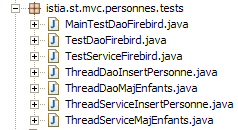
Before performing extensive testing, we can start with a simple program like [main] that will display the contents of the [PERSONNES] table. This is the [MainTestDaoFirebird] class:
The configuration file [spring-config-test-dao-firebird.xml] for layer [dao], used in lines 13–14, is as follows:
<?xml version="1.0" encoding="ISO_8859-1"?>
<!DOCTYPE beans SYSTEM "http://www.springframework.org/dtd/spring-beans.dtd">
<beans>
<!-- data source DBCP -->
<bean id="dataSource" class="org.apache.commons.dbcp.BasicDataSource"
destroy-method="close">
<property name="driverClassName">
<value>org.firebirdsql.jdbc.FBDriver</value>
</property>
<!-- warning: do not leave spaces between the two <value> tags -->
<property name="url">
<value>jdbc:firebirdsql:localhost/3050:C:/data/2005-2006/eclipse/dvp-eclipse-tomcat/mvc-personnes-03/database/dbpersonnes.gdb</value>
</property>
<property name="username">
<value>sysdba</value>
</property>
<property name="password">
<value>masterkey</value>
</property>
</bean>
<!-- SqlMapCllient -->
<bean id="sqlMapClient"
class="org.springframework.orm.ibatis.SqlMapClientFactoryBean">
<property name="dataSource">
<ref local="dataSource"/>
</property>
<property name="configLocation">
<value>classpath:sql-map-config-firebird.xml</value>
</property>
</bean>
<!-- layer access classes [dao] -->
<bean id="dao" class="istia.st.mvc.personnes.dao.DaoImplCommon">
<property name="sqlMapClient">
<ref local="sqlMapClient"/>
</property>
</bean>
</beans>
This file is the one discussed in Section 17.3.2.
For the test, the SGBD Firebird program is launched. The contents of the [PERSONNES] table are as follows:
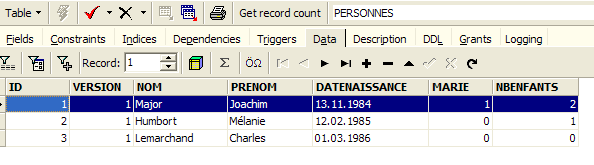
Running the [MainTestDaoFirebird] program produces the following screen output:

We have successfully obtained the list of people. We can now proceed to the JUnit test.
The test JUnit [TestDaoFirebird] is as follows:
- The tests [test1] through [test5] are the same as in version 1, except for [test4], which has changed slightly. The [test6] test is new. We will only comment on these two tests.
[test4]
[test4] is designed to test the method [updatePersonne - DaoImplCommon]. Here is the code for that method:
- lines 4-5: we wait 10 ms. This forces the thread executing [updatePersonne] to lose the CPU, which may increase our chances of seeing access conflicts between concurrent threads.
[test4] launches N=100 threads tasked with simultaneously incrementing the number of children for the same person by 1. We want to see how conflicts with version and access conflicts are handled.
The threads are created on lines 8–13. Each will increment the number of children for the person created on lines 3–5 by 1. The update threads [ThreadDaoMajEnfants ] are as follows:
A person update may fail because the person we want to modify does not exist or has already been updated by another thread. These two cases are handled here on lines 67–69. In both cases, the [updatePersonne] method launches a [DaoException] with code 2. The thread is then returned to restart the update procedure from the beginning (while loop, line 34).
[test6]
[test6] is intended to test the [insertPersonne - DaoImplCommon] method. Here is the code for that method:
- Lines 6-7: We wait 10 ms to force the thread executing [insertPersonne] to yield the CPU, thereby increasing the likelihood of conflicts arising from threads performing inserts simultaneously.
The code for [test6] is as follows:
We create 100 threads that will insert 100 different people simultaneously. These 100 threads will all obtain a primary key for the person they need to insert, then be paused for 10 ms (line 10 – insertPersonne) before being able to perform their insertion. We want to verify that everything is working correctly and, in particular, that they do indeed obtain different primary key values.
- Lines 7–11: An array of 100 people is created. These people are all copies of the person p created in lines 4–5.
- Lines 14–17: The 100 insertion threads are launched. Each is responsible for inserting one of the 100 people created previously.
- Lines 19–23: [test6] waits for each of the 100 threads it launched to finish. When it detects that thread #i has finished, it deletes the person that thread just inserted.
The insertion thread [ThreadDaoInsertPersonne] is as follows:
- lines 19–22: the thread constructor stores the person to be inserted and the [dao] layer to be used for the insertion.
- line 30: the person is inserted. If an exception occurs, it is propagated to [test6].
Tests
During testing, we obtain the following results:
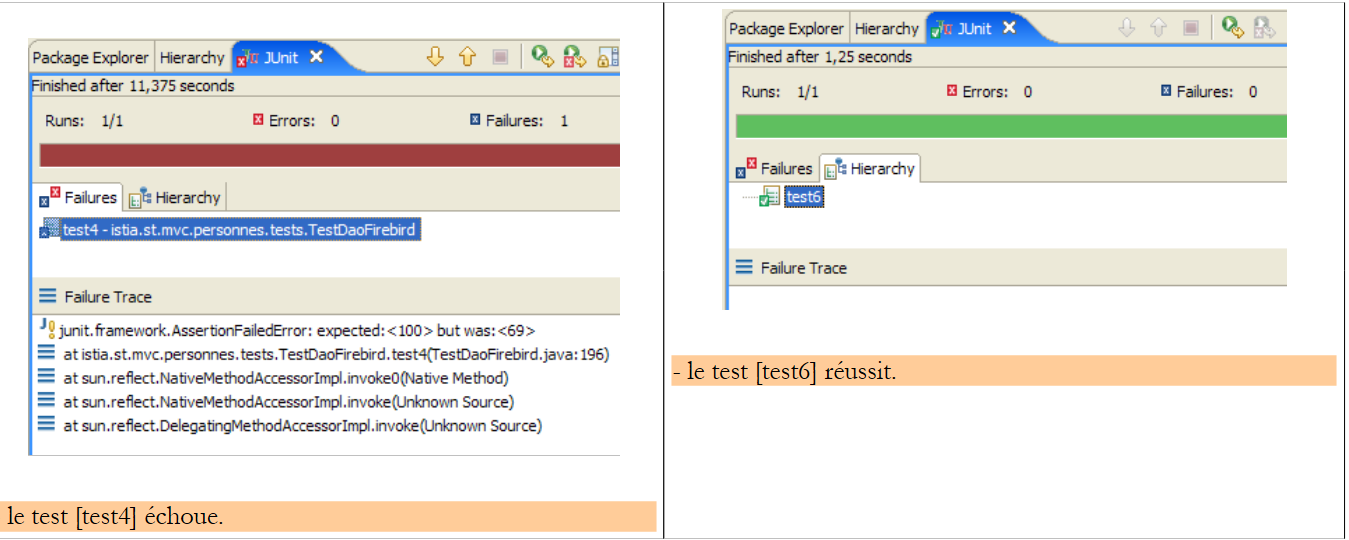 |
The [test4] test therefore fails. The number of children has dropped to 69 instead of the expected 100. What happened? Let’s examine the screen logs. They show the existence of exceptions thrown by Firebird:
Exception in thread "Thread-62" org.springframework.jdbc.UncategorizedSQLException: SqlMapClient operation; uncategorized SQLException for SQL []; SQL state [HY000]; error code [335544336];
--- The error occurred in personnes-firebird.xml.
--- The error occurred while applying a parameter map.
--- Check the Personne.updateOne-InlineParameterMap.
--- Check the statement (update failed).
--- Cause: org.firebirdsql.jdbc.FBSQLException: GDS Exception. 335544336. deadlock
update conflicts with concurrent update; nested exception is com.ibatis.common.jdbc.exception.NestedSQLException:
--- The error occurred in personnes-firebird.xml.
--- The error occurred while applying a parameter map.
- line 1 – a Spring exception [org.springframework.jdbc.UncategorizedSQLException] occurred. This is an uncaught exception that was used to wrap an exception thrown by the Firebird driver JDBC, described on line 6.
- line 6 – the Firebird JDBC driver threw an exception of type [org.firebirdsql.jdbc.FBSQLException] with error code 335544336.
- Line 7: indicates that there was a race condition between two threads that attempted to update the same row in the [PERSONNES] table simultaneously.
This is not a fatal error. The thread that catches this exception can retry the update. To do this, modify the code in [ThreadDaoMajEnfants]:
- line 8: we handle an exception of type [DaoException]. Based on what has been said, we should handle the exception that appeared in the tests, the type [org.springframework.jdbc.UncategorizedSQLException]. However, we cannot simply handle this type, which is a generic Spring type intended to encapsulate exceptions it does not recognize. Spring recognizes the exceptions thrown by the JDBC drivers for a number of SGBD systems such as Oracle, MySQL, Postgres, DB2, SQL Server, ... but not Firebird. Therefore, any exception thrown by the Firebird driver JDBC is encapsulated in the Spring type [org.springframework.jdbc.UncategorizedSQLException]:
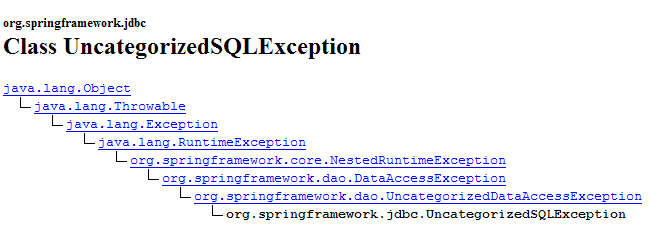
As shown above, the [UncategorizedSQLException] class derives from the [DataAccessException] class mentioned in section 17.3.3. It is possible to identify the exception that has been encapsulated in [UncategorizedSQLException] using its method [getSQLException]:

This exception of type [SQLException] is the one thrown by the [iBATIS] layer, which itself encapsulates the exception thrown by the JDBC driver of the database. The exact cause of the [SQLException] exception can be obtained using the method:

We obtain the object of type [Throwable], which was launched by the driver JDBC:
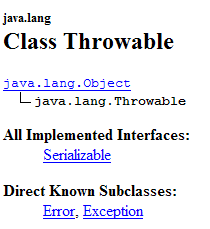
The type [Throwable] is the parent class of [Exception].
Here we need to verify that the object of type [Throwable], thrown by the Firebird driver JDBC and the cause of the[SQLException] exception thrown by the [iBATIS] layer is indeed an exception of type [org.firebirdsql.gds.GDSException] with error code 335544336. To retrieve the error code, we can use the [getErrorCode()] method of the [org.firebirdsql.gds.GDSException] class.
If we use the [org.firebirdsql.gds.GDSException] exception in the [ThreadDaoMajEnfants] code, then this thread will only be able to work with the SGBD Firebird instance. The same applies to the [test4] test that uses this thread. We want to avoid this. In fact, we want our JUnit tests to remain valid regardless of the SGBD used. To achieve this result, we decide that the [dao] layer will launch a [DaoException] with code 4 when an "update conflict" exception is detected, regardless of the underlying SGBD. Thus, the [ThreadDaoMajEnfants] thread can be rewritten as follows:
- lines 34-36: the exception of type [DaoException] with code 4 is caught. The thread [ThreadDaoMajEnfants] will be forced to restart the update procedure from the beginning (line 10)
Our [dao] layer must therefore be able to recognize an "update conflict" exception. This exception is thrown by a JDBC driver and is specific to it. This exception must be handled in the [updatePersonne] method of the [DaoImplCommon] class:
Lines 7–11 must be enclosed in a try/catch block. For the SGBD Firebird, we need to verify that the exception that caused the update to fail is of type [org.firebirdsql.gds.GDSException] and has error code 335544336. If we put this type of test in [DaoImplCommon], we will link this class to the SGBD Firebird class, which is obviously undesirable. If we want to keep the [DaoImplCommon] class general-purpose, we need to derive it and handle the exception in a Firebird-specific class. That is what we are doing now.
17.4.2. The [DaoImplFirebird] class
Its code is as follows:
- line 5: the class [DaoImplFirebird] derives from [DaoImplCommon], the class we just examined. It redefines, on lines 8–33, the method [updatePersonne] that is causing us problems.
- lines 20: we catch the Spring exception of type [UncategorizedSQLException]
- Lines 21–22: We verify that the underlying exception of type [SQLException], thrown by the [iBATIS] layer, is caused by an exception of type [org.firebirdsql.jdbc.FBSQLException]
- line 25: we also verify that the error code for this Firebird exception is 335544336, the "deadlock" error code.
- lines 26–27: if all these conditions are met, a [DaoException] with code 4 is triggered.
- Lines 36–44: The [wait] method allows the current thread to be paused for N milliseconds. It is only useful for testing.
We are ready to test the new [dao] layer.
17.4.3. Testing the [DaoImplFirebird] implementation
The [spring-config-test-dao-firebird.xml] test configuration file is modified to use the [DaoImplFirebird] implementation:
<?xml version="1.0" encoding="ISO_8859-1"?>
<!DOCTYPE beans SYSTEM "http://www.springframework.org/dtd/spring-beans.dtd">
<beans>
<!-- data source DBCP -->
<bean id="dataSource" class="org.apache.commons.dbcp.BasicDataSource"
destroy-method="close">
<property name="driverClassName">
<value>org.firebirdsql.jdbc.FBDriver</value>
</property>
<!-- warning: do not leave spaces between the two <value> tags -->
<property name="url">
<value>jdbc:firebirdsql:localhost/3050:C:/data/2005-2006/eclipse/dvp-eclipse-tomcat/mvc-personnes-03/database/dbpersonnes.gdb</value>
</property>
<property name="username">
<value>sysdba</value>
</property>
<property name="password">
<value>masterkey</value>
</property>
</bean>
<!-- SqlMapCllient -->
<bean id="sqlMapClient"
class="org.springframework.orm.ibatis.SqlMapClientFactoryBean">
<property name="dataSource">
<ref local="dataSource"/>
</property>
<property name="configLocation">
<value>classpath:sql-map-config-firebird.xml</value>
</property>
</bean>
<!-- layer access classes [dao] -->
<bean id="dao" class="istia.st.mvc.personnes.dao.DaoImplFirebird">
<property name="sqlMapClient">
<ref local="sqlMapClient"/>
</property>
</bean>
</beans>
- Line 32: the new implementation [DaoImplFirebird] of the [dao] layer.
The results of the [test4] test, which had previously failed, are as follows:
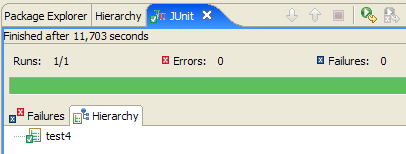
[test4] passed. The last lines of the screen logs are as follows:
The last line indicates that thread #36 was the last to finish. Line 3 shows a conflict involving version that forced thread #36 to restart its person update procedure (line 4). Other logs show access conflicts during updates:
Line 2 shows that thread #75 failed during its update due to an update conflict: when the command SQL [update] was issued on table [PERSONNES], the row that needed to be updated was locked by another thread. This access conflict will force thread #75 to retry the update.
Finally, regarding [test4], there is a notable difference compared to the results of the same test in version 1, where it failed due to synchronization issues. Since the methods in the [dao] layer of version 1 were not synchronized, access conflicts occurred. Here, we did not need to synchronize the [dao] layer. We simply handled the access conflicts reported by Firebird.
Let’s now run the entire JUnit test for the [dao] layer:
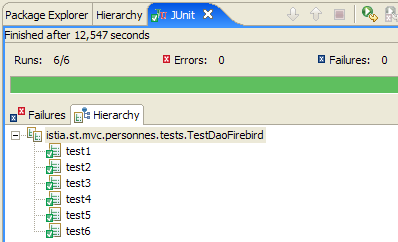
It therefore appears that we have a valid [dao] layer. To declare it valid with a high degree of certainty, we would need to perform further tests. Nevertheless, we will consider it operational.
17.5. The [service] layer
17.5.1. The components of the [service] layer
The [service] layer consists of the following classes and interfaces:
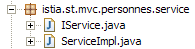
- [IService] is the interface provided by the [service] layer
- [ServiceImpl] is an implementation of the interface
The [IService] interface is as follows:
- The interface has the same four methods as in version 1, but it has two additional ones:
- saveMany: allows saving multiple people at the same time in an atomic manner. Either they are all saved, or none are.
- deleteMany: allows you to delete multiple people at the same time in an atomic manner. Either they are all deleted, or none are.
These two methods will not be used by the web application. We added them to illustrate the concept of a database transaction. Both methods must be executed within a transaction to achieve the desired atomicity.
The [ServiceImpl] class implementing this interface will be as follows:
- The [getAll, getOne, insertOne, saveOne] methods call the methods of the [dao] layer with the same name.
- lines 42–47: The [saveMany] method saves, one by one, the individuals from the array passed as a parameter.
- lines 50–55: The [deleteMany] method deletes, one by one, the persons from the array passed as a parameter from id
We mentioned that the methods [saveMany] and [deleteMany] must be executed within a transaction to ensure the all-or-nothing nature of these methods. We can see that the code above completely ignores this concept of a transaction. This will only appear in the configuration file for the [service] layer.
17.5.2. Configuration of the [service] layer
Above, on line 11, we see that the [ServiceImpl] implementation holds a reference to the [dao] layer. This layer, as in version 1, will be initialized by Spring when the [service - ServiceImpl] layer is instantiated. The configuration file that will enable the instantiation of the [service] layer will be as follows:
<?xml version="1.0" encoding="ISO_8859-1"?>
<!DOCTYPE beans SYSTEM "http://www.springframework.org/dtd/spring-beans.dtd">
<beans>
<!-- data source DBCP -->
<bean id="dataSource" class="org.apache.commons.dbcp.BasicDataSource"
destroy-method="close">
<property name="driverClassName">
<value>org.firebirdsql.jdbc.FBDriver</value>
</property>
<property name="url">
<!-- warning: do not leave spaces between the two <value> tags -->
<value>jdbc:firebirdsql:localhost/3050:C:/data/2005-2006/eclipse/dvp-eclipse-tomcat/mvc-personnes-03/database/dbpersonnes.gdb</value>
</property>
<property name="username">
<value>sysdba</value>
</property>
<property name="password">
<value>masterkey</value>
</property>
</bean>
<!-- SqlMapCllient -->
<bean id="sqlMapClient"
class="org.springframework.orm.ibatis.SqlMapClientFactoryBean">
<property name="dataSource">
<ref local="dataSource"/>
</property>
<property name="configLocation">
<value>classpath:sql-map-config-firebird.xml</value>
</property>
</bean>
<!-- the [dao] layer access class -->
<bean id="dao" class="istia.st.mvc.personnes.dao.DaoImplFirebird">
<property name="sqlMapClient">
<ref local="sqlMapClient"/>
</property>
</bean>
<!-- transaction manager -->
<bean id="transactionManager"
class="org.springframework.jdbc.datasource.DataSourceTransactionManager">
<property name="dataSource">
<ref local="dataSource"/>
</property>
</bean>
<!-- access classes to the [service] layer -->
<bean id="service"
class="org.springframework.transaction.interceptor.TransactionProxyFactoryBean">
<property name="transactionManager">
<ref local="transactionManager"/>
</property>
<property name="target">
<bean class="istia.st.mvc.personnes.service.ServiceImpl">
<property name="dao">
<ref local="dao"/>
</property>
</bean>
</property>
<property name="transactionAttributes">
<props>
<prop key="get*">PROPAGATION_SUPPORTS,readOnly</prop>
<prop key="save*">PROPAGATION_REQUIRED</prop>
<prop key="delete*">PROPAGATION_REQUIRED</prop>
</props>
</property>
</bean>
</beans>
- lines 1–36: configuration of layer [dao]. This configuration was explained when discussing layer [dao] in section 17.3.2.
- Lines 38–64: configure the [service] layer
In line 46, we can see that the implementation of the [service] layer is provided by the [TransactionProxyFactoryBean] type. We expected to find the type [ServiceImpl]. [TransactionProxyFactoryBean] is a predefined Spring type. How is it possible for a predefined type to implement the [IService] interface, which is specific to our application?
Let’s first take a look at the [TransactionProxyFactoryBean] class:
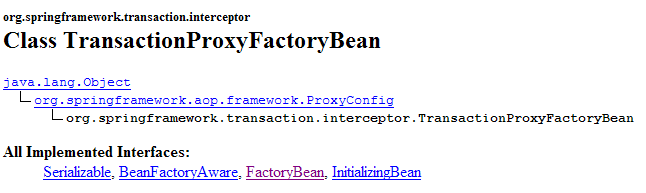
We see that it implements the [FactoryBean] interface. We have already encountered this interface. We know that when an application asks Spring for an instance of a type implementing [FactoryBean], Spring returns not a [I] instance of that type, but the object returned by the [I].getObject() method:

In our case, the [service] layer will be implemented by the object returned by [TransactionProxyFactoryBean].getObject(). What is the nature of this object? We won’t go into the details because they are complex. They fall under what is known as Spring AOP (Aspect-Oriented Programming). We will try to clarify things with simple diagrams. AOP allows the following:
- we have two classes, C1 and C2, where C1 uses the [I2] interface provided by C2:
 |
- Thanks to AOP, we can place an interceptor between classes C1 and C2 in a way that is transparent to both classes:
 |
The class [C1] has been compiled to work with the interface [I2] that [C2] implements. At runtime, AOP inserts the class [intercepteur] between [C1] and [C2]. For this to be possible, the class [intercepteur] must, of course, present the same interface [I2] to [C1] as [C2].
What is this used for? The Spring documentation provides a few examples. For instance, you might want to log calls to a specific method M in [C2] to audit that method. In [intercepteur], you would then write a method [M] that performs these logs. The call from [C1] to [C2].M will proceed as follows (see diagram above):
- [C1] calls method M of [C2]. In fact, it is the M method of [intercepteur] that will be called. This is possible if [C1] addresses an interface [I2] rather than a specific implementation of [I2]. All that is required is for [intercepteur] to implement [I2].
- The M method of [intercepteur] logs the information and calls the M method of [C2], which was initially targeted by [C1].
- The M method of [C2] executes and returns its result to the M method of [intercepteur], which may optionally add something to what was done in step 2.
- The M method of [intercepteur] returns a result to the calling method of [C1]
We can see that the M method of [intercepteur] can perform actions before and after the call to the M method of [C2]. Compared to [C1], it therefore extends the M method of [C2]. We can thus view the AOP technology as a way to extend the interface presented by a class.
How does this concept apply to our [service] layer? If we implement the [service] layer directly with a [ServiceImpl] instance, our web application will have the following architecture:
 |
If we implement the [service] layer with a [TransactionProxyFactoryBean] instance, we will have the following architecture:
 |
We can say that the [service] layer is instantiated with two objects:
- the object we refer to above as [proxy transactionnel], which is actually the object returned by the [getObject] method of [TransactionProxyFactoryBean]. It is this object that will serve as the interface between the [service] layer and the [web] layer. By design, it implements the [IService] interface.
- an instance of [ServiceImpl], which also implements the [IService] interface. It alone knows how to work with the [dao] layer, so it is necessary.
Let’s imagine that the [web] layer calls the [saveMany] method of the [IService] interface. We know that, functionally, the inserts/updates performed by this method must be done within a transaction. Either they all succeed, or none are performed. We introduced the [saveMany] method of the [ServiceImpl] class and noted that it lacked the concept of a transaction. The [saveMany] method of [proxy transactionnel] will enhance the [saveMany] method of the [ServiceImpl] class with this transaction concept. Let’s follow the diagram above:
- The [web] layer calls the [saveMany] method of the [IService] interface.
- The [saveMany] method of [proxy transactionnel] is executed. It starts a transaction. It must have sufficient information to do so, including a [DataSource] object to obtain a connection to SGBD. It then calls the [saveMany] method of [ServiceImpl].
- This method executes. It repeatedly calls the [dao] layer to perform inserts or updates. The SQL commands executed at this time are executed within the transaction started in step 2.
- Suppose one of these operations fails. The [dao] layer will allow an exception to propagate up to the [service] layer, specifically the [saveMany] method of the [ServiceImpl] instance.
- This method does nothing and allows the exception to propagate up to the [saveMany] method of [proxy transactionnel].
- Upon receiving the exception, the [saveMany] method of [proxy transactionnel], which owns the transaction, calls [rollback] on it to roll back all updates, then allows the exception to propagate up to the [web] layer, which will be responsible for handling it.
In step 4, we assumed that one of the inserts or updates failed. If that is not the case, no exception is thrown in [5]. The same applies to [6]. In this case, the [saveMany] method of [proxy transactionnel] performs a [commit] on the transaction to commit all updates.
We now have a clearer picture of the architecture implemented by the [TransactionProxyFactoryBean] bean. Let’s revisit its configuration:
<!-- transaction manager -->
<bean id="transactionManager"
class="org.springframework.jdbc.datasource.DataSourceTransactionManager">
<property name="dataSource">
<ref local="dataSource"/>
</property>
</bean>
<!-- access classes to the [service] layer -->
<bean id="service"
class="org.springframework.transaction.interceptor.TransactionProxyFactoryBean">
<property name="transactionManager">
<ref local="transactionManager"/>
</property>
<property name="target">
<bean class="istia.st.mvc.personnes.service.ServiceImpl">
<property name="dao">
<ref local="dao"/>
</property>
</bean>
</property>
<property name="transactionAttributes">
<props>
<prop key="get*">PROPAGATION_REQUIRED,readOnly</prop>
<prop key="save*">PROPAGATION_REQUIRED</prop>
<prop key="delete*">PROPAGATION_REQUIRED</prop>
</props>
</property>
</bean>
Let’s examine this configuration in light of the architecture that is configured:
 |
- [proxy transactionnel] will handle transactions. Spring offers several transaction management strategies. [proxy transactionnel] requires a reference to the selected transaction manager.
- Lines 11–13: define the [transactionManager] attribute of the [TransactionProxyFactoryBean] bean with a reference to a transaction manager. This is defined in lines 2–7.
- Lines 2–7: The transaction manager is of type [DataSourceTransactionManager]:
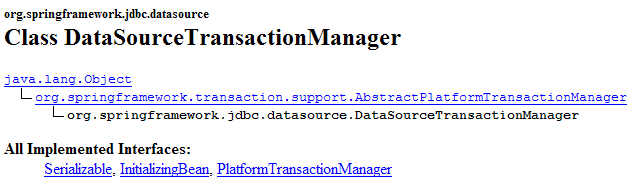
[DataSourceTransactionManager] is a transaction manager designed for SGBD accessed via a [DataSource] object. It can only handle transactions on a single SGBD. It cannot handle transactions distributed across multiple SGBD instances. Here, we have only a single SGBD instance. Therefore, this transaction manager is suitable. When [proxy transactionnel] starts a transaction, it will do so on a connection attached to the thread. This connection will be used in all layers leading to the database: [ServiceImpl, DaoImplCommon, SqlMapClientTemplate, JDBC].
The class [DataSourceTransactionManager] needs to know the data source from which it must request a connection to attach to the thread. This is defined in lines 4–6: it is the same data source as the one used by the [dao] layer (see section 17.5.2).
- Lines 14–19: The "target" attribute specifies the class that must be intercepted, in this case the [ServiceImpl] class. This information is necessary for two reasons:
- the [ServiceImpl] class must be instantiated since it handles communication with the [dao] layer
- [TransactionProxyFactoryBean] must generate a proxy that presents the same interface to the [web] layer as [ServiceImpl].
- Lines 21–27: specify which methods of [ServiceImpl] the proxy must intercept. The [transactionAttributes] attribute on line 21 specifies which methods of [ServiceImpl] require a transaction and what the attributes of that transaction are:
- Line 23: Methods whose names begin with get and [getOne, getAll] are executed within a transaction with the [PROPAGATION_REQUIRED,readOnly] attribute:
- PROPAGATION_REQUIRED: the method runs within a transaction if one is already attached to the thread; otherwise, a new one is created and the method runs within it.
- readOnly: read-only transaction
Here, the methods [getOne] and [getAll] of [ServiceImpl] will execute within a transaction, even though this is not actually necessary. In each case, this is an operation consisting of a single SELECT command. We do not see the point of placing this SELECT in a transaction.
- Line 24: Methods whose names begin with "save," such as [saveOne, saveMany], are executed within a transaction of attribute [PROPAGATION_REQUIRED].
- Line 25: The methods [deleteOne] and [deleteMany] of [ServiceImpl] are configured identically to the methods [saveOne, saveMany].
In our [service] layer, only the [saveMany] and [deleteMany] methods need to be executed within a transaction. The configuration could have been reduced to the following lines:
<property name="transactionAttributes">
<props>
<prop key="saveMany">PROPAGATION_REQUIRED</prop>
<prop key="deleteMany">PROPAGATION_REQUIRED</prop>
</props>
</property>
17.6. Testing the [service] layer
Now that we have written and configured the [service] layer, we will test it using JUnit tests:
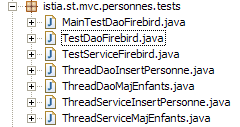
The [spring-config-test-service-firebird.xml] configuration file for the [service] layer is the one described in section 17.5.2.
The JUnit [TestServiceFirebird] test is as follows:
1 2 3 4 5 6 7 8 9 10 11 12 13 14 15 16 17 18 19 20 21 22 23 24 25 26 27 28 29 30 31 32 33 34 35 36 37 38 39 40 41 42 43 44 45 46 47 48 49 50 51 52 53 54 55 56 57 58 59 60 61 62 63 64 65 66 67 68 69 70 71 72 73 74 75 76 77 78 79 80 81 82 83 84 85 86 87 88 89 90 91 92 93 94 95 96 97 98 99 100 101 102 103 104 105 106 107 108 109 110 111 112 113 114 115 116 117 118 119 120 121 122 123 124 125 126 127 128 129 130 131 132 133 134 135 136 137 138 139 140 141 142 143 144 145 146 147 148 149 150 151 152 153 154 155 156 157 | |
- lines 19–22: the program tests layers [dao] and [service] configured by the file [spring-config-test-service-firebird.xml], which was discussed in the previous section.
- The tests [test1] through [test6] are conceptually identical to their counterparts of the same name in the [TestDaoFirebird] test class of the [dao] layer. The only difference is that, by configuration, the methods [saveOne] and [deleteOne] now run within a transaction.
- The purpose of the [test7] method is to test the [saveMany] and [deleteMany] methods. We want to verify that they execute correctly within a transaction. Let’s comment on the code for this method:
- lines 62–63: we count the number of people currently in the list using [nbPersonnes1]
- lines 67–72: we create three people
- lines 73–83: these three people are saved by the [saveMany] method – line 77. The first two people, p1 and p2, having a id equal to -1, will be added to the [PERSONNES] table. Person p3 has a id equal to -2. This is therefore not an insertion but an update. This update will fail because there is no person with a id equal to –2 in the [PERSONNES] table. The [dao] layer will therefore throw an exception that will propagate up to the [service] layer. The existence of this exception is checked on line 83.
- Due to the previous exception, the [service] layer should perform a [rollback] on all SQL orders issued during the execution of the [saveMany] method, because this method runs within a transaction. Lines 86–87: We verify that the number of people in the list has not changed, meaning that the insertions of p1 and p2 did not occur.
- Lines 88–103: We add only p1 and p2 and verify that there are now two more people in the list.
- Lines 106–114: We delete a group of people consisting of the people p1 and p2 that we just added and a non-existent person (id = -1). The method [deleteMany] is used for this, line 108. This method will fail because there is no person with a id equal to –1 in the table [PERSONNES]. The [dao] layer will therefore throw an exception that will propagate up to the [service] layer. The existence of this exception is checked on line 114.
- Due to the previous exception, the [service] layer should perform a [rollback] on all SQL orders issued during the execution of the [deleteMany] method, because this method runs within a transaction. Lines 116–117: We verify that the number of people in the list has not changed and that, therefore, the removals of p1 and p2 did not occur.
- Line 122: A group consisting solely of people p1 and p2 is deleted. This should succeed. The rest of the method verifies that this is indeed the case.
Running the tests yields the following results:
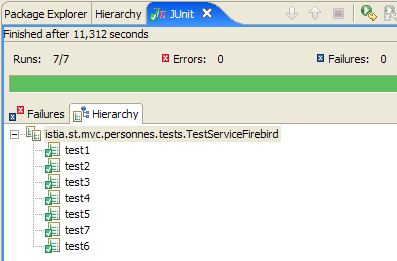
All seven tests were successful. We will consider our [service] layer to be operational.
17.7. The [web] layer
Let’s review the general architecture of the web application to be built:
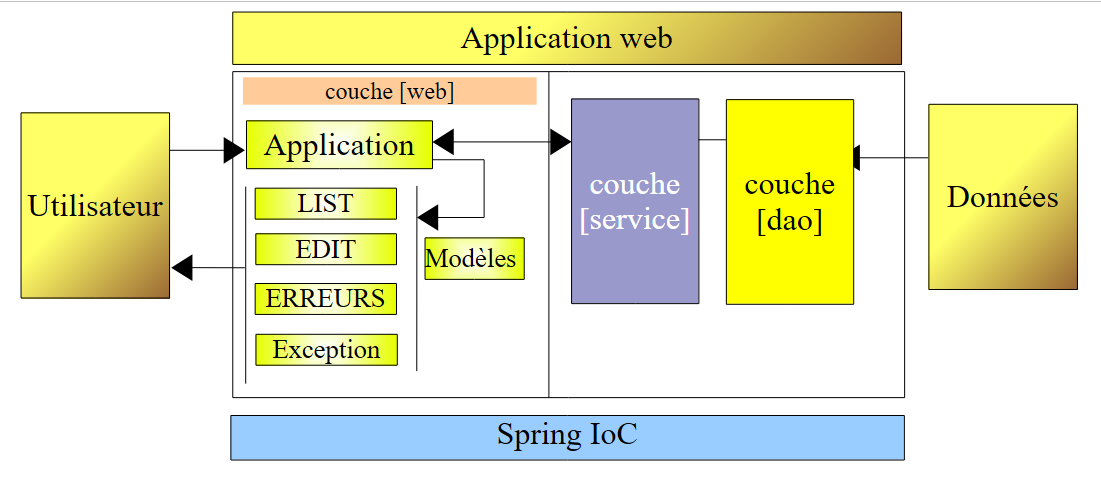 |
We have just built the [dao] and [service] layers that allow us to work with a Firebird database. We wrote a version 1 for this application where the [dao] and [service] layers worked with a list of people in memory. The [web] layer written for that purpose remains valid. This is because it was intended for a [service] layer implementing the [IService] interface. Since the new [service] layer implements this same interface, the [web] layer does not need to be modified.
In the previous article, the application’s version 1 had been tested with the Eclipse project [mvc-personnes-02B], where the [web, service, dao, entites] layers had been placed in .jar archives:
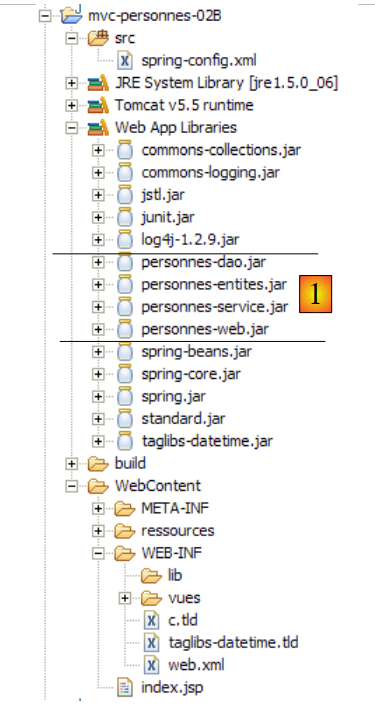 |
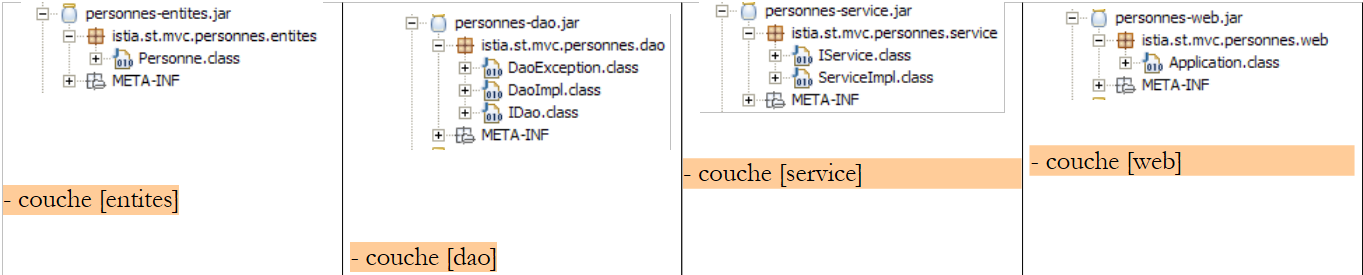
The [src] folder was empty. The layer classes were in the [personnes-*.jar ] archives:
 |
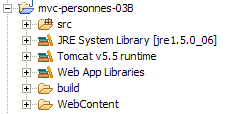
To test version 2, in Eclipse we duplicate the Eclipse folder [mvc-personnes-02B] into [mvc-personnes-03B] (copy/paste):
In the [mvc-personnes-03] project, we export the layers [dao] and [service] from [File / Export / Jar file] to the archives [personnes-dao.jar] and [personnes-service.jar], respectively, in the [dist] folderP003661ZQX of the project:
We copy these two files, then in Eclipse we paste them into the [WEB-INF/lib] folder of the [mvc-personnes-03B] project, where they will replace the archives of the same name from the previous version.
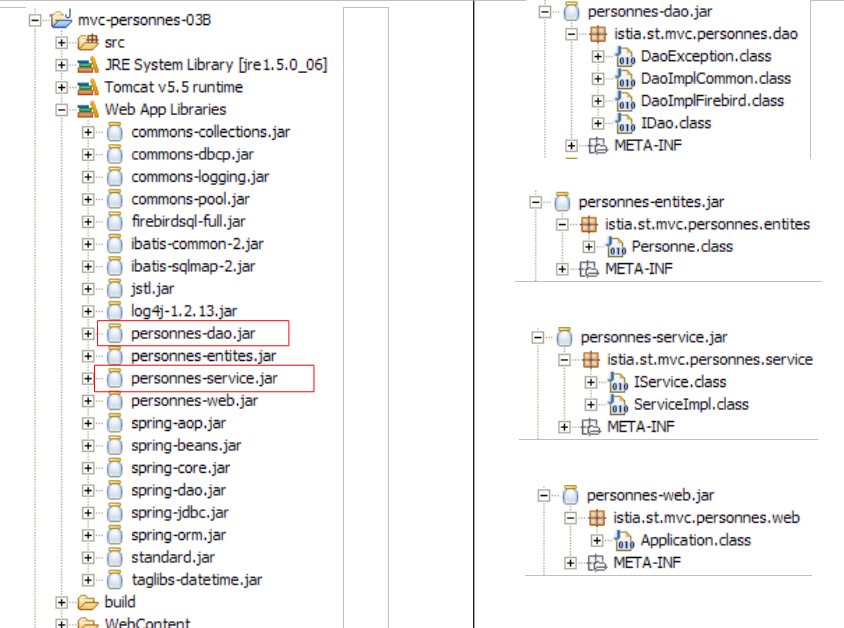 |
We also copy and paste the [commons-dbcp-*.jar, commons-pool-*.jar, firebirdsql-full.jar, ibatis-common-2.jar, ibatis-sqlmap-2.jar] files from the [lib] folder of the [mvc-personnes-03] project into the [WEB-INF/lib] folder of the [mvc-personnes-03B] project. These archives are required for the new layers [dao] and [service].
Once this is done, we include the new archives in the project’s classpath: [clic droit sur projet -> Properties -> Java Build Path -> Add Jars].
The [src] folder contains the configuration files for layers [dao] and [service]:
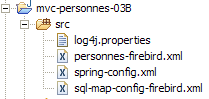
The [spring-config.xml] file configures the [dao] and [service] layers of the web application. In the new version, it is identical to the [spring-config-test-service-firebird.xml] file used to configure the service layer test in the [mvc-personnes-03] project. We therefore copy and paste from one to the other:
<?xml version="1.0" encoding="ISO_8859-1"?>
<!DOCTYPE beans SYSTEM "http://www.springframework.org/dtd/spring-beans.dtd">
<beans>
    <!-- data source DBCP -->
    <bean id="dataSource" class="org.apache.commons.dbcp.BasicDataSource"
        destroy-method="close">
        <property name="driverClassName">
            <value>org.firebirdsql.jdbc.FBDriver</value>
        </property>
        <property name="url">
            <!-- warning: do not leave spaces between the two <value> tags -->
            <value>jdbc:firebirdsql:localhost/3050:C:/data/2005-2006/eclipse/dvp-eclipse-tomcat/mvc-personnes-03/database/dbpersonnes.gdb</value>
        </property>
        <property name="username">
            <value>sysdba</value>
        </property>
        <property name="password">
            <value>masterkey</value>
        </property>
    </bean>
    <!-- SqlMapCllient -->
    <bean id="sqlMapClient"
        class="org.springframework.orm.ibatis.SqlMapClientFactoryBean">
        <property name="dataSource">
            <ref local="dataSource"/>
        </property>
        <property name="configLocation">
            <value>classpath:sql-map-config-firebird.xml</value>
        </property>
    </bean>
    <!-- the [dao] layer access class -->
    <bean id="dao" class="istia.st.mvc.personnes.dao.DaoImplFirebird">
        <property name="sqlMapClient">
            <ref local="sqlMapClient"/>
        </property>
    </bean>
    <!-- transaction manager -->
    <bean id="transactionManager"
        class="org.springframework.jdbc.datasource.DataSourceTransactionManager">
        <property name="dataSource">
            <ref local="dataSource"/>
        </property>
    </bean>
    <!-- access classes to the [service] layer -->
    <bean id="service"
        class="org.springframework.transaction.interceptor.TransactionProxyFactoryBean">
        <property name="transactionManager">
            <ref local="transactionManager"/>
        </property>
        <property name="target">
            <bean class="istia.st.mvc.personnes.service.ServiceImpl">
                <property name="dao">
                    <ref local="dao"/>
                </property>
            </bean>
        </property>
        <property name="transactionAttributes">
            <props>
                <prop key="get*">PROPAGATION_SUPPORTS,readOnly</prop>
                <prop key="save*">PROPAGATION_REQUIRED</prop>
                <prop key="delete*">PROPAGATION_REQUIRED</prop>
            </props>
        </property>
    </bean>
</beans>
- Line 12: the url database in Firebird. We continue to use the database that was used for testing the [dao] and [service] layers
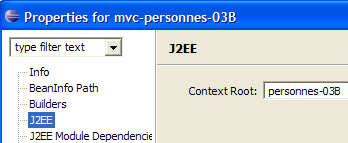
We deploy the [mvc-personnes-03B] web project within Tomcat:
 | 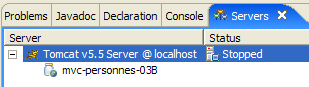 |
We are ready for test . The SGBD Firebird instance is launched. The contents of the [PERSONNES] table are then as follows:
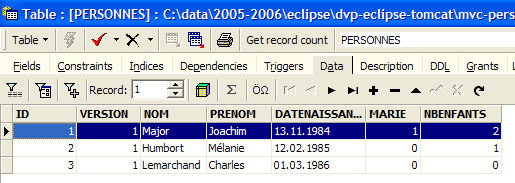
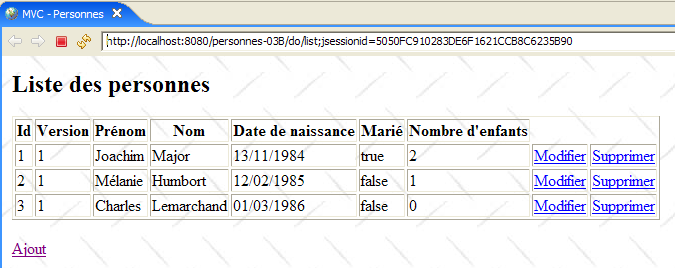
Tomcat is launched in turn. Using a browser, we request the url [http://localhost:8080/mvc-personnes-03B]:
We add a new person using the link [Ajout]:
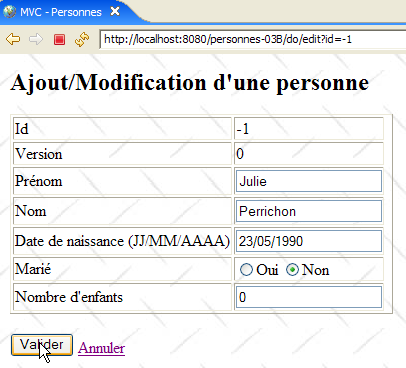 | 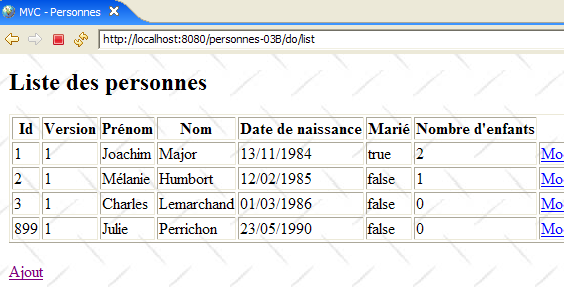 |
We verify the addition in the database:
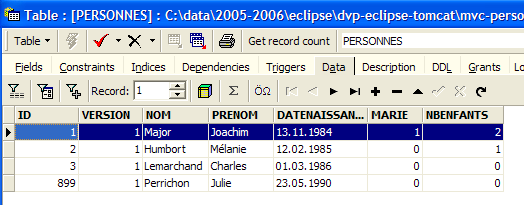
The reader is invited to perform other tests [modification, suppression].
Now let’s perform the conflict test for version, which was done in version 1. [Firefox] will be user U1’s browser. User U1 requests url and [http://localhost:8080/mvc-personnes-03B]:
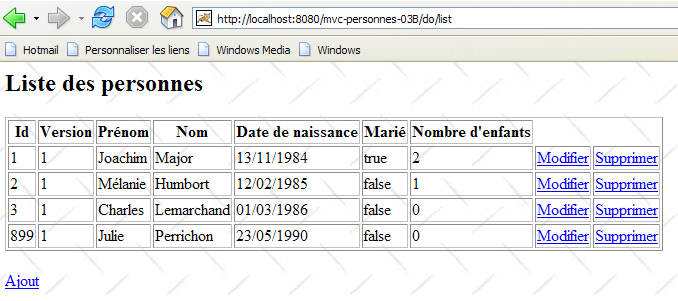
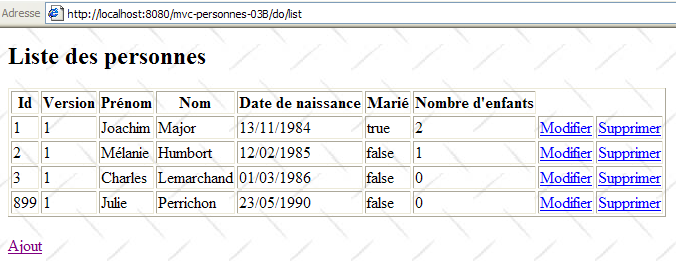
[IE] will be user U2’s browser. User U2 requests the same Url:
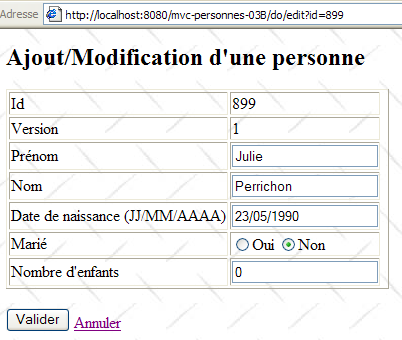
User U1 enters the edit screen for the person [Perrichon]:
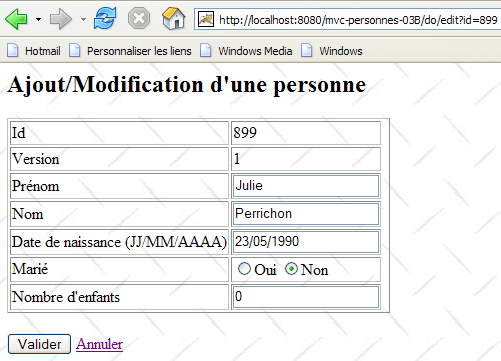
User U2 does the same:
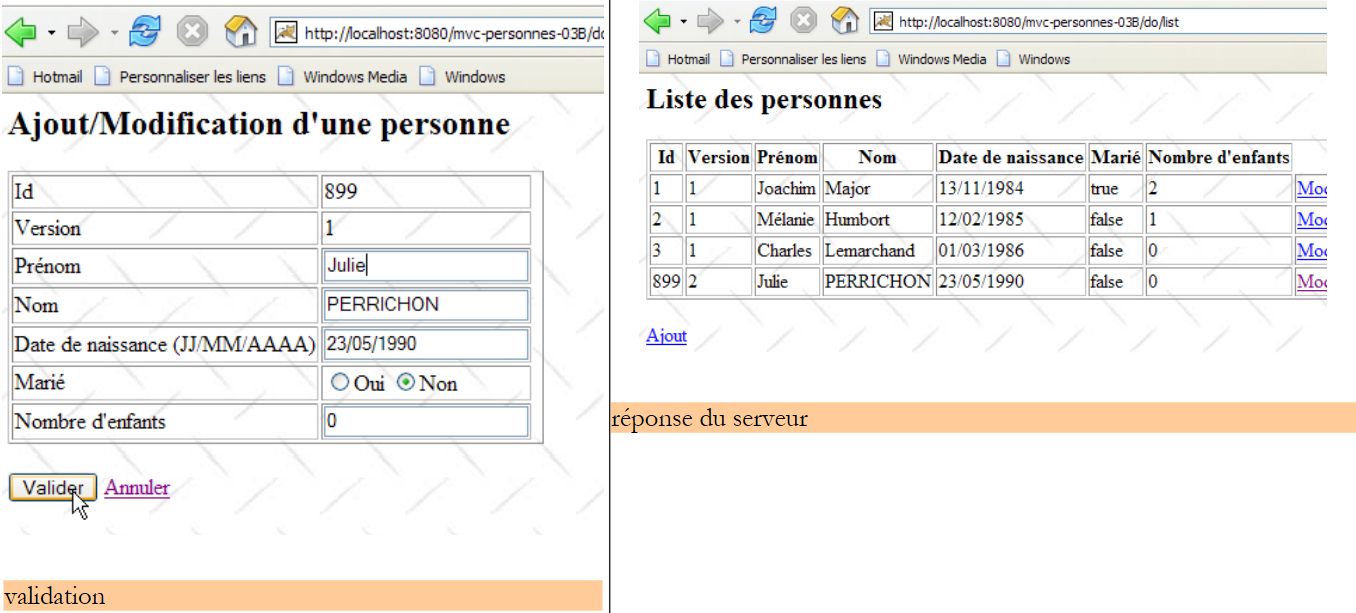
User U1 makes changes and saves:
 |
User U2 does the same:
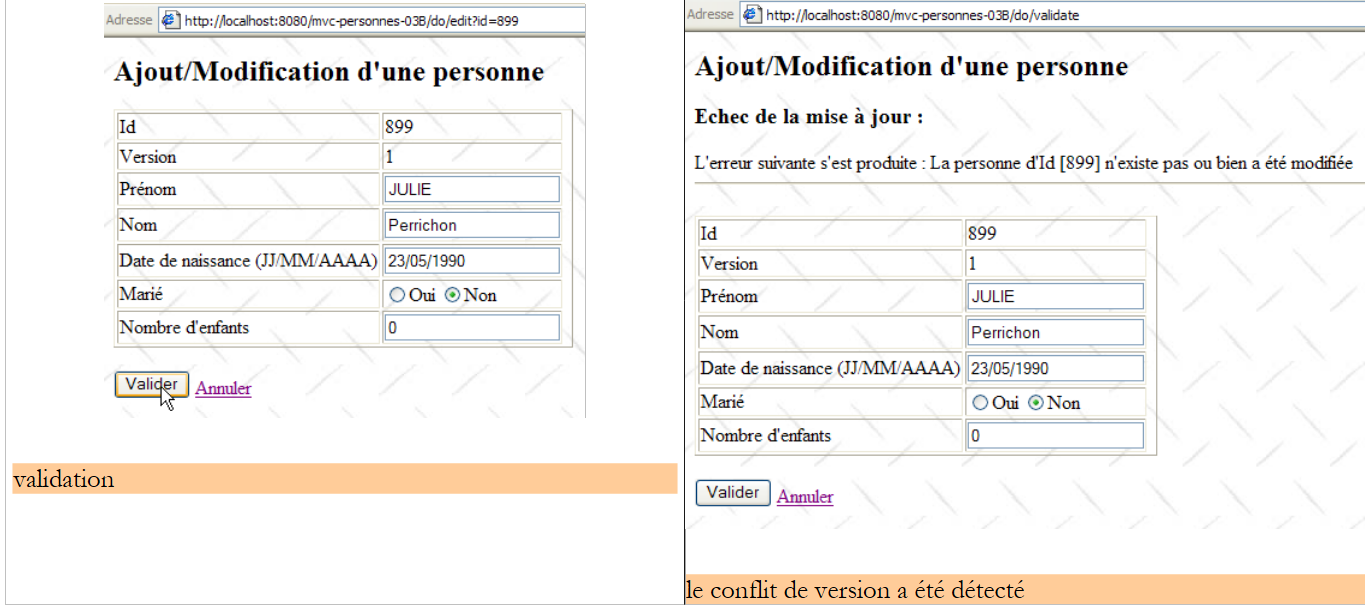 |
User U2 returns to the list of people via the [Annuler] link on the form:
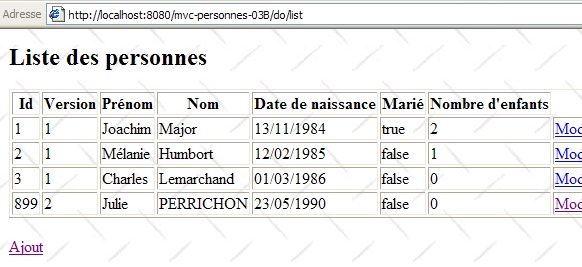
They find the person [Perrichon] as modified by U1 (name converted to uppercase).
And what about the database? Let’s take a look:
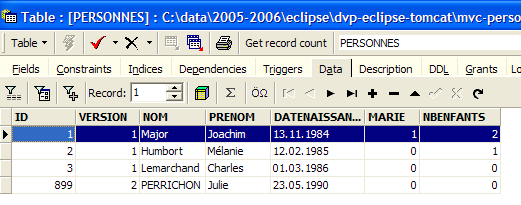
Person #899’s name is indeed in uppercase following the modification made by U1.
17.8. Conclusion
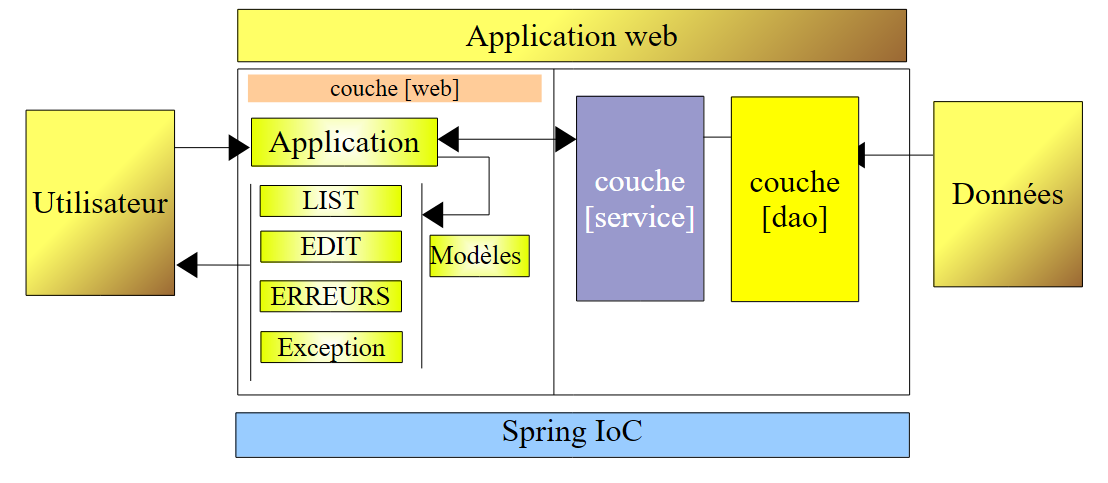
Let’s recap what we wanted to do. We had a web application with the following three-tier architecture:
where the [dao] and [service] layers worked with a list of data in memory that was therefore lost when the web server was shut down. That was version 1. In version 2, the [service] and [dao] layers were rewritten so that the list of people is stored in a database table. It is therefore now persistent. We will now examine the impact that the change to SGBD has on our application. To do this, we will build three new versions of our web application:
 |
- version 3: SGBD is Postgres
- version 4: SGBD is MySQL
- version 5: SGBD is SQL Server Express 2005
The changes are made in the following locations:
- The [DaoImplFirebird] class implements features of the [dao] layer related to SGBD Firebird. If this requirement persists, it will be replaced by the classes [DaoImplPostgres], [DaoImplMySQL], and [DaoImplSqlExpress], respectively.
- The mapping file [personnes-firebird.xml] from iBATIS for the SGBD Firebird will be replaced by the mapping files [personnes-postgres.xml], [personnes-mysql.xml], and [personnes-sqlexpress.xml], respectively.
- The configuration of the [DataSource] object in the [dao] layer is specific to a SGBD. It will therefore change for each version.
- The driver JDBC for SGBD also changes for each version
Apart from these points, everything else remains the same. In the following sections, we describe these new versions, focusing solely on the new features introduced by each one.