7. MVC Web Application [person] – Version 3
Recommended reading in [ref1]: Chapter 9
7.1. Introduction
We propose adding JavaScript code to the HTML pages sent to the browser. It is the browser that executes the JavaScript code embedded in the page it displays. This technology is independent of the one used by the web server to generate the HTML document (Java/servlets/JSP, ASP.NET, ASP, PHP, Perl, Python, ...).
[form.jsp]
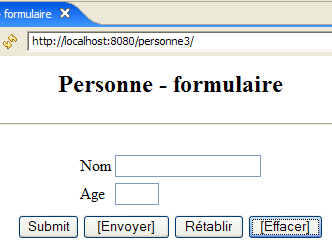
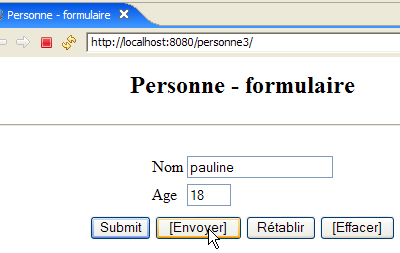
The view generated from this page will look like this:
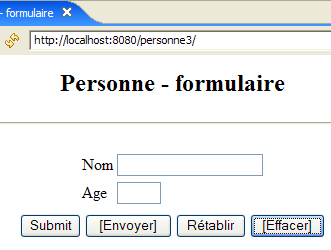
The buttons with the text in a box use JavaScript code embedded in the HTML page:
Label | HTML Type | Function |
<submit> | Acts as the [Submit] button in previous versions: sends the entered values to the controller | |
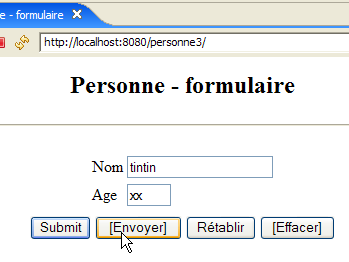
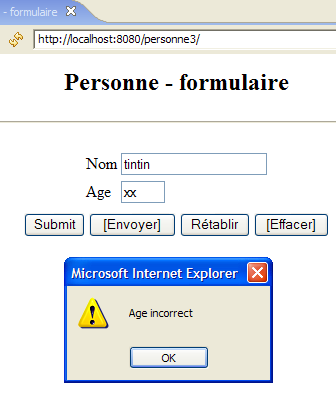
<button> | New button – checks the validity of the entered data locally before sending it to the controller | |
<reset> | resets the form to the state in which it was initially received by the browser | |
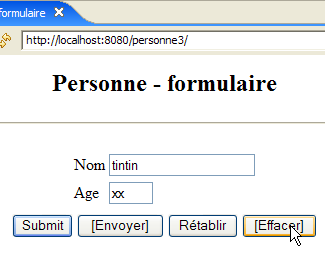
<button> | clears the contents of both input fields |
Here is an example of how to use the [Submit] and [Clear] buttons:
 |  |
 |  |
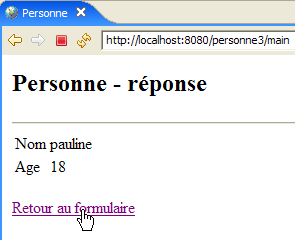
We will also use JavaScript code to handle the [Back to Form] link on the [errors] and [response] views. Let’s take the [response] view as an example:
 | 1 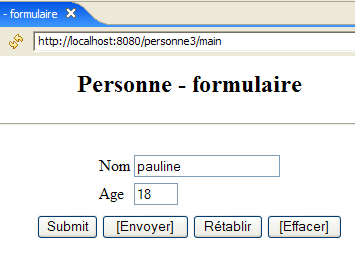 |
The difference lies in the URL displayed in [1]. In the previous version, it was:
Here, the action is no longer part of the URL because it will be sent via a POST request instead of a GET request. This change means that the only URL displayed by the browser will be [http://localhost:8080/personne3/main] regardless of the requested action.
7.2. The Eclipse Project
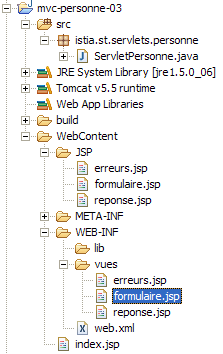
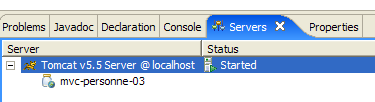
To create the Eclipse project [mvc-personne-03] for the web application [/personne3], duplicate the [mvc-personne-02] project by following the procedure described in section 6.2, page 78.
 |  |
7.3. Configuring the [personne3] Web Application
The web.xml file for the /personne3 application is as follows:
<?xml version="1.0" encoding="UTF-8"?>
<web-app id="WebApp_ID" version="2.4"
    xmlns="http://java.sun.com/xml/ns/j2ee"
    xmlns:xsi="http://www.w3.org/2001/XMLSchema-instance"
    xsi:schemaLocation="http://java.sun.com/xml/ns/j2ee http://java.sun.com/xml/ns/j2ee/web-app_2_4.xsd">
    <display-name>mvc-personne-03</display-name>
    <!--  ServletPersonne -->
    <servlet>
        <servlet-name>personne</servlet-name>
        <servlet-class>
            istia.st.servlets.personne.ServletPersonne
        </servlet-class>
        <init-param>
            <param-name>urlReponse</param-name>
            <param-value>
                /WEB-INF/vues/reponse.jsp
            </param-value>
        </init-param>
        <init-param>
            <param-name>urlErreurs</param-name>
            <param-value>
                /WEB-INF/vues/erreurs.jsp
            </param-value>
        </init-param>
        <init-param>
            <param-name>urlFormulaire</param-name>
            <param-value>
                /WEB-INF/vues/formulaire.jsp
            </param-value>
        </init-param>
        <init-param>
            <param-name>lienRetourFormulaire</param-name>
            <param-value>
                Retour au formulaire
            </param-value>
        </init-param>
    </servlet>
    <!--  Mapping ServletPersonne-->
    <servlet-mapping>
        <servlet-name>personne</servlet-name>
        <url-pattern>/main</url-pattern>
    </servlet-mapping>
    <!--  welcome files -->
    <welcome-file-list>
        <welcome-file>index.jsp</welcome-file>
    </welcome-file-list>
</web-app>
This file is identical to the one in the previous version except for a few details:
- line 6: the display name of the web application has changed to [mvc-personne-03]
The [urlController] parameter has been removed. In the previous version, it was used to set the POST target for the [form] view. In this new version, the target will be the empty string, i.e., the URL displayed by the browser. We explained that this would always be [http://localhost:8080/personne3/main], which is what we need for the POST request from the [form] view.
The home page [index.jsp] changes:
<%@ page language="java" contentType="text/html; charset=ISO-8859-1"
    pageEncoding="ISO-8859-1"%>
<!DOCTYPE HTML PUBLIC "-//W3C//DTD HTML 4.01 Transitional//EN">
<%
  response.sendRedirect("/personne3/main");
%>
- Line 5: The [index.jsp] page redirects the client to the URL of the [ServletPersonne] controller in the [/personne3] application.
7.4. The view code
7.4.1. The [form] view
This view has become the following:
It is generated by the following JSP page [formulaire.jsp]:
<%@ page language="java" contentType="text/html; charset=ISO-8859-1"
  pageEncoding="ISO-8859-1"%>
<!DOCTYPE HTML PUBLIC "-//W3C//DTD HTML 4.01 Transitional//EN">

<%// on récupère les données du modèle
            String nom = (String) session.getAttribute("nom");
            String age = (String) session.getAttribute("age");
%>


<html>
  <head>
    <title>Personne - formulaire</title>
    <script language="javascript">
        // -------------------------------
        function effacer(){
          // on efface les champs de saisie
          with(document.frmPersonne){
            txtNom.value="";
            txtAge.value="";
          }//with
        }//effacer
        // -------------------------------
        function envoyer(){
          // vérification des paramètres avant de les envoyer
          with(document.frmPersonne){
            // le nom ne doit pas être vide
            champs=/^\s*$/.exec(txtNom.value);
            if(champs!=null){
              // le nom est vide
              alert("Vous devez indiquer un nom");
              txtNom.value="";
              txtNom.focus();
              // retour à l'interface visuelle
              return;
            }//if
            // l'âge doit être un entier positif
            champs=/^\s*\d+\s*$/.exec(txtAge.value);
            if(champs==null){
              // l'âge est incorrect
              alert("Age incorrect");
              txtAge.focus();
              // retour à l'interface visuelle
              return;
            }//if
            // les paramètres sont corrects - on les envoie au serveur
            submit();
          }//with
        }//envoyer
      </script>
  </head>
  <body>
    <center>
      <h2>Personne - formulaire</h2>
      <hr>
      <form name="frmPersonne" method="post">
        <table>
          <tr>
            <td>Nom</td>
            <td><input name="txtNom" value="<%= nom %>" type="text" size="20"></td>
          </tr>
          <tr>
            <td>Age</td>
            <td><input name="txtAge" value="<%= age %>" type="text" size="3"></td>
          </tr>
          <tr>
        </table>
        <table>
          <tr>
            <td><input type="submit" value="Submit"></td>
            <td><input type="button" value="[Envoyer]" onclick="envoyer()"></td>
            <td><input type="reset" value="Rétablir"></td>
            <td><input type="button" value="[Effacer]" onclick="effacer()"></td>
          </tr>
        </table>
        <input type="hidden" name="action" value="validationFormulaire">
      </form>
    </center>
  </body>
</html>
What's new:
- Line 56: The form has a name [frmPersonne]. This name will be used in the JavaScript code. Note the absence of the [action] attribute, which means that the [frmPersonne] form will be submitted to the URL displayed by the browser.
- Line 70: The [Submit] button serves the same purpose as the [Envoyer] button in previous versions
- Line 71: Clicking the [Envoyer] button (of type [Button]) executes the JavaScript function [envoyer] defined on line 24
- Line 72: The [Reset] button has not changed its function
- Line 73: Clicking the [Clear] button (type [Button]) executes the JavaScript function [clear] defined on line 16
Before commenting on the JavaScript code, let’s review a few conventions:
JavaScript manages the displayed page and its content as a tree of objects whose root is the [document] object. This document may contain one or more forms. [document.frmPersonne] refers to the form named [frmPersonne] defined on line 56. This form also contains objects. Input fields are part of it. Thus, [document.frmPersonne.txtName] refers to the object representing the HTML input field defined on line 60. The [txtName] object has various properties, including the [value] property, which refers to the content of the input field. Thus, [document.frmPersonne.txtName.value] refers to the content of the [txtName] input field.
- lines 16–22: The JavaScript function [clear] sets an empty string in the input fields [txtName, txtAge].
- Lines 24–49: The JavaScript function [submit] checks the validity of the values in the input fields [txtName, txtAge] before submitting them. It uses regular expressions to do this.
- Line 28: Checks whether the value of the input field [txtNom] matches the pattern /s*, which means zero or more spaces. If the answer is yes, this means the user has not entered a name. If there is a match with the pattern, the variable `champs` will have a value other than the null pointer; otherwise, it will have the value null.
- Line 29: If there is a match with the pattern
- Line 30: Display a message to the user
- line 32: we set the [txtName] field to an empty string (there could have been a sequence of spaces)
- line 33: the blinking cursor is positioned on the [txtName] field
- line 34: the function is terminated. The entered values are therefore not posted to the server.
- Lines 38–45: We follow a similar procedure with the [txtAge] field
- Line 47: If we reach this point, it means the entered values are correct. We then submit the [frmPersonne] form to the web server. Everything then proceeds as if we had clicked the button labeled [Submit].
7.4.2. The [reponse] view
This view displays the values entered in the form when they are valid:
 | 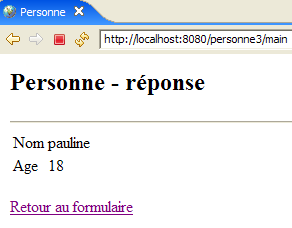 |
Compared to the previous version, the new feature only appears when you use the [Back to Form] link in the [response] view:
| 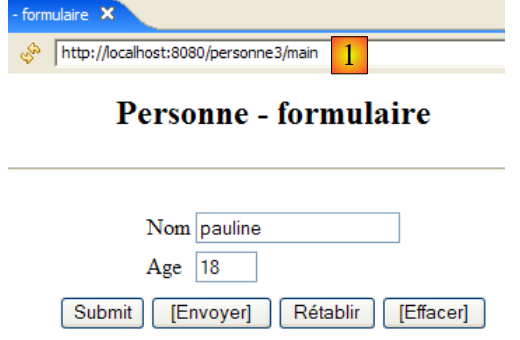 |
The difference lies in the URL displayed in [1]. In the previous version, it was:
Here, the action is no longer part of the URL because it will be sent via a POST request instead of a GET request. The new JSP page [reponse.jsp] is lqqqaaaaaaaaaqqAAAaaa
as follows:
<%@ page language="java" contentType="text/html; charset=ISO-8859-1"
    pageEncoding="ISO-8859-1"%>
<!DOCTYPE HTML PUBLIC "-//W3C//DTD HTML 4.01 Transitional//EN">


<%
    // on récupère les données du modèle
  String nom=(String)request.getAttribute("nom");
  String age=(String)request.getAttribute("age");
  String lienRetourFormulaire=(String)request.getAttribute("lienRetourFormulaire");
%>


<html>
    <head>
      <title>Personne</title>
  </head>
  <body>
      <h2>Personne - réponse</h2>
    <hr>
    <table>
        <tr>
          <td>Nom</td>
        <td><%= nom %>
      </tr>
        <tr>
          <td>Age</td>
        <td><%= age %>
      </tr>
    </table>
    <br>
    <form name="frmPersonne" method="post">
      <input type="hidden" name="action" value="retourFormulaire">
    </form>
    <a href="javascript:document.frmPersonne.submit();">
      <%= lienRetourFormulaire %>
    </a>
  </body>
</html>
What's new:
- lines 35-37: the [Back to form] link contains JavaScript. Clicking this link triggers the execution of the JavaScript code in the [href] attribute. As we saw in the study of [formulaire.jsp], we know that this code submits the values of the <input>, <select>, ... fields in the [frmPersonne] form.
- Lines 32–34: define the [frmPersonne] form. This form has only one field of type <input type="hidden" ...>, i.e., a hidden field. This [action] field is used to pass the name of the action to be executed to the controller, in this case [retourFormulaire].
7.4.3. The [errors] view
This view reports input errors in the form. The change made is the same as for the [response] view:
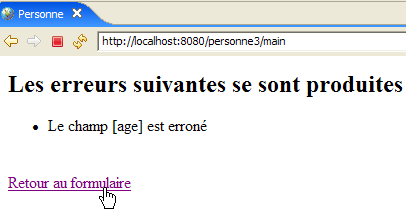 | 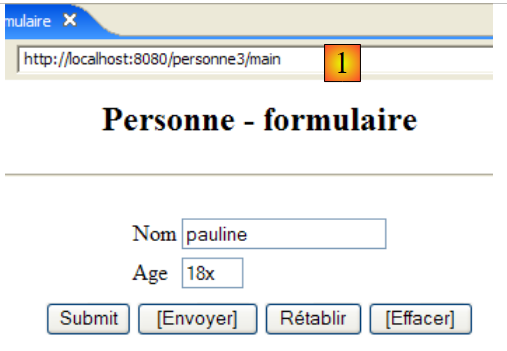 |
The difference lies in the URL displayed in [1]. In the previous version, it was:
Here, the action is no longer part of the URL because it will be sent via a POST request instead of a GET request. The new JSP page [response.jsp] is as follows:
<%@ page language="java" contentType="text/html; charset=ISO-8859-1"
    pageEncoding="ISO-8859-1"%>
<!DOCTYPE HTML PUBLIC "-//W3C//DTD HTML 4.01 Transitional//EN">
<%@ page import="java.util.ArrayList" %>

<%
// on récupère les données du modèle
  ArrayList erreurs=(ArrayList)request.getAttribute("erreurs");
  String lienRetourFormulaire=(String)request.getAttribute("lienRetourFormulaire");
%>


<html>
    <head>
      <title>Personne</title>
  </head>
  <body>
      <h2>Les erreurs suivantes se sont produites</h2>
    <ul>
        <%
          for(int i=0;i<erreurs.size();i++){
            out.println("<li>" + (String) erreurs.get(i) + "</li>\n");
        }//for
      %>
    </ul>
    <br>
    <form name="frmPersonne" method="post">
      <input type="hidden" name="action" value="retourFormulaire">
    </form>
    <a href="javascript:document.frmPersonne.submit();">
      <%= lienRetourFormulaire %>
    </a>
  </body>
</html>
What's new:
- Lines 30-32: the new handling of link clicks. The explanations provided on this topic in the study of [response.jsp] also apply here.
7.5. View testing
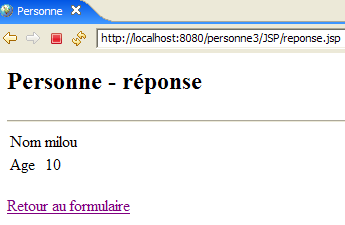
To test the previous views, we duplicate their JSP pages in the /WebContent/JSP folder of the Eclipse project:
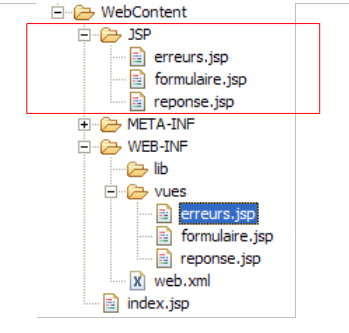
Then, in the JSP folder, the pages are modified as follows:
[form.jsp]:
...
<%
  // -- test : on crée le modèle de la page
  session.setAttribute("nom","tintin");
  session.setAttribute("age","30");
%>

<%// on récupère les données du modèle
            String nom = (String) session.getAttribute("nom");
            String age = (String) session.getAttribute("age");
%>
Lines 4–5 were added to create the model required by the page in lines 9–10.
[reponse.jsp]:
...
<%
  // -- test : on crée le modèle de la page
  request.setAttribute("nom","milou");
  request.setAttribute("age","10");
  request.setAttribute("lienRetourFormulaire","Retour au formulaire");
%>

<%
    // on récupère les données du modèle
  String nom=(String)request.getAttribute("nom");
  String age=(String)request.getAttribute("age");
  String lienRetourFormulaire=(String)request.getAttribute("lienRetourFormulaire");
%>
...
Lines 4–6 were added to create the template required by the page in lines 11–13.
[errors.jsp]:
<%
  // -- test : on crée le modèle de la page
  ArrayList<String> erreurs1=new ArrayList<String>();
  erreurs1.add("erreur1");
  erreurs1.add("erreur2");
  request.setAttribute("erreurs",erreurs1);
  request.setAttribute("lienRetourFormulaire","Retour au formulaire");
%>

<%
// on récupère les données du modèle
  ArrayList erreurs=(ArrayList)request.getAttribute("erreurs");
  String lienRetourFormulaire=(String)request.getAttribute("lienRetourFormulaire");
%>
Lines 4–8 were added to create the model required by the page in lines 13–14.
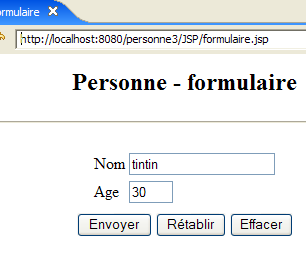
Start Tomcat if you haven't already, then request the following URLs:
 |  |
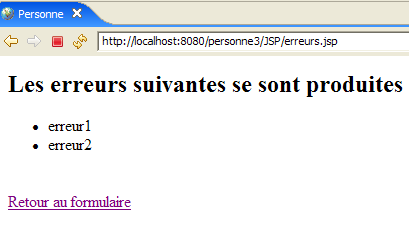 |
We get the expected views.
7.6. The [ServletPersonne] controller
The [ServletPersonne] controller of the [/personne3] web application will handle the following actions:
No. | request | origin | processing |
1 | [GET /person3/hand] | URL entered by the user | - Submit the empty [form] |
2 | [POST /person3/main] with parameters [txtName, txtAge, action=validateForm] posted | click on the [Submit] button in the [form] | - check the values of the [txtName, txtAge] parameters - if they are incorrect, send the [errors(errors)] view - if they are correct, send the [response(name,age)] view |
3 | [POST /person3/main] with parameters [action=returnForm] hosted | click on the [Return to form] views [response] and [errors]. | - Send the [form] view pre-filled with the latest entered values |
We therefore have a new action to handle: [POST /person3/main] with the posted parameter [action=returnForm]. Instead of the old action [GET /person3/main?action=returnForm].
7.6.1. Controller skeleton
The controller skeleton [ServletPersonne] is identical to that of the previous version.
What's new:
- Line 11: The [parameters] array no longer contains the [urlController] parameter, which has been removed from the [web.xml] file.
The [init, doValidationFormulaire] methods remain unchanged. The [doGet, doInit, doRetourFormulaire] methods have changed slightly.
7.6.2. The [doGet] method
The [doGet] method must handle the [POST /person3/main] action with the posted parameter [action=returnForm]:
- lines 6-9: processing the [POST /person3/main] action with the posted parameter [action=returnForm]
7.6.3. The [doInit] method
This method handles request #1 [GET /person3/hand]. Its code is as follows:
The change is that the [form] view displayed on line 8 no longer has the [action] element in its template.
7.6.4. The [doRetourFormulaire] method
This method processes request #1 [POST /person3/main] with [action=formSubmit] in the posted elements. Its code is as follows:
The change is that the [form] view displayed on line 14 no longer has the [action] element in its template.
7.7. Tests
Start or restart Tomcat after integrating the Eclipse project [personne-mvc-03] into it. Request the URL [http://localhost:8080/personne3] and then repeat the tests shown as an example in section 7.1.