5. MVC Web Application [person] – Version 1
5.1. The application views
The application uses the form from the previous examples. The first page of the application is as follows:
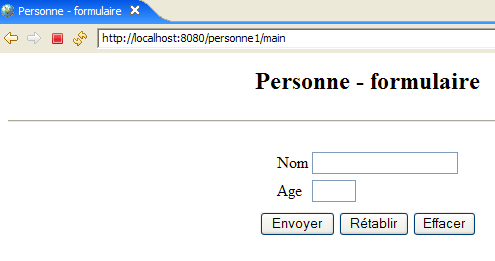
We will call this view the [form] view. If the entries are correct, they are displayed in a view that will be called [response]:
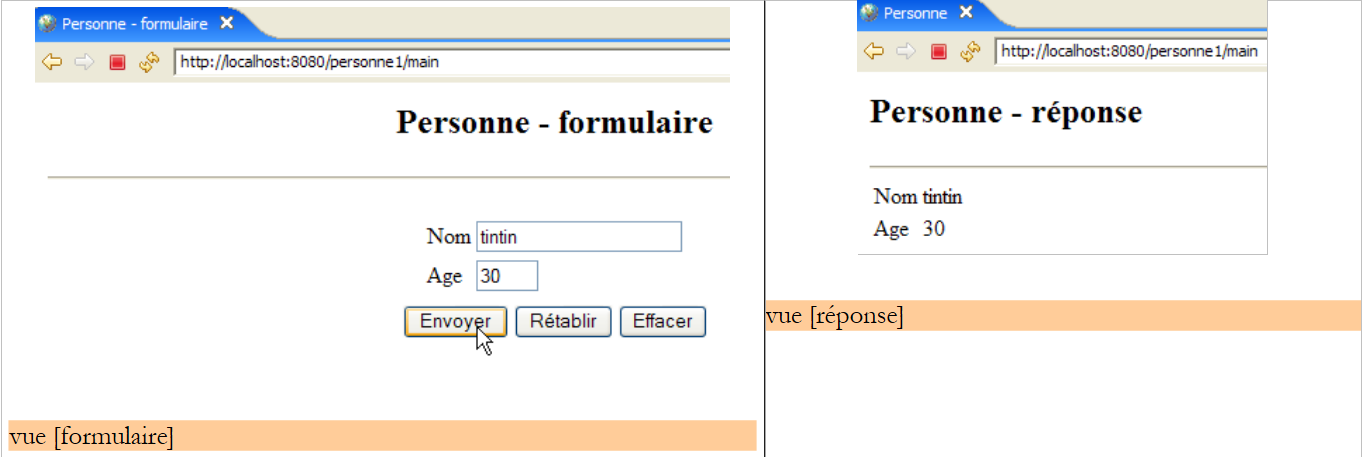
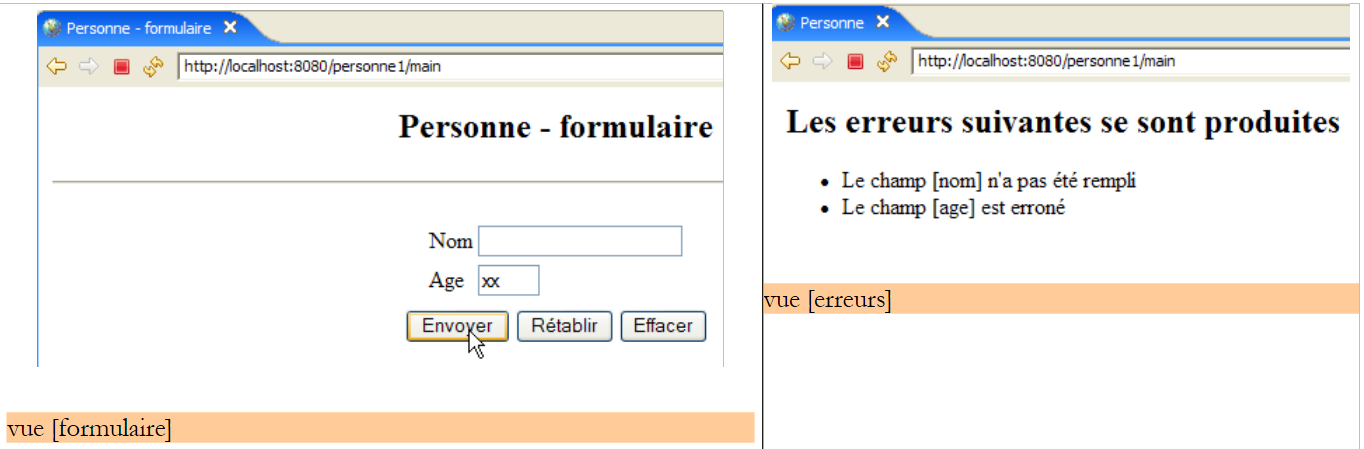
If the entries are incorrect, the errors are displayed in a view called [errors]:
5.2. Application architecture
The [person1] web application will have the following architecture:
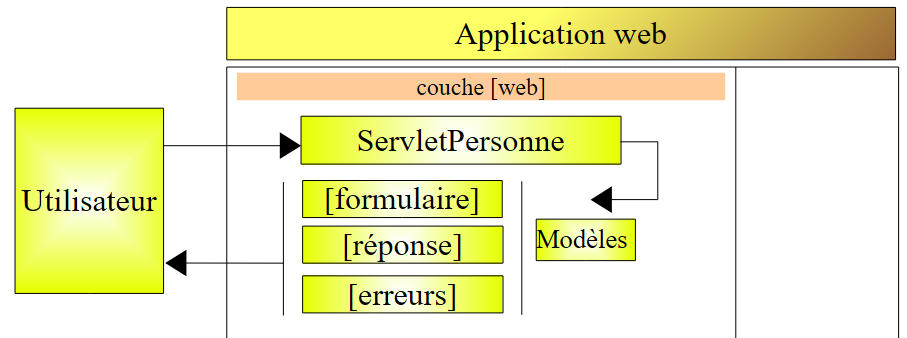
This is a single-tier architecture: there are no [business] or [DAO] layers, only a [web] layer. [ServletPersonne] is the application controller that handles all client requests. To respond to these requests, it uses one of the three views [form, response, errors].
We need to determine how the [ServletPersonne] controller determines the action it must take upon receiving a user request. A client request is an HTTP stream that differs depending on whether it is made with a GET or POST command.
GET Request
In this case, the HTTP stream looks like the following:
Line 1 specifies the requested URL, for example:
This URL can be used to specify the action to be performed. Various methods can be used:
- A URL parameter specifies the action, for example [/app?action=add&id=4]. Here, the [action] parameter tells the controller which action is being requested.
- The last element of the URL specifies the action, for example [/app/add?id=4]. Here, the last element of the URL [/add] is used by the controller to determine the action it must perform.
Other solutions are possible. The two mentioned above are common.
POST Request
In this case, the HTTP flow looks like the following:
Line 1 specifies the requested URL, for example:
This URL can be used to specify the action to be performed, just as with GET. In the case of GET, the [action] parameter was included in the URL. This can also be the case here, as in:
However, the [action] parameter can also be included in the posted parameters (line 15 above), as in:
In the following, we will use these different techniques to tell the controller what to do:
- include the action parameter in the requested URL:
- Post the action parameter:
- Use the last element of the URL as the action name:
5.3. The Eclipse Project
To create the Eclipse project [mvc-personne-01] for the web application [personne1], follow the procedure described in section 3.1.
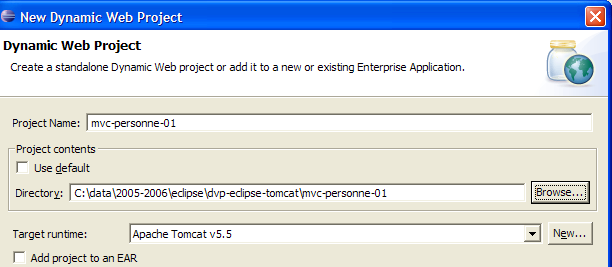
We will not keep the default context [mvc-personne-01]. We will choose [personne1] as shown below:
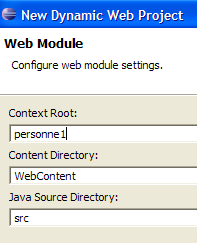
The result is as follows:
If you wish to change the web application context, use the option [right-click on project -> Properties -> J2EE]:
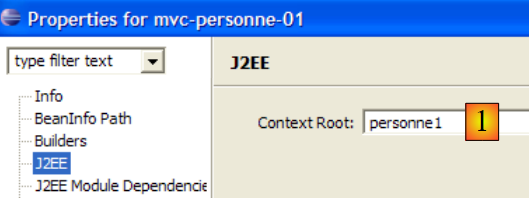
Enter the new context in [1].
We will create a subfolder [vues] in the [WEB-INF] folder: [right-click on WEB-INF -> New -> Folder]:
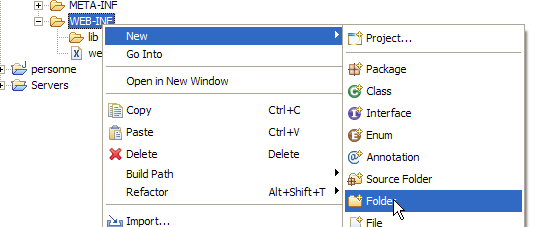 | 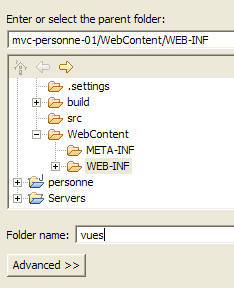 |
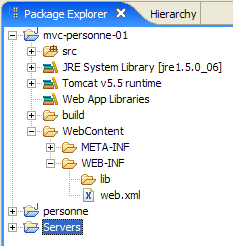
The new project now looks like this:
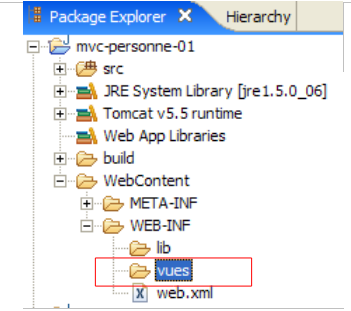
Once completed, the project will look like this:
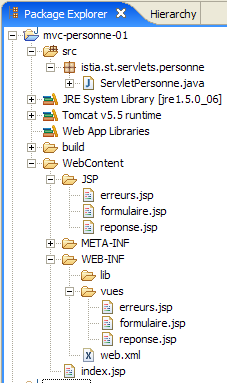
- The [ServletPersonne] controller is in the [src] folder
- The JSP pages for the views [form, response, errors] are in the [WEB-INF/vues] folder, which prevents the user from accessing them directly, as shown in the example below:
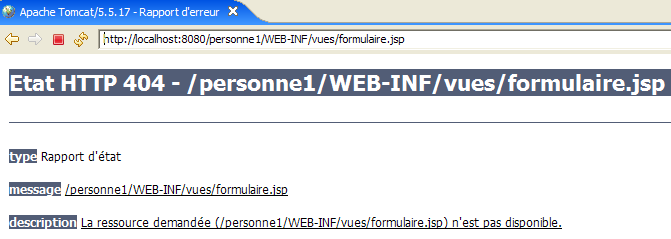
We will now describe the various components of the [/personne1] web application. The reader is invited to create them as they read along.
5.4. Configuration of the [person1] web application
The web.xml file for the /person1 application will be as follows:
<?xml version="1.0" encoding="UTF-8"?>
<web-app id="WebApp_ID" version="2.4"
    xmlns="http://java.sun.com/xml/ns/j2ee"
    xmlns:xsi="http://www.w3.org/2001/XMLSchema-instance"
    xsi:schemaLocation="http://java.sun.com/xml/ns/j2ee http://java.sun.com/xml/ns/j2ee/web-app_2_4.xsd">

  <display-name>mvc-personne-01</display-name>
    <!--  ServletPersonne -->
    <servlet>
        <servlet-name>personne</servlet-name>
        <servlet-class>
            istia.st.servlets.personne.ServletPersonne
        </servlet-class>
        <init-param>
            <param-name>urlReponse</param-name>
            <param-value>
                /WEB-INF/vues/reponse.jsp
            </param-value>
        </init-param>
        <init-param>
            <param-name>urlErreurs</param-name>
            <param-value>
                /WEB-INF/vues/erreurs.jsp
            </param-value>
        </init-param>
        <init-param>
            <param-name>urlFormulaire</param-name>
            <param-value>
                /WEB-INF/vues/formulaire.jsp
            </param-value>
        </init-param>
    </servlet>
    <!--  Mapping ServletPersonne-->
    <servlet-mapping>
        <servlet-name>personne</servlet-name>
        <url-pattern>/main</url-pattern>
    </servlet-mapping>
    <!--  welcome files -->
    <welcome-file-list>
        <welcome-file>index.jsp</welcome-file>
    </welcome-file-list>
</web-app>
What does this configuration file say?
- lines 34–37: the URL /main is handled by the servlet named person
- lines 10-13: the servlet named "person" is an instance of the [ServletPersonne] class
- lines 14–19: define a configuration parameter named [urlResponse]. This is the URL of the [response] view.
- Lines 20–25: define a configuration parameter named [urlErrors]. This is the URL of the [errors] view.
- Lines 26–31: define a configuration parameter named [urlForm]. This is the URL of the [form] view.
- Line 40: [index.jsp] will be the application’s home page.
The URLs of the JSP pages for the [form, response, errors] views are each defined by a configuration parameter. This allows them to be moved without having to recompile the application.
When the user requests the URL [/person1], the [index.jsp] file will send the response (home page file, line 40). This file is located in the root of the [WebContent] folder:
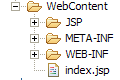
Its content is as follows:
<%@ page language="java" contentType="text/html; charset=ISO-8859-1"
    pageEncoding="ISO-8859-1"%>
<!DOCTYPE HTML PUBLIC "-//W3C//DTD HTML 4.01 Transitional//EN">
<%
  response.sendRedirect("/personne1/main");
%>
The [index.jsp] page simply redirects the client to the URL [/person1/main]. Thus, when the browser requests the URL [/person1], [index.jsp] sends it the following HTTP response:
- Line 1: HTTP/1.1 response to instruct the server to redirect to another URL
- Line 4: The URL to which the browser should redirect
After this response, the browser will request the URL [/person1/main] as instructed (line 4). The [web.xml] file for the [/person1] application specifies that this request will be handled by the [ServletPersonne] controller (lines 35–36).
5.5. The view code
We begin writing the web application by creating its views. These help define the user’s needs in terms of the graphical interface and can be tested without the controller.
5.5.1. The [form] view
This view is for the form used to enter name and age:
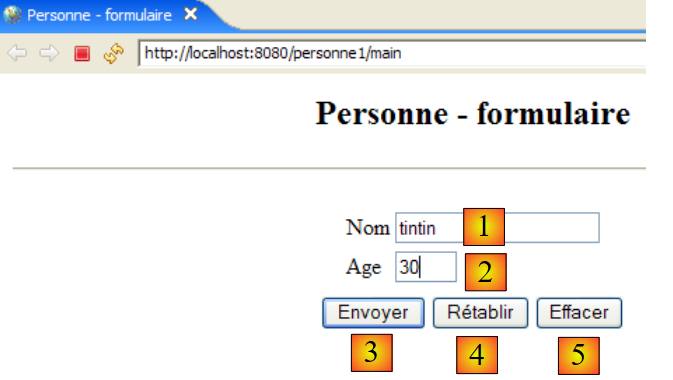
HTML type | name | role | |
<input type="text"> | txtName | Enter name | |
<input type="text"> | txtAge | Enter age | |
<input type="submit"> | Send the entered values to the server at the URL /person1/main | ||
<input type="reset"> | to restore the page to the state in which it was initially received by the browser | ||
<input type="button"> | to clear the contents of input fields [1] and [2] |
It is generated by the JSP page [formulaire.jsp]. Its template consists of the following elements:
- [name]: a name (String) found in the session attributes associated with the key "name"
- [age]: an age (String) found in the session attributes associated with the key "age"
The [form] view is obtained when the user requests the URL [/person1/main], i.e., the URL of the [ServletPersonne] controller. The code for the JSP page [formulaire.jsp] that generates the [form] view is as follows:
<%@ page language="java" contentType="text/html; charset=ISO-8859-1"
    pageEncoding="ISO-8859-1"%>
<!DOCTYPE HTML PUBLIC "-//W3C//DTD HTML 4.01 Transitional//EN">
<%
    // on récupère les données du modèle
  String nom=(String)request.getAttribute("nom");
  String age=(String)request.getAttribute("age");
%>

<html>
    <head>
      <title>Personne - formulaire</title>
  </head>
  <body>
      <center>
        <h2>Personne - formulaire</h2>
      <hr>
      <form method="post">
          <table>
            <tr>
              <td>Nom</td>
            <td><input name="txtNom" value="<%= nom %>" type="text" size="20"></td>
          </tr>
          <tr>
              <td>Age</td>
            <td><input name="txtAge" value="<%= age %>" type="text" size="3"></td>
          </tr>
            <tr>
        </table>
        <table>
            <tr>
              <td><input type="submit" value="Envoyer"></td>
            <td><input type="reset" value="Rétablir"></td>
            <td><input type="button" value="Effacer"></td>
          </tr>
        </table>
        <input type="hidden" name="action" value="validationFormulaire">
      </form>
    </center>
  </body>
</html>
- lines 6-7: The JSP page begins by retrieving the elements [name, age] of its model from the request. In normal application operation, the controller [ServletPersonne] will construct this model.
- lines 18-38: the JSP page generates an HTML form (<form> tag)
- line 18: the <form> tag has no action attribute to specify the URL that will process the values posted by the [Submit] button (line 32). The form values will then be posted to the URL from which the form was obtained, i.e., the URL of the [ServletPersonne] controller. Thus, this controller is used both to generate the empty form initially requested by a GET request and to process the entered data that will be posted to it via the [Submit] button.
- The posted values are those of the HTML fields [txtName] (line 22), [txtAge] (line 26), and [action] (line 37). This last parameter will allow the controller to know what it needs to do.
- When the form is first displayed, the input fields [txtName] and [txtAge] are initialized with the variables [name] (line 22) and [age] (line 26), respectively. These variables obtain their values from the request attributes (lines 6–7), which are known to be initialized by the servlet. It is therefore the servlet that sets the initial content of the form’s input fields.
- Line 33: The [Reset] button of type [reset] restores the form to the state it was in when the browser received it.
- line 34: the [Clear] button of type [reset] currently has no function.
Going forward, we will refer to this view as the [form(name, age)] view when we want to specify both the view’s name and its model. Additionally, note that when the user clicks the [Submit] button, the [txtName, txtAge] parameters are posted to the URL [/person1/main].
5.5.2. The [response] view
This view displays the values entered in the form when they are valid:
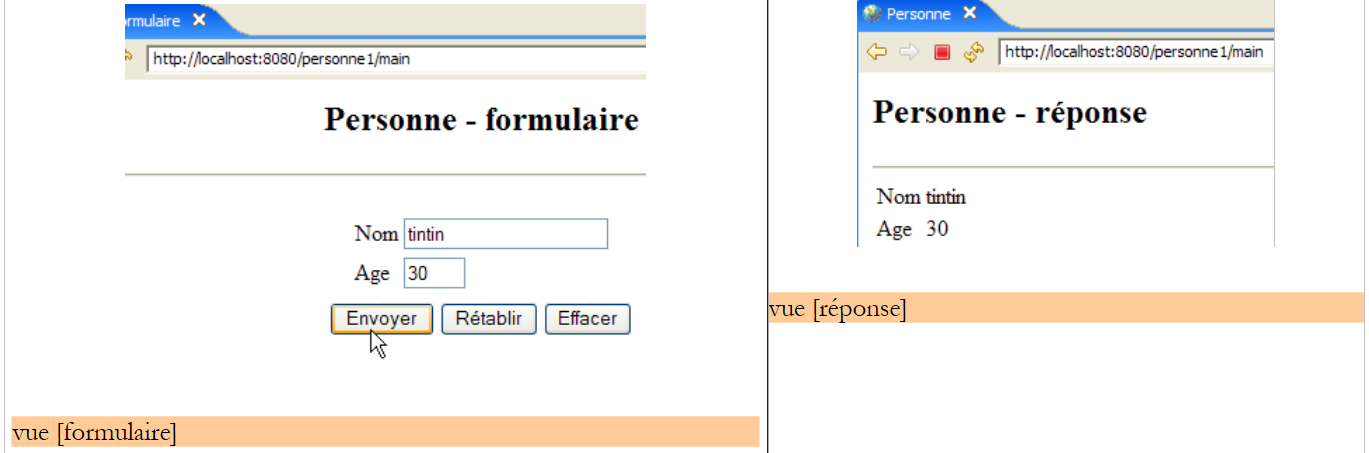
It is generated by the JSP page [reponse.jsp]. Its template consists of the following elements:
- [name]: a name (String) found in the session attributes, associated with the key "name"
- [age]: an age (String) that will be found in the session attributes, associated with the key "age"
The code for the JSP page [reponse.jsp] is as follows:
<%@ page language="java" contentType="text/html; charset=ISO-8859-1"
    pageEncoding="ISO-8859-1"%>
<!DOCTYPE HTML PUBLIC "-//W3C//DTD HTML 4.01 Transitional//EN">
<%
    // on récupère les données du modèle
  String nom=(String)request.getAttribute("nom");
  String age=(String)request.getAttribute("age");
%>

<html>
    <head>
      <title>Personne</title>
  </head>
  <body>
      <h2>Personne - réponse</h2>
    <hr>
    <table>
        <tr>
          <td>Nom</td>
        <td><%= nom %>
      </tr>
        <tr>
          <td>Age</td>
        <td><%= age %>
      </tr>
    </table>
  </body>
</html>
- Lines 6-7: The JSP page begins by retrieving the [name, age] elements of its model from the request. During normal application operation, the [ServletPersonne] controller will construct this model.
- The model elements [name, age] are then displayed on lines 20 and 24
Subsequently, we refer to this view as the [response(name, age)] view.
5.5.3. The [errors] view
This view reports input errors in the form:
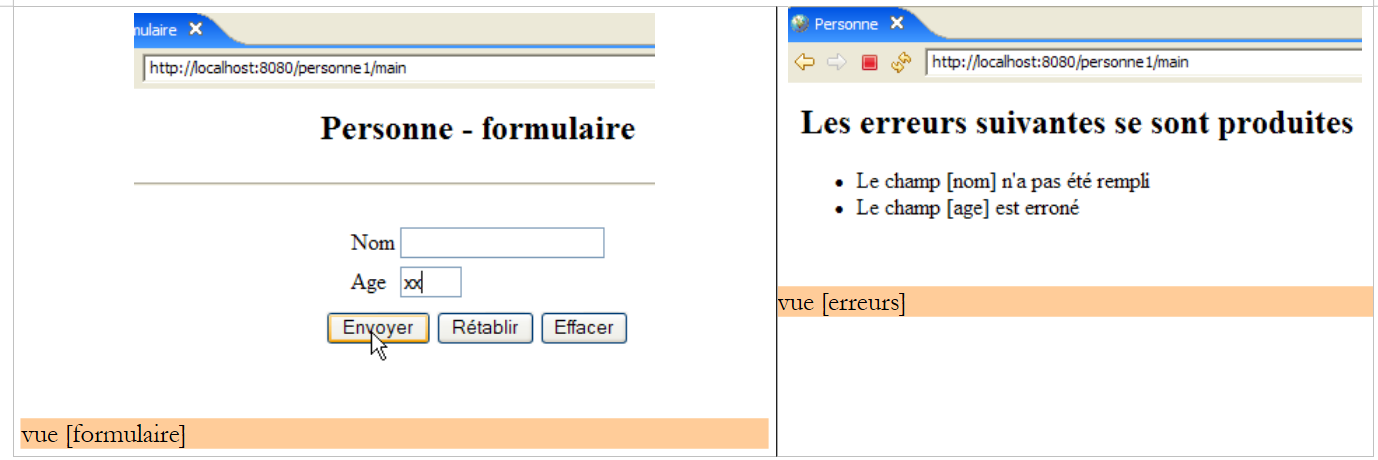
It is generated by the JSP page [errors.jsp]. Its model consists of the following elements:
- [errors]: a list (ArrayList) of error messages that will be found in the request attributes, associated with the key "errors"
The code for the JSP page [errors.jsp] is as follows:
<%@ page language="java" contentType="text/html; charset=ISO-8859-1"
    pageEncoding="ISO-8859-1"%>
<!DOCTYPE HTML PUBLIC "-//W3C//DTD HTML 4.01 Transitional//EN">
<%@ page import="java.util.ArrayList" %>

<%
// on récupère les données du modèle
  ArrayList erreurs=(ArrayList)request.getAttribute("erreurs");
%>

<html>
    <head>
      <title>Personne</title>
  </head>
  <body>
      <h2>Les erreurs suivantes se sont produites</h2>
    <ul>
        <%
          for(int i=0;i<erreurs.size();i++){
            out.println("<li>" + (String) erreurs.get(i) + "</li>\n");
        }//for
      %>
    </ul>
  </body>
</html>
- line 8: the JSP page begins by retrieving the [errors] element from its model in the request. This element represents an ArrayList object containing String elements. These elements are error messages. During normal application operation, the [ServletPersonne] controller will construct this model.
- Lines 18–22: display the list of error messages. To do this, we need to write Java code within the HTML body of the page. We should always aim to keep this to a minimum to avoid cluttering the HTML code. We will see later that there are solutions for reducing the amount of Java code in JSP pages.
- Line 4: Note the import tag for the packages required by the JSP page
We will refer to this view as the [errors(errors)] view.
5.6. Testing Views
It is possible to test the validity of JSP pages without having written the controller. For this, two conditions must be met:
- You must be able to request them directly from the application without going through the controller
- the JSP page must initialize the model itself, which would normally be constructed by the controller
To perform these tests, we duplicate the JSP pages of the views in the [/WebContent/JSP] folder of the Eclipse project:
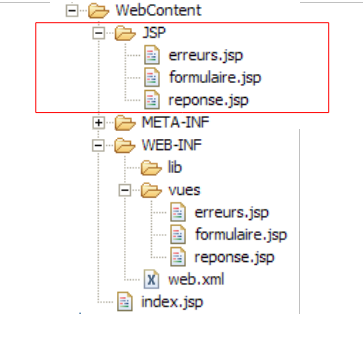
Then, in the JSP folder, the pages are modified as follows:
[form.jsp]:
...

<%
  // -- test : on crée le modèle de la page
  request.setAttribute("nom","tintin");
  request.setAttribute("age","30");
%>

<%
    // on récupère les données du modèle
  String nom=(String)request.getAttribute("nom");
  String age=(String)request.getAttribute("age");
%>

<html>
    <head>
...
Lines 3–7 were added to create the template required by lines 11–12.
[reponse.jsp]:
...

<%
  // -- test : on crée le modèle de la page
  request.setAttribute("nom","milou");
  request.setAttribute("age","10");
%>

<%
    // on récupère les données du modèle
  String nom=(String)request.getAttribute("nom");
  String age=(String)request.getAttribute("age");
%>


<html>
    <head>
...
Lines 3–7 were added to create the template required by the page in lines 11–12.
[errors.jsp]:
...

<%
  // -- test : on crée le modèle de la page
  ArrayList<String> erreurs1=new ArrayList<String>();
  erreurs1.add("erreur1");
  erreurs1.add("erreur2");
  request.setAttribute("erreurs",erreurs1);
%>

<%
// on récupère les données du modèle
  ArrayList erreurs=(ArrayList)request.getAttribute("erreurs");
%>


<html>
    <head>
...
Lines 3–9 were added to create the model required by line 13.
Start Tomcat if you haven't already, then request the following URLs:
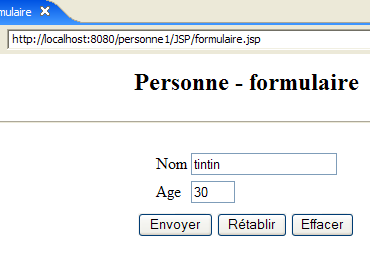 | 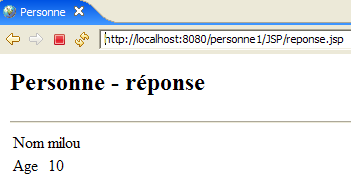 |
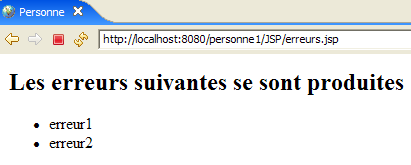 |
We get the expected views. Now that we have reasonable confidence in the application's JSP pages, we can move on to writing its controller [ServletPersonne].
5.7. The [ServletPersonne] controller
All that remains is to write the core of our web application: the controller. Its role is to:
- retrieve the client’s request,
- process the action requested by the client,
- send the appropriate view in response.
The [ServletPersonne] controller will handle the following actions:
request | request | origin | processing |
1 | [GET /person1/hand] | URL entered by the user | - send the empty [form] view |
2 | [POST /person1/hand] with parameters [txtName, txtAge, action] | click on the [Submit] button in the [form] | - check the values of the parameters [txtName, txtAge] - if they are incorrect, send the view [errors(errors)] - if they are correct, send the [response(name,age)] view |
The application starts when the user requests the URL [/person1/main]. According to the application's [web.xml] file (see Section 5.4), this request is handled by an instance of the ServletPersonne class, which we will now describe.
5.7.1. Controller Skeleton
The code for the [ServletPersonne] controller is as follows:
- lines 20–22: the [init] method executed when the servlet is first loaded
- lines 25-28: the [doGet] method called by the web server when a GET request is made to the application
- lines 42-46: the [doPost] method called by the web server when a POST request is made to the application. As shown, this will also be handled by the [doGet] method (line 45).
- lines 31-33: the [doInit] method handles action #1 [GET /person1/main]
- Lines 36–39: The [doValidationFormulaire] method handles action #2 [POST /person1/main] with the posted parameters [txtName, txtAge, action].
We will now describe the various methods of the controller
5.7.2. Controller Initialization
When the controller class is loaded by the servlet container, its [init] method is executed. This happens only once. Once loaded into memory, the controller remains there and processes requests from different clients. Each client is handled by a separate execution thread, so the controller’s methods are executed simultaneously by different threads. Note that, for this reason, the controller must not have any fields that its methods could modify. Its fields must be read-only. They are initialized by the [init] method, which is its primary role. This method has the unique characteristic of being executed only once by a single thread. Therefore, there are no issues with concurrent access to the controller’s fields within this method. The purpose of the [init] method is to initialize the objects required by the web application, which will be shared in read-only mode by all client threads. These shared objects can be placed in two locations:
- the controller's private fields
- the application's execution context (ServletContext)
The code for the [init] method of the [ServletPersonne] controller is as follows:
- line 16: the web application configuration is retrieved, i.e., the contents of the [web.xml] file
- lines 19–29: retrieve the servlet initialization parameters, whose names are defined in the [parameters] array on line 9
- line 21: the parameter value is retrieved
- line 25: if the parameter is missing, the error is added to the initially empty [initializationErrors] error list (line 8).
- Line 28: If the parameter is present, it is stored along with its value in the initially empty [params] dictionary (line 10).
- lines 31–35: the [urlErrors] parameter must be present because it specifies the URL of the [errors] view capable of displaying any initialization errors. If it does not exist, the application is terminated by throwing a [ServletException] (line 33).
5.7.3. The [doGet] method
The [doGet] method handles both GET and POST requests to the servlet, since the [doPost] method redirects to the [doGet] method. Its code is as follows:
- Lines 18–25: We check that the list of initialization errors is empty. If it is not, we display the [errors(initializationErrors)] view, which will report the error(s).
To understand this code, you need to recall the [errors] view template:
<%
// on récupère les données du modèle
  ArrayList erreurs=(ArrayList)request.getAttribute("erreurs");
%>
The [errors] view expects a key named "errors" in the request. The controller creates this key on line 20.
- Line 28: We retrieve the [get] or [post] method that the client used to make the request
- line 30: retrieve the value of the [action] parameter from the request. Recall that in our application, only request #2 [POST /person1/main] has the [action] parameter. In this request, it has the value [validationFormulaire].
- Lines 31–34: If the [action] parameter is not present, we assign it the value "init". This will be the case for the initial request #1 [GET /person1/main].
- Lines 36–40: Processing of request #1 [GET /person1/main].
- Lines 41–45: Processing request #2 [POST /person1/main].
- Line 47: If neither of the two previous cases applies, we proceed as if we were in case #1
5.7.4. The [doInit] method
This method handles request #1 [GET /person1/main]. For this request, it must return the empty [form(name, age)] view. Its code is as follows:
- lines 18-19: the [form] view is displayed. Recall the model expected by this view:
<%
    // on récupère les données du modèle
  String nom=(String)request.getAttribute("nom");
  String age=(String)request.getAttribute("age");
%>
- Lines 16-17: The [name, age] model of the [form] view is initialized with empty strings.
5.7.5. The [doValidationForm] method
This method processes request #2 [POST /person1/main], in which the posted parameters are [action, txtName, txtAge]. Its code is as follows:
- lines 16-17: the values of the "txtNom" and "txtAge" parameters are retrieved from the client's request.
- lines 19-26: the validity of these two parameters is checked
- lines 28-33: if either parameter is incorrect, the [errors(callErrors)] view is displayed. Recall the template for this view:
<%
// on récupère les données du modèle
  ArrayList erreurs=(ArrayList)request.getAttribute("erreurs");
%>
- lines 35-38: if the two retrieved parameters "txtNom" and "txtAge" have valid values, the [response(name, age)] view is displayed. Recall the template for the [response] view:
<%
    // on récupère les données du modèle
  String nom=(String)request.getAttribute("nom");
  String age=(String)request.getAttribute("age");
%>
5.8. Tests
Let’s include the [mvc-personne-01] project in the Tomcat applications by following the procedure described in section 3.3:
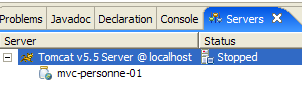
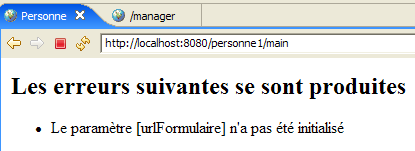
Start Tomcat. Once this is done, we can resume the tests shown as examples in Section 5.1. We can add more tests. For example, we can remove one of the urlXXX configuration parameters from web.xml and see the result. As shown below, one of the parameters is commented out in [web.xml]:
        <!--
            <init-param>
              <param-name>urlFormulaire</param-name>
              <param-value>
                /WEB-INF/vues/formulaire.jsp
              </param-value>
            </init-param>
        -->
We start or restart Tomcat and request the URL [http://localhost:8080/personne1/main]. We get the following response: