14. MVC Web Application in a 3-Tier Architecture – Example 1
14.1. Introduction
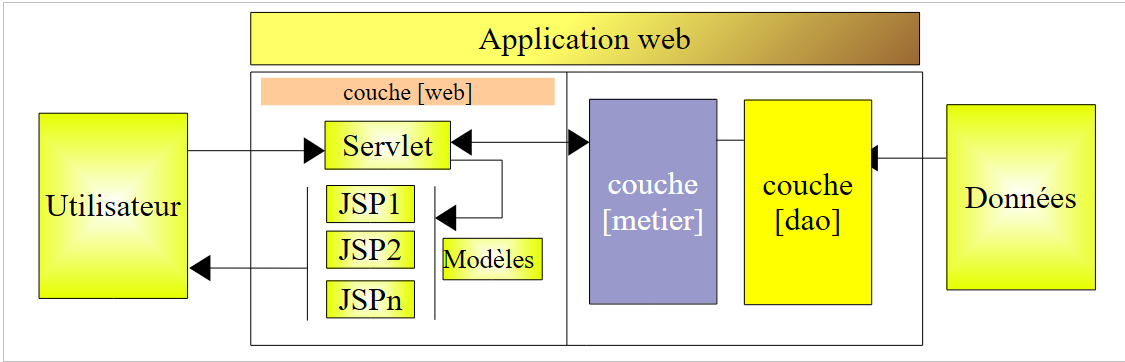
Up to this point, we have limited ourselves to examples intended for educational purposes. For that reason, they had to be simple. We now present a basic application that is nonetheless more feature-rich than any of those presented so far. It will be unique in that it uses all three layers of a 3-tier architecture:
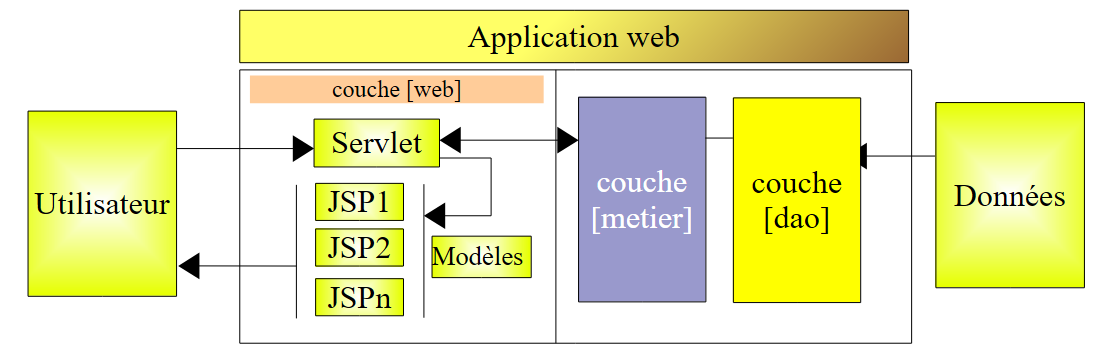
Readers are encouraged to review the principles of a MVC web application in a 3-tier architecture in Section 4, if they have forgotten them.
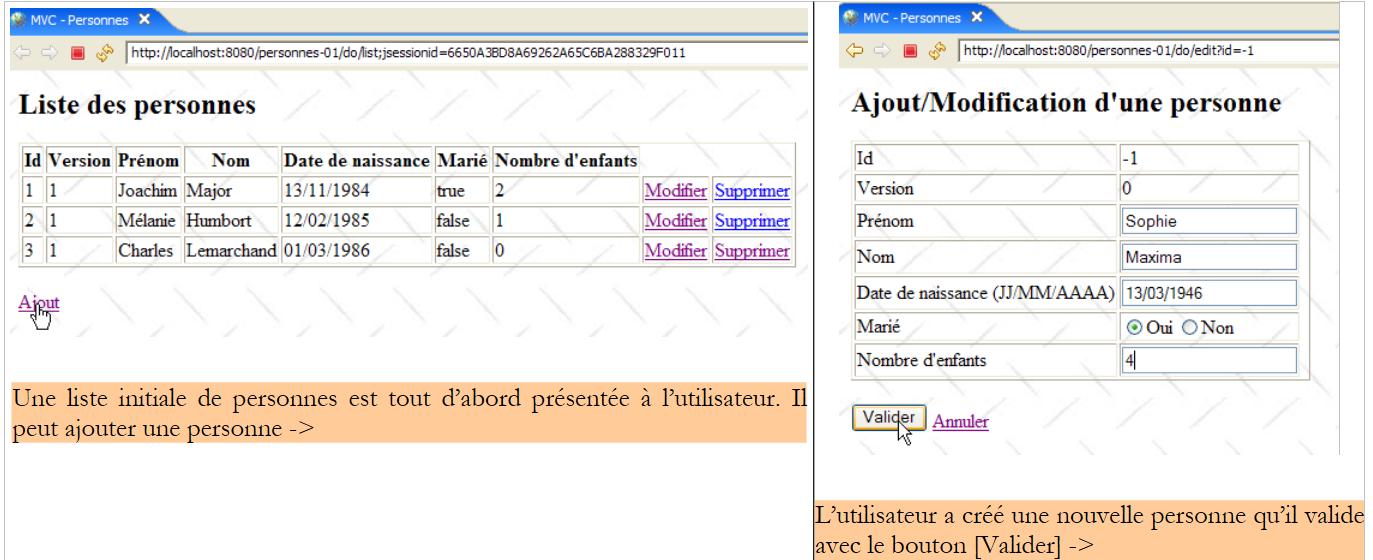
The web application we are going to write will allow us to manage a group of people using four operations:
- list of people in the group
- add a person to the group
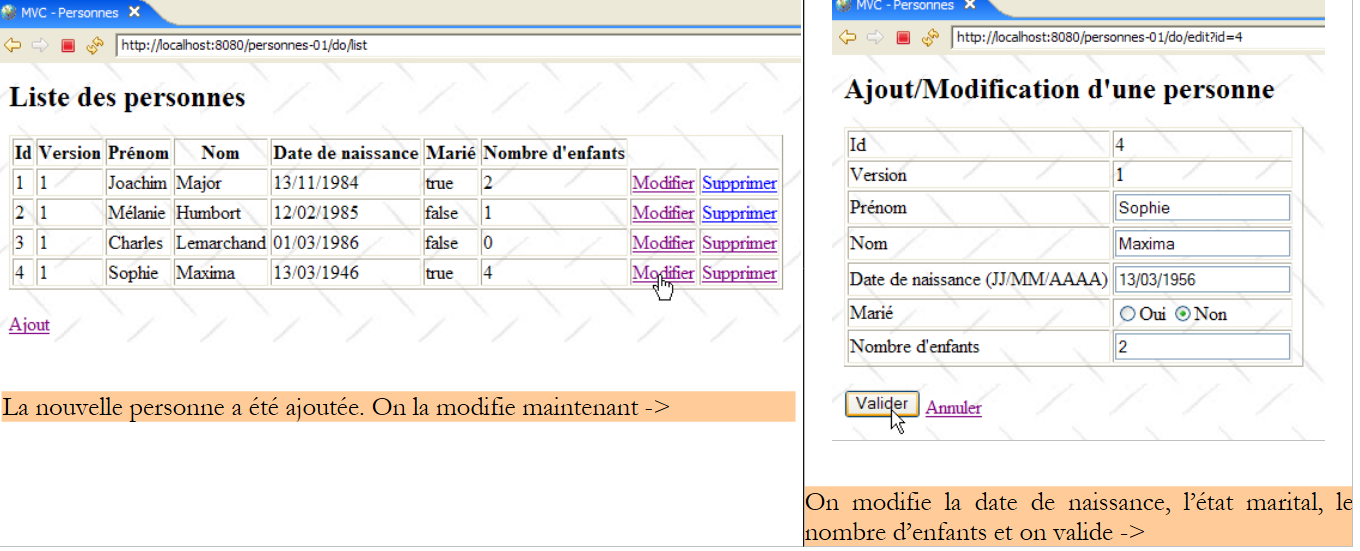
- modifying a person in the group
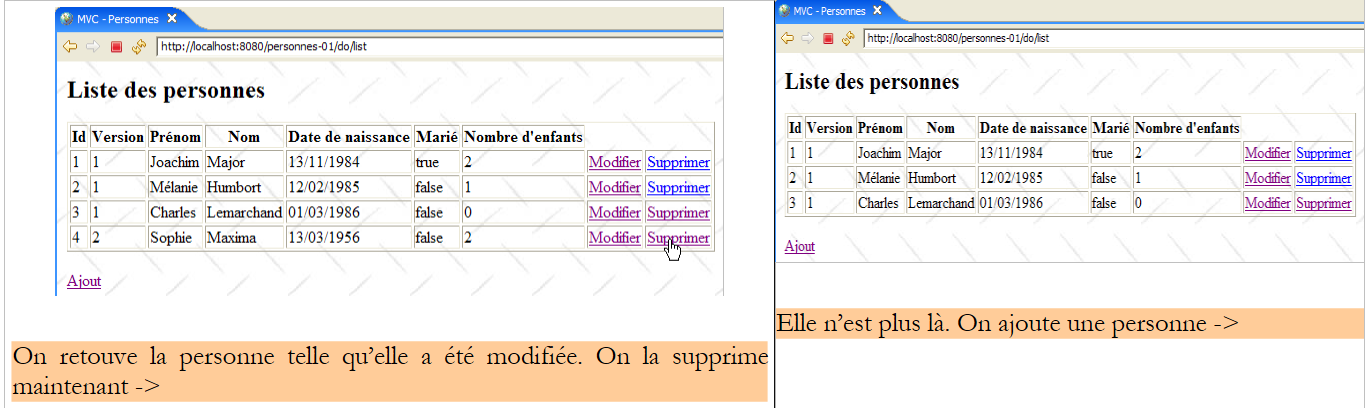
- removing a person from the group
These four operations correspond to the basic operations on a database table. We will write two versions of this application:
- In version 1, the [dao] layer will not use a database. The people in the group will be stored in a simple [ArrayList] object managed internally by the [dao] layer. This will allow the reader to test the application without database constraints.
- In version 2, we will place the group of people in a database table. We will demonstrate that this will have no impact on the web layer of version 1, which will remain unchanged.
The following screenshots show the pages that the application exchanges with the user.
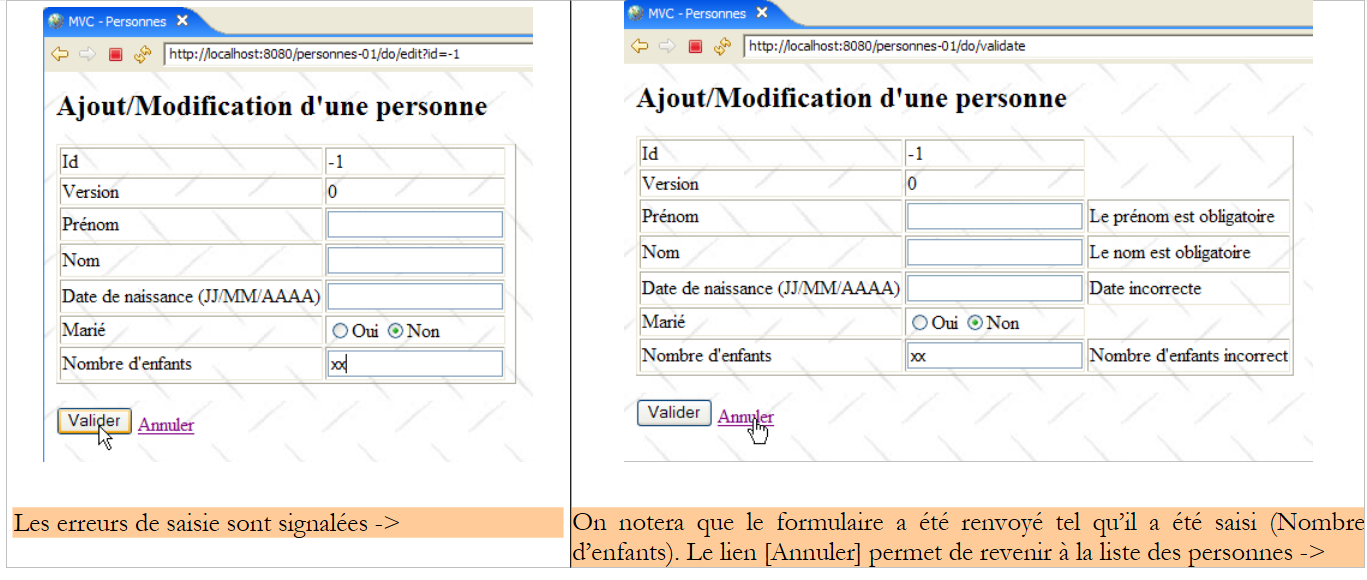 |
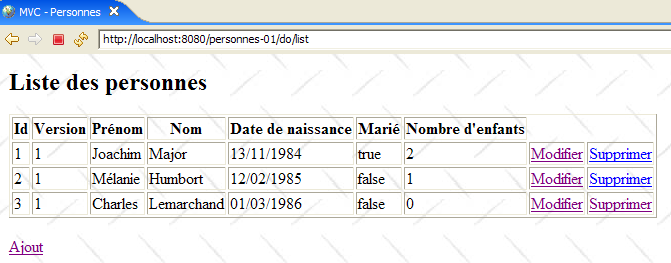 |
14.2. The Eclipse Project
The application project is named [personnes-01]:
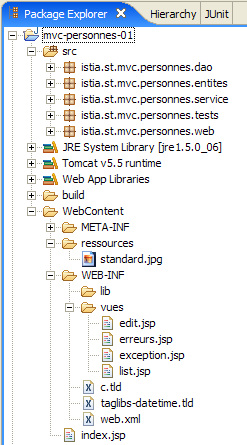
This project covers the three layers of the application’s 3-tier architecture:
 |
- the [dao] layer is contained in the [istia.st.mvc.personnes.dao] package
- the [metier] or [service] layer is contained in the [istia.st.mvc.personnes.service] package
- The layer [web] or [ui] is contained in the package [istia.st.mvc.personnes.web]
- the package [istia.st.mvc.personnes.entites] contains objects shared between different layers
- The package [istia.st.mvc.personnes.tests] contains the JUnit tests for layers [dao] and [service]
We will explore the three layers [dao], [service], and [web] in turn. Since it would be too much to write and perhaps too tedious to read, we may sometimes be a bit brief with the explanations, except when what is presented is new.
14.3. Representation of a Person
The application manages a group of people. The screenshots in section 14.1 showed some of the characteristics of a person. Formally, these are represented by a class [Personne]:

The class [Personne] is as follows:
- A person is identified by the following information:
- id: a unique identifier for a person
- last name: the person's last name
- first name: the person's first name
- dateNaissance: their date of birth
- marital status: whether they are married or not
- nbEnfants: the number of children
- The attribute [version] is an attribute artificially added for the purposes of the application. From an object-oriented perspective, it would likely have been preferable to add this attribute to a class derived from [Personne]. Its necessity becomes apparent when considering use cases for the web application. One such use case is as follows:
At time T1, user U1 begins editing a person P. At this point, the number of children is 0. U1 changes this number to 1, but before U1 saves the change, user U2 begins editing the same person P. Since U1 has not yet saved the change, U2 sees the number of children as 0. U2 changes the name of person P to uppercase. Then U1 and U2 save their changes in that order. U2’s change will take precedence: the name will be in uppercase and the number of children will remain at zero, even though U1 believes they changed it to 1.
The concept of a person helps us solve this problem. Let’s revisit the same use case:
At time T1, a user U1 enters edit mode for a person P. At this point, the number of children is 0 and the version is V1. They change the number of children to 1, but before they save their changes, a user U2 begins editing the same person P. Since U1 has not yet saved their changes, U2 sees the number of children as 0 and the version as V1. U2 changes the name of person P to uppercase. Then U1 and U2 save their changes in that order. Before saving a change, the system verifies that the user modifying person P holds the same version as the currently recorded person P. This will be the case for user U1. Their modification is therefore accepted, and we then change the version of the modified person from V1 to V2 to indicate that the person has undergone a change. When validating U2’s modification, we will notice that they hold a version V1 for person P, whereas person P’s current version is V2. We can then inform user U2 that someone else has already made changes and that they must start over with person P’s new version. They will do so, retrieve person P’s version V2 record—which now includes a child—convert the name to uppercase, and validate. Their modification will be accepted if the registered person P still has version V2. Ultimately, the modifications made by U1 and U2 will be taken into account, whereas in the use case without version, one of the modifications was lost.
- lines 32-40: a constructor capable of initializing a person’s fields. The [version] field is omitted.
- lines 43–51: a constructor that creates a copy of the person passed to it as a parameter. We then have two objects with identical content but referenced by two different pointers.
- Line 55: The [toString] method is redefined to return a string representing the person’s status
14.4. The [dao] layer
The [dao] layer consists of the following classes and interfaces:
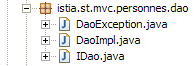
- [IDao] is the interface presented by the [dao] layer
- [DaoImpl] is an implementation of the above where the group of people is encapsulated in a [ArrayList] object
- [DaoException] is a type of unchecked exceptions thrown by the [dao] layer
The interface [IDao] is as follows:
- The interface has four methods for the four operations we want to perform on the group of people:
- getAll: to retrieve a collection of people
- getOne: to retrieve a person with a specific id
- saveOne: to add a person (id=-1) or modify an existing person (id ≠ -1)
- deleteOne: to delete a person with a specific id
The [dao] layer may throw exceptions. These will be of type [DaoException] :
- Line 3: The class [DaoException], which derives from [RuntimeException], is an unhandled exception type: the compiler does not require us to:
- handle this type of exception with a try/catch block when calling a method that might throw it
- include the "throws DaoException" marker in the signature of a method that might throw the exception
This technique prevents us from having to sign the methods of the [IDao] interface with exceptions of a specific type. Any implementation that throws unchecked exceptions will then be acceptable, thereby bringing flexibility to the architecture.
- Line 6: an error code. The [dao] layer will throw various exceptions identified by different error codes. This will allow the layer responsible for handling the exception to determine the exact source of the error and take appropriate action. There are other ways to achieve the same result. One of them is to create an exception type for each possible error type, for example NomManquantException, PrenomManquantException, AgeIncorrectException, ...
- lines 13–16: the constructor that allows you to create an exception identified by an error code and an error message.
- lines 8–10: the method that allows the exception handling code to retrieve the error code.
The class [DaoImpl] implements the interface[IDao]`:
1 2 3 4 5 6 7 8 9 10 11 12 13 14 15 16 17 18 19 20 21 22 23 24 25 26 27 28 29 30 31 32 33 34 35 36 37 38 39 40 41 42 43 44 45 46 47 48 49 50 51 52 53 54 55 56 57 58 59 60 61 62 63 64 65 66 67 68 69 70 71 72 73 74 75 76 77 78 79 80 81 82 83 84 85 86 87 88 89 90 91 92 93 94 95 96 97 98 99 100 101 102 103 104 105 106 107 108 109 110 111 112 113 114 115 116 117 118 119 120 121 122 123 124 125 126 127 128 129 130 131 132 133 134 135 136 137 138 139 140 141 142 143 144 145 146 147 148 149 150 151 152 153 154 155 156 157 158 159 160 161 162 163 164 165 166 167 168 | |
We will only outline the main points of this code. However, we will spend a little time on the trickiest parts.
- line 13: the [ArrayList] object that will contain the group of people
- line 16: the ID of the last person added. Each time a new person is added, this ID will be incremented by 1.
The [DaoImpl] class will be instantiated as a single instance. This is called a singleton. A web application serves its users simultaneously. At any given time, there are multiple threads running on the web server. These threads share the singletons:
- the one from the [dao] layer
- the one from the [service] layer
- those of the various controllers, data validators, etc., in the web layer
If a singleton has private fields, you should immediately ask yourself why it has them. Are they justified? Indeed, they will be shared among different threads. If they are read-only, this is not a problem if they can be initialized at a time when you are sure there is only one active thread. We generally know how to find that moment. This is when the web application starts up but has not yet begun serving clients. If they are read/write, then access synchronization for the fields must be implemented; otherwise, disaster is inevitable. We will illustrate this problem when we test the [dao] layer.
- The [DaoImpl] class has no constructor. Therefore, its default constructor will be used.
- Lines 19–38: The method [init] will be called when the singleton of the [dao] layer is instantiated. It creates a list of three people.
- lines 41–43: implements the [getAll] method of the [IDao] interface. It returns a reference to the list of people.
- lines 46–55: implements the [getOne] method of the [IDao] interface. Its parameter is the id of the person being searched for.
To retrieve it, a private method [getPosition] in lines 113–126 is called. This method returns the position in the list of the person being searched for, or -1 if the person was not found.
If the person is found, the [getOne] method returns a reference (line 51) to a copy of that person, not to the person themselves. In fact, when a user wants to modify a person, information about that person is requested from the [dao] layer and passed up to the [web] layer for modification, in the form of a reference to a [Personne] object. This reference will serve as an input container in the modification form. When the user submits their changes in the web layer, the contents of the input container will be modified. If the container is a reference to the actual person in [ArrayList] from the [dao] layer, then that record is modified even though the changes have not been submitted to the [service] and [dao] layers. The latter is the only layer authorized to manage the list of people. Therefore, the web layer must work on a copy of the person to be modified. Here, the [dao] layer provides this copy.
If the person being searched for is not found, a [DaoException] exception is thrown with error code 2 (line 53).
- Lines 94–104: Implements the [deleteOne] method of the [IDao] interface. Its parameter is the id of the person to be deleted. If the person to be deleted does not exist, an exception of type [DaoException] is thrown with error code 2.
- Lines 58–91: Implements the [saveOne] method of the [IDao] interface. Its parameter is a [Personne] object. If this object has a id value of -1, then this is a person addition. Otherwise, this involves modifying the person in the list with this id using the parameter values.
- Line 60: The validity of the [Personne] parameter is verified by a private method [check] defined on lines 129–155. This method performs basic checks on the values of the various fields in [Personne]. Whenever an anomaly is detected, a [DaoException] with a specific error code is thrown. Since the [saveOne] method does not handle this exception, it will be propagated to the calling method.
- Line 62: If the [Personne] parameter has a id value of -1, then this is an addition. The [Personne] object is added to the internal list of people (line 66), with the first available id (line 64), and a version value of 1 (line 65).
- If the [Personne] parameter has a [id] value other than -1, the person in the internal list with that [id] is to be modified. First, we check (lines 70–75) that the person to be modified exists. If this is not the case, we throw a [DaoException] exception with error code 2.
- If the person does exist, we verify that their current version matches the value of the [Personne] parameter, which contains the changes to be applied to the original. If this is not the case, it means that the person attempting to modify the record does not have the latest version. We notify them by throwing a [DaoException] exception with error code 3 (lines 79–80).
- If everything goes well, the changes are made to the original person record (lines 85–90)
It is clear that this method must be synchronized. For example, between the time we verify that the person to be modified is indeed present and the time the modification is made, the person could have been deleted from the list by someone else. The method should therefore be declared as [synchronized] to ensure that only one thread executes it at a time. The same applies to the other methods of the [IDao] interface. We do not do this, preferring to move this synchronization to the [service] layer. To highlight synchronization issues, during testing of the [dao] layer, we will pause the execution of [saveOne] for 10 ms (line 83) between the moment we know we can make the modification and the moment we actually make it. The thread executing [saveOne] will then lose the CPU to another thread. This increases our chances of observing access conflicts to the list of people.
14.5. Tests for the [dao] layer
A JUnit test is written for the [dao] layer:
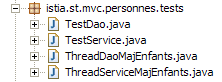 | 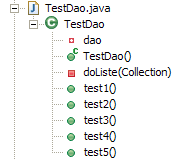 |
[TestDao] is the JUnit test. To highlight concurrent access issues to the list of people, [ThreadDaoMajEnfants]-type threads are created. They are tasked with increasing the number of children for a given person by 1.
[TestDao] contains five tests, from [test1] to [test5]. We present only two of them here; readers are invited to explore the others in the source code associated with this article.
- line 9: reference to the implementation of the [dao] layer being tested
- lines 12–15: the JUnit test constructor. It creates an instance of type [DaoImpl] from the [dao] layer to be tested and initializes it.
The [test1] method tests the four methods of the [IDao] interface as follows:
- line 3: we request the list of people
- line 6: we display it
[1,1,Joachim,Major,13/01/1984,true,2]
[2,1,Mélanie,Humbort,12/01/1985,false,1]
[3,1,Charles,Lemarchand,01/01/1986,false,0]
The test then adds a person, modifies them, and deletes them. Thus, the four methods of the [IDao] interface are used.
- Lines 8–10: A new person is added (id=-1).
- line 11: the id of the added person is retrieved because the addition assigned one to them. They did not have one before.
- Lines 13–14: We request a copy of the person who has just been added from the [dao] layer. Keep in mind that if the requested person is not found, the [dao] layer throws an exception. This will cause a crash on line 13. We could have handled this case more cleanly. On line 14, we check the name of the person found.
- Lines 16–17: We modify this name and ask the [dao] layer to save the changes.
- Lines 19–20: We request a copy of the person just added from the [dao] layer and verify their new name.
- Line 22: Delete the person added at the beginning of the test.
- lines 23-34: we request a copy of the person who was just deleted from layer [dao]. We should receive a [DaoException] with code 2.
- Lines 36–37: The list of people is requested again. We should receive the same list as at the beginning of the test.
The [test4] method aims to highlight issues with concurrent access to the methods of the [dao] layer. Recall that these methods have not been synchronized. The test code is as follows:
- lines 3-6: we add a person P with no children to the list. We note their ID as [id] (line 6).
- lines 7-13: We launch N threads. Each of them will increment the number of children for person P by 1. In the end, person P should have N children.
- lines 15-17: the method [test4], which launched the N threads, waits for them to finish their work before checking the new number of children for person P.
- lines 18–21: We retrieve person P and verify that their number of children is N.
- Lines 22–35: Person P is removed, and we verify that they no longer exist in the list.
Line 11: We see that the threads are of type [ThreadDaoMajEnfants]. The constructor for this type has three parameters:
- the name given to the thread, used to track it via logs
- a reference to the [dao] layer so that the thread can access it
- the id of the person on whom the thread is to work
The [ThreadDaoMajEnfants] type is as follows:
- line 9: [ThreadDaoMajEnfants] is indeed a thread
- lines 18–22: the constructor that initializes the thread with three pieces of information
- the name [name] given to the thread
- a reference [dao] to the layer [dao]. Note that once again, we are working with the type of the interface [IDao] and not that of the implementation [DaoImpl].
- the identifier [id] of the person on whom the thread is to work
When [test4] launches a thread [ThreadDaoMajEnfants] (line 12 of test4), the method [run] (line 25) of that thread is executed:
- lines 78–81: the private method [suivi] enables screen logging. The method [run] uses it to track the thread’s execution.
- The thread attempts to increment by 1 the number of children of person P with identifier [id]. This update may require multiple attempts. Consider two threads, [TH1] and [TH2]. [TH1] requests a copy of person P from layer [dao]. It obtains it and notes that it has version V1. [TH1] is interrupted. [TH2], which was following it, does the same thing and obtains the same version V1 from person P. [TH2] is interrupted. [TH2] takes over, increments the number of children of P, and saves its changes. We know that these changes are now saved and that P’s version will be updated to V2. [TH1] has finished its work. [TH2] takes over and does the same. Its update to P will be rejected because it holds a copy of P from version V1, whereas the original P now has version V2. [TH2] must then repeat the entire [lecture -> mise à jour -> sauvegarde] cycle. This is why we find the loop in lines 32–72. In this loop, the thread:
- requests a copy of person P to be modified (line 34)
- waits 10 ms (line 43). This is artificial and is intended to interrupt the thread between reading person P and actually updating them in the list of people in order to increase the likelihood of conflicts.
- increments the number of children of P (line 54) and saves P (line 56). If the thread does not have the correct version for P, an exception will be thrown by the [dao] layer. We then retrieve the exception code (line 61) to verify that it is indeed code 3 (incorrect version for P). If this is not the case, we re-throw the exception to the calling method, ultimately the test method [test4]. If we have the code 3 exception, then we restart the [lecture -> mise à jour -> sauvegarde] cycle. If there is no exception, then the update has been completed and the thread’s work is finished.
What do the tests show?
In the first configuration tested:
- we comment out the wait instruction in the [saveOne] method of [DaoImpl] (line 83, section 14.4).
- The [test4] method creates 100 threads (line 8, section 14.5).
The following results are obtained:
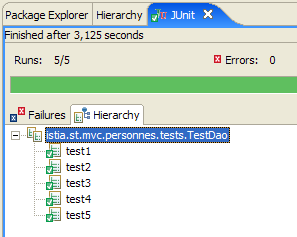
All five tests were successful.
In the second configuration tested:
- the wait instruction in the [saveOne] method of [DaoImpl] is uncommented (line 83, section 14.4).
- the [test4] method creates 2 threads (line 8, section 14.5).
The following results are obtained:
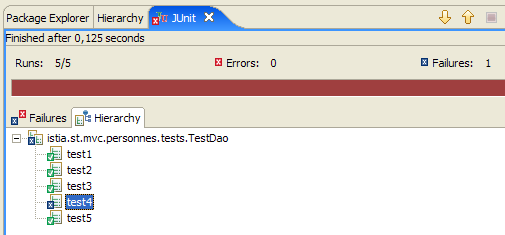 | 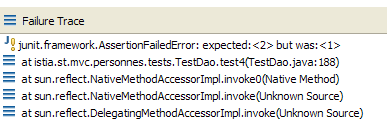 |
The [test4] test failed. Two threads were created, each tasked with incrementing by 1 the number of children for a person P who initially had 0. We therefore expected 2 children after the two threads ran, but we only have one.
Let’s examine the screen logs for [test4] to understand what happened:
- Line 1: Thread #0 begins its work
- line 2: it has retrieved a copy of person P and finds that the number of children is 0
- line 3: it encounters the [Thread.sleep(10)] of its method [run] and therefore pauses at time [1145536368171] (ms)
- line 4: thread #1 then takes over the processor and begins its work
- line 5: it has retrieved a copy of person P and finds that they have 0 children
- line 6: it encounters the [Thread.sleep(10)] of its method [run] and therefore stops
- line 7: thread #0 regains the processor at time [1145536368187] (ms), c.a.d. 16 ms after losing it.
- line 8: same for thread #1
- line 9: thread #0 has updated itself and set the number of children to 1
- Line 10: Thread #1 has done the same
The question is why thread #1 was able to perform its update when, normally, it no longer held the correct version for person P, which had just been updated by thread #0.
First, we can observe an anomaly between lines 7 and 8: it appears that thread #0 lost the processor between these two lines to thread #1. What was it doing at that moment? It was executing the [saveOne] method of the [dao] layer. This method has the following skeleton (see Section 14.4):
- Thread #0 executed [saveOne] and reached line 8, where it was forced to release the processor. In the meantime, it read person P’s version, which was 1 because person P had not yet been updated.
- Since the processor became free, thread #1 inherited it. It, in turn, executed [saveOne] and reached line 8, where it was forced to release the processor. In the meantime, it read person P’s version, and the value was 1 because person P still hadn’t been updated.
- Since the processor became free, thread #0 inherited it. Starting on line 9, it performed its update and set the number of children to 1. Then the [run] method of thread #0 finished, and the thread displayed the log stating that it had set the number of children to 1 (line 9).
- Since the processor became free, thread #1 inherited it. Starting on line 9, it performed its update and set the number of children to 1. Why 1? Because it holds a copy of P with a number of children set to 0. This is indicated by the log (line 5). Then the [run] method of thread #1 finished, and the thread displayed the log stating that it had set the number of children to 1 (line 10).
Where does the problem come from? It stems from the fact that thread #0 did not have time to commit its change and thus update person P’s version before thread #1 attempted to read that version to determine if person P had changed. This scenario is unlikely but not impossible. We had to force thread #0 to lose the CPU to make it appear with just two threads. Without this workaround, the previous configuration had failed to reproduce this same scenario with 100 threads. The [test4] test had been successful.
What is the solution? There are undoubtedly several. One of them, which is simple to implement, is to synchronize the [saveOne] method:
public synchronized void saveOne(Personne personne)
The [synchronized] keyword ensures that only one thread at a time can execute the method. Thus, thread #1 will only be allowed to execute [saveOne] once thread #0 has exited it. We can then be sure that the version for person P will have been changed by the time thread #1 enters [saveOne]. Its update will then be rejected because it will not have the correct version for P.
These are the four methods of the [dao] layer that would need to be synchronized. However, we decide to keep this layer as described and to defer synchronization to the [service] layer. There are several reasons for this:
- we assume that access to the [dao] layer always occurs through a [service] layer. This is the case in our web application.
- it may also be necessary to synchronize access to the methods of the [service] layer for reasons other than those that would cause us to synchronize those of the [dao] layer. In this case, there is no need to synchronize the methods of the [dao] layer. If we are certain that:
- all access to the [dao] layer goes through the [service] layer
- only one thread at a time uses the [service] layer
then we can be sure that the methods of the [dao] layer will not be executed by two threads at the same time.
We now examine the [service] layer.
14.6. The [service] layer
The [service] layer consists of the following classes and interfaces:
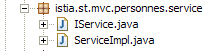
- [IService] is the interface provided by the [dao] layer
- [ServiceImpl] is an implementation of the interface
The [IService] interface is as follows:
It is identical to the [IDao] interface.
The implementation [ServiceImpl] of the interface [IService] is as follows:
- lines 10–19: The [IDao dao] attribute is a reference to the [dao] layer. It will be initialized by Spring IoC.
- lines 22–24: implementation of the [getAll] method of the [IService] interface. The method simply delegates the request to the [dao] layer.
- lines 27–29: implementation of the [getOne] method of the [IService] interface. The method simply delegates the request to the [dao] layer.
- lines 32–34: implementation of the [saveOne] method of the [IService] interface. The method simply delegates the request to the [dao] layer.
- Lines 37–39: Implementation of the [deleteOne] method of the [IService] interface. The method simply delegates the request to the [dao] layer.
- All methods are synchronized (using the `synchronized` keyword), ensuring that only one thread at a time can use the [service] layer and, consequently, the [dao] layer.
14.7. Tests for the [service] layer
A JUnit test is written for the [service] layer:
| 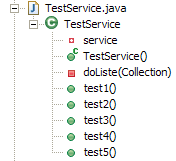 |
[TestService] is the test for JUnit. The tests performed are strictly identical to those performed for the [dao] layer. The skeleton of [TestService] is as follows:
- Line 9: The [service] layer being tested is of type [ServiceImpl].
- lines 11–15: the JUnit test constructor creates an instance of the [service] layer to be tested (line 12), creates an instance of the [dao] (line 13), and instructs the [service] layer to use this [dao] layer (line 14).
The [test1] method tests the four methods of the [IService] interface in the same way as the test method of the [dao] layer with the same name. Simply put, the [service] layer (lines 25, 32, 35) is accessed instead of the [dao] layer.
The [test4] method aims to highlight concurrent access issues to the methods of the [service] layer. It is, once again, identical to the [test4] test method in the [dao] layer. However, there are a few details that differ:
- it addresses the [service] layer rather than the [dao] layer (line 55)
- we pass a reference to layer [service] to the threads instead of layer [dao] (line 61)
The [ThreadServiceMajEnfants] type is also virtually identical to the [ThreadDaoMajEnfants] type, with the exception that it works with the [service] layer rather than the [dao] layer:
- Line 12: The thread is working with the [service] layer
We are running tests with the configuration that caused issues in the [dao] layer:
- we uncomment the wait statement in the [saveOne] method of [DaoImpl] (line 83, section 14.4).
- The [test4] method creates 100 threads (line 65, section 14.7).
The results obtained are as follows:
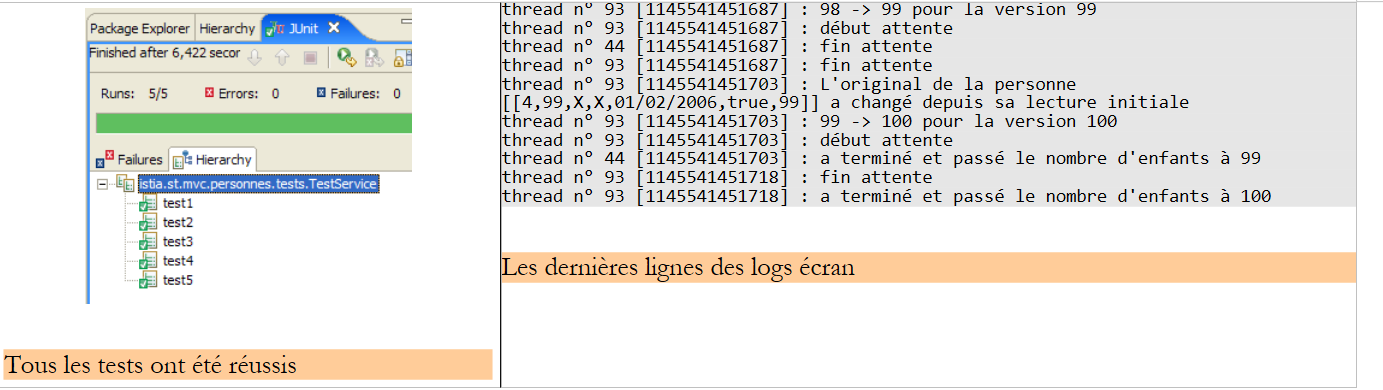 |
It was the synchronization of the methods in the [service] layer that enabled the success of the [test4] test.
14.8. The [web] layer
Let’s review the 3-tier architecture of our application:
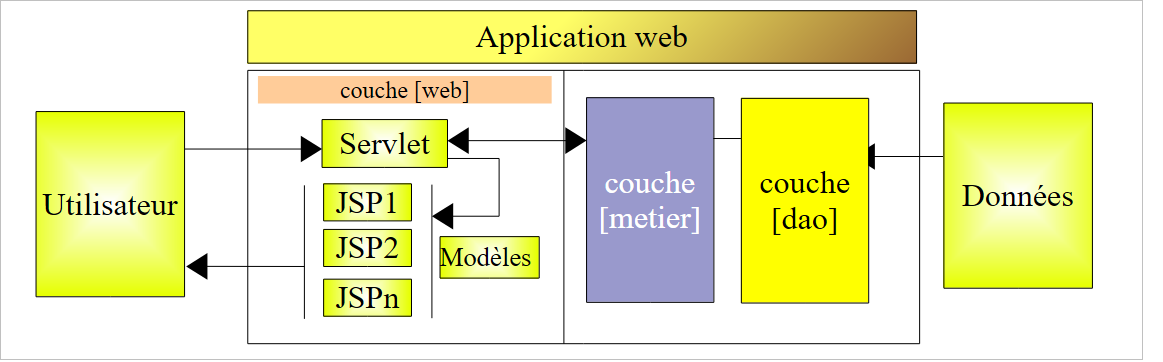 |
The [web] layer will provide screens to the user to allow them to manage the group of people:
- list of people in the group
- add a person to the group
- editing a person in the group
- removing a person from the group
To do this, it will rely on the [service] layer, which in turn will call upon the [dao] layer. We have already presented the screens managed by the [web] layer (section 14.1). To describe the web layer, we will present the following in turn:
- its configuration
- its views
- its controller
- some tests
14.8.1. Web Application Configuration
The Eclipse project for the application is as follows:
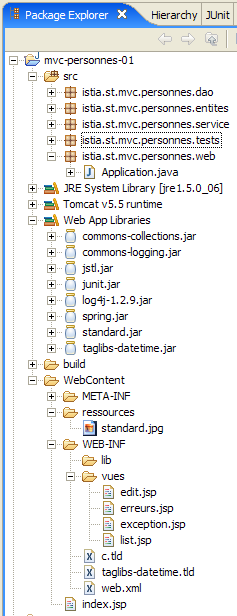
- In the [istia.st.mvc.personnes.web] package, you will find the [Application] controller.
- The pages JSP / JSTL are in [WEB-INF/vues].
- The [lib] folder contains the third-party libraries required by the application. They are located in the [Web App Libraries] folder.
[web.xml]
The file [web.xml] is the file used by the web server to load the application. Its contents are as follows:
<?xml version="1.0" encoding="UTF-8"?>
<web-app id="WebApp_ID" version="2.4"
    xmlns="http://java.sun.com/xml/ns/j2ee"
    xmlns:xsi="http://www.w3.org/2001/XMLSchema-instance"
    xsi:schemaLocation="http://java.sun.com/xml/ns/j2ee http://java.sun.com/xml/ns/j2ee/web-app_2_4.xsd">
    <display-name>mvc-personnes-01</display-name>
    <!--  ServletPersonne -->
    <servlet>
        <servlet-name>personnes</servlet-name>
        <servlet-class>
            istia.st.mvc.personnes.web.Application
        </servlet-class>
        <init-param>
            <param-name>urlEdit</param-name>
            <param-value>/WEB-INF/vues/edit.jsp</param-value>
        </init-param>
        <init-param>
            <param-name>urlErreurs</param-name>
            <param-value>/WEB-INF/vues/erreurs.jsp</param-value>
        </init-param>
        <init-param>
            <param-name>urlList</param-name>
            <param-value>/WEB-INF/vues/list.jsp</param-value>
        </init-param>
    </servlet>
    <!--  Mapping ServletPersonne-->
    <servlet-mapping>
        <servlet-name>personnes</servlet-name>
        <url-pattern>/do/*</url-pattern>
    </servlet-mapping>
    <!--  welcome files -->
    <welcome-file-list>
        <welcome-file>index.jsp</welcome-file>
    </welcome-file-list>
    <!--  Unexpected error page -->
    <error-page>
        <exception-type>java.lang.Exception</exception-type>
        <location>/WEB-INF/vues/exception.jsp</location>
    </error-page>
</web-app>
- lines 27-30: url and [/do/*] will be handled by the [personnes] servlet
- lines 9-12: the [personnes] servlet is an instance of the [Application] class, a class we are going to build.
- lines 13–24: define three parameters [urlList, urlEdit, urlErreurs] identifying the Url of the JSP pages of the [list, edit, erreurs] views.
- Lines 32–34: The application has a default landing page, [index.jsp], located at the root of the web application folder.
- Lines 36–39: The application has a default error page that is displayed when the web server encounters an exception not handled by the application.
- Line 37: The <exception-type> tag specifies the type of exception handled by the <error-page> directive; here, the type is [java.lang.Exception] and its subtypes, meaning all exceptions.
- Line 38: The <location> tag specifies the JSP page to display when an exception of the type defined by <exception-type> occurs. The exception that occurred is available on this page in an object named exception if the page has the directive:
<%@ page isErrorPage="true" %>
- (continued)
- If <exception-type> specifies type T1 and an exception of type T2 (not derived from T1) is reported to the web server, the server sends the client a proprietary exception page that is generally not very user-friendly. Hence the value of the <error-page> tag in the [web.xml] file.
[index.jsp]
This page is displayed if a user directly requests the application context without specifying url, c.a.d. Here, [/personnes-01]. Its content is as follows:
<%@ page language="java" pageEncoding="ISO-8859-1" contentType="text/html;charset=ISO-8859-1"%>
<%@ taglib uri="/WEB-INF/c.tld" prefix="c" %>

<c:redirect url="/do/list"/>
[index.jsp] redirects the client to url [/do/list]. This url displays the list of people in the group.
14.8.2. The JSP / JSTL pages of the application
The [list.jsp] view
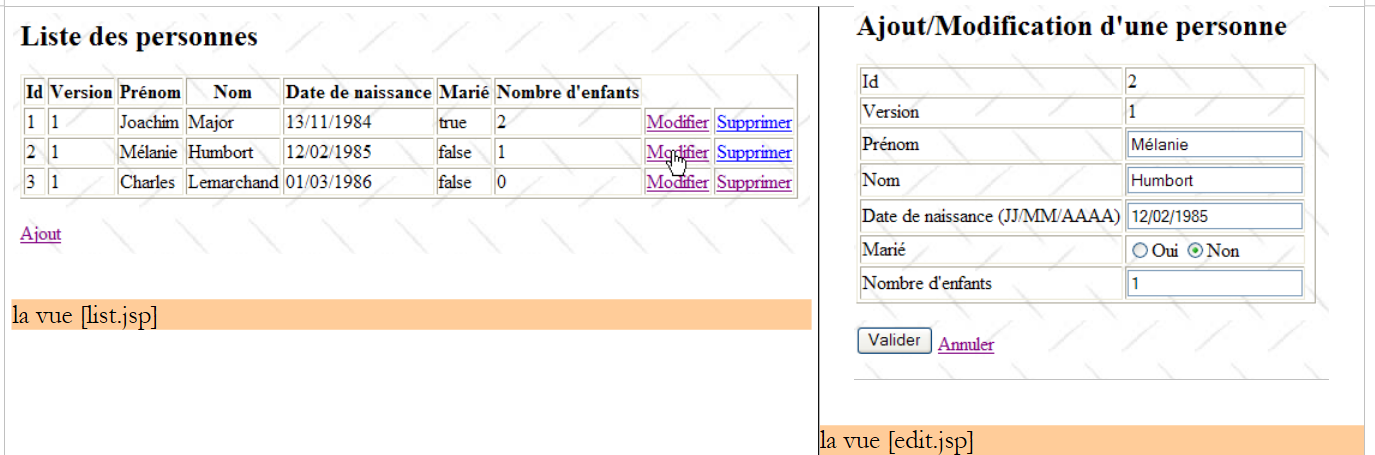
It is used to display the list of people:
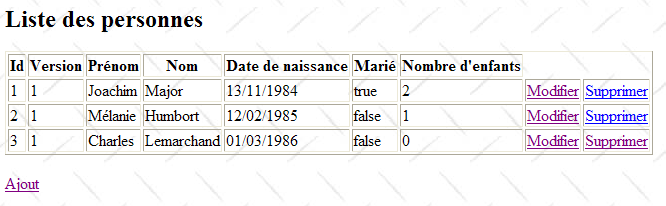
Its code is as follows:
<%@ page language="java" pageEncoding="ISO-8859-1" contentType="text/html;charset=ISO-8859-1"%>
<%@ taglib uri="/WEB-INF/c.tld" prefix="c" %>
<%@ taglib uri="/WEB-INF/taglibs-datetime.tld" prefix="dt" %>
<html>
<head>
<title>MVC - Personnes</title>
</head>
<body background="<c:url value="/ressources/standard.jpg"/>">
<h2>Liste des personnes</h2>
<table border="1">
<tr>
<th>Id</th>
<th>Version</th>
<th>Prénom</th>
<th>Nom</th>
<th>Date de naissance</th>
<th>Marié</th>
<th>Nombre d'children</th>
<th></th>
</tr>
<c:forEach var="personne" items="${personnes}">
<tr>
<td><c:out value="${personne.id}"/></td>
<td><c:out value="${personne.version}"/></td>
<td><c:out value="${personne.prenom}"/></td>
<td><c:out value="${personne.nom}"/></td>
<td><dt:format pattern="dd/MM/yyyy">${personne.dateNaissance.time}</dt:format></td>
<td><c:out value="${personne.marie}"/></td>
<td><c:out value="${personne.nbEnfants}"/></td>
<td><a href="<c:url value="/do/edit?id=${personne.id}"/>">Modifier</a></td>
<td><a href="<c:url value="/do/delete?id=${personne.id}"/>">Supprimer</a></td>
</tr>
</c:forEach>
</table>
<br>
<a href="<c:url value="/do/edit?id=-1"/>">Ajout</a>
</body>
</html>
- This view receives an element in its template:
- the element [personnes] associated with an object of type [ArrayList] of objects of type [Personne]
- lines 22-34: the ${personnes} list is iterated to display a HTML table containing the people in the group.
- line 31: the url pointed to by the link [Modifier] is configured by the [id] field of the current person so that the controller associated with theurl [/do/edit] knows which person to modify.
- Line 32: The same applies to the link [Supprimer].
- Line 28: To display the person’s date of birth in the format JJ/MM/AAAA, we use the <dt> tag from the [DateTime] tag library in the Apache [Jakarta Taglibs] project:
The description file for this tag library is defined on line 3.
- Line 37: The [Ajout] link for adding a new person targets url [/do/edit], just like the [Modifier] link on line 31. It is the value -1 of the [id] parameter that indicates that this is an addition rather than a modification.
The [edit.jsp] view
It is used to display the form for adding a new person or modifying an existing one:
 |
The code for the [edit.jsp] view is as follows:
<%@ page language="java" pageEncoding="ISO-8859-1" contentType="text/html;charset=ISO-8859-1"%>
<%@ taglib uri="/WEB-INF/c.tld" prefix="c" %>
<%@ taglib uri="/WEB-INF/taglibs-datetime.tld" prefix="dt" %>
<html>
<head>
<title>MVC - Personnes</title>
</head>
<body background="../ressources/standard.jpg">
<h2>Ajout/Modification d'one person</h2>
<c:if test="${erreurEdit != ''}">
<h3>Echec de la mise à jour :</h3>
L'the following error occurred: ${erreurEdit}
<hr>
</c:if>
<form method="post" action="<c:url value="/do/validate"/>">
<table border="1">
<tr>
<td>Id</td>
<td>${id}</td>
</tr>
<tr>
<td>Version</td>
<td>${version}</td>
</tr>
<tr>
<td>Prénom</td>
<td>
<input type="text" value="${prenom}" name="prenom" size="20">
</td>
<td>${erreurPrenom}</td>
</tr>
<tr>
<td>Nom</td>
<td>
<input type="text" value="${nom}" name="nom" size="20">
</td>
<td>${erreurNom}</td>
</tr>
<tr>
<td>Date de naissance (JJ/MM/AAAA)</td>
<td>
<input type="text" value="${dateNaissance}" name="dateNaissance">
</td>
<td>${erreurDateNaissance}</td>
</tr>
<tr>
<td>Marié</td>
<td>
<c:choose>
<c:when test="${marie}">
<input type="radio" name="marie" value="true" checked>Oui
<input type="radio" name="marie" value="false">Non
</c:when>
<c:otherwise>
<input type="radio" name="marie" value="true">Oui
<input type="radio" name="marie" value="false" checked>Non
</c:otherwise>
</c:choose>
</td>
</tr>
<tr>
<td>Nombre d'children</td>
<td>
<input type="text" value="${nbEnfants}" name="nbEnfants">
</td>
<td>${erreurNbEnfants}</td>
</tr>
</table>
<br>
<input type="hidden" value="${id}" name="id">
<input type="hidden" value="${version}" name="version">
<input type="submit" value="Valider">
<a href="<c:url value="/do/list"/>">Annuler</a>
</form>
</body>
</html>
This view displays a form for adding a new person or updating an existing one. From now on, to simplify the text, we will use the single term [mise à jour]. The [Valider] button (line 73) triggers the POST form to the url [/do/validate] (line 16). If POST fails, the [edit.jsp] view is redisplayed with the error(s) that occurred; otherwise, the [list.jsp] view is displayed.
- The [edit.jsp] view, displayed on both a GET and a POST that fails, receives the following elements in its template:
attribute | GET | POST |
ID of the updated person | same | |
its version | same | |
first name | first name entered | |
his/her last name | last name entered | |
his/her date of birth | entered date of birth | |
marital status | entered marital status | |
number of children | number of children entered | |
empty | An error message indicating that the addition or modification failed during POST, triggered by the [Envoyer] button. Empty if no error. | |
empty | indicates an incorrect first name – empty otherwise | |
empty | indicates an incorrect last name – empty otherwise | |
empty | indicates an incorrect date of birth – empty otherwise | |
empty | indicates an incorrect number of children – blank otherwise |
- lines 11-15: if the POST in the form fails, [erreurEdit!=''] will be returned and an error message will be displayed.
- line 16: the form will be posted to url [/do/validate]
- line 20: the [id] element of the template is displayed
- line 24: the [version] element of the template is displayed
- lines 26–32: entry of the person’s first name:
- when the form is initially displayed (GET), ${first_name} displays the current value of field [prenom] of the updated object [Personne], and ${erreurPrenom} is empty.
- if an error occurs after POST, the entered value ${first_name} is redisplayed along with any error message ${erreurPrenom}
- lines 33-39: enter the person's last name
- Lines 40–46: Enter the person’s date of birth
- lines 47-61: Enter the person’s marital status using a radio button. The value of the [marie] field in the [Personne] object is used to determine which of the two radio buttons should be selected.
- Lines 62–68: Enter the person’s number of children
- Line 71: A hidden field named HTML with the value of the [id] field for the person being updated; -1 for an addition, something else for a modification.
- line 72: a hidden field named HTML with the value of the [version] field for the person being updated.
- Line 73: the [Valider] button of type [Submit] on the form
- Line 74: a link to return to the list of people. It has been labeled [Annuler] because it allows you to exit the form without saving it.
The [exception.jsp] view
It is used to display a page indicating that an exception occurred that was not handled by the application and was escalated to the web server.
For example, let’s delete a person who does not exist in the group:
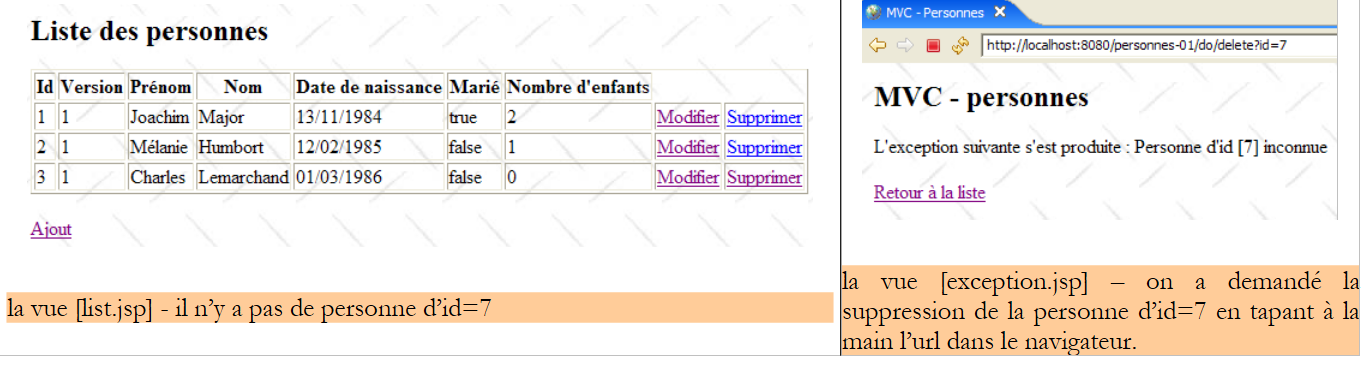 |
The code for the [exception.jsp] view is as follows:
<%@ page language="java" pageEncoding="ISO-8859-1" contentType="text/html;charset=ISO-8859-1"%>
<%@ taglib uri="/WEB-INF/c.tld" prefix="c" %>
<%@ page isErrorPage="true" %>
<%
response.setStatus(200);
%>
<html>
<head>
<title>MVC - Personnes</title>
</head>
<body background="<c:url value="/ressources/standard.jpg"/>">
<h2>MVC - personnes</h2>
L'exception occurred:
<%= exception.getMessage()%>
<br><br>
<a href="<c:url value="/do/list"/>">Retour à la liste</a>
</body>
</html>
- This view receives a key in its template, the element [exception], which is the exception that was intercepted by the web server. For this element to be included in the JSP page template by the web server, the page must have defined the tag on line 3.
- Line 6: The response status code HTTP is set to 200. This is the first header HTTP of the response. The 200 status code indicates to the client that its request was successful. Typically, a HTML document has been included in the server’s response. This is the case here. If the response status code HTTP is not set to 200, it will have the value 500 here, which means an error has occurred. In fact, the web server, having intercepted an unhandled exception, considers this situation abnormal and signals it with the 500 code. The response to the 500 status code varies by browser: Firefox displays the document that may accompany this response, while another browser ignores this document and displays its own page. This is why we have replaced the 500 code with the 200 code.
- Line 16: The exception text is displayed
- line 18: the user is offered a link to return to the list of people
The [erreurs.jsp] view
It is used to display a page reporting application initialization errors, c.a.d. errors detected during execution of the [init] method of the controller servlet. This could be, for example, the absence of a parameter in the [web.xml] file, as shown in the example below:
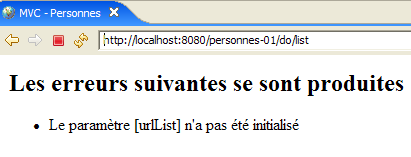
The code for the [erreurs.jsp] page is as follows:
<%@ page language="java" contentType="text/html; charset=ISO-8859-1"
    pageEncoding="ISO-8859-1"%>
<!DOCTYPE HTML PUBLIC "-//W3C//DTD HTML 4.01 Transitional//EN">
<%@ taglib uri="/WEB-INF/c.tld" prefix="c" %>

<html>
    <head>
      <title>MVC - Personnes</title>
  </head>
  <body>
      <h2>Les erreurs suivantes se sont produites</h2>
    <ul>
            <c:forEach var="erreur" items="${erreurs}">
                <li>${erreur}</li>
            </c:forEach>
    </ul>
  </body>
</html>
The page receives in its model an element [erreurs], which is an object of type [ArrayList] containing objects of type [String], the latter being error messages. They are displayed by the loop in lines 13–15.
14.8.3. The application controller
The [Application] controller is defined in the [istia.st.mvc.personnes.web] package:

Struc ture and initialization of the controller
The skeleton of the [Application] controller is as follows:
- lines 20–36: the expected parameters are retrieved from the [web.xml] file.
- lines 39-41: the [urlErreurs] parameter must be present because it refers to the url of the [erreurs] view capable of displaying any initialization errors. If it does not exist, the application is terminated by launching a [ServletException] (line 40). This exception will be propagated to the web server and handled by the <error-page> tag in the [web.xml] file. The [exception.jsp] view is therefore displayed:
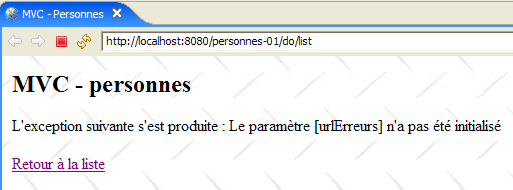
The link [Retour à la liste] above is inactive. Using it returns the same response as long as the application has not been modified and reloaded. It is useful for other types of exceptions, as we have already seen.
- line 43: creates a [DaoImpl] instance implementing the [dao] layer
- line 44: initializes this instance (creates an initial list of three people)
- line 46: creates an instance of [ServiceImpl] implementing the [service] layer
- line 47: initializes the [service] layer by providing it with a reference to the [dao] layer
After the controller is initialized, its methods have a [service] reference to the [service] layer (line 15), which they will use to execute the actions requested by the user. These actions will be intercepted by the [doGet] method, which will have them processed by a specific method of the controller:
Url | Method HTTP | controller method |
GET | doListPersonnes | |
GET | doEditPersonne | |
POST | doValidatePersonne | |
GET | doDeletePersonne |
The [doGet] method
The purpose of this method is to route the processing of user-requested actions to the correct method. Its code is as follows:
- lines 7–13: we check that the list of initialization errors is empty. If this is not the case, we display the view [erreurs(erreurs)], which will report the error(s).
- line 15: retrieve the [get] or [post] method that the client used to make the request.
- Line 17: Retrieve the value of the [action] parameter from the request.
- Lines 23–27: Process the [GET /do/list] request, which requests a list of people.
- Lines 28–32: Process the request [GET /do/delete], which requests the deletion of a person.
- Lines 33–37: Processing of request [GET /do/edit], which requests the form to update a person.
- lines 38-42: processing of request [POST /do/validate], which requests validation of the updated person.
- Line 44: If the requested action is not one of the previous five, then it is treated as if it were [GET /do/list].
The [doListPersonnes] method
This method processes request [GET /do/list], which requests the list of persons:
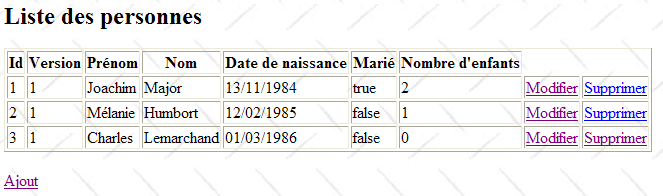
Its code is as follows:
- Line 5: We request the list of people in the group from the [service] layer and store it in the model under the key "people".
- line 7: the [list.jsp] view described in section 14.8.2 is displayed.
The [doDeletePersonne] method
This method processes the request [GET /do/delete?id=XX], which requests the deletion of the person from id=XX. The url [/do/delete?id=XX] is that of the [Supprimer] links in the [list.jsp] view:
whose code is as follows:
Line 12 shows the url and [/do/delete?id=XX] from the [Supprimer] link. The [doDeletePersonne] method, which must process this url, must remove the person from id=XX and then display the new list of people in the group. Its code is as follows:
- line 5: the processed url is in the form [/do/delete?id=XX]. We retrieve the value [XX] from the parameter [id].
- Line 7: We request that the [service] layer delete the person with the obtained id. We do not perform any validation. If the person we are trying to delete does not exist, the [dao] layer throws an exception that is propagated up to the [service] layer. We do not handle it here in the controller either. It will therefore propagate up to the web server, which, by configuration, will display the [exception.jsp] page, described in section 14.8.2:
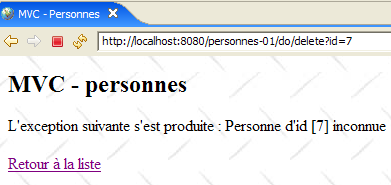
- line 9: if the deletion was successful (no exception), the client is instructed to redirect to the relative Url page [list]. Since the page just processed is [/do/delete], the redirection page Url will be [/do/list]. The browser will therefore be prompted to perform a [GET /do/list], which will cause the list of people to be displayed.
The [doEditPersonne] method
This method handles the [GET /do/edit?id=XX] request, which requests the person update form from id=XX. url and [/do/edit?id=XX] are the links for [Modifier] and [Ajout], respectively, in the [list.jsp] view:
whose code is as follows:
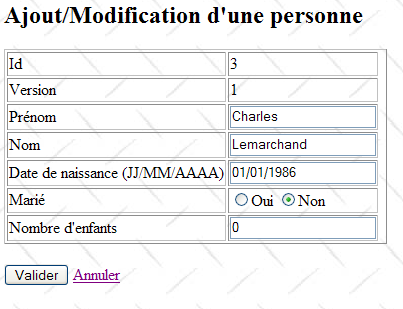
Line 11, we see the url [/do/edit?id=XX] from the link [Modifier] and line 17, the url [/do/edit?id=-1] from the link [Ajout]. The method [doEditPersonne] must display the edit form for the person from id=XX or, if it is an addition, present an empty form.
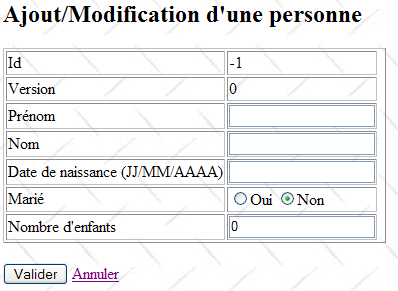 |  |
The code for method [doEditPersonne] is as follows:
- GET targets a url of type [/do/edit?id=XX]. On line 5, we retrieve the value of [id]. Then there are two cases:
- id is not equal to -1. In this case, it is an update, and a form pre-filled with the information of the person to be updated must be displayed. On line 10, this person is requested from the [service] layer.
- id is equal to -1. In this case, it is an addition, and an empty form must be displayed. To do this, an empty person is created in lines 13–14.
- The resulting object [Personne] is placed in the page template [edit.jsp] described in section 14.8.2. This template includes the following elements: [erreurEdit, id, version, prenom, erreurPrenom, nom, erreurNom, dateNaissance, erreurDateNaissance, marie, nbEnfants, erreurNbEnfants]. These elements are initialized in lines 17–30, with the exception of those whose value is the empty string [erreurPrenom, erreurNom, erreurDateNaissance, erreurNbEnfants]. It is known that if they are absent from the template, the library JSTL will display an empty string for their value. Although the element [erreurEdit] also has an empty string as its value, it is nevertheless initialized because a test is performed on its value in the page [edit.jsp].
- Once the model is ready, control is passed to the [edit.jsp] page, lines 32–33, which will generate the [edit] view.
The [doValidatePersonne] method
This method processes the [POST /do/validate] request, which validates the update form. This POST is triggered by the [Valider] button:
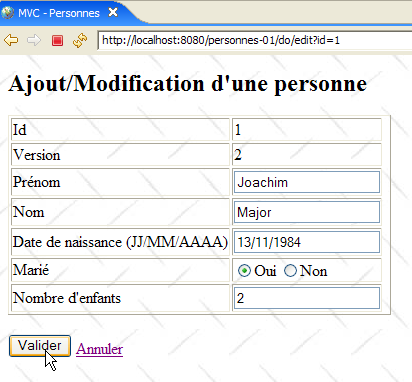
Let’s review the input fields of the HTML form from the view above:
The POST request contains the [prenom, nom, dateNaissance, marie, nbEnfants, id, version] parameters and is posted to the url [/do/validate] (line 1). It is processed by the following [doValidatePersonne] method:
- lines 8-14: the [prenom] parameter of the POST request is retrieved and its validity is checked. If it is found to be incorrect, the [erreurPrenom] element is initialized with an error message and placed in the request attributes.
- lines 16–22: the same procedure is followed for the parameter [nom]
- lines 24–32: the same procedure is followed for the parameter [dateNaissance]
- Line 34: The parameter [marie] is retrieved. We do not check its validity because, in principle, it comes from the value of a radio button. That said, nothing prevents a program from generating a [POST /personnes-01/do/validate] accompanied by a fictitious [marie] parameter. We should therefore test the validity of this parameter. Here, we rely on our exception handling, which causes the [exception.jsp] page to be displayed if the controller does not handle them itself. So, if the conversion of the [marie] parameter to a boolean fails on line 34, an exception will be thrown, resulting in the [exception.jsp] page being sent to the client. This behavior works for us.
- Lines 34–54: We retrieve the parameter [nbEnfants] and check its value.
- Line 56: We retrieve the parameter [id] without checking its value
- Line 58: We do the same for the [version] parameter
- Lines 60–65: If the form is invalid, it is redisplayed with the error messages generated previously
- lines 67–69: if it is valid, a new [Personne] object is created using the form elements
- lines 70–78: the person is saved. The save operation may fail. In a multi-user environment, the person to be modified may have been deleted or already modified by someone else. In this case, the [dao] layer will throw an exception, which is handled here.
- line 80: if no exception occurred, the client is redirected to url [/do/list] to display the new group status.
- Line 75: If an exception occurred during saving, we request that the initial form be redisplayed, passing it the exception’s error message (3rd parameter).
The method [showFormulaire] (lines 84–101) constructs the template required for the page [edit.jsp] using the entered values (request.getParameter(" ... ")). Recall that error messages have already been placed in the template by the [doValidatePersonne] method. The [edit.jsp] page is displayed in lines 99–100.
14.9. Web Application Tests
A number of tests were presented in Section 14.1. We invite the reader to run them again. Here we show additional screenshots illustrating cases of data access conflicts in a multi-user environment:
[Firefox] will be user U1’s browser. User U1 requests url [http://localhost:8080/personnes-01]:
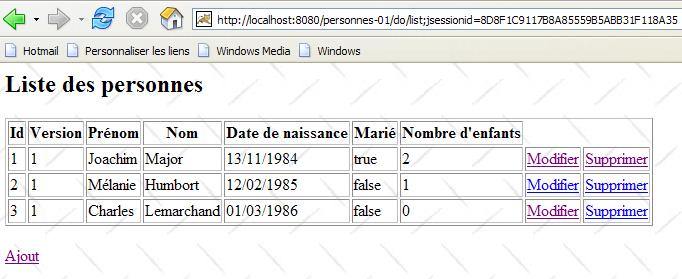
[IE] will be user U2’s browser. User U2 requests the same Url:
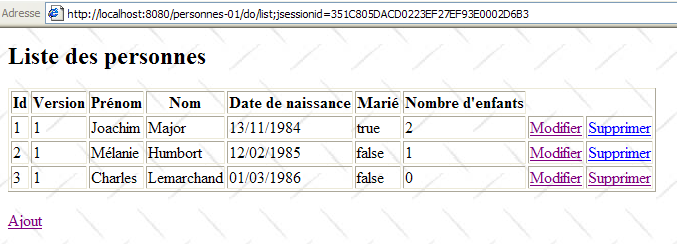
User U1 enters to edit the person [Lemarchand]:
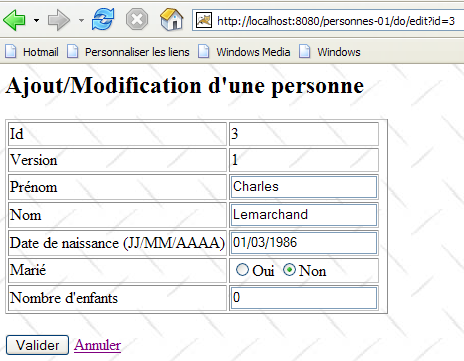
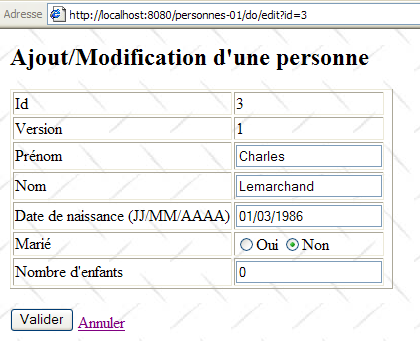
User U2 does the same:
User U1 makes changes and saves:
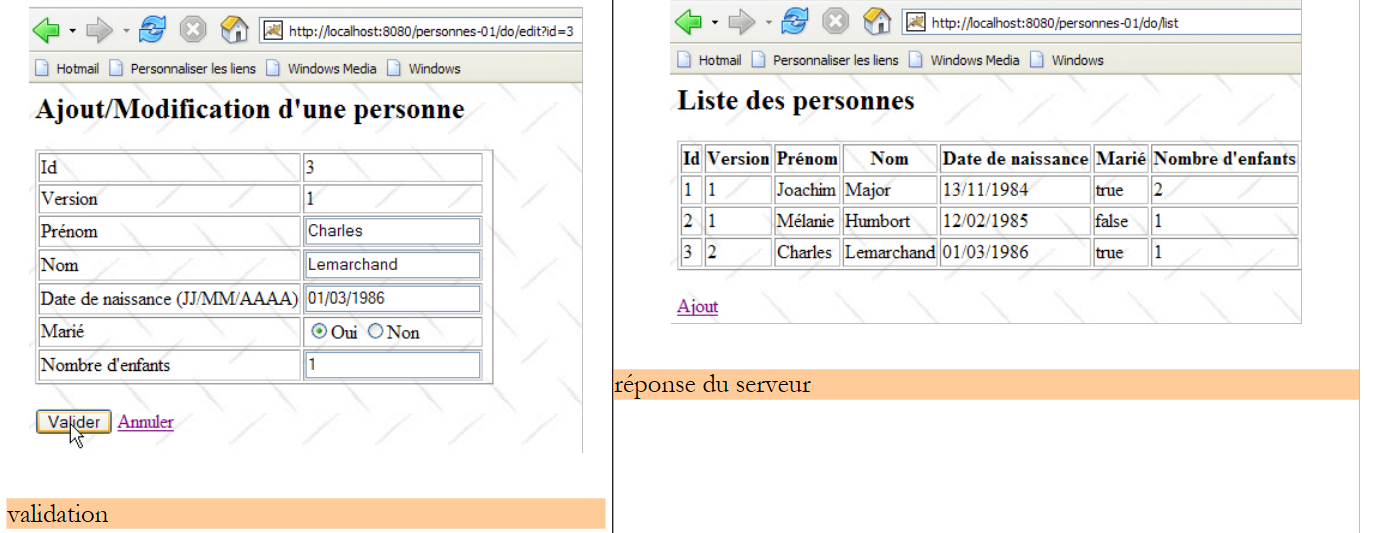 |
User U2 does the same:
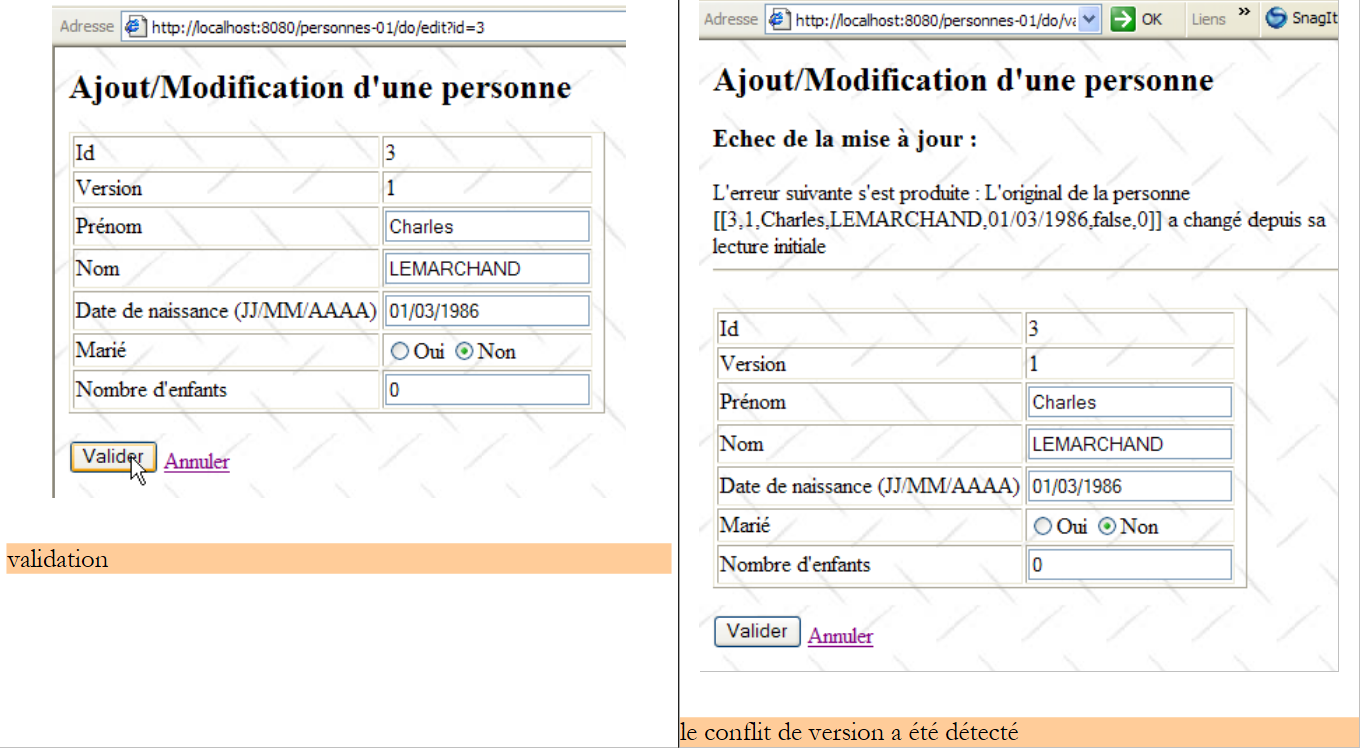 |
User U2 returns to the list of people using the [Annuler] link from the form:
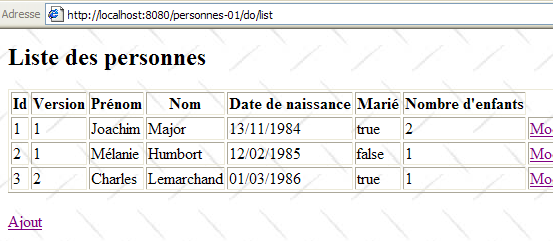
They find the person [Lemarchand] as modified by U1. Now U2 deletes [Lemarchand]:
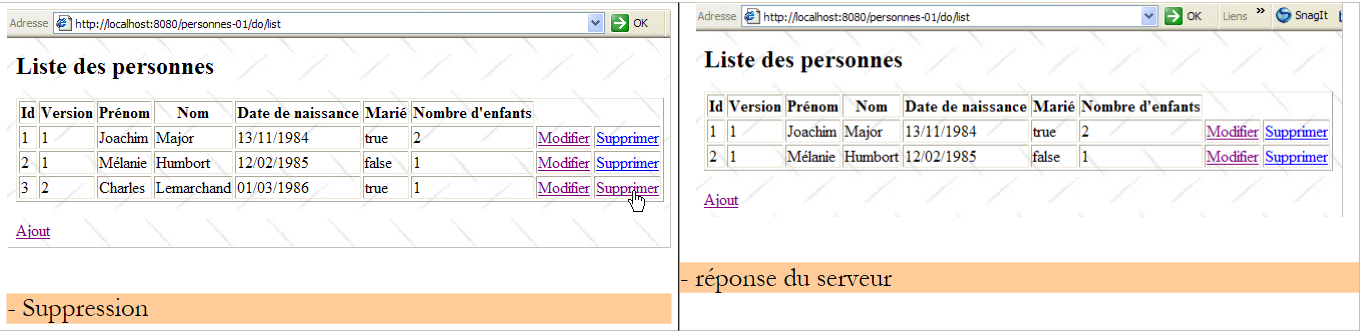 |
U1 still has their own list and wants to edit [Lemarchand] again:
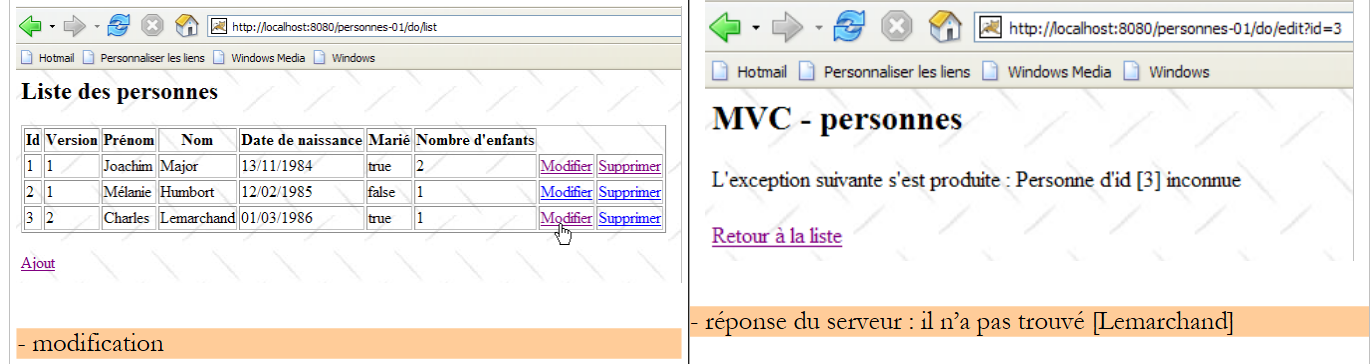 |
U1 uses the link [Retour à la liste] to see what’s going on:
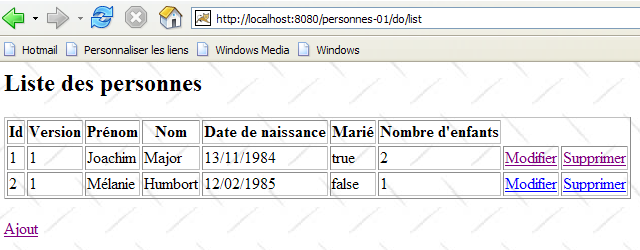
It discovers that [Lemarchand] is indeed no longer part of the list...
14.10. Conclusion
We implemented the MVC architecture within a 3-tier [web, metier, dao] architecture using a basic example of managing a list of people. This allowed us to apply the concepts presented in the previous sections. In the version example we studied, the list of people was kept in memory. We will soon explore versions where this list is stored in a database table.
But first, we will introduce a tool called Spring IoC, which facilitates the integration of the different layers of a n-tier application.