11. MVC Web Application [person] – Version 6
11.1. Introduction
In this version, we make the following change:
The previous version did not use sessions to store data between client/server exchanges. It used cookies, which means that the data to be stored is sent to the client by the server so that the client can send it back during the next exchange. In this new version, we use a similar technique: hidden fields in forms. There are differences between these two techniques:
Cookies | Hidden fields |
- The server places the items to be stored in the HTTP stream preceding the HTML document. | - The server places the elements to be stored within the HTML document. |
- The technique requires the browser to accept cookies so that it can send them back to the server during its GET or POST requests. | - This technique requires that all client requests to the server be POST requests so that the hidden fields are sent to the server. |
- The user can access the stored items by viewing the cookies received by their browser. Most browsers offer this option. | - The user can access the stored data by viewing the source code of the received HTML document. |
The hidden field technique can be used here because all client requests are POST requests.
11.2. The Eclipse Project
To create the Eclipse project [mvc-personne-06] for the web application [/personne6], duplicate the project [mvc-personne-05] by following the procedure described in section 6.2.
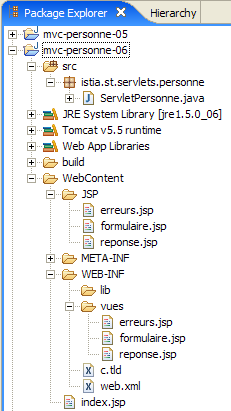 | 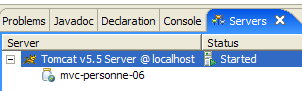 |
11.3. Configuring the [personne6] Web Application
The web.xml file for the /personne6 application is as follows:
<?xml version="1.0" encoding="UTF-8"?>
<web-app id="WebApp_ID" version="2.4"
    xmlns="http://java.sun.com/xml/ns/j2ee"
    xmlns:xsi="http://www.w3.org/2001/XMLSchema-instance"
    xsi:schemaLocation="http://java.sun.com/xml/ns/j2ee http://java.sun.com/xml/ns/j2ee/web-app_2_4.xsd">
    <display-name>mvc-personne-06</display-name>
...
This file is identical to the one in the previous version except for a few details:
- line 6: the display name of the web application has changed to [mvc-personne-06]
The home page [index.jsp] is identical to that of the [/personne5] application:
<%@ page language="java" contentType="text/html; charset=ISO-8859-1"
    pageEncoding="ISO-8859-1"%>
<%@ taglib uri="/WEB-INF/c.tld" prefix="c" %>

<c:redirect url="/do/formulaire"/>
11.4. The view code
Only the [response, errors] views have changed. They now include hidden fields in their respective forms, whereas in the previous version, these forms did not submit any parameters.
[response.jsp]:
...
<html>
...
  <body>
...
    <form name="frmPersonne" action="retourFormulaire" method="post">
      <input type="hidden" name="nom" value="${nom}">
      <input type="hidden" name="age" value="${age}">
    </form>
    <a href="javascript:document.frmPersonne.submit();">
      ${lienRetourFormulaire}
    </a>
  </body>
</html>
- Lines 6–9: The form that will be submitted to the server when the link in lines 10–12 is clicked
- line 6: the POST target will be [/do/retourFormulaire]
- lines 7-8: the hidden fields [name] and [age] will be submitted. Their values ${name} and ${age} will be set by the controller that displays [response.jsp]. These will be the values entered in the form.
[errors.jsp]:
...
<html>
...
  <body>
...
    <form name="frmPersonne" action="retourFormulaire" method="post">
      <input type="hidden" name="nom" value="${nom}">
      <input type="hidden" name="age" value="${age}">
    </form>
    <a href="javascript:document.frmPersonne.submit();">
      ${lienRetourFormulaire}
    </a>
  </body>
</html>
The changes and explanations are the same as for the [response.jsp] view. Note that the [errors] view template has been expanded with two new elements [name, age], which are added to the two existing ones: [errors, returnToFormLink].
Readers are invited to test these new views following the approach used in previous versions.
11.5. The [ServletPersonne] controller
The [ServletPersonne] controller for the [/personne6] web application is very similar to that of the previous version. The changes stem from the fact that the model for the [errors] view has changed. Two additional elements must be added: [name, age]. Only the methods that display this view are affected. These are the [doGet] and [doValidateForm] methods.
11.5.1. The [doGet] method
The code for [doGet] is as follows:
In fact, this code remains identical to what it was. In the previous version, the elements [name, age] were not included in the [errors] view template. If we continue to leave them out, the variables ${name} and ${age} in [errors.jsp] will be replaced by an empty string. This works for us, because in this specific case, the [Back to Form] link is not displayed to the user. In fact, we also do not include the [formBackLink] element in the template. The variable ${lienRetourFormulaire} in [erreurs.jsp] will be replaced by the empty string. Therefore, there will be no link, and thus no way to submit the hidden fields [name, age] from the form in [erreurs.jsp]. The value of these fields can therefore be the empty string.
11.5.2. The [doValidationFormulaire] method
Its code is as follows:
Lines 8–10: We pass the elements [name, age, formReturnLink] to the model. We know that the method displays one of the views [response] or [errors]. The latter will therefore have the elements [name, age] in its model.
11.6. Tests
Start or restart Tomcat after integrating the Eclipse project [person-mvc-06] into it, then request the URL [http://localhost:8080/personne6].