5. Web application MVC [personne] – version 1
5.1. Application Views
The application uses the form from the previous examples. The first page of the application is as follows:
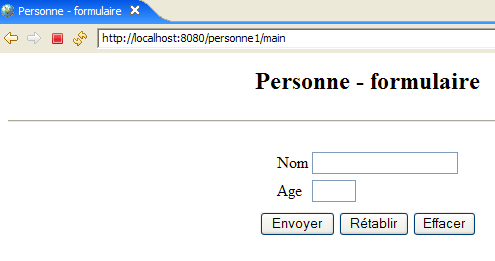
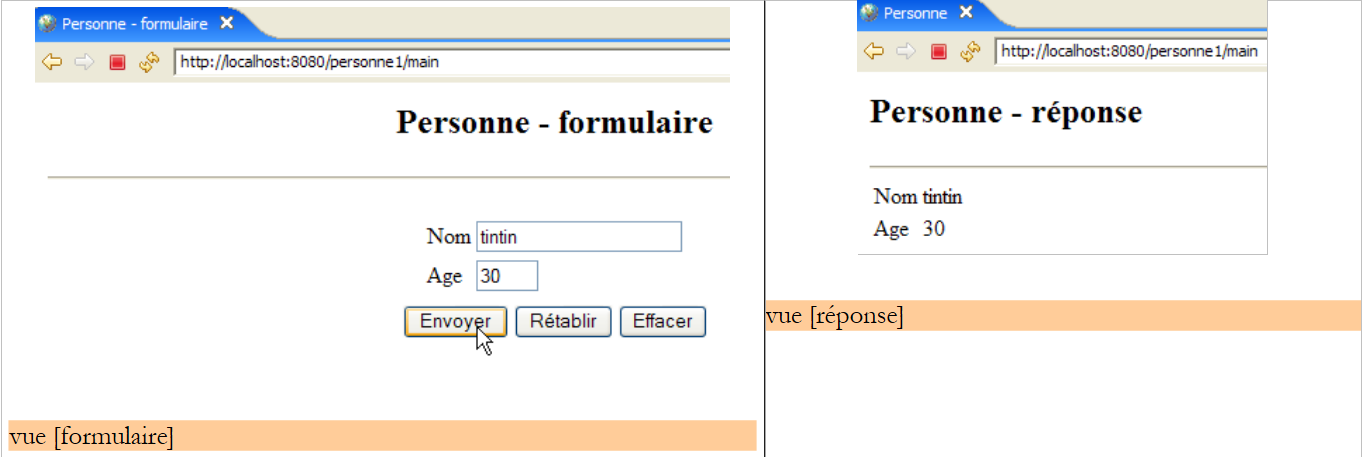
We will call this view the [formulaire] view. If the entries are correct, they are displayed in a view that will be called [réponse]:
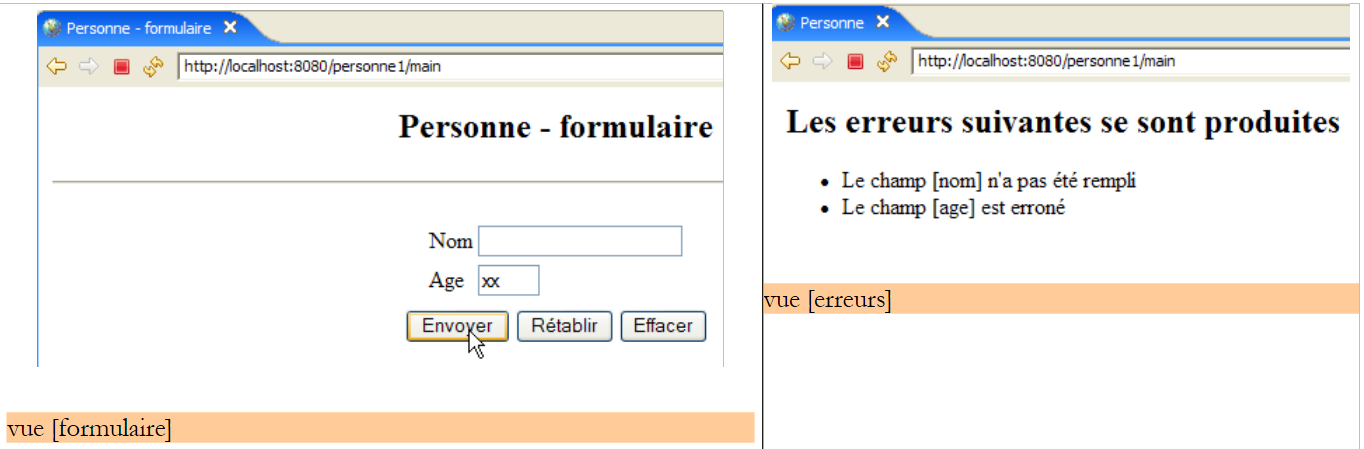
If the entries are incorrect, the errors are reported in a view called [erreurs]:
5.2. Application Architecture
The [personne1] web application will have the following architecture:
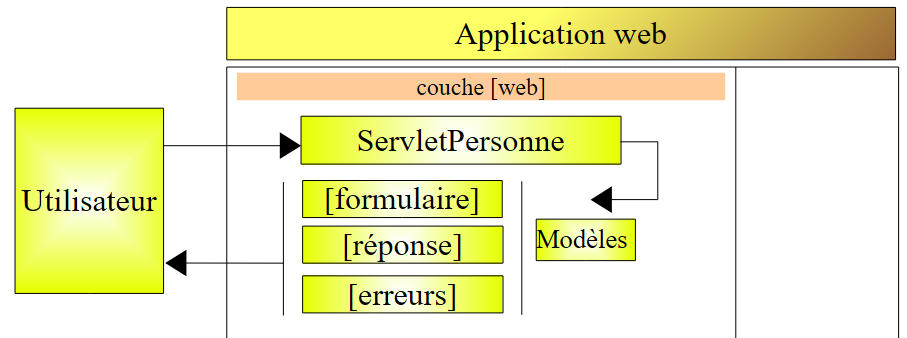
This is a single-tier architecture: there are no [métier] or [dao] layers, only a [web] layer. [ServletPersonne] is the application controller that handles all requests from clients. To respond to these requests, it uses one of the three [formulaire, réponse, erreurs] views.
We need to determine how the [ServletPersonne] controller determines the action it must take upon receiving a user request. A client request is a HTTP stream that differs depending on whether it is made with a GET or POST command.
Request GET
In this case, the HTTP flow looks like the following:
Line 1 specifies the requested url, for example:
This url can be used to specify the action to be performed. Various methods can be used:
- a parameter of the url specifies the action, for example [/appli?action=ajouter&id=4]. Here, the [action] parameter tells the controller which action is being requested.
- the last element of url specifies the action, for example [/appli/ajouter?id=4]. Here, the last element of url [/ajouter] is used by the controller to determine the action it must perform.
Other solutions are possible. The two mentioned above are common.
Request POST
In this case, the HTTP stream looks like the following:
Line 1 specifies the requested url, for example:
This url can be used to specify the action to be performed, just as with the GET. In the case of GET, the [action] parameter was included in the URL. This may also be the case here, as in:
But the parameter [action] may also be included in the posted parameters (line 15 above) as in:
In the following, we will use these different techniques to tell the controller what to do:
- include the action parameter in the requested url:
- Post the action parameter:
- Use the last element of url as the action name:
5.3. The Eclipse Project
To create the Eclipse project [mvc-personne-01] for the web application [personne1], follow the procedure described in section 3.1.
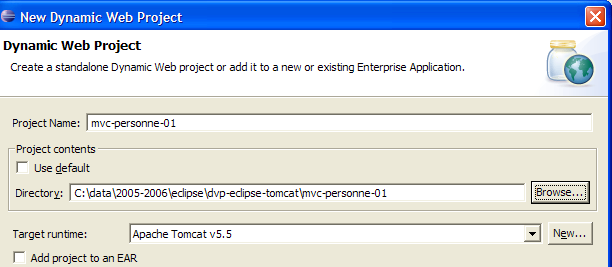
We will not keep the default context [mvc-personne-01]. We will choose [personne1] as shown below:
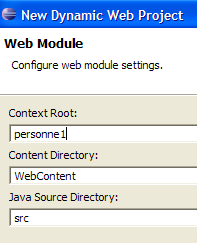
The result is as follows:
If, by any chance, you want to change the web application context, use option [clic droit sur projet -> Properties -> J2EE]:
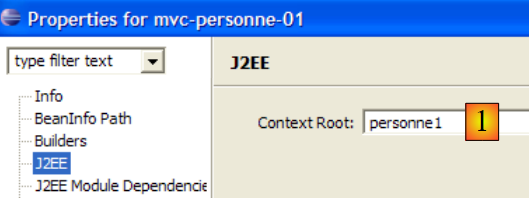
We will specify the new context as [1].
We will create a subfolder [vues] within the [WEB-INF] folder: [clic droit sur WEB-INF -> New -> Folder]:
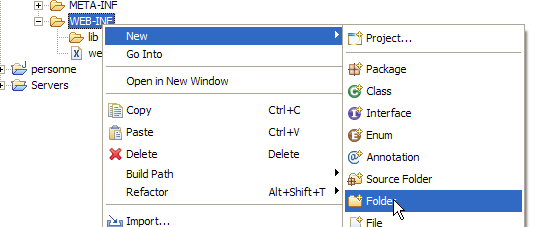 | 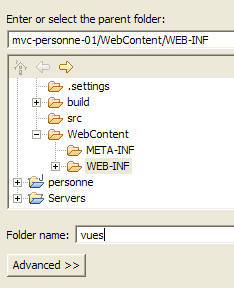 |
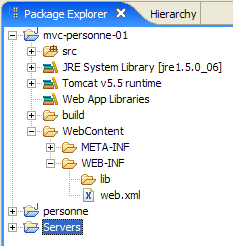
The new project is now as follows:
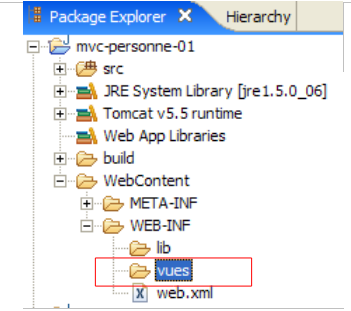
Once completed, the project will look like this:
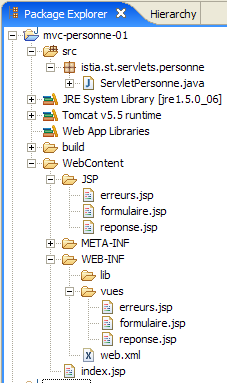
- The [ServletPersonne] controller is in the [src] folder
- The JSP pages of the [formulaire, réponse, erreurs] views are in the [WEB-INF/vues] folder, which prevents the user from requesting them directly, as shown in the example below:
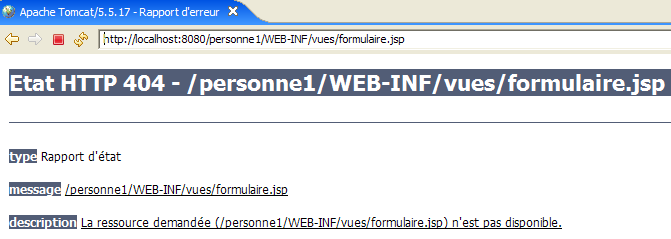
We will now describe the various components of the [/personne1] web application. Readers are encouraged to create them as they read.
5.4. Configuration of the [personne1] web application
The web.xml file for the /person1 application will be as follows:
<?xml version="1.0" encoding="UTF-8"?>
<web-app id="WebApp_ID" version="2.4"
    xmlns="http://java.sun.com/xml/ns/j2ee"
    xmlns:xsi="http://www.w3.org/2001/XMLSchema-instance"
    xsi:schemaLocation="http://java.sun.com/xml/ns/j2ee http://java.sun.com/xml/ns/j2ee/web-app_2_4.xsd">

  <display-name>mvc-personne-01</display-name>
    <!--  ServletPersonne -->
    <servlet>
        <servlet-name>personne</servlet-name>
        <servlet-class>
            istia.st.servlets.personne.ServletPersonne
        </servlet-class>
        <init-param>
            <param-name>urlReponse</param-name>
            <param-value>
                /WEB-INF/vues/reponse.jsp
            </param-value>
        </init-param>
        <init-param>
            <param-name>urlErreurs</param-name>
            <param-value>
                /WEB-INF/vues/erreurs.jsp
            </param-value>
        </init-param>
        <init-param>
            <param-name>urlFormulaire</param-name>
            <param-value>
                /WEB-INF/vues/formulaire.jsp
            </param-value>
        </init-param>
    </servlet>
    <!--  Mapping ServletPersonne-->
    <servlet-mapping>
        <servlet-name>personne</servlet-name>
        <url-pattern>/main</url-pattern>
    </servlet-mapping>
    <!--  welcome files -->
    <welcome-file-list>
        <welcome-file>index.jsp</welcome-file>
    </welcome-file-list>
</web-app>
What does this configuration file say?
- lines 34–37: the URL /main is handled by the servlet named personne
- lines 10-13: the servlet named personne is an instance of the [ServletPersonne] class
- lines 14-19: define a configuration parameter named [urlReponse]. This is the url of the [réponse] view.
- Lines 20–25: Define a configuration parameter named [urlErreurs]. This is the url of the [erreurs] view.
- Lines 26–31: Define a configuration parameter named [urlFormulaire]. This is the url of the [formulaire] view.
- Line 40: [index.jsp] will be the application’s home page.
The url pages of the JSP views of the [formulaire, réponse, erreurs] views each have their own configuration parameter. This allows them to be moved without having to recompile the application.
When the user requests the url [/personne1], the [index.jsp] file will send the response (home file, line 40). This file is located at the root of the [WebContent] folder:
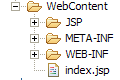
Its content is as follows:
<%@ page language="java" contentType="text/html; charset=ISO-8859-1"
    pageEncoding="ISO-8859-1"%>
<!DOCTYPE HTML PUBLIC "-//W3C//DTD HTML 4.01 Transitional//EN">
<%
  response.sendRedirect("/personne1/main");
%>
The [index.jsp] page simply redirects the client to url [/personne1/main]. Thus, when the browser requests url [/personne1], [index.jsp] sends it the following HTTP response:
- line 1: HTTP/1.1 response to instruct the server to redirect to another URL
- line 4: the URL to which the browser must be redirected
After this response, the browser will therefore request the url [/personne1/main] as instructed (line 4). The [web.xml] file in the [/personne1] application indicates that this request will be handled by the [ServletPersonne] controller (lines 35–36).
5.5. The View Code
We begin writing the web application by creating its views. These help define the user’s needs in terms of the graphical interface and can be tested without the controller.
5.5.1. The [formulaire] view
This view is for the form where the user enters their name and age:
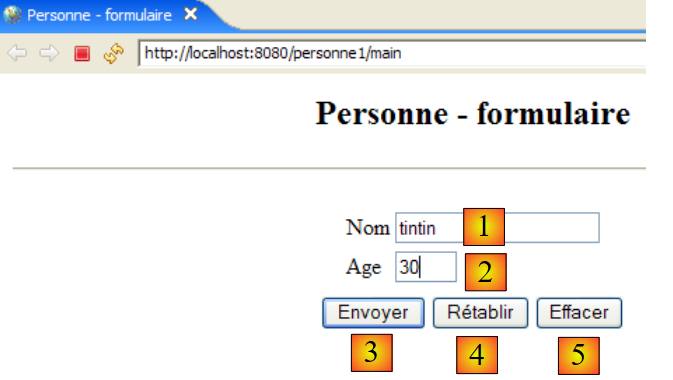
type HTML | name | role | |
<input type="text"> | txtNom | Enter name | |
<input type="text"> | txtAge | Enter age | |
<input type="submit"> | Send entered values to the server at url /person1/main | ||
<input type="reset"> | to restore the page to the state in which it was initially received by the browser | ||
<input type="button"> | to clear the contents of the input fields [1] and [2] |
It is generated by the page JSP [formulaire.jsp]. Its template consists of the following elements:
- [nom]: a name (String) found in the session attributes associated with the "name" key
- [age]: an age (String) found in the session attributes associated with the "age" key
The view [formulaire] is obtained when the user requests url, [/personne1/main], and c.a.d. the url from the [ServletPersonne] controller. The code for the JSP and [formulaire.jsp] pages that generate the [formulaire] view is as follows:
<%@ page language="java" contentType="text/html; charset=ISO-8859-1"
    pageEncoding="ISO-8859-1"%>
<!DOCTYPE HTML PUBLIC "-//W3C//DTD HTML 4.01 Transitional//EN">
<%
    // retrieve data from the model
  String nom=(String)request.getAttribute("nom");
  String age=(String)request.getAttribute("age");
%>

<html>
    <head>
      <title>Personne - formulaire</title>
  </head>
  <body>
      <center>
        <h2>Personne - formulaire</h2>
      <hr>
      <form method="post">
          <table>
            <tr>
              <td>Nom</td>
            <td><input name="txtNom" value="<%= nom %>" type="text" size="20"></td>
          </tr>
          <tr>
              <td>Age</td>
            <td><input name="txtAge" value="<%= age %>" type="text" size="3"></td>
          </tr>
            <tr>
        </table>
        <table>
            <tr>
              <td><input type="submit" value="Envoyer"></td>
            <td><input type="reset" value="Rétablir"></td>
            <td><input type="button" value="Effacer"></td>
          </tr>
        </table>
        <input type="hidden" name="action" value="validationFormulaire">
      </form>
    </center>
  </body>
</html>
- Lines 6-7: The JSP page begins by retrieving the [nom, age] elements from its model in the [request] request. During normal application operation, the [ServletPersonne] controller will build this template.
- Lines 18–38: The JSP page will generate a HTML form (the <form> tag)
- Line 18: The <form> tag does not have an action attribute to specify the url that should process the values posted by the [Envoyer] button of type submit (line 32). The form values will then be posted to the url from which the form was obtained, i.e., the url of the [ServletPersonne] controller. Thus, this form is used both to generate the empty form initially requested by a GET and to process the entered data that will be posted to it using the [Envoyer] button.
- The posted values are those of the fields HTML, [txtNom] (line 22), [txtAge] (line 26), and [action] (line 37). This last parameter will allow the controller to know what to do.
- When the form is first displayed, the input fields [txtNom, txtAge] are initialized with the variables [nom] (line 22) and [age] (line 26), respectively. These variables obtain their attribute values from the request (lines 6–7), attributes that we know are initialized by the servlet. It is therefore the servlet that sets the initial content of the form’s input fields.
- line 33: the [Rétablir] button of type [reset] restores the form to the state it was in when the browser received it.
- Line 34: The [Effacer] button, of type [reset], currently has no function.
Later on, we will refer to this view as the [formulaire(nom, age)] view when we want to specify both the view’s name and its template. Additionally, note that when the user clicks the [Envoyer] button, the [txtNom, txtAge] parameters are posted to the url and [/personne1/main].
5.5.2. The [reponse] view
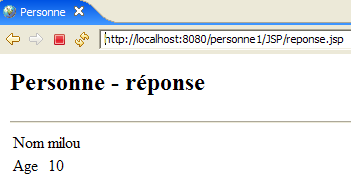
This view displays the values entered in the form when they are valid:
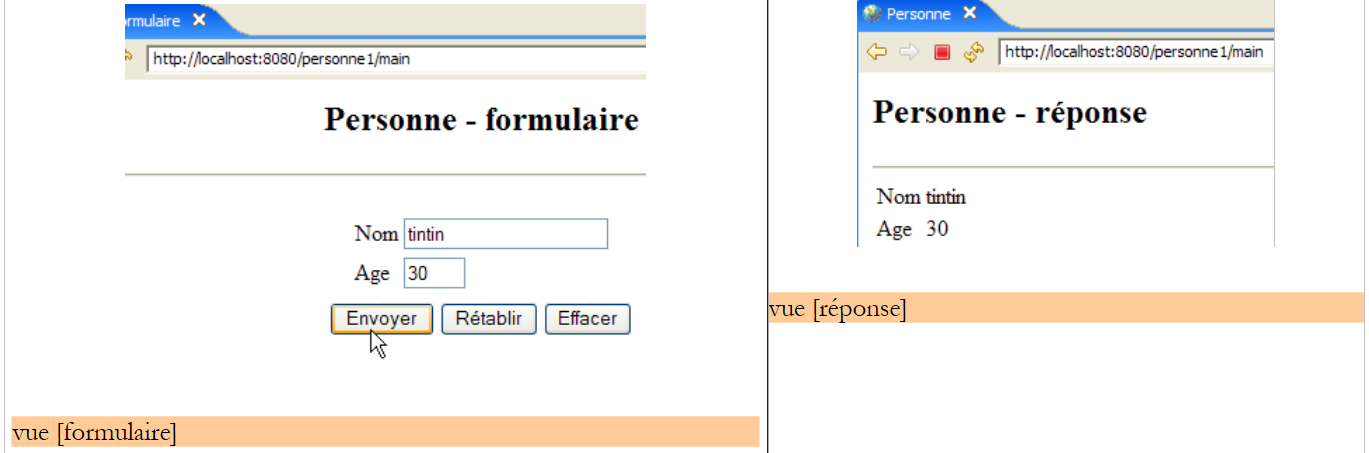
It is generated by the JSP and [reponse.jsp] pages. Its template consists of the following elements:
- [nom]: a name (String) found in the session attributes, associated with the "name" key
- [age]: an age (String) that will be found in the session attributes, associated with the "age" key
The code for the page JSP [reponse.jsp] is as follows:
<%@ page language="java" contentType="text/html; charset=ISO-8859-1"
    pageEncoding="ISO-8859-1"%>
<!DOCTYPE HTML PUBLIC "-//W3C//DTD HTML 4.01 Transitional//EN">
<%
    // retrieve data from the model
  String nom=(String)request.getAttribute("nom");
  String age=(String)request.getAttribute("age");
%>

<html>
    <head>
      <title>Personne</title>
  </head>
  <body>
      <h2>Personne - réponse</h2>
    <hr>
    <table>
        <tr>
          <td>Nom</td>
        <td><%= nom %>
      </tr>
        <tr>
          <td>Age</td>
        <td><%= age %>
      </tr>
    </table>
  </body>
</html>
- Lines 6-7: The JSP page begins by retrieving the [nom, age] elements from its template in the [request] request. During normal application operation, the [ServletPersonne] controller will build this template.
- The [nom, age] elements of the model are then displayed on lines 20 and 24
Subsequently, we call this view the [réponse(nom, age)] view.
5.5.3. The [erreurs] view
This view reports data entry errors in the form:
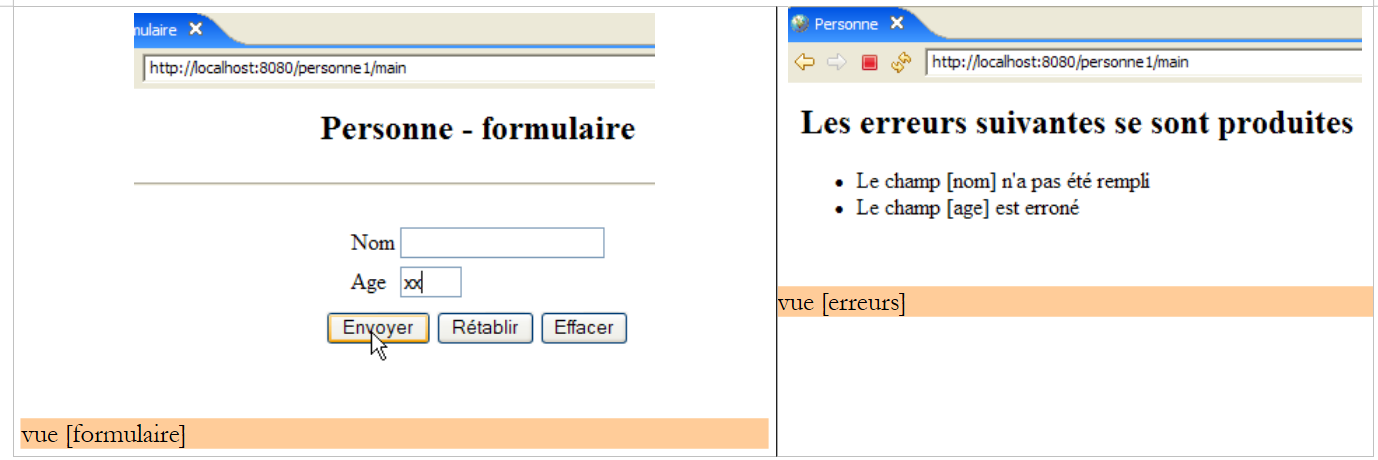
It is generated by the page JSP [erreurs.jsp]. Its template consists of the following elements:
- [erreurs]: a list (ArrayList) of error messages found in the query attributes, associated with the "errors" key
The code for the page JSP [erreurs.jsp] is as follows:
<%@ page language="java" contentType="text/html; charset=ISO-8859-1"
    pageEncoding="ISO-8859-1"%>
<!DOCTYPE HTML PUBLIC "-//W3C//DTD HTML 4.01 Transitional//EN">
<%@ page import="java.util.ArrayList" %>

<%
// retrieve data from the model
  ArrayList erreurs=(ArrayList)request.getAttribute("erreurs");
%>

<html>
    <head>
      <title>Personne</title>
  </head>
  <body>
      <h2>Les erreurs suivantes se sont produites</h2>
    <ul>
        <%
          for(int i=0;i<erreurs.size();i++){
            out.println("<li>" + (String) erreurs.get(i) + "</li>\n");
        }//for
      %>
    </ul>
  </body>
</html>
- Line 8: The JSP page begins by retrieving the [erreurs] element from its template in the [request] request. This element represents an object of type ArrayList containing elements of type String. These elements are error messages. During normal application operation, the [ServletPersonne] controller will construct this model.
- Lines 18–22: display the list of error messages. To do this, we need to write Java code in the HTML body of the page. We should always aim to keep this to a minimum so as not to clutter the HTML code. We will see later that there are solutions for reducing the amount of Java code in the JSP pages.
- Line 4: Note the import tag for the packages required by the JSP page
We will subsequently refer to this view as the [erreurs(erreurs)] view.
5.6. View Testing
It is possible to test the validity of the JSP pages without having written the controller. For this, two conditions must be met:
- you must be able to request them directly from the application without going through the controller
- the JSP page must initialize the model itself, which would normally be constructed by the controller
To perform these tests, we duplicate the JSP view pages into the [/WebContent/JSP] folder of the Eclipse project:
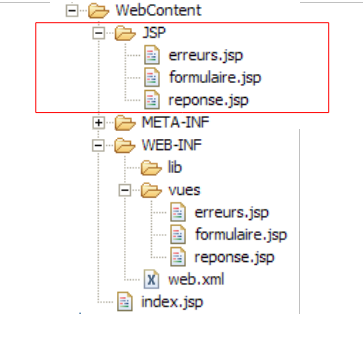
Then, in the JSP folder, the pages are modified as follows:
[formulaire.jsp]:
...

<%
  // -- test: the page template is created
  request.setAttribute("nom","tintin");
  request.setAttribute("age","30");
%>

<%
    // retrieve data from the model
  String nom=(String)request.getAttribute("nom");
  String age=(String)request.getAttribute("age");
%>

<html>
    <head>
...
Lines 3–7 were added to create the template required by the page in lines 11–12.
[reponse.jsp]:
...

<%
  // -- test: the page template is created
  request.setAttribute("nom","milou");
  request.setAttribute("age","10");
%>

<%
    // retrieve data from the model
  String nom=(String)request.getAttribute("nom");
  String age=(String)request.getAttribute("age");
%>


<html>
    <head>
...
Lines 3–7 were added to create the template required by the page in lines 11–12.
[erreurs.jsp]:
...

<%
  // -- test: the page template is created
  ArrayList<String> erreurs1=new ArrayList<String>();
  erreurs1.add("erreur1");
  erreurs1.add("erreur2");
  request.setAttribute("erreurs",erreurs1);
%>

<%
// retrieve data from the model
  ArrayList erreurs=(ArrayList)request.getAttribute("erreurs");
%>


<html>
    <head>
...
Lines 3–9 were added to create the template required by line 13.
Start Tomcat if you haven't already, then request the following url pages:
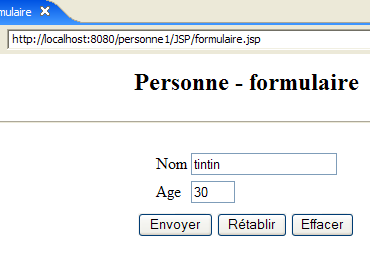 |  |
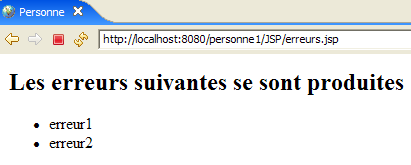 |
We get the expected views. Now that we have reasonable confidence in the application’s JSP pages, we can move on to writing its [ServletPersonne] controller.
5.7. The [ServletPersonne] controller
We still need to write the core of our web application: the controller. Its role is to:
- retrieve the client’s request,
- process the action requested by the client,
- send the appropriate view in response.
The [ServletPersonne] controller will handle the following actions:
No. | request | origin | processing |
1 | [GET /personne1/main] | url entered by the user | - send the empty view [formulaire] |
2 | [POST /personne1/main] with parameters [txtNom, txtAge, action] posted | click the button [Envoyer] in the view [formulaire] | - check the values of the parameters [txtNom, txtAge] - if they are incorrect, send the view [erreurs(erreurs)] - if they are correct, send the view [reponse(nom,age)] |
The application starts when the user requests the url [/personne1/main]. According to the application's [web.xml] file (see section 5.4), this request is handled by an instance of type ServletPersonne, which we will now describe.
5.7.1. Controller skeleton
The code for the [ServletPersonne] controller is as follows:
- lines 20–22: the [init] method executed when the servlet is first loaded
- lines 25-28: the [doGet] method called by the web server when a GET request is made to the application
- lines 42–46: the [doPost] method called by the web server when a POST request is made to the application. As shown, this will also be handled by the [doGet] method (line 45).
- lines 31–33: the [doInit] method handles action #1 [GET /personne1/main]
- Lines 36–39: The method [doValidationFormulaire] processes action #2 [POST /personne1/main] with the posted parameters [txtNom, txtAge, action].
We will now describe the various methods of the controller
5.7.2. Controller Initialization
When the controller class is loaded by the servlet container, its method [init] is executed. This will be the only time. Once loaded into memory, the controller will remain there and process requests from the various clients. Each client is assigned an execution thread, and the controller’s methods are thus executed simultaneously by different threads. Note that, for this reason, the controller must not have any fields that its methods could modify. Its fields must be read-only. They are initialized by the [init] method, which is its primary role. This method has the unique characteristic of being executed only once by a single thread. There are therefore no issues with concurrent access to the controller’s fields within this method. The purpose of the [init] method is to initialize the objects required by the web application, which will be shared in read-only mode by all clients threads. These shared objects can be placed in two locations:
- the controller’s private fields
- the application's execution context (ServletContext)
The code for the [init] method of the [ServletPersonne] controller is as follows:
- line 16: the web application configuration, c.a.d, is retrieved. The contents of the file [web.xml]
- lines 19–29: retrieve the servlet initialization parameters, whose names are defined in the [paramètres] array on line 9
- line 21: the parameter value is retrieved
- line 25: if the parameter is missing, the error is added to the initially empty error list [erreursInitialisation] (line 8).
- line 28: if the parameter is present, it is stored along with its value in the initially empty dictionary [params] (line 10).
- Lines 31–35: The [urlErreurs] parameter must be present because it refers to the url of the [erreurs] view capable of displaying any initialization errors. If it does not exist, the application is terminated by launching a [ServletException] (line 33).
5.7.3. The [doGet] method
The [doGet] method handles both GET and POST requests to the servlet, since the [doPost] method refers to the [doGet] method. Its code is as follows:
- Lines 18–25: We check that the list of initialization errors is empty. If it is not, we display the view [erreurs(erreursInitialisation)], which will report the error(s).
To understand this code, you need to recall the template for the [erreurs] view:
The [erreurs] view expects a key element named "errors" in the request. The controller creates this element on line 20.
- Line 28: Retrieve the method [get] or [post] that the client used to make the request
- Line 30: We retrieve the value of the [action] parameter from the request. Recall that in our application, only request #2 ([POST /personne1/main]) has the parameter [action]. In this request, it has the value [validationFormulaire].
- lines 31–34: if the parameter [action] is not present, it is assigned the value "init". This will be the case for the initial request No. 1, [GET /personne1/main].
- Lines 36–40: Processing of request No. 1 [GET /personne1/main].
- lines 41–45: processing of request #2 [POST /personne1/main].
- line 47: if neither of the two previous cases applies, proceed as if case #1 applied
5.7.4. The [doInit] method
This method processes request #1 [GET /personne1/main]. For this request, it must return the empty view [formulaire(nom,age)]. Its code is as follows:
- lines 18-19: the [formulaire] view is displayed. Recall the model expected by this view:
<%
// retrieve data from the model
String nom=(String)request.getAttribute("nom");
String age=(String)request.getAttribute("age");
%>
- lines 16-17: the [nom,age] model of the [formulaire] view is initialized with empty strings.
5.7.5. The [doValidationFormulaire] method
This method processes request #2 [POST /personne1/main], in which the posted parameters are [action, txtNom, txtAge]. Its code is as follows:
- lines 16-17: the values of the parameters "txtNom" and "txtAge" are retrieved from the client's request.
- lines 19-26: the validity of these two parameters is checked
- lines 28-33: if either parameter is incorrect, the view [erreurs(erreursAppel)] is displayed. Recall the template for this view:
<%
// retrieve data from the model
  ArrayList erreurs=(ArrayList)request.getAttribute("erreurs");
%>
- Lines 35-38: If the two retrieved parameters "txtNom" and "txtAge" have valid values, the view [reponse(nom,age)] is displayed. Recall the template for the [reponse] view:
<%
    // retrieve data from the model
  String nom=(String)request.getAttribute("nom");
  String age=(String)request.getAttribute("age");
%>
5.8. Tests
Include the [mvc-personne-01] project in the Tomcat applications by following the procedure described in section 3.3:
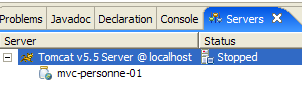
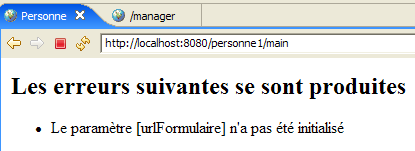
Start Tomcat. Once this is done, we can resume the tests shown as examples in Section 5.1. We can add more. For example, we can remove one of the configuration parameters from urlXXX in web.xml and see the result. As shown below, one of the parameters is commented out in [web.xml]:
        <!--
            <init-param>
              <param-name>urlFormulaire</param-name>
              <param-value>
                /WEB-INF/vues/formulaire.jsp
              </param-value>
            </init-param>
        -->
Restart Tomcat and request url [http://localhost:8080/personne1/main]. The following response is returned: