20. Web application MVC in a 3-tier architecture – Example 6, SQL Server Express
20.1. The SQL Server Express database
In this version, we will populate the list of people into a SQL Server Express 2005 database table available in the url [http://msdn.microsoft.com/vstudio/express/sql/]. The following screenshots are from the EMS Manager Lite client for SQL Server Express [http://www.sqlmanager.net/fr/products/mssql/manager], a free administration client for the SGBD SQL Server Express.
The database is named [dbpersonnes]. It contains a table named [PERSONNES]:
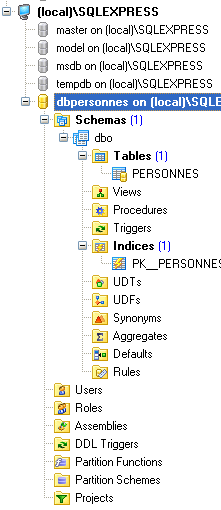
The [PERSONNES] table will contain the list of people managed by the web application. It was created using the following SQL commands:
- Line 2: The primary key [ID] is of type integer. The attribute IDENTITY indicates that if a row is inserted without a value for the ID column in the table, SQL Express will generate an integer for this column itself. In IDENTITY(1, 1), the first parameter is the first possible value for the primary key, and the second is the increment used in number generation.
The table [PERSONNES] might have the following content:
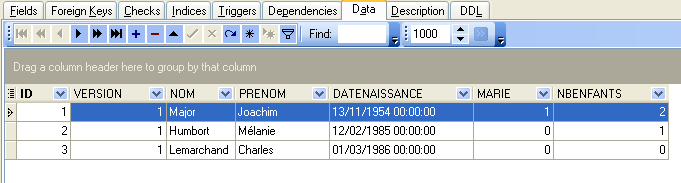
We know that when inserting a [Personne] object via our [dao] layer, the [id] field of this object is equal to -1 before insertion and has a value other than -1 afterward, this value being the primary key assigned to the new row inserted into the [PERSONNES] table. Let’s look at an example to see how we can determine this value.
 |
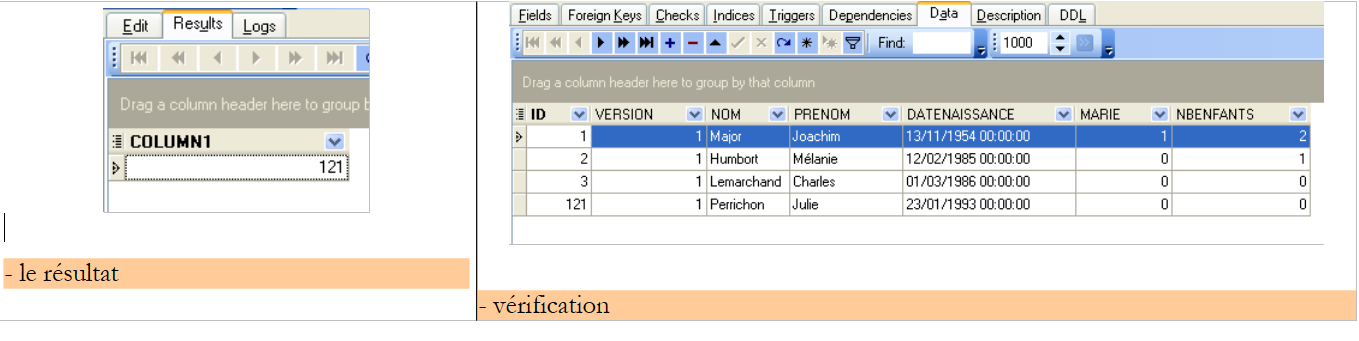 |
The command SQL
allows us to determine the last value inserted into the ID field of the table. It must be executed after the insertion. This differs from the SGBD, [Firebird], and [Postgres] queries, where we requested the primary key value of the added person before the insertion, but it is analogous to the primary key generation in SGBD and MySQL. We will use it in the [personnes-sqlexpress.xml] file, which collects the SQL commands issued to the database.
20.2. The Eclipse project for the [dao] and [service] layers
To develop the [dao] and [service] layers of our application with the [SQL Server Express] database, we will use the following Eclipse project [mvc-personnes-06]:
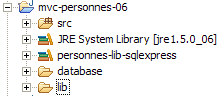
The project is a simple Java project, not a Tomcat web project.
Folder [src]
This folder contains the source code for the [dao] and [service] layers:
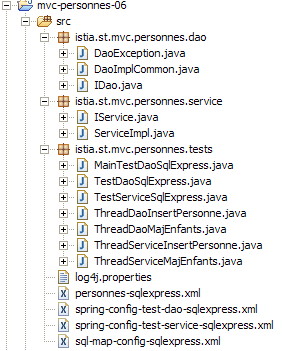
All files with [sqlexpress] in their names may or may not have been modified compared to the Firebird, Postgres, and MySQL versions. In the following, we describe only those that have been modified.
Folder [database]
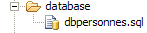
This folder contains the script for creating the SQL Express database of people:
Folder [lib]
This folder contains the archives required by the application:
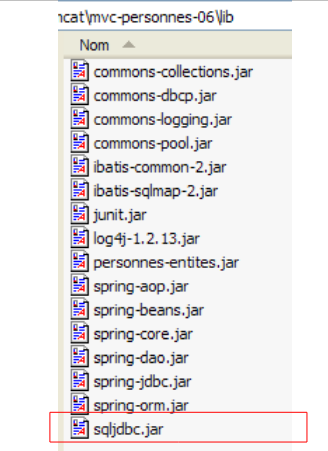 |
Note the presence of the JDBC driver [sqljdbc.jar], SGBD, and [Sql Server Express]. All these archives are part of the Eclipse project’s classpath.
20.3. The [dao] layer
The [dao] layer is as follows:
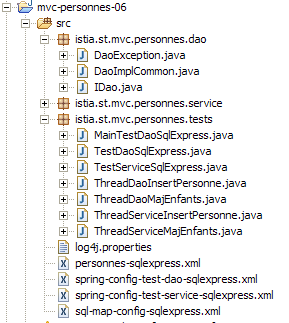
We are only presenting the changes relative to version and [Firebird].
The [personne-sqlexpress.xml] mapping file is as follows:
<?xml version="1.0" encoding="UTF-8" ?>

<!DOCTYPE sqlMap
    PUBLIC "-//iBATIS.com//DTD SQL Map 2.0//EN"
    "http://www.ibatis.com/dtd/sql-map-2.dtd">

<sqlMap>
    <!-- alias class [Person] -->
    <typeAlias alias="Personne.classe"
        type="istia.st.mvc.personnes.entites.Personne"/>
    <!-- mapping table [PERSONNES] - object [Person] -->
    <resultMap id="Personne.map"
        class="istia.st.mvc.personnes.entites.Personne">
        <result property="id" column="ID" />
        <result property="version" column="VERSION" />
        <result property="nom" column="NOM"/>
        <result property="prenom" column="PRENOM"/>
        <result property="dateNaissance" column="DATENAISSANCE"/>
        <result property="marie" column="MARIE"/>
        <result property="nbEnfants" column="NBENFANTS"/>
    </resultMap>
    <!-- list of all persons -->
    <select id="Personne.getAll" resultMap="Personne.map" > select ID, VERSION, NOM,
        PRENOM, DATENAISSANCE, MARIE, NBENFANTS FROM PERSONNES</select>
    <!-- get a specific person -->
        <select id="Personne.getOne" resultMap="Personne.map" >select ID, VERSION, NOM,
        PRENOM, DATENAISSANCE, MARIE, NBENFANTS FROM PERSONNES WHERE ID=#value#</select>
    <!-- add a person -->
    <insert id="Personne.insertOne" parameterClass="Personne.classe">
        insert into
        PERSONNES(VERSION, NOM, PRENOM, DATENAISSANCE, MARIE, NBENFANTS)
        VALUES(#version#, #nom#, #prenom#, #dateNaissance#, #marie#,
        #nbEnfants#)
        <selectKey keyProperty="id">
            select @@IDENTITY as value
        </selectKey>
    </insert>
    <!-- update a person -->
    <update id="Personne.updateOne" parameterClass="Personne.classe"> update
        PERSONNES set VERSION=#version#+1, NOM=#nom#, PRENOM=#prenom#, DATENAISSANCE=#dateNaissance#,
        MARIE=#marie#, NBENFANTS=#nbEnfants# WHERE ID=#id# and
        VERSION=#version#</update>
    <!-- delete a person -->
    <delete id="Personne.deleteOne" parameterClass="int"> delete FROM PERSONNES WHERE
        ID=#value# </delete>
    <!-- obtain the value of the primary key [id] of the last person inserted -->
    <select id="Personne.getNextId" resultClass="int">select
        LAST_INSERT_ID()</select>
</sqlMap>
This is the same content as [personnes-firebird.xml], with the following minor differences:
- The SQL " Personne.insertOne " command has changed lines 29-37:
- the insertion order SQL is executed before the order SELECT, which will allow retrieving the primary key value of the inserted row
- The insertion command SQL has no value for the column ID in the table [PERSONNES]
This reflects the insertion example discussed in Section 20.1. Note that the issue of simultaneous insertions by different threads, described for MySQL in Section 19.3, is present here as well.
The implementation class [DaoImplCommon] of the [dao] layer is the same as that of the three previous versions.
The configuration of the [dao] layer has been adapted to SGBD and [SQL Express]. Thus, the configuration file [spring-config-test-dao-sqlexpress.xml] is as follows:
<?xml version="1.0" encoding="ISO_8859-1"?>
<!DOCTYPE beans SYSTEM "http://www.springframework.org/dtd/spring-beans.dtd">
<beans>
    <!-- data source DBCP -->
    <bean id="dataSource" class="org.apache.commons.dbcp.BasicDataSource"
        destroy-method="close">
        <property name="driverClassName">
            <value>com.microsoft.sqlserver.jdbc.SQLServerDriver</value>
        </property>
        <property name="url">
            <value>jdbc:sqlserver://localhost\\SQLEXPRESS:4000;databaseName=dbpersonnes</value>
        </property>
        <property name="username">
            <value>sa</value>
        </property>
        <property name="password">
            <value>msde</value>
        </property>
    </bean>
    <!-- SqlMapCllient -->
    <bean id="sqlMapClient"
        class="org.springframework.orm.ibatis.SqlMapClientFactoryBean">
        <property name="dataSource">
            <ref local="dataSource"/>
        </property>
        <property name="configLocation">
            <value>classpath:sql-map-config-sqlexpress.xml</value>
        </property>
    </bean>
    <!-- layer access classes [dao] -->
    <bean id="dao" class="istia.st.mvc.personnes.dao.DaoImplCommon">
        <property name="sqlMapClient">
            <ref local="sqlMapClient"/>
        </property>
    </bean>
</beans>
- lines 5-19: The bean [dataSource] now refers to the database [SQL Express] [dbpersonnes], whose administrator is [sa] with the password [msde]. The reader should modify this configuration according to their own environment.
- Line 31: The class [DaoImplCommon] is the implementation class for the layer [dao]
Line 11 requires some explanation:
- //localhost: indicates that the SQL Express server is on the same machine as our Java application
- \\SQLEXPRESS: is the name of a SQL Server instance. It appears that multiple instances can run simultaneously. It therefore makes sense to name the instance we are addressing. This name can be obtained via [SQL Server Configuration Manager], which is normally installed at the same time as SQL Express:

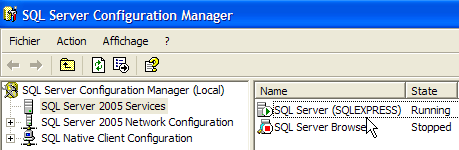
- 4000: listening port for SQL Express. This depends on the server configuration. By default, it uses dynamic ports, which are not known in advance. Therefore, no port is specified in url or JDBC. Here, we have used a fixed port, port 4000. This is achieved through configuration:
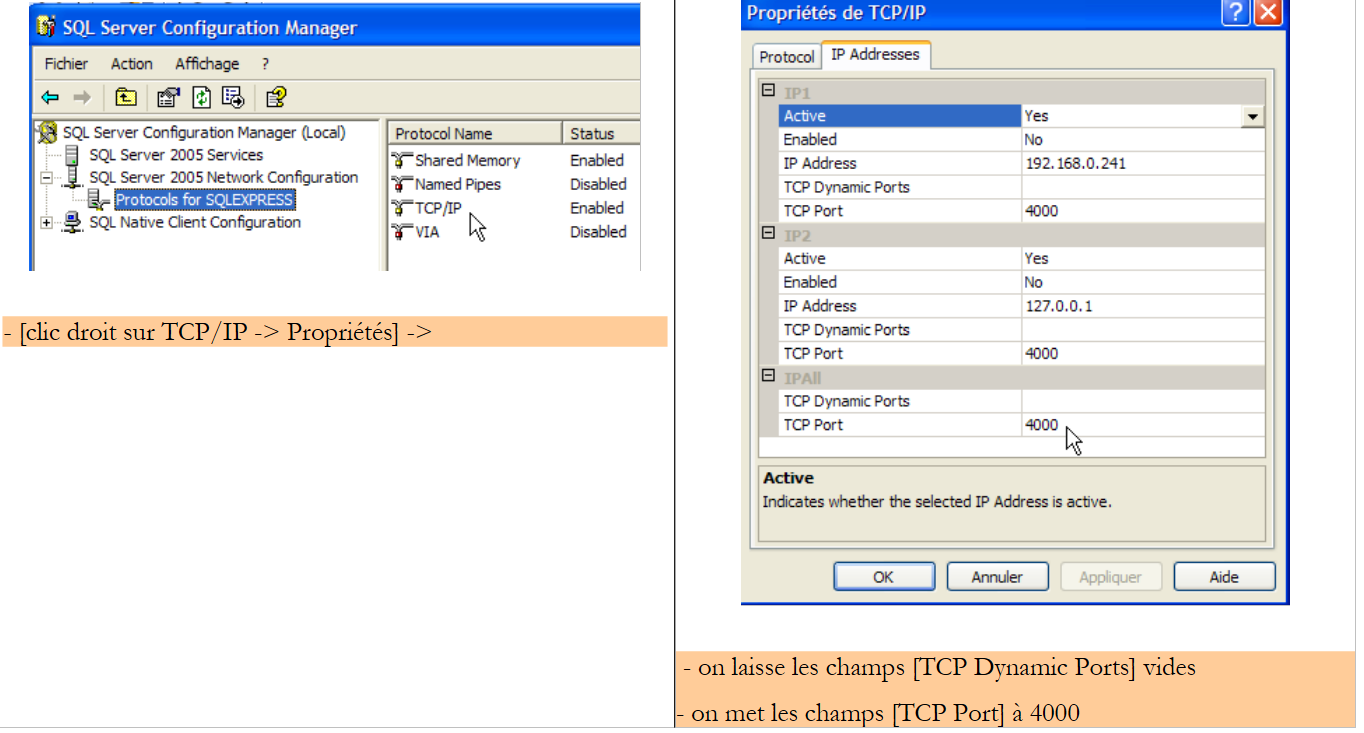 |
- The dataBaseName attribute specifies the database you want to work with. This is the one created with the EMS client:
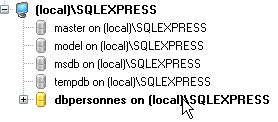
With these changes made, we can move on to testing.
20.4. Testing layers [dao] and [service]
The tests for layers [dao] and [service] are the same as for version and [Firebird]. The results obtained are as follows:
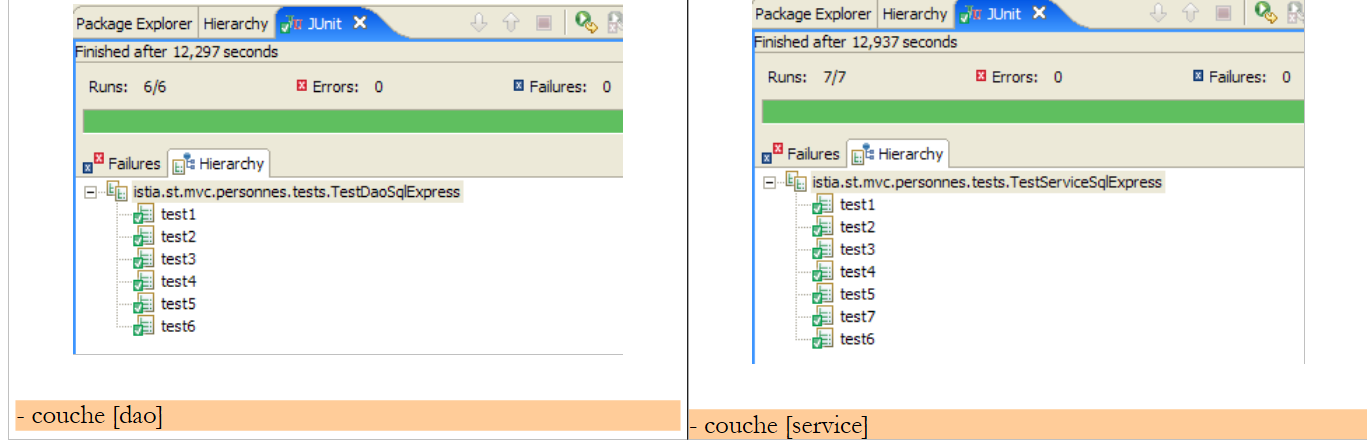 |
We can see that the tests were passed successfully with the [DaoImplCommon] implementation. We will not need to derive this class as was necessary with SGBD and [Firebird].
20.5. Testing the [web] application
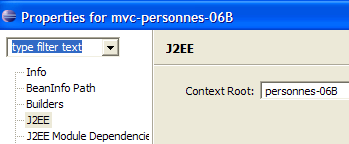
To test the web application with SGBD and [SQL Server Express], we build an Eclipse project [mvc-personnes-06B] in a manner similar to that used to build the previous web projects.
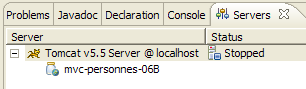
We deploy the [mvc-personnes-05B] web project within Tomcat:
 |  |
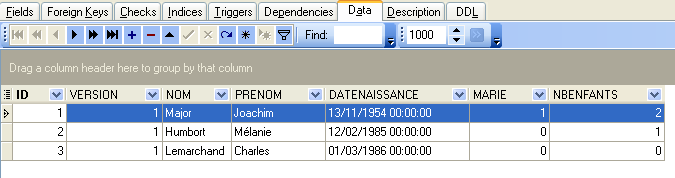
The SGBD SQL Express server is launched. The contents of the [PERSONNES] table are then as follows:
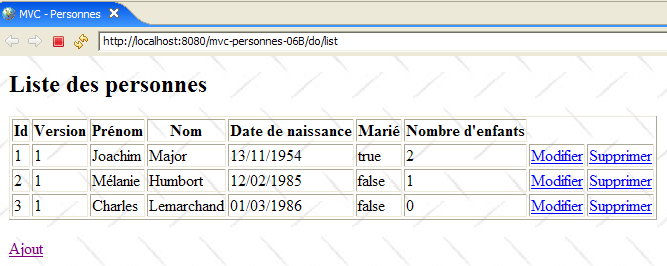
Tomcat is launched in turn. Using a browser, we request the url [http://localhost:8080/mvc-personnes-06B]:
We add a new person using the [Ajout] link:
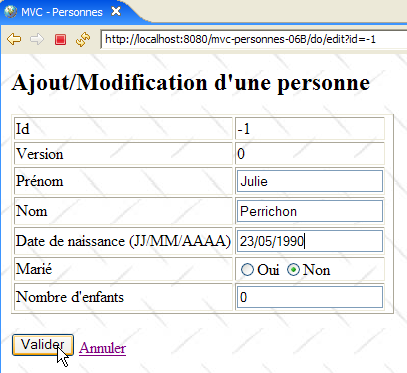 | 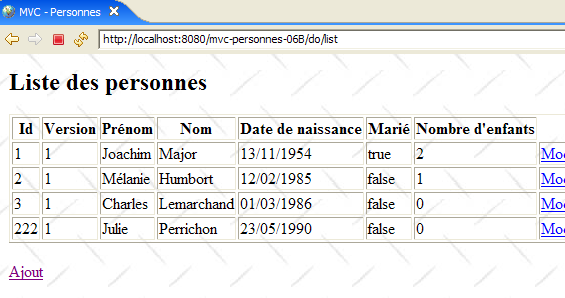 |
We verify the addition in the database:
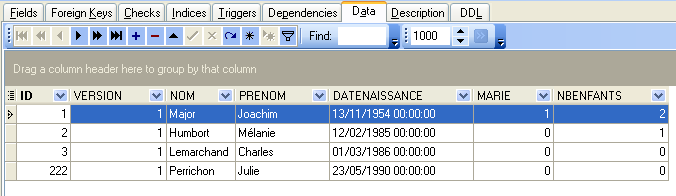
The reader is invited to perform further tests [modification, suppression].