8. Spring Data JPA OpenJpa
8.1. Introduction
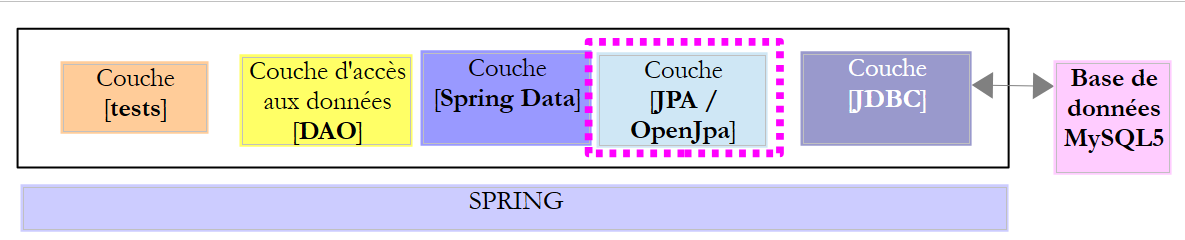
We are reusing the previous architecture, which we are now implementing with a JPA / OpenJpa layer.
 |
8.2. Setting up the work environment
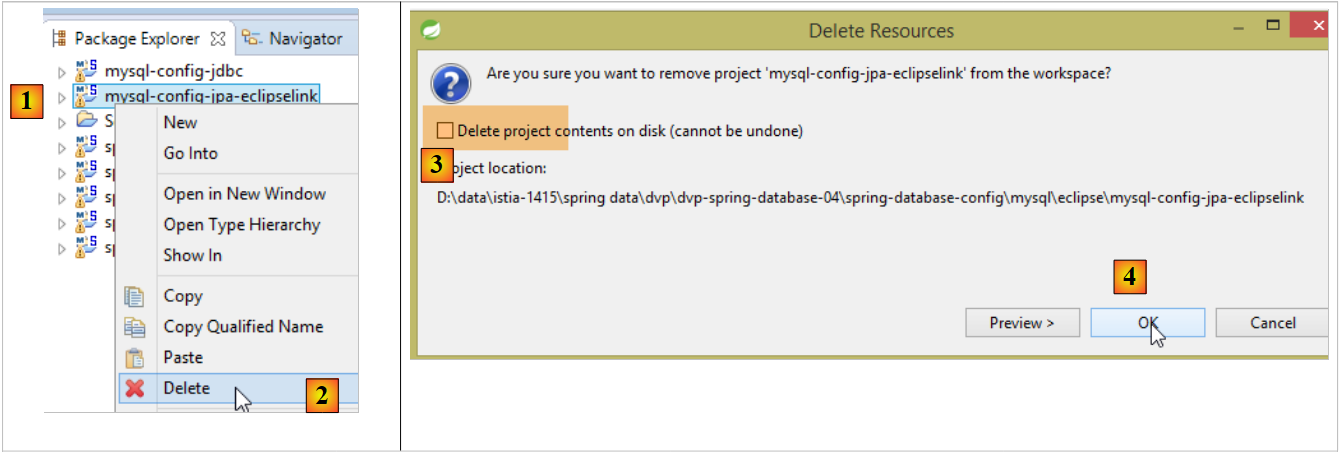
Using STS, unpack the [myql-config-jpa-eclipselink] and [1-4] project:
 |
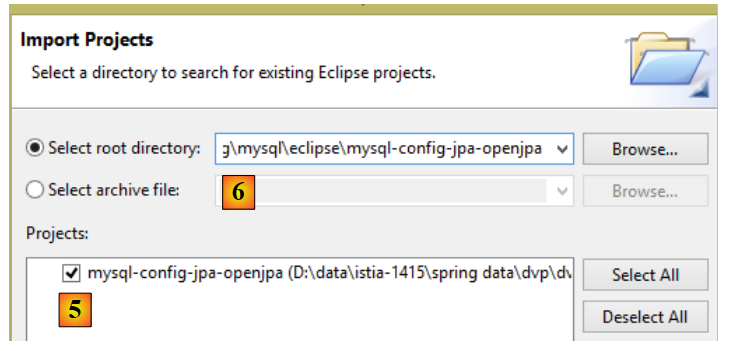
then import the [mysl-config-jpa-openjpa] and [5] projects located in the [<exemples>/spring-database-config/mysql/eclipse] and [6] folder:
 |
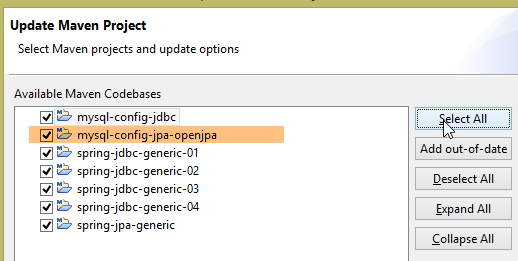
Once this is done, reset the Maven environment (Alt-F5) for all projects in [Package Explorer]:
 |
Next, to verify the runtime environment, run the runtime configuration named [spring-jpa-generic-JUnitTestDao-openjpa]:
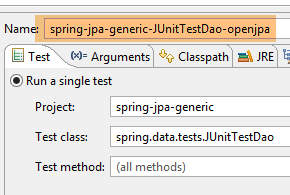 |  |
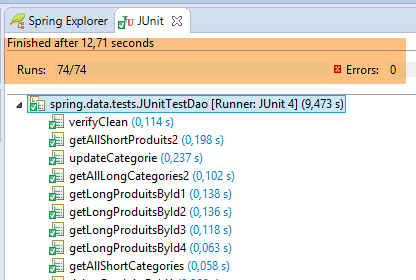
This configuration runs the test [JUnitTestDao]. This test must pass:
 |
8.3. The JPA configuration project
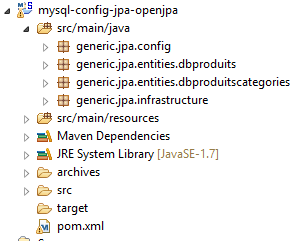 |
The purpose of this project is to configure the JPA layer of the architecture shown below:
 |
8.3.1. Maven Configuration
The project is a Maven project configured by the following [pom.xml] file:
<project xsi:schemaLocation="http://maven.apache.org/POM/4.0.0 http://maven.apache.org/xsd/maven-4.0.0.xsd"
    xmlns="http://maven.apache.org/POM/4.0.0" xmlns:xsi="http://www.w3.org/2001/XMLSchema-instance">

    <modelVersion>4.0.0</modelVersion>
    <groupId>dvp.spring.database</groupId>
    <artifactId>generic-config-jpa</artifactId>
    <version>0.0.1-SNAPSHOT</version>
    <name>configuration mysql openjpa</name>

    <parent>
        <groupId>org.springframework.boot</groupId>
        <artifactId>spring-boot-starter-parent</artifactId>
        <version>1.2.3.RELEASE</version>
    </parent>

    <dependencies>
        <!-- dépendances variables ********************************************** -->
        <!-- JPA provider -->
        <dependency>
            <groupId>org.apache.openjpa</groupId>
            <artifactId>openjpa</artifactId>
            <version>2.3.0</version>
        </dependency>
        <!-- dépendances constantes ********************************************** -->
        <!-- Spring Data -->
        <dependency>
            <groupId>org.springframework.data</groupId>
            <artifactId>spring-data-jpa</artifactId>
        </dependency>
        <!-- configuration JDBC inherited -->
        <dependency>
            <groupId>dvp.spring.database</groupId>
            <artifactId>generic-config-jdbc</artifactId>
            <version>0.0.1-SNAPSHOT</version>
            <exclusions>
                <exclusion>
                    <groupId>org.springframework.boot</groupId>
                    <artifactId>spring-boot-starter-jdbc</artifactId>
                </exclusion>
            </exclusions>
        </dependency>
    </dependencies>

    <properties>
        <project.build.sourceEncoding>UTF-8</project.build.sourceEncoding>
        <java.version>1.7</java.version>
    </properties>

    <build>
        <plugins>
            <plugin>
                <groupId>org.apache.maven.plugins</groupId>
                <artifactId>maven-surefire-plugin</artifactId>
                <version>2.18.1</version>
            </plugin>
        </plugins>
    </build>

</project>
- lines 5–7: the Maven artifact generated by this project. It is the same as that of the [mysql-config-jpa-hibernate] project. This means that only one of these projects can be active at any given time;
- lines 10–14: the parent Maven project that defines the version for most of the dependencies required by the project;
- lines 19–23: the OpenJpa library;
- lines 26–29: the Spring library Data;
- lines 32–34: the JPA layer configuration project relies on the JDBC layer configuration project, which defines, among other things, the JDBC driver for the SGBD being used and the database connection details;
- lines 35–40: the configuration project for layer JDBC includes the library [Spring JDBC], which is replaced here by the library [Spring Data JPA]. Therefore, we recommend not including it in the project dependencies. However, if it remains, this will not cause any errors;
In the end, the dependencies are as follows:
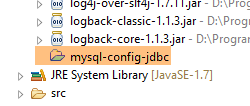 |
8.3.2. Spring Configuration
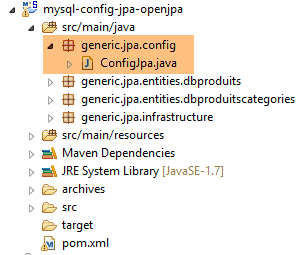 |
The [ConfigJpa] class configures the Spring project as follows:
package generic.jpa.config;

import generic.jdbc.config.ConfigJdbc;

import javax.persistence.EntityManagerFactory;

import org.apache.tomcat.jdbc.pool.DataSource;
import org.springframework.context.annotation.Bean;
import org.springframework.context.annotation.Configuration;
import org.springframework.context.annotation.Import;
import org.springframework.orm.jpa.JpaTransactionManager;
import org.springframework.orm.jpa.JpaVendorAdapter;
import org.springframework.orm.jpa.LocalContainerEntityManagerFactoryBean;
import org.springframework.orm.jpa.vendor.Database;
import org.springframework.orm.jpa.vendor.OpenJpaVendorAdapter;
import org.springframework.transaction.PlatformTransactionManager;

@Configuration
@Import({ConfigJdbc.class})
public class ConfigJpa {

    // the provider JPA
    @Bean
    public JpaVendorAdapter jpaVendorAdapter() {
        OpenJpaVendorAdapter openJpaVendorAdapter = new OpenJpaVendorAdapter();
        openJpaVendorAdapter.setShowSql(false);
        openJpaVendorAdapter.setDatabase(Database.MYSQL);
        openJpaVendorAdapter.setGenerateDdl(true);
        return openJpaVendorAdapter;
    }

    // JPA entity packages
    public final static String[] ENTITIES_PACKAGES = { "generic.jpa.entities.dbproduitscategories" };

    // data source
    @Bean
    public DataSource dataSource() {
        // data source TomcatJdbc
        DataSource dataSource = new DataSource();
        // configuration access JDBC
        dataSource.setDriverClassName(ConfigJdbc.DRIVER_CLASSNAME);
        dataSource.setUsername(ConfigJdbc.USER_DBPRODUITSCATEGORIES);
        dataSource.setPassword(ConfigJdbc.PASSWD_DBPRODUITSCATEGORIES);
        dataSource.setUrl(ConfigJdbc.URL_DBPRODUITSCATEGORIES);
        // initially open connections
        dataSource.setInitialSize(5);
        // result
        return dataSource;
    }

    // EntityManagerFactory
    @Bean
    public EntityManagerFactory entityManagerFactory(JpaVendorAdapter jpaVendorAdapter, DataSource dataSource) {
        LocalContainerEntityManagerFactoryBean factory = new LocalContainerEntityManagerFactoryBean();
        factory.setJpaVendorAdapter(jpaVendorAdapter);
        factory.setPackagesToScan(ENTITIES_PACKAGES);
        factory.setDataSource(dataSource);
        factory.afterPropertiesSet();
        return factory.getObject();
    }

    // Transaction manager
    @Bean
    public PlatformTransactionManager transactionManager(EntityManagerFactory entityManagerFactory) {
        JpaTransactionManager txManager = new JpaTransactionManager();
        txManager.setEntityManagerFactory(entityManagerFactory);
        return txManager;
    }
}
This configuration is similar to the one described in Section 6.3.2 for the JPA Hibernate implementation. We will only detail the differences:
- lines 23–30: the [jpaVendorAdapter] bean is now implemented with OpenJpa;
8.4. The [persistence.xml] file
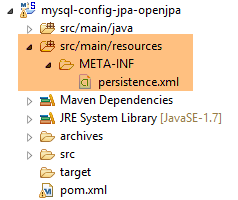 |
<?xml version="1.0" encoding="UTF-8"?>
<persistence version="1.0" xmlns="http://java.sun.com/xml/ns/persistence" xmlns:xsi="http://www.w3.org/2001/XMLSchema-instance"
    xsi:schemaLocation="http://java.sun.com/xml/ns/persistence http://java.sun.com/xml/ns/persistence/persistence_1_0.xsd">
    <persistence-unit name="generic-jpa-entities-dbproduitscategories" transaction-type="RESOURCE_LOCAL">
        <!-- entities JPA -->
        <class>generic.jpa.entities.dbproduitscategories.Categorie</class>
        <class>generic.jpa.entities.dbproduitscategories.Produit</class>
        <class>generic.jpa.entities.dbproduitscategories.User</class>
        <class>generic.jpa.entities.dbproduitscategories.Role</class>
        <class>generic.jpa.entities.dbproduitscategories.UserRole</class>
        <exclude-unlisted-classes />
    </persistence-unit>
    <persistence-unit name="generic-jpa-entities-dbproduits" transaction-type="RESOURCE_LOCAL">
        <!-- entities JPA -->
        <class>generic.jpa.entities.dbproduits.Produit</class>
        <exclude-unlisted-classes />
    </persistence-unit>
</persistence>
- line 4: the persistence unit associated with the [dbproduitscategories] database. It can have any name (name attribute);
- lines 6–10: the five JPA entities to be managed;
- lines 13–17: another persistence unit linked to the [dbproduits] database. OpenJpa allows for a persistence file with multiple persistence units. EclipseLink does not. Note that with Hibernate, we did not use a persistence file;
8.5. The test layer
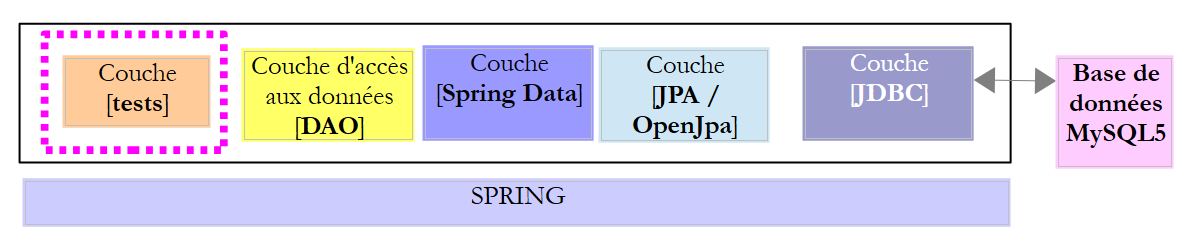 |
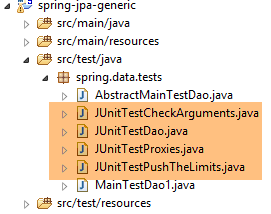 |
The tests above are identical to those for the Spring JDBC, Spring JPA Hibernate, and Spring JPA EclipseLink implementations. Please refer to the following pages if necessary:
- [JUnitTestCheckArguments]: section 4.11.1;
- [JUnitTestDao]: Section 4.11.2;
- [JUnitTestPushTheLimits]: paragraph 4.11.3;
- [JUnitTestProxies]: paragraph 6.4.5;
The execution configurations to be used are as follows:
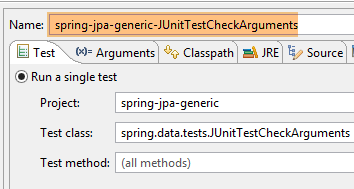 | 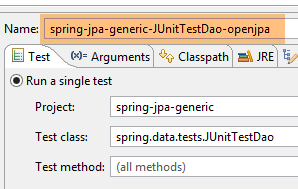 |
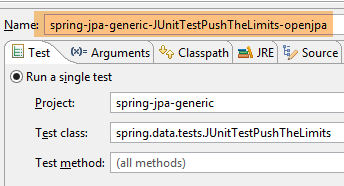 | 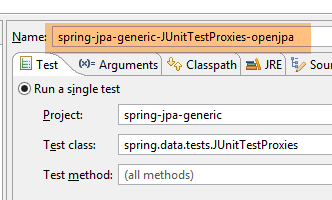 |
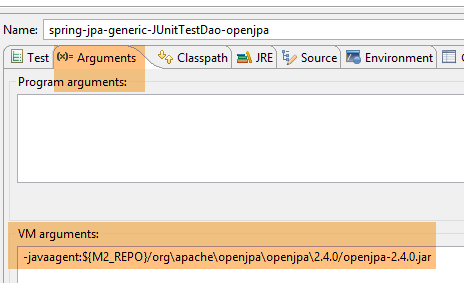
For the JPA entities to be enriched (woven) by OpenJpa, the Java applications or JUnit tests must be launched with a Java agent. This agent will enrich the JPA entities before they are loaded by JVM and [http://openjpa.apache.org/builds/1.2.3/apache-openjpa/docs/ref_guide_pc_enhance.html]. Let’s look, for example, at the configuration of the [JUnitTestDao] test:
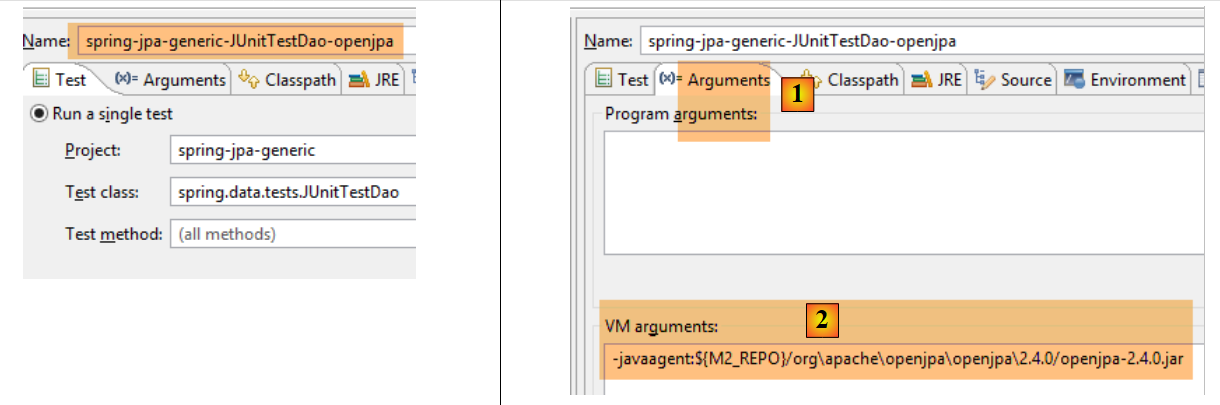 |
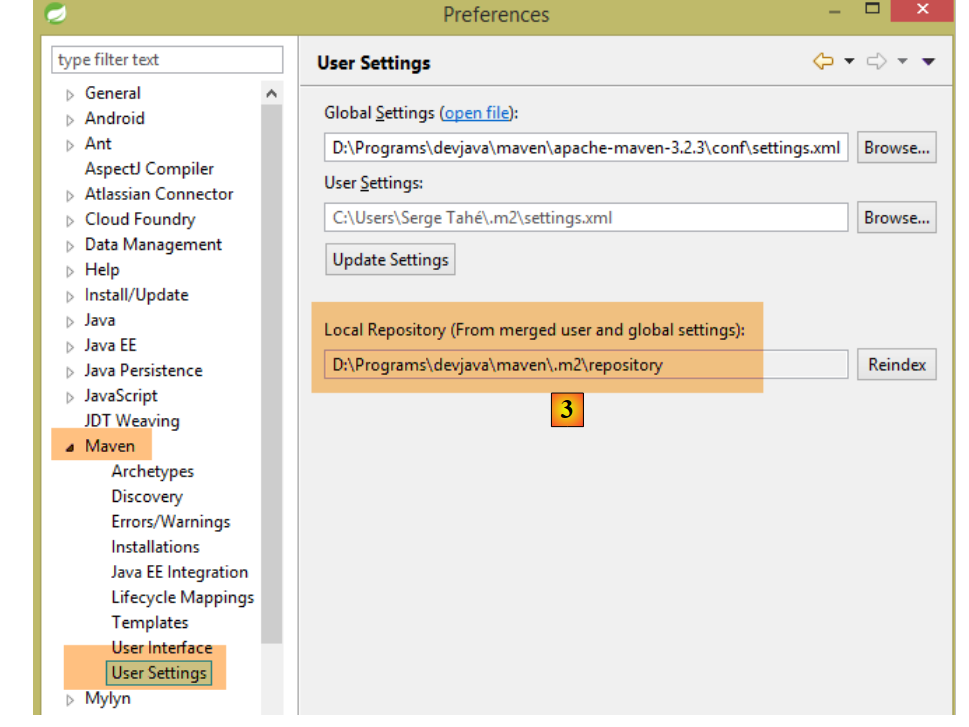
- In the [Arguments] [1] tab, the Java agent reference is specified for JVM using the [2] syntax. The Java agent is the [openjpa-<version>.jar] archive found in the [<m2-repo>/org/apache/openjpa/<version>] folder. The <m2-repo> folder is specified in the Eclipse configuration ([3] below):
 |
In [2], above, we used a user-defined variable [M2_REPO]:
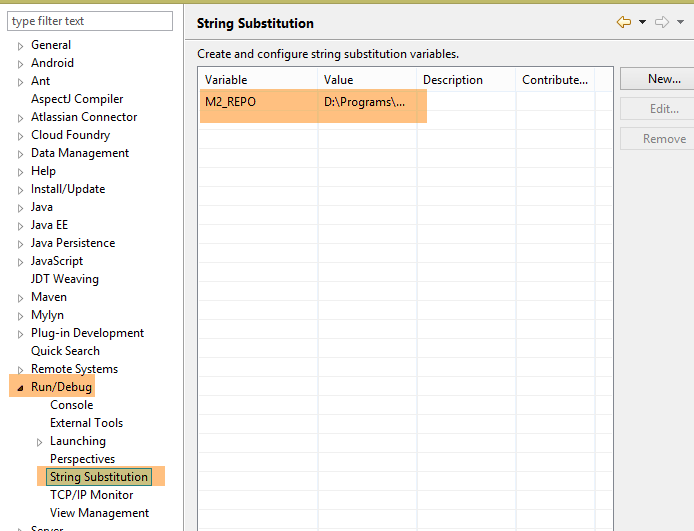 |
The variable [M2_REPO] was assigned the value shown in [3].
The results obtained for the [JUnitTestDao] and [JUnitTestPushTheLimits] tests are as follows:
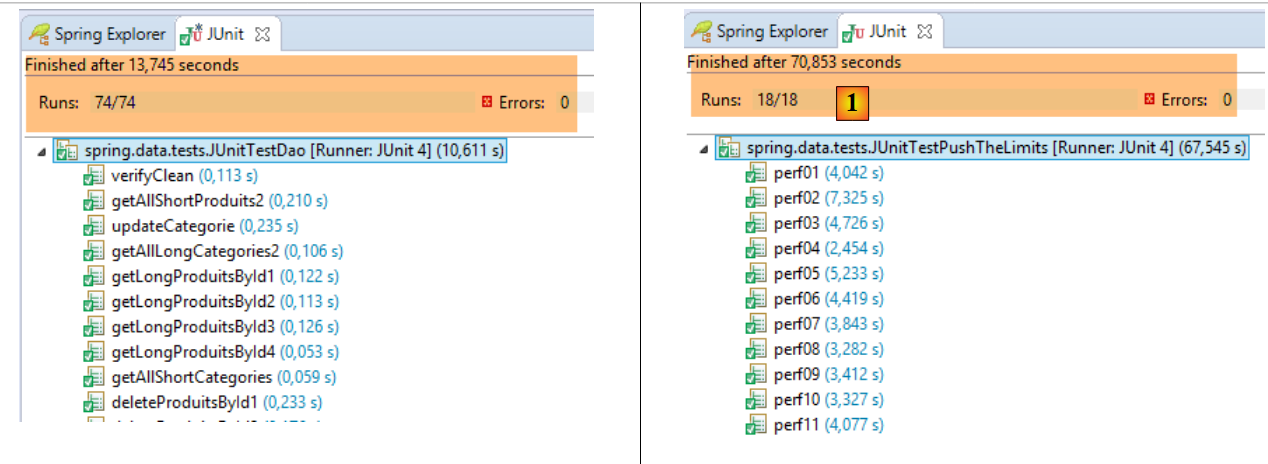 |
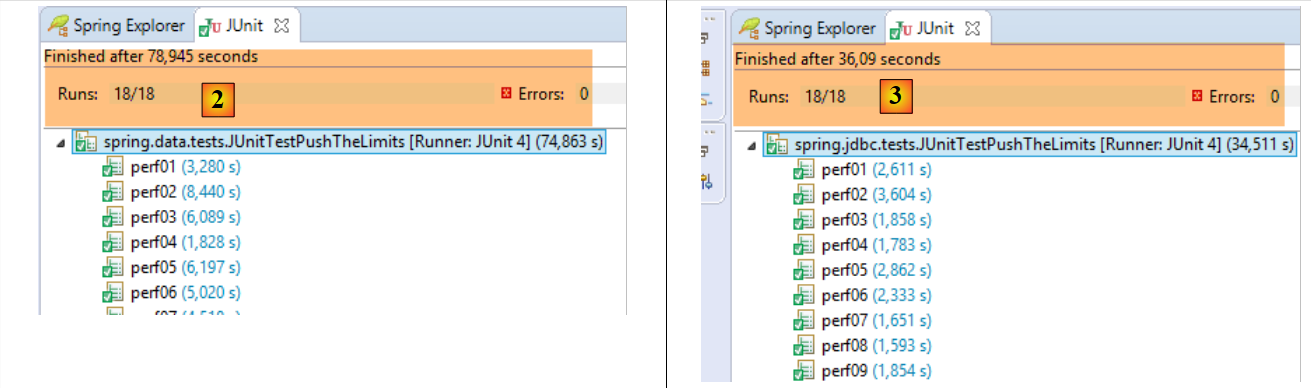 |
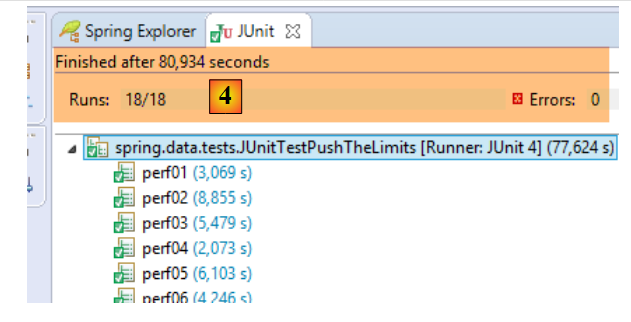 |
- in [1], [JUnitTestPushTheLimits-EclipseLink]: 70.583 s;
- for [2], [JUnitTestPushTheLimits-Hibernate]: 78.945 s;
- in [3], [JUnitTestPushTheLimits-JDBC]: 36.09 s;
- in [4], [JUnitTestPushTheLimits-OpenJpa]: 80.394 s;
The console results obtained for the [JUnitTestProxies] test are as follows:
Here we see that when accessing the [Categorie.produits] field of a category of type PROXY and the [Produit.categorie] field of a product of type PROXY, we have a null pointer in both cases (lines 7 and 17).