16. Introduction to Spring MVC
16.1. The Role of Spring MVC in a Web Application
Let’s situate Spring MVC within the development of a web application. Most often, it will be built on a multi-tier architecture such as the following:
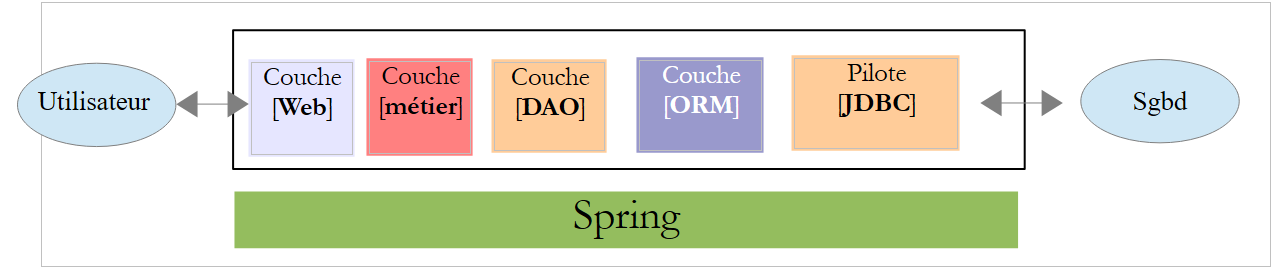 |
- The [Web] layer is the layer that interacts with the web application user. The user interacts with the web application through web pages displayed in a browser. Spring MVC is located in this layer and only in this layer;
- The [métier] layer implements the application's business rules, such as calculating a salary or an invoice. This layer uses data from the user via the [Web] layer and from SGBD via the [DAO] layer;
- the [DAO] layer (Data Access Objects), the [ORM] layer (Object Relational Mapper) and the JDBC driver manage access to the data in SGBD. The [ORM] layer bridges the objects handled by the [DAO] layer and the rows and columns of tables in a relational database. A specification called JPA (Java Persistence API) allows for abstraction from the ORM being used if it implements these specifications. This will be the case in this tutorial, so from now on we will refer to the ORM layer as the JPA layer;
- The integration of the layers is handled by the Spring framework;
16.2. The Spring MVC development model
Spring MVC implements the so-called MVC architectural model (Model–View–Controller) as follows:
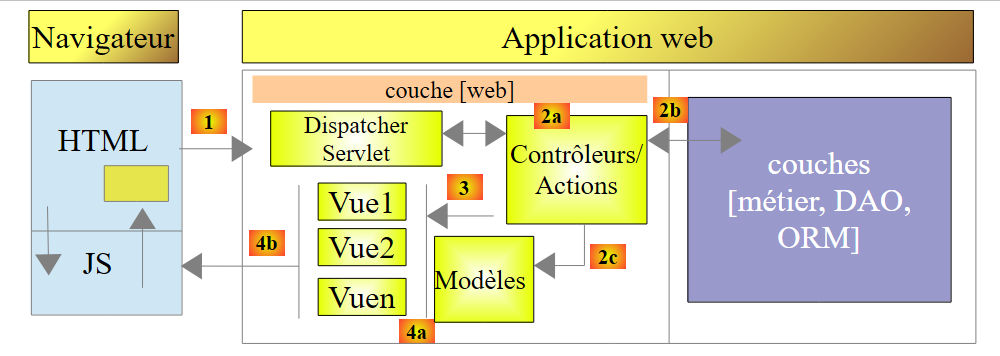 |
The processing of a client request proceeds as follows:
- request - the requested URLs are of the form http://machine:port/context/Action/param1/param2/....?p1=v1&p2=v2&... The [Front Controller] uses a configuration file or Java annotations to "route" the request to the correct controller and the correct action within that controller. To do this, it uses the [Action] field of the URL. The rest of the URL [/param1/param2/...] consists of optional parameters that will be passed to the action. The C in MVC is here the string [Front Controller, Contrôleur, Action]. If no controller can handle the requested action, the web server will respond that the requested URL was not found.
- Processing
- (continued)
- The selected action can use the parameters that [Front Controller] passed to it. These may come from several sources:
- the [/param1/param2/...] path of the URL,
- the [p1=v1&p2=v2] parameters of the URL,
- from parameters posted by the browser with its request;
- when processing the user’s request, the action may require the [métier] and [2b] layers. Once the client’s request has been processed, it may trigger various responses. A classic example is:
- an error page if the request could not be processed correctly
- a confirmation page otherwise
- the action instructs a specific view to be displayed [3]. This view will display data known as the view model. This is the M in MVC. The action will create this M template [2c] and request that a view V be displayed [3];
- response—the selected view V uses the model M constructed by the action to initialize the dynamic parts of the response HTML that it must send to the client, then sends this response.
For a web service / jSON, the previous architecture is slightly modified:
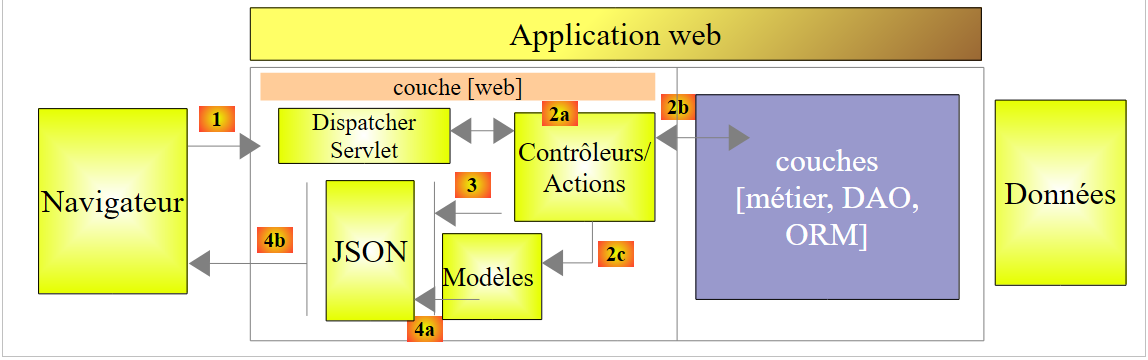 |
- in [4a], the model, which is a Java class, is converted into a string jSON by a library jSON;
- in [4b], this string jSON is sent to the browser;
Now, let’s clarify the relationship between the MVC web architecture and layered architecture. Depending on how we define the model, these two concepts may or may not be related. Let’s consider a single-layer Spring web application MVC:
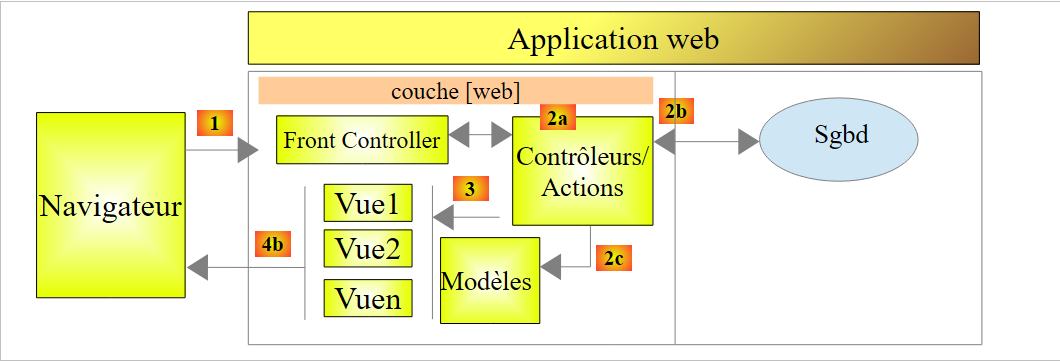 |
If we implement the [Web] layer using Spring MVC, we will indeed have a MVC web architecture but not a multi-layer architecture. Here, the [web] layer will handle everything: presentation, business logic, and data access. These are the actions that will perform this work.
Now, let’s consider a multi-layer web architecture:
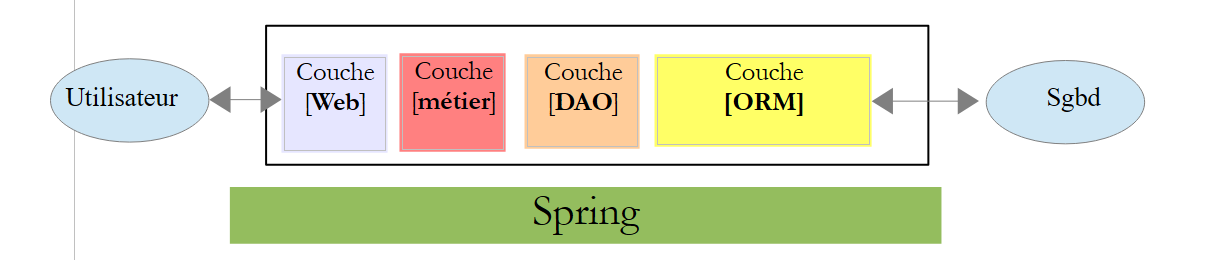 |
The [Web] layer can be implemented without a framework and without following the MVC model. We do then have a multi-layer architecture, but the web layer does not implement the MVC model.
For example, in the .NET world, the [Web] layercan be implemented with ASP.NET and MVC, resulting in a layered architecture with a [Web] layer of type MVC. Once this is done, we can replace this ASP.NET MVC layer with a standard ASP.NET layer (WebForms) while keeping the rest (business logic, DAO, ORM) unchanged. We then have a layered architecture with a [Web] layer that is no longer of type MVC.
In MVC, we stated that model M was that of view V, c.a.d—the set of data displayed by view V. Another definition of model M for MVC is provided:
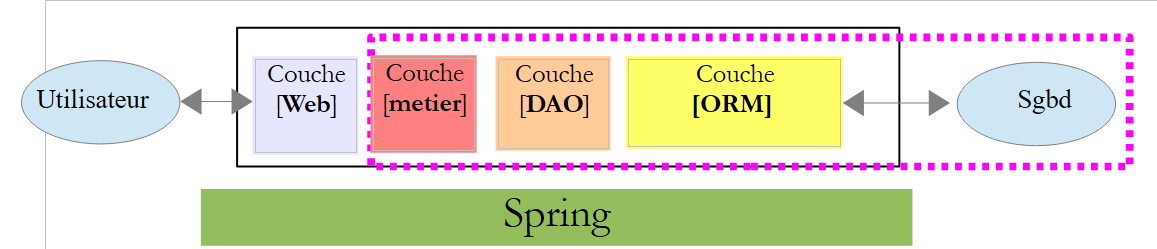 |
Many authors consider that what is to the right of the layer [Web] forms the model M of MVC. To avoid ambiguities, we can refer to:
- the domain model when referring to everything to the right of the [Web] layer
- the view model when referring to the data displayed by a view V
Hereinafter, the term "M model" will refer exclusively to the model of a view V.
16.3. A web project / jSON using Spring MVC
The [http://spring.io/guides] site offers getting-started tutorials to explore the Spring ecosystem. We will follow one of them to learn about the Maven configuration required for a Spring project MVC.
16.3.1. The demo project
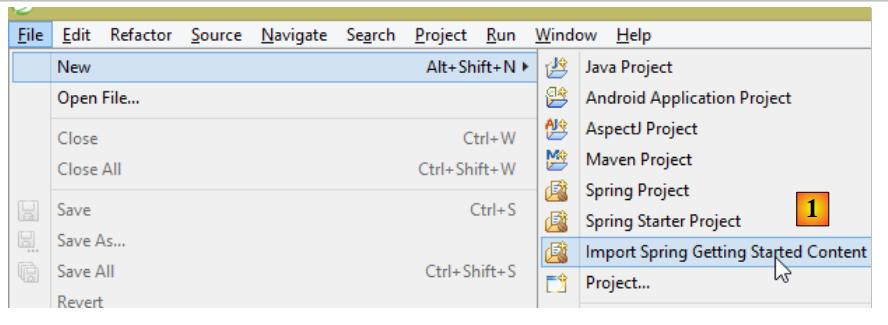 |
- In [1], we import one of the Spring guides;
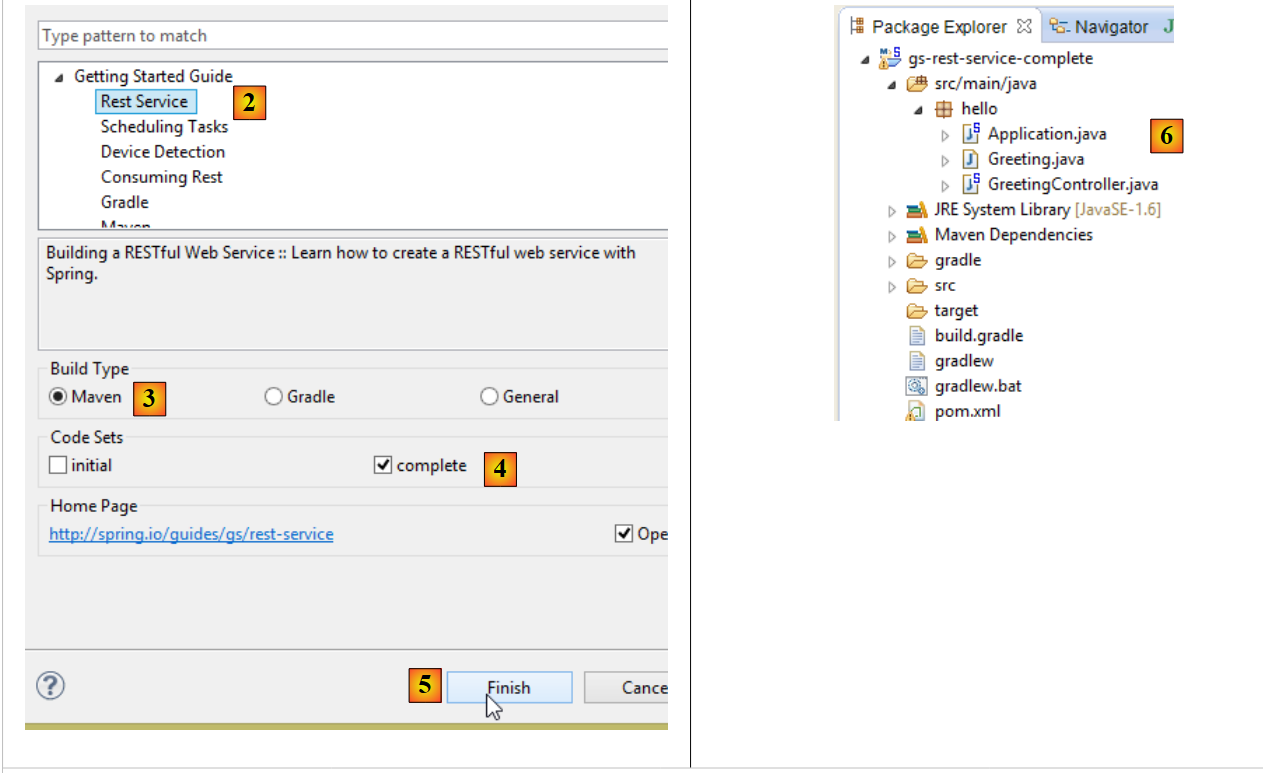 |
- in [2], we select the example [Rest Service];
- in [3], we select the Maven project;
- in [4], we take the final version from the guide;
- In [5], we confirm;
- in [6], the imported project;
Web services accessible via standard URL and which deliver jSON text are often called REST services (REpresentational State Transfer). A service is considered RESTful if it adheres to certain rules.
Let’s now examine the imported project, starting with its Maven configuration.
16.3.2. Maven Configuration
The [pom.xml] file is as follows:
<?xml version="1.0" encoding="UTF-8"?>
<project xmlns="http://maven.apache.org/POM/4.0.0" xmlns:xsi="http://www.w3.org/2001/XMLSchema-instance"
    xsi:schemaLocation="http://maven.apache.org/POM/4.0.0 http://maven.apache.org/xsd/maven-4.0.0.xsd">
    <modelVersion>4.0.0</modelVersion>

    <groupId>org.springframework</groupId>
    <artifactId>gs-rest-service</artifactId>
    <version>0.1.0</version>

    <parent>
        <groupId>org.springframework.boot</groupId>
        <artifactId>spring-boot-starter-parent</artifactId>
        <version>1.2.2.RELEASE</version>
    </parent>

    <dependencies>
        <dependency>
            <groupId>org.springframework.boot</groupId>
            <artifactId>spring-boot-starter-web</artifactId>
        </dependency>
    </dependencies>

    <properties>
        <start-class>hello.Application</start-class>
    </properties>

    <build>
        <plugins>
            <plugin>
                <groupId>org.springframework.boot</groupId>
                <artifactId>spring-boot-maven-plugin</artifactId>
            </plugin>
        </plugins>
    </build>

    <repositories>
        <repository>
            <id>spring-releases</id>
            <url>https://repo.spring.io/libs-release</url>
        </repository>
    </repositories>
    <pluginRepositories>
        <pluginRepository>
            <id>spring-releases</id>
            <url>https://repo.spring.io/libs-release</url>
        </pluginRepository>
    </pluginRepositories>
</project>
- Lines 6–8: the Maven project properties. A [<packaging>] tag specifying the type of file produced by the Maven build is missing. In its absence, the [jar] type is used. The application is therefore a console-based executable application, not a web application, in which case the packaging would be [war];
- lines 10–14: the Maven project has a parent project [spring-boot-starter-parent]. This defines most of the project’s dependencies. They may be sufficient, in which case no additional dependencies are added, or they may not be, in which case the missing dependencies are added;
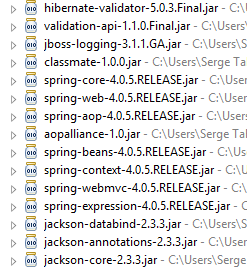
- lines 17–20: the artifact [spring-boot-starter-web] includes the libraries required for a Spring project MVC of the web service type, where no views are generated. This artifact includes a very large number of libraries, including those for an embedded Tomcat server. The application will run on this server;
The libraries included in this configuration are numerous:
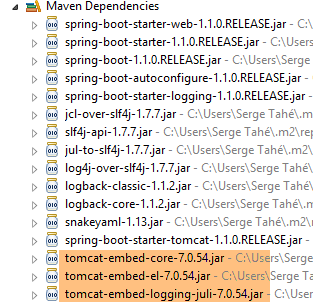 |  |
Above, we see the three Tomcat server archives.
16.3.3. The architecture of a Spring [web / jSON] service
For a web service / jSON, Spring MVC implements the MVC model as follows:
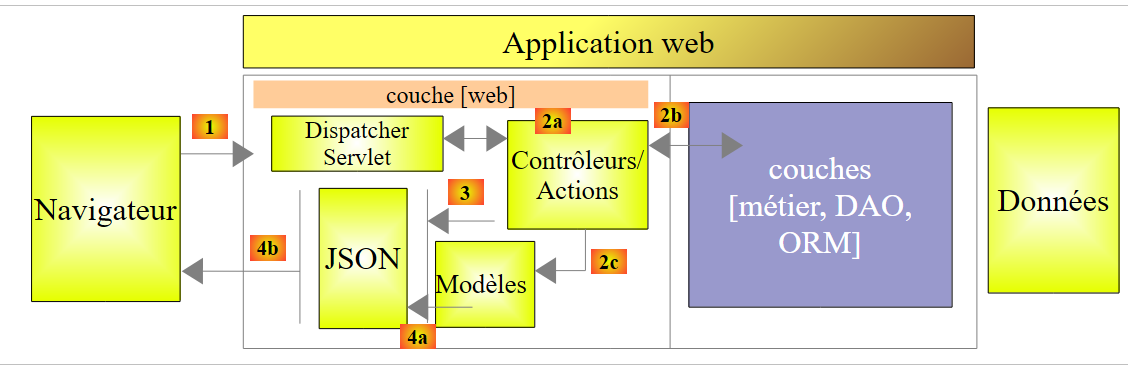 |
- in [4a], the model—which is a Java class—is converted into a string jSON by a library jSON;
- in [4b], this string jSON is sent to the browser;
16.3.4. The C controller
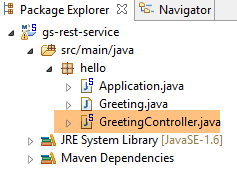 |
The imported application has the following controller:
package hello;

import java.util.concurrent.atomic.AtomicLong;
import org.springframework.web.bind.annotation.RequestMapping;
import org.springframework.web.bind.annotation.RequestParam;
import org.springframework.web.bind.annotation.RestController;

@RestController
public class GreetingController {

    private static final String template = "Hello, %s!";
    private final AtomicLong counter = new AtomicLong();

    @RequestMapping("/greeting")
    public Greeting greeting(@RequestParam(value = "name", defaultValue = "World") String name) {
        return new Greeting(counter.incrementAndGet(), String.format(template, name));
    }
}
- Line 9: The annotation [@RestController] makes the class [GreetingController] a Spring controller, meaning that its methods are registered to handle URL. We have seen the similar annotation [@Controller]. The result of this controller’s methods was a type [String], which was the name of the view to be displayed. Here it is different. The methods of a controller of type [@RestController] return objects that are serialized to be sent to the browser. The type of serialization performed depends on the Spring configuration MVC. Here, they will be serialized as jSON. The presence of a jSON library in the project’s dependencies causes Spring Boot to automatically configure the project in this way;
- line 14: the [@RequestMapping] annotation indicates the URL that the method processes, in this case the URL [/greeting];
- line 15: we have already explained the annotation [@RequestParam]. The result returned by the method is an object of type [Greeting].
- line 12: an atomic integer of type long. This means it supports concurrent access. Multiple threads may want to increment the variable [counter] at the same time. This will be handled correctly. A thread can only read the counter’s value once the thread currently modifying it has finished its modification.
16.3.5. The M model
The M model produced by the previous method is the following [Greeting] object:
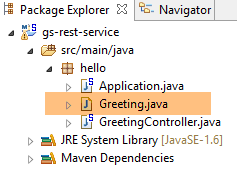 |
package hello;

public class Greeting {

    private final long id;
    private final String content;

    public Greeting(long id, String content) {
        this.id = id;
        this.content = content;
    }

    public long getId() {
        return id;
    }

    public String getContent() {
        return content;
    }
}
The jSON transformation of this object will create the string {"id":n,"content":"text"}. Ultimately, the jSON string produced by the controller method will be in the form:
or
16.3.6. Execution
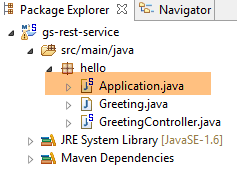 |
The [Application.java] class is the project’s executable class. Its code is as follows:
package hello;

import org.springframework.boot.autoconfigure.EnableAutoConfiguration;
import org.springframework.boot.SpringApplication;
import org.springframework.context.annotation.ComponentScan;

@ComponentScan
@EnableAutoConfiguration
public class Application {

    public static void main(String[] args) {
        SpringApplication.run(Application.class, args);
    }

}
We have already encountered and explained this code in the previous example. Let’s run the project:
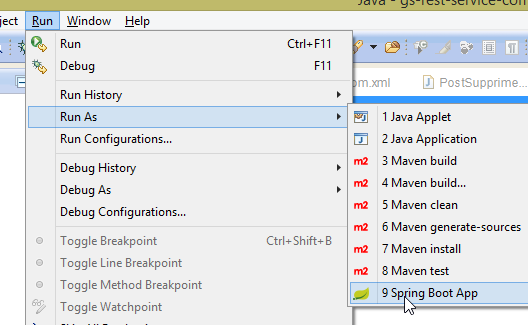 |
We get the following console logs:
- line 13: the Tomcat server starts on port 8080 (line 12);
- line 17: the [DispatcherServlet] servlet is present;
- line 20: the [GreetingController.greeting] method has been discovered;
To test the web application, we request URL [http://localhost:8080/greeting]:
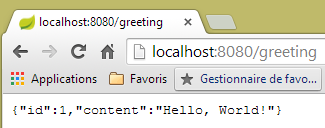 | 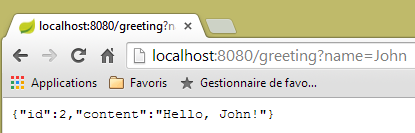 |
We receive the expected jSON string. It may be interesting to view the HTTP headers sent by the server. To do this, we will use the Chrome extension called [Advanced Rest Client] (Chrome / Ctrl-T / [Applications] Menu / [Advanced Rest Client] - see Appendices, paragraph 23.11):
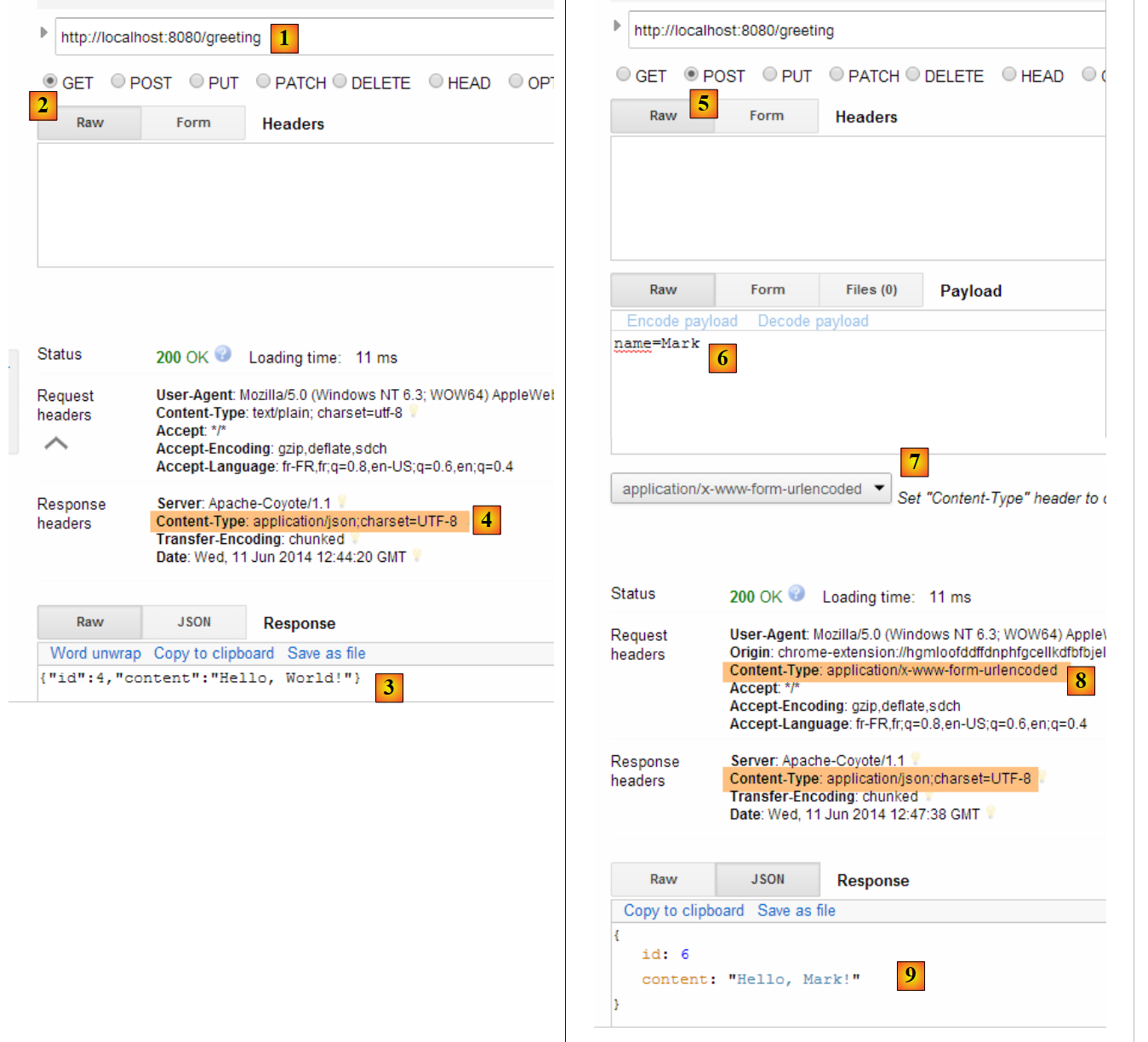 |
- in [1], the requested URL;
- in [2], the method GET is used;
- in [3], the response jSON;
- in [4], the server indicated that it was sending a response in the jSON format;
- in [5], the same URL is requested, but this time with a POST;
- in [7], the information is sent to the server in the form [urlencoded];
- in [6], the parameter name with its value;
- in [8], the browser tells the server that it is sending it information [urlencoded];
- in [9], the server's response jSON;
16.3.7. Creating an executable archive
We will now create an executable archive:
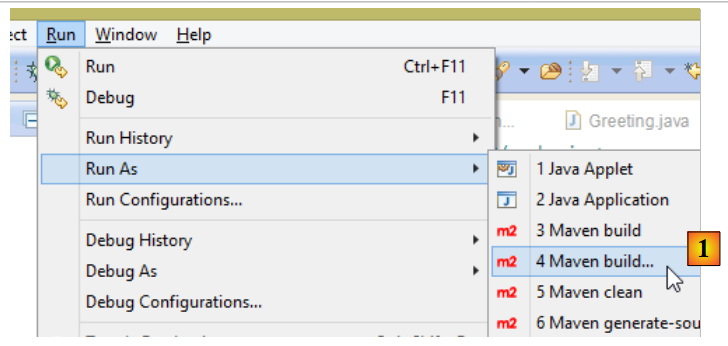 |
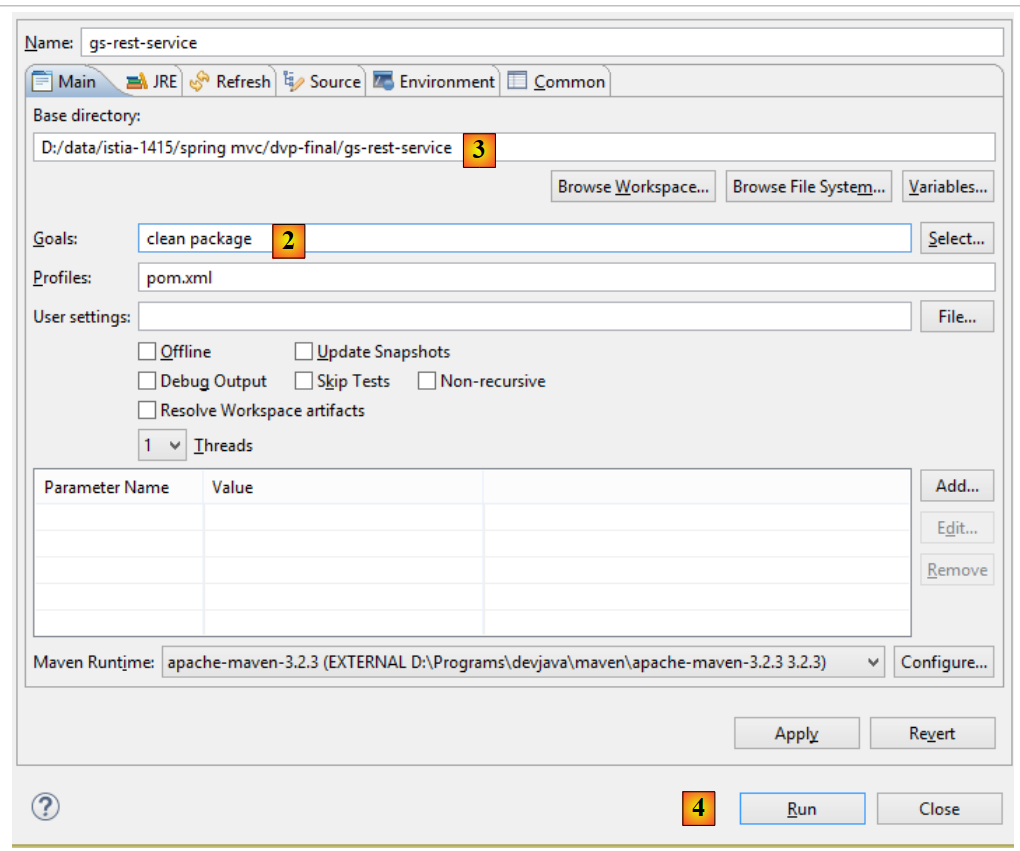 |
- in [1]: we execute a Maven target;
- in [2]: there are two goals: [clean] to delete the [target] folder from the Maven project, [package] to regenerate it;
- in [3]: the generated [target] folder will be created in this folder;
- in [4]: the target is generated;
In the logs that appear in the console, it is important to see the [spring-boot-maven-plugin] plugin appear. This is the one that generates the executable archive (see [pom.xml] below):
    <build>
        <plugins>
            <plugin>
                <groupId>org.springframework.boot</groupId>
                <artifactId>spring-boot-maven-plugin</artifactId>
            </plugin>
        </plugins>
</build>
Using a command prompt, navigate to the generated folder:
D:\Temp\wksSTS\gs-rest-service\target>dir
 ...
11/06/2014  15:30    <DIR>          classes
11/06/2014  15:30    <DIR>          generated-sources
11/06/2014  15:30        11 073 572 gs-rest-service-0.1.0.jar
11/06/2014  15:30             3 690 gs-rest-service-0.1.0.jar.original
11/06/2014  15:30    <DIR>          maven-archiver
11/06/2014  15:30    <DIR>          maven-status
...
- line 5: the generated archive;
This archive is executed as follows:
D:\Temp\wksSTS\gs-rest-service-complete\target>java -jar gs-rest-service-0.1.0.jar

  .   ____          _            __ _ _
 /\\ / ___'_ __ _ _(_)_ __  __ _ \ \ \ \
( ( )\___ | '_ | '_| | '_ \/ _` | \ \ \ \
 \\/  ___)| |_)| | | | | || (_| |  ) ) ) )
  '  |____| .__|_| |_|_| |_\__, | / / / /
 =========|_|==============|___/=/_/_/_/
 :: Spring Boot ::        (v1.1.0.RELEASE)

2014-06-11 15:32:47.088  INFO 4972 --- [           main] hello.Application
                  : Starting Application on Gportpers3 with PID 4972 (D:\Temp\wk
sSTS\gs-rest-service-complete\target\gs-rest-service-0.1.0.jar started by ST in
D:\Temp\wksSTS\gs-rest-service-complete\target)
...
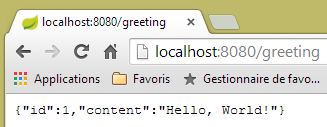
Now that the web application is running, you can access it using a browser:
 |
16.3.8. Deploying the application on a Tomcat server
As we did for the previous project, we modify the [pom.xml] file as follows:
<?xml version="1.0" encoding="UTF-8"?>
<project xmlns="http://maven.apache.org/POM/4.0.0" xmlns:xsi="http://www.w3.org/2001/XMLSchema-instance"
    xsi:schemaLocation="http://maven.apache.org/POM/4.0.0 http://maven.apache.org/xsd/maven-4.0.0.xsd">
    <modelVersion>4.0.0</modelVersion>

    <groupId>org.springframework</groupId>
    <artifactId>gs-rest-service</artifactId>
    <version>0.1.0</version>
    <packaging>war</packaging>

    ...
</project>
- Line 9: You must specify that you are generating a WAR archive (Web ARchive);
You must also configure the web application. If the [web.xml] file is missing, this is done using a class that inherits from [SpringBootServletInitializer]:
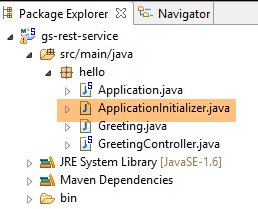 |
The [ApplicationInitializer] class is as follows:
package hello;

import org.springframework.boot.builder.SpringApplicationBuilder;
import org.springframework.boot.context.web.SpringBootServletInitializer;

public class ApplicationInitializer extends SpringBootServletInitializer {

    @Override
    protected SpringApplicationBuilder configure(SpringApplicationBuilder application) {
        return application.sources(Application.class);
    }

}
- line 6: the class [ApplicationInitializer] extends the class [SpringBootServletInitializer];
- line 9: the [configure] method is redefined (line 8);
- line 10: the class that configures the project is provided;
To run the project, proceed as follows:
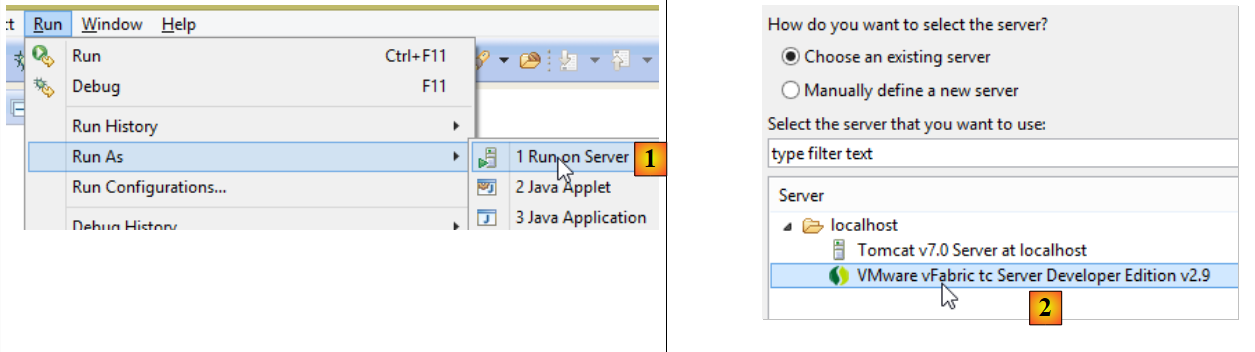 |
- in [1-2], run the project on one of the servers registered in the IDE Eclipse;
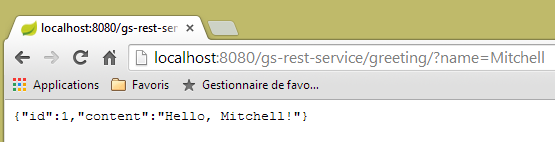
Once this is done, you can request the URL [http://localhost:8080/gs-rest-service/greeting/?name=Mitchell] in a browser:
 |
16.4. Conclusion
We have introduced a type of Spring project where the web application sends a stream to the browser. We will now develop a web application / jSON to expose the database [dbproduitscategories] studied in the previous chapters on the web.