7. Spring Data JPA EclipseLink
7.1. Introduction
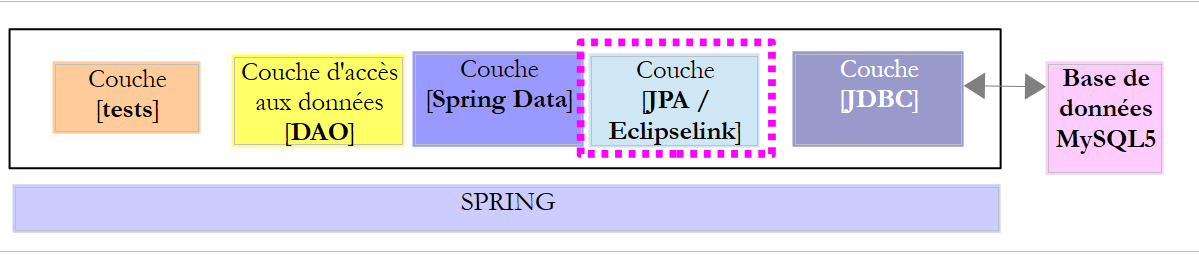
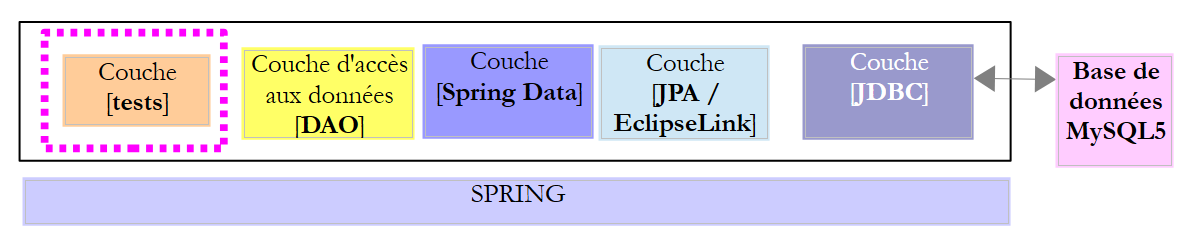
We are reusing the previous architecture, which we are now implementing with a JPA / EclipseLink layer.
 |
7.2. Setting up the work environment
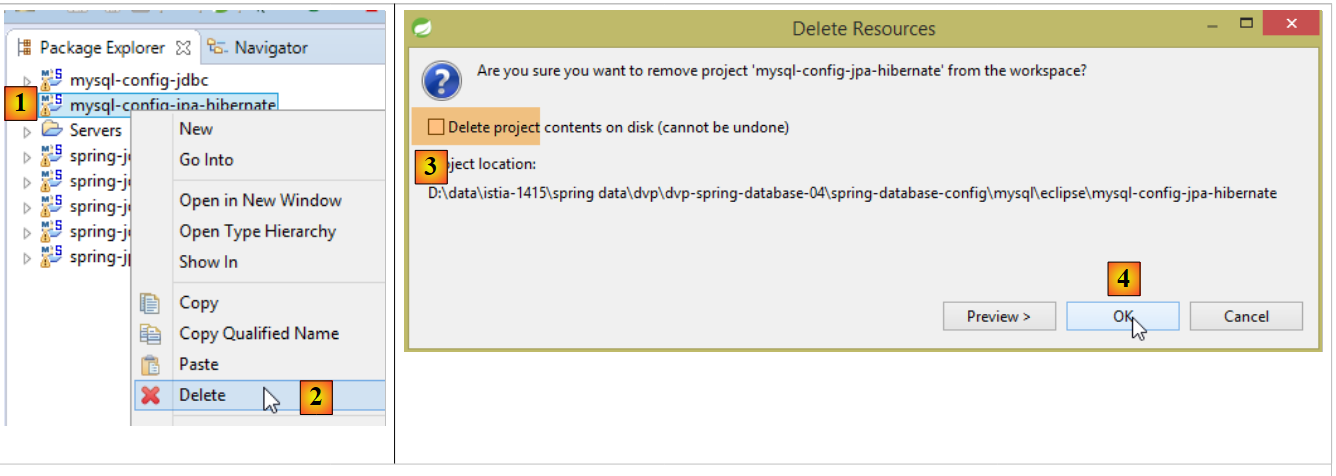
Using STS, unpack the [myql-config-jpa-hibernate] and [1-4] project:
 |
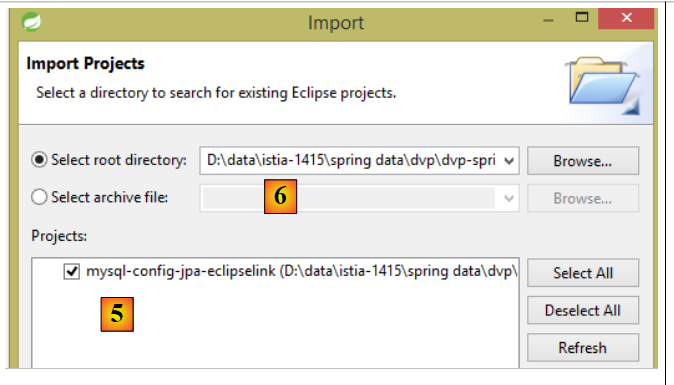
then import the [mysl-config-jpa-eclipselink] and [5] projects located in the [<exemples>/spring-database-config/mysql/eclipse] and [6] folders:
 |
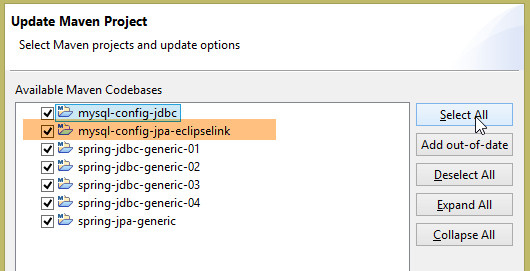
Once this is done, reset the Maven environment (Alt-F5) for all projects in [Package Explorer]:
 |
Then, to verify the build environment, run the build configuration named [spring-jpa-generic-JUnitTestDao-hibernate-eclipselink]:
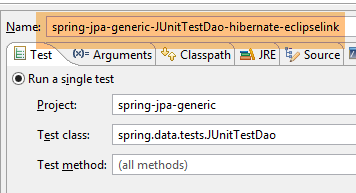 |
This configuration runs the [JUnitTestDao] test. This test must pass:
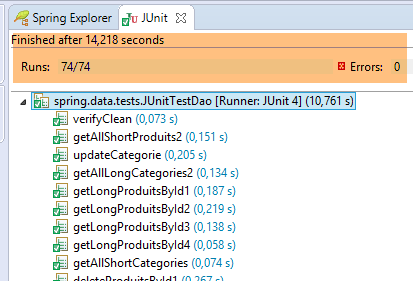 |
7.3. The JPA layer configuration project
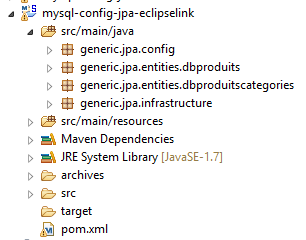 |
The purpose of this project is to configure the JPA layer of the architecture below:
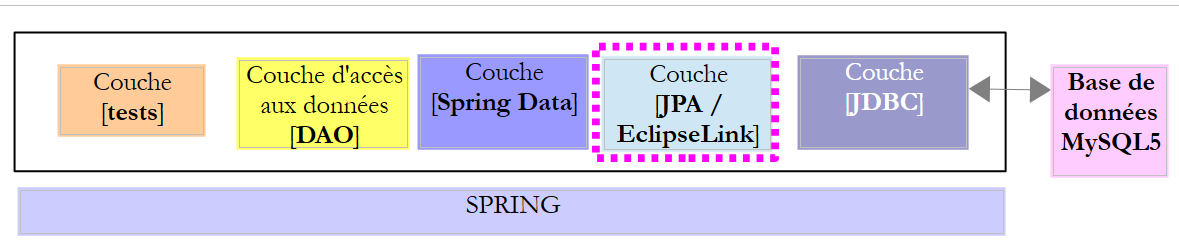 |
7.3.1. Maven Configuration
The project is a Maven project configured by the following [pom.xml] file:
<project xsi:schemaLocation="http://maven.apache.org/POM/4.0.0 http://maven.apache.org/xsd/maven-4.0.0.xsd"
    xmlns="http://maven.apache.org/POM/4.0.0" xmlns:xsi="http://www.w3.org/2001/XMLSchema-instance">

    <modelVersion>4.0.0</modelVersion>
    <groupId>dvp.spring.database</groupId>
    <artifactId>generic-config-jpa</artifactId>
    <version>0.0.1-SNAPSHOT</version>
    <name>configuration mysql openjpa</name>

    <parent>
        <groupId>org.springframework.boot</groupId>
        <artifactId>spring-boot-starter-parent</artifactId>
        <version>1.2.3.RELEASE</version>
    </parent>

    <dependencies>
        <!-- dépendances variables ********************************************** -->
        <!-- JPA provider -->
        <dependency>
            <groupId>org.eclipse.persistence</groupId>
            <artifactId>eclipselink</artifactId>
            <version>2.6.0</version>
        </dependency>
        <!-- dépendances constantes ********************************************** -->
        <!-- Spring Data -->
        <dependency>
            <groupId>org.springframework.data</groupId>
            <artifactId>spring-data-jpa</artifactId>
        </dependency>
        <!-- configuration JDBC inherited -->
        <dependency>
            <groupId>dvp.spring.database</groupId>
            <artifactId>generic-config-jdbc</artifactId>
            <version>0.0.1-SNAPSHOT</version>
            <exclusions>
                <exclusion>
                    <groupId>org.springframework.boot</groupId>
                    <artifactId>spring-boot-starter-jdbc</artifactId>
                </exclusion>
            </exclusions>
        </dependency>
    </dependencies>

    <properties>
        <project.build.sourceEncoding>UTF-8</project.build.sourceEncoding>
        <java.version>1.7</java.version>
    </properties>

    <build>
        <plugins>
            <!-- [https://flexguse.wordpress.com/2013/08/10/maven-spring-data-jpa-eclipselink-and-static-weaving/] -->
            <plugin>
                <groupId>org.apache.maven.plugins</groupId>
                <artifactId>maven-surefire-plugin</artifactId>
                <version>2.18.1</version>
            </plugin>
            <!-- This plugin ensures the EclipseLink static weaving -->
            <plugin>
                <artifactId>staticweave-maven-plugin</artifactId>
                <groupId>de.empulse.eclipselink</groupId>
                <version>1.0.0</version>
                <executions>
                    <execution>
                        <goals>
                            <goal>weave</goal>
                        </goals>
                        <phase>process-classes</phase>
                        <configuration>
                            <logLevel>ALL</logLevel>
                            <!-- <includeProjectClasspath>true</includeProjectClasspath> -->
                        </configuration>
                    </execution>
                </executions>
                <dependencies>
                    <dependency>
                        <groupId>org.eclipse.persistence</groupId>
                        <artifactId>eclipselink</artifactId>
                        <version>2.6.0</version>
                    </dependency>
                </dependencies>
            </plugin>
        </plugins>
        <pluginManagement>
            <plugins>
                <!--This plugin's configuration is used to store Eclipse m2e settings only. It has no influence on the Maven build itself. -->
                <plugin>
                    <groupId>org.eclipse.m2e</groupId>
                    <artifactId>lifecycle-mapping</artifactId>
                    <version>1.0.0</version>
                    <configuration>
                        <lifecycleMappingMetadata>
                            <pluginExecutions>
                                <pluginExecution>
                                    <pluginExecutionFilter>
                                        <groupId>
                                            de.empulse.eclipselink
                                        </groupId>
                                        <artifactId>
                                            staticweave-maven-plugin
                                        </artifactId>
                                        <versionRange>
                                            [1.0.0,)
                                        </versionRange>
                                        <goals>
                                            <goal>weave</goal>
                                        </goals>
                                    </pluginExecutionFilter>
                                    <action>
                                        <execute>
                                            <runOnIncremental>true</runOnIncremental>
                                        </execute>
                                    </action>
                                </pluginExecution>
                            </pluginExecutions>
                        </lifecycleMappingMetadata>
                    </configuration>
                </plugin>
            </plugins>
        </pluginManagement>
    </build>

</project>
- lines 5–7: the Maven artifact generated by this project. It is the same as that of the [mysql-config-jpa-hibernate] project. This means that only one of these projects can be active at any given time;
- lines 10–14: the parent Maven project that defines the version for most of the dependencies required by the project;
- lines 19–22: the EclipseLink library;
- lines 26–29: the Spring library Data;
- lines 32–34: the JPA layer configuration project relies on the JDBC layer configuration project, which defines, among other things, the JDBC driver for the SGBD being used and the database connection details;
- lines 35–40: the configuration project for layer JDBC includes the [Spring JDBC] library, which is replaced here by the [Spring Data JPA] library. Therefore, it is recommended not to include it in the project dependencies. However, if it remains, this does not cause any errors;
- the plugin in lines 58–81 implements the "weaving" of the JPA entities. What is referred to as "weaving" is the transformation (enrichment) of the JPA entities so that they support Lazy Loading. We did not need to configure Hibernate for this weaving to take place. For EclipseLink, a Maven plugin is required. I spent a long time trying to figure out how to force EclipseLink to respect the [fetch = FetchType.LAZY] attribute of the [@ManyToOne] annotation below:
    @ManyToOne(fetch = FetchType.LAZY)
    @JoinColumn(name = ConfigJdbc.TAB_PRODUITS_CATEGORIE_ID)
private Categorie categorie;
The JPA specification indicates that the [fetch = FetchType.LAZY] attribute of the [@ManyToOne] annotation is a 'hint' (suggestion) that the JPA implementation is not required to follow. And indeed, EclipseLink does not follow it by default. A special configuration is required for it to follow it. After much fruitless searching, I found the solution to the URL mentioned on line 51. When lines 58–81 are included in the [pom.xml] file, Eclipse reports an error on the file. This is a configuration issue with the [m2e] plugin, which handles Maven projects within Eclipse. You need to add lines 83–119 to resolve the error.
Ultimately, the dependencies are as follows:
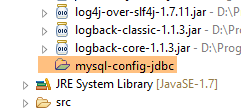 |
7.3.2. Spring Configuration
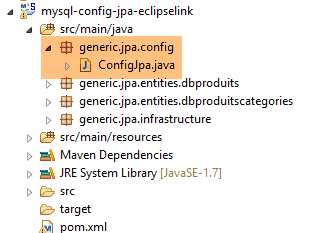 |
The [ConfigJpa] class configures the Spring project:
package generic.jpa.config;

import generic.jdbc.config.ConfigJdbc;

import javax.persistence.EntityManagerFactory;

import org.apache.tomcat.jdbc.pool.DataSource;
import org.springframework.context.annotation.Bean;
import org.springframework.context.annotation.Configuration;
import org.springframework.context.annotation.Import;
import org.springframework.orm.jpa.JpaTransactionManager;
import org.springframework.orm.jpa.JpaVendorAdapter;
import org.springframework.orm.jpa.LocalContainerEntityManagerFactoryBean;
import org.springframework.orm.jpa.vendor.Database;
import org.springframework.orm.jpa.vendor.EclipseLinkJpaVendorAdapter;
import org.springframework.transaction.PlatformTransactionManager;

@Configuration
@Import({ ConfigJdbc.class })
public class ConfigJpa {

    // the provider JPA
    @Bean
    public JpaVendorAdapter jpaVendorAdapter() {
        // Note: JPA entities and Eclipselink configuration are in the META-INF/persistence.xml file
        EclipseLinkJpaVendorAdapter eclipseLinkJpaVendorAdapter = new EclipseLinkJpaVendorAdapter();
        eclipseLinkJpaVendorAdapter.setShowSql(false);
        eclipseLinkJpaVendorAdapter.setDatabase(Database.MYSQL);
        eclipseLinkJpaVendorAdapter.setGenerateDdl(true);
        return eclipseLinkJpaVendorAdapter;
    }

    // data source
    @Bean
    public DataSource dataSource() {
        // data source TomcatJdbc
        DataSource dataSource = new DataSource();
        // configuration access JDBC
        dataSource.setDriverClassName(ConfigJdbc.DRIVER_CLASSNAME);
        dataSource.setUsername(ConfigJdbc.USER_DBPRODUITSCATEGORIES);
        dataSource.setPassword(ConfigJdbc.PASSWD_DBPRODUITSCATEGORIES);
        dataSource.setUrl(ConfigJdbc.URL_DBPRODUITSCATEGORIES);
        // initially open connections
        dataSource.setInitialSize(5);
        // result
        return dataSource;
    }

    // EntityManagerFactory
    @Bean
    public EntityManagerFactory entityManagerFactory(JpaVendorAdapter jpaVendorAdapter, DataSource dataSource) {
        LocalContainerEntityManagerFactoryBean factory = new LocalContainerEntityManagerFactoryBean();
        factory.setJpaVendorAdapter(jpaVendorAdapter);
        factory.setDataSource(dataSource);
        factory.afterPropertiesSet();
        EntityManagerFactory entityManagerFactory = factory.getObject();
        return entityManagerFactory;
    }

    // Transaction manager
    @Bean
    public PlatformTransactionManager transactionManager(EntityManagerFactory entityManagerFactory) {
        JpaTransactionManager txManager = new JpaTransactionManager();
        txManager.setEntityManagerFactory(entityManagerFactory);
        return txManager;
    }

}
This configuration is similar to the one described in Section 6.3.2 for the JPA Hibernate implementation. We will only detail the differences:
- lines 23–31: the [jpaVendorAdapter] bean is now implemented with EclipseLink;
- lines 50–58: in the version JPA Hibernate implementation, the following was written:
which was used to specify where the JPA entities should be searched for. Here, we rely on the [persistence.xml] file (comment on line 25) (see section 6.3.4) to both:
- define the JPA entities;
- configure EclipseLink for weaving these entities;
7.4. The [persistence.xml] file
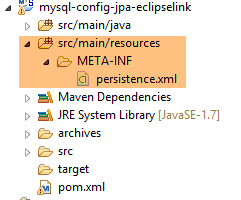 |
<?xml version="1.0" encoding="UTF-8"?>
<persistence version="1.0" xmlns="http://java.sun.com/xml/ns/persistence" xmlns:xsi="http://www.w3.org/2001/XMLSchema-instance"
    xsi:schemaLocation="http://java.sun.com/xml/ns/persistence http://java.sun.com/xml/ns/persistence/persistence_1_0.xsd">
    <persistence-unit name="generic-jpa-entities-dbproduitscategories" transaction-type="RESOURCE_LOCAL">
        <!-- entities JPA -->
        <class>generic.jpa.entities.dbproduitscategories.Categorie</class>
        <class>generic.jpa.entities.dbproduitscategories.Produit</class>
        <class>generic.jpa.entities.dbproduitscategories.User</class>
        <class>generic.jpa.entities.dbproduitscategories.Role</class>
        <class>generic.jpa.entities.dbproduitscategories.UserRole</class>
        <exclude-unlisted-classes>true</exclude-unlisted-classes>
        <!-- properties required for [@ManyToOne] to be searched in LAZY mode -->
        <properties>
            <property name="eclipselink.weaving" value="static" />
            <property name="eclipselink.weaving.lazy" value="true" />
            <property name="eclipselink.weaving.internal" value="true" />
        </properties>
    </persistence-unit>
</persistence>
- line 4: the persistence unit. It can have any name (attribute name);
- lines 6–10: the five JPA entities to be managed;
- Line 11 is important. Sometimes a project defines entities used in different contexts. Line 11 ensures that there will be no entities other than those defined in lines 5–10. This is important when these entities are used to generate the data source tables. Having extra entities would generate extra tables;
- Lines 13–17: configuration of EclipseLink for static weaving. There are two types of weaving:
- [statique]: the JPA entities are woven as soon as the JPA layer is instantiated;
- [dynamique]: JPA entities are enriched (woven) the first time they arrive in the JPA layer;
7.5. The JPA entities
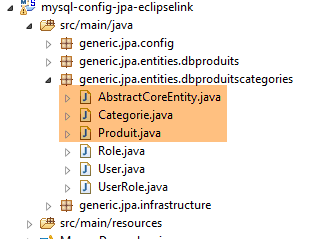 |
The JPA entities are those described in section 6.3.3 for the Hibernate implementation, with two differences:
- All JPA entities have the [@Cache(alwaysRefresh = true)] annotation, which disables the EclipseLink cache. In this document, the caches of the JPA implementations used are not utilized. The EclipseLink cache appears to be active by default and caused errors in the tests.
@Entity
@Table(name = ConfigJdbc.TAB_CATEGORIES)
@JsonFilter("jsonFilterCategorie")
@Cache(alwaysRefresh = true)
public class Categorie implements AbstractCoreEntity {
- All [@OneToMany] annotations are accompanied by the [@CascadeOnDelete] annotation:
    @OneToMany(fetch = FetchType.LAZY, mappedBy = "categorie", cascade = { CascadeType.ALL })
    @CascadeOnDelete
    private List<Produit> produits;
This annotation plays a role in generating tables from JPA entities. It adds to the foreign keys (here PRODUITS[CATEGORIE_ID] ---> CATEGORIES[ID]) the attribute SQL [ON DELETE CASCADE], which ensures that whenever a category is deleted from the table [CATEGORIES], the corresponding products in the [PRODUITS] table are also deleted;
Note: It is important to note that this annotation is used both when creating the table, as we have just seen, and when querying it. EclipseLink assumes that the attribute SQL [ON DELETE CASCADE] is present and uses it whenever it is asked to delete a category. Its absence would cause errors.
7.6. The test layer
 |
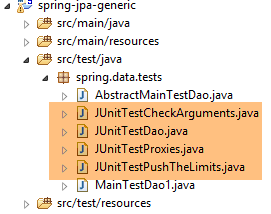 |
The tests above are identical to those for the Spring JDBC and Spring JPA Hibernate implementations. Please refer to the following pages if necessary:
- [JUnitTestCheckArguments]: section 4.11.1;
- [JUnitTestDao]: section 4.11.2;
- [JUnitTestPushTheLimits]: Section 4.11.3;
- [JUnitTestProxies]: paragraph 6.4.5;
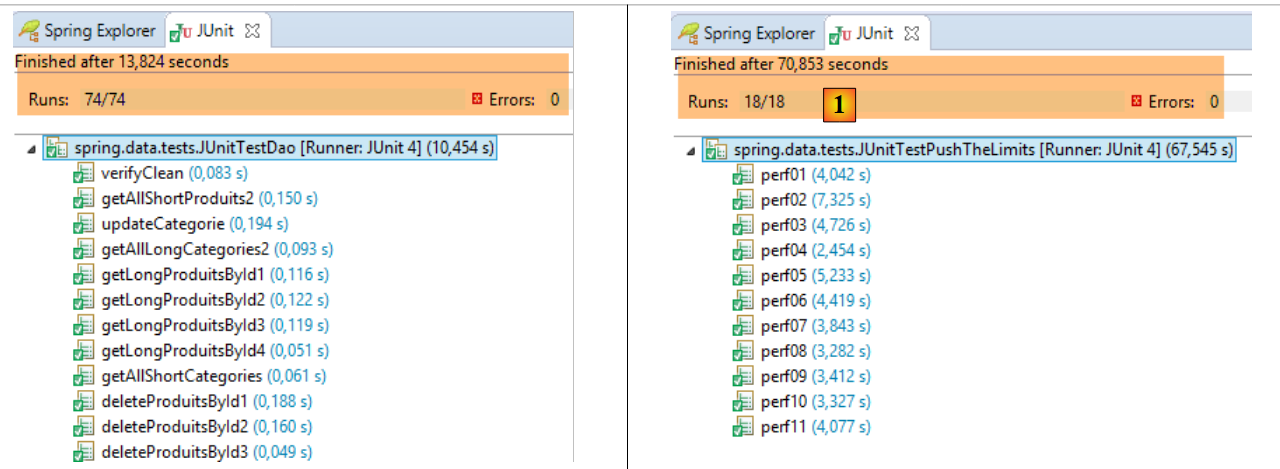
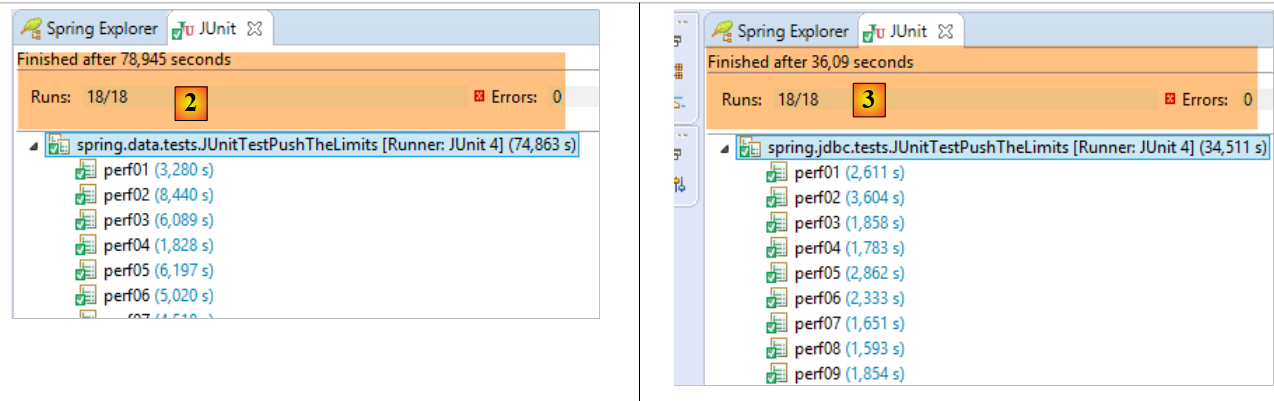
The results obtained are as follows:
 |
 |
- in [1], [JUnitTestPushTheLimits-EclipseLink]: 70.583 s
- in [2], [JUnitTestPushTheLimits-Hibernate]: 78.945 s
- in [3], [JUnitTestPushTheLimits-JDBC]: 36.09 s
The [JUnitTestProxies] test yields the following console results:
Vidage de la base de données --------------------------------
doNothing
Vidage de la base de données --------------------------------
getShortCategoriesByName1 --------------------------------
Catégorie de type : PROXY
Catégorie :
1
Vidage de la base de données --------------------------------
getLongCategoriesByName1 --------------------------------
Catégorie de type : POJO
Catégorie :
1
Vidage de la base de données --------------------------------
getShortProduitsByName1 --------------------------------
Produit de type : PROXY
Nom de la catégorie du produit :
categorie[0]
Vidage de la base de données --------------------------------
getLongProduitsByName1 --------------------------------
Produit de type : POJO
Nom de la catégorie du produit :
categorie[0]
Here we see that when accessing the [Categorie.produits] field of a category of type PROXY and the [Produit.categorie] field of a product of type PROXY, we are able to retrieve the information in both cases (lines 7 and 17). Among the three JPA implementations, this is the only one that allows this on PROXY entities.