19. Securing Access to a Web Service with Spring Security
19.1. The Role of Spring Security in a Web Application
Let’s situate Spring Security within the development of a web application. Most often, it will be built on a multi-tier architecture such as the following:
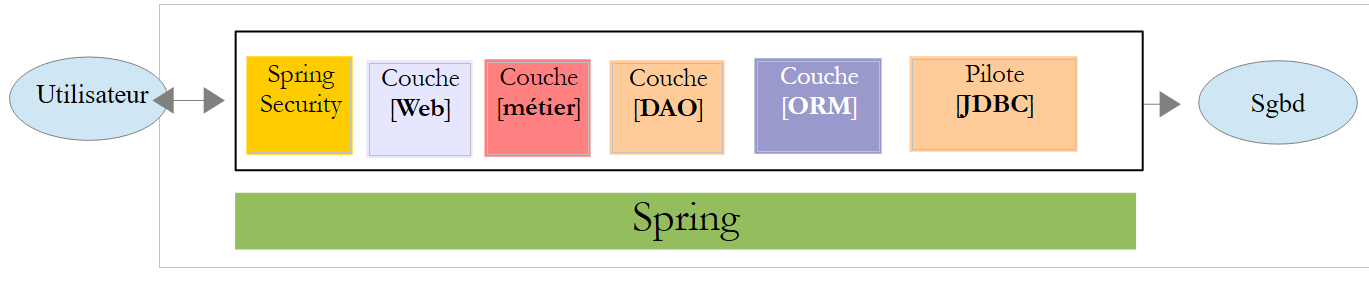 |
- The [Spring Security] layer grants access to the [web] layer only to authorized users.
19.2. A Spring Security Tutorial
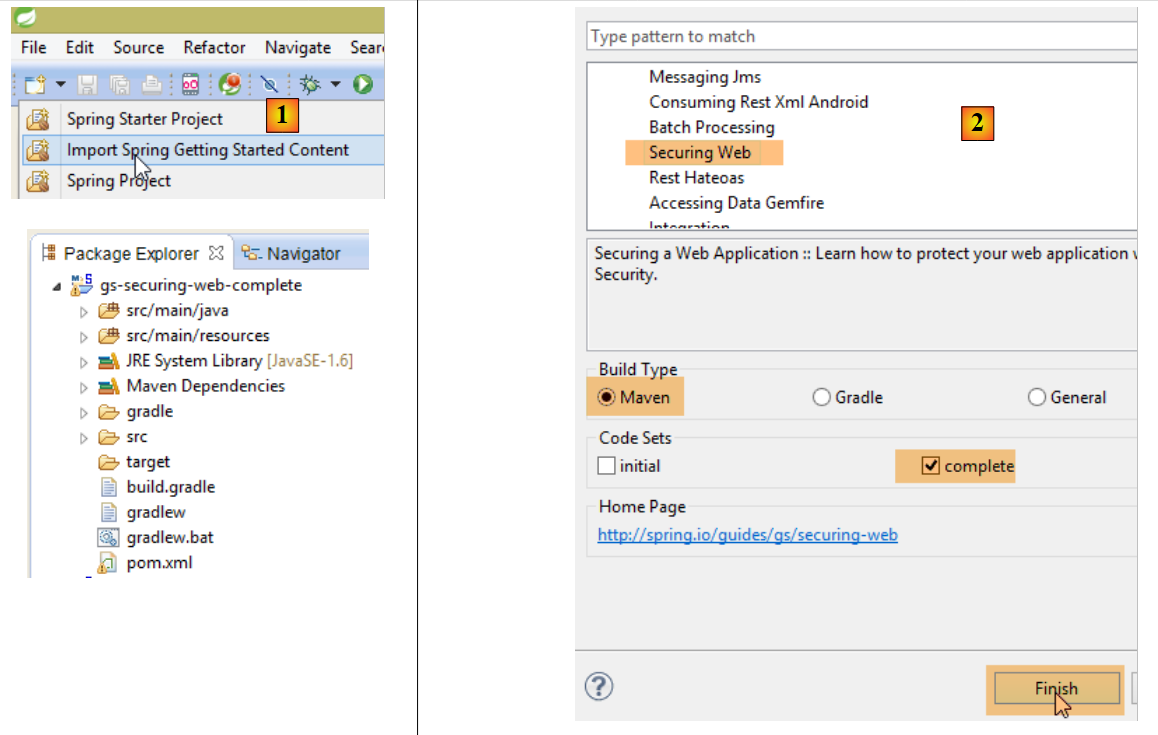
We will import a Spring guide again by following steps 1 through 3 below:
 |
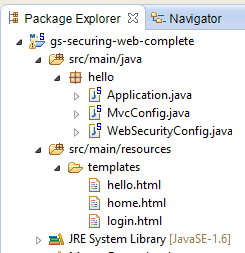 |
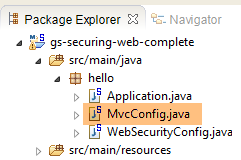
The project consists of the following elements:
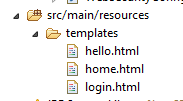
- in the [templates] folder, you will find the HTML pages of the project;
- [Application]: is the project’s executable class;
- [MvcConfig]: is the Spring configuration class MVC;
- [WebSecurityConfig]: is the Spring Security configuration class;
19.2.1. Maven Configuration
The [3] project is a Maven project. Let’s examine its [pom.xml] file to see its dependencies:
<?xml version="1.0" encoding="UTF-8"?>
<project xmlns="http://maven.apache.org/POM/4.0.0" xmlns:xsi="http://www.w3.org/2001/XMLSchema-instance"
    xsi:schemaLocation="http://maven.apache.org/POM/4.0.0 http://maven.apache.org/xsd/maven-4.0.0.xsd">
    <modelVersion>4.0.0</modelVersion>

    <groupId>org.springframework</groupId>
    <artifactId>gs-securing-web</artifactId>
    <version>0.1.0</version>

    <parent>
        <groupId>org.springframework.boot</groupId>
        <artifactId>spring-boot-starter-parent</artifactId>
        <version>1.2.3.RELEASE</version>
    </parent>

    <dependencies>
        <dependency>
            <groupId>org.springframework.boot</groupId>
            <artifactId>spring-boot-starter-thymeleaf</artifactId>
        </dependency>
        <!-- tag::security[] -->
        <dependency>
            <groupId>org.springframework.boot</groupId>
            <artifactId>spring-boot-starter-security</artifactId>
        </dependency>
        <!-- end::security[] -->
    </dependencies>

    <properties>
        <start-class>hello.Application</start-class>
    </properties>

    <build>
        <plugins>
            <plugin>
                <groupId>org.springframework.boot</groupId>
                <artifactId>spring-boot-maven-plugin</artifactId>
            </plugin>
        </plugins>
    </build>

</project>
- lines 10–14: the project is a Spring Boot project;
- lines 17–20: dependency on the [Thymeleaf] framework;
- lines 22–25: dependency on the Spring Security framework;
19.2.2. Thymeleaf views
 |
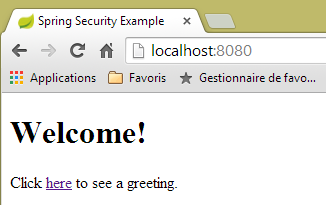
The view [home.html] is as follows:
 |
<!DOCTYPE html>
<html xmlns="http://www.w3.org/1999/xhtml"
    xmlns:th="http://www.thymeleaf.org"
    xmlns:sec="http://www.thymeleaf.org/thymeleaf-extras-springsecurity3">
<head>
<title>Spring Security Example</title>
</head>
<body>
    <h1>Welcome!</h1>

    <p>
        Click <a th:href="@{/hello}">here</a> to see a greeting.
    </p>
</body>
</html>
- Line 12: The attribute [th:href="@{/hello}"] will generate the attribute [href] for the <a> tag. The value [@{/hello}] will generate the path [<context>/hello], where [context] is the web application context;
The generated code HTML is as follows:
<!DOCTYPE html>

<html xmlns="http://www.w3.org/1999/xhtml" xmlns:sec="http://www.thymeleaf.org/thymeleaf-extras-springsecurity3">
    <head>
        <title>Spring Security Example</title>
    </head>
    <body>
        <h1>Welcome!</h1>

        <p>
            Click
            <a href="/hello">here</a>
            to see a greeting.
        </p>
    </body>
</html>
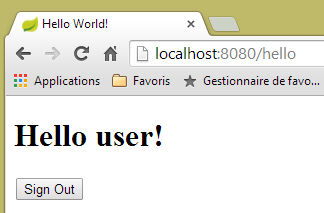
The view [hello.html] is as follows:
 |
<!DOCTYPE html>
<html xmlns="http://www.w3.org/1999/xhtml"
    xmlns:th="http://www.thymeleaf.org"
    xmlns:sec="http://www.thymeleaf.org/thymeleaf-extras-springsecurity3">
<head>
<title>Hello World!</title>
</head>
<body>
    <h1 th:inline="text">Hello [[${#httpServletRequest.remoteUser}]]!</h1>
    <form th:action="@{/logout}" method="post">
        <input type="submit" value="Sign Out" />
    </form>
</body>
</html>
- Line 9: The [th:inline="text"] attribute will generate the text of the <h1> tag. This text contains a $ expression that must be evaluated. The element [[${#httpServletRequest.remoteUser}]] is the value of the [RemoteUser] attribute of the current HTTP query. This is the name of the logged-in user;
- line 10: a HTML form. The [th:action="@{/logout}"] attribute will generate the [action] attribute of the [form] tag. The value [@{/logout}] will generate the path [<context>/logout], where [context] is the web application context;
The generated code HTML is as follows:
<!DOCTYPE html>

<html xmlns="http://www.w3.org/1999/xhtml" xmlns:sec="http://www.thymeleaf.org/thymeleaf-extras-springsecurity3">
    <head>
        <title>Hello World!</title>
    </head>
    <body>
        <h1>Hello user!</h1>
        <form method="post" action="/logout">
            <input type="submit" value="Sign Out" />
            <input type="hidden" name="_csrf" value="b152e5b9-d1a4-4492-b89d-b733fe521c91" />
        </form>
    </body>
</html>
- line 8: the translation of Hello [[${#httpServletRequest.remoteUser}]]!;
- line 9: the translation of @{/logout};
- line 11: a hidden field named (attribute name) _csrf;
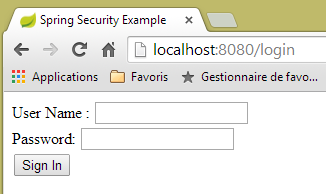
The final view [login.html] is as follows:
 |
<!DOCTYPE html>
<html xmlns="http://www.w3.org/1999/xhtml"
    xmlns:th="http://www.thymeleaf.org"
    xmlns:sec="http://www.thymeleaf.org/thymeleaf-extras-springsecurity3">
<head>
<title>Spring Security Example</title>
</head>
<body>
    <div th:if="${param.error}">Invalid username and password.</div>
    <div th:if="${param.logout}">You have been logged out.</div>
    <form th:action="@{/login}" method="post">
        <div>
            <label> User Name : <input type="text" name="username" />
            </label>
        </div>
        <div>
            <label> Password: <input type="password" name="password" />
            </label>
        </div>
        <div>
            <input type="submit" value="Sign In" />
        </div>
    </form>
</body>
</html>
- line 9: the attribute [th:if="${param.error}"] ensures that the <div> tag will only be generated if the URL that displays the login page contains the parameter [error] (http://context/login?error);
- line 10: the [th:if="${param.logout}"] attribute ensures that the <div> tag will only be generated if the URL URL displaying the login page contains the [logout] parameter (http://context/login?logout);
- lines 11–23: a HTML form;
- line 11: the form will be posted to URL [<context>/login] where <context> is the web application context;
- line 13: an input field named [username];
- line 17: an input field named [password];
The generated code HTML is as follows:
<!DOCTYPE html>

<html xmlns="http://www.w3.org/1999/xhtml" xmlns:sec="http://www.thymeleaf.org/thymeleaf-extras-springsecurity3">
    <head>
        <title>Spring Security Example </title>
    </head>
    <body>

        <div>
            You have been logged out.
        </div>
        <form method="post" action="/login">
            <div>
                <label>
                    User Name :
                    <input type="text" name="username" />
                </label>
            </div>
            <div>
                <label>
                    Password:
                    <input type="password" name="password" />
                </label>
            </div>
            <div>
                <input type="submit" value="Sign In" />
            </div>
            <input type="hidden" name="_csrf" value="ef809b0a-88b4-4db9-bc53-342216b77632" />
        </form>
    </body>
</html>
Note on line 28 that Thymeleaf has added a hidden field named [_csrf].
19.2.3. Spring Configuration MVC
 |
The [MvcConfig] class configures the Spring MVC framework:
package hello;

import org.springframework.context.annotation.Configuration;
import org.springframework.web.servlet.config.annotation.ViewControllerRegistry;
import org.springframework.web.servlet.config.annotation.WebMvcConfigurerAdapter;

@Configuration
public class MvcConfig extends WebMvcConfigurerAdapter {

    @Override
    public void addViewControllers(ViewControllerRegistry registry) {
        registry.addViewController("/home").setViewName("home");
        registry.addViewController("/").setViewName("home");
        registry.addViewController("/hello").setViewName("hello");
        registry.addViewController("/login").setViewName("login");
    }

}
- line 7: the annotation [@Configuration] makes the class [MvcConfig] a configuration class;
- line 8: the [MvcConfig] class extends the [WebMvcConfigurerAdapter] class to override certain methods;
- line 10: redefinition of a method from the parent class;
- lines 11–16: the method [addViewControllers] allows URL to be associated with HTML views. The following associations are made:
view | |
/templates/home.html | |
/templates/hello.html | |
/templates/login.html |
The suffix [html] and the folder [templates] are the default values used by Thymeleaf. They can be changed via configuration. The folder [templates] must be at the root of the project's classpath:
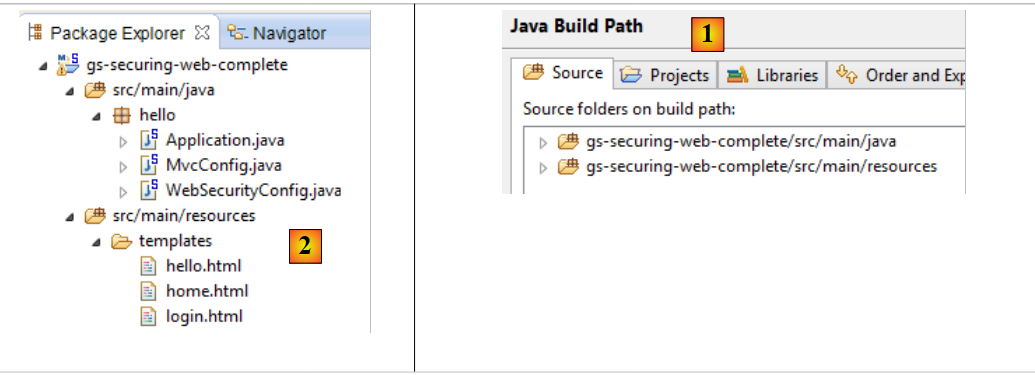 |
Above [1], the folders [java] and [resources] are both source folders. This means that their contents will be at the root of the project’s classpath. Therefore, in [2], the folders [hello] and [templates] will be at the root of the Classpath.
19.2.4. Spring Security Configuration
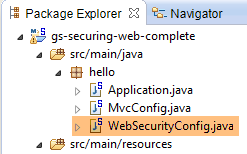 |
The [WebSecurityConfig] class configures the Spring Security framework:
package hello;

import org.springframework.context.annotation.Configuration;
import org.springframework.security.config.annotation.authentication.builders.AuthenticationManagerBuilder;
import org.springframework.security.config.annotation.web.builders.HttpSecurity;
import org.springframework.security.config.annotation.web.configuration.WebSecurityConfigurerAdapter;
import org.springframework.security.config.annotation.web.servlet.configuration.EnableWebMvcSecurity;

@Configuration
@EnableWebMvcSecurity
public class WebSecurityConfig extends WebSecurityConfigurerAdapter {
    @Override
    protected void configure(HttpSecurity http) throws Exception {
        http.authorizeRequests().antMatchers("/", "/home").permitAll().anyRequest().authenticated();
        http.formLogin().loginPage("/login").permitAll().and().logout().permitAll();
    }

    @Override
    protected void configure(AuthenticationManagerBuilder auth) throws Exception {
        auth.inMemoryAuthentication().withUser("user").password("password").roles("USER");
    }
}
- line 9: the [@Configuration] annotation makes the [WebSecurityConfig] class a configuration class;
- Line 10: The annotation [@EnableWebSecurity] makes the class [WebSecurityConfig] a Spring Security configuration class;
- Line 11: The class [WebSecurity] extends the class [WebSecurityConfigurerAdapter] to override certain methods;
- line 12: redefinition of a method from the parent class;
- lines 13–16: the [configure(HttpSecurity http)] method is redefined to define access rights to the various URL in the application;
- line 14: the [http.authorizeRequests()] method allows URLs to be associated with access rights. The following associations are made there:
rule | code | |
access without authentication | | |
authenticated access only |
- line 15: defines the authentication method. Authentication is performed via a form accessible to everyone. Logout is also accessible to everyone;
- lines 19–21: redefine the method that manages users;
- line 20: authentication is performed using hard-coded users [auth.inMemoryAuthentication()]. A user is defined here with the login [user], the password [password], and the role [USER]. The same rights can be granted to users with the same role;
19.2.5. Executable class
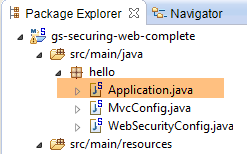 |
The class [Application] is as follows:
package hello;

import org.springframework.boot.autoconfigure.EnableAutoConfiguration;
import org.springframework.boot.SpringApplication;
import org.springframework.context.annotation.ComponentScan;
import org.springframework.context.annotation.Configuration;

@EnableAutoConfiguration
@Configuration
@ComponentScan
public class Application {

    public static void main(String[] args) throws Throwable {
        SpringApplication.run(Application.class, args);
    }

}
- line 8: the [@EnableAutoConfiguration] annotation instructs Spring Boot (line 3) to perform the configuration that the developer has not explicitly set up;
- line 9: makes the [Application] class a Spring configuration class;
- line 10: instructs the system to scan the directory containing the [Application] class to search for Spring components. The two classes [MvcConfig] and [WebSecurityConfig] will thus be discovered because they have the [@Configuration] annotation;
- line 13: the [main] method of the executable class;
- line 14: the static method [SpringApplication.run] is executed with the configuration class [Application] as a parameter. We have already encountered this process and know that the Tomcat server embedded in the project’s Maven dependencies will be launched and the project deployed on it. We have seen that four URL instances were managed by [/, /home, /login, /hello] and that some were protected by access rights.
19.2.6. Application Testing
Let’s start by requesting the URL [/], which is one of the four accepted URL. It is associated with the [/templates/home.html] view:
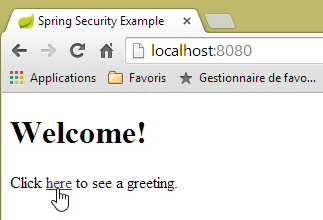 |
The requested URL [/] is accessible to everyone. That is why we obtained it. The [here] link is as follows:
The URL [/hello] will be requested when you click on the link. This one is protected:
rule | code | |
access without authentication | | |
authenticated access only |
You must be authenticated to access it. Spring Security will then redirect the client browser to the authentication page. Based on the configuration shown, this is the page URL [/login]. This page is accessible to everyone:
http.formLogin().loginPage("/login").permitAll().and().logout().permitAll();
We therefore obtain [1]:
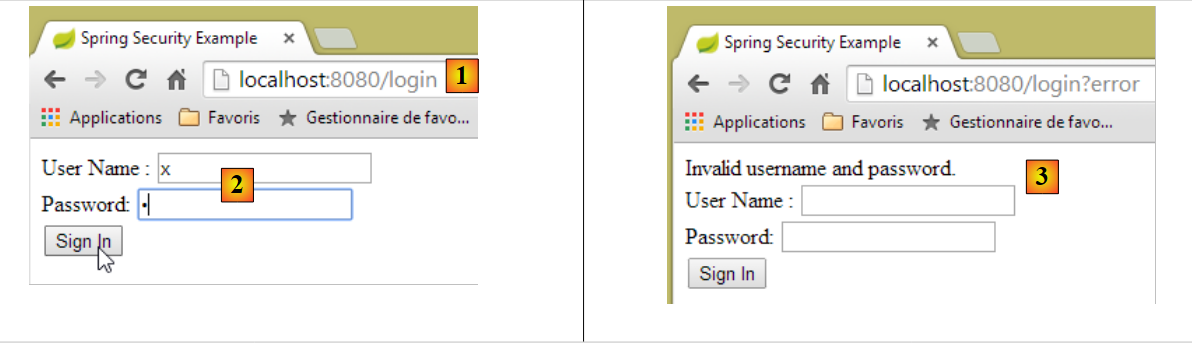 |
The source code for the resulting page is as follows:
- line 7, a hidden field appears that is not in the original [login.html] page. Thymeleaf added it. This code, called CSRF (Cross-Site Request Forgery), is intended to eliminate a security vulnerability. This token must be sent back to Spring Security along with the authentication for it to be accepted;
We recall that only the user/password is recognized by Spring Security. If we enter something else in [2], we get the same page with an error message in [3]. Spring Security redirected the browser to URL [http://localhost:8080/login?error]. The presence of the parameter [error] triggered the display of the tag:
<div th:if="${param.error}">Invalid username and password.</div>
Now, let’s enter the expected user/password values [4]:
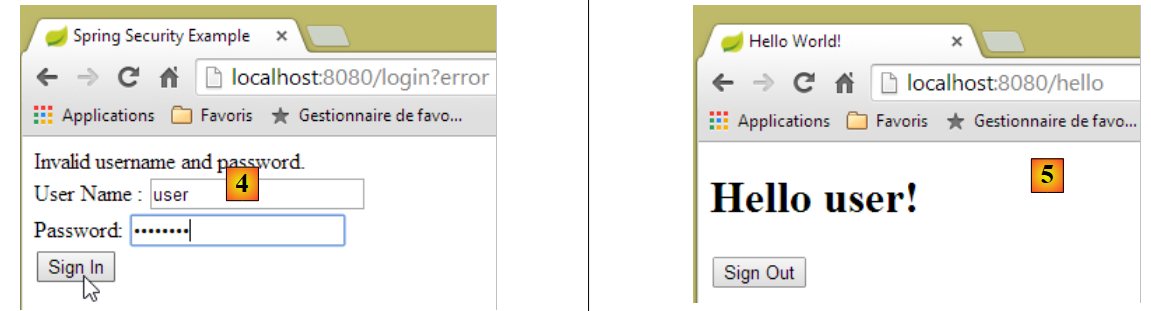 |
- in [4], we log in;
- in [5], Spring Security redirects us to URL [/hello] because that is the URL we requested when we were redirected to the login page. The user's identity was displayed by the following line in [hello.html]:
The [5] page displays the following form:
    <form th:action="@{/logout}" method="post">
        <input type="submit" value="Sign Out" />
</form>
When you click the [Sign Out] button, a POST will be performed on the URL [/logout]. This, like the URL [/login], is accessible to everyone:
http.formLogin().loginPage("/login").permitAll().and().logout().permitAll();
In our URL / views association, we haven’t defined anything for URL and [/logout]. What will happen? Let’s try:
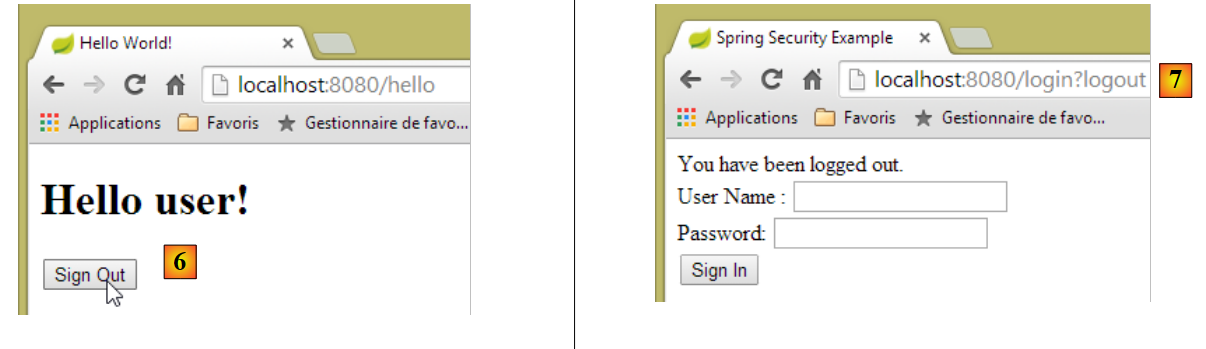 |
- In [6], we click the [Sign Out] button;
- in [7], we see that we have been redirected to URL [http://localhost:8080/login?logout]. Spring Security requested this redirection. The presence of the [logout] parameter in URL caused the following line to be displayed in the view:
<div th:if="${param.logout}">You have been logged out.</div>
19.2.7. Conclusion
In the previous example, we could have written the web application first and then secured it. Spring Security is non-intrusive. You can implement security for a web application that has already been written. Furthermore, we discovered the following points:
- You can define an authentication page;
- Authentication must be accompanied by the token CSRF issued by Spring Security;
- If authentication fails, the user is redirected to the authentication page with an additional parameter error in the URL;
- If authentication succeeds, you are redirected to the page requested at the time of authentication. If you request the authentication page directly without going through an intermediate page, Spring Security redirects you to the URL [/] (this case was not presented);
- You log out by requesting the URL [/logout] with a POST. Spring Security then redirects us to the authentication page with the logout parameter in the URL;
All these conclusions are based on Spring Security’s default behavior. This behavior can be changed through configuration by overriding certain methods of the [WebSecurityConfigurerAdapter] class.
The previous tutorial will be of little help to us going forward. We will instead use:
- a database to store users, their passwords, and their roles;
- header-based authentication (HTTP);
There are relatively few tutorials available for what we want to do here. The solution we’ll propose is a combination of code snippets found here and there.