3. Introduction to the JDBC API
3.1. Setting up the working environment
We will be working with a MySQL5 database.
You must have:
- a JDK (Java Development Kit) installed (Section 23.1);
- installed the Maven dependency manager (section 23.2);
- installed the Spring Tool Suite (STS) IDE (section 23.3);
- installed the MySQL5 DBMS (section 23.4) and its EMS MyManager client (section 23.5);
- downloaded the source code from [http://tahe.developpez.com/java/spring-database];
We assume hereinafter that the MySQL5 administrator is root with the password root. Start the MySQL5 DBMS and its client [MyManager]. Using [MyManager], we create the database [dbproduits] [1-34]:
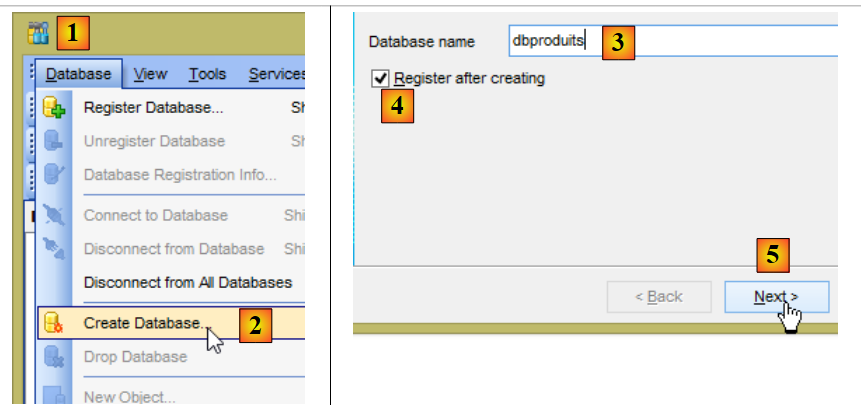 |
- in [3], the database must be named [dbproduits];
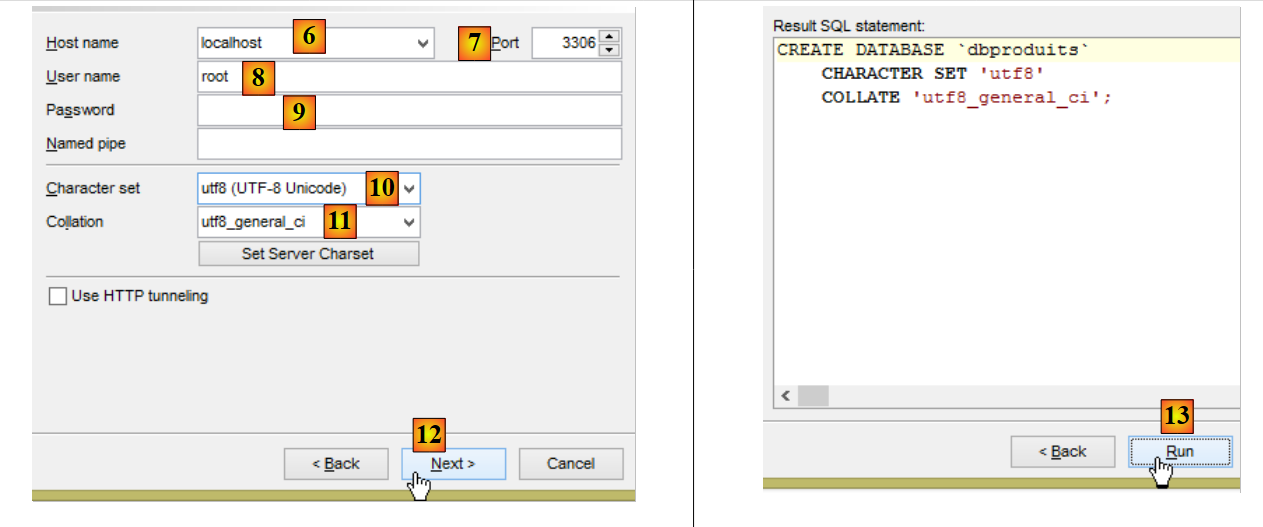 |
- in [8-9], root with the root password (which is not shown in the screenshot above);
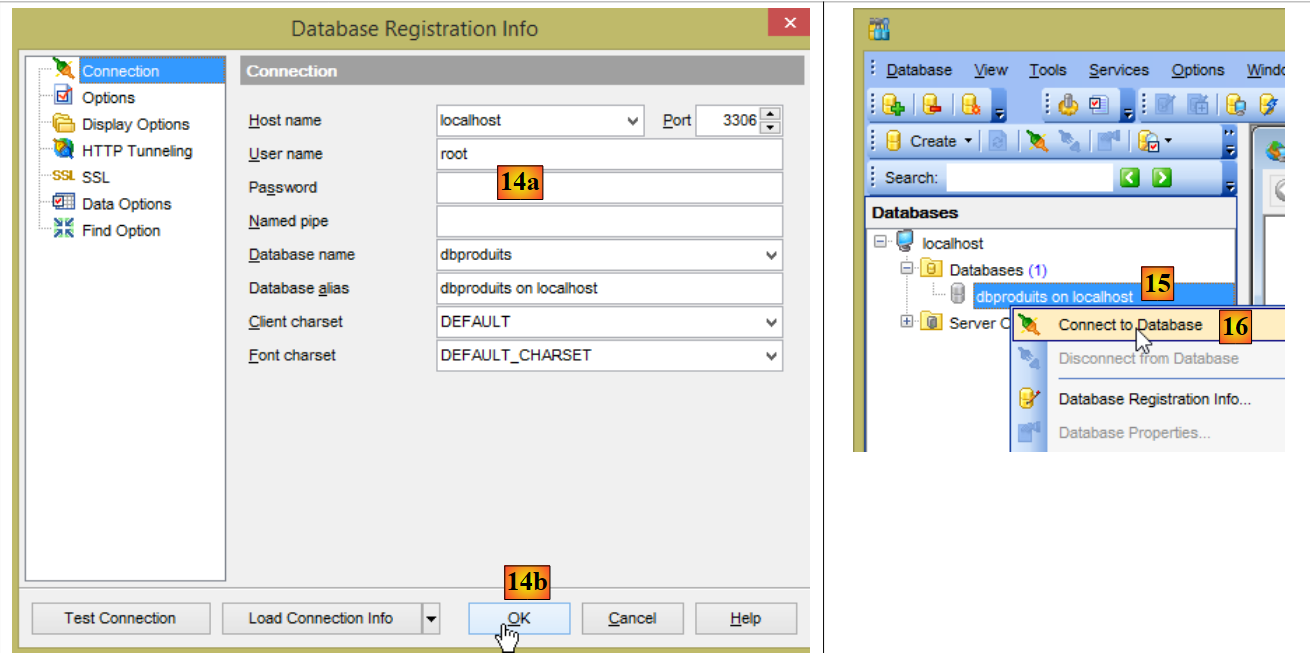 |
- in [14a], the password is root again (which the screenshot does not show);
- in [15], the database [dbproduits] has been created;
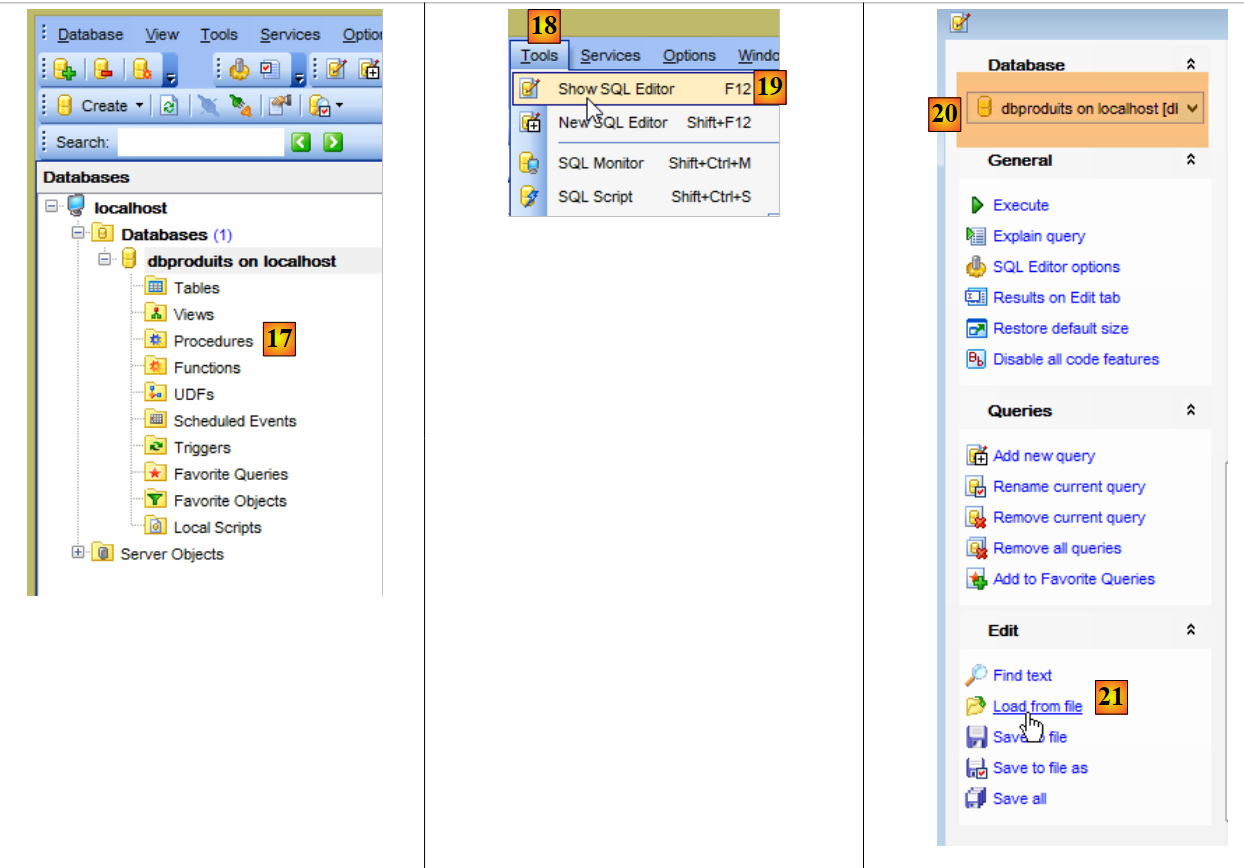 |
- in [20], pay attention to the selected database. It must be the [dbproduits] database;
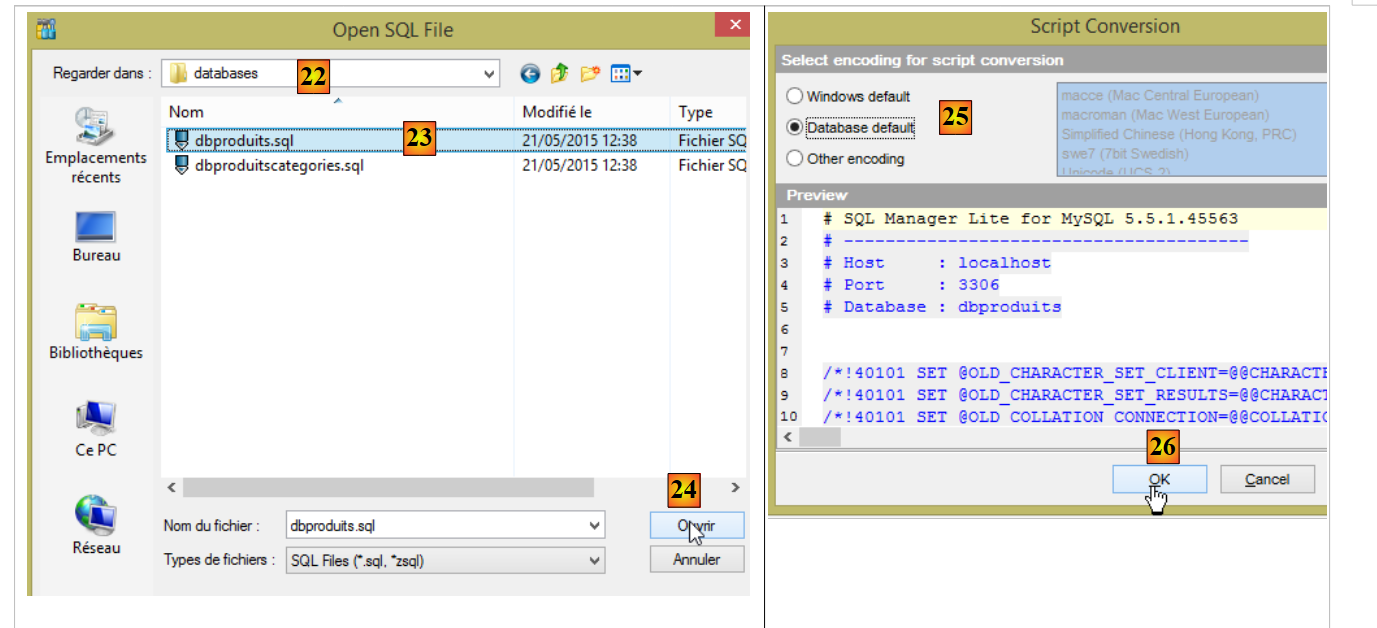 |
- in [22], the folder is <examples>/spring-database-config/mysql/databases, where <examples> is the folder containing the downloaded examples;
- in [23], select the SQL script [dbproduits.sql]. It will generate the [PRODUITS] table in the [dbproduits] database;
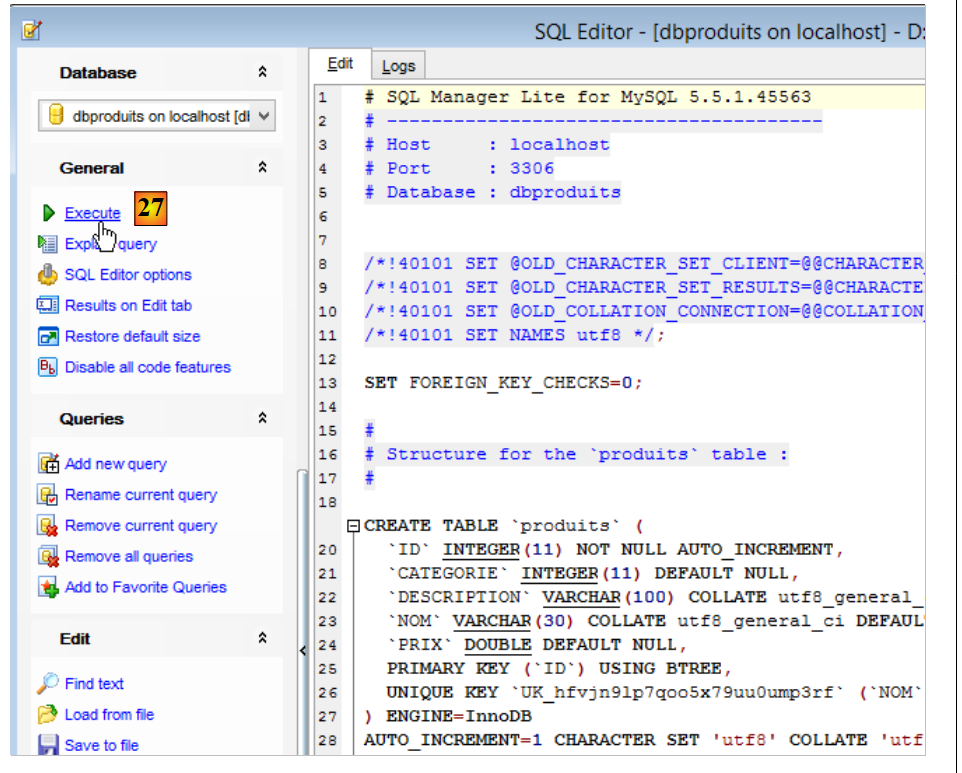 |
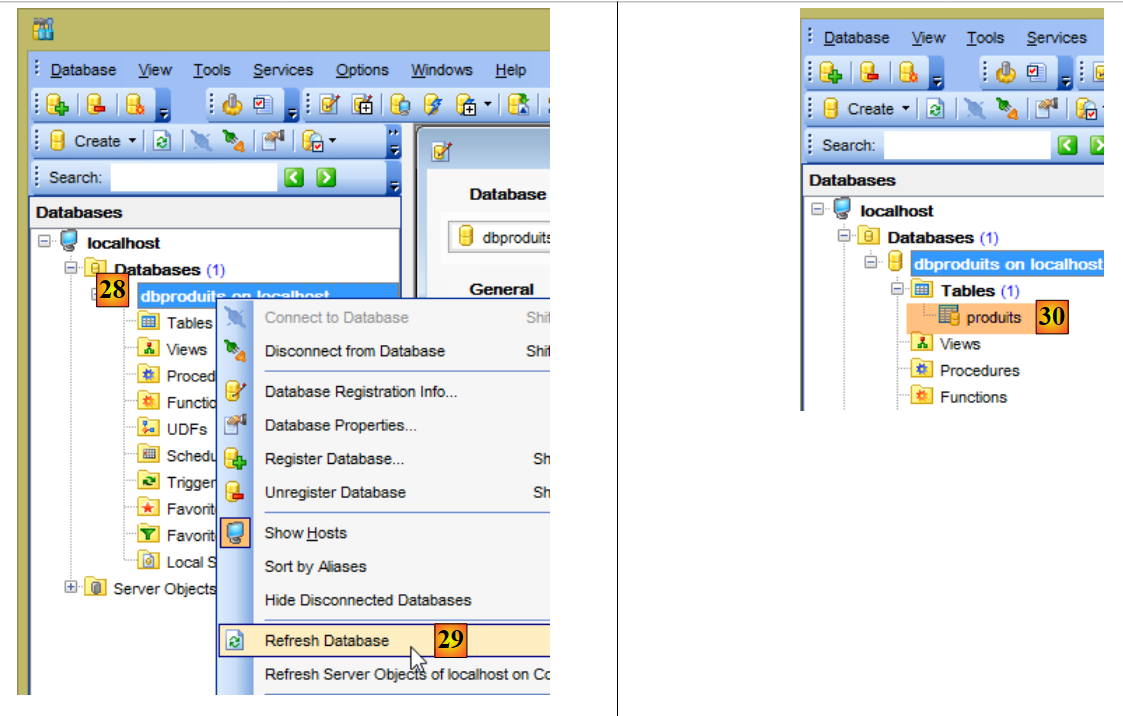 |
- in [30], the [products] table has been created;
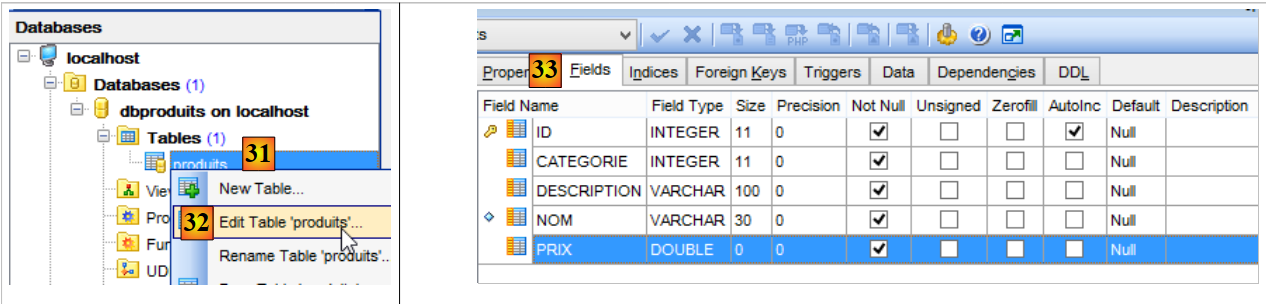 |
- in [33], the columns of the [products] table;
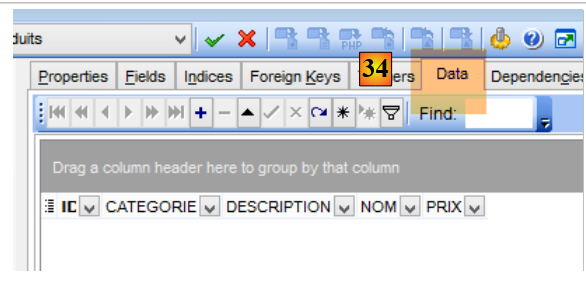 |
- in [34], it is initially empty;
Now, using STS, import the following projects (follow the same procedure used for the projects in the <examples>/spring-core folder):
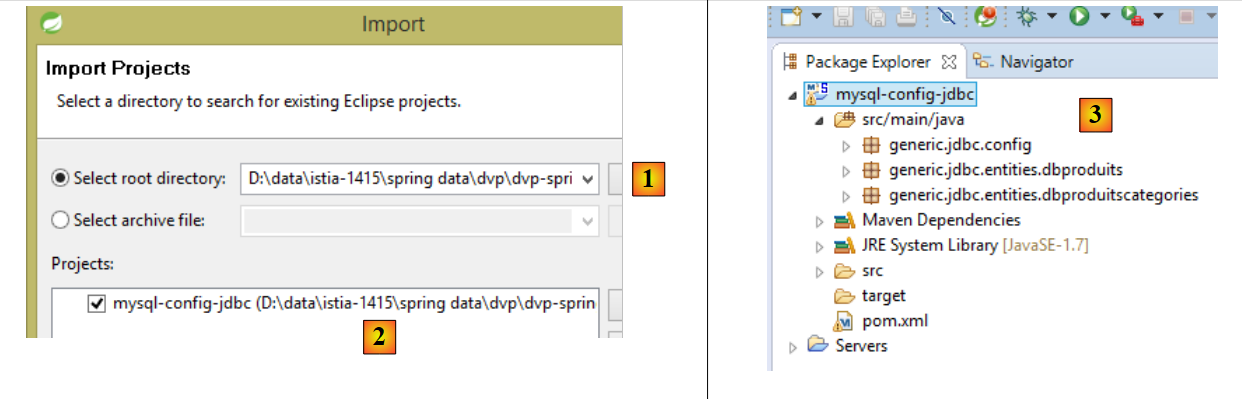 |
- in [2], the [mysql-config-jdbc] project will be found in the [<examples>/spring-database-config/mysql/eclipse/mysql-config-jdbc] folder [1];
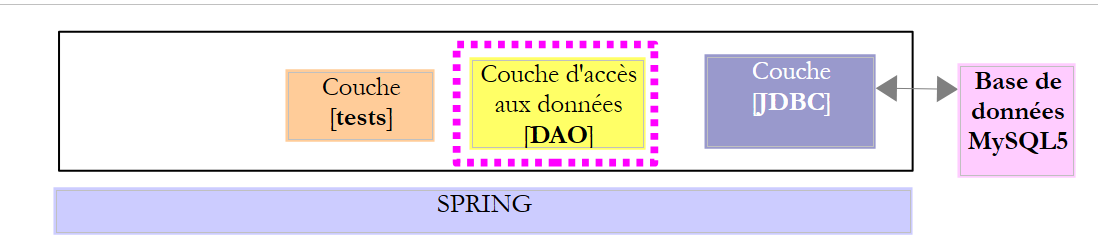
This project configures the JDBC layer of the architecture below:
 |
Then import the following three projects again:
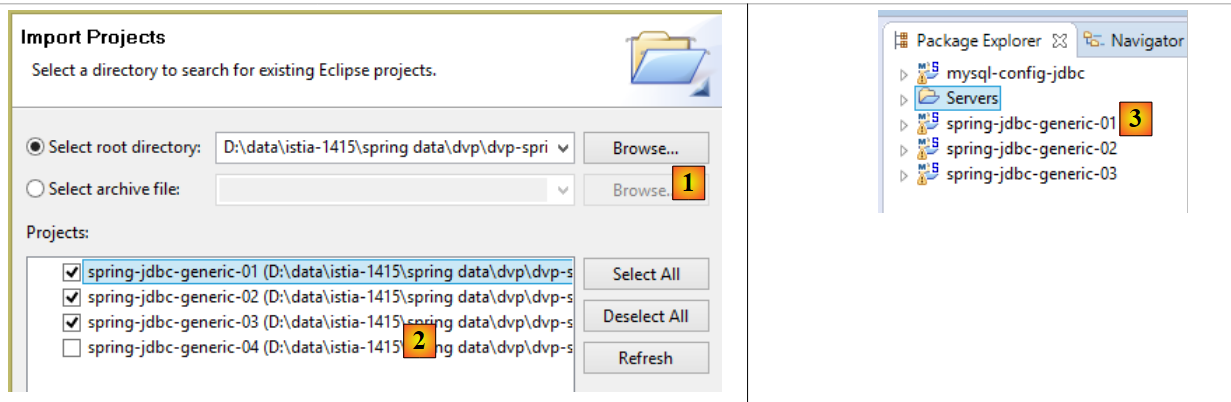 |
- In [2], the projects will be found in the folder [<examples>/spring-database-config/spring-jdbc] [1];
These three projects are Maven projects that use the [mysql-config-jdbc] Maven project. This project generates the following Maven artifact (see pom.xml):
    <groupId>dvp.spring.database</groupId>
    <artifactId>generic-config-jdbc</artifactId>
<version>0.0.1-SNAPSHOT</version>
The same artifact will be generated by the [oracle-config-jdbc, db2-config-jdbc, ...] projects. To ensure that the [spring-generic-jdbc-*] projects currently loaded in STS are indeed using the [mysql-config-jdbc] project:
- Make sure that no other [sgbd-config-jdbc] project is loaded at the same time. This could cause errors that are difficult to understand;
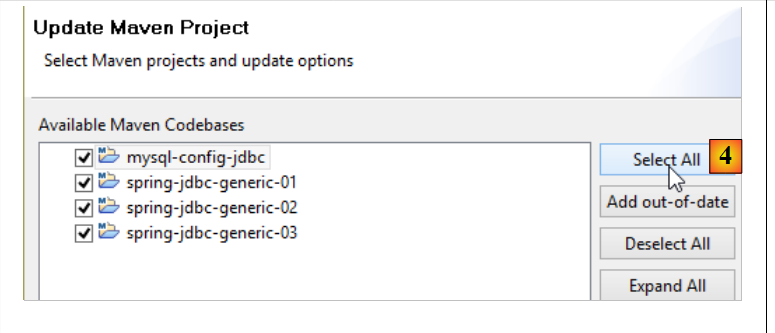
- Update the Maven configuration of the loaded projects as follows:
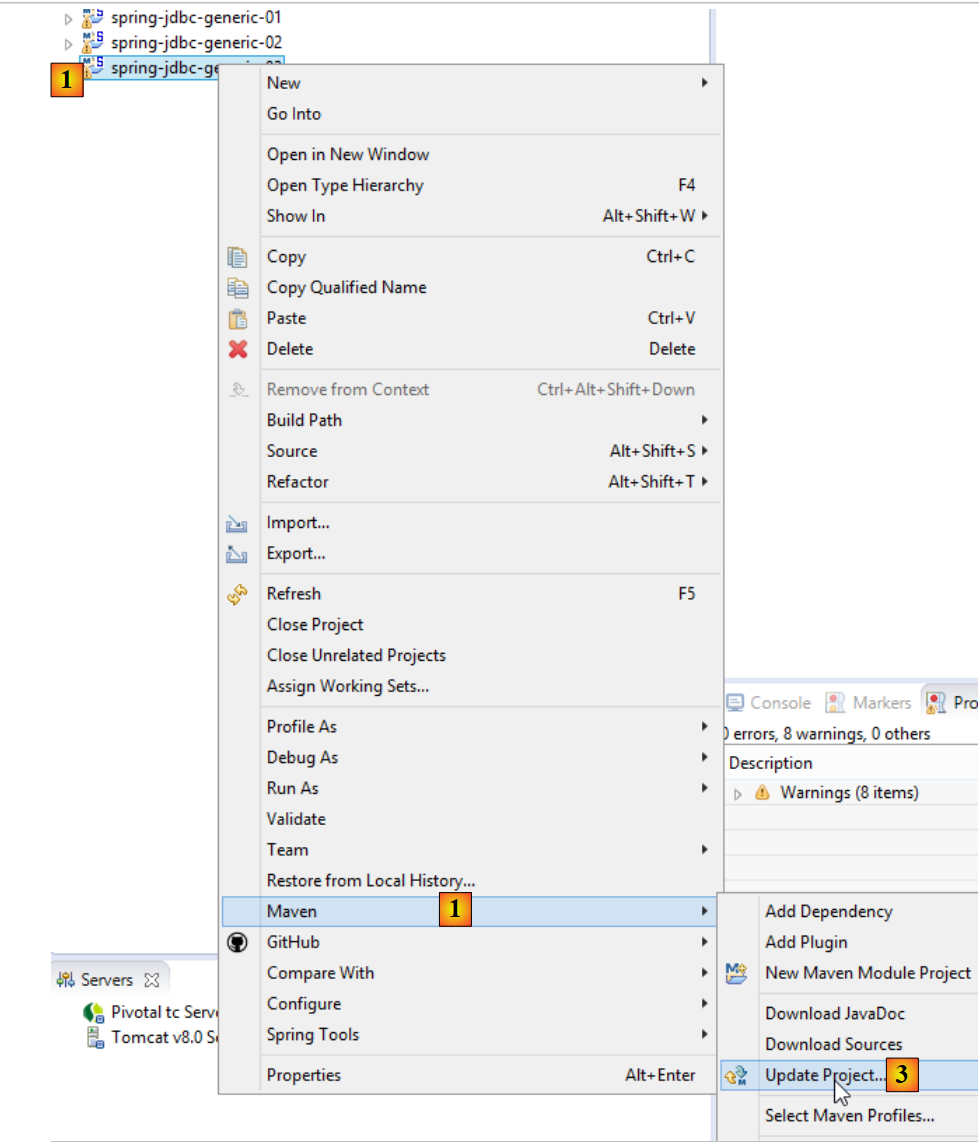 |
 |
To verify your configuration, run the [spring-jdbc-generic-01.IntroJdbc01] build configuration [1-3]:
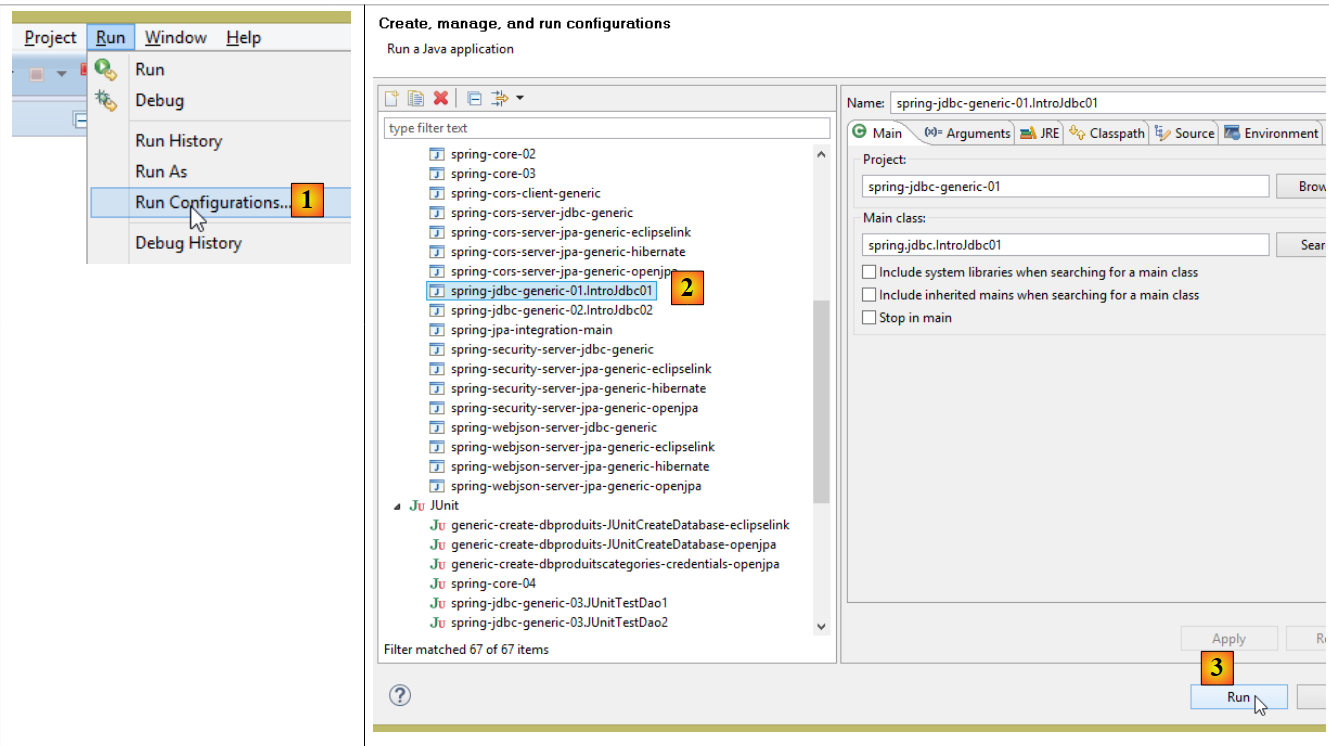 |
You should see the following console output:
------------------------------ Vidage de la table [PRODUITS]
------------------------------ Remplissage de la table [PRODUITS]
------------------------------ Affichage de la table [PRODUITS]
Liste des produits :
{"id":1,"nom":"NOM1","categorie":1,"prix":100.0,"description":"DESC1"}
{"id":2,"nom":"NOM2","categorie":1,"prix":101.0,"description":"DESC2"}
{"id":3,"nom":"NOM3","categorie":1,"prix":102.0,"description":"DESC3"}
{"id":4,"nom":"NOM4","categorie":1,"prix":103.0,"description":"DESC4"}
{"id":5,"nom":"NOM5","categorie":2,"prix":104.0,"description":"DESC5"}
{"id":6,"nom":"NOM6","categorie":2,"prix":105.0,"description":"DESC6"}
{"id":7,"nom":"NOM7","categorie":2,"prix":106.0,"description":"DESC7"}
{"id":8,"nom":"NOM8","categorie":2,"prix":107.0,"description":"DESC8"}
{"id":9,"nom":"NOM9","categorie":2,"prix":108.0,"description":"DESC9"}
{"id":10,"nom":"NOM10","categorie":3,"prix":109.00000000000001,"description":"DESC10"}
------------------------------ Mise à jour de la table [PRODUITS]
------------------------------ Affichage de la table [PRODUITS]
Liste des produits :
{"id":1,"nom":"NOM1","categorie":1,"prix":110.00000000000001,"description":"DESC1"}
{"id":2,"nom":"NOM2","categorie":1,"prix":111.10000000000001,"description":"DESC2"}
{"id":3,"nom":"NOM3","categorie":1,"prix":112.2,"description":"DESC3"}
{"id":4,"nom":"NOM4","categorie":1,"prix":113.30000000000001,"description":"DESC4"}
{"id":5,"nom":"NOM5","categorie":2,"prix":104.0,"description":"DESC5"}
{"id":6,"nom":"NOM6","categorie":2,"prix":105.0,"description":"DESC6"}
{"id":7,"nom":"NOM7","categorie":2,"prix":106.0,"description":"DESC7"}
{"id":8,"nom":"NOM8","categorie":2,"prix":107.0,"description":"DESC8"}
{"id":9,"nom":"NOM9","categorie":2,"prix":108.0,"description":"DESC9"}
{"id":10,"nom":"NOM10","categorie":3,"prix":109.00000000000001,"description":"DESC10"}
------------------------------ Vidage de la table [PRODUITS]
------------------------------ Affichage de la table [PRODUITS]
Liste des produits :
------------------------------ Insertion de deux produits de même clé primaire dans la table [PRODUITS]
Les erreurs suivantes se sont produites lors de l'ajout de deux produits de même clé primaire :
- Duplicate entry '100' for key 'PRIMARY'
------------------------------ Affichage de la table [PRODUITS]
Liste des produits :
------------------------------ Travail terminé
In the following examples, the reader can:
3.2. Steps for operating a database
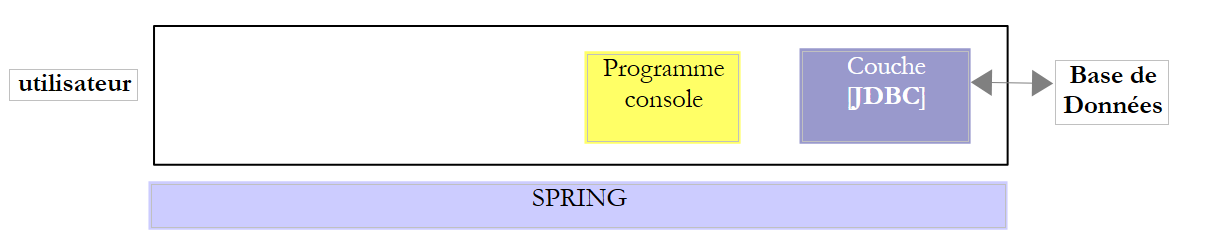 |
In the architecture above, operating a database via the console program involves the following steps:
- loading the database’s JDBC driver;
- opening a connection to the database;
- executing an SQL query on the database and processing the results of the SQL query;
- closing the connection;
Step 1 is performed only once. Steps 2–4 are performed repeatedly. Note that connections are not left open; they are closed as soon as they are no longer needed.
3.2.1. Step 1 - Loading the JDBC driver into memory
The code
        // driver loading JDBC
        try {
            Class.forName(nom de la classe du pilote JDBC);
        } catch (ClassNotFoundException e1) {
            // handle the exception
}
The purpose of the operation on line 3 is to load the database’s JDBC driver into memory. This operation only needs to be performed once. However, repeating it does not cause an error. The JDBC driver class is searched for in the project’s classpath. Therefore, in the Eclipse project, the [jar] file containing the JDBC driver class must have been included in the project’s classpath.
3.2.2. Step 2 - Opening a connection
Once the JDBC driver is in place, we ask it to open a connection to the database:
The code
package spring.jdbc;

import java.sql.Connection;
import java.sql.DriverManager;
import java.sql.PreparedStatement;
import java.sql.ResultSet;
import java.sql.SQLException;

public class IntroJdbc01 {

...
        Connection connexion = null;
        PreparedStatement ps = null;
        ResultSet rs = null;
        try {
            // opening connection
            connexion = DriverManager.getConnection(url, user, passwd);
...
        } catch (SQLException e1) {
            // we handle the exception
            ...
        } finally {
         // close connection
         if (connexion != null) {
            try {
                connexion.close();
            } catch (SQLException e2) {
                // handle the exception
                ...
            }
         }
}
- Lines 3–7: The classes that implement the JDBC interface are all in the [java.sql] package. Furthermore, in the event of an error, they all throw an [SQLException] (lines 19, 27). This exception derives from the [Exception] class and is a so-called checked exception: you must use a try/catch block to handle it, or alternatively, choose not to handle it and indicate that the method allows the exception to propagate by adding [throws SQLException] to the method signature;
- line 17, [DriverManager.getConnection] is a static method that expects three parameters:
- [url]: the database URL. This is a string that depends on the database being used. For MySQL, it is in the form [jdbc:mysql://localhost:3306/db_name];
- [user]: the connection owner;
- [passwd]: the user's password;
- lines 24–30: the connection must be closed in the [finally] clause so that it is closed regardless of whether an exception occurs or not.
3.2.3. Step 3 - Executing SQL [SELECT] Statements
Once a connection is established, SQL commands can be executed. The way read commands [SELECT] are handled differs from that used for update operations [UPDATE, INSERT, DELETE]. We’ll start with [SELECT] SQL commands:
The code
Connection connexion = null;
        PreparedStatement ps = null;
        ResultSet rs = null;
        try {
            // opening connection
            connexion = DriverManager.getConnection(url, user, passwd);
            // start of transaction
            connexion.setAutoCommit(false);
            // in read-only mode
            connexion.setReadOnly(true);
            // table [PRODUITS] is read
            ps = connexion.prepareStatement("SELECT ID, NOM, CATEGORIE, PRIX, DESCRIPTION FROM PRODUITS");
            rs = ps.executeQuery();
            System.out.println("Liste des produits : ");
            while (rs.next()) {
                System.out.println(new Produit(rs.getInt(1), rs.getString(2), rs.getInt(3), rs.getDouble(4), rs.getString(5)));
            }
            // commit transaction
            connexion.commit();
        } catch (SQLException e1) {
            // we handle the exception
             doCatchException(connexion,e1);
        } finally {
            // we treat the finally
            doFinally(rs, ps, connexion);
        }

    private void doFinally(ResultSet rs, PreparedStatement ps, Connection connexion) {
....
}
- Lines 8, 10: opening a transaction (line 8) in read-only mode (line 10). A transaction is a sequence of SQL statements that either all succeed or all fail. Thus, in a transaction containing N SQL statements, if the (I+1)th statement fails, then the preceding I statements will be rolled back. For a read operation, a transaction is not necessary. However, creating a read-only transaction can allow certain DBMSs to perform certain optimizations;
- Line 12: use of a [PreparedStatement]. A [PreparedStatement] normally has parameters denoted by the character ?. Here, it has none. A [PreparedStatement] is a statement prepared by the DBMS. This preparation has a cost and is performed only once. This prepared statement is then executed by the DBMS with actual parameters that replace the placeholder parameters ?. Note that it is preferable to specify the desired columns rather than using the * notation to retrieve all columns. By specifying the column names, their values can then be retrieved based on their position in the SELECT statement;
- Line 13: execution of the [PreparedStatement]. A [ResultSet] object is retrieved;
A [ResultSet] object represents a table, i.e., a set of rows and columns. At any given time, we have access to only one row of the table, called the current row. When the [ResultSet] is initially created, there is no current row. We must perform a [ResultSet.next()] operation to obtain it. The signature of the next method is as follows:
This method attempts to move to the next row of the [ResultSet] and returns true if successful, false otherwise. If successful, the next row becomes the new current row. The previous row is lost and cannot be retrieved.
The [ResultSet] table has columns named labelCol1, labelCol2, ... as specified in the executed [SELECT] query. With the query:
SELECT ID as myId, NOM as myNom, CATEGORIE as myCategorie, PRIX as myPrix, DESCRIPTION as myDescription FROM PRODUITS
- the [ID] column will go into a column in the [ResultSet] named [myId];
- the [NAME] column will go into a column in the [ResultSet] named [myName];
- ...
In the example above, the identifiers [myCol] are called column labels. Without these labels, the names of the [ResultSet] columns depend on the DBMS. When the [SELECT] operates on a single table, the column labels will by default be the names of the columns requested by the SELECT. The problem arises when the [SELECT] operates on multiple tables and those tables contain identical column names, as in the following example:
SELECT PRODUITS.NOM, CATEGORIES.NOM FROM PRODUITS, CATEGORIES WHERE PRODUITS.CATEGORIE_ID=CATEGORIES.ID
assuming that the [PRODUCTS] table has a foreign key to the [CATEGORIES] table represented by the relationship [PRODUCTS].CATEGORY_ID --> [CATEGORIES].ID, and that both the [PRODUCTS] and [CATEGORIES] tables have a [NAME] field. In this case, the names given in the [ResultSet] to the [PRODUITS.NOM] and [CATEGORIES.NOM] columns are DBMS-dependent. For portability between DBMSs, column labels must therefore be used here, and we would write:
SELECT PRODUITS.NOM as p_NOM, CATEGORIES.NOM as c_NOM FROM PRODUITS, CATEGORIES WHERE PRODUITS.CATEGORIE_ID=CATEGORIES.ID
To access the various fields of the current row in the [ResultSet], the following methods are available:
to retrieve the column named "labelColi" from the current row, i.e., the column in the [SELECT] statement with that label. Type refers to the data type of the "labelColi" field. The following [getType] methods can be used: getInt, getLong, getString, getDouble, getFloat, getDate, ... Instead of using the column name, you can use its position in the executed [SELECT] query:
where i is the index of the desired column (i>=1).
- lines 15–17: retrieval of values read from the database;
- line 19: the transaction is validated (also known as committed). This terminates it and releases the resources that the DBMS had allocated for it;
- line 25: resources are released in the [finally] block. This calls the following [doFinally] method:
private void doFinally(ResultSet rs, PreparedStatement ps, Connection connexion) {
        // closure ResultSet
        if (rs != null) {
            try {
                rs.close();
            } catch (SQLException e1) {

            }
        }
        // closure [PreparedStatement]
        if (ps != null) {
            try {
                ps.close();
            } catch (SQLException e2) {

            }
        }
        if (connexion != null) {
            try {
                // close connection
                connexion.close();
            } catch (SQLException e3) {
                // handle the exception
            }
        }
    }
- lines 3-9: close the [ResultSet];
- lines 11–17: close the [PreparedStatement];
- lines 18–27: closing the connection;
The closures in lines 3–17 seem redundant since the connection is closed in lines 18–25. In fact, in some cases they are not redundant, and it is recommended to leave them [http://stackoverflow.com/questions/4507440/must-jdbc-resultsets-and-statements-be-closed-separately-although-the-connection].
- Line 22: The exception is handled by the following [doCatchException] method:
    private static void doCatchException(Connection connexion, Throwable th) {
        // cancel transaction
        try {
            if (connexion != null) {
                connexion.rollback();
            }
        } catch (SQLException e2) {
            // handle the exception
        }
}
- lines 4–6: the transaction is rolled back. This terminates it, and the DBMS can release the resources allocated to it;
3.2.4. Step 3 - Issuing SQL statements [INSERT, UPDATE, DELETE]
SQL statements [INSERT, UPDATE, DELETE] are update operations: they modify the database but do not return any rows. The only information returned is the number of rows affected by the update operation.
The code
Connection connexion = null;
        PreparedStatement ps = null;
        try {
            // ouverture connexion
            connexion = DriverManager.getConnection(url, user, passwd);
            // début transaction
            connexion.setAutoCommit(false);
            // en mode lecture / écriture
            connexion.setReadOnly(false);
            // on met à jour la table
            ps = connexion.prepareStatement("UPDATE PRODUITS SET PRIX=PRIX*1.1 WHERE CATEGORIE=?");
            // catégorie 1
            ps.setInt(1, 10);
            // exécution
            int nbLignes=ps.executeUpdate();
            // commit transaction
            connexion.commit();
        } catch (SQLException e1) {
            // on traite l'exception
            doCatchException(connexion, e1);
        } finally {
            // on traite le finally
            doFinally(null, ps, connexion);
        }
    }
- line 9: the connection is used for reading and writing;
- line 11: a [PreparedStatement] with 1 parameter (represented by ?). There can be multiple parameters. They are numbered starting from 1;
- line 13: its value is assigned to the single parameter. The first parameter of [setType] is the parameter’s position in the [PreparedStatement] (1, 2, ...) and the second is the value assigned to it. You can use the methods [setInt, setLong, setFloat, setDouble, setString, setDate, ...];
- line 15: the [executeUpdate] method is used, not [executeQuery], which is reserved for SELECT statements. The method returns the number of rows affected by the operation. May be 0.
- line 17: the transaction is committed;
3.2.5. Step 4 - Closing the connection
A connection must be closed as quickly as possible in a multi-user environment because a DBMS accepts a limited number of open connections. In the previous examples, it was closed in the [finally] clause of the SQL operations so that it would be closed regardless of whether an exception occurred or not.
3.3. Configuring the JDBC Layer for the MySQL5 Database Management System
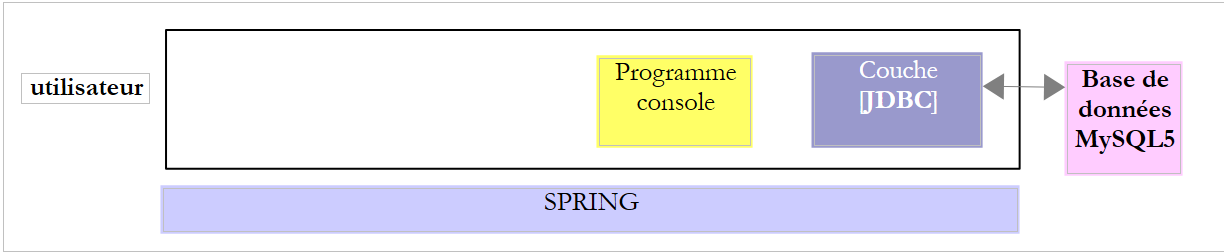
We will examine the [mysql-config-jdbc] project, which configures the JDBC layer as follows:
 |
3.3.1. The Eclipse project
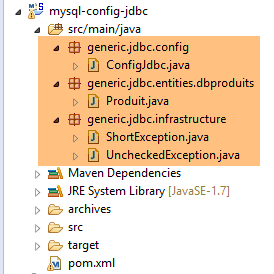 |
3.3.2. Maven Configuration
The project's [pom.xml] file is as follows:
<project xmlns="http://maven.apache.org/POM/4.0.0" xmlns:xsi="http://www.w3.org/2001/XMLSchema-instance"
    xsi:schemaLocation="http://maven.apache.org/POM/4.0.0 http://maven.apache.org/xsd/maven-4.0.0.xsd">
    <modelVersion>4.0.0</modelVersion>
    <groupId>dvp.spring.database</groupId>
    <artifactId>generic-config-jdbc</artifactId>
    <version>0.0.1-SNAPSHOT</version>
    <name>configuration generic jdbc</name>

    <parent>
        <groupId>org.springframework.boot</groupId>
        <artifactId>spring-boot-starter-parent</artifactId>
        <version>1.2.3.RELEASE</version>
    </parent>

    <dependencies>
        <!-- dépendances variables ********************************************** -->
        <!-- driver JDBC from SGBD -->
        <dependency>
            <groupId>mysql</groupId>
            <artifactId>mysql-connector-java</artifactId>
        </dependency>
        <!-- dépendances constantes ********************************************** -->
        <!-- Tomcat JDBC -->
        <dependency>
            <groupId>org.apache.tomcat</groupId>
            <artifactId>tomcat-jdbc</artifactId>
        </dependency>
        <!-- library jSON -->
        <dependency>
            <groupId>com.fasterxml.jackson.core</groupId>
            <artifactId>jackson-core</artifactId>
        </dependency>
        <dependency>
            <groupId>com.fasterxml.jackson.core</groupId>
            <artifactId>jackson-databind</artifactId>
        </dependency>
        <!-- Google Guava -->
        <dependency>
            <groupId>com.google.guava</groupId>
            <artifactId>guava</artifactId>
            <version>16.0.1</version>
        </dependency>
        <!-- Spring Boot -->
        <dependency>
            <groupId>org.springframework.boot</groupId>
            <artifactId>spring-boot</artifactId>
        </dependency>
        <!-- Spring Boot Test -->
        <dependency>
            <groupId>org.springframework.boot</groupId>
            <artifactId>spring-boot-starter-test</artifactId>
        </dependency>
        <!-- logs -->
        <dependency>
            <groupId>org.springframework.boot</groupId>
            <artifactId>spring-boot-starter-logging</artifactId>
        </dependency>
    </dependencies>

    <properties>
        <project.build.sourceEncoding>UTF-8</project.build.sourceEncoding>
        <java.version>1.7</java.version>
    </properties>

    <build>
        <plugins>
            <plugin>
                <groupId>org.apache.maven.plugins</groupId>
                <artifactId>maven-surefire-plugin</artifactId>
                <version>2.18.1</version>
            </plugin>
        </plugins>
    </build>

</project>
This Maven configuration includes a number of archives that are required either by the [mysql-config-jdbc] project or by projects that will depend on it:
- lines 4–6: the Maven artifact generated by the project. As previously mentioned, all [*-config-jdbc] projects generate this same artifact. Therefore, two [*-config-jdbc] projects must not be loaded at the same time;
- lines 9–13: the parent Maven project for this one. It defines the versions of a large number of archives used by the Spring ecosystem. This avoids having to specify them in the projects that derive from it;
- lines 18–21: the JDBC driver archive for the MySQL5 DBMS. This is the only archive required by the [spring-jdbc-01] project;
- lines 24–27: the [tomcat-jdbc] artifact provides an archive required by the JDBC projects [spring-jdbc-02 to 04];
- lines 29–36: provide the libraries required for JSON handling. Used in nearly all projects in this document;
- lines 38–42: Google Guava is a collection management library. Used in almost all projects in this document;
- lines 43–52: libraries for writing tests that integrate Spring and JUnit. Used in almost all projects in the document;
- lines 54–57: logging libraries. Used in almost all projects in this document;
- lines 67–71: the plugin used to install the [mysql-config-jdbc] project artifact in the local Maven repository;
3.3.3. The [ConfigJdbc] configuration class
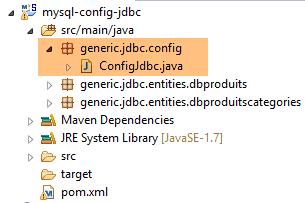 |
The [ConfigJdbc] class is as follows:
package generic.jdbc.config;

import org.springframework.beans.factory.config.ConfigurableBeanFactory;
import org.springframework.context.annotation.Bean;
import org.springframework.context.annotation.Scope;

import com.fasterxml.jackson.databind.ObjectMapper;
import com.fasterxml.jackson.databind.ser.impl.SimpleBeanPropertyFilter;
import com.fasterxml.jackson.databind.ser.impl.SimpleFilterProvider;

public class ConfigJdbc {

    // paramètres de connexion
    public final static String DRIVER_CLASSNAME = "com.mysql.jdbc.Driver";
    public final static String URL_DBPRODUITS = "jdbc:mysql://localhost:3306/dbproduits";
    public final static String USER_DBPRODUITS = "root";
    public final static String PASSWD_DBPRODUITS = "root";
...
    // ordres SQL [jdbc-01, jdbc-02]
    public final static String V1_INSERT_PRODUITS_WITH_ID = "INSERT INTO PRODUITS(ID, NOM, CATEGORIE, PRIX, DESCRIPTION) VALUES (?, ?, ?, ?, ?)";
    public final static String V1_DELETE_PRODUITS = "DELETE FROM PRODUITS";
    //public final static String V1_DELETE_PRODUITS = String.format("DELETE FROM %s", TAB_PRODUITS);
    public final static String V1_SELECT_PRODUITS = "SELECT ID, NOM, CATEGORIE, PRIX, DESCRIPTION FROM PRODUITS";
    public final static String V1_UPDATE_PRODUITS = "UPDATE PRODUITS SET PRIX=PRIX*1.1 WHERE CATEGORIE=?";
    public final static String V1_INSERT_PRODUITS_2 = "INSERT INTO PRODUITS(ID, NOM, CATEGORIE, PRIX, DESCRIPTION) VALUES (100,'X',1,1,'x')";

    // ordres SQL [jdbc-03]
    public final static String V2_INSERT_PRODUITS = "INSERT INTO PRODUITS(NOM, CATEGORIE, PRIX, DESCRIPTION) VALUES (?, ?, ?, ?)";
    public final static String V2_DELETE_ALLPRODUITS = "DELETE FROM PRODUITS";
    public final static String V2_DELETE_PRODUITS = "DELETE FROM PRODUITS WHERE ID=?";
    public final static String V2_SELECT_ALLPRODUITS = "SELECT ID, NOM, CATEGORIE, PRIX, DESCRIPTION FROM PRODUITS";
    public final static String V2_SELECT_PRODUIT_BYID = "SELECT NOM, CATEGORIE, PRIX, DESCRIPTION FROM PRODUITS WHERE ID=?";
    public final static String V2_SELECT_PRODUIT_BYNAME = "SELECT ID, CATEGORIE, PRIX, DESCRIPTION FROM PRODUITS WHERE NOM=?";
    public final static String V2_UPDATE_PRODUITS = "UPDATE PRODUITS SET NOM=?, PRIX=?, CATEGORIE=?, DESCRIPTION=? WHERE ID=?";

...

}
The [ConfigJdbc] class is used to configure the JDBC layer for the four projects [spring-jdbc-01 to 04]. Most of the configuration pertains to the [spring-jdbc-04] project. We will cover this section when we examine that project. Only the configuration for projects [spring-jdbc-01 to 03] is shown above.
- lines 14–17: connection parameters for the MySQL5 database [dbproduits];
- lines 20–25: the SQL statements used in projects [spring-jdbc-01 and 02];
- lines 28–34: the SQL statements used in the [spring-jdbc-03] project;
These SQL statements use the [PRODUCTS] table in the MySQL5 database [dbproducts], which has the following structure:
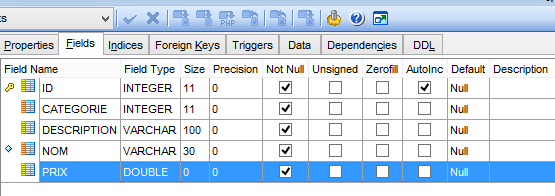 |
- [ID]: primary key in AUTO_INCREMENT mode (if no primary key is specified, the DBMS generates it);
- [NAME]: name of a product—unique;
- [CATEGORY]: category number;
- [PRICE]: its price;
- [DESCRIPTION]: a description of the product;
3.3.4. The [Product] class
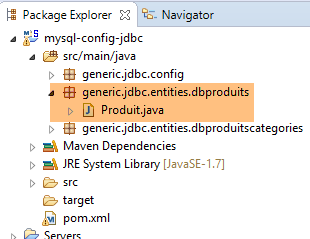 |
The [Product] class represents a row in the [PRODUCTS] table:
package generic.jdbc.entities.dbproduits;

public class Produit {

    // fields
    private int id;
    private String nom;
    private int categorie;
    private double prix;
    private String description;

    // manufacturers
    public Produit() {

    }

    public Produit(int id, String nom, int categorie, double prix, String description) {
        this.id = id;
        this.nom = nom;
        this.categorie = categorie;
        this.prix = prix;
        this.description = description;
    }

    // getters and setters
...
}
Later on, we will need to compare two products to determine whether they are equal or not. We will say that two products are equal if all their fields are equal. To do this, we will override the [equals] method of the [Object] class, from which the [Product] class derives:
    // méthode d'égalité
    @Override
    public boolean equals(Object o) {
        // cas simples
        if (o == null || o.getClass() != this.getClass()) {
            return false;
        }
        Produit p = (Produit) o;
        return this == o
                || (this.id == p.id && this.nom.equals(p.getNom()) && this.categorie == p.categorie
                        && Math.abs(this.prix - p.prix) < 1e-6 && this.description.equals(p.description));
}
- line 3: the [equals] method receives an object o that it must compare to the object this;
- lines 5–7: the simple cases where we can immediately tell that the two objects are not equal. [Object].getClass() returns an instance of type [Class], a type that represents the object’s actual class;
- line 8: the object o is converted to a product p;
- line 9: if the two references o and p to a product are equal, then they physically refer to the same product;
- line 9: if o and p are two different references to two products with the same fields, we will say they are equal. Because the price is of type [double] and there is no exact representation of real numbers in computer science, we will consider two prices to be identical if they are within 10⁻⁶ of each other;
Furthermore, we will redefine the [hashCode] method of the [Object] class:
    // hashcode
    @Override
    public int hashCode() {
        return id + 2 * nom.hashCode() + 3 * categorie + 4 * description.hashCode();
}
The hashCode values of two products must be the same if the [equals] method has declared these two products to be equal. This hashCode value is used to sort objects into collections such as dictionaries. In the example above, if two products are identical, they will indeed have the same hashCode.
3.3.5. The [UncheckedException]
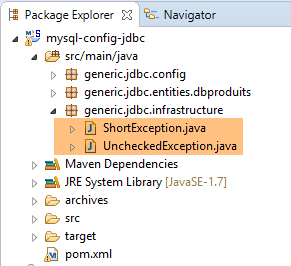 |
Consider the following architecture:
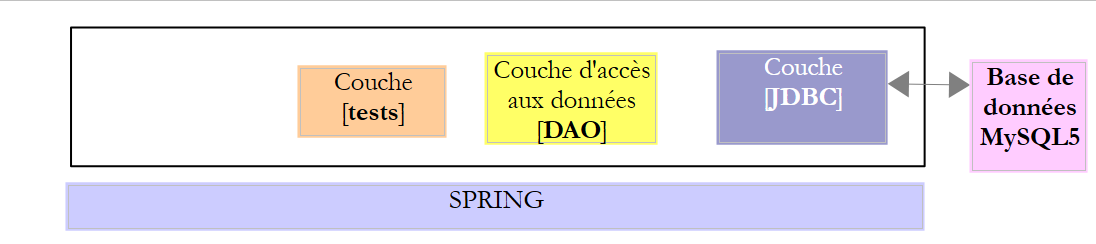 |
- the [JDBC] layer throws [SQLException] exceptions. This exception must propagate up through the layers until it reaches the highest layer, in this case the testing layer;
The [DAO] layer could simply let the [SQLException] propagate up to the testing layer. But since this exception is unchecked (it derives directly from [Exception]), this would imply that the [IDao] interface of the [DAO] layer would be as follows:
public interface IDao {

    // ajouter des produits
    public List<Produit> addProduits(List<Produit> produits) throws SQLException;

    // liste de tous les produits
    public List<Produit> getAllProduits() throws SQLException;

    // un produit particulier
    public Produit getProduitById(int id) throws SQLException;

    public Produit getProduitByName(String name) throws SQLException;

    // mise à jour de plusieurs produits
    public int updateProduits(List<Produit> produits) throws SQLException;

    // suppression de tous les produits
    public int deleteAllProduits() throws SQLException;

    // suppression de plusieurs produits
    public int deleteProduits(int[] ids) throws SQLException;
}
And that's very annoying because it prevents us from implementing the [IDao] interface with a class that would throw a different exception. To work around this issue, the [DAO] layer will throw an unhandled [DaoException] (derived from [RuntimeException]), which allows us to omit the [throws] clause in the interface method signatures. As a result, the interface can be implemented by any class that also throws an unchecked exception, which may be different from the [DaoException]. Our architecture now looks like this:
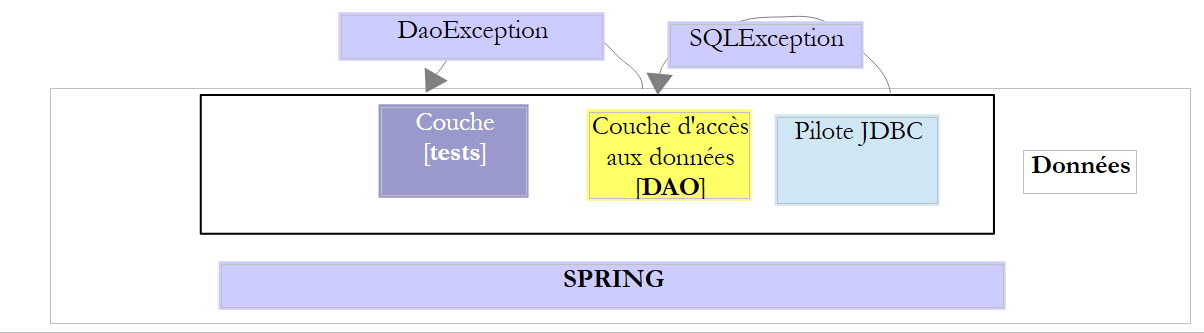 |
To facilitate the creation of unchecked exceptions for different layers of an application, we create a parent class [UncheckedException] for them:
|
package generic.jdbc.infrastructure;

import java.util.ArrayList;
import java.util.List;

import com.fasterxml.jackson.core.JsonProcessingException;
import com.fasterxml.jackson.databind.ObjectMapper;

// generic exception class
// the exception is uncontrolled

public class UncheckedException extends RuntimeException {

    // serial ID generated
    private static final long serialVersionUID = -2924871763340170310L;

    // properties
    private int code;
    private String trace;
    private List<ShortException> exceptions;

    // manufacturers
    public UncheckedException() {
        super();
    }

    public UncheckedException(int code, Throwable e, String simpleClassName) {
        super(e);
        // local
        this.code = code;
        this.exceptions = getErreursForException(e);
        // trace
        String fileName = String.format("%s.java", simpleClassName);
        StackTraceElement[] traces = e.getStackTrace();
        boolean trouve = false;
        for (int i = 0; !trouve && i < traces.length; i++) {
            StackTraceElement trace = traces[i];
            if (fileName.equals(trace.getFileName())) {
                this.trace = String.format("[%s,%s,%s]", simpleClassName, trace.getMethodName(), trace.getLineNumber());
                trouve = true;
            }
        }
    }

    @Override
    public String getMessage() {
        return this.toString();
    }

    @Override
    public void printStackTrace() {
        System.out.println(this);
    }

    // list of exception error messages
    private List<ShortException> getErreursForException(Throwable th) {
        // retrieve the elements of the exception stack
        Throwable cause = th;
        List<ShortException> exceptions = new ArrayList<ShortException>();
        while (cause != null) {
            // retrieve the current exception
            exceptions.add(new ShortException(cause.getClass().getName(), cause.getMessage()));
            // following exception
            cause = cause.getCause();
        }
        return exceptions;
    }

    @Override
    public String toString() {
        ObjectMapper jsonMapper = new ObjectMapper();
        try {
            return String.format("[code=%s, trace=%s, exceptions=%s", code, trace, jsonMapper.writeValueAsString(exceptions));
        } catch (JsonProcessingException e) {
            e.printStackTrace();
            return null;
        }
    }

    // getters and setters
...
}
- line 12: the class extends [RuntimeException] and is therefore an unchecked exception type. It will be used to wrap a checked exception (SQLException) in an unchecked exception type (UncheckedException);
- to differentiate between [UncheckedException] exceptions, we can assign them a code that will be stored in the private field on line 18. Java code intercepting an [UncheckedException] will have access to this error code via the [getCode] method (lines 80 and beyond);
- line 20: stores the error messages from the stack of the encapsulated exception;
- lines 23–43: the different ways to construct an object of type [UncheckedException];
- lines 56–67: a private method that allows constructing the error list from line 20 from a [Throwable] object or a derived type, specifically the [Exception] type;
- lines 69–78: the [toString] method returns a string representing the exception. To display the list of errors from line 20, it uses a JSON library. This library is included in the project’s Maven dependencies:
        <!-- library jSON -->
        <dependency>
            <groupId>com.fasterxml.jackson.core</groupId>
            <artifactId>jackson-core</artifactId>
        </dependency>
        <dependency>
            <groupId>com.fasterxml.jackson.core</groupId>
            <artifactId>jackson-databind</artifactId>
</dependency>
- lines 45–48: redefine the [getMessage] method of the parent class [RuntimeException]. Here, it returns the [toString] signature of the class;
- lines 50–53: redefine the [printStackTrace] method of the parent class [RuntimeException]. The [toString] signature of the class will be displayed;
The [UncheckedException] class stores, in the field on line 20, a list of exceptions described by the following [ShortException] type:
package pam.dao.exceptions;

public class ShortException {

    // properties
    private String className;
    private String errorMessage;

    // manufacturers
    public ShortException() {

    }

    public ShortException(String className, String errorMessage) {
        this.className = className;
        this.errorMessage = errorMessage;
    }

    // getters and setters
...
}
- line 6: the name of the class of the exception that occurred;
- line 7: the associated error message;
Let's examine the following constructor of the [UncheckedException] class:
    public UncheckedException(int code, Throwable e, String simpleClassName) {
        super(e);
        // local
        this.code = code;
        this.exceptions = getErreursForException(e);
        // trace
        String fileName = String.format("%s.java", simpleClassName);
        StackTraceElement[] traces = e.getStackTrace();
        boolean trouve = false;
        for (int i = 0; !trouve && i < traces.length; i++) {
            StackTraceElement trace = traces[i];
            if (fileName.equals(trace.getFileName())) {
                this.trace = String.format("[%s,%s,%s]", simpleClassName, trace.getMethodName(), trace.getLineNumber());
                trouve = true;
            }
        }
}
- line 1, the parameters are as follows:
- [code]: an error code;
- [e]: the exception being encapsulated. [Throwable] is the parent class of the [Exception] class and derives directly from the [Object] class. It is the parent class of all C classes with which one can write [throw c;] where c is an instance of C;
- [simpleClassName]: the simple name of the user code class where the exception e was detected;
- line 4: the error code is recorded;
- line 5: the list of [ShortException] is constructed from the [Throwable e] passed as a parameter;
- lines 7–16: the so-called exception traces are examined. An initial exception occurs at a specific point in the code and then propagates back to the method that called the one where the exception occurred, and so on until a try/catch block catches it. During this propagation, the initial exception leaves traces stored in the [e.stackTrace] array of the exception e. These are retrieved here on line 8 from the [Throwable e] passed as a parameter. Each element of type [StackTraceElement] is an object with the following fields:
- [fileName]: the name of the Java file where the exception occurred;
- [lineNumber]: the line number in this file where the exception occurred;
- [methodName]: the name of the method in this file where the exception occurred;
- Lines 10–16 search the array of traces for the exception passed as a parameter, looking for the first occurrence of the condition [trace.fileName == simpleClassName.java], where [simpleClassName] is the third parameter of the constructor. The idea is to record where the exception occurred in the user code. The user code will wrap an exception as follows:
- line 13: we create a string of type [fileName, methodName, lineNumber] describing the location in the user code where the exception e was caught;
Now, let’s examine the code that records the list of exceptions from the exception stack of the [Throwable th] exception encapsulated by the previous constructor:
    // liste des messages d'erreur d'une exception
    private List<ShortException> getErreursForException(Throwable th) {
        // on récupère les éléments de la pile de l'exception
        Throwable cause = th;
        List<ShortException> exceptions = new ArrayList<ShortException>();
        while (cause != null) {
            // on récupère l'exception courante
            exceptions.add(new ShortException(cause.getClass().getName(), cause.getMessage()));
            // exception suivante
            cause = cause.getCause();
        }
        return exceptions;
}
As it propagates back to the method that caught it using a try/catch block, the initial exception e may have been encapsulated within another exception. It is then this latter exception that propagates back to the method that will finally catch it. It, too, can therefore be encapsulated. Ultimately, when a method decides to catch an exception th and handle it, it will find the initial exception e buried at the bottom of a stack of exceptions. Thus, in the example above, the parameter [Throwable th] is merely the tip of the exception iceberg. Its attribute [th.cause] reveals the exception that it itself encapsulates. And so on. When an exception e satisfies [e.getCause()==null], it means that e is the initial exception.
- Line 8: For each exception in the exception stack of [Throwable th], two pieces of information are stored:
- [getClass().getName()]: the full name of the exception;
- [getMessage()]: the associated error message;
3.4. Example-01
3.4.1. Project Architecture
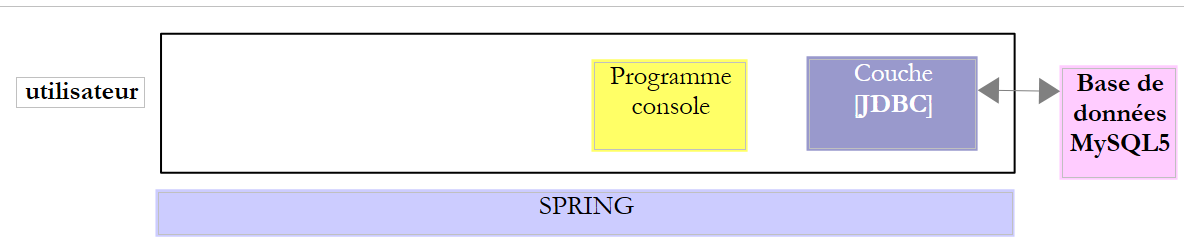 |
In this example, a console program uses the [JDBC] layer interface.
3.4.2. The Eclipse Project
We create a Spring/Maven project [spring-jdbc-01] by following the procedure in Section 2.5.2.1.
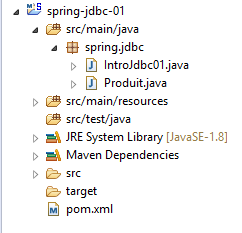 |
The project is a Maven project defined by the following [pom.xml] file:
<?xml version="1.0" encoding="UTF-8"?>
<project xmlns="http://maven.apache.org/POM/4.0.0" xmlns:xsi="http://www.w3.org/2001/XMLSchema-instance"
    xsi:schemaLocation="http://maven.apache.org/POM/4.0.0 http://maven.apache.org/xsd/maven-4.0.0.xsd">
    <modelVersion>4.0.0</modelVersion>

    <groupId>dvp.spring.database</groupId>
    <artifactId>spring-jdbc-generic-01</artifactId>
    <version>0.0.1-SNAPSHOT</version>
    <packaging>jar</packaging>

    <name>spring-jdbc-generic-01</name>
    <description>Demo project for API JDBC</description>

    <parent>
        <groupId>org.springframework.boot</groupId>
        <artifactId>spring-boot-starter-parent</artifactId>
        <version>1.2.3.RELEASE</version>
        <relativePath /> <!-- lookup parent from repository -->
    </parent>

    <properties>
        <project.build.sourceEncoding>UTF-8</project.build.sourceEncoding>
        <java.version>1.8</java.version>
    </properties>

    <dependencies>
        <!-- configuration JDBC of SGBD -->
        <dependency>
            <groupId>dvp.spring.database</groupId>
            <artifactId>generic-config-jdbc</artifactId>
            <version>0.0.1-SNAPSHOT</version>
        </dependency>
    </dependencies>

    <build>
        <plugins>
            <plugin>
                <groupId>org.apache.maven.plugins</groupId>
                <artifactId>maven-surefire-plugin</artifactId>
                <version>2.18.1</version>
            </plugin>
        </plugins>
    </build>

</project>
- Lines 28–32: The project uses the [generic-config-jdbc] artifact from the [mysql-config-jdbc] project we just examined. The [spring-jdbc-01] project therefore has access to all the elements of the [mysql-config-jdbc] project;
We can see this last point in two ways by inspecting the project’s Maven dependencies:
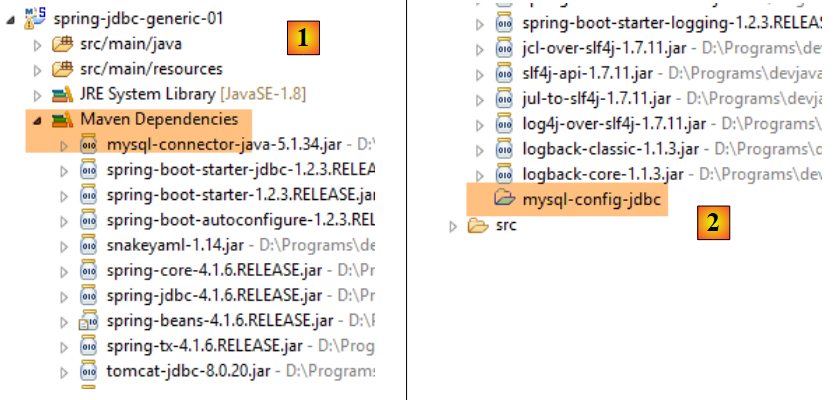 |
- In [2], we see that the [mysql-config-jdbc] project is listed in the project’s Maven dependencies. Since these dependencies are in the project’s Classpath, this means that the [mysql-config-jdbc] project is also in this Classpath, and therefore its classes and interfaces are visible in the [spring-jdbc-01] project;
The Maven project [mysql-config-jdbc] does not need to be present in the [Package Explorer] tab to be usable by other Maven projects. It simply needs to be present in the local Maven repository. Unlike an IDE such as NetBeans, this is not automatic with Eclipse. It must be forced:
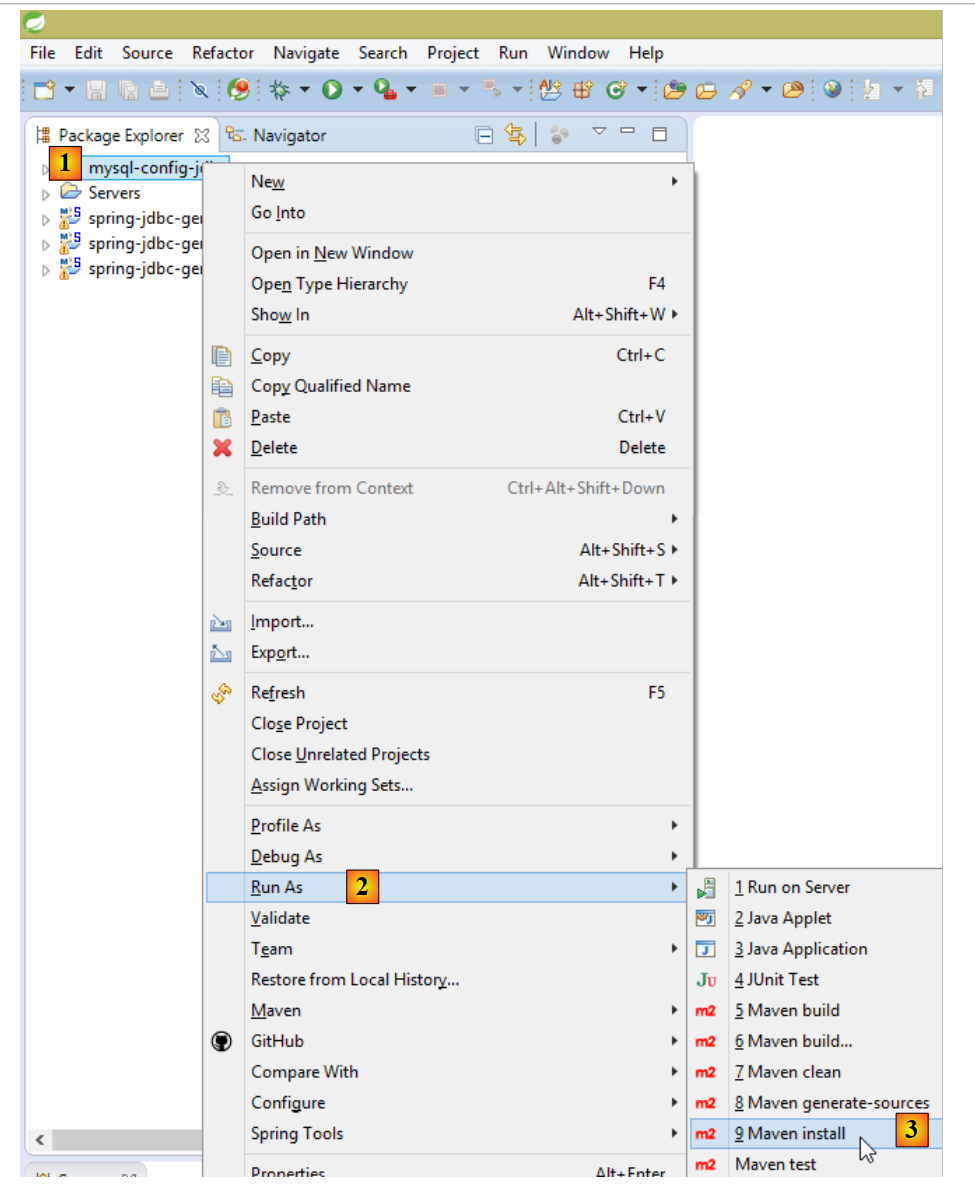 |
We reviewed the conditions that enable this generation in Section 2.3.5. Once it has been completed, you can then remove the [mysql-config-jdbc] project from the [Package Explorer] tab:
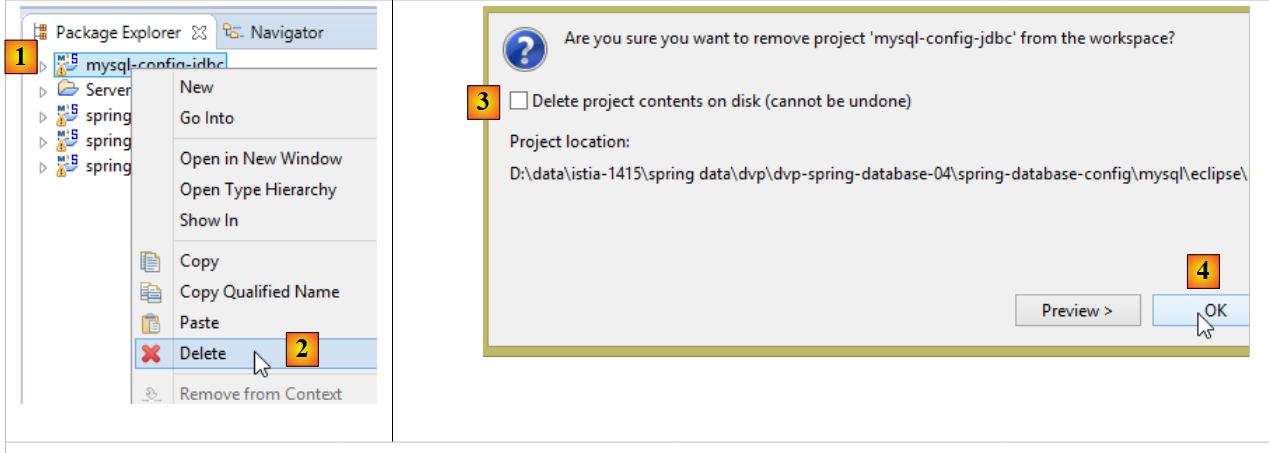 |
- Do not check [3], which physically deletes the project from the disk, making it unrecoverable;
This operation re-calculates the Maven dependencies of the projects that depend on the project removed from the [Package Explorer]. This changes the [Maven Dependencies] branch of these projects. For example, for the [spring-jdbc-01] project, the [Maven Dependencies] branch becomes as follows:
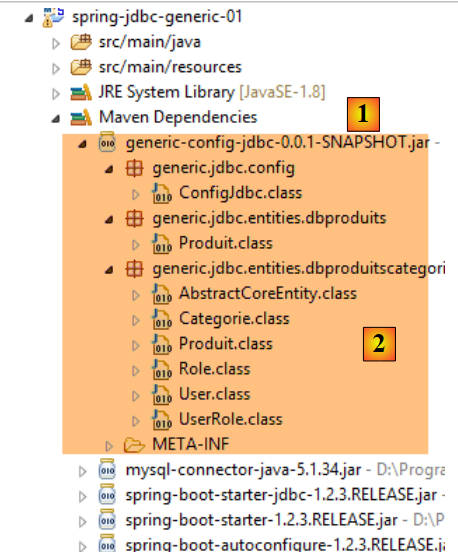 |
This time, the dependency is no longer on a project but on its Maven artifact, in this case the [generic-config-jdbc] artifact [1]. We can see that we do indeed have access to all the classes and interfaces of this artifact. As mentioned, this artifact will be generated by all [*-config-jdbc] projects. To avoid errors, we:
- always keep a single [*-config-jdbc] project in the [Package Explorer] tab;
- update the Maven configuration of all projects in the [Package Explorer] tab (Alt-F5) so that they include the [*-config-jdbc] project in their Maven dependencies;
3.4.3. The skeleton of the main class
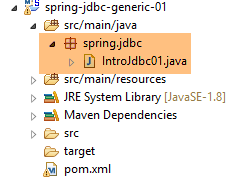 |
The skeleton of the main class [IntroJdbc01] is as follows:
package spring.jdbc;

import generic.jdbc.config.ConfigJdbc;
import generic.jdbc.entities.dbproduits.Produit;

import java.sql.Connection;
import java.sql.DriverManager;
import java.sql.PreparedStatement;
import java.sql.ResultSet;
import java.sql.SQLException;
import java.util.ArrayList;
import java.util.List;

import com.fasterxml.jackson.core.JsonProcessingException;
import com.fasterxml.jackson.databind.ObjectMapper;

public class IntroJdbc01 {

    // constants
    final static ObjectMapper jsonMapper = new ObjectMapper();

    public static void main(String[] args) {
        // loading the JDBC driver from SGBD
        try {
            Class.forName(ConfigJdbc.DRIVER_CLASSNAME);
        } catch (ClassNotFoundException e1) {
            doCatchException("Pilote JDBC introuvable", null, e1);
            return;
        }
        // empty table [PRODUITS]
        System.out.println(String.format("------------------------------ %s", "Vidage de la table [PRODUITS]"));
        delete();
        // fill it
        System.out.println(String.format("------------------------------ %s", "Remplissage de la table [PRODUITS]"));
        insert();
        // we read it
        System.out.println(String.format("------------------------------ %s", "Affichage de la table [PRODUITS]"));
        select();
        // update
        System.out.println(String.format("------------------------------ %s", "Mise à jour de la table [PRODUITS]"));
        update();
        // display
        System.out.println(String.format("------------------------------ %s", "Affichage de la table [PRODUITS]"));
        select();
        // empty table [PRODUITS]
        System.out.println(String.format("------------------------------ %s", "Vidage de la table [PRODUITS]"));
        delete();
        // we display it
        System.out.println(String.format("------------------------------ %s", "Affichage de la table [PRODUITS]"));
        select();
        // INSERTion of two identical elements
        // the INSERTion must fail and neither element is inserted because of the transaction
        System.out.println(String.format("------------------------------ %s",
                "Insertion de deux produits de même clé primaire dans la table [PRODUITS]"));
        insert2();
        // we check
        System.out.println(String.format("------------------------------ %s", "Affichage de la table [PRODUITS]"));
        select();
        // finish
        System.out.println(String.format("------------------------------ %s", "Travail terminé"));
    }

    // product list
    private static void select() {
    ...
    }

    // display jSON of an object
    private static void affiche(Object object) {
...
    }

    // product deletion
    public static void delete() {
...
    }

    // add products
    public static void insert() {
...
    }

    // add 2 products with the same primary keys
    public static void insert2() {
...
    }

    // product updates
    public static void update() {
...
    }

    private static void doFinally(ResultSet rs, PreparedStatement ps, Connection connexion) {
        // closure ResultSet
        if (rs != null) {
            try {
                rs.close();
            } catch (SQLException e1) {

            }
        }
        // closure [PreparedStatement]
        if (ps != null) {
            try {
                ps.close();
            } catch (SQLException e2) {

            }
        }
        if (connexion != null) {
            try {
                // close connection
                connexion.close();
            } catch (SQLException e3) {
                // display error msg
                show("Les erreurs suivantes se sont produites lors de la fermeture de la connexion",
                        getErreursFromThrowable(e3));
            }
        }
    }

    private static void doCatchException(String title, Connection connexion, Throwable th) {
        // display error msg
        show(title, getErreursFromThrowable(th));
        // cancel transaction
        try {
            if (connexion != null) {
                connexion.rollback();
            }
        } catch (SQLException e2) {
            // display error msg
            show("Erreur lors de l'annulation de la transaction", getErreursFromThrowable(e2));
        }
    }

    private static List<String> getErreursFromThrowable(Throwable th) {
        // retrieve the list of exception error msgs
        List<String> erreurs = new ArrayList<String>();
        while (th != null) {
            // throwable error message
            erreurs.add(th.getMessage());
            // we move on to the cause of throwable
            th = th.getCause();
        }
        // result
        return erreurs;
    }

    private static void show(String title, List<String> messages) {
        // title
        System.out.println(String.format("%s : ", title));
        // messages
        for (String message : messages) {
            System.out.println(String.format("- %s", message));
        }
    }
}
- lines 23–29: loading the JDBC driver for the DBMS. On line 25, the constant [ConfigJdbc.DRIVER_CLASSNAME] defined in the [mysql-config-jdbc] project is used;
- lines 136–147: the [getErrorsFromThrowable] method returns the list of error messages encapsulated in an object of type [Throwable], which is the parent class of the [Exception] class. An exception may contain another exception, which can be retrieved using the [Throwable].getCause() method. This allows us to iterate through all exceptions encapsulated in the [Throwable] object;
- lines 149–156: the [show(String title, List<String> messages)] method displays the messages preceded by the text [title];
- lines 122–134: the method [doCatchException(String title, Connection connection, Throwable th)] handles exceptions encountered by the class’s methods. The handled exception is represented by the parameter [Throwable th]. The purpose of the method is:
- to roll back the current transaction of the [Connection connection] object (lines 127–129);
- to write the error messages encapsulated in the exception [Throwable th] (lines 124, 132);
- lines 93–120: the method [doFinally(ResultSet rs, PreparedStatement ps, Connection connection)] handles the [finally] block of the DBMS access methods. Its purpose is to release the resources allocated by the connection;
3.4.4. Deleting the contents of the products table
The [delete] method deletes the contents of the table:
    // product deletion
    public static void delete() {
        Connection connexion = null;
        PreparedStatement ps = null;
        try {
            // opening connection
            connexion = DriverManager.getConnection(ConfigJdbc.URL_DBPRODUITS , ConfigJdbc.USER_DBPRODUITS, ConfigJdbc.PASSWD_DBPRODUITS);
            // start of transaction
            connexion.setAutoCommit(false);
            // in read/write mode
            connexion.setReadOnly(false);
            // empty table [PRODUITS]
            ps = connexion.prepareStatement(ConfigJdbc.V1_DELETE_PRODUITS);
            ps.executeUpdate();
            // commit transaction
            connexion.commit();
        } catch (SQLException e1) {
            // we handle the exception
            doCatchException("Les erreurs suivantes se sont produites à la suppression du contenu de la table", connexion, e1);
        } finally {
            // we treat the finally
            doFinally(null, ps, connexion);
        }
}
Line 7 uses the following constants from the [ConfigJdbc] class:
public final static String URL_DBPRODUITS = "jdbc:mysql://localhost:3306/dbproduits";
public final static String USER_DBPRODUITS = "root";
public final static String PASSWD_DBPRODUITS = "";
Line 13, the prepared SQL statement is as follows:
public final static String V1_DELETE_PRODUITS = "DELETE FROM PRODUITS";
The [delete] method uses transactions. A transaction allows you to group SQL statements that must all succeed or all be rolled back. There are four operations to be aware of:
- start of a transaction: [connection.setAutoCommit(false)];
- end of a successful transaction: [connection.commit()]. In this case, all operations performed on the database during the transaction are committed;
- end of a transaction with failure: [connection.rollback()]. In this case, all operations performed on the database during the transaction are rolled back;
In our examples, whenever an exception occurs, we roll back the transaction in the [doCatchException] method:
    private static void doCatchException(String title, Connection connexion, Throwable th) {
        // display error msg
        Static.show(title, Static.getErreursFromThrowable(th));
        // cancel transaction
        try {
            if (connexion != null) {
                connexion.rollback();
            }
        } catch (SQLException e2) {
            // display error msg
            Static.show("Erreur lors de l'annulation de la transaction", Static.getErreursFromThrowable(e2));
        }
}
3.4.5. Creating the contents of the products table
The [insert] method creates the table content:
public static void insert() {
        Connection connexion = null;
        PreparedStatement ps = null;
        try {
            // opening connection
            connexion = DriverManager.getConnection(ConfigJdbc.URL_DBPRODUITS , ConfigJdbc.USER_DBPRODUITS, ConfigJdbc.PASSWD_DBPRODUITS);
            // start of transaction
            connexion.setAutoCommit(false);
            // in read/write mode
            connexion.setReadOnly(false);
            // fill the table
            ps = connexion.prepareStatement(ConfigJdbc.V1_INSERT_PRODUITS_WITH_ID);
            for (int i = 0; i < 10; i++) {
                // preparation
                int n = i + 1;
                ps.setInt(1, n);
                ps.setString(2, String.format("NOM%s", n));
                ps.setInt(3, n / 5 + 1);
                ps.setDouble(4, 100 * (1 + (double) i / 100));
                ps.setString(5, String.format("DESC%s", n));
                // execution
                ps.executeUpdate();
            }
            // commit transaction
            connexion.commit();
        } catch (SQLException e1) {
            // we handle the exception
            doCatchException("Les erreurs suivantes se sont produites à la création du contenu de la table", connexion, e1);
        } finally {
            // we treat the finally
            doFinally(null, ps, connexion);
        }
    }
Line 12, the prepared SQL statement is as follows:
public final static String V1_INSERT_PRODUITS_WITH_ID = "INSERT INTO PRODUITS(ID, NOM, CATEGORIE, PRIX, DESCRIPTION) VALUES (?, ?, ?, ?, ?)";
3.4.6. Displaying the contents of the products table
The [select] method displays the table contents:
// product list
    private static void select() {
        Connection connexion = null;
        PreparedStatement ps = null;
        ResultSet rs = null;
        try {
            // opening connection
            connexion = DriverManager.getConnection(ConfigJdbc.URL_DBPRODUITS , ConfigJdbc.USER_DBPRODUITS, ConfigJdbc.PASSWD_DBPRODUITS);
            // start of transaction
            connexion.setAutoCommit(false);
            // in read-only mode
            connexion.setReadOnly(true);
            // table [PRODUITS] is read
            ps = connexion.prepareStatement(ConfigJdbc.V1_SELECT_PRODUITS);
            rs = ps.executeQuery();
            System.out.println("Liste des produits : ");
            while (rs.next()) {
                affiche(new Produit(rs.getInt(1), rs.getString(2), rs.getInt(3), rs.getDouble(4), rs.getString(5)));
            }
            // commit transaction
            connexion.commit();
        } catch (SQLException e1) {
            // we handle the exception
            doCatchException("Les erreurs suivantes se sont produites à la lecture de la table", connexion, e1);
        } finally {
            // we treat the finally
            doFinally(rs, ps, connexion);
        }
    }
Line 14, the prepared SQL statement is as follows:
public final static String V1_SELECT_PRODUITS = "SELECT ID, NOM, CATEGORIE, PRIX, DESCRIPTION FROM PRODUITS";
The [display] method (line 18) is as follows:
    // display jSON of an object
    private static void affiche(Object object) {
        try {
            System.out.println(jsonMapper.writeValueAsString(object));
        } catch (JsonProcessingException e) {
            e.printStackTrace();
        }
}
It displays the JSON representation of the object passed as a parameter (see JSON in Section 23.12).
3.4.7. Updating the table contents
The [update] method updates certain products:
    // product updates
    public static void update() {
        Connection connexion = null;
        PreparedStatement ps = null;
        try {
            // opening connection
            connexion = DriverManager.getConnection(ConfigJdbc.URL_DBPRODUITS , ConfigJdbc.USER_DBPRODUITS, ConfigJdbc.PASSWD_DBPRODUITS);
            // start of transaction
            connexion.setAutoCommit(false);
            // in read/write mode
            connexion.setReadOnly(false);
            // table is updated
            ps = connexion.prepareStatement(ConfigJdbc.V1_UPDATE_PRODUITS);
            // category 1
            ps.setInt(1, 1);
            // execution
            ps.executeUpdate();
            // commit transaction
            connexion.commit();
        } catch (SQLException e1) {
            // we handle the exception
            doCatchException("Les erreurs suivantes se sont produites à la mise à jour du contenu de la table", connexion, e1);
        } finally {
            // we treat the finally
            doFinally(null, ps, connexion);
        }
}
Line 13, the prepared SQL statement is as follows:
public final static String V1_UPDATE_PRODUITS = "UPDATE PRODUITS SET PRIX=PRIX*1.1 WHERE CATEGORIE=?";
3.4.8. Role of the transaction
The [insert2] method inserts two products with the same primary key into the table, which is not possible. Since we are in a transaction, the first insertion will be rolled back.
    // add 2 products with the same primary keys
    public static void insert2() {
        Connection connexion = null;
        PreparedStatement ps = null;
        try {
            // opening connection
            connexion = DriverManager.getConnection(ConfigJdbc.URL_DBPRODUITS , ConfigJdbc.USER_DBPRODUITS, ConfigJdbc.PASSWD_DBPRODUITS);
            // start of transaction
            connexion.setAutoCommit(false);
            // in read/write mode
            connexion.setReadOnly(false);
            // add 1 line
            ps = connexion.prepareStatement(ConfigJdbc.V1_INSERT_PRODUITS_2);
            // execution
            ps.executeUpdate();
            // we add the same line a 2nd time, with the same primary key
            // the INSERTion must fail and neither element must be inserted because of the transaction
            ps.executeUpdate();
            // commit transaction
            connexion.commit();
        } catch (SQLException e1) {
            // we handle the exception
            doCatchException("Les erreurs suivantes se sont produites lors de l'ajout de deux produits de même clé primaire",
                    connexion, e1);
        } finally {
            // we treat the finally
            doFinally(null, ps, connexion);
        }
}
Line 13, the prepared SQL statement is as follows:
public final static String V1_INSERT_PRODUITS_2 = "INSERT INTO PRODUITS(ID, NOM, CATEGORIE, PRIX, DESCRIPTION) VALUES (100,'X',1,1,'x')";
3.4.9. Results
We execute the execution configuration named [spring-jdbc-generic-01.IntroJdbc01]:
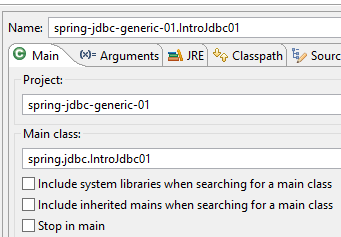 |
The following console output is obtained:
------------------------------ Vidage de la table [PRODUITS]
------------------------------ Remplissage de la table [PRODUITS]
------------------------------ Affichage de la table [PRODUITS]
Liste des produits :
{"id":1,"nom":"NOM1","categorie":1,"prix":100.0,"description":"DESC1"}
{"id":2,"nom":"NOM2","categorie":1,"prix":101.0,"description":"DESC2"}
{"id":3,"nom":"NOM3","categorie":1,"prix":102.0,"description":"DESC3"}
{"id":4,"nom":"NOM4","categorie":1,"prix":103.0,"description":"DESC4"}
{"id":5,"nom":"NOM5","categorie":2,"prix":104.0,"description":"DESC5"}
{"id":6,"nom":"NOM6","categorie":2,"prix":105.0,"description":"DESC6"}
{"id":7,"nom":"NOM7","categorie":2,"prix":106.0,"description":"DESC7"}
{"id":8,"nom":"NOM8","categorie":2,"prix":107.0,"description":"DESC8"}
{"id":9,"nom":"NOM9","categorie":2,"prix":108.0,"description":"DESC9"}
{"id":10,"nom":"NOM10","categorie":3,"prix":109.0,"description":"DESC10"}
------------------------------ Mise à jour de la table [PRODUITS]
------------------------------ Affichage de la table [PRODUITS]
Liste des produits :
{"id":1,"nom":"NOM1","categorie":1,"prix":110.0,"description":"DESC1"}
{"id":2,"nom":"NOM2","categorie":1,"prix":111.0,"description":"DESC2"}
{"id":3,"nom":"NOM3","categorie":1,"prix":112.0,"description":"DESC3"}
{"id":4,"nom":"NOM4","categorie":1,"prix":113.0,"description":"DESC4"}
{"id":5,"nom":"NOM5","categorie":2,"prix":104.0,"description":"DESC5"}
{"id":6,"nom":"NOM6","categorie":2,"prix":105.0,"description":"DESC6"}
{"id":7,"nom":"NOM7","categorie":2,"prix":106.0,"description":"DESC7"}
{"id":8,"nom":"NOM8","categorie":2,"prix":107.0,"description":"DESC8"}
{"id":9,"nom":"NOM9","categorie":2,"prix":108.0,"description":"DESC9"}
{"id":10,"nom":"NOM10","categorie":3,"prix":109.0,"description":"DESC10"}
------------------------------ Vidage de la table [PRODUITS]
------------------------------ Affichage de la table [PRODUITS]
Liste des produits :
------------------------------ Insertion de deux produits de même clé primaire dans la table [PRODUITS]
Les erreurs suivantes se sont produites lors de l'ajout de deux produits de même clé primaire :
- Duplicate entry '100' for key 'PRIMARY'
------------------------------ Affichage de la table [PRODUITS]
Liste des produits :
------------------------------ Travail terminé
- line 30: before inserting the two products with the same primary key, the table is empty;
- line 35: after inserting the two products with the same primary key, the table is empty. This demonstrates the role of the transaction:
- the first insertion succeeds. There is no reason for it to fail;
- the second insertion fails (line 32). Consequently, because these two insertions are within the same transaction, all SQL statements in that transaction are rolled back, including the first insertion.
3.4.10. Conclusion
What is striking about the previous code snippets is the significant amount of space devoted to handling the [SQLException]. Since any JDBC operation can potentially throw this exception, there are numerous try/catch blocks in the code.
3.5. Example-02
We will revisit the previous application using a [javax.sql.DataSource] data source:
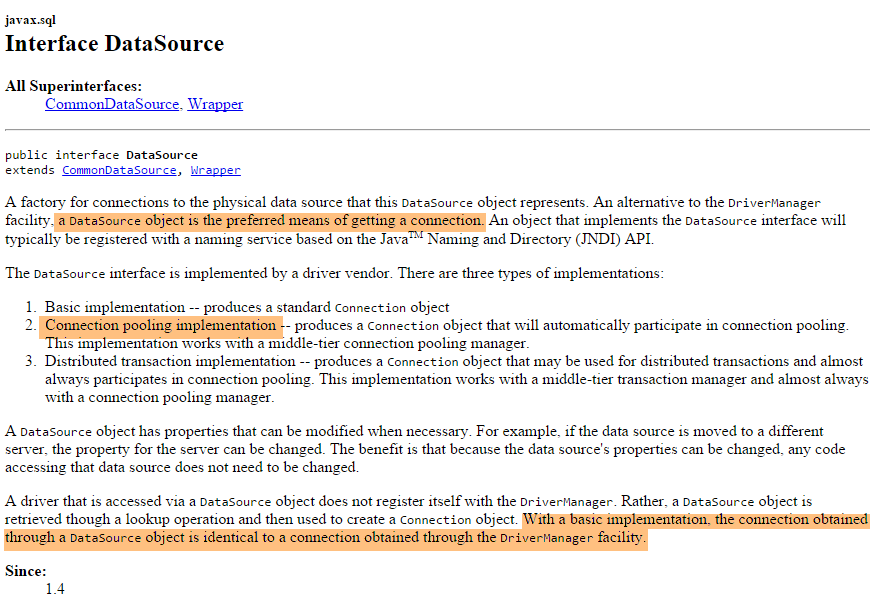
We will use a data source implemented by the [org.apache.tomcat.jdbc.pool.DataSource] class. This class uses a connection pool, i.e., a set of open connections:
- When the pool is instantiated, a certain number of connections are opened to the database. This number is configurable;
- when the Java code opens a connection, it is provided by the pool;
- when the Java code closes a connection, it is returned to the pool;
Ultimately, connections are opened only once, which improves database access performance. The data source will be defined in a Spring configuration class
3.5.1. Project Architecture
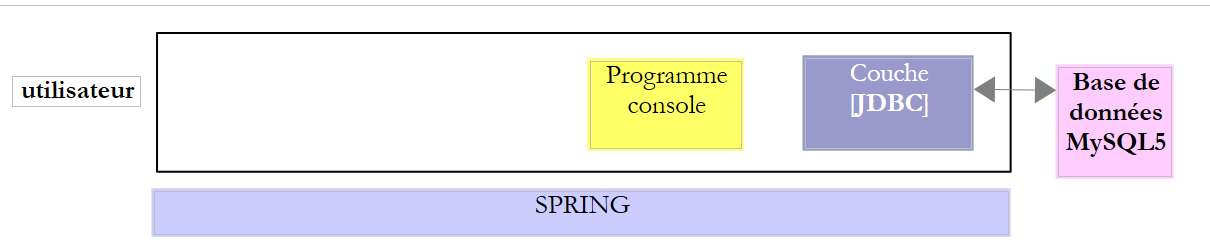 |
In this example, a console program uses the [JDBC] layer interface.
3.5.2. The Eclipse project
The new Eclipse project can be obtained by copying the previous one [1-6]:
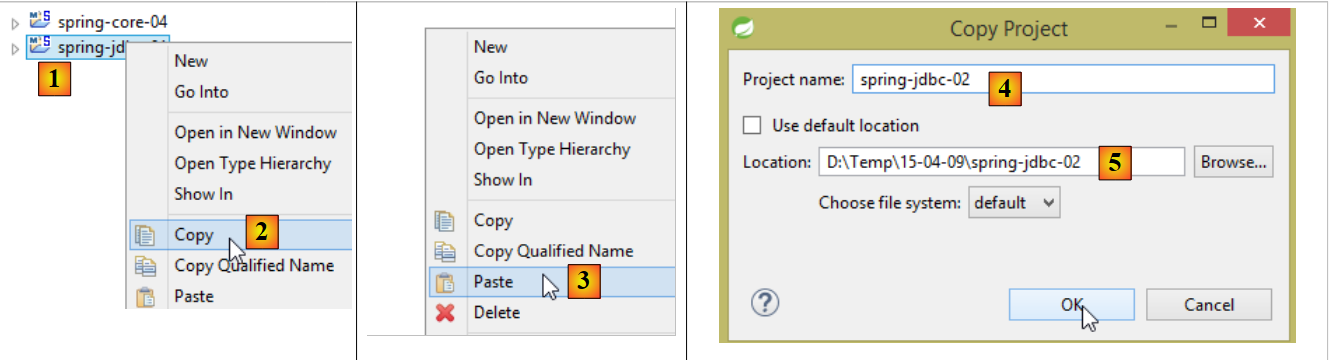 |
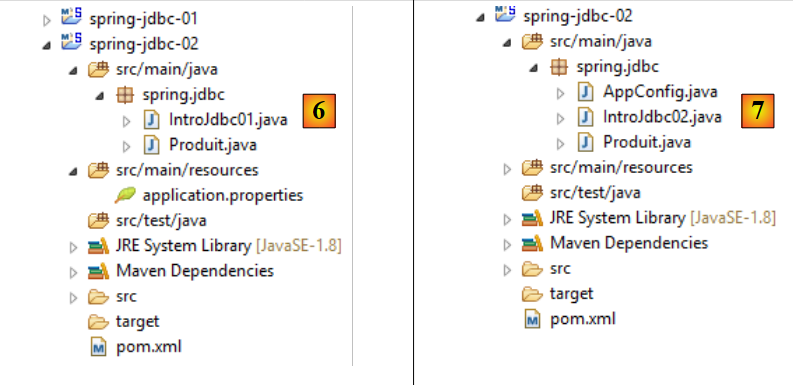 |
We then evolve the project from [6] to [7]:
3.5.3. Maven Configuration
Project [7] is a Maven project defined by the following [pom.xml] file:
<?xml version="1.0" encoding="UTF-8"?>
<project xmlns="http://maven.apache.org/POM/4.0.0" xmlns:xsi="http://www.w3.org/2001/XMLSchema-instance"
    xsi:schemaLocation="http://maven.apache.org/POM/4.0.0 http://maven.apache.org/xsd/maven-4.0.0.xsd">
    <modelVersion>4.0.0</modelVersion>

    <groupId>dvp.spring.database</groupId>
    <artifactId>spring-jdbc-generic-02</artifactId>
    <version>0.0.1-SNAPSHOT</version>
    <packaging>jar</packaging>

    <name>spring-jdbc-generic-02</name>
    <description>Demo project for API JDBC</description>

    <parent>
        <groupId>org.springframework.boot</groupId>
        <artifactId>spring-boot-starter-parent</artifactId>
        <version>1.2.3.RELEASE</version>
        <relativePath /> <!-- lookup parent from repository -->
    </parent>

    <properties>
        <project.build.sourceEncoding>UTF-8</project.build.sourceEncoding>
        <java.version>1.8</java.version>
    </properties>

    <dependencies>
        <!-- configuration JDBC of SGBD -->
        <dependency>
            <groupId>dvp.spring.database</groupId>
            <artifactId>generic-config-jdbc</artifactId>
            <version>0.0.1-SNAPSHOT</version>
        </dependency>
    </dependencies>

    <build>
        <plugins>
            <plugin>
                <groupId>org.springframework.boot</groupId>
                <artifactId>spring-boot-maven-plugin</artifactId>
            </plugin>
            <plugin>
                <groupId>org.apache.maven.plugins</groupId>
                <artifactId>maven-surefire-plugin</artifactId>
                <version>2.18.1</version>
            </plugin>
        </plugins>
    </build>

</project>
- lines 28–33: the Maven dependency on the [mysql-config-jdbc] project;
It is the [mysql-config-jdbc] project that includes in its Maven dependencies the library providing an implementation of a [javax.sql.DataSource] data source (see section 3.3.2):
        <!-- Tomcat JDBC -->
        <dependency>
            <groupId>org.apache.tomcat</groupId>
            <artifactId>tomcat-jdbc</artifactId>
</dependency>
3.5.4. Spring Configuration
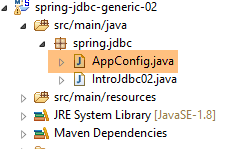 |
The Spring configuration class [AppConfig] is as follows:
package spring.jdbc;

import generic.jdbc.config.ConfigJdbc;

import org.apache.tomcat.jdbc.pool.DataSource;
import org.springframework.context.annotation.Bean;
import org.springframework.context.annotation.Configuration;
import org.springframework.context.annotation.Import;

@Configuration
@Import({ generic.jdbc.config.ConfigJdbc.class })
public class AppConfig {
    // data source
    @Bean
    public DataSource dataSource() {
        // data source TomcatJdbc
        DataSource dataSource = new DataSource();
        // configuration access JDBC
        dataSource.setDriverClassName(ConfigJdbc.DRIVER_CLASSNAME);
        dataSource.setUsername(ConfigJdbc.USER_DBPRODUITS);
        dataSource.setPassword(ConfigJdbc.PASSWD_DBPRODUITS);
        dataSource.setUrl(ConfigJdbc.URL_DBPRODUITS);
        // initially open connections
        dataSource.setInitialSize(5);
        // result
        return dataSource;
    }

}
- line 10: [AppConfig] is a Spring configuration class;
- line 11: import of the configuration class [generic.jdbc.config.ConfigJdbc.class] defined in the [mysql-config-jdbc] project. This means that all beans defined by this configuration file are available;
- lines 14–27: the Spring bean defining the data source;
- line 17: creation of the data source, which is not yet configured;
- lines 19–22: the information that allows the data source to connect to the database;
- line 24: creates a pool of 5 connections. We only need one here. There are never multiple simultaneous connections;
3.5.5. The main class
The main class [IntroJdbc02] is as follows:
package spring.jdbc;

import generic.jdbc.config.ConfigJdbc;
import generic.jdbc.entities.dbproduits.Produit;

import java.sql.Connection;
import java.sql.PreparedStatement;
import java.sql.ResultSet;
import java.sql.SQLException;
import java.util.ArrayList;
import java.util.List;

import javax.sql.DataSource;

import org.springframework.context.annotation.AnnotationConfigApplicationContext;

import com.fasterxml.jackson.core.JsonProcessingException;
import com.fasterxml.jackson.databind.ObjectMapper;

public class IntroJdbc02 {

    // mapper jSON
    final static ObjectMapper jsonMapper = new ObjectMapper();
    // data source
    private static DataSource dataSource;

    public static void main(String[] args) {
        AnnotationConfigApplicationContext ctx = null;
        try {
            // spring context retrieval
            ctx = new AnnotationConfigApplicationContext(AppConfig.class);
            // data source recovery
            dataSource = ctx.getBean(DataSource.class);
            // empty table [PRODUITS]
            System.out.println(String.format("------------------------------ %s", "Vidage de la table [PRODUITS]"));
            delete();
...
        // finish
        System.out.println(String.format("------------------------------ %s", "Travail terminé"));
    }

    // product list
    private static void select() {
        Connection connexion = null;
        PreparedStatement ps = null;
        ResultSet rs = null;
        try {
            // opening connection
            connexion = dataSource.getConnection();
            // start of transaction
            connexion.setAutoCommit(false);
            // in read-only mode
            connexion.setReadOnly(true);
            // table [PRODUITS] is read
            ps = connexion.prepareStatement(ConfigJdbc.V1_SELECT_PRODUITS);
            rs = ps.executeQuery();
            System.out.println("Liste des produits : ");
            while (rs.next()) {
                affiche(new Produit(rs.getInt(1), rs.getString(2), rs.getInt(3), rs.getDouble(4), rs.getString(5)));
            }
            // commit transaction
            connexion.commit();
        } catch (SQLException e1) {
            // we handle the exception
            doCatchException("Les erreurs suivantes se sont produites à la lecture de la table", connexion, e1);
        } finally {
            // we treat the finally
            doFinally(rs, ps, connexion);
        }
    }
...
- line 25: the data source. Note that it is of type [javax.sql.DataSource] (line 13), which is an interface;
- line 31: instantiation of Spring objects;
- line 32: obtaining a reference to the data source. Note that the class actually used is never mentioned. Thus, here, there is nothing to suggest that a [TomcatJdbc] implementation is being used;
- line 49: obtaining an open connection. This is how the various methods in [IntroJdbc02] obtain a connection to the database. The rest of the code is identical to that of the [IntroJdbc01] class;
3.5.6. The tests
We run the execution configuration named [spring-jdbc-generic-02.IntroJdbc02]:
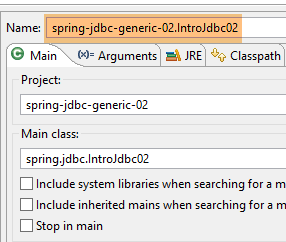 |
We obtain the same results as before (section 3.4.9).
3.6. Example-03
3.6.1. Project architecture
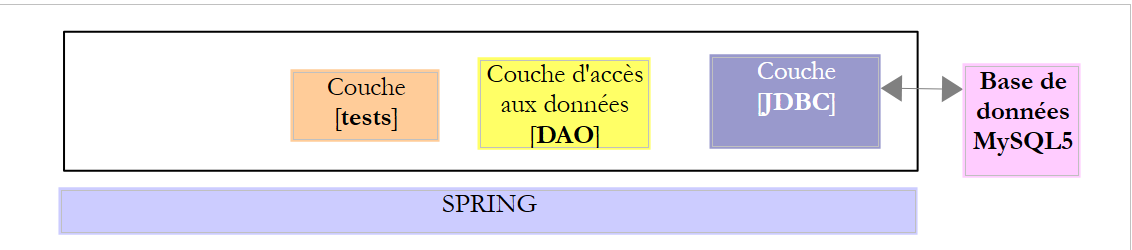 |
In this example, the data access methods are isolated in a [dao] layer. They will be tested using a JUnit test.
3.6.2. The Eclipse Project
The Eclipse project [spring-jdbc-03] is a Spring/Maven project built like the previous one and then supplemented as follows:
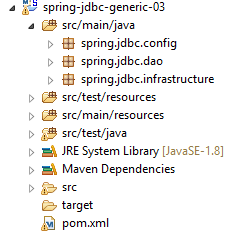 | 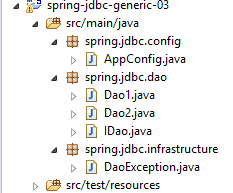 |
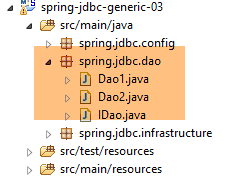
The various packages have the following roles:
- [spring.jdbc.config]: Spring project configuration;
- [spring.jdbc.dao]: implementation of the [DAO] layer;
- [spring.jdbc.infrastructure]: implements the unhandled exception [DaoException];
3.6.3. Maven Configuration
The Maven project is configured by the following [pom.xml] file:
<?xml version="1.0" encoding="UTF-8"?>
<project xmlns="http://maven.apache.org/POM/4.0.0" xmlns:xsi="http://www.w3.org/2001/XMLSchema-instance"
    xsi:schemaLocation="http://maven.apache.org/POM/4.0.0 http://maven.apache.org/xsd/maven-4.0.0.xsd">
    <modelVersion>4.0.0</modelVersion>

    <groupId>dvp.spring.database</groupId>
    <artifactId>spring-jdbc-generic-03</artifactId>
    <version>0.0.1-SNAPSHOT</version>
    <packaging>jar</packaging>

    <name>spring-jdbc-generic-03</name>
    <description>Demo project for API JDBC</description>

    <parent>
        <groupId>org.springframework.boot</groupId>
        <artifactId>spring-boot-starter-parent</artifactId>
        <version>1.2.3.RELEASE</version>
        <relativePath /> <!-- lookup parent from repository -->
    </parent>

    <properties>
        <project.build.sourceEncoding>UTF-8</project.build.sourceEncoding>
        <java.version>1.8</java.version>
    </properties>

    <dependencies>
        <!-- configuration JDBC of SGBD -->
        <dependency>
            <groupId>dvp.spring.database</groupId>
            <artifactId>generic-config-jdbc</artifactId>
            <version>0.0.1-SNAPSHOT</version>
        </dependency>
    </dependencies>

    <build>
        <plugins>
            <plugin>
                <groupId>org.springframework.boot</groupId>
                <artifactId>spring-boot-maven-plugin</artifactId>
            </plugin>
            <plugin>
                <groupId>org.apache.maven.plugins</groupId>
                <artifactId>maven-surefire-plugin</artifactId>
                <version>2.18.1</version>
            </plugin>
        </plugins>
    </build>

</project>
It is identical to that of the [spring-jdbc-02] project. In particular, it uses the Maven dependency of the [mysql-config-jdbc] project (lines 28–32).
3.6.4. [DAO] Layer Interface
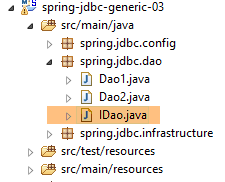 |
The [DAO] layer provides the following [IDao] interface:
package spring.jdbc.dao;

import java.util.List;

import spring.jdbc.entities.Produit;

public interface IDao {

    // add products
    public List<Produit> addProduits(List<Produit> produits);

    // list of all products
    public List<Produit> getAllProduits();

    // a special product
    public Produit getProduitById(int id);

    public Produit getProduitByName(String name);

    // several product updates
    public int updateProduits(List<Produit> produits);

    // removal of all products
    public int deleteAllProduits();

    // removal of several products
    public int deleteProduits(int[] ids);
}
3.6.5. The [DaoException] class
The [DaoException] class simply extends the [UncheckedException] class presented in section 3.3.5:
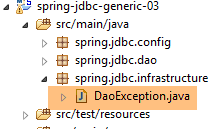 |
package spring.jdbc.infrastructure;

public class DaoException extends UncheckedException {

    private static final long serialVersionUID = 1L;

    // manufacturers
    public DaoException() {
        super();
    }

    public DaoException(int code, Throwable e, String className) {
        super(code, e, className);
    }

}
3.6.6. Spring Project Configuration
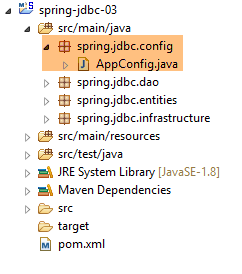 |
The [AppConfig] class that configures the Spring project is identical to the Spring configuration file in the [spring-jdbc-02] example, except for line 11:
package spring.jdbc.config;

import generic.jdbc.config.ConfigJdbc;

import org.apache.tomcat.jdbc.pool.DataSource;
import org.springframework.context.annotation.Bean;
import org.springframework.context.annotation.ComponentScan;
import org.springframework.context.annotation.Configuration;

@Configuration
@ComponentScan(basePackages = { "spring.jdbc.dao" })
public class AppConfig {
    // data source
    @Bean
    public DataSource dataSource() {
        // data source TomcatJdbc
        DataSource dataSource = new DataSource();
        // configuration access JDBC
        dataSource.setDriverClassName(ConfigJdbc.DRIVER_CLASSNAME);
        dataSource.setUsername(ConfigJdbc.USER_DBPRODUITS);
        dataSource.setPassword(ConfigJdbc.PASSWD_DBPRODUITS);
        dataSource.setUrl(ConfigJdbc.URL_DBPRODUITS);
        // initially open connections
        dataSource.setInitialSize(5);
        // result
        return dataSource;
    }
}
- line 11: the [spring.jdbc.dao] package will be scanned to find other Spring components besides those defined in this configuration file;
3.6.7. Implementation of the [DAO] layer
 |
 |
Recall (Section 3.6.4) that the [DAO] layer implements the following [IDao] interface:
package spring.jdbc.dao;

import generic.jdbc.entities.dbproduits.Produit;

import java.util.List;

public interface IDao {

    // add products
    public List<Produit> addProduits(List<Produit> produits);

    // list of all products
    public List<Produit> getAllProduits();

    // a special product
    public Produit getProduitById(int id);

    public Produit getProduitByName(String name);

    // several product updates
    public int updateProduits(List<Produit> produits);

    // removal of all products
    public int deleteAllProduits();

    // removal of several products
    public int deleteProduits(int[] ids);
}
The [Dao1] and [Dao2] classes both implement this interface. The [Dao2] class is a variant of the [Dao1] class that introduces a new syntax feature. We will focus on the [Dao1] class. Its skeleton is as follows:
package spring.jdbc.dao;

import generic.jdbc.config.ConfigJdbc;
import generic.jdbc.entities.dbproduits.Produit;

import java.sql.Connection;
import java.sql.PreparedStatement;
import java.sql.ResultSet;
import java.sql.SQLException;
import java.util.ArrayList;
import java.util.List;

import javax.sql.DataSource;

import org.springframework.beans.factory.annotation.Autowired;
import org.springframework.stereotype.Component;

import spring.jdbc.infrastructure.DaoException;

@Component("dao1")
public class Dao1 implements IDao {

    // class name
    private String simpleClassName = getClass().getSimpleName();
    // data source
    @Autowired
    protected DataSource dataSource;

    // manufacturer
    public Dao1() {
        System.out.println("building Dao1...");
    }

    // ------------------------------- interface
    @Override
    public List<Produit> getAllProduits() {
...
    }

    @Override
    public Produit getProduitById(int id) {
...
    }

    @Override
    public Produit getProduitByName(String name) {
...
    }

    @Override
    public List<Produit> addProduits(List<Produit> produits) {
....
    }

    @Override
    public int updateProduits(List<Produit> produits) {
...
    }

    @Override
    public int deleteAllProduits() {
...
    }

    @Override
    public int deleteProduits(int[] ids) {
...
    }

    // ---------------------------------------- local methods
    // management finally
    protected DaoException doFinally(ResultSet rs, PreparedStatement ps, Connection connexion, int code,
            DaoException daoException) {
        ...
    }

    // catch management
    protected DaoException doCatchException(Connection connexion, Throwable th, int code, DaoException daoException) {
...
}
- line 20: the [Dao] class is a Spring component named [dao1]. This name is optional. When it is not present, the name used is the class name with the first letter lowercased;
- line 24: the class name. We avoid hard-coding [Dao] to allow the class to be renamed without having to redefine this field, which thus remains valid;
- lines 26–27: injection of the data source [tomcat-jdbc] defined in the configuration class [AppConfig];
- lines 36–68: implementation of the [IDao] interface;
- lines 78–80: centralized handling of the catch blocks for the various methods;
- lines 72–75: centralized handling of the `finally` blocks for the various methods;
The catch blocks of the various methods are handled as follows:
    // gestion catch
    protected DaoException doCatchException(Connection connexion, Throwable th, int code) {
        // annulation transaction
        try {
            if (connexion != null) {
                connexion.rollback();
            }
        } catch (SQLException e2) {
            e2.printStackTrace();
        }
        // daoException
        return new DaoException(code, th, simpleClassName);
}
- Line 2: The method is declared [protected], which allows child classes to use it without it being public. It takes the following parameters:
- [Connection connection]: the connection to the DBMS—may be null;
- [Throwable th]: the exception that occurred and will be wrapped in a [DaoException] type;
- [int code]: an error code to be used if the method creates a new [DaoException];
- lines 4–7: the primary role of this method is to roll back the transaction associated with the connection passed as parameter 1;
- lines 8–10: if the transaction rollback fails, the exception trace is written to the console. There isn’t much else we can do since we’re going to throw an exception on line 12;
The *finally blocks* of the various methods are handled as follows:
// management finally
    protected DaoException doFinally(ResultSet rs, PreparedStatement ps, Connection connexion, int code,
            DaoException daoException) {
        // closure ResultSet
        if (rs != null) {
            try {
                rs.close();
            } catch (SQLException e1) {

            }
        }
        // closure [PreparedStatement]
        if (ps != null) {
            try {
                ps.close();
            } catch (SQLException e2) {

            }
        }
        // close connection
        if (connexion != null) {
            try {
                connexion.close();
            } catch (SQLException e3) {
                // record the error if possible
                if (daoException == null) {
                    daoException = new DaoException(code, e3, simpleClassName);
                }
            }
        }
        // result
        return daoException;
    }
- line 2: this method is also declared [protected]. It takes the following parameters:
- [ResultSet rs]: the [ResultSet] if a [SELECT] operation was executed—may be null;
- [PreparedStatement ps]: the [PreparedStatement] that was executed—may be null;
- [Connection connection]: the connection to the DBMS—may be null;
- [int code]: an error code to use if the method throws a new [DaoException];
- [DaoException daoException]: the [DaoException] if one occurred before the finally block—may be null;
- lines 21–30: the primary purpose of this method is to close the connection (line 23);
- lines 24–29: if an exception occurs during this closure, then we check the status of the [DaoException daoException] parameter passed to us: if [daoException == null], then we create a new [DaoException] with the code passed as a parameter;
- line 32: the old or new [DaoException] is returned as the result;
We will not present all the methods of the [Dao] class, but only a few. They are all similar.
3.6.7.1. The [getProductById] method
The [getProductById] method returns the product whose primary key is equal to the [id] parameter, or null otherwise;
@Override
    public Produit getProduitById(int id) {
        // connection resources
        Connection connexion = null;
        PreparedStatement ps = null;
        ResultSet rs = null;
        // initially no exceptions
        DaoException daoException = null;
        // the product you are looking for
        Produit produit = null;
        try {
            // opening connection
            connexion = dataSource.getConnection();
            // start of transaction
            connexion.setAutoCommit(false);
            // in read-only mode
            connexion.setReadOnly(true);
            // table [PRODUITS] is read
            ps = connexion.prepareStatement(ConfigJdbc.V2_SELECT_PRODUIT_BYID);
            ps.setInt(1, id);
            rs = ps.executeQuery();
            if (rs.next()) {
                produit = new Produit(id, rs.getString(1), rs.getInt(2), rs.getDouble(3), rs.getString(4));
            }
            // commit transaction
            connexion.commit();
            // return to default mode
            connexion.setAutoCommit(true);
        } catch (SQLException e1) {
            // we handle the exception
            daoException = doCatchException(connexion, e1, 112);
        } finally {
            // we treat the finally
            daoException = doFinally(rs, ps, connexion, 113, daoException);
        }
        // exception?
        if (daoException != null) {
            throw daoException;
        }
        // result
        return produit;
    }
- line 10: the product to be returned is set to null;
- line 19: the SQL statement [ConfigJdbc.V2_SELECT_PRODUCT_BYID] is as follows:
public final static String V2_SELECT_PRODUIT_BYID = "SELECT NOM, CATEGORIE, PRIX, DESCRIPTION FROM PRODUITS WHERE ID=?";
- lines 22–24: if the [ResultSet] has a row, it is used to create the product to be returned; otherwise, the product to be returned remains null;
- line 41: the product is returned;
- line 8: the method's [DaoException] is initialized to null;
- line 31: the [doCatchException] method creates a [DaoException];
- line 34: the [daoException] parameter of the [doFinally] method is either null or the exception created by the [doCatchException] method. The [doFinally] method:
- leaves this parameter unchanged if it successfully closes the connection;
- leaves this parameter unchanged if it fails to close the connection and a [DaoException] has already occurred previously;
- creates a new [DaoException] if it fails to close the connection and no [DaoException] has occurred previously;
- lines 37–39: if the local [daoException] is not null, then it is thrown; otherwise, the requested result is returned (line 41);
3.6.7.2. The [deleteProducts] method
The [deleteProduits] method deletes the products whose primary keys are passed to it as parameters. It returns the number of products deleted.
@Override
    public int deleteProduits(int[] ids) {
        // connection resources
        PreparedStatement ps = null;
        Connection connexion = null;
        // initially no exceptions
        DaoException daoException = null;
        // number of products updated
        int nbProduits = 0;
        try {
            // opening connection
            connexion = dataSource.getConnection();
            // start of transaction
            connexion.setAutoCommit(false);
            // in read/write mode
            connexion.setReadOnly(false);
            // we do away with products
            ps = connexion.prepareStatement(ConfigJdbc.V2_DELETE_PRODUITS);
            for (int id : ids) {
                // settings
                ps.setInt(1, id);
                // execution
                nbProduits += ps.executeUpdate();
            }
            // commit transaction
            connexion.commit();
            // return to default mode
            connexion.setAutoCommit(true);
        } catch (SQLException e1) {
            // we handle the exception
            daoException = doCatchException(connexion, e1, 171);
        } finally {
            // we treat the finally
            daoException = doFinally(null, ps, connexion, 172, daoException);
        }
        // exception?
        if (daoException != null) {
            throw daoException;
        }
        // result
        return nbProduits;
    }
- Line 18, the SQL statement [ConfigJdbc.V2_DELETE_PRODUITS] is as follows:
public final static String V2_DELETE_PRODUITS = "DELETE FROM PRODUITS WHERE ID=?";
- lines 18–24: the code for deleting products. We can see that the SQL statement is prepared once (line 18) and executed n times (lines 19–24). This is the benefit of the [PreparedStatement] object;
- line 23: the [PreparedStatement].executeUpdate() method returns the number of rows affected by the update operation;
- line 41: returns the number of products updated;
3.6.7.3. The [updateProducts] method
The [updateProduits] method updates the products passed to it as parameters in the database. It returns the number of products updated.
@Override
    public int updateProduits(List<Produit> produits) {
        // connection resources
        PreparedStatement ps = null;
        Connection connexion = null;
        // initially no exceptions
        DaoException daoException = null;
        // number of products updated
        int nbProduits = 0;
        try {
            // opening connection
            connexion = dataSource.getConnection();
            // start of transaction
            connexion.setAutoCommit(false);
            // in read/write mode
            connexion.setReadOnly(false);
            // table [PRODUITS] is updated
            ps = connexion.prepareStatement(ConfigJdbc.V2_UPDATE_PRODUITS);
            for (Produit produit : produits) {
                // settings
                ps.setString(1, produit.getNom());
                ps.setDouble(2, produit.getPrix());
                ps.setInt(3, produit.getCategorie());
                ps.setString(4, produit.getDescription());
                ps.setInt(5, produit.getId());
                // execution
                nbProduits += ps.executeUpdate();
            }
            // commit transaction
            connexion.commit();
            // return to default mode
            connexion.setAutoCommit(true);
        } catch (SQLException e1) {
            // we handle the exception
            daoException = doCatchException(connexion, e1, 131);
        } finally {
            // we treat the finally
            daoException = doFinally(null, ps, connexion, 132, daoException);
        }
        // exception?
        if (daoException != null) {
            throw daoException;
        }
        // result
        return nbProduits;
    }
- line 18: the SQL statement [ConfigJdbc.V2_UPDATE_PRODUITS] is as follows:
public final static String V2_UPDATE_PRODUITS = "UPDATE PRODUITS SET NOM=?, PRIX=?, CATEGORIE=?, DESCRIPTION=? WHERE ID=?";
- lines 19–28: the product update code;
3.6.7.4. The [addProducts] method
The [addProducts] method adds the products passed to it as parameters to the database. It returns these same products with their primary keys (before being added to the database, the products do not have a primary key).
@Override
    public List<Produit> addProduits(List<Produit> produits) {
        // connection resources
        PreparedStatement ps = null;
        Connection connexion = null;
        // initially no exceptions
        DaoException daoException = null;
        try {
            // opening connection
            connexion = dataSource.getConnection();
            // in read/write mode
            connexion.setReadOnly(false);
            // start of transaction
            connexion.setAutoCommit(false);
            // add elements to table [PRODUITS]
            String generatedColumns[] = { ConfigJdbc.TAB_PRODUITS_ID };
            ps = connexion.prepareStatement(ConfigJdbc.V2_INSERT_PRODUITS, generatedColumns);
            for (Produit produit : produits) {
                // settings
                ps.setString(1, produit.getNom());
                ps.setLong(2, produit.getCategorie());
                ps.setDouble(3, produit.getPrix());
                ps.setString(4, produit.getDescription());
                // order execution
                ps.executeUpdate();
                // generated primary key
                ResultSet generatedKeys = ps.getGeneratedKeys();
                if (generatedKeys.next()) {
                    produit.setId(generatedKeys.getInt(1));
                } else {
                    throw new RuntimeException(String.format("Le produit de nom [%s] n'a pas récupéré de clé primaire",
                            produit.getNom()));
                }
            }
            // commit transaction
            connexion.commit();
            // return to default mode
            connexion.setAutoCommit(true);
        } catch (SQLException | RuntimeException e1) {
            // we handle the exception
            daoException = doCatchException(connexion, e1, 151);
        } finally {
            // we treat the finally
            daoException = doFinally(null, ps, connexion, 152, daoException);
        }
        // exception?
        if (daoException != null) {
            throw daoException;
        }
        // result
        return produits;
}
- Line 16, the SQL statement [ConfigJdbc.V2_INSERT_PRODUITS] is as follows:
public final static String V2_INSERT_PRODUITS = "INSERT INTO PRODUITS(NOM, CATEGORIE, PRIX, DESCRIPTION) VALUES (?, ?, ?, ?)";
In the above, the product insertion command does not include the primary key [ID]. Since the primary key in the MySQL database has the [AUTOINCREMENT] attribute, the DBMS will generate a primary key for each insertion. The problem arises of retrieving this key. This is an important point because operations on products are performed via their primary keys. We therefore need to know these keys;
- lines 17–33: the product insertion loop;
- line 16: a specific form of the [prepareStatement] method. The second parameter [generatedColumns] is an array of column names whose values we want to retrieve after insertion. On line 16, we specified that we wanted to retrieve the value of the [id] column. Note here that although the names of a table’s columns are case-insensitive (upper/lowercase), the PostgreSQL DBMS requires that this name be in lowercase. This is typically the kind of problem encountered when porting code from one DBMS to another;
- line 24: inserting a row into the database;
- Line 26: Retrieves the list of values from the columns specified on line 16 into a [ResultSet]. Here, for a single insertion, the [ResultSet] will contain one row, and that row will have a single column containing the primary key;
- Line 28: Retrieves the primary key generated by the DBMS;
- Lines 29–32: If the generated primary key is not obtained, a [RuntimeException] is thrown, which will be wrapped in a [DaoException] (lines 38–40);
3.6.8. The [Dao2] class
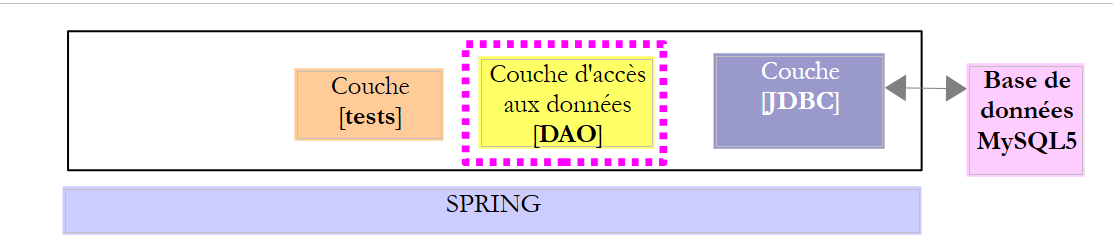 |
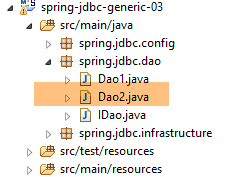 |
The [Dao2] class is a variant of the [Dao1] class using a syntax called try-with-resource(resource):
- [resource] is a resource that implements the [java.lang.AutoCloseable] interface. All resources released using the [close] method fall into this category. This syntax ensures that on line 4, the [resource] will be closed. This avoids having to write a [finally] clause to perform this closing operation;
Let’s take the [getAllProducts] method of the [Dao2] class as an example:
    @Override
    public List<Produit> getAllProduits() {
        // possible exception
        DaoException daoException = null;
        // product list
        List<Produit> produits = new ArrayList<Produit>();
        try (Connection connexion = dataSource.getConnection()) {
            // start of transaction
            connexion.setAutoCommit(false);
            // in read-only mode
            connexion.setReadOnly(true);
            // table [PRODUITS] is read
            try (PreparedStatement ps = connexion.prepareStatement(ConfigJdbc.V2_SELECT_ALLPRODUITS)) {
                try (ResultSet rs = ps.executeQuery()) {
                    while (rs.next()) {
                        produits.add(new Produit(rs.getInt(1), rs.getString(2), rs.getInt(3), rs.getDouble(4), rs.getString(5)));
                    }
                }
                // end transaction
                connexion.commit();
                // return to default mode
                connexion.setAutoCommit(true);
            } catch (SQLException e1) {
                // cancel the transaction
                daoException = doRollback(connexion, e1, 111);
            }
        } catch (SQLException e2) {
            // we handle the exception
            if (daoException == null) {
                daoException = new DaoException(112, e2, simpleClassName);
            }
        }
        // exception?
        if (daoException != null) {
            throw daoException;
        }
        // result
        return produits;
}
- Line 7: try block with the [Connection] resource. Line 27 ensures that it is closed;
- line 13: try block with the [PreparedStatement] resource. Line 23 ensures that it is closed;
- line 14: try block with the [ResultSet] resource. Line 19 ensures that it is closed;
- Line 25: The transaction is rolled back as follows:
    private DaoException doRollback(Connection connexion, Throwable e1, int code) {
        try {
            if (connexion != null) {
                connexion.rollback();
            }
        } catch (SQLException e) {
            e.printStackTrace();
        }
        // génération de l'exception
        return new DaoException(code, e1, simpleClassName);
}
In the end, we have code that is easier to read.
3.6.9. Implementation of the test layer
3.6.9.1. The test classes
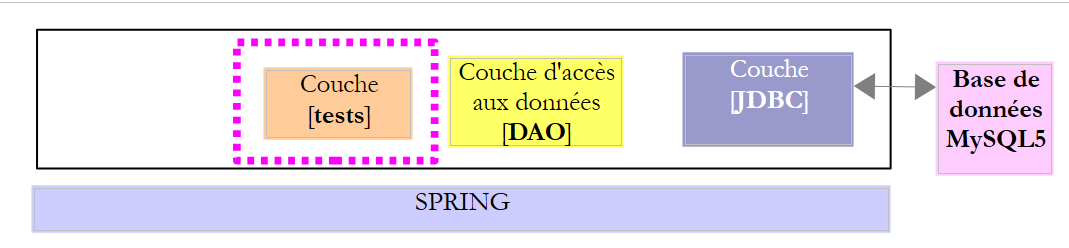 |
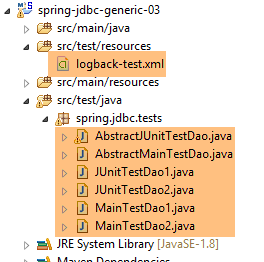 |
- the test [JUnitTestDao1] is a JUnit test for the class [Dao1];
- The [JUnitTestDao2] test is a JUnit test for the [Dao2] class;
- [AbstractJUnitTestDao] is the parent class of the two previous test classes;
- [MainTestDao1] is a console test class for the [Dao1] class;
- [MainTestDao2] is a console test class for the [Dao2] class;
- [AbstractMainTestDao] is the parent class of the two preceding classes. It reuses the code from the console classes [IntroJdbc01, IntroJdbc02] already presented, so we will not examine these console classes;
The [JUnitTestDao1] class is as follows:
package spring.jdbc.tests;

import org.junit.runner.RunWith;
import org.springframework.beans.factory.annotation.Autowired;
import org.springframework.beans.factory.annotation.Qualifier;
import org.springframework.boot.test.SpringApplicationConfiguration;
import org.springframework.test.context.junit4.SpringJUnit4ClassRunner;

import spring.jdbc.config.AppConfig;
import spring.jdbc.dao.IDao;

@SpringApplicationConfiguration(classes = AppConfig.class)
@RunWith(SpringJUnit4ClassRunner.class)
public class JUnitTestDao1 extends AbstractJUnitTestDao {

    // layer [DAO]
    @Autowired
    @Qualifier("dao1")
    private IDao dao;

    @Override
    IDao getDao() {
        return dao;
    }

}
- The annotations on lines 12–13 were discussed in Section 2.5.5. They allow a JUnit test to easily access the Spring context and its beans. This context is configured by the [AppConfig] class (line 12) discussed in Section 2.4.3;
- line 14: the class extends the [AbstractJUnitTestDao] class, which we will discuss shortly. The JUnit test methods are located within this class;
- lines 17–19: the bean named [dao1] (line 18) is injected (line 17). Thus, an instance of the [Dao1] class is injected here;
- lines 21–24: the [getDao] method overrides the method of the same name in the parent class;
Ultimately, the purpose of this class is to provide the parent class with a reference to the [DAO] layer that needs to be tested, in this case an instance of [Dao1]. Similarly, the [JUnitTestDao2] class provides the parent class [AbstractJUnitTestDao] with an instance of the [Dao2] class.
The [AbstractJUnitTestDao] class is a JUnit test class:
package spring.jdbc.tests;

import generic.jdbc.entities.dbproduits.Produit;

import java.util.ArrayList;
import java.util.List;

import org.junit.Assert;
import org.junit.Before;
import org.junit.Test;
import org.springframework.beans.BeansException;

import spring.jdbc.dao.IDao;
import spring.jdbc.infrastructure.DaoException;

import com.fasterxml.jackson.core.JsonProcessingException;
import com.fasterxml.jackson.databind.ObjectMapper;

public abstract class AbstractJUnitTestDao {

    // layer [DAO]
    abstract IDao getDao();

    // mapper jSON
    final static ObjectMapper jsonMapper = new ObjectMapper();

    @Before
    public void clean() {
        // the base is cleaned before each test
        log("Vidage de la base de données", 1);
        getDao().deleteAllProduits();
    }

    @Test
    public void getProduits() throws JsonProcessingException {
    ...
    }

    @Test
    public void getProduitBy() {
    ...
    }

    @Test
    public void doInsertsInTransaction() {
...
    }

    @Test
    public void updateProduits() {
    ...
    }

    @Test
    public void deleteProduits() {
    ....
    }

    @Test
    public void perf1() {
        ...
    }

    @Test
    public void perf2() {
    ...
    }

    @Test
    public void perf3() {
    ....
    }

    // -------------- private methods
...
}
- line 19: the [AbstractJUnitTestDao] class is abstract;
- line 22: the abstract method [getDao], which provides a reference to the [DAO] layer to be tested. This method is implemented by the child classes;
- line 25: a JSON mapper that allows us to display the JSON value of products on the console;
- lines 27–32: before each test (line 27), the [PRODUCTS] table is cleared;
3.6.9.2. The private method [fill]
The private method [fill] is used to add products to the [PRODUCTS] table.
private List<Produit> fill(int nbProduits) {
        log("Remplissage de la base de données", 1);
        // on crée une liste de produits
        List<Produit> produits = new ArrayList<Produit>();
        for (int i = 0; i < nbProduits; i++) {
            int n = i + 1;
            // int id, String nom, int categorie, double prix, String description
            produits.add(new Produit(0, String.format("NOM%s", n), n / 5 + 1, 100 * (1 + (double) i / 100), String.format(
                    "DESC%s", n)));
        }
        // on la persiste en base - on récupère des produits avec leur clé primaire
        produits = getDao().addProduits(produits);
        // on crée un dictionnaire des produits pour pouvoir les retrouver + facilement
        // la clé du dictionnaire est la clé primaire du produit en base
        for (Produit produit : produits) {
            mapProduits.put(produit.getId(), produit);
        }
        // on rend les produits
        return produits;
    }
- line 1: the [fill] method inserts [nbProducts] into the [PRODUCTS] table, which is assumed to be empty;
- lines 3–10: creation of a list of products in the form:
new Produit(0, String.format("NOM%s", n), n / 5 + 1, 100 * (1 + (double) i / 100), String.format("DESC%s", n)));
which uses the Product constructor(int id, String name, int category, double price, String description). The value of the first parameter [id] (primary key of the [PRODUCTS] table) is irrelevant since the [addProducts] method on line 10 does not insert it into the database and lets the DBMS generate its value;
- line 12: the list of products is persisted in the database. Each product in this list is assigned a new primary key [id]. The [addProduits] method returns its [produits] parameter. We could therefore have omitted retrieving the result;
- lines 15–17: the products are placed in a dictionary:
    // dictionnaire des produits
    private Map<Integer, Produit> mapProduits = new HashMap<Integer, Produit>();
The dictionary key is the product’s primary key, and the associated value is the product itself;
- line 19: we return the list of products;
3.6.9.3. The [getProducts] test
This is as follows:
    @Test
    public void getProduits() throws JsonProcessingException {
        // remplissage
        fill(10);
        // liste des produits
        log("Liste des produits", 2);
        List<Produit> produits = getDao().getAllProduits();
        affiche(produits);
        // on vérifie que la liste récupérée et celle persistée sont les mêmes
        for (Produit produit : produits) {
            Produit found = mapProduits.get(produit.getId());
            Assert.assertEquals(found, produit);
            mapProduits.remove(found.getId());
        }
        // tous les produits initiaux doivent avoir disparu du dictionnaire
        Assert.assertEquals(0, mapProduits.size());
}
}
- line 4: 10 products are added to the database;
- line 7: once this is done, we request to view all products in the database;
- line 8: we display them. The goal is to verify that the products have been successfully saved and that they have a primary key;
- lines 10–13: we verify that the retrieved products are identical to those we persisted and that can be found in the dictionary [mapProduits];
- line 11: we retrieve from the dictionary the product with the same primary key as the one returned from the database. This shows that the persisted products have indeed been assigned a primary key;
- line 12: we ensure that the two products are identical. Recall that the [Product] class has defined an [equals] method (see section 3.3.4);
- line 13: the found element is removed from the dictionary;
- line 16: we verify that the dictionary of initial products is indeed empty, meaning that these initial products were all present in the list of products retrieved from the database;
The [display] method on line 8 is the following private method:
    // product list display
    private <T> void affiche(List<T> elements) throws JsonProcessingException {
        for (T element : elements) {
            System.out.println(jsonMapper.writeValueAsString(element));
        }
}
- line 2: The [display] method is a generic method. It is parameterized by a type T, denoted syntactically as <T>. If it were parameterized by two types T1 and T2, we would write <T1,T2>. The syntax of a method m parameterized by a type T is as follows:
In the code of method m, we will find data of type T. Method m of an instance c of class C can then be called as follows:
where T1 is the actual type that will replace the formal type T of method m. Most of the time, the compiler is able to infer the type T1 from the arguments of method m. Therefore, the previous statement will most often be simplified to:
Let’s return to the [display] method. It displays a list of elements of type T. This is possible because the JSON mapper used on line 4 is capable of rendering the JSON representation of any object type. In this specific example, the only type T used will be the [Product] type.
The [display] method could also have been written as follows:
    // product list display
    private void affiche(Object o) throws JsonProcessingException {
            System.out.println(jsonMapper.writeValueAsString(o));
        }
Since the actual parameter is a list of products, line 3 would have printed the JSON representation of that list. This is not the same as printing the representation of each of its elements one by one.
The output produced by the [getProducts] test is as follows:
3.6.9.4. The [getProductBy] test
This is as follows:
    @Test
    public void getProduitBy() {
        // remplissage
        fill(10);
        log("getProduitBy", 1);
        Produit produit = getDao().getProduitByName("NOM3");
        Produit produit2 = getDao().getProduitById(produit.getId());
        Assert.assertNotNull(produit2);
        Assert.assertEquals(produit2.getNom(), produit.getNom());
        Assert.assertEquals(produit2.getId(), produit.getId());
}
- line 6: the [getProductByName] method of the [IDao] interface is used to retrieve the product named [NAME3];
- line 7: the [getProductById] method of the [IDao] interface is then used to retrieve the same product, this time identified by its primary key;
- lines 8–10: we verify that [product2] and [product] have the same characteristics;
3.6.9.5. The [doInsertsInTransaction] test
This is as follows:
    @Test
    public void doInsertsInTransaction() {
        log("Ajout de deux produits de même nom", 1);
        // on fait l'insertion
        List<Produit> inserts = new ArrayList<Produit>();
        inserts.add(new Produit(0, "x", 1, 1.0, ""));
        inserts.add(new Produit(0, "x", 1, 1.0, ""));
        boolean erreur = false;
        try {
            getDao().addProduits(inserts);
        } catch (DaoException daoException) {
            erreur = true;
        }
        // vérifications
        Assert.assertTrue(erreur);
        List<Produit> produits = getDao().getAllProduits();
        Assert.assertEquals(0, produits.size());
}
- lines 5-7: we create a list of two products with the same name [x];
- line 10: these two products are inserted into the [PRODUCTS] table, which is empty (the [clean] method annotated with [@Before]). The first insertion will succeed, but not the second, because the [PRODUCTS] table has a unique constraint on product names. An exception must therefore occur. This is tested on line 15;
- because all methods of the [IDao] interface are executed within a transaction, the fact that the second insertion fails will roll back the entire transaction, including the first insertion. Ultimately, no insertions should be made to the [PRODUCTS] table;
- Lines 16–17: We verify this by retrieving the list of products in the [PRODUCTS] table and checking that this list is empty;
3.6.9.6. The [updateProducts] test
This is as follows:
    @Test
    public void updateProduits() {
        // remplissage
        fill(10);
        log("Mise à jour du prix des produits de catégorie 1", 1);
        // on récupère les produits
        List<Produit> produits = getDao().getAllProduits();
        // on met à jour ceux de catégorie 1
        List<Produit> updated = new ArrayList<Produit>();
        int nbUpdated = 0;
        for (Produit produit : produits) {
            if (produit.getCategorie() == 1) {
                // int id, String nom, int categorie, double prix, String description
                updated
                        .add(new Produit(produit.getId(), produit.getNom(), 1, produit.getPrix() * 1.1, produit.getDescription()));
                nbUpdated++;
            }
        }
        int nbProduits = getDao().updateProduits(updated);
        // vérifications
        // Assert.assertEquals(nbUpdated, nbProduits); -- does not work with DB2
        for (Produit produit : updated) {
            Produit produit2 = getDao().getProduitById(produit.getId());
            Assert.assertEquals(produit2.getPrix(), produit.getPrix(), 1e-6);
        }
}
- Line 4: We insert 10 products into the database;
- line 7: retrieve them;
- lines 9–18: we increase the prices of products in category #1 by 10%;
- line 19: these changes are saved to the database;
- lines 22–25: we iterate through the list of products used for the update in memory. For each one, we look up the product with the same primary key in the database and verify that the price update was successful;
- line 19: retrieve the number of products updated by the [updateProducts] operation;
- line 21: we verify that this number is indeed the expected one. This test passes for all DBMSs except DB2. We have therefore commented it out;
3.6.9.7. The [deleteProducts] test
This test is as follows:
    @Test
    public void deleteProduits() {
        // filling
        fill(10);
        log("deleteProduits", 1);
        // product list
        List<Produit> produits = getDao().getAllProduits();
        // discontinuation of two products
        Produit produit0 = produits.get(0);
        Produit produit5 = produits.get(5);
        int nbDeleted = getDao().deleteProduits(new int[] { produit0.getId(), produit5.getId() });
        // checks
        // Assert.assertEquals(2, nbDeleted); -- does not pass with DB2
        Assert.assertNull(getDao().getProduitById(produit0.getId()));
        Assert.assertNull(getDao().getProduitById(produit5.getId()));
        Assert.assertEquals(produits.size() - 2, getDao().getAllProduits().size());
}
- line 4: we insert 10 products into the database;
- lines 7–11: retrieve all products from the database and remove the products at positions 0 and 5;
- lines 14–16: we verify that the two products are no longer in the database and that the database now has two fewer products;
- The test in line 13 fails with the DB2 DBMS. It passes with the other DBMSs;
3.6.9.8. Performance Tests
We included three methods in the tests whose sole purpose is to evaluate the DBMS’s performance:
    @Test
    public void perf1() {
        // remplissage
        fill(10000);
    }

    @Test
    public void perf2() {
        // remplissage
        fill(10000);
        // modification
        List<Produit> produits = getDao().getAllProduits();
        // on met à jour ceux de catégorie 1
        List<Produit> updated = new ArrayList<Produit>();
        for (Produit produit : produits) {
            // int id, String nom, int categorie, double prix, String description
            updated.add(new Produit(produit.getId(), produit.getNom(), 1, produit.getPrix() * 1.1, produit.getDescription()));
        }
        getDao().updateProduits(updated);
    }

    @Test
    public void perf3() {
        // remplissage
        fill(10000);
        // suppression
        List<Produit> produits = getDao().getAllProduits();
        // clés primaires
        int[] keys = new int[produits.size()];
        for (int i = 0; i < keys.length; i++) {
            keys[i] = produits.get(i).getId();
        }
        getDao().deleteProduits(keys);
}
- lines 1–5: insertion of 10,000 products;
- lines 8–20: inserting 10,000 products and then modifying them using their primary keys;
- lines 23-34: inserting 10,000 products, then deleting them using their primary keys;
To run the [JUnitTestDao1] and [JUnitTestDao2] tests, the following test configurations can be used:
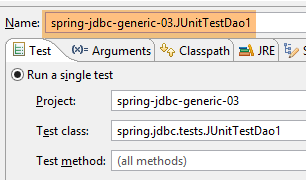 | 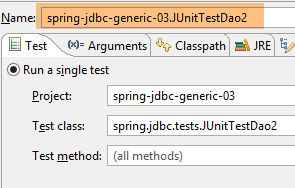 |
The results of the [JUnitTestDao1] test are as follows:
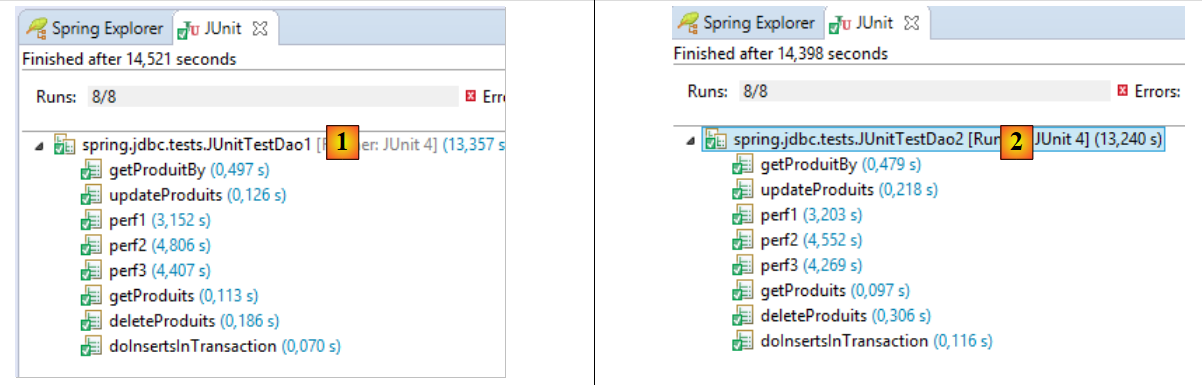 |
In [1] the results of [JUnitTestDao1] and in [2] those of [JUnitTestDao2]. There are no significant differences between them. In [1]:
- the test passes;
- inserting 10,000 products takes 3.15 seconds;
- inserting 10,000 products followed by their modification takes 4.80 seconds;
- inserting 10,000 products followed by their deletion takes 4.40 seconds;
- so the most expensive operation is insertion;