6. Strings
The strings in Javascript are very similar to those in PHP.
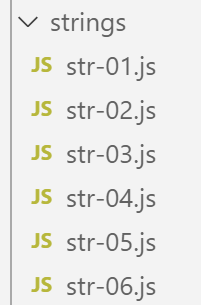
6.1. script [str-01]
The first thing to understand is that once a string is created, it can no longer be modified. There are many methods available to generate a new string from the original string, but the original string remains unchanged. Furthermore, a string can be of two types:
- [string] when it is initialized with a literal string;
- [object] when it is created as an instance of the [String] class;
'use strict';

// strings are read-only (cannot be modified)

// a chain
const chaîne1 = "abcd ";
// type
console.log("typeof(chaîne1)=", typeof (chaîne1));
// character n° 2
console.log("chaîne1[2]=", chaîne1[2]);
// causes an error
chaîne1[2] = "0";
Execution
[Running] C:\myprograms\laragon-lite\bin\nodejs\node-v10\node.exe -r esm "c:\Temp\19-09-01\javascript\strings\str-01.js"
typeof(chaîne1)= string
chaîne1[2]= c
c:\Temp\19-09-01\javascript\strings\str-01.js:1
TypeError: Cannot assign to read only property '2' of string 'abcd '
at Object.<anonymous> (c:\Temp\19-09-01\javascript\strings\str-01.js:12:12)
at Generator.next (<anonymous>)
6.2. script [str-02]
This script demonstrates that a string can be constructed in two ways.
'use strict';

// strings can be of two types

// a literal string
const chaîne1 = "abcd ";
// type
console.log("typeof(chaîne1)=", typeof (chaîne1));
// instance of String
const chaîne2 = new String("xyzt");
// type
console.log("typeof(chaîne2)=", typeof (chaîne2));
// other entry (without new) - type [string] not [object]
const chaîne3 = String("12 34");
// type
console.log("typeof(chaîne3)=", typeof (chaîne3));
// type [string] and type [object] offer the same methods, those of class String
console.log("chaîne1.length=", chaîne1.length);
console.log("chaîne2.length=", chaîne2.length);
Comments
- line 6: the standard method for defining a string. [chaîne1] will be of type [string];
- line 10: a string can be constructed using the constructor of the [String] class. [chaîne2] will be of type [object];
Execution
[Running] C:\myprograms\laragon-lite\bin\nodejs\node-v10\node.exe "c:\Temp\19-09-01\javascript\strings\str-02.js"
typeof(chaîne1)= string
typeof(chaîne2)= object
typeof(chaîne3)= string
chaîne1.length= 5
chaîne2.length= 4
The type [string] inherits the methods of the class [String].
6.3. script [str-03]
This script displays a specific string with variable interpolation.
'use strict';

// chain
const chaîne = "Introduction à Javascript par l'exemple";
// chain with variable interpolation
const str = `[${chaîne}].substr(3, 2)=` + chaîne.substr(3, 2)
console.log(str);
Comments
- line 6: it is possible to have strings containing ${variable} expressions that are replaced by the variable’s value. This follows the same logic as $ variables in PHP strings. Note the syntax for such a string: it is enclosed in backticks (AltGr-7 on a French keyboard);
Execution
[Running] C:\myprograms\laragon-lite\bin\nodejs\node-v10\node.exe -r esm "c:\Temp\19-09-01\javascript\strings\tempCodeRunnerFile.js"
[Introduction à Javascript par l'example].substr(3, 2)=ro
6.4. script [str-04]
The string with variable interpolation remains insufficient. It is not possible to substitute an expression for the variable in the ${variable} expression. For those who have programmed in C, there is nothing quite like the [printf, sprintf] functions for writing or constructing formatted strings. Hundreds of developers have created thousands of Javascript packages, forming a vast ecosystem. When you have a need that isn’t met natively by Javascript, it’s time to look for a package that fulfills it. To do this, we use the [npm] package manager. It features a option [search] that allows you to search for a string of characters in the package descriptions. [npm] returns the list of packages that match the search. We will therefore search for the string [sprintf] in the package descriptions:
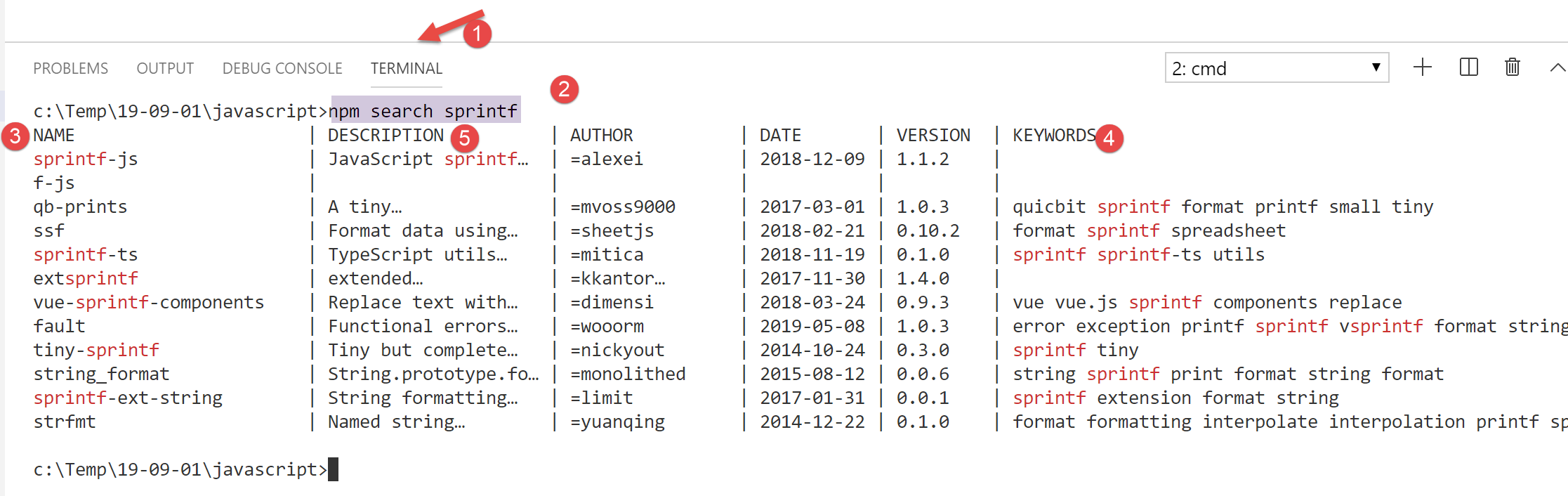
- in the [4] column, the keywords for the packages in the [3] column;
- in the [5] column, the descriptions of the packages in the [3] column;
The next step is to go to the [npm] and [https://www.npmjs.com/] tool websites and read the package descriptions:
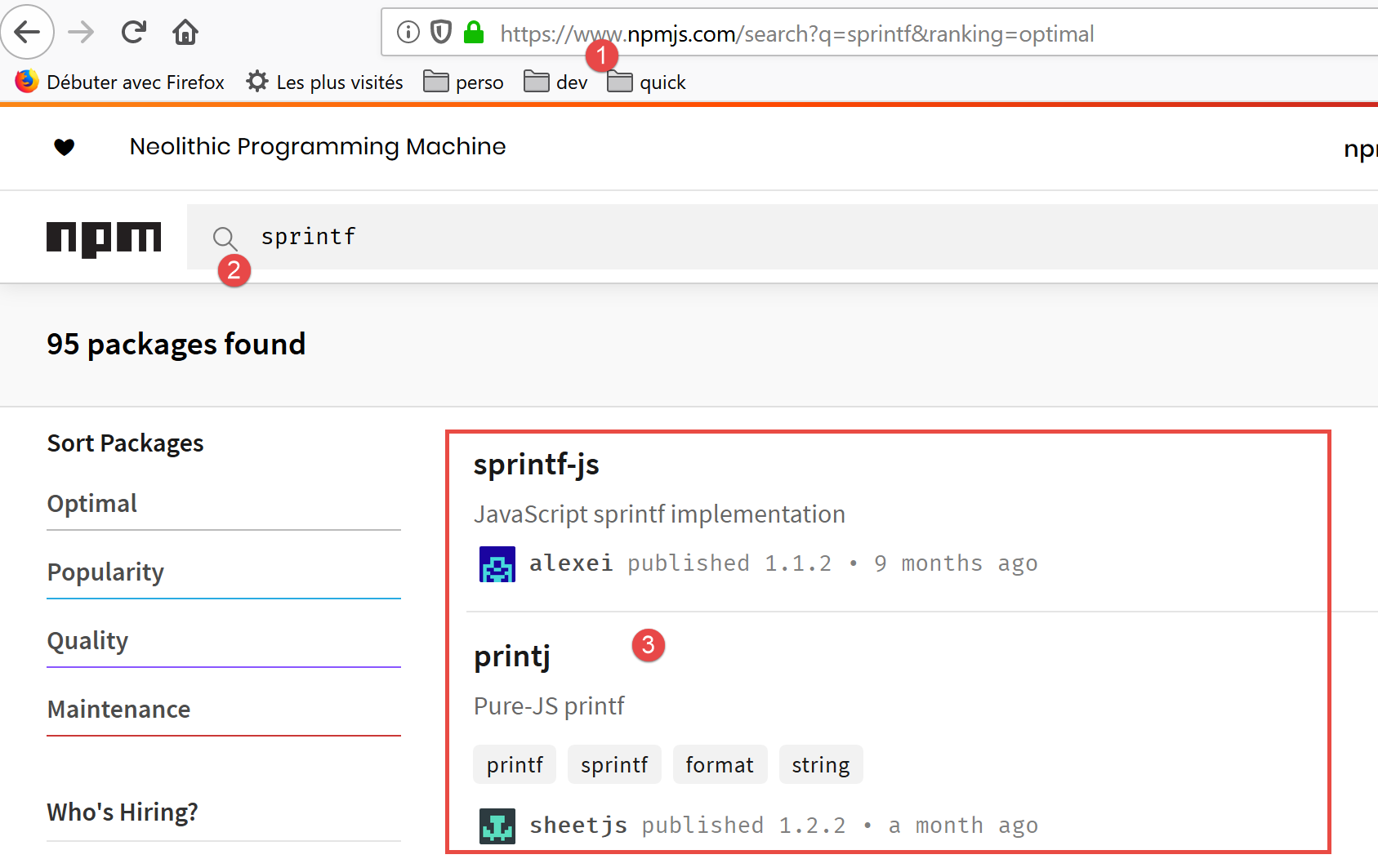
In [3], review the list of packages and select one.
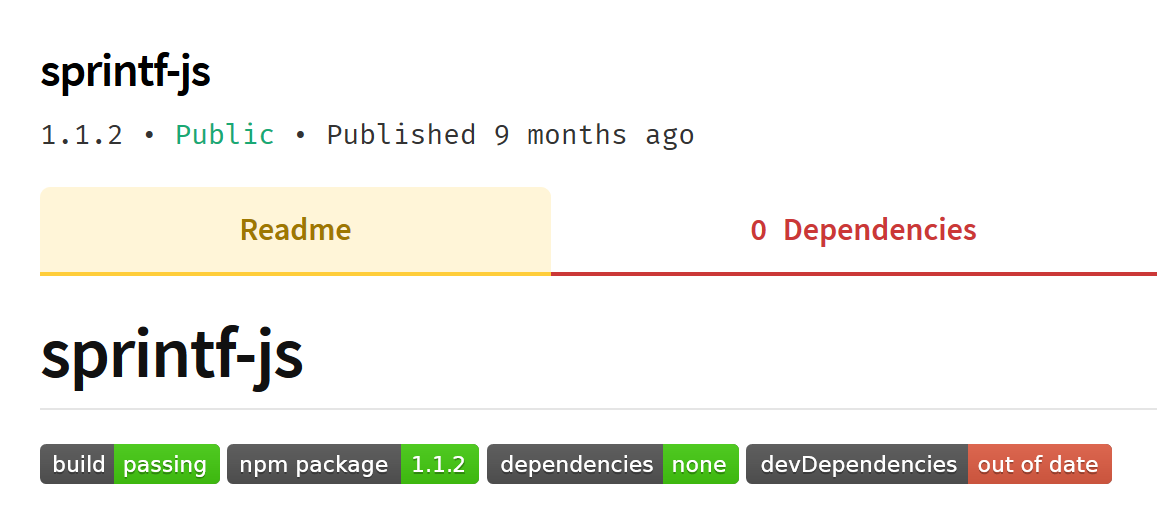
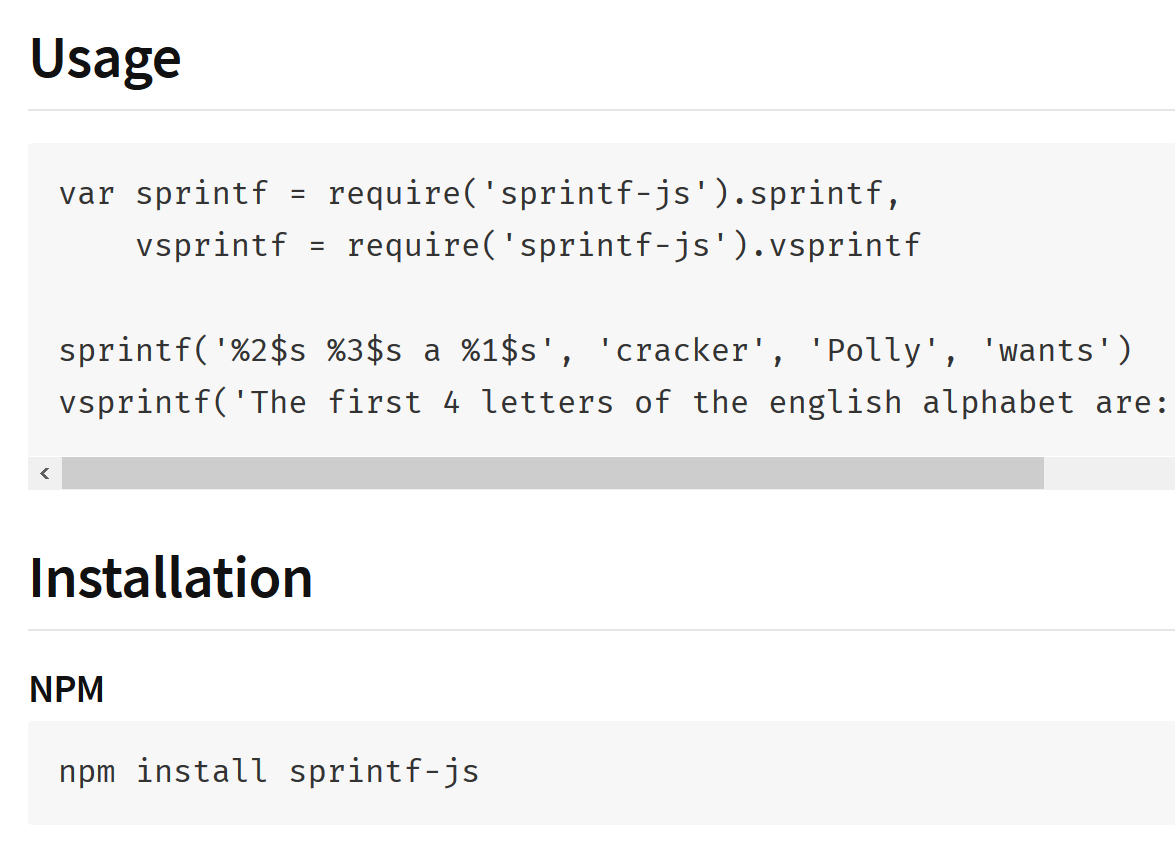
The package description contains instructions for installing and using it:
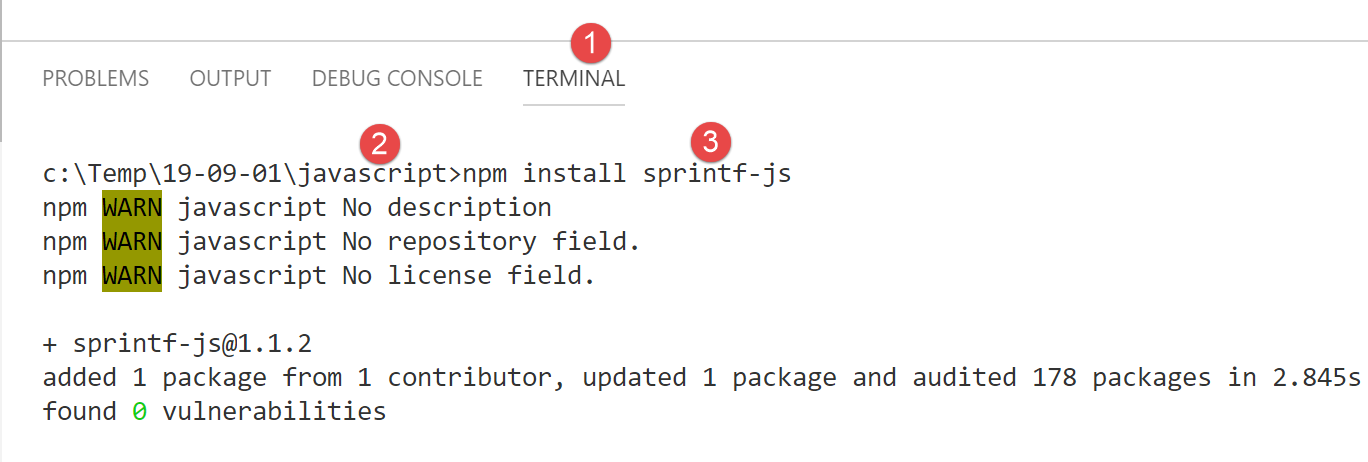
We install the [sprintf-js] package in a [VSCode] terminal:
This installation will modify the [package.json] file located at the root of the [javascript] [2] folder:
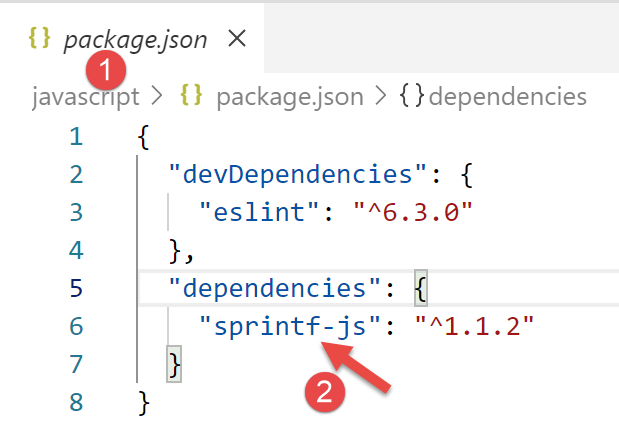
As shown above, the package was installed in [dependencies], i.e., in the packages required to run the project. Note that packages required only during project development are placed in [devDependencies]. They are not used during execution. This distinction is important when creating the final version for the project’s deployment. Tools are available to:
- combine all the jS files required for execution into a single file. The [devDependencies] packages are therefore not included in this final file;
- minify it, i.e., reduce its size as much as possible. To do this, for example, all comments are removed;
- “obfuscate” the code to make it difficult to understand. For example, the variables rate, salary, and tax will be replaced by variables a, b, and c;
- perform other optimizations;
This optimization of the final file for a jS project is used in web programming. A web application may depend on a large number of Javascript files. Loading these files in a browser can slow down the display of the application’s first page. The previous optimization aims to improve this loading time. If users find the loading time too slow, the application will not be used.
Now that we have the [sprintf-js] package, we need to use it. This is the [str-04] script:
'use strict';
// use of an external package to provide the sprintf function
import { sprintf } from 'sprintf-js';
// chain
const chaîne = "Introduction à Javascript par l'exemple";
// method
console.log(sprintf("[%s].substr(3,2)=[%s]", chaîne, chaîne.substr(3, 2)));
With ECMAScript 6, we use the keyword [import] to import an object exported by a package. To find out what the package exports, you can look at its code:
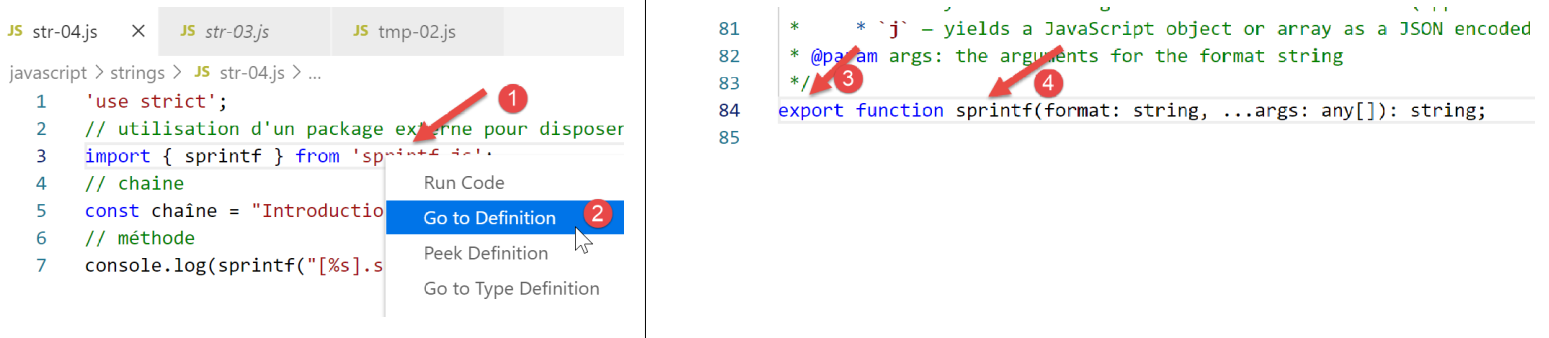
- in [1], right-click on the imported package;
- in [2], we want to see its definition;
- in [3-4], we see that the package exports a function named [sprintf];
The function [sprintf] from the package [sprintf-js] is imported with the statement:
The complete code:
'use strict';
// use of an external package to provide the sprintf function
import { sprintf } from 'sprintf-js';
// chain
const chaîne = "Introduction à Javascript par l'exemple";
// method
console.log(sprintf("[%s].substr(3,2)=[%s]", chaîne, chaîne.substr(3, 2)));
produces the following results:
[Running] C:\myprograms\laragon-lite\bin\nodejs\node-v10\node.exe "c:\Temp\19-09-01\javascript\strings\str-04.js"
c:\Temp\19-09-01\javascript\strings\str-04.js:3
import { sprintf } from 'sprintf-js';
^

SyntaxError: Unexpected token {
at new Script (vm.js:79:7)
at createScript (vm.js:251:10)
at Object.runInThisContext (vm.js:303:10)
at Module._compile (internal/modules/cjs/loader.js:657:28)
Line 3, the [import] instruction is not understood. This is because the version 10.15.1 version of [node.js] used in this course (Sept 2019) does not yet comply with the ECMAScript standard for importing packages called modules. In 2019, [node.js] complies with a module standard called CommonJS. The integration of ECMAScript modules via [node.js] is scheduled for 2020. Once again, developers have stepped up and produced packages that allow the use of ES6 modules with [node.js] as of now (2019).
We will use a package called [esm] (ECMAScript Modules). We install it in a terminal of the [javascript] project:
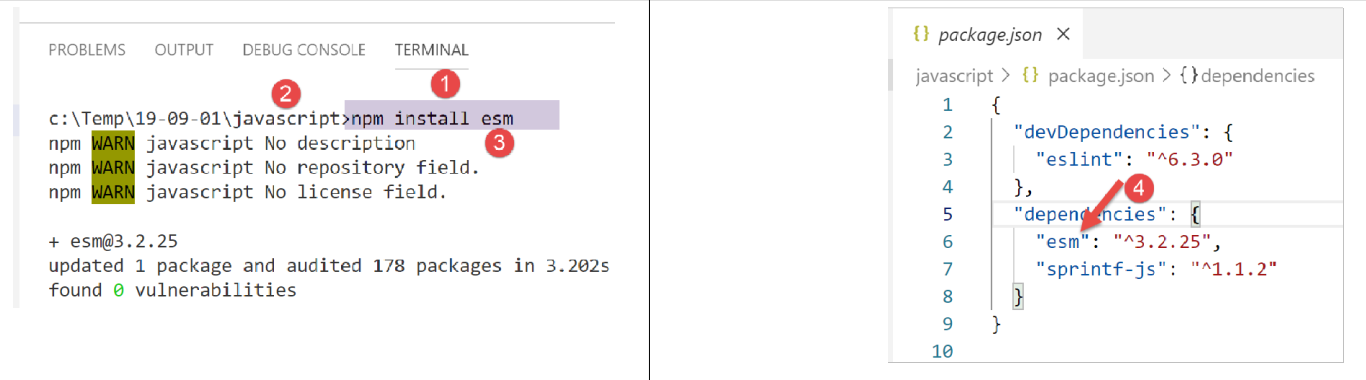
In [4], we can see that the installation of the [esm] [1-3] package modified the [javascript/package.json] file.
We're not done yet. In order for the [esm] module to be used by [node.js], the latter must be launched with the [-r esm] argument.
So we modify the configuration of the [Code Runner] extension from [VSCode]:
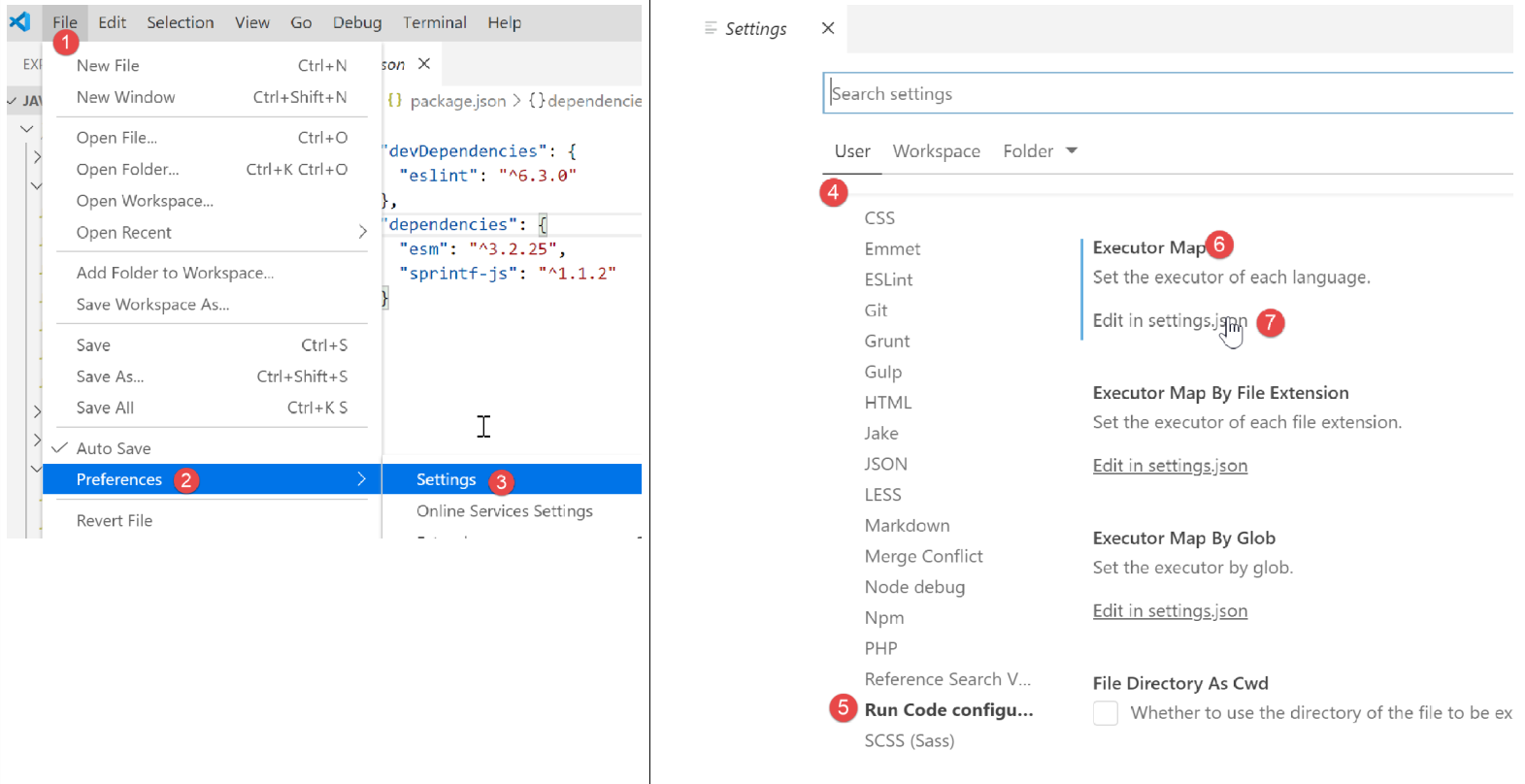
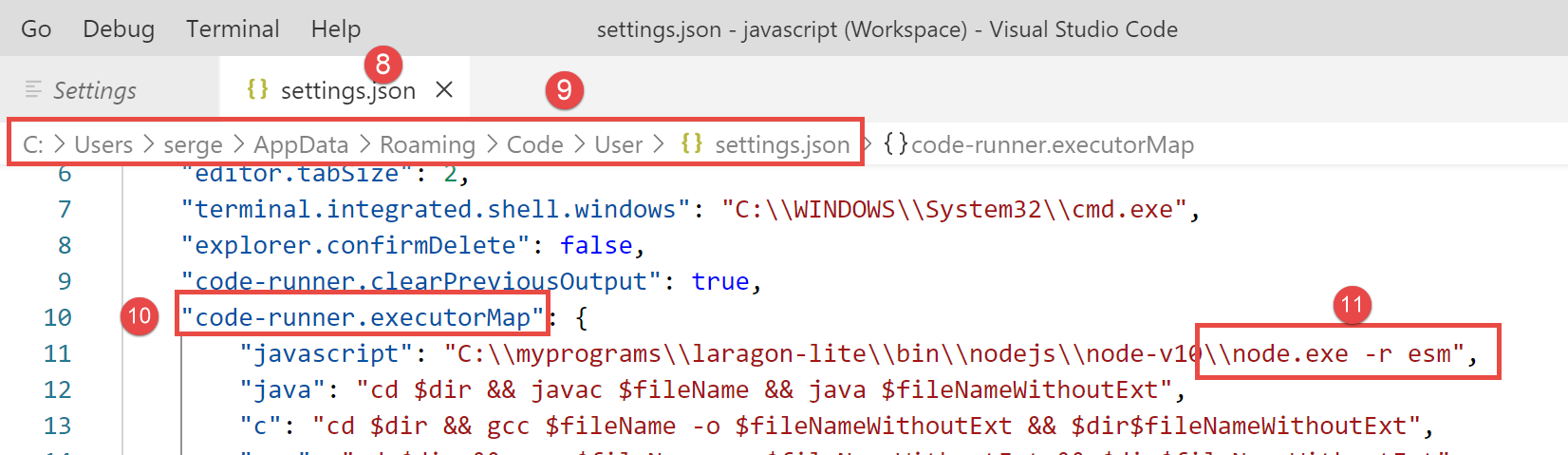
In [11], we add the argument [-r esm] and save (Ctrl-S) the configuration.
Now we can run the [str-04] script:
'use strict';
// use of an external package to provide the sprintf function
import { sprintf } from 'sprintf-js';
// chain
const chaîne = "Introduction à Javascript par l'exemple";
// substr method
console.log(sprintf("[%s].substr(3,2)=[%s]", chaîne, chaîne.substr(3, 2)));

6.5. script [str-05]
Here is what the documentation says about the [sprintf] function:
The placeholders in the format string are marked by % and are followed by one or more of these elements, in this order:
- An optional number followed by a $ sign that specifies which argument index to use for the value. If specified, arguments will be placed in the same order as the placeholders in the input.
- An optional + sign that forces the result to be preceded by a plus or minus sign for numeric values. By default, only the - sign is used for negative numbers.
- An optional padding specifier that specifies which character to use for padding (if specified). Possible values are 0 or any other character preceded by a ' (single quote). The default is to pad with spaces.
- An optional - sign that causes sprintf to left-align the result of this placeholder. The default is to right-align the result.
- An optional number specifying the number of characters the result should contain. If the value to be returned is shorter than this number, the result will be padded. When used with the j (JSON) type specifier, the padding length specifies the tab size used for indentation.
- An optional precision modifier, consisting of a . (dot) followed by a number, that specifies how many digits should be displayed for floating-point numbers. When used with the g type specifier, it specifies the number of significant digits. When used with a string, it causes the result to be truncated.
- A type specifier that can be any of:
- % — yields a literal % character
- b — yields an integer as a binary number
- c — yields an integer as the character with that ASCII value
- d or i — yields an integer as a signed decimal number
- e — yields a float using scientific notation
- u — yields an integer as an unsigned decimal number
- f — yields a float as; see notes on precision above
- g — yields a float as is; see notes on precision above
- o — yields an integer as an octal number
- s — yields a string as is
- t — returns true or false
- T — returns the type of argument1
- v — returns the primitive value of the specified argument
- x — returns an integer as, a hexadecimal number (lowercase)
- X — returns an integer as, a hexadecimal number (uppercase)
- j — returns a JavaScript object or array as a JSON encoded string
The [script-05] script implements some of these formats:
'use strict';
// use of an external package to provide the sprintf function
import { sprintf } from 'sprintf-js';
// chain
const chaîne = "Javascript";
// character strings
console.log(sprintf("[%s, %%s]=>[%s]", chaîne, chaîne));
console.log(sprintf("[%s, %%20s]=>[%20s]", chaîne, chaîne));
console.log(sprintf("[%s, %%-20s]=>[%-20s]", chaîne, chaîne));
// integers
console.log(sprintf("[%d, %%d]=>[%d]", 10, 10));
console.log(sprintf("[%d, %%4d]=>[%4d]", 10, 10));
console.log(sprintf("[%d, %%-4d]=>[%-4d]", 10, 10));
console.log(sprintf("[%d, %%04d]=>[%04d]", 10, 10));
// real
console.log(sprintf("[%f, %%f]=>[%f]", -10.5, -10.5));
console.log(sprintf("[%f, %%10.2f]=>[%10.2f]", -10.5, -10.5));
console.log(sprintf("[%f, %%-10.2f]=>[%-10.2f]", -10.5, -10.5));
console.log(sprintf("[%f, %%010.3f]=>[%010.3f]", -10.5, -10.5));
// json
console.log(sprintf("personne (%%j)=%j", { nom: "mathieu", âge: 34 }));
// type
console.log(sprintf("type personne (%%T)=%T", { nom: "mathieu", âge: 34 }));
// boolean
console.log(sprintf("booléen (%%t)=%t", 4 === 4));
Execution
[Running] C:\myprograms\laragon-lite\bin\nodejs\node-v10\node.exe -r esm "c:\Data\st-2019\dev\es6\javascript\strings\str-05.js"
[Javascript, %s]=>[Javascript]
[Javascript, %20s]=>[ Javascript]
[Javascript, %-20s]=>[Javascript ]
[10, %d]=>[10]
[10, %4d]=>[ 10]
[10, %-4d]=>[10 ]
[10, %04d]=>[0010]
[-10.5, %f]=>[-10.5]
[-10.5, %10.2f]=>[ -10.50]
[-10.5, %-10.2f]=>[-10.50 ]
[-10.5, %010.3f]=>[-00010.500]
personne (%j)={"nom":"mathieu","âge":34}
type personne (%T)=object
booléen (%t)=true
6.6. script [str-06]
The script [str-06] presents some methods of the class [String] that can also be used on the type [string]:
'use strict';
// use of an external package to provide the sprintf function
import { sprintf } from 'sprintf-js';
// chain
const chaîne = "  Introduction à Javascript ";
// a few methods
// substr(10,2): 2 characters starting from number 10
console.log(sprintf("[%s].substr(10,2)=[%s]", chaîne, chaîne.substr(10, 2)));
// trim: eliminates blanks at the beginning and end of a chain (blank=b \t \r \n \f)
console.log(sprintf("[%s].trim()=[%s]", chaîne, chaîne.trim()));
// toLowerCase: transformation to lower case
console.log(sprintf("[%s].toLowerCase=[%s]", chaîne, chaîne.toLowerCase()));
// toUpperCase: transformation into uppercase letters
console.log(sprintf("[%s].toUpperCase=[%s]", chaîne, chaîne.toUpperCase()));
// indexOf: position of a searched  string within the string, -1 if the substring doesn't exist
console.log(sprintf("[%s].indexOf('Java')=[%s]", chaîne, chaîne.indexOf('Java'))));
console.log(sprintf("[%s].trim().indexOf('abcd')=[%s]", chaîne, chaîne.indexOf('abcd'))));
// includes: true if the string searched for is in the string
console.log(sprintf("[%s].includes('Java')=[%s]", chaîne, chaîne.includes('Java'))));
// length: string length - not a method but a property
console.log(sprintf("[%s].length=[%s]", chaîne, chaîne.length));
// slice (7,10): strings of characters 7 to 9
console.log(sprintf("[%s].slice(7,10)=[%s]", chaîne, chaîne.slice(7, 10)));
// match: searches for an expression in the string - this expression can be a regular expression
// /intro/i: regular expression designating the string [intro] in upper or lower case
// returns the string found
console.log(sprintf("[%s].match(/intro/i)=[%s]", chaîne, chaîne.match(/intro/i)));
// replace: replaces string1 with string2 in string
// replaces the 1st occurrence of i with x
console.log(sprintf("[%s].replace('i','x')=[%s]", chaîne, chaîne.replace('i', 'x')));
// replaces all occurrences of i with x
// /i/g is a regular expression designating all (g) occurrences of i
console.log(sprintf("[%s].replace(/i/g,'x')=[%s]", chaîne, chaîne.replace(/i/g, 'x')));
// split : divise la chaîne en mots séparés par le paramètre de split
// renders the table of these words
// /\s*/ : words separated by 0 or more spaces
console.log(sprintf("[%s].split(/\\s*/)=[%s]", chaîne, chaîne.split(/\s*/)));
// /\s+/ : words separated by one or more spaces
console.log(sprintf("[%s].split(/\\s+/)=[%s]", chaîne, chaîne.split(/\s+/)));
Execution
[Running] C:\myprograms\laragon-lite\bin\nodejs\node-v10\node.exe -r esm "c:\Data\st-2019\dev\es6\javascript\strings\str-06.js"
[ Introduction à Javascript ].substr(10,2)=[ti]
[ Introduction à Javascript ].trim()=[Introduction à Javascript]
[ Introduction à Javascript ].toLowerCase=[ introduction à javascript ]
[ Introduction à Javascript ].toUpperCase=[ INTRODUCTION À JAVASCRIPT ]
[ Introduction à Javascript ].indexOf('Java')=[17]
[ Introduction à Javascript ].trim().indexOf('abcd')=[-1]
[ Introduction à Javascript ].includes('Java')=[true]
[ Introduction à Javascript ].length=[28]
[ Introduction à Javascript ].slice(7,10)=[duc]
[ Introduction à Javascript ].match(/intro/i)=[Intro]
[ Introduction à Javascript ].replace('i','x')=[ Introduxon to Javascript ]
[ Introduction à Javascript ].replace(/i/g,'x')=[ Introductxon to Javascrxpt ]
[ Introduction à Javascript ].split(/\s*/)=[,I,n,t,r,o,d,u,c,t,i,o,n,à,J,a,v,a,s,c,r,i,p,t,]
[ Introduction à Javascript ].split(/\s+/)=[,Introduction,à,Javascript,]