11. Event-driven programming and asynchronous functions
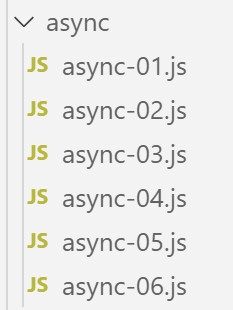
An asynchronous function is a function whose execution is initiated but whose result is not awaited. When execution is complete, the asynchronous function emits an event and transmits its result via that event.
This mode of operation is well-suited for execution within a web browser. Indeed, an application running within a browser is an event-driven application: the application reacts to events, primarily triggered by the user (clicks, mouse movements, text input, etc.). Javascript applications running within a browser are designed to communicate with external services via the HTTP protocol. The native HTTP functions of Javascript are asynchronous: they are launched, and the receipt of a response from the requested external service is signaled by an event that is added to the set of events managed by the application.
The following scripts will be executed by [node.js], not by a browser. [node.js] also has an event-driven execution mode:
- [node.js], like a browser, uses an event loop to execute a script;
- execution of the script’s main code is the first event executed;
- if this main code has launched asynchronous tasks, execution continues until these asynchronous tasks are completed. These tasks emit an event when they are completed. These events are queued in the event loop;
- the main script must subscribe to these events if it wants to retrieve the results of the asynchronous actions;
- the script is not finished until all events it has emitted have been processed;
11.1. script [async-01]
The following script demonstrates the behavior of a script containing an asynchronous action.
'use strict';

// imports
import moment from 'moment';
import { sprintf } from 'sprintf-js';

// start
const débutScript = moment(Date.now());
console.log("[début du script],", heure());

// setTimeout sets a 1000 ms timer (2nd parameter) and immediately returns the timer number
// when the timer has run out of 1000 ms, it emits an event which is queued by the runtime
// when the event is processed by the runtime, the function (1st parameter) is executed
setTimeout(function () {
  // this code will be executed when the timer reaches value 0
  console.log("[fin de l'action asynchrone setTimeout],", heure(débutScript));
}, 1000)

// will be displayed before the internal timer function msg
console.log("[fin du code principal du script],", heure(débutScript));

// time and duration display utility
function heure(début) {
  // current time
  const now = moment(Date.now());
  // time formatting
  let result = "heure=" + now.format("HH:mm:ss:SSS");
  // is it necessary to calculate a duration?
  if (début) {
    const durée = now - début;
    const milliseconds = durée % 1000;
    const seconds = Math.floor(durée / 1000);
    // format time + duration
    result = result + sprintf(", durée= %s seconde(s) et %s millisecondes", seconds, milliseconds);
  }
  // result
  return result;
}
- line 4: we import the [moment] library to format dates (line 27);
- line 5: import the [sprintf-js] library to format durations (line 34);
- line 8: we record the script's start time;
- line 9: we display it using the [heure] method from lines 20–34;
- lines 14–17: The function [setTimeout] has two parameters (f, duration): f is a function that is executed when [durée] milliseconds have elapsed;
- line 14: when the script runs, the function [setTimeout] is executed:
- line 17: a 1000 ms timer is started and the countdown begins until it eventually reaches 0. The [setTimeout] function terminates as soon as the timer is initialized and the countdown begins. It does not wait for the countdown to end. It returns a number identifying the timer used, and execution proceeds to the next instruction, line 20. Here, the result of [setTimeout] is not used;
- line 16: this message will be displayed at the end of the 1000 ms delay of the [setTimeout] function;
- lines 15–16: the function f, the first parameter of the [setTimeout] function, will be executed at the end of the 1000 ms delay. The message on line 16 will then be displayed;
- line 20: this message will be displayed before the one on line 16;
Time function:
- line 23: the function accepts an optional parameter [heure], which is the start time of an operation whose duration it must display;
- lines 25–27: the current time is calculated and formatted;
- line 29: if the parameter [début] is present, then a duration must be calculated;
- line 30: the duration of the operation. This yields a number of milliseconds;
- lines 31–32: this number of milliseconds is broken down into seconds and milliseconds;
- line 34: the duration is added to the time;
Execution
[Running] C:\myprograms\laragon-lite\bin\nodejs\node-v10\node.exe -r esm "c:\Data\st-2019\dev\es6\javascript\async\async-01.js"
[début du script], heure=09:26:40:238
[fin du code principal du script], heure=09:26:40:246, durée= 0 seconde(s) et 11 millisecondes
[fin de l'asynchronous action setTimeout], time=09:26:41:249, duration= 1 second(s) and 14 milliseconds

[Done] exited with code=0 in 1.672 seconds
- line 4: we see that the asynchronous action [setTimeOut] finished approximately 1 second after the end of the script’s main code;
- Line 6: The time displayed on line 3 is the time the main code finished. If the main code launched asynchronous tasks, the script is not finished until all asynchronous tasks have been executed. The duration displayed on line 6 is the total execution time of the script (main code + asynchronous tasks);
The [setTimeout] function will allow us to simulate asynchronous tasks in a [node.js] environment. In fact, the [setTimeout] function behaves like an asynchronous task:
- it returns a result immediately—in this case, a timer number—using the standard function mechanism (return);
- it may later (which is not yet the case above) return other results via events that are then processed by the event loop of [node.js];
- in most of the cases that follow, there will be two such events:
- an event that could be called [success], which will be emitted by the asynchronous task that successfully completed its task. A piece of data—the result of the task—is associated with the emitted event;
- an event that could be called [failure], which will be emitted by the asynchronous task that failed to complete its task. A piece of data—typically an object describing the error—is associated with the emitted event. Possible errors with an asynchronous internet task, for example, would be “network unavailable,” “server not found,” “timeout exceeded,” etc.
- The main code that launched an asynchronous task can subscribe to the events that this task is likely to emit. When one of these is emitted, the main code is notified and can trigger the execution of a specific function designed to handle the event. This function receives as a parameter the data that the asynchronous task associated with the emitted event;
11.2. script [async-02]
In this script, the asynchronous function [setTimeout] will emit events to communicate data to the code that has subscribed to them.
Accessing the events of [node.js] requires additional libraries. We choose the [events] library, which we install along with [npm]:
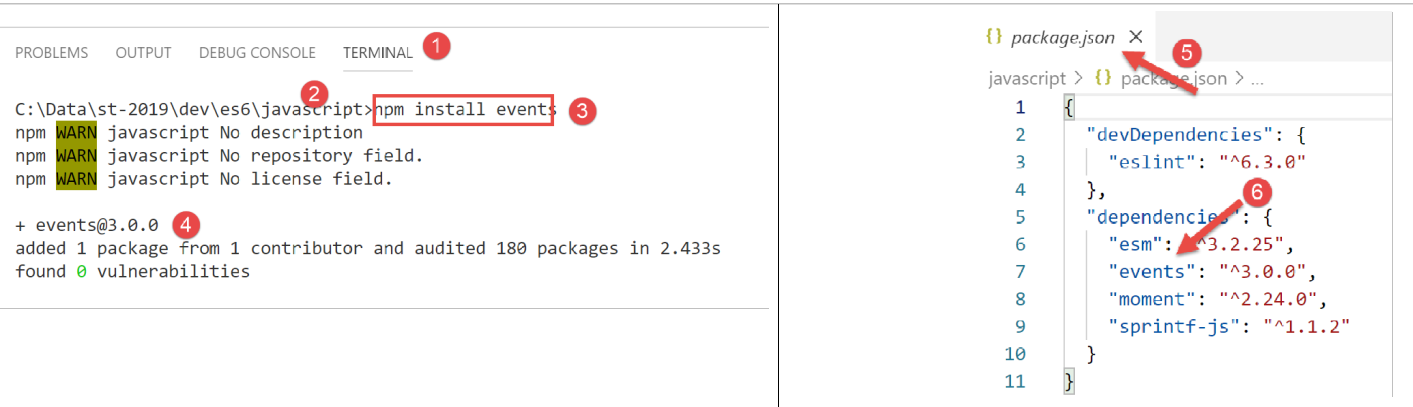
The [async-02] script is as follows:
'use strict';

// asynchronous functions can return a result by emitting an event
// the main code can retrieve these results by subscribing to the events issued

// imports
import moment from 'moment';
import { sprintf } from 'sprintf-js';
import EventEmitter from 'events';

// start
const débutScript = moment(Date.now());
console.log("[début du script],", heure());
// an event transmitter
const eventEmitter = new EventEmitter();

// setTimeout sets a 1000 ms timer (2nd parameter) and immediately returns the timer number
// when the timer has run out of 1000 ms, it emits an event which is queued by the runtime
// when the event is processed by the runtime, the function (1st parameter) is executed
setTimeout(function () {
  // this code will be executed when the timer reaches value 0
  console.log("[setTimeout, fin du timer d'1 s],", heure(débutScript));
  // an event is issued to indicate that a result is available
  eventEmitter.emit("timer1Success", { success: 4 });
  // another event is issued to indicate that another result is available
  eventEmitter.emit("timer1Failure", { failure: 6 });
}, 1000)

// subscribe to evt [timer1Success]
eventEmitter.on('timer1Success', (result) => {
  console.log(sprintf("la fonction asynchrone du timer a rendu le résultat [%j], %s, via l'événement [timer1Success]", result, heure(débutScript)));
});

// subscribe to evt [timer1Failure]
eventEmitter.on('timer1Failure', (result) => {
  console.log(sprintf("la fonction asynchrone du timer a rendu le résultat [%j], %s, via l'événement [timer1Failure]", result, heure(débutScript)));
});

// will be displayed before the msg of evts issued by the function associated with [timer1]
console.log("[fin du code principal du script],", heure(débutScript));

// time and duration display utility
function heure(début) {
  // current time
  const now = moment(Date.now());
  // time formatting
  let result = "heure=" + now.format("HH:mm:ss:SSS");
  // is it necessary to calculate a duration?
  if (début) {
    const durée = now - début;
    const milliseconds = durée % 1000;
    const seconds = Math.floor(durée / 1000);
    // format time + duration
    result = result + sprintf(", durée= %s seconde(s) et %s millisecondes", seconds, milliseconds);
  }
  // result
  return result;
}
Comments
- line 9: we import the [EventEmitter] class from the [events] library. This is a new feature: until now, we had only imported literal objects and functions;
- line 15: we create an event emitter [node.js] by instantiating the class [EventEmitter] with the keyword [new];
- lines 20–27: the asynchronous function [setTimeout]. It will emit two events during execution:
- line 24, the event [timer1Success] with the associated value {success : 4};
- line 26, the event [timer1Failure] with the associated value {failure: 6};
- an asynchronous function can emit as many events as it wants. We mentioned earlier that most often it emits one of the two events [success, failure], not both as we are doing here;
- line 20: the execution of [setTimeout] is instantaneous: a timer is set and its ID returned to the calling code. The events will be emitted later, in this case 1 second later;
- Sending events is pointless if there is no code to handle them when they occur. This is why the main code must subscribe to both [timer1Success, timer1Failure] events if it wants to manage them, specifically to retrieve the data associated with these events;
- lines 30–32: the main code subscribes to the [timer1Success] event. When the [node.js] event listener processes this event, it will call the function that is the second parameter of the [eventEmitter.on] method, passing it the data (here called [result]) associated with the [timer1Success] event;
- line 31: the event handler function will display the jSON of the data associated with the event as well as the current time;
- lines 35–37: using similar code, the main code subscribes to the event [timer1Failure];
- Subscribing to an event (1st parameter) does not immediately execute the code of the [callback] function (2nd parameter). This function will only be executed after the event has occurred;
- Line 40: The main script code has finished, but the script itself has not, since the main code launched an asynchronous task. The overall script will not finish until this asynchronous task has completed;
This is what the results show:
[Running] C:\myprograms\laragon-lite\bin\nodejs\node-v10\node.exe -r esm "c:\Data\st-2019\dev\es6\javascript\async\async-02.js"
[début du script], heure=09:34:58:909
[fin du code principal du script], heure=09:34:58:916, durée= 0 seconde(s) et 10 millisecondes
[setTimeout, fin du timer d'1 s], time=09:34:59:929, duration= 1 second(s) and 23 milliseconds
la fonction asynchrone du timer a rendu le résultat [{"success":4}], heure=09:34:59:931, durée= 1 seconde(s) et 25 millisecondes, via l'event [timer1Success]
la fonction asynchrone du timer a rendu le résultat [{"failure":6}], heure=09:34:59:932, durée= 1 seconde(s) et 26 millisecondes, via l'event [timer1Failure]

[Done] exited with code=0 in 1.627 seconds
- line 3: end of the main code 10 ms after the script started;
- line 4: start of the function encapsulated in the 1000 ms timer, approximately 1 second after the start of the script;
- line 5: processing of event [‘timer1Success’], 2 ms later;
- Line 6: Processing of event [‘timer1Failure’], 1 ms after event [‘timer1Success’];
- Line 8: End of the global script with a total duration of 1.627 seconds;
11.3. script [async-03]
The following script shows another aspect of the [node.js] event loop:
- the loop executes events one after another, generally in the order they arrive. Some OS scripts assign priorities to events, which are then processed in order of priority rather than order of arrival;
- the loop executes only one event at a time. The next event is processed only after the previous one has finished. In an event-driven system, you should therefore avoid writing code that monopolizes the processor for long periods, as events will not be processed when they occur but later when the event loop reaches them. This results in an application that is not very “responsive”;
The script [async-03] demonstrates an example of this phenomenon:
'use strict';

// asynchronous functions can return a result by emitting an event
// the main code can retrieve these results by subscribing to the events issued

// imports
import moment from 'moment';
import { sprintf } from 'sprintf-js';
import EventEmitter from 'events';

// start
const débutScript = moment(Date.now());
console.log("[début du script],", heure());
// an event transmitter
const eventEmitter = new EventEmitter();

// setTimeout sets a 1000 ms timer (2nd parameter) and immediately returns the timer number
// when the timer has run out of 1000 ms, it emits an event which is queued by the runtime
// when the event is processed by the runtime, the function (1st parameter) is executed
setTimeout(function () {
  // this code will be executed when the timer reaches value 0
  console.log("[setTimeout, fin du timer d'1 s],", heure(débutScript));
  // an event is issued to indicate that a result is available
  eventEmitter.emit("timer1Success", { success: 4 });
  // another event is issued to indicate that another result is available
  eventEmitter.emit("timer1Failure", { failure: 6 });
}, 1000)

// subscribe to evt [timer1Success]
eventEmitter.on('timer1Success', (result) => {
  console.log(sprintf("la fonction asynchrone du timer a rendu le résultat [%j], %s, via l'événement [timer1Success]", result, heure(débutScript)));
});

// subscribe to evt [timer1Failure]
eventEmitter.on('timer1Failure', (result) => {
  console.log(sprintf("la fonction asynchrone du timer a rendu le résultat [%j], %s, via l'événement [timer1Failure]", result, heure(débutScript)));
});

// slightly intensive synchronous code that prevented the main code from completing before the end of [timer1]
for (let i = 0; i < 1000000; i++) {
  for (let j = 0; j < 10000; j++) {
    i + i ^ 2 + i ^ 3;
  }
}

// will be displayed before the msg of evts issued by the function associated with [timer1]
console.log("[fin du script],", heure(débutScript));

// time and duration display utility
function heure(début) {
 ...
}
Comments
- This code is from the previous example [async-02], to which lines 39–44 have been added;
- Lines 20–27: The function [setTimeout] has been programmed to execute an internal asynchronous function after a delay of one second. After this second has elapsed, the execution of the timer’s asynchronous function does not occur immediately: an event is placed in the execution loop to request it. If the execution loop is busy processing another event, the execution of the timer’s asynchronous function will have to wait;
- lines 20–27: as soon as the function [setTimeout] has set its timer for a one-second delay, it releases the processor and returns control to the calling code. The calling code continues with lines 30–37, which are event subscriptions and have negligible execution time;
- the main code continues with lines 40–44, which form a loop of 1,010 iterations. This code will be in execution when the timer triggers its “end of 1-second delay” event. This event is then placed in the event loop but must wait until the script’s main code has finished executing to have a chance of being processed;
- Line 47: end of the script’s main code. It is after this final display that the timer end event can be processed and the internal asynchronous function in [setTimeout] can be executed;
The script produces the following results:
[Running] C:\myprograms\laragon-lite\bin\nodejs\node-v10\node.exe -r esm "c:\Data\st-2019\dev\es6\javascript\async\async-03.js"
[début du script], heure=08:55:02:665
[fin du code principal du script], heure=08:55:11:789, durée= 9 seconde(s) et 131 millisecondes
[setTimeout, fin du timer d'1 s], time=08:55:11:794, duration= 9 second(s) and 136 milliseconds
la fonction asynchrone du timer a rendu le résultat [{"success":4}], heure=08:55:11:794, durée= 9 seconde(s) et 136 millisecondes, via l'event [timer1Success]
la fonction asynchrone du timer a rendu le résultat [{"failure":6}], heure=08:55:11:794, durée= 9 seconde(s) et 136 millisecondes, via l'event [timer1Failure]

[Done] exited with code=0 in 9.796 seconds
Comments
- line 3: we see that the main script code took 9 seconds to execute. Any events that may have occurred during this time were queued in the event loop;
- line 4: we see that the event [fin du timer] was processed 5 ms after the main code finished. It was emitted approximately 1 s after the script started but had to wait an additional 8 s to finally be processed;
The key takeaway from this example is that in an event-driven system, code should never occupy the processor for very long. If you have a synchronous code long to execute, you must “figure out” how to break it down into shorter asynchronous tasks that will signal their completion with an event.
11.4. script [async-04]
The script [async-04] demonstrates another mechanism, called [Promise], a result promise. This mechanism avoids the need to explicitly handle [node.js] events. It is handled implicitly, and the developer can therefore ignore the existence of these events. However, understanding them will help the developer better grasp the functioning of [Promise], which is complex at first glance.
The [Promise] type is a Javascript class. Its constructor accepts as a parameter an asynchronous function to which it passes two parameters traditionally called [resolve] and [reject]. They could have different names;
- The constructor of [Promise] does two things:
- it creates an event to trigger the execution of the [function(resolve, reject)] function passed to it as a parameter but does not wait for its result and immediately returns a [Promise] object to the calling code. This object can have four states:
- [pending]: the asynchronous action that returned [Promise] is not yet complete;
- [fulfilled]: the asynchronous action that returned [Promise] has completed successfully;
- [rejected]: The asynchronous action that returned [Promise] failed;
- [settled]: The asynchronous action that returned [Promise] has completed;
- it creates an event to trigger the execution of the [function(resolve, reject)] function passed to it as a parameter but does not wait for its result and immediately returns a [Promise] object to the calling code. This object can have four states:
When the constructor returns its result, the created [Promise] object is in the [pending] state, awaiting the results of the asynchronous function;
- (continued)
- The asynchronous task in lines 2–5 is launched immediately. Asynchronous tasks are most often input/output tasks that break down as follows:
- execution of synchronous code to initiate the I/O operation with another component, such as a remote server;
- waiting for a response from that component;
- processing this response;
- The asynchronous task in lines 2–5 is launched immediately. Asynchronous tasks are most often input/output tasks that break down as follows:
It is phase 2—waiting for the external component—that is the most resource-intensive. Rather than waiting:
- the receipt of the data requested from the external component will be signaled by an event;
- in the synchronous code following phase 1 (line 7 of the example code), we will subscribe to this event and then, at some point, return to the event loop of [node.js]. The next event in the list of pending events will then be processed;
- During phase 2, there is parallel execution, but on different devices:
- the processor for the event loop;
- an external device (disk, database, remote server) for retrieving the requested data;
- At the end of phase 2, once the I/O operation has obtained the requested data, an event is triggered to indicate that the I/O result is available. This event then joins the others in the event queue;
- when its turn comes, it will be processed. The function associated with this event (line 7 of the example code) will then be executed;
This mode of operation helps avoid downtime: the situation where the processor waits for a response from a device that is slower than itself;
- (continued)
- once the asynchronous task in lines 2 and 5 has been launched and has completed its work, it can return a result to the calling code using the two functions [resolve, reject] that the constructor [Promise] passed to it as parameters. The convention is as follows:
- the asynchronous task signals success via [resolve(result)]. This amounts to placing an event—which we could call [resolved]—in the event loop of [node.js], with [result] as the associated data;
- the asynchronous task signals a failure via [reject(error)]. This amounts to placing an event—which we could call [rejected]—into the event loop of [node.js], with [error] as the associated data, typically an object detailing the error that occurred;
- the calling code must therefore subscribe to both of these events to be notified when the result of the asynchronous function is available;
- once the asynchronous task in lines 2 and 5 has been launched and has completed its work, it can return a result to the calling code using the two functions [resolve, reject] that the constructor [Promise] passed to it as parameters. The convention is as follows:
After the asynchronous task encapsulated in [Promise] has finished executing, the state of the [promise] object returned by the [Promise(…)] constructor changes:
- the [resolved] event changes it from the [pending] state to [resolved];
- the event [rejected] changes its state from [pending] to [rejected];
Subscription to the [resolved] and [rejected] events of the asynchronous task is performed using methods of the [Promise] class with the following syntax:
promise.then(f1).catch(f2).finally(f3);
where:
- f1 is a function executed when the state of [promise] changes from [pending] to [resolved], i.e., when the asynchronous task has successfully completed its work. It receives the value [result] as a parameter, passed by the [resolve(result)] instruction of the asynchronous task;
- f2 is a function executed when the state of [promise] changes from [pending] to [rejected], i.e., when the asynchronous task has failed to complete its work. It receives the value [error] as a parameter, passed by the [reject(errror)] instruction of the asynchronous task;
- f3 is a function executed after the methods [then] or [catch] have been executed, so it is always executed. It receives no parameters;
This syntax completely hides the events to which we subscribe. However, it is a subscription, and like the one in the previous example, it does not immediately execute the [f1, f2, f3] functions. These will be executed—or not—when one of the [resolved, rejected] events to which we subscribe occurs.
The [async-04] script demonstrates this mechanism:
'use strict';

// it is possible to obtain the results (success, failure) of an asynchronous function
// without explicitly using events thanks to the [Promise] class
// this class implicitly uses events, but these are not visible in the code

// imports
import moment from 'moment';
import { sprintf } from 'sprintf-js';

// start
const débutScript = moment(Date.now());
console.log("[début du script],", heure(débutScript));

// definition of an asynchronous task using a promise [Promise]
// the asynchronous task is the [Promise] constructor parameter
const débutPromise1 = moment(Date.now());
const promise1 = new Promise(function (resolve) {
  // log
  console.log("[début fonction asynchrone de promise1],", heure(débutPromise1));
  // asynchronous code
  setTimeout(function () {
    console.log("[fin fonction asynchrone de promise1],", heure(débutPromise1));
    // the asynchronous task returns a result with the [resolve] function
    // the promise is fulfilled
    resolve('[réussite]');
  }, 1000)
});

// we can know the result of the promise [promise1]
// when it has been resolved or rejected
// the following instruction is a subscription to the [resolved] event via the [then] method
// et à l'évt [rejected] via la méthode [catch]
// la méthode [finally] est exécutée que ce soit après un then ou un catch
promise1.then(result => {
  // promise success stories [evt resolved]
  console.log(sprintf("[promise1.then], %s, result=%s", heure(débutPromise2), result));
}).catch(result => {
  // error case [evt rejected]
  console.log(sprintf("[promise1.catch], %s, result=%s", heure(débutPromise2), result));
}).finally(() => {
  // executed in all cases
  console.log("[promise1.finally]", heure(débutPromise1));
});

// definition of an asynchronous task using a promise [Promise]
const débutPromise2 = moment(Date.now());
const promise2 = new Promise(function (resolve, reject) {
  // log
  console.log("[début fonction asynchrone de promise2],", heure(débutPromise1));
  // asynchronous task
  setTimeout(function () {
    console.log("[fin fonction asynchrone de promise2],", heure(débutPromise2));
    // the asynchronous task returns a result with the [reject] function
    // the promise is lost
    reject('[échec]');
  }, 2000)
});

// we can know the result of the promise [promise2]
// when it has been resolved or rejected
promise2.then(result => {
  // promise success stories [evt resolved]
  console.log(sprintf("[promise2.then], %s, result=%s", heure(débutPromise2), result));
}).catch(result => {
  // error case [evt rejected]
  console.log(sprintf("[promise2.catch], %s, result=%s", heure(débutPromise2), result));
}).finally(() => {
  // executed in all cases
  console.log(sprintf("[promise2.finally], %s", heure(débutPromise2)));
});

// will be displayed before the msg of asynchronous functions and those of associated events
console.log("[fin du code principal du script],", heure(débutScript));

// utility
function heure(début) {
  // current time
  const now = moment(Date.now());
  // time formatting
  let result = "heure=" + now.format("HH:mm:ss:SSS");
  if (début) {
    const durée = now - début;
    const milliseconds = durée % 1000;
    const seconds = Math.floor(durée / 1000);
    // formatting duration
    result = result + sprintf(", durée= %s seconde(s) et %s millisecondes", seconds, milliseconds);
  }
  // result
  return result;
}
Comments
- lines 18–28: creation of a [Promise promise1]. Its asynchronous function returns its result via an event after one second. Once this asynchronous operation is launched (timer is started), we do not wait for it to return its result and immediately proceed to the code on line 35;
- lines 35–44: we subscribe to the two [resolved, rejected] events that the internal asynchronous function of [promise1] can emit;
- lines 46–71: we repeat the same code sequence as before for a second [promise2] promise;
- line 74: the main code of the script is finished, but not the script as a whole, since two asynchronous actions have been launched. We return to the event loop, where at some point one of the [resolved, rejected] events from the [promise1, promise2] promises will occur. It will then be processed;
- then we return to the event loop. And there, the second event [resolved, rejected] from the [promise1, promise2] promises will be processed when it occurs;
Execution
[Running] C:\myprograms\laragon-lite\bin\nodejs\node-v10\node.exe -r esm "c:\Data\st-2019\dev\es6\javascript\async\async-04.js"
[début du script], heure=09:39:05:950, durée= 0 seconde(s) et 3 millisecondes
[début fonction asynchrone de promise1], heure=09:39:05:958, durée= 0 seconde(s) et 0 millisecondes
[début fonction asynchrone de promise2], heure=09:39:05:959, durée= 0 seconde(s) et 1 millisecondes
[fin du code principal du script], heure=09:39:05:960, durée= 0 seconde(s) et 13 millisecondes
[fin fonction asynchrone de promise1], heure=09:39:06:977, durée= 1 seconde(s) et 19 millisecondes
[promise1.then], heure=09:39:06:980, durée= 1 seconde(s) et 21 millisecondes, result=[réussite]
[promise1.finally] heure=09:39:06:982, durée= 1 seconde(s) et 24 millisecondes
[fin fonction asynchrone de promise2], heure=09:39:07:976, durée= 2 seconde(s) et 17 millisecondes
[promise2.catch], heure=09:39:07:978, durée= 2 seconde(s) et 19 millisecondes, result=[échec]
[promise2.finally], heure=09:39:07:980, durée= 2 seconde(s) et 21 millisecondes

[Done] exited with code=0 in 2.589 seconds
Comments
- line 3: the asynchronous function of [promise1] is launched, but we do not wait for its completion, which will be signaled by an event;
- line 4: the asynchronous function of [promise2] is launched, but we do not wait for it to finish, which will be signaled by an event;
- line 5: end of the main code and return to the event loop;
- Line 6: Processing event [fin fonction asynchrone de promise1]. The status of [promise1] will change to [resolved]. An event signals this;
- Line 7: Since [promise2] has not yet finished its work, the event [promise1 resolved], which has just been added to the loop, will be processed by the method [promise1.then] and then by the method [promise.finally] (line 8);
- lines 9–11: the same mechanism occurs when [promise2] transitions from state [pending] to [resolved];
11.5. script [async-05]
Let’s return to the constructor code for an object [Promise]:
Line 2: the asynchronous task for [Promise] is launched. It often requires more parameters than just the [resolve, reject] parameters passed to it by the function that encapsulates it. In this case, we encapsulate the creation of [Promise] in a function that will pass it the parameters its asynchronous function needs:
The following script:
- defines two asynchronous functions returning a [Promise];
- launches their execution in parallel and waits for both to finish before performing a certain task;
'use strict';

// we can define asynchronous functions that render a [Promise] type
// they can then be tagged with the keyword [async]

// imports
import moment from 'moment';
import { sprintf } from 'sprintf-js';

// start
const débutScript = moment(Date.now());
console.log("[début du script],", heure());

// an asynchronous function that renders a promise [Promise]
function async01(p1) {
  return new Promise((resolve) => {
    console.log("[début de la tâche asynchrone async01]");
    // the asynchronous task
    const débutAsync01 = moment(Date.now());
    setTimeout(function () {
      console.log("[fin de la tâche asynchrone async01],", heure(débutAsync01));
      // the asynchronous task can render a complex result
      resolve({
        prop1: [10, 20, 30],
        prop2: "abcd",
        prop3: p1,
      });
    }, 1000)
  });
}

// an asynchronous function that renders a promise [Promise]
function async02(p1, p2) {
  return new Promise(resolve => {
    console.log("[début de la tâche asynchrone async02]");
    // asynchronous task
    const débutAsync02 = moment(Date.now());
    setTimeout(function () {
      console.log("[fin de la tâche asynchrone async02],", heure(débutAsync02));
      // the asynchronous task can render a complex result
      resolve({
        prop1: [11, 21, 31],
        prop2: "xyzt",
        prop3: p1 + p2
      });
    }, 2000)
  })
}

// run the two asynchronous functions in parallel
// and wait for them both to finish
// the then executes only if both functions have issued the [resolved] event
// le catch s'exécute dès que l'une des deux fonctions émet l'évt [rejected]
Promise.all([async01(10), async02(10, 20)])
  // the result is an array [result1, result2] where [result1] is the result emitted by a [resolve] of [async01]
  // and [result2] the result emitted by a [resolve] of [async02]
  .then(result => {
    console.log(sprintf("[promise-all success], %s, result=%j", heure(débutScript), result));
  })
  // error is the result of the first [reject] of one of the two asynchronous functions
  .catch(error => {
    console.log(sprintf("[promise-all error], %s, erreur=%j", heure(débutScript), error));
  })
  // finally est exécuté après le then ou le catch
  .finally(() => {
    console.log(sprintf("[promise-all finally], %s", heure(débutScript)));
  });

// will be displayed before msgs for asynchronous functions and associated events
console.log("[fin du code principal du script],", heure(débutScript));

// utility
function heure(début) {
  // current time
  const now = moment(Date.now());
  // time formatting
  let result = "heure=" + now.format("HH:mm:ss:SSS");
  if (début) {
    const durée = now - début;
    const milliseconds = durée % 1000;
    const seconds = Math.floor(durée / 1000);
    // formatting duration
    result = result + sprintf(", durée= %s seconde(s) et %s millisecondes", seconds, milliseconds);
  }
  // result
  return result;
}
Comments
- lines 15-30: we define a function [async01] that returns its result after 1 second via a timer event. The function [async01] is used in its result on line 26;
- lines 33–47: we do the same with a function [async02] that returns its result after 2 seconds via a timer event. The function [async02] takes two parameters that are used in its result on line 44;
- When the two functions [async01, async02] are called:
- will be launched;
- return two [promise1, promise2] promises to the calling code;
- execution will then return to the calling code, which will continue running;
- after approximately 1 second, [async01] will emit an event to indicate that it has completed its work. The event in question will be queued in the event loop associated with the result passed by [async01] along with the event;
- After approximately 2 seconds, the same process will occur for [async02];
- Line 54: It is only now that the asynchronous functions [async01, async02] are executed (notations async01(10) and async02(10,20)). They are executed within an array passed as a parameter to the [Promise.all] method. We know that [async01, async02] both return a promise to the calling code. Therefore, the parameter of [Promise.all] is an array of two promises;
- [Promise.all([promise1, promise2, …, promisen]).then(f1).catch(f2).finally(f3)] is an event subscription:
- [Promise.all] is of type [Promise];
- The function [f1] of the method [then] will be executed when all the promises [promise1, promise2, …, promisen] in the parameter array of the method [all] have been passed fromstate [pending] to state [resolved]. In other words, [f1] will be executed when all promises in the array have completed successfully;
- the function [f2] of the method [catch] will be executed as soon as any of the promises in the array transitions from state [pending] to state [rejected]. In other words, [f2] is executed as soon as one of the promises in the array fails;
- the function [f3] of the method [finally] will be executed after the execution of one of the methods [then, catch], so it is always executed;
Executing the code yields the following results:
[Running] C:\myprograms\laragon-lite\bin\nodejs\node-v10\node.exe -r esm "c:\Data\st-2019\dev\es6\javascript\async\async-05.js"
[début du script], heure=12:17:17:367
[début de la tâche asynchrone async01]
[début de la tâche asynchrone async02]
[fin du code principal du script], heure=12:17:17:375, durée= 0 seconde(s) et 10 millisecondes
[fin de la tâche asynchrone async01], heure=12:17:18:391, durée= 1 seconde(s) et 17 millisecondes
[fin de la tâche asynchrone async02], heure=12:17:19:389, durée= 2 seconde(s) et 14 millisecondes
[promise-all success], heure=12:17:19:390, durée= 2 seconde(s) et 25 millisecondes, result=[{"prop1":[10,20,30],"prop2":"abcd","prop3":10},{"prop1":[11,21,31],"prop2":"xyzt","prop3":30}]
[promise-all finally], heure=12:17:19:392, durée= 2 seconde(s) et 27 millisecondes

[Done] exited with code=0 in 2.572 seconds
- lines 6-7: the two asynchronous tasks [async01, async02] are launched. They run in parallel. It is not the execution of their code that is done in parallel, but their respective waits for the requested data occur at the same time;
- line 5: the main script code has finished. All that remains is to wait for the two asynchronous tasks [async01, async02] to complete;
- Line 6: The asynchronous task [async01] completes approximately 1 second after it is launched. It returns a result using the [resolve] function, so its promise in the array on line 56 of the code changes from the [pending] state to [resolved]. This is not enough to trigger the [then] method, lines 59–60 of the code;
- Line 7: The asynchronous task [async02] completes approximately 2 seconds after it is launched. It returns a result using the [resolve] function, so its promise in the array on line 56 of the code changes from the [pending] state to [resolved]. The [then] method will be executed as soon as the event loop allows;
- Line 8: the method [then] of [Promise.all] is executed. It receives as a parameter an array [result1, result2], where [result1] is the result returned by [async01], and [result2] is the result returned by [async02];
- line 9: the method [finally] of [Promise.all] is executed;
11.6. script [async-06]
This new script demonstrates how using the [async / await] keywords together allows for asynchronous code that resembles synchronous code. Event handling is completely hidden, making the code easier to understand.
We’ll revisit the previous example with the following modifications:
- we add a third asynchronous function [async03], which returns its result using the [Promise.reject] method, thereby signaling to the event loop that it has “failed” to complete its task;
- we execute the three asynchronous functions [async01, async02, async03] sequentially. In the previous example, we had executed the asynchronous functions [async01, async02] in parallel;
- Before the appearance of the keywords [async/await], the sequential execution of asynchronous actions was performed using nested [Promise] functions. As soon as there were several asynchronous actions to execute in this way, the number of promises increased accordingly and the code became less readable;
- with the keywords [async/await], the sequential execution of asynchronous tasks uses a syntax similar to that of synchronous task execution:
// asynchronous function - using async / await
async function main() {
  // sequential execution of asynchronous tasks
  try {
    // execution while waiting for [async01]
    const result1 = await async01(...);
    console.log("[async01 result]=", result1);
    // execution while waiting for [async02]
    const result2 = await async02(...);
    console.log("[async02 result]=", result2);
    // execution while waiting for [async03]
    const result3 = await async03(...);
    console.log("[async03 result]=", result3);
  } catch (error) {
    // one of the asynchronous actions has failed
    console.log(sprintf("[sequential error]= %j, %s", error));
  } finally {
    // completed
    console.log("[fin exécution séquentielle des tâches asynchrones],");
  }
- line 6: the asynchronous function [async01] is launched (using the await keyword) and we wait for it to publish its result via one of the [Promise.resolve, Promise.reject] methods. This is therefore a blocking operation;
- line 6: the keyword [await] transforms the asynchronous operation [async01] into a blocking operation. We know that the operation [async01] returns a result in two ways:
- It returns a [Promise] object to the calling code almost immediately;
- it subsequently publishes a result to the event loop via the [Promise.resolve, Promise.reject] methods. It is this latter result that [result1] retrieves, line 6. The event handling for the [async01] action has become invisible;
- if the result [result] of [async01] is published by [Promise.resolve(result)], it is assigned to [result1] on line 6 and execution continues on line 7;
- if the result of [async01] is published by [Promise.reject], this causes an exception and code execution jumps to line 14, the catch block. The parameter of the [catch] clause is the error object (error) published by [async01] with an expression [Promise.reject(error)]. The asynchronous task can also publish the error via a [throw(error)]. The [error] object is the one retrieved in [catch(error)];
- the keyword [await] must be within a function preceded by the keyword [async], line 2. This keyword indicates that the function [main] is an asynchronous function;
- in the expression [await f(…)], [f] must be an asynchronous function that returns an object [Promise] to the calling code;
- We do the same for the asynchronous action [async02] on line 9 and [async03] on line 12;
Still using the keywords [async / await], it is possible to execute asynchronous tasks in parallel using the following syntax:
try {
    // parallel execution of asynchronous tasks
    const result = await Promise.all([async01(...), async02(...), async03(...)]);
    console.log(sprintf("[parallel success], %s, result=%j", heure(débutParallel), result));
  } catch (error) {
    // one of the asynchronous actions has failed
    console.log(sprintf("[parallel error], %s, erreur=%j", heure(débutParallel), error));
  } finally {
    // completed
    console.log(sprintf("[fin exécution parallèle des tâches asynchrones],%s", heure(débutParallel)));
}
- line 3: there is a blocking operation: we wait for the three asynchronous tasks in the [async01(..), async02(..), async03(..)] array to publish their results to the event loop using one of the [Promise.resolve, Promise.reject] methods;
- if the three asynchronous tasks publish their results using [Promise.resolve], then the constant [result] is the array [result1, result2, result3] where:
- [result1] is the result published by [async01] using the expression [Promise.resolve(result1)];
- [result2] is the result published by [async02] using the expression [Promise.resolve(result2)];
- [result3] is the result published by [async03] with the expression [Promise.resolve(result3)];
- if any of the three tasks publishes its result with the expression [Promise.reject(error)], then an exception occurs;
- the constant [result] on line 3 does not receive a value;
- execution proceeds directly to [catch] on line 5;
- the parameter (error) of the catch block is the object (error) published by the expression [Promise.reject(error)];
By combining these two syntaxes, you can execute asynchronous tasks either sequentially or in parallel, all using syntax similar to that of synchronous code. This syntax is therefore much more readable than the previous ones and should be preferred. This [async / await] syntax has only been available since version 6 of ECMAScript. There is still a lot of Javascript code that uses [Promise] promises. That is why it is also important to understand how they work.
The complete code for the [async-06] script is as follows:
'use strict';

// parallel or sequential execution of several asynchronous tasks
// with the keywords async / await

// imports
import moment from 'moment';
import { sprintf } from 'sprintf-js';

// start
const débutScript = moment(Date.now());
console.log("[début du code principal du script],", heure());

// an asynchronous function rendering a [Promise]
function async01(débutAsync01) {
  return new Promise(function (resolve) {
    console.log("[début fonction asynchrone async01],", heure());
    // asynchronous function
    setTimeout(function () {
      console.log("[fin fonction asynchrone async01],", heure(débutAsync01));
      // asynchronous action can make a result complex
      // here success
      resolve({
        prop1: [11, 21, 31],
        prop2: "abcd"
      });
    }, 1000)
  });
}

// an asynchronous function rendering a [Promise]
function async02(débutAsync02) {
  console.log("[début fonction asynchrone async02],", heure());
  return new Promise(function (resolve) {
    // asynchronous function
    setTimeout(function () {
      console.log("[fin fonction asynchrone async02],", heure(débutAsync02));
      // asynchronous action can make a result complex
      // here success
      resolve({
        prop1: [12, 22, 32],
        prop2: "xyzt"
      });
    }, 2000)
  })
}

// an asynchronous function rendering a [Promise]
function async03(débutAsync03) {
  console.log("[début fonction asynchrone async03],", heure());
  return new Promise((resolve, reject) => {
    // asynchronous function
    setTimeout(function () {
      console.log("[fin fonction asynchrone async03],", heure(débutAsync03));
      // asynchronous action can make a result complex
      // here failure
      reject({
        prop1: [13, 23, 33],
        prop2: "échec"
      });
    }, 3000)
  })
}

// asynchronous function - using async / await
async function main() {
  const débutSequential = moment(Date.now());
  // sequential execution of asynchronous tasks
  console.log("------------ exécution séquentielle des tâches asynchrones lancée ------------------------")
  try {
    // execution while waiting for [async01]
    const débutAsync01 = moment(Date.now());
    const result1 = await async01(débutAsync01);
    console.log("[async01 result]=", result1);
    // execution while waiting for [async02]
    const débutAsync02 = moment(Date.now());
    console.log("début async02-------------", heure());
    const result2 = await async02(débutAsync02);
    console.log("[async02 result]=", result2);
    // execution while waiting for [async03]
    const débutAsync03 = moment(Date.now());
    console.log("début async03-------------", heure());
    const result3 = await async03(débutAsync03);
    console.log("[async03 result]=", result3);
  } catch (error) {
    // one of the asynchronous actions has failed
    console.log(sprintf("[sequential error]= %j, %s", error, heure(débutSequential)));
  } finally {
    // completed
    console.log("[fin exécution séquentielle des tâches asynchrones],", heure(débutSequential));
  }

  const débutParallel = moment(Date.now());
  // parallel execution of asynchronous tasks
  console.log("------------ exécution parallèle des tâches asynchrones lancée ------------------------")
  try {
    const result = await Promise.all([async01(débutParallel), async02(débutParallel), async03(débutParallel)]);
    console.log(sprintf("[parallel success], %s, result=%j", heure(débutParallel), result));
  } catch (error) {
    // one of the asynchronous actions has failed
    console.log(sprintf("[parallel error], %s, erreur=%j", heure(débutParallel), error));
  } finally {
    // completed
    console.log(sprintf("[fin exécution parallèle des tâches asynchrones],%s", heure(débutParallel)));
  }

  // completed
  console.log("[fin de la fonction main],", heure(débutSequential));
}
// execution asynchronous function main
main();

// will be displayed before the various msgs for asynchronous functions and their events
console.log("[fin du code principal du script],", heure(débutScript));

// utility
function heure(début) {
  // current time
  const now = moment(Date.now());
  // time formatting
  let result = "heure=" + now.format("HH:mm:ss:SSS");
  if (début) {
    const durée = now - début;
    const milliseconds = durée % 1000;
    const seconds = Math.floor(durée / 1000);
    // formatting duration
    result = result + sprintf(", durée= %s seconde(s) et %s millisecondes", seconds, milliseconds);
  }
  // result
  return result;
}
The execution results are as follows:
[Running] C:\myprograms\laragon-lite\bin\nodejs\node-v10\node.exe -r esm "c:\Data\st-2019\dev\es6\javascript\async\async-06.js"
[début du code principal du script], heure=15:02:00:152
------------ sequential execution of asynchronous tasks launched ------------------------
[début fonction asynchrone async01], heure=15:02:00:161
[fin du code principal du script], heure=15:02:00:164, durée= 0 seconde(s) et 15 millisecondes
[fin fonction asynchrone async01], heure=15:02:01:165, durée= 1 seconde(s) et 4 millisecondes
[async01 result]= { prop1: [ 11, 21, 31 ], prop2: 'abcd' }
début async02------------- time=15:02:01:253
[début fonction asynchrone async02], heure=15:02:01:254
[fin fonction asynchrone async02], heure=15:02:03:265, durée= 2 seconde(s) et 12 millisecondes
[async02 result]= { prop1: [ 12, 22, 32 ], prop2: 'xyzt' }
début async03------------- time=15:02:03:268
[début fonction asynchrone async03], heure=15:02:03:268
[fin fonction asynchrone async03], heure=15:02:06:285, durée= 3 seconde(s) et 18 millisecondes
[sequential error]= {"prop1":[13,23,33],"prop2":"échec"}, heure=15:02:06:289, durée= 6 seconde(s) et 129 millisecondes
[fin exécution séquentielle des tâches asynchrones], heure=15:02:06:291, durée= 6 seconde(s) et 131 millisecondes
------------ parallel execution of asynchronous tasks launched ------------------------
[début fonction asynchrone async01], heure=15:02:06:292
[début fonction asynchrone async02], heure=15:02:06:293
[début fonction asynchrone async03], heure=15:02:06:294
[fin fonction asynchrone async01], heure=15:02:07:294, durée= 1 seconde(s) et 2 millisecondes
[fin fonction asynchrone async02], heure=15:02:08:298, durée= 2 seconde(s) et 6 millisecondes
[fin fonction asynchrone async03], heure=15:02:09:297, durée= 3 seconde(s) et 5 millisecondes
[parallel error], heure=15:02:09:298, durée= 3 seconde(s) et 6 millisecondes, erreur={"prop1":[13,23,33],"prop2":"échec"}
[fin exécution parallèle des tâches asynchrones],heure=15:02:09:299, durée= 3 seconde(s) et 7 millisecondes
[fin de la fonction main], heure=15:02:09:300, durée= 9 seconde(s) et 140 millisecondes

[Done] exited with code=0 in 9.668 seconds