9. Errors and Exceptions
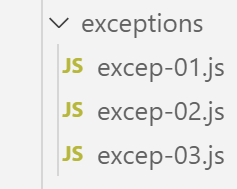
Javascript does not have a very advanced exception handling system. However, it does provide the [throw] statement for reporting errors, as well as the try / catch / finally structure for catching these errors.
9.1. [excep-01] script
In the following script, we will display the current date in the format [heures:minutes:secondes:millisecondes]. To do this, we will use a library called jS. We install it, as usual, using the [npm] tool:
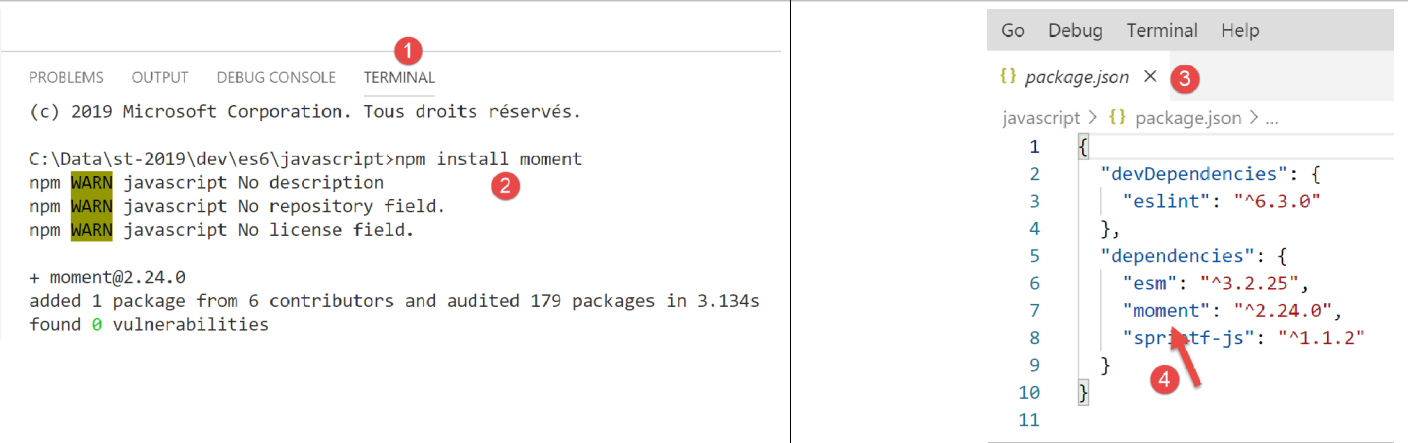
The script code is as follows:
To find out how to write the line [import] on line 4, we can look at the definition of the module [moment]:
- in [1-2], we go to the module definition;
- in [3], we have a TypeScript file, not Javascript. At runtime, this TypeScript file is compiled into the Javascript file before being used;
- In [4], we search for the instructions in [export] (Ctrl-F);
- in [5], the statement exports the object [moment]. This can be imported into ES6 as follows:
You can use any name to import the object [moment], for example:
Let's go back to the script code:
'use strict';

// package moment
import moment from 'moment';

// principe du try / catch / finally
for (let i = 0; i < 10; i++) {
  // date - current time
  const now = Date.now();
  // format time to get milliseconds
  const time = moment(now).format("HH:mm:ss:SSS");
  // milliseconds
  const milli = Number(time.substr(time.length - 3));
  // display
  console.log("--------------------itération n° ", i, "à", time);
  try {
    // number depending on time of day
    const nbre = milli % 2;
    if (nbre === 0) {
      // launch an error msg
      throw "erreur";
    }
    // if we've arrived here, there's been no mistake
    console.log("pas d'erreur");
  } catch (error) {
    // if we get here, it's because there's been a mistake
    console.log("erreur1=", error);
  } finally {
    // executed in all cases error or not
    console.log("finally")
  }
}
Comments
- line 4: import of the [moment] library;
- The script loops 10 times (line 7). On each loop iteration, the current time is retrieved in the format [heures:minutes:secondes:millisecondes] (lines 8–13);
- if the number of milliseconds is even, an error message is displayed (lines 19–22);
- The goal here is to understand how try / catch / finally works
Execution
[Running] C:\myprograms\laragon-lite\bin\nodejs\node-v10\node.exe -r esm "c:\Data\st-2019\dev\es6\javascript\exceptions\excep-01.js"
--------------------itération n° 0 at 17:57:04:440
erreur1= erreur
finally
--------------------itération n° 1 at 17:57:04:447
pas d'error
finally
--------------------eration #2 at 17:57:04:448
erreur1= erreur
finally
--------------------eration #3 at 17:57:04:448
erreur1= erreur
finally
--------------------eration #4 at 17:57:04:448
erreur1= erreur
finally
--------------------eration #5 at 17:57:04:448
erreur1= erreur
finally
--------------------iteration no. 6 at 17:57:04:448
erreur1= erreur
finally
--------------------iteration no. 7 at 17:57:04:448
erreur1= erreur
finally
--------------------iteration no. 8 at 17:57:04:449
pas d'error
finally
--------------------eration no. 9 at 17:57:04:449
pas d'error
finally
We can see that the clause [finally] is always executed, whether there is an error or not.
9.2. script [excep-02]
This script, which the [throw] statement can launch with any type of data, has that data retrieved in its entirety by the [catch] clause.
'use strict';

// on peut "lancer" (throw) à peu près n'importe quoi pour signaler une erreur
let i = 0;
console.log("--------------------essai n° ", i);
// launch a string
try {
  throw "msg d'erreur";
} catch (error) {
  // there has been a mistake
  console.log("erreur=[", error, "], type=", typeof (error));
}
// launch a table
i++;
console.log("--------------------essai n° ", i);
try {
  throw [1, 2, 3]
} catch (error) {
  // there has been a mistake
  console.log("erreur=[", error, "], type=", typeof (error));
}
// launch a literal object
i++;
console.log("--------------------essai n° ", i);
try {
  throw { nom: "hercule", pays: "grèce antique" }
} catch (error) {
  // there has been a mistake
  console.log("erreur=[", error, "], type=", typeof (error));
}
// launch a Error type
i++;
console.log("--------------------essai n° ", i);
try {
  throw new Error("erreur de connexion au réseau");
} catch (error) {
  // there has been a mistake
  console.log("erreur=[", error, "], type=", typeof (error));
}
// launch a Error type
i++;
console.log("--------------------essai n° ", i);
try {
  throw new Error("erreur de connexion au réseau");
} catch (error) {
  // there has been an error - the message is in [error.message]
  console.log("erreur.message=[", error.message, "], type(error)=", typeof (error));
}
Comments
- lines 35, 44: [Error] is a class of Javascript whose constructor accepts an error message as an optional first parameter. This message can be retrieved from the [Error.message] property (line 47);
- there are other classes besides [Error] for reporting an error: [EvalError, InternalError, RangeError, ReferenceError, SyntaxError, TypeError, URIError);
Running
[Running] C:\myprograms\laragon-lite\bin\nodejs\node-v10\node.exe -r esm "c:\Data\st-2019\dev\es6\javascript\exceptions\excep-02.js"
-------------------- test no. 0
erreur=[ msg d'error ], type= string
-------------------- test no. 1
erreur=[ [ 1, 2, 3 ] ], type= object
-------------------- test no. 2
erreur=[ { nom: 'hercule', country: 'ancient greece' } ], type= object
-------------------- test no. 3
erreur=[ Error: erreur de connexion au réseau
at Object.<anonymous> (c:\Data\st-2019\dev\es6\javascript\exceptions\excep-02.js:35:9)
at Object.<anonymous> (c:\Temp\19-09-01\javascript\node_modules\esm\esm.js:1:251206)
at c:\Temp\19-09-01\javascript\node_modules\esm\esm.js:1:245054
at Generator.next (<anonymous>)
at bl (c:\Temp\19-09-01\javascript\node_modules\esm\esm.js:1:245412)
at kl (c:\Temp\19-09-01\javascript\node_modules\esm\esm.js:1:247659)
at Object.u (c:\Temp\19-09-01\javascript\node_modules\esm\esm.js:1:287740)
at Object.o (c:\Temp\19-09-01\javascript\node_modules\esm\esm.js:1:287137)
at Object.<anonymous> (c:\Temp\19-09-01\javascript\node_modules\esm\esm.js:1:284879)
at Object.apply (c:\Temp\19-09-01\javascript\node_modules\esm\esm.js:1:199341) ], type= object
-------------------- test no. 4
erreur.message=[ erreur de connexion au réseau ], type(error)= object
9.3. script [excep-03]
This script demonstrates that, within a [catch], it is possible to distinguish the type of [Error] instance intercepted by the [catch]:
'use strict';

// package moment
import moment from 'moment';

// différencier l'instance d'Error reçue dans un [catch]
for (let i = 0; i < 10; i++) {
  // date - current time
  const now = Date.now();
  // format time to get milliseconds
  const time = moment(now).format("HH:mm:ss:SSS");
  // milliseconds
  const milli = Number(time.substr(time.length - 3));
  console.log("--------------------itération n° ", i);
  try {
    // nbre [0, 1, 2]
    const nbre = milli % 3;
    switch (nbre) {
      case 0:
        throw new ReferenceError("erreur 1");
      case 1:
        throw new RangeError("erreur 2");
      default:
        throw new EvalError("erreur 3");
    }
  } catch (error) {
    // there has been a mistake
    if (error instanceof ReferenceError) {
      console.log("ReferenceError :", error.message);
    } else {
      if (error instanceof RangeError) {
        console.log("RangeError :", error.message);
      }
      else {
        if (error instanceof EvalError) {
          console.log("EvalError :", error.message);
        }
      }
    }
  }
}
Running
[Running] C:\myprograms\laragon-lite\bin\nodejs\node-v10\node.exe -r esm "c:\Data\st-2019\dev\es6\javascript\exceptions\excep-03.js"
-------------------- operation no. 0
ReferenceError : erreur 1
-------------------- operation no. 1
RangeError : erreur 2
-------------------- operation no. 2
RangeError : erreur 2
-------------------- operation no. 3
RangeError : erreur 2
-------------------- operation no. 4
RangeError : erreur 2
-------------------- operation no. 5
RangeError : erreur 2
-------------------- operation no. 6
EvalError : erreur 3
-------------------- operation no. 7
EvalError : erreur 3
-------------------- operation no. 8
EvalError : erreur 3
-------------------- operation no. 9
EvalError : erreur 3