1. Introduction to the ECMASCRIPT 6 language
The PDF from this article is available |HERE|.
The examples in this article are available |HERE|.
This document is part of a series of four articles:
- [Introduction to the ECMAScript 6 language through examples (2019)]. This is the current document;
- [Introduction to the VUE.JS framework through examples (2019)];
- [Introduction to the NUXT.JS framework through examples (2019)];
These are all documents for beginners. The articles follow a logical sequence but are loosely connected:
- the document [1] introduces the language PHP 7. Readers interested only in the language PHP and not in the language Javascript of the following articles will stop here;
- the documents [2-4] aim to build a Javascript client for the tax calculation server developed in document [1];
- the frameworks Javascript, [vue.js], and [nuxt.js] in Articles 3 and 4 require knowledge of Javascript from the latest versions ofECMASCRIPT, and those of version 6. The [2] document is therefore intended for those who are not familiar with this version from Javascript. It refers to the tax calculation server built in document [1]. Readers of [2] will therefore sometimes need to refer to document [1];
- once ECMASCRIPT 6 has been mastered, we can move on to the VUE framework.JS, which allows you to build clients and Javascript that run in a browser in SPA mode (Single Page Application). This is the [3] document. It references both the tax calculation server built in the [1] document and the standalone client code Javascript built in [2]. Readers of [3] will therefore sometimes need to refer to documents [1] and [2];
- once VUE.JS has been mastered, we can move on to the NUXT framework.JS, which allows you to build clients and Javascript that run in a browser in SSR mode (Server Side Rendered). It refers both to the tax calculation server built into the [1] document, the standalone client code Javascript built in [2], and the application [vue.js] developed in the document [3]. Readers of [4] will therefore sometimes need to refer to documents [1], [2], and [3];
The latest version from the tax calculation server, developed in document [1], can be improved in various ways:
- The written version is server-centric. The current trend (as of July 2019) is toward client/server:
- the server runs as a jSON service;
- a static or non-static page serves as the entry point for the web application. This page contains HTML /CSS as well as Javascript;
- the other pages of the web application are generated dynamically by Javascript:
- the HTML page can be obtained by assembling static fragments, provided by the same server that provided the home page, or entirely constructed by Javascript;
- these different pages display data requested from the jSON service;
Thus, the work is distributed between the client and the server. The server, having been offloaded, can serve more users.
The architecture corresponding to this model is as follows:
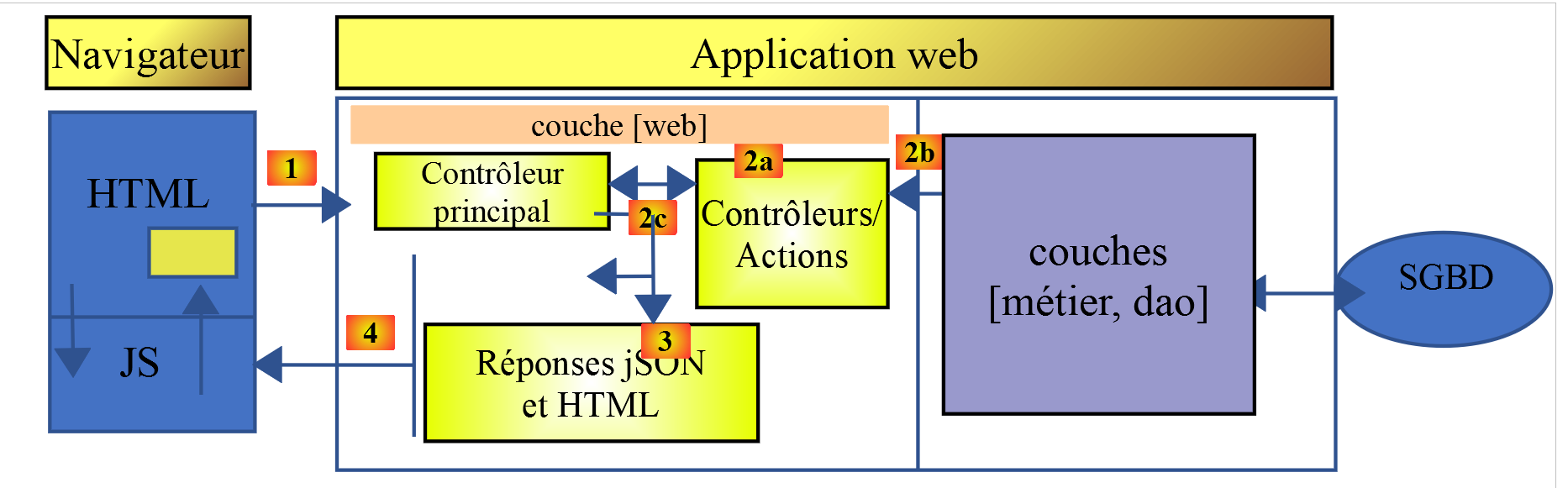
JS : Javascript
The javascript code is client-side:
- a service for static or non-static pages or fragments;
- of a jSON service;
The code Javascript is therefore a client of jSON and, as such, can be organized into layers [UI, métier, dao] (UI: User Interface) just as our clients and jSON were written in PHP. Ultimately, the browser loads only a single page, the home page. All others are retrieved and constructed by the Javascript. This type of application is called SPA: Single Page Application or APU: Single-Page Application.
This type of application is also classified as a so-called AJAX: Asynchronous Javascript and XML
- Asynchronous: because the client’s calls to the server are asynchronous;
- XML: because XML was the technology used before the advent of jSON. However, the acronym AJAX was retained;
We will examine such an architecture in the coming chapters. On the client side, we will use the Javascript [Vue.js] [https://vuejs.org/] framework to write the Javascript client for the jSON PHP, which we wrote in the document [1].
[Vue.js] is a framework for Javascript. To understand it, one must be proficient in this language. In this document, we present the ECMAScript 6 standard, which is the most recent standardization (as of 2019) of this language. The history and role of ECMAScript can be found on Wikipedia [https://fr.wikipedia.org/wiki/ECMAScript].
This document provides a list of Javascript console scripts in various areas (language structures, database access, internet access, layered programming, and interface-based programming). The document concludes with two applications:
A console application that will act as a client for the tax calculation server built in the document [1]. This client will have the same architecture as the console client PHP built in the document [1]:
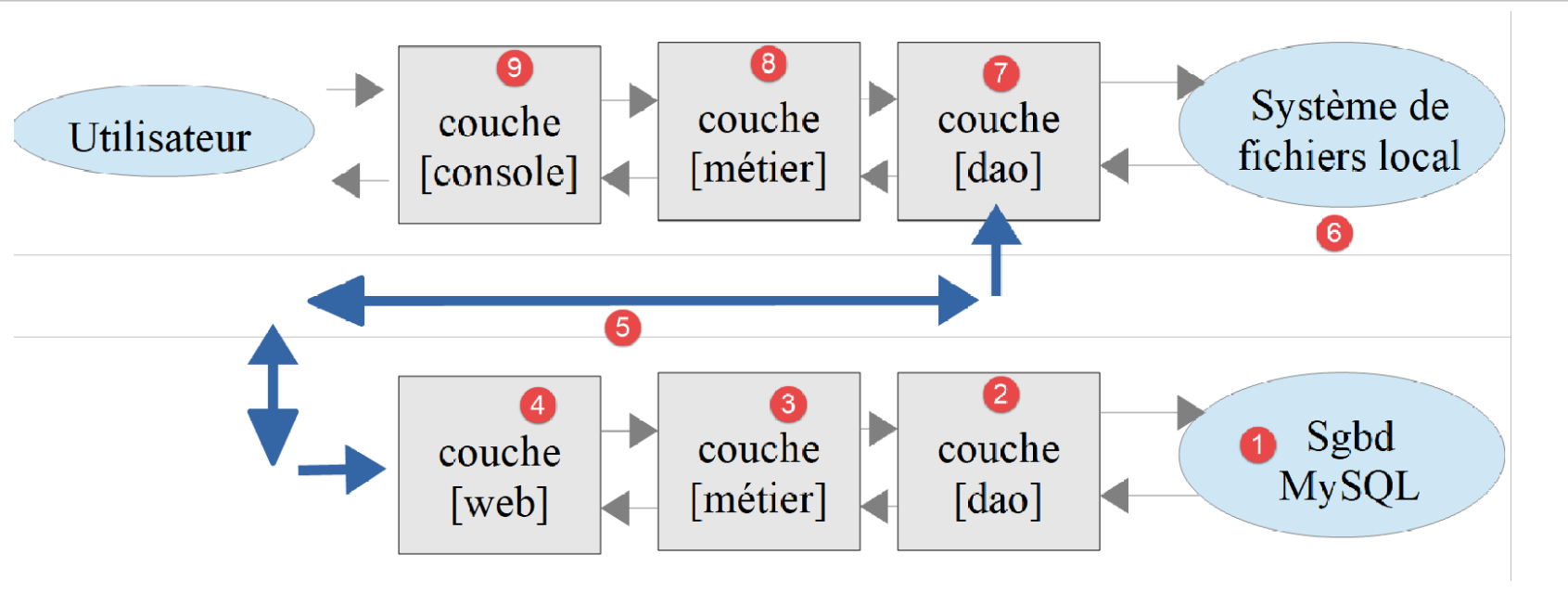
- the [7-9] layers will be those of the Javascript client running in a console;
- the [1-4] layers are those of the PHP server built in document [1];
- unlike the PHP console client built within the [1] document, there will be no interactions with the local file system [6];
This is a client/server application where the client is a console application. A second application will be written where the code for the [7-9] layers will be ported to a browser. We will then be ready to address browser frameworks in documents [3] and [4].
The scripts in this document are commented, and their console output is reproduced. Additional explanations are sometimes provided. The document requires active reading: to understand a script, you must read its code, comments, and execution results.
The examples in this document are available |here|.
The PHP 7 server application can be tested |here|.
Serge Tahé, October 2019